International Journal of Research (IJR)
e-ISSN: 2348-6848, p- ISSN: 2348-795X Volume 2, Issue 06, June 2015Available at http://internationaljournalofresearch.org
Performance Analysis of Automation Testing Tools for
WPF Application
Nishi Tiku
1; Ameya Parkar
2; Idris Rampurawala
3& Aswathi Menon
41 Head of Department, Department of Master in Computer Application, Vivekanand Education Society’s Institute of Technology - Mumbai, Maharashtra, India
2 Assistant Professor, Department of Master in Computer Application, Vivekanand Education Society’s Institute of Technology - Mumbai, Maharashtra, India
3 Student, Department of Master in Computer Application, Vivekanand Education Society’s Institute of Technology - Mumbai, Maharashtra, India
4 Student, Department of Master in Computer Application, Vivekanand Education Society’s Institute of Technology - Mumbai, Maharashtra, India
Abstract
Software testing provides a means to reduce errors, cut maintenance and overall software costs. Testing has become most important parameter in the case of software development lifecycle (SDLC). Testing automation tools enables developers and testers to easily automate the entire process of testing in software development. It is to examine & modify source code. Effective Testing produces high quality software. The objective of the paper is to conduct a comparative study of automated tools such as available in market in HP Quick test professional (QTP) and TestComplete (TC). The aim of this research paper is to evaluate and compare two automated software testing tools to determine their usability and effectiveness for Windows Presentation Foundation (WPF) application. Results of this study will be helpful to software development professionals to select better test automation tool for their application.
Key Words:
SDLC; OS; Unified Functional Testing; Test Complete; Automation; WPF
1. INTRODUCTION
Organizations have become aware of the crucial role of testing in the SDLC and in delivering high quality software products. Every time the source code is modified, test cases must be executed. Automation also boosts confidence of the testing team by automating repetitive task and enabling the team to focus on challenging and high risk projects Manual execution of test cases is not only a costly and time consuming exercise, but also prone to error. Test Automation is an emerging field to meet these challenges and increase efficiency, report and catch bugs and software
defects as early as possible in SDLC.
Automation testing addresses these challenges presented by manual testing. Automating test cases leaves manual testers to focus more on writing test cases and analysis of defects and quality issues in the project. With so many tools in the market, in the past comparison studies have been done to evaluate features and usability of different tools. It can be executed multiple times across iterations much faster than manual test cases, saving time as well as cost. With so many tools in the market, in the past comparison studies have been done to evaluate features and usability of different tools. There was lack of automated test tools so Researches and professionals in test automation industry have produced many tools to automate testing of web. Lengthy test which are often skipped during manual test execution can be executed unattended on multiple machines with different configurations, thus increasing the test coverage.
Automation testing helps find the detects or issues which are often overload during manual testing for example spelling mistakes or hard coding in application code. All iteration in the software need to be tested on all applications and all supported OS. The time and effort spent on scientifically choosing a test automation product can go a long way in ensuring successful test execution.
International Journal of Research (IJR)
e-ISSN: 2348-6848, p- ISSN: 2348-795X Volume 2, Issue 06, June 2015Available at http://internationaljournalofresearch.org
manual testing limitations of being slow and costly for the repetitive functional and regression testing. Manual testing is also not consistent or deterministically repeatable. These tools vary in terms of their capabilities and commercially fall in two either paid or open source tools. UFT and Test Complete have come up top in the list of paid test automation tools available.
2. WPF APPLICATION
Windows Presentation Foundation (or WPF) is a graphical subsystem for rendering user interfaces in Windows-based applications by Microsoft. WPF, previously known as "Avalon", was initially released as part of.NET Framework 3.0. Rather than relying on the older GDI subsystem, WPF uses DirectX. WPF attempts to provide a consistent programming model for building applications and separates the user interface from business logic. It resembles similar XML-oriented object models, such as those implemented in XUL and SVG.
WPF employs XAML, an XML-based language, to define and link various interface elements With WPF, you can create a wide range of both standalone and browser-hosted applications. WPF aims to unify a number of common user interface elements, such as 2D/3D rendering, fixed and adaptive documents, typography, vector graphics, runtime animation, and pre-rendered media
WPF applications can also be deployed as standalone desktop programs, or hosted as an embedded object in a website. Windows Presentation Foundation (WPF) is a next-generation presentation system for building Windows client applications with visually stunning user experiences. These elements can then be linked and manipulated based on various events, user interactions, and data bindings
3. AUTOMATION TEST TOOL
Automated software testing is becoming more and more important for many software projects in order to automatically verify key functionality, test for regressions and help teams run a large number of tests in a short period of time. Many teams (especially larger projects) still require a significant amount of manual functional testing in addition to automated testing, either because of the lack of sufficient resources or skills to automate all tests.
There are various tools that help software teams build and execute automated tests. Many teams are
development efforts to verify critical parts of their projects such as libraries, models and methods. Historically, testing user interfaces of desktop-based applications via automated tests have been more challenging, and currently available tools for this are usually commercial and quite expensive.
Building robust automated GUI tests for desktop applications (e.g. on Windows or Mac systems) is quite difficult, as small changes to the user interface can often result in broken tests.
Because of the more advantages of the automation testing over manual testing, various companies are engaged in developing various automated test tools for various applications. There are two types of test tools.
Open source test tools Commercial test tools
Open Source Test tools: - These test tools are free for the users to use. It can be downloaded from the internet or can be obtained by the vendor without any charges e.g.
Watir
Selenium
FunFx
Commercial Test Tools: - These test tools are not free and user has to pay for it e.g.
TestComplete
Unified Functional Testing Rational robot
TestArchitect
3.1 Unified Functional Testing (UFT)
International Journal of Research (IJR)
e-ISSN: 2348-6848, p- ISSN: 2348-795X Volume 2, Issue 06, June 2015Available at http://internationaljournalofresearch.org
Services, Windows Mobile, VisualAge Smalltalk, Silverlight and mainframe terminal emulators[3].
Although HP Unified Functional Testing is usually used for "UI based" Test Case automation, it also can automate some "non-UI" based test cases, such as file system operations, database testing or Web services testing [4].
3.2 TestComplete (TC)
TestComplete is a functional automated testing platform developed by SmartBear Software. TestComplete gives testers the ability to create automated tests for Microsoft Windows, Web, Android (operating system), and iOS applications. Tests can be recorded, scripted or manually created with keyword driven operations and used for automated playback and error logging. TestComplete is broken out into three modules:
Desktop
Web
Mobile
Each module contains functionality for creating automated tests on that specified platform. TestComplete is used for testing many different application types including Web, Windows, Android, iOS, WPF, HTML5, Flash, Flex, Silverlight, .NET, VCL and Java. It automates functional testing and back-end testing like database testing [2].
TestComplete comes in two editions [5]:
Standard Edition: - This edition contains all the basic features needed to start Automation. Apart from this, Plug-ins for Data Driven Testing, Object Driven Testing etc. are also included in this edition.
Enterprise Edition: - This edition contains additional features for Load testing, TestExecute, TestRecorder etc.
4. QUALITATIVE ANALYSIS
Identification of the right automation tool is critical to ensure the success of testing project. Detailed analysis must be conducted before selecting a tool. The effort put in the evaluation process enables successful execution of the project.
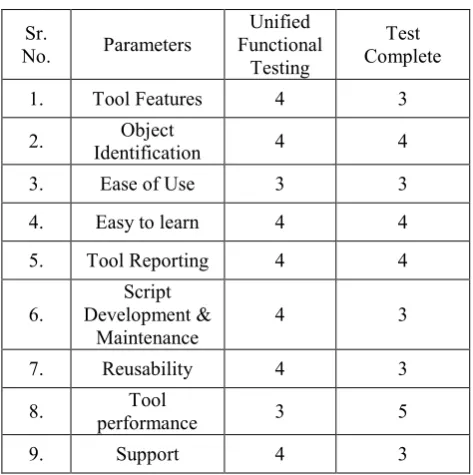
Based on our findings, we have rated both the tools on different qualitative parameters on the scale of 1 to 5; 1 being the lowest.
Table -1: Qualitative analysis of automation test tools
Sr.
No. Parameters
Unified Functional
Testing
Test Complete
1. Tool Features 4 3
2. Identification Object 4 4
3. Ease of Use 3 3
4. Easy to learn 4 4
5. Tool Reporting 4 4
6. Development & Script
Maintenance 4 3
7. Reusability 4 3
8. performance Tool 3 5
9. Support 4 3
The table-1 is purely based on the results we got while testing our WPF application. Results may change while using another application. It just helps in selecting the right parameters for comparing test tools.
5. EVALUATION STUDY
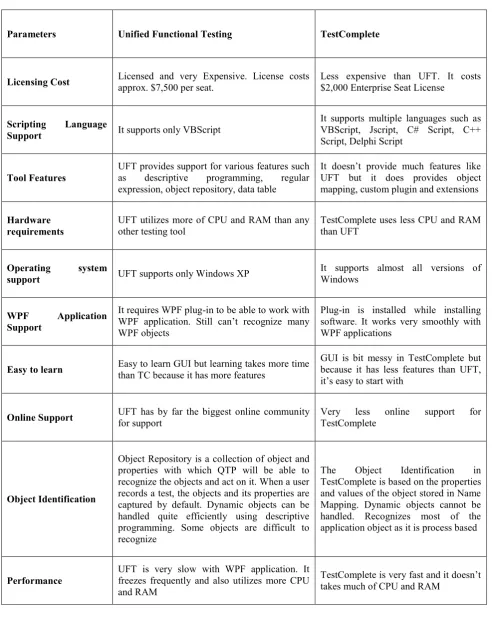
There are a number of windows application tools available in the software market. Although the core functions of these tools are similar, they differ in functionality, features, usability. Keeping in view the above mentioned aspects, we have selected two testing tools for comparison which are Unified Functional Testing and TestComplete.
For this study we use the current version of Unified Functional Testing 12.01, and current version TestComplete 10.0. Comparison between these two tools is made on the basis of parameters:
Licensing Cost
Scripting language support Tool features
Hardware requirements
Operating system support WPF application support Ease to learn
Online support Object Identification
International Journal of Research (IJR)
e-ISSN: 2348-6848, p- ISSN: 2348-795X Volume 2, Issue 06, June 2015Available at http://internationaljournalofresearch.org
Table -2: Comparison between Unified functional Testing and TestComplete
Parameters Unified Functional Testing TestComplete
Licensing Cost Licensed and very Expensive. License costs approx. $7,500 per seat. Less expensive than UFT. It costs $2,000 Enterprise Seat License
Scripting Language
Support It supports only VBScript
It supports multiple languages such as VBScript, Jscript, C# Script, C++ Script, Delphi Script
Tool Features UFT provides support for various features such as descriptive programming, regular expression, object repository, data table
It doesn’t provide much features like UFT but it does provides object mapping, custom plugin and extensions
Hardware requirements
UFT utilizes more of CPU and RAM than any other testing tool
TestComplete uses less CPU and RAM than UFT
Operating system
support UFT supports only Windows XP
It supports almost all versions of Windows
WPF Application Support
It requires WPF plug-in to be able to work with WPF application. Still can’t recognize many WPF objects
Plug-in is installed while installing software. It works very smoothly with WPF applications
Easy to learn Easy to learn GUI but learning takes more time than TC because it has more features GUI is bit messy in TestComplete but because it has less features than UFT, it’s easy to start with
Online Support UFT has by far the biggest online community for support Very TestComplete less online support for
Object Identification
Object Repository is a collection of object and properties with which QTP will be able to recognize the objects and act on it. When a user records a test, the objects and its properties are captured by default. Dynamic objects can be handled quite efficiently using descriptive programming. Some objects are difficult to recognize
The Object Identification in TestComplete is based on the properties and values of the object stored in Name Mapping. Dynamic objects cannot be handled. Recognizes most of the application object as it is process based
Performance UFT is very slow with WPF application. It freezes frequently and also utilizes more CPU and RAM
International Journal of Research (IJR)
e-ISSN: 2348-6848, p- ISSN: 2348-795X Volume 2, Issue 06, June 2015Available at http://internationaljournalofresearch.org
Available online:http://internationaljournalofresearch.org/ P a g e | 544