Accessing the ANW dictionary
Fons Moerdijk, Carole Tiberius, Jan Niestadt
Institute for Dutch Lexicology (INL)
Leiden
{moerdijk,tiberius,niestadt}@inl.nl
Abstract
This paper describes the functional de-sign of an interface for an online schol-arly dictionary of contemporary standard Dutch, the ANW. One of the main inno-vations of the ANW is a twofold meaning description: definitions are accompanied by ‘semagrams’. In this paper we focus on the strategies that are available for ac-cessing information in the dictionary and the role semagrams play in the dictionary practice.
1
Introduction
In this paper we discuss the functional design of an interface for a scholarly dictionary of contem-porary standard Dutch which is currently being compiled at the institute for Dutch Lexicology in Leiden. The ‘Algemeen Nederlands Woorden-boek’ (General Dutch Dictionary), further abbre-viated as ANW, has been set up as an online dic-tionary from the start. Thus, the ANW is not a clone of an existing printed dictionary, but it truly represents a new generation of electronic dictionaries in the sector of academic and scien-tific lexicography. A similar dictionary project is undertaken for German at the Institut für Deutsche Sprache in Mannheim, i.e. elexiko1.
The project runs from 2001 till 2019. We have currently finished the functional design of the interface and the first results will be published on the web in 2009.
© 2008. Licensed under the Creative Commons Attri-bution-Noncommercial-Share Alike 3.0 Unported
license ( http://creativecommons.org/licenses/by-nc-sa/3.0/). Some rights reserved.
1
http://hypermedia.ids-mannheim.de/pls/elexiko/p4_start.portal
The structure of this paper is as follows. First we will provide some background information on the ANW dictionary and we will explain what a semagram is. Then we will discuss the range of search routes that are offered to the user to ex-ploit the information in the dictionary and we will describe the role of the semagram. The ANW dictionary is aimed at the adult Dutch lan-guage user ranging from laymen to linguists and other language professionals.
2
The ANW dictionary
The ANW Dictionary is a comprehensive online scholarly dictionary of contemporary standard Dutch in the Netherlands and in Flanders, the Dutch speaking part of Belgium. Object of de-scription is the general language. Thus words that are specific to a particular region, to a par-ticular group of people or a parpar-ticular subject field are not included. The dictionary focuses on written Dutch and covers the period from 1970 till 2018. The ANW dictionary is a corpus-based dictionary based on the ANW corpus, a balanced corpus of just over 100 million words, which was compiled specifically for the project at the Insti-tute for Dutch Lexicology. The corpus was com-pleted in 20052. It consists of several subcorpora:
a corpus of present-day literary texts, a corpus of neologisms, a corpus of domain dependent texts and a corpus of newspaper texts. The dictionary will contain approximately 80.000 headwords with a complete description and about 250.000 smaller entries.
The ANW is a very informative dictionary. Its abstract entry structure is composed of hundreds of elements and subelements. The reason for this is that special attention is paid to words in con-text (combinations, collocations, idioms,
2 For neologisms new corpus material continues to be
gathered.
erbs) and to relations with other words (lexical relations like synonymy, antonymy, hypero-nymy, hyponymy), to semantic relations (meta-phor, metonymy, generalisation, specialisation) and to morphological patterns, the word structure of derivations and compounds. One of its main innovations is a twofold meaning description: definitions are accompanied by ‘semagrams’. As semagrams play a central role in the dictionary (for understanding and production), we provide a short introduction below.
3
The semagram
A semagram is the representation of knowledge associated with a word in a frame of ‘slots’ and ‘fillers’. ‘Slots’ are conceptual structure elements which characterise the properties and relations of the semantic class of a word meaning. On the basis of these slots specific data is stored
(‘fill-ers’) for the word in question. In ANW jargon the abstract structure schema is called a ‘type template’, whereas semagram refers to such a ‘type template’ populated with concrete word data. Each semantic class has its own predefined type template with its own slots. For instance, the type template for the class of animals contains the slots PARTS, BEHAVIOUR, COLOUR, SOUND, BUILD, SIZE, PLACE, APPEARANCE, FUNCTION and SEX, whereas the type template for beverages has
slots for INGREDIENT, PREPARATION, TASTE, COLOUR, TRANSPARANCY, USE, SMELL, SOURCE, FUNCTION, TEMPERATURE and COMPOSITION. So
far we have concentrated on semagrams for nouns, those for verbs and adjectives will be dif-ferent. Below we give an example of a semagram for a member of the animal class, i.e. koe (cow) (translated into English for illustration) in its meaning as a ‘bovine’:
COW
UPPER CATEGORY: is an animal # animal; mammal; ruminant CATEGORY: is a bovine (animal) # bovine; ruminant
SOUND: moows/lows, makes a sound that we imitate with a low, long-drawn ‘boo’ # moo; low; boo
COLOUR: is often black and white spotted, but also brown and white spotted, black, brown or white # black and white; brown and white; red and white; spotted; black; blackspotted; white; brown; rusty brown
SIZE: is big # big
BUILD: is big-boned, bony, large-limbed in build # big-boned, bony, large-limbed
PARTS: has an udder, horns and four stomachs: paunch, reticulum, third stomach, proper stomach # udder; horns: paunch; rumen; honeycomb bag; reticulum; third stomach; omasum; proper stomach; abomasum
FUNCTION: produces milk and (being slaughtered) meat # milk; flesh; meat; beef; milk production; meat production
PLACE: is kept on a farm; is in the field and in the winter in the byre # farm; farmhouse; field; pasture; meadow; byre; cow-house; shippon; stable
AGE: is adult, has calved # adult; calved
PROPERTY: is useful and tame; is considered as a friendly, lazy, slow, dumb, curious, social animal # tame; domesticated; friendly; lazy; slow; dumb; curious; social
SEX: is female # female
BEHAVIOUR: grazes and ruminates # graze; ruminate; chew the cud TREATMENT: is milked every day; is slaughtered # milk; slaughter
PRODUCT: produces milk and meat # milk; meat
VALUE: is useful # useful
Example 1. Semagram for koe (cow)
At present the data in the slots is completed manually by the lexicographers based on in-formation in the ANW corpus, reference works (such as dictionaries and encyclopaedia) and their language and world knowledge. Not all slots in the type template have to be com-pleted in all cases. Only those for which there
‘semasi-ological’ queries. To facilitate the retrieval for queries from content or parts of the content to the matching words, the ‘onomasiological que-ries’, those sentences are complemented, after a ‘#’ character (a hash), with one or more keywords and possibly some synonyms or other relevant words. The data after the hash will not be visible to the dictionary user on the screen though and will only be used in searches by the computer to enhance retrieval.
A detailed description of the semagram, in-cluding its origin, motivation and the devel-opment of the type templates and their slots, can be found in Moerdijk (2008). In this paper we focus on the strategies that are available for accessing information in the dictionary and we discuss the role of the semagrams in this.
4
Accessing the dictionary
As was hinted at in the previous section, semagrams provide an increase and improve-ment in search and query facilities. This is par-ticularly the case for queries guiding the user from content to form. For instance, a user who cannot think of e.g. the word apiarist can find this word through separate content elements (e.g. ‘bees’, ‘keep’) that he does know and can use for a search. However, with semagrams it is not only possible to go from content to the appropriate word. It is also possible to retrieve a set of words on the basis of one or more con-tent features. Thus a user can retrieve all names for female animals in Dutch on the ba-sis of a query combining the field CATEGORY
with the value ‘animal’, and a field SEX with
the value ‘female’. In our online dictionary we wish to make all these possibilities available to the user.
Five search options are distinguished: a) word → meaning, i.e. search for
in-formation about a word;
b) meaning → word, i.e. search for a word starting from its meaning;
c) features → words, i.e. search for words with one or more common fea-tures;
d) search for example sentences;
e) search for other dictionary informa-tion.
We believe that by presenting the search op-tion this way (rather than using the tradiop-tional dichotomy between simple search (a) and ad-vanced search (b, c, d, e)), users have a better overview of what they can actually search for
and will be more enticed to explore the various options. Semagrams play a role in the first three search options.
4.1 Word → Meaning
This is the traditional search which allows the user to search for information about a word or phrase in the dictionary. As this is the basic search option, it is offered to the user in a cen-tral place on every page of the interface. Some form of fuzzy matching will be incorporated to take care of typing errors and incomplete input.
The ANW contains a wealth of information. To represent this to the user, we use a variation of the two-panel selector model (Tidwell 2005), where two panes are shown next to each other on the screen. (Figure 1)
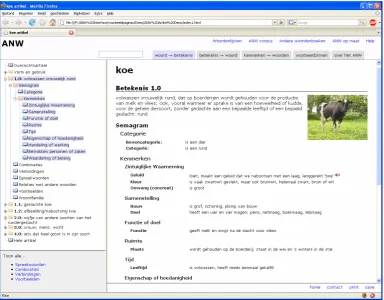
The left pane contains a tree structure show-ing all the elements available for the lemma in question in the ANW. These tree structures look like (and work as) Windows Explorer tree structures. Advantage is that users know im-mediately how to deal with them. Thus the elements are hierarchically structured and can be opened and closed like in Windows Ex-plorer. The meaning structure (the numbered elements in Figure 1) of the lemma remains visible at all times. This way the user keeps an overview and can select the information he likes to see on the right-hand-side of the screen. This is shown for the semagram of the first meaning of koe (cow) in Figure 1. The ele-ments are presented in the same order as in the translated semagram in Example 1.3
On the article screen, the semagram is pre-sented together with the definition. Its function is to provide, in a systemized, explicit and consistent way, more semantic and encyclope-dic information than can be given in the defini-tion. For the lemma koe (cow), for instance, it gives the user information on sound, colour and parts, which is not present in the definition. At the bottom left of the screen, the user is given a direct link to all idioms, proverbs, ex-ample sentences and combinations for the lemma koe (cow).
3 Note that the layout is still subject to change during the
Figure 1 Article screen
4.2 Meaning → Word
By this we mean the onomasiological search where the user is looking for a word that he has forgotten or where he wants to know whether there is a word for a certain concept or not. For instance, a user may want to know whether there is a Dutch equivalent for the English cradle snatcher (i.e. one who weds, or is enamoured of, a much younger person (OED)).
Onomasiological searches in electronic dic-tionaries derived from printed dicdic-tionaries have not been very successful so far, mostly because such searches are primarily based on definitions. Going from a definition to a word can only succeed if the words of the user coin-cide (more or less) with the words in the defi-nition, which is seldom the case (Moerdijk 2002).
As also pointed out by Sierra (2000) the ideal onomasiological search must allow writ-ers to input the concept to be searched for through the ideas they may have, using words in any order. The system must be so con-structed that it accepts a wide range of words which it then analyses in order to point the user to the word that most closely approaches
the concept he had in mind when he started the search.
Recent work in computational linguistics has therefore looked at the possibility of using associative networks (Zock & Bilac 2004) or a combination of definitions and a resource such as WordNet (El-Kahlout & Oflazer 2004).
It is obvious that the information in the se-magrams plays an essential role in the success of onomasiological queries in the ANW. How-ever, rather than just accepting a wide range of words as input, we believe that the format in which the input query is obtained can also help to increase the success rate.
the feature slots of the type template for that category appear on the screen and the user is asked to fill in the value(s) that spring to mind. Again we do not present the full list of feature slots of the type template of that particular se-mantic class, but rather a dozen or so (which have been automatically deduced on the basis of completed semagrams), as we do not want to put off the user with excessively long lists which he needs to complete before he gets an answer. We illustrate this with an example for animals.
Assume the user is looking for the name of a particular breed of dogs, e.g. borzoi (barzoi
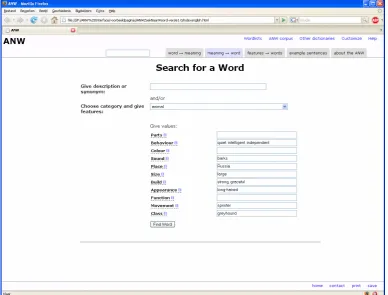
in Dutch), but cannot remember the word. In order to find the answer, he selects the cate-gory ‘animal’ from the menu. He is then pre-sented with a list of features that are character-istic for animals (Figure 2). He completes the most prominent ones for the animal he is thinking of e.g. BEHAVIOUR: quiet, intelligent
and independent; SOUND: barks; CLASS:
grey-hound; PLACE: Russia; SIZE: large; BUILD:
[image:5.595.110.499.263.558.2]strong and graceful; APPEARANCE:long-haired; MOVEMENT: sprinter.
Figure 2 Screenshot Meaning → Word
The input from the user is then compared to the data in the dictionary database (semagrams, definitions, lexical relations and ‘contex-tants’4). Now the words behind the hashes are
also involved in the retrieval process and the matching cases (in the best scenario just one!) are shown. It is not necessary that the
4 We define ‘contextants’ as words which do not
occur in direct combination with the headword, but do occur in a wider context and are semantically relevant for the headword. This is a separate infor-mation category in the microstructure of the ANW.
value combinations match exactly one-to-one. For instance, in our example, one of the values given for BEHAVIOUR, i.e. intelligent, matches the value for PROPERTY in the semagram for barzoi (borzoi).
The results are then presented in a list, or-dered by relevance. Each result is accompa-nied by a ‘mini definition’5 such that the user
can immediately see which word (sense) he is looking for.
4.3 Features → words
This option is particularly relevant for linguists and other language professionals. It enables them to gather words that share one or more identical features within the main dimensions of the ANW, i.e. orthography, pronunciation, morphology, pragmatics, meaning, combina-torics, idioms, etymology. The semagram is of course active in searches in the semantic do-main. Its role is to some extent comparable to its role in the search for a word, going from content to form, but users can now search for all the words that belong to a certain semantic class, for all the words that share one or more particular features, or for all the words sharing both class and certain features, instead of searching for a particular word to express a concept. Here the user is presented the full list of feature slots that occur in one or more of the predefined type templates. This means a total of nearly 200 features can be searched for.
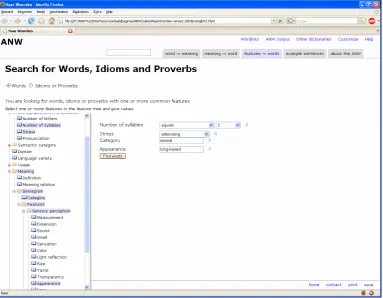
[image:6.595.113.497.357.655.2]To assist the user in finding his way through this forest of criteria, they are presented in a structured way much like the tree structure which is used for navigation on the article screen. We illustrate this with an example query in Figure 3. The user starts from an empty query screen. He is asked to select crite-ria from the tree structure on the left. By de-fault, the user searches for words, but he can also search for proverbs or idioms which will result in a different feature tree as only a sub-set of the criteria that can occur in a query for words apply to idioms and proverbs. In our example the user wants to find all words for long-haired animals (semagram) which consist of two syllables and have alternating stress (orthography and pronunciation). Again barzoi (borzoi) will be among the results.
Figure 3 Screenshot Features → Words
This search option can also be used to resolve the so-called tip-of-the-tongue problems where a user is looking for a word which he cannot ac-cess in his memory, but where he does know, for instance, what the word looks like (e.g. its begin-ning, number of syllables) and its part of speech.
and that it refers to a breed of dogs (animal cate-gory) with long hairs (appearance).
Obviously users will be offered the possibility to save their queries in a kind of ‘search tem-plates’ to avoid having to reconstruct the same query over and over again.
4.4 Search for examples
This option allows the user to search for example sentences based on a set of 5 criteria, i.e. word(s), author, source, domain and date. For instance, a user could search for all example sen-tences with the words koe (cow) and schaap (sheep) in the period from 2000 – 2002 (date). No combo boxes are used for author and source. Although we do not reckon that the user knows which authors and sources are cited in the dic-tionary, the lists would be excessively long and we assume that the user will only use these crite-ria in a search to see which other examples are available from a particular author or source he has retrieved in a previous query. Users will also be offered the possibility to link through to more examples of the same source or author by click-ing on a particular source or author on the results page.
4.5 Search for information about the ANW
The final search option groups primarily diction-ary specific queries and queries of an administra-tive nature, much like a Frequently Asked Ques-tions page. Here the user will find queries about frequency such as how many lemmas are dedi-cated to lexicalised phrases? How many names are there in the dictionary? How many nouns? How many semagrams? How many Flemish words? It also comprises questions such as what kind of dictionary is the ANW? How big is the ANW corpus? Which images are included?
5
Conclusion
In this paper we have discussed the functional design of an interface for an electronic dictionary of Dutch, the ANW. We have focused on the access strategies that are offered and the role se-magrams play in this. We have shown that sema-grams provide an increase in search and query facilities. One the one hand, they lead to a much richer and more consistent semantic description in ‘semasiological’ queries. On the other hand, they are particularly well-suited to support ‘onomasiological’ queries by offering a struc-tured way to find words through separate content elements.
References
El-Kahlout, İlknur Durgar & Kemal Oflazer. 2004. Use of Wordnet for Retrieving Words from their Meanings. In Proceedings of the Global Wordnet Conference (GWC2004). 118-123.
Moerdijk, Fons. 2002. Het woord als doelwit. Am-sterdam, Amsterdam University Press.
Moerdijk, Fons. 2008. Frames and semagrams; Mean-ing description in the General Dutch Dictionary. In
Proceedings of the Thirteenth Euralex Interna-tional Congress, EURALEX 2008. Barcelona. Sierra, Gerardo. 2000. The onomasiological
diction-ary: a gap in lexicography. In Proceedings of the Ninth Euralex International Congress, EURALEX 2000 I, 223-235. Institut für Maschinelle Sprach-verarbeitung, Universität Stuttgart.
Tidwell Jenifer. 2005. Designing Interfaces. O’Reilly. Zock, Michael & Slaven Bilac. 2004. Word lookup on