The
Connection Machine System
C* Programming Guide
Version 6.0.2
June 1991
First printing, November 1990 Second printing, with corrections, June 1991
The information in this document is subject to change without notice and should not be construed as a commitment by Thinking Machines Corporation. Thinking Machines Corporation reserves the right to make changes to any products described herein to improve functioning or design. Although the information in this document has been reviewed and is believed to be reliable, Thinking Machines Corporation does not assume responsibility or liability for any errors that may appear in this document. Thinking Machines Corporation does not assume any liability arising from the application or use of any information or product described herein.
C* ®is a registered trademark of Thinking Machines Corporation.
Connection Machine® is a registered trademark of Thinking Machines Corporation. CM-2, CM, Paris, and DataVault are trademarks of Thinking Machines Corporation. VAX and ULTRIX are trademarks of Digital Equipment Corporation.
Sun, Sun-4, and Sun Workstation are registered trademarks of Sun Microsystems, Inc. UNIX is a registered trademark of AT&T Bell Laboratories.
Copyright © 1991 by Thinking Machines Corporation. All rights reserved.
Thinking Machines Corporation 245 First Street
Cambridge, Massachusetts 02142-1264
Contents
iiij iiiiiiiiiiijiljijjiiiiiii .... liiii~. ii': ... .:..ijiiiii
About This Manual ... Customer Support ...
Part I Getting Started
Chapter 1 What Is C*? ...
1.1 Data Parallel Computing ... 1.2 The Connection Machine System ...
1.2.1 Virtual Processors ... 1.2.2 Communication. ...
1.2.3 /O ...
1.3 C* and C ...
1.3.1 Program Development Facilities ... 1.4 C* and the CM ...
Chapter 2 Using C* ...
...
2.1 Step 1: Declaring Shapes and Parallel Variables ...
2.1.1 Shapes ... 2.1.2 Parallel Variables ... 2.1.3 Scalar Variables ... 2.2 Step 2: Selecting a Shape ...
2.3 Step 3: Assigning Values to Parallel Variables ...
2.4 Step 4: Performing Computations Using Parallel Variables ... 2.5 Step 5: Choosing an Individual Element of a Parallel Variable ...
2.6 Step 6: Performing a Reduction Assignment of a Parallel Variable ...
2.7 Compiling and Executing the Program ... 2.7.1 Compiling ...
2.7.2 Executing ...
iii
gml -1
C* Programming Guide
: " · .. .
.. . .
Part II Programming in C*
Chapter 3 Using Shapes and Parallel Variables ...
193.1 What Is a Shape? ... 19
3.2 Choosing a Shape ... .. ... 20
3.3 Declaring a Shape ... . 21
3.3.1 Declaring More Than One Shape ... 22
3.3.2 The Scope of a Shape ... ... 23
3.4 Obtaining Information about a Shape ... 23
3.5 More about Shapes ... ... 24
3.6 What Is a Parallel Variable? ... 25
3.6.1 Parallel and Scalar Variables ... 25
3.7 Declaring a Parallel Variable ... 26
3.7.1 Declaring More Than One Parallel Variable ... . 27
A Shortcut for Declaring More Than One Parallel Variable 27 3.7.2 Positions and Elements ... 28
3.7.3 The Scope of Parallel Variables ... 29
3.8 Declaring a Parallel Structure ... 29
3.9 Declaring a Parallel Array ... 31
3.10 Initializing Parallel Variables .
...
32
3.10.1
3.11 Obtaining
Initializing Parallel Structures and Parallel Arrays ... Information about Parallel Variables ...
3.11.1 The positionsof, rankof, and dimof Intrinsic Functions
3.11.2
3.12 Choosing
The shapeof Intrinsic Function ... an Individual Element of a Parallel Variable
Chapter 4 Choosing a Shape ...
4.1 The with Statement ... 4.1.1 Default Shape ...
4.1.2 Using a Shape-Valued Expression ... 4.2 Nesting with Statements ...
4.3 Initializing a Variable at Block Scope ... 4.4 Parallel Variables Not of the Current Shape ...
Contents v
Using C* Operators and Data Types ...
Standard C Operators ... ... 5.1.1 With Scalar Operands ...
5.1.2 With a Scalar Operand and a Parallel Operand ... Assignment with a Parallel LHS and a Scalar RHS ... Assignment with a Scalar LHS and a Parallel RHS ...
43 43 43 44 44 46
5.1.3 With Two Parallel Operands ... 47
5.1.4 Unary Operators for Parallel Variables ... 48
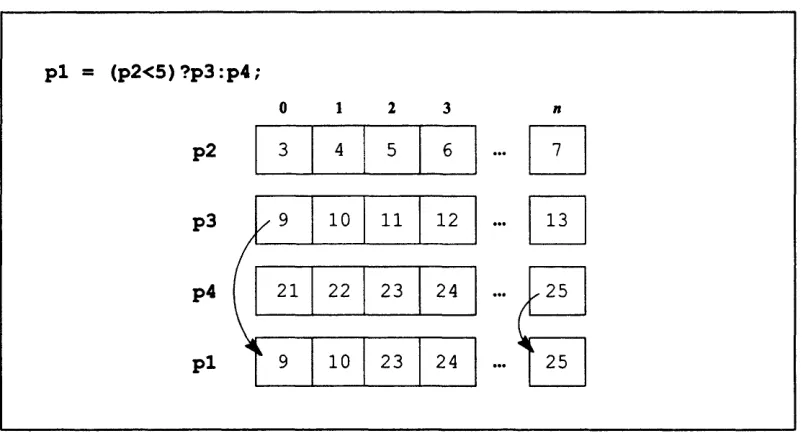
5.1.5 The Conditional Expression ... 49
5.2 New C* Operators ... 50
5.2.1 The <? and >? Operators ... 50
5.2.2 The %% Operator ... 51
5.3 Reduction Operators ... 52
5.3.1 Unary Reduction ... 54
5.3.2 Parallel-to-Parallel Reduction Assignment ... 54
5.3.3 List of Reduction Operators ... 54
5.3.4 The -= Reduction Operator ... ... 55
5.3.5 Minimum and Maximum Reduction Operators ... 56
5.3.6 Bitwise Reduction Operators ... 56
Bitwise OR ... 56
Bitwise AND ... 57
Bitwise Exclusive OR ... 57
5.3.7 Reduction Assignment Operators with a Parallel LHS ... 57
5.4 The bool Data Type ... 58
5.4.1 The boolsizeof Operator ... 59
With a Parallel Variable or Data Type ... 59
With a Scalar Variable or Data Type ... 59
5.5 Parallel Unions ... 5.5.1 Limitations ...
Setting the Context ...
6.1 The where Statement ... 6.1.1 The else Clause ...
6.1.2 The where Statement and positionsof ...
6.1.3 The where Statement and Parallel-to-Scalar Assignment ... 6.2 The where Statement and Scalar Code ...
6.3 Nesting where and with Statements ... 6.3.1 Nesting where Statements ...
60 60 63 63 65 66 67 67 68 68
Chapter 5
5.1
vi C* Programming Guide
6.3.2 Nesting with Statements ... 69
6.3.3 The break, goto, continue, and return Statements .... 70
6.4 The everywhere Statement ... 71
6.5 When There Are No Active Positions ... ... 72
6.5.1 When There Is a Reduction Assignment Operator ... 73
Unary Reduction Operators ... 73
Binary Reduction Assignment Operators ... 74
6.5.2 Preventing Code from Executing ... 74
6.6 Looping through All Positions ... 75
6.7 Context and the I I, &&, and ?: Operators ... 77
6.7.1 1 I1 and && ... 77
6.7.2 The ?: Operator ... 80
Chapter 7 Pointers ...
817.1 Scalar-to-Scalar Pointers ... 81
7.2 Scalar Pointers to Shapes ... . 82
7.3 Scalar Pointers to Parallel Variables ... 82
7.3.1 Alternative Declaration Syntax Not Allowed ... 84
7.3.2 Arrays .. ... 84
7.3.3 Pointer Arithmetic ... ... 85
7.3.4 Parallel Indexes into Parallel Arrays ... 86
Adding a Parallel Variable to a Pointer to a Parallel Variable 87 Limitations ... 88
Chapter 8 Functions ...
...
898.1 Using Parallel Variables with Functions ... ... 89
8.1.1 Passing a Parallel Variable as an Argument ... 89
If the Parallel Variable Is Not of the Current Shape ... 90
8.1.2 Returning a Parallel Variable ... . 91
In a Nested Context ... 91
8.2 Passing by Value and Passing by Reference . ... . 92
8.3 Using Shapes with Functions . ... .. 94
8.3.1 Passing a Shape as an Argument ... ... ... 94
8.3.2 Returning a Shape ... ... 95
8.4 When You Don't Know What the Shape Will Be ... 95
8.4.1 The current Predeclared Shape Name ... 95
Contents vii
Using shapeof with the void Shape ... 97
Using void when Returning a Pointer ... 98
8.5 Overloading Functions ... ... 99
Chapter 9 More on Shapes and Parallel Variables ...
...
1019.1 Partially Specifying a Shape ... 101
9.1.1 Partially Specifying an Array of Shapes ... 102
Arrays and Pointers ... 103
9.1.2 Limitations ... 103
9.2 Creating Copies of Shapes ... 104
9.2.1 Assigning a Local Shape to a Global Shape ... 105
9.3 Dynamically Allocating a Shape ... 106
9.4 Deallocating a Shape ... 107
9.5 Dynamically Allocating a Parallel Variable . ... 109
9.6 Casting with Shapes and Parallel Variables . ... 110
9.6.1 Scalar-to-Parallel Casts ... 110
9.6.2 Parallel-to-Parallel Casts ... 111
Casts to a Different Type ... 111
Casts to a Different Shape ... 111
9.6.3 With a Shape-Valued Expression ... 112
9.6.4 Parallel-to-Scalar Casts ... 112
9.7 Declaring a Parallel Variable with a Shape-Valued Expression ... 112
9.8 The physical Shape ... 114
Chapter 10 Communication ...
10.1 Using a Parallel Left Index for a Parallel Variable ...
10.1.1 A Get Operation ...
10.1.2 A Send Operation ...
10.1.3 Use of the Index Variable ...
10.1.4 If the Shape Has More Than One Dimension .. 10.1.5 When There Are Potential Collisions ...
For a Get Operation ... For a Send Operation ... 10.1.6 When There Are Inactive Positions ...
For a Get Operation ... For a Send Operation ...
Send and Get Operations in Function Calls
viii C* Programming Guide
10.1.7 Mapping a Parallel Variable to Another Shape . ... 128
10.1.8 Limitation of Using Parallel Variables with a Parallel Left Index 130 10.1.9 What Can Be Left-Indexed ... 130
10.1.10 An Example: Adding Diagonals in a Matrix ... .... 131
10.2 Using the pcoord Function .... ... 133
10.2.1 An Example ... 136
10.3 The pcoord Function and Grid Communication ... 138
10.3.1 Grid Communication without Wrapping ... 139
10.3.2 Grid Communication with Wrapping ... 140
Part Ill C* Communication Functions
Chapter 11 Introduction to the C* Communication Library ...
145
11.1 Two Kinds of Communication ... 146
11.1.1 Grid Communication ... ... 146
11.1.2 General Communication ... 147
11.2 Communication and Computation ... 147
Chapter 12 Grid Communication ...
14912.1 Aspects of Grid Communication ... 149
12.1.1 Axis ... 150
12.1.2 Direction ... 150
12.1.3 Distance ... 151
12.1.4 Border Behavior ... 151
12.1.5 Behavior of Inactive Positions ... . 151
12.2 The from_grid dim Function ... 152
12.2.1 With Arithmetic Types ... 152
Examples ... 153
When Positions Are Inactive . .. ... 156
12.2.2 With Parallel Data of Any Length ... 157
12.3 The from_grid Function ... 158
12.3.1 With Arithmetic Types ... 159
12.3.2 With Parallel Data of Any Length ... 160
12.4 The to_grid and to_grid dim Functions ... 161
Contents ix
When Positions Are Inactive ... 162
Examples ... 163
12.4.2 With Parallel Data of Any Length ... 165
12.5 The from torus and from torus dim Functions ... 166
12.5.1 With Arithmetic Types ... 166
12.5.2 With Parallel Data of Any Length ... 168
12.6 The to torus and to torus dim Functions .
...
169
12.6.1 With Arithmetic Types ... 169
Examples ... 170
12.6.2 With Parallel Data of Any Length ... 173
Chapter 13 Communication with Computation ...
175
13.1 What Kinds of Computation? ... 175
13.2 Choosing Elements ... 176
13.2.1 The Scan Class ... 176
The Scan Subclass ... 179
13.2.2 The Scan Set ... 179
Inclusive and Exclusive Operations ... 181
13.2.3 Segment Bits and Start Bits ... 1... 82
If smode Is CMCsegment_bit ... 182
If smode Is CMC start bit ... 182
Inactive Positions ... 182
The Direction of the Operation ... 184
Data from Another Scan Set ... 1... 85
13.3 The scan Function ... 186
13.3.1 Examples ... 187
13.4 The reduce and copy_reduce Functions . ... 190
13.4.1 The reduce Function ... 190
An Example ... ... 191
13.4.2 The copy_reduce Function ... 192
An Example ... ... 192
13.5 The spread and copy_spread Functions . ... 193
13.5.1 The spread Function ... 193
An Example ... 194
13.5.2 The copy_spread Function ... 195
An Example ... 196
13.6 The enumerate Function ... 196
13.6.1 Examples ... 197
x C* Programming Guide
13.7.1 Examples ... 200
13.8 The multispread Function ... 202
13.8.1 The copy_multispread Function ... 206
13.9 The global Function ... 206
Chapter 14 General Communication ...
20914.1 The make send address Function ... 209
14.1.1 Obtaining a Single Send Address ... 210
An Example ... 211
14.1.2 Obtaining Multiple Send Addresses . ... 211
When Positions Are Inactive . ... 212
An Example . ... 212
14.2 Getting Parallel Data: The get Function . .. ... 213
14.2.1 Getting Parallel Variables . ... 214
Collisions in Get Operations ... 215
14.2.2 Getting Parallel Data of Any Length . ... 216
14.3 Sending Parallel Data: The send Function . ... 218
14.3.1 Sending Parallel Variables . .. ... 218
Inactive Positions ... ... 220
An Example . ... ... 220
14.3.2 Sending Parallel Data of Any Length ... 221
14.3.3 Sorting Elements by Their Ranks .... ... 223
14.4 Communicating with the Front End ... ... 226
14.4.1 From the CM to the Front End ... 226
The read_from position Function ... 226
The read from pvar Function ... 227
14.4.2 From the Front End to the CM ... 228
The write_ toposition Function ... 228
The write topvar Function ... 230
14.5 The make_multi_coord and copy_multispread Functions ... 231
Contents xi
Appendixes
Appendix A Improving Performance ...
237
A.1 Declarations ... ... 237
A.1.1 Use Scalar Data Types ... 237
A.1.2 Use the Smallest Data Type Possible ... 237
A.1.3 Declare float constants as floats ... . 238
A.2 Functions A.2.1 A 2 . .. .... ... ... Prototype Functions ... TIeP llr int nctpa nf a hnnP N amP L.z.. .,~ V ,_. . .. - - .. .. . .. .. . . . A.2.3 Use everywhere when All Positions Are Active ... A.2.4 Pass Parallel Variables by Reference ... A.3 Operators ... A.3.1 Avoid Parallel &&, I I, and ?: Operators Where Contextualization Is Not Necessary ... A.3.2 Avoid Promotion to ints by Assigning to a Smaller Data Type ... A.3.3 Assign a "where" Test to a bool ... A.4 Communication. ... A.4.1 Use Grid Communication Functions instead of General Communication Functions ... A.4.2 Use Send Operations instead of Get Operations ...
A.4.3 The allocate detailed shape Function
...
A.5 Parallel Right Indexing ... A.6 Paris ......
245
y9rr
lli-48BP
rCL%
dax;
ipua;
i)r(z-aeo
·s
rW·
iFAI:
.8
About This Manual
:/i.: :i:if i i! i iiiil : ~i i:i:~il! .?~i~i!i:: : ./! ~~:i~?~!i! ~:.~i~ ?:~:! .~~~~.~.!i.~~~~!i~i.:~iii:.ii.i:~i:ii.::. :.::':~~? ~!i? iii:i::::::i.:~::!i.:i.:!i::::i:..ii.:i.:.:::::::::::::::::::::::::: .i:i::i:::i:?i:.1?:i:!i~11...i,,:i:i.: i/, .~~~.: . .:.:!:11!.i:1i:
Objectives of This Manual
This manual is intended to help you learn how to program in the C* data parallel programming language.
Intended Audience
Readers are assumed to have a working knowledge of C programming and a general understanding of the components of the Connection Machine system.
Revision Information
This is a new manual.
Organization of This Manual
Part I Getting Started
These two chapters introduce C* and data parallel programming on the Connection Machine system and provide a step-by-step explanation of a simple program.
Part II Programming in C*
These eight chapters describe how to write programs in C*.
Part II C* Communication Functions
Data parallel programming lets you operate on large multi-dimensional sets of data at the same time. These four chapters describe C* library functions that you can use to transfer values among items in the data set and to perform cumulative operations along any of the dimensions of the data set.
Appendix A Improving Performance
This appendix suggests ways of increasing the performance of a C* program. There is also a glossary that defines technical terms used in the manual.
xiv C* Programming Guide
Associated Documents
The following document about C* appears in the same volume as this programming guide:
* C* User Guide
In addition, a technical report is available that provides a reference description of the C* language.
Information about related aspects of programming the Connection Machine system is contained in the following volumes of the Connection Machine documentation set:
* Connection Machine Users Guide
* Connection Machine I/O Programming
* Connection Machine Graphics Programming
* Connection Machine Parallel Instruction Set
* Connection Machine Programming in C/Paris
C* is based on the standard version of the C programming language proposed by the X3J11 committee of the American National Standards Institute; this version is referred to as standard C in this manual. The standard is available from:
X3 Secretariat
Computer and Business Equipment Manufacturers Association
311 First Street, N.W.
Suite 500
Washington, DC 20001-2178
Related books about standard C include the following:
* Brian W. Kernighan and Dennis M. Ritchie, The C Programming Language, 2nd edition (Englewood Cliffs, New Jersey: Prentice-Hall, 1988)
* Samuel P. Harbison and Guy L. Steele Jr., C: A Reference Manual, third edition
About This Manual xv
i::::'i:::1
:
'
.::://::://:b.':~
:.:.:.:::.::
: : : .: :: ::::..:
::::'.;
:5:1'.::.:
.:
.:
::.::'
: :! : , : : : ..
:.:
::
... ... . .: :,-, .,,: .. . ... ... -i:Notation Conventions
The table below displays the notation conventions used in this manual:
Convention Meaning
bold typewriter
italics
C* and C language elements, such as keywords, operators, and function names, when they appear embedded in text. Also UNIX and CM System Software commands, command options, and file
names.
Parameternames andplaceholders in function and command
for-mats.
typewriter
% bold typewriter
typewriter
Code examples and code fragments.
In interactive examples, user input is shown in bold type-writer and system output is shown in regular typetype-writer
Customer Support
.. .. . ... ... . ... ....- -- -- .- -- .. . . ... .. .:: . .. .: : ' ....
Thinking Machines Customer Support encourages customers to report errors in Connection Machine operation and to suggest improvements in our products.
When reporting an error, please provide as much information as possible to help us identify and correct the problem. A code example that failed to execute, a session transcript, the record of a back-trace, or other such information can greatly reduce the time it takes Thinking Machines to respond to the report.
To contact Thinking Machines Customer Support:
U.S. Mail: Thinking Machines Corporation
Customer Support 245 First Street
Cambridge, Massachusetts 02142-1264
Internet
Electronic Mail: customer-support~think.com
Usenet
Electronic Mail: ames!think!customer-support
Telephone: (617) 234-4000 (617) 876-1111
For Symbolics Users Only
The Symbolics Lisp machine, when connected to the Internet network, provides a special mail facil-ity for automatic reporting of Connection Machine system errors. When such an error occurs, simply press Ctrl-M to create a report. In the mail window that appears, the To: field should be addressed
as follows:
To: customer-supportgthink.com
Please supplement the automatic report with any further pertinent information.
Part I
Getting Started
r0ii·
*qa
xuc
CI·j'
"FFi
bJ-)r-v*
ILVlr
rSJF:
.so-.
cw;
g*a
rOP·;
·
BII-ias;
Chapter 1
What Is C*?
C* (pronounced "sea-star") is an extension of the C programming language designed for the Connection Machine data parallel computing system. This chapter introduces C* and data parallel computing on the Connection Machine system.
1.1 Data Parallel Computing
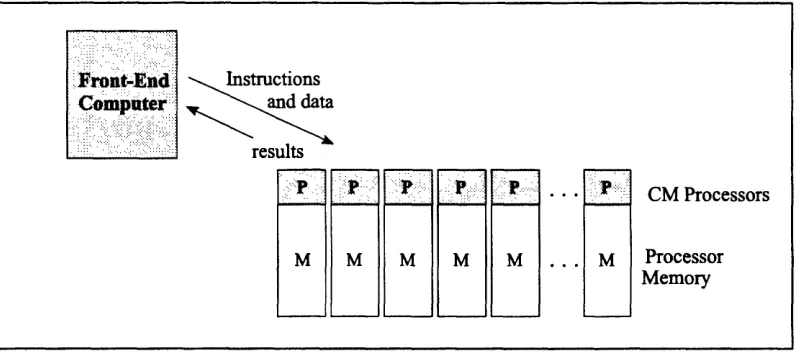
In the data parallel computing model, there are many small processors, each with some associated memory, and all acting under the direction of a serial computer called the front end. Each processor stores the information for one data point in its local memory; all proc-essors can then perform the same operation on all the data points at the same time.
Here are some examples of how data parallel computing can be used:
* A graphics program might store pixels one-per-processor and then have each
proc-essor calculate the color value for its pixel, all at the same time.
* A text retrieval program might store articles one-per-processor and then have each
processor search its article for a keyword.
* A modeling program (for example, one that simulates fluid flow) might create a large number of individual cells, stored one-per-processor. Each cell might have a small number of possible states, which are simultaneously updated at each "tick" of a clock according to a set of rules that are applied to each cell.
Data parallel programming also has the following features:
2 C* Programming Guide
* A programmer can specify that only a particular subset of the processors is to carry out an operation. In the text retrieval program, for example, the processors that find the initial keyword might be instructed to search further for another keyword, while those that did not find the initial keyword remain idle.
* Processors can pass messages to each other. For example, color shading in a graph-ic image requires that each processor obtain surface information from surrounding processors to calculate the result for its pixel.
1.2 The Connection Machine System
In the Connection Machine system, the front end is a standard serial computer, such as a Sun-4 or certain models of VAX. A bus interface connects the front end to the CM itself. Programs for the CM reside on and run from the front end. Serial code within a program is executed on the front end in the usual manner; parallel code is executed by the CM proc-essors.
Figure 1. Interactions between front end and CM Instructions
and data
results
CM Processors
M M M M M Processor
Chapter 1: What Is C*? 3
1.2.1 Virtual Processors
Different CM models have different numbers of processors. This does not limit the size of the data set that a program can use, however, since the CM system supports virtual proces-sors. The CM can divide up the memory associated with each physical processor to create power-of-2 multiples of the entire set of processors. A CM with 16K physical processors, for example, can operate as if it has 32K processors, 64K processors, and so on. The time required to do each operation increases as the number of virtual processors increases.
1.2.2 Communication
CM processors are interconnected by a high-speed communication device called a router. The router allows each processor to send a message to any other processor, all at the same time. In addition, the CM system has a faster form of communication called grid communi-cation, which allows processors to communicate with their neighbors.
1.2.3 11/O0
Different devices can be used to perform I/O to and from CM memory:
* A mass storage system called the DataVault can be attached to the CM via a 64-bit
I/O bus. The DataVault provides permanent disk storage for CM data.
* Other I/O devices can be connected to the CM via this same I/0 bus or through an interface to a computer with aVMEbus.
* The graphic display system and associated software provides I/0 from the CM to
a display monitor.
4 C* Programming Guide
1.3 C* and C
C* implements the ANSI standard C language; programs written in standard C compile and run correctly under C* (except when they use one of the words that are newly reserved in C*). In addition, C* provides new features that make possible the kind of data parallel com-puting described in Section 1.1. These features include the following:
* A method for describing the size and shape of parallel data and for creating parallel
variables. Shapes and parallel variables are discussed in Chapters 3, 4, and 9.
* New operators and expressions for parallel data, and new meanings for standard operators that allow them to work with parallel data. Operators are discussed in
Chapter 5.
* Methods for choosing the parallel variables, and the specific data points within parallel variables, upon which C* code is to act. These features are discussed in
Chapters 4 and 6.
* New kinds of pointers that point to parallel data and to shapes. C* pointers are
discussed in Chapter 7.
* Changes to the way functions work so that, for example, a parallel variable can be
used as an argument. Chapter 8 describes C* functions.
* Methods for communication among parallel variables. See Chapter 10.
* Library functions that also allow communication among parallel variables. Chap-ters 11-14 describe these functions.
1.3.1 Program Development Facilities
C* uses its own compiler, run-time libraries, and header files. The compiler translates a C*
program into a serial C program made up of standard serial C code and calls to Paris. This
code is then passed to the front end's C compiler, which handles it in the normal way to produce an executable load module. The serial C code is executed on the front end; the Paris instructions are executed on the CM.
Chapter 1: What s C*? 5
1.4 C* and the CM
Although C* is designed for the CM system, it is not necessary to understand the details of the CM hardware in order to use the language. For example, when the size of the data set requires it, C* automatically takes advantage of the virtual processor mechanism de-scribed above; the programmer need not be aware of the details. If you do understand the CM hardware, however, the relationship between the language and the system may some-times be clear: for example, "positions" in C* are implemented in the CM on physical processors or on virtual processors.
If you are familiar with Paris, the CM's parallel instruction set, you will probably find it helpful to consult Chapter 2 of the C* User i Guide. A section in this chapter describes the relationship between C* concepts such as shapes and parallel variables and Paris concepts
-i:
3#+r
A 4* _
Chapter 2
Using C*
This chapter presents a simple C* program that illustrates some basic features of the lan-guage. At this point we are not going to describe these features in detail; the purpose is simply to give a feel for what C* is like. After the program has been presented, we describe
how to compile and execute it.
The program sets up three parallel variables, each of which consists of 65,536 individual data points called elements. (This is, by the way, a typical use of the CM, with parallel variables having tens of thousands of elements.) It then assigns integer constants to each
element of these parallel variables and performs simple arithmetic on them.
Example 1. A simple C* program: add. cs
#include <stdio.h>
/*
* 1. Declare the shape and the variables */
shape [2][32768]ShapeA;
int:ShapeA pl, p2, p3;
int sum = 0;
main()
{
/*
* 2. Select the shape
C* Programming Guide
*/
with (ShapeA){
/*
* 3. Assign values to the parallel variables */
pl = 1;
p2 = 2;
/*
* 4. Add them */
p3 = pl + p2;
/*
* 5. Print the sum in one element of p3
*/
printf ("The sum in one element is %d.\n", [0][1]p3);
/*
* 6. Calculate and print the sum in all elements of p3 */
sum += p3;
printf ("The sum in all elements is %d.\n", sum);
Example 1. Output
The sum in one element is 3.
The sum in all elements is 196608.
Chapter 2: Using C* 9
Before we go through the program, notice the file extension, . cs, in the program's name.
C* source files must have this .cs extension.
2.1 Step 1: Declaring Shapes and Parallel Variables
2.1.1 Shapes
The initial step in dealing with parallel data in a C* program is to declare its shape-that
is, the way the data is to be organized. In Step 1 of add. cs, the line
shape [2] [32768]ShapeA;
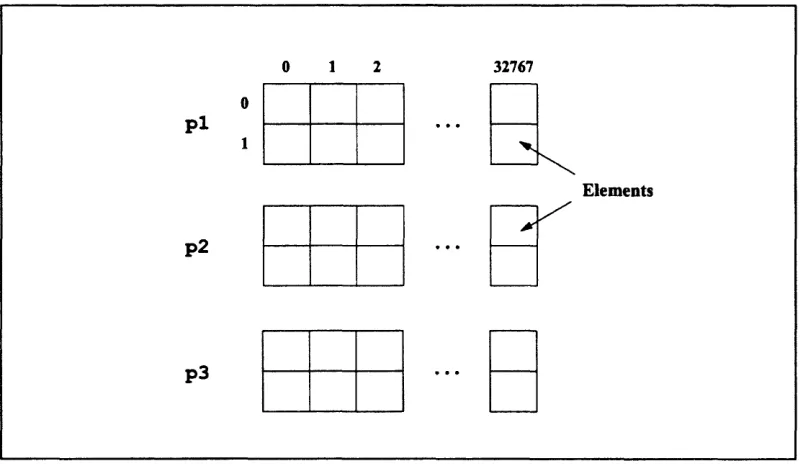
declares a Figure 2.
shape called ShapeA ShapeA consists of 65,536 positions, as shown in
Figure 2. The shape ShapeA
ShapeA has two dimensions; you can also declare shapes with other numbers of dimen-sions. The choice of two dimensions here is arbitrary. The appropriate shape depends on the data with which your program will be dealing.
ShapeA
32767
.. . 0
1
Position LI.
_ _
0 1 2
A
10 C* Programming Guide
: .-.. - :.I : ': C .:: ' : Z :-.5:: :::. --.. . -. -. -..:-. ... . .. ..-- - -...'::.':.,... -i..._...,?. ... ':.:
2.1.2 Parallel Variables
Once you have declared a shape, you can declare parallel variables of that shape. In add. cs, the line
int:ShapeA p, p2, p3;
declares three parallel variables: p1, p2, and p3. They are of type int and of shape ShapeA. This declaration means that each parallel variable is laid out using ShapeA as a template, with memory allocated for one element of the variable in each of the 65,536 posi-tions specified by ShapeA. Figure 3 shows the three parallel variables of shape ShapeA.
Figure 3. Three parallel variables of shape ShapeA
With C*, you can perform operations on all elements of a parallel variable at the same time, on a subset of these elements, or on an individual element.
0
32767
*f R
*d C
.
___
_
0 1 2
p1
p2
p3
Chapter 2: Using C* 11
2.1.3 Scalar Variables
In Step 1, the line
int sum = 0;
is standard C code that declares and initializes a standard C variable. These C variables are called scalar in this guide to distinguish them from C* parallel variables. Memory for stan-dard C variables is allocated on the front end rather than on the CM.
2.2 Step 2: Selecting a Shape
In add. cs, the line
with (ShapeA) /* Step 2 */
tells C* to use ShapeA in executing the code that follows. In other words, the with state-ment specifies that only the 65,536 positions defined by ShapeA are active. In C* terminology, this makes ShapeA the current shape. With some exceptions, the code fol-lowing the with statement can operate only on parallel variables that are of the current shape, and a program can execute most parallel code only within the body of a with state-ment.
2.3 Step 3: Assigning Values to Parallel Variables
Once a shape has been selected to be the current shape, the program can include statements
that perform operations on parallel variables of that shape. Step 3 in add. cs is a simple
example of this:
pl = 1;
p2 = 2;
12 C* Programming Guide
. :
" .: ..':::' . : .. .. ... .:..'.'.. . :' .-. :". ' ' :.: :.. i'i': .: -.> ... .. !' -::-": : ,: :. "'."...- . , . -" . .
The first statement assigns the constant 1 to each element of pl; the second statement as-signs 2 to each element of p2. After these two statements have been executed, p1 and p2 are initialized as shown in Figure 4.
Figure 4. Initialized parallel variables
Note that the statements in Step 3 look like simple C assignment statements, but the results are different (although probably what you would expect) because pi and p2 are parallel variables. Instead of one constant being assigned to one scalar variable, one constant is assigned simultaneously to each element of a parallel variable.
2.4
Step 4: Performing Computations Using
Parallel Variables
Step 4 in add. cs is a simple addition of parallel variables: p3 = p + p2;
In this statement, each element of pl is added to the element of p2 that is in the same posi-tion, and the result is placed in the element of p3 that is also in the same position. Figure 5 shows the result of this statement.
p
= 1;
p2 = 2; 0 1 2 32767
0 1 1 1 1
p
10
1 1 1 1
2 2 2 2
Chapter 2: Using C* 13 :" . .. ' ..' ' " ' '.
:: : : i: : -: :: . ... .. ... ...
Figure 5. Addition of parallel variables
Like C* assignment statements, C* parallel arithmetic operators look the same as the stan-dard C arithmetic operators, but work differently because they use parallel variables.
2.5 Step 5: Choosing an Individual Element of a
Parallel Variable
In Step 5 of add. cs we print the sum in one element of p3. Step 5 looks like a standard C printf statement, except for the variable whose value is to be printed:
[0] [1]p3
[0] [1] specifies an individual element of the parallel variable p3. Elements are numbered starting with 0, and you must include subscripts for each dimension of the parallel variable. Thus, [0 ] [l ] p3 specifies the element in row 0, column 1 of p3, and the printf statement prints the value contained in this element.
p3 = pl + p2;
0 1 2
0 i 1
P
1
1 1
2 2 2
p2
2 2 2
3 3 3
p3
3 3 3
32767
1- +
2
14
. -. ...
Figure 6. Element [0][1] of p3
Note that the following printf statement would be incorrect:
printf ("The sum in one element is %d.\n", p3); /* wrong */
Different elements of p3 could have different values (even though they are all the same in the sample program), so printf would not know which one to print.
2.6 Step 6: Performing a Reduction Assignment of a
Parallel Variable
So far, add. cs has demonstrated assignments to parallel variables and addition of parallel variables. The following line in the program:
sum += p3;
/* Step 6 */
is an example of a reduction assignment of a parallel variable. In a reduction assignment, the variable on the right-hand side must be parallel, and the variable on the left-hand side must be scalar. The += reduction assignment operator sums the values in all elements of the parallel variable (in this case, p3) and adds this sum to the value in the scalar variable (in this case, sum); see Figure 7. (Note that the value of the scalar variable on the left-hand
side is included in the addition; that is why add. cs initializes sum to 0 in Step 1.)
0 1 2 32767
p3 ...
Chapter 2: Using C* 15
Figure 7. The reduction assignment of parallel variable p3
The final statement of the program simply prints in standard C fashion the value contained
in sum.
Note the first closing brace, on the line after the final printf statement. This brace ends the block of statements within the scope of the with statement in Step 2.
2.7 Compiling and Executing the Program
2.7.1 Compiling
You compile a C* program using the compiler command cs on the front end. To compile the program add. Cs, type the following:
% cs add.cs
As with the C compiler command cc, this command produces an executable load module,
placed by default in the file a. out.
sum + p3;
Front End
sum 196608
0 1 2 32767
3 3 3 3
16 C* Programming Guide
2.7.2 Executing
To execute the resulting load module, you can use the CM System Software command
cmattach, as in the following example:
% cmattach a.out
Issuing this command for the executable version of add. cs produces a response from the system like the following (provided that CM resources are available):
Attaching the Connection Machine system [name] ...
cold booting... done.
Attached to 8192 physical processors on sequencer 0, microcode version 6002
Paris safety is off.
The sum in one element is 3.
The sum in all elements is 196608.
Detaching... done.
Part II
Programming in C*
Chapter 3
Using Shapes and Parallel Variables
The sample C* program in Chapter 2 began by declaring a shape and several parallel variables. Shapes and parallel variables are the two most important additions of C* to standard C. This chapter introduces these topics; Chapter 9 discusses them in more detail.
3.1 What Is a Shape?
A shape is a template for parallel data, a way of logically configuring data. In C*, you must define the shape of the data before you can operate on it. A shape is defined by the following:
* The number of its dimensions. This is referred to as the shape's rank. For example, a shape of rank 2 has two dimensions. A shape can have from 1 to 31 dimensions. A dimension is also referred to as an axis.
* The number of positions in each of its dimensions. A position is an area that can contain individual values of parallel data.
The total number of positions in a shape is the product of the number of positions in each of its dimensions. Thus, a 2-dimensional shape with 4 positions in axis 0 (the first
dimen-sion) and 8 positions in axis 1 (the second dimendimen-sion) has 32 total positions, organized as
shown in Figure 8. (By convention in this guide, axis 0 denotes the row number, and axis
1 denotes the column number.)
C* Programming Guide
I "... - . .. . -. : . - - :.. : : . ....I
Axes 1
0 0 1 2 3 4 5 6 7
I
0
1
2
3
Figure 8. A 4-by-8 shape
The CM system currently imposes the following restrictions on shapes in C*:
* The number of positions in each dimension of a shape must be a power of two. * The total number of positions in the shape must be some multiple of the number
of physical processors in the section of the CM that the C* program is using. For example, if the program is running in a CM section with 8192 physical processors, it can have shapes with 8192 positions, 16384 positions, and so on. You can arrange them 2 by 4096, 4 by 4 by 512, and so on.
3.2 Choosing a Shape
The choice of a shape depends on the data that the C* program is going to be using. The shape typically reflects the natural organization of the data. For example:
* A database program for the employee records of a large company might use a
1-dimensional shape, with the number of positions equaling the number of
employees.* A graphics program might use a shape representing the 2-dimensional images that the program is to process. If the images have 256 pixels in the vertical dimension and 256 pixels in the horizontal dimension, a shape of rank 2 with 256 positions
- .
-_ _ 20
7
I
I
LChapter 3: Using Shapes and Parallel Variables 21
in each dimension would be appropriate. This would let each position represent a pixel in an image.
A program to analyze stress in a solid object might use a 3-dimensional shape, with
each axis representing a dimension of the object, and each position representing some portion of the volume of the object.
3.3 Declaring a Shape
Here is a declaration of a shape in C*:
shape [16384]employees;
This statement declares a shape called employees. It has one dimension (a rank of 1) and 16384 positions.
Let's take a closer look at the components of the statement: * shape is a new keyword that C* adds to standard C.
* [16384] specifies the number of positions in the shape. If the shape is declared
at file scope, or as an extern or static at block scope, the value in brackets must
be a constant expression. Otherwise, it can be any expression that can be evaluated
to an integer. This follows the ANSI C standard.
* employees is the name of the shape. Shape names follow standard C naming
rules. They are in the same name space as variables, functions, typedef names,
and enumeration constants.
C* Programming Guide
- .. .. ... .: : .. ..
Figure 9. The shape employees
A 2-dimensional shape adds another number, in brackets, to the brackets. This number represents the number of positions in the example:
right of the first set of second dimension. For
shape [256] [512]image;
This shape has 256 positions along axis 0 and 512 positions along axis 1. Each additional dimension is represented by another number in brackets, to the right of the previous dimen-sions.
Individual positions within a shape can be identified using bracketed numbers as coordi-nates. For example, position [4] of shape employees is the fifth position in the shape (numbering starts with 0, as in C). Position [47][112] of shape image is the position at coordinate 47 along axis 0 and 112 along axis 1.
3.3.1 Declaring More Than One Shape
A program can include many shapes. You can use a single shape statement to declare more
than one shape. For example:
shape [16384]employees, [256][512]image; shape employees
0 1 2 3 16383
Chapter 3: Using Shapes and Parallel Variables 23
3.3.2 The Scope of a Shape
A shape's scope is the same as that of any identifier in standard C. For example, a shape declared within a function or block is local to that function or block. A shape declared at global scope can be referenced anywhere in the source file after its declaration.
NOTE: If a block contains a shape declaration, you should not branch into it (for example, with a switch or goto statement); the behavior is undefined.
3.4 Obtaining Information about a Shape
You can obtain information about a shape by using the C* intrinsic functions
positionsof, rankof, and dimof. (Intrinsic functions are new in C*; they have function-like syntax, but they must be known to the compiler-for example, because they don't follow all ANSI C rules for functions.)* positionsof takes a shape as an argument and returns the total number of posi-tions in the shape.
* rankof takes a shape as an argument and returns the shape's rank.
* dimof takes two arguments: a shape and an axis number. It returns the number of positions along that axis.
The simple C* program in Example 2 displays information about a shape.
I-24 C* Programming Guide
Example 2. Obtaining information about a shape: shape. cs
#include <stdio.h>
shape [16384]employees, [256][512]image;
main ()
printf ("Shape 'employees' has rank %d and %d positions.\n", rankof(employees), positionsof(employees));
printf ("Shape 'image' has rank %d and %d positions.\n", rankof(image), positionsof(image));
printf ("Axis 0 has %d positions; axis 1 has %d positions.\n",
dimof(image,0), dimof(image, 1));
}
Example 2. Output
Shape 'employees' has rank 1 and 16384 positions. Shape 'image' has rank 2 and 131072 positions. Axis 0 has 256 positions; axis 1 has 512 positions.
These intrinsic functions can be used in other, more interesting contexts, as we discuss
later.
3.5 More about Shapes
So far, we have covered the basics about shapes in C*. Chapter 9 discusses more advanced aspects of shapes. For example:
Chapter 3: Using Shapes and Parallel Variables 25
* Partially specifying a shape * Copying shapes
* Dynamically allocating a shape
3.6 What Is a Parallel Variable?
Once a program has declared a shape, it can declare variables of that shape. These variables are called parallel variables.
3.6.1 Parallel and Scalar Variables
A good way to understand parallel variables is to compare them with standard C variables. As we mentioned in Chapter 2, standard C variables are referred to in this guide as scalar
to distinguish them from parallel variables. A scalar variable contains only one
"item"--one number, one character, and so on. A parallel variable contains many items. (Note that ANSI C uses the term scalar in a slightly different way, to refer collectively to arithmetic and pointer types. We consider a standard C array or structure, for example, to be scalar because it contains only one array or structure.)A scalar variable has the following associated with it:
* A type, along with its modifiers and qualifiers, (for example, char, unsigned
int, long double) that defines how much memory is to be allocated for the
vari-able and how operators deal with it
* A storage class (for example, auto, static) that defines the manner in which the memory is to be allocated
Like a scalar variable, a parallel variable has a type and a storage class, but in addition it has a shape. The shape defines how many elements of a parallel variable exist, and how they are organized. Each element exists in a position in the shape and contains a single value for the parallel variable. If a shape has 16384 positions, a parallel variable of that shape has 16384 elements, one for each position.
26 C* Programming Guide
elements (or any subset of elements) of a parallel variable at the same time. As the sample program in Chapter 2 demonstrated, you can:
* Assign a constant to all elements of a parallel variable at the same time. * Declare multiple parallel variables of the same shape.
* Perform an arithmetic operation on all elements of a parallel variable at the same time.
* Do reduction assignments of data in all elements of a parallel variable.
As we explain later in this manual, parallel variables that have different shapes can interact, but interactions between parallel variables are more efficient if the parallel variables are of the same shape.
3.7 Declaring a Parallel Variable
Before declaring a parallel variable, you must define the shape that the parallel variable is to take. For example, assume that the following shape has been defined:
shape [16384]employees;
You can then declare parallel variables of this shape. For example:
unsigned int employee_id:employees;
Interpret the colon in this syntax to mean "of shape shapename." Thus, this statement declares a parallel variable called employeeid that is of shape employees. unsigned
int specifies the type of the parallel variable employeeid. Parallel variable names, like shape names, follow standard C naming rules.
Chapter 3: Using Shapes and Parallel Variables 27
".::::? &;' :... ..; ': ;i:5J ...; ;:':;.!!:::.:: ::::::::::::::::::: :::::::::::::::::::::::::::::::::::::::::::::::::::::::::::::::::::: ' -;'¢ .:i/ ~:;;; I. '. ;:~~.:: ... .:; ';~~~~z:::.~::/ 5 :ii: '' :::::::::::::::::::::::::::..::::::::::::::....:::::::::::::::::
Figure 10. A parallel variable of shape employees
3.7.1 Declaring More Than One Parallel Variable
You can declare more than one parallel variable in the same statement, if they are of the
same type. For example:
unsigned int employee_id:employees, age:employees;
The parallel variables need not be of the same shape. For example:
unsigned int employee_id:employees, fieldl:image;
A Shortcut for Declaring More Than One Parallel Variable
If parallel variables have the same type and same shape, C* provides a more concise method for declaring them. Put the ": shapename" after the type rather than after each par-allel variable. For example:
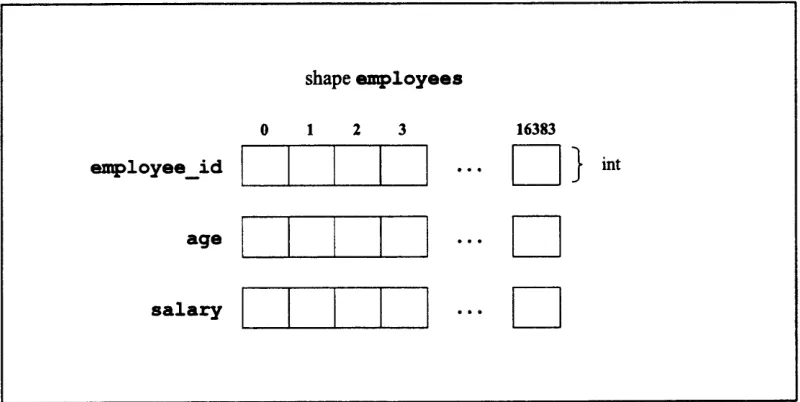
unsigned int:employees employee_id, age, salary;
The parallel variables employeeid, age, and salary are all unsigned ints of shape employees. This syntax is generally used except when parallel variables of different
shapes are being declared.
Figure 11 shows the three parallel variables that this statement creates.
shape employees
28 C* Programming Guide
-:'
~
. 11 --- , -. - I. .. .. , .- I - -. . .. I -- -:. .:. - : - . .shape employees
employeeid
age
salary
± 1 2 3
I I I I
I I I I I
I I I I I
16383
.
L Z}
int
* C
*C
Figure 11. Three parallel variables of shape employees
3.7.2 Positions and Elements
As we have mentioned, a shape is a template for the creation of parallel variables. It is
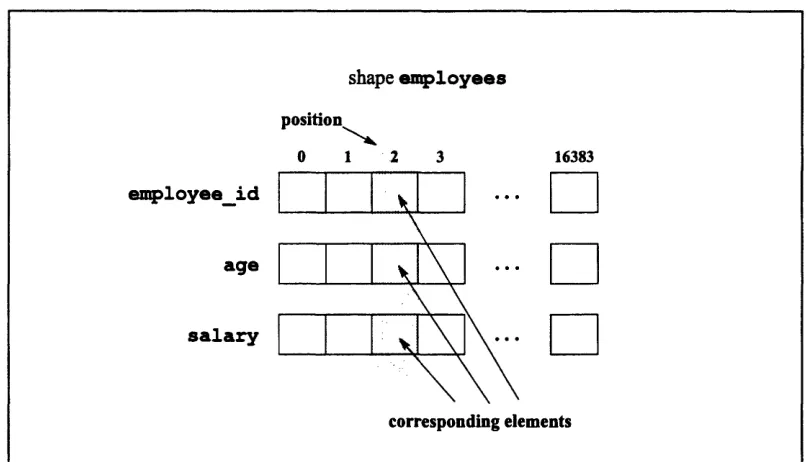
important to keep in mind the distinction between positions of a shape and elements of parallel variables that have been declared to be of that shape. As shown in Figure 12,
elements with the same coordinates can be considered to occupy the same position in the
Chapter 3: Using Shapes and Parallel Variables 29
i::.: .. . .. II.::.-.I ::: :.: i: .I:.: ..: i:.:. : :. ::: :.:.:.r... :I:: .I )2: ... ::~::.:?:::::::.:?:::. ::.: : ?.:::: ..:::?'%:::::::... : :;:;:l.::.: ::::.:.:?.::i:.:I :i: :' :... :'.. .. .:?:::...:: . .::::-/: -:::I.::.I.: ....
employee_id
age
salary
shape employees
position
0 1 .2 3
I -I I 1\
I I 1. xi \1
16383
,00
corresponding elements
Figure 12. Corresponding elements
3.7.3 The Scope of Parallel Variables
Parallel variables follow the same scoping rules as standard scalar variables (and shapes). For example, a parallel variable declared within a function or block is local to that function or block.
NOTE: As with shape declarations, if a block contains a parallel variable declaration, you should not branch into it (for example, with a switch or goto statement); the behavior is undefined.
3.8 Declaring a Parallel Structure
You can declare an entire structure as a parallel variable. For example:
shape [16384]employees;
struct date {
30 C* Programming Guide
int month;
int day;
int year;
struct date:employees birthday;
The final line of code defines a parallel variable called birthday. It is of shape
employees and of type struct date. This parallel structure is shown in Figure 13.
Figure 13. A parallel structure of shape employees
Each element of the parallel structure contains a scalar structure, which in turn will contain the birthday of an employee.
As with non-structured variables, you can declare more than one parallel structure in a single statement. For example:
struct date:employees birthday, dateof_hire;
You can declare parallel structures of different shapes. For example:
struct date birthday:employees, date_of_purchase:equipment;
Note the different syntax, with ":shapename" coming after each parallel variable. You can also use the following syntax for declaring a parallel structure:
shape employees
0 1 2 3 16383
month
structure
birthday
day
year
I
C
I
.
·
iChapter 3: Using Shapes and Parallel Variables 31
struct date { int month;
int day;
int year;
}:employees birthday;
Accessing a member of a parallel structure is the same as accessing a member of a scalar
structure. For example, birthday. day specifies all elements of structure member day in
the parallel structure birthday.
Some additional points about structures:
* Only scalar (that is, non-parallel) variables are allowed within parallel or scalar structures.
* Shapes are not allowed within parallel or scalar structures; a pointer to a shape is
allowed within a scalar structure. (Pointers to shapes are discussed in Chapter 7.)
* You can include a scalar array within a parallel structure; you cannot include pointers of any kind.
* C*, like standard C, allows structures to be nested.
3.9 Declaring a Parallel Array
You can declare an array of parallel variables. For example,
shape [16384]employees; int:employees ratings[3];
declares an array of three parallel ints of shape employees, as shown in Figure 14.
ratings [ 0 ] specifies the first of these parallel variables, ratings [ 1] the second, and
32 C* Programming Guide
.~
~ ~ ~ ~ ~ ~ ~~'
.-,~
.:'':: ., .. .: -- -. - ... .. .- .- -~~ ... ·.. :: . .. -.. , .0 1 2 3
shape employees
16383
ratings [0]
array 2ratings [ 1]
ratings
ratings [2]
Figure 14. A parallel array of shape employees
Please note the difference between an element of a parallel array and an element of a
par-allel variable:
* An element of a parallel array, like ratings [O] in Figure 14, is a parallel vari-able. It has values for each position of its shape.
* An element of a parallel variable is scalar, and exists in only one position.
ratings [0] consists of 16384 separate parallel variable elements. You can also use the alternative syntax for declaring a parallel array. For example:
int ratings [3]:employees;
We discuss parallel arrays further in Chapter 7, where we explain their relationship to pointers.
3.10 Initializing Parallel Variables
Chapter 3: Using Shapes and Parallel Variables 33
.: :..shape :::::::: .. ::: [6 .:::.::::::::::::::: 553 hapeA::::: :. :.:.. .:::::::
shape [65536]ShapeA;
int:ShapeA pl = 6;
sets each element of parallel variable p1 to 6.
If the variable is an automatic, the initializer can be an expression that can be evaluated at
the variable's scope. For example:
main ()
int i = 12;
shape [65536]ShapeA;
int:ShapeA pl = (6+i);
sets each element of pl to 18.
If there is no initializer in a parallel variable declaration, and the variable has static storage
duration, each element of the parallel variable is set to 0; this follows the ANSI C standard.
-
-3.10.1 Initializing Parallel Structures and Parallel Arrays
Members of parallel structures and elements of parallel arrays can be initialized only to scalar constants; this too follows the ANSI standard.
3.11 Obtaining Information about Parallel Variables
Once you have declared a parallel variable in a program, you can obtain information about
34 C* Programming Guide
*~
~ ~
~ ~ ~ ~ ~ ~~ ~~~·:·
. . -":' -.i.: ": .:·: -' -· -: -' . · . ' :' -· .- --·': . .:·:: - ..3.11.1 The positionsof, rankof, and dimof Intrinsic Functions
The positionsof, rankof, and dimof intrinsic functions described in Section 3.4 can be applied to parallel variables as well as to shapes. For example, if age is a parallel
vari-able of shape employees:
* rankof (age) returns the rank of employees.
* positionsof (age) returns the total number of elements of age (and any other
parallel variable of shape employees). Note that the number of elements of a par-allel variable is the same as the number of positions in the parpar-allel variable's shape. * dimof (age, 0) returns the number of instances in axis 0 of age (and any other
parallel variable of shape employees).
3.11.2 The shapeof Intrinsic Function
C* includes another intrinsic function that applies only to a parallel variable. The shapeof intrinsic function takes a parallel variable as an argument and returns the shape of the paral-lel variable. For example, if a program contains the following declarations:
shape [16384]employees; unsigned int:employees age;
shapeof (age) returns the shape employees.
shapeof (age) is a shape-valued expression; it can be used anywhere the shape name
employees is used. For example, once age is declared, a subsequent declaration of a
par-allel variable:
unsigned int:employees salary;
could also be written:
unsigned int:shapeof(age) salary;
Chapter 3: Using Shapes and Parallel Variables 35
struct date:shapeof(age) birthday;
3.12 Choosing an Individual Element of a Parallel Variable
As we described earlier, an individual position can be described by its coordinates along the axes of the shape. These coordinates are also used in specifying an individual element of a parallel variable. As with a shape declaration, the coordinates appear in brackets to the left of the variable name, starting with the coordinate for axis 0. These coordinates are also referred to as a left index.
Thus, if age is a parallel variable of a 1-dimensional shape named employees, [ 0] age specifies the first element of age, and [4 ] age specifies the fifth element of age. For a 2-dimensional parallel variable called pvar,
* 0] [0]pvar specifies the element in row 0, column 0.
* 1] [ 0] pvar specifies the element in row 1, column 0.
*01 [ ] pvar specifies the element in row 0, column 1.
and so on. Recall that axis 0 refers to the rows, and axis 1 refers to the columns.
A left index must be 0 or greater. The behavior of an operation that includes a negative left index is undefined.
You can use a left index with an element of a parallel array. For example:
[77]A1[4]
specifies the seventy-eighth parallel variable element of Al [4], which is the fifth array element of the parallel array Al.
You can use scalar variables or expressions in place of numbers in the left index. For example, if a program contains the following declaration:
int j = 4;
the expression [ j] age specifies the fifth instance of age.
Ir"·
Bri.
.ut·.
i*I·
rCn·
inp-iA··
ai
wa
aihi-Y1
2rxi
gC·
aOi)·
Chapter 4
Choosing a Shape
In Chapter 3 we described how to declare a shape, which is used as a way of organizing
parallel data. You can declare more than one shape in a C* program. However, a program can in general operate on parallel data from only one shape at a time. That shape is known as the current shape. You designate a shape to be the current shape by using the with state-ment, which C* has added to standard C.
4.1 The with Statement
Assume a program contains the following declarations for a shape and three parallel vari-ables of that shape:
shape [16384]employees;
unsigned int:employees employee_id, age, salary;
Before operations can be performed on these parallel variables, employees must become the current shape.
To make employees the current shape, use the with statement as follows:
with (employees)
Any statement (or block of declarations and statements) following with (employees) can operate on parallel variables of shape employees. For example,
with (employees)
age = 0;
38 C* Programming Guide
initializes all elements of the parallel variable age to 0. (We discuss parallel assignment statements in the next chapter.) If each element of salary has been initialized to each em-ployee's current salary, the following code:
unsigned int:employees new_salary; with (employees)
new_salary = salary*2;
stores twice each employee's salary in the elements of new_salary. (Once again, we cover arithmetic with parallel variables in the next chapter.)
You can also include operations on scalar variables inside a with statement. For example, you can declare a scalar variable called samplesalary and assign one of the values of
salary to it:
with (employees) {
unsigned int sample_salary;
sample_salary = [O]salary;
H
Here is what you can do inside a with statement:
shape [16384]employees, [8192]equipment;
unsigned int employee_id:employees, date_of _purchase:equipment;
main ()
with (employees)
date_of_purchase = 0; /* This is wrong */
}
The program cannot perform this operation on date ofpurchase, since this parallel variable is not of the current shape. However, the following is legal:
shape [16384]employees, [8192]equipment;
unsigned int employee_id:employees, date_of_purchase:equipment;
main ()
{
with (employees)
[6]date_of_purchase = 0; /* This is legal */
Chapter 4: Choosing a Shape 39
In this case, [6] date of.purchase is scalar, since it refers to a single element. Scalar operations are allowed on parallel variables that are not of the current shape.
See Section 4.4 for a list of the situations in which a program can operate on parallel vari-ables that are not of the current shape.
4.1.1 Default Shape
Note that the sample program in Chapter 2 included a with statement, even though only one shape was declared. You must include a with statement to perform parallel operations on parallel data, even if only one shape has been declared.
NOTE: There is no default shape in C*. However, an implementation can define a default
shape. See the C* User i Guide for more information on default shapes.
4.1.2 Using a Shape-Valued Expression
You can use a shape-valued expression instead of a shape name to specify the current
shape. For example:
shape [16384lemployees;
unsigned int:employees age, salary;
main ()
{
with (shapeof(age))
salary = 200;
}
The current shape is employees, because shapeof (age) returns the shape of the parallel variable age.
U.
40 C* Programming Guide
4.2 Nesting with Statements
Consider the following with statement:
with (employees) addsalaries();
where add_salaries is a function defined elsewhere in the program. Clearly,
employees remains the current shape while executing the code within addsalaries. But what if add salaries contains its own with statement? The new with statement then takes effect, and the shape it specifies becomes current. When the with statement's scope is completed, employees once again becomes the current shape.
You can therefore nest with statements. The current shape is determined by following the chain of function calls to the innermost with statement. Returning to an outer level resets the current shape to what it was at that outer level. For example:
shape [16384]ShapeA, [32768]ShapeB;
int:ShapeA pl, p2;
int:ShapeB ql;
main()
with (ShapeA) {
pl = 6;
with (ShapeB)
ql = 12;
p2 = 18;
Once the code in this example leaves the scope of the nested with statement, ShapeA once
again becomes the current shape. The assignment to p2 is therefore legal.
The break, goto, continue, and return statements also reset the current shape when they branch to an outer level. For example, the following code is legal:
with (ShapeA) {
loop:
/* C* code in ShapeA . . . */ with (ShapeB) {
/* C* code in ShapeB . . . */
Chapter 4: Choosing a Shape 41
When the statement is executed and the program returns to loop, Shap.A once again.oto
becomen the goto statement is executed and the program returns to loop,ShapeA once again becomes the current shape.
C* does not define the behavior when a program branches into the body of a nested with statement, however. For example, the following code results in undefined behavior:
goto loop;
with (ShapeA) {
loop: /* This is wrong */
4.3 Initializing a Variable at Block Scope
Section 3.10 described how to initialize parallel variables; it stated that you can initialize an automatic variable with an expression that can be evaluated at the variable's scope. Note that if the expression contains a parallel variable, the parallel variable must therefore be of the current shape. In the following code, p2 is initialized to the values of pl; pl must
there-fore be of the current shape.
shape [16384]ShapeA;
int:ShapeA pl = 6;
main ()
{
with (ShapeA) {
int:ShapeA p2 = pl;
/* ... */
42 C* Programming Guide
4.4 Parallel Variables Not of the Current Shape
As we mentioned above, there are certain situations in which a program can operate on a parallel variable that is not of the current shape. They are as follows:
* You can declare a parallel variable of a shape that is not the current shape. You cannot initialize the parallel variable using another parallel variable, however (be-cause that involves performing an operation on the parallel variable being
declared).
* As we discussed in Section 4.1, a parallel variable that i