Trusted Execution Environment - To Harden
Every Day Android Applications on Intel
Architecture
Vishalakshi.R
1, Sumanth Naropanth
2, Dr. M.Dakshayini
3PG Student [Computer Networks], Dept. of ISE, BMS College of Engineering, Bangalore, Karnataka, India 1
Engineering Manager, Intel Corporation, Bangalore, Karnataka, India2
Professor, Dept. of ISE, BMS College of Engineering, Bangalore, Karnataka, India3
ABSTRACT:More and more people are using their smartphones and tablets to surf the web, update social networking sites and also to shop & bank online. Consequently cybercriminals and malware are increasingly targeting mobile devices. Internet users are connecting to cloud based services today more than they have done so in the past. The explosion of mobile platforms, primarily smartphones and tablets has made access to services such as email, social networking, media streaming, online banking and online shopping easily available to the less tech-savvy common man. Security vulnerabilities affecting Android devices can compromise sensitive user data and lead to data loses not just minor inconveniences. We are demonstrating the use of Trusted Execution Environment in Mobile devices makes applications more secure and resistant to many attacks.
KEYWORDS:Trusted Execution Environment, Trusted Applications, Virtualization
.
I.INTRODUCTION
The right mobile apps can make a workforce more productive and nimble [1]. The wrong ones can put its most valuable assets at risk. Mobile apps offer a level of convenience that the world has never known before. From home, the office, on the road and even from hotel room in another country on vacation – one can login to voicemail at work, check credit card balance, view bank balance, and buy new clothes, book travel and more. This extreme level of convenience has brought with it an extreme number of security risks as user‘s credit card details, bank logins, passwords and more are flying between devices and backend databases and systems across the net [2]. Embedded devices are handling data of high value such as login IDs, One Time Passwords and other consumer credentials. They are gradually becoming open software platforms with off-device connectivity that allows consumers to download third party applications which puts these devices at risk.
In this paper we give an introduction to Trusted Execution Environments and Intel support to Trusted Execution Environment. Also we explain about the demonstrations done using TEE that includes a password manager to securely manage user passwords, securing SSL and Sockets and securing Digital Certificates.
top of the hardware. It is also called hardware virtualization engine. They provide high performance and greater flexibility, reduces overhead required to run the hypervisor itself. Applications that run type 1 hypervisors are single function applications serving single function [6]. VMware ESXi and CitrixXenServer are few examples of type 1 hypervisor. Type 2 hypervisors operates as an application on top of operating system. SunVirtualBox, VMwareServer and MicrosoftVirtualPC are examples that run type 2 hypervisor [6].
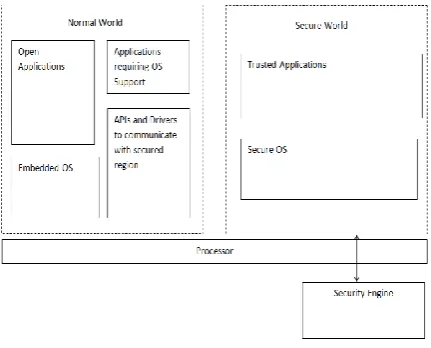
The TEE in the perspective of the overall security infrastructure of a mobile device has three mobile environments – Rich OS, TEE and SE.
1. Rich Operating System (Rich OS) [3]: An environment created where device applications, such as Android, Symbian OS, and Windows Phone, are executed with versatility and richness. It allows third party download. Security is a secondary concern here.
2. Trusted Execution Environment (TEE) [3]: comprises both software and hardware. It offers protection against attacks, generated from Rich OS environment. It helps to control access rights of applications and secures sensitive applications away from Rich OS.
3. Secure Element (SE) [3]:The SE is made up of software and tamper resistant hardware. It allows high levels of security and can even work in tandem with the TEE. The SE is mandatory for hosting proximity payment applications or official electronic signatures where the highest level of security is required.
Fig. 1 TEE Architecture
II.LITERATURE SURVEY
Virtualization summaries hardware that allows multiple workloads to share a common set of resources [7]. On shared virtualized hardware, a variety of workloads can co-locate while maintaining full isolation from each other, freely migrate across infrastructures, and scale as needed [8]. Businesses gains significant profit and operational efficiency from virtualization as it improves server utilization and consolidation, dynamic resource allocation and management, workload isolation, security, and automation. Intel virtualization technology is one among the most promising technologies which realizes virtualization in practical, increasing efficiency by reducing performance overhead and providing security. Intel virtualization technology involves memory virtualization, I/O virtualization, CPU virtualization, Graphics virtualization and Network Function virtualization [8].
securely measure and comply with system configuration and system code, a means to set policies to establish a trust level based on those measurements, Based on those policiesit is a means to invoke enhanced capabilities, to Prevent a system that fails the policy from entering the secure mode, Check whether the system has entered the secure mode environment. The platform owner (e.g., datacenter IT manager) is the key person to establish trust policies, and Intel TXT is flexible enough so that the system administrator can create a trust policy to match the requirements of the datacenter.
A new Intel processor Haswell features McAfee Deep Defender—a product designed to protect systems against ―below the operating system‖ malware attacks, a difficult threat to detect and recover from [10]. It provides a trusted view of system events beyond the operating system, a new method to block sophisticated advanced persistent threats (APTs) and stealth techniques in real time, before they have a chance to hide and the ability to uncover threats that traditional operating system-based security does not detect [10].
ARM TrustZone technology is an approach to secure a wide array of client and server computing platforms. Applications using this technology include payment protection technology, digital rights management, BYOD and a host of secured enterprise solutions. TrustZone technology is integrated into Cortex-A processors but the secure state is also extended throughout the system via the AMBA AXI bus and specific TrustZone System IP blocks [11]. Peripherals such as secure memory, crypto blocks, keyboard and screen are also protected by enabling this technology.
III.APPLICATIONS
Three uses cases have been experimented and demonstrated using Trusted Execution Environment. Each of them is described in this section.
A.Analysing The Security Of Existing Password Manager On Android
Internet users are connecting to cloud based services today more than they‘ve done so in the past. The explosion of mobile platforms, primarily smartphones and tablets has made access to services such as email, social networking, media streaming, online banking and online shopping easily available to the less tech-savvy common man. Most cloud based services require users to setup profiles and authenticate themselves, which means we have a lot more passwords to remember and manage today than before. Advanced threats against cloud-based services and password thefts also drive users to create unique passwords with good entropy for each of these applications. There are many cases where cyber gang hacks into more than 4,20,000 web and FTP sites to steal 1.2 billion username and password combinations. In other words, now more than ever, keeping log-in information secure is crucial. Fortunately, one can manage many logins while keeping them as secure as possible with the right password manager. With password managers, one need to remember only one master password then let the software remember all log-in information. Some of the best password managers also generate strong passwords so that user will never have to worry whether man or machine can figure out password. There are several password management solutions available for Android. Few examples are Secrets for Android by Google, Password Box etc.
In this analysis, an example of google application ―Secrets for Android‖ has been taken. Secrets for Android is an application to securely store and manage passwords and secrets on your Android phone. It uses techniques like strong encryption and auto-logout to help ensure that your secrets remain safe. They typically work by storing all the passwords in a file in the application directory and encrypting the file with an app specific password. This model has a few concerns
The password file is only as secure as the app password
The entire password file is decrypted and stored in the memory when the application is opened
Fig. 2 Password Manager without TEE
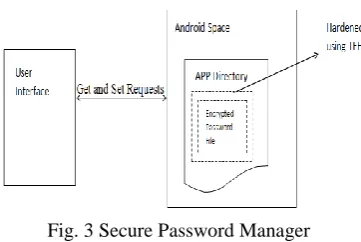
A secure password manager application has been proposed that uses Trusted Execution Environment on Intel architecture. This ensures stronger security compared to just using an application specific password to encrypt the file. It also offers replay and integrity protections on the saved password file. Our implementation hardens the file handling of the password file, and never exposes the entire file contents to Android or to the OS. Only the password requested for a particular website or a service is shown to the user.
Fig. 3 Secure Password Manager
The TEE-hardened password manager application is built on this architecture.The functionalities to be implemented in this application are: Generate password, Insert new password, Edit password, Delete password, View password.
B.Secure SSL
Communication is normally depicted as layers of protocols, each performing specific tasks of the communication. For example, the Internet Protocol (IP) is a connectionless protocol, which sends messages to other nodes, across the network using IP address. This protocol does not guarantee in-order delivery nor does it provide retransmission facilities in case of corrupted messages. To provide such features, the Transmission Control Protocol (TCP) can be utilized. TCP is a reliable, end-to-end, connection oriented protocol. On top of TCP we may choose to add encryption of the messages, and hence a new layer must be used, for example the Secure Socket Layer (SSL) protocol. SSL was later standardized to Transport Layer Security (TLS) by IETF. All these different layers basically provide the same functions to the user: open a connection, send and receive data, and close the connection.
SSL/TLS is vulnerable to many attacks such as Browser Exploit Against SSL/TLS Attack (BEAST) whereattacker who can see the encrypted traffic can note the IV used for session cookie and the cookie‘s location is predictable, SSL Renegotiation Attack wherean attacker can inject commands into an HTTPS session, downgrade a HTTPS connection to a HTTP connection, inject custom responses, perform denial of service, etc. , heart bleed attack which is a as a buffer over-read, a situation where more data can be read than should be allowed.
communication with the server. It also maintains a sockets interface in the Rich Execution Environment (REE) to the remote server. This allows separation of Security Protocols and Pure Transport Protocols.
Fig. 4 Secure SSL/TLS
C.Secure Digital Certificates:
Certificates play an important role in SSL/TLS, where they prevent an attacker from impersonating into a secure website. These certificates are issued by trusted third party organizations, called Certifying Authorities (CAs). A certificate contains information such as issued to, issued by, subject name, public key, subject name etc. certificate verification process includes verifying certificate chain and verifying all these parameters. An attacker, if get access to a certificate he can read public key and other parameters with which he can tamper with the security sensitive data.
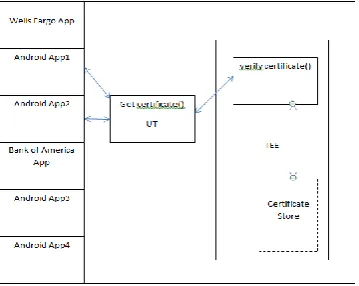
Certificates are of three types – root certificate, intermediate certificate and leaf certificate. Root certificates are self-signed certificates. While verifying certificate chain, certificates are verified from leaf certificate and traversed until root certificate. Verification of certificate in android takes place in two phases. In the first phase, it gets the certificate from peer and certificate chain. It starts verifying certificate chain by comparing ‗issued to‘ and issued by‘ fields, date and time fields, until root certificate is encountered. Root certificate is checked whether it is self-signed or not and also it is compared against the one stored in certificate store. If all the verifications are success, only then the client notifies the server with ‗certificate_verify‘ message indicating either ‗valid certificate‘ or ‗invalid certificate‘. In Android framework root certificates are stored in certificate stored in the path /etc/security. We can secure this path containing certificate store on trusted side to access and to perform verification of certificate and certificate chain. In this way certificates are protected from root level attacks.
Android apps like Wells Fargo app, Bank of America apps use certificate store inside /etc/security. If an attacker can get access to this path and hence the certificates, sensitive data is compromised. TEE solution can prevent this attack gracefully.
IV.COMPARING WITH TRUSTZONE
Trustzone is a hardware enabled security framework provided to protect sensitive data from different kind of threats. Instead of providing fixed, all-in-one solution, Trustzone provides the infrastructure foundations that allow a SoC designer to choose from a range of components that can fulfil specific functions within the security environment [12]. The primary objective of this is to provide integrity, confidentiality protection to sensitive assets to protect them from specific attacks in a traditional and cost-effective manner. Trustzone partitions hardware and software resources to be present in two different worlds; normal world and secure world. Applications running in normal world cannot access resources in secure world. Trustzone enables AMBA3 AXI fabric ensures that resources in secure world are inaccessible by applications running in normal world. Extensions implemented for ATM processor core enables single processor core to execute the sensitive code from both the normal and the secure worlds. This removes the necessity to have a dedicated processor to provide security in Trustzone. Security aware debug infrastructure is also provided to enable control over secure world debug, without damaging debug visibility of the normal world [12]. AMBA3 AXI provides extra control signal to each of the read and write channels. AWPROT is used for write transaction and ARPROT for read transaction. Low value indicates secure and high value indicates non-secure. Trustzone extends to peripherals too. It protects interrupt controllers, timers and IO devices. Secure interrupt controller allows a non-interrupt secure task to monitor the system continuously, securing clock supports robust DRM and securing IO allows users to enter password securely from the keyboard. AMBA3 APB (Advanced Peripheral Bus) is introduces to achieve securing peripherals. APB is connected to the system bus through AXI-to-APB-bridge. AXI-to-APB-bridge is responsible for securing the peripherals. With TrustZone, user space applications operate in "normal" mode. The kernel runs "system" mode. The trusted kernel operates in "monitor" mode. Because of this architecture, even a "rooted" application cannot access protected regions within the trusted kernel. AMDs Secure Execution Environment also relates to Trusted Execution Environment to separate critical applications from normal operating environment [12].
Samsung KNOX integrates ARM TrustZone. Samsung KNOX is an Android-based solution designed from the ground up with security in mind to address the perception of the current open source Android platform. It is featured with application container technology that enables enterprises to support both BYOD and Corporate-Liable models without compromising corporate security or employee privacy [13]. Its features are - Platform Security, Application Security, Mobile Device Management, and Theft Recovery. Platform security provides Customizable Secure Boot, ARM TrustZone-based Integrity Measurement Architecture (TIMA) and Security Enhancements for Android. Application security provides Application Containers, On-device Data Encryption, and Virtual Private Network Support. It offers tamper-proof anti-theft capability combined with a theft recovery service [13].
V. CONCLUSION
Mobile devices are a part of our life. Consider that there are more than 5 billion mobile devices used on the world amongst 7 billion people. People use their devices to stay in touch, take pictures, shop, bank, listen to music, and socialize. In addition, they store personal and business information on them. As a number of phones grow, security risks will increase too. Mobile security can be compromised due to design flaws, vulnerabilities, and protocol failures in any mobile applications, viruses, spyware, malware and other threats.
REFERENCES
[1] OUT OF POCKET: A Comprehensive Mobile Threat Assessment of 7 Million iOS and Android Apps, FireEye special report
[2] http://www.decompilingandroid.com/mobile-app-security/top-10-mobile-security-risks/
[3] https://www.globalplatform.org/mediaguidetee.asp
[4] TPM MOBILE with Trusted Execution Environment for Comprehensive Mobile Device Security, TRUSTED COMPUTING GROUP WHITE
PAPER, June 2012
[5] http://en.wikipedia.org/wiki/Hypervisor
[6] http://searchservervirtualization.techtarget.com/tip/Virtualization-hypervisor-comparison-Type-1-vs-Type-2-hypervisors
[7] Lavneet Kaur , HimanshuKakkar, ―A Review On optimization technique in Server Virtualization‖, International Journal of Computer Science
and Information Technologies, Vol. 5 (1) , 2014, 948-952
[8]
http://www.intel.fr/content/www/fr/fr/virtualization/virtualization-technology/intel-virtualization- technology.signinMobile.html?redirect=/content/www/fr/fr/virtualization/virtualization-technology/intel-virtualization-technology.html&locale=/fr/fr
[9] Intel® Trusted Execution Technology Hardware-based Technology for Enhancing Server Platform Security, white paper
[10]
https://embedded.communities.intel.com/community/en/applications/blog/2013/06/13/roving-reporter-enhancing-retail-security-and-manageability-with-4th-generation-intel-core-processors
[11] http://www.arm.com/products/processors/technologies/trustzone/index.php
[12] ARM Security Technology Building a Secure System using TrustZone® Technology, Copyright © 2005-2009 ARM Limited