Available Online atwww.ijcsmc.com
International Journal of Computer Science and Mobile Computing
A Monthly Journal of Computer Science and Information Technology
ISSN 2320–088X
IMPACT FACTOR: 6.017IJCSMC, Vol. 5, Issue. 10, October 2016, pg.61 – 68
Android Based Mobile Application
Development for Web Login Authentication
Using Fingerprint Recognition Feature
Nilay Yıldırım
Software Engineering DepartmentFırat University Elazig/Turkey
Asaf Varol
Software Engineering Department Fırat University
Elazig/Turkey [email protected]
Abstract -Many mobile device makers now incorporate biometric security features into their products. And, some device manufacturers now allow application developers to use these features via their software development kits (SDKs). In this study, we utilize fingerprint scanning and recognition technology, a popular biometric security feature, to develop a web login authentication mobile app. Our application uses the Samsung Galaxy S5 fingerprint recognition feature and International Mobile Equipment Identity (IMEI) number to generate single time passwords. Within a limited time frame, the secure passwords can be used to sign in/log in to online user accounts related to government, banking, education, etc. As the production of mobile devices with fingerprint recognition continues to increase, finger print user authentication apps, like the one we introduce in this study, will become a prevalent security measure.
Keywords: mobile devices; biometric security; fingerprint recognition; user login
I. INTRODUCTION
ODAY, mobile devices have become an important part of human life. Users access their e-mails, social networks, bank accounts, and various other websites via mobile devices. Mobile hardware manufacturers, operating system and application developers take a variety of security measures due to the personal, private and/or sensitive nature of the information stored in mobile devices. These measures include, but are not limited to passwords, PINs, patterns and biometric features. The use of biometric recognition on mobile devices started with cameras and microphones. More recently, mobile device manufacturers have added biometric authentication systems like the increasingly popular fingerprint recognition feature. This is a more secure and practical solution for identification on mobile devices.
Some of the mobile device manufacturers allow developers to use the device’s fingerprint security features in their mobile applications via the device’s software development kit (SDK).
In this paper, we present an application developed using the fingerprint security feature for a Samsung device. We will discuss the importance of fingerprint security applications and the development stages of our fingerprint web login authentication program in this paper.
II. MOBILE BIOMETRIC SECURITY SYSTEMS
Biometrics is used for identifying individuals based on their chemical, physical, and/or behavioral features [1]. Biometric technologies are described as the automated authentication and the identity verification of a living person based on their physiological and behavioral characteristic [2]. Biometric systems are used for two purposes [1]:
To verify that the user is the actual person by comparing the stored biometric records for that user to the detected features,
To identify the user by comparing the acquired biometric feature from the user with the collection of the same biometric features taken from multiple users.
Biometric recognition systems can be listed as iris, retina, face, fingerprint, vein, palm, voice, signature and keystroke. A fingerprint consists of the ridges on a person’s finger and a fingerprint distinguishes a person from others by the unique pattern of those ridges [3]. According to Javelin Strategy & Research [4], 35 percent of consumers use the fingerprint matching method as seen in Figure 1.
35 12 8 7 5 3 0 30
0 20 40 Fingerprint matching Eye scan Face recognition Voice recognition Hand geometry Keystroke analysis Another biometric method I am not interested in…
Percent…
Figure 1.Biometric usage by consumers [4]. Considering the following mobile device security features:
SIM card security with the PIN code,
Drawing shapes on the screen or pin number input for secure access to a smart phone,
E - mail and password authentication for accessing applications,
Various third party applications for ensuring the safety and validity of mobile phones,
They are not sufficient for the case of a stolen or illegally accessed mobile device. On the other hand, a biometric authentication method can determine the identity of the user and cannot be shared with others but a password or token based authentication cannot prove the user [5].
Considering all the advantages of biometric recognition, mobile device manufacturers have started to carry different biometric sensors on mobile devices. Goode Intelligence predicts that 3.4 billion users will use biometric systems on their mobile devices by 2018 [6]. Now fingerprint sensors are available on the latest smart mobile devices. It is predicted that by 2016, biometric sensors will be equipped in 40% of smartphones [7].
In Goode's mobile biometric market report 2013-2018, the factors contributing to the realization of mobile biometric market growth are discussed in the following [6]:
Biometrics are presented to end-users and consumers with technology like Apple iPhone 5s and Touch ID.
Biometrics deliver practical mobile device protection compared to mobile device authentication methods like PIN or password, which are cumbersome and unpractical.
The use of biometric authentication systems for mobile commerce is a convenient and safe way for payment methods.
Many authentication companies with FIDO Alliance membership are planning to support biometrics and this support will include mobile devices.
Mobile biometric recognition, especially fingerprint recognition, can be used in the following ways:
Fingerprint recognition for mobile payment transactions can deliver mobile payments safer way. As an example, PayPal and Samsung Galaxy S5 users can make payments via PayPal using fingerprint biometric [8].
Fingerprint recognition to open the screen lock of a device will be easier and safer for users.
Mobile banking will provide fingerprint recognition along with one-time-password generation for their mobile applications.
Developers can use fingerprint security features for their mobile applications.
The smartphone leaders, Apple and Samsung, have taken measures to protect user fingerprint data. The fingerprint data does not leave the device and stays within the protected hardware environments. Additionally, Apple and Samsung support Trusted Execution Environment (TEE) [8]. This shows that fingerprint data are relatively secure in mobile devices.
The FIDO (Fast Identity Online) Alliance is a non-profit organization to solve the problems of remembering multiple usernames and passwords [8]. It stores all credentials including biometric ID in the cloud [9]. The fingerprint sensor in the Samsung Galaxy complies with FIDO standards [8]. The FIDO system will provide a new direction for user recognition systems with the support of biometric identification. And passwords may be altogether replaced by biometric authentication for mobile devices.
III. WEB LOGIN AUTHENTICATION APPLICATION USING MOBILE FINGERPRINT FEATURE AND IMEINUMBER
With the increase of mobile devices that include the fingerprint recognition feature and SDK (Software Development Kit) access to developers, it is considered that where the fingerprint recognition features can be used for security.
Many security measures have been developed to verify the user login identity for web sites in areas such as e-government, banking, and e-learning. Some of these security measures are single use passwords, to login with identity information. Also, for some private educational sites, many users can participate in training with same user name and password and that can be a security problem.
Our Android based Web Login Authentication application has been developed to use the mobile biometric feature login processes. The main purpose of the program is to produce a single use, time constrained password by fingerprint authentication that will be used along with user name and password for login to the related web site. First, the user registers her or his device to the database using the device’s IMEI number. If the fingerprint verification feature is available for the device, a single time password that can be used within a three minute is produced. Then a user is able to log in to the web site with this password.
In this section, the operation of the application, development and coding stages are discussed.
A. Operation of the Application
The application consists of two parts. The first part is the web side and the second part is the Android application side, which generates the password.
The operation of the Android program is as follows: 1) User opens the Android program.
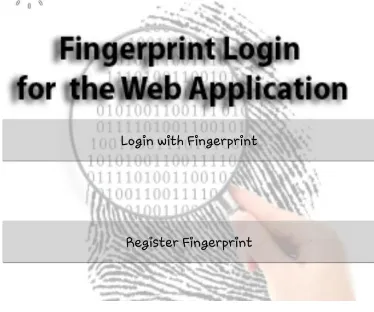
2) Initially, the user is confronted with the screen shown in Figure 2. The user is expected to proceed with fingerprint authentication as shown in Figure 3. If there is no fingerprint record on the mobile device, registration of the user’s fingerprint is required. After fingerprint registration, the fingerprint verification is requested from the user again.
Figure 3. Fingerprint authentication
3) After the fingerprint verification step, the IMEI number will be queried in the database of the web page. Thus, the user can be exposed to two conditions:
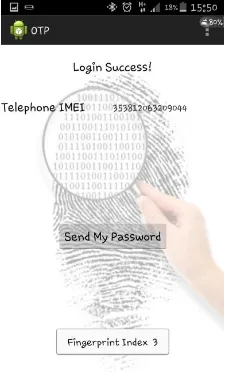
If the IMEI number is registered, the user will be redirected to the web site that produces single time password as shown in Figure 4.
.
Figure 4. Single time password generation page
If the IMEI number is not registered, the user will be directed to the registration page as shown in Figure 5.
4) The IMEI number of the device is recorded by entering the user name and the password that are recorded to the database into the registration page. Thus, the device is defined. Users will be able to login from only defined mobile device. Then, the user will be redirected to the page that generates the single time password.
5) In the single time password generation page, the single time password is obtained. The user has to use the password for web site login within three minutes. After three minutes, it will be necessary to generate a new password.
6) Once the IMEI number is recorded, the user will be automatically directed to the single time password generation screen for login to the web site by only verifying the fingerprint on the device.
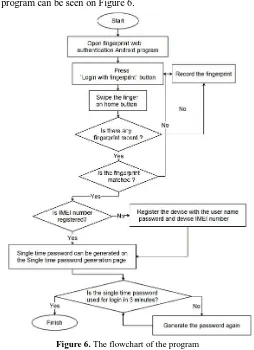
The flowchart of the Android program can be seen on Figure 6.
Figure 6. The flowchart of the program
For the example web site, the login section has been prepared. Only the login section is important because the web content may differ according to the site’s intended use.
The textbox as shown in Figure 7 (a) is the field where the user enters the single time password produced by the mobile application. When the user enters the single time password along with his or her user name and password information, the user is directed to the relevant web site.
Another important case is using fingerprint for what security purposes. When the first fingerprint is registered by the phone owner, it is necessary to be the owner of the phone to register other fingerprints. If the user is the owner of the phone, the fingerprint input will be used for this application. Thus, different users of the web site will not be able to access the password screen if there is no fingerprint match.
Up to three different fingerprints can be registered on the phone. However, recording other fingers is realized by fingerprint authentication of the phone owner. When the mobile device users that have different fingerprint registrations on the same device login to the application, they can reach single time password page by their fingerprint records. However, this access will not matter if the user name and password required for login to the website is not known.
Another threat for security, a person who knows the e-mail and password information of the user may save the information on their phone, then registers the device to the database. In this case, the correct user can press the "Change My Device" button on the web site as shown in Figure 7 (c), than reset the device information and the password based on the information that will be sent to the predefined user e-mail.
B. Development and Coding of the Application
Before discussing the application development, we will describe the device and programs used. Samsung Galaxy S5 differs from other mobile devices that support fingerprint because it allows third party application developers to create application s using the fingerprint sensor API (Pass API) [10]. Therefore, this device brand was selected and application trials were performed on Samsung Galaxy S5.
The fingerprint web login authentication Android application has been developed using Java on the Eclipse platform. Samsung Pass SDK has been used for fingerprint recognition. Properties of the Pass SDK that were used are listed in the following [11]:
Requesting fingerprint recognition.
Verifying the fingerprint of the current user matches the fingerprint registered on the device.
Registering fingerprints through the enroll screen.
Getting the index of the identified fingerprint from the array of registered fingerprints.
Three libraries were added to the project to use the Pass SDK. These are sdk-v1.0.0.jar, pass-v1.1.2.jar and android-support-v4.jar. The background image used in project was obtained from a [12] web source.
The android application consists of three pages. Activity pages for Android are used for creating the pages. The user is directed to the related activity pages when the necessary conditions are met. The background image used in this project was obtained from a [12] web source.
Figure 8. A part of the codes about Pass SDK
Definitions are made about fingerprint libraries and fingerprint feature in the code sample that shown in Figure 8. The processes regarding verified fingerprint input are defined after this code fragment. When the fingerprint verification is achieved on the Login page, the operations that will be carried out are as follows:
1) When the user’s fingerprint is authenticated, the fingerprint index number is saved to the user's records on the database and the index number is shown to the user as a Toast Message.
The IMEI number is obtained by the following codes:
import android.telephony.TelephonyManager;
test.getDeviceIdTm(getApplicationContext();
Figure 9. Login table
3) If the IMEI number match is not found, the user is directed to the registration page. When the user name and password authentication has been completed, the IMEI number automatically sent via the android app is recorded for the user. The mobile device of the user will remain as a constant until changing the device on the web site.
4) If the IMEI number matches, the user will be directed to the single time password generation page. Secure random password is generated when the user presses "Send My Password" button on single time password page and the password is sent to the database. Secure Random class in Java generates a cryptographically strong random number and this number minimally complies with the statistical random number generator tests specified in "Security Requirements for Cryptographic Modules” [13]. This secure random number cannot be predicted. Secure Random password generation codes are shown in Figure 10.
Figure 10. Secure random codes
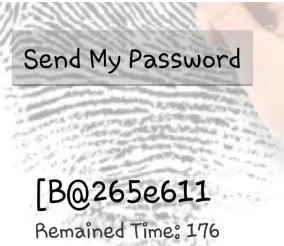
5) After the single time password is generated, the user needs to login to the web site using the generated password within three minutes. Generated code sample is shown in Figure 11. If the user doesn't login to the web site in specified time period, the password will be reset and a new password will be required.
Figure 11.Single time password sample
IV. CONCLUSION
In this study, we investigate how the fingerprint security feature on mobile devices can provide security for web login. We introduce a program that generates single time passwords for login to a web site via fingerprint on a registered device. This program requires the user saves their fingerprint and logs in to the application with that IMEI number.
The importance of the biometric features, especially fingerprint features, is high in terms of ensuring the security of applications. The Android-based application has been developed with PassSDK that is offered to developers by Samsung, and Android application security, in general, can be improved by this SDK. For this purpose, fingerprint recognition feature has been used in terms of the security of the application.
Our application is an important example of how to use the biometric features in a mobile device to authenticate web-based user account. In this way, user login will become more secure for the web sites that are important to authenticate the user.
Three security features are utilized in our application. And they include the single-use password, the IMEI number that identifies the user's device, and the fingerprint security that authenticates the user with their fingerprint. Therefore, the application is also important because it meets the expectations of a multi-layered security system.
The user can open the program with entering his or her user name and password information and fingerprint recognition without saving the IMEI number. However, this method is not convenient for the user and recording the IMEI is more practical.
There are some restrictions of Pass SDK in terms of security measures. Using fingerprint records for biometric authentication on web platforms is not possible. To perform user authentication only with the unique ID of the fingerprint without the need of IMEI number can provide the main biometric authentication. However, only FIDO (Fast Identity Online) member applications can provide this.
Our study is expected to increase the use of Software development kits such as Pass SDK, available to developers of third party applications, to ensure the safety of mobile applications or for different ideas about fingerprint identifications.
R
EFERENCES
[1] Pocovnicu, A., Biometric Security for Cell Phones, Informatica Economică, vol 13, no. 1, pp. 57-63, 2009.
[2] Karnan, M. and Krishnaraj, N., Bio Password - Keystroke dynamic Approach to Secure Mobile Devices, Computational Intelligence and Computing Research (ICCIC), 2010 IEEE International Conference on, Coimbatore, 2010.
[3] Ghany, K. K. A., Hefny, H. A., A. Hassanien, E. and Ghali, N. I., A Hybrid approach for biometric template security, 2012 IEEE/ACM International Conference on Advances in Social Networks Analysis and Mining, İstanbul, 2012.
[4] Caldwell, T., Voice and facial recognition will drive mobile finance, Biometric Technology Today, vol 2012, no. 10, pp. 2-3, 2012.
[5] Yang, W., Hu, J., Yang, J., Wang, S. and Shu, L., Biometrics for Securing Mobile Payments: Benefits,Challenges and Solutions, 2013 6th International Congress on Image and Signal Processing, Hangzhou, China, 2013.
[6] Goodeintelligence.com, Goode Intelligence forecasts that the market for mobile biometric security products and services is se t to grow and will generate over $8.3 billion revenue by 2018, Goodeintelligence.com, 28 September 2013. Available: http://www.goodeintelligence.com/media- centre/view/goode-intelligence-forecasts-that-the-market-for-mobile-biometric-security-products-and-services-is-set-to-grow-and-will-generate-over-83-billion-revenue-by-2018. 18 March 2014.
[7] Elsevier Ltd, Javelin researchers find mobile users prefer fingerprint biometrics, Biometric Technology Today, pp. 2-3, January 2015. [8] Goode, A., Bring your own finger –how mobile is bringing biometrics to consumers, Biometric Technology Today, pp. 5-9, May 2014. [9] Elsevier Ltd., Samsung S5 to feature biometric access control and secure mobile PayPal, Biometric Technology Today, p. 1, March 2014. [10] Chip.com.tr, Galaxy S5, iPhone'a "hodri meydan" dedi!, Chip.com.tr, 1 March 2014. Available:
http://www.chip.com.tr/haber/galaxy-s5-iphone-a-hodri-meydan-dedi_45711.html. 13 March 2014.
[11] SAMSUNG, What Is Pass SDK?, SAMSUNG, 2014. Available: http://developer.samsung.com/galaxy#pass. 12 March 2014.
[12] successimg.com, online research, www.athenamentor.com, 2014. Available: http://successimg.com/online-research/www.athena-mentor.com*new*wp-content*uploads*2009*09*fingerprint.jpg/www.athenamentor.com*mba*gmat*/. 12 Mach 2014.
![Figure 1. Biometric usage by consumers [4].](https://thumb-us.123doks.com/thumbv2/123dok_us/1915641.1251270/2.595.174.421.274.418/figure-biometric-usage-consumers.webp)