---- ---- ---- ----
---
-
-
-
-- -- .
----
-
-
~,
-Publication Number
GC30-3085· 3
Distributed Office
Support Systeml370
Version 3 Release 3
General Information
MVS and VSE
Program Numbers
5665-290(MV~
Fourth Edition (October 1984)
This major revision obsoletes GC30-3085-2. The Summary of Changes explains the changes made in this edition. Changes or additions to the text and illustrations are indicated by a vertical line to the left of the change. This edition applies to Version 3 Release 3 of the IBM Distributed Office Support System/370 (program number 5665-290 for MVS and program number 5666-270 for VSE) and to all subsequent releases and modifications until otherwise indicated in new editions or Technical Newsletters.
Changes are made occasionally to the information herein. Therefore, before using this publication in connection with the operation of IBM systems, consult the latest
I BAt S.~·Itt'm/ 370 Bibliography of Industry Systems and Application Programs,
GC20-0370. for the editions that are applicable and current.
Any reference to an IBM program product in this publication is not intended to state or imply that only IBM's program product may be used. Any functionally equivalent program may be used instead.
It is possible that this publication may contain references to, or information about, IBM products (machines and programs) or services that are not announced in your country. Such references or information must not be construed to mean that IBM intends to announce such IBM products or services in your country.
Publications are not stocked at the address given below; requests for IBM publications should be made to your IBM representative or to the IBM branch office serving your locality.
This manual is for:
- a company executive who makes office systems decisions
- a data-procegsing executive
- an administrative services executive
If you want information about:
- The Distributed Office Support System (DISOSS)
- How DISOSS fits into a data-processing system
- The products DISOSS supports
- The migration aids DISOSS provides
- The office requirements DISOSS satisfies
- The programming functions DISOSS provides
-Installing DlSOSS
- Using DISOSS
- The security features of DISOSS
- Available DlSOSS aids
- Migrating from a previous DISOSS version
- The required hardware and software
- The required computer storage
- DISOSS and your system performance
See Chapter:
1
2
3
4
5
The DISOSS Publications Library
The 01SOSS/370 Version 3 publications are organized into a library according to tasks that must be performed to use 01SOSS/370 Version 3. Task
orientation eliminates the need to define who performs a specific task.
The information needed to perform a specific task-whether it is evaluating DISOSS, planning for it, installing it, or diagnosing problems-is contained in one book dedicated to that task. Some information is needed by more than one task (for example, OISOSS messages and reference information). This
cross-task information is combined into one book to avoid duplicating information in multiple books.
The identified tasks for OISOSS Version 3 are
1. Evaluation: Deciding to install DISOSS.
2. Planning: Making decisions about the options that DISOSS offers. The
decisions are specified in written directions and procedures that are followed during the implementation tasks of installation, administration, and diagnosis.
3. Installation: Making DISOSS ready to do useful work. It implements
decisions made during the planning task.
4. Administration: Managing DISOSS and making changes to the system after
installation.
5. Application Programming: Developing application programs that use the
DISOSS application program interface to access DISOSS functions.
6. Diagnosis: Identifying and describing problems that occur in the DISOSS
system.
7. End Use: Using DISOSS. The DISOSS Version 3 library describes how to
use the IBM Scanmaster I with DISOSS. All other end-user tasks (for example, filing or distributing documents) are described by the product providing the end-user interface to DISOSS.
Except for this one, each OISOSS public~tion has title labels attached to its back cover. These labels fit into pockets on standard IBM binders that may be ordered to hold the DISOSS library. The IBM order numbers for these binders are SR30-0329 (1-inch binder), SR30-0330 (l.5-inch binder), and SR30-0331 (2-inch binder).
TASKS:
rn
Evaluationi
DiSOSS I I
Documentation I
General
I
I Information I I I I GC30-3085 I I I I I I I I I I I
Note: The DISOSS publications listed below are currently available for DISOSS
Version 3 Release 2. DISOSS Version 3 Release 3 publications will be avaIlable at the product release's general availability.
rn
Planning ~ InstallationApplication
rn
Adminlstrotion ~ ProgrammingI!I
Diogn0818i
I
I
,
I I
I
I
Planning I I WS I Administration Application Diagnosis Guide Installation I Guide I
Programming
I I
Guide I I
I I
I I
SC30-3093 SC30-3090 I SC30-3091 SC30-3096 SC30-3097
I I
I I
r
VSE
I
Architecture Reference for InstallationI
Document Interchange Units Guide and Interchange UnitsI
SC30-3232 I I I I SC30-3276
I I
I I I
I
I Installation
I
I
I and Administration I
I ReferencB
I I
I SC30-3092 J) I
I
i
~ 1I
I
MessagBsI
I
SC3O-3094
I
i
I
I
Bibliography and Master Index
SC3O-3277 .0.
I i I I
Ii] End Use
i I
I
I II
I
Scanmaster I User's Guide SC30-3095 Scanmaster IDISOSS Template SX27-3543 Sconmaster IDISOSS Instruction Cards S)(27-3544Note: A complete set af the DISOSS library manuals whose order numbers begin with the pr8fix "SC" can be ordered by specifying order number SBOF-t624.
v
,4!-:o.;:-Publications about the Products DISOSS Supports
For this type
of information: Refer to: Order No.:
Description of the IBM IBM Displaywriter System G544-0851
Displaywriter System General Information
Description of the IBM 5520 IBM 5520 Administrative GC23-0702
Administrative System System Introduction
Description of the IBM Distributed Office Support GC27-0546
8100/DOSF System with the Facility General Information GH12-5139
Distributed Office Support and Distributed Office Support
System/8100/DOSF System/8100/DOSF General
Information
Description of the IBM IBM Scanmaster I Description GA18-2094
Scanmaster I
Description of the IBM Introducing the Professional GH20-5601
Professional Office System Office System"
(PROFS)
,
Description of Personal Introducing Personal GC30-3292,
Services/370 Services/370Summary of Changes
GC30-3085-1
GC30-3085-2
GC30-3085-3
The second edition provides corrected and additional information on the
software requirements for DISOSS and its supported products listed in "Chapter
s.
DISOSS Resource Requirements."It also adds information on acceptable document interchange for an IBM Displaywriter System in Appendix A, "Document Interchange Among DISOSS-Supported Products" on page A-I.
The third edition provides support for DISOSS Version 3 Release 2.
• Distribution among multiple DISOSS systems
Distribution between the IBM 5520 Administrative System and DISOSS systems
• Personal and priority distributions for Displaywriter and Scanmaster I
• Interchange of revisable documents among 5520, Displaywriter. and
8100/DOSF users
• Interactive service aids
• Trace formatter
The fourth edition provides support for DISOSS Version 3 Release 3. Changes have been made throughout the book, and it should be reread in its entirety.
Interchange of documents between DISOSS MVS and PROFS (VM/CMS) devices
Interchange of documents between DISOSS and Personal Services/370
• Interchange of documents between DISOSS and Personal Services/PC
• Enhanced revisable-form text formatter for producing final-form output
documents from revisable-form input documents
• Enhanced formatter for 81001 text controls for DOSF Release 4
• List Document Profile utility to help DISOSS users associate search
arguments with documents by providing information for the entire library, for selected documents, or for selected groups of documents
• Deletion, addition, and changing of search terms functions have been added
to the Owner and Search Term Change utility (formerly called the Change Document Ownership utility)
• Enhanced trace formatter for PROFS
Expanded accounting activity records for CICS transactions processed by DISOSS
• Host user profile (HUP) and routing data set List functions have been
enhanced to operate while CICS/VS is active
Contents
Chapter 1. Introducing the Distributed Office Support System 1-1 DISOSS and the Data-Processing System 1-2
Products Supported by DISOSS 1-3 IBM Displaywriter System 1-3 IBM 5520 Administrative System 1-4 IBM 8100/DOSF System 1-4
IBM Personal Computer and Personal Services/PC 1-6 IBM Personal Services/370 1-6
IBM Professional Office System (PROFS) 1-6 IBM Scanmaster I 1-6
Security 1-6
National Language Support 1-7 Previous DISOSS Versions 1-7 Product Support Summary 1-7
Chapter 2. How DISOSS Meets Your Office Requirements 2-1 An Automated Filing and Retrieval System 2-2
Filing Problems in a Conventional Office 2-2 The DISOSS Solution 2-2
An Automated Document Distribution System 2-4
Document Distribution Problems in a Conventional Office 2-4 The DISOSS Solution 2-4
Chapter 3. What DISOSS PrOl'idcs 3-1 Library Services 3-2
Filing a Document 3-2 Searching for a Document 3-2 Retrieving a Document 3-3 Deleting a Document 3-3 Distribution Services 3-3
Distributing a Document 3-4 Receiving a Document 3-5 Scanmaster I Support 3-5
Filing an Image Document 3-6 Distributing an Image Document 3-6 Receiving an Image Document 3-6 Printing a Text Document 3-7 Document Interchange 3-7
Handling Naming Conventions 3-8 Changing Data Streams 3-8
Definition of Users Performing Work for Others 3-8 Application Program Interface 3-9
Application Program Interface Sample Program 3-9
Service Aids 3-10
Host Services 3-10
Batch Job Submission 3-11
Host Printing and Formatting Facilities 3-11
Direct Document View 3-11
Document Transmission Facility 3-11
Chapter 4. What You Should Know about DISOSS 4-1
Making DISOSS Operational 4-2
Planning for DISOSS 4-2
Preinstallation Effort 4-2
DISOSS Installation 4-3
Starting to Use DISOSS 4-3
Establish a Conversion Plan 4-4
Educate Your Personnel 4-4
Security Aids Included in DISOSS 4-4
Securing DISOSS Resources 4-5
Securing Access to Documents 4-5
Related Security Features 4-6
Administration Aids Available with DISOSS 4-6
Host User Profile and Routing Information Maintenance 4-6
Document Library Management 4-7
Distribution List Definition 4-8
Control of Search Arguments 4-8
Maintaining Accounting Information 4-8
DISOSS Support 4-9
Publications 4-9
Messages 4-9
Education 4-9
Problem Determination Aids 4-10
IBM Support Organizations 4-10
Migration from an Earlier DISOSS Version or Release 4-11
Summary of DISOSS Version 1 4-11
Summary of DISOSS Version 2 4-11
Summary of DISOSS Version 3 Release 1 4-11
Summary of DISOSS Version 3 Release 2 4-12
New Support in DISOSS Version 3 Release 3 4-12
Migration to DISOSS Version 3 Release 3 4-13
Chapter 5. DISOSS Resource Requirements 5-1
System Hardware Requirements 5-2
Host Processor 5-2
Communications Controller Other Hardware Requirements System Software Requirements
For MVS 5-3
ForVSE 5-4
Other Software 5-4
5-2 5-3 5-3
Software Requirements for Supported Products 5-4
IBM Displaywriter System 5-5
PROFS 5-5
Personal Services/PC 5-5
Personal Services/370 5-5
IBM 8100/DOSF 5-5
Storage Requirements 5-6
System Performance 5-6
Appendix A. Document Interchange Among DISOSS-Supported
Products A-1
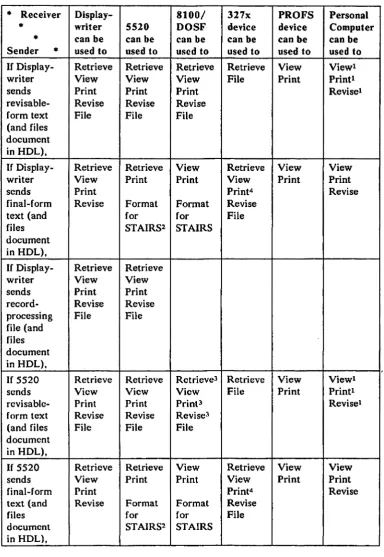
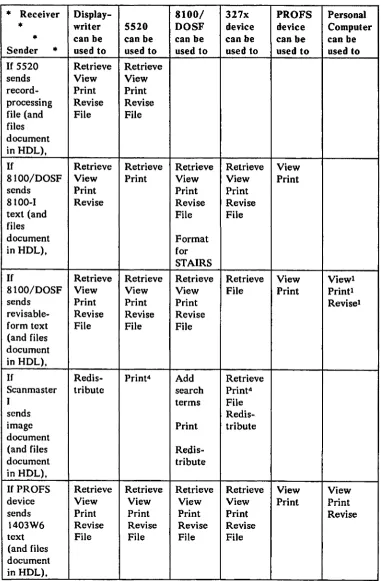
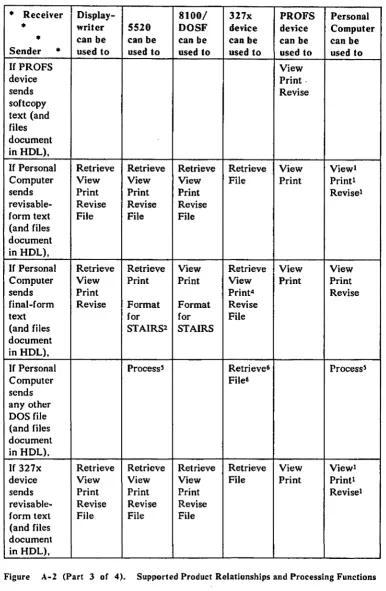
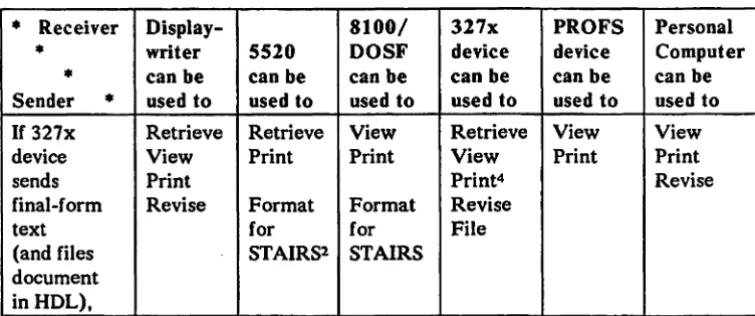
DISOSS-Supported Product Relationships and Processing Functions A-2
Index X-I
Figures
1-1. DISOSS and Supported Products 1-5
1-2. Product Support Summary 1-8
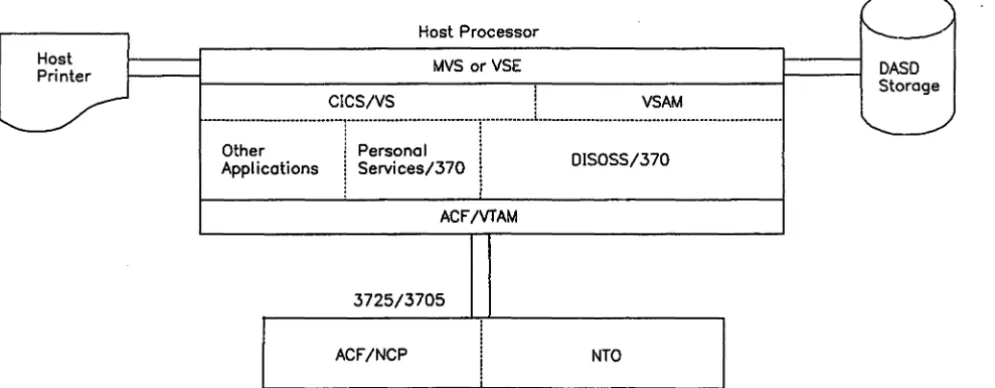
5-1. DISOSS/310 System Environment 5-2
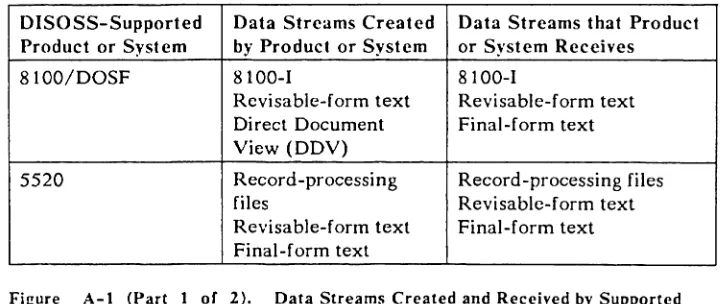
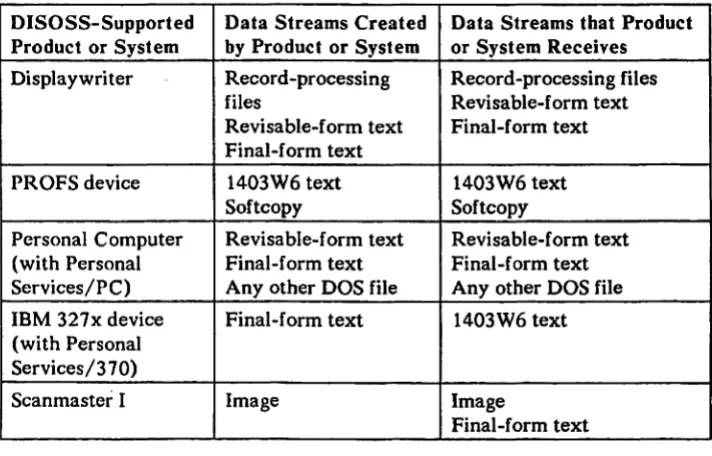
A-I. Data Streams Created and Received by Supported Products A-I
Chapter 1. Introducing the Distributed Office Support System
Today's office is changing and the Distributed Office Support System offers the new features that are needed for this change.
Except for the addition of the electric typewriter, the typical office has remained much the same as it was fifty years ago. It has been a paper-based office requiring more and more people to operate. Salaries and other associated office costs have increased to the point that they are the single largest cost factor for many companies.
In recent years, companies have started to automate their offices to lessen these rapidly increasing costs. However, most of the money spent on office
automation has been to increase the productivity of the relatively small number of office personnel (typists, secretaries, clerks, and so on). Almost nothing has been done to enhance the productivity of the management and professional personnel who account for the biggest percentage of office personnel costs.
In spite of rising office costs, today's office must obtain timely and accurate information with which to make important decisions. It must also satisfy the increasing demands for information gathering and reporting.
Office automation has led to an increasing use of word-processing equipment. This has helped create error-free text that can be stored and reused. After the text and reports have been generated, however, it still takes a lot of time to distribute the information. This distribution time lag reduces the ability of a company to react promptly to changing market conditions.
The Distributed Office Support System/370 program product (called DISOSS in the remainder of this book) offers a systematic approach to solving these office
problems. If you are not now using word-processing equipment, DISOSS and its
devices can provide an automated office system for your management, professional, and office personnel. If you are now using word-processing equipment, DISOSS can connect your equipment into your data-processing system to increase the benefits to your company.
DISOSS offers:
• A centralized information filing and retrieval system
An integrated network distribution system
Host services
Library services allow information created at a word-processing work station or
entered at an IBM Scanmaster I-an image scanning and printing device- to be
stored in the DISOSS document library in the host processor to which the work station is attached. A document (any information you want saved) can be filed in the host document library with a description that can later be used for locating the document. A document can be retrieved from the DISOSS document library to be viewed, printed, distributed, or revised by your authorized personnel. The specific office tasks your users can perform on a document filed in the DISOSS document library depend upon the functions of their work stations.
Distribution services allow information created at a work station or retrieved
from the document library to be distributed to any other DISOSS user. You can distribute documents to, and receive documents from, other users within the same DISOSS system or on a different DISOSS system.
In addition, DISOSS provides host services. This group of functions includes a host printing and formatting facility and the ability to submit a batch job to a host processor from a work station.
These three areas-library services, distribution services, and host
services-plus others are described in this book. After reading it, you will understand what benefits DISOSS can bring to your organization.
The rest of this chapter is an overview of DISOSS. You will find out how DISOSS fits into your data-processing system, what products it supports, and how these products are supported. You will learn about the security features DISOSS offers to protect your information and about the national languages DISOSS supports. In addition, if you have an earlier version of DISOSS/370 installed, you will learn how to migrate to Version 3 Release 3.
DISOSS and the Data-Processing System
DISOSS is an IBM host-based program product that uses IBM's Systems Network Architecture (SNA) for communication with its related products. Since this is the same communication facility used by your data-processing system, word-processing programs can run on the same system as your data-processing applications. This enables you to:
• Fit office functions directly into your existing network operation and
management
• Share communication facilities (lines) and other system resources
Access host data-processing data bases and application programs
.
Use the interface provided by DISOSS to allow data-processing programs to access documents stored in the DISOSS document library
To make data processing available to yo.u, DISOSS depends upon several other host program products. A description of the hardware and software
requirements for DISOSS is in "Chapter 5. DISOSS Resource Requirements."
Products Supported by DISOSS
Through its support of the following products and their attached devices, DISOSS enables you to automate your document and image filing and distribution processes.
• IBM Displaywriter System (Displaywriter)
IBM 5520 Administrative System (5520)
IBM 81 OO/Distributed Office Support Facility with the Distributed Office Support System/8100/DOSF (8100/DOSF)
• IBM Scanmaster I (Scanmaster I)
• IBM Professional Office System (PROFS) (for distribution services only)
• IBM Personal Computer with the Personal Services/PC program product
(for distribution services only)
IBM 327x display stations with the Personal Services/370 program product
Figure 1-1 on page 1-5 shows a DISOSS system with all of the supported products. The following paragraphs describe each of these products.
IBM Displaywritcr System
The IBM Displaywriter System is a diskette-based text processor. It can create and edit text and send or receive information over communication lines from compatible office equipment and computers. Licensed programs provide the IBM Disp\aywriter System functions, such as text processing. record processing. data processing, and electronic communications.
By using text processing, the user can create, revise, or store a document on a diskette. The user can also use a spelling verification aid to compare words in a document with stored dictionaries. Additional words can be added to the dictionaries to meet any specific spelling needs of the user.
By using records processing, the user can create and maintain lists (files) of variables on the Displaywriter diskette. With no programming skills, an operator can request that the Displaywriter print final-form reports from these files or merge the variables into text documents (for example, a contract or a letter).
The data-processing support enables a Displaywriter operator to execute BASIC, FORTRAN, or PASCAL programs on a Displaywriter. In addition,
data maintained by data-processing applications can be converted and used by text or records-processing applications.
IBM 5520 Administrative System
The IBM 5520 Administrative System}s a shared-logic text and files processor that can create and edit documents and send or receive information over communication lines from compatible office equipment and computers. It contains internal dis'k storage for documents being processed or for storing frequently used documents or documents shared by several users. External diskette storage is available for placing infrequently used documents on external
storage or for transferring documents to another 5520 system. An mM licensed
program controls all 5520 processing and controls the flow of information to and from attached devices on the 5520 system. The IBM 5520 Administrative System supports the IBM 5253 Display Station and the IBM Personal Computer emulating the IBM 5253 Display Station.
By using text and file processing, the user can create, revise, or store a
document on disk or diskette storage. The document ~n be printed by an
attached printer or accessed by another 5520 user. Multiple systems can be
connected to make up a network of 5520 and other compatible systems for document distribution.
IBM 8100/DOSF System
DISOSS supports an IBM 8100/DOSF system with the IBM Distributed Office Support System/81 OO/DOSF program product. This system is made up of three separate products: (1) an 8100 Information System with a Data Processing Control Executive (DPCX) operating system, (2) the Distributed Office Support Facility (DOSF), and (3) the Distributed Office Support System/8100/DOSF (OIS0SS/81 OO/DOSF). DOSF adds text processing to the 8100 Information System. The Distributed Office Support
System/8100/DOSF program product assists 8100/DOSF users to gain access to host processor resources for filing and retrieving documents and for
exchanging documents and messages with other DISOSS users.
IBM Displaywriter System
IBM PROFS (VM) Support
IBM 8100/DOSF
Information System
IBM Displaywriter
IBM Personal Services/370
IBM
Application Programming Interface (API)
Personal Computer
IBM Personal Computer
FiJ:ure 1-1. D1S0SS and Supported Products
IBM Scanmaster I
6670 Information Distribution System
IBM 5520 Administrative System
-~q~
IBM Personal Computer and Personal Services/PC
DISOSS provides distribution services support for attachment of IBM Personal Computers, IBM 3270 Personal Computers. and IBM Personal Computer XTs (PC-XTs) as asynchronous and 327x emulator devices. The IBM Personal Services/PC program product provides document interchange capability among Personal Computer software applications that have common data formats. Personal Services/PC can be used to send, receive. view. and print final-form and revisable-form text documents or messages.
IBM Personal Services/370
Personal Services/370 provides distribution,library, and host services for attachment of IBM 327x devices through use of the DISOSS application programming interface (API).
IBM Professional Office System (PROFS)
IBM Scan master I
Security
DISOSS provides distribution services support for connecting PROFS (VM/CMS) devices to DISOSS (for MVS only).
The IBM Scanmaster I can scan and print images and can also print text. It can
communicate with another Scanmaster I directly or through a host processor. A document is scanned at the sending location and its image is transmitted to a receiving Scanmaster I, where it is printed. or to the DISOSS document library. where it is filed. The Scanmaster I offers an automatic document feeder and selectable scanning and darkness-control levels. It can also be used as a local copying device.
DISOSS el1ables a user to enter an image document at a Scanmaster I for filing in the host document library. The document can then be distributed at a word-processing work station. DISOSS also controls the direct distribution and
receiving of an image document using a Scanmaster I. Displaywriter and
8100/DOSF users can distribute final-form text documents and messages to any Scan master I for printing. Furthermore, 8100/DOSF and 5520 users can use a host-attached Scanmaster I to print text or image documents.
Because the storage, retrieval, and distribution of information could allow access by unauthorized persons. security is a major concern for a company. The internal design of DISOSS enables your company to address the unauthorized use of DISOSS resources and limit access to documents. The program products used in conjunction with DISOSS also offer additional security features.
automatically designating document owners and by enabling document owners to restrict access to their documents.
These and other security features provided by DISOSS are described in "Security Aids Included in OIS0SS" on page 4-4.
National Language Support
DISOSS provides translated distribution status heading information for the Displaywriter, messages for the Scanmaster I, headings for the 8100/DOSF Direct Document View panels, and end-user messages in the following languages:
Danish Norwegian German
Previous DISOSS Versions
Italian French Swedish
Dutch Spanish U.S. English
DISOSS Version 3 is an enhancement of OIS0SS/370 Versions 1 and 2 and
DISOSS/VSE Releases 1 and 2. If you are now using either of these previous
DISOSS versions and want to take advantage of Version3's extended functions and product support, you can do so by using the DISOSS Version 3 migration utility programs.
DISOSS Version 3 uses CICS/VS for data base and communication
management. If you are using a previous DISOSS version and are currently
using IMS/VS for data base management, you can use the Version 3 migration utility programs as an aid in converting your DISOSS libraries to CICS/VS.
These utility programs are described in "Migration to DISOSS Version 3 Release 3" on page 4-13.
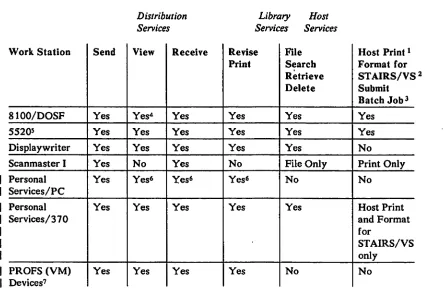
Product Support Summary
Figure 1-2 on page l-El summarizes the functions provided by DISOSS to each
of its supported products. See" Appendix A. Document Interchange among Supported Products" for more details on the functions that each work station can perform.
Work Station Send
8100/DOSF Yes
55205 Yes
Displaywriter Yes
Scanmaster I Yes
Personal Yes
Services/PC
Personal Yes
Services/370
PROFS (VM) Yes
Devices7
Distribution Services
View Receive
Yes4 Yes
Yes Yes
Yes Yes
No Yes
Yes6 Yes6
Yes Yes
Yes Yes
Library Host Services Services
Revise File Host Print 1
Print Searcb Format for
Retrieve STAIRS/VS 2
Delete Submit
Batcb Jobl
Yes Yes Yes
Yes Yes Yes
Yes Yes No
No File Only Print Only
Yes6 No No
Yes Yes Host Print
and Format for
STAIRS/VS only
[image:21.599.31.479.89.389.2]Yes No No
Figure 1-2. Product Support Summary
Notes:
1. The user can request printing of a document on a host-attached system printer (for example. a 1403, 3800, or 6670 printer) or a Scan master I. (This is in addition to local printing provided by the devices.)
2. Storage and Information Retrieval System/Virtual Storage (5740-XR1 OS/VS, 5746-XR4 DOS/VS).
3. The user can submit a batch job to the host processor from a work station.
4. In addition to viewing documents created on the 8JOO/DOSF, users can view and browse documents filed in the DISOSS document library without first retrieving them (direct document viewing) .
.5. 5.520 Release 3 is required to use the distribution services provided by DISOSS.
For .5520 Release 2, a 5520 user is supported with library services and host services.
6. Requires IBM DisplayWrite or PCWrite.
Chapter 2. How DISOSS Meets Your Office Requirements
By combining DISOSS with various work stations and the Scanmaster I, you can establish an electronic office system that can solve many of the problems existing in a conventional office. Of special concern to most companies is getting timely and accurate information for making decisions. Companies must also satisfy an ever-increasing demand for accumulating information and statistics for required reports. There are two basic elements for solving these information management problems. They are:
• An automated document filing and retrieval system
• An automated document distribution system
After reading this section, you will understand how an office system consisting of DISOSS and a combination of supported IBM work stations and products (such as Displaywriter, 5520, 8100/DOSF, Personal Services/PC, Personal Services/370, Professional Office System (PROFS), and Scanmaster I) can satisfy your office requirements and can help:
Increase the productivity of professional and administrative personnel
• Improve office efficiency and, therefore. provide more time for creativity,
thinking. and analyzing important issues
• Improve communication between decision-makers
An Automated Filing and Retrieval System
The first element for solving many of the problems in today's office is an automated filing and retrieval system to make accurate, up-to-date information available to all of your personnel.
Filing Problems in a Conventional Office
If you have a conventional filing system, you probably have file cabinets containing paper copies of important information controlled by various groups in your company. Each group has its own filing system and controls access to its files, even though other groups in your company have a valid need for the information. Anyone needing the information must request it from the controlling group. The controlling group must find the information, make a copy of it, and give it to the requestor. This may be as easy as handing the information to the requestor or it may involve transmittal over a long distance requiring several days.
To further complicate matters, there is probably one person responsible for maintaining each group file. If that person is unavailable, the needed
information often cannot be located. Another problem that may occur is that the information has not yet been filed or that the information was filed some time ago and has been transferred to another site for long-term storage.
Overall, it is often difficult to find information using a conventional filing. system.
The DISOSS Solution
Filing a Text Document
DISOSS provides a host document library to allow your management and office personnel to file, search for, retrieve, and delete documents in an automated filing system. The term "document" is meant to include whatever you need filed-reports, form letters, regulations, correspondence, customer records, and image documents. With DISOSS, everyone having a need for certain
information can be allowed to find it and retrieve it as needed. Each authorized user has easy access to the information stored in the host DISOSS system.
After creating a document at a work station or receiving a text document from another user, you can file (store) the document in the host document library for future use. (Whenever a reference is made to filing a document in this
publication, it always means filing the document in your DISOSS host document library.)
Filing an Image Document
way, anyone looking for an external document can see when it arrived, who it was from, the subject, and where it is filed in your paper filing system.
Because you know best how to classify your organization's documents, OISOSS allows you to define your filing needs by using a document class. Some
examples of possible document classes are a letter, report, project-related records, or any other special class, such as image documents. DISOSS files each document according to its specified class, and you can then establish a
document retention schedule based on the document class and date.
In addition to the document class, you can define other descriptive terms to make it easy to find a document after it has been filed. For example, you can define document name, date, recipients, and search terms that define the document's contents. By establishing meaningful standards for your organization, any user can describe and retrieve needed information, even though the user did not file the document originally.
In addition to filing a text document from a work station, you can use a
Scanmaster I to file an image document. It can then be retrieved whenever you need it.
If you want to file an image document, you enter the document at the
Scanmaster 1. OISOSS needs your Scanmaster user identifier and a document identifier. This information is sent to OISOSS by marking a form called a file coversheet or by keying the information using the numeric keypad on the Scanmaster 1.
After filing the image document, a user must then go to any work station attached to the same OISOSS host system for additional handling:
A Displaywriter user can search for an image document, distribute it to a Scanmaster I for printing, or delete it.
• A 5520 user with library services can search for an image document, print
it on a host-attached Scanmaster I, or delete it.
• An 8100/DOSF user can search for an image document, add search terms
and access codes, distribute or redistribute the image document, print it on a host-attached Scanmaster I, or delete it.
• A Personal Services/370 user can search for an image document, add
search terms and access codes, distribute or redistribute the image document, print it on a host-attached Scan master I, or delete it.
Controlling Access to a Document
\
OISOSS not only makes it easy for you to find information, it helps you make the information secure. While information is readily available to those who have a legitimate need for it, sensitive information can be restricted by using access codes. When you file a document, you decide whether to assign access codes. If you do not assign an access code, only you or a specified delegate can use the document. If you do assign access codes, only those users who have
Retrieving a Document
been defined to DISOSS as being authorized to access documents with those codes can use the document.
DISOSS also lets you change ownership of documents when another user assumes responsibility for them. Your company can continue to control access to information when job responsibilities change.
Anyone who has authorized access to a document can retrieve it from the host document library. A user can search for the document and then view it, print it, edit it, or distribute it to another user. However, when a document is filed by a user at one work station type and it is retrieved by a user at a different type of work station, there are some restrictions on the processing that is allowed. See "Library Services" on page 3-2 for specific details.
An Automated Document Distribution System
The second basic element for solving the problems existing in today's office is an automated document distribution system. This can reduce the time that information is in transit and increase the time that information is available to your personnel.
Document Distribution Problems in a Conventional Office
With a conventional document distribution system, it often takes a lot of time to distribute information that is needed to make an important real-time decision.
Often, when the need for specific information is recognized, a telephone call is made to where the information is believed to be located. At the receiving location, someone starts to look for the information in the file cabinets. When it has been found, the information is duplicated and rushed to where it is needed. That might be on the next floor of the same building, in another building, or even in another city. The information might arrive too late to influence a decision that must be made immediately.
The DISOSS Solution
DISOSS provides document distribution services that enable you to get the
information you need to make important decisions and to keep y.our comp~y
office personnel will no longer need to wait for the manual delivery of a document.
Distributing a Document Using a Work Station
Within work station limitations, a document filed in your DISOSS document library can be distributed to anyone defined within a DISOSS network. DISOSS handles some of the conversions necessary to distribute a document between two different types of devices. It also handles the routing necessary to
distribute a document to any DISOSS, PROFS, or 5520 system in your network. All you need to know is the recipient's user name. You can make this easy for your users by setting up a DISOSS user directory for your company.
In addition to distributing documents, you can include a message with the distributed document to let the recipient know exactly what action you want taken. Distributions may be specified for personal or priority handling, if requested. DISOSS can also let the sender know when a distribution arrives at the intended destination.
By checking their delivery queue, recipients can choose to obtain, view, redistribute, print, file, or delete the document. The processing options available to the recipient are based upon the type of work station that distributed the document and the type of work station used by the recipient. These options are described in "Distribution Services" on page 3-3.
Distributing a Document Using a Scanmaster I
Besides the document library and distribution service described above, DISOSS offers another option for communication between users. By attaching a
Scanmaster I to DISOSS, you can distribute an image document to any other Scanmaster I in your DISOSS network.
Using a Scan master I, you can distribute an image document to individual recipients or to a distribution list that has been previously defined to DISOSS. DISOSS requires only the Scanmasler identifier assigned to the sender and to each recipient or distribution list. This information is provided by marking a form called a distribution coversheet or by keying the information on the Scanmaster I keypad.
You can also use the coversheet or keypad to specify that the distribution is personal or to request that the distribution be given priority in delivering it to the recipient.
After a document has been entered at the Scanmaster I, DISOSS controls its · distribution. This means that you can enter a document at your convenience, · without requiring a connection with the receiving Scan master I and without
requiring that the receiving Scanmaster I be available.
You have two choices for receiving a document at a Scanmaster I. A document · can be automatically printed at the receiving Scanmaster I without requiring
any action by the recipient or DISOSS can store the document until the recipient requests it.
Chapter 3. What DISOSS Provides
DISOSS plays an important role in an IBM office system by serving as a central link between products, providing a centralized filing and retrieval system and multi host distribution (within limitations noted in this chapter).
Specifically, this chapter describes:
Library services for the Displaywriter, 5520, 8100/DOSF, and Personal Services/370 products
• Distribution services for the Displaywriter, 5520, 8100/DOSF, Personal
Services/PC, Personal Services/370. and Professional Office System (PROFS) products
• Scanmaster I allows the filing and distribution of image documents
• Document interchange among products
• Definition of users performing work for one another
An application program interface to allow user applications to use DISOSS
• An application program interface sample program to aid in the creation of a
user directory
Interactive service aids that enable users to display queues and routing information and to delete entries from the queues
• Host services for the 5520, 8100/DOSF, and Personal Services/370
products
Library Services
Filing a Document
DlSOSS provides the Displaywriter, 5520, 81 OO/DOSF, and Personal
Services/370 products and application programs with library services that file, search for, retrieve, and delete text documents from a host document library. DISOSS also automatically reclaims the library storage space when a document is deleted from the document library. (Library services provided for the Scanmaster I are described in "Scan master I Support" on page 3-5.)
When a user requests that a document be filed, DISOSS stores the document in the host document library. In a file request, a user defines the document name, date, author, recipients, document class, and any chosen search terms that reflect the document contents. DISOSS uses this description to create search arguments that are filed in a document library index. The search arguments can then be used.in locating the document in the document library.
DlSOSS also allows a description of an external document to be filed in the document library index. A user can search for the external document in the same way as for a document filed in the document library. A user can
determine when the document was received, the name of the sender, the name of the recipient, and where it is filed outside of the DlSOSS system.
DISOSS assigns a unique library name to each filed document. For Displaywriter, 5520, and Personal Services/370 users, the DISOSS
library-assigned document name can be used for future retrieval of a document.
DISOSS classifies the filer of a document as the primary owner. As primary owner, the filer can control access to a specific document by choosing to assign or not to assign access codes. (The concepts of document ownership and access codes as related to document security are described in "Security Aids Included in DISOSS" on page 4-4.)
For 81 OO/DOSF, if a document is filed by the primary owner with a name used previously, DISOSS creates a new version of the document and assigns a unique library document name. The earlier version is not replaced; DISOSS retains each version until it has been specifically deleted from the document library. When the owner searches for the document, DISOSS supplies the name and all existing version numbers.
Searching for a Document
When a user enters a search request, DISOSS searches the document library for documents owned by the requestor and those to which the requestor has access. DISOSS looks for those authorized documents whose search arguments match· the criteria specified in the search request. If a user does not know the exact search arguments defined for the document, the user can specify some alternative search arguments. For example, a user could search for all documents containing auto, car, automobile, or vehicle as a search argument.
Then DISOSS can look for all the documents whose search arguments match any of the search arguments but do not necessarily match all of them.
DISOSS creates a list of document descriptions that match the search arguments and stores it in a search results file. A user can then retrieve any or all of the matching documents in the search results file.
Retrieving a Document
Deleting a Document
DISOSS retrieves and delivers a document from the document library as the result of a user request. The retrieval request specifies the results of a search request. A Displaywriter. 5520, or Personal Services/370 user has the option of specifying (he library-assigned document name when retrieving a document.
If more than one document fits the criteria specified in a search request, DISOSS provides a list of document descriptions in the search results file. A user can then select a document description from the search results file and retrieve the description from the document library instead of the document itself. A Displaywriter. 5520. or Personal Services/370 user can specify that all of the document descriptions be automatically returned as a result of a search request. In that case. the user does not have to issue a specific retrieval request for them. In either case, a user can determine which document are needed and can issue a retrieval request for the required document.
As mentioned earlier, DISOSS classifies the filer of a document as the primary owner. When a document is distributed by the primary owner, DISOSS
classifies each recipient as a secondary owner. When any of the owners request DISOSS to delete a particular document, DISOSS deletes that owner's access to the document. DISOSS does not delete the document itself at this time (unless no one else is classified as the owner of the document). When the last
remaining document owner requests deletion. DISOSS deletes the actual document from the document library. Documents can also be deleted by using the Library Management utility program. After a document has been deleted. DISOSS automatically reclaims the document storage space for reuse.
Like a retrieval request, the delete request can specify either the
library-assigned document name or a selection from the results of a search request.
Distribution
Services
DISOSS provides multihost document distribution services among
Displaywriter. 5520 Release 3. 8100/DOSF, Personal Services/370, Personal
Services/PC, PROFS, and Scanmaster I users. User-written 370/host
application programs may also use distribution services. Distribution among
users of different devices is limited by the type of documents and character sets that a device accepts.
Distribution services include distributing a document among users on the same or on a different DISOSS system, on a PROFS system, or on a 5520 Release 3 Administrative System. Users on separate DISOSS, PROFS, or 5520 Release 3 systems can interchange documents without knowing that they are not on the same DISOSS system. DISOSS distributes documents to other systems in a network using the Systems Network Architecture (SNA) Distribution Services or a special DISOSS-PROFS connection.
Document distribution requests are entered at the user's convenience, without requiring an immediate connection with other systems (nodes). DISOSS temporarily stores documents awaiting delivery to another node until the connection to that node is available.
Users need only be defined to the DISOSS, 5520, or PROFS system to which they are directly attached. However, each user name, combined with the node name, must be unique across the network. Standard naming conventions for Displaywriter, 5520. Personal Services/PC, Personal Services/370, and PROFS users create unique network names. Standard names for 8100/DOSF and Scanmaster I users are converted to network-unique names in the host user profile (HUP). Mapping for user names must be defined in the node to which the users are associated.
However, DISOSS allows 81 OO/DOSF and Scanmaster I users to be defined using the unique name format. In that case, these users need to be defined only in the node to which they are attached. DISOSS does not, however, verify that the user names are unique across the network. Because of this, it is
recommended that naming conventions that create unique names be followed for all users.
More information on how DISOSS handles the various naming conventions in providing document interchange among products is described in a later section called "Document Interchange" on page 3-7.
Distributing a Document
DISOSS provides document and message distribution to individual recipients that have been previously defined to DISOSS. DISOSS returns a confirmation of document delivery to the sender, if requested.
Documents distributed by an 8100/DOSF user are always filed in the host document library. DISOSS also optionally files documents distributed by a Displaywriter. PROFS, Personal Services/PC, or Personal Services/370 user. Documents distributed by a 5520 user defined with distribution services are not filed as part of distribution.
Displaywriter, Scanmaster I, and Personal Services/PC users may designate a document distribution as personal. If it is a personal distribution, it is delivered
only to the specified recipient. ',.;,
Displaywriter, Scanmaster I, and Personal Services/PC users may also designate a distribution request to receive a priority distfibution before other
Receiving a Document
non-priority distributions. DISOSS sends priority distributions ahead of non-priority distributions. An organization can choose to set up a different route for sending priority distributions.
The products supported by DISOSS receive documents differently.
A document distributed to an 81 OO/DOSF user is filed and is stored in a queue in the DISOSS host for the 8100/DOSF system. The 8100/DOSF obtains the document and creates an entry in the recipient's mail log. The 8100/DOSF user checks the mail log and decides how to process the document; that is, to
redistribute it, print it, or delete it.
DISOSS stores a document distributed to a Displaywriter, Personal
Services/370, or Personal Services/PC user in a queue in the DISOSS host until the user requests delivery. Optionally, DISOSS may also file the document. Displaywriter, Personal Services/370, or Personal Services/PC users can list the contents of the document delivery queue and decide how to process the documents. The user may obtain all of the documents or specific ones or may choose to cancel delivery of specific documents. Personal Services/370 users may obtain all of the documents in their delivery queue or cancel document delivery.
A document distributed to a 5520 Release 3,user is sent to the 5520 node. For 5520 users defined as having only library services, the distributed document is filed in the DISOSS document library.
Scannlaster I Support
DISOSS supports the Scanmaster I by handling the distribution and receipt of an image document. It allows the filing of an image document entered at a
Scanmaster I. DISOSS also allows text documents and messages to be printed at
a Scan master I.
An identification number of up to seven digits is assigned to each Scanmaster I user and is defined at the host DISOSS node.
When a Scanmaster I user wants to send a document, DISOSS is given the Scanmaster identifiers of the sender and each recipient or list of recipients. A DISOSS utility is provided for creating the Scanmaster I distribution lists that allow a document to be sent to many people with one request.
When a Scan master I user, wants to file a document, DISOSS must be given the Scanmaster identifier of the filer. A four-digit document name is optional. DISOSS assigns a name if none is supplied.
Filing an Image Document
When a user files an image document using a Scanmaster I, DISOSS needs the user's Scanmaster identifier and, optionally, a document name. This
information is provided by marking a file coversheet or by keying the information and a File command using the numeric keypad.
DISOSS interprets the filing instructions, verifies that the user has been defined to DISOSS, and returns a printed confirmation message to the user. The
message includes the document name (if provided), the user's name as owner of the document, and a library-assigned document name.
After filing an image document using a Scanmaster I, a user can perform additional processing at a work station. The processing that can be performed was described earlier in "Filing an Image Document" on page 2-3.
Distributing an Image Document
As an alternative to filing an image document, a user can distribute it directly. To enter a document for distribution at a Scanmaster I, a user must supply DISOSS with information on both the sender and the recipients. An image document can be distributed with personal or priority designations as described in "Distributing a Document" on page 3-4. This is done by marking a
distribution coversheet or by keying the information and a Send command on the numeric keypad. The Scanmaster I scans the document and sends it to DISOSS.
DISOSS first interprets the distribution instructions and verifies that the sender has been defined to DISOSS. It also verifies that the recipients have been defined to DISOSS or have a route defined for distribution to them. DISOSS then returns a printed confirmation message to the user. The confirmation message contains the sender and recipients' identifiers and notes any detected errors. If there are no errors, DISOSS delivers the document to the recipient. If
there are any errors detected, DISOSS lists them on the confirmation message and informs the user to correct the distribution instructions and reenter the document.
DISOSS optionally files documents distributed by a Scanmaster I in the host document library.
Receiving an Image Document
DISOSS offers several methods for receiving an image document. If the
recipient has specified that all image documents be automatically printed at a specific Scanmaster I, the document is delivered and printed as soon as possible on that Scanmaster I. If the distribution is personal, a message is printed and the distribution document is stored until the recipient requests it. I •
When the recipient is an 81 OO/DOSF user, DISOSS files the image document. If the recipient has not requested automatic printing, DISOSS stores a
description on the 8100/DOSF queue. The 8100/DOSF obtains the document description and adds an entry to the recipient's mail log to indicate that an image document has been received. The recipient can then print the image document at a Scanmaster I using mail log print or can redistribute the document to another user.
When the recipient is a Displaywriter, Personal Services/370, or Personal Services/PC user who has not requested automatic printing, DISOSS stores the image document on a delivery queue and optionally files it. The user can then list the contents of the delivery queue to determine when there is an image document to obtain. When a request to obtain the image document is entered using the Scanmaster keypad, DISOSS delivers the document to be printed.
When the recipient is a 5520 user defined for library services only. DISOSS files the image document. The 5520 user can then search for the document and use DISOSS host print to print it at a Scan master I. (A 5520 user defined for distribution services cannot receive an image document.)
After receiving an image document, a Personal Services/370 user can view, file, distribute, or print the document.
Printing a Text Document
DISOSS can distribute a final-form text document or message to a Scanmaster I to be printed. A user can be defined so that all text documents and messages sent are automatically printed at a specific Scanmaster I.
If text documents are not automatically printed, a Displaywriter user can enter a specific request using the Scanmaster I keypad to obtain text documents and messages. An 8100/DOSF or 5520 user can use host print to request the printing of a text document at a Scanmaster I.
Document Interchange
DISOSS provides for the interchange of documents among products. This support involves the interchange of a document being filed in and retrieved from the document library and the interchange of a document being distributed among users. DISOSS provides both library services and distribution services for Displaywriter, Personal Services/370, 5520, 81QO/DOSF, and Scanmaster I users. (5520 users can be defined for library services, distribution services, or both library and distribution services. 5520 Release 3 is required for 5520 distribution services.)
Handling Naming Conventions
The products supported by DISOSS use different naming conventions. Because of this, it is recommended that you establish a consistent scheme for defining all user names no matter what work station is used. This will eliminate any problems that may arise because of the different naming conventions used by the products.
However, if different naming conventions are used, DISOSS can handle them automatically without any special action by the user. When a document is filed or distributed, DISOSS transforms the defined user name entered at the source work station into a DISOSS-controlled name called a qualified name. When a document is retrieved from the document library or is received as the result of a distribution request, DISOSS converts the qualified name of the source work station into the form required by the destination work station.
Changing Data Streams
If the source and destination work stations use different types of data streams, DlSOSS changes the data stream (if possible) to ensure that a document is in the correct format to be processed by the destination work station. DISOSS allows the interchange of final-form text documents among Displaywriter,
81 OO/DOSF, and Scanmaster I users and among Displaywriter, 5520,
Scanmaster I, PROFS, Personal Services/PC, and Personal Services/370 users. DISOSS also allows the exchange of revisable-form text documents among Displaywriter, PROFS, Personal Services/PC, Personal Services/370,
8100/DOSF, and 5520 products. PROFS devices can also send 1403W6 data streams. Personal Services/PC users can exchange revisable-form text documents if IBM DisplayWrite or PCWrite are used with the Personal Computer.
To provide for document interchange, DISOSS stores the document as it is entered by the work station. If the work station uses a different format and is directly connected to the DISOSS host system, DISOSS performs the data stream transformation. The data stream transformation is done in accordance with IBM's Document Content Architecture (DCA), which specifies the format of a document.
Different levels of document interchange are possible, depending upon the source and destination work stations, the data streams used, and the function being performed. Appendix A contains detailed information on the data stream transf ormation and document interchange of the supported products.
Definition of Users Performing Work for Others
DISOSS provides for the definition of users who regularly perform work for other users by working on behalf of another and obtaining documents for others.
Displaywriter, API, 5520, 81 OO/DOSF, and Personal Services/PC users can be
defined to DISOSS so that they.z.ln work on their own behalf or on behalf of
others in an established working relationship called an affinity relationship. If
access codes are assigned, the user can then work in behalf of another user within defined limitations.
In addition, Displaywriter and Scanmaster I users can be defined so that they can obtain documents (except personal distributions) being distributed to other users within a specified work group. To obtain another's personal distributions, the specified recipient's identifier and password must be used.
Application Program Interface
DISOSS offers an application program interface to allow user-written application programs to use DISOSS. The application program must be executing on the same CICS/VS subsystem as DISOSS.
Application programs can file, search for, retrieve, and delete documents from the host document library. They can also add search arguments, print
documents on a host-attached printer, receive distributed documents, and distribute documents to other system users.
DISOSS provides these functions by accepting from the application programs a set of Document Interchange Architecture (DIA) commands. The use of the
application program interface and DIA commands is described in the DISOSS
Application Programming publication.
Note: Personal Services/370 is a program product that uses the application
programming interface (API) to provide DlSOSS support for IBM 327x devices.
Application Program Interface Sample Program
DISOSS provides a sample program that uses the application program interface. The sample program provides guidance to an organization in developing application programs of its own. An organization can then use the DISOSS and CICS/VS to offer additional support to its users.
The sample program provides an online user directory that enables
Displaywriter and 8100/DOSF users to create directory entries for their work groups, using their work stations. With the aid of a DISOSS-supplied skeleton document, users fill in the user name, user system identifier, Scanmaster identifier, location, and telephone number. Optional fields, such as address and job title, can also be added. Using their usual distribution procedure, users send the directory document to the directory program. A user can add, change, or remove directory entries.
Users can find the directory entry for an individual or all of the entries for a location by sending a request to the directory program. A shortened name may
Service Aids
Host Services
DISOSS provides a set of operator commands that help a system administrator or network operator monitor DISOSS distribution operations. The operator or system administrator at a 327x terminal can:
• Display: (1) All of the names of a specified user (network unique name,
Scanmaster I identifier, 8100/DOSF name); (2) the next node in a route used for distribution to the user; or (3) the local queue where that user's distributions are held until delivery
• Determine the size of a queue and how long the first (the next entry to be
serviced) and the oldest entries have been on the queue
Locate a document distribution request by specifying the originator or recipient of the distribution request
Display the name of the sender and recipient and the date and time of the first or all entries on a queue
• Display the document type
Locate the next node in a route
• Delete an entry from a distribution queue
Queue displays can specify a specific queue, a group of queues, or all queues.
DISOSS provides host services for 8100/DOSF, 5520, and Personal Services/370 users. Host services include:
• Batch job submission
• Host print/format facilities
• Direct Document View Facility (8100/DOSF only)
• Document Transmission Facility (8100/DOSF only)
Batch Job Submission
DISOSS enables an 8100/DOSF, 5520, or Personal Services/370 user to submit a data-processing batch job to the host processor. When a batch job is
submitted, a set of job-control statements is created by DISOSS, based on installation parameters. The job control procedure used with the submitted job must have been stored in a procedure library.
While this function is primarily intended to supply some parameters to a program to be executed, it can also be used to transfer a document to the host processor for processin'g by a suitable program.
Host Printing and Formatting Facilities
DISOSS provides host formatting and printing support by allowing an organization to define a printer description table tailored to its own needs. It contains the characteristics of each output device or program. The output devices and programs allowed are the IBM Storage and Information Retrieval System/Virtual Storage (STAIRS/VS) program, a user-defined formatting program, host-attached printers, or a Scanmaster I. DISOSS also converts revisable-form documents into final-form documents for host printing.
DlSOSS provides a STAIRS/VS format facility that formats a document in the condensed text format required for loading a STAIRS/VS data base.
DISOSS enables an 8100/DOSF, 5520, or Personal Services/370 user to format a text document that is stored in the host document library with a user-written formatter instead of the DISOSS host print formatter.
DISOSS enables a user to request that a document in the library be printed on a host-attached printer (for example, a 1403,3800, or 6670) or at a Scanmaster I.
This function makes it possible for a user to take advantage of the high-speed and volume printing offered by host-attached printers. Defining a Scanmaster I
as a printer enables a user who does not have a work station to receive image and text documents at a location that may be more convenient than a system printer.
Direct Document View
DISOSS enables an 8100/DOSF user to use the Direct Document View (DDV) facility to display a text document stored in the document library without retrieving the document.
Document Transmission Facility
Chapter 4. What You Should Know about DISOSS
By now, you should understand what DISOSS offers in the way of functions and how the functions can be used in your office. However, there are probably some other points you are interested in:
• What is necessary to make DISOSS operational and to start using it
• What kind of security aids, administration aids, and support is available
Also, if you have an earlier version or release of DISOSS installed, you want to know what steps are necessary to install Version 3 Release 3.
Making DISOSS Operational
Planning for DISOSS
Prcinstallation Effort
There are three stages in getting DISOSS ready for active use. You must (1) plan for DISOSS, (2) prepare for installation, and (3) install DISOSS. Thorough planning and preparation will make the installation stage easier.
Planning for DISOSS involves setting specific goals for automating your office activities and relating those goals to the way you want to implement DISOSS. After setting your goals, you should decide on how to implement DISOSS. You might choos~ to include your entire organization in the DISOSS office system. Or, you might choose initially to implement DISOSS in several related groups or in a single work group.
You must also define your current office environment. For example, you should determine what your current work procedures are, what kinds of
documents are created, what groups work together, and so on. After you define your current practices, you can better define how you want to use DISOSS and what kinds of work procedures you need.
DISOSS preinstallation effort can actually be considered another planning task...,...one in which you make decisions that are necessary for installation to proceed smoothly. It includes developing your system installation plan, setting naming standards, and defining your users.
Before you install DISOSS, you should develop a system installation plan to fit DISOSS into your current information-processing system. The required host processor programs must be operational or installed. You must decide which office system devices are to go in which locations in order to make best use of the DISOSS document interchange.
If you are setting up a multi host DISOSS network, you must define the routes to be used to distribute information from one DISOSS, 5520, or Professional Office System (PROFS) system to another.
Setting naming standards and procedures for your organization before installation will help improve the security and effectiveness of your DISOSS office system. Naming conventions that are logical and easy to remember lead to orderly storage of information and effective retrieval of it. This is really no different than setting up a standardized, conventional filing.system.
Another important task that should be done before installation is for you to
define your users. You must define your user names,:password;~ Scanmaster
identifiers, access codes, and affinity relationships. Defining this before installation allows you to implement security procedures th~t are provided by
DISOSS Installation
The DISOSS Planning Guide gives details of all of these recommended planning and preinstallation steps. It also includes information gathering forms and checklists that you can use to prepare for DISOSS installation.
DISOSS simplifies installation by providing an Installation Assist process. The Installation Assist process consists of editable sample definition statements for a DISOSS system and all of the definitions required to include DISOSS in the CICS/VS subsystem. These definitions can be combined with the CICS/VS Starter System definitions to generate a pretested CICS/VS-DISOSS system.
As part of the Installation Assist process, DISOSS provides matching
telecommunications definitions (ACF/VTAM, ACF/NCP, and NTO) that are required to add other DISOSS hosts, Displaywriter, 5520 Administrative System, 8100/DOSF Information System, Personal Computer, PROFS connection, and Scanmaster I products to existing network definitions. Also included are the definitions of DlSOSS data sets required to define an initial DISOSS host document library and host user profile.
If you use the Installation Assist process, you can reduce the time required to install an initial DISOSS system.
DISOSS also provides utility programs to help you modify the supplied definitions to meet your needs:
• The Host Definition utility defines your resources to DISOSS.
The Data Base Initialization utility initializes the DlSOSS data sets for use.
• The Host User Profile Create and Maintenance utility defines user information to DISOSS.
• The Routing Create and Maintenance utility defines routing information to DISOSS.
Examples of all utility programs are provided in DISOSS Installation Assist. DISOSS installation is simplified by the use of step-by-step procedures that are included in the DISOSS Installation GUide.
Starting to Use DISOSS
You can make the conversion to DISOSS easy for your personnel and nondisruptive to your organization by establishing a conversion plan and educating your personnel.
Establish a Conversion Plan
Whether you are con