Systems
GC26-3846-3 File No. S370-30
IBM 3800 Printing Subsystem
Programmer's Guide
OS/VS1 Release 7 OS/VS2 MVS Release 3.8
-- -- -- --
Page of GC26-3846-3 as updated 25 Jan 1980 by TNl GN26-0964
This publication was produced using the IBM Document Composition Facility
(program number 5748-XX9) and the master was printed on the
IBM 3800 Printing Subsystem.
Fourth Edition (January 1980)
This edition, as amended by technical newsletter GN26-0964, applies to Release 7 of IBM OS/VS1, and to Release 3.8 of IBM OS/VS2 MVS, and to any subsequent releases of either system until otherwise indicated in new editions or technical newsletters.
The changes for this edition are summarized under "OS/VSl. Summary of Amendments" or "OS/VS2 MVS Summary of Amendments" following the list of figures. Information about the IBM 3800 Printing Subsystem Enhancements is for planning purposes only, until availability of the product. Since this publication has been completely reorganized, technical changes are not marked by vertical lines.
Changes are periodically made to the information herein; before using this publication in connection with the operation of IBM systems, consult the latest IBM System/370 and 4300 Processors Bibliography, GC20-0001, for the editions that are applicable and current.
It is possible that this material may contain reference to, or information about, IBM products (machines and programs),
programming, or services that are not announced in your country. Such references or information must not be construed to mean that IBM intends to announce such IBM products, programming, or services in your country.
Publications are not stocked at the address given below; requests for IBM publications should be made to your IBM representative or to the IBM branch office serving your locality.
A form for reader's comments is provided at the back of this publication. If the form has been removed, comments may be addressed to IBM Corporation, General Products Division, Department 61C, Tucson, Arizona, U.S.A. 85744. IBM may use or distribute any of the information you supply in any way it believes appropriate without incurring any obligation whatever. You may, of course, continue to use the information you supply.
© Copyright International Business Machines Corporation 1975,
PREFACE
This book provides:
•
Planning and converlion information for the IBM 3800
Printing Subsystem. The intended aud;ence ;s data-processing managers1 system planners, and system programmers planning to incorporate a 3800 into computer installations.
• Information on how to use the 3800. This is intended for
application programmers and system programmers who will be using the 3800 Printing Subsystem.
There is no prerequisite reading for this publication, although a basic knowledge of computers and system printers is assumed.
STRUCTURE OF THIS PUBLICATION
This publication has been arranged in four major sections. The material in each section is divided under chapter headings and subheadings. The chapter headings are reflected in the footings on odd-numbered pages. This organization was chosen to increase retrievability of the information in the publication by creating many chapter headings, and therefore, many footings for the user to scan in searching for data.
"Section 1. Introduction" describes the IBM 3800 Printing Subsystem, how it works, and how to maintain compatibility between the 3800 and the IBM impact printers.
"Section 2. How to Use the 3800 Printing Subsystem" descibes how, as a user of the 3800 Printing Subsystem, you can take advantage of its various capabilities.
"Section 3. Supporting the 3800 Printing Subsystem" describes, for the system programmer, some special considerations for controlling the 3800 when allocating the printer directly or through JES.
"Section 4. The IEBIMAGE Utility Program" is a reference
section. In it are the details of what IEBIMAGE does and how the control statements are to be coded.
Appendixes A through F contain detailed reference information about the 3800 character sets, library modules, paper standards, channel commands, and sense bytes.
The Glossary contains definitions of terms as they are used in this publication.
RELATED PUBLICATIONS
The following publications contain additional information about the 3800 Printing Subsystem. Some of them are referenced in this book:
• IBM 3800 Printing Subsystem Enhancements System Information,
GC26-3935, which contains a general description of the 3800 Enhancements, and details for ordering the Enhancement packages and related publications.
• Forms Design Reference Guide for the IBM 3800 Printing Subsystem, GA26-l633, which contains information on forms design and on designing and making or obtaining forms overlays.
• IBM 3800 Printing Subsystem Print line and Character Gauoe,
GX26-1652, which can be used to design and measure the line and character spacing for 3800 output.
• IBM 3800 Character Set Catalog, GA26-1656, which contains
the scan patterns for the IBM-supplied character sets.
• IBM 3800 Printing Subsystem Character Design and Coding
Form, GX26-3713, which is a pad of forms for designing and coding characters for the 3800.
• Operator's Library: OS/VSl Reference, GC38-0110, which
describes the operator's SETPRT command for OS/VSl.
• OS/VSl Data Management Macro Instructions, GC26-3872, and
OS/VS2 MVS Data Mana~ement Nacro Instructions, GC26-3873,
which describe the SETPRT macro instruction.
• OS/VSl Data Management Services Guide, GC26-3874, and OS/VS2
MVS Data Manaoement Services Guide, GC26-3875, which contain information on user exits.
• OS/VSl Debugginq Guide, GC24-5093, and OS/VS2 System
Programming library: Debugging Handbook, GC28-0708 (Volume 1), GC28-0709 (Volume 2), and GC28-07l0 (Volume 3), which contain information on system dumps and how high-density dumps can be obtained with the 3800.
• OS/VSl JCL Reference, GC24-5099, OS/VSl JCl Services,
GC24-5100, and OS/VS2 MVS JCl, GC28-0692, which describe the job control language (JCll for using the 3800.
• OS/VS Message library: VSl System Messaoes, GC38-l00l, and
OS/VS Messaoe library: VS2 System Messages, GC38-1002, which
include system messages issued for the 3800.
• OS/VS Message Library: VSl Utilities Messages, GC26-39(9,
and OS/VS Message library: VS2 ~IVS Utilities Messages,
GC26-3920, which contain the lEBA messages issued by the IEBIMAGE utility program.
• OS/VSl Planning and Use Guide, GC24-5090, which describes
JESl and user-written writer procedures in OS/VSl.
• 'OS/VSl Storage Estimates,GC24-5094, which contains
information on how to calculate auxiliary storage requirements for the system image library.
• OS/VSl System Data Areas, SY28-0605, which contains details
of DCBIFLGS and the UCB extension for 3800 printers.
• OS/VSl Service Aids, GC28-0665, and OS/VS2 System
Programming Library: Service Aids, GC28-0674, which contain information on the PRDMP dump facility and the SPZAP utility program.
• OS/VSl Supervisor Services and Macro Instructions,
GC24-5103, and OS/VS2 Supervisor Services and Macro Instructions, GC28-0683, which describe the SNAP dump facility.
• OS/VSl System Generation Reference, GC26-3791, and OS/VS2
System Programming library: System Generation Reference, GC26-3792, which tell how to include a 3800 in your system.
• OS/VS2 MVS System Programming library: JES2, GC23-0002, which contains information on JES2 and how it treats output on the 3800. It describes JES2 initialization and
performance and the track cell method of despooling data to a printer.
• System ProQramming Library: Network Job Entry Facility for JES2, SC23-0003, which contains information on JES2 NJE and how it treats output on the 3800. It describes JES2 NJE initialization and performance and the track cell method of despooling data to a printer.
• OS/VS2 MVS Svstem Programming Library: JES3~ GC28-0608, which contains information on JES3 initialization, and on the amount of spool read-ahead that should be used with the 3800.
• OS/VS2 System Programming Library: Supervisor, GC28-0628, which contains information about the Authorized Program Facility (APF).
• OS/VS2 Message library: JES3 Messages, GC38-l012, which includes messages issued by JES3 about the 3800.
• OS/VSI Utilities, GC26-3901, and OS/VS2 MVS Utilities, GC26-3902, which tell how to use IEBUPDTE, IEHPROGM, and other utility programs needed when working with and maintaining the modules on SYSl.IMAGELIB.
• OS/VS Utilities Logic, SY35-0005, which includes the IEBIMAGE utility logic.
• Reference Manual for the IBM 3800 Printing Subsystem, GA26-l635, which gives channel programming considerations for the 3800, and also the algorithm for calculating when a copy modification module is constructed such that it can cause a line overrun condition on the printer. It also
contains information about the page IDs that are used in the 3800 Enhancements to synchronize JES with the printer
processing, and details of the sense data that is returned when a Request Printer Information order is issued (380D Enhancements only).
• OS/VS2 MVS SAM-E Installation: Storage Estimating,
SH20-9l44, which contains the sizes of program modules that are used for the 3800, when it is installed with
SAM-Extended.
NOTATIONAL CONVENTIONS
A uniform system of notation describes the format of the job control language and IEBIMAGE utility commands. This notation is not part of the language; it simply provides a basis for
describing the structure of the commands.
The command-format illustrations in this book use the following conventions:
• Brackets, [ ], indicate an optional parameter.
• Braces, { }, indicate a choice of entry; unless a default is indicated, you must choose one of the entries.
• Items separated by a vertical bar,
I,
represent alternative items. No more than one of the items may be selected.• An ellipsis, ... , indicates that multiple entries of the type immediately preceding the ellipsis are allowed.
• Other punctuation (parentheses, commas, apostrophes, etc.) must be entered as shown.
•
Boldface
type indicates the exact characters to be entered. Such items must be entered exactly as illustrated (in upper case).• Medium face underscored type specifies fields to be supplied by the user.
•
Boldface undarscored
type indicates a default option. If theparameter is omitted, the underscored value is assumed.
SUMMARY OF AMENDMENTS
OS/VS1 SUMMARY OF AMENDMENTS
JANUARY 1980
Release 7
IBM 3800 Printing Subsystem Enhancements
MAY 1978
OPTION OVERRUN
RELEASE 6
This revision describes the functions available with the IBM
3800 Printing Subsystem Enhancements, and how to use them. Also,
the publication has been reorganized, and miscellaneous technical and editorial changes have been made.
This reV1Slon describes the format and use of the OPTION OVERRUN statement in the IEBIMAGE program. The OPTION OVERRUN capability is provided in PTF# UXI0818.
Miscellaneous technical and editorial changes have also been made.
The condensed character sets, the character arrangement tables that use them, and related support for printing at 12 lines per inch, are added to this edition of this book.
Miscellaneous technical and editorial changes have also been made throughout the book. "Appendix G: Additional Information on Burster-Trimmer-Stacker Support" has been deleted because the
information is now included in the appropriate VSl system library books.
OS/VS2 MVS SUMMARY OF AMENDMENTS
JANUARY 1980
Release 3.8
IBM 3800 Printing Subsystem Enhancements
This revision describes the functions available with the IBM
3800 Printing Subsystem Enhancements, and how to use them. Also,
the publication has been reorganized, and miscellaneous technical and editorial changes have been made.
MAY 1978
OPTION OVERRUN
This reV1Slon describes the format and use of the OPTION OVERRUN statement in the IEBIMAGE program. The OPTION OVERRUN capability is provided in PTF# UZ15813.
Miscellaneous technical and editorial changes have also been made.
MVS IBM 3800 PRINTING SUBSYSTEM 12 LINES PER INCH SELECTABLE UNIT (VS2.03.8481
The condensed character sets, the character arrangement tables that use them, and related support for printing at 12 lines per inch, are added to this edition of this book.
Miscellaneous technical and editorial changes have also been made throughout the book. "Appendix G: Additional Information on Burster-Trimmer-Stacker Support" has been deleted because the
information therein is now included in the appropriate system library books or their selectable unit newsletters.
CONTENTS
section 1.
Int~oductionWhat is the
3800 P~intingSubsystem?
Standard Features Optional Features Enhancements Package
How the
3800 P~intingSubsystem
Wo~ksData Securi ty . . . . Controlling the Printer Setup Character Arrangements
Bursting-Trimming-Stacking
Fo rms . . . . Two-Channel Switch . . . .
3800 Com~atibility
with
Othe~IBM
P~inte~s• • • •
Overprinting . . . . Underscor i ng . . . •
Fold; n g . . . . . . Compatibility with Print Trains Channel Commands . . . . . Forms Control . . . . .
Page Margi ns . . . . . . . . . FCB Change for Users of ISO Paper Sizes
Section
2.How to Use the
3800 P~intingSubsystem
How to specify
P~inte~settings
Using Job Control Language (JCl) Using SETPRT . . . .
The SETPRT Macro Instruction The SETPRT Supervisor Call
Usi ng SETPRT wi th Spooled Data . . . . Using SETPRT with a User-Defined library Defaults for JCL, SETPRT, and the 3800
The JFCB Extension and Exit . . . . Multiple Opens of a Data Set . . . . Dynamic Allocation in OS/VS2 . . . " .
How to specify
Cha~acte~ A~~angementsModifying Character Arrangement Tables
Intermixing Character Styles and P i t c h e s . . . . . . Using Table Reference Characters and OPTCD=J . . . . .
Rules for Coding Table Reference Characters . . . . . Rules for Merging Data Lines into One Print Line . . . . • Special Considerations when Designing a Character Set
How to Change and
C~eate Cha~acte~sThe World Trade National Use Graphics User-Designed Graphic Characters
The Character Cell . . . . Matching Existing Characters
Character Design Procedures Character Design Guidelines Composite Designs . . . .
How to Request Multiple copies
How to Mod i fy Cop i es
How to Flash
Fo~msHow to Use
Fo~mat Cha~acte~sHow to specify
FD~msControl
How to Burst and Offset Stack Output
1 3 4 4. 4 7 9 9 10 15 16 16 19 19 19 20 20 21 21 21 22 23
2S
26 27 28 29 29 30 30 32 33 33 3S 36 37 37 38 38 3941
41 42 42 44 49 52 54 SS 58 59 61 63 65section 3. supporting the 3800 Printing subsystem
Job Entry subsystems
Controlling the Output . • • • • SYSOUT Classes . • • . • • • . Page Definition . . . . Job Separation . . . .
Spool Space . . . .
Wri ter Procedures in OS/VSl . .
Reassigning Printing to Alternate Printers
.
. .
. .
Responding to Paper Jam or Cancel Key
High-Density Dumps
. • • • •
Performance
System Generat i on
• • • • •
section 4. The IEBIMAGE utility Program
What is IEBIMAGE?
Input for IEBIMAGE . . • . Operation Groups . . • . Nami ng the Module • . . Utility Control Statements Output from IEBIMAGE . . . . •
Return Codes . . • • . . . Module Structure . • . . . Naming Conventions for Modules
Job Control For IEBIMAGE
• • • •
Job Control Statements . . . . Invoking the IEBIMAGE Program from a Problem Program Maintaining the SYSl.IMAGELIB Data Set
Auxiliary Control statements
• • • • •
INCLUDe statement . . . ' . NAME Statement • . • • . . .
Forms Control Buffer Modules: FCB
The FCB Module Structure . . • . FCB Module Listing
FCB statement
Examples of Using the FeB Statement
• • • • • • • •
Example 1: Building a Forms Control Buffer Module Example 2: Building a Forms Control Buffer Module Example 3: Building a Forms Control Buffer Module
Example 4: Building a Forms Control Buffer Module • . • • Example 5: Building a Forms Control Buffer Module to
Replace STD3 for ISO Paper Sizes
Copy Modification Modules: COPYMOD
•
The Copy Modification Module Structure COPYMOD Module Listing
COPYMOD statement
• • • • • • • • • • •
OPT I ON Sta tement • . • . . . • • • . • . • . COPYMOD listing with Overrun
Examples of Using the COPYMOD statement
• • • • •
Example 1: Building a Copy Modification Module Example 2: Building a COpy Modification Module
Character Arrangement Tables: TABLE
• • • • • • •
The Character Arrangement Table Module Structure TABLE Module Listing
TABLE statement
67
69
, 69 69 69 69 70 70 71 73 75 77 81
83
85 85 85 86 86 87 87 87 88 89 89 90 90 93 93 94 95 95 96 99 101 101 102 102 103 104 105 105 106 107 109 110 113 113 114 117 117 119121
Examples of Us
ing the TABLE statement
• • • • • • • • • •
123
Example 1: Modifying a Character Arrangement Table
Module . . . . . . . Example 2:
Example 3: Example 4:
Building a Character Arrangement Table Module Building a Character Arrangement Table Module Building a Character Arrangement Table Module
Graphic
Char~cterModification Modules: GRAPHIC
•
The Graphic Character Modification Module Structure GRAPHIC Module Listing . . . .
GRAPHIC statement
Examples of Us i ng the GRAPHIC Statement
• • • . • • • • • • •
Example 1: Listing the World Trade National Use Graphics Graphic Character Modification Module . . . . Example 2: Building a Graphic Character Modification
Module . . . . . . . Example 3: Building a Graphic Character Modification Module and Modifying a Character Arrangement Table to Use It . . . . • . . . Example 4: Building a Graphic Character Modification
Module . . . . . . . Example 5: Defining a Character and Using It
Library Character set Modules: CHARSET
• • •
The Library Character Set Module structure CHARSET Module Listing . . • .
123 124 124 125
127
127 129131
135
135 135 136 137 138141
141 143CHARSET statement
145
Examples using the CHARSET
Statem~nt• • • • • • • • • • • • 149
Example 1: Listing a Library Character Set Module 149 Example 2: Bui ldi ng aLi brary Character Set Module. 149 Example 3: Building a Library Character Set Module and
Modifying a Character Arrangement Table to Use It 149 Example 4: Building a Library Character Set Module ~50
APpendix A.
APpendix
B.APpendix C.
APpendix D.
per Line
APpendix E.
APpendix F.
Glossary
Index
IBM-Supplied Character sets
IBM-supplied Character Arrangement Tables
War ld Trade Nat i ana 1 Use Graph i cs
Paper Sizes, Weights, and Maximum Characters
Channel Commands
Sense Bytes
153
165
177
183 185187
189193
FIGURES
Figure 1. Figure 2. Figure 3. Figure 4. Figure 5. Figure 6. Figure 7. Figure 8. Figure 9. Figure 10. Figure 11. Figure 12. Figure 13.
Figure 14. Figure 15. Figure 16. Figure 17. Figure 18. Figure 19. Figure 20. Figure 21. Figure 22. Figure 23. Figure 24. Figure 25. Figure 26. Figure 27.
Figure 28. Figure 29. Figure 30. Figure 31. Figure 32. Figure 33. Figure 34. Figure 35.
Figure 36. Figure 37. Figure 38. Figure 39.
The IBM 3800 Printing Subsystem • • • An Overview of SYSOUT Processing to the 3~OO An Overview of Direct Processing to the 3800 An Overvi ew of How the 3800 Pri nts • . . . How an 8-bit Data Code is Translated into a WCGM
Locati on . . • . . . .
How Graphic Character Modification Works Parameters and Defaults for JCL, SETPRT, and
the 3800 . . . • • . . • . . . . • Dualing of Graphics, Where Two Data Codes Print
the Same Character . • . . • • • . . . • The Result of Merging Different Pitch Data Lines The l8-Column by 24-Row Printing Cell, with a
10-Pitch Gothic "A" • • . • The Scan Patterns of Some Gothic Underscored,
Text, and Katakana Characters . • • . . • The Scan Patterns of the Format Intersection in
Three Pitches and Line Weights . • • • . • The Porti ons of the Character Cell Avai lable
for Printing at the Three Line Spacings and
Three Pitches • . .
The IBM 3800 Printing Subsystem Character Desi gn and Codi ng Form . . . . • . . Transferring the Dot Pattern to the Right Side of the Desi gn Form . . . . . • • . Some Scan Patterns to Illustrate the Design
Gui del i nes . . . . .
Four Logos Constructed Using lO-Pitch Characters Output in Respon se to COP I ES =14 . . . . Output in Response to COPIES=(6,(l,3,2»
IEBIMAGE Listing of a Forms Control Buffer Module . • . . . . . • . • . . . . • IEBIMAGE Listing of Three Segments of a Copy Modification Module . . .
IEBIMAGE Listing of a Copy Modification Module wi th Overrun Notes . . • . . . . • IEBIMAGE Listing of a Character Arrangement Table Module • . . • . . . IEBIMAGE Listing of Two Segments of a Graphic Character Modi fi cat i on Module . • IEBIMAGE Listing of Two Segments of a Library
Character Set . • .
Character Sets Supplied with the 3800 WCGM Assignments for Gothic and Gothic
Underscored (in All Three Pitches) and Gothic-15 CondenSed Characters .
WCGM Assignments for Katakana Characters (in All Three Pitches> . . .
WCGM Assignments for OCR-A Characters WCGM Assignments for OCR-B Characters WCGM Assignments for Text 1 and Text 1
Underscored Characters • . • • WCGM Assignments for Text 2 and Text 2
Underscored Characters . . . . . WCGM Assignments for Format Characters (in All
Three P i t c h e s ) . . . . . . . Character Arrangement Tables Supplied with the
3800 . • . • . • • . . • . • .
The GSI0, GS12, GS15, and GSC; and GUI0, GU12, GUI5, and GUC (Underscored) Character
Arrangement Tables .
The GFI0, GF12, GF15, and GFC Folded Character Arrangement T a b l e s . • . . • • • The 3211 Group and 1403 Group of Gothic
Character Arrangement Tables . . . • . • • . The TU10, TIl, TN, and SN Character Arrangement
T a b l e s . . •
The DUMP Character Arrangement Table. •
3 7 8 9 13 15 31 36 39 43 46 47 48 50 51 53 54 56 .57 96 106 111 119 129 143 154 155 156 157 159 161 162 163 166 167 168 169 170 171
Figure 40. Figure 41. Figure 42. Figure 43. Figure 44. Figure 45. Figure 46. Figure 47.
The OCR Group of Character Arrangement Tables The Katakana Group of Character Arrangement
Tables . . • . . . . . • . . . . • . • • The Format Group of Character Arrangement
Tables . . . . • • • . . The World Trade National Use Graphics
Common-Use Paper Sizes Usable in the 3800 ISO Paper Sizes Usable in the 3800 (Not
Ava i lable oj n the Un i ted States and Canada) . .
Maximum Characters per Line on Common-Use Paper Sizes • . . • . . . . • . . . . Maximum Characters per Line on ISO Paper Sizes
xiv IBM 3800 Printing Subsystem Programmer's Guide
[image:14.612.36.561.52.735.2]SECTION 1. INTRODUCTION
WHAT IS THE 3800 PRINTING SUBSYSTEM?
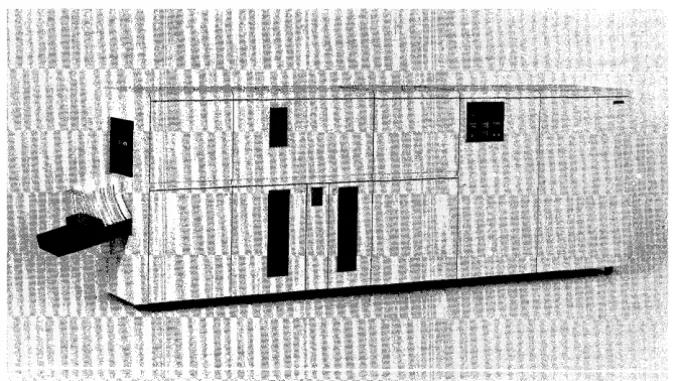
The IBM 3800 Printing Subsystem (Figure 1) is a nonimpact, high-speed, general-purpose system printer that uses an
electrophotographic technique with a low-powered laser to print on single-ply computer output paper.
Figure 1. The IBM 3800 Printing Subsystem
It provides easy-to-use programming interfaces for its functions and features, and it offers compatibility for user programs that were designed for impact printers.
As long as there is sufficient data to print, the 3800 prints at a constant high speed. For example, it can process 1000 II-inch long'pages in approximately six minutes of continuous printing, regardless of the number of lines per page. Printing speed is also independent of the number of characters being used.
The 3800 Printing Subsystem operates under the OS/VSl and OS/VS2 MVS operating systems through a channel attachment, and can be attached to a system configuration with an IBM System/370 Model 145, 148, 155-11, 158, 158-2 (in Japan), 158-3, 165-11, 168, or 168-3, or System/370 3031, 3032, 3033, or 4341 Processor.
A 3800 Subsystem can be attached to a System/370 Model 135 or 138 via RPQ S00338, and to an IBM System/370 4331 Processor, using the optional block multiplexer channel (1241) and the optional power interface (5531).
The IBM 3800 Printing Subsystem can be used either as a system output device or as a direct output device. When the 3800 is used as a system output device, the job entry subsystems (JES) control the setup and use of the 3800. When necessary, JES can reassign the printing of data sets from a 3800 to an impact printer, and vice versa. If the printing of a reassigned data set requires special features unique to the 3800, the operating system ignores the job control (Jel) keywords that specify these features when the job is processed on an impact printer. The user with direct control of the 3800 Printing Subsystem must simulate some of the job entry subsystem functions.
[image:17.617.210.550.182.373.2]STANDARD FEATURES
The followlng standard features are available with the 3800:
• Character generation storage is provided for printing 128
graphic characters (two character sets).
• Any two of 20 different character sets (including 10-, 12-,
and 1S-pitch and 1S-pitch condensed sets) can be selected for printing a data set, and can be intermixed on a page without operator intervention.
• Graphic character modification allows the substitution or
addition of graphic characters into an already-defined character arrangement.
• Multiple copies are printed on single-ply paper, with every
copy an original, eliminating the need for multiple-ply paper and subsequent deleaving.
• Copy modification permits printing of predefined data or
suppressing the printing of selected data on one or more copies.
• The forms control buffer (FCB) controls the vertical format
of pages, allowing printing at 6, 8, or 12 lines per inch, or a mixture of these vertical line spacings on a page.
• Forms overlay permits printing of forms at the same time as
data is being printed, thus reducing the need for preprinted forms.
• The mark form feature permits marking the horizontal
perforations between pages to simplify job separation.
OPTIONAL FEATURES
The following optional features are available:
• Character generation storage for an additional 127
characters is available. With the additional character generation storage, as many as four character sets can be selected for printing each data set.
• The optional Burster-Trimmer-Stacker bursts the fanfold
output, trims 1/2 inch (12.7 mm) from the left edge and the same amount from the right edge, and stacks the sheets in groups, so individual jobs can be identified and removed.
• A two-channel switch is available as an optional feature for
attaching the 3800 to two separate processors through two channels.
ENHANCEMENTS PACKAGE
The following additional features are available when the 3800 Enhancements package is installed:
• Twenty IBM-supplied character sets (duplicates of the
character sets that are available in the standard 3800) are stored in the imagQ library in a module type called a
library character set module~ The user can modify these
library character sets, and can build new library character sets to be stored in the image library.
• Multiple extents can be specified for the system image
library to support the addition of modules available for use by the 3800.
• Detailed printer-setup error messages simplify the recovery task for both programmers and operators. Error messages for the programmer are printed at the 3800 on a separate page from the data set output.
• JES is specifically informed when a paper jam that requires system restart occurs during printer setup, or when the Cancel key is pressed during printer setup.
• In the OS/VS2 MVS system, the user can change the printer setup for a spooled data set while creating the data set.
HOW THE 3800 PRINTING SUBSYSTEM WORKS
The OS/VSl and OS/VS2 operating systems support the operation of the IBM 3800 Printing Subsystem through a channel attachment. You specify JCL DD statement parameters to control the functions of the 3800, and the operating system uses the printer setup routine called SETPRT to initialize the printer based on your specifications. If the 3800 is being used as a direct output device, you can use the SETPRT macro instruction to initialize the 3800. In OS/VS2, if the Enhancements are installed, you can use SETPRT, while you are creating a spooled data set, to change the setup information for the 3800.
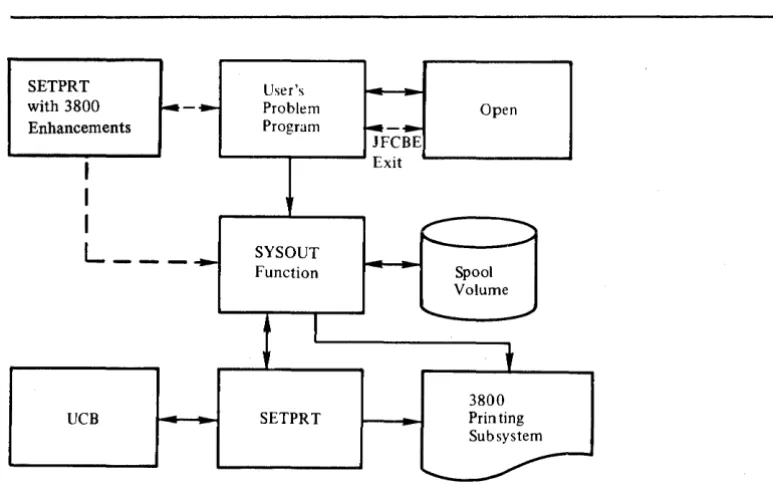
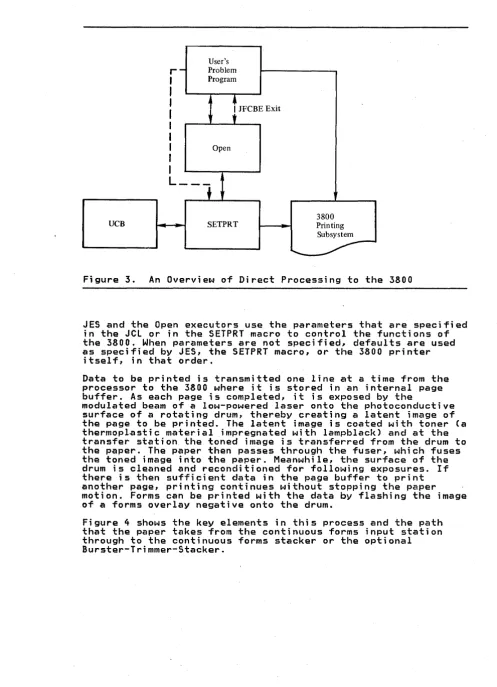
Figure 2 and Figure 3 show the flow of processing through the JES and data management routines.
SETPRT User's
with 3800 :.-~ Problem Open Enhancements Program ~-~
JFCBE
I
ExitI
I
~ ...L ___
~ SYSOUT ~ - 'Function Spool Volume
I
"-
~t
3800
UCB SETPRT Printing
Subsystem
...
-Figure 2. An Overview of SYSOUT Processing to the 3800
[image:21.615.177.564.250.493.2]User's
r-
Problem I ProgramI
I
t
JFCBE ExitI
t
I
I
I Open I
I
L ___
f
3800
UCB SETPRT Printing
[image:22.615.57.555.48.736.2]Subsystem
...
--Figure 3. An Overview of Direct Processing to the 3800
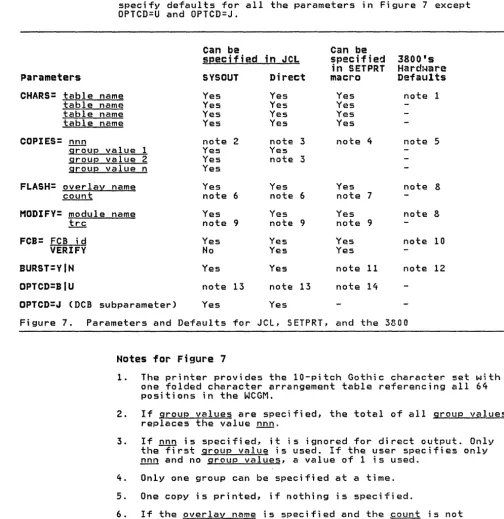
JES and the Open executors use the parameters that are specified in the JCL or in the SETPRT macro to control the functions of the 3800. When parameters are not specified, defaults are used as specified by JES, the SETPRT macro, or the 3800 printer
itself, in that order.
Data to be printed is transmitted one line at a time from the processor to the 3800 where it is stored in an internal page buffer. As each page is completed, it is exposed by the
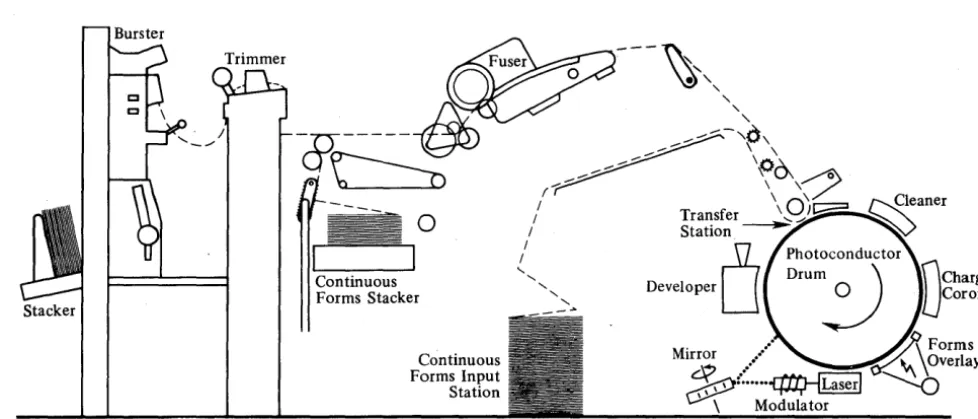
modulated beam of a low-powered laser onto the photoconductive surface of a rotating drum, thereby creating a latent image of the page to be printed. The latent image 1s coated with toner (a thermoplastic material impregnated with lampblack) and at the transfer station the toned image is transferred from the drum to the paper. The paper then passes through the fuser, which fuses the toned image into the paper. Meanwhile, the surface of the drum is cleaned and reconditioned for following exposures. If there is then sufficient data in the page buffer to print another page, printing continues without stopping the paper motion. Forms can be printed with the data by flashing the image of a forms overlay negative onto the drum.
Figure 4 shows the key elements in this process and the path that the paper takes from the continuous forms input station through to the continuous forms stacker or the optional Burster-Trimmer-Stacker.
Burster
Stacker
~---~'"
-~---& ~---~~~\
o
r::::-;
_---
~~\~
( \ \ /
---
0
/
Transfer\9/1:;2
/ Station ~
Continuous Forms Stacker
Continuous Forms Input Station
/
0
Photoconductor" ' , Drum 0 ') r\Charge _':::. Developer
J
IJJCoronaMirror /
~~~'J~y
~:
...
~~
\ Modulator
Figure 4. An Overview of How the 3800 Prints
DATA SECURITY
The 3800 contains several features for protecting the data in the page buffer from improper alterations or disclosures!
• Page buffer data cannot be read back into the processor
using available channel commands.
• Residual data in the page buffer cannot be printed because
page definition is destroyed after the last copy of a page has been exposed onto the photoconductor.
• Residual images on the photoconductor are removed by the
cleaner assembly, which prevents reading the images on the photoconductor.
CONTROLLING THE PRINTER SETUP
The 3800 printer setup functions are supported by IBM-supplied or user-defined modules that are created and stored in an image library using the IEBIMAGE utility program. (IEBIMAGE is
described in "Section 4. The IEBIMAGE Utility Program.") JCl and SETPRT parameters are available for controlling the following functions:
• You can specify the character arrangements to be used to
print a data set by naming character arrangement table modules. See the section entitled "Character Arrangements" in this chapter for a description of character arrangements
and character arr~ngement tables.
• You can control the vertical format of a page by naming a
format control buffer module to be used for printing the page.
[image:23.620.85.574.90.299.2]• You can specify that a forms overlay is to be flashed onto a page to be printed. See the chapter entitled "How to Flash Forms" for a description of how to use the forms overlay function.
• You can specify that the data set to be printed contains codes for line-by-line selection of the character
arrangements to be used. See the chapter entitled "How to Specify Character Arrangements" for details on how to do this.
• You can specify the number of copies of a data set you want printed. The copies can be grouped by full data set or by multiple copies of each page.
• You can request the bursting, trimming, and stacking of the output if your installation has the optional equipment. • You cari specify that you want predefined data to be printed
on certain copies of a page by haming a copy modification module to be used. See the chapter entitled "How to Modify Copi~s" for details.
• You can request that certain error condition indlcators be sent to the host system. See the section entitled "Using Job Control Language" in the chapter entitled "How to Specify Printer Settings."
• ¥ou can request initialization of the printer to hardware defaults.
• If you have direct control of the 3800, you can request retransmission of a data set to the 3800 to obtain additional copies of that data. set.
• If the 3800 Enhancements are i·nstalled, you can specify whether or not error messages that are generated as a result of printer setup should be written to a printer for the programmer's information.
• If the 3800 Enhancements are installed, you can specify a message area for SETPRT. to use to store a copy of an error message.
• If the 3800 Enhancements are installed, you can cause a spooled data set to be split into two or more units of printed output. You can also specify different printer setups for the output units.
• If the 3800 Enhancements are installed, the user with direct control of the 3800 can specify a user-defined library to replace SYS1.IMAGElIB.
CHARACTER ARRANGEMENTS
The standard 3800 subsystem uses only the 20 IBM-supplied character sets that reside on the flexible disk in the 3800. Each character set contains a maximum of 64 graphic character representations. After the character set has been loaded into the 3800 character generation storage, you can use graphic
character modification modules created with the IEBIMAGE program to modify the character set.
With the Enhancements installed, the 3800 subsystem uses both the IBM-supplied character sets that reside on the flexible disk and library character sets that are stored in the system image
library (SYS1.IMAGELIB) or, for the direct u~er of the 3800, in a user-defined library.
The 20 library character sets that are supplied by IBM are duplicates of those character sets that reside on the flexible disk. The character sets that reside on the 3800's flexible disk have even-numbered IDs, while their comparable IBM-supplied library character sets have odd-numbered IDs.
If you want to use the 20 IBM-supplied library character sets, the installation most:
• Have loaded them into the image library using IEBIMAGE. For details on how to do this, see the program directory that accompanies the 3800 Enhancements package.
• Have modified existing character arrangement tables to reflect the odd-numbered IDs, or create new character arrangement tables to point to the library character sets. You can customize the IBM-suppl.ied .library character sets using IEBIMAGE control statements. You can aiso use IEBIMAGE control statements to create entirely new library character sets to be stored in SYS1.IMAGELIB, or in a user-defined library.
To use a 3800 character set, you must point to the character set by means of a character arrangement table. Multiple character arrangement tables can point to one character set. Character arrangement tables can be created using IEBIMAGE control statements.
A character arrangement is a collection of characters that have been selected from one or more character sets or have been newly designed or redesigned. A charactgr arrangement table contains three kinds of data:
• IDs for as many as four character sets that are to be used as sources of data codes and graphic character
representations for the character arrangement being designed • Names for as many as four graphic character modification
modules to be used to introduce new graphic characters into the arrangement or to replace characters in the character sets referenced by the character arrangement table
• A 256-byte translate table (that accommodates a maximum of four 64-byte character sets) that translates 8-bit data codes into WCGM locations where the graphic representations (scan patterns) of those data codes are stored.
A WCGM is a writable character generation module. It contains 64 segments of character generation storage, which hold the scan patterns of characters being used by the 3800 to print a data set. There are two WCGMs in the standard 3800, and two more can be added as an option. The WCGMs are numbered 0-3.
The last position of the fourth WCGM, that is, the WCGM position that is addressed by X'FF', is not available for printing
because the X'FF' code is reserved for indicating an unprintable character. Therefore, a maximum of 255 scan patterns can be used for printing a data set.
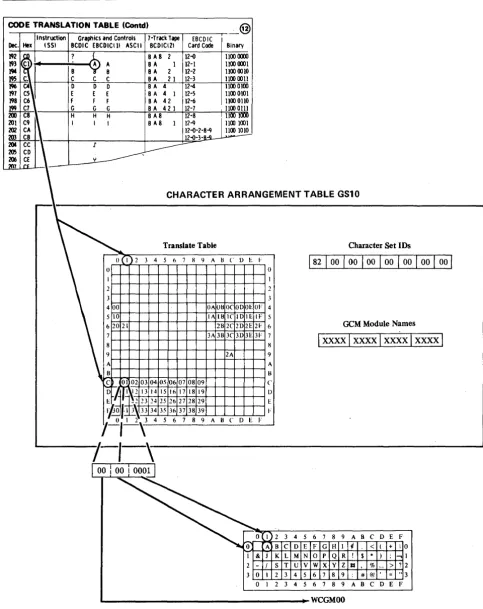
Figure 5 shows how an 8-bit data code sent to the 3800 is
transformed into an address in a WCGM using the translate table portion of the character arrangement table. The 8-bit EBCDIC assignment 'Cl', equivalent to the graphic character 'A', is used by the 3800 to address a location in the translate table. That location contains the value '01', which is the address of the WCGM location that contains the scan pattern for printing the 'A'.
The following table shows which location of which WCGM is referenced by the contents of a translate table location.
Translate Table WCGM # WCGM Location Contents
00-3F 0 0O-3F
40-7F 1 0O-3F
80-BF 2 0O-3F
CO-EF 3 0O-3E
Note that translate table contents of 'FF' indicates an invalid character, and does not address a WCGM location. Therefore, location '3F' of WCGM 3 is not addressable.
CODE TRANSLATION TABLE (Contel) @ Instruction
Dec. Hex \551 192
1
193 194 ~ lCJ6 197 C5 198 C6
199 C7 200 C8
~
201 C9 202 CA
203 CB
2CM CC
\
205 CO 206 CE
:1(17 r~
\
Figure 5.
Graphics and Controls 7-Track Tape [BCD IC BCDIC EBCDICllI ASCII BCOICI21 Card Code Binary
? B C 0 E F G H I
~:
BA8 2 12-() 1100 <XXXIBA 1 12-1 1100 Iml
BA 2 12-2 1100 0010
C C BA 2 1 12'·3 1100 0011
0 0 8A 4 IN 1100 0100
E [ B A 4 I 12-5 1100 0101
F F BA 42 12-6 1100 0110
G G B A 421 12-7 1100 Olll
H H BA8 12-8 1100 11m
I I BA8 I 12-9 11001001
12-0-2-8-9 1100 1010
12-o-3-~
.r
L---c-y
CHARACTER ARRANGEMENT TABLE GS10
Translate Table
0(1)2 3 4 5 6 7 8 9 ABC DEI·
o 0
3 3
4~O~0~~~-4-4-+-+-+-+(-)A+U-B+(-)C+O-D+O-E~O~F 4 510 IAIBICIDIEIF 5 62021 2B2C2D2E2F 6 7 3A 3B 3C 3lJ 3E 31' 7
8 8
9 2A 9
A A
B B
C O l 02 03 04 05 06 07 08 09 C D~ff'\12 13 14 15 1617 1819 D
E 1 t 2 23 24 25 26 27 28 29 E
rto
'JIl.~33 3435
36 37 3839 I',--2.,_1_2 \ 4 5 6 7 8 9 ABC D E F
I
00 : 00 I 0001J
0 I 0 A I & J
2 - /
3 0 I 0 I
2 3 B C
K L S T
2 3 2 3
Character Set IDs
GeM Module Names
Ixxxxlxxxxlxx~xlxxxxi
4 5 6 7 8 9 A B C D E F D E F G H I ¢ < ( + 10
M N 0 P Q R ! $
.
) ; .., IU V W x y Z a % > ? 2 4 5 6 7 8 9 : # @' = .. 3 4 5 6 7 8 9 A B C D E F
WCGMOO
How an 8-bit Data Code is Translated into a WCGM Location
[image:27.617.79.563.82.692.2]The sequence of events that causes the loading of the WCGM in preparation for printing is described in the numbered steps below. This sequence assumes that opti~ns are specified in the JCL. The character arrangement table Gil was chosen for
illustrative purposes, because it uses graphic character modification. Graphic character modification allows the
substitution or addition of one or more characters into an already defined character arrangement. steps 5 and 6 of the following sequence explain the graphic character modification process.
1. Using the CHARS parameter, you request that character arrangement table Gil be loaded.
//SYSPRINT DD SYSQUT=A,CHARS=Gll
2. SETPRT loads the character arrangement table module from SYSI.IMAGELIB into the processor. The character arrangement table Gil specifies that the Gothic-lO. character set, which is identified by '82', is to be loaded into WCGM O.
3. Using the character set identifier '82', SETPRT loads the Gothic-IO character set from the flexible disk in the 3800
into WCGM 0 (see Figure 6).
Note that, if the Enhancements package is installed, SETPRT first checks to see if the requested character set is
already in a WCGM. If so, the Gothic-IO character set is not reloaded unless the WCGM in which the set resides is WCGM 3. If it is in WCGM 3, the character set is reloaded into one of the other WCGMs, in order to accommodate the Gothic-IO reference to location '3F' of the WCGM. Figure 6 shows the Gothic-IO character set in WCGM O.
4. The translate table portion of the character arrangement table is then loaded into the 3800. Figure 5 shows the translate table entries for the WCGM location assignments for the Gothic-IO character set data codes. In Figure 6, the translate table entries have been modified using graphic character modification.
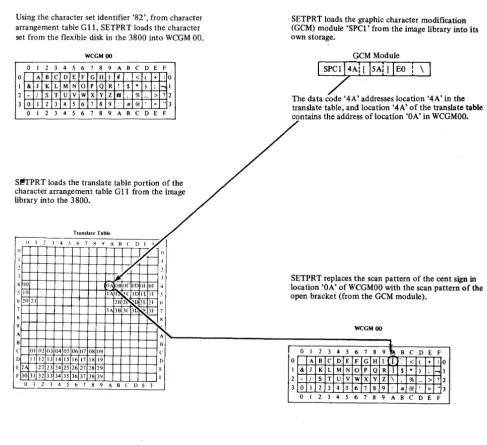
5. The graphic character modification (GCM) modules (if any) identified by the character arrangement table are loaded from SYS1.IMAGELIB into SETPRT's storage.
In this instance, GIl uses the graphic character
modification module SPCI, which contains data codes and scan patterns for the open bracket, close bracket, and reverse slant.
6. The data codes of the characters in the GCM module address translate table locations that contain the addresses of WCGM locations. The scan patterns for the characters in the
graphic character modification module(s) replace the
patterns at the specified WCGM locations. Figure 6 shows the graphic character modification process. The open bracket replaces the cent sign, the close bracket replaces the exclamation point, and the reverse slant replaces the lozenge.
Using the character set identifier '82', from character arrangement table GU, SETPRT loads the character set from the flexlble disk in the 3800 into WCGM 00.
SETPRt loads the graphic character modification (GCM) module 'SPCl' from the image library into its own storage.
WCGM 00 GeM Module
o 1 2 3 4 5 6 7 8 9 ABC D E F
o A B C D E F G H I
,
< ( + I o & J K L M N 0 p Q R ! $ * ) ; ...,- / s T U V W x y Z II % - > ?
0 1 2 3 4 5 6 7 8 9 : # @ = "
o 1 2 3 4 5 6 7 8 9 ABC D E F
The data code '4A' addresses location '4A' in the translate table, and location '4A' of the translate table contains the address of location 'OA' in WCGMOO.
S~TPRT loads the translate table portion of the character arrangement table G 11 from the image library into the 3800.
Transtall' Table
~
() I 2 .1 4 -' b 7 X 'I A H C !) I
yr
II/. . , II
I ./ r-- I
2 !/" 2
.1 it .1
400 OA lH OCO!) 01.01' .j
-' 10 IA 1111 Ie ID IE II· S 6 10 11 21l 2t ~ 11: 21· b
7 .lA3H .lC 3[: R:.lI· 7
H
'-X
'I
~
A A~
H B
c 01 02 0304 05 06 07 08 09 C
[) 1 I 12 13 14 15 16 17 I H 19
D
U"I 22 23 24 25 2627 2829 l-I' 30 31 32 33 34 35 36 37 38 39 I:
0 1 2 3 4 5 6 7 8 9 A H C D E 'I'
SETPRT replaces the scan pattern of the cent location 'OA' of WCGMOO with the scan patte open bracket (from the GCM module).
WCGM 00
.J.
0 1 2 3 4 5 6 7 8 9~ B C D E F 0 A B C D E F G H 1 I .. < ( + 10 I & J K L M N o p Q R ) $
.
) ; ...,1 2 - / s T U V W x y Z \ % > ? 2 3 0 1 2 3 4 5 6 7 8 9 # @ = " 3 0 1 2 3 4 5 6 7 8 9 A B C D E Fsign in
rn of the
Figure 6. How Graphic Character Modification Works
BURSTING-TRIMMING-STACKING
The Burster-Trimmer-Stacker can be added to the base machine in order to produce individual shee~ output. The trimmer removes 1/2 inch (12.7 mm) from each edge of the form. The form is then fed to the burster, which separates the continuous forms into individual sheets. These sheets are then moved to the stacker, where the output from each dat~ set is offset from that of the preceding data set. Copies and groups of copies can also be offset. The programmer can request that the job output go to the Burster-Trimmer-Stacker or to the continuous forms stacker (see "How to Burst and Offset Stack Output" in the "Using the 3800" section).
[image:29.617.75.563.107.552.2]In the standard system, you can initialize for BURST using JCl. With the enhancement features, you can also issue the SETPRT macro for a SYSOUT data set to change the printer settings during the printing process. If you are a direct user of the 3800 subsystem, you can use SETPRT to specify BURST.
The 3800 uses continuous single-ply fanfold forms with both edges punched for tractor feeding, and perforations between the pages. The paper can be preprinted, have ruled lines or color striping, or can be blank.
The sizes and basis weights of paper that can be used in the 3800, and the maximum number of characters that can be printed on each width at each of the three available pitches, are given in "Appendix D: Paper Sizes, Weights, and Maximum Characters per Line."
See the Forms Design Reference Guide for the IBM 3800 Printing Subsystem for specifications for the paper and forms that are
acceptable for printing in the 3800. •
The 3800 Printing Subsystem can use preprinted forms; or it can
create its own forms, as it prints the data, by using: • The forms overlay feature to print forms from
previously-prepared negatives
• The Format character sets to print squares, rectangles, and column rules
• The copy modification feature to print headings, legends, explanatory remarks, and similar data on copies of a report, as well as to suppress certain data on certain copies
These features can be used singly or in any combination.
For information on how to request forms flashing, refer to the chapter "How to Flash Forms" in "Section 2. How to Use the 3800 Printing Subsystem." Performance considerations for using forms overlay are discus~ed later in the chapter "Performance" in "Section 3. Supporting the 3800 Printing Subsystem." For information on designing, making, and obtaining forms overlay negatives, see the Forms Design Reference Guide for the IBM 3800 Printing Subsystem.
Information on using Format characters is in the chapter "How to Use Format Characters." Copy modification is discussed under "How to Modify Copies."
TWO-CHANNEL SWITCH
The two-channel switch attaches the 3800 via two channels to two separate processors. The switching is done manually using the interface enable/disable switches on the 3800. Only one channel interface can be enabled at a time~ unless the dynamic switch feature is installed.
The dynamic switch feature allows both channel interfaces to be enabled at the same time. Selection of the interface to be used is determ;ned by programming. The dynamic switch feature allows
the 380n to be attached to two channels of a single processor
and provides alternate path capability. (Note: The alternate path support is not used if the 38~0 is connected to byte multiplexer channels.) The dynamic switch feature also allows
the 3800 to be attached to two processors in an MP environment
and allows both processors, one at a time, to access the 3800,
thus providing alternate path capability. (Note: For MP systems this dynamic two-channel switch configuration is recommended because it reduces potential I/O supervisor overhead in accessing the 3800.)
Also, with the two-channel switch installed, a remote switch feature can be added to permit manual channel selection from a remote console rather than at the printer.
3800 COMPATIBILITY WITH OTHER IBM PRINTERS
OY·EBpRI NT ING
UNDERSCORING
Most of the jobs you are currently' printing on an IBM 1403 or 3211 can be printed without change on the IBM 3800 Printing Subsystem. However, there are some incompatibilities between the 3800 and impact printers, and there are some 3800 features that can be used to compensate for these incompatibilities. This chapter describes the things you should consider--both the new features and the incompatibilities--when planning for the 3800.
Overprinting on an impact printer requires stopping the paper in a fixed position (that is, no carriage movement) while two or more lines of data are printed in the same line space. This results in having two or more sets of printed characters
superimposed one on the other (or one set superimposed on itself for boldface printing).
While the 3800 cannot create multiple images at the same print location (except for characters with underscores), it can merge lines of nonconflicting data into a single line before exposing the resulting line onto the moving drum. (Nonconflicting data lines contain either blanks or the same data characters as those in the corresponding positions of previously transmitted lines.) The following two examples of frequently-used impact printer applications of overprinting are included to indicate what the results would be on the 3800.
• Boldfaced printing--the same data is printed on an impact printer more than once in the same position to emphasize it with a heavier and darker image. Since the data to be
superimposed is identical, the 3800 prints it with no special emphasis in terms of contrast or thickness to make it stand out against other data. However, the user can
design boldface characters and load them into the printer by means of the graphic character modification feature or by using library character sets.
• Printing of special composite characters (for example, a zero with a slash over it)--this requires two characters to be printed in the same space on an impact printer. The 3800 prints the first character while rejecting the second with an error indication, unless data checks are blocked, in which case no error is indicated. The output is either a zero or a slash, depending on which was transmitted first. Again, the special character can be designed by the user and loaded into the 3800 using the graphic character
modification feature or a library character set.
On the 3800, you can print with underscores using one of these methods:
• The 3800 has a built-in underscore capability. It is invoked by referring to the code X'2D' in a character set that has the high-order bit of its ID on. When an underscore and another printable character are to be merged (that is, printed in the same character position) using this method, the 3800 generates the underscore to fit the cell-size of the other character, and prints the underscore at the same time as the character with which it is paired.
FOLDING
• You can use one or more of the six underscored character sets (in Gothic and Text) that are supplied by IBM. In these character sets, each of the characters is designed to
contain its own underscore.
Using the built-in underscore capability requires two
transmissions of the output line. The data line containing the character to be underscored must be sent to the 3800 first, then the underscore is sent. If you use an underscored character set, you transmit the output line only once, with a resulting saving
in channel use and transmission time. The use of an underscored character set, however, might require additional character generation storage when underscored printing is intermixed with nonunderscored (for ~xample, when Text 1 and 2 and underscored Text 1 and 2 are used together); it also requires specifying the desired underscored character arrangement table name in the CHARS parameter. The amount of underscoring required, then, should be the primary factor in determining which of the two methods is used.
Note:
You can design your own underscore character and use it asyou use any other character. However, see "Rules for Merging Data Lines into One Print Line" if you plan to use your underscore in combination with other characters.
Folding is a technique used in impact printers with the Universal Character Set (UCS) feature to allow printing in uppercase graphic characters when lowercase graphic characters are called for and not available on the print train. Activating the Fold function on an impact printer is done by issuing the Fold channel command, while deactivating the same function is done by issuing the Unfold channel command. While the 3800 does not recognize the Fold and Unfold channel commands, using the GF10, GF12, GF15, or GFC character arrangement table provides the folding effect (ignoring the first 2 bits of each
character's 8-bit data code). If character arrangement tables with the folding feature for other than Gothic characters are desired, they can be provided by the user.
COMPATIBILITY WITH PRIN~ TRAINS
The 3800 provides compatibility for users of other IBM printers by providing character arrangement tables that correspond with and have the same names as the standard 1416 and 3216 print tra;fns (as used on IBM 1403 and 3211 Pri nters). Desi red groups of these character arrangement tables can be specified during system generation. In addition, new character arrangement tables are provided, as a Basic group, to include the characters found
in various print trains and to provide for different pitches, underscoring, and the folding effect.
The 3800 programming support does not provide character
arrangement tables equivalent to nonstandard 1416 and 3216 print trains. Any program using a nonstandard print train must have a user-defined character arrangement table to correspond to the train. Special characters on such a train may have to be defined by the user. Information on creating and modifying both
character arrangement tables and characters is in "Section 2. How to Use the 3800 Printing Subsystem" and "Section 4. The IEBIMAGE Utility Program" of this book.
CHANNEL COMMANDS
FORMS CONTROL
PAGE MARGINS
Channel commands direct a channel, control unit, or device to perform an operation or set of operations. Channel commands for the 3800 are listed in Appendix E.
Certain channel commands are device dependent and cannot be used interchangeably among printers. The following is a complete list of channel commands that are valid for either the IBM 1403 or IBM 3211 Printer but are J1Q.i accepted by the 3800:
1403
Diagnostic Read
Load UCS (without folding) Load UCS (folding)
Allow Buffer Loading
3211
Load UCSB Fold Unfold Read PLB Read UCSB Read FCB Check Read
Diagnostic Write Diagnostic Gate Skip to Channel 0 Raise Cover
The 3800 uses a forms control buffer (FCB) to control the vertical format of the page, as does the IBM 3211 Printer. The format of the 3800 FCB, however, is different from that of the 3211.
The 3800 can print with a vartical line spacing of either 6, 8, or 12 lines per inch or an intermix of any of these on the same page. The 3800 FCB must describe the exact length of the forms being printed. Further information .on this topic is under "How to Specify Forms Control."
The 3800 reserves the top and bottom 1/2 inch (12.7 mm) of each page for accelerating and decelerating paper when it is
necessary to start or stop printing. If current programs are designed to print in these areas of a page, either the printing format or the FCB definition must be changed.
For example, only 10 inches on an 11-inch long page can be used for printing with the 3800. Therefore, if a program must print 61 lines per page on an 11-inch long page, it cannot do so using a line spacing of 6 lines per inch for the whole page. The FCB must be redefined to obtain 61 printable lines at various
vertical line spacings, or all at 8 lines per inch, in order to fit in the 10-inch printable length. Jobs that ;n the past required printing across page boundaries (such as long graphs, or computer-produced contour or demographic maps) cannot be produced in the same way on the 3800.
Left and right page margins must allow at least 1/2 inch (12.7 mm) between the page edge and the ends of the print line, except for the widest paper size. Because the maximum printable line width is 13.7 inches (348 mm), the right margin on 14-7/8 inch paper is 0.675 inch. For a 3800 using ISO paper sizes, the right margin is 17.3 mm for 378 mm paper.
FC"CHA~GE FOR USERS OF ISO PAPER SIZES
If your 3800 uses ISO (International Standards Organization) paper sizes, an additional planning consideration is that the IBM-supplied FCB named STD3 (for use when printing high-density dumps at 8 lines per inch) is not usable on your machine. STD3 specifies that 80 lines be printed at 8 lines per inch on ll-inch long paper (which is not an ISO paper size). Thus STD3 should either not be used or should be modified for use on a 3800 using ISO paper sizes. Example 5 of using the FCB statement
in "Section 4. The IEBIMAGE Utility Program" shows how to make this modification.
SECTION 2. HOW TO USE THE 3800 PRINTING sUlsystn
HOW TO SPECIFY PRINTER SETTINGS
The OS/VS1 and OS/VS2 operating systems support the operation of the IBM 3800 Print;ng Subsystem via a channel attachment. You specify JCl DD statement parameters to control the functions of the 3800, and the operating system initializes the printer based on these parameter specifications. You can also initialize the 3800 or change its setup dynamically, in certain circumstances, using the SETPRT macro; or you can change the setup using the JFCBE exit. This chapter includes sections on using JCl, using SETPRT, and using the JFCBE exit, as well as a section on defaults. The programming support includes:
• JCL parameters for specifying character arrangement tables, multiple copies, modifying copies, forms overlay printing, forms control, and bursting and stacking of output.
• SETPRT parameters for controlling the printer setup. For details, see the section "Using SETPRT" in this chapter. • Use of the names of print train arrangements (for example,
AN, TN) on existing printers. All standard 1416 and 3216 print train arrangements (except for ALA) of the IBM 1403-Nl, 3203 Models 4 and 5, and 3211 Printers are recognized.
• A basic group of character arrangements, not equivalent to any previous print train arrangements, that is suitable for a wider variety of printing applicat;ons. The GSI0
arrangement, for instance, includes the graphic characters previously found on a number of different print trains. • Provision for dynamically selecting the character
arrangement during the printing of a data set.
• Automatic control of features and functions for SYSOUT data sets according to specifications in JCL and system defaults. Unless there is a need to override SYSOUT class values, no special provision is required in JCL to print on the 3800. • Provision for system dumps in condensed format, using 50 to
60 percent less paper. High-density dumps are printed in 15-pitch characters, and are obtained via the ABDUMP and PRDMP facilities. ABEND dumps and, in OS/VS2 only, SNAP dumps, are available through ABDUMP. SVC and stand-alone dumps are available through PRDMP.
• The IEBIMAGE utility program to provide a means for creating and printing:
Forms control buffer modules Copy modification modules
Character arrangement table modules
Graphic character modification modules Library character set modules
USING JOB CONTROL LANGUAGE (JeL)
This section contains an overview of how JeL is used to specify 3800 printer settings. Specific examples of using JCL are
included in the sections that describe how to do the various tasks related to the 3800. Additional details on the parameters discussed in this publication, and information on JCL parameters that are not described in this publication can be found, for VSl systems, in OS/VSl JCL Services and OS/VSl JCl Reference, and for VS2 systems, in OS/VS2 JCl.
The job entry subsystem (JES) is a key link between the user and the 3800 for SYSOUT processing. In "Section 3. Supporting the 3800 Printing Subsystem," specific 3800-related considerations are discussed under "Job Entry Subsystems."
Another link for both SYSOUT and direct processing to the 3800, is SETPRT, which is discussed later in this chapter.
Following that, other sections of this chapter discuss "Defaults for JCl, SETPRT, and the