3D ANALYTICAL TOOLS FOR TERRAIN SPATIAL OBJECTS
Alias Abdul Rahman and Chen Tet Khuan
Center for Geographic Information and Analysis &
Department of Geoinformatics
Faculty of Geoinformation Science and Engineering Universiti Teknologi Malaysia
81310 UTM Skudai, Johor Malaysia [email protected]
KEY WORDS: GIS, 3D datasets, Buffering Algorithms, Interface
ABSTRACT:
Geographic information system inevitably moves towards handling and manipulating not just two-dimensional data but more than that e.g., three-dimensional (3D) and four-dimensional (4D) spatial objects. At this moment very few GIS systems offer real 3D analytical operations or analyses with the exception of visualization. Buffering is one of the analytical tools that should be available in any 3D GIS system. This paper discusses 3D buffering aspect in details such as the mathematics, the geometry as well as the development of user interface of the 3D buffering. We tested our buffering approach by using photogrammetrically captured datasets. Finally, the paper provides outlook to the proposed work towards the development of advanced 3D analytical solutions in 3D GIS domain.
1. INTRODUCTION
Geographic information system (GIS) deals with modeling, manipulation, management, analysis, and representation of geographically referenced data. GIS tools and applications are not only for GIS specialist, but also for those who could manipulate spatial data and make use of the generated information that relates to locations (with attributes data). Spatial data contains positional values and the attributes describe what the data is and eventually the information of objects and their surrounding through spatial analysis operations. We would not be able to understand the objects fully if the analytical operations were not done in 3D space as we perceived in the real world (Abdul-Rahman et al, 2002) and Zlatanova (2000). Current GIS system faces some difficulties in handling certain types of datasets e.g. 3D dataset as most GIS users dealt with in 3D applications for example in environmental monitoring, urban mapping, city navigation, geological exploration, etc. need a system that able to do some 3D analysis or analytical operations. The problem of doing such buffering operation in 3D motivates us to do some experiments in this 3D analytical operation. In order to have a 3D GIS system that handles real-world spatial objects, the system should not be constrained by single XY plane only. Assuming 3D analysis is one of the core components of the 3D GIS (Zlatanova et al, 2002), an investigation towards 3D buffering as a framework for 3D analyticaloperations for such system is inevitable.
This paper discusses the analytical tools, the buffering algorithms (for points, line, and surface) in section 2.1, section 2.1, and section 2.3 respectively and forms major discussions. Preliminary results of the algorithms are presented at the end of each section. Study area and the interface development are briefly described in section 3 and 4. Finally, the conclusions in section 5.
2. 3D ANALYTICAL TOOLS
We have developed 3D analytical tools for terrain spatial objects. The tools are point buffering, line buffering, and polygon buffering in 3D space and the results could be visualized by using commercial software like ArcView. The paper presents each algorithm in detailed and demonstrates some visual output from the experiment.
2.1 Point Buffering
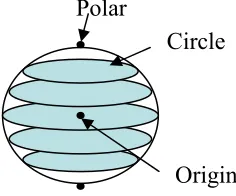
Point can be defined as single coordinate triplets of x, y, z and can be used to represent point features like boreholes, control towers, etc. (Raper, 2000). Point objects or features such as survey ground control points, towers along a power line, spot heights, other features such as ponds, lakes, underground objects such as ore bodies, rocks, etc. Typical analytical GIS operation that could be done on these objects is proximity analysis like buffering. This analytical operation could be done in 3D and would provide better understanding of the phenomena. Our buffering algorithm for point features is based on sphere geometry, i.e. a point of x, y, z coordinates gradually evolved into a sphere shape and its size depends on the distance from the centre of a point object. The following figure (Figure 1) shows the basic geometry of the generated surface around a point object.
The technique to generate a sphere begins with the creation of polygon surface as implemented by ESRI, see (ESRI, 1998) that is the implementation of the PolygonZ to create a solid buffering object (sphere). PolygonZ is a one of the spatial features appears within the ESRIís shapefile library. Polygon
represents the plane surface, whereas the Z ensures the Polygon
occupied in the three-dimensional space. We have implemented the PolygonZ to create surfaces due to the lack of curve surface appears within that shapefile library. Surface is created by joining all related polygon surfaces. Figure 2 shows the construction of circles and a sphere for the buffering.
Figure 2: Method to create circles.
The algorithm for point buffering:
The algorithm begins with the reading of point datasets. The total number of input datasets will then be calculated simultaneously. A point buffer model is based on a sphere. To do that, a set of circle needs to be created (see Fig. 2). Point sets are generated for each upper and lower circle. Later, these datasets are used to create surface for point buffer model.
The code starts to compute the array of Z-coordinate and its buffer length (parameter) for each upper and lower circle. The code generates circle by using the array of Z-coordinate, respective to the buffer length. All the datasets for upper and lower circles will be recorded into a file that corresponds to the format for surface generation. The file will be revised by another code functions to generate shapefile (*.shp).
The algorithm could be written in C++ style as below:
{
variables declaration;
while (if data != EOF) {
while (read data file != END) {
read input data: ID, X, Y, Z, Buffer Length; calculate the amount of data: n++;
}
for (k=0;k<n-1;k++) {
Compute the array of Z value; Compute the array of buffer length correspond to the Z value;
for (i=0;i<360;i++) {
compute the circle using processed buffer length;
}
compute the upper and lower polar points;
for (i=0;i<360;i++) {
print to file; }
for (i=0;i<360;i++) {
print results to file }
}
open processed data file; read data from the file;
call the *.dbf routine and generate *.dbf file; call the *.shp routine and generate *.shp file; call the *.shx routine and generate *.shx file; }
}
Figure 3 illustrates the generated spheres that represent the buffering surfaces of point objects.
Figure 3: 3D buffering of point objects
2.2 Line Buffering
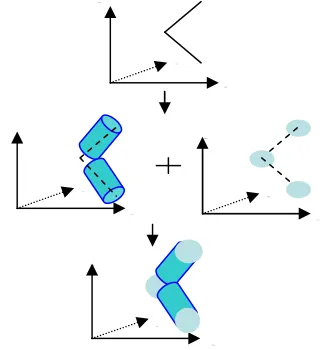
In GIS a line or arc is represented by two end nodes. de By (2000) noted that line data could be used to represent one-dimensional (1-D) objects such roads, railroads, canal, rivers and power lines. The straight part of a line between two successive vertices (internal nodes) or end nodes are called line segments. The buffering of a line results a cylinder, see Figure 4.
Figure 4: Method to create line buffer
x
z
y
x
z
y
x
y
x
z
y
Polar
X
o,Y
o,Z
o Main circleThe algorithm for line buffering:
Line buffer model consists of sphere (point buffer, see section 2.1). First, create a cylinder. The buffer model will be joint together with spheres that form a complete line buffer model.
The algorithm begins with the reading of line datasets and the total number of input datasets will be calculated simultaneously. A cylinder represents a line buffer model. Joining two circles from a line segment (start node and end node) creates this cylinder (see Fig. 4 (i)). The circles should be perpendicular to each line segment in three-dimensional space (see Fig.4 (ii)). There are x-axis, y-axis, and, z-axis rotations.
All the circles datasets are recorded into a file that follows the format to create a line buffer. With the same implementation from the section 2.1, points buffer are also created for each node. With the combination of both line and point buffering models, the internal segment of the buffer object needs to be removed. Later, all the datasets will be recorded into file.
The file will then be revised by another code functions to generate shapefile (*.shp). Finally, all the allocated memory of each variable will be freed.
The algorithm that implements the mathematics for line buffering is given below:
{
variables declaration;
while (if data != EOF) {
while (read data file != END) {
read input data: ID, X, Y, Z, Buffer Length; calculate the amount of data: n++;
}
(Generate line buffering dataset)
for (k=0;k<n-1;k++) {
Calculate the rotation angle for x-axis; Calculate the rotation angle for y-axis; Calculate the rotation angle for z-axis; for (a=0;a<360;)
{
compute the entire dataset for a circle; rotate the circle towards the x-axis; rotate the circle towards the y-axis; Determine the partial rotation of z-axis; Substract the partial rotation with the rotation angleof z-axis;
} }
for (k=0;k<n-1;k++) {
for (a=0;a<360;) {
compute the entire dataset for a circle; rotate the circle towards the x-axis; rotate the circle towards the y-axis; rotate the circle towards the z-axis;
} }
for (k=0;k<n-1;k++) {
for (a=0;a<360;) {
print the entire dataset into file; }
}
extract all the point from line data with no redundancy;
(Generate point buffering dataset) for (k=0;k<n-1;k++)
{
Compute the array of Z value; Compute the array of buffer length correspond to the Z value;
for (i=0;i<360;i++) {
compute the circle using processed buffer length;
}
compute the upper and lower polar points; compute the maximum distance to remove the internal segment;
for (i=0;i<360;i++) {
if (buffering datasets > maximum distance)
{
print to file; }
}
for (i=0;i<360;i++) {
if (buffering datasets > maximum distance)
{
print the results to file; }
} }
open processed data file; read data from the file;
call the *.dbf routine and generate *.dbf file; call the *.shp routine and generate *.shp file; call the *.shx routine and generate *.shx file; }
Figure 5: 3D buffering of line objects.
2.3 Surface Buffering
A
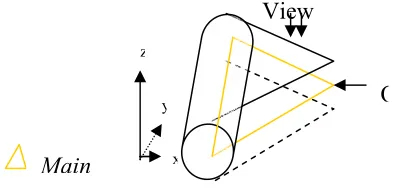
polygon could be represented by several closed arcs. Buffering of a polygon surface in 3D space involves steps mentioned in the point, and line techniques, see Figure 6.Figure 6: Combination of point and arcs
The algorithm for surface buffering:
We could describe the algorithm for the surface buffering as below.
Surface buffer model is a combination of box (surface buffer itself), cylinder (line buffer, see section 2.2), and sphere (point buffer, see section 2.1). This section will focus on the surface buffer model. After the model is done, it combines with the other buffer models (lines and points) to become a complete surface buffer model.
The algorithm starts with the reading of the surface datasets and the total number of input datasets will be calculated simultaneously. In order to create a box that represents a surface buffering object, both upper and lower polygon need to be constructed. The vector cross product is implemented to generate points that form the upper and lower surface.
The same implementation from the section 2.1, and 2.2 are used to create points and lines buffer. With the combination of points, lines and polygon buffering models, the internal segment of the buffer object needs to be removed. The processed datasets will be recorded into file.
The file will be revised by another code functions to generate shapefile (*.shp). Finally, all the allocated memory of each variable will be freed.
We could describe the algorithm for the surface buffering as below.
{
variables declaration;
while (if data != EOF) {
while (read data file != END) {
read input data: ID, X, Y, Z, Buffer Length; calculate the amount of data: n++;
}
Calculate the Vector for X (point A and B); Calculate the Vector for Y (point A and B); Calculate the Vector for Z (point A and B); Calculate the determinant for upper-plane; Calculate the Vector length for upper-plane; Calculate the Normalized Vector for upper-plane;
Calculate the Vector for X (point A and B); Calculate the Vector for Y (point A and B); Calculate the Vector for Z (point A and B); Calculate the determinant for lower-plane; Calculate the Vector length for lower-plane; Calculate the Normalized Vector for lower-plane;
for(i=0;i<n;i++) {
compute the upper and lower polygon for buffering; print to file;
}
Extract the entire line data from polygon with no redundancy; (Generate line buffering dataset)
for (k=0;k<n-1;k++) {
Calculate the rotation angle for x-axis; Calculate the rotation angle for y-axis; Calculate the rotation angle for z-axis; for (a=0;a<360;)
{
compute the entire dataset for a circle; rotate the circle towards the x-axis; rotate the circle towards the y-axis; Determine the partial rotation of z-axis; Substract the partial rotation with the rotation angleof z-axis;
} }
for (k=0;k<n-1;k++) {
for (a=0;a<360;) {
compute the entire dataset for a circle; rotate the circle towards the x-axis; rotate the circle towards the y-axis; rotate the circle towards the z-axis; }
}
for (k=0;k<n-1;k++) {
for (a=0;a<360;) {
print the entire dataset into file; }
}
extract all the point from line data with no redundancy;
(Generate point buffering dataset) for (k=0;k<n-1;k++)
{
Compute the array of Z value; Compute the array of buffer length correspond to the Z value;
for (i=0;i<360;i++) {
compute the circle using processed buffer length;
}
compute the upper and lower polar points;
View
O
y z
x
compute the maximum distance to remove the internal segment;
for (i=0;i<360;i++) {
if (buffering datasets > maximum distance)
{
print to file; }
}
for (i=0;i<360;i++) {
if (buffering datasets > maximum distance)
{
print the results to file; }
} }
open processed data file; read data from the file;
call the *.dbf routine and generate *.dbf file; call the *.shp routine and generate *.shp file; call the *.shx routine and generate *.shx file; }
The following figure (Figure 7) shows the result of the 3D buffering of polygon or surface objects.
3. STUDY AREA
The algorithms were tested by using real datasets captured using Leica-Helava photogrammetric system. The area covers an entire Universiti Teknologi Malaysia campus in Skudai, Johor. In this dataset, it contains three major data types, they are spot heights (point object), roads (linear objects), and terrain surfaces (polygon objects). Figure 8 shows the location of the area.
Figure 8: The datasets (UTM campus)
4. THE SOFTWARE AND INTERFACE DEVELOPMENT
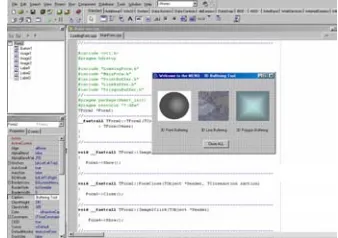
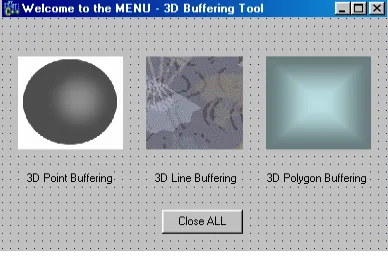
For the tools and the interface development, we used Borland C++ Builder (BCB) - 3D buffering tool v1.0. The interface represents a menu for the buffering tools and it is quite user friendly that has simple menu for users to interact with.
In this experiment, three modules have been developed ñ point, line, and polygon buffering and three components from the compiler were utilized; Image, Label, and Button. Image is used as a button to access into another sections, so as to the Label, however Label give more information to users because an appropriate name is given to the Image. Users can put picture to represent the Image component. Both of them are clickable ñ enable users to proceed into next process. The final component used into the main menu is the ì Close Allî Button. This button closes the entire interface and stops all the process within the software modules. The following figure illustrates the design of the main form menu of the 3D Buffering Tools v1.0.
Figure 9: The interface design and development.
5. CONCLUSIONS
The initial investigation of the problems show that the techniques work for simple object primitives like point, lines, and surfaces (polygons). The buffering technique could be extended for greater usefulness i.e. incorporates with topological information of the primitives. We have also implemented a set of tools for the 3D buffering and it is in the form of software module developed by using Borland C++ Builder, see Figure 10 for the user interface.
Figure 10: The 3D buffering tools user interface
In conclusion, this paper investigated the buffering in 3D space. The developed method for 3D buffering has some potential applications particularly in 3D GIS e.g. 3D proximity analysis of terrain spatial objects. The method also could be applied for underground and subsurface analysis. Geometrically, the buffering methods work. However, several issues have not been addressed and these could be done in future especially issues in the aspect of 3D topology so that a more complete 3D analysis for terrain spatial objects could be achieved.
ACKNOWLEDGMENT
We would like to thank the Ministry of Science, Technology and Environment (MOSTE), Malaysia for the NSF grant and supports.
REFERENCES
Abdul-Rahman, A., Zlatanova, S., and Shi, W. (2002). Topology for 3D spatial objects. Proc. of International Symposium and Exhibition on Geoinformation 2002, Kuala Lumpur, 12-14 October (CD-ROM).
de By, R. A. (2000). Principles of geographic information systems. ITC, The Netherlands, 230 p.
ESRI (1998) White paper on polygonZ (http://www.esri.com)
Raper, J. (2000). Multidimensional geographic information science. Taylor and Francis, 300 p.
Zlatanova, S., Abdul-Rahman, A., and Pilouk, M. (2002). Present status of 3D GIS. GIM International, Vol. 16, No. 2, pp. 41-43.
Zlatanova, S. (2000). 3D GIS for urban development. PhD thesis, ITC, The Netherlands.