UNIVERSITY OF TWENTE
MASTER THESIS
The fluency effect as the underlying
variable for judging beauty and
usability
Author: Deniece S. Nazareth
Abstract
Contents
1. Introduction ... 1
1.1 Beauty and usability in HCI research ... 2
1.1.1 Definitions of perceived beauty ... 2
1.1.2 Definition of perceived usability ... 2
1.1.3 Relationship between perceived beauty and perceived usability ... 3
1.2 Processing fluency ... 8
1.2.1 The dual-processing approach as the theoretical framework of fluency ... 8
1.2.2 The fluency effect in judgment ... 9
1.2.3 The affect heuristic as mediator of the fluency effect ... 11
1.2.4 Manipulations of Fluency ... 13
1.2.5 The fluency model ... 15
1.2.6 Breaking the fluency effect ... 17
2. Methods ... 19
2.1 Participants ... 19
2.2 Design ... 19
2.3 Websites rated ... 20
2.4 Measures ... 20
2.5 Measurement of the reaction time ... 21
2.6 Treatment ... 21
2.7 Apparatus and materials ... 22
2.8 Procedure ... 22
2.9 Data analysis ... 23
3. Results ... 25
3.1 The fluency effect ... 29
3.1.1 Scale ... 29
3.1.3 Prototypicality ... 31
3.1.4 Visual Complexity ... 32
3.1.5 Interaction between visual complexity and prototypicality ... 33
3.2 Breaking the fluency effect ... 33
3.2.1 Treatment condition ... 34
3.2.2 Prototypicality and treatment ... 34
3.2.3 Visual simplicity and treatment ... 36
3.2.4 Correlation between beauty and perceived usability ... 39
3.2.5 Reaction time ... 39
3.3 Conclusion ... 43
3.3.1 The fluency effect ... 43
3.3.2 Breaking the fluency effect ... 44
4. Discussion ... 47
4.1 The fluency effect: critical reflection of the scales ... 47
4.2 Breaking the fluency effect ... 49
4.3 Design in Fluency ... 52
4.4 Limitations ... 53
4.5 Future research ... 56
5. References ... 59
6. Appendix ... 65
6.1 Treatment criteria list ... 65
6.2 Example participant specific input for randomization of the stimuli, scales and items: excel ... 66
6.3 Opensesame Instructions for both conditions ... 67
6.3.1 Control condition ... 67
6.3.2 Treatment instruction for breaking the fluency effect ... 68
6.5 Items ... 69
6.6 Randomization scales, screenshots and items: Excel. ... 81
6.7 Screenshots of the experiment ... 83
6.8 Websites used ... 88
6.8.1 Fluent websites (low VC – high PT) ... 88
6.8.2 Disfluent websites (high VC – low PT) ... 89
List of Figures
Figure 1. Inference perspective extended by Hassenzahl and Monk (2010). ... 4
Figure 2. Information-processing stage model by Leder et al.(2004)... 7
Figure 3. Affect heuristic as a mediator in processing fluency and judgment. ... 12
Figure 4. Causes and consequences of Fluency. (Left : Kahneman, 2011, Right: Weiss-Lijn, 2012). ... 12
Figure 5. The fluency model. ... 15
Figure 6. Visualization of the randomization and selection of stimuli. ... 20
Figure 7. Procedure of the experiment. ... 23
Figure 8. Reaction time of questionnaire against age. ... 26
Figure 9. Reaction time of viewing the stimuli against age. ... 27
Figure 10. Regression estimates of the model. ... 29
Figure 11. Boxplot of repeated exposure. ... 30
Figure 12. Interaction plot of PT and scale. ... 32
Figure 13. Interaction plot of VS and scale. ... 33
Figure 14. Interaction plot of PT and condition. ... 35
Figure 15. 2-way interaction plot of PT and condition between the three scales. ... 36
Figure 16. Interaction plot of VS and condition. ... 37
Figure 17. 2-way interaction plot of VC and condition for the three scales. ... 38
Figure 18. Boxplot of the reaction time of answering the questions and condition. ... 40
Figure 19. Boxplot of the reaction time when viewing the stimuli and condition. ... 42
List of Tables
Table 1 An overview of studies examining the relation beauty-usability ... 3
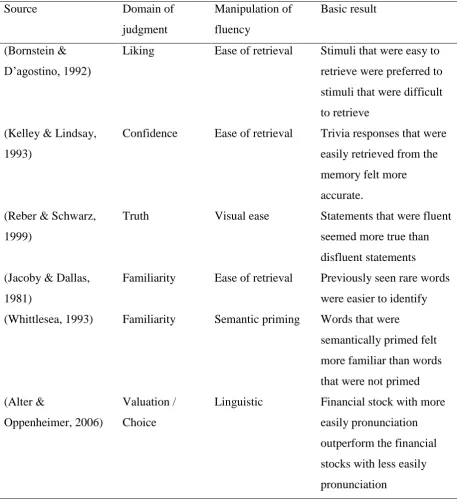
Table 2 An overview of the fluency effect in different domains of judgment... 10
Table 3 Estimated fixed effects coefficients, with alpha error and 95% credible intervals ... 28
Table 4 Pearson correlation between scales in the conditions ... 39
Table 5 Parameter estimates and estimated marginal means of reaction time when answering the questions ... 41
information that is unavailable at the time. Their inference model proposes that the starting point of these inference processes is beauty, as its nature is primarily sensory therefore immediate available (Hassenzahl & Monk, 2010).
.
Figure 1. Inference perspective extended by Hassenzahl and Monk (2010).
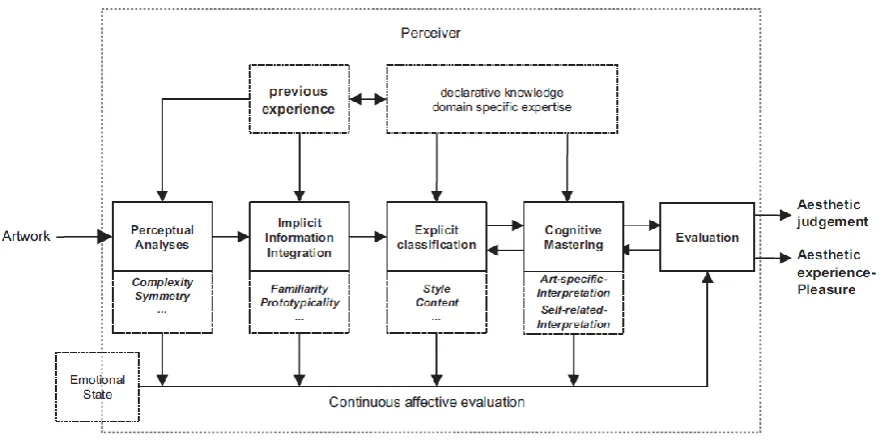
information can be processed due to lack of time, information is not inferred, information is just processed in lower stages than it would otherwise.
Figure 2. Information-processing stage model by Leder et al.(2004).
Stimuli Fluency (feeling of
ease) Affect impression Higher judgments
Figure 3. Affect heuristic as a mediator in processing fluency and judgment.
Thus, the fluency effect results in more positive feelings when judging stimuli. Figure 4 shows different feelings of judgments when the stimulus is processed fluently. Ergo, the conclusion can be made that fluency has an uniform positive effect across different domains of judgments (Alter & Oppenheimer, 2009). However, to the best of our knowledge, not a lot of research has been conducted regarding usability judgment and processing fluency. Van Rompay, de Vries and van Venrooij (2010) discussed that the impression of enhanced website usability of a user may be the result of fluent processing. The relationship of beauty and perceived usability however, leads to our proposal of explaining perceived usability and perceived beauty by processing fluency.
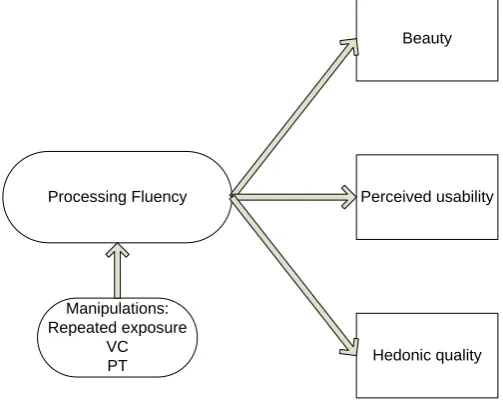
„why‟ of interaction (Hassenzahl & Monk, 2010). It subjectively measures the quality as perceived by the user (e.g. innovative or originality), without a direct connection to the goals that are related to the tasks (Hassenzahl & Monk, 2010). For users, it is important that they perceive the product in the same way as the designers in order for a product to be usable. So, based on these results, hedonic quality was added to the model in order to test it. If processing fluency is true, it will affect all scales.
Furthermore, Figure 5 shows the relevant manipulations of the fluency model for this study. As discussed earlier, repeated exposure, VC and PT will be used to manipulate fluency in order to examine if processing fluency is the underlying variable. As processing fluency influences judgment of perceived beauty positively, the expectation is that high fluency will lead to a more positive judgment of beauty. This study expects that, besides perceived beauty, the judgment of perceived usability and hedonic quality will also be more positive as processing fluency will influence all factors.
Therefore, the research question of this study is: Is processing fluency the cognitive process of perceived beauty, perceived usability and hedonic quality?
The hypotheses that will support the research questions are:
H1. High fluency due to repeated exposure will lead to a more positive judgment of perceived
beauty, perceived usability and hedonic quality.
H2. High fluency due to low VC will lead to a more positive judgment of perceived beauty,
perceived usability and hedonic quality.
H3. High fluency due to high PT will lead to a more positive judgment of perceived beauty
perceived usability and hedonic quality.
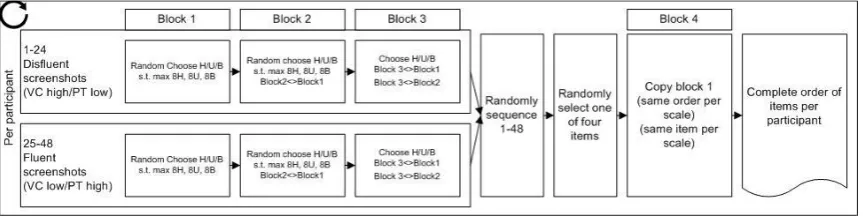
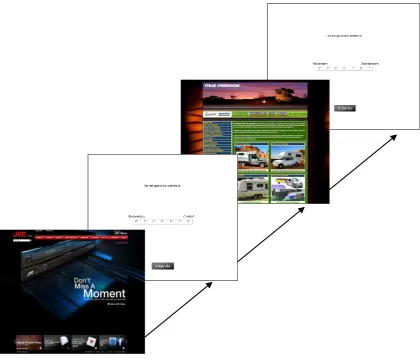
in the blocks (H-U-B, B-U-H, U-H-B, U-B-H, B-H-U, and H-B-U). One of the six combinations was then selected for each participant per screenshot. See Figure 6 for an illustration of the randomization and selection of the stimuli in the experiment. The random selection of items of each scale was not balanced out, resulting in some questions appearing more often than other questions of a scale (See appendix 6.6).
Figure 6. Visualization of the randomization and selection of stimuli. 2.3 Websites rated
In the current study, the websites in the study of Tuch et al. (2012a) were. In the experiment, 48 American companies‟ websites were selected from the pool used in the study by Tuch et al. (2012b). The websites were chosen from the categories VC low – PT high (20 websites: high fluency) and VC high – PT low (20 websites: low fluency). Furthermore, eight websites were added in order to balance out the three scales more evenly. Analyzing their results, these websites had a VC low-PT high score or VC high-PT low score despite categorized in another group (e.g. VC medium, PT low) (Tuch et al., 2012a). For the practice phase, four new companies‟ websites were used to avoid priming or repeated exposure in the experiment phase. The companies‟ websites were selected from Tuch et al. (2012a) study. See appendix 6.8 for an overview of all websites.
2.4 Measures
Figure 7. Procedure of the experiment. 2.9 Data analysis
All data of the participants were used to analyze. Statistical programs IBM SPSS 21.0 and R were used to analyze the data (R Core Team, 2013; SPSS IBM, NY).
In R, the libraries LME4 (mixed effects models) (Bates, Maehler, Bolker, & Walker, 2014) and MCMCglmm (Markov chain Monte Carlo Generalized Linear Mixed Models) (Hadfield, 2009) were used.
Havinga, 2013). The Gaussian error term was used for the data model. For testing the hypotheses, we focused on the fixed effects results. The syntax of R can be found in appendix 6.4.
To examine whether the correlation between beauty and perceived usability would decrease after treatment, a bivariate correlation analysis was conducted in SPSS (see appendix 6.9 for the SPSS syntax).
3. Results
In total, 8064 responses were measured with 192 responses per participant. For the MCMC glmm analysis, the z-standardized scores of the response, VC and PT were used. The variable VC was transformed into visual simplicity (VS) for easier interpretation (Schmettow & Boom, 2013). The reference group consists of the hedonic quality scale, control condition and block 1. Several models were tested and the less complex model with a lower DIC (27629.75) was chosen. The main effects were VS, PT and blocks whereas the two-way interaction effects were VS*condition, VS*PT and PT*condition. Two three-way interaction effects were introduced in the model. They were VS*condition*scale and PT*condition*scale. The estimated fixed-effects coefficients are shown in Table 1. For treatment contrasts, the reference groups consisted of the control condition, the hedonic quality scale and the first block. The hedonic quality scale was used as the reference group as the study was targeted at the association between beauty and usability.
For the correlation analyses of the rating scales, the data consisted only of block 1 thus resulting in 1008 responses of the 48 screenshots per condition (21 participants per condition).
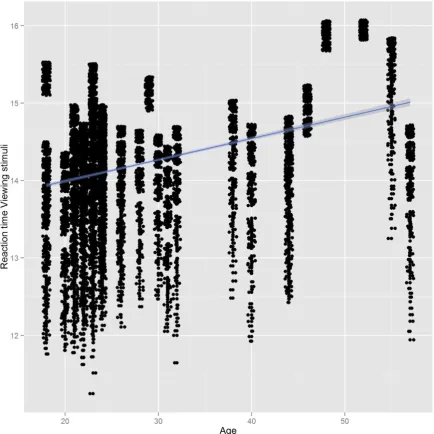
Plotting both reactions times against age, it appears that the time spent on viewing the stimuli and answering the questions, increased with age (Figure 8 and 9).
Figure 8. Reaction time of questionnaire against age.
Figure 10. Regression estimates of the model. 3.1 The fluency effect
The research question was whether processing fluency is the underlying variable of perceived beauty, perceived usability and hedonic quality. As we expected that repeated exposure, VC and PT would lead to more positive judgments of these three constructs, they will now be discussed.
3.1.1 Scale
3.1.2 Repeated exposure
Figure 11 displays the plot for repeated exposure. It appears that Block 2 and 3 had higher responses than Block 1 and fourth. It was expected that Block 4 would be in line with Block 2 and 3, therefore it is a surprising result.
Figure 11. Boxplot of repeated exposure.
3.1.3 Prototypicality
Figure 12. Interaction plot of PT and scale. 3.1.4 Visual Complexity
not differ much compared to the hedonic quality scale but resulted still in slightly more positive judgments when the websites are visually simple (Δresponse=.051).
Figure 13. Interaction plot of VS and scale.
3.1.5 Interaction between visual complexity and prototypicality
Table 3 shows that a significant interaction effect was found between VS and PT (Δresponse =.358, p=.022). This means that websites that are visual simple and high in prototypicality results in more positive judgments.
3.2 Breaking the fluency effect
analyzed. Furthermore, two three-way interaction were introduced in the model, namely VS*condition*scale and PT*condition*scale. Also, we hypothesized that the correlation between beauty and perceived usability would decrease in the treatment condition.
Lastly, we expected that the reaction time in the treatment would be longer than in the control condition due to the activation of System 2.
3.2.1 Treatment condition
In order to answer the hypothesis of breaking fluency, we will take a look at the treatment condition. The expectation is that the effect of fluency is gone in the treatment condition, resulting in less positive judgments on the scales. This would mean that the judgments on the beauty, perceived usability and hedonic quality scales are more “true”.
Based on Table 3, the treatment condition was judged less positive in comparison with the control condition (Δresponse=-.235) although it did not met statistical significance.
3.2.2 Prototypicality and treatment
Figure 14. Interaction plot of PT and condition.
Analyzing Table 3, the interaction effect is indeed found which met statistical significance (Δresponse=0.155, p=.034). Thus, the effect of PT differs between the control and treatment condition. However, in contrast with Figure 14, the result suggests that the treatment condition leads to more positive judgments in comparison with the control condition. To see whether the effect of PT and condition differs among the three scales, a 3-way interaction effect is conducted (Figure 15).
interaction for the hedonic quality scale (Δresponse=-.247). In comparison with the hedonic quality scale, the judgments of PT in the treatment condition were less positive for perceived usability (Δresponse=-.203). For the perceived usability scale, no significant 3-way interaction was found.
Figure 15. 2-way interaction plot of PT and condition between the three scales.
3.2.3 Visual simplicity and treatment
are almost the same in the treatment and control condition. Visual complex websites are perhaps processed less fluent (more cognitive restrain), thus disfluency can occur which explain the similar results of the treatment and control condition. Looking at Table 3, there is indeed an interaction effect between VS and condition. The judgments are less positive in visual simple websites in the treatment condition, in comparison with the control condition (Δresponse=-.217). The interaction effect between VS and condition reached statistical significance (p=.004). This result supports the breaking fluency hypothesis.
Figure 17 illustrates the three-way interaction effect of VS, condition and scales. It seems that the three-way interaction effect differs at the different scales. Table 3 shows if the interaction effect of VS and condition indeed differs between scales. For the perceived beauty scale, the interaction effect of VS and condition was found significant (p=.010). In comparison with the hedonic quality scale interaction effect, the judgments on the beauty scale were more positive on visual simple websites in the treatment condition (Δresponse=.256) However, this effect is almost cancelled out when compared to the interaction effect VS and condition on the hedonic quality scale. The interaction effect did not reach statistical significance on the perceived usability scale and the judgments were a bit more positive in comparison with the hedonic quality scale (Δresponse=.102).
Table 5
Parameter estimates and estimated marginal means of reaction time when answering the
questions
Parameter Β SEβ Wald‟s χ2 df p
Intercept 8.159 .0820 9893.61
1
1 .000
Control .040 .1271 .098 1 .754
Treatment 0
Scale 0.676
Estimated marginal means
Moderated M SE
Control 8.199 .097
Treatment 8.159 .082
Looking at Table 5, the reaction time in the control condition is slightly higher. This means that participants in the control condition took longer to answer the questions in comparison with the treatment condition (β= .040). It did not meet statistical significance. However, the difference is minimal as we can see in the estimated marginal means for the control condition (M=8.199) and treatment condition (M=8.159).
Reaction time for viewing the stimuli
had a longer preparation time when the recipe had a fancier font which made it harder to read. The fancier font was thus processed more strained, resulting in the substitution of the target question “How long the dish takes to prepare” by the heuristic question “Is it hard to read the recipe?” (Song & Schwarz, 2008). Regarding the attribute substitution of beauty and perceived usability, this would translate in the fluency of the features that influences beauty (e.g. symmetry, color) mediates the substitution. Another possibility of the two models working together is that the fluency model would address to different errors in judgments in System 1, whereas attribution substitution could account for errors in judgments when System 1 and System 2 are joint. These are of course assumptions as no evidence is found as of today. Therefore, it would be good and interesting to test the model. This would not only lead to a better and possible different understanding of beauty and perceived usability, but it would also analyze how the fluency model interacts (i.e. fits) with the attribution substitution assuming of course that they do not exclude each other.
6. Appendix
6.1 Treatment criteria list
CRITERIA LIJST
SCHOONHEID
Maak een lijst van 5 woorden die voor u een criteria zijn voor Schoonheid (Beauty). Dit zijn woorden waarmee u Schoonheid definieert. Deze woorden mogen niet hetzelfde zijn als de woorden in de Gebruiksvriendelijkheid (usability) lijst hieronder.
1. ……….……….
2. ……….……….
3. ……….……….
4. ……….……….
5. ………..……….
CRITERIA LIJST
GEBRUIKSVRIENDELIJKHEID
Maak een lijst van 5 woorden die voor u een criteria zijn voor Gebruiksvriendelijkheid (Usability) . Dit zijn woorden waarmee u gebruiksvriendelijkheid definieert. Deze woorden mogen niet hetzelfde zijn als de woorden in de Schoonheid lijst hierboven.
1. ……….……….
2. ……….……….
3. ……….……….
4. ……….……….
6.3 Opensesame Instructions for both conditions
6.3.1 Control condition
Welkom bij dit onderzoek over de factoren Schoonheid (beauty) en Gebruiksvriendelijkheid (usability) van websites.
Voordat u begint aan het onderzoek, zullen er een paar algemene vragen worden gesteld. Daarna zal het onderzoek worden uitgelegd. Het experiment duurt ongeveer 45 minuten. De data van het onderzoek zal anoniem worden verwerkt.
Voordat het onderzoek begint, volgt er nu eerst een korte oefening zodat u weet hoe het onderzoek zal gaan. Deze oefenfase bestaat uit 4 screenshots met ieder een vraag.
Als u klaar bent met het bekijken van de screenshot, druk dan op de <u><b>spatiebalk</b></u> om door te gaan naar de vraag.
6.3.2 Treatment instruction for breaking the fluency effect
##Instruction breaking fluency effect
Als we antwoord moeten geven of iets (bv. een website) mooi of gebruiksvriendelijk is, denken we niet goed na over wat schoonheid (beauty) en gebruiksvriendelijkheid (usability) voor ons betekenen. We staan niet echt stil bij wat het mooi of gebruiksvriendelijk maakt.
In plaats daarvan worden wij <b>onbewust en intuïtief</b> beïnvloed.
We beoordelen onbewust schoonheid en gebruiksvriendelijkheid. Namelijk op basis van visuele kenmerken zoals symmetrie, bekendheid of complexiteit etc. Als u zometeen de vragen in het onderzoek beantwoordt, denk dan eerst goed na over wat het mooi of gebruiksvriendelijk maakt.
Wat betekenen <i>schoonheid en gebruiksvriendelijkheid</i> <b>werkelijk</b> voor u? U heeft net een lijst gemaakt met criteria voor schoonheid en gebruiksvriendelijkheid. Deze woorden definiëren dus schoonheid en gebruiksvriendelijkheid voor u.
Houdt deze alstublieft <b>goed</b> in gedachten als u de vragen invult
U krijgt nu het eerste screenshot van een website te zien.
Bekijk hem <b>kort</b> en druk vervolgens op <u><b>spatiebalk</b></u> als u klaar bent om naar de vraag te gaan. Beantwoord de vraag op basis van uw eerste impressie.
Denk goed na over wat de website mooi of gebruiksvriendelijk maakt. Herinner uw critera lijst over <i>gebruiksvriendelijkheid</i> en <i>schoonheid</i>. Deze woorden omschrijven wat u mooi of gebruiksvriendelijk vindt. Houdt dit <b>goed in gedachten</b> als u de vragen invult. Dus:
Wat betekenen <i>schoonheid en gebruiksvriendelijkheid</i> <b>werkelijk</b> voor u?
6.4 R syntax
library(ggplot2) library(lme4)
library(MCMCglmm) library(foreign) library(effects)
citaload(file = "C:/Users/Gebruiker/Documents/School/Master/Masterthese/Data R/DN.Rda") #load(file = "DN.Rda")
load(file = "C:/Users/Gebruiker/Documents/School/Master/Masterthese/Data R/MCMC regression.Rda")
#load(file = "MCMC regression.Rda")
##load spss file with scale 1H 2U 3B
dataSPSS2<-read.spss("C:/Users/Gebruiker/Desktop/Data/DataLongHUB.sav", to.data.frame=TRUE)
## Judgments #### qplot(DN$questions)
dev.off()
## Response Time ####
qplot(DN$response_time_Screenshot)
qplot(DN$response_time_Screenshot[DN$response_time_Screenshot<50000])
##Outliers reaction time
plot.BoxRT <- qplot(condition, DN$response_time_Screenshot, data = DN, geom="boxplot") print(plot.BoxRT)
DN$RT <- DN$response_time_Screenshot DN$RT[DN$RT > 50000] <- NA
DN$lRT <- log(DN$RT) summary(DN)
qplot(DN$lRT)
summary(lm(lRT ~ Leeftijd + condition, DN[!is.na(DN$RT),]))
qplot(DN$Leeftijd, DN$RT) + geom_jitter() + geom_smooth(method="lm")
ggsave(filename="Reaction time questions Age.jpg", plot.RTAge, width=100, height=100, units="mm", scale=2)
plot.TSAge <- qplot(DN$Leeftijd, DN$lTS, xlab="Age", ylab="Reaction time Viewing stimuli") + geom_jitter() + geom_smooth(method="lm")
ggsave(filename="Reaction time viewing.jpg", plot.TSAge, width=100, height=100, units="mm", scale=2)
##Testing the time of the screenshots (viewing time) on the VC against conditions qplot(DN$time_Screenshot)
qplot(DN$time_Screenshot[DN$time_Screenshot<10000000]) DN$TS <- DN$time_Screenshot
DN$TS[DN$TS > 100000] <- NA DN$lTS <- log(DN$TS)
summary(DN)
qplot(DN$zVC, DN$TS, color=DN$condition, xlab="zVC", ylab="Viewing time Screenshot") + geom_jitter() + geom_smooth(method="lm")
qplot(DN$zPT, DN$TS, color=DN$condition, xlab="zPT", ylab="Viewing time Screenshot") + geom_jitter() + geom_smooth(method="lm")
qplot(DN$zPT, DN$lTS, color=DN$condition, xlab="zPT", ylab="Viewing time Screenshot") + geom_jitter() + geom_smooth(method="lm")
plot.TSCond <- ggplot(DN, aes(x=zPT, y=DN$TS, color=condition)) + geom_jitter() + geom_smooth(method="lm")
print(plot.TSCond)
##Testing the time of the screenshots (viewing time) on the PT against conditions qplot(DN$time_Screenshot)
DN$TS <- DN$time_Screenshot
qplot(DN$zPT, DN$lTS, color=DN$condition, xlab="zPT", ylab="Viewing time Screenshot") + geom_jitter() + geom_smooth(method="lm")
####QUESTIONS
##Plot interaction zVC and condition on questions
plot.vcpt <- ggplot(DN, aes(x=zVC, y=zPT, color=condition)) + geom_jitter() + geom_smooth(method="lm")
print(plot.vcpt)
ggsave(filename="ZVC and condition questions.jpg", plot.vcQ, width=100, height=100, units="mm", scale=2)
##Plot interaction zVC and condition on questions
plot.vcQ <- ggplot(DN, aes(x=zVC, y=questions, color=condition)) + geom_jitter() + geom_smooth(method="lm")
print(plot.vcQ)
##Plot interaction zPT and condition on questions
plot.ptQ <- ggplot(DN, aes(x=zPT, y=questions, color=condition)) + geom_jitter() + geom_smooth(method="lm")
print(plot.ptQ)
ggsave(filename="ZPT and condition questions 1.jpg", plot.ptQ, width=100, height=100, units="mm", scale=2)
####RESPONSE
##Plot interaction zVC and condition on response(z-standardized)
plot.vcR <- ggplot(DN, aes(x=zVC, y=Response, color=condition)) + geom_jitter() + geom_smooth(method="lm")
print(plot.vcR)
ggsave(filename="ZVC and condition 1.jpg", plot.vcR, width=100, height=100, units="mm", scale=2)
##Plot interaction zVS and condition on response(z-standardized)
plot.vsR <- ggplot(DN, aes(x=zVS, y=Response, color=condition)) + geom_jitter() + geom_smooth(method="lm")
print(plot.vsR)
ggsave(filename="ZVS and condition 1.pdf", plot.vsR, width=100, height=100, units="mm", scale=2)
ggsave(filename="ZVS and condition 1.jpg", plot.vsR, width=100, height=100, units="mm", scale=2)
##Plot interaction zPT and condition on response(z-standardized)
plot.ptR <- ggplot(DN, aes(x=zPT, y=Response, color=condition)) + geom_jitter() + geom_smooth(method="lm")
ggsave(filename="ZPT and condition 1.jpg", plot.ptR, width=100, height=100, units="mm", scale=2)
##Plot interaction zPT and scale on response(z-standardized)
plot.ptS <- ggplot(DN, aes(x=zPT, y=Response, color=Scale)) + geom_jitter() + geom_smooth(method="lm")
print(plot.ptS)
ggsave(filename="ZPT and condition 1.jpg", plot.ptS, width=100, height=100, units="mm", scale=2)
##Plot interaction zVC and scale on response(z-standardized)
plot.vcS <- ggplot(DN, aes(x=zPT, y=Response, color=Scale)) + geom_jitter() + geom_smooth(method="lm")
print(plot.vcS)
ggsave(filename="ZPT and condition 1.jpgf", plot.vcS, width=100, height=100, units="mm", scale=2)
##Plot block regression line scatterdot
plot.block <- ggplot(dataSPSS2, aes(x=block, y=Response)) + geom_jitter() + geom_smooth(method="lm")
print(plot.block)
ggsave(filename="block.pdf", plot.scale1, width=100, height=100, units="mm", scale=2) ##Plot interaction zVC and scales on response does not make sense: regression line over the scales?
plot.block <- ggplot(dataSPSS2, aes(x=block, y=Response)) + geom_jitter() + geom_smooth(method="lm")
#Reaction time on VC on Scale
plot.RT <- ggplot(DN, aes(x=zVC, y=DN$RT, color=Scale)) + geom_jitter() + geom_smooth(method="lm")
print(plot.RT)
ggsave(filename="RT VC Scale.jpg", plot.RT, width=100, height=100, units="mm", scale=2)
#Reaction time on PT on Scale
plot.RTPT <- ggplot(DN, aes(x=zPT, y=DN$RT, color=Scale)) + geom_jitter() + geom_smooth(method="lm")
print(plot.RTPT)
ggsave(filename="RT PT Scale.jpg", plot.RTPT, width=100, height=100, units="mm", scale=2)
#Reaction time on PT on Condition
plot.RTPTCond <- ggplot(DN, aes(x=zPT, y=DN$lRT, color=condition)) + geom_jitter() + geom_smooth(method="lm")
print(plot.RTPTCond)
ggsave(filename="RT PT Condition.jpg", plot.RTPTCond, width=100, height=100, units="mm", scale=2)
#Reaction time on VC on Condition
plot.RTVCCond <- ggplot(DN, aes(x=zVC, y=DN$lRT, color=condition)) + geom_jitter() + geom_smooth(method="lm")
print(plot.RTVCCond)
#Boxplot response time questions of PT on Condition
plot.RTCondBox <- qplot(condition, lRT, data = DN, geom="boxplot") print(plot.RTCondBox)
#Boxplot response time questions of VS on Condition
plot.TSCondBox <- qplot(condition, lTS, data = DN, geom="boxplot") print(plot.TSCondBox)
##Boxplot for block and response
d <- ggplot(dataSPSS2, aes(factor(block), Response)) k <- d + geom_boxplot()
ggsave(filename="block boxplot.pdf", k, width=100, height=100, units="mm", scale=2) #Plot zVC and zPT on Scale for H2 and H3
#VC and scale
plot.Scale <- ggplot(DN, aes(x=zVC, y=Response, color=Scale)) + geom_jitter() + geom_smooth(method="lm")
plot.Scale
ggsave(filename="VC and Scale1.jpg", plot.Scale, width=100, height=100, units="mm", scale=2)
#VS and scale
plot.Scale2 <- ggplot(DN, aes(x=zVS, y=Response, color=Scale)) + geom_jitter() + geom_smooth(method="lm")
plot.Scale2
#PT and scale
plot.Scale1 <- ggplot(DN, aes(x=zPT, y=Response, color=Scale)) + geom_jitter() + geom_smooth(method="lm")
plot.Scale1
ggsave(filename="PT and Scale1.jpg", plot.Scale1, width=100, height=100, units="mm", scale=2)
## Influence of aesthetics ####
plot.vc <- ggplot(DN, aes(x=zVC, y=Response, color=condition)) + geom_jitter() + geom_smooth(method="lm") + facet_grid(.~Scale)
print(plot.vc)
ggsave(filename="VC Condition Scale.jpg", plot.vc, width=100, height=100, units="mm", scale=2)
plot.vs <- ggplot(DN, aes(x=zVS, y=Response, color=condition)) + geom_jitter() + geom_smooth(method="lm") + facet_grid(.~Scale)
print(plot.vs)
ggsave(filename="VS Condition Scale.jpg", plot.vs, width=100, height=100, units="mm", scale=2)
plot.pt <- ggplot(DN, aes(x=zPT, y=Response, color=condition)) + geom_jitter() + geom_smooth(method="lm") + facet_grid(.~Scale)
print(plot.pt)
ggsave(filename="PT Condition Scale.jpg", plot.pt, width=100, height=100, units="mm", scale=2)
#setwd(wualadir)
ggsave(filename="PT and condition.pdf", plot.pt, width=100, height=100, units="mm", scale=2)
#m1 <- MCMCglmm(Resp_usability ~ Resp_hedonism * condition, random =~ subject_nr, data = DN.wide)
summary(m1) # Usability and hedonism**
#m2 <- MCMCglmm(Resp_usability ~ Resp_beauty * condition, random =~ subject_nr, data = DN.wide)
summary(m2) # Usability and beauty **
#m3 <- MCMCglmm(Resp_usability ~ (Resp_hedonism * condition) + (Resp_beauty * condition), random =~ subject_nr, data = DN.wide)
summary(m3) # Usability and hedonism
#m4 <- MCMCglmm(Response ~ condition + as.factor(block), random =~ subject_nr + SSName + ItemNum, data = DN)
summary(m4) ## **** ##
#m5 <- MCMCglmm(questions ~ condition * zVS * Scale + condition * zPT * Scale + as.factor(block), random =~ subject_nr + SSName + ItemNum, data = DN)
round(summary(m5)$solutions,2) summary(m5)
## **** ##
#m6 <- MCMCglmm(questions ~ zVS:zPT +condition * zVS * Scale + condition * zPT * Scale + as.factor(block), random =~ subject_nr + SSName + ItemNum, data = DN)
#m7 <- MCMCglmm(questions ~ zVC:zPT +condition * zVC * Scale + condition * zPT * Scale + as.factor(block) - Scale:condition, random =~ subject_nr + SSName + ItemNum, data = DN)
summary(m7)
#trace and density plot plot(m7)
#Coefficient regression estimates plot
source("http://www.math.mcmaster.ca/~bolker/classes/s756/labs/coefplot_new.R") coefplot(m7)
plotInteraction(DN,'ZVC','condition','questions') plotResiduals(m7)
6.7 Screenshots of the experiment
Introduction screen in both conditions
Practice phase in both conditions
Stimuli screenshot websites
6.8 Websites used
6.8.1 Fluent websites (low VC – high PT)
Stimuli Name VC_mean VC_sd PT_mean PT_sd Website url
honda 2,708333 2,053188 4,833333 1,761093 http://powersports.honda.com
allete 3,208333 1,718927 4,875 1,701981 http://www.allete.com
pg&e 3,428571 1,68533 5 1,608799 http://www.pge.com
behr 3,777778 2,025479 5,111111 1,502135 http://www.behr.com/Behr/home
harley_davidson 3,772727 1,925563 5,590909 1,469016 http://www.harley-davidson.com
chevrolet 3,590909 1,816829 5,227273 1,631004 http://www.chevrolet.com/#cruze
hebei_yanuo 3 1,752549 5,275862 1,250616 http://www.yanuo.com
sabic 3,454545 1,818615 4,863636 1,753784 http://www.sabic.com/corporate/en
quintiles 3,62963 1,690429 5,407407 1,474378 http://www.quintiles.com
ameresco 3,272727 1,804276 5,454545 1,438494 http://www.ameresco.com
pioneer 3,727273 1,723281 4,636364 1,890967 http://www.pioneerelectronics.com
aiam 2,857143 1,292412 4,928571 1,59153 http://www.globalautomakers.org
northeast_system 3,590909 2,130484 5,136364 1,859223 http://www.nu.com
novasyn_organics 2,928571 1,439246 5,357143 1,499084 http://www.novasynorganics.com
fantasy_junction 2,685714 1,811263 4,828571 1,67131 http://www.fantasyjunction.com
ansa 3,885714 1,761874 5,028571 1,524037 http://ansaautomotive.com
mafs 3,037037 1,580688 5,148148 1,406132 http://www.usemafs.com
engro_corp 3,566667 1,735697 5,233333 1,356551 http://engro.com
national_heat 3,727273 1,723281 4,545455 1,738288 http://www.nationalheatexchange.com
sherwin_williams 3,409091 1,918806 5,136364 1,726418 http://www.sherwin-williams.com
exchange_consulta 2,666667 1,464557 4,25 1,799758 http://www.exchangeconsulting.com
tesla 3,028571 1,932473 5,514286 1,268891 http://www.teslamotors.com
jvc 3,272727 2,229282 5,545455 1,534594 http://www.jvc.com
6.8.2 Disfluent websites (high VC – low PT)
Stimuli name VC_mean VC_sd PT_mean PT_sd Website url
powermadd 4,214286 1,847184 3,214286 1,368805 http://www.powermadd.com
chase 4,942857 1,679336 3,628571 1,516298 http://www.chase.com
plows_unlimited 4,409091 1,816829 2,772727 1,47783 http://www.plowsunlimited.com/archive
Lloyd 5,142857 1,09945 3,5 1,286019 http://www.lloydsstsb-offshore.com
Taxproblem 4,971429 1,790263 4,057143 1,589355 http://www.taxproblem.org
airgas 4,727273 1,351606 4,318182 1,358794 http://www.airgas.com
chain 4,888889 2,100061 3,185185 1,35978 http://www.chain-auto-tools.com
snl_financial 5,074074 1,356634 4,185185 1,468569 http://www.snl.com
american_express 5,137931 1,186957 4,413793 1,63701 http://www.americanexpress.com
synchem 4,371429 1,800093 3 1,57181 http://www.synchem.com
abraxas 4,541667 2,08471 2,291667 1,517411 http://www.abraxasenergy.com
bank_of_america 5,136364 1,320009 3,818182 1,562549 http://www.bankofamerica.com
geico 5,533333 1,547709 3,6 1,940494 http://www.geico.com
izmocars 4,714286 1,724758 4,228571 1,646488 http://www.izmocars.com
freedom 5,083333 1,529895 3,25 1,823756 http://www.freedomoffroad.com.au
ebizautos 4,851852 1,292097 4,074074 1,858989 http://www.ebizautos.com
horschel 4,733333 1,595972 3,833333 1,821014 http://www.hbpllc.com
first_european 4,818182 1,468279 4 1,573592 http://www.first-european.co.uk
sensient 4,958333 1,680558 3,375 1,68916 http://www.sensient-tech.com
Honeywell 5,296296 1,234592 4,481481 1,451004 http://honeywell.com/Pages/Home.aspx
snowcare_for_troops 4,857143 1,561909 4 1,88108 http://projectevergreen.com/scft
bajaj 4,222222 1,281025 2,925926 1,591466 http://www.bajajauto.com
bureau_van_dijk 5,045455 1,174218 4,045455 1,214095 http://www.bvdinfo.com