Abstract— As we know that TCP and UDP are internet protocols which are used for communication through internet. The communication takes places through TCP and UDP using packets. In this research paper ,our purpose to analysis packets of TCP and UDP while sending a e-mail using a tool called wireshark. Wireshark is a free and open-source packet analyzer. To inspect the packets of TCP and UDP we are using different parameters are frame no. On wire ,frame length, IP source ,IP destination ,header length of the packets and also window size value etc.
Index Terms— PROTOCOLS ,TCP,UDP, WIRESHARK,
PACKET FLOW.
I. INTRODUCTION
The Internet become grown significantly in scope, and many results shown for operational requirements of internet in form of algorithms and new protocols. So many protocols like SIP, HTTP, UDP, ICMP, TCP, RIP etc. expansion gives us privacy and also secure our data on the internet and there are so many tools developed and evolved to test the work of real environment they still have certain limitations in their environment because of using the approaches of so much topologies and lot of traffic generation on their network so as in real world so up to now there are number of algorithms and protocols developed and designed to cover the operational needs of internet. Transmission Control Program that incorporated both connection-oriented links and datagram services between hosts. The monolithic Transmission Control Program was later divided into a modular architecture consisting of the Transmission Control Protocol at the connection-oriented layer and the Internet Protocol at the internetworking (datagram) layer. The model became known informally as TCP/IP, although formally it was henceforth called the Internet Protocol Suite. The Transmission Control Protocol (TCP) is a core protocol of the Internet Protocol Suite. It originated in the initial network implementation in which it complemented the Internet Protocol (IP). TCP is the protocol that major Internet applications such as the World Wide Web, email, remote administration and file transfer rely on.
UDP uses a simple connectionless transmission model with a minimum of protocol mechanism. It has no handshaking dialogues, and thus exposes any unreliability of the underlying network protocol to the user's program. There is no guarantee of delivery, ordering, or duplicate protection. UDP provides checksums for data integrity, and port numbers for addressing different functions at the source and destination of the datagram. Lets focus on TCP and UDP connection :-
1.1 TCP/UDP CONNECTION ESTABLISHMENT
1.1.1 Transmission Control Protocol (TCP) connection is
established using three steps:
1) SYN bit from host A(client) to host B(server) 2) SYN+ACK bit from host B(server) to host A(client) 3) ACK bit from host A(client) to host B(server), which is shown in Fig 1.
Fig. 1
TCP connection establishment
If any of the steps in connection establishment doesn’t occur, means that connection is not established between client and server and there is some type of intrusion in network.
1.1.2 User Datagram Protocol (UDP) connection follows
only request and response query from sender and receiver respectively.
2. LITERATURE REVIEW
As in the study of TCP and UDP in Wireshark in which they worked on different formulae to calculate theperformance of TCP and UDP and also gave installation steps for wireshark.we study about two protocols (TCP,UDP) how to create the topologies and network components. Wireshark is a network protocol analyzer. It is formerly known as Ethereal. It reads packet from the network, decodes them and presents them in an easy to understand format .It is an open source network analyzer and is freely available. As
TCP & UDP PACKETS ANALYSIS USING WIRESHARK
Dr. Mahesh Kumar
1Rakhi Yadav
2Associate Professor M.Tech Scholar
MRKIE&T MRKIE&T
Rewari,Haryana ,India Rewari,Haryana,India
Amanpreet Kaur , Monika Saluja did work on Investigating
TCP/IP, HTTP, ARP, ICMP Packets Using Wireshark in
their research paper they analysis In this paper network traffic from a live network is shown by taking various traces and monitoring and analysis is done on that captured files and then statistics is built. Detailed analysis and summary as well as conversations between two end points are shown. One interesting option which Wireshark give is objects which we captured or say user who are on the network using whatever sites can be listed in this object list .but We analysed the performance Of TCP and UDP packets while sending a E-mail and also make comparison between TCP and UDP packets.
3. PROBLEM STATEMENT
TCP and UDP contains lots of internal parameter . TCP are connection oriented and UDP are connectionless protocols for analysing these two protocols first we should know all the internal details of these two.
3.1 TCP INTERNAL STRUCTURE ANALYSIS
The TCP protocol was designed to operate reliably over almost any transmission medium regardless of transmission rate, delay, corruption, duplication, or reordering of segments. Production TCP implementations currently adapt to transfer rates in the range of 100 bps to 10**7 bps and round-trip delays in the range1 ms to 100 seconds. Recent work on TCP performance has shown that TCP can work well over a variety of Internet paths, ranging from 800 Mbit/sec I/O channels to 300 bit/sec dial-up modems [Jacobson88a]. The introduction of fiber optics is resulting in ever-higher transmission speeds, and the fastest paths are moving out of the domain for which TCP was originally engineered. This memo defines a set of modest extensions to TCP to extend the domain of its application to match this increasing network capability.
3.2 UDP INTERNAL STRUCTURE ANALYSIS
UDP uses a simple connectionless transmission model with a minimum of protocol mechanism. It has no handshaking dialogues, and thus exposes any unreliability of the underlying network protocol to the user's program. There is no guarantee of delivery, ordering, or duplicate protection. UDP provides checksums for data integrity, and port numbers for addressing different functions at the source and destination of the datagram. 3.2.1. UDP ATTRIBUTES
A number of UDP's attributes make it especially suited for certain applications.
It is transaction-oriented, suitable for simple query-response protocols such as the Domain Name System or the Network Time Protocol.
It provides datagram, suitable for modeling other protocols such as in IP tunneling or Remote Procedure Call and the Network File System.
It is simple, suitable for bootstrapping or other purposes without a full protocol stack, such as the DHCP and Trivial File Transfer Protocol.
It is stateless, suitable for very large numbers of clients, such as in streaming media applications for example IPTV
The lack of retransmission delays makes it suitable for real-time applications such as Voice over IP, online games, and many protocols built on top of the Real Time Streaming Protocol.
Works well in unidirectional communication, suitable for broadcast information such as in many kinds of service discovery and shared information such as broadcast time or Routing Information Protocol
4. PROPOSED SOLUTION
In solution approach here for TCP and UDP packets analysis we are using wireshark tool lets discuss about it.
4.1 USES OF WIRESHARK TOOL:-
Wireshark is a GUI based network capture tool. There is a command line based version of the packet capture utility, called TShark. TShark provides many of the same features as it’s big brother, but is console-based. It can be a good alternative if only command line access is available, and also uses less resources as it has no GUI to generate.
4.2. USING WIRESHARK TO CAPTURE AND ANALYSE TRAFFIC :-
The fundamentals of the Wireshark Packet Sniffer and Protocol Analyser tool will be introduced. Then Wireshark will be used to perform basic protocol analysis on TCP and UPD network traffic. Wireshark is a network packet sniffer (and protocol analyzer) that runs on many platforms, including Windows XP and Vista. Generate some network traffic with a Web Browser, such as Internet Explorer or Chrome. Your Wireshark window should show the packets, and now look something like.
Fig. 2
Wireshark Capuring Traffic Packet List Panel Packet Details Panel Packet Bytes Panel
4.3. STEPS FOR USING WIRESHARK
1.Start the Wireshark application. When Wireshark is first run, a default, or blank window is shown. To list the available network interfaces, select the Capture->Interfaces menu option.traffic click the Start button for the network interface you want to capture traffic on. Windows can have a long list of virtual interfaces, before the Ethernet Network Interface Card (NIC).
2. To stop the capture, select the Capture->Stop menu option, Ctrl+E, or the Stop toolbar button. What you have created is a Packet Capture or ‘pcap’, which you can now view and analyse using the Wireshark interface, or save to disk to analyse later. The capture is split into 3 parts:
a. Packet List Panel – this is a list of packets in the current capture. It colours the packets based on the protocol type. When a packet is selected, the details are shown in the two panels below.
b. Packet Details Panel – this shows the details of the selected packet. It shows the different protocols making up the layers of data for this packet. Layers include Frame, Ethernet, IP, TCP/UDP/ICMP, and application protocols such as HTTP. c. Packet Bytes Panel – shows the packet bytes in Hex and ASCII encodings.
5. EXPERIMENTAL SETUP
5.1. TCP PACKET ANALYSIS USING WIRESHARK WHILE SENDING A MAIL
5.1.1. Following steps are included for analysis the TCP packets
1) First we are selecting the TCP packet from all the network packets from wireshark.
FIG. 3
TCP PACKET SELECTION
2) First line shows a summary of the frame. The other lines show the data link layer, the network layer, the transport layer, and finally, the actual data contained within the frame. I will step through each line in order.
Here frame detail is 571 bytes on wire and 571 bytes capture. Arrival time jun 15, 2015 and frame number 2 134,frame length 571 bytes
Fig. 4
Frame Details Of TCP Packets
3) Moving to the Ethernet layer we can see that it is pretty simple. It contains a destination address and a source address. The Ethernet layer is concerned with node to node.
FIG. 5
ETHERNET LAYER OF TCP PACKETS
4) The IP layer is concerned with moving between networks, hence the original meaning of the term internetwork, from whence Internet was derived. Highlighting the network layer shows more details. we can see the source and destination IP addresses as well as the IP header length.
Here IP version is 4 And Header length 20 bytes
Fig 6 IP layer
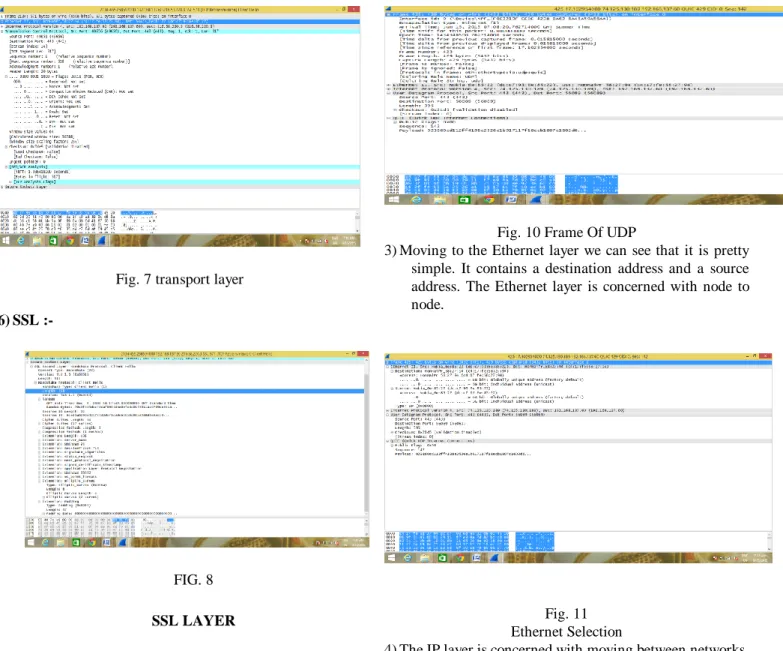
5) The transport layer is where applications communicate via the use of ports. we can see that the
source port is 49654, while the destination port is 443 . and seq. No. 1 ,ack. 1 ,header length 20 bytes ,widow size -64.
Fig. 7 transport layer
6) SSL :-
FIG. 8
SSL LAYER
1.2. UDP PACKET ANALYSIS USING WIRESHARK WHILE SENDING A MAIL
1) Firstly we are selecting the UDP packet from all the network packets from wireshark.
Fig 9
Selection Of UDP Packet
2) First line shows a summary of the frame. The other lines show the data link layer, the network layer, the User datagram protocol, and finally, the actual data contained within the frame. I will step through each line in order. Here frame detail frame number 429 ,frame length 429 bytes
Fig. 10 Frame Of UDP
3) Moving to the Ethernet layer we can see that it is pretty simple. It contains a destination address and a source address. The Ethernet layer is concerned with node to node.
Fig. 11 Ethernet Selection
4) The IP layer is concerned with moving between networks, hence the original meaning of the term internetwork, from whence Internet was derived. Highlighting the network layer shows more details. we can see the source and destination IP addresses as well as the IP header length.Here IP version is 4 And Header length 20 bytes
Fig. 5.12 IP PACKETS
5) The user datagram is where applications communicate via the use of ports. Looking at the capture , we can see that the source port is 443, while the destination port is56089 length is 395
Fig. 5.13 User Datagram
RESULT :- Layers, Which Can Act As An Aid In Troubleshooting Network Problems. It Can Also Help You To Understand What Sort Of Traffic Is Going Over The Network. While Sending A E-Mail We Analysis The Packets Of UDP And TCP And Concluded A Result According To The Following Parameter :-Frame No. On Wire,Frame Length,IP Source ,IP Destination ,Header Length .Window Size Value. With help of these parameters we see that Frame no. On wire of TCP is 571 and UDP is 429 ,Frame length of TCP is 571 and UDP is 429. ,Bytes captured TCP is 571 and UDP bytes length captured is 429. ,IP source of TCP is 49654 & destination is 443 and UDP source is 443 and destination is 56089.So, we concluded here that frame length, frame no. And bytes captured during sending a mail more of TCP than UDP.
6.Conclusion
In this paper we discuss about TCP and UDP protocols .We also study the types of
protocols used on each layer of TCP/IP model and its related issues.We also analyzed the packet flow scenario i.e. how packet is flow from source to destination while sending a e-mail.as we know that TCP is connection oriented protocol and connection is establishedbefore packets flow from source to destination and acknowledgement is also send by receiver and UDP are connectionless protocol so according to frame length, frame no. And bytes captured during sending a mail , all the values of these are more of TCP than UDP. As we analysis the packets flow during sending a E-mail, in future we also analysis the packets flow rate during a call like using Skype ,video call etc.
REFERENCES [1]https://www.wireshark.org/docs/wsug_html_chunked/ChapterI ntroduction.html [2]https://www.google.co.in/?gfe_rd=cr&ei=NIt-Vd3gIoaFogPV_o DgBw#q=tcp+and+udp+packets [3]ttps://www.wireshark.org/download.html [4]https://www.google.co.in/?gfe_rd=cr&ei=NIt-Vd3gIoaFogPV_o DgBw#q=how+to+use+wireshark [5]https://www.google.co.in/?gfe_rd=cr&ei=Sox-VeKFAsaFoAOE gYGYAw#q=tcp+and+udp+protocols
[6] research paper Investigating TCP/IP, HTTP, ARP, ICMP Packets UsingWireshark
Amanpreet Kaur1, Monika Saluja publish in January 2014.