Customer contact and interaction is important for companies to build lasting and contented customer relationships. Contact centres are the primary interaction point between a company and its customers. The contact centre agent’s (CCA’s) response time to solve problems is critical in terms of both the customer
experiences and from the company’s revenue
perspective. One approach to improve the CCA’s productivity is to provide them with a computer user interface (UI) that will facilitate and reduce the time used to assist customers. CCAs have different capabilities, expertise and interests and studies have provided empirical support that user performance can be increased when the computer UI characteristics match the user skill level. The focus of this research is to develop an adaptive user interface model for a contact centre that adapts the UI to the CCA’s expertise level in order to improve the CCA’s productivity.
Index Terms—Contact Centres, Intelligent User Interfaces, Adaptive User Interfaces
I. INTRODUCTION
ontact centres are the primary interaction point between a company and its customers and are rapidly expanding in terms of both workforce and economic infrastructure [1, 2]. The contact centre personnel managing the calls logged by customers are referred to as contact centre agents (CCAs) [3]. CCAs differ in their ability to respond to customer queries and do not interact with the computer user interface (UI) in a similar manner. CCA’s have different experience levels, cognitive abilities and learning and work styles.
The CCA’s current computer UIs are static in nature and are the same for each CCA. Thus the traditional contact centre computer UIs often seem too complex for a novice CCA, while appearing too simplistic to an experienced CCA. One of the important challenges in today’s contact centre solutions is to increase the speed at which CCAs retrieve information to answer customer queries. CCA’s response time is critical in terms of both customer experiences as well as from a company’s revenue perspective. Studies have provided empirical support that user performance can be increased when the computer UI characteristics match the user skill level [4]. As a result, software systems have to become more individualised and cater for the different users.
The most common dimension used when discussing user expertise/skill level is the user’s experience with the specific UI. Users are normally either experts or novices. There is evidence to support the fact that novice and expert users behave differently [5].
Novice users are generally concerned with how to do things instead of how fast they can do it. Novice users require the UI to be easy to learn so that they could become experts quickly. Expert users are more goal orientated when using an interface. They quickly deduce goals and actions to achieve those goals. They further require a highly efficient interface and would thus like the number of interactions to be reduced. Novice and expert users’ behaviour usually differ dramatically at the physical level of action [6]. An example of this difference is that novice users use the mouse to select from a menu whereas expert users prefer to press an accelerator key. Novice performance builds the skills that transitions to expert performance when the basic action of the novice and expert are the same [5, 6].
The above emphasises the importance of adaptive user interfaces (AUIs). AUIs which has widely been recognised as a being a central component of Intelligent User Interfaces (IUIs), have been proposed as a promising attempt to overcome the above mentioned problems of human-computer interaction (HCI) complexity [16]. It is thus envisaged that by providing a more personalised UI according to the CCA’s expertise level, an improved customer experience could be achieved.
An AUI model has been developed for contact centre computer UIs. The aim of this research is to determine if existing AUI models can be combined with an IUI model for CCAs and if such interfaces would improve productivity and usability. Section II of this paper discusses the problem domain of this research study, namely IUIs and AUIs. The proposed AUI model is introduced in Section III and implementation and preliminary evaluation of this model is discussed in Section IV and V respectively. Section VI focuses on current and future research related to AUIs.
II. RELATEDWORK A. Contact Centres
Contact centres are defined as an operation that use personnel and various multi-media customer-contact channels in sophisticated ways to deliver a variety of services to customers [2, 9]. The various areas of operations for contact centres are a help desk or a service desk. A help desk can be defined as a single point of contact for customer problem resolution [11]. Service desks are defined as a
An Adaptive User Interface Model for Contact Centres
Bronwin Jason, Andrè Calitz
Department of Computer Science and Information Systems
Nelson Mandela Metropolitan University, PO Box 77000, Port Elizabeth, 6031 Tel: 041-504-2323 Fax: 041-504-2831
Email: {Bronwin.Jason, Andre.Calitz}@nmmu.ac.za
central point of contact between the customer and all IT related areas whereby customers can use multiple channels for requesting services [11, 13]. The main difference thus between a help desk and service desk is that a service desk enables the usage of multiple channels to service customers.
Even though contact centres utilise state-of-the-art technology, all contact centres rely on people to act as the intermediaries between the information in the database and the servicing of the customers [8]. These people employed by contact centres are the CCAs whose responsibility it is to receive the calls placed by customers and either redirect those calls or personally assist the customer, as previously mentioned. These CCAs are trained and skilled in customer service [7].
Even though these CCAs have different characteristics, they currently use a standard static UI. The next section further investigates IUIs, in order to understand how AUI can be used to adapt the UI to the needs of the CCAs. B. Intelligent User Interfaces
In the early days of personal computers the UIs consisted of text based interfaces. Graphical User Interfaces (GUIs) have since replaced these text-based interfaces but despite the advancement, GUIs are still difficult to learn for inexperienced users. IUIs are a way of alleviating this problem.
IUIs can be considered the next wave of interfaces. IUIs are human-computer interfaces that aim to improve the efficiency, effectiveness, and naturalness of human-machine interaction by representing, reasoning, and acting on models of the user, domain, task, discourse, and media (e.g. graphics, natural language, gesture) [15].
IUIs currently constitute a major direction of HCI research, towards the provision of high-quality user-computer interaction. They are considered especially important when the aim is towards supporting heterogeneous user groups with variable and diverse needs, abilities and preferences since they facilitate a more ‘natural’ interaction, i.e. effective and efficient user-computer interaction [15].
A suitable IUI architecture depicting the main functions of an IUI is provided in Figure 1. This specific architecture was proposed by Tyler et al. [18]. The main components of this architecture are the Input/Output Manager, Plan Manager, Presentation Manager, Adaptor and Knowledge Base [18].
The Input/Output Manager provides the user with multimodal means of input. The Knowledge Base is the key component of the IUI as it is a repository that is used to adapt the UI to the user’s needs. The Plan Manager assists the user with achieving high-level goals by using knowledge of the user’s current goals and plans. The Plan Manager has the ability of detecting errors and correcting them, interpreting ambiguous requests and the ability to help users map high-level goals into low-level application commands. The Adaptor ensures that the UI is modified to best fulfill the user’s needs and thereby assists the user with task completion. The Presentation Manager determines the most suitable modality and modality techniques to display to the user [18].
Figure 1: Tyler et al.’s Intelligent Interface Architecture (Extract) [18]
According to the above mentioned IUI architecture, the Adaptor component and the Presentation Manager are responsible for adapting the UI to the user’s needs. The Adaptor component is responsible for maintaining the user model so that the Presentation Manager can best decide how to adapt the UI. It can therefore be concluded that adaptivity is recognised as being a central component of an IUI. The next section further investigates AUIs.
C. Adaptive User Interfaces
A clear distinction needs to be made between an adaptable and an adaptive system. A system is called adaptable if the user is provided with tools to customise the UI. This is an attractive objective, to provide the user with facilities for tailoring the system according to his personal tasks and needs. This kind of individualisation gives control over the adaptation to the user. A system is called adaptive if it is able to change its own characteristics automatically according to the user’s needs [19].
An AUI can be defined as a software artifact that dynamically changes the appearance, function or content of the UI in response to its user interaction experience [21]. It improves interaction with the user by constructing a user model based on partial experience with that user [20, 21, 22]. Thus an adaptive interface does not exist in isolation and is designed to interact with human users. Furthermore, the interface is only adaptive if the interaction with the user is improved. Improvements should result from generalisation over past experiences and carry over to new interactions [21].
The above definition of AUI will seem familiar to some as it takes the same form as common definitions for machine learning. The main differences are that the user plays the role of the environment in which learning occurs, the user model takes the place of the learned knowledge base, and interaction with the user serves as the performance task on which learning should lead to improvement. In this view, AUIs constitute a special class of learning systems that are designed to aid humans, in contrast to early work on machine learning, which aimed to develop knowledge-based systems that would replace domain experts [21].
A further investigation was done into various AUI models in order to select the most suitable one. Opperman suggests that all AUIs should consist of the following criteria [23]: 1) Afferential component of Adaptivity: This component
implicitly or explicitly collected and then recorded. The Knowledge Base stores the recorded data.
2) Inferential component of Adaptivity: This component consists of the adaptive system analysing the gathered data to identify from the user behaviour possible adaptation indicators, and hence inferences are made. The inferential component can be based on rules and heuristics that are represented by various models (user/system/task etc.).
3) Efferential component of Adaptivity: This component specifies how the system should be adapted based on data obtained in the Knowledge Base. The Knowledge Base and in particular the user model is thus the core component needed for personalisation.
The above mentioned components were used as a basis to investigate the criteria of various AUI architectures/models. The criteria specified was found to be evident in all AUI models but in some cases not explicitly defined. An AUI model was proposed that satisfies all criteria of AUIs. The next section describes the design of the proposed AUI model and the extent to which it can be adapted to suit the domain of contact centres.
III. MODEL DESIGN A. Architecture
The AUI model proposed in Figure 2 is a general architecture and can be applied to any system. This section discusses the various components of the proposed model (Figure 2) and the interaction between these components. The components of the AUI model are:
1) Knowledge Base: The Knowledge Base serves as the core component for AUIs acting as a repository by making use of various models. Among all the possible models pertained in the Knowledge Base, the field of user model research gains the most attention. The reason for this is that adaptivity requires the system to have a certain amount of knowledge about the user and user modeling fills this void. The Knowledge Base is not however limited to the models (user, task, domain and system) provided by Figure 2.
2) Analysis Engine: The Analysis Engine uses the user model and other models in the Knowledge Base to derive new user information. The analysis engine can update the user model based on new information learned about the user or it can initiate an event such as suggesting something to the user. It also responds to queries from the application. The Inferential component of Adaptivity is thus satisfied by the Analysis Engine.
3) Watcher: The Watcher collects information about the user either implicitly by observing the user’s behaviour while the user interacts with the system or explicitly and updates the Knowledge Base. The Afferential component of Adaptivity is thus satisfied by the Watcher.
4) Adaptation Effect: The Adaptation Effect provides various kinds of adaptations such as adaptation to information, presentation, UI and navigation. The Efferential component of Adaptivity is thus satisfied by the Adaptation Effect. The Adaptation Effect decides how to adapt the UI to the user’s behaviour based on data obtained from the Knowledge Base.
The proposed model can be specialised to the domain of contact centres by incorporating contact centre information in the Knowledge Base. The other components can then be configured to operate within the new domain.
Figure 2: Proposed AUI Model
All components of adaptivity as proposed by Opperman are thus satisfied by the proposed AUI model. The proposed AUI model also fits into Tyler et al.’s Intelligent Interface Architecture (Figure 3) and this will now be discussed.
Figure 3: Tyler et al.’s Intelligent Interface Architecture containing proposed AUI model (extract) [18]
The Knowledge Base for both Tyler et al. and the proposed AUI model remains the same. The Adaptor component of Tyler et al.’s Intelligent Interface Architecture as discussed in Section II (b), receives input from the Plan Manager, updates the user model and ensures that the UI is modified according to the user’s needs. As seen in Figure 3, the Analysis Engine and the Watcher serve as the Adaptor component of Tyler et al.’s Intelligent Interface Architecture. These components collectively provide the same function if not more, as that provided by the Adaptor. The Presentation Manager component of Tyler et al.’s Intelligent Interface Architecture is discussed in Section II (b). This component receives input from the Adaptor component and uses knowledge obtained to decide how the UI can be adapted to the user’s needs. As seen in Figure 3, The Adaptation Effect serves as the Presentation Manager of Tyler et al.’s Intelligent Interface Architecture. The next section will discuss the implementation of the proposed model as a proof of concept.
IV. IMPLEMENTATION
Nelson Mandela Metropolitan University (NMMU) ICT Service Desk was used as a case study for the purpose of this research. The main purpose of the NMMU ICT Service Desk is to provide solutions to computer related problems and to log problems for the users (staff and students) on all campuses. At present the NMMU ICT Service Desk uses FrontRange Solutions HEAT Product Suite [12]. The call logging steps for the NMMU’s current Service Desk software are:
1) Search for the customer 2) Provide call description details
3) Assign the call to a technician/CCA and
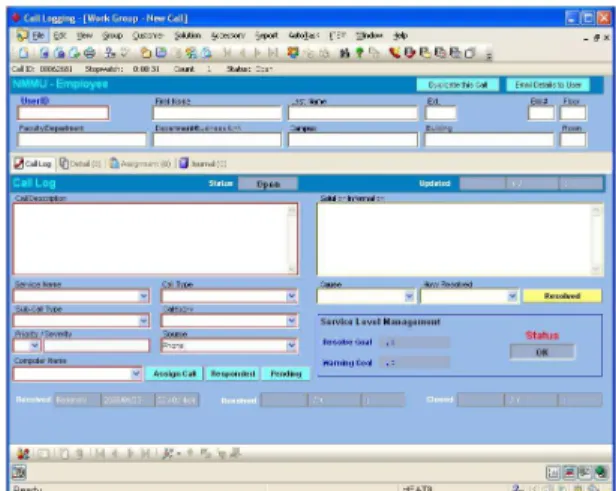
4) If the call was assigned to the CCA receiving the call, provide the call’s solution description. Problems were found in the existing UIs of the NMMU ICT Service Desk. As seen in Figure 4, the Call Logging UI appears cluttered and requires the CCAs to recall what they have previously done rather than recognise. It is thus not an easy to use interface, especially for newly appointed CCAs.
Figure 4: NMMU ICT Service Desk Call Logging UI (Screenshot)
The implemented prototype should allow the user to successfully log a call placed by a customer. Implementation of the Knowledge Base was done using SQL Server 2005 combined with an extract of the existing HEAT database. The User and Task Models were implemented in XML and currently reside within the database.
The User Model consists of data for each Informative Moment and the potentially predictive features associated with that Informative Moment. Hudson et al. define Informative Moments as user actions which can be readily isolated, are indicative of the phenomena they wish to study, model or predict, and can be easily and accurately labeled. They gathered data obtained from menu operations and used that as Informative Moments [10]. The Informative Moments for the implemented prototype consist of the various drop down list selections as well as text entered in a Textbox.
Textbox entries classified as Informative Moments are when the user enters text for the call and solution description. Drop down list selections classified as Informative Moments are when the user selected a customer, service name, call type, priority, source, campus, contact, cause and resolved option. For each Informative Moment, data for a number of
possibly predictive features is captured.
Hudson et al. developed potential features that could be predictive of a user’s skill level. These features are not based on a task model but rather on low-level mouse and menu data which could be used in any application as they are not application specific [10]. The tasks for the implemented prototype constitute as mostly selecting items from a list of items, similarly to selecting from a menu and thus work done by Hudson et al. could prove to be useful. The following potentially predictive features were selected for a drop down list selection from Hudson et al. as most appropriate for this research project:
1) Total Time (seconds): Total Elapsed time within the action (starting when the list opened and ending when it closed). This is a summative value of all the selection times for the drop down list selection.
2) Y Mouse Velocity (pixels/second): Average velocity of the mouse during a list operation in the Y direction. 3) Y Mouse Acceleration (change in velocity/second):
Average unsigned acceleration of the mouse during a list operation in the Y direction.
4) Dwell Time (seconds): Time spent dwelling (not moving) during the interaction sequence.
5) Average dwell time (seconds/count): Time spent dwelling divided by the number of list items visited. 6) Nr of Items visited (count): Total number of list items
that were visited or passed through during list action. 7) KLM (Keystroke Level Model) Diff (seconds):
Difference between KLM predicted time and selection time for the action.
8) KLM Ratio (dimensionless): KLM predicted time divided by the actual time for the action.
9) Selection Time (seconds): Elapsed time within the action (starting when the list opened and ending when it closed). The Authors have also proposed the following potentially predictive features for textbox entry:
1) WPM (count): The number of words entered per minute. 2) Nr Errors (count): The number of spelling errors that
the user has made.
The Watcher and Adaptation Effect component was implemented in C#. As the user performs a task, the watcher collects the interaction data and updates the User and Task Models pertained in the Knowledge Base. The Watcher updates the Task Model by specifying which steps of a task are complete and incomplete and what the current step is. Current task and step information is displayed to the user in a section allocated to the delivery of task based information (top section of Figure 5 and 6) similarly to that implemented by Singh and Wesson [14]. The Watcher updates the User Model by updating the values for the Informative Moments for each task (textbox entry or drop down list selection) the user performs. The Adaptation Effect implemented provides adaptation to the UI. UIs were designed and implemented for expert users and novice users, hereafter known as the expert UI and the novice UI.
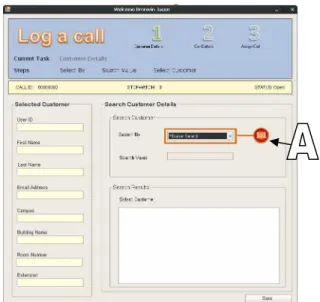
The novice UI (Figure 5) displayed a separate screen for each of the call logging steps guiding them step-by-step through the call logging process. It was previously mentioned that novice users are more concerned with how to do things instead of what to do and this suggests that novice users need to be guided through their tasks. A step indicator
indicating the next step (see A in Figure 5) appeared as the user completed a task and the user is constricted in the order in which they complete a task. More warning messages and error messages are given to novice users as opposed to expert users and these messages are also more descriptive.
The expert UI (Figure 6) displayed only one screen for logging a call i.e. instead of displaying separate screens for the call logging steps, all steps were tabbed in one interface. Expert users are not constricted to do tasks in a step-by-step manner, as the novice users were. They were given less guidance (no next step indicator) and more freedom when performing tasks.
Figure 5: Novice UI for Step 1 (Search Customer) of Call Logging Steps (Screenshot)
Figure 6: Expert UI (Screenshot) V. PRELIMINARY EVALUATION
Preliminary evaluation included a convenience sample of 15 participants at NMMU. These participants are classified as novice users as they have had no previous interaction with helpdesk software and in particular the current HEAT software. Most participants were male (n=12). All participants possessed a degree and their ages ranged from 21-28 years. Participants were given two calls to log using the novice UI (Figure 5) in a simulated contact centre environment. For each Informative Moment encountered, data for each predictive feature was captured.
Questions and further comments were solicited after the evaluation by means of a user satisfaction questionnaire developed by Pretorius [17]. The questionnaire was intended to determine the user’s general impressions of the system and its functionality. Participants were required to respond to questions (Table 1) by providing an appropriate rating on a 5-point Likert scale, where 1 represents strongly disagree and 5 represents strongly agree. Results were captured in Microsoft Excel and statistical functions were applied in order to determine the mean and the standard deviation for each question. The results of these responses are summarised in Figure 7. Figure 7 presents the question number which corresponds to the question number presented in Table 1.
TABLEI
QUESTIONS ASKED IN POST-TEST QUESTIONNAIRE
Nr Question
1.1 Overall, I am satisfied with how easy it is to use the system 1.2 It was simple to use this system
1.3 I can effectively complete the tasks using this system 1.4 I am able to complete the tasks quickly using the system 1.5 I can efficiently complete the tasks using the system 1.6 I feel comfortable using the system
1.7 It was easy to learn to use this system
1.8 I believe I became productive quickly using this system 1.9 The system gives error messages that clearly tell me how to fix
problems
1.10 Whenever I make a mistake using the system, I recover easily and quickly
1.11 The information (such as on screen messages and help) provided with this system is clear
1.12 The information provided for the system is easy to understand 1.13 The information is effective in helping me complete the tasks
and scenarios
1.14 The interface of this system is pleasant 1.15 I like using the interface of this system 1.16 Overall, I am Satisfied with this system
The overall reactions to the system were acceptable as mean ratings were above 3.2. Results should however be higher, as the novice UI should be easy to use. There is thus a need to improve the design of the novice UI.
The majority of users (n=13) found the UI to be pleasant, but could not complete the tasks quickly. This could be because of their unfamiliarity with call centre terminology and thus they did not know which selections to make from the various drop down lists. The standard deviation is relatively large indicating there is not sufficient consensus among the participants.
VI. CONLUSIONANDFUTUREWORK
An AUI model was proposed that could be suited to the domain of contact centres. The prototype of the model has been implemented and partially evaluated. Novice users performed tasks on the prototype UIs. Initial results indicate that the novice users found the novice UI pleasant to use. A full evaluation however still needs to be done whereby expert users (CCAs) are asked to perform tasks using the novice UI. Gathering both novice and expert users’ interaction data, when using the novice UI, will allow the Authors to compute a detailed statistical analysis of the differences between novice and expert CCAs, such that in time the CCA will transition from using a novice UI to an expert UI. The Authors wish to answer the research question of whether the adaptation improves CCA’s performance as previous work done by Gajos et al. [24] found AUIs improved the user’s task performance.
The envisaged benefits of this research would be increased performance of CCAs. This research helps novices become skilled/expert users and thus a secondary benefit includes training CCAs.
ACKNOWLEDGMENT
Acknowledgements are due to the Telkom Centre of Excellence Programme and the Department of Computer Science and Information Systems at the Nelson Mandela Metropolitan University for making this research possible.
REFERENCES
[1] G. Koole and A. Mandelbaum. Queueing Models of Call Centers An Introduction. [Online]. Available: http://www.cs.vu.nl/obp/callcenters. 2001.
[2] A. Mandelbaum. Call Centres: Research Bibliography with Abstracts. Israel, 2004.
[3] A. Steel. Understanding and Enhancing Call Centre Computer- Human-Human Interaction. CHI '03 extended abstracts on Human factors in computing systems. 2003.
[4] E. Jettmar. Adaptive Interfaces: Effects on User Performance. [Online]. Available:
http://www.dangerisland.com/true/papers/AdaptationJet tmar.html. 2000.
[5] J. WU. Accommodating both Experts and Novices in One Interface. [Online]. Available:
http://www.otal.umd.edu/UUGuide/jingwu/. 2000
[6] W.A.S. Buxton, G. P. Kurtenbach and A.J. Sellen. An empirical evaluation of some articulatory and cognitive aspects of "marking menus". Human Computer Interaction, 1993. 8 (1), pp. 1-23.
[7] Australian National Audit Office. Telephone Call Centres. [Online] Available:
http://www.anao.gov.au/WebSite.nsf/Publications/4A25 6AE90015F69B4A2569120006FCD1. 1996.
[8] S. Parbhoo. CCMA National Call Centre. [Online] Available:
http://www.ccma.org.za/DisplayNews2.asp?ID=8. 2002.
[9] G. Koole and A. Mandelbaum. Queueing Models of Call Centers An Introduction. [Online] Available:
http://www.cs.vu.nl/obp/callcenters. 2001.
[10]S.E. Hudson, A. Hurst and J. Mankoff. Dynamic detection of novice vs. skilled use without a task model.
Proceedings of the SIGCHI Conference on Human Factors in Computing Systems. 2007.
[11]M.G. Frants. The Evolution of the IT Help Desk to the Service Desk. CompuCom. Available:
http://www.compucom.com/wwwimages/Corp/Images /CompuComServiceDeskWhitePaper0106.pdf. 2006. [12]FrontRange Solutions. [Online] Available:
http://www.frontrange.com/productssolutions/subcatego ry.aspx?id=35&ccid=6
[13]Microsoft. Service Management Functions: Service Desk [Online]. Available:
http://www.microsoft.com/technet/solutionaccelerators/ cits/mo/smf/smfsvcdk.mspx. 2002.
[14]A. Singh and J.L Wesson. Designing an Intelligent User Interfaces for Contact Centres. Proceedings 10th Annual SATNAC Conference. Sugar Beach Resort, Mauritius. 2007.
[15]M. Maybury and W. Wahlster. Intelligent User Interfaces: An Introduction. Readings in Intelligent User Interfaces. San Francisco, Kaufmann, M. 1998. pp. 1-13.
[16]K. Hook. Steps to take before intelligent user interfaces become real. Interacting with Computers, 12, pp. 409-426, 2000.
[17]M. Pretorius. The added value of Eye Tracking in the usability evaluation of a network management tool. Computer Science and Information Systems. Nelson Mandela Metropolitan University.2005.
[18]S.W. Tyler, A.R. Schlossberg, R. Gargan, L.K. Cook and J.W. Sullivan. An intelligent interface architecture for adaptive interaction. In Intelligent User Interfaces, J.W. Sullivan and S.W. Tyler, Eds. ACM Press, New York, NY, pp. 95-109, 1991.
[19]A. Jameson. Adaptive Interfaces and Agents. The human-computer interaction handbook: fundamentals, evolving technologies and emerging applications. Lawrence Erlbaum Associates, Inc. pp. 305 – 330, 2002.
[20]D. Akoumianakis, A. Savidis and C. Stephanidis. Encapsulating intelligent interactive behaviour in unified user interface artifacts. Interacting with Computers. Crete, Greece, Elsevier, pp. 383-408, 2000. [21]P. Langley. User Modeling in Adaptive Interfaces.
Proceedings of the Seventh International Conference on User Modeling. Springer-Verlag, pp. 357-370, 1999. [22]R.J. Keeble and R.D. Macredie. Assistant agents for the
world wide web intelligent interface design challenges. Interacting with Computers. Elsevier, pp. 357-381, 2000.
[23]R. Oppermann. Adaptive User Support: Ergonomic Design of Manually and Automatically Adaptable Software, New Jersey, USA, Lawrence Erlbaum Associates Inc., 1994.
[24]K. Gajos, K. Everitt, D. S. Weld, D. S. Tan & M. Czerwinski. Predictability and Accuracy in Adaptive User Interfaces. CHI 2008 Proceedings, 2008. pp. 1271-1274.
Bronwin Anastasia Jason received her BSc Computer Science degree (Cum laude) in 2005 and her BSc (Hons) degree in 2006 from NMMU. She is currently pursuing a Masters degree in the field of Computer Science and Information Systems at NMMU and is a Telkom bursar.
![Figure 1: Tyler et al.’s Intelligent Interface Architecture (Extract) [18]](https://thumb-us.123doks.com/thumbv2/123dok_us/993594.2630590/2.892.499.792.74.295/figure-tyler-et-al-intelligent-interface-architecture-extract.webp)
![Figure 3: Tyler et al.’s Intelligent Interface Architecture containing proposed AUI model (extract) [18]](https://thumb-us.123doks.com/thumbv2/123dok_us/993594.2630590/3.892.476.812.467.749/figure-tyler-intelligent-interface-architecture-containing-proposed-extract.webp)