JavaScript Sequence Alignment Viewer (JSAV)
Andrew C. R. Martin
1
1[email protected] -or- [email protected] , Corresponding author, Institute of Structural and Molecu-lar Biology,, Division of Biosciences, University College London,, Darwin Building, Gower Street,, London WC1E 6BT
Abstract
The JavaScript Sequence Alignment Viewer (JSAV) is designed as a simple-to-use JavaScript component for displaying sequence alignments on web pages. The dis-play of sequences is highly configurable with options to allow alternative colouring schemes, sorting of sequences and ‘dotifying’ repeated amino acids. An option is also available to submit selected sequences to another web site, or to other JavaScript code. JSAV is implemented purely in JavaScript making use of the JQuery and JQuery-UI libraries. It does not use any HTML5-specific options to help with browser compatibility. The code is documented using JSDOC and is available from
http://www.bioinf.org.uk/software/jsav/
Introduction
Viewing multiple sequence alignments (MSAs) is a fun-damental requirement in analysis of protein sequences, allowing us to visualize conservation across protein fami-lies as well as unusual features of particular sequences. As a result, there are a plethora of tools for viewing MSAs. These range from tools which provide attractive printed output, through standalone graphical tools — ei-ther operating-system dependent, or independent — to web-based viewers.
Two of the earliest tools were HOMED[1] and MALIGNED[2] written for VAX/VMS workstations. Neither seems to be actively maintained or easily avail-able any more. Other early viewers include GeneDoc[3], BioEdit, Seaview[4] and DCSE[5] which is part of the RnaViz package for visualizing RNA secondary structure[6], but which can be used for protein se-quence alignments. A problem in writing graphical software is the operating-system dependency of many graphics libraries. CINEMA[7] was probably the first sequence alignment viewer and editor implemented in Java, a platform independent programming language allowing graphical user interfaces (GUIs) to run on any operating system. It has now been rewritten in C++ and is part of UTOPIA[8]. Other software includes MPSA[9], ANTHEPROT[10]and ClustalX[11], a GUI for the ClustalW multiple sequence alignment program, pro-viding an integrated environment for aligning sequences and analyzing results. Clustal Omega is the most recent version, but at the time of writing only has a command line interface — a beta version of a GUI is due to be released soon.
More recent developments include the Protein Family Alignment Annotation Tool (PFAAT)[12]designed specif-ically for family analysis and incorporating residue anno-tation tools as well as integration with Jmol for protein structure display. Like early versions of CINEMA, PFAAT is implemented in Java for operating system independence. CLC Viewer is a recent free package written in Java which contains a number of integrated tools and acts as a core product for adding other features through a commercial version. A more complete list of MSA viewers is available on the web at
http://en.wikipedia.org/wiki/
List_of_alignment_visualization_software
. Probably the most popular of the available tools is Jalview[13] which is available in two versions: a stan-dalone Java application which provides many tools and facilities, and as a ‘light’ version (JalviewLight) — a Java applet that can be embedded in a web page. The latter responds to the need for web site developers to be able to embed MSA visualization.However, in recent years there has been a gradual move away from using Java applets in web development. Java creates an additional layer of software (including addi-tional memory consumption) and modern browsers en-force much more caution in running Java applets to avoid security threats. This can result in user irritation with having to accept various popup warnings and/or con-figure security settings, often having to repeat this
pro-cess when there is a software update. It is not uncom-mon for Java applets simply to fail to run, perhaps be-cause users do not understand what settings need to be changed. New HTML features such as the HTML5 Canvas, and powerful JavaScript libraries such as Boot-strap, JQuery and JQuery-UI that provide an easier syn-tax for accessing elements of a web page together with new widgets such as sliders and drag-and-drop support, have overtaken Java as the method of choice for creating interactive web sites with complex requirements. Such features are used widely by popular web sites such as Google Mail, Google Docs, Twitter and Facebook. Illus-trating this trend, the Jmol structure viewer has recently been reimplemented in JavaScript as JSmol (
http://
sourceforge.net/projects/jsmol/
).Consequently, over the last couple of years a small number of JavaScript-based sequence and alignment viewers have started to be developed. These include MODalign[14], Alignment-Annotator[15], SnipViz[16], and Sequence[17], a component of the BioJS library[18]. In addition, there is an intention to port JalviewLight to JavaScript. The available programs are briefly reviewed:
MODalign is part of the MODexplorer package[19], a web site for protein modelling, but does not appear to be available as a download for use in other web sites.
Alignment-Editor is part of a more complex sys-tem, STRAP. It uses a Java server-side interpreter, Alignment-to-HTML[20], which parses the STRAP scripting language and creates an alignment in a form that can be rendered in Web browsers. The server-side element allows tasks such as sequence retrieval, computation of alignments and commu-nication with BioDAS-servers. The rendering sys-tem includes a selection of colouring schemes, high-lighting of conserved and variable positions in the alignment, reordering and deletion of sequence by drag-and-drop, and residue annotation as well as links to 3D visualization and sequence groups. It ex-ploits JavaScript and HTML5 using the HTML5 can-vas to draw helices and other visual elements. How-ever the JavaScript visualizer does not appear to be available by itself. The description of Alignment-Editor[15]suggests that alignments should be pre-pared using the full Java system and the final align-ment can then be downloaded as HTML files in a ZIP archive. The software is licensed under the GPL and available from the authors on request, or a desktop version of STRAP can be downloaded or run using Java WebStart. While in principle possible, no sim-ple documentation is provided to enable the client-side JavaScript/HTML5 viewer to be used without the server side software.
SnipViz is a compact and lightweight component de-signed for display of multiple versions of gene and protein sequences — i.e. essentially identical se-quences with mutations. It provides a very simple clean display focused around both DNA and protein
var MySeqs = Array();
MySeqs.push({ id :"id1b1.L", sequence :"SASSSVNYMYACREFGHIKLMNPTRSTVWY"});
MySeqs.push({ id :"id1a.L",
sequence :"SASSSTNYMYACDEFGHIKLMNPQRSTVWY"});
MySeqs.push({ id :"id2b1.L", sequence :"SASSTCNYMTACDEEGHIKLMNP-RSTCWY"});
var MyOptions = Array();
MyOptions.sortable = true;
MyOptions.selectable = true;
MyOptions.deletable = true;
MyOptions.toggleDotify = true;
MyOptions.toggleNocolour = true;
MyOptions.consensus = true;
MyOptions.selectColour = true;
printJSAV(’sequenceDisplay’, MySeqs, MyOptions);
Figure 1. Example code illustrating the creation of a JavaScript array of sequence objects, the options and the call necessary to create the alignment viewer.
sequences allowing very long sequences through a scrolling mechanism which also shows a small box on a representation of the complete sequence to show the relative position within the complete alignment. It also allows display of phylogenetic trees stored in Newick format. Note that SnipViz should not be con-fused with SNPViz[21].
Sequence is a BioJS component for visualizing sequences rather than alignments. It only provides very sim-ple views with no choices of colouring schemes, al-though it does provide very flexible highlighting of regions within a sequence.
JSAV (JavaScript Sequence Alignment Viewer) is a novel JavaScript component that adds to this list. The primary motivation for implementing a new tool was for devel-opment of our abYsis antibody database (
http://www.
abysis.org/
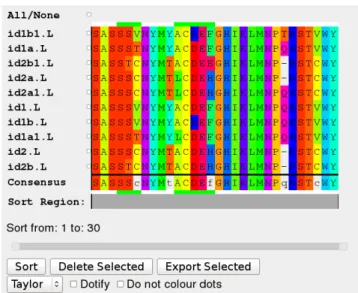
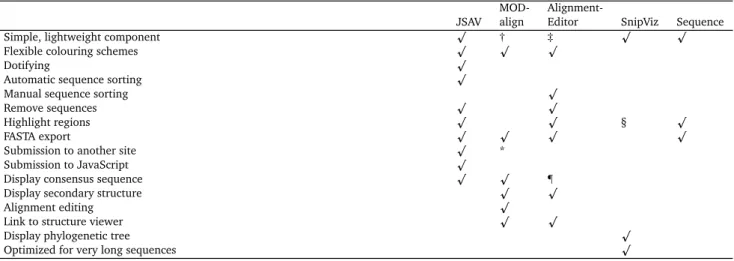
), where we required a simple JavaScript component that would enable us to display a set of aligned sequences, sort and select sequences in that alignment for further analysis, and highlight regions of the align-ment corresponding to the CDR loop regions of antibod-ies. Consequently the requirements were as follows: (i) a very simple-to-use lightweight component that can eas-ily be dropped into a web site; (ii) provision of flexible colouring schemes and ‘dotifying’ alignments (replacing repeated residues with dots); (iii) the ability to sort se-quences — based both on complete sese-quences or regions of sequences (such as a CDR loop or framework region of an antibody); (iii) the ability to remove sequences from the alignment; (iv) the ability to highlight regions in the alignment and to display a consensus sequence; (v) the ability to export a selected set of sequences in FASTA for-mat; (vi) the ability to submit a selected set of sequences to another web site or to client-side JavaScript code for further processing. Table 1 lists the availability of these and other features in different tools.Figure 2.A typical JSAV alignment view
Software tool
JSAV allows the end-user to modify the display in a num-ber of ways. The web-site provider has control over which of these is available to the end user. First, the sequences can be sorted — the code selects the most representative sequence, displaying that at the top of the alignment fol-lowed by the most similar sequence and so on. By de-fault, sorting is performed across the whole sequence, but a two-handled slider allows the range of positions on which the sort is based to be modified. Different colour-ing schemes are available duplicatcolour-ing those provided in Jalview. The alignment can also be ‘dotified’, replacing residues repeated between sequences with dots in order to emphasize amino acid differences. Colouring of doti-fied residues can also be switched off or on. Sequences can be selected and deleted from the alignment; a con-sensus sequence can be displayed at the bottom of the alignment and updates automatically when sequences are deleted. The complete set of sequences, or a selected
sub-MOD-
Alignment-JSAV align Editor SnipViz Sequence
Simple, lightweight component p † ‡ p p
Flexible colouring schemes p p p
Dotifying p
Automatic sequence sorting p
Manual sequence sorting p
Remove sequences p p
Highlight regions p p § p
FASTA export p p p p
Submission to another site p *
Submission to JavaScript p
Display consensus sequence p p ¶
Display secondary structure p p
Alignment editing p
Link to structure viewer p p
Display phylogenetic tree p
Optimized for very long sequences p
Table 1.Summary of availability of features in various JavaScript sequence alignment display tools as described in their respective papers and web sites. Note that the MODAlign web site was unavailable at the time of writing so capabilities have been judged purely on what is published in the paper. † not available for use in other web sites. ‡ Should be possible, but not designed to be used in this way. * Submission to Modeller only. § Automat-ically highlights mutated residues. ¶ highlights columns of residues conserved at a specified level rather than displaying a consensus.
set, can be submitted to another web site, or passed to an-other JavaScript function for integration with an-other tools. Tooltips are provided for each option and all options are documented in detail on the web site.
JSAV is implemented purely in JavaScript. Code is man-aged using GitHub (
http://www.github.com
) and documented using JSDOC (http://usejsdoc.org
). JSAV employs the JQuery library to ease access to ele-ments of the HTML that it generates and uses JQuery-UI to implement a two-value slider that is used to specify a range of positions in the alignment. As input, the code requires an array of JavaScript objects which contain two elements: a unique identifier for a sequence and the se-quence itself — all sese-quences must be pre-aligned. Sec-ondly a set of options can be provided. Options fall into two classes - those that control the (initial) display and those that control facilities available to the end user of a web site to modify the view of the MSA. Options that control the display include: (i) ranges of alignment col-umn positions to be highlighted; (ii) the colour scheme to be used; (iii) whether the sequence should be doti-fied and whether repeated residues should be coloured; (iv) whether a consensus sequence should be displayed; (v) whether a FASTA export button should be available and the label for that button; (vi) the URL and label for a button to allow selected sequences to be submitted to an-other web site; (vii) a JavaScript function name and label for a button to allow selected sequences to be processed by code written by the web site developer; (viii) whether plain tool tips should be used rather than those provided by JQuery — more attractive tooltips available with the ‘tooltipster’ package are also supported. Options that con-trol how the end-user can manipulate the display include: (i) whether the alignment should be sortable and, if so, the width and height of the slider used to select a region for sorting (ii) whether selection checkboxes should bedisplayed next to each sequence (iii) whether sequences can be deleted from the alignment (iv) whether the user should be able to toggle the dotifying of the alignment (v) whether the user should be able to toggle not colour-ing dotified residues (vi) whether a pull-down should be displayed to select colour schemes.
The sequence alignment is rendered as a table and all dis-play of colours and layout is achieved through Cascad-ing Style Sheets (CSS). Consequently a web-site devel-oper can easily add a new colour scheme by modifying the CSS file and setting an option to specify available colour scheme names. The number and size of sequences in the MSA is limited only by the memory available to the web browser. A brief extract of sample code is shown in Fig-ure 1 with the results shown in FigFig-ure 2.
JSAV deliberately avoids making use of HTML5 to max-imize browser compatibility. It is known to work with modern browsers including Firefox V32.0, Chrome V37, Konqueror V4.13.3, Safari V5.1.7 and Explorer V10.0 on Linux, Mac and Windows platforms and is known to work on versions of Firefox as old as V9.0.1. JSAV has been de-veloped and tested using JQuery V1.10.2 and JQuery-UI V1.10.4, but it only uses the JQuery HTML element selec-tion mechanism and tool tips and the two-handled slider component from JQuery-UI and consequently would be expected to work with much earlier versions.
Conclusions
Viewing multiple sequence alignments is a fundamental requirement of protein sequence analysis. With that large amounts of Bioinformatics work being performed over the web, there is a clear need to be able to embed MSA view-ers within web pages. The recent move away from Java in favour of JavaScript has driven a need for MSA viewing tools written in JavaScript. While four other tools have
been made available, two do not appear to be available as simple components that can be used by a web developer to provide sequence alignments (MODalign and Alignment-Editor). Of the other two, SnipViz has only very limited facilities and is designed for viewing SNPs in alignments of very similar sequences while Sequence is only designed for displaying single sequences not MSA.
Consequently JSAV fills this gap, providing a very simple-to-use component that can just be passed an array or pre-aligned sequences, but which also has the flexibility to allow manipulation of the way in which the MSA is dis-played. JSAV provides a number of features that appear to be absent from any of the other tools including dotify-ing alignments, automatic sortdotify-ing of sequences (includdotify-ing limiting the sort to a region within the MSA), and submis-sion of selected sequences to other web sites or to other JavaScript code.
Future directions are likely to include modifying the JSAV component to become part of BioJS[18]and linking JSAV with JSMol for structure visualization.
Software availability
The software is licensed under the GPL and may be downloaded from
http://www.bioinf.org.uk/
software/jsav/
where demonstrations, including the ability to upload your own MSA, are available to-gether with full documentation implemented with JS-DOC. The software is managed on GitHub athttp://
www.github.com/AndrewCRMartin/JSAV
.Competing interests
JSAV was developed under a grant for commercialization of abYsis, a web-based antibody database and analysis platform (
http://www.abysis.org/
. JSAV is used as part of abYsis in which University College London and the author have a financial interest.Grant information
Development of this software was funded as part of a BB-SRC Follow-On grant (BB/K015443/1).
Acknowledgements
ACRM thanks the UCL Research Software Development team (in particular, Jens Nielsen) for their contributions to JSAV.
References
[1] Stockwell P. A and Petersen G. B. HOMED: a ho-mologous sequence editor. Comput Appl Biosci. 1987; 3:37–43.
[2] Clark S. P.MALIGNED: a multiple sequence align-ment editor. Comput Appl Biosci. 1992; 8:535– 538.
[3] Nicholas K. B and Nicholas, Jr. H. B. GeneDoc: Analysis and visualization of genetic variation. EMBNEW.NEWS. 1997; 4:14.
[4] Galtier N, Gouy M and Gautier C. SEAVIEW and PHYLO_WIN: two graphic tools for sequence alignment and molecular phylogeny. Comput Appl Biosci. 1996; 12:543–548.
[5] De Rijk P and De Wachter R. DCSE, an interactive tool for sequence alignment and secondary struc-ture research. Comput Appl Biosci. 1993; 9:735– 740.
[6] De Rijk P, Wuyts J and De Wachter R. RnaViz 2: an improved representation of RNA secondary structure. Bioinformatics. 2003; 19:299–300.
[7] Parry-Smith D. J, Payne A. W, Michie A. D, et al.
CINEMA–a novel Colour INteractive Editor for Multiple Alignments. Gene. 1998; 221:GC57– GC63.
[8] Pettifer S. R, Sinnott J. R and Attwood T. K. UTOPIA-User-Friendly Tools for Operating Informatics Applications. Comp Funct Genomics. 2004; 5:56– 60.
[9] Blanchet C, Combet C, Geourjon C, et al. MPSA: integrated system for multiple protein sequence analysis with client/server capabilities. Bioinfor-matics. 2000; 16:286–287.
[10] Deléage G, Combet C, Blanchet C,et al. ANTHE-PROT: an integrated protein sequence analysis software with client/server capabilities. Comput Biol Med. 2001; 31:259–267.
[11] Thompson J. D, Gibson T. J, Plewniak F,et al. The CLUSTAL_X windows interface: Flexible strate-gies for multiple sequence alignment aided by quality analysis tools. Nucleic Acids Res. 1997; 25:4876–4882.
[12] Johnson J. M, Mason K, Moallemi C, et al. Pro-tein family annotation in a multiple alignment viewer. Bioinformatics. 2003; 19:544–545.
[13] Clamp M, Cuff J, Searle S. M,et al. The Jalview Java alignment editor. Bioinformatics. 2004; 20:426–427.
[14] Barbato A, Benkert P, Schwede T,et al. Improving your target-template alignment with MODalign. Bioinformatics. 2012; 28:1038–1039.
[15] Gille C, Fähling M, Weyand B, et al. Alignment-Annotator web server: Rendering and annotat-ing sequence alignments. Nucleic Acids Res. 2014; 42:W3–W6.
[16] Jaschob D, Davis T. N and Riffle M.SnipViz: a com-pact and lightweight web site widget for display and dissemination of multiple versions of gene and protein sequences. BMC Res Notes. 2014; 7:468–468.
[17] Gomez J and Jimenez R. Sequence, a BioJS component for visualising sequences. F1000Res. 2014; 3:52–52.
[18] Corpas M, Jimenez R, Carbon S. J,et al. BioJS: an open source standard for biological visualisation - its status in 2014. F1000Res. 2014; 3:55–55.
[19] Kosinski J, Barbato A and Tramontano A. MODex-plorer: an integrated tool for exploring protein sequence, structure and function relationships. Bioinformatics. 2013; 29:953–954.
[20] Gille C, Birgit W and Gille A.Sequence alignment visualization in HTML5 without Java. Bioinfor-matics. 2014; 30:121–122.
[21] Langewisch T, Zhang H, Vincent R, et al. Ma-jor soybean maturity gene haplotypes revealed by SNPViz analysis of 72 sequenced soybean genomes. PLoS One. 2014; 9:e94150–e94150.