International Journal of Advanced Research in
Computer Science and Software Engineering
Research Paper
Available online at:
www.ijarcsse.com
Comparative Study of the Bug Tracking Tools
Yogita Sharma Aman Kumar Sharma Student, M.Tech, Associate Professor, Department of Computer Science, Department of Computer Science, Himachal Pradesh University, Shimla, India Himachal Pradesh University, Shimla, India Abstract- as new software systems are getting larger and more complex every day, software bugs are an inevitable phenomenon. Recent years have seen a striking success of Open System Software as it allows the software developers to use shared source codes and correct errors as well as further redistribute such source codes. Continually evolving software systems, especially open-source software systems, are frequently changed and released. One of the most famous and successful open source software projects is Linux. On the one side, a change could fix a bug or add a new feature to the system. On the other side, a change might introduce new bugs to the system. Bugs arise during different phases of software development, from inception to transition. Flaws in specifications, design, code or other reasons can cause these bugs. Identifying and fixing bugs in the early stages of the software is very important as the cost of fixing bugs grows over time. So, the goal of a software tester is to find bugs and find them as early as possible and make sure they are fixed. They occur for a variety of reasons, ranging from ill-defined specifications, to carelessness, to a programmers misunderstanding of the problem, technical issues, non-functional qualities, corner cases, etc. Bug tracking tools enable the users and testers to report their findings in a unified environment. The issue-tracking systems also provide users with the facility of tracking the status of bug reports. This study aims to provide a comparative study of five such open source bug tracking tools namely Flyspray, JTrac, Mantis, phpBugTracker and Webissues.Keywords: Bug, Bug report, Bug tracking, Bug tracking tools.
I. INTRODUCTION
Today, every sector of the economy depends on computers to a great extent. The software has seen many changes since its inception. Development of even a trivial piece of software requires many activities to be performed and it is regarded as a project. All the engineering aspects relating to software development have combined together to evolve as a discipline called Software Engineering. It is concerned with building quality software within time and resource constraints [8].
Different tasks of SE are performed as part of an organized sequence of activities that is known as the Software Development Life Cycle (SDLC). Basically, SDLC consists of all steps/ stages of software starting from its inception to its implementation. Some phases, which are common in every SDLC model, are requirement gathering and analysis, system Design, coding, testing and implementation. Requirement gathering and analysis is basically the brainstorming phase and often consists of sub-stages like feasibility analysis to check how much of the idea can be put into action. The success of a project whether measured in functional or financial terms can be directly related to the quality of a requirement [12]. In system design phase, the physical system is designed with the help of the logical design prepared by system analysts. The software is coded with precision in the coding phase. A team of programmers are assigned by the company to work on the software. When the software is ready, it is sent to the testing department where quality analysts test it thoroughly for different errors by forming various test cases. They either test the software manually or using automated testing tools and ensures that each and every component of the software works fine. In implementation stage, the software is run on various systems by users. If it runs smoothly on these systems without any flaw, then it is considered ready to be launched.
Despite advances in formal methods and verification techniques, a system still needs to be tested before it is used. Testing remains the truly effective means to assure the quality of a software system of non-trivial complexity [1]. Testing is an important aspect of SDLC. It is basically the process of testing newly developed software, prior to its actual use. The program is executed with desired input(s) and the output(s) is/are observed accordingly. The observed output(s) is/are compared with expected output(s). If both are same, the program is said to be correct as per specifications, otherwise there is something wrong somewhere in the program [11]. Software testing provides a means to reduce errors, cut maintenance and overall software costs. Testing has become most important parameter in the case of SDLC. Testing automation tools enables developers and testers to easily automate the entire process of testing in software development. It is to examine & modify source code. Effective Testing produces high quality software [2].
Manual testing is time consuming, error prone and requires lots of manpower. All these drawbacks can be overcome if the testing process can be made automated. The testing tools reduce the manual testing to a large extent and once the
March - 2015, pp. 530-536 software is ready for testing, the functionality of the software can be tested repeatedly to improve the quality and reliability.
A bug is a potential source of product dissatisfaction. A software bug is the common term used to describe an error, mistake, fault or failure in a computer program that produces incorrect or unexpected results. Bug tracking tools allows capturing lot of information about the bug. They facilitate clear communication about bugs. These tools also allow capturing history of bugs that can be referred later.
The present work gives a comparative study of the open source bug tracking tools. It consists of VI sections. Section I being the introduction, section II gives an overview of the bug, bug report and bug tracking system. Different tools are described in section III followed by their evaluation is section IV. Analysis and the analysis table are discussed in section V. Finally, section VI presents the conclusion and future scope.
II. SOFTWARE BUG
A bug is a defect in a program. It is an accidental condition that causes a functional unit to fail to perform its required function. It can also be defined as a manifestation of an error in software. A bug, if encountered, may cause a failure [9]. A bug can be assigned a status according to the stage of its life cycle and can be moved to another status like new, assigned, closed and more.
There are bugs in software due to unclear or constantly changing requirements, software complexity, programming errors, timelines, errors in bug tracking, communication gap, documentation errors, deviation from standards etc. Constantly changing software requirements cause a lot of confusion and pressure both on the development and testing teams.
According to Patton [10] there are some reasons why not fixing all the bugs is a reality. These include:
(i)There is not enough time: every project always has too many software features, too few people to code and test them and not enough room left in the schedule to finish.
(ii)It’s really not a bug: it is not uncommon for misunderstanding, test errors or specification changes to result in would be bugs dismissed as features.
(iii)It’s too risky to fix: testers might make a bug fix that causes other bugs to appear.
(iv) It’s just not worth it: bugs that would occur infrequently or appear in little-used features may be dismissed. Bugs that have workarounds, way that a user can prevent or avoid the bug, often aren’t fixed.
(v)Ineffective bug reporting: the tester did not make a strong enough case that a particular bug should be fixed. As a result, the bug was misunderstood as not being a bug, was deemed not important enough to delay the product.
Bug report: It is not just enough to find the bugs; these should also be reported or communicated clearly and efficiently. A bug report is a technical document that describes the various symptoms or failure modes associated with a single bug. A good bug report provides the project management team the information they need to decide when and whether to fix a problem. A good bug report also captures the information a programmer will need to fix and debug the problem. Bug reporting is critical because bug reports are the vehicle by which testers influence increased product quality.
Reporting a bug may be the most important and sometimes the most difficult task that one as a software tester will perform. By using various tools and clearly communicating to the developer, one can ensure that the bugs found are fixed. Using automated tools to execute tests, run scripts and tracking bugs improves efficiency and effectiveness of the tests.
Checklist of publishing a bug report (i)Look for duplicates.
(ii)Check for meaningfulness of entries in all elements of the bug report.
(iii)Try modeling as different audience and ask if the bug report is really useful to them. (iv)Make a list of mistakes in the past with bug reporting and run it through the report. (v)Check for attachments, their sizes and relevancy to the context.
III. BUG TRACKING TOOLS
The success of a software system depends on how well it fits the needs of its users and its environment. Bugs trigger error that can in turn have ripple effect. So it is necessary that all these bugs are discovered to maintain the reliability of software. To manage the process of writing a bug report, solving a bug and communicating the solution to fix a bug communities have created and adopted different system. These systems and tools make the process of bug tracking very easy. A good bug tracking tool can centralize information about the bugs. BTS are some programs or applications that allow the project team to report, manage and analyze bug reports and bug trends. It allows the development team to fix problems based on importance to the project team, project management, the customers and the users.
Nowadays, many bug tracking tools are present in the market. Some of them are proprietary tools while others are open source tools. Open source tools are computer software with its source code made freely available. This software is distributed under licensing agreement, whereas the code of proprietary tools is largely developed in private. Its source code is generally not disclosed.
This study is conducted to analyze some of the bug tracking tools that can help an organization to increase their chances of success. For this study five open source bug tracking tools namely Flyspray, JTrac, phpBugTracker, Mantis and Webissues have been considered. The analysis of these tools is done based on their platform and the features provided by them.
March - 2015, pp. 530-536 A. Flyspray
Flyspray is an open source lightweight, web-based bug tracking system written in PHP for assisting with software development and project managements. Originally developed for the Psi Jabber client project it has been made available to everyone under the GPL 2.1 licence. Flyspray aims to cut out the unnecessary complexity of other bug trackers focusing on a very intuitive design making it very easy to effectively manage projects. It requires PHP, MySQL or PostgreSQL, and a web server (like Apache). It is easy to use and has easy installation. It provides dependency graphs that allow drawing a picture that shows the relationships between the tasks that have dependencies.It provides the ability of advanced search which is easy to use. Private tasks are supported by Flyspray, once done; the task can only be viewed by the administrator, project managers, the users who opened the task and anyone who is assigned to the task. Flyspray uses the CSS to achieve different layouts and colors. Bluey is the default theme used. Other themes can be downloaded and one can create its own theme.Comments and file attachments are also provided by the tool. [5]
B. JTrac
JTrac is an open source generic issue-tracking web-application that can be easily customized by adding custom fields and drop-downs. JTrac is ideal for issue tracking or bug-tracking, but it has been designed to be generic and one can define custom fields to track almost anything one need. JTrac is extremely easy to install and the only pre-requisite is a Java 5 (or higher) Runtime Environment. One of the useful features of JTrac is that it is distributed with an embedded web-application server (Jetty) that has a very small footprint and an embedded database called HSQLDB. JTrac can be used to effectively track various kinds of things such as bugs, action items and tasks. One can easily add the custom fields to a tracker Project (Space). JTrac customization does not stop at workflow - one can also define different roles for each tracker project set up. This allows for power and flexibility. The default view when you log into JTrac is a very handy dashboard view that provides the most frequently used statistics at a glance. JTrac has built-in support for authenticating user credentials against an LDAP or Active Directory server. JTrac also has support for integrating with a Central Authentication Service (CAS) installation. [4]
C. Mantis
Mantis is an open source web based bug tracking system that was first made available to the public in November 2000. Over time it has matured and gained a lot of popularity, and now it has become one of the most popular open source bug/issue tracking systems. Mantis is developed in PHP, with support to multiple database backend including MySQL, MSSQL, PostgreSQL and DB2. Mantis, as a PHP script, can run on any operating system that is supported by PHP. Mantis is known to run fine on Windows, Linux, OS/2, Mac OS X, System i and a variety of UNIX operating systems. Mantis is released under the terms of GNU General Public License (GPL). There are several ways to keep up to date with MantisBT news. These include Mantis mailing list, Mantis blog and twitter. The pruning function provided by the tool allows deleting of user accounts that have been created more than a week ago, and they never logged in. This is particularly useful for users who signed up with an invalid email or with a typo in their email address. Users can fine tune the way Mantis interacts with them via modifying their user preferences. User preferences can only be managed by users and are not available for the administrators to tweak. However, once a user account is created, it is then the responsibility of the user to manage his preferences. [6]
D. phpBugTracker
phpBugTracker is a PHP web based open source bug tracking system. It helps user to manage software development. It uses a database to store issues to be done, bugs to be fixed, and features to be added. It has two user interfaces. One is for internal team. The other is for customers to report their feedback. It is easy to use and has an easy installation. It provides comprehensive permission system. There are two versions of the bug query page. The default version is the simple form, which allows one to restrict the search by project and bug status. The advanced query page presents a wide array of options for finding a specific set of bugs. When changes are made to a bug, an email is sent to the person who reported it and to the person to whom the bug is assigned. However, email is not sent to the person who is making the changes to the bug. [3]
E. Webissues
Webissues is an open source bug tracking software. It is a multi-platform system for issue tracking and team collaboration. A web server, database server and PHP are required for its working. Webissues provides access by both the web browser and a desktop client application, which supports Windows, Linux and OS X. Its desktop Client application can run natively on Windows, Linux and OS X and the Web Client can be used to access the system using a web browser. It offers much greater possibilities of customization than the other similar programs. One can create multiple separate instances of the Webissues server in a single installation that can be accessed through domain names or sub domains or in different virtual subdirectories. It allows tracking issues, bugs, tasks, requests and any other information. Adding and modifying columns is possible in the tool. It is Possible to freely discuss and exchange information about individual issues and to attach any files to them. In both the desktop client and the web client one can export the list of issues to a CSV file, which can be exported into a spreadsheet or an external database. [7]
IV. EVALUATION OF THE TOOLS
A comparative evaluation of above mentioned bug tracking tools has been performed in this section. The evaluation is based on various features supported by the tools that are considered important for the management of the bug. Some of
March - 2015, pp. 530-536 the features are described briefly below:
A. Comments
Include any other information that will be helpful in identifying the bug. It allows providing more detail about what caused the bug or what the expected behavior was. It is used by developers to let the reporter know what he has been working on, but can also be used for requesting clarification and the like.
B. Create graphs
Graphs allow expressing complex data in visual form. These are very good for quick view of the state of the bug. Modeling complex systems cannot be done without considering a system from multiple views. Using multiple views improve model understandability.It not only provides a nice picture of data, but it is also quick. Randomness in data can be easily identified. It helps in comparative analysis of data and avoids wastage of money.
C. Customized theme
Some bug tracking tools allows the users to select the color scheme and layout for the project and some also allows user to create his own theme. It may not be the necessary feature but can prove an additional feature that the users might find interesting.
D. Customized workflow
A good BTS allow one to implement whatever workflow would be appropriate in a particular development and maintenance context. This allows for flexibility. It dictates the valid transition between statuses and the user level of the user who triggers such transitions. In other words, how issues move from one status to another and who is authorized to trigger such transition is the workflow.
E. Dependencies
Include the tasks that depend upon other tasks. That means if task1 depends upon task2, one cannot close task1 until task2 is closed. It shows the relationships between the tasks.
F. Email notification
If one is not the only user, it is necessary to get notified about the changes made directly from the system. This feature allows one to get notified about the changes made even if not currently working on it. The status change for an item triggers email notification by default.
G. Export files
Bug tracking tools are able to export the results of any search as an excel sheet. Once the data is in a spreadsheet, it is very easy to analyze and do things like creating pivot tables and charts. Many users can use this feature to fulfill custom reporting requirements.
H.Failure description
It is the heart of any bug tracking and reporting system. It is the message of the bug report. This shouldn’t be a copy paste of test case. It could contain information on what a tester consciously did and what was observed. It is the tester’s first and best opportunity to communicate clearly with the programmers and the project team about a problem. If done poorly, it obfuscates the bug and misleads the reader.
I.File attachment
It allows uploading file attachments at the time of reporting an issue containing all the important and necessary information required for fixing the bugs. It can also include the screenshots of the bug. Screenshots help understanding a bug faster.
J. History view
Good bug tracking tool often allows owners and stakeholders to log notes and history for a bug report as it progresses along its life cycle. The Tool also allows capturing the history of bugs and then refers later when looking at the status of the bugs.
K. Multilanguage Support
If the tool is available in many languages, it can have complete internationalized support. Changing the user interface and adding a translation should be easy.
L. Reminders
Some developers often need to be regularly reminded about their tasks. This can be done by sending small messages. M. Severity
Indicates how bad the bug is, the likelihood and the degree of impact when the user encounters a bug. It specifies frequent occurrence of the bug and its impact on the system.
March - 2015, pp. 530-536 N. Version
Specify the version of the project.
V. ANALYSIS
There are number of open source tools available in the software market. Although the basic or core functions of these tools are similar, they differ in functionality, features and usability. The decision about which tool to use can cause confusion. Keeping in view the above mentioned aspects of the bug tracking tools five tools namely Flyspray, JTrac, Mantis, phpBugTracker and Webissues have been selected for the comparison. The comparative study of the tools is done based on their platforms and the different features provided by them.
Table I Analysis on the basis of platform
Table 1 consists of the analysis of the bug tracking tools based on their platform. In the analysis of five named tools most of the tools use PHP in their coding as programming language with the exception of JTrac which uses java. Most of the bug tracking tools runs on more than one operating system. All the tools run on windows operating system. MySQL and PostgreSQL are databases supported by most of the tools whereas JTrac support any database supported by Hibernate. Apache and IIS-MS are used by Mantis, Webissues and phpBugTracker. Flyspray uses Apache as a web server.
Table II Analysis on the basis of the features Tool
Platform Flyspray JTrac Mantis phpBugTrack er Webissues Programming language PHP Java PHP version 5.3.x and above PHP PHP Operating System OS-independen t Platform independent Windows, MacOS, OS/2, Linux, Solaris, the BSDs Windows Unix/Linux, OS X or Windows operating system Database MySQL or PostgreSQ L Any database supported by Hibernate. MySQL, PostgreSQL, DB2, Microsoft SQL Server and Oracle MySQL, PostgreSQL, Oracle 8 MySQL , PostgreSQL, Microsoft SQL Server. Webserver Apache Jetty,
embedded web-application server
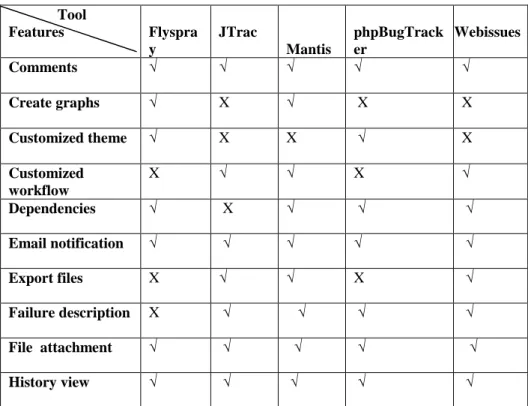
Microsoft IIS and Apache, can work with any web server Apache, IIS, etc. configured to run PHP scripts Apache web server and Microsoft IIS server Tool Features Flyspra y JTrac Mantis phpBugTrack er Webissues Comments √ √ √ √ √ Create graphs √ X √ X X Customized theme √ X X √ X Customized workflow X √ √ X √ Dependencies √ X √ √ √ Email notification √ √ √ √ √ Export files X √ √ X √ Failure description X √ √ √ √ File attachment √ √ √ √ √ History view √ √ √ √ √
March - 2015, pp. 530-536
Note: X: means feature is available. √: means feature is not available.
Flyspray support the features severity, email notification, graphs, files attachments, version, history view, comments and reminders. Exporting files to excel sheets is not provided by Flyspray. It is only available in English language. It also doesn’t support failure description.
Jtrac include features like severity, email notification, files attachments, version, history view, comments and reminders. It supports an additional feature of failure description. It does not provide the features like Multilanguage support, and dependencies. Graphs are also not supported by Jtrac.
Mantis is the only tool that provides most of the features discussed above. The features supported are severity, email notification, files attachments, version, history view, failure description, comments and reminders. Graphs can be created and reports can be exported to the excel sheets the only feature that is not provided by Mantis is the customized theme creation.
phpBugTracker support the features severity, failure description, email notification, files attachments, dependencies, version, customized theme, Multilanguage support and history view. It also provides its users to create their own theme for the project. It is present in multiple languages. Customized workflow, dependencies and reminders are not provided in the tool. Also the reports cannot be exported to excel sheet or any other platform.
Severity, failure description, email notification, files attachments, dependencies, version, Multilanguage support, customized workflow, reminders and history view are the features supported by Webissues. The features that it does not provide are the customized theme and creating graphs.
As the analysis of all the five tools against the provided features show that flyspray and phpBugTracker lacks features more than the others. Mantis is the only tool that supports all the features except one. Therefore, we can interpret from the study conducted in this report that Mantis is the best open source bug tracking tool.
VI. CONCLUSION AND FUTURE SCOPE
Bugs are prevalent in software systems. To improve the reliability of software systems, developers often allow end users to provide feedback on bugs that they encounter. Users could perform this by sending a bug report in a bug report management system. This process however is uncoordinated and distributed, which means that many users could submit bug reports reporting the same problem. Bug tracking is the process of reporting and tracking the process of bugs from discovery to resolution.
The bug tracking tools can prove a great asset for this work. In this study five open source tools namely Flyspray, Jtrac, Mantis, phpBugTracker and Webissues were evaluated. Comments, create graphs, customized theme, customized workflow, dependencies, email notification, export files, failure description, file attachments, history view, multilanguage support, reminder, severity, status and version are the features considered for the analysis of the tools. These tools can manage bugs throughout their life cycle, from the initial report to the final resolution. The Table1 is used to show the analysis of the tools based on the platform and Table2 show the analysis based on the features provided by them.
The study showed that Mantis is the best tool among all. But whichever tool is decided on, it is important that using it is a minimal effort. If it is too much of a hassle to use a tool, it is likely that its users will at some point neglect to register small and seemingly unimportant issues in it. As per proper procedure are not followed for these issues, this may ultimately result in increased maintenance costs.
As we have considered only five tools, there are number of other bug tracking tools available in the market that can provide functionalities other than mentioned here. So the research can be extended by adding more tools for evaluation. We hope that this paper will help the developers to look for the right tool according to their needs.
REFERENCES
[1] E. F. Miller, “Introduction to Software Testing Technology,” Tutorial: Software Testing & Validation Techniques, Second Edition, IEEE Catalog No. EHO 180-0, pp. 4-16.
[2] Harpreet Kaur, Dr.Gagan Gupta, “ Comparative Study of Automated Testing Tools: Selenium, Quick Test Professional and Testcomplete”, Int. Journal of Engineering Research and Applications www.ijera.com ISSN :
2248-9622, Vol. 3, Issue 5, Sep-Oct 2013, pp.1739-1743.
[3] http://phpbt.sourceforge.net/, “phpBugTracker”, Retrieved on 27-december-2014 at 0800Hrs. [4] http://sourceforge.net/projects/j-trac/files/jtrac/,”JTrac”, Retrieved on 20-december-2014 at 1600Hrs. [5] http://www.flyspray.org/,”Flpspray”, Retrieved on 15-december-2014 at 1730Hrs.
[6] https://www.mantisbt.org/,”Mantis”, Retrieved on 22-december-2014 at 2000Hrs. Multilanguage Support X √ √ √ √ Reminders √ X √ X √ Severity √ √ √ √ √ Version √ √ √ √ √
March - 2015, pp. 530-536 [7] http://webissues.mimec.org/, “WebIssues”, Retrieved: 13-december-2014 at 1500Hrs.
[8] J. Mishra, A.Mohanty, Software Engineering, 2nd ed; Dorling Kindersley (India) Pvt. Ltd, 2012. [9] Peter Farrell Vinay, Manage Software Testing, Auerbach Publications,Taylor and Francis Group, 2008. [10] Ron Patton, Software Testing, 2nd ed; Pearson Education, 2006.
[11] Yogesh Singh, Software testing, 1st ed; Cambridge University Press, 2012.
[12] Yogita Sharma, Aman Kumar Sharma, “Evaluation of the Software Requirement Tools”, International Journal