User Manual
Net-X II User Manual Rev. 7
Edition Notes
The Net-X II User Manual includes a description, safety precautions, installation, programming, operation, and maintenance instructions for the Net-X II as of the release date of this edition.
LIMITED WARRANTY
FOR WARRANTY REGISTRATION AND COMPLETE TERMS AND CONDITIONS PLEASE VISIT OUR WEBSITE.
For Customers in the United States and Mexico:www.chauvetlighting.com/warranty-registration. For Customers in the United Kingdom, Republic of Ireland, Belgium, the Netherlands, Luxembourg, France, and Germany:www.chauvetlighting.eu/warranty-registration.
Chauvet warrants that this product shall be free from defects in material and workmanship under normal use, for the period specified in, and subject to the exclusions and limitations set forth in the full limited warranty on our website. This warranty extends only to the original purchaser of the product and is not transferable. To exercise rights under this warranty, you must provide proof of purchase in the form of an original sales receipt from an authorized dealer that shows the product name and date of purchase. THERE ARE NO OTHER EXPRESS OR IMPLIED WARRANTIES. This warranty gives you specific legal rights. You may also have other rights that vary from state to state and country to country. This warranty is valid only in the United States, United Kingdom, Republic of Ireland, Belgium, the Netherlands, Luxembourg, France, Germany, and Mexico. For warranty terms in other countries, please consult your local distributor.
Trademarks
CHAUVET, the Chauvet logo, and Net-X II are registered trademarks or trademarks of Chauvet & Sons, LLC (d/b/a Chauvet and Chauvet Lighting) in the United States and other countries. Other company and product names and logos referred to herein may be trademarks of their respective companies.
Copyright Notice
The works of authorship contained in this manual, including, but not limited to, all designs, texts, and images are owned by Chauvet.
© Copyright 2020 Chauvet & Sons, LLC. All rights reserved. Electronically published by Chauvet in the United States of America.
Manual Use
Chauvet authorizes its customers to download and print this manual for professional information purposes only. Chauvet expressly prohibits the usage, copy, storage, distribution, modification, or printing of this manual or its content for any other purpose without written consent from Chauvet.
Document Printing
For best results, print this document in color, on letter size paper (8.5 x 11 in), double-sided. If using A4 paper (210 x 297 mm), configure the printer to scale the content accordingly.
Intended Audience
Any person installing, operating, and/or maintaining this product should completely read through the guide that shipped with the product, as well as this manual, before installing, operating, or maintaining this product.
Disclaimer
Chauvet believes that the information contained in this manual is accurate in all respects. However, Chauvet assumes no responsibility and specifically disclaims any and all liability to any party for any loss, damage or disruption caused by any errors or omissions in this document, whether such errors or
omissions result from negligence, accident or any other cause. Chauvet reserves the right to revise the content of this document without any obligation to notify any person or company of such revision, however, Chauvet has no obligation to make, and does not commit to make, any such revisions. Download the latest version from www.chauvetprofessional.com.
Document Revision
This Net-X II User Manual is the 7th edition of this document. Go to www.chauvetprofessional.com for the latest version.
TABLE OF CONTENTS
1. Before You Begin ...
1What Is Included ...
1Claims ...
1Manual Conventions ...
1Symbols ...
1Safety Notes...
22. Introduction ...
3Description ...
3Features ...
3Product Overview...
3Product Dimensions ...
43. Setup ...
5AC Power ...
5Fuse Replacement ...
5Mounting ...
5Orientation...
5Mounting Diagram...
6Installation Guidelines ...
6Signal Connections ...
6 Art-Net™ Connection ... 6 sACN Connection... 6Signal Connection Diagrams... 7
Input Connections Diagram ... 7
4. Operation ...
8Control Panel Operation...
8Control Knob ... 8
Programming...
8Menu Map ...
8Operating Settings Configuration ...
12Home Screen ... 12
Primary Home Screen ... 12
Secondary Home Screen ... 13
Custom Device Name ... 14
Set IP Mode ... 14 Static IP ... 14 Manual IP ... 14 Set Netmask... 14 Operating Mode ... 14 NetWork Timeout ... 15 On Source Loss ... 15 Set DMX Port ... 15 Disp Type ... 15 DMX Status ... 15 DMX Mode... 16 Protocol ... 16 Framerte/fs ... 16 Network ... 16 1st Universe... 17 LCD Backlight ... 17 User Preset ... 17
Net-X II User Manual Rev. 7
ii
Factory Reset... 18 Record Scenes... 18 Scene Name... 18 Scene Steps ... 18 Add Step... 18 Delete Step... 18 Timing... 18 Trigger Settings... 19Trigger Setting Diagram ... 19
Backup ... 19
Firmware Version ... 19
Exit ... 19
Web Server ...
20Web Server Overview ... 21
DMX Port Overview - Input Status ... 21
DMX Port Overview - Output Status ... 21
Firmware Update/Backup... 21
5. Technical Information ...
22Product Maintenance ...
226. Technical Specifications ...
237. Returns...
248. Contact Us ...
251. Antes de empezar...
27Qué va incluido ...
27Reclamaciones...
27Convenciones del Manual...
27Símbolos ...
27Notas de Seguridad ...
282. Introducción...
29Descripción ...
29Caracteristicas ...
29Vista general del panel frontal... 29
Vista general del panel posterior... 29
Dimensiones del Producto ...
303. Instalación...
31Corriente alterna ...
31Sustitución del Fusible ...
31Montaje ...
31Orientación...
31Diagrama de Montaje del Producto...
32Pauta de Instalación...
32Conexiones de señal...
32Conexión Art-Net™ ... 32
Conexión sACN... 33
Diagramas de conexiones... 33
Diagrama de conexiones de entrada... 33
Diagrama de conexiones de salida ... 33
4. Funcionamiento...
34Funcionamiento del Panel de Control ...
34Mando de control ... 34
Programación...
34Configuración de Ajustes de Funcionamiento...
38Pantalla de inicio ... 38
Pantalla de inicio principal ... 38
Pantalla de inicio secundaria ... 39
Nombre de dispositivo personalizado ... 40
Dirección IP... 40
Static IP ... 40
Manual IP ... 40
Configurar la mascara de red... 40
Modo de operación ... 40
Tiempo de espera de red ... 41
En la pérdida de origen ... 41
Configuración del puerto DMX ... 41
Tipo de visualización ... 41 Estado DMX ... 41 Modo DMX... 42 Protocolo ... 42 Framerte/fs ... 42 Red ... 42 1st Universo... 43 Retro-iluminación de la pantalla... 43 Presets de usuario ... 43 Restablece de fábrica ... 43 Grabar escenas... 44 Nombre de la escena ... 44 Pasos de la escena ... 44 Añadir paso ... 44 Borrar paso ... 44 Tiempos... 44
Configuración del disparador ... 45
Diagrama de ajuste del disparador... 45
Copia de seguridad ... 45
Versión de firmware ... 45
Salida ... 45
Servidor Web ...
46Descripción general del servidor Web ... 47
Descripción del puerto DMX - Puerto de entrada ... 47
Descripción del puerto DMX - Puerto de salida ... 47
Copia de seguridad / actualización del firmware... 47
5. Información Técnica ...
48Mantenimiento...
486. Especificaciones Técnicas...
497. Devoluciones ...
508. Contacto...
511. Avant De Commencer ...
53Contenu...
53Réclamations ...
53Conventions Manuelles...
53Symboles ...
53Consignes de Sécurité ...
542. Introduction ...
55Description ...
55Caractéristiques ...
55Net-X II User Manual Rev. 7
iv
Vue d'ensemble de l'appareil ...
55Dimensions de l'appareil ...
563. Configuration...
57Alimentation CA ...
57Remplacement des Fusibles...
57Fixation...
57Orientation...
57Schéma de Montage ...
58Instructions pour I’Installation...
58Connections du Signal ...
58Connexion Art-Net™ ... 58
Connexion sACN... 58
Schémas de connexions ... 59
Schéma des connexions en entrée ... 59
Schéma des connexions en sortie... 59
4. Fonctionnement ...
60Utilisation du Panneau de Commande...
60Bouton de controle ... 60
Programmation...
60Plan du Menu ...
60Configuration des Paramètres de Fonctionnement...
63Écran d'accueil... 63
Écran d'accueil principal ... 63
Écran d'accueil secondaire... 64
Nom personnalisé du périphérique ... 65
Sélection du mode IP ... 65
Statique IP ... 65
Manuel IP ... 65
Configuration du masque réseau ... 65
Mode de fonctionnement... 65
Délai d'expiration du réseau... 66
Perte de source... 66 Paramètres de port DMX ... 66 Type d'affichage ... 66 Statut DMX ... 66 Mode DMX... 67 Protocole ... 67 Framerte/fs ... 67 Réseau ... 67 1st Univers... 68 Rétro-éclairage de l'écran ... 68 Préréglages utilisateur ... 68 Réinitialisation d'usine... 68
Enregistrement des scènes... 69
Nom de la scène... 69
Étapes de scène... 69
Ajout d'une étape... 69
Suppression d'une scène ... 69
Cadencement ... 69
Paramètres de déclenchement ... 70
Diagramme des paramètres de déclenchement... 70
Sauvegarde... 70
Mise à jour du microprogramme ... 70
Serveur Web ...
715. Informations Techniques...
72Entretien de l'Appareil ...
726. Spécificités Techniques ...
737. Renvois ...
748. Nous Contacter...
751. Voordat tu begint...
77Wat is er inbegrepen ...
77Claims ...
77Conventies van deze handleiding ...
77Symbolen ...
77Veiligheidsinstructies...
782. Inleiding...
79Beschrijving...
79Eigenschaften ...
79Afmetingen van het product ...
803. Instelling...
81AC-stroom ...
81Vervangen van de zekering ...
81Montage ...
81Oriëntering ...
81Montage Diagram...
81Signaalverbindingen...
82 Art-Net™-aansluiting... 82 sACN-aansluiting ... 82 Aansluitingsdiagrammen... 82Diagram met ingangsaansluitingen ... 82
Diagram met uitgangsaansluitingen ... 83
4. Werking ...
84Werking van het bedieningspaneel ...
84Programmeren ...
84Menukaarte ...
85Configuratie gebruiksinstellingen ...
87 Startscherm... 87 Primaire Startscherm ... 88 Secundair Startscherm ... 88 Aangepaste apparaatnaam... 89 Statische IP-modus ... 89 Statische IP ... 89 Handmatige IP... 89 Netmask instellen... 89 Bedrijfsmodus ... 89 Netwerktime-out ... 90 Over bronverlies... 90 DMX-poortinstellingen... 90 Weergavetype ... 90 Status van DMX... 90 DMX-modus... 91 Protocol ... 91 Framerte/fs ... 91 Netwerk ... 91Net-X II User Manual Rev. 7
vi
1st Universe... 92 Beeldscherm LCD ... 92 Selecteer gebruikersvoorkeuren ... 92 Fabrieksinstellingen reset ... 92 Scènes opnemen ... 92 Scènenaam ... 93 Scènestappen... 93 Stap toevoegen ... 93 Stap verwijderen... 93 Timing... 93 Triggerinstellingen... 94 Triggerinstellingen diagram ... 94 Backup ... 94 Firmwareversie... 94 Annuleren... 94Web Server ...
95Overzicht Web Server ... 96
Overzicht DMX Poort - Ingangsstatus... 96
Overzicht DMX Poort - Uitgangsstatus ... 96
Firmware-update/backup ... 96
5. Technische Informatie ...
97Product Onderhoud...
976. Technische Specificaties...
987. Retouren...
99Before You Begin
1. Before You Begin
What Is Included
Claims
Carefully unpack the product immediately and check the container to make sure all the parts are in the package and are in good condition.
If the box or the contents (the product and included accessories) appear damaged from shipping, or show signs of mishandling, notify the carrier immediately, not Chauvet. Failure to report damage to the carrier immediately may invalidate your claim. In addition, keep the box and contents for inspection.
For other issues, such as missing components or parts, damage not related to shipping, or concealed damage, file a claim with Chauvet within 7 days of delivery.
Manual Conventions
Symbols
• Net-X II• Neutrik® powerCON® power cord
• Phoenix connector • User manual
CONVENTION MEANING
1–512 A range of values
50/60 A set of values of which only one can be chosen <SET> A button on the product’s control panel
Settings A product function or a menu option
SYMBOL MEANING
Critical installation, configuration, or operation information. Not following these instructions may make the product not work, cause damage to the product, or cause harm to the operator.
Important installation or configuration information. The product may not function correctly if this information is not used.
2
Before You Begin
Net-X II User Manual Rev. 7
Safety Notes
Read all the following safety notes before working with this product. These notes contain important information about the installation, usage, and maintenance of this product.
Personal Safety
• Avoid direct eye exposure to the light source while the product is on.
• Always disconnect the product from the power source before cleaning or replacing the fuse. • Always connect the product to a grounded circuit to avoid the risk of electrocution.
• Do not touch the product’s housing when operating because it may be very hot.
Mounting
• This product is for indoor use only! To prevent risk of fire or shock, do not expose this product to rain or moisture. (IP20)
• CAUTION: When transferring product from extreme temperature environments, (e.g. cold truck to warm humid ballroom) condensation may form on the internal electronics of the product. To avoid causing a failure, allow product to fully acclimate to the surrounding environment before connecting it to power.
• Make sure there are no flammable materials close to this product while it is operating. • Never carry the product by the power cord.
Power and Wiring
• Make sure the power cord is not crimped or damaged.
• Always make sure you are connecting this product to the proper voltage in accordance with the specifications in this manual or on the product’s specification label.
• To eliminate unnecessary wear and improve its lifespan, during periods of non-use completely disconnect the product from power via breaker or by unplugging it.
• Never connect this product to a dimmer pack or rheostat.
• Never disconnect this product by pulling or tugging on the power cable.
Operation
• Do not operate this product if there is damage on the housing or cables. Have the damaged parts replaced by an authorized technician at once.
• Do not cover the ventilation slots when operating to avoid internal overheating.
• The maximum ambient temperature is 113 °F (45 °C). Do not operate the product at higher temperatures. • In the event of a serious operation problem, stop using this product immediately!
This product contains no user-serviceable parts. Any reference to servicing in this User Manual will only apply to properly trained, certified technicians. Do not open the housing or attempt any repairs.
All applicable local codes and regulations apply to proper installation of this product.
Introduction
2. Introduction
Description
Net-X II is a reliable and versatile rack-mountable ethernet-to-DMX adapter with an integrated optical DMX splitter and Ethernet switch capability. It has two 5-pin DMX In ports and eight 5-pin DMX Output/input ports, all optically isolated. It takes up to 8 Art-Net™ or sACN universes simultaneously. The eight 5-pin DMX Out ports can be assigned to either of the DMX In ports or to one of the Art-Net™ or sACN universes. Neutrik® etherCON® ports are through ports that allow daisy chaining of Net-X II units. Net-X II provides a reliable, highly customizable network infrastructure for complex control systems. Merge two controllers into the Net-X II via DMX, Art-Net™, or sACN, supporting both LTP (Latest Takes Precedence) and HTP (Highest Takes Precedence) functions. Record function allows you to record looks from a controller and save them into memory and it is Web server supported for remote configuration and backup/update.
Features
• 5-pin DMX splitter/distributor
• Art-Net™/sACN to DMX converter, up to 8 universes • DMX to Art-Net™/sACN converter, up to 8 universes
• Merge two 5-pin DMX universes into a single universe, or merge two NET controllers (Art-Net™ or sACN) into the same universe, then convert to standard 5-pin DMX for the outputs
• HTP (Highest Takes Precedence) and LTP (Latest Takes Precedence) merge functions supported • Backup settings and configurations with same or other Net-X IIs
• Web server supported for remote configuration and backup/update
• Integrated Record function allows you to record looks from a controller and save them into memory (10 shows in memory, 100 steps each) to trigger up to 4 shows/zones simultaneously using the 5-wire Phoenix cold contacts on the rear of the unit
• Supports RDM over Art-Net™ for remote fixture management
Product Overview
Phoenix connector for remote triggers (4) Neutrik® etherCON® through ports DMX output/ input (assignable) Control panel display LED indicators DMX in Fuse holder Neutrik® powerCON® in Knob LED indicators Power Switch
4
Introduction
Net-X II User Manual Rev. 7
Product Dimensions
1.73 in 44 mm 6.20 in 157.5mm 17.40 in 442 mm 19 in 483 mm 5.39 in 137mmSetup
3. Setup
AC Power
Each Net-X II has an auto-ranging power supply that works with an input voltage range of 100 to 240 VAC, 50/60 Hz. To determine the power requirements for each Net-X II, refer to the label affixed to the product. You can also refer to the Technical Specifications chart in this manual.
The listed current rating indicates the maximum current draw during normal operation. For more
information, download Sizing Circuit Breakers from the Chauvet website: www.chauvetprofessional.com.
Fuse Replacement
The Net-X II uses a F 1 A, 250 V fuse accessible from the back of the product. To change the fuse, do the following:
1. Disconnect the product from power.
2. With a Phillips head screwdriver, unscrew the fuse holder cap from the housing. 3. Remove the blown fuse.
4. Replace with a fuse of the same type and rating.
5. Screw the fuse holder cap back in place and reconnect power.
Mounting
Before mounting this product, read and follow the Safety Notes. For our Chauvet line of mounting clamps, go to www.trusst.com/productcategory/accessories-clamps/.
Orientation
Always mount this product in a safe position. Ensure that the menu and the ports are accessible, and there is adequate room for ventilation, configuration, and maintenance. The Net-X II fits nicely in a standard 19” rack, can be suspended upright or upside down, or it can be placed on its rubber feet on a flat level surface. Use the following guidelines when mounting the Net-X II:
• When selecting an installation location, consider easy access to this product for operation, programming adjustments, and routine maintenance.
• Make sure to mount this product away from any flammable material as indicated in the Safety Notes.
• Never mount in places where rain, high humidity, extreme temperature changes, or restricted ventilation may affect the product.
• If hanging this product, make sure that the mounting location can support the product’s weight. See the Technical Specifications for the weight-bearing requirements of this product.
• When hanging this product, always secure to a fastening device using a safety cable. • Leave enough slack on the cables to prevent tension and pull on the plugs.
• Always connect the product to a grounded and protected circuit. Make sure the product has an appropriate electrical ground to avoid the risk of electrocution or fire. • To eliminate unnecessary wear and improve its lifespan, during periods of non-use
completely disconnect the product from power via breaker or by unplugging it. Never connect the product to a rheostat (variable resistor) or dimmer circuit, even if the rheostat or dimmer channel serves only as a 0 to 100% switch.
• Disconnect the product from power before replacing the fuse.
6
Setup
Net-X II User Manual Rev. 7
Mounting Diagram
Installation Guidelines
The Net-X II is used as part of a control system for operating various lighting and multimedia products. The physical and digital construction of the control network is determined by the location and signal needs of the products.
When designing a control system that uses the Net-X II, consider the following: • Placing the Net-X II so the menu and ports can be accessed
• Running the cables so there is no tension or pull on the cables or plugs
• Planning a large control system carefully before configuring the components, so IP address, DMX address, and other identifiers are not duplicated.
The NET-X II supports setting the 8 output ports as inputs. Male to female gender adapters will need to be used for the 5-pin XLR connectors for this scenario. When using this setup, it is not recommended to use RDM in the system along with HTP/LTP signal merging. The architecture of the RDM protocol is not suited for this scenario.
When using 2 controllers to merge signal into a fixture through the NET-X II, it is recommended to use Art-Net Art-RDM protocol via Ethernet from both controllers feeding into the NET-X II, not DMX/RDM over a RS-485 line feeding from the controllers.
Signal Connections
The Net-X II receives signal though 2 DMX In ports and one of two Neutrik® etherCON® ports. It sends signal out through eight DMX out ports and the other Neutrik® etherCON® port.
Art-Net™ Connection
Art-Net™ is an Ethernet protocol that uses TCP/IP to transfer a large amount of DMX512 data using an etherKON® RJ45 connection over a large network. An Art-Net™ protocol document is available from
www.chauvetprofessional.com. Art-Net™ designed by and copyright Artistic Licence Holdings Ltd.
sACN Connection
Also known as ANSI E1.31, streaming ACN is an Ethernet protocol that uses the layering and formatting of Architecture for Control Networks to transport DMX512 data over IP or any other ACN compatible network.
Safety cable Mounting clamp
Setup
Signal Connection Diagrams
Input Connections Diagram
# CONNECTIONS PURPOSE
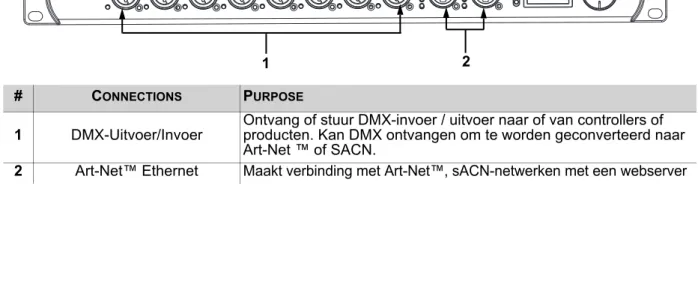
1 DMX output/input Receive or send DMX input/output to or from controllers or products. Can receive DMX to be converted to Art-Net™ or sACN. 2 Ethernet input/throughput Link to an Art-Net™ or sACN network; also used to access Web server
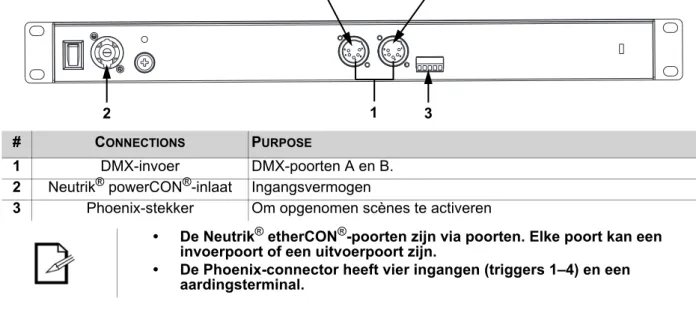
# CONNECTIONS PURPOSE
1 DMX in DMX ports A and B.
2 Neutrik® powerCON® in Power in
3 Phoenix connector To trigger recorded scenes
• The Neutrik®etherCON® ports are through ports. Each port can be either an input or an output port.
• The Phoenix connector has four inputs (triggers 1–4) and a ground terminal.
1 2
2 1 3
8
Operation
Net-X II User Manual Rev. 6
4. Operation
Control Panel Operation
The Net-X II is configured through the control panel, using the control knob. Once the Net-X II is properly configured it operates without user intervention.
The Net-X II can be used as a DMX splitter, in which case the DMX In ports must be assigned to the DMX output/input ports, but the Net, Subnet, and IP address settings may not need configuration.
The Net-X II can be used as an Art-Net™ node, in which case the Art-Net™ universes must be assigned to the DMX output/input ports, and the Net, Subnet, and IP address settings must be configured.
The Net-X II can be used as an sACN node, in which case the sACN universes must be assigned to the DMX output/input ports, and the IP address settings must be configured.
The Net-X II can be used as both a DMX splitter and either an Art-Net™ or sACN node simultaneously, in which case both the DMX assignments and the Art-Net™ or sACN settings must be configured.
The Net-X II can be used to merge two DMX, Art-Net™, or sACN signals from different controllers and output as one signal, using LTP (latest takes precedence) and HTP (highest takes precedence) functions. The Net-X II has backup settings and configurations with same or other Net-X II products.
The Net-X II is Web server supported for remote configuration and backup/update.
The Net-X II’s record function allows you to record looks from a controller and save them into memory. These can be deployed via the Phoenix triggers.
Control Knob
The Net-X II has a knob that is used to scroll through the options in the menu. Press the knob to make a selection.
Programming
Refer to the Menu Map to understand the menu options. The menu map shows the main level and a variable number of programming levels for each option.
• To access the menu from the Home Screen, press the knob.
• To scroll through the options on each level of the menu, turn the knob. Turn it clockwise to scroll down, and turn it counter-clockwise to scroll up.
• Press the knob to select the highlighted option. This will take you to the next programming level for that option, or it will highlight a value that can be edited.
• To increase a selected number value, turn the knob clockwise. To decrease a selected number value, turn the knob counter-clockwise.
• Press Exit/Cancel to the previous main level.
• Press the knob for 3 seconds to return to the Home Screen.
Menu Map
Refer to the Net-X II product page on www.chauvetprofessional.com for the latest menu map. MAIN LEVEL PROGRAMMING LEVELS DESCRIPTION
1. Custom
Device Name _ _ _ _ _ _ _ _ _ _ _ _ _ _ _
Cancel
Inputs a custom device name Enter
2. Set IP Mode
1. Static IP _ _ _ _ _ _ _ _ _ _ Default address-cannot be changed 2. Manual IP _ _ _ _ _ _ _ _ _ CancelSets the IP Addresses
Enter
3. Exit Exits to previous screen
3. Set Netmask
A. 255.000.000.000 Sets Netmask A
B. 255.255.000.000 Sets Netmask B
C. 255.255.255.000 Sets Netmask C
Operation
4. Operating Mode
1. 8 Port Assigns each port as an output/input (this also supports RDM over Ethernet)
2. 2 + 8 Port Supports DMX merging with the two DMX inputs (disables RDM function)
3. Exit Exits to previous screen
5. NetWork Timeout
1. Disabled Disables the timeout feature
2. 1 Seconds 1 second time delay to stop receiving commands from a console connected to the network 3. 2 Seconds 2 seconds time delay to stop receiving commands from a
console connected to the network 4. 5 Seconds 5 seconds time delay to stop receiving commands from a
console connected to the network
5. Exit Exits to the previous screen
6. On Source Loss
1. Hold output Holds the last value received before the source console/ controller stops sending signal 2. Blackout Sets all DMX channels to a value of 000
3. Stop DMX Disables the port
4. Exit Exits to previous screen
10
Operation
Net-X II User Manual Rev. 6 7. Set DMX Port DMX Ports 1–8 / DMX Input A–B (Inputs A and B only when Operating Mode is set to 2 + 8 Port)
1. Disp Type HEX Hexadecimal values
DEC Decimal values
2. DMX Status
OUTPUT Sets the port as output
INPUT Sets the port to receive DMX from a controller that can be routed to another DMX port
DISABLE Disables the output port
3. DMX Mode
SINGLE (OUTPUT
Status only) Disables Ethernet signal merging LTP
(OUTPUT Status only)
Sets Ethernet signal merging to Latest Takes Precedence HTP
(OUTPUT Status only)
Sets Ethernet signal merging to Highest Takes Precendence NORMAL
(INPUT Status only)
Sets input ports acting as a primary controller
BACKUP (INPUT Status
only)
Sets input ports acting as a backup controller
4. Protocol
ArtNet Sets the output/input source for the DMX port to Art-Net™ sACN Sets the output/input source for the DMX port to sACN 5. Framerte/fs 010–040 Sets rate of speed for output ports
6. Network 00H–7FH 000–128 (Dec) Sets the net settings(Hex)
7. 1st Universe 00H–FFH 000–256 (Dec)(Hex)Sets the primary input/output universe 8. Exit (Option 8 for Input Status or
Output Status in Single Mode) Exits to the previous screen 8. LCD
Backlight
1. On Backlight on
2. 10 Seconds Display turns off after 10 seconds 3. 30 Seconds Display turns off after 30 seconds
4. Exit Exits to the previous screen
9. User Preset
1. Art-net 8-port DMX Sets all 8 ports to receive 8 universes of Art-Net™ from 0–7 2. sACN to 8-port DMX Sets all 8 ports to receive 8 universes of sACN from 1–8
3. 1x8 DMX Splitter Sets the product to operate as a DMX splitter with all 8 outputs receiving DMX from input A
4. 2x4 DMX Splitter Sets and the 1–45–8 outputs to outputs to input-port A input-port B
5. Exit Exits to previous screen
10. Factory Reset
NO
Resets to factory settings YES
Operation
11. Record Scenes <1–10>
1. Name Scene _ _ _ _ _ _ _ _ _ CancelCustomize scene name Enter
2. Step: (0/0) 000–100 Scroll to the step that you prefer to edit 3. Add Step Adds steps to scene and takes a snapshot of all 8 ports and records
step to memory
4. Delete Step NO Delete current step from scene
YES
5. Timing
1. Save Step Saves timing for the selected step 2. Fade In
Time 0.10S–9M59S Selects fade in time 3. Fade
Out Time 0.10S–9M59S Selects fade out time 4. Delay
Time 0.10S–9M59S Selects delay time 5. Exit Exits to previous screen
6. Exit Exits to previous screen
12. Trigger Settings
1. Trigger 1 Scene 1–10 Assigns trigger 1 to one of the 10 scenes 2. Trigger 2 Scene 1–10 Assigns trigger 2 to one of the 10 scenes 3. Trigger 3 Scene 1–10 Assigns trigger 3 to one of the 10 scenes 4. Trigger 4 Scene 1–10 Assigns trigger 4 to one of the 10 scenes
5. Exit Exits to previous screen
13. Backup
1. Save Preset 1–10
Saves and loads configurations
2. Load Preset 1–10
3. Exit Exits to previous screen
14. Firmware
Version __ _ __ _ Displays firmware version
15. Exit Exit Exits to main screen
12
Operation
Net-X II User Manual Rev. 6
Operating Settings Configuration
Home Screen
The Net-X II has 2 home screens which display the current status of all ports. The home screen is displayed when the menu is not being accessed.
To access the menu from the home screen, press the knob. To return to the home screen from the menu, select 13. Exit and press the knob, or press & hold the control knob for 3 seconds (this can be done from any position in the Menu map)
Primary Home Screen
# SYMBOL DESCRIPTION
1
A–B Ethernet in/through ports
- or x
(EtherNET ports status)
x is connected - is disconnected P1–4 Ports 1–4 universe label P5–8 Ports 5–8 universe label
2
1–8 5-pin female port number label (1–8) or x
(ports 1–8 signal sensor)
is detecting a signal x is no signal detected Art, ACN, or DMX
(Art-Net™, sACN, or DMX) Defines output or input port protocol for outputs 1–4 Art, ACN, or DMX
(Art-Net™, sACN, or DMX) Defines output or input port protocol for outputs 5–8
3 IP: Displays the device IP address
1
3
Operation
Secondary Home Screen
To access the secondary home screen, rotate the knob when viewing the main home screen.
# SYMBOL DESCRIPTION
1
A–B 5-pin male input port (A/B) - or x
(A/B input port status)
x is connected - is disconnected P1–4 Ports 1–4 universe label P5–8 Ports 5–8 universe label
2
1–8 5-pin female port number label (1–8) I, O, or x
(ports 1–8 direction mode)
Input (I) Output (O) Disabled (x)
000–256 Defines output or input port universe for outputs 1–4 000–256 Defines output or input port universe for outputs 5–8
3 IP: Displays the device IP address
1
3
14
Operation
Net-X II User Manual Rev. 6
Custom Device Name
To assign the Net-X IIa custom device name, do the following: 1. Use the knob to select 1. Custom Device Name. 2. Press the knob.
3. If there is no name set for this product, press the knob. If there is a name set for this product, use the knob to select which letter to edit, then press the knob.
4. Use the knob to select the letter, number or symbol, from A–@. There are 63 options. 5. Repeat until the name is set as desired.
6. Use the knob to select either Enter to save the name, or Cancel to exit without saving. 7. Press the knob.
Set IP Mode
The Net-X II can use a pre-set static IP address, or it can be set manually.
Static IP
To set the Net-X II to a pre-set static IP address, follow the instructions below: 1. Use the knob to select 2. Set IP Mode.
2. Press the knob.
3. Use the knob to select 1. Static IP. 4. Press the knob.
Manual IP
To set the IP address manually, do the following: 1. Use the knob to select 2. Set IP Mode. 2. Press the knob.
3. Use the knob to select 2. Manual IP. 4. Press the knob.
5. The manual IP address can be set from 000.000.000.000 to 255.255.255.255 by using the knob to scroll and select the desired numbers 000–255 for each byte (set of three numbers). Use this process to set each of the four bytes.
6. Use the knob to select Enter to save the chosen IP address or Cancel to exit without saving.
Set Netmask
To set the Netmask, follow the instructions below: 1. Use the knob to select 3. Set Netmask. 2. Press the knob.
3. Use the knob to select one of the following options: • A. 255.000.000.000
• B. 255.255.000.000 • C. 255.255.255.000 • Exit (to cancel).
Operating Mode
The Net-X II can operate as a splitter/converter, or a DMX merger. To switch between the 2 modes, do the following:
1. Use the knob to select 4. Operating Mode. 2. Press the knob.
3. Use the knob to select either 1. 8 Port (used to activate RDM over Ethernet support for transport of RDM to/from lighting fixtures via 5-pin DMX to a lighting controller via Ethernet, e.g., Art-Net™, Art-RDM) or 2.2 + 8 Port (required for DMX splitter mode via the 2 male DMX ports on the back of the NET-X II; disables all RDM functionality; adds DMX Input A & B under the Set DMX Port menu option).
4. Press the knob. 5. 3. Exit (to cancel).
Operation
NetWork Timeout
The network timeout sets the time delay for the Net-X II to stop receiving commands from a console connected to the network. This can only be applied to HTP/LTP DMX merge modes via Art-Net™ or sACN protocols.
1. Use the knob to select 5. NetWork Timeout. 2. Press the knob.
3. Use the knob to select either 1. Disabled, 2. 1 Seconds, 3. 2 Seconds, or 4. 5 Seconds. 4. Press the knob.
5. 5. Exit (to cancel).
On Source Loss
This option is used to determine what happens when a console suddenly stops sending data to or through the Net-X II. To configure this setting, follow the instructions below:
1. Use the knob to select 6. On Source Loss. 2. Press the knob.
3. Use the knob to select from 1. Hold output (holds the last value received), 2. Blackout (sets all DMX channels to a value of 000), 3. Stop DMX (disables the port), or 4. Exit (to cancel).
4. Press the knob.
Set DMX Port
The Net-X II has 8 DMX ports that can be set as outputs or inputs. To select a DMX port to configure, follow the instructions below:
1. Use the knob to select 7. Set DMX Port. 2. Press the knob.
3. Use the knob to select the desired DMX port, from DMX Port 1–8 / DMX Input A–B (DMX inputs will only display if Operating Mode is set to 2 + 8 Port), or Exit (to cancel).
4. Press the knob.
Disp Type
The display type determines whether the selected port universe displays as either decimal or hexidecimal values. The display type will alter the menu options for Network and Universe ranges.
1. Select the DMX port to configure as instructed in Set DMX Port. 2. Use the knob to select 1. Disp Type.
3. Press the knob.
4. Use the knob to select either DEC (decimal) or HEX (hexadecimal). 5. Press the knob.
DMX Status
The DMX status determines whether the selected port functions as an input, an output, or is disabled. The selected status will alter the menu options for DMX Mode and Universe merging.
1. Select the DMX port to configure as instructed in Set DMX Port. 2. Use the knob to select 2. DMX Status.
3. Press the knob.
4. Use the knob to select the desired port mode from, DISABLE, OUTPUT, or INPUT. 5. Press the knob.
If set to Disabled, the Net-X II will remain locked into the network lighting controller even if the controller stops sending data.
16
Operation
Net-X II User Manual Rev. 6
DMX Mode
The Net-X II is capable of merging two signals of the same protocol into one, using HTP
(Highest Takes Precedence), or LTP (Latest Takes Precedence) logic when the DMX Status is set to Output. When the DMX Status is set to Input, Normal and Backup must be set to the same Output universe.
1. Select the DMX port to configure as instructed in Set DMX Port. 2. Use the knob to select 3. DMX Mode.
3. Press the knob.
4. Use the knob to select the desired mode:
• SINGLE (OUTPUT Status only) - Disables Ethernet signal merging • HTP (OUTPUT Status only) - Highest Takes Precedence
• LTP (OUTPUT Status only) - Latest Takes Precedence
• NORMAL (INPUT Status only) - Input port acts as a primary controller
• BACKUP (INPUT Status only) - Input port acts as a backup controller; the Net-X II will NOT start accepting changes from the backup port until the normal port with the same Universe assignment stops broadcasting control signal
5. Press the knob.
Protocol
Set the protocol to either Art-Net™ or sACN:
1. Select the DMX Port to configure as instructed in Set DMX Port. 2. Use the knob to select 4. Protocol.
3. Press the knob.
4. Use the knob to select the desired settings from ArtNet or sACN. 5. Press the knob.
Framerte/fs
The frame rate, in milliseconds (ms), is the speed at which the DMX packets are sent out of the 8 DMX ports. This only applies when the ports are set to Output.
1. Select the DMX Port to configure as instructed in Set DMX Port. 2. Use the knob to select 5. Framerte/fs.
3. Press the knob.
4. Use the knob to set the frame rate from 010–040. 5. Press the knob.
Network
To set the net setting, do the following:
1. Select the DMX port to configure as instructed in Set DMX Port. 2. Use the knob to select 6. Network.
3. Press the knob.
4. Use the knob to select from range options (differs based on Disp Type and Protocol selections): • 000–127: When Disp Type is set to DEC & Protocol is set to ArtNet.
• 001–128: When Disp Type is set to DEC & Protocol is set to sACN. • 00H–7FH: When Disp Type is set to HEX & Protocol is set to ArtNet. • 01H–80H: When Disp Type is set to HEX & Protocol is set to sACN. 5. Press the knob.
The sACN priority value (1–200) from the consoles will be ignored if using the merging functions of HTP or LTP with the sACN control protocols.
This feature is useful for fixtures unable to receive high-speed DMX.
Operation
1st Universe
Sets the primary Input/Output universe.
1. Select the DMX port to configure as instructed in Set DMX Port. 2. Use the knob to select 7. 1st Universe.
3. Press the knob.
4. Use the knob to select from range options (differs based on Disp Type and Protocol selections): • 000–255: When Disp Type is set to DEC & Protocol is set to ArtNet.
• 001–256: When Disp Type is set to DEC & Protocol is set to sACN. • 00H–7FH: When Disp Type is set to HEX & Protocol is set to ArtNet. • 01H–80H: When Disp Type is set to HEX & Protocol is set to sACN. 5. Press the knob.
LCD Backlight
To set the amount of time after inactivity before the display backlight turns off, follow the instructions below: 1. Use the knob to select 8. LCD Backlight.
2. Press the knob.
3. Use the knob to select from the following options, 1. On (does not turn off), 2. 10 Seconds (turns off after 10 seconds of inactivity), 3. 30 Seconds (turns off after 30 seconds of inactivity), or 4. Exit (to cancel).
4. Press the knob.
User Preset
This option saves 4 different preset menu option configurations. To set these presets, follow the instructions below:
1. Use the knob to select 9. User Preset. 2. Press the knob.
3. Use the knob to select one of the four following presets:
• 1. Art-net 8-port DMX (Sets all 8 ports to receive 8 universes of Art-Net™ from 0–7). • 2. sACN to 8-port DMX (Sets all 8 ports to receive 8 universes of sACN from 1–8). • 3. 1x8 DMX Splitter (Sets the product to operate as a DMX splitter with all 8 outputs
receiving DMX from input A).
• 4. 2x4 DMX Splitter (Sets 1–4 outputs to input-port A and the 5–8 outputs to input-port B). • 5. Exit (to cancel).
4. Press the knob.
18
Operation
Net-X II User Manual Rev. 6
Factory Reset
To restore the Net-X II to factory default settings, do the follow: 1. Use the knob to select 10. Factory Reset.
2. Press the knob.
3. Use the knob to select NO (do not reset) or YES (reset to factory settings). 4. Press the knob.
Record Scenes
The Net-X II has the capability to record up to 10 scenes. To record scenes, follow the instructions below: 1. Use the knob to select 11. Record Scenes.
2. Press the knob.
3. Use the knob to select from Scene 1–10. 4. Press the knob.
Scene Name
The Net-X II allows you to customize the name of each scene. To name a scene, do the following: 1. Select the Scene to configure as instructed in Record Scenes.
2. Use the knob to select 1. Name:Scene_1–10. 3. Press the knob.
4. Use the knob to select the letter, number or symbol, from A–@. There are 96 options. 5. Repeat until the name is set as desired.
6. Use the knob to select either Enter to save the name, or Cancel to exit without saving. 7. Press the knob.
Scene Steps
This feature displays the amount of steps saved to the scene. To view previously saved steps, follow the instructions below:
1. Select the Scene to configure as instructed in Record Scenes. 2. Use the knob to select 2. Step:(0/0).
3. Press the knob.
4. Turn the knob to cycle through the saved steps.
Add Step
This function adds a step to the scene. To add a step to the scene, do the following: 1. Select the Scene to configure as instructed in Record Scenes.
2. Use the knob to select Add Step. 3. Press the knob.
Delete Step
This function deletes a step from the scene. To delete a step from the scene, follow the instructions below: 1. Select the Scene to configure as instructed in Record Scenes.
2. Use the knob to select Delete Step. 3. Press the knob.
Timing
This function sets the intervals between steps, as well as a fading effect if desired. 1. Select the Scene to configure as instructed in Record Scenes.
2. Use the knob to select 5. Timing. 3. Press the knob.
4. Use the knob to select:
• 2.Fade In Time:0.10S—9M59S. • Press the knob.
• 3.Fade Out Time:0.10S—9M59S. • Press the knob.
• 4.Delay Time:0.10—9M59S. • Press the knob.
• 5. Exit (to cancel).
5. Select 1. Save Step menu option to save timing settings. This will erase any existing recorded scenes.
Operation
Trigger Settings
The Net-X II can assign a trigger to an external dry contact switch to trigger a recorded scene. When the trigger is turned on, the Trigger Info will display on the display screen with the scene name, amount of steps, and the timing set for that scene.
1. Use the knob to select 12. Trigger Settings. 2. Press the knob.
3. Use the knob to select Trigger 1–4. 4. Press the knob.
5. Use the knob to select the desired Scene 1–10. 6. Press the knob.
Trigger Setting Diagram
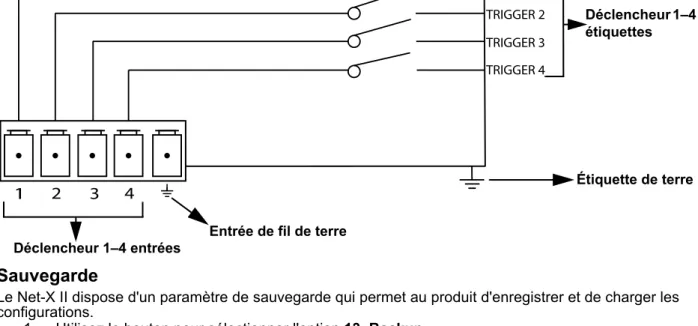
The Net-X II can set recorded scenes to a trigger using the 5-wire Phoenix connector on the rear of the unit. Up to 4 triggers can be connected for momentary functionality.
A latching switch will be necessary to run indefinitely.
Backup
The Net-X II has a backup setting that allows the product to save and load configurations. 1. Use the knob to select 13. Backup.
2. Press the knob.
3. Use the knob to select 1. Save. 4. Press the knob.
5. Use the knob to select 2. Load. 6. Press the knob.
7. Use the knob to select 3. Exit (to cancel). 8. Press the knob.
Firmware Version
This function displays the firmware version of the product. 1. Use the knob to select 14. Firmware Version.
2. Press the knob. The firmware version will display: B1.0 V2.3. 3. Press the knob to exit.
Exit
This function exits out of the menu to the main screen. 1. Use the knob to select 15. Exit.
2. Press the knob. The product returns to the home screen.
This will backup to the internal memory, and does NOT include the recorded scenes. The use of the webserver backup method will be needed to backup to an external source.
1
2
3
4
TRIGGER 1 TRIGGER 2 TRIGGER 3 TRIGGER 4 Trigger 1–4 labels Trigger 1–4 inputs Ground input Ground label20
Operation
Net-X II User Manual Rev. 6
Web Server
The Net-X II Web server can be accessed by any computer on the same network as the product. It allows network access to system information, settings such as control setup, backup, manual testing of all functions, and firmware updates. To access the Web browser:
1. Connect the product to a Windows computer with a network cable.
2. Enter the IP address of the product into the URL bar of a web browser on the computer and press enter.
Operation
Web Server Overview
DMX Port Overview - Input Status
DMX Port Overview - Output Status
Firmware Update/Backup
The Net-X II has a backup setting that allows the product to save and load configurations from the Web server. The Net-X II also has firmware upgrades that allow the product to be updated to the latest firmware.To use these functions, follow the instructions below:
B1.0 V2.3
Select device name
Select operation mode Select Static or Manual IP mode Product IP address
Select Netmask
Select user presets Displays firmware
Selects port status
Selects Normal or Backup Selects protocol
Sets universe Selects DEC or HEX
Selects protocol Selects HTP or LTP Selects port status
Selects frame rate
Selects DEC or HEX for 1st universe Sets 1st universe
Click here to select firmware or backup file to
upload
Click here to
upload selected file backup selected Click here to file
Technical Information
Net-X II User Manual Rev. 6
5. Technical Information
Product Maintenance
To maintain optimum performance and minimize wear, clean this product frequently. Usage and environment are contributing factors in determining the cleaning frequency.
Clean this product at least twice a month. Dust build-up reduces performance and can cause overheating. This can lead to reduced life and increased mechanical wear.
To clean the product:
1. Unplug the product from power.
2. Wait until the product is at room temperature.
3. Use a vacuum (or dry compressed air) and a soft brush to remove dust collected on the external vents.
4. Clean all transparent surfaces with a mild soap solution, ammonia-free glass cleaner, or isopropyl alcohol.
5. Apply the solution directly to a soft, lint-free cotton cloth or a lens-cleaning tissue. 6. Softly drag any dirt or grime to the outside of the transparent surface.
7. Gently polish the transparent surfaces until they are free of haze and lint. Always dry the transparent surfaces carefully after cleaning them.
Technical Specifications
6. Technical Specifications
Dimensions and Weight
Note: Dimensions in inches rounded to the nearest decimal digit.
Power
Connections
Thermal
Ordering
LENGTH WIDTH HEIGHT WEIGHT
19 in (483 mm) 6.22 in (158 mm) 1.73 in (44 mm) 4.6 lb (2.1 kg)
POWER SUPPLY TYPE RANGE VOLTAGE SELECTION
Switching (internal) 100 to 240 VAC, 50/60 Hz Auto-ranging PARAMETER 120 V, 60 HZ 208 V, 60 HZ 230 V, 50 HZ
Consumption 11 W 14 W 14 W
Operating current 0.09 A 0.06 A 0.06 A
POWER I/O U.S./WORLDWIDE UK/EUROPE
Power input connector Neutrik® powerCON® A Neutrik® powerCON® A
Power cord plug Edison (U.S.) Local Plug
INPUTS OUTPUTS/INPUTS (ASSIGNABLE) THROUGHPUTS
Neutrik® etherCON®
(1 total) 5-pin XLR (8 total) Neutrik
® etherCON® (1 total) 5-pin XLR (2 total)
MAXIMUM EXTERNAL TEMPERATURE COOLING SYSTEM
104 °F (40 °C) Convection
PRODUCT NAME ITEM NAME ITEM CODE UPC NUMBER
25
Returns
Net-X II User Manual Rev. 6
Returns
Send the product prepaid, in the original box, and with the original packing and accessories. Chauvet will not issue call tags.
Call Chauvet and request a Return Merchandise Authorization (RMA) number before shipping the product. Be prepared to provide the model number, serial number, and a brief description of the cause(s) for the return.
To submit a service request online, go to www.chauvetprofessional.com/service-request.
Clearly label the package with an RMA number. Chauvet will refuse any product returned without an RMA number.
Once you have the RMA number, provide the following information on a piece of paper and place it inside the box:
• Your name • Your address • Your phone number • RMA number
• A brief description of the problem
Be sure to pack the product properly. Any shipping damage resulting from inadequate packaging will be your responsibility. FedEx packing or double-boxing are recommended.
Write the RMA number on a properly affixed label. DO NOT write the RMA number directly on the box.
Chauvet reserves the right to use its own discretion to repair or replace returned product(s).
Contact Us
Contact Us
Visit the applicable website above to verify our contact information and instructions to request support. Outside the US, the UK, Ireland, Mexico, France, Germany, or Benelux, contact the dealer of record.
General Information Technical Support
Chauvet World Headquarters
Address: 5200 NW 108th Ave. Voice: (844) 393-7575 Sunrise, FL 33351 Fax: (954) 756-8015 Voice: (954) 577-4455 Email: [email protected]
Fax: (954) 929-5560
Toll Free: (800) 762-1084 Website: www.chauvetdj.com Chauvet Europe Ltd
Address: Unit 1C Email: [email protected]
Brookhill Road Industrial Estate
Pinxton, Nottingham, UK Website: www.chauvetdj.eu
NG16 6NT Voice: +44 (0) 1773 511115 Fax: +44 (0) 1773 511110
Chauvet Europe BVBA
Address: Stokstraat 18 Email: [email protected]
9770 Kruishoutem
Belgium Website: www.chauvetdj.eu
Voice: +32 9 388 93 97
Chauvet France
Address: 3, Rue Ampère
91380 Chilly-Mazarin Email: [email protected] France Website: www.chauvetdj.eu
Voice: +33 1 78 85 33 59
Chauvet Germany
Address: Bruno-Bürgel-Str. 11
28759 Bremen Email: [email protected] Germany Website: www.chauvetdj.eu
Voice: +49 421 62 60 20
Chauvet Mexico
Address: Av. de las Partidas 34 - 3B
(Entrance by Calle 2) Email: [email protected] Zona Industrial Lerma Website: www.chauvetdj.mx
Lerma, Edo. de México, CP 52000 Voice: +52 (728) 690-2010
Manual de usuario de Net-X II, Rev. 7
Notas de la Edición
El Manual de usuario del Net-X II contiene una descripción, precauciones de seguridad e instrucciones de instalación, programación, funcionamiento y mantenimiento del Net-X II en el momento de la publicación de esta edición.
GARANTÍA LIMITADA
PARA VER EL REGISTRO DE GARANTÍA Y LOS TÉRMINOS Y CONDICIONES COMPLETOS, VISITE NUESTRO SITIO WEB.
Para clientes en los Estados Unidos y México:www.chauvetlighting.com/warranty-registration.
Para clientes en Reino Unido, República de Irlanda, Bélgica, Países Bajos, Luxemburgo, Francia y Alemania:www.chauvetlighting.eu/warranty-registration.
Chauvet garantiza que este producto estará libre de defectos de material y mano de obra en condiciones de uso normales, durante el periodo especificado, sujeto siempre a las exclusiones y limitaciones
establecidas en la garantía limitada completa de nuestro sitio web. Esta garantía se concede únicamente al comprador original del producto y no es transferible. Para ejercer los derechos que otorga esta garantía, usted debe proporcionar una prueba de compra en forma de un recibo de compra original, expedido por un distribuidor autorizado, donde figure el nombre del producto y la fecha de compra. NO EXISTEN OTRAS GARANTÍAS EXPRESAS NI IMPLÍCITAS. Esta garantía le otorga derechos legales específicos. Es posible que a usted le asistan otros derechos, que variarán dependiendo del estado o del país. Esta garantía solamente es válida en los Estados Unidos, Reino Unido, República de Irlanda, Bélgica, Países Bajos, Luxemburgo, Francia, Alemania y México. Para conocer los términos de garantía en otros países, consulte a su distribuidor local.
Marcas registradas
CHAUVET, el logotipo de Chauvet y Net-X II son marcas comerciales o marcas registradas de Chauvet & Sons LLC (con nombres comerciales Chauvet y Chauvet Lighting) en los Estados Unidos y otros países. Otras empresas, nombres de productos y logotipos a los que se haga referencia aquí pueden ser marcas comerciales de sus respectivas empresas.
Aviso de derechos de autor
Las obras de autoría contenidas en este manual, incluyendo, pero sin limitarse a ellas, todos los dibujos, textos e imágenes, son propiedad de Chauvet.
© Copyright 2020, Chauvet & Sons, LLC. Todos los derechos reservados. Publicado en formato electrónico por Chauvet en los Estados Unidos de América.
Uso del manual
Chauvet autoriza a sus clientes a descargar e imprimir este manual solo para propósitos de información profesional. Chauvet prohíbe expresamente la utilización, copia, almacenamiento, distribución,
modificación o impresión de este manual o su contenido, con cualquier fin, sin consentimiento escrito de Chauvet.
Impresión del documento
Para mejores resultados, imprima este documento en color, en papel tamaño carta (215,9 × 279,4 mm), a doble cara. Si usa papel A4 (210 x 297 mm), configure la impresora para escalar el contenido
proporcionalmente.
Destinatarios
Cualquier persona a cargo de la instalación, manejo y/o mantenimiento de este producto debe leer íntegramente la guía que se entrega con el producto, así como este manual, antes de instalar, manejar o mantener este producto.
Exención de responsabilidad
Chauvet cree que la información contenida en este manual es exacta en todos los aspectos. Sin embargo, Chauvet no asume responsabilidad alguna, y queda exenta específicamente de todas y cada una de las responsabilidades y obligaciones, de la clase que sean y para con cualquier parte, por pérdida, perjuicio o trastorno causados por cualquier error u omisión en este documento, tanto si tales errores y omisiones se deben a negligencia o accidente como a cualquier otra causa. Chauvet se reserva el derecho a revisar el contenido de este documento sin ninguna obligación de notificar dicha revisión a ninguna persona o empresa; sin embargo, Chauvet no está en absoluto obligado a hacerlo así, ni se compromete a realizar revisión alguna.
Revisión del documento
Este manual del usuario del Net-X II es la revisión7 edición de este documento. Visite
Antes de empezar
1. Antes de empezar
Qué va incluido
Reclamaciones
Inmediatamente después de recibirlo, desembale este producto con cuidado y compruebe el contenedor. Asegúrese de que ha recibido todas las partes que se indican arriba en buenas condiciones.
A su recepción, si el continente o el contenido (el producto y los accesorios incluidos) parecen dañados a causa del transporte o muestran signos de manipulación inadecuada, notifíqueselo inmediatamente al transportista, y no a Chauvet. Si no lo hace oportunamente, puede quedar invalidada su reclamación al transportista. Además, guarde la caja y todo el material de embalaje para su inspección.
Para otras incidencias, como componentes o piezas que falten, daños no relacionados con el transporte o daños no evidentes, presente una reclamación a Chauvet en el plazo de 7 días de la recepción de la mercancía.
Convenciones del Manual
Símbolos
• Net-X II• Cable de alimentación Neutrik® powerCON®
• Conector Phoenix • Manual de usuario
CONVENCIÓN SIGNIFICADO
1–512 Un rango de valores en el texto
50/60 Un conjunto de valores mutuamente excluyentes en el texto <SET> Un botón en el panel de control del producto
Settings Una función del producto o una opción de menú
SÍMBOLOS SIGNIFICADO
Instalación, configuración o información crítica sobre el funcionamiento. El
incumplimiento de esta información puede causar que el producto no funcione, que se averíe, u ocasionar daños al usuario.
Instalación o información de configuración importante. Hacer caso omiso de esta información puede hacer que el producto no funcione.
29
Antes de empezar
Manual de usuario de Net-X II, Rev. 7
Notas de Seguridad
Por favor, lea todas las notas de seguridad siguientes antes de poner en funcionamiento este producto. Estas notas contienen información importante de seguridad sobre la instalación, uso y mantenimiento de este producto.
Seguridad Personal
• Evite la exposición directa de los ojos a la fuente de luz mientras es producto esté encendido. • Desconecte siempre el producto de la fuente de alimentación antes de limpiarlo o cambiar el
fusible.
• Conecte siempre el producto a un circuito con toma de tierra para evitar el riesgo de electrocución. • No toque la carcasa del producto cuando esté en funcionamiento, porque podría estar muy
caliente.
Montaje
• ¡Este producto es para uso en interiores solamente! Para evitar riesgos de incendio o descarga, no exponga este producto a la lluvia o la humedad (IP20).
• CUIDADO: cuando traslade el producto desde ambientes de temperatura extrema (p. ej., desde un camión frío a una sala de fiestas húmeda y caliente) se puede formar condensación en la
electrónica interna del producto. Para evitar que se produzca un fallo, deje que el producto se aclimate totalmente al entorno antes de conectar la alimentación.
• Asegúrese de que no hay materiales inflamables cerca de este producto cuando esté en funcionamiento.
• No mueva nunca el producto tirando del cable de alimentación.
Alimentación y Cableado
• Asegúrese de que el cable de alimentación no está retorcido ni estropeado.
• Asegúrese siempre de que conecta este producto a la tensión adecuada, en concordancia con las especificaciones de este manual o de la etiqueta de especificación del producto.
• Para evitar un desgaste innecesario y alargar su vida útil, desconecte completamente el producto de la alimentación mediante el interruptor o desenchufándolo durante periodos en que no se use. • Nunca conecte este producto a un regulador de intensidad o reostato.
• Nunca desconecte este producto agarrando o tirando del cable de alimentación.
Funcionamiento
• No haga funcionar este producto si hay daño en la carcasa o en los cables. Haga que un técnico autorizado sustituya todas las piezas estropeadas.
• No cubra las ranuras de ventilación cuando esté funcionando, para evitar sobrecalentamiento interno.
• La temperatura ambiente máxima es de 113 °F (45 °C). No haga funcionar el producto a temperaturas más altas.
• ¡En caso de un problema grave de funcionamiento, deje de usar este producto inmediatamente! Este producto no contiene piezas reparables por el usuario. Cualquier referencia a la reparación en este manual de usuario se aplicará solamente a técnicos certificados, adecuadamente formados. No abra la carcasa ni intente ninguna reparación.
Todos los códigos locales y regulaciones correspondientes se aplican a la instalación adecuada de este producto.
Si su producto de Chauvet necesita reparación, póngase en contacto con el servicio técnico de Chauvet.
Introducción
2. Introducción
Descripción
El Net-X II es un adaptador ethernet a DMX fiable y versátil, con un divisor óptico DMX integrado, que puede actuar como concentrador ethernet. Tiene dos puertos de entrada DMX de 5 pines y ocho puertos de salida DMX de 5 pines, todos ellos aislados ópticamente. Admite hasta 8 universos Art-Net™ o sACN simultáneos. Los ocho puertos de salida DMX de 5 pines se pueden asignar a cualquier puerto de entrada DMX o a uno de los universos Art-Net™ o sACN. Los puertos Neutrik® etherCON® son puertos de enlace que permiten la conexión en cadena de unidades Net-X.
El Net-X proporciona una infraestructura de red fiable y extremadamente flexible, para sistemas de control complejos. Combine dos controladores en el Net-X por medio de DMX, Art-Net™ o sACN, compatibles con las funciones LTP (Latest Takes Precedence, el último tiene prioridad) y HTP (Highest Takes Precedence, el más alto tiene prioridad). La función de grabación le permite grabar diseños de un controlador y guardarlos en memoria, compatible con servidor web para configuración remota y copia de seguridad o actualización.
Caracteristicas
• Divisor/distribuidor DMX de 5 pines
• Convertidor Art-Net™ / sACN a DMX, hasta 8 universos • Convertidor de DMX a Art-Net™ / sACN, hasta 8 universos
• Combine dos universos DMX de 5 pines en un solo universo, o combine dos controladores NET (Art-Net™ o sACN) en el mismo universo, luego conviértalos a DMX estándar de 5 pines para las salidas • HTP (Highest Takes Precedence, el más alto tiene prioridad) y LTP (Latest Takes Precedence, el
último tiene prioridad) funciones de combinación compatibles
• Configuraciones de respaldo y configuraciones con el mismo u otro Net-X IIs
• Servidor web compatible para configuración remota y copia de seguridad / actualización
• La función de grabación integrada le permite grabar miradas desde un controlador y guardarlas en la memoria (10 shows en la memoria, 100 pasos cada uno) para activar hasta 4 shows / zonas simultáneamente usando los contactos Phoenix de 5 hilos en la parte posterior de la unidad • Compatible con RDM sobre Art-Net ™ para la gestión remota de dispositivos
Vista general del panel frontal
Vista general del panel posterior
Pantalla del panel de control Puertos de enlace Neutrik® etherCON® Salida/Entrada (asignable) DMX Indicadores LED Mando Indicadores LED
Conector Phoenix para disparadores remotos Entrada DMX Portafusibles Entrada Neutrik® powerCON® Interruptor de encendido
31
Introducción
Manual de usuario de Net-X II, Rev. 6
Dimensiones del Producto
6,20” 157.5 mm 17,40” 442 mm 19” 483 mm 5,39” 137 mm 1,73” 44 mm
Instalación
3. Instalación
Corriente alterna
El Net-X IItiene una fuente de alimentación interna con detección automática (autorango) que funciona con un rango de tensión de entrada de 100–240 VCA, 50/60 Hz. Para determinar los requisitos de alimentación para el Net-X II consulte la etiqueta fijada al producto o las Especificaciones Técnicas. La especificación indica el consumo de corriente máximo durante un funcionamiento normal. Para más información, descargue Dimensionar interruptores automáticos del sitio web de Chauvet en
www.chauvetprofessional.com.
Sustitución del Fusible
El Net-X II utiliza un fusible T 250 mA 250 V al que se puede acceder desde la parte posterior del producto. Para cambiar el fusible, haga lo siguiente:
1. Desconecte el producto de la alimentación.
2. Con un destornillador plano, desatornille la tapa del portafusibles de la carcasa. 3. Quite el fusible fundido.
4. Sustitúyalo con un fusible del mismo tipo y categoría.
5. Vuelva a atornillar la tapa del portafusibles en su sitio y conecte de nuevo la alimentación.
Montaje
Antes de montar este producto, lea las Notas de Seguridad. Para nuestra línea Chauvet de abrazaderas de montaje, visite www.trusst.com/productcategory/accessories-clamps/.
Orientación
Monte siempre este producto en una posición segura, donde estén accesibles el menú y los puertos, y cerciórese de que se trata de una sala adecuada para su ventilación, configuración y mantenimiento. El Net-X II encaja perfectamente en un rack de 19”, se puede suspender boca arriba o boca abajo, o se pone sobre una superficie plana.
Utilice la siguiente pauta cuando monte el Net-X II:
• Cuando elija una ubicación para instalar, tenga en cuenta el acceso al producto para su manejo, ajustes de programación y mantenimiento de rutina.
• Asegúrese de montar este producto apartado de cualquier material inflamable, como se indica en las Notas de Seguridad.
• Nunca monte en lugares donde la lluvia, humedad alta, cambios extremos de temperatura o ventilación limitada puedan afectar al producto.
• Si cuelga este producto, asegúrese de que la ubicación del montaje puede soportar el peso del producto. Vea las Especificaciones Técnicas para los requisitos de soporte de peso de este producto.
• Cuando cuelgue este producto, asegúrelo siempre a un dispositivo de fijación usando un cable de seguridad (como el CH-05 de Chauvet).
• Deje holgura suficiente en los cables para evitar tensión y tirones en los enchufes.
• Conecte siempre este producto a un circuito protegido con una toma de tierra eléctrica apropiada para evitar el riesgo de electrocución o incendio.
• Para evitar un desgaste innecesario y alargar su vida útil, desconecte completamente el pr