Supporting Collaborative Work using
Interactive Tabletop
Kanida Sinmai
School of Computing Science
Newcastle University
This thesis submitted in partial fulfillment
of the requirement for the degree of
Doctor of Philosophy
February 2016
Declaration
I hereby declare that except where specific reference is made to the work of others, the contents of this dissertation are original and have not been submitted in whole or in part for consideration for any other degree or qualification in this, or any other University. This dissertation is the result of my own work and includes nothing which is the outcome of work done in collaboration, except where specifically indicated in the text.
Kanida Sinmai February 2016
Acknowledgements
Over four years at Newcastle University I have many people to thank for their support, motivation and guidance through it all.
First and foremost I would like to thank my supervisor, Professor Peter Andras for pro-viding assistance in numerous ways. For supervision and continuous guidance enabled me to complete my work. Thank you for his expertise, patience, and kindness. Also I would like to thank Dr Phillip Lord for his helps and support me to finish the thesis.
Thank you Professor Aad van Moorsel for his help, support and kindness. My gratitude is also extended to the School of Computing Science for giving me the opportunity to un-dertake the memorable learning experience. I would like to thank all people and staff in the School for helping me in many ways.
Of my friends at University, I would like to thank particularly to Dr John Colquhoun, Sarah Crabbe and Dr Jennifer Warrender who always support me in many ways and also help me with proof reading and give me a great deal of potential information. Thank you for their friendship, inspiration and never giving up on me.
I would like to thank Supandee Maneelok who always supports and cheer me up. To my parents, my brothers, sister, sisters-in-law and all of my family for undying and unconditional support. Also my three little nieces who always make me smile.
The Royal Thai government, for the full funding during my PhD.
To the numerous people I have crossed paths with during my time at Newcastle, I would like to say thank you to everyone who has steered me towards its completion, I am eternally grateful.
Abstract
Collaborative working is a key of success for organisations. People work together around tables at work, home, school, and coffee shops. With the explosion of the internet and com-puter systems, there are a variety of tools to support collaboration in groups, such as group-ware, and tools that support online meetings. However, in the case of co-located meetings and face-to-face situations, facial expressions, body language, and the verbal communica-tions have significant influence on the group decision making process. Often people have a natural preference for traditional pen-and-paper-based decision support solutions in such situations. Thus, it is a challenge to implement tools that rely advanced technological inter-faces, such as interactive multi-touch tabletops, to support collaborative work.
This thesis proposes a novel tabletop application to support group work and investigates the effectiveness and usability of the proposed system. The requirements for the developed system are based on a review of previous literature and also on requirements elicited from potential users. The innovative aspect of our system is that it allows the use of personal de-vices that allow some level of privacy for the participants in the group work. We expect that the personal devices may contribute to the effectiveness of the use of tabletops to support collaborative work.
We chose for the purpose of evaluation experiment the collaborative development of mind maps by groups, which has been investigated earlier as a representative form of col-laborative work. Two controlled laboratory experiments were designed to examine the us-ability features and associated emotional attitudes for the tabletop mind map application in comparison with the conventional pen-and-paper approach in the context of collaborative work. The evaluation clearly indicates that the combination of the tabletop and personal devices support and encourage multiple people working collaboratively. The comparison of the associated emotional attitudes indicates that the interactive tabletop facilitates the active involvement of participants in the group decision making significantly more than the use of the pen-and-paper conditions. The work reported here contributes significantly to our understanding of the usability and effectiveness of interactive tabletop applications in the context of supporting of collaborative work.
Contents
Contents v
List of Figures ix
List of Tables xii
Nomenclature xiii
1 Introduction 2
1.1 Context and Motivation . . . 2
1.2 Research Aims and Objectives . . . 4
1.3 The Challenges . . . 5
1.4 Research Contributions . . . 5
1.4.1 Main Research Contributions . . . 5
1.4.2 Publication . . . 6
1.5 Thesis Outline . . . 6
2 Background and Related Work 8 2.1 Tabletop Technology . . . 8
2.1.1 From CLI to NUI . . . 10
2.1.2 Design Guidelines for Tabletops . . . 12
2.2 Collaborative Work . . . 14
2.2.1 Computer Supported Collaborative Work . . . 15
2.2.2 Tools for Collaboration . . . 18
2.2.3 Horizontal and Vertical Displays, which one is the best? . . . 20
2.2.4 Multi-Display Environment . . . 21
2.3 Tabletop and Group Work . . . 22
Contents
2.4.1 Tabletop Mind Mapping . . . 27
2.5 Summary . . . 28 3 Research Methodology 29 3.1 Goal . . . 30 3.1.1 Research Questions . . . 30 3.1.2 Hypotheses . . . 30 3.2 Experimental Method . . . 31 3.2.1 Design . . . 31 3.2.2 Apparatus . . . 33 3.2.3 Tasks . . . 34 3.2.4 Participants . . . 35 3.2.5 Procedure . . . 36 3.2.6 Variables . . . 37
3.2.7 Data Collection Methods . . . 38
3.2.8 Data Analysis Approaches . . . 38
3.3 Answering The Research Questions . . . 39
3.3.1 Performance metric . . . 40
3.3.2 Collaboration Metric . . . 40
3.3.3 Usability Metric . . . 41
3.3.4 Emotional Attitudes Metric . . . 41
3.3.5 Mapping metric to research questions and hypotheses . . . 42
3.4 Summary . . . 43
4 Tabletop Mind Map Application 44 4.1 Group Meeting Application . . . 44
4.1.1 Main workspace . . . 45
4.1.2 Accessing meeting attachments . . . 45
4.2 Tabletop Mind Map Application . . . 48
4.2.1 System Requirements . . . 48
4.2.2 User Interface Design . . . 51
4.2.3 Android User Interface . . . 55
4.3 System Architecture . . . 56
4.4 System Implementation . . . 59
4.4.1 Tabletop Mind Map . . . 59
Contents 4.5 Summary . . . 62 5 Results 63 5.1 Participants . . . 63 5.2 Performance . . . 64 5.2.1 Effectiveness . . . 64 5.2.2 Efficiency . . . 66 5.3 Collaboration . . . 67 5.3.1 Communication . . . 67 5.4 System Usability . . . 69 5.4.1 Motivation . . . 69 5.4.2 Ease of Use . . . 70 5.4.3 Enjoyment . . . 71 5.4.4 Collaboration Rating . . . 72 5.5 Emotion Attitudes . . . 81 5.5.1 Positive Emotions . . . 81 5.5.2 Negative Emotions . . . 87
5.5.3 Emotion Attitudes Summary . . . 93
5.6 Qualitative feedback . . . 95 5.7 Summary . . . 97 6 Discussion 98 6.1 Performance . . . 99 6.1.1 Effectiveness . . . 100 6.1.2 Efficiency . . . 100 6.2 Collaboration . . . 101 6.3 Usability . . . 102 6.3.1 Motivation . . . 103 6.3.2 Ease of Use . . . 103 6.3.3 Enjoyment . . . 104 6.3.4 Collaborative rating . . . 104 6.4 Emotion Attitudes . . . 105 6.5 Limitations . . . 107 6.6 Summary . . . 108
Contents 7 Conclusion 109 7.1 Summary of Contributions . . . 111 7.2 Future Work . . . 112 References 114 Appendix A Questionnaire 123
A.1 Experiment One . . . 123 A.2 Experiment Two . . . 127
List of Figures
2.1 Tabletop Timeline . . . 8
2.2 CSCW Typologies . . . 17
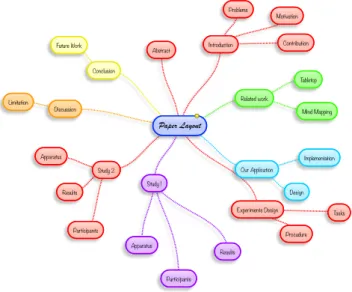
2.3 Component of a mind map: the central idea represents the core topic, branches radiate the sub-topic from the main node, nodes represent the ideas of topic, and lines show a hierarchy of the nodes. The conceptual hierarchical rela-tionships of the concepts represented by the nodes. . . 25
3.1 The setting of Experiment One . . . 32
3.2 The setting of Experiment Two . . . 32
3.3 The within-subjects design . . . 35
3.4 Experiment procedure . . . 36
4.1 Group meeting application workspace . . . 45
4.2 Meeting attachments folder . . . 46
4.3 The document viewer . . . 46
4.4 The document viewer with icons for adding annotations . . . 47
4.5 Show the notes . . . 47
4.6 Hide the notes . . . 48
4.7 Tabletop mind map workspace (1) . . . 51
4.8 Tabletop mind map workspace (2) . . . 52
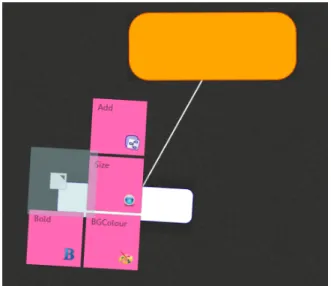
4.9 Element menu . . . 52
4.10 Example for changing a parent node . . . 53
4.11 Virtual Keyboards . . . 53
4.12 Android mind map workspace . . . 55
4.13 Android mind map workspace (2) . . . 55
4.14 Android mind map example . . . 56
List of Figures
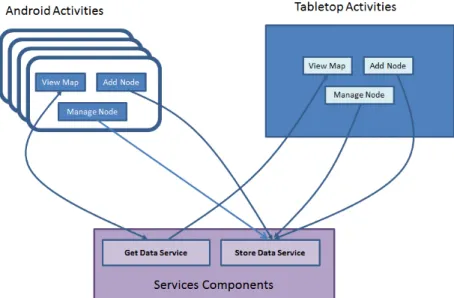
4.16 Services components . . . 57
4.17 A touchscape table . . . 59
4.18 A screenshot of Community Core Vision . . . 60
4.19 Tabletop Mind Map Architecture . . . 60
4.20 Model-View-ViewModel Design Pattern [Microsoft,2014] . . . 61
4.21 Android Architecture . . . 62
5.1 The number of participants . . . 64
5.2 Means of the number of ideas on the pen-and-paper condition compared with the tabletop approaches for both experiments. . . 65
5.3 Means of completion time on the pen-and-paper condition compared with the tabletop approach. . . 67
5.4 Means of collaboration on the pen-and-paper condition compared with the tabletop approach. . . 68
5.5 Means of motivation scale on the pen-and-paper condition compared with the tabletop approach for both experiments. . . 69
5.6 Means of ease of use in the pen-and-paper condition compared with the tabletop approach for both experiments. . . 70
5.7 Means of enjoyment in the pen-and-paper condition compared with the tabletop approach. . . 71
5.8 Means of the statement "I had a lot of ideas" in the pen-and-paper condition compared with the tabletop approach for both experiments. . . 72
5.9 Means of the statement "I was satisfied with my participation" in pen-and-paper conditions compared with the tabletop approach. . . 73
5.10 Means of the statement "I had high quality ideas" in the pen-and-paper con-dition compared with the tabletop approach for both experiments. . . 74
5.11 Means of the statement "The results are important to me" in the pen-and-paper condition compared with the tabletop approach for both experiments. 75 5.12 Means of the statement "I collaborated with other participants" in the pen-and-paper condition compared with the tabletop approach for both experi-ments. . . 76
5.13 Means of the statement "It was agreeable" in the pen-and-paper condition compared with the tabletop approach for the two experiments. . . 77
List of Figures
5.14 Means of the distributions of the statement "I tried my best" in the pen-and-paper condition compared with the tabletop approach for the two experi-ments. . . 78 5.15 Means of total satisfaction of collaboration rating using the pen-and-paper
condition compared with the tabletop approach for both experiments. . . 79 5.16 Means of alertness using the pen-and-paper condition compared with the
tabletop approach for both experiments. . . 81 5.17 Means of energetics using the pen-and-paper condition compared with the
tabletop approach for the two experiments. . . 82 5.18 Means of enthusiasm using the pen-and-paper condition compared with the
tabletop approach for both experiments. . . 83 5.19 Means of calm using the pen-and-paper condition compared with the
table-top approach for the two experiments. . . 84 5.20 Means of relaxation using the pen-and-paper condition compared with the
tabletop approach for the two experiments. . . 85 5.21 Means of happiness using the pen-and-paper condition compared with the
tabletop approach for both experiments. . . 86 5.22 Means of anxiety using the pen-and-paper condition compared with the
tabletop approach for the two experiments. . . 87 5.23 Means of tiredness using the pen-and-paper condition compared with the
tabletop approach for the two experiments. . . 88 5.24 Means of depression using the pen-and-paper condition compared with the
tabletop approach for the two experiments. . . 89 5.25 Means of sadness using the pen-and-paper condition compared with the
tabletop approach for the two experiments. . . 90 5.26 Means of tenseness using the pen-and-paper condition compared with the
tabletop approach for both experiments. . . 91 5.27 Means of boredom using the pen-and-paper condition compared with the
tabletop approach for the two experiments. . . 92 5.28 Means of total emotions using the pen-and-paper condition compared with
the tabletop approach for the two experiments. . . 93 5.29 Percentage of positive feedback . . . 95 5.30 Percentage of positive feedback . . . 96
List of Tables
2.1 Collaboration framework with examples of CSCW technology . . . 18
2.2 Collaborative technologies . . . 19
2.3 Mind maps hardware . . . 26
2.4 Comparison table for work related to this research . . . 27
2.5 Summary of the TMM approach described . . . 28
3.1 Research methods overview . . . 29
3.2 Groups and scenarios . . . 33
3.3 Summary of the investigation of answering the research questions . . . 39
3.4 Mapping metric to research questions and hypothesis . . . 42
4.1 Major User Actions (Figures fromideum[2014] ) . . . 54
4.2 Data Structure . . . 58
5.1 Number of ideas per group in both conditions for the two experiments. . . . 65
5.2 The completion time per group in both experiments. . . 66
5.3 Collaboration rating summary . . . 79
5.4 Emotion attitudes summary . . . 93
5.5 Positive feedbacks (N=42) . . . 95
5.6 Users’ feedbacks (N=19) . . . 96
5.7 The brief summary of experiment one results. . . 97
6.1 A brief summary of the experimental results. . . 99
6.2 Performance metric results . . . 99
6.3 Collaboration metric results . . . 101
6.4 Usability metric results . . . 102
6.5 A collaboration rating summary from the two experiments . . . 104
List of Tables
6.7 Emotion attitudes summary . . . 106 7.1 Summary of the TMM approach described . . . 110
Abbreviations
ADB Android Debug Bridge CCV Community Core Vision
CDSS Clinical Decision Support System
CM Concept Mapping
Cmate Concept Mapping at an Adaptive Tabletop for educaiton CSCW Computer Supported Collaborative Work
CUI Command Line User Interface
FTIR Frustrated Total Internal Reflection (FTIR) GP General Practitioner
GUI Graphic User Interface HD High Definition
IDE Integrated Development Environment JDK Java Development Kit
JPEG Joint Photographic Experts Group LCD Liquid Crystal Display
MERL Mitsubishi Electric Research Laboratories MDE Multi-Display Environment
MM Mind Mapping
MVVM Model View View-Model NUI Natural User Interface PNG Portable Network Graphic SDK Software Development Kit SQL Structured Query Language SMS Short Message Service TMM Tabletop Mind Map
WCF Windows Communication Foundation WIMP Windows Icons Menus and Pointers WPF Windows Presentation Foundation
XAML Extensible Application Markup Language XML Extensible Markup Language
Chapter 1
Introduction
1.1
Context and Motivation
"Coming together is a beginning, Keeping together is progress. Working together is success" said Henry Ford, a well-known American industrialist [Brinkley,2003]. The ability to work together is a backbone of any strong and successful relationship.
Collaboration is an ambitious weapon for success. People constantly collaborate to meet mutually beneficial goals. Collaboration can occur in any situation, for example studying, working, meeting, and brainstorming. Collaboration benefits participants in many ways. People have opportunities to exchange their different experiences. Furthermore, they are able to achieve a wealth of knowledge. Most importantly, they can develop a shared vision, and also find a new solution. A common group activity is collaboration around a table, for example, a meeting table, a coffee table, a common room table, a dinner table, and a game table. With the explosion of the Internet and computer systems, there are a variety of tools to support collaboration in groups, such as groupware, and tools that support online meetings. However, in the case of co-located meetings and face-to-face situations, facial expressions, body language, and verbal communications have significant influence on the group decision making process [Hilliges et al.,2007]. People may have a natural preference for using traditional pen-and-paper-based decision support solutions.
Increasing recent research on technologies that can support collaboration. One of these technologies is the interactive tabletop. It is becoming increasingly difficult to ignore the benefits of interactive tabletops. The tabletop systems provide a large workspace where people can collaborate in a face-to-face setting simultaneously. Recent developments in re-lated research into tabletops found that interactive tabletops are enjoyable to use and support group awareness [Baraldi et al.,2008;Chi et al.,2011;Lee et al.,2009;North et al.,2009;
1.1 Context and Motivation
Pantidi et al., 2009]. Tabletop applications have been widely developed for studying and comparing the usability of the interactive surfaces [Hilliges et al.,2007;Seifert et al.,2012; Shen et al., 2003]. Although many research studies have investigated around interactive tabletops in the context of collaboration, tabletop mind map applications still need to be explored [Buisine et al.,2007].
Collaborative decision making is a particularly interesting area of research. It requires the sharing of information and also discussion amongst group members. There are a great deal of decision making tools to find a new solution. With face-to-face meeting situations, mind mapping is a well-known powerful decision making technique for generating new solutions and ideas.
Mind Mapping is the striking combination of imagery, colour, and visual-spatial ar-rangement. This valuable method is a graphical diagram for presenting thoughts or ideas relating to the central topic [Faste and Lin, 2012]. The mind mapping approach was intro-duced by Buzan in the mid-1970s [Buzan, 2008]. The mind map can be applied to every discipline to enhance human performance and to unlock the potential of the brain [Buzan, 2008]. It was initially used for learning and note-taking. Recently, the mind map has been widely used in other areas such as planning, presenting, problem solving, decision making and so forth [Willis and Miertschin,2006].
The advantages of mind mapping compared with ordinary note taking include, for ex-ample, time is saved by just noting down relevant keywords [Chik et al., 2007], increasing productivity by 30% and improved understanding of complex issues [Frey, 2011]. Frey [2011] also reveals that mind mapping empowers creativity, boosts up memory, and man-ages information overload. Mind mapping also promotes group collaboration. Shih et al. [2009]’s work showed that mind map structure imposes an important framing effect on group dynamics and thought organization during the brainstorming process. Consequently, mind maps are a great tool to support collaborative decision making and argument building. The first application of mind maps on tabletop devices to support collaborative decision making was reported byBuisine et al.[2007]. The research aimed to compare the usability and usefulness of this approach to traditional paper-and-pen conditions. The results showed no difference in production of ideas, but the tabletop condition significantly improved ges-tural and verbal interactions, as well as the perceived efficiency and pleasure of group tasks. However, until relatively recently, little had been written on the mind mapping issue. It is a challenge to implement such tools that rely on more advanced technological interfaces, such as interactive multitouch tabletops. We believe that not only do multitouch tables en-hance the productivity of mind mapping tools, but incorporating the use of personal devices
1.2 Research Aims and Objectives
further extends the possibilities for greater collaboration.
It is well established that emotional attitudes are important factors that influence the ef-fectiveness of collaborative work [Ashforth and Humphrey, 1995]. It has been shown that positive emotions (e.g. happiness, enjoyability) are significantly more influential factors for collaborative working than for individual work [González-Ibáñez et al.,2011]. Positive emotions also indicate self-fulfillment of participants in the context of collaborative work [Fredrickson and Losada, 2005]. In contrast, negative emotions such as anxiety, sadness, and anger, may be associated with reduced accuracy on tasks and executive functioning by biasing cognitive processing, or may lead to reduction of the production of ideas [ Fredrick-son, 2001]. Therefore, it is important to consider the emotional attitudes of users in the context of evaluation of techniques aimed to support collaborative work.
Hence, this thesis proposes a tabletop mind map application to enhance collaborative work among group members. This work also explores the issue of design challenges for interactive tabletops. Furthermore, the usability of the system will be studied through ob-servation and experimentations.
1.2
Research Aims and Objectives
This research focuses on tabletops that people can work together in a situation of syn-chronous co-located collaboration. The main aim of this research is to investigate the ef-fectiveness and the usability of the tabletop mind map system in the context of support for collaborative work. The principal objectives of this research are as follows:
• To increase an understanding of the use of interactive tabletops in the context of col-laborative work.
• To review the existing tabletop applications and identify challenges and weaknesses in this regard.
• To design and implement a framework for collaboration using tabletops. • To evaluate the approach by conducting experiments.
• To propose design guidelines for tabletop application in the context of collaborative work.
1.3 The Challenges
1.3
The Challenges
The key challenges of this research which are as follows:
• Design challenge for interactive tabletops: people usually work collaboratively around a physical table. Moving to the digital table is a challenge to ensure users become fa-miliar with this environment. This is because a benefit of the tabletop is to use the multitouch interaction technique to enable users to interact with the surface simultane-ously by directly touching the screen instead of using the traditional input (i.e. mouse and keyboard). Consequently, from command line user interface (CLI) to natural user interface (NUI), in this thesis, touch interaction was considered.
• Development challenge: developing tabletop mind map application is complicated since the framework consists of two main applications: tabletop mind map applica-tion and Android mind map applicaapplica-tion. Both applicaapplica-tions support multi-touch inter-action. The former one was developed by C#, and Java for the latter one. What is more web-service was chose to be media of the two components.
1.4
Research Contributions
The research contributions can be divided into two sections presented below:
1.4.1
Main Research Contributions
This thesis makes a number of contributions in the area of supporting collaborative work using interactive tabletops. These are summarised below:
• The design of the table mind map system for collaborative work. The requirements for the developed system were based on a review of previous literature and also on requirements elicited from potential users. The design was guided by the work of Bachl et al.[2010] which presented the challenges for designing user experience and a given specific guidelines for co-located collaboration byScott et al.[2003]. The de-sign of the system aims to support simultaneous user actions, consider the appropriate arrangement of users, support individual differences and support transition between individual and collaborative work.
• The implementation of the tabletop mind map system. The proposed implementation consists of two main components: tabletop mind map application and Android mind
1.5 Thesis Outline
map application. The tabletop mind map component is for supporting users work simultaneously in the same surface. To support privacy and may help the creativity and feeling well of participants, the Android hand-help component is developed. • The evaluation of two controlled laboratory experiments. The first experiment
com-pared the use of our mind map application with pen-and-paper condition. The sec-ond experiment combined our tabletop mind map application with personal devices and compared this combined application with the conventional approach. The results clearly indicate that the combination of a tabletop and personal devices support and encourage multiple people to work collaboratively. The comparison of the associated emotional attitudes indicates that the interactive tabletop facilitates the active involve-ment of participants in the group decision making significantly more than the use of the pen-and-paper approach.
1.4.2
Publication
This work has been documented in part of this publication:
K. Sinmai and P. Andras, "Mapping of Surfaces: Supporting Collaborative Work Using Interactive Tabletop". In 20th International Conference on Collaboration and Technology (CRIWG 2014), September 7-10, Chile, 2014. [Sinmai and Andras,2014]
This work presented the evaluation of the effectiveness and usability of the applications.
1.5
Thesis Outline
This thesis is organised as follows:
• Chapter 2 provides the background information of the research areas relevant to this work. These include the theoretical dimensions of interactive tabletop work and evalu-ation, collaborative work, mind mapping, and multi-display groupware. Furthermore, the next part of the review concerns design guidelines for the tabletop system. What is more, the final section of the review presents the combination between table and personal devices system related to collaborative work.
• Chapter 3 The methodology adopted for this research is presented. This includes a discussion of experimental design, data collection and analysis. This also explained how research questions are going to be answered.
1.5 Thesis Outline
• Chapter 4 presents the system requirements and design for the development of the applications. Next, a high level architecture of the system will be presented. Finally, the user interface and the interaction are discussed.
• Chapter 5 reports the results of experiment one and experiment two.
• Chapter 6 discusses the research finding for chapter 5 and 6. Also it explains how the research questions are answered. These also include limitation of the work.
• Chapter 7 draws conclusions from the research presented throughout the thesis. These also summarise the achievements, contributions, and problem of this thesis. Addition-ally, a number of directions for future work into this research are recommended.
Chapter 2
Background and Related Work
The purpose of this chapter is to provide the background information on commonly used concepts within the setting of this research study and to summarise briefly the related work. The chapter begins by giving some information into tabletop technology which is the main hardware used in the research. The basic issues in collaborative work and mind mapping technique are also presented. Finally, recent works into tabletop mind mapping are dis-cussed.
2.1
Tabletop Technology
Figure 2.1 Tabletop Timeline
Over the past twenty years, interactive tabletop technologies have been studied in various domains, not only because it is a new form of computer, but also because of the advantages
2.1 Tabletop Technology
of this technology. Tabletops are multi-user horizontal devices designed for simultaneous use. They have the potential to support collaborative working and more specifically to aid people to collaborate more effectively.
The tabletop technology timeline is presented in Figure 2.1. The area of interactive tabletops and horizontal displays research was started by Pierre Wellner who proposed the DigitalDesk system in 1993 [Wellner,1993]. The DigitalDesk is a real physical desk but it is enhanced to provide digital characteristics by using fingers which were tracked by a com-puter system. It could detect touches on a relatively large surface. Fitzmaurice et al.[1995] developed a large horizontal desktop surface called ActiveDesk, which allowed interaction devices other than fingers. Using a rear-projected digitizing board, it was also possible to interact with a stylus. Additionally, a graspable user interface was introduced, which is the physical representation of the graphical user interface. These two tabletops did not provide multi-user interaction.
The most common tabletop technology that is used in a number of tabletop studies is DiamondTouch [Fleck et al.,2009;Forlines et al.,2007;Pantidi et al.,2009;Piper and Hol-lan,2009;Shen et al.,2003;Smeaton et al.,2007;Tse et al.,2007;Yamaguchi et al.,2007]. DiamondTouch was developed at the Mitsubishi Electric Research Laboratories (MERL) [Dietz and Leigh, 2001]. It was the first multi-user and multitouch technology for table-top front-projected displays. It enables users to use the same touch-surface simultaneously without interfering with each other.
Han [2005] presented a multitouch technology that provided the most widely known optical technique, frustrated total internal reflection (FTIR). This technology is used for demonstrating in many studies [Echtler et al., 2009;Gross et al., 2008;Hansen and Hour-cade,2010;Hunter and Maes,2008]. Later on in 2006, Perceptive Pixel developed a wall-sized multitouch display called "Multi-Touch Collaboration Wall". In 2012, Microsoft pur-chased Perceptive Pixel [BBC,2012].
In 2005, PlayAnywhere was introduced by a Microsoft researcher which uses a front-projected, computer-vision based interaction tabletop system [Wilson, 2005]. Both the wide-angle projection and infrared-based tracking system are located above the tabletop. The infrared illumination is deployed to generate shadows.
Microsoft introduced an interactive table surface called Microsoft Surface which is ca-pable of sensing multiple fingers and hands in May 2007 [Buxton, 2011]. The device is optimized to recognize 52 simultaneous multitouch points of contact. It can also identify various objects and their position on the surface. In 2011, Microsoft Surface 2.0 was devel-oped which uses rear projection and projectors replaced by augmented LCD technology. It
2.1 Tabletop Technology
is now called the Samsung SUR40 [Pepitone, 2011]. The Microsoft Surface Table website is now no longer online, instead it is rebranded to Microsoft PixelSense [Microsoft,2012].
Numerous computer manufacturers have released commercial devices and operating systems with multitouch capabilities. Moreover, there are a growing number of research groups and hobbyists developing their own multitouch low-cost solutions [Buxton, 2011; Han,2005;Microsoft,2012].
2.1.1
From CLI to NUI
In the very first user interfaces, users had to interact with computer by using a keyboard entering text into a command line. The command line interface (CLI) was the first user interface. Next, the graphical user interface (GUI), with which users interact regularly is based on the desktop metaphor using a mouse and a keyboard. A GUI provides graphical icons, and visual indicators such as label underneath the icons. It can be referred to as WIMP: windows, icons, menus, and pointers or direct manipulation interaction style. The terms of GUI and WIMP are usually used interchangeably. The GUI represents a lower barrier for users than a command line interface. Then, the natural user interface (NUI) seems to be in same position as the GUI was in the early 1980s [Wigdor and Wixon,2011]. The GUI cannot completely replace the CUI likewise the NUI cannot completely replace the GUI. The NUI is not simply a natural veneer over a GUI. Instead, it has a set of strengths based on what it makes easier, how it makes those things easier and how it shapes the user’s interaction with technology [Norman,2010].
In terms of natural is understood to mean of the real world. Blake[2011] stated that developers should forget what natural means but they should make an interface that makes users act and feel like a natural. Wigdor and Wixon [2011], moreover, addressed that a NUI is not a natural user interface, but rather a natural user interface. The NUI may represent a revolution in computing, not because it replaces existing ways of interacting with computers, but because it enables computing to expand into new niches that could be of a very large size and importance.
According toBlake[2011], NUI is a user interface designed to reuse existing skills for interacting directly with content. There are three important characteristics about the natural user interface. Firstly, during the design process, the designer has to create NUI interactions that are appropriate for users. Secondly, NUI reuses existing skills, which focuses on how to create interfaces naturally. Users should interact with computers using intuitive actions such as touching, gesturing, and talking. Finally, NUI have direct interaction with contents.
2.1 Tabletop Technology
Furthermore, the NUI is defined by three elements: enjoyable, leading to skilled practice and appropriate to context [Wigdor and Wixon, 2011]. The NUI should have all of these elements. Additionally, NUIs are concerned about objects, containers, gestures and manip-ulations. Objects and containers are types of interface elements. They are presented by the application using whatever output technology is appropriate, whether graphics, sound or voice, tactile, or future output technologies such as 3-D holograph. Gestures and ma-nipulations are types of interface actions that the user performs. The user provides input to the application with whatever input technology is appropriate, including multitouch, motion tracking, stylus, voice, or future input technologies such as muscle sensors or brainwave sensors.
With regard to objects, each object presented in the interface should be represented by an individual, self-contained object. For instance, images that can move, rotate, scale and be thrown. There are three main attributes of the object metaphor. Firstly, permanent objects, if user leaves an object in a particular state at a particular position, leaves to work on another task and comes back later, that object should still be in the same state and position. Next physical attributes, these attributes determine how users interact with objects, how objects interact with each other, and how objects behave within the environment outside of this interaction. Lastly, fluid transitions, is an aesthetic, continuous animation that helps user to understand how and why an object is changing states. Containers are metaphors for the relationship between contents. This metaphor is based on user experience with real-world containers.
Touch
The process of touching is immediately recognisable as the gift of life [Shneiderman,1991]. People always interact by touching in daily life. Touch is a common intuitive interaction. Back to 1965, the first touch screen was introduced by E.A. Johnson of the Royal Radar Establishment, Malvern, UK [Buxton, 2011]. Since then touch screens have been progres-sively developed and enhanced from single touch to multitouch displays with more colours and faster response rates. Single touch is one point of contact on a surface at a time such as ATM, Palm and so forth, whilst multitouch is many points of contact that allows users using their fingers touch on screen simultaneously such as DiamondTouch, SUR40 and iPad [Dietz and Leigh,2001;Microsoft,2012;Morrissey and Campbell,2010].
Multiple methods on how touch and gesture are incorporated into computing systems have also arisen. For instance, iPhone uses touch as the sole input method [Buxton, 2011; Morrissey and Campbell,2010]. Windows 7 uses a triad of input methods: touch, stylus and
2.1 Tabletop Technology
keyboard/mouse [Buxton, 2011]. Also, different hardware interfaces are being developed. Wigdor and Morrison[2010] mentioned that some devices are based on camera system and others on capacitive technologies. For example, Apple’s track pad uses multiple gestures including a four finger touch gesture, while the HP TouchSmart can recognize track only two points of contact, and larger devices such as Microsoft Surface and the Smart Table are able to simultaneously track over 50 contact points.
Why Touch Screen?
[Shneiderman, 1991] also stated that there are many advantages of touch screen over the previous pointing devices. Firstly, touching requires little thinking and is easy to learn in a form of direct manipulation. Secondly, touch screens are the fastest pointing device. Thirdly, touch screens have easier hand-eye coordination than mice and keyboards. Next, no extra workspace is needed as they use the same devices for input and display. Finally, the screens are durable in public access and in high volume usage. Touch screens, however, have some disadvantages. For example, user’s hands may obscure the screen and they cost more than previous devices.
2.1.2
Design Guidelines for Tabletops
Numerous research suggests general guidelines for multitouch designing [Bachl et al.,2010; Kruger et al.,2003;Scott et al.,2003]. Scott et al. suggested design guidelines for tabletop technologies as follow:
1. Natural interpersonal interaction: This design is to support group activities at the heart of collaboration. Also it can be supported with an appropriate and friendly physical design for the table.
2. Transitions between activities: This can be in term of software tools, or hardware/ software tools as in switching between using a physical keyboard and a stylus. 3. Transitions between personal and group work: To divide the table space into personal
and public territories.
4. Transitions between tabletop collaboration and external work: Work generated exter-nally should be easy to incorporate in the tabletop environment and vice versa. 5. The use of physical objects: Physical objects include pen, paper and tangible objects
2.1 Tabletop Technology
6. Accessing shared physical and digital objects: Shared access to physical and digital objects should be provided where it helps in maintaining group focus and facilitates awareness.
7. Flexible user arrangements: Consideration should be paid to the appropriate arrange-ment of users and the table shape and size.
8. Simultaneous user interactions: Supporting multiple users collaborating simultane-ously.
A number of studies have followed these guidelines. For instance, WorkTop [Clifton et al.,2010] is a sketching tool designed to facilitate and augment collaborative brainstorm-ing. This study meets most of these guidelines excepts number four. Also, WordPlay a tabletop interface, has been developed for supporting collaborative brainstorming and de-cision making [Hunter and Maes, 2008]. Furthermore, UbiTable was designed to support collaborative work for small group meetings and also supports these guidelines [Shen et al., 2003]. In this study people could walk up, share their content, and exchange data.
However, research suggested that a tabletop application should meet some of Scott’s guideline for co-located collaborative work on a tabletop. Finger Talk supported collab-orative work for small by using talk and fingertip interaction [Rogers et al., 2004]. They suggest that in the future tables may have to increase in size allow to for users sitting further away from each other. They also suggest the need of Scott et al.’s guidelines for natural interpersonal interaction and fluid transition between interaction and activities.
Furthermore,Bachl et al.[2010] presented eight challenges that need to be considered when designing the user experience of multitouch interfaces. These challenges can be clas-sified into three categories: screen based, user-based and input-based challenges.
The screen-based challenge describes problem related to physical properties of touch screens. This group is related to the affordance of screens and the lack of tactile user feed-back. Next challenges, the user-based explores the use of fingers for direct input as the origin of problems users are facing when interacting with multitouch interfaces. This category in-cludes the challenge of the ergonomics, individual differences of users, and accessibility. Lastly, the input-based challenges present the difficulties in interpreting and supporting the input to enhance the user experience of multitouch interfaces. Challenges of within the group are related to gestures and patterns, supporting data input, and multi-user support.
2.2 Collaborative Work
Challenges of design for multitouch interfaces
According to the affordance principle, Shen et al. [2003] states that “an affordance is a property of whatever the person interacts with, but to be in the category of affordances it has to be a property that interacts with a property of an agent in such a way that an activity can be supported”. Then NUI designers should forget all about web design or GUI design which is point and click interaction. NUI designers should think about a clean paper that users can fill in.
In addition, they should be concerned about sources of error. There are many sources of error that designers should be concerned with understand.
One challenge of designing multitouch is from users’ experiences that related to er-gonomics and individual differences of users and accessibility. One important thing to consider when designing multitouch interfaces is partial occlusion of the screen caused by fingers, hands and arms when users interact with the display [Ryall et al.,2004]. For a small multitouch display, the designers should focus how to touch correctly the targets, where touch targets are also small. This problem increases when designing multitouch applica-tions that support different platforms. Individual differences between users are an important for designing user interfaces for multitouch applications. For instance, different finger sizes differ from a computer mouse that has a target zone of one pixel. The next challenge is multiple users support. Designing a system for multiple users, who interact simultaneously, is the ability to distinguish between individual users. Still there is no conclusive solution for multiple users support that works for different technologies.
2.2
Collaborative Work
As far as history goes, people tend to work together to achieve their goals. Groups of people work around a physical table such as a coffee table or a meeting table for sharing ideas, brainstorming, discussing, and making a decision. Many decision making problems have to be solved by discussion among a group of people. The "world of work" [Levin, 2005] requires more time and effort, awareness, knowledge, skills, ideas to gain benefit of group work. Therefore, in collaborative work, people have opportunities to exchange their different experiences. Furthermore, they are able to achieve a wealth of knowledge. Most importantly, they can develop a shared vision, and also find a new solution.
Collaboration has occurred when more than one person works on a single task. Accord-ing toIivari and Linger[1999] "collaborative work is constituted by the interdependence of
2.2 Collaborative Work
multiple people who, in their individual activities, in changing the state of their individual field of work, also change the state of the field of work of others and who thus interact through changing the state of a common field of work". Furthermore, collaboration def-inition, is defined by Roschelle and Teasley [1995] that "Collaboration is a coordinated, synchronous activity that is the results of a continued attempt to construct and maintain a shared conception of a problem". Also, Denise [1999] identified that collaboration is not about agreement, but it is about creation. This is also presented in a book bySchrage [1990] stating "collaboration is the process of shared creation: two or more individuals with complementary skills interacting to create a shared understanding that none had previously possessed or could have come to on their own. Collaboration creates a shared meaning about a process, a product or an event. In this sense, there is nothing routine about it. Something is there that wasn’t there before". Furthermore,Denise[1999] also stated that collaboration is unlike communication, coordination and cooperation. Collaboration is about using in-formation, seeking divergent insight and spontaneity, not structural harmony. What is more collaboration thrives on differences and requires the sparks of dissent. The collaboration can be successful only when the goal is achieved and accomplished by a group not an individual. Therefore, collaboration is a process to achieve a goal with can be done by a group of people.
2.2.1
Computer Supported Collaborative Work
Computer Supported Collaborative Work or CSCW emerged in 1984 from shared interests among product developers and researchers in diverse fields [Grudin, 1994a]. CSCW is a very strongly related area of research to group working. It is a research agenda that focuses using computer systems to support group work. CSCW is an umbrella bringing researchers together from several areas such as computer science, psychology, sociology, anthropology, ethnography, management and medical [Greenberg,1991]. Computer supported collabora-tive work must overcome the difficulties of multidisciplinary interaction [Grudin, 1994a]. CSCW refers to people working together with formal and informal tasks in organisation with help from computer. CSCW is related to social dynamics which users need to learn how to work in interactive group situations. It starts as an effort by technologists to learn from economists, social psychologists, anthropologists, organizational theorists and so on. This field is also known as computer-supported collaboration, GroupWare, Workflow, and Group Decision Support Systems [Palmer and Fields,1994]. Palmer and Fields also stated that a primary key to success in CSCW activities lies in user comfort with system operations.
2.2 Collaborative Work
The heart of this comfort is the user interface that it needs to become more intuitive.
As far as design challenges for CSCW developers are concerned,Grudin[1994b] listed eight design challenges that must be considered during the design and implementation pro-cess of a sucpro-cessful and suitable groupware system.
1. Disparities between effort required and benefit for individuals. 2. Limits of informed intuition: Managers and designers beware. 3. Critical mass of users for economical usage of groupware systems. 4. Avoiding other social and motivational pitfalls.
5. Support for exception handling. 6. Designing for low-frequency events. 7. Difficulty of evaluation.
8. The adoption process. Designer must consider what will be needed to promote suc-cessful adoption from the outset.
CSCW Typologies
People work together in different modes. Activities can occur in the same place at the same time or different sites at the same time or different times and different places. Figure 2.2 illustrates the CSCW typologies. The matrix considers the two dimensions of time and place.
The time factor can be divided into two categories: same time and different time. The former category refers as synchronous or real time while the latter one refers as asyn-chronous where people collaborate asynasyn-chronously.
The location factor can also be divided into two categories: Same place and different place.
Additionally,Wilson[1991] identified four categories of CSCW technology that can be considered.
1. Communication mechanisms enabling people at different locations to see, hear and send messages to each other. For instance, video conferencing and email.
2. Shared work space facilities enabling people to view and work on the same electronic space at the same time. For example, remote screen sharing.
2.2 Collaborative Work
Figure 2.2 CSCW Typologies
3. Shared information facilities enabling people to view and work on a shared set of information, for example multiple user databases.
4. Group activity support facilities to augment group work processes, for example, the co-authoring of documents and idea generation.
Grudin and Poltrock[2013] also addressed the framework of the CSCW technology as presented in Table 2.1. These human behaviours can be roughly divided into three cate-gories: communication, sharing information, and coordination. These behaviours can oc-curred at the same time or at different times.
Groupware Usability
Gutwin and Greenberg[2000] defined groupware usability as the degree to which a group-ware system supports the mechanics of collaboration for a particular set of users and par-ticular set of tasks. They also suggested the usability analysis which should be focused on when studying group work. The groupware usability are:
• Effectivenessconsiders whether the activity was successfully completed, and the num-ber and severity of errors made during that activity. A usable groupware system will not prevent the mechanics of collaboration from taking place, and will not cause group members to make undue errors in those activities.
2.2 Collaborative Work
Table 2.1 Collaboration framework with examples of CSCW technology Synchronous Asynchronous
Communication Telephone Email
Video Conference Voice Mail Instant messaging Blogs
Texting Social networking sites Information Sharing Whiteboards Document repositories
Application Sharing Wikis Meeting facilitation Web sites
Virtual worlds Team workspaces Coordination Floor control Workflow management
Session management CASE Tools Location tracking Project management
Calendar scheduling
• Efficiency considers the resources such as time or effort required to carry out the activity. A good groupware system will allow the activities of collaboration to proceed with less time and effort than will a system with usability problems. Note that any measures of efficiency must be carefully focused on task activities, since groups often engage in off-task activities that are not detrimental to the overall shared work. • Satisfactionconsiders whether the group members are reasonably happy with the
pro-cesses and outcomes of each of the activities of collaboration. Satisfaction will some-times overlap with efficiency and effectiveness (that is, problems in the other areas are likely to reduce satisfaction).
2.2.2
Tools for Collaboration
There are a great many tools for supporting collaborative work such as pen and paper, a desktop PC, and a whiteboard. With the advent of digital technologies, not only pen and paper have been used in a meeting situation, but a computerised tool is also involved such as a desktop PC, a laptop, a tablet or even an electronic whiteboard. The computerised tool is seen as an ideal work facilitator. In the very early days of computing, a personal computer was too expensive for individual use. As time goes by, the power of computer technology has been increasing while the cost has decreased. Computers have implicitly supported the work of a single user by using off-the-shelf software such as word processors, spreadsheets and slide presentations.
group-2.2 Collaborative Work
ware, a computer software has been designed. In the context of interactive tabletop research, the terms of collaboration is used to refer to co-located settings involving small groups of two to five users [Kharrufa,2010].
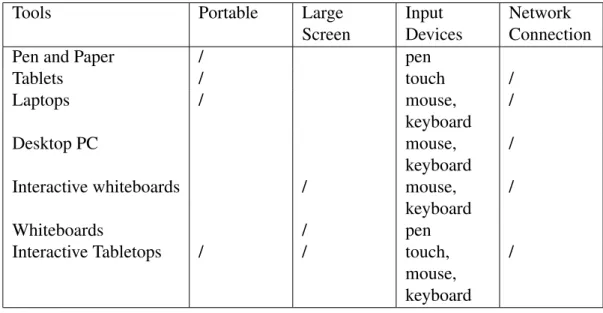
Table2.2below shows collaborative tools that can be considered into seven categories. Tool features can be roughly divided into four groups: 1) portable: if the device is easy to move; 2) large screen: if the device has a big screen and it is possible to work with other people; 3) input devices: what input technique used for each device; 4) network connection: if the device can connect to network or internet.
Table 2.2 Collaborative technologies
Tools Portable Large
Screen
Input Devices
Network Connection
Pen and Paper / pen
Tablets / touch / Laptops / mouse, keyboard / Desktop PC mouse, keyboard /
Interactive whiteboards / mouse,
keyboard /
Whiteboards / pen
Interactive Tabletops / / touch,
mouse, keyboard
/
Pen and paper are the most traditional tools that can be used as they always support hand-writing and portability. However, nowadays, in the digital era some people prefer to use tablet rather than pen and paper. Tablets make use of touch with either a finger or a stylus and the output is provided on the same surface. The benefits of tablets are portability, mobility, support for video and audio, robust and improved communication [Scholtz et al., 2013].
Interactive whiteboards are technologies that support collaboration with vertical screen. They can directly connect to a desktop PC or can be controlled by a PC. This technology is popular in classroom environments [Scholtz et al., 2013]. However it has some limitations - they are expensive, time-consuming to learn, and need to be well maintained.
Whiteboards are non digital tools for collaboration. They are vertical boards that also support group work. However they are not portable devices and can not be able to connect to the internet.
2.2 Collaborative Work
Interactive tabletops are large screen technologies which has input and output on the same device as same as tablets. This technology is promised to support multi-user work simultaneously. Interactive tabletops are also considered a perfect technology for collabo-ration [Scholtz et al., 2013]. Users can use their fingers to interact with the screen instead of using a mouse or a physical keyboard.
2.2.3
Horizontal and Vertical Displays, which one is the best?
In the section, between horizontal and vertical displays, which one is the best for collabora-tion will be discussed. Few studies have focused on this matter. A horizontal display offers a great deal of possibilities for user arrangement, providing users with diverse perspective, and providing a flat surface for placing objects [Inkpen et al.,2005]. While a vertical display provides users the same perspective, is also more commonplace, require less space, and are less expensive than horizontal surfaces [Inkpen et al.,2005;Potvin et al.,2012].
Potvin et al.[2012] suggested that the vertical displays better support a co-located situ-ation, while the horizontal surface encourage more discussion. This study used non-digital surfaces (i.e. a whiteboard and a physical table). They compared both surface orientations by using dyads preforming a collaborative design task while standing. The result shown that dyads can work effectively with both vertical and horizontal surfaces. That is perhaps participants were standing while performing the experiments.
Inkpen et al. [2005] found that participants interacting with the vertical display noted more ergonomic difficulties related to arm fatigue, difficulty writing and back stiffness. Furthermore, a vertical display may be better for shorter, more focussed tasks, while a hori-zontal display may be better for longer duration tasks that require more discussion.
Another study [Rogers and Lindley, 2004] found that in horizontal displays, groups switched more between roles, explored more ideas and had a greater awareness of what each other was doing. In vertical condition, groups found it more difficult to collaborate around display. Rogers and Lindley also listed the advantages of tabletop displays that encourage group members to work collaboratively in more cohesive ways. The main benefits include:
• Enabling the group to refer to the same representations, making it easier for all mem-bers to contribute to the problem-solving at hand.
• Supporting more fluid interaction through close coupling between the creation of a plan, document, etc. and the digital information that needs to be accessed.
2.2 Collaborative Work
• Providing a physical surface that affords easy role swapping, and, in so doing, more alternative to be put forward for discussion.
In conclusion, vertical displays are better at providing a shared surface for communal and audience-based viewing and annotating of information that is to be talked and referred to [Rogers and Lindley,2004]. However, horizontal displays support the participants in col-laborative activities that involve using and creating an assortment of representations [Inkpen et al.,2005;Rogers and Lindley,2004].
2.2.4
Multi-Display Environment
Nowadays, display technologies become increasingly available at low prices and blend thus into our everyday lives. People have a lot more devices to provide additional displays. For example they extend a computer monitor with a television for entertainment at home. In the workspace, a laptop could extend with a digital projector for a presentation. Moreover, people connect their phone to a tablet or a desktop to share their personal data or play games. In terms of collaborative work, multiple displays configurations has gained a lot of attention. A multi-display environment (MDE) is a system that integrates many devices such as tabletop, wall displays and personal devices (i.e. tablets and mobile phones) [Seyed et al., 2012]. This system offers the potential to support teamwork [Bachl et al., 2011; Nacenta et al.,2012;Seifert et al.,2012;Seyed et al.,2012].Wallace et al.[2009] also confirmed that MDE offers advantages for preforming individual tasks. MDEs often include heterogeneous displays to take benefit of different capabilities such as their size, position, resolution or portability to support the task at hand [Seyed et al.,2012].
MobiSurf [Seifert et al., 2012] has been used to investigate how the combination of personal devices and a simple way of information exchange between the devices and an interactive surface change the way people solve collaborative tasks compared to an existing approach of using personal devices. This finding shows that users can facilitate switch between the devices.
2.3 Tabletop and Group Work
2.3
Tabletop and Group Work
Tabletop research is located in the Computer Supported Cooperative Work (CSCW) domain which addresses how computers can mediate and support group collaboration, and social interaction. Collaborative working on tabletops can be challenging for communication be-tween people. The studies examined in this section show that interactive tabletop supporting group brainstorming, decision making, game, education and health care.
It can be argued that there are several important directions for future research includ-ing: standardization of methods to evaluate collocated collaboration; comparative studies to determine the impact of existing system configurations on collaboration; and creation of a taxonomy of collaborative tasks to help determine which tasks and activities are suitable for tabletop collaboration.
What is the most appropriate type of tabletop system to build? Answering this fun-damental question could benefit the larger CSCW community as more researchers begin exploring co-located collaboration. There is no standard configuration for tabletop systems. Decision about the size and resolution affect how many collaborators can gather around the table. Projection technology: top, bottom, self illuminating, which affect the view angle, brightness and robustness of the system but also influences interaction.
There are several projects on multitouch systems. These studies are about understand-ing, designing and developing multitouch applications and comparing them with traditional group working. The findings of the studies reveal that both surfaces can affect the nature of the collaboration and interaction during a workshop [Baraldi et al., 2008; Chi et al., 2011; Lee et al., 2009;North et al., 2009;Pantidi et al., 2009]. For instance, Pantidi et al.[2009] compared between four different surfaces: Post-It note, large sheets of paper, writeable wall, and tabletop computer. The last two surfaces are unfamiliar to the participants, they may have initial difficulties understanding them. However Post-It note can be easily used. In case of group size, this study also found the participants using the tabletop broke up into smaller groups (4 people) because larger sizes of group members made it difficult for all group members to use the surface.
There is numerous research involving supporting collaborative working for multitouch technology. These projects introduce the differences in real world and digital tabletop col-laboration. The research projects found tabletop systems afford and encourage interaction amongst a group of people [Pinelle and Gutwin,2008;Shen, 2007;Wang et al., 2009; Ya-maguchi et al.,2007].
sys-2.3 Tabletop and Group Work
tems. Piper and Hollan[2011] introduced an application for older patients using a shared touch screen computer. This research found that users can simply use the system by operat-ing the horizontal touch screen, but a few participants mentioned that the size of the display screen could be made smaller.
Also, in Clinical Decision Support System (CDSS), most of the applications focus on providing diagnostic assistance to medical doctors and healthcare professionals. For exam-ple, the medical consultation which is a two-way interaction between clinician and patient involving interactive decision making [Gibson et al., 2006]. This study investigates into verbal prescribing in general practice consultations. The research found that GP decision making need to be incorporated in CDSS design. Another study explored the aims to facili-tate the awareness of how GPs use their computers while in consultation with their patients [Gibson et al.,2005].
A focused partnership is a goal of collaborations in a small group that needs to com-plete a task, for instance two pathologists consulting about a cancer patient’s biopsy. In traditional face-to-face meetings, participants work at a computer and make simultaneous contributions. Shared and private windows plus large-screen projectors enable simultaneous shared comments.
Hilliges et al.[2007] investigated the design guidelines and implications of using a table-top interface in combination with a large wall display for face-to-face group brainstorming. They compared a digital brainstorming application composed of an interactive table and a wall display to the pen-and-paper condition. The result showed no difference in task per-formance between the two conditions but subjective evaluations were globally favourable to the digital condition.
WebSurface has evolved on a tabletop environment to address the problem of collabora-tive Web browsing [Tuddenham et al.,2009]. This study was tested by six pairs of collab-orators, each pair of them tested three different Web browsing technologies: WebSurface, single laptop and dual laptops. This work suggested that the tabletop condition can help to address limitation of conventional tools, and presents beneficial affordances for information layout.
The co-located meeting tends to encourage more equitable work style than shoulder-to-shoulder working style [Morris et al., 2010]. Hansen and Hourcade [2010] compared touch with mouse (two mice) found that users were efficient when using multi-mouse but preferred multi-touch.
Other related work considered social factors in enticing users and groups to approach displays and begin interaction. For example,Marshall et al.[2011a] found that users move
2.4 Mind mapping: A Tool for Collaborative Work
around a collaborative surface and they also gather dynamically. Marshall et al. [2011b] has suggested that spatial relationships can encourage more people engage in an interaction naturally.
Several studies have applied the interactive table with children. Cao et al. [2010]’s TellTable supported sketch-based storytelling on a Microsoft surface, aiming to encourage incorporating physical objects into stories via ‘capture tools’ that inserted photos directly on to the story surface. The application has been found to support creativity and collaboration.
2.4
Mind mapping: A Tool for Collaborative Work
Mind Mapping is a powerful thinking tool for brainstorming [Buzan,2006]. This valuable method is a graphical diagram for presenting thoughts or ideas relating to the central idea [Faste and Lin,2012]. The mind mapping approach was invented byBuzan[2008]. It can be applied to every discipline to enhance human performance and to unlock the potential of the brain [Buzan, 2008]. Mind map was initially used for learning and note-taking. Recently, mind maps have been widely used in other areas such as planning, presenting, problem solving, decision making and so forth [Willis and Miertschin,2006].
Mind mapping has several advantages when compared with ordinary note taking. For example, time is saved by just noting down relevant keywords [Chik et al., 2007], there is increased productivity of 30% and improved understanding of complex issues [Frey,2011]. Mind mapping empowers creativity, boosts memory, and helps manages information over-load [Frey,2011]. Mind mapping also promotes group collaboration. Shih et al. showed that the mind map structure imposes important framing effect on group dynamics and thought organization during the brainstorming process [Shih et al.,2009].
Mind Mapping is built from the centre which represents the main idea and branches out as dictated by the individual ideas and general form the central theme [Buzan,2006]. Later, Shui and Le [2010] stated that a mind map is a tree-like diagram used to represent words, ideas, tasks, or other items and their relationships. An example of a mind map can be seen in Figure2.3. The four main features of a mind map are:
1. Each mind map has a starting location, the centre node that contains the central theme. 2. The ideas of the mind map “radiate” from the central node as branches with sub-nodes
connected to each other in parent-child relationships.
2.4 Mind mapping: A Tool for Collaborative Work
4. Each connector/branch has keywords or an image associated with it.
Paper Layout Introduction Problems Motivation Contribution Related work Tabletop Mind Mapping Our Application Design Implementation Study 1 Participants Apparatus Results Study 2 Apparatus Results Participants Discussion Limitation Conclusion
Future Work Abstract
Experiments Design
Procudure Tasks
Figure 2.3 Component of a mind map: the central idea represents the core topic, branches radiate the sub-topic from the main node, nodes represent the ideas of topic, and lines show a hierarchy of the nodes. The conceptual hierarchical relationships of the concepts repre-sented by the nodes.
Mind maps can be used in any situations where thinking and learning are involved. ThinkBuzan[2014] lists the example of the situations as follows:
• Learning: Mind maps can improve reading and assimilation of large volumes of books and helps aid understanding.
• Over viewing: Users can see an overview of the solution. • Concentrating: Mind maps helps users focusing on the task.
• Memorising: As Mind maps use picture that would be easily stored in the brain and helps in quick recall.
• Organising: It can be a great help to organise the task.
• Presentation: Mind maps can help in effective communication and presentation. A Mind mapped presentation helps in giving concise and clear speech as the entire de-tails are in a single Mind Map.
2.4 Mind mapping: A Tool for Collaborative Work
• Thinking: Mind Maps can help in considering minute details about the problem and can aid in better and consistent thinking.
• Planning: Mind Maps can help in effective planning. All the stages to the solution can be approached in a systematic way.
• Brain booming: It is a modern way of Brainstorming using mind maps in which every thought generated are properly analysed with its critical details.
Generally, a mind map can be created by using blank paper, coloured pens and pencils. Alternatively, with the advent of the digital realm, mind mapping has been converted from a hand drawn hard copy into an electronic form using a physical keyboard and a mouse for input. Tools for mind mapping are summarised in Table2.3, which has traditional pen-and-paper, whiteboard, and computerised tools. The mind map is editable and reusable by using computerised tools. Blank paper is portable as same as laptop, tablets and mobile phones. However tabletops are better suited for working in co-located meeting.
Table 2.3 Mind maps hardware
Tools Interaction technique Editable Reusable Large Screen Portable
Pen and Paper Pens or Pencils /
Whiteboard pens / /
Desktop PC keyboard, mouse / /
Laptop keyboard, mouse / / /
Tables touch / / /
Mobile Phone touch / / /
Tabletop keyboard, mouse, touch / / /
Digital mind mapping applications have been provided both commercially and as free-ware such as XMind [XMind,2006], FreeMind [FreeMind,2014] and iMindMap [ThinkBuzan, 2014].
2.4 Mind mapping: A Tool for Collaborative Work
2.4.1
Tabletop Mind Mapping
Table 2.4 Comparison table for work related to this research
Works Tool users sit / stand input
devices
multi-display Buisine et al.[2007] MM 4 sit around
the table
a keyboard No Do-Lenh et al.[2009] CM 3 sit/ side by
side
a mouse / a keyboard
No Oppl and Stary[2009] CM 2-3 standing Tokens No Martínez Maldonado et al.[2010] CM 2 Sit side by
side
Touch No
Table 2.4 presents related work. In the context of tabletop mind mapping, one of the most relevant pieces of research on this area is Tabletop Mind-Maps (TMM) [Buisine et al., 2007]. This project was developed to support collaborative decision making and aimed to compare the usability and usefulness of this approach to the traditional pen and paper conditions. A similar approach was presented by Do-Lenh et al.[2009]. The researchers evaluated the usage of a tabletop concept mapping tool in cooperative settings. They com-pared a concept mapping using two different interfaces: a desktop computer using one mouse/keyboard and tabletop to support tangible interaction. Furthermore,Oppl and Stary [2009] developed a hybrid tool for concept mapping using labelled physical tokens as con-cepts and digital unlabelled relationship between them. They found concept mapping at the table offers participants equal opportunities of participation to share their individual when compared with a networked system.
In an additional study byMartínez Maldonado et al.[2010], they presented Cmate (Con-cept Mapping at an Adaptive Tabletop for education) to support learners in the form of dis-cussion based on comparing personal understanding as captured in personal concept maps. More recently,Buisine et al.[2012] designed an experiment to answer how interactive table-top systems influence collaboration. This study explored two experiments comparing the use of a tabletop system to the traditional pen-and-paper in two different creative problem solving tools: a Brainpurge on sticky notes and a Mindmap.
In terms of Buisine et al work, they developed the first mind map application for tabletop devices. Therefore, they evolved the Tabletop Mind-Maps (TMM) application using MERL DiamondTouchDietz and Leigh[2001] which was conducted with the DiamondSpin toolkit Shen et al. [2004]. The TMM mind maps are built top-down from the root label (i.e. the central idea). All users can create or move nodes but editing these nodes must be consensual: