This is an electronic version of a chapter published in
Reengineering the Library: Issues
in Electronic Resources Management
edited by George Stachokas (ALA Editions,
2018). Available at:
https://www.alastore.ala.org/content/reengineering-library-issues-electronic-resources-management-alcts-monograph
.
Developing staff skills in e-resource troubleshooting: training, assessment, and
continuous progress
Sunshine Carter
, Electronic Resources Librarian, University of Minnesota Libraries.
Stacie Traill
, Metadata Analyst, University of Minnesota Libraries. [email protected]
ABSTRACTElectronic resource troubleshooting is complex, sophisticated work that often falls to a very small number library staff, even in large institutions. Seeing a need to expand the group of staff capable of diagnosing and resolving e-resource access issues, librarians at the University of Minnesota Libraries developed a training program for E-Resource Management staff. The training program comprised a ten-part workshop, a post-workshop troubleshooting project using real-world examples drawn from user activity logs, ongoing meetings for continuous skill
development, and assessment of participant knowledge levels at various stages of the training program. As a result, staff participants demonstrated an increased familiarity in troubleshooting skills and knowledge. This chapter describes the planning, design, and implementation of the training program and offers suggestions for how others might create their own training
programs.
INTRODUCTION
Electronic resources librarians are well acquainted with the multitude of challenges inherent in troubleshooting e-resource access issues. With the complicated mix of systems, data, and standards that must work together to provide and control access to resources, effective troubleshooting sometimes seems more art than science. The complexity involved in problem diagnosis and resolution can make developing troubleshooting skills in other staff seem like an insurmountable task. Faced with a growing number of problem reports and too few staff who could successfully resolve them, librarians at the University of Minnesota Libraries began
exploring ways to develop staff troubleshooting skills. This chapter describes the planning, design, and implementation of a staff training program focused on assessment and ongoing skill development, and offers suggestions for how others might create their own training programs.
LITERATURE REVIEW
The number of electronic resources available to libraries has burgeoned over the past twenty years. Whether from native interfaces, OpenURLs, database A-Z links, or ever-growing web-scale discovery services, the sheer quantity of links to e-resources has been constantly increasing since their inception. The growth in links corresponds to an increase in access issues. The propensity for e-resources to fail, and prohibit access to desired content has been covered extensively in the literature.1
Troubleshooting in Libraries
Two surveys distributed in 2013 offered insight into the state of troubleshooting in libraries; Samples and Healy surveyed Association of Research Libraries (ARL) members,2 and
Rathmel et al. surveyed a variety of libraries.3 Both surveys suggested that troubleshooting
practices could be improved by developing workflows, utilizing established tools to facilitate troubleshooting, and offering staff both basic and advanced levels of troubleshooting training. Respondents from the Rathmel, et al. survey indicated their top three training needs were basic troubleshooting (50%), a big picture understanding of e-resources (33%) and advanced
troubleshooting (27%).4 Knowledge and staffing levels may not have kept pace with the growth
in linking issues we see today in libraries. “The majority (138; 61%) [of reporting libraries] have between two to five employees with e-resources troubleshooting within their job responsibility. Strikingly, there are still over a third (75; 33%) who indicate having just one person handling e-resources troubleshooting, and that includes organizations with more than 50 employees.”5
Troubleshooting access issues is a difficult skill to master and one usually taught on the job.6
Good communication skills, a knowledge of and access to e-resource technologies and
systems, and a strong understanding of e-resource management are all required to troubleshoot problems effectively.7
Literature coverage on formalized troubleshooting training for staff is limited. Hart and Sugarman created an e-resources troubleshooting training program for public service staff.8 At
forwarding to technical services staff for resolution. Hart and Sugarman combed through older trouble tickets, identified areas of weakness and created a map of potential points of failure, along with five important questions public service staff should ask when investigating an access issue. Those five questions asked who the user was, where they were located, what content they were looking for, what happened when they tried to access the resource, and how the user go to the error. With this new knowledge, they designed and held a workshop for public services staff, consisting of four lecture/demonstration sessions. “The authors decided that while basic access issues would be addressed, greater emphasis would be placed on teaching the kind of information that attendees needed to provide in order to resolve problems, rather than teaching attendees how to technically resolve problems, given the complicated nature of access
difficulties” (p. 31). So while Hart and Sugarman provided some training on resolving very basic access issues, their training focus was getting public services staff to collect and share with technical services staff information about the users and access issues scenario. The four sessions covered an overview of e-resources and the map, authentication, OpenURL and link resolvers, and lastly the map in context with the relevant e-resource systems (e.g. EZproxy, databases A-Z list). After the training, Hart and Sugarman reviewed the following year’s trouble tickets to evaluate the effectiveness of their training program for public services. Based on the usually more descriptive information provided by public services staff, technical services staff resolved trouble tickets 59% more quickly (from 7.6 to 3.1 days).
Carter and Traill addressed the troubleshooting needs elucidated by the Samples and Healy and Rathmel, et al. surveys, within the specific confines of a complex web-scale
discovery environment.9 Carter and Traill discussed methods for tracking and reporting access
issues, outlined approaches to documentation and training, and created a checklist of essential skills and knowledge for troubleshooting access problems. Carter and Traill argued that
documenting and teaching others troubleshooting skills
[H]as a number of clear benefits. In addition to faster and more efficient problem resolution resulting in increased user satisfaction, a successful troubleshooting training program also demystifies the workings of the discovery system and empowers library staff with a much better understanding of the tools they and their users work with every day. Finally, a training program helps ensure continuity in the face of staff departures and retirements, allowing new staff to more quickly and effectively master the
complexities of their library’s discovery environment.10
Training can be defined as “the planned and systematic activities designed to promote the acquisition of knowledge (i.e., need to know), skills (i.e., need to do), and attitudes (i.e., need to feel),”11 but Ittner and Douds are careful to point out that the information provided in
training is meant to be used, as opposed to providing information solely for the sake of learning.12 Training methods are defined as “a set of systematic procedures, activities, or
techniques that are designed to impart KASAs [e.g. knowledge, abilities, skills, or attitudes] to the participants that have direct utility in enhancing their job performance.”13
Martin, Klodiana, and Lam identified thirteen training methods via a comprehensive review of training literature. The training methods identified included case study, games-based training, internship, job rotation, job shadowing, lecture, mentoring and apprenticeship,
programmed instruction, role-modeling, role play, simulation, stimulus-based training, and team-training.14 Martin, Klodiana, and Lam categorized these training methods based on criteria such
as learning modality (doing, seeing or hearing), training environment (natural, contrived or simulated), presence of a trainer (yes or no), proximity to trainer (face to face or distance), interaction level (interactive, somewhat interactive or not interactive), cost consideration (low, moderate or high) and time demands of trainees (low, moderate or high).15 The paper
highlighted the benefits and challenges of each training method, concluding that providing a variety of training methods in a training program helps meet the needs of different learning styles, and reduces boredom.16
Effective Training
Salas et al. reviewed literature on effectiveness of organizational training and
development. Their review of several meta-analyses on the effects of training “show that when training is designed systematically and based on the science of learning and training it yields positive results.”17 Pre-training, training design, and post-training activities are critical to
teaching employees effectively. Pre-training tasks should include such things as performing needs analyses (on job-tasks, the organization and people) and establishing a positive learning climate. Clearly communicating the expectations, benefits and needs of training and providing opportunities to practice or refresh skills all lend themselves to a positive environment.18 During
the design period, trainers should consider individual characteristics of the trainees, appropriate pedagogical approaches, and the appropriateness of technology-based instruction.19
Instructional strategies and principles should incorporate concepts such as information,
create tasks “designed so that trainees are more likely to commit errors,” model behavioral best practices, and encourage self-reflection and redirection.20
Post-training activities are just as important as the planning, design and delivery stage of training; they should promote transfer of training (“the extent to which knowledge and skills acquired during training are applied to the job”21) and provide evaluation opportunities. Salas, et
al recommend the following post-training steps to increase effectiveness: Ensure transfer of training
o Remove obstacles of transfer
o Provide tools and advice to supervisors
o Encourage use of real-world debriefs
o Provide other reinforcement and support mechanisms Evaluate training
o Clearly specify the purpose of evaluation
o Consider evaluating training at multiple levels22
UNIVERSITY OF MINNESOTA LIBRARIES ENVIRONMENT
The University of Minnesota, Twin Cities is a large public research university with over 30,000 undergraduate students, over 16,000 graduate and professional students, and almost 17,000 faculty and staff. The University of Minnesota Libraries (UL) provides access to
hundreds of thousands of electronic resources, including electronic journals, electronic books, and subject-specific databases. The UL discovery environment relies in large part on tools from vendor Ex Libris: Alma library services platform (which includes a central knowledge base and link resolver alongside traditional ILS functions), Primo discovery layer, and Primo Central web-scale discovery index.
A library-wide reorganization in 2012 led to the creation of the E-Resource Management (ERM) Unit, with seven full-time staff. This unit, led by the Electronic Resources Librarian, has primary responsibility for acquiring, licensing, activating, and troubleshooting e-resources. Staff in the UL Data Management and Access department who manage systems and metadata also play a role in e-resource access and troubleshooting. ServiceNow is the University of
Minnesota’s issue-tracking system, used by UL staff to track and resolve discovery and access problems. Since March 2014, when tracking of access issues began, the E-Resource
As a result of the large influx of web-scale discovery records following system implementation in 2013, UL e-resources staff observed a sharp increase in the number of reported access issues. In November 2014, the authors began developing process flowchart job aids to provide visual descriptions of the institution’s complex discovery ecosystem. These charts helped to encourage sharing of different types of troubleshooting knowledge by revealing interconnections, boosting the confidence of troubleshooting staff, and fostering independent action. Shortly thereafter, the Electronic Resources Librarian began meeting regularly with ERM unit staff to discuss troubleshooting. After the first workflow was completed, a second workflow was created, quickly followed by a third.
The confluence of these two activities -- creating job aids and holding regular
troubleshooting meetings -- soon led to the identification of substantial local training needs. The authors then embarked upon the creation of a skills checklist consisting of all the essential skills and knowledge for troubleshooting access problems. Use this skills checklist, based on local needs and informed by best practices in the literature, as a curriculum outline for teaching troubleshooting skills to others, in response to the identified training needs.23
WORKSHOP PLANNING
The newly created curriculum outline provided the foundation for a 10-hour
troubleshooting workshop that instructors presented to ERM staff in ten one-hour sessions, held February-May 2016. Following the troubleshooting workshop, the authors conducted a
troubleshooting skills development project between July and October 2016. ERM staff completed three surveys given over the course of the training program to measure their familiarity with e-resource system and troubleshooting topics. The authors wanted to learn whether a troubleshooting training program, including both a multi-session workshop and a skills development project, would increase staff familiarity with topics related to troubleshooting e-resources, as well as staff troubleshooting ability.
Curriculum development laid much of the groundwork for the workshop. The authors, who would also serve as workshop instructors, decided to break the workshop into ten one-hour sessions, with ample time between each workshop (a necessity of having to schedule workshop sessions around other commitments). The lengthy breaks between workshop sessions were not ideal in some ways, but did have two major positive outcomes. First, staff had plenty of time to review and put into practice what they learned during each session before the next. Second,
instructors had time to adjust the content of upcoming workshops based on their experiences during each workshop session and feedback from staff.
Instructors originally planned one hour for each of the ten major curriculum topics, but quickly realized that some topics required much more than one hour to cover adequately, while others needed less time. While ten hours turned out to be enough time to cover the planned workshop content in full, instructors had to be flexible in shifting content between sessions. Potential future workshops would follow a more realistic schedule based on instructor experiences during the initial workshop offering.
To create content for each workshop session, instructors met to outline the specific concepts, tools, practical information, demonstrations, and scenarios to plan for each session, then divided the content so each could prepare their assigned portions individually. In an effort to make the content accessible and relatable to staff participating in the training, the instructors placed heavy emphasis on concrete examples, details of local system implementations,
policies, and procedures, and real-world troubleshooting examples. Troubleshooting tools, including both established third-party tools and locally developed tools, played a significant role in workshop sessions. The introduction of each tool in the context of the workshop provided a natural opportunity to demonstrate it in use to diagnose or resolve an access problem.
The troubleshooting training program at UL included case studies, lectures, and
mentoring/apprenticeship, along with role-modeling and team-training methods. In practice, the largest portion of group training time consisted of lecture. Most workshop sessions followed a common structure: they began with brief review of the previous session, followed by introduction of a key concept. After introducing a concept, instructors presented applications, examples, and demonstrations of that concept in the local discovery environment, and discussed useful tools for diagnosing and solving problems related to the basic concept. Finally, instructors presented issue scenarios that the group worked through together. Instructors combined the various content elements in the way that seemed most logical for each workshop session.
WORKSHOP CONTENT
Pre-readings
Selected readings on general workshop concepts or topics are a worthwhile learning tool for some staff. At UL, staff received one or two short reading selections before most of the
hour-long workshop sessions that introduced concepts or topics covered in that session. The selected readings ranged from brief articles in peer-reviewed journals to web pages offering informal overviews of a particular topic. For some workshops, instructors were unable to find any readings that addressed relevant topics at an appropriate level, but instructors selected at least one pre-workshop reading whenever possible. The goal was not to overwhelm staff with preparatory work, but to help those who prefer to learn by reading, and to provide context extending beyond the scope of an hour-long workshop session.
Concepts
Staff must learn and understand a number of concepts before they are able to solve electronic resource access problems successfully on their own. Workshops should devote substantial time to the teaching of conceptual information in a number of areas. The checklist, serving as the blueprint for workshop content, outlines most of the major concepts that
workshops should cover. At UL, instructors emphasized several e-resource management and access concepts in workshop sessions, most extrapolated from the curriculum outline:
● Link resolvers, knowledge bases, and OpenURL construction and linking. ● Linking methods and parsers.
● Web-scale discovery systems.
● Authentication and access control, including proxying and other methods of IP-based authentication.
● Content access models (open access/free and licensed).
● How metadata works and what it controls in discovery systems and link resolvers.
● Structure and relationship of e-resource administrative, discovery, and access metadata in local systems.
Instructors used preassigned readings to introduce many of these concepts, then reinforced and expanded on them in workshop sessions. Instructors typically followed discussion of new
concepts with real-world examples and practical demonstrations of the concept at work in local systems
Most of the workshop time should be devoted to delivering practical and factual information staff will need in order to become effective problem solvers. Training should cover the specifics of local system implementations and the local discovery environment, as well as local policies and procedures for relevant functions in electronic resources management,
problem tracking, and communication. At the University of Minnesota, instructors covered a long list of specific topics in several broad subject areas, including but not limited to the following:
● Component systems of the local discovery environment and communication among those systems.
● Update schedules for each system, and staff/units responsible for the maintenance of each system.
● Information display and presentation in the public user interface. ● Common access problems and their likely causes.
● How access to resources is controlled, and which groups of affiliate and non-affiliate users have access to which resources.
● Local policies for activation of resources in the link resolver knowledge base and web-scale discovery system.
● Data sources that provide content in the discovery layer, and degree of local control over those data sources.
● Tools to diagnose specific problems (OpenURL deconstructor, link resolver context object viewer, HTTP headers viewing tools).
● Local policies and procedures for problem tracking and escalation. ● Best practices for reporting problems to system and content vendors.
● Best practices for communicating with end users when problems are resolved.
Practical topics follow on from the concepts they demonstrate. For example, authentication concepts lead naturally to a detailed discussion of access control for various user groups at a specific institution; web-scale discovery concepts naturally lead to a discussion of discovery system data sources and metadata.
Demonstrations of basic troubleshooting techniques and tools should be included in workshop sessions when appropriate. Practical demonstrations are extremely effective at showing how conceptual and practical information enables real-world problem-solving. Instructors can demonstrate tools and techniques not easily shown in a classroom setting at other times, such as during one-on-one training sessions with staff. Some advance preparation may be necessary for demonstrations, especially when demonstrating tools that require local installation. Screencasts of a technique or tool in action to be played during a classroom session (or afterwards for review) are one way to overcome technology issues, complicated scenario setups, differences in computer installations, and failures that might occur during a live demonstration.
Whether shown live or recorded for later, demonstrations require an example of a known issue from which to work. It can be difficult to find an example of a known issue “on the fly,” especially for rare, intermittent, or location-dependent issues. Building a collection of known issues before any instruction takes place will benefit testing, training, and demonstrating, and will make all of these activities more efficient.
For example, evaluating HTTP headers of websites proved to be a useful
troubleshooting skill. During the fourth workshop session, on OpenURL and link resolvers, workshop instructors demonstrated the Firefox Chrome extension “HTTP Live Headers” to track the HTTP header history when navigating from a licensed database to full text content via the OpenURL resolver. Instructors tracked the headers by activating the extension, navigating through to the full text, reviewed the HTTP header logs with attendees, and highlighted any useful or erroneous pieces of information. All staff attendees were encouraged to install the extension on their computers to practice reviewing HTTP headers on their own.
Diagrams and Workflows
Diagrams and flowcharts are effective training tools for visual learners and others, because they can convey multiple complex relationships or decision-making processes in a constrained amount of space. At UL, workshop instructors used charts created during the training project’s exploratory phase as a starting point for diagrams to show communication paths and relationships among various systems in the discovery ecosystem, as well as
flowcharts to show troubleshooting steps for several common types of access problems. Charts and diagrams can serve as a bridge between conceptual and practical information and
the details. Instructors can also reuse charts and diagrams many times over the course of a multi-hour workshop. Charts and diagrams can serve as reminders or memory aids for staff of topics previously covered, and they can help orient staff to which local system(s) play a role in the specific topic, demonstration, or scenario under discussion at any given moment.
Scenarios
Crafted scenarios or case studies are useful for illustration and teaching. They can introduce or wrap up a training topic, initiate small group discussions, or test knowledge. Depending on the goals for troubleshooting training, scenarios should include various pieces of information, such as:
● The issue experienced by the user.
● Information about the user (institutional affiliation, location, etc.) ● Additional information pertinent to the particular issue.
● Initial results of troubleshooting.
For example, in a troubleshooting workshop session on authentication, UL instructors presented staff with this scenario:
Reported Issue: An off-campus user is having problems accessing articles on the [publisher platform]. They are not having problems getting into [the publisher platform] when coming from a Primo/Alma services page, but if they try to browse to another article inside [the publisher platform] they are asked to pay for the other article. What is going on?
This scenario could have been used by itself as a solo or group exercise, but instructors instead offered more information to further discussion, elaborating on the above scenario as follows:
Investigation: You check the EZProxy configuration file, and the [publisher platform] stanza looks correct, and is the recommended entry provided by the vendor. The troubleshooter tests using an off-campus IP and sees the issue. Is this a proxy issue?
Scenarios should be created with an end result in mind. Trainers should be aware that trying to elicit a specific answer or discussion requires a specific scenario with many details. In
cases where a broad answer with multiple outcomes is adequate, scenarios can be less specific.
ASSESSMENT
Pre/Post Surveys
Pre- and post-surveys for workshop attendees are an easy and effective way to
determine whether the goals of the workshop have been met. To achieve this, identical surveys should be given just prior to and immediately after the workshops take place. Use pre-workshop survey results to identify topics that may require more time to cover; post-workshop results help to identify topics where staff need further reinforcement. Of course, survey results also provide one method that instructors can use to assess staff progress and knowledge gains once the workshop has been completed.
Various types of surveys could serve these purposes. At UL, workshop instructors opted to use a Likert-type scale,24 since it is simple to use and allows for easy analysis. Instructors
surveyed staff on their familiarity with broad topics related to e-resources, troubleshooting, and the local web-scale discovery environment. The Likert scale spanned five choices ranging from “Not at All Familiar” to “Extremely Familiar” (or on a scale of 1 to 5, respectively). Staff rated their familiarity with the following areas:
● A high-level overview of our discovery and access environment ● Common points of failure
● Authentication and authorization ● OpenURL and link resolvers
● Differences and similarities between access for OA/free resources and licensed/paid resources
● Discovery index content, activations, and linking mechanisms ● Metadata sources, quality, and impact on access
● Detailed interaction between link resolver, discovery index, discovery layer, and LMS ● Distinguishing isolated issues from widespread problems
Workshop instructors intentionally provided no elaboration on or definitions of the topics, leaving it up to each staff member to construct the meaning themselves. Attendees received the pre-survey twenty-eight work days before the workshop sessions began. The post-survey was distributed seven work days after the workshop sessions completed. All attendees (n=6)
completed both surveys. The non-supervisor workshop instructor matched each attendee’s pre- and post-survey results for comparison. The instructor then anonymized the resulting
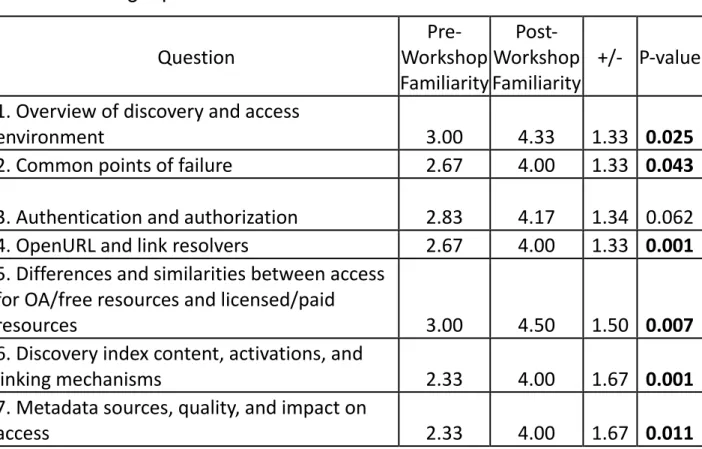
comparison data and destroyed the original survey results. The average pre-survey score was 2.68, while the average post-survey score was 4.17, an increase of 1.49. There was a
significant increase in average familiarity scores (P-value < 0.000001 by two-tailed t-test). Additionally, all but two of the individual questions had significant increases in familiarity (P-value < 0.05 by two-tailed t-test). The two questions without significant increases were about authentication and authorization (P-value = 0.062) and distinguishing between isolated and widespread problems (P-value = 0.084). While these changes were nearly significant, one likely reason to explain a more minor effect could be that staff were most familiar with these two topics and had less to gain from a session on this topic.
Table 1. Average pre- and post-workshop staff familiarity with
troubleshooting topics*
Question
Pre-Workshop
Familiarity
Post-Workshop
Familiarity
+/-
P-value
1. Overview of discovery and access
environment
3.00
4.33
1.33
0.025
2. Common points of failure
2.67
4.00
1.33
0.043
3. Authentication and authorization
2.83
4.17
1.34
0.062
4. OpenURL and link resolvers
2.67
4.00
1.33
0.001
5. Differences and similarities between access
for OA/free resources and licensed/paid
resources
3.00
4.50
1.50
0.007
6. Discovery index content, activations, and
linking mechanisms
2.33
4.00
1.67
0.001
7. Metadata sources, quality, and impact on
8. Detailed interaction between link resolver,
discovery index, discovery layer, and LMS
1.67
3.83
2.16
0.001
9. Distinguishing isolated issues from
widespread problems
3.00
4.17
1.17
0.084
10. Effective communication with system
vendors and content providers
3.33
4.67
1.34
0.025
Average
2.68
4.17
1.49
0.000
*
(1=Not at all; 5=Extremely). N = 10 questions by 6 respondents. Bolded
P-values = statistically significant P-values.
Minute Surveys
Short surveys administered immediately after each individual workshop session can help identify areas of confusion, provide an opportunity for immediate feedback, and offer a quick snapshot of attendees’ thoughts on the session. Additionally, instructors can use the feedback from these surveys to improve curriculum and pedagogy for future workshops. At UL, instructors administered “minute” surveys25 during the last few minutes of each of the ten workshop
sessions. These surveys were anonymous and asked the same four questions:
1. What session are you reviewing?
2. Without looking at your notes, what was most memorable or stands out in your mind about today’s session?
3. During today’s session, what idea(s) struck you as things you could or should put into practice?
4. For you, what interesting questions remain unanswered about today’s topic?
Minute survey questions should help answer any questions workshop instructors might have about the content and delivery of workshop sessions. For multiple-session workshops offered over a period of days or weeks, minute survey responses can give instructors the opportunity to fine-tune training as it progresses, making it possible to revisit or reinforce topics that attendees did not fully understand when initially presented.
Group Troubleshooting Sessions
Group troubleshooting sessions are useful to gather and tackle issues collaboratively. They also provide an opportunity to discuss any new issues that require deeper explanation, to delve deeper into a new problem solving or diagnosis technique, or to work on a thorny issue together. The UL E-Resource Management unit has a standing monthly meeting to discuss troubleshooting issues. Typically, these meetings offer a chance to review specific reported but unresolved issues submitted via the ticketing system, or to discuss troubleshooting strategies and “hot topics.” The meetings also provide a forum for the unit manager to address pending changes to the system (e.g. changes to authentication methods, system release functionality or bugs, etc.), so staff can better prepare for potential issues that may result from the changes. Group troubleshooting sessions should ideally be held in a room where there is access to a presenter’s workstation with all the necessary troubleshooting tools installed.
Skill Development
Staff must put troubleshooting skills and knowledge into everyday practice to help with retention and to establish concrete understanding. Access issues can be hard to come by; they can be non-existent one week and plentiful the next. It is not always easy to predict or plan for practice opportunities while reactively addressing access issues as they are reported or discovered. At UL, instructors opted instead to proactively seek out potential access issues to give staff problems to diagnose and solve as they continued to develop their troubleshooting skills. As part of another project, technical staff provided a list of 400 random OpenURLs generated by library patrons attempting to link to resources via third-party databases in May 2016. Each staff member tested a subset of these OpenURLs for successful linking to full text. 314 of the OpenURLs offered full text, and 56 (17.8%) of these had at least one malfunctioning link to full text. This gave E-Resource Management unit staff an opportunity to exercise their troubleshooting skills in a compressed and intensified timeline. Not only did staff identify the 56 OpenURLs with broken links, but they also reviewed these links to determine the cause of the issue, reported or fixed the issue as appropriate, and saw the issue through to resolution. Staff completed proactive troubleshooting (testing, diagnosis and resolution) by December 1.
During this skill development phase of the training, each staff member had two one-hour one-on-one troubleshooting sessions with the Electronic Resources Librarian. This was an opportunity to discuss, diagnose, test and begin resolution of the access issues.
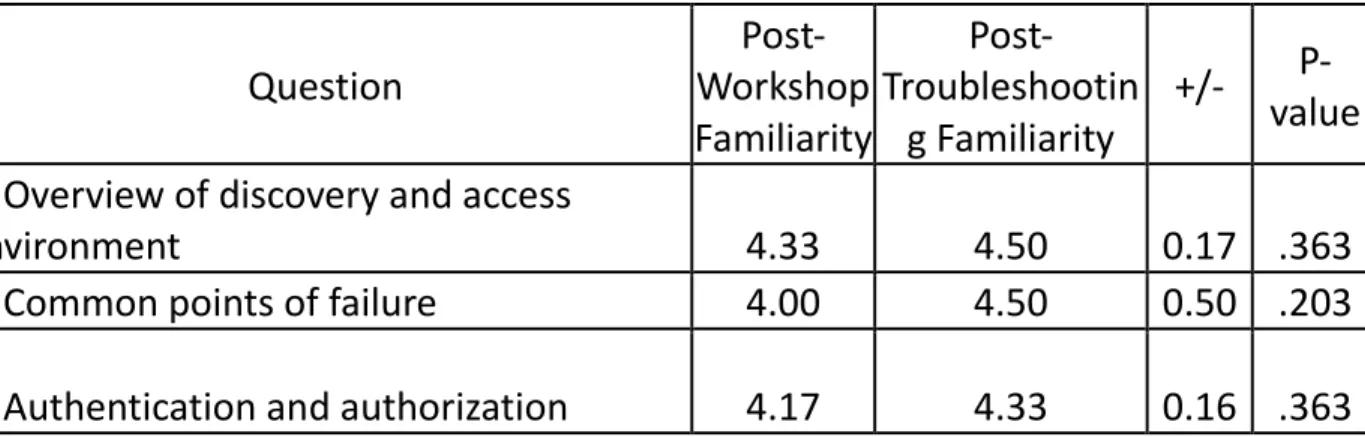
After the skill development phase of the training was complete, the non-supervisor instructor distributed a third survey (a post-post-survey) to staff to evaluate staff familiarity with the same ten e-resource topics. The post-troubleshooting survey was distributed 143 work days after the workshop ended and 7 work days after proactive troubleshooting ended. All attendees (n=6) completed the post-troubleshooting survey. The non-supervisor workshop instructor matched each attendee’s post-workshop and post-troubleshooting results for comparison. The instructor then anonymized the resulting comparison data and destroyed the original survey results. The average post-workshop score was 4.17, while the average post-troubleshooting score was 4.32, an increase of 0.15. The average score for seven of the ten questions increased; two questions had no change and one question had a decrease. None of the individual questions had significant differences in familiarity, and there was no significant difference in average familiarity scores for the post-troubleshooting survey. Even though the survey did not show significant differences in self-assessed familiarity after proactive
troubleshooting, informal feedback indicated the experience was overall a positive one for staff. Due to the varied nature of the randomly selected openURLs for proactive troubleshooting and the long lag time between workshop and troubleshooting completion, staff may not have felt their familiarity with some topics increased as a result of the project. Additionally, staff may have encountered specific issues not covered in the workshop, where instructors demonstrated broad topics with “hand-picked” examples.
Table 2. Average post-workshop and post-troubleshooting staff familiarity
with troubleshooting topics*
Question
Post-Workshop
Familiarity
Post-Troubleshootin
g Familiarity
+/-
P-value
1. Overview of discovery and access
environment
4.33
4.50
0.17 .363
2. Common points of failure
4.00
4.50
0.50
.203
4. OpenURL and link resolvers
4.00
4.17
0.17
.363
5. Differences and similarities between
access for OA/free resources and
licensed/paid resources
4.50
4.83
0.33
.175
6. Discovery index content, activations,
and linking mechanisms
4.00
4.00
0.0
1.00
7. Metadata sources, quality, and impact
on access
4.00
4.17
0.17
.611
8. Detailed interaction between link
resolver, discovery index, discovery layer,
and LMS
3.83
3.83
0.0
1.00
9. Distinguishing isolated issues from
widespread problems
4.17
4.50
0.33
.175
10. Effective communication with system
vendors and content providers
4.67
4.33
-0.34
.175
Average
4.17
4.32
0.15
.068
*
(1=Not at all; 5=Extremely). N = 10 questions by 6 respondents. Bolded
CONCLUSION
Creating an effective staff training program for electronic resources troubleshooting requires a substantial investment of time and effort on the part of both instructors and staff learners. However, for institutions willing to invest the necessary resources in such a project, the payoff can be great. Having a larger number of staff who are sophisticated e-resource
troubleshooters means better service for library patrons, who will see their access problems resolved more quickly and efficiently. Reducing bottlenecks in problem solving queues also makes it possible for e-resource support units to manage their workloads more effectively. Libraries become less dependent on a small number of individuals who hold the specialized skills and knowledge needed for troubleshooting, making succession planning and staff departures easier to manage. Finally, a training program is rewarding for both staff and instructors. Instructors improve and enhance their own skills through the process of teaching others, while staff members build confidence as they acquire new skills, which can position them to progress in their own careers and take on new opportunities as they arise. At the University of Minnesota Libraries, the authors and e-resources staff continue to learn together as systems evolve and new problems arise, but all are better off for participating in the process.
1 Beth Ashmore, Emily Allee, and Rebekah Wood, “Identifying and
Troubleshooting Link-Resolution Issues with ILL Data”, Serials Review, 41:1 (2015): 23-29, doi:
10.1080/00987913.2014.1001506; Sarah Glasser, “Broken Links and Failed Access,” Library Resources & Technical Services, 56:1 (2012): 14–23, doi: 10.5860/lrts.56n1.14; Tess Graham and Nate Hosburgh, “A User-Centered Approach to
Addressing Issues of Discoverability and Access,” The Serials Librarian, 67:1 (2014): 48-51, doi: 10.1080/0361526X.2014.899290; Patricia A. Headlee and Sandra C. Lahtinen, “Callisto Basic and Callisto Pro.” Journal of the Medical Library Association: JMLA, 102.4 (2014): 305–306, doi:
10.3163/1536-5050.102.4.018; Sanjeet Mann, "Electronic Resource Availability Studies: An Effective Way to Discover Access Errors," Evidence Based Library and Information Practice, 10:3 (2015), 30-49. doi: 10.18438/B88C82; Denise Pan, Gayle Bradbeer, and Elaine Jurries, "From Communication to
Collaboration: Blogging to Troubleshoot E-resources," The Electronic Library, 29:3 (2011): 344-353, doi: 10.1108/02640471111141089; Kenyon Stuart, Ken Varnum, and Judith Ahronheim, "Measuring Journal Linking Success From a Discovery Service." Information Technology and Libraries, 34:1 (2015): 52-76, doi: 10.6017/ital.v34i1.5607; Susan Davis et al., "Who Ya Gonna Call? Troubleshooting Strategies for E-resources Access Problems," The Serials Librarian, 62:1-4 (2012): 24-32, doi:
10.1080/0361526X.2012.652459; Rebecca Donlan, "Boulevard of Broken Links: Keeping Users Connected to E-journal Content," Reference Librarian, 48:1 (2007): 99–104, doi:
10.1300/J120v48n99_08; Sanjeet Mann and Sarah Sutton, "Why Can’t Students Get the Sources They Need? Results from a Real Electronic Resources Availability Study," The Serials Librarian 68:1-4 (2015): 180-190, doi: 10.1080/0361526X.2015.1017419; Cindi Trainor and Jason Price, "Digging Into the Data: Exposing the Causes of Resolver Failure," Library Technology Reports 46:7 (2010): 15-26; Maria Collins and William T. Murray, "SEESAU: University of Georgia's Electronic Journal Verification System," Serials Review, 35:2 (2009): 80-87, doi: 10.1080/00987913.2009.10765216; Jina Choi Wakimoto, David S. Walker, and Katherine S. Dabbour. "The Myths and Realities of SFX in Academic Libraries," The Journal of Academic Librarianship 32, no. 2 (2006): 127-136. doi: 10.1016/j.acalib.2005.12.008.
2 Jacquie Samples and Ciara Healy, "Making It Look Easy: Maintaining the Magic of Access," Serials
Review 40:2 (2014): 105-117, doi: 10.1080/00987913.2014.929483.
3 Angela Rathmel et al., "Tools, Techniques, and Training: Results of an E-Resources Troubleshooting
Survey," Journal of Electronic Resources Librarianship 27:2 (2015): 88-107, doi: 10.1080/1941126X.2015.1029398.
4Ibid.,103. 5Ibid., 99-100.
6 Taryn Resnick, "Core Competencies for Electronic Resource Access Services," Journal of Electronic
Resources in Medical Libraries, 6:2 (2009): 101-122. doi: 10.1080/15424060902932185; Sarah Sutton, "Identifying Core Competencies for Electronic Resources Librarians in the Twenty-First Century Library," (PhD diss., Texas Woman’s University, 2011); Emma Lawson, Roën Janyk, and Rachel A. Erb. "Getting to the Core of the Matter: Competencies for New E-Resources Librarians," The Serials Librarian 66:1-4 (2014): 153-160. doi: 10.1080/0361526X.2014.879639.
7 Jeffrey Perkins, "Solving Electronic Journal Problems Effectively: A Short Guide," Journal of Electronic
Resources in Medical Libraries 5:3 (2008): 267-273. doi: 10.1080/15424060802222471; Davis et al.,
“Who Ya Gonna Call?”; Resnick, “Core Competencies for Electronic Resource Access Services.”
8Katherine A. Hart and Tammy S. Sugarman, “Developing an Interdepartmental Training Program for
E-Resources Troubleshooting,” The Serials Librarian, 71:1 (2016) 25-38, doi: 10.1080/0361526X.2016.1169569.
9 Sunshine Carter and Stacie Traill, "Essential Skills and Knowledge for Troubleshooting E-resources
Access Issues in a Web-Scale Discovery Environment," Journal of Electronic Resources Librarianship
29:1 (2017), doi: 10.1080/1941126X.2017.1270096.
10Ibid., 13.
11 Eduardo Salas et al., "The Science of Training and Development in Organizations: What matters in
Practice." Psychological Science in the Public Interest 13:2 (2012): 77, doi: 10.1177/1529100612436661.
12 Penny L. Ittner and Alex F. Douds, Train the Trainer: Practical Skills That Work (Coursebook)
(Amherst, Mass.: Human Resource Development Press, Inc., 1988), 1.4.
13 Barbara Ostrowski Martin, Klodiana Kolomitro, and Tony CM Lam, "Training Methods: a Review and
Analysis." Human Resource Development Review 13:1 (2014): 12, doi: 10.1177/1534484313497947
14Ibid.,16-17. 15Ibid.,15-20. 16Ibid.,21-31.
17Salas et al., "The Science of Training and Development in Organizations,” 74. 18Ibid., 80-83.
19Ibid., 84-88. 20Ibid., 85-87. 21Ibid., 88. 22Ibid., 92.
23 Carter and Traill. "Essential Skills and Knowledge for Troubleshooting E-resources Access Issues,”
6-11.
24 Wade M. Vagias, “Likert-type scale response anchors,” (Clemson International Institute for Tourism &
Research Development, Department of Parks, Recreation and Tourism Management. Clemson University), accessed December 12, 2016.
http://www.marquette.edu/dsa/assessment/documents/Sample-Likert-Scales.pdf
25 Thomas A. Angelo and K. Patricia Cross, Classroom assessment techniques: A handbook for college
teachers, (San Francisco: Jossey-Bass, 1993). BIBLIOGRAPHY
Angelo, Thomas A., and K. Patricia Cross. Classroom assessment techniques: A handbook for college teachers. San Francisco: Jossey-Bass, 1993.
Ashmore, Beth, Emily Allee, and Rebekah Wood. “Identifying and Troubleshooting Link-Resolution Issues with ILL Data.” Serials Review 41:1 (2015): 23–29.
Carter, Sunshine and Stacie Traill. "Essential Skills and Knowledge for Troubleshooting E-resources Access Issues in a Web-Scale Discovery Environment," Journal of Electronic Resources Librarianship 29:1 (2017): 1-15.
Collins, Maria, and William T. Murray. “SEESAU: University of Georgia’s Electronic Journal Verification System.” Serials Review 35:2 (2009): 80–87.
Davis, Susan, Teresa Malinowski, Eve Davis, Dustin MacIver, Tina Currado, and Lisa Spagnolo. “Who Ya Gonna Call? Troubleshooting Strategies for E-resources Access Problems.” Serials Librarian 62:1-4 (2012): 24–32.
Donlan, Rebecca. ”Boulevard of Broken Links: Keeping Users Connected to E-Journal Content.” Reference Librarian 48:1 (2007): 99–104.
Glasser, Sarah. “Broken Links and Failed Access.” Library Resources & Technical Services 56:1 (2012): 14–23.
Graham, Tess and Nate Hosburgh. “A User-Centered Approach to Addressing Issues of Discoverability and Access.” Serials Librarian 67:1 (2014): 48–51.
Hart, Katherine A., and Tammy S. Sugarman. "Developing an Interdepartmental Training Program for E-Resources Troubleshooting." Serials Librarian 71, no. 1 (2016): 25-38.
Headlee, Patricia. A. and Sandra C. Lahtinen. “Callisto Basic and Callisto Pro.” Journal of the Medical Library Association 102:4(2014): 305–306.
Ittner, Penny L. and Alex F. Douds. Train the Trainer: Practical Skills That Work (Coursebook). Amherst, Mass.: Human Resource Development Press, Inc., 1988: 1.4.
Lawson, Emma, Roën Janyk, and Rachel A. Erb. “Getting to the Core of the Matter:
Competencies for New E-Resources Librarians.” Serials Librarian 66:1-4 (2014): 153–160.
Mann, Sanjeet. “Electronic Resource Availability Studies: An Effective Way to Discover Access Errors.” Evidence Based Library & Information Practice 10:3 (2015): 30–49.
Martin, Barbara Ostrowski, Klodiana Kolomitro, and Tony CM Lam. "Training Methods: A Review and Analysis." Human Resource Development Review 13:1 (2014): 11-35.
Pan, Denise, Gayle Bradbeer, and Elaine Jurries. “From communication to collaboration: blogging to troubleshoot e-resources.” Electronic Library 29:3 (2011): 344–353.
Perkins, Jeffrey. “Solving Electronic Journal Problems Effectively: A Short Guide.” Journal of Electronic Resources in Medical Libraries 5:3 (2008): 267–273.
Rathmel, Angela, Liisa Mobley, Buddy Pennington, and Adam Chandler. “Tools, Techniques, and Training: Results of an E-Resources Troubleshooting Survey.” Journal of Electronic Resources Librarianship 27:2 (2015): 88–107.
Resnick, Taryn. “Core Competencies for Electronic Resource Access Services.” Journal of Electronic Resources in Medical Libraries, 6:2(2009): 101–122.
Salas, Eduardo, Scott I. Tannenbaum, Kurt Kraiger, and Kimberly A. Smith-Jentsch. "The Science of Training and Development in Organizations: What Matters in Practice."
Psychological Science in the Public Interest 13:2 (2012): 74-101.
Samples, Jacquie and Ciara Healy. “Making It Look Easy: Maintaining the Magic of Access.” Serials Review 40:2 (2014): 105–117.
Stuart, Kenyon, Ken Varnum, and Judith Ahronheim. “Measuring Journal Linking Success from a Discovery Service.” Information Technology & Libraries 34:1 (2015): 52–76.
Sutton, Sarah. “Identifying Core Competencies for Electronic Resources Librarians in the Twenty-First Century Library.” (PhD diss., Texas Woman’s University, 2011).
https://repositories.tdl.org/tamucc-ir/handle/1969.6/33
Trainor, Cindi and Jason Price. “Digging into the Data: Exposing the Causes of Resolver Failure.” Library Technology Reports 46:7 (2010): 15–26.
Wakimoto, Jina Choi, David S. Walker, and Katherine S. Dabbour. “The Myths and Realities of SFX in Academic Libraries.” The Journal of Academic Librarianship 32:2 (2006): 127–136.