University of New Orleans University of New Orleans
ScholarWorks@UNO
ScholarWorks@UNO
University of New Orleans Theses and
Dissertations Dissertations and Theses
12-17-2010
A Framework Supporting Development of Ontology-Based Web
A Framework Supporting Development of Ontology-Based Web
Applications
Applications
Shireesha Tankashala
University of New Orleans
Follow this and additional works at: https://scholarworks.uno.edu/td
Recommended Citation Recommended Citation
Tankashala, Shireesha, "A Framework Supporting Development of Ontology-Based Web Applications" (2010). University of New Orleans Theses and Dissertations. 103.
https://scholarworks.uno.edu/td/103
This Thesis-Restricted is protected by copyright and/or related rights. It has been brought to you by
A Framework Supporting Development of Ontology-Based Web Applications
A Thesis
Submitted to the Graduate Faculty of the University of New Orleans
in partial fulfillment of the requirements for the degree of
Master of Science in
Computer Science
by
Shireesha M Tankashala
G.Narayanamma Institute of Technology, India, 2006
ACKNOWLEDGEMENT
I would like to express my heartfelt gratitude to my major professor Dr. Shengru Tu for his
belief and substantial support throughout my work. It has been a wonderful experience to
work under his guidance.
I would like to thank Dr.Adlai Depano and Dr.Golden Richard III for being a part of my
thesis committee.
Table of Contents
ABSTRACT ... v
CHAPTER 1 INTRODUCTION ... 1
CHAPTER 2 BACKGROUND ... 3
2.1 Ontology ... 3
2.1.1 Definition ... 4
2.1.2 Ontology Representation Languages ... 4
2.1.3 Structure of the Ontology ... 6
2.2 Overview of Jena2 ... 8
2.3 Ontology Editors ... 8
2.4 Ontology query languages ... 10
CHAPTER 3 THE FRAMEWORK ... 13
3.1 Framework Overview ... 13
3.2 Framework Architecture ... 13
3.3 Framework Components ... 14
3.3.1 OntAccess ... 15
3.3.2 Controller ... 15
3.3.3 Tree-View Browser ... 17
3.3.4 QueryProcessor ... 19
3.3.5 The Servlet classes ... 20
3.3.6 Utility class ... 21
CHAPTER 4 FRAMEWORK IMPLEMENTATION ... 22
4.1 Jena Model Creation ... 22
4.2 Build a Tree ... 22
4.3 Display the Tree ... 24
4.4 Process the Ontology Data ... 27
4.5 Process Queries ... 29
CHAPTER 5 APPLICATIONS OF THE FRAMEWORK ... 32
5.1 Study Guide Producer ... 32
5.2 METOC data entry forms ... 34
5.3 Google Maps Mashup ... 37
CHAPTER 6 CONCLUSION AND FUTURE WORK ... 40
Reference ... 41
Table of Figures
Figure 2. 1 A Sample RDF ... 5
Figure 2. 2 A Sample OWL file ... 7
Figure 2. 3 Protégé Interface ... 10
Figure 2. 4 An Example SPARQL Query... 11
Figure 2. 5 A Comparison of SPARQL and DL queries ... 12
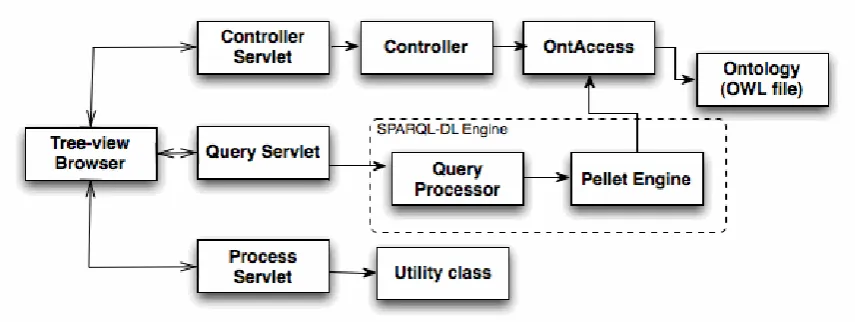
Figure 3. 1 Framework Architecture ... 14
Figure 3. 2 Framework Component Diagram ... 14
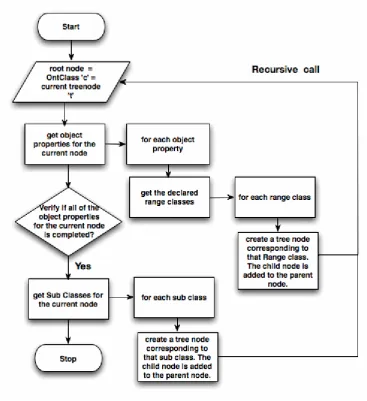
Figure 3. 3 Flowchart for drillDown ... 17
Figure 3. 4 Three different views of the tree ... 18
Figure 3. 5 Right panel of the Tree-view Browser ... 19
Figure 3. 6 Servlet classes in the Framework Component Diagram (not grayed) ... 21
Figure 4. 1 code for creation of tree ... 23
Figure 4. 2 drilldown method code ... 24
Figure 4.3 Root tree tag ... 25
Figure 4.4 Tree node name tag ... 25
Figure 4.5 Tree expand handle ... 26
Figure 4.6 Tree Formation ... 26
Figure 4.7 Tree nodes Indentation ... 27
Figure 4. 8 Schema declaration using Annotations ... 28
Figure 4. 9 The generated XML ... 29
Figure 4. 10 JAXB methods ... 29
Figure 4. 11 Jena classes for Query Execution ... 29
Figure 4. 12 Comparison of SPARQL and SPARQL-DL queries for pizza ontology ... 31
Figure 5. 1 Left Panel of the Tree-view Browser ... 33
Figure 5. 2 METOC Ontology ... 35
Figure 5. 3 METOC data entry forms ... 36
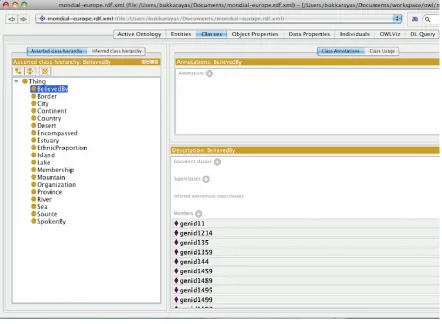
Figure 5. 4 Individuals list for the class „Province‟ of Mondial Ontology ... 38
Figure 5. 5 An example Google Maps Mashup... 39
ABSTRACT
We have developed a framework to support development of ontology based Web
applications. This framework is composed of a tree-view browser, an attribute selector, the
ontology persistence module, an ontology query module, and a utility class that allows the
users,to plug-in their own customized functions. The framework supports SPARQL-DL
query language. The purpose of this framework is to shield the complexity of ontology from
the users and thereby ease the development of ontology based Web applications. Having high
quality ontology and using this framework, the end-users can develop Web applications in
many domains. For example, a professor can create highly customized study guides; a
domain expert can generate the Web forms for data collections; a geologist can create a
Google Maps mashup. We have also reported three ontology-based Web applications in
education, meteorology and geographic information system.
Keywords
Ontology, Framework, Jena,
CHAPTER 1 INTRODUCTION
Significant efforts have been invested in establishing ontologies in many areas such as Music,
Biology, Geography and so on. Ontologies are vital for applications that use search engines
and merge data from a wide range of communities. XML schemas alone are inadequate and
unreliable for data exchange between automated systems because of their lack of semantics.
The Semantic Web addresses this issue making it easy for applications that integrate
information over the Internet by customizing tagging features of XML and the compliant
approach of RDF to represent data.
A number of ontology browsers are available on the market. Among the tools for managing
ontologies, Protégé has been the most widely used. These tools can serve the need of end
users for information retrieval. On the other hand, the application programming interfaces
(API) such as “Jena 2” provides the ultimate capability for manipulating ontologies through
programming. This is a powerful tool for programmers to develop applications involved in
ontologies; Jena 2 requires a good understanding of ontology internals and advanced Java
programming skills.
In this project, we have developed a framework that helps users to develop ontology-based
Web applications in a light-weighted way. This framework is composed of a tree viewer of
the ontology, an attribute selector, the ontology persistence module, and a utility class that
allows the users to plug-in their own customized functions. Having a high-quality ontology
and using this framework, a professor can create highly customized study guides or topics
training course; a domain expert can generate the Web forms for data collections. With a
graduate assistant or a student programmer, using the associated Java API can create many
more features.
Compared to Protégé, our framework does not support making changes of ontology; the
recommendation is to use Protégé. Compared to Jena 2, our framework is far less capable.
In fact, our framework has been constructed using Jena 2. However, our framework does
not require extensive Java programming skills; the design of the Web application has been
done for the users.
This thesis is organized as follows: Chapter 2 deals with the background knowledge of the
project. The concepts and definitions of Ontology, OWL, Jena, and Protégé 4 are presented.
Chapter 3 presents the framework introduction; the architecture and advantages of the
framework have been discussed. The design of various components of the framework has
been presented in detail. Chapter 4 describes the implementation details of the framework.
The implementation of all the framework components has been discussed in detail. Chapter 5
presents examples on how to use the framework to build Ontology based Web applications.
Three such Web applications are presented. Chapter 6 discusses the conclusions and future
CHAPTER 2 BACKGROUND
The Semantic Web is an evolving development of the World Wide Web in which the
semantics of information and services on the web are defined, making it possible for the web
to understand and satisfy the requests of people and machines to use the web content[eureka
08]. It is a place where intelligent decisions can be made. To accomplish this, we need to
build intelligence into the system, a formal description of concepts and their XML
representations in a machine-readable way is required. This can be done using the Web
Ontology Language.
2.1 Ontology
An ontology is a formal explicit specification of a shared conceptualization for a domain of
interest [4]. The concept of Ontology can be better understood by considering the example
given in the article [8]- It is difficult for a computer to select a dress for you, as it doesn't
understand your taste and what you are not supposed to wear. It might pick a shirt with
stripes and checks together. Hence, it is difficult for a computer to make a choice without
human‟s assistance. Ontology can define certain concepts for computer, such as hats, shoes,
socks, styles, sizes, and other related information, and how they all fit together. The computer
2.1.1 Definition
The dictionary definition of Ontology is – “a branch of metaphysics relating to the nature and
relations of being a particular theory about the nature of being or the kinds of existence”. This
definition is derived from philosophy. The Artificial Intelligence community defines
Ontology as a formal explicit specification of a shared conceptualization for a domain of
interest. Specification of conceptualization means that ontology is a description of the
concepts and relationships that can exist for an agent or a group of software agents.
In the context of knowledge sharing, ontology includes definitions of terms or the vocabulary
for a particular domain. It is also referred to as „Knowledge Base‟
2.1.2 Ontology Representation Languages
Ontology is expressed in a logic-based language, so that detailed, accurate, consistent, sound,
and meaningful distinctions can be made among the classes, properties, and relations [iisa09].
In order to be machine understandable, the ontologies should be expressed formally. A
number of languages have been developed for the Semantic Web. The construction of these
languages meets a number of requirements [5]:
Have a compact syntax.
Be highly intuitive to humans.
Have a well-defined formal semantics.
Be able to represent human knowledge.
Have the potential for building knowledge bases.
The Resource Description Framework (RDF) is a standard for the web metadata that the
World Wide Web Consortium (W3C) developed. It is a language for describing any web
resource such that it provides interoperability between applications that exchange
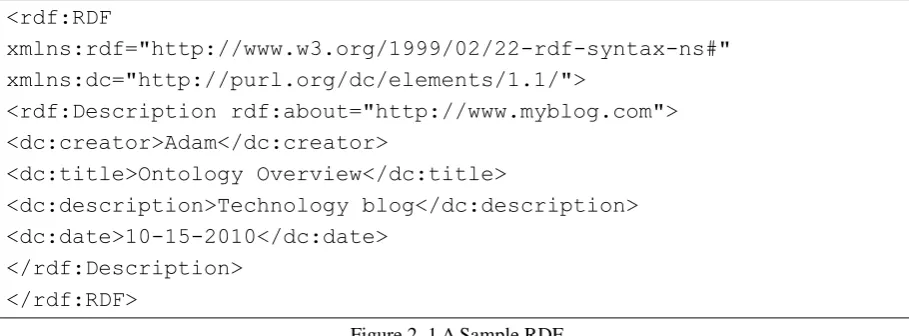
machine-understandable information on the web. Figure 2.1 is an example of how a resource
is represented using RDF. The description of the resource is identified by the URI
http://www.myblog.com. The properties, such as creator title, creator is defined in the
http://purl.org/dc/elements/1.1 namespace.
<rdf:RDF
xmlns:rdf="http://www.w3.org/1999/02/22-rdf-syntax-ns#" xmlns:dc="http://purl.org/dc/elements/1.1/">
<rdf:Description rdf:about="http://www.myblog.com"> <dc:creator>Adam</dc:creator>
<dc:title>Ontology Overview</dc:title>
<dc:description>Technology blog</dc:description> <dc:date>10-15-2010</dc:date>
</rdf:Description> </rdf:RDF>
Figure 2. 1 A Sample RDF
We could just take all the information and represent it as RDF, but we need a way for the
computer to be able to make inferences. For example, say person „X‟ lives in New Orleans,
and a person „Y‟ lives in Baton Rouge. We know that New Orleans is in Louisiana, and that
Baton Rouge is in Louisiana. But there is nothing about RDF that allows the computer to
make the inference that „X‟ and „Y‟ live in the same state. Web Ontology Language (OWL)
is an application of RDF that provides a way to encode this information so that a computer
can make these inferences.
OWL makes it possible to describe a wide variety of concepts and relationships. The more
OWL Full is the most expressive of the three levels. We can define classes
on-the-fly, use classes as properties and individuals, and build ontologies that are not
necessarily decidable, meaning that a program might not have enough information to
answer all questions suggested by the data.
OWL DL: The DL stands for description logic has much of the expressiveness of
OWL Full, but requires ontologies to be decidable. It also requires all classes to be
explicitly defined, and has certain restrictions on some of OWL's more advanced
features.
OWL Lite is a subset of OWL. It is used for simpler ontology that does not require
all of the expressiveness of the language. A valid OWL Lite ontology is also a valid
OWL DL and OWL Full ontology, and a valid OWL DL ontology is also a valid
OWL Full ontology.
2.1.3 Structure of the Ontology
The ontology should be written such that the machines can interpret it unambiguously and
used by software agents. In order to achieve this proper syntax and formal semantics for the
OWL are required. A typical OWL ontology begins with a namespace declaration that
provides a means to interpret identifiers and thus make the ontology presentation much more
readable. For example, a namespace declaration (xmlns:owl
="http://www.w3.org/2002/07/owl#") says that in the ontology document, elements prefixed
with owl: should be understood as referring to things drawn from the namespace called
The next element is the Ontology header, which is a collection of assertions about the
ontology grouped under an owl:Ontology tag. This includes tags such as comments, version
control and inclusion of other ontologies.
The primary purpose of ontology is to classify things in terms of semantics. This can be
achieved through the use of classes and subclasses, and their instances or individuals.
A class in OWL is a classification of individuals into groups, which share common
characteristics.
!-- OWL Class Definition - Plant Type -->
<owl:Class rdf:about="http://www.linkeddatatools.com/plants#planttyp e">
<rdfs:label>The plant type</rdfs:label>
<rdfs:comment>The class of all plant types.</rdfs:comment> <owl:Class>
<!-- OWL Subclass Definition - Flower -->
<owl:Class rdf:about="http://www.linkeddatatools.com/plants#flowers" >
<!-- Flowers is a subclassification of planttype -->
<rdfs:subClassOfrdf:resource="http://www.linkeddatatools.com/plants# planttype">
<rdfs:label>Flowering plants</rdfs:label>
<rdfs:comment>Flowering plants, also known as angiosperms </rdfs:comment>
</owl:Class>
Figure 2. 2 A Sample OWL file
Figure 2.2 is an example of how classes and subclasses are declared in OWL. Individuals in
OWL are related by properties. There are two types of property in OWL:
Object properties (owl:ObjectProperty) relate individuals (instances) of two OWL
classes.
Datatype properties (owl:DatatypeProperty) relates individuals (instances) of OWL
2.2 Overview of Jena2
Jena is an open source sematic web framework that provides a java API to extract data from
and write to RDF or OWL. In Jena, ontology is treated as a model, more specifically
OntModel that allows the ontology to be manipulated programmatically, with methods to
create classes, property restrictions, and so forth. The Jena framework creates an additional
layer of abstraction that translates the statements and constructs of the Semantic
Web into Java artifacts, such as classes, objects, methods and attributes [9]. These reduce
the effort needed for programming Semantic Web applications.
The Jena OWL API provides classes and methods to navigate through the ontology, identify
resources and retrieve them from the model. Every resource is identified with URI; this
makes the knowledge sharing process extremely easy. In Jena, the subject of a statement is a
Resource, the predicate is represented by a Property, and the object is either another Resource
or a literal value. The framework also covers methods for validating ontology.
Jena not only supports persistence of OWL or RDF data as files, but also has an
API for database backend. It supports different SQL databases from different vendors.
Jena supports querying the ontology through its API, or through SPARQL query
language. ARQ is a query engine for Jena that supports the SPARQL RDF Query Language.
There are other query engines available in the market that can be integrated easily with jena.
2.3 Ontology Editors
Ontology editors are used to build, inspect, browse and edit ontologies. Since ontologies may
be notoriously hard to build, a tool should provide intelligent assistance in ontology
RDF and OWL. We used Protégé Ontology editor for this project as it is a free, open source
ontology editor and knowledge-base framework. In Protégé, the ontologies can be exported
into a variety of formats including RDF(S), OWL, and XML Schema. Protégé supports
multiple design panes for ontology development including classes and property design,
construction of both restriction and disjoint function, comment and definition sections.
Protégé‟s various design panes or the tabs are shown in the Figure 2.3. The first tab is
the Classes tab that view used to browse ontologies. On this tab, the ontology is shown as an
expandable tree on the editor and the Members of a class selected by the user is shown on the
right. In the tree view, classes that are indented and below a class are called the “sub classes”,
whereas the class above is the parent. The classes that are related by the properties are called
“range classes”. The classes tab permits editing of the ontology. The users can drag and drop
classes to reorganize the hierarchy, create and rename classes. The values for attributes of
classes can also be directly edited. The other tabs in the Protégé editor are the properties,
forms, and instances tab. The slots tab enables users to view and edit all slots in an ontology;
the instances tab displays all instances associated with the classes; and the forms view
Figure 2. 3 Protégé Interface
The Protégé OWL plugin[] allows for the development of OWL ontologies using its rules,
syntax of the OWL language including its support for reasoning. The backend ontology
language rule and syntax control mechanisms ensure a hassle free development and
maintenance of the required syntax for the ontology and design for proper communication of
its knowledge with other systems.
2.4 Ontology query languages
The Ontology query languages are used to retrieve information from the Ontologies.
SPARQL (Simple Protocol And RDF Query Lanuguage) is a language for querying RDF
data. The syntax is similar to SQL. Figure 2.4 is an example of a SPARQL query.
Line 1 in the Figure 2.4 defines namespace prefix. In this query, we are looking for
want the subjects of these triples. Lines 3-4 use the prefix „foaf‟ defined in line 1 to express
the RDF to be matched. The variables in the SPARQL syntax begin with „?‟.
1. PREFIX foaf: <http://xmlns.com/foaf/0.1/> 2. SELECT ?name ?id WHERE {
3. ?x foaf:name ?name . 4. ?x foaf:id ?id . }
Figure 2. 4 An Example SPARQL Query
Predefined filter constraints such as regex, isLiteral etc., can be added to the query. The result
of the query can be modified using clauses similar to SQL clauses such as, ORDER BY,
DISTINCT, OFFSET, LIMIT. There are four different query forms as listen below:
Select - returns the list of values of variables for the query
Construct- returns an RDF graph constructed by the variables in the query
Describe- returns an RDF graph describing the resources that were found
Ask- returns a boolean value indicating whether the query pattern matches or not
SPARQL is RDF-based query language and it is harder to use it with respect to OWL-DL.
SPARQL-DL is the best possible solution; it is a subset of SPARQL for which we use
OWL-DL based semantics. SPARQL-DL is more expressive than existing DL query
languages and can be implemented without too much effort on top of existing OWL-DL
reasoners.
A SPARQL-DL query consists of one or more query atoms such as Type, SubClassOf,
SubPropertyOf and so on. For example, consider a query in the Figure 2.5. It is a comparison
Give me all graduate students (?X) that are some how related to some course (?W). We also want to know what kind of the relation (?Y) they are related with and what is the kind of the course (?Z).
SPARQL-DL Abstract syntax:
Type(?X, ub:GraduateStudent), PropertyValue(?X, ?Y, ?W), Type(?W, ?Z), SubClassOf(?Z, ub:Course)
SPARQL syntax:
SELECT ?X ?Y ?W ?Z WHERE {
?X rdf:type ub:GraduateStudent . ?X ?Y ?W .
?W rdf:type ?Z .
?Z rdfs:subClassOf ub:Course . }
CHAPTER 3 THE FRAMEWORK
3.1 Framework Overview
There are several products on the Web for analyzing and processing ontologies. However,
they require the users to be a specialist in the field of ontologies in order to understand their
internal organization and be able to analyze or process the information in the ontology. In this
project, we have developed a framework that helps the users who know little about the
ontology model to develop ontology-based Web applications. The advantages of the proposed
solution are listed below:
The complexity of ontology is shielded from the users.
A programmer can extend the framework to build more complex Web applications
and significantly reuse the existing design and code.
3.2 Framework Architecture
The framework design has been based on the MVC design pattern. Under MVC, an
application is seen as having three distinct parts. The Model represents the problem domain.
The output to the users is represented by the View. And the controller accepts input from the
user and instructs the model and view to perform actions based on that input.
The flow control of the framework is quite simple: When a request comes in to load the
ontology, the Controller initiates the Ontology Model class. The Model object consists of the
entire internal structure of the ontology. The controller then uses a java program to convert
ontology structure. The user may use the other features in the framework for further
processing.
Figure 3. 1 Framework Architecture
3.3 Framework Components
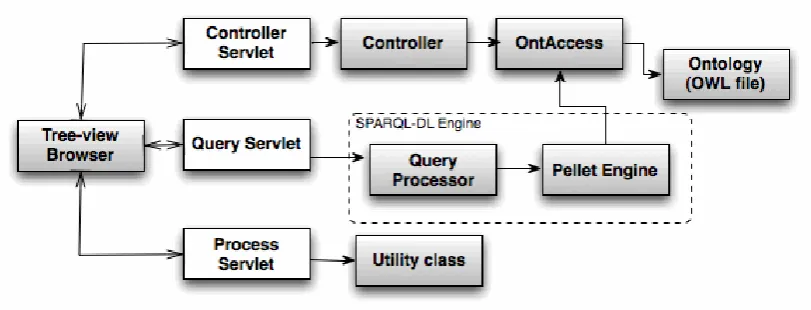
The framework consists of six major components as shown in Figure 3.2 in which the
component Tree-View Browser represents the “View”; the Servlet components, the
QueryProcessor and the controller class represent the “Controller”; OntAccess represents the
“Model” in the MVC design pattern. The components are discussed in detail in the following
sub sections.
3.3.1 OntAccess
The OntAccess class has been written based on the Jena Ontology API[16]. It consists of
methods for creation of ontology model from owl files, and to access various features of the
ontology. A summary of these methods in the OntAccess class is given in Table 3.1. As
discussed in the section 2.2, in order to create a Jena model of the ontology, the OntModel
class is used. The OntModel creation code is written in the constructor of the OntAccess class.
Therefore, instantiation of the OntAccess class loads the ontology into an OntModel object.
Using this object, various methods have been defined in the OntAccess classes for accessing
the internal structures of the ontology.
Method Summary
void loadModel(String uri, boolean local)
Reads into the model object the RDF at input param uri. The Boolean param specifies if the uri is a path to the local ontology file or a remote file.
String[] getSubClasses(OntClass c)
Returns an array of sub classes local names for the given class. OntClass[] getRangeClasses(OntProperty p)
Returns an array of declared Range classes for the given property. String[] getAttributes(OntClass c)
Returns an array of data properties local names for the given class.
List getIndividuals(OntClass c)
Returns a list of instances or the Individuals for the given class. OntProperty[] getObjProperties(OntClass c)
Returns an array of object properties for the given class. OntClass createOntClass(String uri)
Retrieves the resource with the given URI and thus returns the OntClass. Table 3.1 OntAccess Methods Summary
3.3.2 Controller
request to load ontology comes from the tree-view browser, the controller class instantiates
the model object and uses it to build the ontology tree object. The code for building the tree
object is written in a recursive method named drillDown.
We used the Jenkov JSP Tree Tag library[11] to build the tree structure. The tag library
consists of a tree model API, and the tree tags to display the tree model in the JSP page. First
a root tree node and the parent node for the root Ontology class is created and it is passed to
the drillDown method. The “object properties” of the root ontology class, which is the current
tree node, are obtained. For each object property, the declared Range class list is fetched. The
list is then iterated and for each Range Class, a tree node instance is created and added to the
parent. The newly created tree node is passed to the recursive call of the drillDown method.
This loop will terminate when the leaf node is reached or when a predefined level limit is
reached.
Once the iteration of the object properties is done, the sub classes for the current tree node are
obtained. For each sub class, a corresponding tree node is created and added to the parent.
The newly created tree node is passed to the recursive call of the drillDown method. The
method will terminate when the entire tree structure is built. The tree object is then set in
Figure 3. 3 Flowchart for drillDown
3.3.3 Tree-View Browser
The advantage of the tree-view browser over many ontology tools currently available in the
market is that it displays not only the subclasses in the hierarchy, but also the relationships
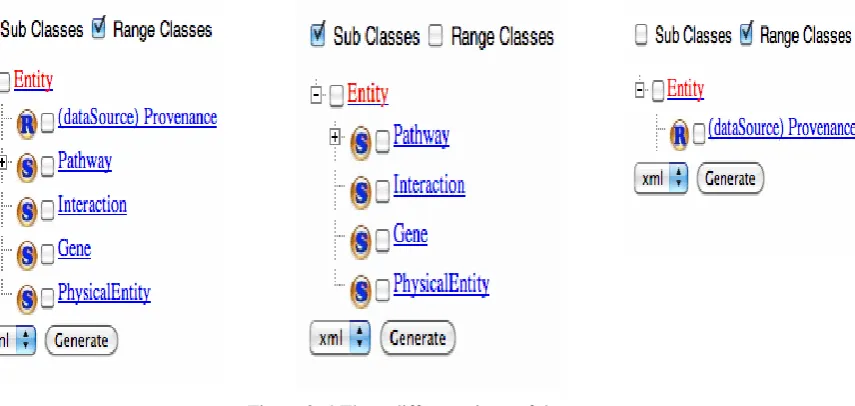
that connect to other classes in the same tree view. In the Figure 3.4, the “S” nodes denote the
subclasses; the “R” nodes denote the range classes (the classes connected through a
relationship). Initially when the ontology is loaded, both the sub classes and the range classes
framework. The figure presents three different views of the same ontology tree; a tree with
both sub classes and range classes; a tree with only sub classes; a tree with only range classes.
Figure 3. 4 Three different views of the tree
The check box associated with each node allows the user to select the class. Clicking on a
class name, the attributes and the related information will be displayed on the right pane of
the viewer. The Attributes section lists the Data Properties; the Related Information section
displays the comments of the Ontology Class as shown in the Figure 3.5.
Having the class hierarchy displayed, the user performs a concept-based search (Vieira,
2009). Having the relationships displayed along with the “hierarchy”, the user performs a
concept-based and workflow-based search at the same time. This is more informative to the
viewer who is not familiar to the given ontology, compared to Protégé that represents the
relationships view in a view (property view), and separated from the class hierarchy.
The "Generate" button shown at the bottom of the tree (Figure 3.4) is the controller that can
trigger an action according to the applications. A typical action is to generate an XML file
that records the selection of classes by the user, which will be the metadata of the follow-up
Figure 3. 5 Right panel of the Tree-view Browser
There is a section for SPARQL-DL query on the right panel. SPARQL-DL is an expression
language for querying OWL ontologies. It is significantly more expressive than existing DL
query languages and can still be implemented without too much effort on top of existing
OWL-DL reasoners [1]. More about SPARQL-DL is discussed in section 3.3.4.
The tree-view browser is implemented using the JSP technology. More details on how it is
implemented is discussed in Section 4.3
3.3.4 QueryProcessor
Query answering is a crucial inference service for ontology-based systems. The ability to
combine queries about the schema (classes and properties) and the data (individuals) brings
We used the SPARQLAS toolkit to transform the queries to SPARQL. The transformed
queries are then processed using the Pellet engine. In order to interact with Pellet, we used the
Jena API.
The QueryProcessor class, processes the queries in two steps-
First, it transforms the SPARQL-DL query request string to SPARQL query using the
SPARQLAS tool kit.
Second, it processes the SPARQL query using pellet engine and Jena API.
Writing SPARQL queries for OWL ontologies is very technical and requires significant
studies. SPARQLAS is toolkit that allows users to query using SPARQL-DL syntax. These
queries are translated into SPARQL queries that can be executed in a SPARQL engine. Thus,
the users do not have to care about mapping OWL to RDF graphs. SPARQLAS convertor
comes as a standalone application or a Webservice. We have used the standalone version to
integrate with our project.
3.3.5 The Servlet classes
The primary purpose of the Servlet classes is to process the requests from the tree-view
browser. They are responsible for handling all the requests. The three servlets used in the
framework are shown in the Figure 3.6 (not grayed). When a request comes in to load an
ontology, the ControllerServlet class forwards the request to Controller class. The Controller
class builds the Ontology tree structure and returns to the servlet class. The ControllerServlet
redirects the response to the tree-view browser.
QueryProcessor class to process the queries. The response or the result set of the query is
formatted properly and sent to the tree-view browser.
Figure 3. 6 Servlet classes in the Framework Component Diagram (not grayed)
After the user browses the ontology using the tree-view browser, he/she can select some of
the ontology classes for further processing. This can be done by checking the checkbox next
to the class name in the tree and clicking on the Generate button. The ProcessServlet class is
invoked when the request is submitted (on „Generate‟ button click). It invokes the required
methods from the Utility class depending on the requirements and the application.
3.3.6 Utility class
The Utility class has methods to process the user selected ontology data. It has methods to
generate an XML or PDF file for a given input. It also has methods to convert XML to java
object or HTML. The user can customize the class and add more methods based on the
CHAPTER 4 FRAMEWORK IMPLEMENTATION
The Framework supports the users to create their ontology-based Web applications with four
capabilities as listed below:
1. Creating a Jena model from OWL files.
2. Parse through the ontology and build a tree structure.
3. Display the tree to the user using tag library.
4. Process the user selected data.
The implementation of the above capabilities is discussed in the following sections.
4.1 Jena Model Creation
This step is implemented in the OntAccess class. Jena supports several different ways of
constructing the ontology model. The simplest way to create a model is to
call ModelFactory.createOntologyModel(). This delivers a plain ontology model, stored
in-memory that does no inference and has no special ontology interface. Then we have to
load the ontology document in the Ontology model using the read method in the OntModel
class. By default, when an ontology model reads an ontology document, it will also locate
and load the document's imports. The model now contains the entire ontology document. The
next step is to parse through the model and create a tree object.
4.2 Build a Tree
To build the tree structure from the Model object, we use the Jenkov Tree library[11]. The tag
library consists of a tree model API, and the tree tags to display the tree model in the JSP
store it in the session. Tell the tree tags in what session variable the subject tree is stored.
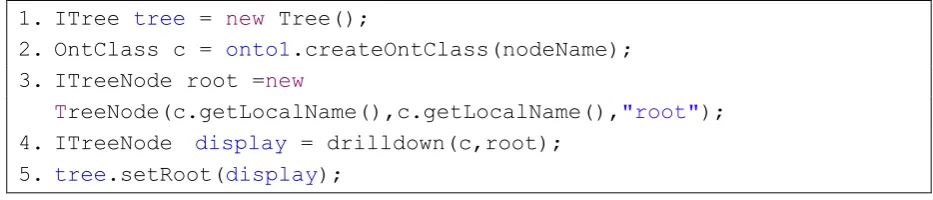
We follow the algorithm given in Figure 3.4 to build the tree. This is implemented in the
Controller class. First, a tree instance is created (line 1 in figure 4.1). The tree instance
contains information about what nodes are expanded and selected. This information is not
kept in the tree nodes.
1. ITree tree = new Tree();
2. OntClass c = onto1.createOntClass(nodeName); 3. ITreeNode root =new
TreeNode(c.getLocalName(),c.getLocalName(),"root"); 4. ITreeNode display = drilldown(c,root);
5. tree.setRoot(display);
Figure 4. 1 code for creation of tree
Second, a root tree node or the parent node is created and it is passed to the drilldown method
where the children are added to the tree (lines 2-4). createOntClass is a method in OntAccess
class which creates a OntClass object for a given resource name. Finally the tree instance is
told that the root node is the root of the tree to be displayed (line 5).
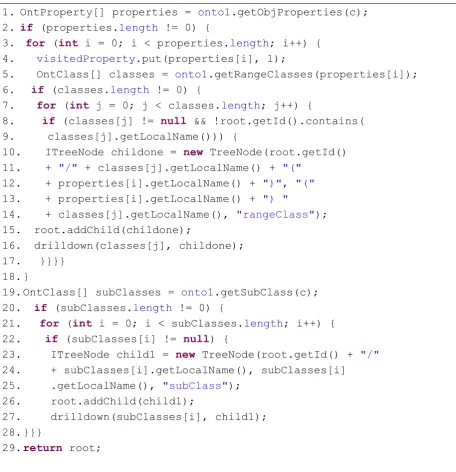
The algorithm given in Figure 3.4 is implemented in the method named drilldown. Figure 4.2
is the code for the drilldown method. The “object properties” of the root ontology class,
which is the current tree node, are obtained using the getObjProperties method in the
OntAccess class (line 1). The object „onto1‟ in the code refers to an instance of OntAccess
class. The methods in the OntAccess are discussed in section 3.3.1. For each object property,
the declared Range classes list is fetched (lines 3-5). The list is then iterated and for each
Range Class, a tree node instance is created and added to the parent (lines 7-15). The newly
created tree node is passed to the recursive call of the drillDown method (line 16). This loop
1. OntProperty[] properties = onto1.getObjProperties(c); 2. if (properties.length != 0) {
3. for (int i = 0; i < properties.length; i++) { 4. visitedProperty.put(properties[i], 1);
5. OntClass[] classes = onto1.getRangeClasses(properties[i]); 6. if (classes.length != 0) {
7. for (int j = 0; j < classes.length; j++) {
8. if (classes[j] != null && !root.getId().contains(
9. classes[j].getLocalName())) {
10. ITreeNode childone = new TreeNode(root.getId() 11. + "/" + classes[j].getLocalName() + "("
12. + properties[i].getLocalName() + ")", "("
13. + properties[i].getLocalName() + ") "
14. + classes[j].getLocalName(), "rangeClass"); 15. root.addChild(childone);
16. drilldown(classes[j], childone); 17. }}}}
18.}
19.OntClass[] subClasses = onto1.getSubClass(c); 20. if (subClasses.length != 0) {
21. for (int i = 0; i < subClasses.length; i++) {
22. if (subClasses[i] != null) {
23. ITreeNode child1 = new TreeNode(root.getId() + "/"
24. + subClasses[i].getLocalName(), subClasses[i] 25. .getLocalName(), "subClass");
26. root.addChild(child1);
27. drilldown(subClasses[i], child1); 28.}}}
29.return root;
Figure 4. 2 drilldown method code
Once the iteration of object properties is done, the sub classes for the current tree node are
obtained (line 19). For each sub class, a corresponding tree node is created and added to the
parent (lines 20-26). The newly created tree node is passed to the recursive call of the
drilldown method (line 27). The tree object is then set in session.
4.3 Display the Tree
stored in the session. The tree tag <tree:tree> is responsible for finding the tree and iterating
the visible nodes. It doesn't do any layout of the tree by itself, nor display any of the data in
the tree model. We have to specify that using specialized tags provided by Jenkov library
such as <tree:nodeMatch>, <tree:nodeIndent>. These tags are placed between the start
<tree:tree> tag and the end </tree:tree> tag. We must specify inside the <tree:tree> tag where
to make the tree nodes available. This is done with the node attribute as shown in Figure 4.3.
<tree:tree tree="ontologyClass" node="tree.node">
</tree:tree>
Figure 4.3 Root tree tag
Now the <tree:tree> tag will store the nodes iterated as a request attribute under the key
"tree.node". The tag <tree:nodeName> displays the name of the iterated tree nodes (Figure
4.4).
<tree:tree tree="ontologyClass" node="tree.node">
..
<tree:nodeName node="tree.node"/>
..
</tree:tree>
Figure 4.4 Tree node name tag
In order to make it look like a tree we should add expand and collapse handles to each visible
node if it has any children. This is done using the <tree:nodeMatch> tag as shown in Figure
4.5.
The Tree Tags does only enable the iteration of the tree nodes in the correct sequence. All
formatting is written between the Tree Tags as plain HTML. In order to break the nodes onto
their own vertical lines the nodes are placed inside a table row (Figure 4.6).
When indenting a node in a tree we need to understand whether to display a blank space (for
means that each node needs to know if it's super nodes has any children following it
vertically. The <tree:nodeIndent> tag iterates the current node's indentation profile (Figure
4.7).
<tree:tree tree="ontologyClass" node="tree.node">
<tree:nodeMatch node="tree.node" hasChildren="true">
<a href="javascript:expandSubmit('<tree:nodeId
node="tree.node"/>');">
<img src="images/collapsedLastNode.gif" border="0"></a> </tree:nodeMatch>
Figure 4.5 Tree expand handle
<table cellspacing="0" cellpadding="0" border="0"> <tr>
<td>
<tree:nodeMatch node="tree.node" hasChildren="true"> <a href="javascript:expandSubmit('<tree:nodeId node="tree.node"/>');">
<img src="images/collapsedLastNode.gif" border="0"> </a>
</tree:nodeMatch> </td>
<td>
<tree:nodeName node="tree.node" /> </td>
</tr> . . . </table
Figure 4.6 Tree Formation
The indentation information whether it is a vertical line or blank space is made available as a
request attribute under the key "type" as shown in the Figure 4.7. The body of the tag
<tree:nodeIndentVerticalLine> is executed if the indentation is a vertical line. The body of
the tag <tree:nodeIndentBlankSpace> is evaluated if the indentation type is a blank space.
We used the <tree:nodeMatch> and / or the <tree:nodeNoMatch> tags to display appropriate
browses the ontology and selects some of the ontology classes for further processing. This
can be done by checking the checkbox next to the class name in the tree and clicking on the
Generate button.
<table cellspacing="0" cellpadding="0" border="0">
<tr><td>
<tree:nodeIndent node="example.node" indentationType="type">
<tree:nodeIndentVerticalLine indentationType="type">
<img src="images/verticalLine.gif"> </tree:nodeIndentVerticalLine>
<tree:nodeIndentBlankSpace indentationType="type">
<img src="images/blankSpace.gif"> </tree:nodeIndentBlankSpace>
</tree:nodeIndent></td> <td> . . .</td>
</tr></table>
Figure 4.7 Tree nodes Indentation
4.4 Process the Ontology Data
We have developed the Utility class that has methods to process the user selected ontology
data. The selected class list from the JSP is an instance of a Java Bean SelectedNodesList
(Figure 4.8) that consists of an arraylist of selected node Ids. This object is retrieved by the
Process Servlet. It then invokes the getXmlFromObject method in Utility class by passing the
Arraylist object. We used JAXB(Java Architecture for XML binding) to convert object to xml.
One of the distinct advantages of JAXB is that it allows us to access and process XML data
without having to know XML or XML processing. The parsing is done based on schema or
a set of Java classes that represents the schema. We modified the SelectedNodesList class
using the JAXB Annotations to represent the schema for xml. The Annotation
„@XmlRootElement‟ associates a global element with the schema type to which the class is
Figure 4.8 is java object schema for the xml in Figure 4.9. The xml root element
<SelectedNodesList> is annoted using the @XmlRootElement annotation in java class.
@XmlRootElement(name = "SelectedNodesList", namespace="")
@XmlAccessorType(XmlAccessType.FIELD)
@XmlType(name = "SelectedNodesList", namespace="", propOrder = {
"nodeId", })
public class SelectedNodesList {
@XmlElement(name = "nodeId", namespace="")
private ArrayList<String> nodeId;
public SelectedNodesList(){
this.nodeId = new ArrayList<String>(); }
//setters and getters for nodeId ..
..
}
Figure 4. 8 Schema declaration using Annotations
As we can see in Figure 4.9, there are multiple <nodeId> tags between the
<SelectedNodesList> tag. Hence, the nodeId property is declared as an Arraylist in the java
class.
The next step is to use the JAXB API to perform the marshalling (xml from java object) or
unmarshalling (java object from xml) process. The Marshaller object has properties that can
be set through the setProperty method. For example, we can set the format of the resulting
XML data with line breaks and indentation. Finally, call the marshal method. This method
does the actual marshalling of the content tree. The parameters to the marshal method are the
java object and the output target. The generated xml can be further processed based on the
requirements. The user can add methods or modify existing methods based on the
<?xml version="1.0" encoding="UTF-8" standalone="yes"?> <SelectedNodesList>
<nodeId>Province</nodeId> <nodeId>City</nodeId>
<nodeId>BelievedBy</nodeId>
<nodeId>EthnicProportion</nodeId> </SelectedNodesList>
Figure 4. 9 The generated XML
1. Class[] classes = SelectedNodesList.class;
2. final JAXBContext jc = JAXBContext.newInstance(classes);
3. final Marshaller m = jc.createMarshaller();
4. m.marshal(obj, new File(dir, "sample.xml"));
Figure 4. 10 JAXB methods
4.5 Process Queries
The QueryProcessor class, processes the queries in two steps-
First, it transforms the SPARQL-DL query request string to SPARQL query using the
SPARQLAS tool kit.
Second, it processes the SPARQL query using pellet engine and Jena API.
The SPARQLAS package consists of a static class Sparqlas2SparqlStandalone . This class
has methods to validate query string and perform the transformation. It has a method named
„transformSparqlasQueryToSparqlFile‟ that takes SPARQL-DL query string as input and
returns SPARQL query string.
// Now read the query file into a query object
Query q = QueryFactory.read( query );
// Create a SPARQL-DL query execution for the given query and model
QueryExecution qe = SparqlDLExecutionFactory.create( q, m );
// We want to execute a SELECT query, do it, and return the //result set
The transformed query is then processed using the pellet engine. We have used Jena API to
interact with pellet engine as shown in the Figure 4.11. A Query object for the transformed
query string is created and it is used to create the QueryExecution instance. The query is then
executed by calling the execSelect method on QueryExecution instance. The result set object
is properly formatted using the ResultSetFormatter class and returned to JSP.
Figure 4.12 is an example of SPARQL query output for the pizza ontology[12] using the
SPARQLAS toolkit. Pizza ontology is an example ontology used widely in OWL tutorials. It
is a classification of Pizza and its varieties. The example in Figure 4.12 is to query pizzas that
have some topping with spiciness hot. As we can see, the SPARQL-DL query is very simple
All subclasses of pizza that have as topping some topping with spici ness hot
SPARQL-DL query:
SubClassOf ( ?x And ( Pizza Some ( hasTopping And ( PizzaTopping Som e (hasSpiciness Hot ) ) ) ) )
SPARQL query:
PREFIX : <http://www.co-ode.org/ontologies/pizza/pizza.owl#> PREFIX rdfs: <http://www.w3.org/2000/01/rdf-schema#>
PREFIX owl: <http://www.w3.org/2002/07/owl#> PREFIX xsd: <http://www.w3.org/2001/XMLSchema#>
PREFIX rdf: <http://www.w3.org/1999/02/22-rdf-syntax-ns#> PREFIX sparqldl: <http://pellet.owldl.com/ns/sdle#>
SELECT DISTINCT ?x WHERE
{ ?x rdfs:subClassOf _:b0 . _:b0 rdf:type owl:Class ; owl:intersectionOf _:b1 . _:b1 rdf:first :Pizza ; rdf:rest _:b2 . _:b2 rdf:first _:b3 .
_:b3 rdf:type owl:Restriction ; owl:onProperty :hasTopping ; owl:someValuesFrom _:b4 .
_:b4 rdf:type owl:Class ; owl:intersectionOf _:b5 .
_:b5 rdf:first :PizzaTopping ; rdf:rest _:b6 .
_:b6 rdf:first _:b7 .
_:b7 rdf:type owl:Restriction ; owl:onProperty :hasSpiciness ; owl:someValuesFrom :Hot .
_:b6 rdf:rest rdf:nil . }
CHAPTER 5 APPLICATIONS OF THE FRAMEWORK
The Framework effectively shields the complexity of ontology from the users and eases the
development of ontology applications in various fields. Applications in different domains will
be discussed in this chapter to demonstrate how effectively applications can be developed
using our framework.
5.1 Study Guide Producer
Ontology makes it possible to represent knowledge in a structured way and thus expresses the
classification of a domain clearly. As domain experts create the ontologies, they are more
accurate compared to the Web resources like Wikipedia. Querying an ontology returns
specific and related results as compared to the web search.
Study Guide Producer is an application for professors or students to make customized study
guides. Numerous high-quality ontologies have been defined in the fields of Arts and
Sciences. For example, the gene ontology, a bio-informatics ontology, is a knowledge
repository for the gene and its properties. It has a very informative comments section that is
organized in multiple pieces such as “Definition”, “Comment” and “Examples”.
Using this application, a student or a professor can load an ontology related to his field and
browse through the knowledge hierarchy to understand various concepts and relations. The
event handler of the class nodes has been enabled. Upon clicking on each class node, the
browser will display the definition, synonyms and examples in the comment of this class as
shown in Figure 3.6.
Thus the professor can have an instant preview of the choice. By checking the checkbox
clicking the “Generate” button, an e-book of the selected terms and related information is
generated in the PDF format.The application can be further enhanced to include review
questions or quiz.
Figure 5. 1 Left Panel of the Tree-view Browser
The advantage of our framework over other ontology tools is that the range classes are shown
along with the sub classes in the tree structure. For example, in Figure 5.1, the classification
of class „Conversion‟, not only shows its sub-divisions (Degradation, Transport etc.) but also
the related topics like PhysicalEntity and Stoichiometry. The relationship parameter is shown
5.2 METOC data entry forms
This example came from a project for the training needs of the Meteorology and
Oceanography (METOC) community (Navy, 2009). The weather and ocean data are
utilized by vastly diversified user applications that consume a wide range of METOC data
including gridded forecast model data, climatology, weather effects data, raw satellite data,
space environment and solar, remote-sensed observations, as well as imagery (METOC,
2009).
A basic and critical training need is to assure the data entry personnel to provide the
applications with correct data. Ideally, a set of GUIs would be able to mimic the data entry
scenarios of the in-field tasks of data requests. However, in the METOC community the
requirements of the data vary dramatically from one type of user such as a ship navigator to
another type such as a weather station staff. Furthermore, the data requirements of the same
type of user change when different tasks are carried out. There are simply too many
varieties of data request scenarios. Furthermore, developing highly customized METOC
GUIs is very costly because it is typically difficult for the GUI programmers to understand
the highly specialized METOC terminologies and distinguish synonyms and antonyms in
different contexts for many tasks. We have used our framework to develop an
ontology-based application that automates the generation of highly tailored training GUI
components.
The development of any application using our framework is a two-step process. The first step
is straightforward for any application and we need not modify any code for this step. The
this application we just had to write a jsp to display the METOC forms. The ProcessServlet
processes the selected nodes and converts them to Java Bean Objects using JAXB API. The
Bean objects are then iterated and displayed in a tabular format using the JSTL tags.
Figure 5. 2 METOC Ontology
To make the data request training GUI for a task, the METOC engineer (the domain expert)
navigates in the Ontology facilitated by our tree-view browser as shown in Figure 5.2.
Similar to the earlier example, the domain expert selects the nodes of the needed data items
from the tree view by clicking the checkbox associated with each node. Upon the expert
Figure 5. 3 METOC data entry forms
As a result, the identifier of the selected ontology classes as well as the selected attributes of
these classes is recorded in an XML file, which is the metadata of the training GUI Web
application. Upon invoking the training GUI application, the attributes of the selected nodes
are displayed in a tabular format as shown in the Figure 5.3. Once the user fills in and
application on the server side.
5.3 Google Maps Mashup
In Web development, a mashup is a Web page or application that uses and combines data,
presentations or functionality from two or more resources to create new services[14]. For
example, we could create a mashup of the earth‟s climate by integrating weather data with
Google Maps interface. There are a number of APIs available in the market to create Google
Maps Mashup. We have used Google‟s API in this application.
This Web application is a mashup that allows the users to query Mondial ontology[13] and
then display the results on GoogleMaps. The Mondial ontology contains geographical data
about countries, cities, rivers, islands, deserts and so on. The initial step of the mashup is to
load the Mondial Ontology in the tree-view browser. The user then browses through the
ontology classes and their individuals as shown in the Figure 5.4.
The next step is to enter the query in the SPARQL-DL query text box. The longitudes and the
latitudes information are fetched and passed to Google Maps API script. The map with the
query results is displayed. Figure 5.5 is an example of fetching all city instances from the
Figure 5. 4 Individuals list for the class „Province‟ of Mondial Ontology
When the query is submitted, the ProcessServlet class, transforms the query to SPARQL
query and submits to the pellet engine. The implementation of the above step was discussed
in the chapter 3. Jena API has a class called ResultSetFormatter to process the ResultSet of
the SPARQL query. It has methods to turn ResultSet into various forms like xml, RDF
model, plain text, CSV file etc. For this application, the ResultSet was converted to a plain
text and returned to the tree-view browser.
We have written a Javascript function (Figure 5.6) to parse the response text from the
ProcessServlet and create a Google map object. The process of map initialization is handled
8-12. Finally, the map point creation and rendering is handled in lines 14 and 15.
Figure 5. 5 An example Google Maps Mashup
Figure 5. 6 Javascript code to generate a Google Map
By making use of the different result set format methods in ResultSetFormatter class, more
CHAPTER 6 CONCLUSION AND FUTURE WORK
We expect to see more applications showing the utilizations of ontologies by all kind of users
and for diversified purposes. It is certain that numerous utilizations will in turn stimulate a
fast growth of the ontologies themselves. Compared to any other industry, education would
most benefit from the applications of ontologies because knowledge management and
information retrieval are the two central activities in education. In this project, we have
developed a framework to enable programmers and non-programmers to build ontology
based web applications. We have presented three examples demonstrating the applications of
our framework. They are cases for educational materials creation, software component (GUI)
generation, and web publishing. These examples have illustrated the benefit of utilizing our
Reference
1. Evren Sirin and Bijan Parsia : SPARQL-DL: SPARQL Query for OWL-DL (2007) 2. Petr Kremen, Evren Sirin : SPARQL-DL Implementation Experience (2008)
3. Holger Knublauch, Ray W. Fergerson, Natalya F. Noy and Mark A. Musen: The Protégé OWL Plugin: An Open Development Environment for Semantic Web Applications.
4. Gruber, T.R.: A Translation Approach to Portable Ontology Specifications. (1993) [http://ksl-web.stanford.edu/KSL_Abstracts/KSL-92-71.html]
5. J.R.G. Pulido, M.A.G. Ruiz, R. Herrera, E. Cabello, S. Legrand , D. Elliman:
Ontology languages for the semantic web: A never completely updated review (2006) 6. Shireesha Tankashala, Fangfang Liu, Brian Horton, Shengru Tu: An Online Ontology
Navigator for web applications in Education
7. http://weblog.clarkparsia.com/2007/10/26/towards-sparql-dl-evaluation-in-p
ellet
8. http://www.ibm.com/developerworks/xml/tutorials/x-ultimashup4/
9. http://semanticwebbuzz.blogspot.com/2009/10/jena-framework-for-developing-seman tic.html
10. http://www.obitko.com/tutorials/ontologies-semantic-web/
11. http://jenkov.com/prizetags/index.html
12. http://www.co-ode.org/ontologies/pizza/2007/02/12/
13. http://www.dbis.informatik.uni-goettingen.de/Mondial/
14. http://en.wikipedia.org/wiki/Mashup_(web_application_hybrid)
15. http://swat.cse.lehigh.edu/projects/lubm/