Paper: AC
Active Server Pages: Technology for
Creating Dynamic Web Pages and
Web-enabled Databases
Gireesh Kumar P
Documentation Research and Training Centre, Bangalore
Abstract
1
Introduction
Web based information services are receiving much attention from library
community. A presence in the global network enables a library to reach to a
wider audience and introduces novel services. The earlier attempts from libraries
of have a presence on Web were limited by hosting few static HTML pages
containing information about the library, and as addition, a links to few sources
of information which are of interest to its users. Even locally developed databases
were converted to 'flat files' and later to plain old HTML Web pages. This trend
is changing and more and more libraries are moving towards hosting dynamic
web pages.
2
Static-Vs-Dynamic pages
A static page remains constant until it is updated and republished. These pages
were not interactive and developers had to physically enter any new information.
With the advances in software and hardware, dynamic pages are being used to
make the Internet more interactive. A dynamic page has the ability to change
every time a user goes to the page. The advantage is that the developer does not
have to enter new information every time the client wants the page to be
updated. A well-developed site will allow client to add, remove, or update
material without any background in programming. In addition, this allows a user
to customize a page so that it may contain material that only the user wants to
see.
The central concept in a dynamic page is that a web server does the processing
before passing information back to the client.
3
Server technologies for dynamic pages
Most dynamic pages are built using server-side script. Number of scripting
languages are available for providing dynamic pages. PERL was the first
the so-called CGI (Common Gateway Interface) scripting languages to create the
customized code.
3.1 CGI (Common Gateway Interface)
CGI programs are small executables that the server executes in response to a
request from a browser (client). They use HTML forms to accept search requests
from users, search the databases, and provide customized responses. The program
can be written in any programming language, including C, Perl, and Visual Basic
Script. The use of CGI scripts on the server to deliver dynamic content is
probably the most widespread method in use on web servers primarily because
this is supported on all platforms. Though it did well, it had certain inherent
limitations.
The problem with CGI is that if five people are submitting a request at the same
time, five different copies of the CGI application have to be running on the server
to handle them. If a hundred people are submitting form information at once - a
hundred copies of the application run at the same time. This makes the Web
server’s functioning slower and slower and finally it may slog.
3.2 Internet Server Application Programming Interface (ISAPI)
To eliminate the problems associated with CGI applications, server-side scripting
language like PHP, JSP, ASP etc. introduced. Microsoft introduced a new server
technology known as Internet Server Application Programming Interface
(ISAPI). It takes just as long to load an ISAPI application as a CGI program, but
the server doesn't destroy ISAPI applications at the end of each request. Instead,
they stay loaded, either as long as the server is running or for a pre-determined
length of time.
3.3 Active server pages (ASP)
ASP is an ISAPI application. It's a single Dynamic Link Library (DLL) (asp.dll)
"Active Server Pages is an open, compile-free application environment in which
you can combine HTML, scripts, and reusable ActiveX server components to
create dynamic and powerful Web -based business solutions. Active Server Pages
enables server-side scripting for IIS with native support for both VBScript and
Jscript."
Some of the features of ASP are
Ø ASP is language independent
Ø ASP is compile free
Ø ASP code resides in text files
Ø ASP code times out
Ø ASP applications are usually small
Active Server Pages files have a .asp extension and are composed of standard
HTML and some script-logic (usually VBScript, JavaScript, Perl, etc). With ASP,
the code is written in the HTML page itself. The HTML tags and the code are
side by side.
3.3.1 Client-server model
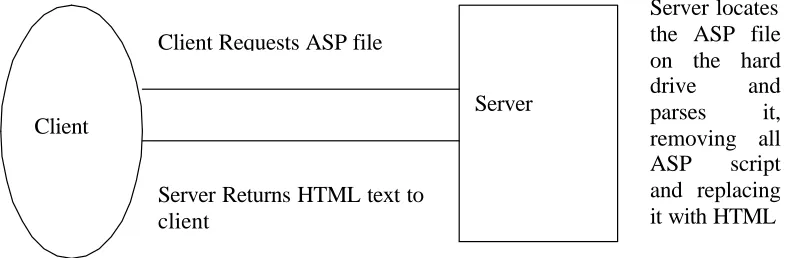
ASP is based on client-server model. When the server receives a browser's HTTP
‘request’ for a .asp file, it executes (from top to bottom) any script contained in
Fig. 1: Client -server model Client
Server Client Requests ASP file
Server Returns HTML text to client
the file and dynamically adds HTML to the rest of the file prior to sending the
"response" to the browser. In other words, the ASP script causes the server to
dynamically generate HTML to be sent to the client. This process has been
graphically illustrated below.
3.3.2 Running an ASP page
For running, an ASP page requires either Microsoft's Personnel Web Server or
Internet Information Server. Personnel Web Server is intended to run on
Microsoft Windows 95 or 98, or Microsoft Windows NT Workstation. Personnel
Web Server can be downloaded freely from Microsoft's site.
Internet Information Server (IIS) is Microsoft's professional Web server. It is
designed to run on Windows NT server. The latest version of IIS is 5.0, which
shipped with Windows 2000. ASP 3.0 is shipped with IIS 5.0 and installed
automatically when IIS 5.0 is installed.
Though ASP is designed primarily for Microsoft's Web servers, it's not necessary
that it will run only on Microsoft's platforms. Couple of companies have created
software that allows ASP pages to run on various Web servers and Platforms.
One of these products is Halcyon Software's Instant ASP, often abbreviated
iASP. Another such product, created by Chili!Soft, is Chili!ASP.
3.3.3 Creating an ASP page
An ASP page can be created using any text editor. As we have already seen, an
ASP page is a combination of Text, HTML tags and ASP script commands. ASP
scripts are differentiated from HTML by using <% and %> tags. The text that
appears in between <% and %> is designated as ASP code. This is what the
server process before it sends the page to the Web browser. The following
example shows a simple HTML page that contains a script command:
<HTML> <BODY>
The VBScript function ‘Now’ returns the current date and time. When the Web server processes this page, it replaces <%= Now %> with the current date and
time and returns the page to the browser. It may look like the following:
This page was last refreshed on 8/6/00 2:20:00 PM.
ASP exposes seven built-in objects, which makes a programmer's job easy. These
are Response Object, Request Object, Application Object, Session Object, Server Object, ObjectContext Object and ASPError Object. These objects can be used to send an HTML page to the browser, retrieve information from the browser,
communicate with the server, cache data for application, and handle errors. For
instance, the following script uses two objects 'response' and 'request', where one
will gather the IP address (request) and the other (response) will output that to the
browser.
<% Response.Write (Request.ServerVariables("REMOTE_ADDR")) %>
3.3.4 Databases and ASP
A major breakthrough in dynamic pages occurred when databases were able to
integrate into web pages. Database have been the main vehicle through which
organizations of all kinds have made structured textual and other data available
for data processing. Several advantages are seen for web -enabled databases: [1]
Ø Global access to data that is in public domain, e.g. bibliographic,
statistical, full text, image and multimedia databases;
Ø Wide access to data that is not in public domain but needs to be
shared between different locations of a given enterprises, e.g. a
multinational bank with branches all over the world, or between an
organization and its vendors;
Ø Platform-independent access to data and information;
Ø Dynamic updating of data ensuring that live data is available
becoming particularly important in the rapidly growing e-commerce
sectors;
Ø The fact that a single interface, viz., the Internet browser is all that
is needed on the client machine to access databases across the
internet, and
Ø The possibility for developing and delivering interactive solutions
and for the collection of valuable feedback, reactions, analyses, and
user preferences for use in business and other decisions.
At one time, connecting to a database was a difficult job. Databases came in a
variety of formats and a programmer needs to know low-level API (application
programming interface) for every database he wants to use. ASP made it simple
through ActiveX Data Object (ADO). An ADO comes with ASP and allows us to
connect to a database easily. ADO contains six objects, which includes a
Connection Object, Recordset Object, Error Object, Field Object, Command Object and Parameters Object. Out of this Connection Object and Recorset Object are the frequently used objects.
The Connection Object is used to connect to a data source. Obtaining a connection is the first step to working with databases. A connection can be either
a DSN or DSN-less connection. DSN stands for data source name. In a DSN
connection, a system DSN has to be created in the ODBC (Open Database
Connectivity) Manager.
A Recordset Object is used to work with the data in a table. It can be used to read through the rows of a table, modify the rows of a table, or collect new data to be
added to the table. The following scripts illustrate the use of Connection and
Creating and Opening a connection
<%
Dim objConn
Set objConn=Server.CreateObjcet("ADODB.Connection") ObjConn.ConnectioString="DRIVER={Microsoft Access Driver(*.mdb)};"&_"DBQ=C:\My Documents\book.mdb" objConn.Open
%>
Creating and Opening a Recordset
<%
Dim objRS
Set objRS=Server.CreateObject("ADODB.Recordset") ObjRS.Open, "tablename",objConn, , ,adCmdTable %>
After opening a recordset, the records can be read using any Visual Basic Control
Structure.
3.3.5 SQL and ASP
Another feature of ASP is that SQL statements can be effectively used to query a
database. It can use along with the RecordSet object and retrieve the specified
records in a table. This makes the application small and a programmer's job easy.
The following code illustrates the use of SQL statement in an ASP page to
retrieve an author name from a table named book.
<%
Dim strSQL
strSQL="SELECT * FROM book WHERE author='Ranganathan ' Dim objRS
Set objRS=Server.CreateObject("ADODB.Recordset") ObjRS.Open, strSQL, objConn
%>
4
Conclusion
Active Server Pages technology makes server-side scripting available to users of
varying levels of programming skill. By learning a little VBScript and embedding
that code within a web page, the user who is not a professional programmer can
achieve some very professional-looking results with ASP. A library can use this
existing services. For instance, creating a catalogue of printed and electronic
sources of information, starting a message board in the library site, automated
SDI service, conducting online user survey, hosting locally developed database to
web, etc are many to choose. It's up to the library to decide how to use it by
taking care of the user needs.
5
References
1. HARAVU (L. J.). Web-enabled databases: an overview of technology and
problems. Information Today and Tomorrow, 19 (1), 2000, pp. 7-10.
2. PEREZ (Ernest). GDIdb: getting your database on the web, with no big deal.
Library Computing, 18 (1), 1999, pp. 29-35.
3. MISCHO (William H.) and SCHLEMBACH (Mary C.). Web-based access to
locally developed databases. Library Computing, 18 (1), 1999, pp. 51-58.
4. 4GuysFromRolla.com. http://www.4guysfromrolla.com/webtech/
5. LearnASP. http://www.learnasp.com
6. ASPFree.com. http://www.aspfree.com/default.asp
7. Active Server Corner. http://www.kamath.com/tutorials/
8. Haneng.com. http://www.haneng.com/search/