University of New Orleans University of New Orleans
ScholarWorks@UNO
ScholarWorks@UNO
University of New Orleans Theses and
Dissertations Dissertations and Theses
5-8-2004
Control Synchronous Web-Based Training Using Web Services
Control Synchronous Web-Based Training Using Web Services
Yanfang Wei
University of New Orleans
Follow this and additional works at: https://scholarworks.uno.edu/td
Recommended Citation Recommended Citation
Wei, Yanfang, "Control Synchronous Web-Based Training Using Web Services" (2004). University of New Orleans Theses and Dissertations. 170.
https://scholarworks.uno.edu/td/170
CONTROL SYNCHRONOUS WEB-BASED TRAINING USING WEB SERVICES
A Thesis
Submitted to the Graduate Faculty of the University of New Orleans in partial fulfillment of the requirements for the degree of
Master of Science in
The Department of Computer Science
By
Yanfang Wei
B.S., Hebei University of Technology, China, 2000
Acknowledgement
I am especially indebted to my adviser, Dr. Shengru Tu, for the encouragement in the stressful days, comments for my thesis, patience for answering all questions, and hard working.
I would also like to thank my committee members, Dr. Fu and Dr. Chiu, for their work and time.
I wish to sincerely thank Shujing Shu and Liang Xu for their kindly help to support me starting my thesis.
Table of Contents
List of Figures
……….……vAbstract
……….………….……….….viChapter 1 Introduction
……….….1Chapter 2 Background
……….….32.1 Web Service………..3
2.1.1 SOAP……….4
2.1.2 UDDI……….6
2.1.3 WSDL………7
2.2 Apache Axis………..7
2.3 JSDT……….8
2.4 JMF………..10
Chapter 3 System Design
………113.1 Virtual Training Class...………...……...…….11
3.2 System Description………..13
3.3 System Structure………..14
3.3.1 Web Services……….…16
3.3.1.1 Authentication Service………...17
3.3.1.2 Instruction Service……….21
3.3.2 A/V transmission………..25
3.3.3 JSDT……….…27
3.3.4 Trainer GUI……….….28
3.3.5 Trainee GUI……….….29
Chapter 4 Implementation of the System
………....314.1 Database……….…..31
4.2 Web Service Creation, Deployment, and Involving……….……32
4.3 Implementation of the A/V agent component……….….35
4.4 Database Connection………...37
Chapter 5 A Comparison of Using Web Service and Using Jini
………...385.1 Jini………....38
5.2 A Comparison between Web Services and Jini………....39
5.3 Impact to System Design from the Difference of Jini Lookup and UDDI…...42
Chapter 6 Conclusion
………...45References
………..……….…46List of Figures
Figure 2.1: Structure of a SOAP Message……….………5
Figure 3.1: System Architecture Diagram……….…...15
Figure 3.2: Web Services Relationship Diagram………..17
Figure 3.3: Trainee’s Authentication Web Service Process Diagram……….…..18
Figure 3.4: Login Dialog for Trainee……….………..….18
Figure 3.5: Trainer Authentication Web Service………..……….…19
Figure 3.6: Login Dialog for Trainer……….……20
Figure 3.7: Instruction Web Service Diagram……….…...21
Figure 3.8: Polling Service Process Diagram……….….…..23
Figure 3.9: HTML Presentation Control (Polling Service) Diagram…………....24
Figure 3.10: A/V Transmission Diagram………...25
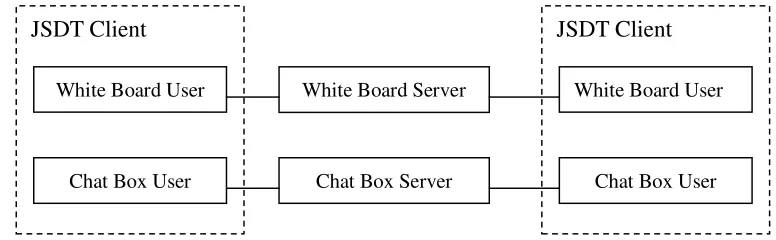
Figure 3.11: JSDT subsystem……….…28
Figure 3.12: Trainer GUI……….…...29
Figure 3.13: Trainee GUI……….…...30
Abstract
With the rapidly advancing technologies, training has been vital to keep companies
competitive. Web-based training grows rapidly and attracts more attention for its most
flexible manner. Virtual classroom is a form of synchronous web-based training. It
provides real-time interactivity in learning process.
I have developed a virtual classroom that uses Web services to control the
audio/video transmission, chat box, whiteboard, and synchronous HTML presentation.
Compared to an early implementation of the virtual classroom based on the Jini
network, my Web-service based implementation has a significantly different control
Chapter 1 Introduction
Web-based Training (WBT) has become a widely accepted tool for distance
learning along with the World Wide Web. It is rapidly growing. Many WBT projects
have gained significant better results compared to the correspondingtraditional training
courses. The advantages provided by Web Based Training include the flexibility of
schedule or space, reduced training costs, world-wide accessibility, easily updating
training course content, and a self-control capability which leads to a highly
individualized learning. Furthermore, some studies have shown that the
technology-based instruction may reduce the time to achieve the given objectives.
These are always appealing to companies that have many employees to train. The
market demand for web-based training is expanding faster than ever, which results in
the demand for rapid development of web-based training.
Web-based training is generally broken down into asynchronous and synchronous
learning. In asynchronous learning, training takes place in different time frames. The
trainees access information at their convenience. In synchronous learning, on the other
hand, training takes place for all the participants at the same time. The information is
accessed instantly. The latter requires an instructor and provides more interactivity. It is
also called Internet virtual classroom.
Classroom interactivities have long been emphasized in conventional teaching
techniques. In a classroom, the learning process is interactive and spontaneous.
Classroom discussions are an effective way for the trainer to verify the learning process.
While many training courses have been replaced by asynchronous self-paced online
courses, instant interactions remain to be necessary when the constructivist pedagogical
approach is applied in a synchronous manner. The current web-based classrooms share
a common weakness: limited support for viewers’ feedback. This often disables the
continuality of conversations stimulated by questions.
In this thesis, I report the design and implementation of the control structure of a
virtual training classroom by means of Web services. This virtual classroom is
supported by audio and video conferencing, electronic whiteboards, chat boxes, and
web browsers. The trainer must control the whole class easily and access the resources
directly. On the other hand, the trainees are able to receive the lecture in video and
audio along with the synchronized HTML web pages. Each trainee can request to speak
to the whole class.
In the implementation of virtual training classroom, the interaction between the
trainees and trainer does not follow the traditional way that trainer pushes everything to
trainee. The trainee will request the resources. In this case, we can be benefited from
Chapter 2 Background
In our virtual classroom, we have used various resources to facilitate the
presentation and illustrations such as multimedia communications and electronic
whiteboard to promote interaction between the trainer and trainees. Such a system is
comprehensive and complicated to develop.
In this chapter, I have reviewed the technologies used in our virtual classroom
including the general Web service model, an open-source implementation of Web
services – Apache Axis, the Java Shared Data Toolkit (JSDT), and the Java Media
Framework (JMF).
2.1 Web Service
The definition of Web service provided by W3C Working Group is as follows:
“A Web service is a software system identified by a URI, whose public interfaces
and bindings are defined and described using XML. Its definition can be discovered by
other software systems. These systems may then interact with the Web service in a
manner prescribed by its definition, using XML based messages conveyed by Internet
protocols.” [18].
given URL using the SOAP protocol over HTTP. The service receives the request,
processes it, and returns a response. An often-cited example of a Web service is a stock
quote service, in which the request asks for the current price of a specified stock, and
the response gives the stock price. This is one of the simplest forms of a Web service in
which the request is fulfilled immediately in the same call.
The Web service model is governed by three protocols: SOAP, UDDI, and WSDL.
2.1.1 SOAP
SOAP, short for "Simple Object Access Protocol", is an XML-based
communication protocol and encoding format for inter-application communication.
SOAP is widely viewed as the backbone of a new generation of cross-platform
cross-language distributed computing applications, called Web Services.
SOAP is a lightweight protocol for exchanging information in distributed
environment. SOAP contains three parts:
an envelope
a set of encoding rules
The envelope is for describing what the message is and how to process it. The
encoding rules are to express instances of data types which are defined in a specific
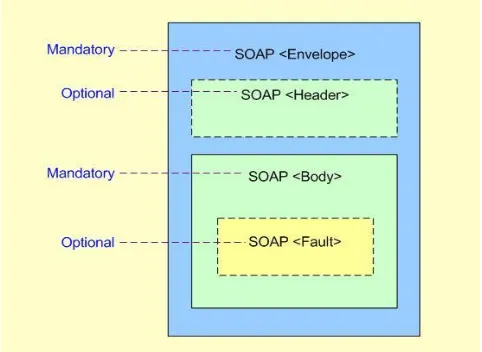
application. Figure 1 shows the structure of a SOAP message.
Figure 2.1: Structure of a SOAP Message
• SOAP Envelope: A required root element that identifies the XML
document as a SOAP message
• SOAP Header: An optional key information element in SOAP Envelope,
which contains header information for supporting the addition of
directives that expand SOAP capabilities
• SOAP Body: A required element of SOAP Envelope, which contains call
and response information XML data
• SOAP Fault: An optional element in SOAP Body scope, which provides
A example of a soap message is as follows:
<soap:Envelope
xmlns:soap="http://schemas.xmlsoap.org/soap/envelope/"
soap:encodingStyle='http://schemas.xmlsoap.org/soap/encoding/'>
<soap:Header>
<x:x
xmlns:x='http://example.org/Extensions/'
soap:actor='http://example.org/Nodes/Fireball/XL5'>
<!-- extension detail goes here -->
</x:x>
</soap:Header>
<soap:Body>
<!-- message payload goes here -->
</soap:Body>
</soap:Envelope>
2.1.2 UDDI
The Universal Description, Discovery and Integration (UDDI) protocol creates a
standard interoperable platform so that it can enable companies and applications to find
and use Web services dynamically over the Internet. UDDI also allows operational
JUDDI is an open source Java implementation of the UDDI specification for Web
services. It bounds with any database that supports ANSI standard SQL. Furthermore, it
is also deployable on any Java application server that supports the Servlet 2.3
specification such as Jakarta Tomcat, WebSphere, WebLogic, Borland Enterprise
Server, and JRun.
2.1.3 WSDL
Web Services Description Language (WSDL) is an XML format for describing
web services as a set of endpoints operating on messages containing either
document-oriented or procedure-oriented information. The operations and messages are
described abstractly, and then bound to a concrete network protocol and message
format to define an endpoint. Related concrete endpoints are combined into abstract
endpoints (services). WSDL is extensible to allow description of endpoints and their
messages regardless of what message formats or network protocols are used to
communicate [19].
2.2 Apache Axis
Apache Axis is a soap engine for constructing SOAP processors such as clients
and servers [18]. Apache Axis is not only an implementation of the SOAP but also a
• a simple stand-alone server
• a server which plugs into servlet engines such as Tomcat
• extensive support for the Web Service Description Language (WSDL)
• emitter tooling that generates Java classes from WSDL
• some sample programs
• a tool for monitoring TCP/IP packets
Axis is a great tool for publishing and deploying Web services. Axis provides two
ways to publish a service. The first one is very simple. It requires just copying the
service implementations into the “webapp” directory of Tomcat, and renaming it with
extension .jws instead of .java. The second way is to use Axis’s Admin command line
tool for tasks such as deployment or undeployment according to a deployment
descriptor. Axis provides two utility tools. Java2WSDL generates the WSDL file for a
given service implementation, and WSDL2Java generates the server-side wrapper Java
code and stubs for clients to access.
2.3 JSDT
JSDT, Java Shared Data Toolkit, is a development library that allows developers to
easily add collaboration features to applets and applications which are written in the
software to create network-centric applications such as shared whiteboards or chat
environments. It can also be used for remote presentations and shared simulations and
to easily distribute data for enhanced group workflow.
JSDT comes with three implementation types. Each implementation type uses a
different transport protocol:
• socket - users TCP/IP sockets
• http - uses HTTP commands
• lrmp - uses a light weight reliable multicast package (LRMP)
JSDT application is made up of four components listed below.
Session object: As with all types of collaborative environments, there needs to be some
way for each application to initially rendezvous so that data can be
shared. The JSDT group rendezvous point is a Session object.
Client object: A Client is an object which is part of a JSDT application or applet and is a
participant in an instance of multiparty communications. A client object
can be the source or the destination of the data which is being exchanged
in an instance of communication.
Channel object: A Channel is a specific instance of a potential multi-party
communication path between two or more clients within a given session.
Channel will be given the data sent on that Channel. Any client is able to
send data on a given channel.
Channel consumer object: A channel consumer is a client object which has registered its
interest in receiving data sent over a given channel.
2.4 JMF
The Java Media Framework (JMF) [13] is an application programming interface
(API) for incorporating media data such as audio and video into Java applications and
applets. It is specifically designed to take advantage of Java platform features. The JMF
API (the Java Media Player API) enables programmers to develop Java programs for
playback of time-based media. The JMF APIs support RTP (Real-Time Protocol). The
JMF RTP APIs enable operations such as opening RTP sessions, receiving every
incoming stream on the session, creating a JMF player using the stream data source,
Chapter 3 System Design
In the past, we designed and implemented a prototype of a virtual training
classroom over the Internet controlled by the Jini network [17]. Since Jini requires
TCP/IP ports that are typically blocked by firewalls, we decided to replace the
Jini-based control structure with Web services. It turned out that this replacement
implied significant change in design. For completeness, I describe the entire system in
this chapter.
3.1 Virtual Training Class
A virtual training class is a synchronous online training class led by a trainer. In a
class, the trainer leads the (remote) trainees to conduct computer-aided hands-on
experiment during lectures. The lecture is delivered by audio and video (A/V) to every
trainee’s computer. The trainees’ lecture material in HTML is kept updating to
synchronize with the audio and video. Using the chat box and whiteboard, the trainer
and trainees can also discuss the lecture by exchanging textual messages and explain
problems by using the whiteboard. Furthermore, the chat box also enables more
trainees to discuss problems at same time. This has been proved a very effective
learning process for professional training. For the traditional satellite classroom, the
that satellite classes, our system has been facilitated a channel from the trainees to the
entire class. The virtual training classes can provide more timely help to trainees than
the asynchronous web-based training classes. In asynchronous web-based training,
accumulated questions may prevent a trainee from catching up the lecture. On the other
hand, explaining every possible question in the lecture may force the trainer to loose the
concentration on the main theme. Boring “side walks” would be drawn the trainees’
focus. In a synchronous virtual training class, the trainees can ask questions instantly.
Explanation will always be given with a target. The question-and-answer conversation
is typically beneficial to the whole class.
In the traditional training class, human interactions consist of:
the trainee poll the current page of HTML browser,
the trainer and the trainees interacting with each other,
the trainees interacting with one another.
Our virtual training class supports these types of interactions in different ways. If the
trainee receives questions from some trainees and grants permission to a chosen trainee,
the conversation regarding that question is sent to the whole class as an audio session.
Upon the trainer’s choice, the audio for the speaking trainee can be sent to everybody
else in the class. When a question-and-answer session is granted, the course
presentation is paused. In addition to the A/V session for questions and the follow-up
on the whiteboard which is shared by the class. The simplest communication means is a
chat box with which one can exchange textual messages with an individual. This is
available to everybody.
In order to communicate in the learning process, both the trainees and the
trainer should be equipped with the networked computers. Additionally, to enable the
audio and video communication, the trainees and the trainer should also have installed
the corresponding software to support the audio and video transmission and JSDT
registry and servers. In my project, since the trainer transmits both audio and video to
the trainees and the trainees only transmits audio under control of the trainer, the trainer
has both microphone and camera and trainee has only microphone for audio.
3.2 System Description:
The virtual classroom allows both the trainees and the trainer to be active in this
learning process. The trainer can create a course by registering the course on the server
side and providing information such as the course name, course id, course time, and the
references to the class web pages. Trainee can register by providing personal
information and the course identifier he/she wants to take. The trainer can activate the
course at the server side. At this time, the trainees must run the client side. User
authenticated function is first invoked. Only the registered trainees and trainer can take
trainer’s presentation. During the process of the class, the trainer’s audio and video are
continuing transmitting to the trainees’ GUI. The trainer can also use whiteboard and
HTML pages to facilitate his/her presentation. If a trainee has a question, he/she can ask
for permission to speak. The trainer can decide who can speak on the class and grant
the permission to the trainee. The trainer may also deactivate the speaking trainee’s
microphone. Moreover, the trainees can use chat box and whiteboard to raise and
discuss questions.
3.3 System Structure
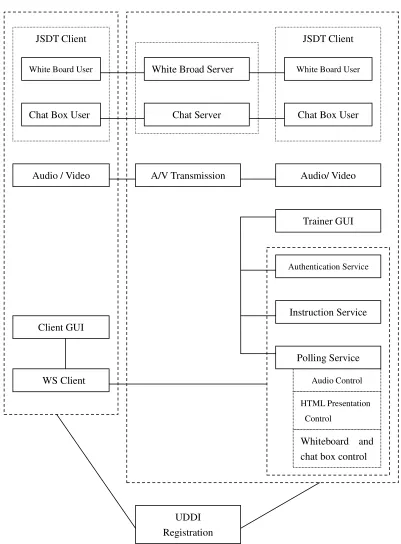
The whole system can be divided into four subsystems: A/V transmission, the
JDST server, the Web Server (Tomcat), and the UDDI registration. For the first two
subsystems, we have used free Java components such as Java Media Framework (JMF)
[13], the Real-Time Protocol (RTP) [7] implementation in JMF, and the Java Shared
Data Toolkit (JSDT) [15]. The Web Server (Tomcat) is responsible for system control
and UDDI registration is for service locating.
Audio / Video JSDT Client
Chat Server White Broad Server
A/V Transmission Audio/ Video
White Board User
Chat Box User Trainee Side
JSDT Client
White Board User
Chat Box User Trainer Side
Client GUI
WS Client
Trainer GUI
Authentication Service
Instruction Service
Audio Control
HTML Presentation Control
Polling Service
Figure 3.1: System Architecture Diagram UDDI
Registration
3.3.1 Web Services
In our system, the Web services are responsible for controlling the operations of
many components. In this project, we have created three Web services for the client: the
Authentication service, the Instruction service, and the Polling service. The polling
service contains audio control service and HTML presentation control service. The
authentication service is responsible for the trainees’ status verification. The Instruction
service is for notifying the trainer which trainee is asking in the question session. The
HTML presentation control service is to synchronize the lecture material and the audio
control service grants permission to the trainee who is asking to speak.
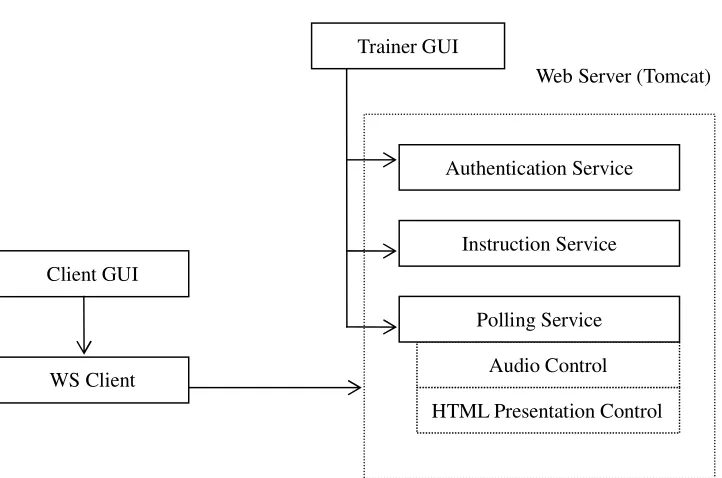
Figure 3.2 shows the “uses” relationship between the trainer GUI, the trainee GUI,
and the Web services. The implementations of the three Web services are under the
control of the trainer GUI. The trainee GUI is connected to the web server by the WS
client which resides in the trainee GUI. The trainees make use of the Web services
without bothering the trainer GUI. The changes caused by the Web services will be
3.3.1.1 Authentication Service
We enabled password protection in use of the system. When a trainer needs to
establish a course, he/she will be asked to provide the course information. Moreover,
the trainer will be assigned an identifier for later use. For the trainees, the registration
process is simply collecting identification information. Each trainee will obtain an
identifier for authentication. Therefore, only registered user can access this system.
--Trainee Login:
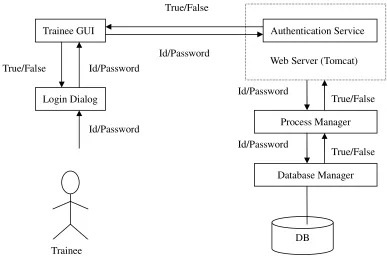
Figure 3.3 shows the trainee’s authentication process and the components involved Client GUI
WS Client
Trainer GUI
Figure 3.2: Web Services Relationship Diagram
Authentication Service
Instruction Service
Audio Control
HTML Presentation Control Polling Service
in this process.
Authentication service is designed to deal with login and logout functions. When a
registered trainee wants to login to take the course he/she registered, the trainee is ask
to provide his/her identifier and password and select the course available at that time.
The system will check the profile of that trainee from the database to verify the
information.
Figure 3.4: Login Dialog for Trainee
True/False
True/False Id/Password
Id/Password Trainee GUI
Login Dialog
Web Server (Tomcat) Authentication Service
Process Manager Id/Password
Database Manager Id/Password
Id/Password
DB True/False
True/False
status (listening) into the on-going class table. Correspondingly, the list which holds the
content of that table is shown in trainer’s GUI. In addition, the system will connect the
trainee as a chat user and a whiteboard user.
--Trainee Logout:
When a trainee exits the system, all the information about this individual stored in
on-going class table will be removed, no matter what status he/she is. In the logout
process, the trainee will be disconnected from the chat group and the whiteboard.
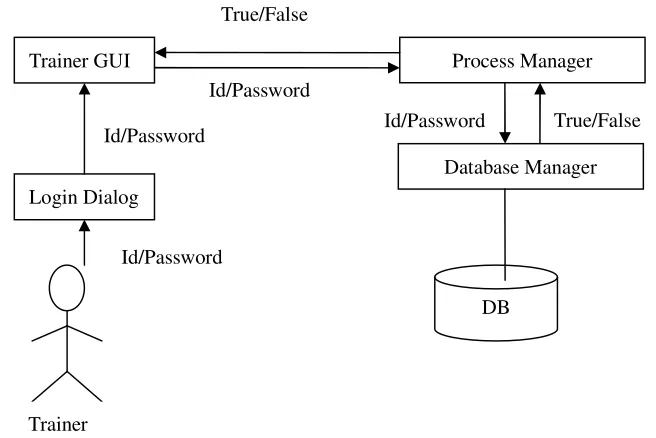
--Trainer Login:
Figure 3.5 shows the trainer’s authentication process and the components involved
in this process. Figure 3.6 shows the trainer’s login dialog. Only user id and password Id/Password True/False
Process Manager
Database Manager
DB Trainer GUI
Login Dialog
Id/Password Id/Password
Id/Password True/False
are needed for a trainer to login.
Figure 3.6: Login Dialog for Trainer
When a trainer logs in successfully, system will do the following:
tell system this course is available now by adding the course identifier to a
table which holds the on-going class information;
load the presentation web pages for the course;
insert the current page into a table which holds the current web page’s URL;
create a chat user for the trainer;
create a white board user for the trainer;
start transmitting audio and video to trainees.
--Trainer Logout:
Corresponding to the login process, the trainer can logout by asking the system to
clear and drop the tables which are used by and created for the class, and remove the
record in the courses availability table. In addition, we need to stop broadcast audio and
video after class to save network traffic resource. Finally, the system disconnects the
3.3.1.2 Instruction Service
In the virtual classroom, a trainee is allowed to ask questions just like in a
traditional classroom. The trainee does it by clicking a button instead of raising his/her
hand. The Instruction Service as a Web service has few operations only. When the client
WS receives the request from the trainee, it sends the trainee’s id to the trainer GUI by
calling the Instruction service. In turn, the Instruction service calls the Process Manager
to change the status of this trainee from “listening” to “asking”. Since the trainer GUI is
kept refreshing periodically,every 0.1 seconds, the change will be shown on the trainer
GUI quickly. Thus, the trainer can figure out who has a question to ask and take the
operations accordingly. Figure 3.7 shows the process for using Instruction Web service.
Figure 3.7: Instruction Web Service Diagram Change status
to “asking” Trainee Id
Trainee WS
Web Server (Tomcat) Instruction Service
Process Manager
Database Manager Trainee Id
3.3.1.3 Polling Service:
Polling and callback are two commonly used patterns in asynchronous
communication, in which a client continues its computation without blocking it control
flow after issuing a remote service (procedure) call. If the client itself can also handle
remote service requests, the client can ask the remote server to call a specific (client’s)
method when the service result is ready to deliver. This approach is called callback.
However, if the client side is not capable of handle remote service requests, then the
client side has to poll the server side periodically until the service result is ready to pick
up.
In my project, since the trainee side is not equipped with a Web server, the trainee
side is incapable of accepting Web service calls. On the other hand, asynchronous calls
are more desirable for a number of long-duration requests such as the request for
speaking in the audio control process and the request for the next page in the HTML
presentation control.
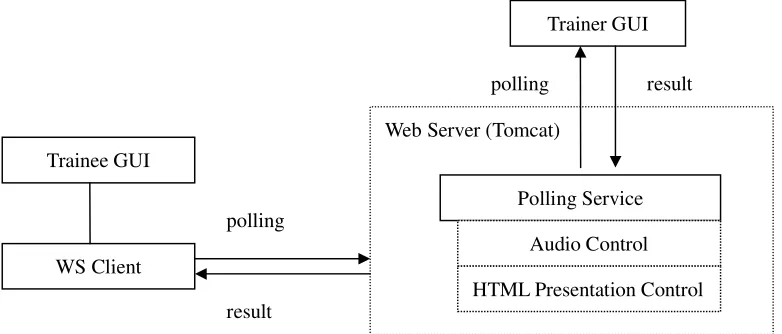
Figure 3.8 shows the Polling service for the audio control and the HTML
presentation control processes. The Instruction service informs the trainer GUI who is
requesting to speak and then waits for the trainer’s decision. The audio control service
In the virtual classroom, the RTP-based audio/video communication channels can
allow multiple speakers (the trainer or the trainees) to speak simultaneously. However,
as a classroom, the trainer must be able to control the channels and allow one speaker at
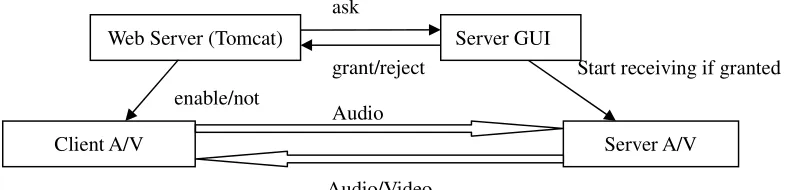
a time. This is achieved by our Web-service based control system. As mentioned earlier,
the trainer GUI controls the trainees’ microphones which are disabled by default. When
a trainee attempts to speak, he/she sends a request to the Instruction service in server
side. Then the trainee process continues polling the trainer-side Polling service until the
request is granted or rejected. The trainee may cancel his/her request at any time. Upon
receiving requests for speaking from (typically multiple) the trainees, the trainer will
choose one trainee to speak by granting the corresponding request. At the same time,
the trainer process also rejects every other request. Therefore, a trainee’s speaking
request typically goes through two of three states, first “pending” then either “granted”
or “rejected”. A trainee’s microphone will not be enabled unless a speaking request result
polling
Web Server (Tomcat) Trainee GUI
WS Client
Polling Service
Audio Control
HTML Presentation Control Trainer GUI
Figure 3.8: Polling Service Process Diagram polling
results in a “granted” state.
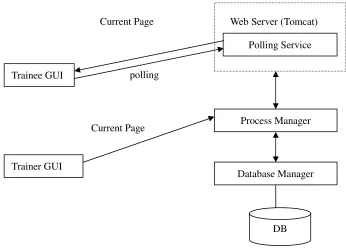
The Polling service is also used to push the HTML pages to every trainee’s GUI at
the pace controlled by the trainer. The URLs of the HTML pages of the classes are
stored in the database. The trainer may want to keep a page on the screen for a fraction
of a minute or a couple of minutes. The duration is unpredictable by the program. When
the trainer goes to a page by clicking the “Next” or “Previous” button, every trainee’s
screen should browse to the same page immediately. Considering the trainee side has
no Web server, we let each trainee’s process to poll the trainer-side Polling service. This
Polling service always returns the URL of the current page on the trainer’s browser.
Upon receiving this browser component should fetch a new page. Figure 3.9 shows the
HTML presentation control diagram.
Web Server (Tomcat)
Polling Service
Trainee GUI polling Current Page
Trainer GUI
Current Page Process Manager
Database Manager
3.3.2 A/V transmission
While the TCP/IP connection can handle all the control messages, the textual
messages and the HTML presentations, adequately, it is not suitable for audio and video
streams. Rather, we have chosen the Real-Time Transport Protocol (RTP) for
transmitting audio and video [16]. The Java Media Framework API enables the
playback and transmission of RTP streams through the APIs. JMF supports audio, video,
and other time-based media to be added to applications built on Java technology [5]. In
my project, I implemented the audio and video conference by using JMF [13]. JMF
offers a function to capture audio and video with capture devices, such as microphones
and cameras [12]. We can create a data source from the data captured by such devices
with JMF API. In order to display the data source in a GUI, a player takes the data
source as input and renders it into audio or video. Since a processor can output data
either to a player or to convert it to a format which is suitable to transmit, we create a
processor and get the output to be ready to transmit. In the receiver, a player is created
enable/not
grant/reject ask Web Server (Tomcat)
Client A/V Server A/V
Figure 3.10: A/V Transmission Diagram Audio/Video
Audio
for the receiving stream to display.
A challenge in using audio/video transmission is that one data source can not be
operated twice. In my project, the data source generated by video camera can either be
used to display on GUI locally or be transmitted to the trainees. To solve this problem, I
create a clone from that data source and use them for different places [11].
In a local area network, multicast does not cost much more bandwidth than a
point-to-point transmission. Transmission between zones across the Internet apparently
could be a problem due to the limited bandwidth. Particularly, when multiple viewers in
the same remote zone watch the same video and audio, we want to avoid duplicating
the transmissions of the same contents over the Internet. This was well thought in the
multipoint operation [Lindbergh] specified by a number of comprehensive multimedia
conferencing standards of ITU-T (the International Telecommunication Union
Telecommunication Standardization Sector) such as H.320 and H.323 [Thom].
Particularly, the multipoint operation in these two standards works by connecting all
participating terminals (the users’ interfaces) to a central bridge device called the
multipoint control unit (MCU) in a point-to-point mode. The MCU relays and controls
the transmissions between remote MCUs and their terminals in a flexible and
complicated manner. On one hand, the virtual classrooms acutely need the multipoint
training, a whole lab’s users are all taking the same remote course. On the other hand,
using a fully-blown H.323 implementation would be overkill. H.323 has many special
requirements for routers that not commonly available, while many complicated features
and controls for teleconferencing are not needed by the virtual classroom.
We have devised an application-level solution to cope with the demand for the
multipoint feature. There are two channels for the trainer’s audio and video respectively
from a trainer’s zone to each class recipient zone, and two additional channels for A/V
transmission from each remote zone to every other zone. To achieve multicast at the
application-level, a pipe is needed between every pair of zones. At each zone, the A/V
agent object manages every pipe.
3.3.3 JSDT
I used the JSDT framework to implement the classroom facilities, the chat box and
the whiteboard [14]. JSDT gives a neat definition and simple structure of distributed
computing features data sharing. With JSDT, we can construct a collaborative
application easily and fast [15]. JSDT supports various types of networks and
multipoint communications among a number of connected entities. In my project
scenario, a number of trainees and a trainer can connected through any kind of
provide the same view for all the participants. The communication supported by JSDT
is the complimentary for the audio and video communication in the class.
3.3.4 Trainer GUI
Only one trainer can be active in one virtual classroom at any time. The trainer must
be able to control every activity in the class. The trainer service must be capable of
enabling and disabling every component in the virtual classroom, such as the
microphone, whiteboard, and chat box at each trainee’s computer.
Figure 3.12 shows the trainer GUI [3]. In this GUI, the upper left pane is the
broadcasting video. The upper middle pane is the whiteboard of the virtual classroom.
The chat box is in the lower left corner on the GUI. The lecture presentation is in the
lower middle pane. The trainees’ status information is displayed in the list on the right
hand side. The trainer can take some actions according trainees’ different statuses, such
as listening, asking, and speaking. The trainer can grant the audio channel to or revoke
it from any trainee by highlighting the trainee’s entry and then pressing the “Grant” or JSDT Client
JSDT Client
Chat Box Server White Board Server
Chat Box User White Board User
Chat Box User White Board User
the “Revoke” button.
Figure 3.12: Trainer GUI
3.3.5 Trainee GUI
The trainee service is the front end of the virtual classroom. The emphasis of this
service is on ease of use. Figure 3.13 illustrates the trainee GUI [3]. As mentioned
Figure 3.13: Trainee GUI
The microphone of every trainee is disabled by default. Before the trainee wants to
speak, he/she must ask for permission from the trainer. The trainer service grants the
permission by enabling the trainee’s microphone. Either the trainer or the trainee can
Chapter 4 Implementation of the System
In the implementation of the system, I have taken advantage of the existing
components but focused on the Web services implementation.
4.1 Database
The virtual classroom system is supported by a small database that accommodates
the data model depicted in Figure 4.1 [1]. The “Trainee” and “Trainer” entities hold the
information such as name, id, and password. The “Course” entity has the fields such as
the course title, description, and length. Relationship “cover” represents the skill that
each course covers. The “Class” entity is an offer of a course. The class time, URL, and
other related information are associated with this entity. Relationship “Attending” holds
1 n m Trainer Skill Attending Offer Cover m Use PageURL m m 1 Class Trainee Register
1
1
Course
the dynamic attendance information upon trainees’ login on to the classes. Entity
“PageURL” and Relationship “Use” represent the collection of each course’s web pages.
When a trainee wants to take a course, he/she needs to register to the class.
4.2 Web Service Creation, Deployment, and Involving
Axis facilitates creation and deployment of Web services [4] [6]. The following is
an example of doing so for the audio control of polling service. The implementation of
this service is listed below.
If a trainee has a question and attempts to speak, he/she will click “Ask” button to
ask to speak. This request is processed by calling a trainer-side Polling service. When
the call to this service is accepted by Axis through the Tomcat Servlet engine, Axis
This Java implementation must be represented by an XML message in WSDL. We can
obtain such a WSDL document by running the command Java2WSDL, an Axis utility.
Next, we need to generate all of the code for deploying the service as well as the stub to
access this service. This is carried out the following command, another Axis utility.
After running this command, seven programs will be generated in package
server.polling.
public String pollGrant(){
if(pm.isStatus(tablename,"speaking")){
String i= pm.checkWhoSpeak(tablename); i = i.trim();
pm.terminate(); if (i.compareTo(stuid)==0){ return "accept"; } else{ return "reject"; } } else{ return "pending"; } }
java org.apache.axis.wsdl.Java2WSDL -o Polling.wsdl
-l"http://localhost:8080/axis/services/PollingService" -n urn:Polling -p"Polling" urn:Polling server.Polling
• PollingServiceSoapBindingImpl: This is the implementation code for our Web
service. PollingServiceSoapBindingImpl needs to be changed to delegate the
call to the implementation code.
• Polling.java: This is a remote interface to the polling subsystem (extends
Remote, and methods from the original Polling.java throw RemoteExceptions).
• PollingService.java: Service interface of the Web services. The ServiceLocator
implements this interface.
• PollingServiceLocator.java: This is the program which can locate the service for
the trainee.
• PollingServiceSoapBindingStub: Client-side stub code that encapsulates client
access.
package server.polling;
import server.Polling;
public class PollingServiceSoapBindingImpl implements server.polling.Polling{
server.Polling poll = new server.Polling();
public java.lang.String proPolling(java.lang.String in0, java.lang.String in1) throws java.rmi.RemoteException {
return poll.proPolling(in0,in1);
}
public boolean pollRevoke(java.lang.String in0, java.lang.String in1) throws java.rmi.RemoteException {
return poll.pollRevoke(in0,in1);
}
• deploy.wsdd: Deployment descriptor that we pass to the Axis system to deploy
these Web services.
• undeploy.wsdd: Deployment descriptor that will undeploy the Web services
from the Axis system.
In order to deploy the service, we first compile the java programs in directory
server.polling and then pack all of the code into a jar file and copy it into Axis’ “lib”
directory in Tomcat. Next, after running Tomcat, we deploy the Web service using the
WSDD deployment descriptor.
The client-side code to call this Web service is simple because Axis has prepared the
stub code for the client side. The following code fragment is sufficient to make the call
for Polling service.
4.3 Implementation of the A/V agent component
Multicast is not supported in most part of the internet. A less expensive solution
without special network routers’ intelligence would be using the subnet-directed java org.apache.axis.client.AdminClient deploy.wsdd
server.polling.PollingService service1 = new server.polling.PollingServiceLocator(); server.polling.Polling poll = service1.getPollingService();
broadcast address. If the network number and the subnet number are both valid and the
most number is 255, then this address refers to all hosts on the specified subnet. The
subnet broadcast is performed by the router that receives the packets into the subnet.
However, the subnet broadcast capacity is deliberately turned off in many routers due to
security concerns. Thus a solution at the application level is needed.
In a local network, multicast is commonly available. In each subnet, we allocate
multicast channels. All the channels use the same multicast IP number but have
different port numbers. In our system, we use 228.1.2.3:42050 and 228.1.2.3:42052 for
the audio and video outputs respectively. We use 228.1.2.3:42054 and 228.1.2.3:42056
for the audio and video inputs respectively.
In our system, trainee has three objects to relay communications: audioTrans,
videoTrans, videoRec. Trainee also has three objects: audioRec, videoTans, videoRec.
The audioTrans object is to forward the local audio steam broadcasting in the local
network to the A/V agent at every participating zone. The audioRec object is to catch
the audio steams coming from any participating zone and forward the streams to the
local audio broadcasting address, 228.1.2.3:42052. The videoTrans and videoRec
objects perform the similar tasks for management. Since the internet bandwidth is not
adequate, all the A/V agents will reduce their transmission rate for video to preserve the
4.4 Database Connection
To facilitate managing the database, we create a Process Manager for the system.
Using Process Manager can prevent other programs from accessing database and
establishing unnecessary database connections. Additionally, Process Manager also
provides simple methods for easy use of the database.
Furthermore, we also create a Database Manager to communicate the database with
Process Manager. Database Manager can access database directly and handle all the
SQL commands needed in this system, such as establishing and closing a connection,
Chapter 5 A Comparison of Using Web Service and Using Jini
As mentioned earlier, we implemented a similar virtual training classroom using
the Jini network to control classroom components and activities. Having implemented
the current virtual training classroom using the Web service, I am to compare the
implementations based on these two mechanisms. First, I am to introduce Jini in
Section 5.1.
5.1 Jini
The Jini network is an infrastructure for providing services over a network.
Services can join or leave the network in a robust fashion. Clients can rely upon the
availability of visible services. The advantages offered by Jini technology include [9]:
Simplicity - Jini is about how services connect to one another, not about what those
services are or what they do or how they work.
Reliability - Jini allows a set of known services to change fluidly, without requiring
any static configuration and administration. Every service that connects to a Jini
community carries with it all the code necessary for that service to be used by any other
participant in the community. Communities of Jini services are largely self-healing. Jini
Scalability - Jini software creates communities that form along network boundaries.
With trivial administration, these communities can be federated together.
The Jini technology supports distributed computing environment which supports
services that provide an interoperable and flexible distributed environment with the
primary goal of solving the interoperable problems with the networked electronic
devices. Jini network plug and play mechanism is particularly suitable for this problem.
5.2 A Comparison between Web Services and Jini
Both Web services and Jini networks support the service-oriented computing
model for distributed software. The basic building blocks in both approaches are the
services. Services are self-describing and open components which support composition
of distributed applications. To operate in a service-oriented computing environment,
services must declaratively define their functional and nonfunctional requirements and
capabilities in an agreed and machine-readable format. Based on declarative service
descriptions, automated service discovery, selection, and binding must be supported.
The Web services and the Jini network both intend to provide such a realization of the
service-oriented computing paradigm. They both have three main parts: (1)
application-level services which are offered across networks, such as printing services,
connectors which support looking up services, an extension of the system naming
service. Finally, some transport protocols, such as TCP/IP and HTTP, line them up.
While Web services and Jini share many common features in principle, they are
different in many important aspects due to their different originations. The original goal
of the Jini network was to connect networked devices in embedded systems such as
printers, conference room lighting control, and overhead projectors. Therefore, small
footage has been an important requirement in the Jini architecture. The core Jini
network services for both service providers and clients are supported by a set of
programs less than 400 KB only. On the other hand, the Web service was originated
from XML-RPC, remote procedure call in XML. The goal has been set to support
business-to-business (B2B) software integration. A default assumption has been that
every service provider has a companion web server which is a typically substantial
large footage.
Another direct consequence of the different originations of Jini and Web services is
the openness in terms of programming languages of the applications. Jini directly
supports one programming language only – Java; this is a way for Jini to achieve
leanness. On the other hand, Web services have eliminated the restriction to the
programming languages used by the participants because Web services are built on a set
Jini and Web services’ approaches to implementations of the common feature –
lookup services – are very different. The Jini lookup serivce is the central component of
Jini runtime infrastructure [8]. It not only provides a powerful way for clients to find the
services but also enables service providers to advertise their presence. In order to register,
the service provider has to find the lookup server. Jini offers two ways to find the
regestrar. If the service provider knows the address of the lookup sever, it can use unicast
to directly communicate with the lookup server. If not, it uses multicast which enables
the service provider to send a request to all the computers it can access and then wait for
an answer from a lookup server. After that, the service provider can register by posting a
proxy of this service (a Java object) on the lookup server. Web service uses UDDI
(Universal Description, Discovery and Integration) as its lookup (locating) service. Some
leading companies, such as IBM and Microsoft, offer UDDI business registry
functionality for companies to register, publish, and search services. Web services use a
web browser as the user interface which is very user friendly. Users can use either their
own registry [2] or the business registry provided by IBM or Microsoft to register their
services. Developers can register, publish, and search services through a web browser
over the Internet. Registration is the process to create a publisher account by offering the
email, name, and phone number. Publishing allows the publisher (service provider) to
publish and modify the service information. The publisher (service provider) can provide
more information to describe the service by giving the service’s category, name,
which represents a description of an interface and can be referenced as part of the binding
and instance information for a service, can provide a reference to the service for the
searcher. A service will be available immediately after it finishes registration.
JUDDI is an open source implementation of UDDI using a database (with the
administrator privilege) to build a local registry. By deploying JUDDI on a Web server
such as Tomcat, developers can use their own registry.
5.3 Impact to System Design from the Difference of Jini Lookup and UDDI
Since Jini’s footage is so small, every trainee’s program can contain a Jini platform.
Thus, not only the trainer’s program but also every trainee’s program can be a Jini
service provider. As a result, the call-back design pattern rather than the polling was
applied to synchronize the trainer and trainees processes. An advantage of call-back is
that the messages sending between the trainer and the trainees are minimized. However,
call-back is not practical in the Web service implementation because we cannot expect
every trainee side to install a Web server. Compared to call-back, polling will generate
substantial network overhead due to those polling messages.
The significant size difference of Jini and Web services will almost inevitably
affect the system structures. Jini will strongly encourage the peer-to-peer computing
between UDDI and the Jini lookup service. When a service wants to join a UDDI
registry, all the information the service needs to provide is string. Clients can find the
service by specifying a service name or a category. Both the service name and category
are strings. Furthermore, if the client wants to use this service, a URL (also a string)
will be returned by the UDDI registry to the client. In contrast to UDDI, when a service
joins a Jini network, it advertises itself by passing a java object (a proxy) that
implements the Jini service interface to the lookup service. The implementation of the
service for this proxy can work in any way the service chooses. Jini uses a special
interface, the Entry classes (those classes that implements the interface
net.jini.core.entri.Entry) to encapsulate the attributes of the service. The client can look
for services according to a number of criteria such as the service name, the service
interface, or the service category.
Jini’s garbage collection is a unique functionality. When the service registers its
presence on a lookup server, it has to provide a lease. During this lease, the service will
guarantee to be alive and can be invoke by clients. To keep the service available
without expiration, the lease has to be renewed before the expiring time. Otherwise, the
service will be removed from the lookup server. In this way, we can handle some
failures by removing the dead services. This mechanism offers a dynamic approach for
keeping services useful. Unfortunately, the Web service does not have an approach like
is the service provider's responsibility to keep the service alive. If the service provider
forgets to remove it when the service is not available, invoking this service will result in
failure. If many dead services appear on the look up pages, clients will feel discouraged
Chapter 6 Conclusion
I successfully implemented the control mechanism of the virtual training
classroom using the Web service technology by transforming the Jini-based
peer-to-peer structure to a Web service-based centralized structure. In doing so, I was
forced used polling extensively. Through this project, I have experienced both the
advantages and the disadvantages of using Web services.
In my project, I have implemented four Web services: the authenticated service,
the instruction service, the audio control service, and the HTML presentation control
service. These four services are used to control multimedia components and classroom
activities.
A significant advantage of my implementation is that it is based on the industrial
standards, which can lead to a wider user base considering Web based training systems
References
[1] Abraham Silberschatz, Henry F. Korth, S. Sudarshan, Database System
Concepts Fourth Edition, McGraw-Hill Science/Engineering/Math, 2001.
[2] Andreas Hess, “How to set up your own UDDI registry”, http://moguntia.ucd.ie /programming/uddi/#jUDDI.
[3] Cay S. Horstmann, Core Java2, Prentice Hall PTR, 2001.
[4] Dion Almaer “Creating Web Services with Apache Axis”, http://www.onjava.com /pub/a/onjava/2002/06/05/axis.html?page=1.
[5] Fred Halsall, Multimedia communications, Addison-Wesley, 2001.
[6] Hongtao Liu, “The Frequently Asked Questions and Solution in Using Apache Axis” http://www-900.ibm.com/developerWorks/cn/webservices/ws-axisfaq/in
dex.shtml.
[7] H. Schulzrinne, et al, “RTP: A transport protocol for real-time applications” IETF RFC 1889, Jan. 1996, http://www.ietf.org/rfc/rfc1889.txt
[8] Jan Newmarch, “Jan Newmarch's Guide to JINI Technologies”, http://pandonia.canberra.edu.au /java/jini/tutorial/Jini.xml.
[9] Keith Edwards, Core Jini, 2nd ed., Prentice Hall, Upper Saddle River, NJ, 2000.
[10] Maydene Fisher, “Introduction to Web Services”, http://java.sun.com/webservices /docs/1.0/tutorial/doc/IntroWS.html.
[11] Sun Microsystems, Clone.java, http://java.sun.com/products/java-media/ jmf/2.1.1/solutions/Clone.java.
[12] Sun Microsystems, “Code Samples and Apps JMF 2.1.1 Solutions”, http://java.sun.com/products/java-media/jmf/2.1.1/solutions.
[13] Sun Microsystems, JavaTM Media Framework 2.1.1 Reference Implementation, http://java.sun.com/products/java-media/jmf/2.1.1/.
[14] Sun Microsystems, JavaTM Shared Data Toolkit,
http://java.sun.com/products/java-media/jsdt/index.html. [15] Sun Microsystems, “Setting up and Running JSDT”.
[16] Sun Microsystems, “Transmitting Audio and Video using RTP”, http://java.sun.com/products/java-media/jmf/2.1.1/solutions/AVTransmit.html. [17] S. Tu, L. Xu and Y. Wu, “A Framework Approach to Accommodation of
MultimediaCommunications for Training Systems”, Proceedings of the 4th
InternationalSymposium on Multimedia Software Engineering (MSE2002),
Newport Beach, CA, pp 232-239, December 11-13, 2002.
[18] The Axis Development Team, WebServices – Axis, http://ws.apache.org/axis/. [19] W3C, “Web Service Description Language (WSDL)”,
Vita
Yanfang Wei was born in Hengshui, a small city in North China. She received
her Bachelor Degree in Computer Science from Hebei University of Technology in July
2000. Yanfang Wei entered the Computer Science Graduate Program at the University