A Digital Library of Library and Information Science using DSpace
Devika P. Madalli
Documentation Research and Training Centre Indian Statistical Institute
Bangalore
Abstract
1. Introduction
The widespread Internet reach and awareness of its information potential in the user communities brought about an unprecedented demand for online information services. Digital libraries were initiated in response to the need for organized management of networked information services in a distributed environment where both the users and resources are at varied locations. Several architectures are advocated to deal with data intensive operations of DLs that are expected to render information from distributed communities. The major issues in such scenario are interoperability and scalability.
2.
DSpace Digital Library System
The DSpace is a joint project of the MIT Libraries and HP labs (1). DSpace is a digital asset management system. It helps create, index and retrieve various forms digital content. Dspace is adaptable to different community needs. Interoperability between systems is built-in and it adheres to international standards for metadata format.
2.1 Why DSpace?
The reasons why we chose DSpace are:
• Dspace is an open source technology platform which can be customized or extend its capabilities.
• Dspace is a service model for open access and/or digital archiving for perpetual access.
• Dspace is a platform to build an Institutional Repository* and the collections are searchable and retrievable by the Web.
• To make available institution-based scholarly material in digital formats. The collections will be open and interoperable.
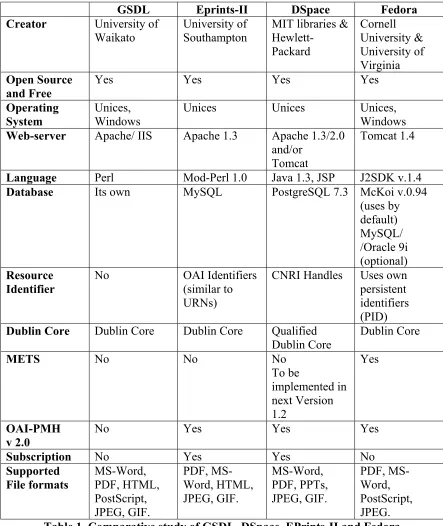
GSDL Eprints-II DSpace Fedora Creator University of
Waikato
University of Southampton
MIT libraries & Hewlett-Packard Cornell University & University of Virginia Open Source and Free
Yes Yes Yes Yes
Operating System
Unices, Windows
Unices Unices Unices, Windows
Web-server Apache/ IIS Apache 1.3 Apache 1.3/2.0 and/or
Tomcat
Tomcat 1.4
Language Perl Mod-Perl 1.0 Java 1.3, JSP J2SDK v.1.4
Database Its own MySQL PostgreSQL 7.3 McKoi v.0.94 (uses by default) MySQL/ /Oracle 9i (optional) Resource Identifier
No OAI Identifiers
(similar to URNs)
CNRI Handles Uses own persistent identifiers (PID)
Dublin Core Dublin Core Dublin Core Qualified Dublin Core
Dublin Core
METS No No No
To be implemented in next Version 1.2 Yes OAI-PMH v 2.0
No Yes Yes Yes
Subscription No Yes Yes No
Supported File formats MS-Word, PDF, HTML, PostScript, JPEG, GIF. PDF, MS-Word, HTML, JPEG, GIF. MS-Word, PDF, PPTs, JPEG, GIF. PDF, MS-Word, PostScript, JPEG.
Table 1. Comparative study of GSDL, DSpace, EPrints-II and Fedora Note: These features may change as newer versions of the software are made available
http://drtc.isibang.ac.in:9080/fedora/search. However, it is completely in experimental stage and has only the demo data supplied with the software. We hope to conduct better experiments once the version 1.2 is released around 10th December, 2003.
3.
DRTC Digital Library
The DRTC DL (5) is an institutional as well as community repository for the Library and Information Science Community. The DRTC digital repository contains a specialist collection of Library and Information Science resources. The objectives for the creation of the DRTC digital library are to:
• Provide an open and interoperable platform for information professionals to enable the sharing of resources worldwide
• Facilitate Digital Library research interactions through a discussion forum - the Digital Library Research Group (DLRG).
• Act as an Institutional Repository for DRTC and LIS community digital research materials
• To provide a platform for scholarly material in digital formats • To provide perpetual access to the collections.
• To act a Preservation archive for digital material available in the field of Library and Information Science.
The DRTC digital library was developed using the DSpace Digital Library System. It is OAI-PMH (Open Archives Initiatives-Protocol for Metadata Harvesting) Version 2-compliant. The metadata format used by is the Dublin Core Standard. The digital library uses a secure layer over http. (https://drtc.isibang.ac.in)
3.1. The DRTC Digital Library Repository
The DRTC Digital Library consists of three main communities of collections:
• Digital Library of Library and Information Science is a community collection. It includes DRTC Seminar Volumes which is a collection of digitized documents, of DRTC conference and seminar proceedings. Other collections include: Papers by LIS professionals, Ph.D. Theses/Dissertations, Power Point Presentations, Students Dissertations/Theses.
• DL in Indian Languages -- Demo site includes and provides access to multilingual documents in various Indian languages. These documents in Indian languages are Unicode-compliant. However, resources in languages other than the English and Indian languages can also be included by interested parties.
• Power Point Presentations: a collection of power point presentations on various topics in the field of Library and Information Science.
These individual communities of collections are searchable as well as browsable by Title, Author and by Date. The query language is discussed in another section.
4.
Major Features of DSpace
The following sections describe the three major features of DSpace. 1) Lucene Search Engine and query language
2) Handle System 3) OAI-PMH
4.1 Lucene Search Engine
Dspace uses Lucene Search Engine, which is a part of Apache Jakarta Project (6 ). The syntax of the queries is given below.
Exact Term
The search term can be a word or a phrase. One can use a search word, e.g. “information” or a phrase “information retrieval”.
Fielded Search:
One can search for a term in a particular field. e.g.: author:jaba
title:web keyword:ocr abstract:digital
Wild cards:
The symbol ‘?’ is used for a single character, as in ‘te?t’ that matches words like ‘test’, ‘text’ etc. The symbol ‘*’ is used for multiple characters matching, as in “inf*” matches with information, informetrics, etc.
Fuzzy Search
One of the popular fuzzy search algorithms is Levenshtein distance algorithm named after the Russian scientist Vladimir Levenshtein, who devised the algorithm in 1965. It is also called ‘Edit Distance algorithm’ (7).
Levenshtein Distance (LD) is a measure of the similarity between two strings, which we will refer to as the source string (s) and the target string (t). The distance is the number of deletions, insertions, or substitutions required to transform s into t. For example,
• If s is "test" and t is "test", then LD(s,t) = 0, because no transformations are needed. The strings are already identical.
The Levenshtein distance algorithm has been used in:
• Spell checking • Speech recognition • DNA analysis • Plagiarism detection
In Dspace implementation, one can use in the following way:
Example: author:sanker~
can match shankar
You can notice, the search word has ‘sa’ not ‘sha’ and also ‘ker’ not ‘kar’.
Proximity Search
Proximity search is used in a query to retrieve documents that have two words or phrases in proximity i.e. that they appear near to each other.
“information system”~3
Retrieves records where the words ‘information’ and ‘system’ are within the three words distance. Thus the above search retrieves the following titles.
Decision Support Systems : A tool for Information Managers
Thesaurus in an Automated Information Retrieval System
International Nuclear Information System: An Overview
Range search
If the search query is: author:[prasad to rao]
Then the system retrieves documents authored by names that fall between ‘prasad’ and ‘rao’.
Whereas, the query ‘author:{prasad to rao}’ excludes Prasad and Rao
Boosting a Term
Lucene provides the relevance level of matching documents based on the terms found. To boost a term use the caret, "^", symbol with a boost factor (a number) at the end of the term you are searching. The higher the boost factor, the more relevant the term will be.
Internet web
and you want the term "internet" to be more relevant, boost it using the ^ symbol along with the boost factor next to the term. You would type:
internet^5 web
By default, the boost factor is 1. Although the boost factor must be positive, it can be less than 1 (e.g. 0.2)
Boolean Search
Boolean ‘AND’, ‘OR’, ‘NOT’ are used for Boolean combinations. Boolean operators should be caps.
• ‘OR’ is the default conjunction operator. One can use ‘||’ instead of ‘OR’.
• Either ‘AND’ or ‘&&’ can be used for Boolean ‘AND’.
• Either ‘NOT’ or ‘!’ can be used for Boolean ‘NOT’.
4.2. Handle System
DSpace makes use of Handle system's global resolution feature, you willl also need to set up a Handle server, which is obtained from the central CNRI Handle site. (8)
A Handle server runs as a separate process that receives TCP requests from other Handle servers, and issues resolution requests to a global server or servers if a Handle entered locally does not correspond to some local content. The Handle protocol is based on TCP, so it will need to be installed on a server that can broadcast and receive TCP on port 2641.
Note that since the DSpace code manages individual Handles, administrative operations such as Handle creation and modification are not supported by DSpace's Handle server.
For the DRTC Digital library, we have registered with http://hdl.handle.net and they have assigned the numeric code 1849 for the site https://drtc.isibang.ac.in. Whenever a digital document is added to the collection, DSpace automatically assigns a unique document Id. Thus, one can refer any document in the Digital library without going to the DRTC digital library and searching for it. For example, if one enters in the browser, ‘http://hdl.handle.net/1849/50’, this gets automatically translated to
https://drtc.isibang.ac.in/handle/1849/50, and the browser displays the metadata of the document, by I.K. Ravichandra Rao on “Informatics : Scope, Definition, Methodology and Conceptual Questions”.
4.3. OAI-PMH
examples of OAI verbs display output in XML. Though they are not meant for the end-user, trying the following verbs give a better understanding of the harvesting protocol.
One can try some of the following OAI-PMH (8) verbs to see the DSpace’s output.
Identify: Returns general information about the archive and its policies (e.g., datestamp granularity)
Example: http://drtc.isibang.ac.in/oai/?verb=Identify
ListSets: Provide a listing of sets in which records may be organized (may be hierarchical, overlapping, or flat)
Example: http://drtc.isibang.ac.in/oai/?verb=ListSets
ListMetadataFormats: Lists metadata formats supported by the archive as well as their schema locations and namespaces
Example: http://drtc.isibang.ac.in/oai/?verb=ListMetadataFormats
ListIdentifiers : List headers for all items corresponding to the specified parameters
http://drtc.isibang.ac.in/oai/?verb=ListIdentifiers&metadataPrefix=oai_dc
GetRecord: Returns the metadata for a single item in the form of an OAI record
Example:
http://drtc.isibang.ac.in/oai/?verb=GetRecord&identifier=hdl:1849/99&metadataPrefix=o ai_dc
ListRecords: Retrieves metadata records for multiple items
http://drtc.isibang.ac.in/oai/?verb=ListRecords&metadataPrefix=oai_dc&from=2002-12-01
ListIdentifiers: To get a list of identifiers
http://drtc.isibang.ac.in/oai/?verb=ListIdentifiers&metadataPrefix=oai_dc&from=2002-12-01
Output:
http://drtc.isibang.ac.in/oai/?verb=GetRecord&identifier=hdl:1849/121&metadataPrefix= oai_dc
<?xml version="1.0" encoding="UTF-8" ?>
- <OAI-PMH xmlns="http://www.openarchives.org/OAI/2.0/"
xsi:schemaLocation="http://www.openarchives.org/OAI/2.0/
http://www.openarchives.org/OAI/2.0/OAI-PMH.xsd">
<responseDate>2003-11-30T19:27:24Z</responseDate>
<request verb="GetRecord" identifier="hdl:1849/121"
metadataPrefix="oai_dc">http://drtc.isibang.ac.in/oai/</request>
<GetRecord> <record> <header>
<identifier>hdl:1849/121</identifier>
<datestamp>2003-10-28T17:13:25Z</datestamp>
<setSpec>2:3</setSpec>
</header> <metadata>
<oai_dc:dc xmlns:oai_dc="http://www.openarchives.org/OAI/2.0/oai_dc/" xmlns:dc="http://purl.org/dc/elements/1.1/"
xmlns:xsi="http://www.w3.org/2001/XMLSchema-instance"
xsi:schemaLocation="http://www.openarchives.org/OAI/2.0/oai_dc/
http://www.openarchives.org/OAI/2.0/oai_dc.xsd">
<dc:contributor>Prasad A.R.D.</dc:contributor>
<dc:date>2003-10-25T19:21:39Z</dc:date>
<dc:date>2003-10-25T19:21:39Z</dc:date>
<dc:date>2002</dc:date>
<dc:identifier>http://hdl.handle.net/1849/121</dc:identifier>
<dc:description>The paper presents a Perl program for downloading MARC21
records from a Z3950 compliant target in a batch mode. Also discusses some of the open source software for Z39.50 protocol required for running the Perl program.</dc:description>
<dc:format>17782 bytes</dc:format>
<dc:format>application/pdf</dc:format>
<dc:language>en</dc:language>
<dc:publisher>DRTC</dc:publisher>
<dc:title>A Z39.50 Client for Retrieving MARC21 Records in Batch
Mode</dc:title>
<dc:type>Article</dc:type>
</oai_dc:dc> </metadata> </record> </GetRecord> </OAI-PMH>
If one wishes to test their digital libraries OAI-PMH compatibility, one way is to use Open Archives Initiative - Repository Explorer, available at the site:
http://oai.dlib.vt.edu/cgi-bin/Explorer/2.0-1.45/testoai. This performs various tests and reports the successes and errors on a given digital library.
5.
Conclusion
The DRTC is quite keen in pursuing authors in the field of Library and Information Science to upload copyright retained publications. If an author has not exclusively surrendered the copyright to a publisher, by default, the author is the copyright owner of his documents/ publications. With the escalating journal costs, scientists and researchers are becoming more interested in sending their publications to pre-prints archives, in a way circumventing the copyright infringement problems. Pre-prints archives make the information freely accessible to the fellow researchers and scientists, especially to those who are working in less funded organizations, where their libraries can not afford the astronomical cost of the journals.
6. References
1. DSpace at MIT. http://www.dspace.org
2. GNU Eprints Archive Software. http://software.eprints.org/
3. Greenstone Digital Library Software.
http://www.greenstone.org/english/home.html
4. The Fedora™ Project: An Open-Source Digital Repository Management System. http://www.fedora.info
5. DRTC Digital Library of Library and Information Science.
https://drtc.isibang.ac.in
6. The Apache Jakarta Project: Lucene. http://jakarta.apache.org/lucene/docs/ queryparsersyntax.html
7. Gilleland, Michael. Levenshtein Distance, in Three Flavors. http://www. merriampark.com/ld.htm
8. Handle System. http://hdl.handle.net