Volume 2 | Issue 2
Article 1
2015
Infotainment Interface Design for Automobiles
Ian R. Buck
University of Minnesota, Morris
Follow this and additional works at:
http://digitalcommons.morris.umn.edu/horizons
Part of the
Graphics and Human Computer Interfaces Commons
This Article is brought to you for free and open access by University of Minnesota Morris Digital Well. It has been accepted for inclusion in Scholarly Horizons: University of Minnesota, Morris Undergraduate Journal by an authorized administrator of University of Minnesota Morris Digital Well. For more information, please [email protected].
Recommended Citation
Buck, Ian R. (2015) "Infotainment Interface Design for Automobiles,"Scholarly Horizons: University of Minnesota, Morris Undergraduate Journal: Vol. 2: Iss. 2, Article 1.
Infotainment Interface Design for Automobiles
Ian R. Buck
Division of Science and Mathematics University of Minnesota, Morris Morris, Minnesota, USA 56267
[email protected]
ABSTRACT
In an increasingly connected, mobile world, situations where users do not interact with their digital lives are becoming few and far between. This can be a problem in situations that demand a user’s attention for their safety. Driving is one such situation, and it is doubly important because a signifi-cant portion of the western population drives on a daily ba-sis. Researchers have tested different interface designs with the goal of finding one that demands the least cognitive load while still allowing the user to perform the desired task effi-ciently. In this paper interfaces incorporating auditory cues, voice dictation, and air gestures are discussed.
Keywords
Infotainment, human-computer interaction, automobile, mul-tiple goal environments, text-to-speech, voice dictation, air gestures
1.
INTRODUCTION
Driving is a major part of many people’s lives. Most peo-ple who own a car use it on a daily basis to commute to work, shop, visit friends and family, and many other tasks. Mobility is a desirable luxury, and so it is understandable why many people invest in automobiles. At the same time, universal access to information and entertainment has be-come widespread with the rise of mobile computing. In the literature this area is called “infotainment,” a reference to the fact that both work and play reside in the same devices. Infotainment inherently demands a user’s attention; what good is information or entertainment if the user is not aware of it? Some types of infotainment require more attention than others. Driving also demands the user’s attention, with very serious consequences possible if that attention lapses. Because of this, there has been some concern over the use of infotainment devices in cars. Many states have laws for-bidding texting while driving, particularly among younger drivers. However, laws are often not enough to prevent peo-ple from using infotainment devices while driving [2]. This
This work is licensed under the Creative Commons Attribution-Noncommercial-Share Alike 3.0 United States License. To view a copy of this license, visit http://creativecommons.org/licenses/by-nc-sa/3.0/us/ or send a letter to Creative Commons, 171 Second Street, Suite 300, San Fran-cisco, California, 94105, USA.
UMM CSci Senior Seminar Conference, April 2015Morris, MN.
has led to a push by mobile developers and researchers to create interfaces that lessen the cognitive load on the user and allow the attention that would have been spent on the infotainment interface to be directed toward the act of driv-ing. When these interfaces are tested in a driving context, the act of driving is referred to as the primary task, while interacting with the infotainment system is referred to as the secondary task. In this paper three experiments that test different infotainment interfaces in automobiles are ex-amined.
2.
BACKGROUND
2.1
User Interfaces
The experiments discussed in this paper each focus on a different user interface. Some of them are available in con-sumer devices already and may be familiar to the reader. Others will be foreign. Note that the input and output meth-ods described in the following subsections are combined in a variety of ways in the experiments described in this paper.
2.1.1
Touchscreens
Touchscreens are found on many mobile devices. They are almost universally used in smartphones and tablets. Even handheld gaming devices frequently feature touchscreens. Touchscreens are also sometimes found in laptops and desk-tops, though that is far less common. As their name sug-gests, touchscreens involve users touching the screen, usually with their fingers. Sometimes the user taps an on-screen but-ton (analogous to a click when using a mouse), sometimes they drag their finger across the screen or flick their finger to scroll. Other commonly found actions include pinch-to-zoom, multi-finger rotation, and long pressing.
Touchscreens demand more of the user’s attention than many other interfaces. The user must use at least one hand for input. The user also usually has to look at the screen to avoid unintentionally tapping buttons, while some advanced users of phones with physical keys can compose messages without looking at the phone.
2.1.2
Voice Dictation
gener-ally less of an issue. Another reason voice dictation is not as common is because physically typing is often more accurate and easier to correct when mistakes are made. The ability to look away from the screen while composing a message is both a blessing and a curse for voice dictation.
2.1.3
Screen Reading
Screen reading is similar to voice dictation, only in the opposite direction. Screen reading involves text being read aloud by a synthetic voice. Often screen reading is utilized to make computer interfaces accessible to the visually impaired. In that case a synthetic voice not only reads text displayed on the screen, but also describes the context around it: what programs are open, where the user is in a menu, etc. Screen reading is also available in some eBook readers so the user can listen to a book without having to purchase an audio version recorded by a human.
Three types of screen reading are important in the ex-periments discussed here. Text-to-speechis the simplest: the text in question is read aloud exactly as it appears at a conversational pace. Spindex, short for “speech index” is a short auditory cue based on the pronunciation of the first letter of a menu item. For example, if a menu item started with the letter “D” the spindex of that menu item would say “DEE”.Spearconis similar to text-to-speech, but the phrase being read aloud is sped up, sometimes to the point where it is no longer comprehensible [1]. There are many online examples of each of these.
2.1.4
Air Gestures
Air gestures are a form of interaction that involve neither touching the device nor speaking to it. Instead sensors are used to detect the user’s motions. Sometimes the user’s whole body is used, as in the case of the Microsoft Kinect. Other times it is limited to one or both of the user’s hands, as in the case of the Leap Motion Controller. Sometimes users are required to perform specific gestures, other times the position of their body is what is measured by the computer. This interface category is still young and common practices are being developed.
2.2
Testing Distracted Driving
Due to the fact that these experiments are testing distrac-tion while driving, none of them place their test subjects in control of an actual car. Driving simulators are used in their stead. Due to budget constraints, all of the simula-tors used in the experiments discussed here were very low fidelity. They involved the participant being seated at a desk or table, with a computer monitor or television in front of them displaying the view out of the simulation’s windshield. A simple steering wheel and driving pedals rounded out the simulation setups.
Each experiment involved different measurements to de-termine how distracted a driver is.
2.2.1
Lane Changing Exercise
The lane change exercise is a task set within the simu-lation. The participant periodically passes road signs that indicate which lane the participant must drive in until they pass the next sign. The simulation is programmed with an ideal driving line, against which the participant’s path is compared; lower deviation is better. The participant is also assessed by how far before the sign they initiate their lane
change; the farther before the sign, the better.
2.2.2
Car Following Exercise
The car following exercise is also a task set within the simulation. The participant is instructed to follow a lead car down a straight road at a constant distance. The lead car breaks randomly throughout the simulation. In addition, a car behind the participant (visible in a rear-view mirror displayed at the top of the screen) uses its turn indicator randomly. When that happens, the participant is to push a button on the steering wheel. Measurements taken during the car following exercise include lateral and longitudinal deviation from the ideal position, response time to the lead car braking, and response time to the rear car using its turn indicator.
2.2.3
Eye Tracking
Eye tracking is a measurement that is independent from the task set within the simulation. The participant wears eye tracking glasses that record a video from the user’s point of view as well as where in that video frame the participant is looking. The justification for using eye tracking as a mea-surement of driving ability is found in the study in [3], which found a strong correlation between a driver’s gaze fixation and their driving performance.
3.
AUDITORY CUES
Touchscreens require the user to direct their gaze at the screen for a large portion of their use. One possible way to lessen this requirement is to add auditory cues to the in-terface. Gable et al. [1] performed an experiment to test this hypothesis in a driving environment. Most previous re-search on the effects of auditory cues focused solely on mea-surements taken within the driving simulations to determine performance of the primary task. Gable et al. specifically tested the effects of auditory cues on the driver’s gaze in addition to overall driving performance.
Their experiment had 26 participants, all of whom were students and had a driver’s license. The simulation ran a lane changing exercise. The secondary task involved finding a particular song in a list on a smartphone. The list was made up of 150 songs pulled from the Billboard Hot 100/Pop 100 charts in 2009.
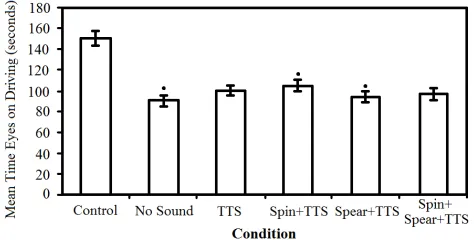
Five different audio cue scenarios were tested in the exper-iment: no sound; text-to-speech (TTS); spindex followed by to-speech (spindex+TTS); spearcon followed by text-to-speech (spearcon+TTS); and spindex followed by spearcon followed by text-to-speech (spindex+spearcon+TTS).
The main measurement made in this experiment was vi-sual fixation, as measured by eye tracking glasses. Any fix-ations that fell inside the screen displaying the driving sim-ulator were counted as gaze time on the primary task. Any fixations that fell outside the screen or fixations that were missing (due to the participant looking below the glasses) were counted as gaze time on the secondary task.
Figure 1: Mean time visual fixation on the primary task. The control was significantly higher than all other condi-tions. Spindex+TTS was significantly higher than no sound and spearcon+TTS, marked here with dots.
for a comparison of visual fixation on the primary task. Deviation from the ideal driving line was also analyzed. It was found that the control had significantly lower deviation than all other conditions. No significant difference was found among any other search conditions.
Data from the smartphone included the number of songs the participant found correctly, how many mistakes they made, and the mean time it took to find each song. Number of songs found and number of mistakes made showed no significant differences between the various search conditions. The mean time for spearcon+TTS was slightly lower than no sound and TTS.
The questionnaire regarding cognitive load showed signif-icant differences between several of the search conditions. The control had significantly lower cognitive load than all other conditions. Spindex+TTS was significantly lower than spearcon+TTS. All other conditions were statistically simi-lar. A significant number of participants also reported that they preferred spindex+TTS over other search conditions.
The various sets of data were also compared to each other to find correlations. Gaze time on the road was negatively correlated with both lane deviation and cognitive load. Cog-nitive load and lane deviation were positively correlated. These correlations support the use of gaze time and reported cognitive load as valid measurements of an interface’s affect on driving ability.
Out of the auditory cues tested in this experiment, spin-dex+TTS shows the most promise. It increased the gaze time on the road when compared to having no auditory cues; it did not adversely affect the user’s ability to perform the secondary task; and it resulted in a lower cognitive load than spearcon+TTS.
4.
TEXT-TO-SPEECH AND VOICE
DICTATION
Another possible solution to lessen the cognitive load on a driver is to do away with the visual distraction and physical interaction with the interface. Truschin et al. [5] performed an experiment to determine the viability of using text-to-speech and voice dictation as the sole infotainment interface. Their goal was twofold: determine if this interface reduced the impact of the secondary task on driving performance, and determine if the interface allowed the user to perform
the secondary task well.
Previous research indicated that existing speech interfaces in cars were not effective at reducing cognitive load for drivers, but none had attempted to improve on those interfaces. Tru-schin et al. hoped to improve the interface by using multiple text-to-speech voices to differentiate between different par-ticipants in an email conversation. They hypothesized that using multiple text-to-speech voices would make it easier for the driver to differentiate between people in an email conversation, and would lead to both improved driving per-formance and improved retention of information contained in the email conversations.
Their experiment had 112 participants. All were students and were experienced drivers (with an average of 5.5 years of driving experience). All had normal or corrected vision and no hearing impairments. Because of the nature of the interface, all participants demonstrated very good language skills.
Each participant was placed in one of two groups. One group heard the email conversations read in a single syn-thetic voice. The other group heard the email conversations read with different voices for each email sender. The genders of the voices were matched to the genders of the senders. Each participant interacted with four email conversations: two had low complexity text, two had high complexity text. The complexity of the texts was analyzed with the Flesch readability formula. This formula rates texts based on how many words it has per sentence and how many syllables are in each word.
During the experiment the participants performed a lane changing exercise (see Section 2.2.1 for more about the lane changing exercise) while listening and responding to email conversations. To avoid distractions, there was no visual interface provided. The participant used short speech com-mands to navigate through email threads, have them read, dictate responses, and send those responses. When a thread was read, all messages belonging to the thread were read in chronological order. This was done to avoid the participant accidentally reading individual messages out of context. The participants were told to role-play a person while composing their responses. The participants were given six facts about the character they were role-playing. This number was based on the research that says most people can memorize 7 +/-2 facts.
In addition to the driving performance measurements taken in the simulation, email task performance and cognitive load were measured. Surface-level comprehension was measured by a post-experiment questionnaire. Deep-level comprehen-sion was measured by assessing the completeness and cor-rectness of the responses to the emails. Cognitive load for each email thread was measured by a post-experiment ques-tionnaire using the NASA Task Load Index.
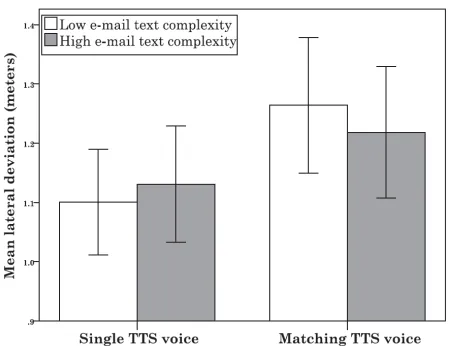
mes-(a) Mean lateral deviation during responding phase. Overall us-ing the sus-ingle TTS voice resulted in lower deviation than match-ing TTS voices.
(b) Mean lane change initiation during responding phase. Using single TTS voice resulted in faster reaction times than matching TTS voices, but the difference was not significant.
Figure 2: Mean lateral deviation and mean lane change ini-tiation during responding phase.
sages did not have significant differences between the TTS voice conditions.
Next is lane change initiation, or how far before the sign the participant began changing lanes. As expected, partic-ipants responded most quickly when not engaged with the secondary task. During the listening phase, neither TTS voice condition nor email text complexity had an affect on lane change initiation. During the responding phase, partic-ipants using the single TTS voice responded more quickly than participants using the matching TTS voices, though the difference was not significant (see Figure 2b).
Email comprehension showed significant differences be-tween the TTS voice conditions. Overall using matching TTS voices resulted in higher email comprehension than us-ing sus-ingle TTS voice. This was most true for low complexity messages (see Figure 3).
The subjective cognitive load showed a similar trend to email comprehension. For low complexity messages, single
Figure 3: Email comprehension. Matching TTS voices had much higher comprehension than single TTS voice for low complexity messages.
TTS voice resulted in higher cognitive load than matched TTS voices. For high complexity emails, there was no signif-icant difference. When comparing low and high complexity emails within the single TTS voice participants, there was no significant difference in cognitive load. However, match-ing TTS voices resulted in significantly lower cognitive load for low complexity emails. When taken all together, higher complexity emails resulted in significantly higher cognitive load than low complexity emails.
It is difficult to know based on the experiment how voice dictation and TTS compares to using a physical interface, as the researchers only compared two different TTS voice conditions. Of course, the secondary action being performed (reading an email conversation and composing a response) would be impossible to do safely with a visual interface. The data collected shows that using matched TTS voices to differentiate between message senders was a hindrance to the primary task, in particular when the participant was composing a response to low complexity messages. On the other hand, email comprehension was much higher when using matched TTS voices. Likewise, cognitive load was lower overall when using matched TTS voices.
5.
AIR GESTURES
Air gestures offer the possibility of reducing visual fixa-tion on the secondary task by eliminating the need to touch physical controls. May, Gable, and Walker [4] performed an experiment to compare the performance of air gestures to that of touchscreen interfaces.
The Leap Motion Controller, a consumer gesture detector, was used in their experiment.The researchers used a selective mapping approach when designing their interface; instead of having a set of universal gestures, their interface had a small set of gestures that performed different tasks depending on the context. Because of this, a menu system had to be used to navigate between different contexts.
the user held their hand in a particular vertical section of the Leap’s detection area: holding the hand in the upper third scrolled up, holding the hand in the lower third scrolled down, and holding the hand in the middle third kept the se-lection on the current item. This implementation was slower than a one-to-one mapping of the hand’s vertical position to the selector’s position. However, in preliminary studies the one-to-one approach was found to be too distracting. In or-der to select the currently highlighted item, the user pushed their hand forward. In order to go back to the previous menu, the user swiped their hand to the right.
There were two situations that commonly resulted in the computer detecting gestures that the user did not intend: soon after the user placed their hand in the detection area, and as the user removed their hand from the detection area. To prevent the first situation, a 500ms delay was imple-mented between when the user’s hand was first detected and when the computer would start accepting gestures. To prevent the second situation, gestures were disallowed when the user’s hand had significant backward velocity.
An auditory feedback system was developed to help the user know when the system was performing certain tasks. A “latch” sound indicated that the hand had been recog-nized by the detector; tones indicated that the hand was entering a different vertical zone (upper, middle, or lower); when scrolling, each item in the menu had a different tone associated with its position on the list; a menu item that was paused on would be read aloud with a TTS voice; tradi-tional feedback sounds were used for selection, going back, and errors. In order to assess the effectiveness of this sys-tem, a version of the interface without auditory feedback was included.
There were 26 participants in their experiment. All were undergraduate students with driver’s licenses and all had normal or corrected vision and hearing. The driving sim-ulation ran the car following task (see Section 2.2.2). The secondary task had the participant carry out menu selections consisting of 1 to 4 sequential targets. Each participant com-pleted each of these tasks with three different search condi-tions: air gestures with sound (AG/S), air gestures without sound (AG/NS), and via a direct touch interface (DT). The direct touch interface did not have auditory feedback. Each participant also completed the car following task without a secondary task as a baseline.
The data from the driving simulator included deviation from the desired position behind the lead car, response time to braking, and response time to turn signals from the fol-lowing car. The deviation was higher in all search conditions than the baseline, but there was no significant difference be-tween the search conditions. There were no significant dif-ferences between any driving conditions for response time to braking or response time to turn signals.
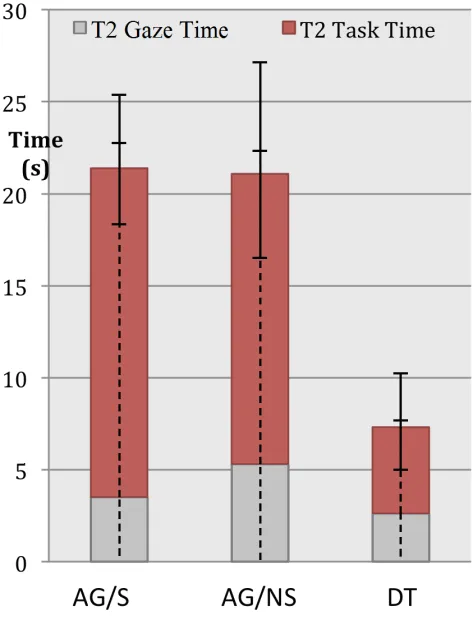
Visual fixation was also recorded. Gaze times on the sec-ondary task were highest for AG/NS, followed by AG/S, and lowest for DT (see Figure 4). A trend noted by the researchers is that AG/S allowed participants to distribute their total gaze time over more glances, giving each individ-ual glance less time. According to the researchers, this is a desirable trait.
Efficiency in performing the secondary task was measured by the time it took to complete the task and number of er-rors made in the task. DT was both faster and had fewer mistakes than the AG search conditions. There was no
sig-Figure 4: Total time and gaze time for secondary tasks.
nificant difference between the AG search conditions. Finally, overall workload was measured in a post experi-ment questionnaire using the NASA Task Load Index. The AG search conditions showed higher workload than DT, though it is unclear if this is a result of inexperience with AG, or if there is a fundamental flaw in AG interfaces. It is worth noting that even participants who claimed proficiency with AG preferred using DT.
6.
DISCUSSION
The experiments discussed above examine the safety of their respective user interfaces, but there are other consid-erations to take into account when discussing the viability of each interface. First, it is important that users enjoy using the interface more than the alternatives. No matter how safe a particular interface is, it would be irrelevant if the majority of users do not adopt it. Second, each interface is viable for different types of tasks a user may want to perform. Third, each interface has different hardware requirements. Some are easily integrated into existing consumer devices, while others require car manufacturers to integrate the interface into the vehicle itself. These requirements will also deter-mine whether or not users will encounter the interface in other areas of their lives, which will affect their familiarity with the interface.
spindex+TTS over the other search conditions, including no auditory cues. Also, auditory cues can be introduced imme-diately, as it is a mere matter of altering the software avail-able on consumer infotainment devices. It would be best if mobile operating systems like Android and iOS integrated these cues, perhaps creating a global “car mode” for the de-vice that reads list and menu items out loud. Otherwise, it is up to individual app developers to build it into their products. Car manufacturers can also include auditory cues in any infotainment interfaces that they design for their ve-hicles. Auditory cues are best suited to tasks such as menu navigation or searching through a list, not for composing messages or other complex tasks.
Utilizing both TTS and voice dictation (Section 4) to do away with a visible interface entirely makes intuitive sense. It is conceptually similar to having a passenger interacting with the driver’s phone while the driver tells them what to do. Even so, it is difficult to know how likely users are to adopt this interface design. This type of interface ex-ists in many modern cars, but is usually limited to simple commands like “Call [contact’s name]”. Some mobile de-vices have many actions that can be performed with voice commands, but those commands do not extend to every-thing a user may want to do. This also illustrates that voice dictation fills a different use case than auditory cues or air gestures. Instead of navigating through a menu or list, the user simply says a command that performs the same action no matter the current context.
Air gesture interfaces (Section 5) face many more barriers to adoption than the other interfaces discussed here. Unfor-tunately air gesture interfaces were not popular among the participants, and are unlikely to be adopted by most users. The interface is much slower than touchscreen interfaces, and it is tiring to hold one’s hand in a position for long peri-ods of time. Like auditory cues, air gestures are best suited to navigating menus and searching through lists. Air gesture interfaces require much more advanced technology than au-ditory cues or voice dictation. No mobile consumer devices currently support air gestures, and so gesture recognition sensors would have to be built into automobiles.
7.
CONCLUSION
It is important when learning about the possibilities of infotainment interfaces in automobiles to keep in mind that these interfaces do not change the fact that in many areas it is still illegal to interact with one’s phone, whether there is a visual interface or not. In fact, the experiments discussed here support the existence of those laws because none of the interfaces tested brought driving performance significantly close to the driving performance when no secondary task was performed.
8.
ACKNOWLEDGMENTS
Many thanks to my adviser Kristin Lamberty and my pro-fessor Elena Machkasova for their feedback and for keeping me on track. And thanks to everyone who helped revise this paper.
9.
REFERENCES
[1] T. M. Gable, B. N. Walker, H. R. Moses, and R. D. Chitloor. Advanced auditory cues on mobile phones help keep drivers’ eyes on the road. InProceedings of
the 5th International Conference on Automotive User Interfaces and Interactive Vehicular Applications, AutomotiveUI ’13, pages 66–73, New York, NY, USA, 2013. ACM.
[2] J. Heikkinen, E. M¨akinen, J. Lylykangas, T. Pakkanen, K. V¨a¨an¨anen-Vainio-Mattila, and R. Raisamo. Mobile devices as infotainment user interfaces in the car: Contextual study and design implications. In
Proceedings of the 15th International Conference on Human-computer Interaction with Mobile Devices and Services, MobileHCI ’13, pages 137–146, New York, NY, USA, 2013. ACM.
[3] Y. Liang, J. D. Lee, and L. Yekhshatyan. How dangerous is looking away from the road? algorithms predict crash risk from glance patterns in naturalistic driving.Human Factors: The Journal of the Human Factors and Ergonomics Society, 54(6):1104–1116, 2012. [4] K. R. May, T. M. Gable, and B. N. Walker. A
multimodal air gesture interface for in vehicle menu navigation. InAdjunct Proceedings of the 6th International Conference on Automotive User Interfaces and Interactive Vehicular Applications, AutomotiveUI ’14, pages 1–6, New York, NY, USA, 2014. ACM.