APACHE
SECURITY
The Complete Guide to Securing
Your Apache Web Server
APACHE
SECURITY
The Complete Guide to Securing
Your Apache Web Server
Apache Security
Apache Security
by Ivan Ristić
Copyright © 2004, 2005 Ivan Ristić
First published in March 2005. Digital reprint published in April 2010. Revision 199.
Feisty Duck Limited www.feistyduck.com [email protected]
Address:
6 Acantha Court Montpelier Road London W5 2QP United Kingdom
Copyeditor: Mary Dageforde
Technical reviewers: Rich Bowen and Anton Chuvakin
All rights reserved. No part of this publication may be reproduced, stored in a retrieval system, or transmitted, in any form or by any means, without the prior permission in writing of the publisher.
The author and publisher have taken care in preparation of this book, but make no expressed or implied warranty of any kind and assume no responsibility for errors or omissions. No liability is assumed for incidental or consequential damages in connection with or arising out of the use of the information or programs contained herein.
Feisty Duck Digital Book Distribution www.feistyduck.com
Licensed for the exclusive use of:
Table of Contents
Preface to Digital Reprint . . . xi Preface . . . xiii
Audience xiii
Scope xiv
Contents of This Book xv
Online Companion xvii
Conventions Used in This Book xvii
Programming Conventions xviii
Typesetting Conventions xviii
Using Code Examples xviii
Acknowledgments xix
1. Apache Security Principles . . . 1
1.1. Security Definitions 1
1.1.1. Essential Security Principles 2
1.1.2. Common Security Vocabulary 4
1.1.3. Security Process Steps 4
1.1.4. Threat Modeling 5
1.1.5. System-Hardening Matrix 7
1.1.6. Calculating Risk 10
1.2. Web Application Architecture Blueprints 10
1.2.1. User View 11
1.2.2. Network View 12
1.2.3. Apache View 13
2. Installation and Configuration . . . 15
2.1. Installation 16
2.1.1. Source or Binary 16
2.1.2. Static Binary or Dynamic Modules 19
2.1.3. Folder Locations 20
iv
2.2. Configuration and Hardening 26
2.2.1. Setting Up the Server User Account 27 2.2.2. Setting Apache Binary File Permissions 27
2.2.3. Configuring Secure Defaults 28
2.2.4. Enabling CGI Scripts 31
2.2.5. Logging 32
2.2.6. Setting Server Configuration Limits 33
2.2.7. Preventing Information Leaks 35
2.3. Changing Web Server Identity 37
2.3.1. Changing the Server Header Field 38
2.3.2. Removing Default Content 40
2.4. Putting Apache in Jail 41
2.4.1. Tools of the chroot Trade 43
2.4.2. Using chroot to Put Apache in Jail 46
2.4.3. Using the chroot(2) Patch 50
2.4.4. Using mod_security or mod_chroot 51
3. PHP . . . 55
3.1. Installation 55
3.1.1. Using PHP as a Module 55
3.1.2. Using PHP as a CGI 57
3.1.3. Choosing Modules 58
3.2. Configuration 59
3.2.1. Disabling Undesirable Options 59
3.2.2. Disabling Functions and Classes 62
3.2.3. Restricting Filesystem Access 62
3.2.4. Setting Logging Options 63
3.2.5. Setting Limits 64
3.2.6. Controlling File Uploads 65
3.2.7. Increasing Session Security 66
3.2.8. Setting Safe Mode Options 67
3.3. Advanced PHP Hardening 69
3.3.1. PHP 5 SAPI Input Hooks 70
3.3.2. Hardened-PHP 70
4. SSL and TLS . . . 73
4.1. Cryptography 74
4.1.1. Symmetric Encryption 75
4.1.2. Asymmetric Encryption 77
4.1.3. One-Way Encryption 78
4.1.5. How It All Falls into Place 82
4.2. SSL 83
4.2.1. SSL Communication Summary 84
4.2.2. Is SSL Secure? 84
4.3. OpenSSL 87
4.4. Apache and SSL 90
4.4.1. Installing mod_ssl 90
4.4.2. Generating Keys 91
4.4.3. Generating a Certificate Signing Request 92
4.4.4. Signing Your Own Certificate 93
4.4.5. Getting a Certificate Signed by a CA 94
4.4.6. Configuring SSL 95
4.5. Setting Up a Certificate Authority 97
4.5.1. Preparing the CA Certificate for Distribution 100
4.5.2. Issuing Server Certificates 101
4.5.3. Issuing Client Certificates 102
4.5.4. Revoking Certificates 103
4.5.5. Using Client Certificates 103
4.6. Performance Considerations 104
4.6.1. OpenSSL Benchmark Script 104
4.6.2. Hardware Acceleration 106
5. Denial of Service Attacks . . . 107
5.1. Network Attacks 109
5.1.1. Malformed Traffic 109
5.1.2. Brute-Force Attacks 109
5.1.3. SYN Flood Attacks 110
5.1.4. Source Address Spoofing 112
5.1.5. Distributed Denial of Service Attacks 112
5.1.6. Reflection DoS Attacks 113
5.2. Self-Inflicted Attacks 114
5.2.1. Badly Configured Apache 114
5.2.2. Poorly Designed Web Applications 116
5.2.3. Real-Life Client Problems 118
5.3. Traffic Spikes 119
5.3.1. Content Compression 119
5.3.2. Bandwidth Attacks 119
5.3.3. Cyber-Activism 120
5.3.4. The Slashdot Effect 120
vi
5.4.1. Apache Vulnerabilities 121
5.4.2. Brute-Force Attacks 122
5.4.3. Programming Model Attacks 123
5.5. Local Attacks 124
5.5.1. Process Limits 125
5.5.2. Process Accounting 126
5.5.3. Kernel Auditing 126
5.6. Traffic-Shaping Modules 127
5.7. DoS Defense Strategy 128
6. Sharing Servers . . . 129
6.1. Sharing Problems 129
6.1.1. File Permission Problems 130
6.1.2. Dynamic-Content Problems 132
6.1.3. Sharing Resources 137
6.1.4. Same Domain Name Problems 137
6.1.5. Information Leaks on Execution Boundaries 139
6.2. Distributing Configuration Data 142
6.3. Securing Dynamic Requests 144
6.3.1. Enabling Script Execution 144
6.3.2. Setting CGI Script Limits 146
6.3.3. Using suEXEC 146
6.3.4. FastCGI 153
6.3.5. Running PHP as a Module 155
6.4. Working with Large Numbers of Users 155
6.4.1. Web Shells 156
6.4.2. Dangerous Binaries 156
7. Access Control . . . 159
7.1. Overview 159
7.2. Authentication Methods 161
7.2.1. Basic Authentication 161
7.2.2. Digest Authentication 163
7.2.3. Form-Based Authentication 164
7.3. Access Control in Apache 166
7.3.1. Basic Authentication Using Plaintext Files 166 7.3.2. Basic Authentication Using DBM Files 168
7.3.3. Digest Authentication 169
7.3.4. Certificate-Based Access Control 169
7.3.5. Network Access Control 170
7.3.7. Final Access Control Notes 174
7.4. Single Sign-on 178
7.4.1. Web Single Sign-on 179
7.4.2. Simple Apache-Only Single Sign-on 180
8. Logging and Monitoring . . . 183
8.1. Apache Logging Facilities 183
8.1.1. Request Logging 184
8.1.2. Error Logging 188
8.1.3. Special Logging Modules 190
8.1.4. Audit Log 192
8.1.5. Performance Measurement 194
8.1.6. File Upload Interception 195
8.1.7. Application Logs 195
8.1.8. Logging as Much as Possible 196
8.2. Log Manipulation 200
8.2.1. Piped Logging 200
8.2.2. Log Rotation 202
8.2.3. Issues with Log Distribution 204
8.3. Remote Logging 205
8.3.1. Manual Centralization 205
8.3.2. Syslog Logging 206
8.3.3. Database Logging 208
8.3.4. Distributed Logging with the Spread Toolkit 209
8.4. Logging Strategies 211
8.5. Log Analysis 212
8.6. Monitoring 214
8.6.1. File Integrity 214
8.6.2. Event Monitoring 214
8.6.3. Web Server Status 220
9. Infrastructure . . . 231
9.1. Application Isolation Strategies 232
9.1.1. Isolating Applications from Servers 232
9.1.2. Isolating Application Modules 232
9.1.3. Utilizing Virtual Servers 233
9.2. Host Security 234
9.2.1. Restricting and Securing User Access 234
9.2.2. Deploying Minimal Services 235
9.2.3. Gathering Information and Monitoring Events 236
viii
9.2.5. Advanced Hardening 239
9.2.6. Keeping Up to Date 240
9.3. Network Security 240
9.3.1. Firewall Usage 241
9.3.2. Centralized Logging 241
9.3.3. Network Monitoring 242
9.3.4. External Monitoring 243
9.4. Using a Reverse Proxy 244
9.4.1. Apache Reverse Proxy 245
9.4.2. Reverse Proxy by Network Design 248
9.4.3. Reverse Proxy by Redirecting Network Traffic 248
9.5. Network Design 249
9.5.1. Reverse Proxy Patterns 250
9.5.2. Advanced Architectures 254
10. Web Application Security . . . 265
10.1. Session Management Attacks 267
10.1.1. Cookies 267
10.1.2. Session Management Concepts 269
10.1.3. Keeping in Touch with Clients 269
10.1.4. Session Tokens 270
10.1.5. Session Attacks 270
10.1.6. Good Practices 272
10.2. Attacks on Clients 273
10.2.1. Typical Client Attack Targets 273
10.2.2. Phishing 273
10.3. Application Logic Flaws 275
10.3.1. Cookies and Hidden Fields 275
10.3.2. POST Method 276
10.3.3. Referrer Check Flaws 277
10.3.4. Process State Management 277
10.3.5. Client-Side Validation 278
10.4. Information Disclosure 278
10.4.1. HTML Source Code 278
10.4.2. Directory Listings 279
10.4.3. Verbose Error Messages 281
10.4.4. Debug Messages 282
10.5. File Disclosure 283
10.5.1. Path Traversal 283
10.5.3. Source Code Disclosure 284
10.5.4. Predictable File Locations 285
10.6. Injection Flaws 287
10.6.1. SQL Injection 288
10.6.2. Cross-Site Scripting 293
10.6.3. Command Execution 297
10.6.4. Code Execution 298
10.6.5. Preventing Injection Attacks 299
10.7. Buffer Overflows 300
10.8. Evasion Techniques 301
10.8.1. Simple Evasion Techniques 301
10.8.2. Path Obfuscation 302
10.8.3. URL Encoding 303
10.8.4. Unicode Encoding 304
10.8.5. Null-Byte Attacks 305
10.8.6. SQL Evasion 307
10.9. Web Application Security Resources 307
10.9.1. General Resources 307
10.9.2. Web Application Security Resources 308
11. Web Security Assessment . . . 309
11.1. Black-Box Testing 310
11.1.1. Information Gathering 311
11.1.2. Web Server Analysis 322
11.1.3. Web Application Analysis 330
11.1.4. Attacks Against Access Control 332
11.1.5. Vulnerability Probing 333
11.2. White-Box Testing 334
11.2.1. Architecture Review 335
11.2.2. Configuration Review 336
11.2.3. Functional Review 340
11.3. Gray-Box Testing 343
12. Web Intrusion Detection . . . 345
12.1. Evolution of Web Intrusion Detection 345
12.1.1. Is Intrusion Detection the Right Approach? 347 12.1.2. Log-Based Web Intrusion Detection 347 12.1.3. Real-Time Web Intrusion Detection 348 12.1.4. Web Intrusion Detection Features 348
12.2. Using mod_security 352
x
12.2.2. More Configuration Advice 363
12.2.3. Deployment Guidelines 366
12.2.4. Detecting Common Attacks 369
12.2.5. Advanced Topics 374
A. Tools . . . 381
A.1. Learning Environments 381
A.1.1. WebMaven 382
A.1.2. WebGoat 383
A.2. Information-Gathering Tools 385
A.2.1. Online Tools at TechnicalInfo 385
A.2.2. Netcraft 385
A.2.3. Sam Spade 386
A.2.4. SiteDigger 387
A.2.5. SSLDigger 388
A.2.6. Httprint 389
A.3. Network-Level Tools 390
A.3.1. Netcat 390
A.3.2. Stunnel 391
A.3.3. Curl 392
A.3.4. Network-Sniffing Tools 393
A.3.5. SSLDump 393
A.4. Web Security Scanners 394
A.4.1. Nikto 394
A.4.2. Nessus 395
A.5. Web Application Security Tools 396
A.5.1. Paros 396
A.5.2. Commercial Web Security Tools 397
A.6. HTTP Programming Libraries 398
Preface to Digital Reprint
Apache Security was originally published by O’Reilly in 2005, and it was very well received.
Soon after publication, it was heralded as the best Apache security resource, according to many. Contrary to my expectations, it also aged very gracefully, which is probably why it continues to be popular. As much as I wanted to release an update, I struggled for years to justify a second edition. When I finally could, it turned out that O’Reilly was not too keen on the idea.
That was an opportunity for me to do things differently. As much as I enjoyed working on
Apache Security a few years ago, the process was traditional and slow. It was a new digital age
and we had all the advanced technology at our fingertips, yet we were still producing books the old-fashioned way. I wanted more. Above all, I wanted the ability to update my books whenever I felt the need. Unable to find a publisher that supported the process I wanted, I started my own publishing company. Feisty Duck, as my wife and I named it, is a publisher of computer books, with special focus on continuous publishing and digital delivery.
We are now releasing what is pretty much the original Apache Security, in digital format only, in order to establish a starting point for the second edition, which will be published by Feisty Duck at some point in the future. The known errors in the book have been fixed. If further errors are discovered, they will be fixed, too, and the digital version will be updated.
You may wonder whether the first edition of Apache Security is still worth paying for. After all, it has been five years since the first edition. Here’s what I think:
• The only part of the book that is completely obsolete is the ModSecurity chapter. I have only myself to blame for that, because I completely rewrote ModSecurity itself in 2006. If ModSecurity is what you’re after, you should look at my other book,
ModSecu-rity Handbook (Feisty Duck, 2010). You will find more information about it at https:// www.feistyduck.com.
xii Preface to Digital Reprint
read several books to get decent coverage of web application security, and complete coverage is virtually impossible.
• The same can be said for Chapter 11, “Web Security Assessment”: it’s still good, but it’s just not enough any more.
• The rest of the book remains pretty solid. Five years later, some aspects are not entirely accurate, but what is in the book is still very useful. You will find that the general prin-ciples of web server security haven’t changed at all.
Preface
There is something about books that makes them one of the most precious things in the world. I’ve always admired people who write them, and I have always wanted to write one myself. The book you are now holding is a result of many years of work with the referenced Internet technologies and almost a year of hard work putting the words on paper. The preface may be the first thing you are reading, but it is the last thing I am writing. And I can tell you it has been quite a ride.
Aside from my great wish to be a writer in the first place, which only helped me in my effort to make the book as good as possible, there is a valid reason for its existence: a book of this profile is greatly needed by all those who are involved with web security. I, and many of the people I know, need it. I’ve come to depend on it in my day-to-day work, even though at the time of this writing it is not yet published. The reason this book is needed is that web security is affected by some diverse factors, which interact with each other in web systems and affect their security in varied, often subtle ways. Ultimately, what I tried to do was create one book to contain all the information one needs to secure an Apache-based system. My goal was to write a book I could safely recommend to anyone who is about to deploy on Apache, so I would be confident they would succeed provided they followed the advice in the book. You have, in your hands, the result of that effort.
Audience
xiv Preface
This book does not assume previous knowledge of security. Security concepts relevant for discussion are introduced and described wherever necessary. This is especially true for web application security, which has its own chapter.
The main thing you should need to do your job in addition to this book, is the Apache web server’s excellent reference documentation (http://httpd.apache.org/docs/).
The book should be especially useful for the following groups:
System administrators
Their job is to make web systems secure. This book presents detailed guidance that enables system administrators to make informed decisions about which measures to take to enhance security.
Programmers
They need to understand how the environment in which their applications are deployed works. In addition, this book shows how certain programming errors lead to vulnera-bilities and tells what to do to avoid such problems.
System architects
They need to know what system administrators and programmers do, and also need to understand how system design decisions affect overall security.
Web security professionals
They need to understand how the Apache platform works in order to assess the security of systems deployed on it.
Scope
At the time of this writing, two major Apache branches are widely used. The Apache 1.x branch is the well-known, and well-tested, web server that led Apache to dominate the web server market. The 2.0.x branch is the next-generation web server, but one that has suffered from the success of the previous branch. Apache 1 is so good that many of its users do not intend to upgrade in the near future. A third branch, 2.2.x will eventually become publicly available. Although no one can officially retire an older version, the new 2.2.x branch is a likely candidate for a version to replace Apache 1.3.x. The Apache branches have few configuration differences. If you are not a programmer (meaning you do not develop modules to extend Apache), a change from an older branch to a newer branch should be straightforward.
This book covers both current Apache branches. Wherever there are differences in the configuration for the two branches, such differences are explained. The 2.2.x branch is configured in practically the same way as the 2.0.x branch, so when the new branch goes officially public, the book will apply to it equally well.
you are running some Unix flavor, Windows, or some other operating system. However, in most cases I will assume you are running Apache on a Unix platform. Though Apache runs well on Windows, Unix platforms offer another layer of configuration options and security features that make them a better choice for security-conscious deployments. Where examples related to the operating system are given, they are typically shown for Linux. But such exam-ples are in general very easy to translate to other Unix platforms and, if you are running a different Unix platform, I trust you will have no problems with translation.
Contents of This Book
While doing research for the book, I discovered there are two types of people: those who read books from cover to cover and those who only read those parts that are of immediate interest. The book’s structure (12 chapters and 1 appendix) aims to satisfy both camps. When read sequentially, the book examines how a secure system is built from the ground up, adding layer upon layer of security. However, since every chapter was written to cover a single topic in its entirety, you can read a few selected chapters and leave the rest for later. Make sure to read the first chapter, though, as it establishes the foundation for everything else.
Chapter 1, Apache Security Principles, presents essential security principles, security terms, and a view of security as a continuous process. It goes on to discuss threat modeling, a tech-nique used to analyze potential threats and establish defenses. The chapter ends with a dis-cussion of three ways of looking at a web system (the user view, the network view, and the Apache view), each designed to emphasize a different security aspect. This chapter is dedicat-ed to the strategy of deploying a system that is creatdedicat-ed to be secure and that is kept secure throughout its lifetime.
Chapter 2, Installation and Configuration, gives comprehensive and detailed coverage of the Apache installation and configuration process, where the main goal is not to get up and run-ning as quickly as possible but to create a secure installation on the first try. Various harderun-ning techniques are presented along with discussions of the advantages and disadvantages of each.
Chapter 3, PHP, discusses PHP installation and configuration, following the same style es-tablished in Chapter 2. It begins with a discussion of and installation guidance for common PHP deployment models (as an Apache module or as a CGI), continues with descriptions of security-relevant configuration options (such as the safe mode), and concludes with advanced hardening techniques.
xvi Preface
Chapter 5, Denial of Service Attacks, discusses some dangers of establishing a public presence on the Internet. A denial of service attack is, arguably, one of the worst problems you can ex-perience. The problems discussed here include network attacks, configuration and program-ming issues that can make you harm your own system, local (internal) attacks, weaknesses of the Apache processing model, and traffic spikes. This chapter describes what can happen, and the actions you can take, before such attacks occur, to make your system more secure and reduce the potential effects of such attacks. It also gives guidance regarding what to do if such attacks still occur in spite of your efforts.
Chapter 6, Sharing Servers, discusses the problems that arise when common server resources must be shared with people you may not trust. Resource sharing usually leads to giving other people partial control of the web server. I present several ways to give partial control without giving too much. The practical problems this chapter aims to solve are shared hosting, work-ing with developers, and hostwork-ing in environments with large numbers of system users (e.g., students).
Chapter 7, Access Control, discusses the theory and practice of user identification, authentica-tion (verifying a user is allowed to access the system), and authorizaauthentica-tion (verifying a user is allowed to access a particular resource). For Apache, this means coverage of HTTP-defined authentication protocols (Basic and Digest authentication), form-based and certificate-based authentication, and network-level access control. The last part of the chapter discusses single sign-on, where people can log in once and have access to several different resources.
Chapter 8, Logging and Monitoring, describes various ways Apache can be configured to ex-tract interesting and relevant pieces of information, and record them for later analysis. Spe-cialized logging modules, such as the ones that help detect problems that cause the server to crash, are also covered. The chapter then addresses log collection, centralization, and analy-sis. The end of the chapter covers operation monitoring, through log analysis in batch or re-al-time. A complete example of using mod_status and RRDtool to monitor Apache is present-ed.
Chapter 9, Infrastructure, discusses a variety of security issues related to the environment in which the Apache web server exists. This chapter touches upon network security issues and gives references to web sites and books in which the subject is covered in greater detail. I also describe how the introduction of a reverse proxy concept into network design can serve to enhance system security. Advanced (scalable) web architectures, often needed to securely deploy high-traffic systems, are also discussed here.
Chapter 11, Web Security Assessment, establishes a set of security assessment procedures. Black-box testing is presented for assessment from the outside. White-box and gray-box test-ing procedures are described for assessment from the inside.
Chapter 12, Web Intrusion Detection, builds on the material presented in previous chapters to introduce the concept of web intrusion detection. While the first part of this chapter discusses theory, the second part describes how Apache and mod_security can be used to establish a fully functional open source web intrusion detection system.
Appendix A, Tools, describes some of the more useful web security tools that save time when time is at a premium.
Online Companion
A book about technology cannot be complete without a companion web site. To fully appre-ciate this book, you need to visit http://www.apachesecurity.net, where I am making the relevant material available in electronic form. Some of the material available is:
• Configuration data examples, which you can copy and paste to use directly in your configuration.
• The tools I wrote for the book, together with documentation and usage examples. Re-quest new features, and I will add them whenever possible.
• The links to all resources mentioned in the book, grouped according to their appear-ance in chapters. This will help you avoid retyping long links. I intend to maintain the links in working order and to provide copies of resources, should they become unavail-able elsewhere.
I hope to expand the companion web site into a useful Apache security resource with a life on its own. Please help by sending your comments and your questions to the email address shown on the web site. I look forward to receiving feedback and shaping the future book releases according to other people’s experiences.
Conventions Used in This Book
Throughout this book certain stylistic conventions are followed. Once you are accustomed to them, you will distinguish between comments, commands you need to type, values you need to supply, and so forth.
xviii Preface
Programming Conventions
In command prompts shown for Unix systems, prompts that begin with # indicate that you need to be logged in as the superuser (root username); if the prompt begins with $, then the command can be typed by any user.
Typesetting Conventions
The following typographical conventions are used in this book:
• Italic indicates new terms, URLs, email addresses, filenames, file extensions, path-names, directories, userpath-names, group path-names, module path-names, CGI script path-names, pro-grams, and Unix utilities.
• Constant width indicates commands, options, switches, variables, functions, meth-ods, HTML tags, HTTP headers, status codes, MIME content types, directives in configuration files, the contents of files, code within body text, and the output from commands.
• Constant width bold shows commands or other text that should be typed literally by the user.
• Constant width italic shows text that should be replaced with user-supplied val-ues.
Note
This icon signifies a tip, suggestion, or general note.
Warning
This icon indicates a warning or caution.
Using Code Examples
This book is here to help you get your job done. In general, you may use the code in this book in your programs and documentation. You do not need to contact us for permission unless you’re reproducing a significant portion of the code. For example, writing a program that uses several chunks of code from this book does not require permission. Selling or distribut-ing a CD-ROM of examples from our books does require permission. Answerdistribut-ing a question by citing this book and quoting example code does not require permission. Incorporating a significant amount of example code from this book into your product’s documentation does require permission.
Acknowledgments
This book would not exist, be complete, or be nearly as good if it were not for the work and help of many people. My biggest thanks go to the people believing in the open source philos-ophy, the Apache developers, and the network and application security communities. It is a privilege to be able to work with you. A book like this cannot exist in isolation. Others have made it possible to write this book by allowing me to stand on their shoulders. Much of their work is referenced throughout the book, but it is impossible to mention it all.
Some people have had a more direct impact on my work. I thank Nathan Torkington and Tatiana Diaz for signing me up with O’Reilly and giving me the opportunity to have my book published by a publisher I respect. My special thanks and gratitude go to my editor, Mary Dageforde, who showed great patience working with me on my drafts. I doubt the book would be nearly as useful, interesting, or accurate without her. My reviewers, Rich Bowen, Dr. Anton Chuvakin, and Sebastian Wolfgarten were there for me to give words of encouragement, very helpful reviews, and a helping hand when it was needed.
I would like to thank Robert Auger, Ryan C. Barnett, Mark Curphey, Jeremiah Grossman, Anders Henke, and Peter Sommerlad for being great people to talk to and work with. My special thanks goes to the merry members of #port80, who were my first contact with the web security community and with whom I’ve had great fun talking to.
1
1 Apache Security Principles
This book contains 12 chapters. Of those, 11 cover the technical issues of securing Apache and web applications. Looking at the number of pages alone it may seem the technical issues represent the most important part of security. But wars are seldom won on tactics alone, and technical issues are just tactics. To win, you need a good overall strategy, and that is the purpose of this chapter. It has the following goals:
• Define security
• Introduce essential security principles • Establish a common security vocabulary • Present web application architecture blueprints
The Web Application Architecture Blueprints section offers several different views (user, net-work, and Apache) of the same problem, with a goal of increasing understanding of the un-derlying issues.
Security Definitions
Security can be defined in various ways. One school of thought defines it as reaching the three goals known as the CIA triad:
Confidentiality
Information is not disclosed to unauthorized parties.
Integrity
Information remains unchanged in transit or in storage until it is changed by an au-thorized party.
Availability
Authorized parties are given timely and uninterrupted access to resources and infor-mation.
The other main school of thought views security as a continuous process, consisting of phas-es. Though different people may name and describe the phases in different ways, here is an example of common phases:
Assessment
Analysis of the environment and the system security requirements. During this phase, you create and document a security policy and plans for implementing that policy.
Protection
Implementation of the security plan (e.g., secure configuration, resource protection, maintenance).
Detection
Identification of attacks and policy violations by use of techniques such as monitoring, log analysis, and intrusion detection.
Response
Handling of detected intrusions, in the ways specified by the security plan.
Both lines of thought are correct: one views the static aspects of security and the other views the dynamics. In this chapter, I look at security as a process; the rest of the book covers its static aspects.
Another way of looking at security is as a state of mind. Keeping systems secure is an ongoing battle where one needs be alert and vigilant at all times, and remain one step ahead of adver-saries. But you need to come to terms that being 100 percent secure is impossible. Sometimes, we cannot control circumstances, though we do the best we can. Sometimes we slip. Or we may have encountered a smarter adversary. I have found that being humble increases security. If you think you are invincible, chances are you won’t be alert to lurking dangers. But if you are aware of your own limitations, you are likely to work hard to overcome them and ensure all angles are covered.
Knowing that absolute security is impossible, we must accept occasional failure as certainty and design and build defensible systems. Richard Bejtlich (http://taosecurity.blogspot.com) coined this term (in a slightly different form: defensible networks). Richard’s interests are net-works but the same principles apply here. Defensible systems are the ones that can give you a chance in a fight in spite of temporary losses. They can be defended. Defensible systems are built by following the essential security principles presented in the following section.
Essential Security Principles
Essential Security Principles 3
cover them in detail, such as the excellent book Secrets & Lies: Digital Security in a Networked
World by Bruce Schneier (Wiley). Here are the essential security principles:
Compartmentalize
Compartmentalization is a concept well understood by submarine builders and by the captain of the Starship Enterprise. On a submarine, a leak that is not contained to the quarter in which it originated will cause the whole submarine to be filled with water and lead to the death of the entire crew. That’s why submarines have systems in place to isolate one part of the submarine from another. This concept also benefits computer security. Compartmentalization is all about damage control. The idea is to design the whole to consist of smaller connected parts. This principle goes well together with the next one.
Utilize the principle of least privilege
Each part of the system (a program or a user) should be given the privileges it needs to perform its normal duties and nothing more. That way, if one part of the system is compromised, the damage will be limited.
Perform defense in depth
Defense in depth is about having multiple independent layers of security. If there is only one security layer, the compromise of that layer compromises the entire system. Mul-tiple layers are preferable. For example, if you have a firewall in place, an independent intrusion detection system can serve to control its operation. Having two firewalls to defend the same entry point, each from a different vendor, increases security further.
Do not volunteer information
Attackers commonly work in the dark and perform reconnaissance to uncover as much information about the target as possible. We should not help them. Keep information private whenever you can. But keeping information private is not a big security tool on its own. Unless the system is secure, obscurity will not help much.
Fail safely
Make sure that whenever a system component fails, it fails in such a way as to change into a more secure state. Using an obvious example, if the login procedure cannot com-plete because of some internal problem, the software should reject all login requests until the internal problem is resolved.
Secure the weakest link
The whole system is as secure as its weakest link. Take the time to understand all system parts and focus your efforts on the weak parts.
Practice simplicity
was demonstrated in a recent paper, “A Quantitative Study of Firewall Configuration Errors” by Avishai Wool: http://www.eng.tau.ac.il/~yash/computer2004.pdf.)
Common Security Vocabulary
At this point, a short vocabulary of frequently used security terms would be useful. You may know some of these terms, but some are specific to the security industry.
Weakness
A less-than-ideal aspect of a system, which can be used by attackers in some way to bring them closer to achieving their goals. A weakness may be used to gain more information or as a stepping-stone to other system parts.
Vulnerability
Usually a programming error with security consequences.
Exploit
A method (but it can be a tool as well) of exploiting a vulnerability. This can be used to break in or to increase user privileges (known as privilege elevation).
Attack vector
An entry point an adversary could use to attempt to break in. A popular technique for reducing risk is to close the entry point completely for the attacker. Apache running on port 80 is one example of an entry point.
Attack surface
The area within an entry point that can be used for an attack. This term is usually used in discussions related to the reduction of attack surface. For example, moving an e-commerce administration area to another IP address where it cannot be accessed by the public reduces the part of the application accessible by the attacker and reduces the attack surface and the risk.
Security Process Steps
Expanding on the four generic phases of the security process mentioned earlier (assessment, protection, detection, and response), we arrive at seven practical steps that cover one iteration of a continuous process:
1. Understand the environment and the security requirements of the project.
2. Establish a security policy and design the system. 3. Develop operational procedures.
Threat Modeling 5
5. Perform maintenance and patch regularly.
6. Monitor. 7. Handle attacks.
The first three steps of this process, referred to as threat modeling, are covered in the next section. The remaining steps are covered throughout the book.
Threat Modeling
Threat modeling is a fancy name for rational and methodical thinking about what you have, who is out there to get you, and how. Armed with that knowledge, you decide what you want to do about the threats. It is genuinely useful and fun to do, provided you do not overdo it. It is a loose methodology that revolves around the following questions:
1. What do you have that is valuable (assets)?
2. Why would attackers want to disrupt your operation (motivation)?
3. Where can they attack (entry points)? 4. How would they attack (threats)?
5. How much would it cost to protect from threats (threat ranking)?
6. Which threats will you fight against and how (mitigation)?
The best time to start is at the very beginning, and use threat modeling for system design. But since the methodology is attack-oriented, it is never too late to start. It is especially useful for security assessment or as part of penetration testing (an exercise in which an attempt is made to break into the system as a real attacker would). One of my favorite uses for threat modeling is system administrator training. After designing several threat models, you will see the recurring patterns. Keeping the previous threat models is, therefore, an excellent way to document the evolution of the system and preserves that little bit of history. At the same time, existing models can be used as starting points in new threat modeling efforts to save time.
Table 1-1. Major reasons why attacks take place
Reason Description
To grab an asset Attackers often want to acquire something valuable, such as a customer database with credit cards or some other confidential or private information.
To steal a service This is a special form of the previous category. The servers you have with their bandwidth, CPU, and hard disk space are assets. Some attackers will want to use them to send email, store pirated software, use them as proxies and starting points for attacks on other systems, or use them as zombies in automated distributed denial of service attacks.
Recognition Attacks, especially web site defacement attacks, are frequently performed to elevate one’s status in the underground.
Thrill Some people love the thrill of breaking in. For them, the more secure a system, the bigger the thrill and desire to break in.
[image:27.540.67.470.323.624.2]Mistake Well, this is not really a reason, but attacks happen by chance, too.
Table 1-2 gives a list of typical attacks on web systems and some ways to handle them.
Table 1-2. Typical attacks on web systems
Attack type Description Mitigation
Denial of service Any of the network, web-server, or ap-plication-based attacks that result in denial of service, a condition in which a system is overloaded and can no longer respond normally.
Prepare for attacks (as discussed in
Chapter 5). Inspect the application to remove application-based attack points.
Exploitation of configuration errors These errors are our own fault. Sur-prisingly, they happen more often than you might think.
Create a secure initial installation (as described in Chapter 2-Chapter 4). Plan changes, and assess the impact of changes before you make them. Im-plement independent assessment of the configuration on a regular basis. Exploitation of Apache vulnerabilities Unpatched or unknown problems in
the Apache web server.
Patch promptly. Exploitation of application
vulnerabil-ities
Unpatched or unknown problems in deployed web applications.
Assess web application security be-fore each application is deployed. (See
Chapter 10 and Chapter 11.) Attacks through other services This is a “catch-all” category for all
other unmitigated problems on the same network as the web server. For example, a vulnerable MySQL data-base server running on the same ma-chine and open to the public.
Do not expose unneeded services, and compartmentalize, as discussed in
System-Hardening Matrix 7
In addition to the mitigation techniques listed in Table 1-2, certain mitigation procedures should always be practiced:
• Implement monitoring and consider implementing intrusion detection so you know when you are attacked.
• Have procedures for disaster recovery in place and make sure they work so you can re-cover from the worst possible turn of events.
• Perform regular backups and store them off-site so you have the data you need for your disaster recovery procedures.
To continue your study of threat modeling, I recommend the following resources: • For a view of threat modeling through the eyes of a programmer, read Threat
Model-ing by Frank Swiderski and Window Snyder (Microsoft Press). A threat-modelModel-ing tool
developed for the book is available as a free download at http://www.microsoft.com/ downloads/details.aspx?FamilyID=62830f95-0e61-4f87-88a6-e7c663444ac1.
• Writing Secure Code by Michael Howard and David LeBlanc (Microsoft Press) is one of the first books to cover threat modeling. It is still the most useful one I am aware of. • Improving Web Application Security: Threats and Countermeasures (Microsoft Press) is
provided as a free download (http://www.microsoft.com/downloads/details.aspx? familyid=E9C4BFAA-AF88-4AA5-88D4-0DEA898C31B9) and includes very good coverage of threat modeling.
• Attack trees, as introduced in the article “Attack trees” by Bruce Schneier (http:// www.schneier.com/paper-attacktrees-ddj-ft.html), are a methodical approach to de-scribing ways security can be compromised.
• “A Preliminary Classification Scheme for Information System Threats, Attacks, and Defenses; A Cause and Effect Model; and Some Analysis Based on That Model“ by Fred Cohen et al. can be found at http://www.all.net/journal/ntb/cause-and-effect.html.
• “Attack Modeling for Information Security and Survivability” by Andrew P. Moore, Robert J. Ellison, and Richard C. Linger can be found at http://www.cert.org/ archive/pdf/01tn001.pdf.
• A talk I gave at OSCOM4, “Threat Modelling for Web Applications” (http:// www.thinkingstone.com/talks/Threat_Modelling.pdf), includes an example that demonstrates some of the concepts behind threat modeling.
System-Hardening Matrix
justifiable and which is not? In the ideal world, security would have a price tag attached and you could compare the price tags of protection methods. The solution I came to, in the end, was to use a system-hardening matrix.
First, I made a list of all possible protection methods and ranked each in terms of complexity. I separated all systems into four categories:
1. Mission critical (most important)
2. Production 3. Development
4. Test (least important)
System-Hardening Matrix 9
Table 1-3. System-hardening matrix example
Technique Category 4:
Test
Category 3: Development
Category 2: Production
Category 1: Mission criti-cal
Install kernel patches +
Compile Apache from source + + Tighten configuration (remove default modules,
write configuration from scratch, restrict every module)
+ +
Change web server identity + + Increase logging (e.g., use audit logging) + +
Implement SSL + +
Deploy certificates from a well-known CA + + Deploy private certificates (where appropriate) +
Centralize logs + + + +
Jail Apache + + +
Use mod_security lightly + + Use mod_security heavily + Do server monitoring + + + Do external availability monitoring + + Do periodic log monitoring or inspection + + + + Do real-time log monitoring + Do periodic manual log analysis + +
Do event correlation +
Deploy host firewalls + + + Validate file integrity + + Install network-based web application firewall + Schedule regular assessments + + Arrange external vulnerability assessment or
pene-tration testing
+ Separate application components +
System classification comes in handy when the time comes to decide when to patch a system after a problem is discovered. I usually decide on the following plan:
Category 1
Patch immediately.
Category 2
Categories 3 and 4
Patch when the vendor patch becomes available or, if the web server was installed from source, within seven days of publication of the vulnerability.
Calculating Risk
A simple patching plan, such as in the previous section, assumes you will have sufficient re-sources to deal with problems, and you will deal with them quickly. This only works for prob-lems that are easy and fast to fix. But what happens if there aren’t sufficient resources to patch everything within the required timeline? Some application-level and, especially, architectural vulnerabilities may require a serious resource investment. At this point, you will need to make a decision as to which problems to fix now and which to fix later. To do this, you will need to assign perceived risk to each individual problem, and fix the biggest problem first.
To calculate risk in practice means to make an educated guess, usually supported by a sim-ple mathematical calculation. For examsim-ple, you could assign numeric values to the following three factors for every problem discovered:
Exploitability
The likelihood the vulnerability will be exploited
Damage potential
The seriousness of the vulnerability
Asset value
The cost of restoring the asset to the state it was in before the potential compromise, possibly including the costs of hiring someone to do the work for you
Combined, these three factors would provide a quantitive measure of the risk. The result may not mean much on its own, but it would serve well to compare with risks of other problems. If you need a measure to decide whether to fix a problem or to determine how much to invest in protective measures, you may calculate annualized loss expectancies (ALE). In this approach, you need to estimate the asset value and the frequency of a problem (compromise) occurring within one year. Multiplied, these two factors yield the yearly cost of the problem to the orga-nization. The cost is then used to determine whether to perform any actions to mitigate the problem or to live with it instead.
Web Application Architecture Blueprints
User View 11
• User view • Network view • Apache view
Each view comes with its own set of problems, which need to be addressed one at a time until all problems are resolved. The three views together practically map out the contents of this book. Where appropriate, I will point you to sections where further discussion takes place.
User View
The first view, presented in Figure 1-1, is deceptively simple. Its only purpose is to demonstrate how a typical installation has many types of users. When designing the figure, I chose a typical business installation with the following user classes:
• The public (customers or potential customers) • Partners
• Staff • Developers • Administrators • Management
Members of any of these classes are potential adversaries for one reason or another. To secure an installation you must analyze the access requirements of each class individually and im-plement access restrictions so members of each class have access only to those parts of the system they need. Restrictions are implemented through the combination of design decisions, firewall restrictions, and application-based access controls.
Note
As far as attackers are concerned, user accounts and workstations are legitimate at-tack targets. An often-successful atat-tack is to trick some of the system users into un-knowingly installing keylogger software, which records everything typed on the work-station and relays it back to the attacker. One way this could be done, for example, is by having users execute a program sent via email. The same piece of software could likely control the workstation and perform actions on behalf of its owner (the at-tacker).
Technical issues are generally relatively easy to solve provided you have sufficient resources (time, money, or both). People issues, on the other hand, have been a constant source of security-related problems for which there is no clear solution. For the most part, users are not actively involved in the security process and, therefore, do not understand the importance and consequences of their actions. Every serious plan must include sections dedicated to user involvement and user education.
Network View
Network design and network security are areas where, traditionally, most of the security effort lies. Consequently, the network view is well understood and supported in the literature. With the exception of reverse proxies and web application firewalls, most techniques employed at this level lie outside the scope of this book, but you will find plenty of recommendations for additional reading throughout. The relevant issues for us are covered in Chapter 9, with references to other materials (books, and documents available online) that offer more detailed coverage. Chapter 12 describes a network-level technique relevant to Apache security, that of web intrusion detection.
The network view is illustrated in Figure 1-2. Common network-level components include: • Network devices (e.g., servers, routers)
• Clients (e.g., browsers)
• Services (e.g., web servers, FTP servers) • Network firewalls
Apache View 13
Figure 1-2. Web architecture: network view
Apache View
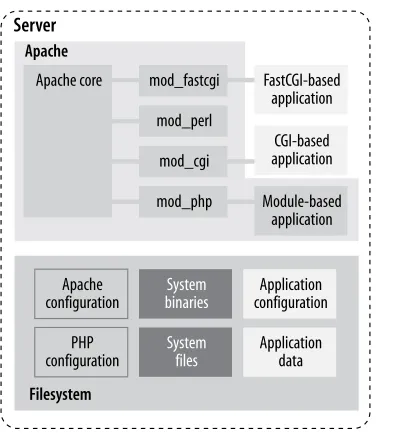
The Apache view is the most interesting way of looking at a system and the most complicated. It includes all the components you know are there but often do not think of in that way and often not at the same time:
• Apache itself • Apache modules • Apache configuration • CGI scripts
• Applications
• Application configurations • Application data on the filesystem • Application data in databases • External services (e.g., LDAP) • System files
• System binaries
Figure 1-3. Web architecture: Apache view
The components shown in the illustration above are situated close together. They can interact, and the interaction is what makes web application security complex. I have not even included a myriad of possible external components that make life more difficult. Each type of external system (a database, an LDAP server, a web service) uses a different “language” and allows for different ways of attack. Between every two components lies a boundary. Every boundary is an opportunity for something to be misconfigured or not configured securely enough. Web application security is discussed in Chapter 10 and Chapter 11.
Though there is a lot to do to maintain security throughout the life of a system, the overall
security posture is established before installation takes place. The basic decisions made at this
time are the foundations for everything that follows. What remains after that can be seen as a routine, but still something that needs to be executed without a fatal flaw.
15
2 Installation and Configuration
Installation is the first step in making Apache functional. Before you begin, you should have a clear idea of the installation’s purpose. This idea, together with your paranoia level, will determine the steps you will take to complete the process. The system-hardening matrix (de-scribed in Chapter 1) presents one formal way of determining the steps. Though every addi-tional step you make now makes the installation more secure, it also increases the time you will spend maintaining security. Think about it realistically for a moment. If you cannot put in that extra time later, then why bother putting the extra time in now? Don’t worry about it too much, however. These things tend to sort themselves out over time: you will probably be eager to make everything perfect in the first couple of Apache installations you do; then, you will likely back off and find a balance among your security needs, the effort required to meet those needs, and available resources.
As a rule of thumb, if you are building a high profile web server—public or not—always go for a highly secure installation.
Though the purpose of this chapter is to be a comprehensive guide to Apache installation and configuration, you are encouraged to read others’ approaches to Apache hardening as well. Every approach has its unique points, reflecting the personality of its authors. Besides, the opinions presented here are heavily influenced by the work of others. The Apache reference documentation is a resource you will go back to often. In addition to it, ensure you read the Apache Benchmark, which is a well-documented reference installation procedure that allows security to be quantified. It includes a semi-automated scoring tool to be used for assessment. The following is a list of some of the most useful Apache installation documentation I have encountered:
• Apache Online Documentation (http://httpd.apache.org/docs-2.0/)
• Apache Security Tips (http://httpd.apache.org/docs-2.0/misc/security_tips.html) • Apache Benchmark (http://cisecurity.org/en-us/?
• “Securing Apache: Step-by-Step” by Artur Maj (http://www.securityfocus.com/ print/infocus/1694)
• “Securing Apache 2: Step-by-Step” by Artur Maj (http://www.securityfocus.com/ print/infocus/1786)
Installation
The installation instructions given in this chapter are designed to apply to both active branches (1.x and 2.x) of the Apache web server running on Linux systems. If you are running some other flavor of Unix, I trust you will understand what the minimal differences between Linux and your system are. The configuration advice given in this chapter works well for non-Unix platforms (e.g., Windows) but the differences in the installation steps are more noticeable:
• Windows does not offer the chroot functionality (see the section Section 2.4) or an equivalent.
• You are unlikely to install Apache on Windows from source code. Instead, download the binaries from the main Apache web site.
• Disk paths are different though the meaning is the same.
Source or Binary
One of the first decisions you will make is whether to compile the server from the source or use a binary package. This is a good example of the dilemma I mentioned at the beginning of this chapter. There is no one correct decision for everyone or one correct decision for you alone. Consider some pros and cons of the different approaches:
• By compiling from source, you are in the position to control everything. You can choose the compile-time options and the modules, and you can make changes to the source code. This process will consume a lot of your time, especially if you measure the time over the lifetime of the installation (it is the only correct way to measure time) and if you intend to use modules with frequent releases (e.g., PHP).
• Installation and upgrade is a breeze when binary distributions are used now that many vendors have tools to have operating systems updated automatically. You exchange some control over the installation in return for not having to do everything yourself. However, this choice means you will have to wait for security patches or for the latest version of your favorite module. In fact, the latest version of Apache or your favorite module may never come since most vendors choose to use one version in a distribu-tion and only issue patches to that version to fix potential problems. This is a standard practice, which vendors use to produce stable distributions.
improve-Source or Binary 17
ments) occur in the 2.x branch. Some operating system vendors have moved on to the 2.x branch, yet others remain faithful to the proven and trusted 1.x branch.
Note
The Apache web server is a victim of its own success. The web server from the 1.x branch works so well that many of its users have no need to upgrade. In the long term this situation only slows down progress because developers spend their time main-taining the 1.x branch instead of adding new features to the 2.x branch. Whenever you can, use Apache 2!
This book shows the approach of compiling from the source code since that approach gives us the most power and the flexibility to change things according to our taste. To download the source code, go to http://httpd.apache.org and pick the latest release of the branch you want to use.
Downloading the source code
Habitually checking the integrity of archives you download from the Internet is a good idea. The Apache distribution system works through mirrors. Someone may decide to compromise a mirror and replace the genuine archive with a trojaned version (a version that feels like the original but is modified in some way, for example, programmed to allow the attacker unlimited access to the web server). You will go through a lot of trouble to secure your Apache installation, and it would be a shame to start with a compromised version.
If you take a closer look at the Apache download page, you will discover that though archive links point to mirrors, archive signature links always point to the main Apache web site. One way to check the integrity is to calculate the MD5 sum of the archive and to compare it with the sum in the signature file. An MD5 sum is an example of a hash function, also known as one-way encryption (see Chapter 4 for further information). The basic idea is that, given data (such as a binary file), a hash function produces seemingly random output. However, the output is always the same when the input is the same, and it is not possible to reconstruct the input given the output. In the example below, the first command calculates the MD5 sum of the archive that was downloaded, and the second command downloads and displays the contents of the MD5 sum from the main Apache web site. You can see the sums are identical, which means the archive is genuine:
$ md5sum httpd-2.0.50.tar.gz
8b251767212aebf41a13128bb70c0b41 httpd-2.0.50.tar.gz
$ wget -O - -q http://www.apache.org/dist/httpd/httpd-2.0.50.tar.gz.md5
Using MD5 sums to verify archive integrity can be circumvented if an intruder compromises the main distribution site. He will be able to replace the archives and the signature files, making the changes undetectable.
A more robust, but also a more complex approach is to use public-key cryptography (described in detail in Chapter 4) for integrity validation. In this approach, Apache developers use their cryptographic keys to sign the distribution digitally. This can be done with the help of GnuPG, which is installed on most Unix systems by default. First, download the PGP signature for the appropriate archive, such as in this example:
$ wget http://www.apache.org/dist/httpd/httpd-2.0.50.tar.gz.asc
Attempting to verify the signature at this point will result in GnuPG complaining about not having the appropriate key to verify the signature:
$ gpg httpd-2.0.50.tar.gz.asc
gpg: Signature made Tue 29 Jun 2004 01:14:14 AM BST using DSA key ID DE885DD3 gpg: Can't check signature: public key not found
GnuPG gives out the unique key ID (DE885DD3), which can be used to fetch the key from one of the key servers (for example, pgpkeys.mit.edu):
$ gpg --keyserver pgpkeys.mit.edu --recv-key DE885DD3
gpg: /home/ivanr/.gnupg/trustdb.gpg: trustdb created
gpg: key DE885DD3: public key "Sander Striker <[email protected]>" imported gpg: Total number processed: 1
gpg: imported: 1
This time, an attempt to check the signature gives satisfactory results:
$ gpg httpd-2.0.50.tar.gz.asc
gpg: Signature made Tue 29 Jun 2004 01:14:14 AM BST using DSA key ID DE885DD3 gpg: Good signature from "Sander Striker <[email protected]>"
gpg: aka "Sander Striker <[email protected]>" gpg: aka "Sander Striker <[email protected]>" gpg: aka "Sander Striker <[email protected]>" gpg: checking the trustdb
gpg: no ultimately trusted keys found
Primary key fingerprint: 4C1E ADAD B4EF 5007 579C 919C 6635 B6C0 DE88 5DD3
Static Binary or Dynamic Modules 19
Downloading patches
Sometimes, the best version of Apache is not contained in the most recent version archive. When a serious bug or a security problem is discovered, Apache developers will fix it quickly. But getting a new revision of the software release takes time because of the additional full testing overhead required. Sometimes, a problem is not considered serious enough to warrant an early next release. In such cases, source code patches are made available for download at
http://www.apache.org/dist/httpd/patches/. Therefore, the complete source code down-load procedure consists of downdown-loading the latest official release followed by a check for and possible download of optional patches.
Static Binary or Dynamic Modules
The next big decision is whether to create a single static binary, or to compile Apache to use dynamically loadable modules. Again, the tradeoff is whether to spend more time in order to get more security.
• Static binary is reportedly faster. If you want to squeeze the last bit of performance out of your server, choose this option. But, as hardware is becoming faster and faster, the differences between the two versions will no longer make a difference.
• A static server binary cannot have a precompiled dynamic module backdoor added to it. (If you are unfamiliar with the concept of backdoors, see the sidebar Apache Back-doors.) Adding a backdoor to a dynamically compiled server is as simple as including a module into the configuration file. To add a backdoor to a statically compiled server, the attacker has to recompile the whole server from scratch.
• With a statically linked binary, you will have to reconfigure and recompile the server every time you want to change a single module.
• The static version may use more memory depending on the operating system used. One of the points of having a dynamic library is to allow the operating system to load the library once and reuse it among active processes. Code that is part of a statically compiled binary cannot be shared in this way. Some operating systems, however, have a memory usage reduction feature, which is triggered when a new process is created by duplication of an existing process (known as forking). This feature, called
copy-on-write, allows the operating system to share the memory in spite of being statically
Apache Backdoors
For many systems, a web server on port 80 is the only point of public access. So, it is no wonder black hats have come up with ideas of how to use this port as their point of entry into the system. A backdoor is malicious code that can give direct access to the heart of the system, bypassing normal access restrictions. An example of a backdoor is a program that listens on a high port of a server, giving access to anyone who knows the special password (and not to normal system users). Such backdoors are easy to detect provided the server is routinely scanned for open ports: a new open port will trigger all alarm bells.
Apache backdoors do not need to open new ports since they can reuse the open port 80. A small fragment of code will examine incoming HTTP requests, opening “the door” to the attacker when a specially crafted request is detected. This makes Apache backdoors stealthy and danger-ous.
A quick search on the Internet for “apache backdoor” yields three results:
• http://packetstormsecurity.org/UNIX/penetration/rootkits/apachebd.tgz
• http://packetstormsecurity.org/advisories/b0f/mod_backdoor.c
• http://packetstormsecurity.org/web/mod_rootme-0.2.tgz
The approach in the first backdoor listed is to patch the web server itself, which requires the Apache source code and a compiler to be available on the server to allow for recompilation. A successful exploitation gives the attacker a root shell on the server (assuming the web server is started as root), with no trace of the access in the log files.
The second link is for a dynamically loadable module that appends itself to an existing server. It allows the attacker to execute a shell command (as the web server user) sent to the web server as a single, specially crafted GET request. This access will be logged but with a faked entry for the home page of the site, making it difficult to detect.
The third link is also for a dynamically loadable module. To gain root privileges this module creates a special process when Apache starts (Apache is still running as root at that point) and uses this process to perform actions later.
The only reliable way to detect a backdoor is to use host intrusion detection techniques, discussed in Chapter 9.
Folder Locations
In this chapter, I will assume the following locations for the specified types of files:
Binaries and supporting files
/usr/local/apache
Public files
Installation Instructions 21
Private web server or application data
/var/www/data
Publicly accessible CGI scripts
/var/www/cgi-bin
Private binaries executed by the web server
/var/www/bin
Log files
/var/www/logs
Installation locations are a matter of taste. You can adopt any layout you like as long as you use it consistently. Special care must be taken when deciding where to store the log files since they can grow over time. Make sure they reside on a partition with enough space and where they won’t jeopardize the system by filling up the root partition.
Different circumstances dictate different directory layouts. The layout used here is suitable when only one web site is running on the web server. In most cases, you will have many sites per server, in which case you should create a separate set of directories for each. For example, you might create the following directories for one of those sites:
/var/www/apachesecurity.net/bin /var/www/apachesecurity.net/cgi-bin /var/www/apachesecurity.net/data /var/www/apachesecurity.net/htdocs /var/www/apachesecurity.net/logs
A similar directory structure would exist for another one of the sites:
/var/www/modsecurity.org/bin /var/www/modsecurity.org/cgi-bin /var/www/modsecurity.org/data /var/www/modsecurity.org/htdocs /var/www/modsecurity.org/logs
Installation Instructions
Before the installation can take place Apache must be made aware of its environment. This is done through the configure script:
$ ./configure --prefix=/usr/local/apache
$ make
# make install
# /usr/local/apache/bin/apachectl start
Though this will install and start Apache, you also need to configure your operating system to start Apache when it boots. The procedure differs from system to system on Unix platforms but is usually done by creating a symbolic link to the apachectl script for the relevant runlevel
(servers typically use run level 3):
# cd /etc/rc3.d
# ln -s /usr/local/apache/bin/apachectl S85httpd
On Windows, Apache is configured to start automatically when you install from a binary distribution, but you can do it from a command line by calling Apache with the -k install
command switch.
Testing the installation
Installation Instructions 23
Figure 2-1. Apache post-installation welcome page
As a bonus, toward the end of the page, you will find a link to the Apache reference manual. If you are near a computer while reading this book, you can use this copy of the manual to learn configuration directive specifics.
Using the ps tool, you can find out how many Apache processes there are:
$ ps -Ao user,pid,ppid,cmd | grep httpd
root 31738 1 /usr/local/apache/bin/httpd -k start httpd 31765 31738 /usr/local/apache/bin/httpd -k start httpd 31766 31738 /usr/local/apache/bin/httpd -k start httpd 31767 31738 /usr/local/apache/bin/httpd -k start httpd 31768 31738 /usr/local/apache/bin/httpd -k start httpd 31769 31738 /usr/local/apache/bin/httpd -k start
192.168.2.3 - - [21/Jul/2004:17:12:22 +0100] "GET /manual/images/feather.gif HTTP/1.1" 200 6471
192.168.2.3 - - [21/Jul/2004:17:20:05 +0100] "GET /manual/not-here HTTP/1.1" 404 311
Here is what the error log contains for this example:
[Wed Jul 21 17:17:04 2004] [notice] Apache/2.0.50 (Unix) configured -- resuming normal operations
[Wed Jul 21 17:20:05 2004] [error] [client 192.168.2.3] File does not exist: /usr/local/apache/manual/not-here
The idea is to become familiar with how Apache works. As you learn what constitutes normal behavior, you will learn how to spot unusual events.
Selecting modules to install
The theory behind module selection says that the smaller the number of modules running, the smaller the chances of a vulnerability being present in the server. Still, I do not think you will achieve much by being too strict with default Apache modules. The likelihood of a vulnerability being present in the code rises with the complexity of the module. Chances are that the really complex modules, such as mod_ssl (and the OpenSSL libraries behind it), are the dange