HAROLD
If XML can do it, you can do it too . . .
Now revised and expanded to cover the latest XML technologies and applications, this all-in-one tutorial and
reference shows you step by step how to put the power of XML to work in your Web pages. From document
type definitions and style sheets to XPointers, schemas, the Wireless Markup Language, XHTML and other
advanced tools and applications, XML expert Elliotte Rusty Harold gives you all the know-how and examples
you need to integrate XML with HTML, solve real-world development challenges, and create data-driven content.
Inside, you’ll find complete coverage of XML
•
Create well-formed XML documents
•
Place international characters in documents
•
Validate documents against DTDs and schemas
•
Use entities to build large documents from smaller parts
•
Embed non-XML data in your documents
•
Format your documents with CSS and XSL style sheets
•
Connect documents with XLinks and XPointers
•
Merge different XML vocabularies with namespaces
•
Write metadata for Web pages using RDF
•
Harness XML for site design, vector graphics,
and other real-world applications
Shelving Category:
Web Development/XML
Reader Level:
Beginning to Advanced
System Requirements:
Java 1.1 or later compatible platform such as Mac OS 8.5 or later, Windows 95/98/Me/NT/2000, Linux, or Solaris
ISBN 0-7645-4760-7
$49.99
USA$74.99
Canada£39.99
UK incl. VATXM
L
XM
L
Master
XML
fundamentals
including elements,
tags, attributes,
DTDs, and
namespaces
Harness
the
power of CSS and
XSL to format
XML documents
Take
XML to the
limit using XLinks,
XPointers, Schemas,
SVG, and XHTML
XML
Elliotte Rusty Harold
“The XML Bible provides complete coverage on all XML-related
topics and will be an essential resource for any developer.”
—Sean Rhody, Technical Editor, XML Journal
,!7IA7G4-fehgah!:p;o;t;T;T
XML code and authoring tools
on CD-ROM!
BONUS
CD-ROM!
Sample XML code
XML authoring tools
W3C standards
w w w . h u n g r y m i n d s . c o m
100%
O N E H U N D R E D P E R C E N TC O M P R E H E N S I V E A U T H O R I T A T I V E W H A T Y O U N E E D
O N E H U N D R E D P E R C E N T
Publish XML documents on the Web Write Web pages in foreign languages and diverse scripts
Shareware programs are fully functional, free trial versions of copyrighted programs. If you like particular programs, register with their authors for a nominal fee and receive licenses, enhanced versions, and technical support. Freeware programs are free, copyrighted games, applications, and utilities. You can copy them to as many PCs as you like—free—but they have no technical support.
XML Resources on CD-ROM
XML
B
ible
Author of Java Network Programming
Now updated!
Covers XML
1.0 second
edition
*85555-AEHFHa
100%
C O M P R E H E N S I V E• Code for all examples in the book, plus additional examples
• XML authoring tools, including expat, XT, Xalan, Xerces, Batik, FOP, SAXON, HTML Tidy, and Mozilla
• World Wide Web Consortium XML standards
2nd Edition
2nd Edition
2nd Edition
XML
Bible
Second Edition
Praise for Elliotte Rusty Harold’s XML Bible
“Great book! I have about 10 XML books and this is by far the best.”
— Edward Blair, Systems Analyst, AT&T
“I recommend the XML Bible.I found it to be really helpful, as I am a beginner myself. It is easy to understand, which I found most useful since I am not a ‘tech-head.’”
— Marius Holth Hanssen, Independent IT Consultant
“I don’t know how to praise Elliotte Rusty Harold enough. When I read a technical book, I don’t expect to ENJOY it in the pure sense. Oh, I expect to ENJOY increasing my knowledge or to ENJOY the experience of successfully understanding a particu-larly poorly written passage. Your text is enjoyable in the pure sense. It is fun to read. I don’t have to force myself to pick up XML Bible— I jump for it because I know I will be finding something on each page to make me smile.”
— Mike Maddux, Software Architect, Texas Department of Health
“Just wanted to take a minute and send you a big thank you for writing XML Bible and Java Beans. Without those two books, my life would be so much harder!”
XML
Bible
Second Edition
Elliotte Rusty Harold
Hungry Minds, Inc.
New York, NY 10022 www.hungryminds.com
Copyright © 2001 Hungry Minds, Inc. All rights reserved. No part of this book, including interior design, cover design, and icons, may be reproduced or transmitted in any form, by any means (electronic, photocopying, recording, or otherwise) without the prior written permission of the publisher.
Library of Congress Control Number: 2001089303 ISBN: 0-7645-4760-7
Printed in the United States of America 10 9 8 7 6 5 4 3 2 1
2B/RX/QV/QR/IN
Distributed in the United States by Hungry Minds, Inc.
Distributed by CDG Books Canada Inc. for Canada; by Transworld Publishers Limited in the United Kingdom; by IDG Norge Books for Norway; by IDG Sweden Books for Sweden; by IDG Books Australia Publishing Corporation Pty. Ltd. for Australia and New Zealand; by TransQuest Publishers Pte Ltd. for Singapore, Malaysia, Thailand, Indonesia, and Hong Kong; by Gotop Information Inc. for Taiwan; by ICG Muse, Inc. for Japan; by Intersoft for South Africa; by Eyrolles for France; by International Thomson Publishing for Germany, Austria, and Switzerland; by Distribuidora Cuspide for Argentina; by LR
International for Brazil; by Galileo Libros for Chile; by Ediciones ZETA S.C.R. Ltda. for Peru; by WS
Computer Publishing Corporation, Inc., for the Philippines; by Contemporanea de Ediciones for Venezuela; by Express Computer Distributors for the Caribbean and West Indies; by Micronesia Media Distributor, Inc. for Micronesia; by Chips
Computadoras S.A. de C.V. for Mexico; by Editorial Norma de Panama S.A. for Panama; by American Bookshops for Finland.
For sales inquiries and reseller information, including discounts, premium and bulk quantity sales, and foreign-language translations, please contact our Customer Care department at 800-434-3422, fax 317-572-4002 or write to Hungry Minds, Inc., Attn: Customer Care Department, 10475 Crosspoint Boulevard, Indianapolis, IN 46256.
For information on licensing foreign or domestic rights, please contact our Sub-Rights Customer Care department at 212-884-5000.
For information on using Hungry Minds’ products and services in the classroom or for ordering examination copies, please contact our Educational Sales department at 800-434-2086 or fax 317-572-4005. For press review copies, author interviews, or other publicity information, please contact our Public Relations department at 317-572-3168 or fax 317-572-4168.
For authorization to photocopy items for corporate, personal, or educational use, please contact Copyright Clearance Center, 222 Rosewood Drive, Danvers, MA 01923, or fax 978-750-4470.
LIMIT OF LIABILITY/DISCLAIMER OF WARRANTY: THE PUBLISHER AND AUTHOR HAVE USED THEIR BEST EFFORTS IN PREPARING THIS BOOK. THE PUBLISHER AND AUTHOR MAKE NO REPRESENTATIONS OR WARRANTIES WITH RESPECT TO THE ACCURACY OR COMPLETENESS OF THE CONTENTS OF THIS BOOK AND SPECIFICALLY DISCLAIM ANY IMPLIED WARRANTIES OF MERCHANTABILITY OR FITNESS FOR A PARTICULAR PURPOSE. THERE ARE NO WARRANTIES WHICH EXTEND BEYOND THE DESCRIPTIONS CONTAINED IN THIS PARAGRAPH. NO WARRANTY MAY BE CREATED OR EXTENDED BY SALES REPRESENTATIVES OR WRITTEN SALES MATERIALS. THE ACCURACY AND COMPLETENESS OF THE INFORMATION PROVIDED HEREIN AND THE OPINIONS STATED HEREIN ARE NOT GUARANTEED OR WARRANTED TO PRODUCE ANY PARTICULAR RESULTS, AND THE ADVICE AND STRATEGIES CONTAINED HEREIN MAY NOT BE SUITABLE FOR EVERY INDIVIDUAL. NEITHER THE PUBLISHER NOR AUTHOR SHALL BE LIABLE FOR ANY LOSS OF PROFIT OR ANY OTHER COMMERCIAL DAMAGES, INCLUDING BUT NOT LIMITED TO SPECIAL, INCIDENTAL, CONSEQUENTIAL, OR OTHER DAMAGES.
Netscape Communications Corporation has not authorized, sponsored, endorsed, or approved this publication and is not responsible for its content. Netscape and the Netscape Communications Corporate Logos, are trademarks and trade names of Netscape Communications Corporation.
Trademarks:All trademarks are property of their respective owners. Hungry Minds, Inc. is not associated with any product or vendor mentioned in this book.
Credits
Acquisitions Editor
Grace Buechlein
Project Editor
Sharon Nash
Technical Editor
Ken Cox
Copy Editor
Richard H. Adin
Project Coordinator
Nancee Reeves
Graphics and Production Specialists
Heather Pope, Jill Piscitelli, Kathie Shutte
Quality Control Technicians
David Faust, Andy Hollandbeck, Angel Perez, Dwight Ramsey, Charles Spencer
Permissions Editor
Laura Moss
Media Development Specialist
Gregory Stephens
Media Development Coordinator
Marisa Pearman
Illustrators
Gabriele McCann John Greenough
Proofreading and Indexing
TECHBOOKS Production Services
Cover Image
Lawrance Huck
About the Author
Elliotte Rusty Harold is an internationally respected writer, programmer, and edu-cator both on the Internet and off. He got his start writing FAQ lists for the
Macintosh newsgroups on Usenet and has since branched out into books, Web sites, and newsletters. He’s an adjunct professor of computer science at Polytechnic University in Brooklyn, New York. His Cafe con Leche Web site at
http://www.ibiblio.org/xml/has become one of the most popular indepen-dent XML sites on the Internet.
Preface
W
elcome to the second edition of the XML Bible. When the first edition was published about two years ago, XML was a promising technology with a small but growing niche. In the last two years, it has absolutely exploded. XML no longer needs to be justified as a good idea. In fact, the question developers are ask-ing has changed from “Why XML?” to “Why not XML?” XML has become the data format of choice for fields as diverse as stock trading and graphic design. More new programs today are using XML than aren’t. A solid understanding of just what XML is and how to use it has become a sine qua nonfor the computer literate.The XML Bibleis your introduction to the exciting and fast-growing world of XML. With this book, you’ll learn how to write documents in XML and how to use style sheets to convert those documents into HTML so that legacy browsers can read them. You’ll also learn how to use document type definitions (DTDs) to describe and validate documents. You’ll experience a variety of XML applications in many domains, ranging from finance to vector graphics to genealogy. And you’ll learn how to take advantage of XML for your own unique projects, programs, and Web sites.
Who You Are
Unlike most other XML books on the market, the XML Biblediscusses XML from the perspective of a Web-page author, not from the perspective of a software developer. I don’t spend a lot of time discussing BNF grammars or parsing element trees. Instead, I show you how you can use XML and existing tools today to more effi-ciently produce attractive, exciting, easy-to-use, easy-to-maintain Web sites that keep your readers coming back for more.
This book is aimed directly at Web-site developers. I assume you want to use XML to produce Web sites that are difficult to impossible to create with raw HTML. You’ll be amazed to discover that in conjunction with style sheets and a few free tools, XML enables you to do things that previously required either custom software cost-ing hundreds to thousands of dollars per developer, or extensive knowledge of pro-gramming languages such as Perl. None of the software discussed in this book will cost you more than a few minutes of download time. None of the tricks require any programming.
What’s New in the Second Edition
complaints about the first edition. For instance, the largest examples are now smaller and easier to digest. Where mistakes or misstatements were found, they have been corrected. Most important, the text has been brought completely up to date with the state of the XML world in 2001. Many technologies that were rapidly changing, bleeding-edge tools in 1999 (XSLT, XSL-FO, XHTML, XLinks, XPointers, namespaces, etc.), have become the solid rocks on which future XML technologies are being built. Thus, it is now possible to offer much more comprehensive and final coverage of these, rather than the somewhat tentative first steps I took in the first edition.
The world never stands still for long, however. In the two years since the first edi-tion appeared, new XML technologies have issued forth at a frightening pace. They are discussed here as well, though often with caveats that the details are still sub-ject to change. There are several completely new chapters covering many of these cutting-edge applications, including chapters on:
✦The Extensible Hypertext Markup Language (XHTML)
✦Scalable Vector Graphics (SVG)
✦Schemas
✦The Wireless Markup Language (WML)
Even more important than the new chapters are the new sections woven into more familiar chapters. Although I made every effort to write more concisely in this edi-tion (My favorite reader comment about the first ediedi-tion was, “It would seem to me that if you asked the author to write 10,000 words about the colour blue, he would be able to do it without breaking into a sweat”), we still ended up with a book 200 pages longer than before, and most of those 200 pages are new material scattered throughout the book. If you liked the first edition, I can only surmise that you’re going to like the second edition even more. It is in every way a better, more compre-hensive, more accurate book. If you didn’t like the first edition, I hope you’ll find the second more to your taste.
What You Need to Know
XML does build on top of the underlying infrastructure of the Internet and the Web. Consequently, I will assume you know how to ftp files, send e-mail, and load URLs into your Web browser of choice. I will also assume you have a reasonable knowl-edge of HTML at about the level supported by Netscape 1.1. On the other hand, when I discuss newer aspects of HTML that are not yet in widespread use, such as Cascading Style Sheets, I discuss them in depth.
To be more specific, in this book I assume that you can:
✦Write a basic HTML page, including links, images, and text, using a text editor.
ix
Preface
On the other hand, I do not assume that you:
✦Know SGML. In fact, this preface is almost the only place in the entire book you’ll see the word SGML used. XML is supposed to be simpler and more widespread than SGML. It can’t be that if you have to learn SGML first.
✦Are a programmer, whether of Java, Perl, C, or some other language. XML is a markup language, not a programming language. You don’t need to be a pro-grammer to write XML documents.
What You’ll Learn
This book has one primary goal: to teach you to write XML documents for the Web. Fortunately, XML has a decidedly flat learning curve, much like HTML (and unlike SGML). As you learn a little you can do a little. As you learn a little more, you can do a little more. Thus the chapters in this book build steadily on one another. They are meant to be read in sequence. Along the way you’ll learn:
✦How to author XML documents and deliver them to readers.
✦How semantic tagging makes XML documents easier to maintain and develop than their HTML equivalents.
✦How to post XML documents on Web servers in a form everyone can read.
✦How to make sure your XML is well formed.
✦How to use international characters such as and Æ in your documents.
✦How to validate documents against DTDs and schemas.
✦How to use entities to build large documents from smaller parts.
✦How to describe data with attributes.
✦How to embed non-XML data in your documents.
✦How to merge different XML vocabularies with namespaces.
✦How to format your documents with CSS and XSL style sheets.
✦How to connect documents with XLinks and XPointers.
✦How to write metadata for Web pages using RDF.
In the final section of this book, you’ll see several practical examples of XML being used for real-world applications, including:
✦Web site design
✦Schemas
✦Push
✦Vector graphics
How the Book Is Organized
This book is divided into five parts:
I.Introducing XML
II.Document Type Definitions
III.Style Languages
IV.Supplemental Technologies
V.XML Applications
By the time you finish reading this book, you’ll be ready to use XML to create com-pelling Web pages. The five parts are described below.
Part I: Introducing XML
Part I consists of Chapters 1 through 7. It begins with the history and theory behind XML and the goals XML is trying to achieve. It shows you how the different pieces of the XML equation fit together to enable you to create and deliver documents to readers. You’ll see several compelling examples of XML applications to give you some idea of the wide applicability of XML, including Scalable Vector Graphics (SVG), the Resource Description Framework (RDF), the Mathematical Markup Language (MathML), the Extensible Forms Description Language (XFDL), and many others. Then you’ll learn by example how to write XML documents with tags that you define that make sense for your document. You’ll learn how to edit them in a text editor, attach style sheets to them, and load them into a Web browser such as Internet Explorer 5.0 or Mozilla. You’ll even learn how you can write XML docu-ments in languages other than English, even languages that are nothing like English, such as Chinese, Hebrew, and Russian.
Part II: Document Type Definitions
Part II (Chapters 8 through 13) focuses on document type definitions (DTDs). A DTD specifies which elements are and are not allowed in an XML document, and the exact context and structure of those elements. A validating parser can read a ment, compare it to its DTD, and report any mistakes it finds. DTDs enable docu-ment authors to ensure that their work meets any necessary criteria.
xi
Preface
Part III: Style Languages
Part III, consisting of Chapters 14 through 18, teaches you everything you need to know about style sheets. XML markup specifies only what’s in a document. Unlike HTML, it does not say anything about what that content should look like.
Information about an XML document’s appearance when printed, viewed in a Web browser, or otherwise displayed is stored in a style sheet. Different style sheets can be used for the same document. You might, for instance, want to use one style sheet that specifies small fonts for printing, another one with larger fonts for on-screen presentation, and a third with absolutely humongous fonts to project the document on a wall at a seminar. You can change the appearance of an XML docu-ment by choosing a different style sheet without touching the docudocu-ment itself.
Part III describes in detail the two style sheet languages in broadest use today, Cascading Style Sheets (CSS) and the Extensible Stylesheet Language (XSL). CSS is a simple style-sheet language originally designed for use with HTML. It applies fixed style rules to the contents of particular elements. CSS exists in two versions: CSS Level 1 and CSS Level 2. CSS Level 1 provides basic information about fonts, color, positioning, and text properties and is reasonably well supported by current Web browsers for HTML and XML. CSS Level 2 is a more recent standard that adds sup-port for aural style sheets, user interface styles, international and bidirectional text, and more.
XSL, by contrast, is a more complicated and more powerful style language that can apply styles to the contents of elements as well as rearrange elements, add boiler-plate text, and transform documents in almost arbitrary ways. XSL is divided into two parts: a transformation language for converting XML trees to alternative trees, and a formatting language for specifying the appearance of the elements of an XML tree. Currently, many more tools support the transformation language than the for-matting language.
Part IV: Supplemental Technologies
Part IV consists of Chapters 19 through 21. It introduces some XML-based lan-guages and syntaxes that layer on top of basic XML. XLinks provides multidirec-tional hypertext links that are far more powerful than the simple HTML <A>tag. XPointers introduce a new syntax you can attach to the end of URLs to link not only to particular documents but also to particular parts of particular documents. RDF is an XML application used to embed metadata in XML and HTML documents. Metadata is information about a document, such as the author, date, and title of a work, rather than the work itself. All of these can be added to your own XML-based markup languages to extend their power and utility.
Part V: XML Applications
(SVG) is a standard XML format for drawings recommended by the World Wide Web Consortium (W3C). The Vector Markup Language (VML) is a Microsoft-proprietary XML application for vector graphics used by Office 2000 and Internet Explorer 5.0. Microsoft’s Channel Definition Format (CDF) is an XML-based markup language for defining channels that can push updated Web-site content to subscribers. Finally, a completely new application is developed for genealogical data to show you not just how to use XML tags, but why and when to choose them. Combining all of these dif-ferent applications, you’ll develop a good sense of how XML applications are designed, built, and used in the real world.
What You Need
XML is a platform-independent technology. Furthermore, most of the best software for working with XML is written in Java and can run on multiple platforms. Much of this is included on the CD in the back of the book or is freely available on the Internet. To make the best use of this book and XML, you need:
✦A Web browser that supports XML such as Mozilla, Netscape 6.0, or Opera 5.0. Internet Explorer 5.0/5.5 also supports XML; but its built-in XML parser, MSXML, is quite buggy, so you’ll need to upgrade it to MSXML 3.0 or later before you’ll be able to use many of the techniques in this book.
✦A Java 1.2 or later virtual machine. (Java 1.1 can do in a pinch.) You’ll just need it to run programs written in Java. You won’t need to write any programs to use this book.
How to Use This Book
This book is designed to be read more or less cover to cover. Each chapter builds on the material in the previous chapters in a fairly predictable fashion. Of course, you’re always welcome to skim over material that’s already familiar to you. I also hope you’ll stop along the way to try out some of the examples and to write some XML documents of your own. It’s important to learn not just by reading, but also by doing. Before you get started, I’d like to make a couple of notes about grammatical conventions used in this book.
Unlike HTML, XML is case sensitive. <FATHER>is not the same as <Father>or
<father>. The fatherelement is not the same as the Fatherelement or the
FATHERelement. Unfortunately, case-sensitive markup languages have an annoying habit of conflicting with standard English usage. On rare occasion, this means that you may encounter sentences that don’t begin with a capital letter. More commonly, you’ll see capitalization used in the middle of a sentence where you wouldn’t normally expect it. Please don’t get too bothered by this. All XML and HTML code used in this book is placed in a monospaced font, so most of the time it will be obvious from the context what is meant.
xiii
Preface
especially when dealing with source code where the difference between a comma or a period and no punctuation at all can make the difference between perfectly correct and perfectly incorrect code.
What the Icons Mean
Throughout the book, I’ve used icons in the left margin to call your attention to points that are particularly important.
Note icons provide supplemental information about the subject at hand, but gen-erally something that isn’t quite the main idea. Notes are often used to elaborate on a detailed technical point.
Tip icons indicate a more efficient way of doing something, or a technique that may not be obvious.
CD-ROM icons tell you that software discussed in the book is available on the companion CD-ROM. This icon also tells you whether a longer example, dis-cussed but not included in its entirety in the book, is on the CD-ROM.
Caution icons warn you of a common misconception or that a procedure doesn’t always work quite like it’s supposed to. The most common reason for a Caution icon in this book is to point out the difference between what a specification says should happen and what actually does.
The Cross-Reference icon refers you to other chapters that have more to say about a particular subject.
About the Companion CD-ROM
Inside the back cover of this book is a CD-ROM that holds all numbered code list-ings from this book as well as some longer examples that couldn’t fit into this book. The CD-ROM also contains the complete text of various XML specifications in XML and HTML. (Some of the specifications are also available in other formats like PDF.) Finally, you will find an assortment of useful software for working with XML docu-ments. Many (though not all) of these programs are written in Java, so they’ll run on any system with a reasonably compatible Java 1.1 or later virtual machine. Most of the programs that aren’t written in Java are designed for Windows 95 or later, though there are also a few programs for Mac and Linux readers.
For a complete description of the CD-ROM contents, please read Appendix A. In addition, to get a complete description of what is on the CD-ROM, you can load the file index.html onto your Web browser. The files on the companion CD-ROM are not compressed, so you can access them directly from the CD.
Cross-Reference
Caution On the CD-ROM
Reach Out
Hungry Minds and I want your feedback. After you have had a chance to use this book, please take a moment to send us an e-mail at [email protected]. Be sure to include the title of this book in your e-mail. Please be honest in your evaluation. If you thought a particular chapter didn’t tell you enough, let me know. Of course, I would prefer to receive comments like: “This is the best book I’ve ever read,” “Thanks to this book, my Web site won Cool Site of the Year,” or “Because I was reading this book on the beach, I met a stunning swimsuit model who thought I was the hottest thing on feet,” but I’ll take any comments I can get.
Feel free to send me specific questions regarding the material in this book. I’ll do my best to help you out and answer your questions, but I can’t guarantee a reply. The best way to reach me is by e-mail:
Also, I invite you to visit my Cafe con Leche Web site at http://www.ibiblio. org/xml/, which contains a lot of XML-related material and is updated almost daily. Despite my persistent efforts to make this book perfect, some errors have doubtless slipped by. Even more certainly, some of the material discussed here will change over time. I’ll post any necessary updates and errata on my Web site at
http://www.ibiblio.org/xml/books/bible/. Please let me know via e-mail of any errors that you find that aren’t already listed.
Elliotte Rusty Harold
http://www.ibiblio.org/xml/
Acknowledgments
T
he folks at Hungry Minds have all been great. The acquisitions editors, John Osborn on the first edition and Grace Buechlein on this edition, deserve spe-cial thanks for arranging the unusual scheduling this book required to hit the mov-ing target that XML presents, as well for puttmov-ing up with multiple missed deadlines. I’ll do better on the third edition guys, I promise! Sharon Nash shepherded this book through the development process. With poise and grace, she managed the constantly shifting outline and schedule that a book based on unstable specifica-tions and software requires. Terri Varveris edited the first edition. Without her, there could never have been a second edition.Steven Champeon brought his SGML experience to the book, and provided many insightful comments on the text. My brother Thomas Harold put his command of chemistry at my disposal when I was trying to grasp the Chemical Markup Language. Carroll Bellau provided me with the parts of my family tree you’ll find in Chapter 20. Piroz Mohseni and Heather Williamson served as technical editors on the first edition and corrected many of my errors. Heather Williamson also wrote parts of the CSS, Namespaces, and VML chapters for the first edition. WandaJane Phillips wrote the original version of Chapter 27 on CDF that is adapted here.
I also greatly appreciate all the comments, questions, and corrections sent in by readers of the first edition and XML: Extensible Markup Language. I hope that I’ve managed to address most of those comments in this book. They’ve definitely helped make the XML Biblea better book. Particular thanks are due to Michael Dyck, Alan Esenther, and Donald Lancon Jr. for their especially detailed comments.
Preface . . . vii
Acknowledgments . . . xv
Part I: Introducing XML . . . 1
Chapter 1: An Eagle’s Eye View of XML . . . 3
Chapter 2: XML Applications . . . 17
Chapter 3: Your First XML Document . . . 55
Chapter 4: Structuring Data . . . 63
Chapter 5: Attributes, Empty Tags, and XSL . . . 101
Chapter 6: Well-formedness . . . 143
Chapter 7: Foreign Languages and Non-Roman Text . . . 175
Part II: Document Type Definitions . . . 209
Chapter 8: DTDs and Validity . . . 211
Chapter 9: Element Declarations . . . 227
Chapter 10: Entity Declarations . . . 257
Chapter 11: Attribute Declarations . . . 289
Chapter 12: Unparsed Entities, Notations, and Non-XML Data . . . 317
Chapter 13: Namespaces . . . 331
Part III: Style Languages . . . 351
Chapter 14: CSS Style Sheets . . . 353
Chapter 15: CSS Layouts . . . 379
Chapter 16: CSS Text Styles . . . 427
Chapter 17: XSL Transformations . . . 481
Chapter 18: XSL Formatting Objects . . . 571
Part IV: Supplemental Technologies . . . 645
Chapter 19: XLinks . . . 647
Chapter 20: XPointers . . . 677
Part V: XML Applications . . . 733
Chapter 22: XHTML . . . 735
Chapter 23: The Wireless Markup Language . . . 787
Chapter 24: Schemas . . . 827
Chapter 25: Scalable Vector Graphics . . . 881
Chapter 26: The Vector Markup Language . . . 939
Chapter 27: The Channel Definition Format . . . 965
Chapter 28: Designing a New XML Application . . . 995
Appendix A: What’s on the CD-ROM . . . 1025
Appendix B: XML Reference Material . . . 1029
Appendix C: The XML 1.0 Specification, Second Edition . . . 1089
Index . . . 1153
End-User Licence Agreement . . . 1212
Contents
Preface . . . vii
Acknowledgments . . . xv
Part I: Introducing XML
1
Chapter 1: An Eagle’s Eye View of XML . . . 3
What Is XML? . . . 3
XML is a meta-markup language . . . 3
XML describes structure and semantics, not formatting . . . 5
Why Are Developers Excited About XML? . . . 6
Design of field-specific markup languages . . . 6
Self-describing data . . . 7
Interchange of data among applications . . . 8
Structured and integrated data . . . 8
The Life of an XML Document . . . 9
Editors . . . 9
Parsers and processors . . . 10
Browsers and other applications . . . 10
The process summarized . . . 10
Related Technologies . . . 11
HTML . . . 11
Cascading Style Sheets . . . 12
Extensible Stylesheet Language . . . 12
URLs and URIs . . . 14
XLinks and XPointers . . . 14
The Unicode character set . . . 15
Putting the pieces together . . . 16
Chapter 2: XML Applications . . . 17
XML Applications . . . 17
Chemical Markup Language . . . 18
Mathematical Markup Language . . . 19
Channel Definition Format . . . 22
Classic literature . . . 23
Synchronized Multimedia Integration Language . . . 25
HTML+TIME . . . 25
Open Software Description . . . 27
Scalable Vector Graphics . . . 28
MusicML . . . 31
VoiceXML . . . 33
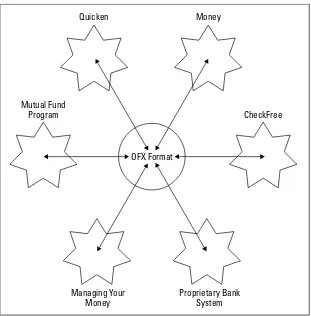
Open Financial Exchange . . . 35
Extensible Forms Description Language . . . 37
HR-XML . . . 41
Resource Description Framework . . . 44
XML for XML . . . 45
XSL . . . 46
XLinks . . . 47
Schemas . . . 47
Behind-the-Scene Uses of XML . . . 48
Microsoft Office 2000 . . . 49
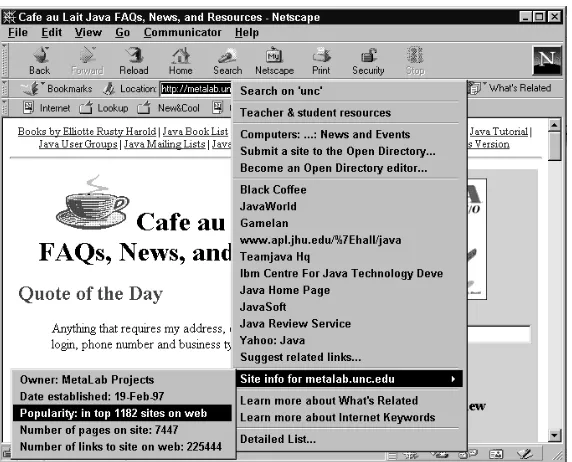
Netscape’s What’s Related . . . 49
Chapter 3: Your First XML Document . . . 55
Hello XML . . . 55
Creating a simple XML document . . . 56
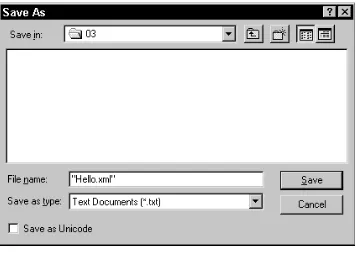
Saving the XML file . . . 56
Loading the XML file into a Web browser . . . 57
Exploring the Simple XML Document . . . 58
Assigning Meaning to XML Tags . . . 59
Writing a Style Sheet for an XML Document . . . 60
Attaching a Style Sheet to an XML Document . . . 61
Chpater 4: Structuring Data . . . 63
Examining the Data . . . 63
Batters . . . 64
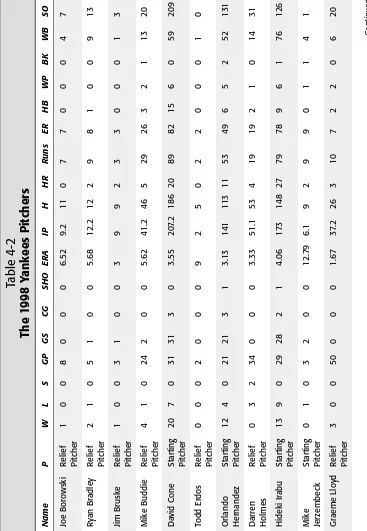
Pitchers . . . 66
Organization of the XML data . . . 69
XMLizing the Data . . . 70
Starting the document: XML declaration and root element . . . 70
XMLizing league, division, and team data . . . 72
XMLizing player data . . . 74
XMLizing player statistics . . . 74
Putting the XML document back together . . . 76
The Advantages of the XML Format . . . 84
Preparing a Style Sheet for Document Display . . . 86
Linking to a style sheet . . . 87
Assigning style rules to the root element . . . 88
Assigning style rules to titles . . . 89
Assigning style rules to player and statistics elements . . . 94
Summing up . . . 95
Chapter 5: Attributes, Empty Tags, and XSL . . . 101
Attributes . . . 101
Attributes versus Elements . . . 107
Structured metadata . . . 107
xxi
Contents
What’s your metadata is someone else’s data . . . 111 Elements are more extensible . . . 112 Good times to use attributes . . . 112 Empty Elements and Empty Element Tags . . . 114 XSL . . . 114 XSLT templates . . . 116 The body of the document . . . 117 The title . . . 119 Leagues, divisions, and teams . . . 122 Players . . . 126 Separation of pitchers and batters . . . 129 Element contents and the select attribute . . . 134 CSS or XSL? . . . 140
Chapter 6: Well-formedness . . . 143
Well-Formedness Rules . . . 144 XML Documents . . . 145 The XML declaration . . . 145 A document must have exactly one root element that completely
contains all other elements. . . 146 Text in XML . . . 147 Elements and Tags . . . 148 Element names . . . 148 Every start tag must have a corresponding end tag . . . 149 Empty element tags . . . 149 Elements may nest but may not overlap . . . 151 Attributes . . . 152 Attribute names . . . 153 Attribute values . . . 153 Entity References . . . 154 Comments . . . 156 Processing Instructions . . . 158 CDATA Sections . . . 159 Well-Formed HTML . . . 161 Rules for HTML . . . 161 Tools . . . 170
Chapter 7: Foreign Languages and Non-Roman Text . . . 175
The MacRoman character set . . . 193 The Windows ANSI character set . . . 194 The Unicode Character Set . . . 195 Unicode Encodings . . . 201 Unicode 3.1 . . . 202 How to Write XML in Unicode . . . 202 Converting to and from Unicode . . . 203 Inserting characters in XML files with character references . . . 204 How to write XML in other character sets . . . 205
Part II: Document Type Definitions
209
Chapter 8: DTDs and Validity . . . 211
Document Type Definitions . . . 211 Element Declarations . . . 212 DTD Files . . . 214 Document Type Declarations . . . 215 Internal DTDs . . . 216 Internal and external DTD subsets . . . 217 Public DTDs . . . 218 DTDs and style sheets . . . 219 Validating Against a DTD . . . 220 Command-line validators . . . 221 Web-based validators . . . 222
Chapter 9: Element Declarations . . . 227
Analyzing the Document . . . 227 The ANY Content Model . . . 233 The #PCDATA Content Model . . . 234 Child Elements . . . 237 Sequences . . . 239 One or More Children . . . 240 Zero or More Children . . . 240 Zero or One Child . . . 241 Grouping with Parentheses . . . 244 Choices . . . 246 Mixed Content . . . 247 Empty Elements . . . 248 Comments in DTDs . . . 249
Chapter 10: Entity Declarations . . . 257
xxiii
Contents
External General Entities . . . 264 Text declarations . . . 266 Nonvalidating parsers . . . 268 Internal Parameter Entities . . . 268 External Parameter Entities . . . 270 Building a Document from Pieces . . . 276
Chapter 11: Attribute Declarations . . . 289
What Is an Attribute? . . . 289 Declaring Attributes in DTDs . . . 290 Declaring Multiple Attributes . . . 291 Specifying Default Values for Attributes . . . 292 #REQUIRED . . . 292 #IMPLIED . . . 293 #FIXED . . . 294 Attribute Types . . . 294 The CDATA attribute type . . . 295 The NMTOKEN attribute type . . . 295 The NMTOKENS attribute type . . . 296 The enumerated attribute type . . . 296 The ID attribute type . . . 297 The IDREF attribute type . . . 298 The IDREFS attribute type . . . 299 The ENTITY attribute type . . . 300 The ENTITIES attribute type . . . 300 The NOTATION attribute type . . . 301 Predefined Attributes . . . 301 xml:space . . . 302 xml:lang . . . 303 Declarations of xml:lang . . . 308 A DTD for Attribute-Based Baseball Statistics . . . 308 Declaring SEASON attributes in the DTD . . . 310 Declaring LEAGUE and DIVISION attributes in the DTD . . . 310 Declaring TEAM attributes in the DTD . . . 311 Declaring PLAYER attributes in the DTD . . . 311 The complete DTD for the baseball statistics example . . . 314
Chapter 12: Unparsed Entities, Notations, and Non-XML Data . . . 317
Chapter 13: Namespaces . . . 331
The Need for Namespaces . . . 331 Namespace Syntax . . . 333 Defining namespaces with xmlns attributes . . . 336 Multiple namespaces . . . 339 Attributes . . . 343 Default namespaces . . . 344 Namespaces and Validity . . . 349
Part III: Style Languages
351
Chapter 14: CSS Style Sheets . . . 353
What Are Cascading Style Sheets? . . . 353 A simple CSS style sheet . . . 354 Attaching style sheets to documents . . . 354 Document Type Definitions and style sheets . . . 357 CSS1 versus CSS2 . . . 358 CSS3 . . . 358 Comments in CSS . . . 359 Selecting Elements . . . 360 The universal selector . . . 362 Grouping selectors . . . 363 Hierarchy selectors . . . 364 Attribute selectors . . . 366 ID selectors . . . 366 Pseudo-elements . . . 367 Pseudo-classes . . . 369 Inheritance . . . 371 Cascades . . . 372 Different Rules for Different Media . . . 374 Importing Style Sheets . . . 375 Style Sheet Character Sets . . . 376
Chapter 15: CSS Layouts . . . 379
xxv
Contents
Marker . . . 395 Tables . . . 395 List items . . . 397 Box Properties . . . 400 Margin properties . . . 400 Border properties . . . 403 Outline properties . . . 406 Padding properties . . . 409 Size . . . 410 The width and height properties . . . 410 The min-width and min-height properties . . . 412 The max-width and max-height properties . . . 413 The overflow property . . . 413 Clipping . . . 414 Positioning . . . 415 The position property . . . 415 Stacking elements with the z-index property . . . 419 The float property . . . 420 The clear property . . . 421 Formatting Pages . . . 422 @page . . . 422 The size property . . . 422 The margin property . . . 423 The mark property . . . 423 The page property . . . 423 Controlling page breaks . . . 424 Widows and orphans . . . 425
Chapter 16: CSS Text Styles . . . 427
Background Properties . . . 451 The background-color property . . . 452 The background-image property . . . 452 The background-repeat property . . . 454 The background-attachment property . . . 457 The background-position property . . . 458 The background shorthand property . . . 462 Visibility . . . 463 Cursors . . . 464 The Content Property . . . 465 Quotes . . . 466 Attributes . . . 467 URIs . . . 467 Counters . . . 468 Aural Style Sheets . . . 472 The speak property . . . 473 The volume property . . . 473 Pause properties . . . 474 Cue properties . . . 474 Play-during property . . . 474 Spatial properties . . . 475 Voice characteristics . . . 476 Speech properties . . . 478
Chapter 17: XSL Transformations . . . 481
What Is XSL? . . . 481 Overview of XSL Transformations . . . 482 Trees . . . 483 XSLT style sheet documents . . . 486 Where does the XML transformation happen? . . . 488 How to use Xalan . . . 488 Direct display of XML files with XSLT style sheets . . . 491 XSL Templates . . . 493 The xsl:apply-templates element . . . 494 The select attribute . . . 496 Computing the Value of a Node with xsl:value-of . . . 497 Processing Multiple Elements with
xxvii
Contents
Matching text nodes with text( ) . . . 510 Using the or operator | . . . 510 Testing with [ ] . . . 511 XPath Expressions for Selecting Nodes . . . 513 Node axes . . . 514 Expression types . . . 520 The Default Template Rules . . . 531 The default rule for elements . . . 531 The default rule for text nodes and attributes . . . 532 The default rule for processing instructions and comments . . . 532 Implications of the default rules . . . 532 Deciding What Output to Include . . . 533 Attribute value templates . . . 533 Inserting elements into the output with xsl:element . . . 535 Inserting attributes into the output with xsl:attribute . . . 536 Defining attribute sets . . . 537 Generating processing instructions with xsl:processing-instruction 538 Generating comments with xsl:comment . . . 539 Generating text with xsl:text . . . 539 Copying the Context Node with xsl:copy . . . 540 Counting Nodes with xsl:number . . . 542 Default numbers . . . 543 Number to string conversion . . . 547 Sorting Output Elements . . . 548 Modes . . . 551 Defining Constants with xsl:variable . . . 553 Named Templates . . . 555 Passing Parameters to Templates . . . 556 Stripping and Preserving White Space . . . 557 Making Choices . . . 559 xsl:if . . . 559 xsl:choose . . . 559 Merging Multiple Style Sheets . . . 560 Importing with xsl:import . . . 560 Inclusion with xsl:include . . . 561 Embedding with xsl:stylesheet . . . 561 Output Methods . . . 563 xsl:output . . . 563 XML Declaration . . . 564 Document type declaration . . . 565 Indentation . . . 566 CDATA sections . . . 567 Media type . . . 567
Chapter 18: XSL Formatting Objects . . . 571
Page Layout . . . 583 The root element . . . 583 Simple page masters . . . 584 Page sequences . . . 587 Page sequence masters . . . 596 Content . . . 599 Block-level formatting objects . . . 599 Inline formatting objects . . . 600 Table formatting objects . . . 601 Out-of-line formatting objects . . . 601 Leaders and Rules . . . 602 Graphics . . . 604 fo:external-graphic . . . 604 fo:instream-foreign-object . . . 607 Graphic properties . . . 609 Links . . . 611 Lists . . . 612 Tables . . . 616 Inlines . . . 622 Footnotes . . . 623 Floats . . . 623 Formatting Properties . . . 624 The id property . . . 625 The language property . . . 625 Paragraph properties . . . 625 Character properties . . . 628 Sentence properties . . . 631 Area properties . . . 633 Aural properties . . . 640
Part IV: Supplemental Technologies
645
Chapter 19: XLinks . . . 647
xxix
Contents
Chapter 20: XPointers . . . 677
Why Use XPointers? . . . 677 XPointer Examples . . . 678 A Concrete Example . . . 681 Location Paths, Steps, and Sets . . . 684 The Root Node . . . 686 Axes . . . 686 The child axis . . . 687 The descendant axis . . . 688 The descendant-or-self axis . . . 689 The parent axis . . . 689 The self axis . . . 689 The ancestor axis . . . 689 The ancestor-or-self axis . . . 689 The preceding axis . . . 690 The following axis . . . 690 The preceding-sibling axis . . . 690 The following-sibling axis . . . 690 The attribute axis . . . 691 The namespace axis . . . 691 Node Tests . . . 692 Predicates . . . 694 Functions that Return Node Sets . . . 697 id( ) . . . 697 here( ) . . . 698 origin( ) . . . 699 Points . . . 700 Ranges . . . 701 Range functions . . . 702 String ranges . . . 702 Child Sequences . . . 704
Chapter 21: The Resource Description Framework . . . 707
The Alt container . . . 723 Statements about containers . . . 724 Statements about container members . . . 727 Statements about implied bags . . . 729 RDF Schemas . . . 729
Part V: XML Applications
733
Chapter 22: XHTML . . . 735
Why Validate HTML? . . . 735 Moving to XHTML . . . 737 Making the document well-formed XML . . . 740 Making the document valid . . . 747 The strict DTD . . . 755 The frameset DTD . . . 768 HTML Tidy . . . 769 What’s New in XHTML . . . 773 Character references . . . 773 Custom entity references defined in DTD . . . 777 Encoding declarations . . . 780 The xml:lang attribute . . . 781 CDATA sections . . . 782
Chapter 23: The Wireless Markup Language . . . 787
xxxi
Contents
Select . . . 821 Setting a new context for variables . . . 821 Talking Back to the Server . . . 822
Chapter 24: Schemas . . . 827
What’s Wrong with DTDs? . . . 827 What is a Schema? . . . 829 The W3C XML Schema Language . . . 831 Hello Schemas . . . 832 The greeting schema . . . 832 Validating the document against the schema . . . 834 Complex Types . . . 836 minOccurs and maxOccurs . . . 838 Element content . . . 841 Sharing content models . . . 843 Anonymous types . . . 844 Mixed content . . . 846 Grouping . . . 848 The xsd:all Group . . . 849 Choices . . . 850 Sequences . . . 851 Simple Types . . . 851 Numeric data types . . . 854 Time data types . . . 856 XML data types . . . 857 String data types . . . 858 Miscellaneous data types . . . 859 Derived Types . . . 859 Regular expressions . . . 860 The xsd:simpleType element . . . 865 Empty Elements . . . 867 Attributes . . . 867 Namespaces . . . 871 Schemas for default namespaces . . . 871 Multiple namespaces, multiple schemas . . . 875 Annotations . . . 878
Chapter 25: Scalable Vector Graphics . . . 881
The line element . . . 896 Polygons and polylines . . . 898 Paths . . . 899 Arcs . . . 902 Curves . . . 905 Text . . . 907 Strings . . . 907 Text on a path . . . 909 Fonts and text styles . . . 911 Text spans . . . 912 Bitmapped Images . . . 913 Coordinate Systems and Viewports . . . 914 The viewport . . . 915 Coordinate systems . . . 917 Grouping Shapes . . . 921 Referencing Shapes . . . 922 Transformations . . . 924 Linking . . . 932 Metadata . . . 933 SVG Editors . . . 936
Chapter 26: The Vector Markup Language . . . 939
What Is VML? . . . 939 Drawing with a Keyboard . . . 941 The shape element . . . 942 Other shape attributes . . . 944 Shape child elements . . . 945 Predefined shapes . . . 946 The shapetype element . . . 947 The group element . . . 949 Positioning VML Shapes with CSS Properties . . . 950 The rotation property . . . 953 The flip property . . . 955 The center-x and center-y properties . . . 956 VML in Microsoft Office . . . 956 Settings . . . 957 Drawing a house . . . 958
Chapter 27: The Channel Definition Format . . . 965
xxxiii
Contents
Scheduling Updates . . . 975 Precaching and Web Crawling . . . 978 Precaching . . . 978 Web crawling . . . 978 The Reader Access Log . . . 979 The BASE Attribute . . . 981 The LASTMOD Attribute . . . 982 The USAGE Element . . . 984 Desktop components . . . 985 E-mail . . . 986 Precaching . . . 987 Screen savers . . . 988 Software update . . . 990
Chapter 28: Designing a New XML Application . . . 995
Organization of the Data . . . 995 Listing the elements . . . 997 Identifying the fundamental elements . . . 998 Establishing relationships among the elements . . . 1000 The Person DTD . . . 1002 The Family DTD . . . 1007 The Source DTD . . . 1009 The Family Tree DTD . . . 1010 Designing a Style Sheet for Family Trees . . . 1017
Appendix A: What’s on the CD-ROM . . . 1025
Appendix B: XML Reference Material . . . 1029
Appendix C: The XML 1.0 Specification, Second Edition . . . 1089
Index . . . 1153
End-User Licence Agreement . . . 1212
Introducing XML
✦ ✦ ✦ ✦
In This Part
Chapter 1
An Eagle’s Eye View of XML
Chapter 2
XML Applications
Chapter 3
Your First XML Document
Chapter 4
Structuring Data
Chapter 5
Attributes, Empty Tags, and XSL
Chapter 6
Well-formedness
Chapter 7
Foreign Languages and Non-Roman Text
✦ ✦ ✦ ✦
P A R T
I
An Eagle’s Eye
View of XML
T
his chapter introduces you to XML. It explains, in general terms, what XML is and how it is used. It shows you how the different pieces of the XML equation fit together, and how an XML document is created and delivered to readers.What Is XML?
XML stands for Extensible Markup Language (often miscapi-talized as eXtensibleMarkup Languageto justify the acronym). XML is a set of rules for defining semantic tags that break a document into parts and identify the different parts of the document. It is a meta-markup language that defines a syntax in which other field-specific markup languages can be written.
XML is a meta-markup language
The first thing you need to understand about XML is that it isn’t just another markup language like Hypertext Markup Language (HTML) or TeX. These languages define a fixed set of tags that describe a fixed number of elements. If the markup language you use doesn’t contain the tag you need, you’re out of luck. You can wait for the next version of the markup language, hoping that it includes the tag you need, but then you’re really at the mercy of whatever the vendor chooses to include.
XML, however, is a meta-markup language. It’s a language in which you make up the tags you need as you go along. These tags must be organized according to certain general princi-ples, but they’re quite flexible in their meaning. For instance, if you’re working on genealogy and need to describe family names, personal names, dates, births, adoptions, deaths, burial sites, families, marriages, divorces, and so on, you can create tags for each of these. You don’t have to force your data to fit into paragraphs, list items, table cells, and other very general categories.
1
1
C H A P T E R
✦ ✦ ✦ ✦
In This Chapter
What is XML?
Why are developers excited about XML?
The life of an XML document
Related technologies
The tags you create can be documented in a Document Type Definition (DTD). You’ll learn more about DTDs in Part II of this book. For now, think of a DTDas a vocabulary and a syntax for certain kinds of documents. For example, the MOL.DTD in Peter Murray-Rust’s Chemical Markup Language (CML) describes a vocabulary and a syntax for the molecular sciences: chemistry, crystallography, solid state physics, and the like. It includes tags for atoms, molecules, bonds, spectra, and so on. Many different people in the field can share this DTD. Other DTDs are available for other fields, and you can create your own.
XML defines the meta syntax that field-specific markup languages such as MusicML, MathML, and CML must follow. It specifies the rules for the low-level syntax, saying how markup is distinguished from content, how attributes are attached to ele-ments, and so forth without saying what these tags, eleele-ments, and attributes are or what they mean. It specifies the patterns that elements must follow without giving the names of the elements. For instance, XML says that tags begin with a <and end with a >. However, XML does not tell you what names must go between the <and the >.
If an application understands this meta syntax, it at least partially understands all the languages built from this meta syntax. A browser does not need to know in advance each and every tag that might be used by thousands of different markup languages. Instead, it discovers the tags used by any given document as it reads the document or its DTD. The detailed instructions about how to display the content of these tags are provided in a separate style sheet that is attached to the document.
For example, consider the three-dimensional Schrödinger equation:
Scientific papers are full of equations like this, but scientists have been waiting eight years for the browser vendors to support the tags needed to write even the most basic math. Musicians are in a similar bind, because Netscape and Internet Explorer can’t display sheet music.
XML means you don’t have to wait for browser vendors to catch up with what you want to do. You can invent the tags you need, when you need them, and tell the browsers how to display these tags.
ih
∂ψ
r
,
t
∂
t
= –
h
22
m
∇
2
5
Chapter 1 ✦ An Eagle’s Eye View of XML
XML describes structure and semantics,
not formatting
The second thing to understand about XML is that XML markup describes a docu-ment’s structure and meaning. It does not describe the formatting of the elements on the page. Formatting can be added to a document with a style sheet. The ment itself only contains tags that say what is in the document, not what the docu-ment looks like.
By contrast, HTML encompasses formatting, structural, and semantic markup. <B>
is a formatting tag that makes its content bold. <STRONG>is a semantic tag that means its contents are especially important. <TD>is a structural tag that indicates that the contents are a cell in a table. In fact, some tags can have all three kinds of meaning. An <H1>tag can simultaneously mean 20-point Helvetica bold, a level 1 heading, and the title of the page.
For example, in HTML a song might be described using a definition title, definition data, an unordered list, and list items. But none of these elements actually have anything to do with music. The HTML might look something like this:
<dt>Hot Cop
<dd> by Jacques Morali, Henri Belolo, and Victor Willis <ul>
<li> Jacques Morali <li> PolyGram Records <li> 6:20
<li> 1978
<li> Village People </ul>
In XML the same data might be marked up like this:
<SONG>
<TITLE>Hot Cop</TITLE>
<COMPOSER>Jacques Morali</COMPOSER> <COMPOSER>Henri Belolo</COMPOSER> <COMPOSER>Victor Willis</COMPOSER> <PRODUCER>Jacques Morali</PRODUCER> <PUBLISHER>PolyGram Records</PUBLISHER> <LENGTH>6:20</LENGTH>
<YEAR>1978</YEAR>
<ARTIST>Village People</ARTIST> </SONG>
they fit the information I was describing. Domain-specific tagging has a number of advantages, not the least of which is that it’s easier for a human to read the source code to determine what the author intended.
XML markup also makes it easier for nonhuman automated computer software to locate all of the songs in the document. A computer program reading HTML can’t tell more than that an element is a dt. It cannot determine whether that dtrepresents a song title, a definition, or just some designer’s favorite means of indenting text. In fact, a single document may well contain dtelements with all three meanings.
XML element names can be chosen such that they have extra meaning in additional contexts. For instance, they might be the field names of a database. XML is far more flexible and amenable to varied uses than HTML because a limited number of tags don’t have to serve many different purposes. XML offers an infinite number of tags to fill an infinite number of needs.
Why Are Developers Excited About XML?
XML makes easy many Web-development tasks that are extremely difficult with HTML, and it makes tasks that are impossible with HTML, possible. Because XML is extensible, developers like it for many reasons. Which reasons most interest you depends on your individual needs; but once you learn XML, you’re likely to dis-cover that it’s the solution to more than one problem you’re already struggling with. This section investigates some of the generic uses of XML that excite develop-ers. In Chapter 2, you’ll see some of the specific applications that have already been developed with XML.
Design of field-specific markup languages
XML enables individual professions (e.g., music, chemistry, human resources) to develop their own field-specific markup languages. These languages make it possi-ble for practitioners in the field to trade notes, data, and information without wor-rying about whether or not the person on the receiving end has the particular proprietary payware that was used to create the data. They can even send docu-ments to people outside the profession with reasonable confidence that the people who receive them will at least be able to view the documents.
7
Chapter 1 ✦ An Eagle’s Eye View of XML
Self-describing data
Much computer data from the last 40 years is lost, not because of natural disaster or decaying backup media (though those are problems, too — ones that XML doesn’t solve), but simply because no one bothered to document how one actually reads the data media and formats. A Lotus 1-2-3 file on a 10-year-old 5.25-inch floppy disk may be irretrievable in most corporations today without a huge invest-ment of time and resources. Data in a less-known binary format such as Lotus Jazz may be gone forever.
XML is, at a low level, an incredibly simple data format. It can be written in 100 per-cent pure ASCII text as well as in a few other well-defined formats. ASCII text is rea-sonably resistant to corruption. The removal of bytes or even large sequences of bytes does not noticeably corrupt the remaining text. This starkly contrasts with many other formats, such as compressed data or serialized Java objects, in which the corruption or loss of even a single byte can render the entire remainder of the file unreadable.
At a higher level, XML is self-describing. Suppose you’re an information archaeolo-gist in the twenty-third century and you encounter this chunk of XML code on an old floppy disk that has survived the ravages of time:
<PERSON ID=”p1100” SEX=”M”> <NAME>
<GIVEN>Judson</GIVEN>
<SURNAME> McDaniel</SURNAME> </NAME>
<BIRTH>
<DATE>21 Feb 1834</DATE> </BIRTH> <DEATH>
<DATE>9 Dec 1905</DATE> </DEATH> </PERSON>
Even if you’re not familiar with XML, assuming you speak a reasonable facsimile of twentieth-century English, you’ve got a pretty good idea that this fragment describes a man named Judson McDaniel, who was born on February 21, 1834 and died on December 9, 1905. In fact, even with gaps in, or corruption of the data, you could probably still extract most of this information. The same could not be said for a proprietary binary spreadsheet or word-processor format.
Interchange of data among applications
Because XML is nonproprietary and easy to read and write, it’s an excellent format for the interchange of data among different applications. XML is not encumbered by copyright, patent, trade secret, or any other sort of intellectual property restric-tions. It has been designed to be extremely powerful, while at the same time be easy for both human beings and computer programs to read and write. Thus it’s an obvious choice for exchange languages.
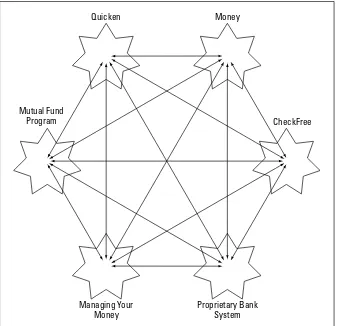
One such format is the Open Financial Exchange 2.0 (OFX, http://www.ofx.net/). OFX is designed to let personal finance programs such as Microsoft Money and Quicken trade data. The data can be sent back and forth between programs and exchanged with banks, brokerage houses, credit card companies, and the like.
OFX is discussed in Chapter 2.
By choosing XML instead of a proprietary data format, you can use any tool that understands XML to work with your data. You can even use different tools for differ-ent purposes, one program to view and another to edit for instance. XML keeps you from getting locked into a particular program simply because that’s what your data is already written in, or because that program’s proprietary format is all your corre-spondent can accept.
For example, many publishers require submissions in Microsoft Word. This means that most authors have to use Word, even if they would rather use WordPerfect or Nisus Writer. This makes it extremely difficult for any other company to publish a competing word processor unless it can read and write Word files. To do so, a developer must reverse-engineer the undocumented Word file format, which requires a significant investment of limited time and resources. Most other word processors have a limited ability to read and write Word files, but they generally lose track of graphics, macros, styles, revision marks, and other important features. The problem is that Word’s file format is undocumented, proprietary, and con-stantly changing. Word tends to end up winning by default, even when writers would prefer to use other, simpler programs. If a common word-processing format were developed in XML, writers could use the program of their choice.
Structured and integrated data
XML is ideal for large and complex documents because the data is structured. It not only lets you specify a vocabulary that defines the elements in the document; it also lets you specify the relations between elements. For example, if you’re putting together a Web page of sales contacts, you can require that every contact have a phone number and an e-mail address. If you’re inputting data for a database, you can make sure that no fields are missing. You can even provide default values to be used when no data is entered.
9
Chapter 1 ✦ An Eagle’s Eye View of XML
XML also provides a client-side include mechanism that integrates data from multi-ple sources and displays it as a single document. (In fact, it provides at least three different ways of doing this, which is a source of some confusion.) The data can even be rearranged on the fly. Parts of it can be shown or hidden depending on user actions. This is extremely useful when you’re working with large information reposi-tories like relational databases.
The Life of an XML Document
XML is, at its root, a document format. It is a series of rules about what XML docu-ments look like. There are two levels of conformity to the XML standard. The first is well-formednessand the second is validity. Part I of this book shows you how to write well-formed documents. Part II shows you how to write valid documents.
HTML is a document format that is designed for use on the Internet and inside Web browsers. XML can certainly be used for that, as this book demonstrates. However, XML is far more broadly applicable. It can be used as a storage format for word pro-cessors, as a data interchange format for different programs, as a means of enforc-ing conformity with Intranet templates, and as a way to preserve data in a
human-readable fashion.
However, like all data formats, XML needs programs and content before it’s useful. Thus, it isn’t enough to just understand XML itself. That’s not much more than a specification for what data should look like. You also need to know how XML docu-ments are created, written, and edited, how processors read XML docudocu-ments and pass the information they read on to applications, and what these applications do with that data.
Editors
XML documents are most commonly created with an editor. This may be a basic text editor such as Notepad or vi that doesn’t really understand XML at all. On the other hand, it may be a completely WYSIWYG (What You See Is What You Get) edi-tor such as Adobe FrameMaker that insulates you almost completely from the details of the underlying XML format. Or it may be a structured editor such as Visual XML (http://www.pierlou.com/visxml/) that displays XML documents as trees. For the most part, the fancy editors aren’t very useful yet, so this book concentrates on writing raw XML by hand in a text editor.
Other programs can also create XML documents. For example, later in this book, you’ll see several XML documents whose data came straight out of a FileMaker database. In these cases, the data was first entered into the FileMaker database. Next, a FileMaker calculation field converted that data to XML. Finally, an
In any case, the editor or other program creates an XML document. More often than not, this document is an actual file on some computer’s hard disk, but it doesn’t absolutely have to be. For example, the document may be a record or a field in a database, or it may be a stream of bytes received from the network.
Parsers and processors
An XML parser (also known as an XML processor) reads the document and verifies that the XML it contains is well formed. It may also check that the document is valid, although this test is not required. The exact details of these tests are covered in Part II. If the document passes the tests, then the processor converts the docu-ment into a tree of eledocu-ments.
Browsers and other applications
Finally, the parser passes the tree or individual nodes of the tree to the end applica-tion. If this application is a Web browser such as Mozilla, then the browser formats the data and shows it to the user. But other programs may also receive the data. For instance, a database might interpret an XML document as input data for new records; a MIDI program might see the document as a sequence of musical notes to play; a spreadsheet program might view the XML as a list of numbers and formulas. XML is extremely flexible and can be used for many different purposes.
The process summarized
To summarize, an XML document is created in an editor. The XML parser reads the document and converts it into a tree of elements. The parser passes the tree to the browser or other application that displays it. Figure 1-1 shows this process.
Figure 1-1: XML document life cycle
It’s important to note that all of these pieces are independent of and decoupled from each other. The only thing that connects them is the XML document. You can change the editor program independently of the end application. In fact, you may not always know what the end application is. It may be an end-user reading your
Browser Parser
Document displays
page to is read by sends
data to
writes User
Editor
Tempest.xml Txpad32.exe
11
Chapter 1 ✦ An Eagle’s Eye View of XML
work; it may be a database sucking in data; or it may be something not yet
invented. It may even be all of these. The document is independent of the programs that read and write it.
HTML is also somewhat independent of the programs that read and write it, but it’s really only suitable for browsing. Other uses, such as database input, are beyond its scope. For example, HTML does not provide a way to force an author to include certain required content. For instance, you can’t say that every book must have an ISBN number. In XML, however, you can require this. You can even control the order in which particular elements appear (for example, that level 2 headers must always follow level 1 headers).
Related Technologies
XML doesn’t operate in a vacuum. Using XML as more than a data format involves several related technologies and standards. These include:
✦HTML for backward compatibility with legacy browsers
✦The CSS and XSL style sheet languages to define the appearance of XML documents
✦URLs (Uniform Resource Locaters) and URIs (Uniform Resource Identifiers) to specify the locations of XML documents
✦XLinks to connect XML documents to each other
✦The Unicode character set to encode the text of XML documents
HTML
Opera 4.0 and later, Internet Explorer 5.0 and later, Netscape 6.0 and Mozilla pro-vide some (albeit incomplete) support for XML. However, it takes about two years from initial release before most users have upgraded to a particular browser ver-sion (in 2001, my wife still uses Netscape 1.1 on her Mac at work), so you’re going to need to convert your XML content into classic HTML for some time to come.
Therefore, before you jump into XML, you should be completely comfortable with HTML. You don’t need to be a hotshot graphical designer, but you should know how to link from one page to the next, how to include an image in a document, how to make text bold, and so forth. Since HTML is the most common output format of XML, the more familiar you are with HTML, the easier it will be to create the effects you want.
On the other hand, if you’re accustomed to using tables or single-pixel GIFs to arrange objects on a page, or if you begin planning a Web site by sketching out its design in Photoshop, then you’re going to have to unlearn some bad habits. As pre-viously discussed, XML separates the content of a document from the appearance of the document. You develop the content first, then design a style sheet that for-mats the content. Separating content from presentation is an extremely effective technique that improves both the content and the appearance of the document. Among other things, it allows authors and designers to work more independently of each other. However, it does require a different way of thinking about the design of a Web site, and perhaps even the use of different project management techniques when multiple people are involved.
Cascading Style Sheets
Because XML allows arbitrary tags in a document, there is no way for the browser to know in advance how each element should be displayed