From Front-End to Back-End and Everything In-Between:
Work Practice in Game Development
Boriana Koleva, Peter Tolmie, Pat Brundell, Steve Benford, Stefan Rennick Egglestone
Mixed Reality Laboratory, University of Nottingham
Nottingham, UK
{first name.last name}@nottingham.ac.uk
ABSTRACT
This paper addresses a paucity in the literature of studies of actual game development. It presents the initial findings from a questionnaire addressed to game development companies together with an ethnographic case study that drills into how resources are actually used and how the workflow and coordination are actually accomplished. It finds a number of challenges that can be seen to confront the development of new game authoring tools, centred around the intensely co-present character of design-related interaction and collaboration in this domain. These findings are used to articulate a range of potential requirements.
Author Keywords
Game Development; Work Practices; Ethnography; Questionnaires; Collaboration.
ACM Classification Keywords H.5.2; H.5.3
INTRODUCTION
Computer games represent a vast economic market, a key driver of computing technology, and an increasingly powerful medium for entertainment, learning, artistic expression, marketing and even health and fitness. Commercial games are usually developed by teams of programmers and generally involve considerable amounts of both time and effort. There are therefore strong reasons in both research and industry for developing authoring platforms that can simplify the work of creating interactive content and enable both experienced programmers and novices to develop games faster and more cheaply.
Recent tools like 3DVia Studio [1], Quest3D [17], GameMaker [9], and game engine editors (e.g. CryENGINE [6], PlayMaker for Unity [15]) provide visual programming interfaces though abstract graphical representations (e.g. flow charts and configuration of properties through various visual forms). Tools with a drag and drop interface, like FPS Creator and the 3D
Gamemaker [2, 7] from the GameCreators [8] have also emerged to support creative people who have not mastered scripting techniques. With an eye to also supporting workflow Inscape (http://www.inscape3D.com) and 3D Via have combined drag and drop interfaces and flow charts. Additionally, a number of authoring platforms have specifically targeted mobile experiences, including AppFurnace [3] and Magellan, which has arisen within an EC-funded project of the same name [14].
While many development efforts so far have been aimed at making game authoring possible for non-programmers and quicker for experts, there is still potential for significant improvements with respect to supporting the workflow and collaboration in teams who create games commercially. To aid the development of such future authoring platforms we need to understand the kinds of work practices, workflows and tools already involved in the conceptualization and authoring of gaming experiences and where gaps in support currently exist. Any new technology in this space is going to have to be made at home within this existing ecology.
Most of the games literature focuses primarily upon the design and evaluation of games. Some work does look at matters of practice, for instance Tran and Biddle’s ethnographically-informed study [22] of a company developing games for business training. They suggest that innovative game design can be supported by creating a culture of collaboration, with innovation being largely dependent on the quality of the interpersonal relationships within teams. Aside from this a few games designers have shared reflections upon the exercise of their craft and the importance of effective management of the game creation process [13][20], but, to date, there is a marked absence in the literature of direct studies of games developers.
In this paper we draw upon two complementary investigations of the work of games development. One of these centres upon using a questionnaire to identify general practices and surface themes. The other is a much more detailed ethnomethodologically-informed ethnographic study of practice [12] looking at just how this kind of work actually gets done [5]. These two studies were conducted conjointly, each being intended to inform the other. In particular we were interested in using the ethnography to gather data whereby we could drill into matters that might be revealed by the questionnaire, whilst simultaneously providing insights regarding how certain questions might be © ACM 2015. This is the author's version of the work. It is posted here for
your personal use. Not for redistribution. The definitive Version of Record was published in the proceedings of CHI Play 2015.
framed. Most especially, by collecting very detailed materials we were seeking to address the question of what it is respondents might be specifically speaking of when we saw the results of the questionnaire. Together the findings reveal the principal tools game developers make use of in their everyday work, how the workflow is organised, and how the work is deeply embedded within patterns of collaboration. Critically the findings also indicate ways in which some parts of the workflow are not currently well-supported by existing tools, indicating important areas for the future design of a range of possible tools.
QUESTIONNAIRE STUDY Method
The questionnaire had 23 items consisting of a mixture of 2-choice and multiple choice items, descriptive answers and Likert type items. The questionnaire was broadly structured to investigate use of physical and digital tools, the capabilities and limitations of current tools and practices, and game experience design requirements. To that end questions were posed such as:
“Describe the physical and digital tools which significantly contribute to your design process”
“What are the main problems or issues in designing location-based experiences which you would like MAGELLAN to address?”
“What kind of location-based experiences do you want to produce?”
“Which elements do you need to create in order to define and structure your experiences?”
The questions were developed by experienced interaction design researchers in collaboration with the commercial and academic technical partners on the project. These included: mobile, web and app development companies, developers of multi-sensorial devices for visualisation, interaction and collaborative working, academic research groups researching and developing augmented reality, geo-location and telecommunications, graphics and computer vision systems. The actual design and deployment of the questionnaire was managed through an online service
provided by Bristol Online Surveys
(www.survey.bris.ac.uk). Data collection took place from November 2013 to February 2014. Participants were recruited through a mailing list for SME’s focused on gaming experiences and involved in a project developing a novel authoring tool for collaborative games1.
The questionnaire was completed by 33 respondents, who all came from the project end-user partners and their associates. This group was chosen because it is the target commercial audience for technical products being developed by the project. The partner companies are all
1 Both studies reported here operated under strict ethics
guidelines bound to UK law and the data protection act.
commercial SMEs, focusing on games design, web publishing, multimedia content and mobile apps. Over half the respondents (57.6%) were between 35 and 44, another 27.3% between 45 and 54. The rest were over 55 (9.1%) or 34 and under (6.1%). They mostly covered 3 different project roles: development (35.3%); project management (32.4%); and graphic and multimedia design (26.5%). A further 5.9% were involved in research or other activities. The spread of technical experience amongst them included: general computing experience, technical development, audio, video, 3D content and image production, computer-vision based localization, mobile experience design, location-based mobile design, mobile augmented reality design, and the creation of object hyperlinks.
Data from the questionnaire was analysed by the project’s academic partners with an eye to discovering: the kinds of tools and resources being used; the way these were embedded in and across various workflows; the collaboration entailed in bringing about such workflows; how these matched their reasoning about the work of game experience design, and where there were currently shortcomings in the process and the resources available. We present findings relating to these matters below.
Findings
Workflow and Resources
Questionnaire respondents were asked to describe the current activities they perform to produce an experience e.g. construct paper prototypes, draw onto maps, Javascript coding, and to indicate which tool or tools they currently use to perform these tasks (software or not). All 33 respondents provided descriptive answers to this question. The number of activities described ranged from 1-10 with over 50% of respondents describing at least five activities, together with the tools they use to complete each task.
The descriptive answers were organised into 11 categories of activity which revealed, in the vast majority of cases, a similar production process, beginning with the elicitation of client requirements, followed by brainstorming and ideation activities and project planning. Further steps in the production process typically included design, prototyping and production of assets (such as images, videos and 3D models), continuing with html and coding development, and finally, deployment and testing. Figure 1 shows the activity/production categories (rectangular boxes) with the tools (elipses) which were reported as being used to complete each of these tasks.
specific technical production activities such as 3D modeling there were at least three different tools in use.
Figure 1. Tools used in games development
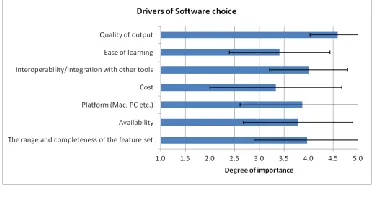
Respondents were asked to judge the importance of various factors driving their choice of software tools. A 5-point Likert-type scale was used ranging from 1 = "never drives my choice" to 5 = "always drives my choice". Figure 2 shows a summary of the results.
Figure 2. Drivers of software choice
Post hoc paired sample t-tests were conducted to identify the differences. Here Bonferonni adjusted values for alpha of .002 were used (.05/21). The tests indicated that the quality of output was judged to be of greater importance than ease of learning, t(32)= 5.63, p < .00; interoperability/integration, t(32)= 4.66, p < .00; cost, t(32)= 4.61, p < .00; and availability, t(32)= 3.97, p < .00. By a similar token, interoperability/integration with other tools, was shown to be of significantly greater importance than ease of learning t(32)= 2.85, p = .008.
The mean values for the importance of features as drivers for software choice were all above the midpoint of 3. This finding might suggest that all the features are relevant to users. This being said, it was particularly notable that quality of output was rated as more important as a driver of
choice than the majority of other features, the only other feature standing out being integration with other tools.
Respondents were also asked to identify where problems typically arise in the workflow. Although 55% of respondents did not provide an answer to this question, and one stated that there were no points of breakdown or difficulty in their workflow, many did identify problems and their perceived causes. These ranged from global organisational problems, such as general disorganization to some specific problems. Breakdowns in communication, and gaps of expectation between clients and production teams were mentioned most often. Time and product delivery pressures were also identified a number of times.
Collaboration
Respondents were asked who they most closely worked with (in terms of job role). Descriptive responses overwhelmingly reflected the same job roles as respondents used to describe themselves. That is, they worked closely with designers (58%), project managers (38%) and developers (74%). Perhaps surprisingly, only 9% of respondents said they worked most closely with their clients. Respondents were asked to indicate how frequent communication was with these people on a scale of: Never (1); Monthly (2); Weekly (3); Daily (4); to Hourly (5). Real-time communication (face to face, video or phone) took place daily (44%) or hourly (44%) for the majority of respondents. Email was also used frequently with the majority using it daily (35%) or hourly (56%). Frequent use of shared workspaces was shown with most respondents using them daily (35%) or hourly (38%).
In another question respondents were asked to describe how collaborative authoring of gaming experiences might be most effectively supported. Answers here included: establishing common goals and plans; sharing and organizing work in real-time; an organizational culture of contribution; learning from others; ability to "see" at what stage of the design process my colleagues are; version systems; and being able to communicate between the field and the studio. The answers mostly address different parts of the design process, but two responses - building a common understanding of goals and collaboration over distance - were mentioned by multiple users
Building a deeper understanding
[image:3.612.81.269.414.514.2]ETHNOGRAPHIC STUDY Approach
Ethnography, and more specifically ethnomethodologically-informed ethnography [12] has been one of the most effective approaches adopted in the systems design community for uncovering the nature of real-world work practices [5]. It was specifically used in this case to provide formative insights regarding the ordering of the kinds of creative and technical work associated with the development of game experiences.
Two solid days of ethnographic observation were undertaken at an SME in Spain. The choice of this company was pragmatic, shaped by its availability for study as a partner within the project. However, it also operates a workflow matching the kinds of targets we are interested in exploring, so useful insights were more or less guaranteed. The data gathered consists in handwritten notes made during observations, and audio and video recordings of both interviews with personnel and of personnel actually pursuing their ordinary everyday activities across a variety of local work situations.
The analysis is ethnomethodological in character [10]. In other words it goes beyond scenic descriptions of what people do in order to bring out how their activities are ordered and methodical means of bringing about particular courses of action. Thus findings are articulated around the organisational properties of work as a set of methods for the realization of specific local accomplishments.
Description of the games company
The company where observations took place has been in existence for 4 years and creates location-based games, primarily as promotions for large clients, though they also have a portfolio of their own designs and do occasional work for other games design companies. The company is made up 12 people working in an open plan office on one single floor of a large building. Within the office staff are spread across 3 islands of desks broadly representing a functional division within the company: one island is devoted to creative work (graphic design, animation and the preparation of web layouts); another to front-end work (coding in the interactive elements); and another to back-end work (creating the underlying resources such as databases and services). Additionally there is a large closed off meeting room and a smaller common room.
FINDINGS
Because of their particular pertinence to both understanding the responses to the questionnaires and the development of effective requirements, the observations we present focus upon: the kinds of tools and resources used; the nature of the workflow; and what it takes to actually accomplish an effective workflow across a division of labour.
Use of Resources Software
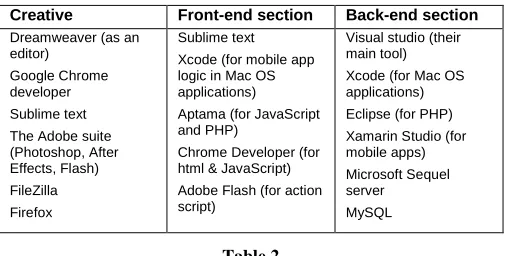
First of all let us look at the primary software tools used across each of the functional divisions within the company (Table 2). As was indicated by the questionnaire there proved to be a range of applications being used to support each function, with some in use across them.
Creative Front-end section Back-end section
Dreamweaver (as an editor)
Google Chrome developer
Sublime text
The Adobe suite (Photoshop, After Effects, Flash) FileZilla
Firefox
Sublime text Xcode (for mobile app logic in Mac OS applications)
Aptama (for JavaScript and PHP)
Chrome Developer (for html & JavaScript) Adobe Flash (for action script)
Visual studio (their main tool) Xcode (for Mac OS applications)
Eclipse (for PHP)
Xamarin Studio (for mobile apps) Microsoft Sequel server
MySQL
Table 2
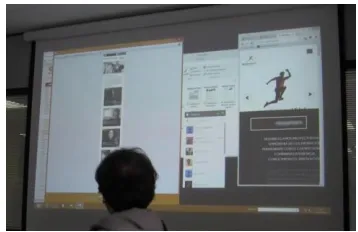
[image:4.612.312.565.149.277.2]The interleaving of various tools and continual switching between them on the desktop was characteristic of the work across all of the teams, instead of working with just one application. Figure 1 shows how a common practice was to re-size windows on the desktop so that multiple applications being worked upon were all kept in view.
Figure 1. Multiple applications kept in view
Outside of their principal applications, some tools were also recurrently used to support the everyday flow of work, especially the sharing of files and content. One such resource heavily relied upon is Dropbox. A company account is maintained as staff find it the quickest and most lightweight way of sharing files rapidly. Only once files have been worked up are they moved to the local server.
through subtle forms of bodily comportment, such as frowns or nods of the head.
Physical resources
Whilst most of the work in the company centred on desktop computers, the use of some other devices was also observed. In the creative section both drawing tablets to support working with graphics and tablet computers such as iPads were used. A key affordance of iPads proved to be the possibility of displaying materials they had been creating in another form, notably websites. Sometimes this work of display was even enacted in tandem with the work of creation, with cross-reference happening routinely between desktop display and the iPad, as in the following:
Sebastian (creative) using iPad to display web information
whilst looking at PC screen – Referring between the two -
iPad situated at side of Matias’s desk (so it can be plugged in) but angled towards Sebastian
[image:5.612.347.526.59.175.2]Smartphones were also notably used in this regard to display mobile applications they had been working on or, as in the case of the following, other people’s applications as a resource to inform their own development activities. Here three of them have just come out of a meeting regarding the development of a new product for the hotel industry:
Figure 2. Use of smartphones
They pause outside the room and Sebastian shows them the application he just mentioned using his mobile phone... They talk about it as he scrolls down. Then they head back to their desks, still talking.
Another recurrently visible resource that was important to the accomplishment of work here was what might be termed ‘mutually available interactive spaces’. A significant part of the work is brought about during meetings between people in the enterprise, often from various different teams. An important part of being able to facilitate communication during these meetings, evidence ideas, create records that can be mutually ratified, provide for group annotation, and so on, is the provision of resources that everyone can see at the same time and, where relevant, act upon and transform in a variety of ways.
Figure 3, for instance, shows a group of features being displayed on a screen for everyone involved in a conference call with a client.
Figure 3. Resources displayed to all in a conference call
Figure 4 on the other hand shows a list of considerations regarding the development of a new product that have been written by one of the participants on the windows of the meeting room, such that others can come up and amend them or add to them in some way.
Figure 4. Publicly visible and editable list
Finally, it is important to note that people working in the company also made extensive use of paper resources, especially ordinary notebooks. One of the common uses of such notebooks is to record jobs to do after more programmatic discussions, such as project meetings. However, they were also used as a means of keeping ‘To Do’ lists, with items being systematically ticked or crossed off once completed. A further use was recording ways of doing things when they engaged in discussions with more experienced members of staff. Outside of this they were used to simply record information, such as names and telephone numbers. Sometimes existing entries, such as To Do lists were seen to be annotated as further considerations became manifest. Additionally, they often proved to be the most to-hand resource for quickly sketching out various relationships and ideas in the course of design discussions.
The Workflow as a Formulation
In order to examine the workflow, we shall begin with some local formulations of its character.
[image:5.612.348.525.266.382.2] [image:5.612.86.265.348.459.2]art (PSD or JPEGs) to give an idea of what they want. There is a local meeting to discuss the idea and if it’s problematic in any way. The meeting is documented in an email shared between the people who were in the meeting. This implicates a range of refinements and text editing to arrive at a story they are willing to pass back to the client. However, this first stage can also be subject to variation:
“It can often be the client phones, says ‘can you come to my office so I can give you some requirements for an application’,... Next day we go to their office and have a meeting to find out what they want. Then we work up the brief between us rather than it being specified at the outset.”
Where clients do not have a clear idea a questionnaire may be sent to them, before a functional document is created showing features, requirements, designs, tech diagrams, etc. For this they use Microsoft Visual Studio for drawing the diagrams. They send it to the client to review and the client provides feedback. The client then returns the final brief and they start work straight away. They don’t create this document for every project. A lot of projects are agile and for these they uncover the requirements along the way.
At this stage there are several other structures and workflows that come into being relating to the formal establishment of the project within their own system. One of the most important is splitting the job up into tasks and allocating these to the various departments. This is overseen be one of the principal managers in the course of weekly status meetings where a range of new and existing projects are reviewed. Documents and other materials relating to the projects are arranged within specific client directories in Dropbox and on their own local server. Once tasks have been allocated members of teams are then able to go into the directories and collect the materials they need.
In most cases the next step is for designers in the creative team to use Photoshop or Illustrator to draw the application:
“Once the project is approved by the client it has to go on a
mobile or on the web in html format. This is what ‘set up’ refers to. Once the set up is done the front end can start working. Once the illustration is completed and approved by the client, even if it is not set up yet, the back enders can get underway. So the front has a dependency on the set up, the back has a dependency on the illustration.”
After each team has worked independently on its materials the front and the back end have to be put together. This can only happen once both of their separate strands are completed. At this point there is a meeting and each side’s work is documented in a Word document or an email, which specifies that the job is complete and itemizes everything that has been done. This enables the other side (front or back) to see what might still need doing.
With all of the materials assembled together they move into a quality assurance phase:
“There are usually 1 or 2 full days of correcting once each
side is complete. Troubleshooting and debugging takes
time. We don't send out work until this testing and correction work is done.”
Deadlines can be especially aggressive:
“It’s hard to push back on deadlines. The applications we
create are tied to marketing campaigns on TV etc. where the company has paid for a pre-booked slot. The result is testing may have to happen in overtime. We usually have less urgent projects we can push back to make space for labour (or free up resources) on urgent ones as they approach the deadline.”
Delivery was where tensions in the workflow could really start to become manifest. Initially the application is published on their own testing server. The client can then review it, test it and give feedback. The reason for keeping things on their own test server at this stage was because:
“It makes things easier for rapid response to issues,
because … the first delivery never goes perfectly … They
normally give feedback and ask for changes – in maybe
99% of cases - e.g. “I told you I wanted this in red, but I want blue”. We may have 3 or 4 rounds of doing changes.”
The client then confirms it’s ok by email and at this point they need to say when and how they want the application published. Two processes relate to delivery after this:
“With option 1 they use our own servers. They install the application on their production server and configure it, and it is published on a date specified by the client. We then continue to host it and provide monthly maintenance tasks to the client…”
Option 2 (which they don't really like) is to use the client’s servers. This leads to several issues:
“First of all we have to pass QA for security purposes… It
can be a hard phase… they may insist on an exhaustive list of security features. It can take up to a week to cover these specifications. And here there’s a risk of missing a deadline
…. One QA took 9 days to complete.”
It became clear that it is possible here to get caught up in a need for a communication interchange where one side is outside of your control and your own system of priorities. There are two main risks associated with this: 1) the intermediaries slowing the process, with an increased risk of error; 2) losing control so that delays may arise that are not of your own making and that you are powerless to rectify. However, the problems do not stop at that:
“After QA there is the Install, Configure, and Publish phase
Sometimes we find we have to call the final client and instruct them anyway because the advertising company just
wouldn't be able to explain it.”
Evidently, having to pass through multiple intermediaries can make the process very heavy. But there is also a risk here of a sort of Chinese Whispers where chains of assumptions regarding ‘what the documentation is saying really’ may lead to a final outcome that is some distance removed from what would have been published on the company’s own servers. They are therefore increasingly pushing for new business direct with final clients to reduce these kinds of issues.
The Workflow As An Accomplishment
The preceding section provides an overview of how the work in this organization needs to be ordered for it to get done. For those doing the work, however, any discrete part of this workflow may involve a great many more unspecified yet vital situated and contingent matters for it to actually be accomplished at any given moment (see [4] for a cogent discussion of this matter). For the sake of brevity we look here at just two aspects of ‘getting the work done’ that are typically missed from formal workflow articulations but which are, nonetheless, central components of its actual realization: i) how the exact work to be done is first established and then shared out amongst parties; and ii). the amount of coordination and collaboration involved in bringing the workflow about.
Establishing what needs to be done and by whom
So, one of the things outlined in the preceding articulation of the workflow was the arrival of a job as a package of, typically image-based, materials. These are then used to create, on the one hand an html layout that can service the needs of the front end and, on the other hand, a set of illustrations that can populate the services established by the back end. Whilst a number of these kinds of client packages were visible over the course of the observations and clearly occupied the point within the workflow as outlined, this articulation rather glosses the amount of work it can take to establish, on the basis of this package, just what the job of arriving at these layouts and illustrations is going to be. It is clear when the work is inspected that just what any package of such materials amounts to as a set of instructions for how to then assemble them as a job is something that stands above and beyond the materials themselves and requires a range of situated practices and accountable bodies of reasoning for them to be rendered in any such way. To take an example:
Diego talking through the content of a job for a large car manufacturer that has just arrived by email with Sebastian. Sebastian sits beside him and Diego talks through each of the images in turn, discussing the things they need to do from a creative point of view. They discuss specific elements on an image and how to cut it up and change it to make it interactive. Then Diego and Sebastian change places. Sebastian goes to Google Chrome and opens the image in
Chrome Developer. They discuss how to change things further and Sebastian changes some of the lines of code. They inspect the result then Sebastian and Diego change places back again. Sebastian stands up to go but stands by the desk as they discuss further and Diego formulates what he understands they are going to do. Sebastian says ok and heads back to his desk.
In the above example, just how to proceed is worked up through interaction between Diego and Sebastian, through inspection of specific images, experimentation regarding ways of cutting and handling them, and through the specific articulation of a set of mutual understandings about appropriate ways to render such things interactive. Only with this work done can the materials as delivered be handled by Sebastian as a set of known tasks that he will then have to accommodate within his schedule.
Coordination and collaboration
Something already visible in the preceding discussion is the way in which it takes significant amounts of coordination and collaboration both within and across tasks for the work to be brought about in practice. Here we explore some of the characteristics of the coordination and collaboration visible in the enterprise and how that too shaped the doing of the work. One of the things we note straight off is the sheer extent of collaborative work and paired interaction that took place. Within this pattern of working we also note some tight dependencies that further serve to shape its character, such as interruptability, dislocation, and deictic devices. Also relevant here are the ways in which expertise is distributed around the organisation.
code or the images, whilst the other party directed their actions and commented upon what they were seeing.
The requirements of interruptability and dislocatability: A concomitant element of all of this co-situated work is that it carries with it an implicit expectation of people’s interruptability, but also their capacity to dislocate and move to one another’s desks. These expectations are characteristic of their work and form a part of its routine backdrop such that for someone to resist interruption or refuse to dislocate would actually stand in need of account. However, the possibilities of fluid co-situation are not a necessary feature of just any kind of office work and brings with them some highly specific benefits that are central to the doing the work, such as deixis.
The requirements of deixis: One of the strongest and most recurrent kinds of deictic reference seen was the activity of pointing to specific lines of code or specific features on the screen. This mundane feature was one of the most pervasively visible methods underpinning the work of coordination between people working on different tasks or bringing to bear specific kinds of expertise. It was especially critical in the context of dealing with troubles and, as testing and verification is a constant feature of the work, troubles are being uncovered all the time and debugging is a continual feature of the work.
So, even though this work is often quite technical and referring to inherently digital phenomena, it is also profoundly deictic and embedded in physical representations of the elements being discussed in the real world. Lines of code all look rather similar so it is critical that you be able to point to which one you mean. The discovery of flaws in such stubbornly opaque representations is redolent of Goodwin’s discussion of ‘professional vision’ and how medical practitioners can see diagnostically significant elements in apparently opaque bodies of medical imagery [11]. It is hard to overstate how deeply wedded this body of practice is to pointing and touching in highly specific ways to make clear the object of reference. Nor is it easily replaced. Highlighting elements on a screen remotely would lack the mutual witnessability of not just the act of pointing but also the ways in which objects of reference are manifestly being ‘seen’.
Hubs of expertise: Another classic issue in CSCW and studies of work is the presence of ‘hubs of expertise’, i.e. people with particular bodies of local knowledge that it is hard to just extract and formalize in any coherent way (see [18], for instance). Three people were of note here; the manager responsible for the back-end work; the manager who handled interactions with the clients; and a senior programmer who was heavily implicated in the production of APIs. Seeking advice from these people is central to how some of the coordination takes place, especially under conditions where the need is to be agile. Trying to distribute or codify the knowledge they posses would be a significant overhead and the most economical way to proceed is often
to just seek out their help, though this carries an evident risk regarding handling their absence.
DESIGN IMPLICATIONS
In this paper we have provided an overview of the principal findings from both a questionnaire and an ethnographic study of game design practice. Together these findings have focused upon three main areas: the principal tools (software and otherwise) game developers make use of in their everyday work and how that imbues the work with particular kinds of characteristics; the workflow as an abstract device for the purposes of planning and description; and how the workflow is actually accomplished within the doing of the work. To conclude we are going to indicate some of the implications the findings may have for the design of future authoring tools, similarly organised around matters such as resources, workflow, and coordination.
Resources
Existing tools: Despite the diversity of the work, some tools were highlighted as being of enormous general utility, e.g. Chrome Developer. The fact that any other tools will probably be measured in relation to this and necessarily used in tandem with them and compared against them for the quality of their output needs to be taken into account.
Interleaving of applications: It was clear from the
questionnaire that designers, developers and project managers use many different tools to accomplish their tasks. The ethnographic study also revealed a strong tendency to have multiple tools open at the same time and set up on the screen so that it was easy to transition between them. Outputs from future authoring tools should be equally adaptable to such shrink and fit considerations.
Use of mutually available interactive spaces for relevancing work and demonstration: There is a lot of research in this space that harks right back to Suchman’s 1990 observations regarding whiteboard use [21]. Once again the majority of SMEs indicated that the use of spaces to share resources was commonplace, both in the physical environment with whiteboards and paper, but also digitally mediated through shared workspaces. This was especially relevant in the early requirement elicitation and conceptual development stages of production. Once again, drilling down into the use of these spaces in the case study confirmed and elaborated the strong orientation to making use of these kinds of spaces in the context of game design. Future authoring tools will need to consider how to both support and potentially populate such resources.
workflow was under-represented. The importance of To Do lists and other practical management artefacts is likely to be repeated across all organisations.
Workflow
Interactions with clients: As new development platforms don’t just feed into local workflows but also the next generation of experiences it’s important to take into account how work is currently shaped for customer delivery. Reasoning about what should be delivered to customers spans a number of different kinds of considerations.
Intermediaries: The case study suggested there is often a need to feed outputs through ‘unsympathetic’ or ‘less than fully competent’ intermediaries. A common cause of breakdown in several workflows was a mismatch between client expectation and delivery. New or more efficient methods are required to support effective production and communication processes for designs, prototypes and delivered products across a wide range of different possible understandings, motivations and expectations.
Control requirement: A major threat to effective workflow
is loss of control. Authoring platforms therefore need to address commercial concerns in retaining control over the assets they produce as they cross environments.
Testing: There is an enormous pressure to verify and test outcomes on an almost continual basis (indeed this is one of the reasons why Chrome Developer is seen to be so useful in some organisations) and any future authoring tools need to support a similar functionality.
The need for agility: The company examined here is heavily committed to rapid delivery so it is critical that new tools do not result in slower processes or new bottlenecks. The questionnaire also revealed that time pressure on product delivery is a source of breakdowns for a number of organisations. Pressures on product delivery were identified to result from things like the development of new technologies, again highlighted by the wide-ranging requirement for integration with existing systems. In that agile computing has become an important feature of the games design landscape these issues are likely to be recurrent. Understanding their character and relating this more broadly to how agile work is accomplished is therefore going to be important for future research [see 16].
Establishing the work: The case study revealed that one of the primary creative ‘moments’ is associated with establishing what a job might be in the first place. The development of new authoring platforms needs to understand and take into account the interactional dynamics associated with these ‘moments’.
Working up an appropriate division of labour: Authoring tools need to avoid making the mistakes of the past [4] by imposing overly rigid workflow models. An appropriate workflow and division of labour is something that is often only uncovered in the course of doing a job.
Collaboration and Coordination
Extent of collaborative work: For the vast majority of SMEs games development is intensely collaborative at all points within the workflow. Authoring tools need to provide a suite of ways in which to support the kinds of rich interaction and collaboration we have observed, In particular, paired work has certain characteristics that involve roles of articulation and direction that are not necessarily equally shared across both parties. A particular challenge here is the extent to which the work turns upon highly situated forms of deictic reference and embodiment. Mechanisms are needed to support a variety of situated interactions and the relevancing of features for discussion.
Requirements of interruptability and dislocatability: For the questionnaire there was a high frequency of real-time, and mediated communication visible in almost all SMEs who contributed data. The case study shows how existing practices of coordination turn upon assumptions regarding interruptibility and the capacity of people to go where they are needed. In larger and more geographically distributed organisations the support for interruptability and flexible communication and sharing practices is likely to be even more pertinent. This may be even more important where coordination turns upon the exercise of quite specific bodies of expertise. It is an open question as to how such mechanisms might map to something that seeks to service collaborative creativity in other ways.
CONCLUSION
In this paper we have explored in depth a much-neglected aspect of the game literature, namely how the actual work of games development is accomplished. To do this we used in combination a questionnaire, in order to uncover some cross-organisational similarities and concerns, and an ethnomethodologically-informed ethnographic study in order to reveal some of the specific methods and orientations central to the accomplishment of the work.
ACKNOWLEDGEMENTS
The research reported here was supported by the EC 7th Framework Programme project MAGELLAN, Grant Agreement No. 611526.
REFERENCES
1. 3DVia Studio. Retrieved April 1, 2015 from http://www.3ds.com/products-services/3dvia/space-planning-software/studio/
2. The 3D Gamemaker. Retrieved April 1, 2015 from http://www.thegamecreators.com/?m=view_product&id =2126
3. AppFurnace. Retrieved April 1, 2015 from http://appfurnace.com/
4. Bowers, J., Button, G. and Sharrock, W. (1995) ‘Workflow from within and without’, in Proc. CSCW ‘95, 51-66
5. Crabtree, A., Rouncefield, M. & Tolmie, P. (2012)
Doing Design Ethnography, London: Springer
6. CryENGINE. Retrieved April 1, 2015 from
http://www.crytek.com/cryengine/cryengine3/overview
7. FPS Creator. Retrieved April 1, 2015 from
http://www.thegamecreators.com/?m=view_product&id =2001
8. The GameCreators, Retrieved April 1, 2015 from http://www.thegamecreators.com/
9. GameMaker. Retrieved April 1, 2015 from http://www.yoyogames.com/studio
10.Garfinkel, H., (1967) Studies in Ethnomethodology, London: Polity Press.
11.Goodwin, C. (1994) ‘Professional Vision’, American Anthropologist 96(3) pp 606-633.
12.Hughes, J A, Randall, D, and Shapiro, D (1992) Faltering from Ethnography to Design, in Proc.
CSCW’92, 115-122
13.Khaled, R and Ingram, G (2012) Tales from the front lines of a large-scale serious game project, in Proc. CHI’12, 69-78
14.MAGELLAN project. Retrieved April 1, 2015 from http://www.magellanproject.eu
15.PlayMaker for Unity. Retrieved April 1, 2015 from http://u3d.as/content/hutong-games-llc/playmaker/1Az
16.Procter, R, Rouncefield, M, Poschen, M, Lin, Y and Voss, A (2011) Agile Project management: A Case Study of a Virtual Research Environment Development Project, JCSCW, May 2011
17.Quest3D. Retrieved April 1, 2015 from http://quest3d.com/
18.Randall, D., O’Brien, J., Rouncefield, M. and Hughes, J. (1996). ‘Organisational Memory and CSCW:
Supporting the ‘Mavis’ phenomenon’ in Proc. OzCHI 96
19.Sacks, H. (1984) ‘Notes on Methodology’, in Atkinson and Heritage (eds.), Structures of Social Action: Studies
in Conversation Analysis, Cambridge: Cambridge
University Press, 21–27.
20.Shirinian, A (2011) Dissecting the postmortem: Lessons learned from two years of game development self-reportage, Game Developer Magazine, February 2011.
21.Suchman, Lucy (1990) 'Representing practice in cognitive science', in M. Lynch and S Woolgar (eds) Representation in Scientific Practice, Cambridge (Mass.): MIT Press, 301-321