Feature and performance comparison of the
V-REP, Gazebo and ARGoS robot simulators
Lenka Pitonakova1,2, Manuel Giuliani1, Anthony Pipe1, and Alan Winfield1 1
Bristol Robotics Laboratory, University of the West of England, Bristol, UK
Abstract. In this paper, the characteristics and performance of three open-source simulators for robotics, V-REP, Gazebo and ARGoS, are thoroughly analysed and compared. While they all allow for program-ming in C++, they also represent clear alternatives when it comes to the trade-off between complexity and performance. Attention is given to their built-in features, robot libraries, programming methods and the usability of their user interfaces. Benchmark test results are reported in order to identify how well the simulators can cope with environments of varying complexity. The richness of features of V-REP and the strong performance of Gazebo and ARGoS in complex scenes are highlighted. Various usability issues of Gazebo are also noted.
1
Introduction
Simulation is a useful scientific tool that can complements more traditional ex-perimental approaches [1]. Choosing a suitable simulator is important, as differ-ent simulation environmdiffer-ents offer differdiffer-ent performance, model detail and built-in features, all of which may affect the success and the merit of a simulation-based study. In this paper, features and performance of three open-source simulators for robotics, V-REP [2], Gazebo [3] and ARGoS [4], are thoroughly analysed and suggestions about what types of projects they are suitable for are provided. All of the three simulators allow for programming in C++, allowing us to make reasonable comparisons between their features and performance. At the same time, the simulators represent clear alternatives when it comes to the trade-off between simulation complexity and speed.
Other simulators, such as Matlab [5, 6], Webots [5, 6], Player/Stage [5, 7–9], Gazebo [5, 7–9], USARSim [5, 8, 9], SARGE [8] and TeamBots [7], have previ-ously been described and compared. While some comparisons were rather in-formal [6, 8], others involved ranking simulators based on specific evaluation criteria. For example, in [9], programming language support, documentation, user interface and debugging techniques of simulators were evaluated. In [5], the evaluation criteria included simulator physical fidelity, functional fidelity, ease of development and cost.
aim to provide a ranked evaluation of the simulator characteristics in Section 2. Moreover, similarly as in [9], the simulator performance is evaluated on a set of benchmark experiments in Section 3.
2
Simulator Characteristics
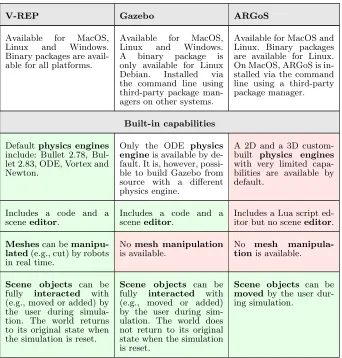
[image:2.612.138.480.315.673.2]All tests were performed in the 64-bit Ubuntu Linux 16.04 environment running on a computer with 4x Intel Core i7 2.2 Gz processor, 8GB RAM and Intel HD Graphics 6000 graphics card. The built-in capabilities, model library, program-ming methods and user interface of the simulators are compared in Table 1.
Table 1: Simulator characteristics ranked as rich (green), neutral (white) and poor (red). Ranking was performed by considering characteristics in the same row (i.e., of the same type) relatively to each other.
V-REP Gazebo ARGoS
Available for MacOS, Linux and Windows. Binary packages are avail-able for all platforms.
Available for MacOS, Linux and Windows. A binary package is only available for Linux Debian. Installed via the command line using third-party package man-agers on other systems.
Available for MacOS and Linux. Binary packages are available for Linux. On MacOS, ARGoS is in-stalled via the command line using a third-party package manager.
Built-in capabilities
Defaultphysics engines
include: Bullet 2.78, Bul-let 2.83, ODE, Vortex and Newton.
Only the ODE physics engineis available by de-fault. It is, however, possi-ble to build Gazebo from source with a different physics engine.
A 2D and a 3D custom-built physics engines
with very limited capa-bilities are available by default.
Includes a code and a sceneeditor.
Includes a code and a sceneeditor.
Includes a Lua script ed-itor but no sceneeditor.
Meshescan be manipu-lated(e.g., cut) by robots in real time.
No mesh manipulation
is available.
No mesh manipula-tionis available.
Scene objects can be fully interacted with (e.g., moved or added) by the user during simula-tion. The world returns to its original state when the simulation is reset.
Scene objects can be fully interacted with (e.g., moved or added) by the user during sim-ulation. The world does not return to its original state when the simulation is reset.
Scene objects can be
Outputs include video, custom data plots and text files.
Outputs include simula-tion log files, video frames as pictures and text files.
Outputs include video frames as pictures and text files.
Includes particle systems. No particle systems are available.
No particle systems are available.
Robot and other models
Provides a large variety of robots, including bi-pedal, hexapod, wheeled, flying and snake-like robots. Also provides a large number of robot actuators and sensors.
A less diverse library of default robots, that mostly includes wheeled and flying robots. Third-party robot models are available, but their docu-mentation is often poor.
A fairly small library of robots, only includ-ing the e-puck [11], eye-bot [13], Kiloeye-bot [17], marXbot [12] and Spiri [14] robots.
The default modelsare very detailed and there-fore appropriate for high-precision simulations. It is possible to simplify the models directly in V-REP.
The default models
are fairly simple and are therefore more appropri-ate for computationally complex simulations.
The default models
are fairly simple and are therefore more appropri-ate for computationally complex simulations.
Meshes are imported
as collections of sub-components. It is there-fore possible manipulate individual parts of an imported model and to change their textures, materials and other properties.
Meshes are imported
as single objects. Models that contain multiple sub-components have to be as-sembled in Gazebo from multiple DAE files, each corresponding to one sub-component.
Mesh importing is not available. Object representations are programmed using OpenGL.
It is possible tosimplify, split and combine meshes. This makes it possible to optimise the triangle count of imported models and to manipulate meshes (e.g., to cut them) with robot actuators.
Imported meshes can-not be changed. A model therefore has to be optimised in third-party 3D modeling soft-ware. This may be diffi-cult during iterative de-velopment.
N/A
Programming methods
A scene is saved in a special V-REP format. All scene editing therefore has to be done using the V-REP interface.
A scene is saved as an XML file. This makes it possible to e.g. create a bash script that changes the scene and then runs a simulation.
There are various options for programming func-tionality, including scripts attached to robots, plug-ins, ROS nodes [10] or separate programs that connect to V-REP via the RemoteAPI.
Functionality can be pro-grammedeither as com-piled C++ plug-ins or as ROS [10] programs. Lack of scripting makes it dif-ficult to run quick tests with ad-hoc solutions.
Robots can be pro-grammed either through Lua scripts or in C++.
Scripts can be included in robot models and are of-ten used todescribe the models and their capa-bilities.
It is difficult to recognise how a third-party robot
model works or what ins it uses. The plug-in list is only available plug-in the Model Editor.
Some documentation
of the robots is provided in ARGoS, but most of how a robot works needs to be deducted from code examples.
“CustomUI” API, based on QT[15], is used to cre-ate custom interfaces. Custom UI controllers can be attached to individ-ual robots. For example, it is possible to display a robot’s camera output when the robot is clicked on.
Custom interfaces can be created as plug-ins by using the default QT API [15]. However, the inter-faces can only be attached to the whole scene and not to individual robots.
Custom interfacescan be created in C++ by sub-classing an ARGoS API class. The interfaces can be attached to the whole scene or to individ-ual robots.
All scripts and plug-ins provided with the de-fault robot modelsand example scenes worked.
Many plug-ins pro-vided with the default robot models did not work. Some on-line examples were difficult to run due to a large number of dependencies and differences in ROS versions.
A few examples are provided on the AR-GoS website, all of which worked.
Good API documenta-tion, a large library of tu-torials and code examples and a large user commu-nity are available. Regular
updates have been pro-vided since 2013.
A fairly comprehensive
documentation, step-by-step tutorials and a large user community are available. Gazebo is likely to be supported
in the future, since a development road map is available on the website.
Good documentation, but a small user commu-nity are available. Devel-opment has not been reg-ular.
No freezing issueswith the interface were experi-enced.
The interface froze a number of times and the program, and sometimes the computer, had to be restarted. This occurred, e.g., when editing robot models, starting or stop-ping the simulation, and in other instances.
No freezing issues
with the interface were experienced.
All functionality is fairly intuitive and follows general conven-tions known from similar applications.
The UI usability is rel-atively low. For exam-ple, the top application tool bar sometimes disap-pears, it is not possible to copy and paste multi-ple objects, or to save a scene into the same file af-ter making changes to it.
The UI is very limited, but allfunctionality is fairly intuitiveand fol-lows general conventions known from similar ap-plications.
The model library is distributed with V-REP and it is thus always avail-able regardless of Internet connectivity.
The model library
is not distributed with Gazebo, and it is instead available on-line. On multiple occasions, the library could not be accessed because Gazebo could not connect to its server, even though the computer was connected to the Internet.
The robot models are distributed with ARGoS and it is thus always available regardless of In-ternet connectivity.
The model library is organised into folders based on model category. User can create their own folders for their own models.
The model library is a long list of models and particular model types (e.g., robots) can be dif-ficult to find.
Different robot types
are natively a part of AR-GoS and can be found by querying command-line documentation.
One advantage of Gazebo and ARGoS over V-REP is the ability to define a scene in a XML file. This is convenient, for example, when multiple experiments with varying parameter values need to be generated and run automatically. On the other hand, a V-REP experiment can only be specified in a V-REP scene file via the V-REP graphical interface. It is therefore difficult to vary experimental parameters, especially when running REP from the command line. While V-REP offers up to nine optional command-line arguments that can be supplied to a simulation, a more involved parameter specification would have to be handled, for example, by a plug-in that could parse parameter text files. Such a plug-in is currently not distributed with V-REP.
3
Simulator Performance
3.1 Methods
There were two types of benchmark test performed with each simulator:
– The GUI benchmarkinvolved running a simulation of robots that moved in a straight line and avoided obstacles in real-time. The simulators were run along with their user interfaces. Each simulation took one minute.
– The headless benchmarkinvolved running the same simulation as in the GUI benchmark, that lasted five minutes. The simulators were run from the command line without their user interfaces.
There were two types of simulation environment:
– Small scene, where robots were put on a large 2D plane
– Large scene, where an industrial building model with approximately 41,6000 vertices was imported into the simulator (Figure 1a). Since it was not possi-ble to import the model into ARGoS, 5,200 boxes, corresponding to 41,6000 vertices, were randomly placed in the environment (Figure 1b).
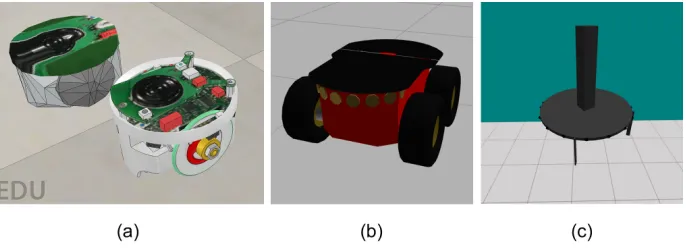
Robot models were selected from a library of models available in each sim-ulator, so that a sensible similarity, in terms of robot geometry and controller capabilities, was achieved (Figure 2). In ARGoS, a flying instead of a wheeled robot was used, since all wheeled robots in ARGoS are handled by a relatively simple 2D physics engine. In V-REP, the original e-puck model was simplified in order to decrease its vertex count. Each benchmark test was run with 1, 5, 10 and 50 robots in both environments.
At the beginning of each benchmark experiment, a simulator was restarted. The computer was not running any other applications, apart from those normally required by its operating system, and a simple CPU and memory monitoring application. V-REP was running in “threaded rendering” mode during the GUI benchmarks.
Fig. 1.The “Large scene” environment in (a) V-REP and Gazebo, and (b) ARGoS.
Fig. 2.(a) The simplified (left) and the original (right) e-puck [11] models in V-REP. (b) The Pioneer 3AT [16] model in Gazebo. (c) The eye-bot [13] model in ARGoS.
were needed (dt= 10 ms), otherwise some robots exhibited strange movement dynamics, such as rocking behaviour on a straight horizontal plane.
Three performance metrics were used to evaluate the simulator performance.
Real-time factor, R = simulated time / real time, the amount of CPU usage, C, and the amount ofmemory usage, M. WhenR >1, a simulation could run faster than real time and vice versa. WhenC >100%, a simulator could utilise multiple processor cores. Two values for C andM were noted for Gazebo GUI experiments, corresponding to the usage of gzclient (visualisation) and gzserver (simulation), respectively.
3.2 Results
[image:7.612.139.482.284.410.2]Headless benchmark (Tables 2 and 3). However, Gazebo usually required the largest amount of memory when it was running in the GUI mode, and a median amount in the Headless mode. V-REP combined with ODE usually achieved the lowest simulation speed. Using Bullet 2.78 often significantly increased the performance of V-REP.
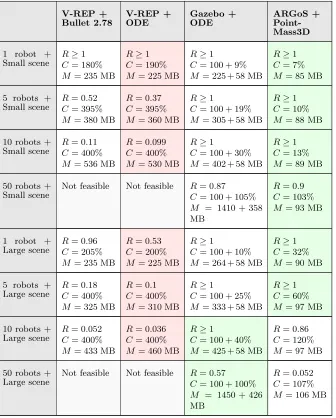
Table 2: Simulator performance in the GUI mode. The best (green) and the worst (red) performance are indicated.
V-REP + Bullet 2.78 V-REP + ODE Gazebo + ODE ARGoS + Point-Mass3D
1 robot + Small scene
R≥1
C= 180%
M = 235 MB
R≥1
C= 190%
M = 225 MB
R≥1
C= 100 + 9%
M = 225 + 58 MB
R≥1
C= 7%
M = 85 MB
5 robots + Small scene
R= 0.52
C= 395%
M = 380 MB
R= 0.37
C= 395%
M = 360 MB
R≥1
C= 100 + 19%
M = 305 + 58 MB
R≥1
C= 10%
M = 88 MB
10 robots + Small scene
R= 0.11
C= 400%
M = 536 MB
R= 0.099
C= 400%
M = 530 MB
R≥1
C= 100 + 30%
M = 402 + 58 MB
R≥1
C= 13%
M = 89 MB
50 robots + Small scene
Not feasible Not feasible R= 0.87
C= 100 + 105%
M = 1410 + 358 MB
R= 0.9
C= 103%
M = 93 MB
1 robot + Large scene
R= 0.96
C= 205%
M = 235 MB
R= 0.53
C= 200%
M = 225 MB
R≥1
C= 100 + 10%
M = 264 + 58 MB
R≥1
C= 32%
M = 90 MB
5 robots + Large scene
R= 0.18
C= 400%
M = 325 MB
R= 0.1
C= 400%
M = 310 MB
R≥1
C= 100 + 25%
M = 333 + 58 MB
R≥1
C= 60%
M = 97 MB
10 robots + Large scene
R= 0.052
C= 400%
M = 433 MB
R= 0.036
C= 400%
M = 460 MB
R≥1
C= 100 + 40%
M = 425 + 58 MB
R= 0.86
C= 120%
M = 97 MB
50 robots + Large scene
Not feasible Not feasible R= 0.57
C= 100 + 100%
M = 1450 + 426 MB
R= 0.052
C= 107%
In general,R≥1 could be achieved by all simulators until all available CPU power was used. The cut-off point, in terms of the number of robots, was always the lowest for V-REP, i.e. the simulation in V-REP slowed down in smaller experiments, compared to the other simulators. Furthermore, the simulation speed decrease due to insufficient CPU power was generally less severe for Gazebo than for V-REP and ARGoS.
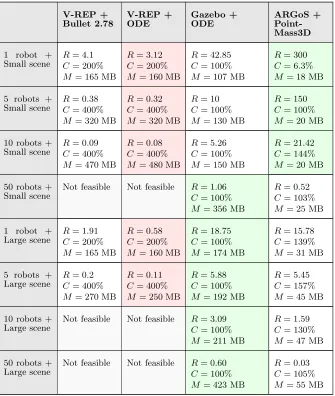
[image:9.612.142.477.263.659.2]Running Gazebo and ARGoS in the Headless mode (Table 3) increasedRin environments where maximum CPU power was utilised by the GUI mode. On
Table 3: Simulator performance in the Headless mode. The best (green) and the worst (red) performance are indicated.
V-REP + Bullet 2.78 V-REP + ODE Gazebo + ODE ARGoS + Point-Mass3D
1 robot + Small scene
R= 4.1
C= 200%
M = 165 MB
R= 3.12
C= 200%
M = 160 MB
R= 42.85
C= 100%
M = 107 MB
R= 300
C= 6.3%
M = 18 MB
5 robots + Small scene
R= 0.38
C= 400%
M = 320 MB
R= 0.32
C= 400%
M = 320 MB
R= 10
C= 100%
M = 130 MB
R= 150
C= 100%
M = 20 MB
10 robots + Small scene
R= 0.09
C= 400%
M = 470 MB
R= 0.08
C= 400%
M = 480 MB
R= 5.26
C= 100%
M = 150 MB
R= 21.42
C= 144%
M = 20 MB
50 robots + Small scene
Not feasible Not feasible R= 1.06
C= 100%
M = 356 MB
R= 0.52
C= 103%
M = 25 MB
1 robot + Large scene
R= 1.91
C= 200%
M = 165 MB
R= 0.58
C= 200%
M = 160 MB
R= 18.75
C= 100%
M = 174 MB
R= 15.78
C= 139%
M = 31 MB
5 robots + Large scene
R= 0.2
C= 400%
M = 270 MB
R= 0.11
C= 400%
M = 250 MB
R= 5.88
C= 100%
M = 192 MB
R= 5.45
C= 157%
M = 45 MB
10 robots + Large scene
Not feasible Not feasible R= 3.09
C= 100%
M = 211 MB
R= 1.59
C= 130%
M = 47 MB
50 robots + Large scene
Not feasible Not feasible R= 0.60
C= 100%
M = 423 MB
R= 0.03
C= 105%
the other hand,Rwas often smaller in the Headless mode of V-REP, compared to its GUI mode. There were two factors that contributed to this result. Firstly, R of the Headless mode was calculated over a longer period of time (simulated five rather than one minute) and its average, rather than its maximum, value was reported. Secondly, R of the Headless mode took into account not only the actual simulation time, but also the time needed to initialise and close the simulation. This in some cases took a significant amount of time, especially when ODE physics engine was used with V-REP.
Finally, V-REP demonstrated the most optimal CPU utilisation. It automat-ically spawned new threads when it was necessary and it could thus fully utilise all available CPU cores. Gazebo only utilised a single CPU core per process. In the GUI mode, Gazebo ran two processes, gzclient and gzserver, that could each utilise a maximum of 100% of CPU power. In the Headless mode, only a single core was utilised, as only the gzserver process was running. The multi-threaded core utilisation by ARGoS worked in general but problems were experienced in larger experiments. The CPU usage was notably smaller when more robots were added to the environment. Furthermore, unlike V-REP, ARGoS requires the user to specify the desired number of threads, rather than automatically spawning new threads when it is necessary.
It is notable that the 3D models used in ARGoS and Gazebo were fairly sim-ple compared to those used in V-REP, even though effort was made to simplify the V-REP robot model (Figure 2). Moreover, the ARGoS physics engine was much simpler than those used by V-REP and Gazebo. It is therefore expected that using third-party libraries to cope with various aspects of the simulation that are currently not covered in ARGoS, such as calculating more complex physics dynamics, or working with imported 3D meshes, would decrease the simulator’s performance. Similarly, it is expected that more complex 3D models would decrease the performance of Gazebo compared to V-REP.
In order to confirm that the mesh complexity played a major role in V-REP, we ran experiments with the Kilobot robots [17], that could only move forward and did not have the sensing or controller capabilities of e-pucks, but consisted of very simple 3D meshes. In the Kilobot experiments, up to six times higherR could be achieved, using only about an eighth of the computer’s resources. In another experiment, the building model in the Large scene was simplified from around 41,600 to around 2,000 vertices. This increasedRby up to 66%. Another kind of optimisation involved decreasing the number of simulation update loops per second from ten to two (i.e.,dt= 500 ms). This increasedRby up to 150%, while decreasing memory usage by up to 15%. These results suggest that it is possible to significantly increase the performance of V-REP by carefully setting simulation parameters and by optimising 3D models used in the simulation.
4
Conclusion
engines, a comprehensive model library, the ability of a user to interact with the world during simulation and, most importantly, mesh manipulation and optimi-sation. Moreover, V-REP automatically spawns new threads on multiple CPU cores and therefore utilises the full amount of CPU power when it is necessary. It is therefore suitable for high-precision modelling of robotic applications such as object transportation or area surveillance, as well as of various industrial applications, where only a few robots are required to operate at the same time. ARGoS, on the other hand, is a suitable choice for simulations of swarm robotics tasks, such as collective foraging, flocking, or area coverage. Compared to V-REP, ARGoS trades-off robot, environment and physics complexity for superior performance. An XML-based simulation settings file is also very conve-nient, especially when a large variety of simulations need to be generated auto-matically. However, there are multiple important features missing from ARGoS, most notably the ability to import 3D meshes into the simulator. Currently, users that are not willing to spend time and effort on programming new robot models in OpenGL, have fairly limited choices.
Gazebo occupies the space between V-REP and ARGoS. While it is much closer to V-REP in terms of features, its interface and default robot models are much simpler and resemble those found in ARGoS. It is notable that Gazebo outperformed ARGoS in the larger simulation environments studied here, which suggests that it is a more suitable choice for large swarm robotics experiments. However, our experiments showed that the usability of Gazebo is relatively poor. Firstly, while it can import 3D meshes, there are no editing options, making it difficult to alter and optimise models. Another problem is the interface that has a number of issues and fails to follow established conventions. Finally, difficulties were noted when installing dependencies for Gazebo and for many of its third-party models. While not necessarily severe by themselves, these issues together could have a negative impact on a research project.
In the future, it would be interesting to conduct a user survey regarding the features and simulator usability in order to obtain a more robust comparison. It would also be interesting to evaluate the extent of the reality gap in the default simulator robot models.
Acknowledgements:This work was supported by EPSRC Programme Grant “Robotics for Nuclear Environments”, grant ref: EP/P01366X/1. We would like to thank Farshad Arvin, Tareq Assaf, Giovanni Beltrame, Paul Bremner, Ales Leonardis, Carlo Pinciroli, Chie Takahashi, Simon Watson and Craig West for sharing their opinions and insights into various aspects of simulation work. We would also like to thank Xavier Poteau, who created the sample industrial building CAD model.
References
2. Rohmer, E., Singh, S. P. N., & Freese, M. (2013). V-REP: A versatile and scal-able robot simulation framework. In Proc. of the 2013 IEEE/RSJ International Conference on Intelligent Robots and Systems (IROS 2013). Piscataway, NJ: IEEE Press. DOI: 10.1109/IROS.2013.6696520
3. Koenig, N. & Howard, A. (2004). Design and use paradigms for gazebo, an open-source multi-robot simulator. In Proc. of the 2004 IEEE/RSJ Inter-national Conference on Intelligent Robots and Systems (IROS 2004) (pp. 2149–2154). Piscataway, NJ: IEEE Press
4. Pinciroli, C., Trianni, V., et al.(2012). ARGoS: A modular, parallel, multi-engine simulator for multi-robot systems. Swarm Intelligence, 6(4), 271–295. 5. Craighead, J., Murphy, R., Burke, J., & Goldiez, B. (2007). A survey of
com-mercial & open source unmanned vehicle simulators. In Proceedings of the 2007 IEEE International Conference on Robotics and Automation (ICRA 2007) (pp. 852–857). Piscataway, NJ: IEEE.
6. ˇZlajpah, L. (2008). Simulation in robotics. Mathematics and Computers in Simulation, 79(4), 879–897.
7. Kramer, J., & Scheutz, M. (2007). Development environments for autonomous mobile robots: A survey. Autonom. Robots, 22(2), 101–132.
8. Harris, A., & Conrad, J. M. (2011). Survey of popular robotics simula-tors, frameworks, and toolkits. Proceedings of the 2011 IEEE Southeastcon, 243–249.
9. Staranowicz, A., & Mariottini, G. L. (2011). A survey and comparison of commercial and open-source robotic simulator software. In Proceed-ings of the 4th International Conference on PErvasive Technologies Re-lated to Assistive Environments (PETRA ’11). New York, USA: ACM. DOI: 10.1145/2141622.2141689
10. Quigley, M., Gerkey, B., et al. (2009). ROS: an open-source Robot Operating System. In Proceedings of the ICRA 2009 Workshop on Open Source Software. 11. Mondada, F., Bonani, M., et al. (2009) The e-puck, a robot designed for ed-ucation in engineering. In Goncalves, P. J. S., Torres, P. J. D. and Alves, C. M. O. (Eds.), Proc. of the 9th Conference on Autonomous Robot Systems and Competitions (ROBOTICA 2009), 1(1) (pp. 59-65).
12. Bonani, M., Longchamp, V., et al. (2010). The MarXbot, a miniature mobile robot opening new perspectives for the collective-robotic research. In Proc. of the 2010 IEEE/RSJ International Conference on Intelligent Robots and Systems (IROS 2010) (pp. 4187–4193). Piscataway, NJ: IEEE Press.
13. Ducatelle, F., Di Caro, G. A., et al. (2011). Self-organized cooperation between robotic swarms. Swarm Intelligence, 5(2), 73–96.
14. Spiri Specifications. http://pleiadesrobotics.com (Accessed on 18th April 2018) 15. QT. https://www.qt.io (Accessed on 18th April 2018).
16. Pioneer 3AT Spefications. http://bit.ly/2D2VfSR (Accessed on 18th April 2018)