ATTACK AND DEFEND TOOLS FOR
REMOTELY ACCESSIBLE CONTROL AND
PROTECTION EQUIPMENT IN ELECTRIC POWER SYSTEMS
1Paul W. Oman, Allen D. Risley, Jeff Roberts, and Edmund O. Schweitzer, III Schweitzer Engineering Laboratories, Inc.
Pullman, WA USA
A
BSTRACTThe industry trend to increase the level of power system automation and remote accessibility, coupled with a dramatic increase in the number and sophistication of Internet and telephone based cyber attacks, is exposing the electric power industry to a growing risk of electronic intrusion. Furthermore, our electric power infrastructure is a potentially high-value target for individuals, organizations, and nations with anti-U.S. sentiments or political agendas. As a result, there is a very real and rapidly increasing probability that malicious individuals will attempt to gain remote access to your power control equipment in order to destabilize the power grid and/or destroy parts of your power system. Similar attacks have been launched against telecommunications
companies and E-commerce sites for several years now. Fortunately, we can learn from their experiences. Many defensive techniques and practices have been used to reduce the chances of cyber attack and electronic intrusion, including password protection, audit logging, multi-tiered access levels, alarm conditions, remote authentication, redundant controllers, time-out
communication parameters, virus protection, firewalls, encryption, and intrusion detection systems. However, to understand these defensive practices you first need to understand the offensive techniques that may be used to carry out a cyber attack or intrusion. In this paper, we describe the offensive techniques and capabilities of individuals (malicious and otherwise) so that you can counteract their actions with equally effective defensive measures. For each offensive procedure, we provide defensive tools and techniques that you can apply to your power system automation solutions. We note, however, that no system is ever 100 percent secure – only continued vigilance can ensure reliable operation of our electric power systems.
I
NTRODUCTIONThe North American electric power grid is vulnerable to electronic intrusions (a.k.a.
cyber-attacks) launched from anywhere in the world, according to studies by the White House, FBI, IEEE, North American Electric Reliability Council (NERC), and National Security
Telecommunications Advisory Committee (NSTAC) [1, 2, 3, 4]. At the heart of this vulnerability is the capability for remote access to control and protection equipment used by generation
facilities and Transmission and Distribution (T&D) utilities. Remote access to protective equipment historically has been limited to proprietary systems and dedicated network
connections. Now, however, there is an increased use of public telephone services, protocols, and network facilities, concurrent with a growing, more sophisticated, worldwide population of computer users and computer hackers. These persons, regardless of location or nationality, represent a growing threat to the safety and reliability of electric power systems, and there is increasing evidence suggesting that United States infrastructures have been targeted by organized
information warfare groups. The North American electric power industry has been identified as one of America’s critical infrastructures. Electronic intruders randomly or maliciously operating circuit breakers, reclosers, and switchgear could have disastrous consequences on the safety and reliability of our electric power systems. While it is yet unknown if cyber-attacks have actually caused power outages, there are now several documented instances of electronic cyber-attacks on electric power generation plants and T&D utilities. Full details of the increasing risk and the spectrum of mitigating technologies are discussed in our earlier conference papers [5, 6]. Tools for attacking computer-based control equipment by telephone and network connection are free and widely available over the Internet. There are literally dozens of Web sites devoted to hacking, usually providing downloadable programs or scripts to help the novice hacker get started. Similarly, there are dozens of defensive Web sites devoted to preventing or detecting hacker intrusions, many of which provide downloadable programs or scripts to identify and reduce system vulnerabilities. We will identify and discuss widely available tools and procedures for attacking remotely accessible control and protection equipment, and present defensive tools and procedural mechanisms to mitigate risk and safeguard that equipment. We also present attack and defend scenarios for protective IEDs and control equipment, and emphasize defensive strategies. In addition, we discuss hardware and software tools for improved access restriction, authentication, encryption, modem security, and network security via firewall, virtual private networks, and cryptography. Protective relay developers and electric power service providers can use these mechanisms to reduce the chance of hackers intruding into protective and control equipment in order to degrade or destroy our electric power systems.
We begin by discussing terms and phrases, then describe a plausible cyber-attack scenario so you can see the procedures and tools that may be used by hackers to carry out attacks against your networked systems. In subsequent sections, we present strategies and guidelines to help defend your SCADA systems and networked assets against attacks and exploits.
B
ACKGROUNDD
EFINITIONSA cyber intrusion is a form of electronic intrusion where the attacker uses a computer to invade electronic assets to which he or she does not have authorized access. The IEEE defines
electronic intrusions as:
Entry into the substation via telephone lines or other electronic-based media for the manipulation or disturbance of electronic devices. These devices include digital relays, fault recorders, equipment diagnostic packages, automation equipment, computers, PLCs, and communication interfaces. [1]
A cyber-attack can be an intrusion as described above, or a denial of serviceattack (DOS) where the attacker floods the victim with nuisance requests and/or messages to the extent that normal services and functions cannot be maintained. A DOS attack is also called a flood attack. A distributed DOS attack (D-DOS) is a flood attack launched simultaneously from multiple sites.
transmissions. Scripts that automate the process of breaking into wireless networks are called
war drivers because hackers literally drive around searching for wireless network packets with a laptop, wireless access card, and transceiver antenna. Eavesdropping can also be achieved by hacking into computers that control telecommunications and network switching.
A hacker is a person who engages in cyber-attacks and/or computerized eavesdropping.2 A hack is an intrusion or sniffing event. A hacktivist is a hacker motivated by social or political causes, while a script kiddie is a novice hacker whose attack knowledge is limited to downloading and running attack scripts available on the Internet. Hackers and script kiddies attack through network and computer vulnerabilities, flood programs and scripts, or via information gleaned through eavesdropping and social engineering (deduction of confidential information through public sources and/or manipulating insiders). Phone Phreaks are hackers who focus on
telecommunications computers; their illicit access to telecommunication controllers enable them to eavesdrop, record, and re-route communications traffic. Hackers also target Internet Service Provider (ISP) computers and routers in order to eavesdrop, record, and re-route network packets.
Spoofing is another technique used by hackers to gain confidential information. Bogus E-mails, network packets, and Web sites can be created with spoofed (i.e., not genuine) sender/site addresses to fool victims into responding or entering data they would not normally divulge to unknown persons. Address spoofing can also be used to hide the identity of the attacker. Similarly, anonymizers are E-mail servers and Web sites that obscure E-mail and network addresses so the recipient of the attack cannot directly identify the attacker.
Hackers usually attack via telecommunication channels like the Internet, public telephone system, wireless bands, and leased-line facilities. They use automated scripts to focus their attacks on vulnerable sites. For example, a Ping Sweeper and Port Scan tool will tell them what equipment is attached to a network and how it is connected. Similarly, a war dialer is a modem attack program that enables the hacker’s modem to systematically dial every number in a wide range of telephone numbers, and listen for the telltale answer tones of an analog modem. Using these tools, hackers will scan hundreds or thousands of Internet addresses and telephone numbers in a single night, looking for vulnerable targets.
Insiders are people with legitimate access to the computer system or network being threatened or attacked. They can be employees, partners, customers, service personnel, etc. A dupe is an insider who is tricked into doing something that jeopardizes the computer system or network. Malicious activities include the spread of viruses (harmful programs that spread via human interactions, such as E-mail), worms (which spread across networks autonomously), backdoors
and other Trojan horses (programs implanted by intruders or insiders to allow easy unauthorized access), and logic bombs (destructive programs implanted by intruders or insiders and timed to go off at a later date).
R
EMOTEA
CCESSV
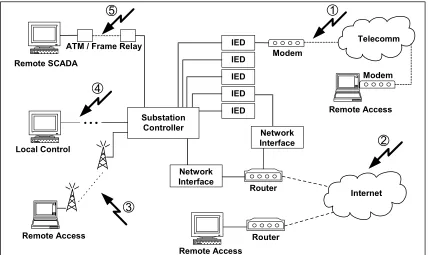
ULNERABILITIESFigure 1 shows a hypothetical substation automation configuration with a variety of local and remote electronic access points. The configuration of the system and its remote access points create vulnerabilities, indicated by lightening bolts, that can be attacked by electronic intruders. In this scenario we embedded most of the common vulnerabilities, including (clockwise from #1):
1. Modem access via telecommunications providers. 2. Public network access via the Internet.
3. Wireless network access. 4. Long-run private network lines.
5. Leased network lines (e.g., ATM or Frame-Relay connections) using telecommunications providers.
We also recognize physical access vulnerabilities, like gaining access to the inside of a substation and changing settings, but physical security parameters are more well defined and deployed in our industry so we will not dwell on physical security issues. Instead, we focus our attention to electronic access and start our discussion with an anatomy of a cyber attack.
Network Interface Substation
Controller Remote SCADA
ATM / Frame Relay
Local Control
IED
IED IED IED IED
Network Interface
Remote Access
Router Modem
Router Remote Access
5
4
Internet
1
3
2
Telecomm
[image:4.612.111.539.252.507.2]Remote Access Modem
Figure 1 Electronic Access Vulnerabilities
A
NATOMY OF AC
YBER-A
TTACKNetwork Reconnaissance
Most direct attacks begin with an information-gathering phase, referred to as network
reconnaissance even though it also applies to access via telephone modem. The goal of this phase is to learn as much about your network as possible with the hope that some of the information can be used to aid in the ensuing attack. Some examples of particularly useful information are:
• Employee names and telephone numbers: Can be used in social engineering attacks. For example, an attacker may call one of your employees and pose as a system
administrator (or some other high-ranking company official) and dupe the employee into divulging or changing login information.
• The physical location of your company and all of its holdings (subsidiaries and remote sites): Can be useful for identifying the large-scale connectivity of your network. Often, the network connections between physically separated sites are the easiest to exploit. Furthermore, remote sites, in the case of the power industry, are susceptible to physical intrusion and/or sabotage.
• The assigned blocks of IP addresses that your company holds: This information is critical for identifying exploitable company assets that are accessible via the Internet. It is important to note that all publicly addressable IP addresses are assigned by, and registered with the Internet Information Center (InterNIC) and the American Registry for Internet Numbers (ARIN). All of your registration information, including which
addresses were assigned, all domain names that you “own,” and a point of contact (usually a name, E-mail address, and telephone number of a system administrator) is publicly available.
• List of authoritative Domain Name Servers: DNS servers are used to map IP addresses to human readable names (e.g., www.amazon.com) and vice versa. The addresses of these servers are particularly coveted because they can divulge a tremendous amount of information about your network if they are insecurely configured.
• The telephone numbers assigned to your company and all of its holdings: This information can be used to identify which telephone numbers are associated with a connected analog modem. All modems connected to the public telephone system
represent a potentially exploitable entry into your network, very much like an assigned IP address.
• Specific knowledge of networked devices or the software that they are running: This knowledge can help a hacker identify hardware or software specific security vulnerabilities in your network. Examples of such knowledge include the make and model of a device or the software services and versions that are running on it.
There are many sources for the above information. Some are obvious, such as telephone book listings, the company website, or news articles. Others are a bit more obscure, such as the comment fields in the HTML source code of the company website (e.g., “Changed by Brian Jones, Feb. 20, 2002, because it was breaking our Apache version 1.3.22 web server.”).
Network Scanning
live devices. IP addresses are typically assigned in blocks with inflexible sizes (typically large powers of two), so not all assigned addresses have to be used. Even more ambiguity exists in the assignment of telephone numbers. Most likely, not all of your company’s telephone numbers are publicly listed. It is, however, common for a company to “own” all telephone numbers in a given numerical range. Because of this, it is reasonable to start with a published telephone number (i.e. your company’s reception desk) and probe all numbers in a contiguous block containing the published number. Automated scanning via Ping Sweeper, Port Scanner, or war dialer is used to find out what equipment is accessible, including modems, PBX’s, computers, IEDs, DPUs, RTUs, meters, and literally every piece of networked digital equipment. Every publicly visible telecommunication connection is subject to scanning, including wireless connections. We’ll first look at attacks on Internet IP addresses, and follow that with a look at modem attacks
The attacker’s first step in Internet scanning is to find out which of your assigned IP addresses actually have a live host attached. An IP address is associated with the network layer of the Internet communications protocol. A single IP address is typically associated with a single network connection (i.e. a single Ethernet card). This is similar to a person’s physical street address, if we use the U.S. postal service as an analogy. Above this lies the transport layer, which in the case of the Internet, uses both the TCP and UDP protocol (TCP constitutes most of the traffic, hence the TCP/IP designation for Internet communication). The transport layer (TCP or UDP) “addresses” are called ports (or sockets) and are numbered from 0 to 65535. Again using our postal service analogy, a given sixteen-bit transport layer port can be likened to a single, specific resident (of possibly many) at a single physical address.
Hackers find active network connections by sending TCP/IP control packets, on some arbitrary port, to a potential IP address and waiting for an answer. Clearly, if control packets are sent back in answer, there is a live host of some kind actively using that IP address. The most common technique is to send an ICMP (Internet Control Message Protocol) Echo Request packet to the IP address and wait for an ICMP Echo Reply packet to return. This is commonly known as a ping. There are many tools available to do this, including the ping command bundled with virtually all operating systems. It is important to note that the attacker can specify a range of IP addresses in most of these tools. In other words, at the touch of a button, an attacker can scan every IP address assigned to you by ARIN. Furthermore, the attacker can send these pings to any arbitrary port. This is very useful for getting by port blocking firewalls and packet filters.
The second step in Internet scanning is to further analyze your live IP addresses, the ones that answered the IP address sweep. The attacker can now carry out a more complicated analysis of this shorter list of IP addresses in order to find out which of the 65536 transport layer ports are active.3 In order for anything useful to be done via the TCP/IP protocol, there must be useful services (i.e. ftp, telnet, http) running on the host, waiting for contact on a specific port. The types of services running on a given host determine the ways in which an individual can communicate with that host. This information is very useful to an attacker.
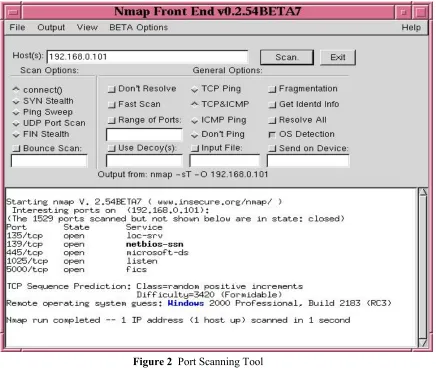
The two steps mentioned above are very closely related in the sense that a host must be listening on some port in order for the attacker to get a response from it. There are many ways to tickle a response out of a host, and the hackers have come up with some very devious ways to do just that. Most of these variations are designed to take advantage of commonly used open ports. Figure 2 shows an example of a port scan tool probing connections to a computer running the Windows 2000 operating system.
Figure 2 Port Scanning Tool
the default passwords shipped with the product, backdoor login accounts designed into the product, or specific exploitable weaknesses in the product itself.
Denial of Service
Rudimentary knowledge of your network layout, gained through reconnaissance and scanning techniques, may be enough to disrupt normal use of network assets through a DOS attack. These attacks generally constitute a flood of bogus traffic directed at one of your publicly addressable hosts. The goal of a flood attack is to consume limited system resources, thereby making legitimate access difficult or impossible – DOS attacks literally deny you access to your own system or network. There are several varieties of Internet-based DOS attacks. The simplest and most popular DOS method is the flood attack where a large volume of properly formatted packets is directed at one of your networked systems. The malicious traffic typically consists of ICMP control packets sent via the TCP or UDP protocol (i.e., ICMP Echo Replies). This form of attack is particularly popular because of the simplicity, effectiveness, and anonymity associated with such activity. The flood attack has been made simple by pushbutton scripts readily available for download on the Internet. The effectiveness of these attacks can be amplified through the use of D-DOS attack methods, via hacked computers or improperly configured networks, which also serve to protect the anonymity of the attacker. Some examples of readily available tools for carrying out such D-DOS attacks are smurf, fraggle, and SYNFlood. Smurf and fraggle send a spoofed ICMP Echo Request packet to a large network’s broadcast address using the TCP and UDP protocols, respectively. All hosts on the network will respond with an Echo Reply and, because the source address was spoofed as that of the intended victim machine, all packets will be routed to your network. There are actually sites on the Internet that provide lists of IP addresses that make very good flood attack sources. SYNFlood offers a slightly more malicious form of flood attack in the sense that it does not, in general, require as much packet volume to be effective. A SYN flood is created by sending a continuous stream of TCP connection requests (SYN packets) to a target. Because the attacker never completes the three-way TCP handshake by acknowledging the connection, the victim machine quickly becomes overloaded with half-open TCP connections.
An even more dangerous DOS (or D-DOS) attack comes in the form of a malformed packet flood, in which the attacker sends a stream of improperly formatted packets to a target. The TCP/IP protocol specifies precisely what a system should do with properly formed packets. There are, however, lots of ways to form an illegal or nonsensical packet, and the TCP/IP
protocol does not specify how to handle the reception of such a payload. Over the years, hackers have identified weaknesses in the implementation of many TCP/IP implementations that cause systems to hang or crash when subjected to very specific packet formats. There are even tools that package many of the known weaknesses into a single attack script, so that at the push of a button an attacker can launch a stream of packets that are known to disrupt common TCP/IP implementations. Fortunately, when these weaknesses come to light, the product developers rush to make a patch available to fix the vulnerability. This is why it is so important to keep all of the equipment connected to your network patched with the latest software or firmware updates. It is important to note that we cannot totally eliminate the affects of a DOS attack. More
Gaining Access
More often than not, a hacker’s goal is not just to deny you access to your own system, but also to gain control over some or all of your networked assets. Usually the hacker accomplishes this by exploiting the weakest externally addressable point on your network via public IP address or modem and using that access point to gain entrance to other, more sensitive, internal systems. It is important to note that once an attacker has broken into your network, he or she will use your computing systems to mount a fresh attack on your other networked assets, and possibly on other companies as well.
The most direct method for gaining access to a networked device is to acquire the login information for that system. There are a number of ways to gain such information, including social engineering, physical theft, password guessing, password cracking, and network
interception. Social engineering involves gathering sensitive but publicly available information and/or manipulating insiders. To thwart social-engineering-based attacks your company needs to create and implement well-defined practices for safeguarding confidential information.
[image:9.612.115.575.437.590.2]Password guessing attacks can be manual or automated. An attacker can simply start entering possible login strings at a system prompt. Any knowledge of the system hardware or legitimate users can be applied to narrow the search and increase the likelihood that a valid password will be entered. One common hacker technique is to look at the welcome banner issued by the computer, modem, or IED, which often identifies the make and model of the equipment, thus enabling the hacker to try the vendor’s default password(s). For this reason, it is important to always replace vendor passwords with your own. For more complicated attacks, scripts can easily be written to continuously attempt logins using a list of words stored in a file, typically called a dictionary. Attack dictionaries can potentially contain thousands of commonly used passwords, including street slang, foreign words, and entertainment names and buzzwords like C3PO, Wookie, Gandalf, and Coolio. Hence, it is important to choose passwords that are not words, names, or pronounceable acronyms.
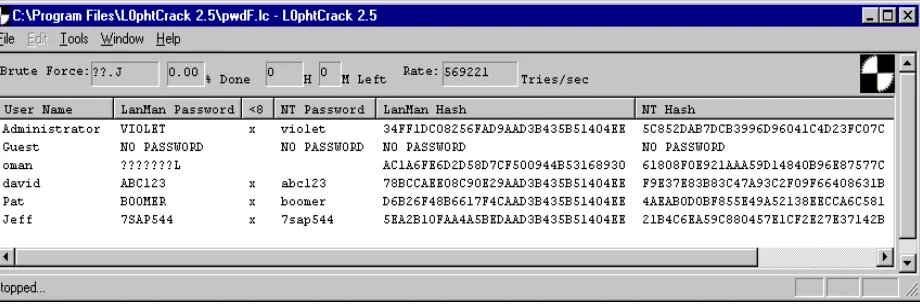
Figure 3 Password Cracker
hashed password file from a networked host or server or it can intercept the challenge/response authentication traffic that is exchanged between networked machines. Other cracking programs are available that are capable of cracking Unix/Linux password files as well as many other encryption formats. Most password cracking programs come with an extensive dictionary file and also support brute force password attacks where all combinations of letters, numbers, and characters are tried.
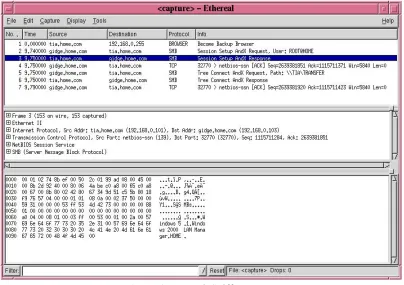
[image:10.612.123.527.368.653.2]One popular method for password theft is to intercept the login information from normal network traffic transmitted between systems negotiating a remote connection. Figure 4 shows the output from a sniffing tool freely available over the Internet. The bottom portion of the sniffer display shows the actual text or control information contained in the packet selected in the top portion of the display. Many protocols, such as ftp or telnet, exchange login information in plain text that can be easily read from the intercepted packet. Other protocols, such as SSH, use encryption techniques to hide login exchanges. Some encryption protocols are stronger than others, so it is very important to understand the relative strengths and weaknesses of all protocols that are being used on your network to exchange login information. If you are using a plain text protocol to implement remote access over public networks, it is essential that you use strong encryption techniques, like Virtual Private Networking (VPN), to hide the transmitted information. Many sniffing tools are available for free download. Some are passive sniffers incapable of rerouting network traffic, but others are actually capable of rerouting network traffic to make it visible to the attacker. This capability allows the attacker to intercept traffic that would not otherwise have traveled over his or her network. The attacker can copy all packets of interest to a file and then forward the traffic to the intended destination so as not to interrupt normal communication.
Figure 4 Network Sniffer
achieve this, the attacker must be able to directly view the session traffic with his or her local computer. This requirement is automatic if the attacker is on a network segment between the legitimate user and the remote host; however, if this is not the case, the attacker can reroute the traffic using active packet sniffers. If the packet is not encrypted, or encrypted weakly, and the session is visible to the attacker, then it is susceptible to session hijacking. By spoofing the source address to that of the legitimate user, and matching the TCP sequence numbers, the attacker can successfully pose as the legitimate user and take over the session at any time. Some tools, such as the Hunt and Ettercap programs, allow essentially pushbutton session hijacking. These tools will identify exploitable sessions on the network, list them, and, at the push of a button, hijack the session of choice. All that the authorized user will notice is that
communication to the remote host has been lost, which will probably be blamed on network congestion and simply ignored. With a hijacked session, the attacker has all the rights and privileges on the remote machine that the original user had. In fact, from the remote host’s point of view, the attacker is the original user.
Hackers use a variety of techniques to get a foothold on your networked assets. If no login information is available to allow the hackers to pose as legitimate users, then they must find other means of getting commands executed on the target system. On occasion, a hacker will discover a security exploit in a popular network service that will allow them to execute commands on a system running the service. These vulnerabilities are typically caused by design or
implementation flaws in the software or firmware running on the networked device. Often, when such security vulnerabilities are discovered, somebody will make a script available online that will allow others to take advantage of the new find. Hackers are known for their generosity and frequently share their attack scripts. Another way to get commands executed on a target machine is to bury a piece of malicious code within an otherwise innocuous application. The idea here is to get a user to run the innocent looking application (i.e. a newly downloaded game or an electronic greeting card) and, in the process of executing the carrier application, launch the malicious code. There are actually programs available online that will automatically insert the malicious code within a chosen application. Hackers will use similar techniques to install Trojan Horses and backdoors into your system. Some backdoors simply open a listening port on the system that, when connected to, will launch a remote command shell on the attacker’s computer. Others are very sophisticated remote control suites that allow complete control over the hijacked computer. When attackers connect to the listening port, they are given access to the video, mouse, and file systems on the exploited computer. Back Orifice, for example, provides a remote sniffer, password extraction, and full registry, process, and file system control all in a nicely packaged GUI. Most of these hijacking tools will rerun every time the system is rebooted and remove themselves from the process list in order to avoid detection. The point to remember is that a very small piece of malicious code, run just once on your networked computer, can provide hackers with an easy and almost undetectable window into your system.
D
EFENSIVES
TRATEGIESWe have outlined the anatomy of a cyber attack, from reconnaissance through penetration. These offensive techniques are not only applicable to publicly available telecommunications like Internet and telephone systems, but have been used to attack private networks, leased lines, and wireless media as well. We now turn our attention to defensive tools and techniques that you can use to protect your IEDs, substation controllers, SCADA systems, and enterprise-level IT
Password Attack Defenses
All security experts agree that strong password selection is still your best defense against electronic intrusion and other forms of unauthorized access (e.g., physical front-panel access). Regardless of what other security mechanisms you use, a good password not only protects your equipment against unauthorized settings, but also safeguards the integrated system and helps ensure the reliable operation of a substation or SCADA system. A well-formed, strong password is virtually impossible to guess and may take thousands of hours to crack, whereas an ill-chosen password may be guessed or cracked in just a few minutes. It is extremely important to maintain the security of your system by using strong passwords in protective relays, controllers, and remote access points to your SCADA systems. A Personal Identification Number (PIN) is just a password defined from a numeric character set; although PINs are not as strong as passwords, we collectively include PINs in our discussions of passwords.
A password can be keyed to an entire system or individual devices, databases, and even selected data records or fields. The level or layer of security is defined by the software or firmware implementing the password control. If several users have the same password, then you have a simple access restriction technique, but you do not have user authentication or user
accountability. User authentication occurs only when there is a one-to-one mapping between the user and the access key. User accountability occurs only when every access attempt is recorded. For example, assigning each person a unique password keyed to a specific system, device, database or data record allows the system to authenticate that person as a legitimate user of the secure entity. Logging that access, or attempted access, enables the system to maintain audit records establishing user accountability. The strength of your user authentication is a function of the details retained in the access logs and the number of factors used in the authentication
process. Access logs (aka, audit logs) record instances of access attempts, both valid and invalid, and session information like date and time stamps (among other things) to create a record of activity documenting who did what. These logs are indispensable when diagnosing and recreating events, and for prosecuting cases of unauthorized electronic intrusion.
You need to choose passwords that are not based on existing words or popular culture. Strong passwords consist of six or more characters, with at least one special character or digit and mixed-case sensitivity, but do not form a name, date, acronym, or word. Examples of valid, distinct strong passwords include:
P3a5t7 A24.68 Ih2dcs 4u-Iwg Ic-4.7
Passwords formed in this manner are less susceptible to password guessing and automated attacks. Password generation programs are available as operating system features and via the Internet, but there is an easy way to create strong passwords without resorting to password generators. Simply take the first letter of each word in a memorable phrase and insert a non-alphabetic character somewhere in the resulting character string. For example, the phrase “I love to ride my horse, Blue” can be used to form and remember the password Il2rmhB, which is difficult to crack because it cannot be pronounced and it is not meaningful. Similarly, the phrase “The Palouse has four beautiful seasons” can be used to create the password tPh4bs, which is simple and easy to remember because of the sentence from which it is formed.
continuous trial and error guessing. Three bad passwords in a row should trigger a 30 second or 1 minute channel time-out where all communication is discarded; even better protection would be issuing a channel disconnect after the third invalid password. Another safeguard would be communication disconnects after periods of channel inactivity, say 5 or 10 minutes. Figure 4 shows examples of login time-outs and disconnects.
*ACC
Password: ? @@@@@@
Date: 02/13/02 Time: 10:05:59 Level 1
*>ID
SEL-2030-R114-V0-Z001000-D20010619
*>TIME 10:06:08 *>
NO CARRIER
(a) Communications Processor Time-out
*ACC
Password: ? @@@@@@ Invalid Password
Password: ? @@@@@@ Invalid Password
Password: ? @@@@@@ Invalid Password Access Denied
WARNING: Access by unauthorized persons strictly prohibited.
NO CARRIER
[image:13.612.106.547.141.317.2](b) Bad Password Disconnect
Figure 5 Login Time-Outs and Disconnects
It is important to note that the procedures mentioned above are sufficient defenses against password guessing and some password cracking attacks. They may not, however, protect you against password theft. If a hacker is able to intercept the transmission of login information with, for example, a network sniffer or physical wiretap, then you may have handed the attacker enough information to compromise your system. If you use adequate encryption, coupled with the strong password practices mentioned above, then the process of extracting the password from the intercepted traffic can be made exceedingly difficult. It is still important to periodically change your passwords because weaker encryption protocols are vulnerable to brute force cracking techniques. If you do not use encryption techniques when transmitting login
information over public networks, then an attacker can potentially intercept your transmissions and read your password directly from the captured data. In this case, the “strongest” password imaginable will be immediately defeated. Here is a list of recommended practices to maintain strong password defenses:
• Strong passwords consist of six or more characters with mixed case and special characters. Do not use common words, acronyms, or personal information like birthdays and names.
• Run a password cracker program on your own system password files to see how easily they can be cracked.
• Change passwords periodically (e.g., quarterly). Change passwords immediately after instances of contractor installation and maintenance, after suspected intrusions, and when personnel turnover or strife increases insider risk.
• Teach password security and monitor compliance. If passwords must be recorded, store them in secure, non-obvious locations.
• Terminate remote communications sessions after periods of inactivity and ensure that all communications ports are properly closed so the next user does not inherit unauthorized access privileges.
• Keep communications system details and network access information private. Remove welcoming banner screens and replace them with “no trespassing” warning signs.
• Log all access attempts and analyze that data for abnormal activity, such as repetitive attempts during off-hours and from unusual locations.
• Do not send login information over public networks unless it is encrypted.
Access Restriction and User Authentication
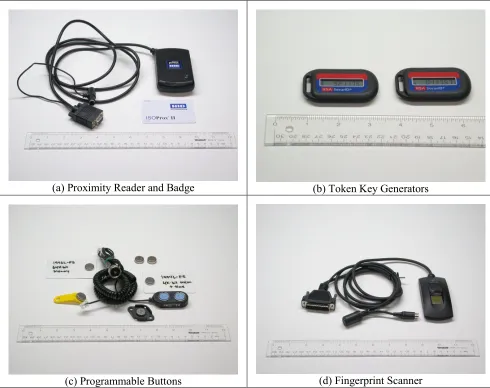
Access restriction and user authentication are the cornerstones of all security. Both physical and electronic means of access restriction should be used, but physical restriction is common in our industry so we focus our attention on electronic access restriction. Passwords are one means of access restriction and user authentication, but not the only means. Electronic authentication via encryption key(s) is common for secure communications and is discussed in later sections. Other electronic identification devices, like access badges, SmartCards, magnetic strips, barcodes and embedded chips, are all physical authentication mechanisms. Fingerprints, retinal eye patterns, voice prints, facial patterns, and other personal characteristics are biological authentication mechanisms. When viewed together, these different techniques form the three vectors, or factors, of authentication: (1) something you know, (2) something you have, and (3) something you are. In all cases the authenticating data is entered into or placed near a reader that checks the
(a) Proximity Reader and Badge (b) Token Key Generators
[image:15.612.77.567.72.460.2](c) Programmable Buttons (d) Fingerprint Scanner
Figure 6 Low Cost Authentication Devices
Modem Attack Defenses
In the attack scenario we described earlier we concentrated on Internet-based attacks because they dominate today’s hacker landscape. But it is important to realize that any modem that connects your system to the public telephone infrastructure provides a window through which an attacker can corrupt your system and use it to attack other portions of your network and/or other
companies and government installations. Hence, when the hacker connects to your modem, you must have your security measures in place. Modem security ranges from literally nothing to very strong authentication and encryption. On a scale from worst to best, you have:
1. No security – answer all direct connections.
2. Dial-back security – recognize incoming calls, hang up, and originate a call to a predefined telephone number.
4. Password controlled dial-back security – requires a valid password prior to hanging up and dialing a predefined telephone number.
5. Modem key-lock pairs – the originating and receiving modems authenticate every connection with predefined tones, passwords, or PINs.
6. Encrypting modems pairs – the originating and receiving modems authenticate every connection with predefined cryptographic techniques, and all data interchange is also encrypted using a predefined or negotiated cipher.
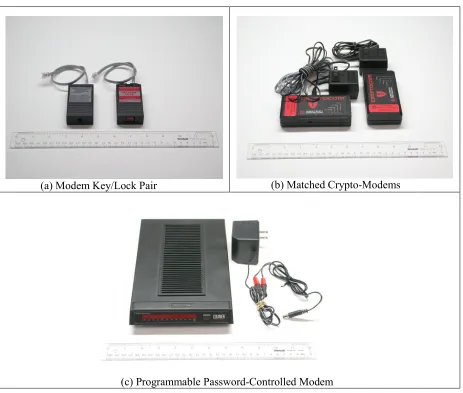
Dial-back security was once common in the electric power industry, but is no longer adequate because of dial-back spoofing. Hackers have learned to fake the hang-up tone and remain on the line while the called modem attempts to dial its predefined dial-back number. Hackers just ignore the incoming dial tones and issue an answer tone that reestablishes connection to the dial-back modem. Thus, the dial-back has been spoofed or fooled into an unauthorized connection. Figure 7 contains pictures of three types of modem security devices that are better than dial-back
security: (1) an inexpensive modem key/lock pair costing about $150 per pair, (2) a pair of crypto-modems costing roughly $1200 per pair, and (3) a stand-alone password-controlled dial-back modem costing less than $350.
(a) Modem Key/Lock Pair (b) Matched Crypto-Modems
[image:16.612.109.572.304.697.2](c) Programmable Password-Controlled Modem
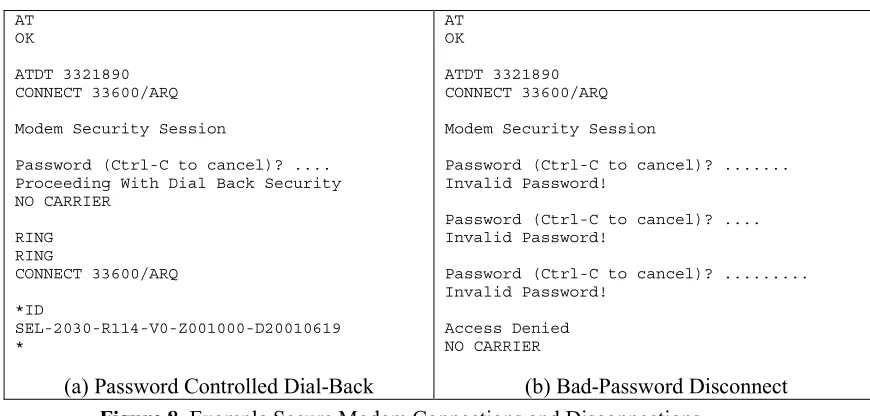
Regardless of how hackers gain a viable connection to the modem, once access is granted, they can begin probing the equipment that is connected to the modem. Hence, it is prudent to implement a second tier of access control by password or PIN on the equipment itself. Further, communication time-outs and disconnects on that equipment, and on the modem itself, will provide added security. Figure 8 shows a password-controlled dial-back modem at work. The left side of the figure shows a valid connection, while the right side shows a bad-password time-out and disconnect. We recommend using the following practices when implementing modem security:
• Implement some form of authentication and access control within your remote equipment. Direct connect and unsecured dial-back modems are no longer adequate by themselves.
• Use strong passwords and maintain good password practices, as described earlier.
• Use communication time-outs and bad-password disconnects, as described earlier.
• Use authenticating modem key/lock devices, password-secured dial-back modems, or encrypting modems for public telephone system access to critical equipment. Match the strength of your authentication to the importance of the equipment control.
• Use war dialers within your own telephone number domain to locate unauthorized or forgotten modems.
AT OK
ATDT 3321890 CONNECT 33600/ARQ
Modem Security Session
Password (Ctrl-C to cancel)? .... Proceeding With Dial Back Security NO CARRIER
RING RING
CONNECT 33600/ARQ
*ID
SEL-2030-R114-V0-Z001000-D20010619 *
(a) Password Controlled Dial-Back
AT OK
ATDT 3321890 CONNECT 33600/ARQ
Modem Security Session
Password (Ctrl-C to cancel)? ... Invalid Password!
Password (Ctrl-C to cancel)? .... Invalid Password!
Password (Ctrl-C to cancel)? ... Invalid Password!
Access Denied NO CARRIER
[image:17.612.106.541.340.548.2](b) Bad-Password Disconnect
Figure 8 Example Secure Modem Connections and Disconnections
Public Network Attack Defenses
Hackers have a plethora of offensive Internet-based attack tools. On one end of the spectrum are script kiddies downloading attack scripts to launch against unpopular corporate computers and nuisance hackers flooding servers and defacing Web pages just “for fun.” On the other end, are career criminals and organized crime penetrating corporate databases to steal credit and identity information, foreign information warfare agents deliberately stealing corporate and national secrets, and terrorists looking for ways to use your own assets against you. The one thing they all have in common is the high-speed anonymous access provided by the Internet. Experienced hackers rarely attack directly from their own computers. Hackers will obscure their paths through several layers of hacked computer systems and anonymizers, so their back-trail gets lost in layer upon layer of bogus accounts.
Your defenses against Internet-based attacks are many, but two strategies stand out as most effective. First, maintain strong password practices, up-to-date security patches, and always change default vendor password settings. Second, employ experienced network administrators and charge them with regular scrutiny of access logs and system events. Diligent monitoring of system logs is absolutely crucial. Experienced network administrators can detect and shut off intrusions as they unfold. Although an automated Intrusion Detection System (IDS) can identify and (sometimes) prevent common intrusions, nothing matches the flexibility and adaptability of a human expert. Hackers are very adept at hiding the signatures of their attacks and, as stated earlier, the attackers are generally a step ahead of the defenders. One example is the increasing use of polymorphing viruses and worms that dynamically alter their own code, thus making it more difficult to spot. A diligent network administrator provides another level of defense against such practices. IDSs, virus scanners, firewalls, and VPNs complement, but do not replace, experienced network administrators.
An automated IDS is used to determine if insiders or external users are misusing the system. There are two types of IDS: signature detection systems and anomaly detection systems. Signature detection systems match known, observable intrusion characteristics against a database of intrusion profiles and determine if a match is likely. Anomaly detection compares ongoing system behavior against a profile of normal system behavior and warns when anomalous behavior is occurring. When an intrusion profile is matched or abnormal activity is detected, the IDS will attempt to shut down the intrusion and inform the system operator. Both types of IDS have the same common problem: too sensitive a setting generates false positive warnings, or false alarms when there is no intrusion, and too insensitive a setting generates false negatives, or misdiagnosed actual intrusions that go unnoticed. IDSs can be implemented in computer operating systems and/or firewalls and routers. Software versions range in cost from free via the Internet to several thousand dollars commercially; hardware versions typically cost several thousand dollars. Virus scanners are programs that scan incoming files (usually E-mail messages, but other
datastreams as well) to see if those files contain characteristics of known computer viruses. They look for embedded or attached executable programs, macros, and scripts. Good scanners have an up-to-date database of virus profiles. When a target profile is identified, the virus is either
removed or the recipient is warned that the file may contain a virus. Any computer receiving files via E-mail, Ftp, Java or Javascript, Active-X, or Web-based cgi program is susceptible to virus infection. Free virus scanners can be obtained through the Internet, but commercial versions only cost a few hundred dollars and the timely vendor upgrades and virus alerts are invaluable when trying to ward off the latest plague of contaminated E-mails flooding your mail servers.
industrial firewalls are programmable network routers, many combinations of hardware and software filters can be used to protect your substation equipment. Software firewalls are available free via the Internet or at costs ranging from a few hundred to a few thousand dollars commercially. Hardware firewalls start at a few thousand dollars and go up from there.
A VPN is an implementation of network packet encryption working in conjunction with firewalls to form point-to-point secure messaging over public networks like the Internet. By encrypting and encapsulating the low-level data within other protocols and data packets capable of firewall-to-firewall addressing, you can send a secure message that can only be opened by the receiving VPN device. This is often called tunneling because the secure message is, in effect, tunneled through a public network. VPNs always work in pairs with both the sender and receiver encrypting and deciphering the data packets being transmitted between the two devices. A properly configured VPN will also hide all network addressing information beyond the VPN servers. This gives a further level of security and protection by hiding the details of your private network. VPNs can be implemented as software running on servers, but are more commonly integrated within a hardware firewall router. Software VPNs can be obtained freely through the Internet, or commercially for up to a few thousand dollars. Hardware VPNs start at around $500 and go up to over $25,000 for combined router/firewall/VPN capabilities.
[image:19.612.111.537.459.702.2]It is important to remember that, for the TCP/IP protocol, all services and open ports on a given device represent a potentially exploitable window into your system. Because of this, you should always limit the services offered by all devices with direct or remote access to critical systems. Shut down as many open ports as possible by stopping unnecessary services like web servers and mail servers. You should also stop all unused remote access protocols from running and, thus, opening unwanted access points into your system. Finally, all activities, like E-mail reception or web surfing, that may contribute to the spread of viruses and/or Trojan horse backdoors should not be conducted from any system directly or remotely connected to critical devices.
Figure 9 shows how cryptographic devices like secure modems and VPNs can be used to safeguard your substation communications, while Figure 10 shows how VPNs and firewalls can safeguard your enterprise-level IT systems.
Network Interface Substation
Controller Remote SCADA
ATM / Frame Relay IED
IED IED IED IED
Network Interface
VPN Router Modem
VPN Router Remote Access
Internet Lock
Crypto
Remote Access Crypto
Crypto Crypto
Crypto
Local Control
Crypto
Telecomm
Remote Access Modem
Key
Network Interface
Firewall/Proxy Server
Remote Access
VPN Router
Modem VPN Router
Remote Access Telecommunications
Provider
Remote Access
Semi-private DMZ
Web Server
Customer Services
Remote Ghosted Services
Internal Services
Intranet Web Services
Disk/File Server
Pr
iv
a
te
Ne
tw
or
[image:20.612.111.537.71.255.2]k
Figure 10 Securing Enterprise IT Systems
These practices are recommended for safeguarding systems attached to the Internet:
• Use strong passwords and maintain good password practices, as described earlier.
• Use communication time-outs and bad-password disconnects, as described earlier.
• Change all vendor-supplied passwords and access control lists.
• Use a port scan tool to identify your own active, unguarded ports.
• Use a ping sweeper to find unauthorized or forgotten IP addresses within your own domain.
• Use a network sniffer and/or a trace route tool to verify that your network configuration is what it is supposed to be.
• Use network switches, not hubs, to isolate subnets and eliminate multipoint broadcasts.
• Eliminate unused and unnecessary ports, user accounts, and operating system services (e.g., rwho, rlogin, anonymous logins and anonymous ftp).
• Enable Web-browser security options and site restrictions; Disable Active-X controls, anonymous logins, Java and JavaScript.
• Separate potentially insecure user activities, like web surfing or mail reception, from truly critical systems.
• Regularly apply vendor patches and upgrades (software and firmware) to ward off automated attack scripts and maintain state-of-the-practice security. Stay informed of the latest security threats and patches by subscribing to security alert E-mail lists for all relevant hardware and software vendors.
• Use VPNs to encrypt communications to and from critical control equipment and enterprise-level IT systems.
• Separate enterprise-level IT systems from SCADA systems using firewall/routers; better yet, segregate them completely.
• Have systems personnel view system logs and access lists daily. Whenever possible, set up real-time electronic intrusion notification at all critical sites. Modern IDSs can be configured to send a page or an E-mail to an appropriate person in the event of a security alarm.
Wireless Network Attack Defenses
Wireless networks are only slightly different from public networks in that wireless
communication vendors typically incorporate security features in their products to ward off simple eavesdropping. Remember, however, that even directional line-of-sight signals can be intercepted and decoded. Bluetooth and 802.11 are the emerging favorites in radio-based wireless networking. They both have spread-spectrum frequency hopping capabilities, but that does not stop hackers from eavesdropping on your communications using war driving techniques [7, 8]. Satellite and microwave transmissions are typically more secure than radio networks, but they both have reliability concerns that may preclude their use for some critical high-speed control situations [9]. Further, most organizations deploying radio-based wireless networks are using that capability for ease-of-access into enterprise-level LANs and WANs. Thus, a hacker penetrating the wireless network not only sees network traffic containing internal user accounts and passwords, but also has a trusted backdoor into the enterprise computer network!
Fortunately, several vendors are now selling wireless routers and modems with built-in firewall and VPN capabilities. Spread spectrum hoppers and Wireless Application Protocol (WAP) transceivers with built-in security functions are available for just a few hundred dollars. Integration and application engineers need to be careful, however, because most of the wireless products are shipped with security options turned off, and several of them have known, posted vulnerabilities that are already being exploited by hackers. Here are some recommended practices for safeguarding wireless network systems:
• Assume your wireless network is a public network; follow all recommended practices for public networks, as described earlier.
• Turn on all vendor-supplied security features; change all vendor-supplied passwords and access lists.
• Use a wireless sniffer to verify that your broadcasts are encrypted properly and that account and password information has been completely obscured.
• Use wireless firewalls and VPNs whenever they are available in your communications media. Do not use wireless communications for critical control systems without secure VPN
tunneling.
Private Network Attack Defenses
custom solutions can be designed around high-speed crypto-chips enabling secure serial or network communications with little loss of throughput.4 (Encryption is discussed further in the next section.) Here are some recommended practices for safeguarding your private network systems:
• Assume you will eventually have an insider problem; implement access controls and audit logs to ensure accountability across employees.
• Do not assume that your long-run lines will not be tapped for industrial espionage.
• Have systems personnel regularly view access logs. Set up IDS auto-notification whenever appropriate.
• Implement alarm conditions for abnormal use (e.g., off-hours, extremely long connections).
• Star topologies are more “survivable” than ring or bus topologies. Ring and bus topologies suffer from one-down-all-down failures.
• Use encrypted communications for critical applications when there is a likelihood of insider abuse and/or wiretapping or sniffing.
Telecommunications Network Attack Defenses
Unencrypted data communications over telephone or network lines are susceptible to eavesdropping via insiders, telephone taps, Phone Phreaks, and network sniffers. Electronic intrusions against telephone switching centers can be traced back over 30 years and are as common today as hacker attacks against corporate IT systems. In a similar manner, a successful cyber-attack on a long distance leased-line provider or an Internet Service Provider (ISP), gives the intruder access to all the data packets flowing into and out of that provider’s equipment. Figure 11 shows that when communicating via leased or public telecommunications lines from any office to a substation (or vice versa), the communications path goes through the
telecommunications service provider’s computer-controlled switching network. If someone hacks into that network-switching computer, it is relatively easy to listen to, or reroute, the data traffic on the telecommunications lines. It does not matter whether the provider is a local telephone company, a long-distance carrier, or an ISP – if their switching computer is remotely accessible, then it is vulnerable to cyber-attack. And even if it is not remotely accessible, the provider’s equipment is still vulnerable to insider attack and eavesdropping.
Network Computer
Switching Network
User's Office Other Users
Substation
L1 L2 L3 • • • Ln
Telecommunications Provider
(L3...Ln)
(L2)
Line 2 Line 1
[image:23.612.127.486.68.326.2](L1)
Figure 11
Hacking Telecommunications Provider’s Switchgear
The PhoneMasters hacker gang compromised computer-controlled telephone switching in virtually every major telephone provider across the U.S., to the extent that they could listen to, record, or reroute public telephone calls at will. Similarly, by hacking into an ISP and dropping a sniffer, network hackers can intercept and view IP, TCP, UDP, or UCA packets transmitted across a network and record all packets going to/from a specified target. The hackers then come back at a later time, retrieve their sniffed packets and start looking for valuable information like passwords, credit card numbers, or account and identity information.
Leased telecommunications facilities are somewhat more secure than public telecommunications lines, but they are not without vulnerabilities. Asynchronous Transfer Mode (ATM) networks and Frame-Relay Permanent Virtual Circuits (PVCs) are the most popular mode for leased line network communications. The ATM and PVC solutions have reliability and quality of service suitable for critical applications and are probably the most reliable communications pathways outside of wholly owned dedicated lines. It should be noted, however, that all leased lines are vulnerable to unauthorized electronic intrusions. Longstaff, et al. [11] take a very pessimistic view of our connections via unguarded communications channels:
…the ever-increasing use of SCADA systems to remotely operate our critical infrastructures through the telecommunications network has rendered our information systems more vulnerable to intrusions and the transmission of malicious misinformation and signals… International boundaries have been eliminated …{such that} universal access to computers has enabled hackers and would-be terrorists to attack information systems and critical infrastructures worldwide.
the final source and destination addresses so that network traffic analysis (used in industrial espionage) is difficult. Methods of data encryption are beyond the scope of this paper, but Figures 9 and 10 show how cryptographic devices can be used on all communications media. The cost of these devices ranges from a few hundred dollars per pair to several thousand dollars per device.
In the United States, encryption standards are established via Federal Information Processing Standards Publication 140-1, Security Requirements for Cryptographic Modules. FIPS 140-1 defines four levels of cryptographic security ranging from Level 1, basic security via integrated circuitry, through Level 4, the highest level of secure communications and processes. Most encrypting modems operate at Level 2 or Level 3, the difference being that Level 3 requires users to identify themselves by entering a password or PIN. Hence, Level 3 encrypting modems are, by definition, two-factor authentication devices. Similarly, most encrypting network
communications cards or boxes operate at Levels 3 and 4, so they are also multifactor authentication devices.
Here are some recommended practices for safeguarding your communication that flows through telecommunications providers:
• Be aware that employees of the telecommunications provider are insiders with access to your data; assume that all your data is visible unless you encrypt it.
• Use encrypting modems, wireless transceivers, and VPN devices whenever sending and receiving critical information across leased or public telecommunication lines. Turn on all security options. (Many devices are shipped with security features turned off.)
• Change the default vendor encryption settings so hackers cannot break your encryption just by reading the vendor documentation.
• Implement alarm conditions for abnormal use (e.g., off-hours, extremely long connections).
S
UMMARY ANDC
ONCLUSIONModern configurations of electric power control systems and protection devices are essentially systems of distributed intelligent devices resembling networked computing systems. As we move to increased integration and automation in our power stations, the temptation of easy remote access brings both opportunities and challenges. You need to recognize remote access vulnerabilities and apply mitigating technologies to remove or reduce those risks. We have discussed a variety of tools and techniques you can use to safeguard against electronic intrusions into computer-based networks controlling electric power generation, transmission, and
distribution. Figure 12 shows an example vulnerability assessment tool that can be used to identify and mitigate your own network vulnerabilities.
Figure 12
Example Network Vulnerability Analysis Tool
R
EFERENCES[1] IEEE Power Engineering Society, IEEE Standard 1402-2000: IEEE Guide for Electric Power Substation Physical and Electronic Security, IEEE, New York, NY, April 4, 2000.
[2] National Security Telecommunications Advisory Committee Information Assurance Task Force,
Electric Power Risk Assessment, March 1997. (see http://www.ncs.gov/n5_hp/Reports/EPRA/electric.html)
[3] The White House Office of the Press Secretary, White House Communications on Critical Infrastructure Protection, October 22, 1997. (see
http://www.julieryan.com/Infrastructure/IPdoc.html)
[4] U.S. Federal Bureau of Investigation, National Infrastructure Protection Center, 2000. (see http://www.nipc.gov)
[5] P. Oman, E. Schweitzer, and D. Frincke, “Concerns About Intrusions into Remotely Accessible Substation Controllers and SCADA Systems,” 27th Annual Western Protective Relay Conference, Paper #4, (October 23–26, Spokane, WA), 2000. (see http://www.selinc.com)
[6] P. Oman, E. Schweitzer, and J. Roberts, “Safeguarding IEDs, Substations, and SCADA Systems Against Electronic Intrusions,” Proceedings of the 2001 Western Power Delivery Automation Conference, Paper No. 1, (April 9–12, Spokane, WA), 2001. (see http://www.selinc.com)
[7] S. Harris, “Evaluating Wireless Technologies for Distribution Automation,” Utility Automation, Vol. 6(6), Sept./Oct., 2001, pp. 25–28.
[8] I. Armstrong, “What’s Happening with WAP?,” SC Magazine, Feb. 2001, pp. 32–34.
[10] Computer Security Institute, “CSI/FBI Computer Crime and Security Survey,” Computer Security Issues and Trends, Vol. 6(1), Spring 2000.
[11] T. Longstaff, C. Chittister, R. Pethia, and Y. Haimes, “Are We Forgetting the Risks of Information Technology?,” IEEE Computer, Vol. 33(12), December 2000, pp. 43–51.
B
IOGRAPHIESDr. Paul W. Oman is a Senior Research Engineer at Schweitzer Engineering Laboratories in Pullman, WA. Prior to joining SEL, he was Professor and Chair of Computer Science at the University of Idaho and was awarded the distinction of Hewlett-Packard Engineering Chair during his last seven years there. Dr. Oman has published over 100 papers and technical reports on computer security and software engineering topics. He is a past editor of IEEE Computer and IEEE Software journals. He has a Ph.D. in computer science from Oregon State University; he is a Senior Member in the IEEE and is active in the IEEE Computer Society and the ACM.
Allen D. Risley is a Security Analyst at Schweitzer Engineering Laboratories in Pullman, WA. Prior to joining SEL, he worked at Advanced Hardware Architectures as a Senior Research Engineer specializing in information theory and forward error correction. He received his MSEE from Washington State University in 1998. He has presented papers at the 1998 Conference on Information Sciences and Systems, as well as the 2001 ISCTA conference. His work has been published in the Proceedings of the International Symposium on Information Theory and the IEEE Transactions on Communications.
Jeff Roberts is a Research Fellow at Schweitzer Engineering Laboratories in Pullman, WA. Prior to joining SEL he worked for Pacific Gas and Electric as a Relay Protection Engineer. He received his BSEE from Washington State University in 1985. Mr. Roberts holds 19 patents and has several other patent applications pending; he has written many papers in the areas of distance element design, sensitivity of distance and directional elements, directional element design, and analysis of event report data. He has delivered papers at the Western Protective Relay
Conference, Texas A&M University, Georgia Tech, Monterrey Symposium on Electric Systems Protection, and the South African Conference on Power System Protection. He is a Senior Member of the IEEE and was recognized by the Spokane chapter of the IEEE as Engineer of the Year for 2001.
Dr. Edmund O. Schweitzer, III is recognized as a pioneer in digital protection, and holds the grade of Fellow of the IEEE, a title bestowed on less than one percent of IEEE members. He has written dozens of technical papers in the areas of digital relay design and reliability and holds more than 20 patents pertaining to electric power system protection, metering, monitoring, and control. Dr. Schweitzer received his Bachelor’s degree and his Master’s in electrical engineering from Purdue University, and his Ph.D. degree from Washington State University. He served on the electrical engineering faculties of Ohio University and Washington State University, and in 1982 he founded Schweitzer Engineering Laboratories to develop and manufacture digital protective relays and related products and services.
Copyright © SEL 2002 (All rights reserved)