Domain System Software Release Notes
Please read all of Chapter 7 before installing SRl 0.1 .
Restricted Rights Notice
Software Release 10.1 Order No. 005809-A03
Use, duplication, or disclosure by the Government is subject to restrictions as set forth in subparagraph (c) (1) (ii) of the Rights in Technical Data and Computer Software clause at DFARS 52.227-7013.
Apollo Computer Inc. 330 Billerica Road Chelmsford, MA 01824
(508) 256-6600
Notice: Notwithstanding any other lease or license agreement that may pertain to, or accompany the delivery of, this computer software, the rights of the Government regarding its use, reproduction and disclosure are as set forth in Section 52.227-19 of the FARS Computer Software - Restricted Rights clause.
© 1988 Apollo Computer, Inc., Chelmsford, Massachusetts. Unpublished - all rights reserved under the Copyright Laws of the United States.
This document was formatted on a Domain node using the troff text fonnatter distributed with Domain/OS software.
Apollo and Domain are registered trademarks of Apollo Computer Inc.
UNIX is a registered trademark of AT&T in the USA and other countries. DOCUMENTER'S WORK-BENCH is a trademark of AT&T.
Alis is a trademark of Applix, Inc. APPLE and LaserWriter are registered trademarks of Apple Computer, Inc. ETHERNET is a registered trademark of Xerox Corp. GENICOM is a trademark of GENICOM Cor-poration. mM is a registered trademark of International Business Machines. IMAGEN is a registered trademark of IMAGEN Corp. Interleaf is a trademark of Interleaf, Inc. MUL TIBUS is a registered trade-mark of Intel Corp. NFS is a registered tradetrade-mark of Sun Microsystems Inc. POSTSCRIPT is a registered trademark of Adobe Systems. TRANSCRIPT is a trademark of Adobe Systems. Tektronix is a registered trademark of Tektronix, Inc. VAX is a registered trademark of Digital Equipment Corporation. Versatec is a registered trademark of Versatec. The X Window System is a trademark of Massachusetts Institute of Technology.
3DGMR, Aegis, D3M, DGR, Domain/Access, Domain/Ada, Domain/Bridge, Domain/C, Domain/Com Controller, Domain/CommonLISP, Domain/CORE, Domain/Debug, Domain/DFL, Domain/Dialogue, Domain/DQC, Domain/IX, Domain/Laser-26, Domain/LISP, Domain/PAK, Domain/PCC, Domain/pCI, Domain/SNA, Domain X.25, DPSS, DPSS/Mail, DSEE, FPX, GMR, GPR, GSR, NLS, Network Computing Kernel, Network: Computing System, Network License Server, Open Dialogue, Open Network Toolkit, Open System Toolkit, Personal Supercomputer, Personal Super Worksta-tion, Personal WorkstaWorksta-tion, Series 3000, Series 4000, Series 10000, and VCD-8 are trademarks of Apollo Computer Inc.
Apollo Compu)er Inc. reserves the right to make changes in specification and other information contained
in this pUblication without prior notice, and the reader should in all cases consult Apollo Computer Inc. to determine whether any such changes have been made
THE TERMS AND CONDITIONS GOVERNING THE SALE OF APOLLO COMPUTER INC. HARDWARE PRODUCTS AND THE LICENSING OF APOLLO COMPUTER INC. SOFfW ARE PRODUCTS CONSIST SOLEL Y OF THOSE SET FORTH IN THE WRITfEN CONTRACTS BETWEEN APOLLO COMPUTER INC. AND ITS CUSTOMERS. NO REPRESENTATION OR OTHER AFFIRMATION OF FACT CONTAINED IN THIS PUBLICATION, INCLUDING BUT NOT UMITED TO STATEMENTS REGARDING CAPACITY, RESPONSE-TIME PERFORMANCE, SUI-TABILITY FOR USE OR PERFORMANCE OF PRODUCTS DESCRIBED HEREIN SHALL BE DEEMED TO BE A WARRANTY BY APOLLO COMPUTER INC. FOR ANY PURPOSE, OR GIVE RISE TO ANY UABIUTY BY APOLLO COMPUTER INC. WHATSOEVER.
IN NO EVENT SHALL APOLLO COMPUTER INC. BE UABLE FOR ANY INCIDENTAL, INDIRECT, SPECIAL, OR CONSEQUENTIAL DAMAGES WHATSOEVER (Ll\lCLUDING BUT NOT LIMITED TO LOST PROFITS) ARISING OUT OF OR RELATING TO THIS PUBUCATION OR THE INFORMATION CONTAINED IN IT, EVEN IF APOLLO COMPUTER INC. HAS BEEN ADVISED, KNEW, OR SHOULD HA VB KNOWN OF THE POSSIBIUTY OF SUCH DAMAGES.
THE SOFTWARE PROGRAMS DESCRIBED IN THIS DOCl.JMENT ARE CONFIDENTIAL INFOR-MATION AND PROPRIETARY PRODUCTS OF APOLLO COMPUTER INC. OR ITS LICENSORS.
Preface
This document describes standard Domain® System software for Domain/OS Software Release 10.1 (SR10.1). For the benefit of customers who may be upgrading to SR10.1 from SR9.7, this document also discusses SR10. Customers already running SR10 may want to be selective in their reading:
Chapter 1
Chapter 2
Chapter 3
Chapter 4 Chapter 5 Chapter 6
Chapter 7 Chapter 8
"An Overview of Software Release 10." Summarizes the major changes between SR10 and previous releases of Domain System software.
"An Overview of Software Release 10.1." Summarizes the changes between SR10 and SRIO.l.
"Software and Hardware Compatibility." Discusses compatibility between SRIO.1 and versions of software and hardware prior to SR 1 O.
"Bugs. Fixed by SR10." "Bugs Fixed by SR10.1."
"Limitations and Known Bugs." Discusses limitations and known bugs in SRIO.l.
"Installing SR 10.1. "
"Documentation." Discusses changes in documentation relative to releases prior to SR10.
Appendix A "Changes to Commands and Calls." Lists the commands and system calls that have been added, changed, and deleted since SR9. 7 , relative to SR I O. Appendix B "Making the Transition to SRIO Operating System Releases." Contains
changes, corrections and additions to Making the Transition to SR10 Operating System Releases.
The normal software installation process places a version of these release notes in each node's /install/doc/apoilo directory. Release notes for optional Domain software are installed in a similar manner. If you are upgrading from a previous software release to SR10, be sure to read Making the Transition to SR10 Operating System Releases (Order No. 011435) before installing SR10.1.
Apollo Computer Inc. reserves the right to make changes in snecifications and other information contained in this publication without prior notice, and the reader should, in
all C(k;es, consult Apollo Computer Inc. to determine whether any such changes have been made.
How to Print the Release Notes
You may print the online copy of this document.
where pathname is the pathname of the release notes, usually
linstali/doc/apolio/os.v 10. I_notes (note that there are nvo underscores before notes).
If your installation uses the Domain print system, use the following AegisTM Icom/prf
command:
prf pathname -pr printer name -npag
If your installation uses the BSD Ipd print daemon, use an Ipr command similar to the following:
I pr -Pprinter name pathname
CONTENTS
1. An Overview of Software Release 10 . . . . 1.1 New Software Installation Tools. . . . . . . . 1.2 New Problem Reporting Procedures. . . . . . . 1.3 The Node and User Environment . . . . .
1.4
1.3.1 Display Manager . . . . . . . . 1.3.2 The fetc Directory. . . . . . . . 1.3.3 The /usr/apollo Directory . . . .
1.3.4 Guaranteed Command Set . . . . 1.3.5 Case Sensitivity . e • • • • • • • •
1.3.6 Key Definitions . . . . 1.3 .6.1 Key Definition Files and Initialization . 1.3.6.2 Additional Key Definition Changes. . . . 1.3.6.3 Keyboard Support of 8-Bit Fonts
1.3.7 Font Support . . . . 1.3.7.1 8-Bit Support . . . . . . . . 1.3.7.2 Font Height . . . . 1.3.7.3 The edfont Utility and Icons . . . .
1.3.8 Initialization, Login, Shell Startup . . . . . 1.3.9 Aegis Shell. . . . 1.3.10 Commands in fcom Requiring -p Option . 1.3.11 Korn Shell . . . .
System Administration
· ·
·
·
1.4.1 OS Name and the MD
· ·
·
· ·
·
1.4.2 Libraries in /lib·
· ·
· · · · ·
· ·
1.4.3 Paging Statistics
·
·
·
·
1.4.4 The Print Environment
·
·
·
·
· ·
1.4.5 UNIX Devices. · ·
·
·
·
·
1.4.6 SIO Lines.
·
·
·
·
· ·
·
·
1.4.7 Handling Devices and Mounting·
1.4.8 Project Lists·
· · ·
·
·
·
1.4.9 Process Accounting·
· · · · ·
·
1.4.10 Log-In Accounting·
·
·
·
· ·
·
1.4.11 Backup and rwmt· ·
· · · ·
·
·
1.4.12 DPSS/Mail to UNIX mail and UUCP·
·
1.4.13 SPM. .
.
. · · · · ·
·
·
·
· ·
1.4.14 The netman Program and Diskless Nodes·
1.4.15 The ns_helper Server· · ·
·
· ·
· ·
·
1.4.16 The 'node_data Directory·
·
·
·
·
· ·
1.4.17 Domain Internet Support· ·
·
· · · ·
·
1.4.18 Integrated TCP/IP·
·
·
·
· ·
·
·
1.4.19 HoneyDanBer UUCP .·
· · · ·
·
· ·
1.4.20 Sys V terminfo Files· ·
·
·
·
·
·
1.4.21 The /usr/new and /usr/games Directories·
1.6.1 Other Protection Mechanisms . . .
0..
1. 7 The Registry. . . 0 • 0 • • • • • 0 • • • •1.8 The Progranuning Environment . . . . . . 1.8.1 Case Sensitivity . 0 • • • • • • • •
1.8.2 Process Invocation and Absolute Code . 0 •
1.8.3 Object File Format . . . 0 • • • • • 0 •
1.8.4 Long Names . . 0 0 • • • • 0 0 • • •
1.8.5 Names with Blanks and Special Characters . . . . 1.8.6 Data Alignment . . . 0 • • • • 0 •
1.8.7 Standard Streams . . . . 0 • • 0 . . 0 •
1.8.8 Directories . . . 0 0 • • 0 0 • • •
1.8.9 System V STREAMS and TI . . . 0 • • • •
1.8.10 UNIX Process Timing . . 0 0 • • • •
1.8.11 The std_$call Convention . . . 0 0 • •
1.8.12 Opening and Accessing Files that Lack Type
Managers 0 • • 0 • 0 0 • 0 0
1.8.13 The mallocO and rws_$alloc Calls 0 0 0 0 0 0 0
1.8.14 UNIX scanf Routine 0 • 0 0 • 0 0 0 0 0 0
1.8.15 The C Math Library 0 0 0 0 0 0 0
1.8.16 The apollo_$std.h File 0 0 0 • • 0 • 0 0 0
1.8.17 The pfm_$cleanup Call . . . . 0 0 0 0 0 0 • •
1.8.18 New Compiler Features . 0 0 • 0 0 • •
1.8.19 A New Debugger 0 o . 0 0 0 0 0 0 0
1.8.20 The Bind Utility 0 0 0 0 • • • 0 0 0 0 0
1.8.21 The lbr Utility 0 0 0 • 0 0 • 0 0 0 0 0 •
1.9 Printer Support 0 • 0 • 0 0 0 0 • • 0 0 0 • 0
1.9.1 Client/Server Communications 0 0 0 0
1.9.2 The Print Manager 0 0 0 0 0 0 0 0 0 0 0
1. 9.3 The Print Server . 0 0 • • 0 0 0 • 0 0 0
1.9.4 The prf Command 0 • 0 • • 0 0 0 0
1.9.5 The prel0q Daemon o . 0 0 0 0 0 0 0
1.10 TCP /IP Support 0 0 • 0 • • • 0 • • 0
1.11 GPIO Support . . . 0 • • • • 0 0 0 0 0
1.12 Network Computing Support . 0 • • • • • • • • •
1.13 GSR . • • '. . . • • . . . • . • 2. An Overview of Software Release 10.1 . . . . . .
2.1 Hardware Support 0 • • 0 • • • • • • •
2.1.1 DN4500 Personal Workstation . . • . . 2.1.2 DN3500 Personal Workstation 0 • • • •
2.1.3 DN4000-F Personal Workstation
2.1.4 Floating Point Accelerator • . . . • . 2.2 New Cartridge Tape Access Protocols . . .
2.2.1 Examples of Now-lliegal wbak Invocations . . 2.2.2 Cartridge Tape Compatibility for rbak and wbak: 2.2.3 Hybrid Tape Details for rbak and wbak . . . 2.2.4 Adding to the End of SR10.1-Created Tapes on SR9.7
2.2.5 2.2.6
Systems. . . . Change in the SR9.7.1 wbak -no_eot Option. . Change in Error Message When Writing on Erased Tapes . . . .
2.3 Remote Magtape Support for wbak: and rbak
2.4 New System V, Release 3.1 Functionality. . . . 2.4.1 Eight-Bit Characters • . . . • . .
2.4.2 International Alphabets . . . . 2.4.3 International Date Formats . . .
2.4.4 nawk . . . . . . .
2.5 Domain/OS Sys V STREAMS . • . . . 2.5.1 Shared TI Library. . . . . . . .
2.5.2 STREAMS Sockets . . . . . . .
2.5.3 New Utility and Daemon . . . . . . . 2.5.4 Changes to Trace Module . . . . . • . 2.6 Other Changes in the UNIX Environments . . .
2.6.1 Bourne Shell ENV Renamed to SHENV . . . 2.6.2 Effect on ACLs of !bin/cp . . . . . . . 2.6.3 The adjtime System Call. . • . . . . . . . 2.6.4 Changes in UUCP • • • • • • . • • •
2.6.5 passwd, chfn, and chsh . . . . . .
2.6.5.1 passwd . . . .
2.6.6 chfn and chsh . . . . 2.6.7 Sys V !bin/size . . . . . . . . 2.7 Enhancements to Floating Point Functionality . . . .
2.8 TCP lIP Enhancements. . . . .
2.8.1 SLIP Support . . . . . . . . .
2.8.2 Subnetting Support . . .
2.9 Error Logging Interface . . . . . . . . 2.10 Tape File Processor . . . .
2.11 Network Computing Kernel . . . .
2.11.1 Changes to lb _admin . . . . . . . 2.11.1.1 Associating Names with UUIDs. . . • . 2.11.1.2 Garbage Collection of Databases . . . . 2.11.1.3 New set_timeout Command . . . . 2.11.1.4 Modification to the use_broker
Command
2.11.2 Changes to the Global Location Broker . . .
2.11.2.1 Changes to glbd and drm_admin • • • . • •
2.11.2.2 Changing the Address Families of GLB
Replicas . . . . . • . . .
2.12.1 The cmpexe Type. . . . • 2.12.2 Compound Executable Archiver 2.12.3 Changes in the Core Tools . • .
2.12.3.1 Icom/bind . . . 2.12.3.2 lusr/bin/f77 • . • • • 2.12.3.3 /bin/ld • • . . . . 2.12.4 Changes in config .
2.13 Changes in lusr/apollo/bin
2.13.1 Changes in Existing Utilities 2.13.2 New Utilities . . • • •
2.14 Support for Diskless Series 10000 Workstations
2.15 Changes in
Icom
Utilities . . . • . • . 2.15.1 ACL Operations on Links . • . . • . 2.15.2 Command Line Parsing • . . • • 2.15.3 Conversion of SR9. 7 ACLs. • • . 2.16 Binaries Stored on NFS Volumes . • • • • . 2.17 Delete Paste Buffers Command . . . • •2.18 Domain Distributed Debugging Environment . • • • 3. Software and Hardware Compatibility. • . • • • . . • .
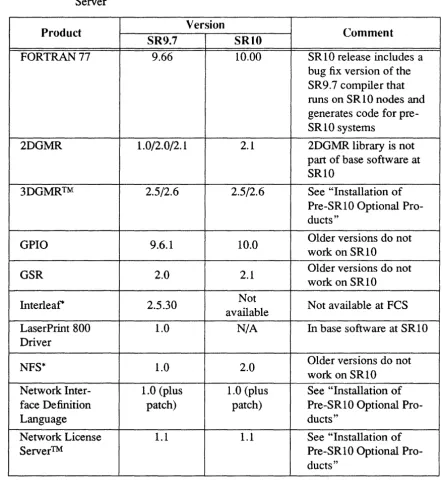
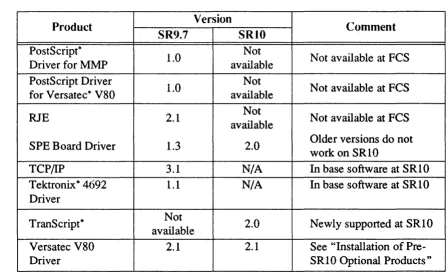
3.1 Hardware Configuration Considerations . • • • • . • 3.2 Object Module Compatibility. . • • • • • . . . • • • 3.3 Network Compatibility . . . . • . • • . . . • 3.4 Media Compatibility . . . • • • • • . • • 3.5 Optional Product Versions Compatible with SR 10 . . • •
3.6 Installation of Pre-SRI0 Optional Products . • . . . 3.6.1 Products that Require
Icom •
. • . • • •
3.6.2 Versatec Printer Driver • • . . • • . • • . 3.6.3 EtherController-MB . • • • . • • • • • . • • 3.7 Optional Products Released in Multiple Versions . . • 3.8 2DGMR Unbundled at SRI0 • . • • • • . . . • •
3.9 SR9.7 Compatibility Items • • . • • . . • • • • 3.9.1 The sr9.7 _executables Directory . . • . . • .
3.9.2 The compat_with_sr9.7 Directory • . • • • • • • • 3.10 Superseded Software • • . • • • • • • . • • • 4. Bugs Fixed by SR10 . • . • • • • . . . • . • • .
4.1 Bugs Fixed that were Reported in APRs or UCRs • . . • . 4.2 Additional Bugs Fixed Since SR9.7 • • • • . . .
4.2.1 The fork Call . • • • • • • • • • . 4.2.2 The Bind Utility • . • • • • • • • • 4.2.3 TCP/IP • • • . • • • • • • . • • 4.2.4 Berkeley Distribution Bug Fixed • . • . • • .
5. Bugs Fixed by SRIO.l • . . • . . • . . . • . . . 5.1 Bugs Fixed That Were Reported in APRs . . • . . . .
5.1.1 Color Generator . • . • . .
5.1.2 Apollo Token Ring . . . • .
5.1.3 ETHERNET • • • • • • • • • • •
5.1.4 Aegis Kernel . . . .
5.1.5 Aegis Shell. . • • . . . .
5.1.6 CC . . . • . .
5.1. 7 /com/lbr . • . . • . . . . .
5.1.8 Documentation . • . . • • . • . . . .
5.1.9 Domain/lX. • • • . . • . • • . • . .
5.1.10 Domain/IX clib . • • . • . . • • • . •
5.1.11 Domain/IX Language Tools • . • • . . .
5.1.12 FORTRAN • • • • • • • • • • • • • •
5.1.13 GPR. . . • . . • . . . . .
5.1.14 Installation • . • • . . • . . • . • . •
5 .1.15 Naming Server . . . . • . . .
5.1.16 NCS. . . • . . . .
5.1.17 netmain . . • . . • • . • . •
5.1.18 netstat • . . . • . . • • • . . .
5.1.19 Pascal . . . • . . • . .
5.1.20 Print Server . . • . • • • • • . .
5.1.21 vt100 . . • . . . . • • . • • • . .
5.2 SRI0 Bugs and Limitations Fixed by SRI0.1. • • .
5.2.1 uucp. . . • . . . .
5.2.2 TCP/IP • • • • • • • • • • • • • • •
5.2.3 loader . . . • . . • . . . .
5.2.4 Display Manager . . • • • . . . . •
5.2.5 Aegis Shell. . . . . . . .
5.2.6 C Shell . • . . • . • . • . • . •
5.2.7 Aegis Commands . . . • • • . . • .
5.2.8 The crp Utility. • . . .
5.2.9 UNIX Commands . . . . . . . .
5.2.10 BSD Commands and Utilities . • • . . .
5.2.11 SysV glossary, locate, starter, and usage Commands • • • • . . •
5.2.12 sendmail . . • . . . .
5.2.13 SR9.X File Ownership and setuid 5.2.14 Printing. • • • . • . . • • 5.2.15 Tasking. . • . • . • • • .
5.2.16 UNIX Calls . . . .
5.2.17 Registry Server . . . • .
5.2.18 Common Commands . • • .
5.2.19 /etc Commands and Files . . • .
5.2.20 Creating Directories . . . .
5.2.24 GPIO
.
·
·
·
· · · ·
· . .
5.2.25 chad.
· ·
·
·
·
· ·
·
·
·
·
·
5.2.26 cvtrgy·
·
·
·
· · ·
·
·
.
5.2.27 FORTRAN Compiler·
·
· ·
·
·
· ·
·
5.2.28 DSEE Bugs· ·
·
· ·
·
· ·
·
5.2.29 Installation·
·
·
· ·
·
· · · ·
6. Limitations and Known Bugs6.1 Cartridge Tape Devices • • • . • • • • • . 6.1.1 Accessing the First File • • • . . . • • 6.1.2 Accessing Files Other than the First . . • .
6.1.2.1 Extracting Files Other than the First . • • 6.1.2.2 Writing Files Other than the First
6.2 ¥agnetic Tape Devices • . • . . . • • . . 6.3 Other Limitations . . • . • . • • • . . .
6.3.1 Writing to Tape • • . . . . • •
6.3.2 The settimeofday() Call, the time_$doek Call, and Event
6.3.3 6.3.4 6.3.5 6.3.6 6.3.7 6.3.8 6.3.9 6.3.10 6.3.11 6.3.12 6.3.13 6.3.14 6.3.15 6.3.16 6.3.17 6.3.18 6.3.19 6.3.20 6.3.21 6.3.22 6.3.23 6.3.24 6.3.25 6.3.26
Counts • . . . • . • • • • . • • Booting Diskless from Workstations Running TECHnet • • • • . . •
inlib . . . . . . . . .
Display Manager . . • •
sendmail . • . . . . • . • . • •
Turbo Systems with FPX • • .
Booting from Floppy Disks . • . . • • . UNIX Media Installs and /eom . • . • Debugger and DSEE Memory Requirements. . The invol Utility . • . • . . . . • • Crash Logging Systems with Storage Modules . • • Diskless Nodes and /dev . . . • .
Aegis Shell . • • • • . • .
Bourne Shell . • • . • • . . . • .
C Shell . . . . . . • . Aegis Commands • • • . •
The erp Command • • . • Common Commands • • • • . . Commands and Files in fete . . . .
UNIX Commands . . • . .
BSD Commands sendmail . . . /usr/adm/lastlog • . . Dates on Device Files Reading Sparse Files • •
6.3.27 Eight-Bit Font Support
· · · · ·
· ·
·
6-8 6.3.28 Eight-Bit Character Support·
·
·
· · · ·
6-8 6.3.29 Quit and SIGINT Signaling· · ·
·
·
·
·
6-10 6.3.30 Blasting Processes·
· ·
·
· ·
·
6-10 6.3.31 Tracebacks· · · · ·
·
·
·
·
·
· ·
6-10 6.3.32 getty on an Aegis-Only System·
·
·
·
6-106.3.33 Special Devices
·
·
·
·
·
·
6-106.3.34 UUCP
· ·
·
· ·
·
·
·
· ·
·
6-10 6.3.35 Printing· · · · ·
·
·
·
·
· ·
· ·
6-11 6.3.36 Standard Streams and obj Files·
· ·
·
6-11 6.3.37 Domain/OS Calls·
·
· · · ·
·
·
·
·
6-11 6.3.38 Partial-Line Output to the DM· · · ·
·
·
·
·
6-11 6.3.39 Naming Server·
·
·
· · ·
·
· ·
6-11 6.3.40 Registry Creation·
· · · ·
· · ·
6-12 6.3.41 Registry Modification· · · ·
·
· · · · ·
6-12 6.3.42 Debugger·
·
·
·
·
· · · ·
·
6-12 6.3.43 SAX .·
· · · ·
·
·
·
· ·
·
6-12 6.3.44 GPR. · · · ·
·
·
· ·
·
· · · ·
6-13 6.3.45 C Compilers·
·
· ·
· ·
·
.
.
6-136.3.46 Open System Toolkit
·
·
·
· ·
6-136.3.47 DSEE Tutorial
·
·
· · ·
·
· ·
·
6-13 6.3.48 Ethercontroller-MB and Apollo Routing·
· · · ·
6-13 6.4 SR10.1-Related SR9.7 Restrictions·
·
· ·
·
·
·
6-146.4.1 Shell Scripts
· ·
·
·
·
·
·
6-146.4.2 Aegis Commands
·
· · ·
·
·
·
·
·
·
6-146.4.3 UNIX Is Command
· · · ·
· · ·
6-146.4.4 Creating .bak Files from SR9.7 Nodes
·
· · ·
6-156.4.5 COFFUID
· · ·
· ·
· ·
·
·
·
6-156.4.6 COFF objects and the DM
· ·
·
6-156.4.7 COFF Objects and Type Managers
·
· ·
6-15 6.4.8 Access to New Object Types·
· ·
· · ·
6-16 6.4.9 Eight-Bit Font Support·
·
· · ·
·
· · · ·
6-16 6.4.10 Eight-B it Character Support .· ·
·
·
·
·
6-16 6.4.11 Printing·
· · · ·
·
·
·
· ·
·
6-16 6.4.12 TCP/IP·
·
· · · ·
·
· ·
6-176.4.13 UUCP
· ·
·
·
·
·
·
6-176.5 Other Known Bugs
·
· ·
·
·
·
·
·
·
·
·
·
6-17 6.5.1 distaa·
·
· · · ·
· · · ·
·
·
·
6-18 6.5.2 Display Manager·
· · · ·
·
· ·
6-18 6.5.3 Installation· · ·
· · · ·
·
·
·
6-18 6.5.4 ios_$change_pathname·
· ·
·
·
· ·
·
6-18 6.5.5 BSD mail·
·
·
· · ·
·
· · ·
6-18 6.5.6 /usr/bin/bc·
· ·
· · · ·
·
· ·
6-19 6.5.7 Sys V /usr/bin/remsh·
·
·
·
·
·
· ·
·
6-196.5.8 rgyd
.
· ·
·
·
·
·
· · ·
6-196.5.12 Sys V Graphics Utilities . . . . 6.5.13 SAU6 and SAU8 Disk Diagnostics. . . . 6.5.14 MD MX Command . . .
6.5.15 The init Program . . . . 6.5.16 DN5XO Initialization Messages 6.5.17 Node Shutdown . . . . 6.5.18 The /dev/display Device . . 6.5.19 The Registry and DPSS/Mail
6.5.20 Eight-Bit Fonts . . . . . . . .
6.5.21 The crp Utility. . . . . . . . . 6.5.22 Common Commands . . . . . . .
6.5.23 /etc Commands and Files . . . . 6.5.24 BSD and SysV Commands and Utilities . . . . 6.5.25 BSD Commands and Utilities . . . .
6.5.26 Printing. . . . . . . .
6.5.27 ETHERNET Drivers . . . • . . . . . 6.5.28 TCP/IP . . . . . . . . .
6.5.29 Debugger . . . . . . . . . .
6.5.30 Online Examples . . • . . . 6.5.31 Domain/Delphi . . . . . . . .
6.5.32 GPR. • . . . . . . • . . . 6.5.33 GPIO Include Files . . . .
7. Installing SRI0.1 • . . . . . . . . 7.1 Optional Products . . . . . . . . . . 7.2 W orkaround for install Bug . . . . . . .
7.3 Preparing a Pre-SRI0 Network to Load SRIO.l . . . . . 7.4 The minst Program. . . . . . . .
7.4.1 Running minst. . . . 7.4.2 Deleting SRI0.0 Domain/OS on an Authrozied Area
Node . . . . . . . 7.4.3 The Questions • . . . • . . . . 7.4.4 Selecting Products . . . . 7.4.5 Loading and Installing Products . . . . .
7.4.5.1 Completing Configuration and Product Loading/lnstallation . . . . 7.4.5.2 Shutting Down and Rebooting Your
Node(s) . . . .
7.4.5.3 Setting Up a Registry Site . . . . 7.4.6 Troubleshooting the minst Program . . . .
7.5 Changes to distaa Since SRIO.O . . . . 7.6 Changes to config Since SRI0.0 . . . . 7.7 Installation and Configuration Considerations . . . .
7.7.1 7.7.2 7.7.3 7.7.4 7.7.5 7.7.6 7.7.7 7.7.8 7.7.9 7.7.10 7.7.11 7.7.12 7.7.13 7.7.14
Access to Target Workstations . . . . Accessing Tools . . . . . . . Booting and Installing your First SRI0 Authorized Area. . . . . . . . . 7.7.3.1 Situation A . .
7.7.3.2 Situation B . . Media Installs to Small Disks Media Boot
Installing from a Limited Authorized Area Override Files . . . . Creating an AA on a Pre-SR10 Node Adding Subcomponents to the AA . Inability to Restore Release Index .
Removing the AA /install Directory . . . The uucp Account Log-in Shell. . . . . BSD /usr/lib/find . . . .
Optional Product Installations . . . . 7.7.14.1 Domain/Dialogue and Domain/p AK
Installation . . . . 7.7.14.2 NFS . . . • . . . . 7.7.14.3 Domain/Dialogue, Domain/Pascal, and
D3M. . . . 7.7.14.4 SPE Installation
7.7.14.5 TranScript Installation . . . 7.8 The /install Directory . . . . . . . 7.9 Installation Tools for Solution Suppliers . . . 7.10 Media Types . . . . . . . .
7.10.1 Streaming Cartridge Tapes . . . 7.10.2 Magnetic Tapes . . . . . . 7.10.3 Floppy Disks . . . . 7.11 Canned Selection Files and Configurations . . •
7.11.1 Selection Component Descriptions. . . . .
7.11.2 Selection Component Tables . . . . . . 7.11.3 Software Installed on User Nodes . . .
7.11.3.1 Small Aegis. . . . 7.11.3.2 Small Aegis for Programmers . . . 7.11.3.3 Medium Aegis . . . . • • . . . . 7.11.3.4 Large Aegis " . . . . . . . . 7.11.3.5 Medium BSD and Medium SysV . . . 7.11.3.6 Large BSD and Large SysV . . . . 7.11.3.7 Combination Medium Configurations . . . 7.11.3.8 Combination Large Configurations . . 8. Documentation . . . . . . .
8.1 Introduction to SRI0 Documentation . . . . . 8.1.1 Organization of the Documentation Set
8.1.3.2 Ordering Manuals at SRI0
· · · ·
·
8-4 8.1.3.3 SR10 and Pre-SRI0 Manuals·
· ·
8-5 8.1.4 Manuals at SRI0.1·
·
· ·
·
·
·
·
·
8-9 8.2 Changes to Documentation· ·
·
·
· ·
· ·
·
·
·
8-9 8.2.1 Domain System Software Release Notes·
8-10 8.2.2 Making the Transition to SR10 Operating SystemReleases
. .
·
·
·
· ·
·
·
· ·
·
8-10 8.2.2.1 Libraries .·
·
· ·
·
· ·
·
·
·
·
8-108.2.2.2 The cvtrgy Command
·
· ·
·
8-108.2.2.3 The Bind Utility
· · · ·
· · ·
8-10 8.2.3 Managing BSD System Software·
· ·
·
·
· ·
8-11 8.2.4 Managing Sys V System Software· ·
·
· ·
·
· · ·
8-11 8.2.5 Managing Aegis System Software· · · · ·
·
· · ·
8-11 8.2.6 Configuring and Managing TCPlIP
· ·
· · · ·
8-11 8.2.7 Programming with System Calls For InterprocessCommunication
·
·
·
· ·
·
· ·
·
· · ·
8-11 8.2.8 Alann Server Help Page·
· ·
· ·
·
·
·
8-12 8.2.9 Debugger Help Page·
·
·
· ·
·
· ·
·
8-12 8.2.10 Sys V Syntax Documentation· · ·
·
· ·
8-12 8.2.11 Common Commands·
·
·
· ·
·
· · ·
·
·
8-128.2.11.1 The cpboot Command.
· ·
·
8-128.2.11.2 The edmtdesc Command
· ·
· · ·
·
· · ·
8-13 8 .2~ 11.3 The Iprotect Command· · ·
·
· · ·
8-13 8.2.11.4 The mkapr Command· ·
·
·
·
· ·
·
8-13 8.2.11.5 The mkdevno Command·
· ·
·
·
8-13 8.2.12 Aegis Commands· · · ·
· · · ·
·
· ·
·
8-14 8.2.12.1 The fserr Command· · · ·
8-14 8.2.12.2 The prf Command·
· ·
·
· ·
· ·
·
8-14 8.2.12.3 The pst Command·
·
·
·
· · · ·
·
8-14 8.2.13 The sa Command· · · ·
· · ·
·
·
·
8-14 8.2.14 BSD Commands· · · ·
·
· ·
· · ·
8-14 8.2.14.1 The Is Command· · · ·
· · ·
8-14 8.2.14.2 The man Command· ·
·
· · ·
·
·
8-15 8.2.14.3 The tip Command·
· · · ·
·
· ·
·
8-15 8.2.14.4 The tset Command.·
·
· ·
·
·
8-15 8.2.15 SysV Commands·
·
·
·
· ·
·
· · ·
8-158.2.15.1 The chmod Command.
·
8-158.2.15.2 The Is Command
· ·
·
·
·
·
·
·
8-15 8.2.15.3 The glossary, locate, starter, and usageCommands
· · · ·
· · · ·
·
8-15 8.2.16 /usr/lib/vfont·
·
·
·
·
·
· ·
·
8-16 8.2.17 The bstring(3) Call·
·
·
· ·
·
· · ·
·
·
8-168.2.18 Open System Toolkit. . . .
8.2.19 Debugger Manual.. . . . . 8.3 Undocumented GPR Features . . . .
8.3.1 New GPR Subroutine Calls . . . . 8.3.2 Support for the Domain Dial Box
8.3 .2.1 Dial Server . . . . 8.3.2.2 Starting the Dial Server and Sending
Requests. . . . 8.3.2.3 Closing an SIO Port . . . . . . 8.3.2.4 Using Dial Boxes with GPR . . . • . . 8.3.2.5 Testing the Dial Box . . . . 8.3.2.6 Dial Box Startup Scripts . . . . . 8.3.2.7 Dial Box Example . . . . . . . A. Changes to Commands and Cans . . . .
A.1 Changes to Commands . . . . . .
A.2
A.I.1 D M Commands . . . . A.I.2 Commands in /com . . . .
A.1.2.1 Obsolete Commands . . . . . . A.1.2.2 Changed Commands . . . . • . . . . . A.1.2.3 New Commands . . . .
A.1.3 Commands in /usr/apollo/bin . . . .
A.1.4 Domain Extensions to Jetc • • • • • • • • • • •
A.I.5 TCP /IP Support . . . . A.1.5.1 Administrative Facilities Files in Jetc • • • • •
A.1.5.2 SysV TCP/IP Commands and Files . . . . A.I.5.3 Aegis TCP/IP Commands and Utilities. . . . . A.I.6 Sys V Commands . . . • . . . .
A.l.6.1 Obsolete or Unsupported Commands . . .
A.1.6.2 Changed Commands . . . . . . A.I.6.3 New Commands . . . . A.I.7 BSD Commands and Files . . . .
A.l.7.1 Obsolete or Unsupported Commands . . .
A.I.7.2 Changed Commands and Files . . . A.l.7.3 New Commands . . . . A.1.7.4 UUCP Support . . . .
Changes to Calls . . . • . . • . . A.2.1 Sys V Calls, Subroutines, and File Formats . . . . A.2.l.1 Obsolete or Unsupported Calls . . . . A.2.1.2 New and Changed Features
A.2.2 BSD System Calls, Subroutines, and File Formats . . . . A.2.2.1 Obsolete or Unsupported Calls
A.2.2.2 New and Changed Features . . . A.2.3 Domain/OS System Calls . . . . .
A.2.3.1 The name_$ and ios_$ Interfaces
A.2.3.6 Miscellaneous New and Changed Calls and Insert Files . . . . . . • . •
A.2.3.7 Superseded Interfaces . . . • . . A.3 Changes to /systest . . . • • . B. Making the Transition to SR10 Operating System Releases • . •
B.l Changes to Making the Transition to SRI0 Operating System Releases . . . . • . • • • • . • • • •
B.1.1 Login Monitoring . • . • • • • • . • • • B.1.2 Project Lists . . • . . . • . •
B .1.3 The Print Environment • • . . . • B.1.4 The /etc/environ File • . • • • .
B.1.5 Protected Subsysterns . . . • • . B.1.6 Protection Inheritance . . . • . • B.1.7 The Local-Access-Only Attribute . . . B.1.8 The cvtrgy Tool . • • • • .
B .1.9 The crpasswd Tool • . . • . . • • • B.1.10 Starting and Administering the glbd . • • • B.1.11 Starting the rgyd Process.. . . . . B.1.12 Operating Mixed Networks • . . . • • . B .1.13 Print Services . . • • • • . . . • • B.1.14 Protection Incompatibilities in Mixed Networks . B.1.15 Command Search Rules . . . • . . . . B.1.16 Bind Utility . . . . • • . B .1.17 Libraries . . . . . •
B .1.18 Transition Aids . • . • . • • . B .1.19 The inlib Command . . . B.2 Protection and ACL Overview . • .
B.2.1 Overall Network Protection Model •
B.2.2 Object Protection Model. . • . . • • • B.2.2.1 The UNIX Model • . . .
B.2.2.2 SR10 Extensions to the UNIX Model
B.2.3 Interactions of UNIX Protection and ACLS . • • • B.2.4 ACL Search Order . . • • • . • • • B.2.5 Changes in Protections Between SR9.7 and SRI0
B .2.5.1 Identifiers • . . . • . • B.2.5.2 Required Entries and Ownership B .2.5.3 Inheritance Mechanism . . •
B .2.5.4 Rights . . . . • . . . • . B.2.6 Tools for Manipulating Protections on Objects
B.2.7 Additional New Protection Capabilities • • •
B.2.7.1 Local Access Only (LAO) . • . . • • B .2.7.2 The lprotect Command • . .
B.2.7.3 Node Owners B-15
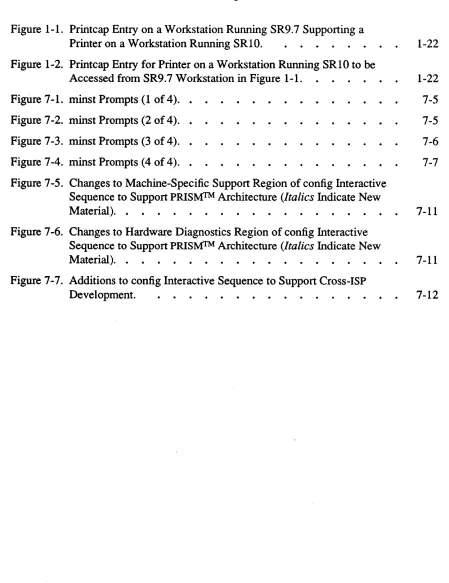
Printer on a Workstation Running SRI0. 1-22 Figure 1-2. Printcap Entry for Printer on a Workstation Running SRI0 to be
Accessed from SR9.7 Workstation in Figure 1-1. 1-22
Figure 7-1. minst Prompts (1 of 4). . 7-5
Figure 7-2. minst Prompts (2 of 4). . 7-5
Figure 7-3. minst Prompts (3 of 4). • 7-6
Figure 7-4. minst Prompts (4 of 4). . 7-7
Figure 7-5. Changes to Machine-Specific Support Region of config Interactive Sequence to Support PRISMfM Architecture (Italics Indicate New
Material). . 7-11
Figure 7-6. Changes to Hardware Diagnostics Region of config Interactive Sequence to Support PRISMfM Architecture (Italics Indicate New
Material). . 7-11
Figure 7-7. Additions to config Interactive Sequence to Support Cross-ISP
Development. 7 -12
[image:18.612.77.526.151.734.2]List of Tables
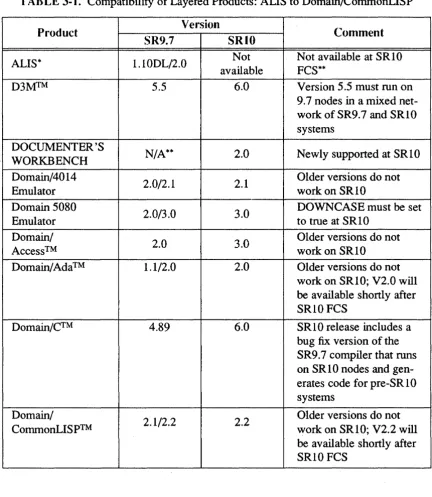
TAB LE 3-1. Compatibility of Layered Products: ALIS to
Domain/CommonLISP . . . 3-4
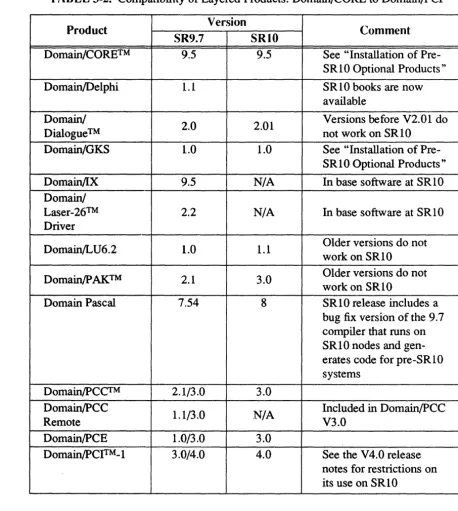
TABLE 3-2. Compatibility of Layered Products: Domain/CORE to
Domain/PCI . . . . 3-5
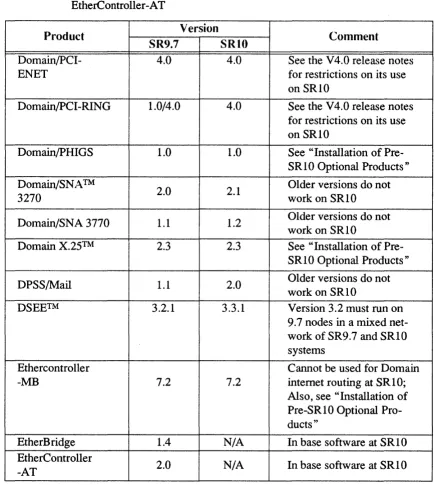
TABLE 3-3. Compatibility of Layered Products: Domain/PCI-ENET to
EtherController-AT . . . • . . . . 3-6
TABLE 3-4. Compatibility of Layered Products: FORTRAN 77 to Network
License Server . . . . . 3-7
TABLE 3-5. Compatibility of Layered Products: PostScript Driver for l\1l\1P to
Versatec V80 Driver . . . . . . . . 3-8
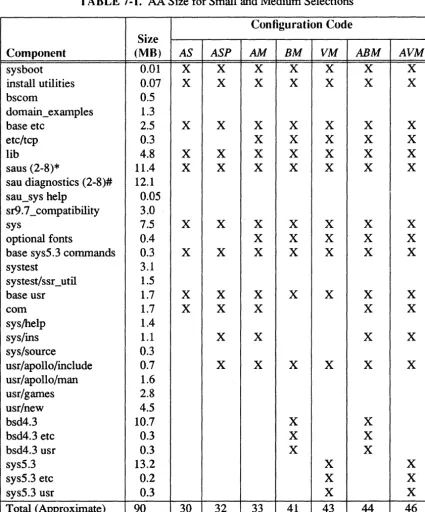
TABLE 7-1. AA Size for Small and Medium Selections
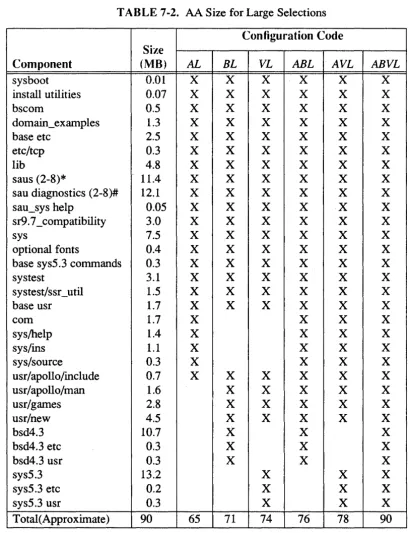
TABLE 7-2. AA Size for Large Selections . . . . . .
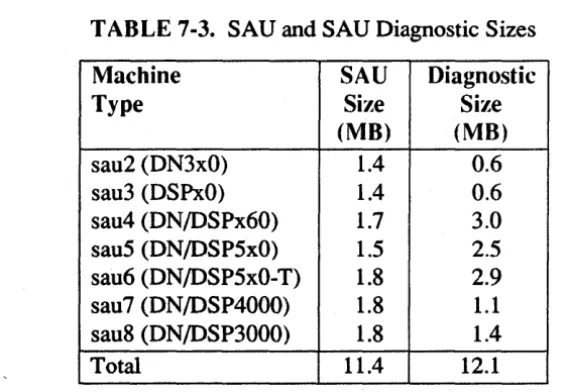
TABLE 7-3. SAU and SAU Diagnostic Sizes. . . .
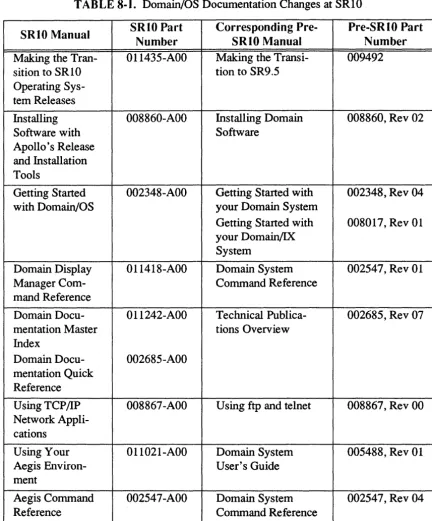
TABLE 8-1. Domain/OS Documentation Changes at SRIO
TABLE 8-2. Domain/OS Documentation Changes at SRIO (Continued). . . .
TABLE 8-3. Domain/OS Documentation Changes at SRIO (Continued). • . . . .
TABLE 8-4. Domain/OS Documentation Changes at SRIO (Continued). . . .
xix
7-27
7-28
7-29
8-6
8-7
8-8
Software Release 10.1
Chapter 1: An ()verview of Software Release 10
Domain/OS Software Release 10 (SR 1 0) is a general release of Domain system software. It includes significant new functionality, perfonnance enhancements, and bug fixes for previous releases. Additionally, at SRI0 the standard system software contains UNIX* functionality that was previously supported by the separate Domain/IXTM product. SR 10 provides additional functionality, perfonnance enhancements and bug fixes to the
software that was supplied in previous releases of Domain/lX.
The SRIO release of the Domain operating system provides major benefits to Apollo cus-tomers in the fonn of an extended Aegis environment and enhanced support in the Domain kernel for UNIX functionality. It contains three separate operating ments that can run independently of each other and concurrently. The Aegis environ-ment provides all the functionality of the Aegis operating system, including the SRIO extensions. The BSD and SysV environments provide users with enhanced 4.3 Berkeley Software Distribution and AT&T System V Release 3 UNIX environments, respectively. The SysV environment is compatible with the System V Release 3 SVID (Base OS, Base Libraries, and Library Extensions) and includes support for System V STREAMS.
It is important to note that each of these environments runs without relying on the pres-ence of any other. Neither of the UNIX environments, for example, requires a Icom directory to run properly. However, the Domain/OS kernel and systeln libraries are com-mon to all environments, so you can use Domain/OS calls such as mbx $open in pro-grams that will run in a Domain/OS UNIX environment.
Major changes and enhancements made to standard Domain system software since SR9.7 include the following:
• Changes in node initialization and log-in procedures • Enhancements to system administration
• Improvements in the file system • Changes in the process model • A new executable binary fonnat • Enhancements to UNIX support • New and changed commands
*
UNIX is a Registered Trademark of AT&T in the USA and other countries.• TCP /lP is now standard in all envirorunents
This chapter describes changes made between SR9. 7 and SRI0 and does not describe changes made in previous software releases.
If you are upgrading existing SR9.7 or earlier based systems to SRIO.i, be sure to read Making the Transition to SRIO Operating System Releases before installing new software.
This chapter briefly describes changes made to Domain/OS system software. It is not intended to be a complete and detailed description of all changes at SRIO. Instead, it cov-ers all areas of change and often refcov-ers you to Making the Transition to SR10 Operating System Releases or other manuals for detailed information. Additionally, we have included listings of all new and changed commands and calls in Appendix A of this document.
1.1 New Software Installation Tools
At SRIO we provide a completely new set of software installation procedures that are both easier to use and more powerful than the previous installation scripts. For complete infonnation on the new procedures, refer to Installing Software with Apollo's Release and Installation Tools. The major changes from a user perspective are
• An increase in speed of installation. The new installation tools are based on com-piled code rather than shell scripts. Thus, they are significantly faster than the old procedures.
• A more flexible user interface. For a user wanting a standard system or product configuration, the new tools provide a complete system of defaults to eliminate time-consuming product or option selection. For a system administrator or user who wants to tailor a network or node envirorunent to special site or personal requirements, the tools allow for a high degree of customization.
• Integration of system software and layered software product installation when instal-ling across a network. Formerly, installation of more than one product, or of system software and layered software products, had to be done on a serial basis; that is, all the objects in one software product had to be loaded before another product could be selected or configured. The new tools allow users to make all product selections, including selection of system software options and the choice of a default network or node environment, before any software is actually loaded to the target node. A user or system administrator can configure the node or nodes to be installed during the day and run the installation itself during the night.
• Simultaneous installation to multiple nodes. A system administrator can install SR I 0 software on multiple nodes simultaneously, if the nodes to be installed are running the Server Process Manager (SPM) program.
In addition to providing the new Release and Installation functionality, Apollo provides an updated set of pre-SRI0 installation scripts in the linstall/sr9.7 com pat directory of
Software Release 10.1
the Authorized Area. Use the scripts in this directory to install SR9. 7 -based optional software products that are compatible with the SRIO version of the Domain/OS operating system but are not being re-released with SRIO. The names of the scripts to use are given in in Installing Software with Apollo's Release and Installation Tools, while the procedures to be followed are described in Installing Domain Software (Part No. 008869 Rev. 02).
1.2 New Problem Reporting Procedures
As of SRI 0, we have implemented a new format for reporting software problems, called the Apollo Product Report. At the same time, we have improved our ability to track and respond to product reports. A new command, lusr/apollo/bin/mkapr, generates an Apollo Product Report and replaces the eruer command, which is now obsolete. The
mkapr command is available in all Domain/OS environments.
1.3 The Node and User Environment
We've made significant enhancements to the workstation environment that affect system administration and use. The following subsections briefly describe these modifications.
1.3.1 Display Manager
We have made the following changes to the Display Manager:
• The DM now handles text lines of up to 1024 characters, including pathnames up to 1023 characters.
• The DM can now handle 8-bit fonts; see "Font Support."
• The OM now creates files of type unstruet, unstructured files without a Domain streams header, instead of type uase, unstructured ASCn with a streams header. • The DM no longer sets the execute bit on files that it creates.
• The DM log-in prompt is now "login:".
1.3.2 The
letc
DirectoryAll systems, even if they have only the Aegis environment, have an
letc
directory .. This directory contains many of the administrative commands and facilities that were located in the Icom orIsys
directories. The exact contents of theletc
directory depend on the installed environments. Any commands inletc
that were in the Icom directory in previ-ous releases are still available in that directory, usually through links.Each node, disked or diskless, has a "node datal etc directory that contains files that are node-specific. The
lete
directory entries (such asletc/Uys)
are links to these files.1.3.3 The /usr/apollo Directory
We now install a /usr directory in all environments; all systems, even if they have only the Aegis environment, now have a /usr/apollo directory. It contains certain conunon environment commands and Domain extensions to the UNIX environment. It also C include files for Domain system calls, as well as other proprietary files.
The /usr/apollo directory contains the following subdirectories:
/usr/apollo/bin This directory contains Domain commands that apply to all three
environments or extend the UNIX environment. It includes com-mands that were previously in the Icom directory but are also appli-cable to the UNIX environments, new commands that apply to all three environments, and commands that are specific to the UNIX environments under Domain/OS. Commands that were in the I com
directory in previous releases are still available in that directory, usually through links. The /usr/apollo/bin directory is now on the default search paths for all shells.
/usr/apollo/lib This directory contains binaries and related files that UNIX users
do not run directly. Examples include the cc compiler that the
Ibin/cc program calls. The ftn compiler is also in this category.
/usr/apollo/include This directory contains Domain/OS system call C include files with
function prototypes. Both IsysS.3/usr/inciude and
/bsd4.3/usr/include contain directories, called apollo, that are links
to this directory. Versions of the Aegis system call C insert files that do not have function prototypes are located in the Isys/ins
directory for compatibility purposes.
See Making the Transition to SRIO Operating System Releases for more information on
the /usr/apollo directory and its effects on all three user environments.
1.3.4 Guaranteed Command Set
All systems, including nodes that do not have a Sys V environment installed, have a
/sys5.3/bin directory. On systems that have only BSD or Aegis, this directory contains
the following commands:
cat cpio
In
sed
chgrp diff
Is
sort
chmod expr mkdir sum
chown find
mv
tar
cmp grep rm uniq
In addition, we always supply a SysV Bourne shell in /etc/sys_sh. These files enable solution suppliers to provide a single (SysV) script that will correctly install software on all nodes, independent of the installed environments.
Software Release 10.1
1.3.5 Case Sensitivity
The OS kernel and libraries are now fully case-sensitive in handling pathnames. Path-name text is now maintained case-correct, and we no longer use the colon escape charac-ter to indicate uppercase characcharac-ters. This full case sensitivity eliminates the problems that users encountered when operating in both the Aegis and UNIX environments.
The OS automatically converts between colon-mapped names on pre-SRIO systems and case-correct names on SRIO nodes, and we provide additional conversion tools, which are described in Making the Transition to SRlO Operating System Releases.
1.3.6 Key Definitions
We have made several enhancements to the key definitions at SRI0; these are described in the following subsections.
1.3.6.1 Key Definition Files and Initialization
At SRIO, we have changed the files in the Isys/dm directory from which the Display Manager (OM) automatically loads the key definitions at login. The exact files that are used depend on the specific keyboard and environment. For detailed information on key definition initialization, see the Using Your Environment and Managing System Software manuals for your environment(s).
AT SRI0, key definitions support 8-bit characters. To accommodate this change, new files are used to store the binary versions of the most recent key definitions. For more infonnation on these changes and their effects, see Making the Transition to SRlO Operating System Releases.
1.3.6.2 Additional Key Definition Changes
You can now define the SHIff/key and CTRL/key combinations for the following keys for Model II (including international) keyboards: BACK SPACE (bs), ESC (esc), RETURN (cr), and DELETE (del). You can also define CfRL/key combinations for all left keypad, (Ii-If), right keypad (rl-r6)
and
numeric keypad keys. You cannot define any of these key combinations for Model I (old-style, low-profile) or earlier keyboards. Several standard key definitions have been changed. These changes are described in detail in Making the Transition to SRlO Operating System Releases. (Key definitions are still user-modifiable.)1.3.6.3 Keyboard Support of S·Bit Fonts
At SRIO, we provide support for the composition of 8-bit characters, that is, characters in an 8-bit font where the high bit is set. You can compose 8-bit characters on all key-boards through user-settable compose and ALT key functions. We also supply a new command, lusr/apollo/bin/kbm, that displays the current keyboard characteristics and sets the compose key and the multinational long and short shift keys.
1.3.7 Font Support
The following changes have been made in font support at SR10.
1.3.7.1 8·Bit Support
SRIO includes new support for 8-bit fonts, that is, fonts that provide up to 256 characters. The following font sets are now supplied in 8-bit format and conform to the ISO 8-bit character set commonly known as Latin-I, which includes all the characters used in
Western European languages.
Courier family t7x13 Times family
din_t7x11 t7x13.b Legend family
f5x9 Helvetica family Standard family
The remaining standard fonts do not include 8-bit characters and are still supplied in 7 -bit font format.
Because users may want to continue using the keyboard character encoding of the yre-SR10 national fonts, we continue to provide the 7-bit versions of these fonts. However, we also provide a set of tools in /usr/apollo/bin, such as french_to _iso, that convert files written with the 7 -bit format national fonts into 8-bit ISO Latin-1 format.
The Sys V Bourne and Kom shells and the Aegis shell provide 8-bit support, as does DPSS/Mail™. The keyboard supports 8-bit character input, and we provide tools for creating 8-bit fonts and for converting between 7 -bit and 8-bit fonts.
Other features of the new font support include
• Fixed-spaced and proportionally spaced fonts • Font file field to specify bytes per character • Minimum and maximum character code field • Bounding box coordinates around character • Underlining specification
Programs that "knew" about the old format of fonts, (that is, included the smdu.ins file
in their program) will not automatically work at SR10.
For detailed information on using 7 -bit and 8-bit fonts, see Making the Transition to SRIO Operating System Releases. See Chapter 3 of these notes for a detailed list of res-trictions on 8-bit fonts.
Software Release 10.1
1.3.7.2 Font Height
The fonts in the Courier, Times, and Helvetica families are slightly taller than they were at SR9.7.
1.3.7.3 The edfont Utility and Icons
We have rewritten the edfont utility to work with n-bit fonts and have changed the user interface. The edfont utility now checks and uses all font characteristics, while the old version did not. As a result, edfont can now notice some errors that existed in icon files generated before SRI0, and may not appear to display some old icons correctly.
1.3.8 Initialization, Login, Shell Startup
The node initialization, log-in, and shell startup sequences and procedures have been revised. The initialization sequence is designed to be independent of the windowing sys-tem and confonns more closely to the UNIX startup mechanisms. Login and startup pro-cedures have added fte!xibility.
At SRI0, the init process runs as Process 1, instead of the DM. It executes the file 'node_data/etc/rc and invokes getty to initialize the serial lines and start the DM or SPM. Also, each node's default environment and systype are set by an /etc/environ file, while a .environ file in the HOME or directory can specify each user's default environ-ment and systype. See the user's guide for your environenviron-ment, Making the Transition to SR10 Operating System Releases, and the Managing System Software manuals for detailed infonnation on the initialization, login, and shell startup procedures.
1.3.9 Aegis Shell
The following changes have been made to the Aegis shell:
• The shell now runs user _ data/sh/startup in the home directory for every interactive version of the shell that is run.
• The shell now runs user _ data/sh/login any time it is invoked from a log-in program such as Icom/login, siologin, crp (without the -me option). More specifically (for programmers) the shell can be made to run its login script by invoking it with argv[O] set to -sh.
• The shell now checks that any program or shell script it invokes has execute permis-sion for the current user.
• Environment variables can be defined at shell startup time by using
-Dvariable[=value]. This feature can be used to make startup scripts branch depend-ing on how they were invoked.
• The shell now supports 8-bit character input and output.
• The shell now supports the use of a CSR (conunand search rules) environment vari-able. If this variable exists, it is expected to contain a list of blank-separated path-names that are used to detennine where to look for executable files. Changes to the search path via the csr command will change this variable, and changes to the
variable will be reflected in the command search rules reported by the csr command. However, unlike the csr command, changes to the CSR variable will not be inherited by the parent of a shell script.
• All internal shell commands now output their errors to errout. As a result, error mes-sages from internal commands can be redirected.
• stdout and errout can now be merged into a single file via (> foo >'! foo).
• The shell will continue searching through its search rules until it finds an executable file that matches the specified name. Thus, if you have a shell script or program called Id earlier in your search path than /com/ld, and that object is not executable, the shell will execute /com/ld and will not give you an error. However, if it cannot find a copy of Id anywhere else in your search path, then you will get an error about the lack of execute pennissions.
• The shell no longer prints a one-line status after a fault or undefined global error. This infonnation can be obtained by using the t b command.
1.3.10 Commands in Icom Requiring -p Option
Several commands in the /com directory that manipulate files now require a -p[airwise] option if you specify more than two file tokens. This option was added to provide a measure of protection against inadvertent uses of these commands in UNIX shells, which expand wildcards before executing the command. Thus, for example, if you used cpf in a UNIX shell with a wildcard in the source name, and the source name expanded to three pathnames, you would copy the first file onto the second source file and lose the second file. The requirement for a -p[airwise] option makes this kind of error harder to make. At SRIO, the use of parentheses to group file names (such as cpf (foo bar) /dir) also requires the -p[airwise] option, just as the specification of more than one pair of tokens does. The commands themselves do the checking, rather than the command-line inter-preter, since only some commands can have bad results with multiple pairs of tokens. Since a leading "(" can be part of a name, it would invalidate this protection to accept
"(" as syntax without "permission" from the user in the fonn of -p[airwise].
1.3.11 Korn Shell
We've added support for the Korn shell in both the BSD and SysV environments.
1.4 System Administration
The following changes primarily affect the ways in which systems and networks are administered.
Software Release 10.1
1.4.1 OS Name and the MD
The operating system is now called Domain/OS, not Aegis. As a result, the OS file in the /saun directories has been changed to domain_os You can now start the operating system from the Mnemonic Debugger (MD) by using the following command:
EX D()MAIN OS
Note, however, that DN5xx-T systems with FPX boards and with MD revisions earlier than 5.7 must still use EX AEG IS.
1.4.2 Libraries in /lib
We have changed the way in which libraries in the llib directory are loaded. The
letc/sys.conf file now allows you to specify whether libraries must be loaded into global space or can be loaded into user space, whether the global libraries should be loaded on system initialization or when first needed at run time, and whether the library is optional (that is, whether the system should initialize successfully if the library is not found).
The llib/unixlib library is obsolete at SRIO. In addition, the llib/tblib library is provided only for Ada compatibility.
The following libraries are new at SRIO:
libc The libc and c1ib libraries now contain the data and entry points that were previ-ously in the c1ib and unixlib libraries.
rgyli b The registry library; it is required on each system by the new distributed registry.
dblib The debugging library; this is used by the traceback command and for cross-process debugging.
The Iii b directory also contains a link to the C preprocessor program.
We also supply the following libraries in the Isr9.7 _compatibility/sr9.7 _executables/lib
directory that should be installed on SR9. 7 systems in a network with SR 1 0 systems:
• The kg_.lib, loader _.lib, and name _.lib libraries enable programs that reference SRI0 entry points to run on the SR9.7 nodes. They contain interludes that convert SRIO entry points into SR9.7 entry points.
• The prflib library should replace the standard SR9.7 prflib.
• The streams library fixes a bug encountered when an SR9.7 system uses temporary files on an SRI0 node.
• The ddslib library enables SR9.7 nodes to run the rgyd; this library should be installed on nodes that use NCS-based software to communicate with SRI0 systems.
1.4.3 Paging Statistics
We have made some changes to the way we count paging activity at SRIO. This infor-mation is visible through the Icom/pst and Ibin/ps commands.
At SR9.7, the kernel made two per-process counters available:
global faults Counted 1 for each page fault occurring in global space
private faults Counted 1 for each page fault in private address space
Neither of these counters included adjustments for "touch-ahead" pages. Also a special "sharing fault" path (page resident but not in the user's mmu tables) through the kernel did not increment these counts. As a result, the counters were not consistent, accurate, or meaningful measurements of paging activity.
At SR10, we have changed the contents and meaning of these counters. They now represent the following:
data file faults A count of the number of pages read from disk or network that are not executable. It includes "touch-ahead" page8, but does not include zero-filled (newly created) pages. This number is roughly equivalent to file I/O.
executable faults A count of the number of pages read from disk or network that are executable (have the "x" access bit on).
Sharing faults (pages that are resident, but not in the mmu tables for this process) are not counted in either case.
1.4.4 The Print Environment
Changes to the print environment at SR10 include enhancements to the prf command to provide queue and job control, a new interface for adding drivers to prsvr, and a print manager that allocates and coordinates print resources in a network. See" Printer S up-port" for more information.
1.4.5 UNIX Devices
The UNIX device name for any transcript pad created by the DM is now the same as for the default pad name and the process name for the shell process. For example, if you use the default DM SHELL key to create a shell, the shell process and transcript pad name will be something like pad06. In this case, any output written to /dev/pad06 will appear in the shell's transcript pad.
1.4.6 SIO Lines
We now provide full UNIX tty support (getty and init) for remote login over SIO (Serial I/O) lines, as well as siomonit and siologin.
UNIX SIO line software now fully supports all UNIX line protocol semantics. The Aegis SIO software continues to support the Aegis semantics. As a result, the /dev/siox files and the corresponding Idev/ttyxx files refer to the same devices, except that the state of the
Software Release 10.1
DCD line is always ignored on open by /dev/siox devices. For a detailed description of this change and its effects, see Making the Transition to SRlO Operating System
Releases.
The SRlO SIO software initializes the /dev/siox devices to settings different than those used in previous releases. Use the -default option of the tcU command to obtain the pre-SRIO settings. For example, to set SIO line 3 to the pre-SRIO settings, do this:
teU -default -line 3
1.4.7 Handling Devices and Mounting
Both SRIO UNIX environments support handling devices in the /dev directory and build-ing special files with the mknod command.
1.4.8 Project Lists
Project lists (group sets) are fully supported at SRI0 and may be used in all environ-ments. At SR9.7, project list entries rnatched only Access Control List (ACL) entries of the exact form % .group _name. 0/0. %. At SR I 0, the project list check substitutes each group in the user's project list into the Subject Identifier (SID) and compares each result-ing SID in doresult-ing an ACL check. See Making the Transition to SRlO Operating System Releases for more details.
1.4.9 Process Accounting
We provide local process accounting with /etc/sa and /etc/accton in all environments. The online manual pages provide details.
1.4.10 Log-In Accounting
We provide facilities to log log-in events. By editing the 'node_data/etc/login_log.conf
file, you can select to log any combination of the following types of logins: DM, window, SPM, and SIO line. You can also specify the file that will contain the logged infonnation.
1.4.11 Backup and rwmt
We've made changes to the rbak and wbak commands to support a mixed pre-SRI0 and SRlO network. We've also added support to tar and cpio for archiving typed files, and
tar now supports blocking factors of 1 through 20. The performance of tar and tfp has also been improved.
The wbak and rbak utilities have been enhanced to allow backup output to be written to a streams object and restore input to be read from a streams object. Streams objects include files, standard input, and standard output. An option has also been added to the
rwmt utility to disable byte swapping when data is written to magnetic tape. These features provide additional flexibility in the wbak process, including the ability to use a disk file as an intermediate staging area for backup output. (The "disable byte swap-ping" feature is needed when using rwmt to write wbak output from a disk file to mag-netic tape.)
The rbak tool will no longer restore protected subsystems or setuid objects unless the user has permissions to do so.
1.4.12 DPSS/Mail to UNIX mail and UUCP
SRI0 includes the ability to gateway from DPSS/Mail to UNIX mail and to UUCP. A field in the person entries in the registry allow users to specify a mail address. The DPSS/Mail product provides a command, Icom/edsd, that allows you to edit the entries
in a directory of subscribers. .
The SR 10 BSD and Sys V envirorunents support 4.3BSD mail and AT&T System V Release 3 mail, respectively. Both fonns of mail use the sendmail utility as a base.
1.4.13 SPM
At SRIO, you can configure a system so that the Server Process Manager (SPM) prevents unauthorized users from creating processes on or logging in to a node. To do so, edit a 'node _ data/spm _control file that lists the authorized users. See Making the Transition to SR10 Operating System Releases or the Managing System Software manuals for more infonnation on this subject. The Is)'s/spm/spm program also has two new options • • hi[gh] and ·Io[w], for specifying process priority.
1.4.14 The net man Program and Diskless Nodes
At SR 1 0 the Isys/net/netman program automatically executes the commands in the shell script Isys/net/netman.rc when a remote node attempts to boot diskless. This script creates and initializes the resources that are required to support the remote node. The Isys/net/netman.rc directory entry is actually a link to either Isys/net/netman.com _ sh or fsysfnet/netman.bin_sh, depending upon the default node envirorunent specified during installation. You will find that the first diskless boot from a given partner takes longer than previously, due to the time required to create the supporting files.
We no longer supply the linstallfcreate _partner script that was included in previous releases. However, the diskless list mechanism is still in effect.
1.4.15 The ns_helper Server
At SRlO, ns_helper cannot run on diskless nodes. Additionally, the ns_helper's data-base files have been moved from their SR9.710cation in the directory tree. Making the Transition to SR10 Operating System Releases describes procedures for converting an SR9.7 ns_helper to SRI0.
1.4.16 The 'node_data Directory
The ' node_data directory has been rearranged to put more files into subdirectories. New subdirectories include system_logs for logging and dump files, systmp for system tem-porary files, and etc for node-specific fetc objects.
Software Release 10.1
1.4.17 Domain Internet Support
The maximum number of hops allowed in a Domain internet has been increased to 16, provided that every network in the internet meets minimum network throughput perfor-mance guidelines. The minimum transmission rate over any single link must be at least one megabit per second with a maximum end-to-end delay of 100 ms. Refer to Planning Domain Networks and Internets for descriptions of the internet configurations and equip-ment that you can use to ensure adequate internet performance.
When you install SRlO on Domain internet routers, you must reassign network numbers to the router's principal and alternate networks. Refer to Managing Domain/OS and Domain Routing in an Internet for procedures that describe how to assign network numbers.
1.4.18 Integrated TCP/IP
At SRIO, TCP/IP software is a part of the base operating system. One version operates in all environments, and the previous layered product is now obsolete. See Making the Transition to SR10 TCP//P for details.
1.4.19 HoneyDanBer UUCP
A single version ofUUCP, known as HoneyDanBer, operates in both UNIX environ-ments. It is a more robust implementation, providing enhancements such as spool direc-tory trees and better security and error handling. SRIO UUCP communicates over com-munications lines with most versions of UUCP, including Apollo pre-SRIO versions and other vendors' HoneyDanBer and other UUCP implementations. We also supply a ver-sion of HoneyDanBer UUCP that runs on SR9.7 systems and will work correctly on a network with SRIO UUCP. See Making the Transition to SR10 Operating System Releases for more information on running UUCP on mixed SRIO/SR9.7 networks.
1.4.20 SysV terminfo Files
We have made a change to save disk space at SR10. We have created the directory lusr/lib/terminfo.Iocal that contains a set of terminfo files that are most commonly used. When Sys V curses looks for a terminfo file, it first checks to see if the file is under the new directory. If so, it uses that file. If not, it goes on to use the original
lusr/lib/terminfo directory. Warnings or errors are never generated about missing files in terminfo.local (terminfo.local is about 78 blocks). You can install terminfo.local, ter-minfo, or both locally or as links to a centralized directory.
1.4.21 The lusr/new and lusr/games Directories
The
lusr/new
directory contains unsupported miscellaneous tools and commands from the Berkeley 4.3BSD distribution. Thelusr/games
directory contains games from the Berkeley 4.3BSD and System V distributions, as well as games that are specific to Apollo systems. You can optionally install either or both directories when you install either the BSD or Sys V environment. Each is then put in a