1
Backup
Introduction
There are 2 fundamental ways to backup an M2000:
- Host Based
In this mode, data always passes through the Host. The backup software runs on the Host processor and tape devices may be attached either directly to the Host or to one or more of the Nodes. Standard Solaris backup products will typically run without modification in this mode.
- Node (or FSP) Based
In this mode, data never passes through the Host. Data moves directly from the disk attached to one FSP to a tape attached to either the same or a different FSP. The backup software may run on the Host processor or on another system entirely.
On the M2000, there are 2 different ways of providing node based backup:
-NFS
This is done by mounting the source file system using NFS and copying the data over the network. This is a nearly universally compatible solution, but absorbs what is often limited network bandwidth.
-NDMP (with BTE/FTE on the back end)
Network Data Management Protocol (NDMP) is an evolving standard for network based backup and restore.
1 ▲ Backup
M2000 Technology Camp ▲ 1-2 node. Data transfers can be either within the same node or across nodes. BTE enables image backup of filesystems whereas FTE allows backup of individual files.
The NDMP protocol is a client server protocol. The server process moves the data between disk and backup media and the client handles backup administration. This enables the creation of a plug-n-play backup facility on Auspex NetServer to be used by any centralized backup administration application which is NDMP protocol compliant. It allows our file server to implement efficient data movement by exploiting the architectural advantages. It also reduces the complexity of a backup product by separating file server issues from backup administration issues. The backup and restore solution is partitioned in a way that minimizes the amount of software required on the host with the tape drive attached. An Auspex NDMP server that utilizes BTE/FTE on the back end, will provide high speed backup and restore without requiring each third party software provider to port to our platform.
Auspex NDMP Server
Some Terminology
Backup host
The host on which the backup software, daemons and the databases ex-ists. The backup software host may or may not have a tape drive attached
NDMP host
The host which has a tape drive physically attached and can perform local backups to that tape drive using NDMP.
NDMP server
The virtual state machine on the NDMP host that is controlled using the NDMP protocol. There is one of these for each connection to the NDMP host.
NDMP client
Auspex NDMP Server Architecture
The architecture is a client server model and the backup software is con-sidered a client to the NDMP server. For every connection between the client on the backup software host and the NDMP host, there is a virtual state machine on the NDMP host that is controlled using the NDMP pro-tocol. This virtual state machine is referred to as the NDMP server. Each state machine controls at most one device used to perform backups. The protocol is a set of XDR encoded messages that are exchanged over a bi-directional TCP/IP connection and are used to control and monitor the state of the NDMP server and to collect detail information about the data that is backed up.
In the most simple configuration, the backup software will backup the data from the NDMP host to a tape drive connected to the NDMP host.
It is also possible to use the NDMP to simultaneously backup two tape drives physically attached to the NDMP host. In this configuration there are two instances of NDMP server on the NDMP host.
Auspex NDMP Server Design
The NDMP server will be implemented as a daemon process running on the Auspex Host Processor. It will be a concurrent server. Each back-up/restore request will be handled by a separate instance of NDMP serv-er.
NDMP Server Modules
In terms of functionality, the NDMP server daemon can be divided into two modules:
Connection module - will handle all NDMP functionality except data collection and formatting. The connection module functionality includes establishing connection to the NDMP client, receiving and sending messages to the NDMP client, controlling tape and jukebox devices, etc.
1-4 ▲ M2000 Technology Camp
One Tape Drive Configuration
Two tape drive configuration NDMP
Client
NDMP Server
Backup Data NDMP Connection
Ne
tw
o
rk B
ounda
ry
Backup Host NDMP Host
NDMP Client
NDMP Server
Backup Data NDMP Connection
Ne
twork Boundary
Backup Host NDMP Host
NDMP Server
Backup Data NDMP
Module Interaction in NDMP Server
Data Flow in NDMP Server
data module1
data module2 connection
module ndmp client
NDMP messages TCP/IP connection
ax_nd
m
pd d
e
a
m
on
Formatted data data module connection
1 ▲ Backup
M2000 Technology Camp ▲ 1-6 The NDMP server uses concurrent server model. Each backup or restore session will be handled by a separate instance of NDMP server process. The data module performs backup or recover operation concurrent with the NDMP connection module. Data module will provide a set of functions to connection module to start a backup or restore operation, abort an operation, and get backup attributes. Connection module will provide a set of functions to data module for getting the details about backup or restore operation, sending file history to NDMP client, logging errors, etc.
Tape/SCSI interface
The Following section describes the device naming conventions on Aus-pex NetServer that will be reported to NDMP client during probing de-vices on NDMP host.
Nomenclature
• Disk devices on a Mylex controller (Note: These device names are for configurational use only. These cannot be accessed.)
Name: fsp<F>m<M>c<C>t<T> /dev pathname: N/A
Where:
F - FSP instance (0-255)
M - Mylex controller number (0-3) C - SCSI channel within controller (0-2) T - SCSI Target ID (0-6, 8-15)
• RAID Arrays (also known as logical devices or system devices): Name: fsp<F>m<M>rd<R>
/dev pathname:
/dev/axmrd/fsp<F>m<M>rd<R>s{0-15} /*block */ /dev/raxmrd/fsp<F>m<M>rd<R>s{0-15} /*raw */ Where:
F - FSP instance (0-255)
M - Mylex controller number (0-3)
• Virual partitions:
Name: fsp<F>vp<V> /dev pathname:
/dev/axvp/fsp<F>vp<V>/* block devs for VPs */ /dev/raxvp/fsp<F>vp<V>/* raw devs for VPs */ Where:
F - FSP instance (0-255)
V - Virtual partition number (0-255) • Tape devices:
Name: fsp<F>c<C>t<T>[n][c] /dev pathname:
/dev/raxmt/fsp<F>c<C>t<T>[n][c] Where:
F - FSP instance (0-255)
C - SCSI channel in an Adaptec controller (0-7) T - SCSI Target ID (0-6, 8-15)
n - no rewind on close c - compression
• Auto-changer devices:
Name: fsp<F>c<C>t<T>
/dev pathname:
/dev/raxac/fsp<F>c<C>t<T>/*raw access only */
Where:
F - FSP instance (0-255)
C - SCSI channel in an Adaptec controller (0-7) T - SCSI Target ID (0-6, 8-15)
• Snapshot devices:
Name: fsp<F>snp<S>l<L>
1 ▲ Backup
M2000 Technology Camp ▲ 1-8 /dev/axsnp/fsp<F>snp<S>l<L>/* block dev */
/dev/raxsnp/fsp<F>snp<S>l<L>/* raw dev */
Where:
F - FSP instance (0-255) Y - Snapshot number (0-127) l - Level of snapshot (0-15)
Multiple level device layer snapshots will be available in NS10K. If a device has been checkpointed at various times, a pseudo snapshot device for each level of snapshot is available. Mounting a snapshot device will provide the exact “snapshot” of a filesystem at the particular time it was checkpointed. ax_snapshot is the related command.
Note: NetBackup NDMP client 3.1.1 does not support longer device names. Hence, the NDMP server reports autochanger device names as spt?. We create a symbolic link to the actual device nodes. The symbolic names will look be as follows:
FastBack method of NDMP server backup
This section explains how FastBack backup and restore requests will be handled. For details about NDMP backup and restore request formats, re-fer to the full specification of NDMP protocol found at
http://www.nd-mp.org.
FastBack method will do full file system backup and full file system re-store using FSP’s FastMove (Block Transfer Engine) available through m16 user library. It will also provide backup of live filesystem using snapshot capability. The backed up image will be compatible with dd for-mat.
The number of FastBack backups that can run simultaneously will be de-termined by the number of tape drives connected to the system.
Table 1:
Symbolic link name Actual device path name
Snapshot or checkpointing
File system requires checkpointing to enable consistent backup when file system is mounted. The user must specify the cache partition for the backup of a mounted file system. The backup would fail if the cache par-tition is missing.
Unmounted File systems do not require snapshot capability to enable consistent backup. However, if the user specifies the cache partition we will checkpoint the source partition. This would enable the user to mount the file system while backup is in progress.
User supplies /usr/AXbase/etc/snaptab file that contains a file system de-vice name and its associated cache partition name. Snaptab file format is as give below:
#
# source partition cache partition #
fsp?m?rd??s?? fsp?vp??
fsp?vp?? fsp?m?rd??s??
NDMP client interface for FastBack Backup
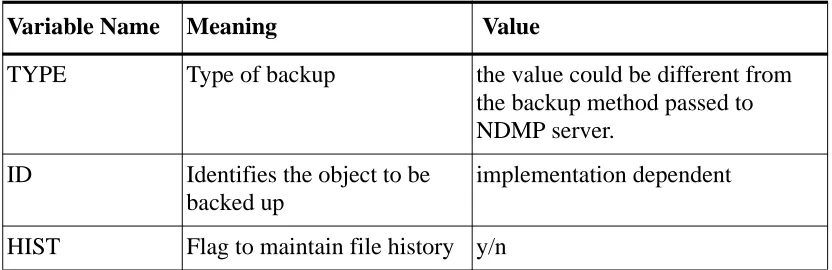
NDMP_DATA_START_BACKUP request begins a backup. The details
are given in table 1. The ID identifies the object to be backed up. The meaning of ID is implementation dependent. The type of backup is also implementation dependent. The env is a list of parameters that may affect the behavior of the backup. The env returned by the
NDMP_DATA_GET_ENV will be saved and made available to the
1 ▲ Backup
M2000 Technology Camp ▲ 1-10 The following environmental variables are defined by NDMP client.
The following environmental variables are required by FastBack type of backup.
Returned Error codes
NDMP_NO_ERR
Backup operation successfully started. NDMP_ILLEGAL_STATE_ERR
A data operation is already in progress. Only one data operation per connection is allowed to be executing at a time.
NDMP_ILLEGAL_ARGS_ERR
Invalid backup method, invalid backup method parameter, or invalid backup method parameter value specified.
NDMP_DEV_NOT_OPEN_ERR
[image:10.612.157.573.114.249.2]No tape device is currently open by the connection.
Table 2: Backup environment variables Variable Name Meaning Value
TYPE Type of backup the value could be different from the backup method passed to NDMP server.
ID Identifies the object to be backed up
implementation dependent
HIST Flag to maintain file history y/n
Variable Name Meaning Value
FILESYSTEM File system to be backed up. This variable would specify a mount point for mounted file system or source partition name for
unmounted file system.
file system mount point or fsp?m?rd??s?? or fsp?vp??? CACHEPARTI-TION
Spare partition that holds changes to the filesystem during backup.
This is optional field, when speci-fied will take precedence over the cache partition entry specified in /usr/AXbase/etc/snaptab file.
fsp?m?rd??s?? or
NDMP_WRITE_PROTECT_ERR The tape is write protected.
NDMP client interface for FastBack Recover
NDMP_DATA_START_RECOVER request recover the files specified in nlist from the backup. The env is the list of parameters and values saved
at the end of the backup. The recovery can reposition the tape as long as it does not position outside of the current tape file. Any repositioning of the tape will be reflected in the tape status. If the recovery encounters an EOM, it will enter a paused state and notify the NDMP client to load the next tape.
Request Arguments
env
The backup environment that was returned from a data get environ-ment request made prior to notifying the NDMP server that the backup was complete via a data stop message.For example
-the following environmental variables are required by FastBack type of backup.
Returned Error Codes NDMP_NO_ERR
Recover operation successfully started. NDMP_ILLEGAL_STATE_ERR
A data operation is already in progress. Only one data operation per connection is allowed to be executing at a time.
NDMP_ILLEGAL_ARGS_ERR
Invalid recover method, invalid recover method parameter, invalid recover meth-od parameter value, or invalid name list entry specified.
NDMP_DEV_NOT_OPEN_ERR No tape device is currently opened by this connec-tion.
Variable Name Meaning Value
FILESYSTEM File system to be restored fsp?m?rd??s?? or
1 ▲ Backup
M2000 Technology Camp ▲ 1-12 FastBack method error handling
Following sections describe how different errors are handled by NDMP server on Auspex.
End of Media handling
When a single file system image can not fit on one tape, NDMP server would encounter an EOM condition. Tape EOM condition is handled by both the server and client. Server would pause and notify the client to change the tape. Once client changes the tape server would resume the backup or restore. Backup/restore statistics are remembered by server during media change.
Cache partition full condition
While the file system is checkpointed for the duration of backup, the cache partition could experience partition full condition. Currently, snap-shot module in FSP logs a warning to host console when the cache parti-tion is about 80% full. The user must grow the cache partiparti-tion to avoid snapshot failure in order to provide the consistent backup image. If the user does not grow the cache partition in time, backup would fail with an error condition.
Two source partitions using same cache partition
Two or more source partitions could use a single partition as their cache partition provided they are not checkpointed simultaneously. Snapshot module will not allow two source partitions to use the same partition as their cache. The second request would fail with an error condition.
User specifying a valid unmounted file system as cache device.
User Interface
NDMP server will be run as a daemon and the syntax is given below:
ax_ndmpd [-d debug-level] [-p port-number]
debug-level - The least significant 4 bits of the level specify the
detail. 0 will result in minimal messages for enabled compo-nents being output. 15 will result in all messages for enabled components being output. The remaining bits in the level spec-ify the components for which messages are to be output. Default is all messages disabled.
port-number - TCP port number on which the NDMP server is
listening for connection requests. Default is to lookup the port in the services database.
References
1. Roger Stager, David Hitz: “NDMP Protocol Specification”, http://www.ndmp.org.
2. NDMP Software Development Kit, http://www.ndmp.org.
3. RFC 1832, _XDR: External Data Representation Standard_, R. Srini-vasan, Sun Microsystems, August 1996.
1 ▲ Backup