Data Processing System for Remote Sensing
Satellites in Private Cloud Environment
C Pradeep1, K Mounika2, ANSV Murali Krishna3, SVSRK Kishore4, C Chandrasekhar Reddy5 1
Storage and Internal Networks Division, Computing, storage, networks and visualization facility, Data Processing, Products archive and Web applications Area, National Remote sensing centre, Indian space research Organisation, Hyderabad.
Abstract: In this paper we present a customized cloud setup for Image processing of data acquired from Earth observation satellites. To produce greater extent varieties of larger datasets and to drive the information from datasets, remote sensing data processing needs to be equipped with an improved platform. Cloud Computing proves to be a good option; this digital engineering platform has increased application potentialities in terms of functioning, elastic resource management and collaborative executive approach. The satellite images acquired at ground stations from various satellite sensors are archived in traditional data centres for data products generation and further analysis used in applications. Here, we discuss one such data processing systems based on the implementation of direct data processing on multi core servers in data centre and analyse the limitations such as underutilization of physical compute resource, dynamic scaling of resources, management and maintainability. A Cloud Infrastructure was initiated and deployed to address the above limitations and to demonstrate how applications can use the resilient hardware architecture and continue well-functioning. Smart dashboards and control panels that aids in better cloud resource management and monitoring. Billing in terms of development cost and running cost of services.
I. INTRODUCTION
The Remote Satellite Imagery servers as a primary source used to monitor the environmental conditions or to detect the responses of upcoming disasters and also to plan mostly the terrain infrastructures. The photographs from satellite are taken in digital form and later are processed by the servers to extract the meaningful information. Several analytical and statistical image processing algorithms are applied to the digital images and after processing the various discrete surfaces are identified in terrain and aquatic regions and by analyzing the pixel values. Advanced earth observations technologies are used to cater the needs of remote sensing data. These technologies produce more variety and huge datasets, the processing of these data needs a modular framework focusing the concepts of compute-intensive and data-intensive environment. The hardware and software considerations are always outlined along with the mission related data processing requirements. Therefore, a paradigm that fits into the road to exascale is considered to be Cloud Computing.
Cloud Computing serves as the good and suitable model for enabling convenient, on-demand network access to a shared pool of configurable computing resources, which can be rapidly provisioned and released with minimal management effort. Cloud computing allows Administrators, users and developers to leverage large computing infrastructures. There are several options for building cloud computing based applications and for using cloud computing technologies to integrate and extend existing applications.The deliverables needed for computing representative values in terms of memory, processor Cloud computing refers to a collaborative IT environment which is planned with the intention of measurable, remotely purveying scalable IT resources for effective and efficient utilization and to speed up the IT services.
cloud infrastructure. This paper also provides both logical and physical design considerations encompassing components that are pertinent and specific to organisational requirements, these considerations and decisions are based on a combination of best practices and specific technical requirements. This architecture was developed to support the consolidation of existing physical IT infrastructure in Public (Internet domain network) and Private (Data domain network). The initial consolidation of NRSC Private Cloud started with the virtualisation of IRS RISAT-2B Data processing servers, IRS Oceansat-2 and NON-IRS mission like JPSS & NPP. After initial foundation the architecture has been successfully implemented, it can be horizontally scaled and expanded when cluster limits have been reached, using similar clusters in a building block approach.
II. HYPERVISOR
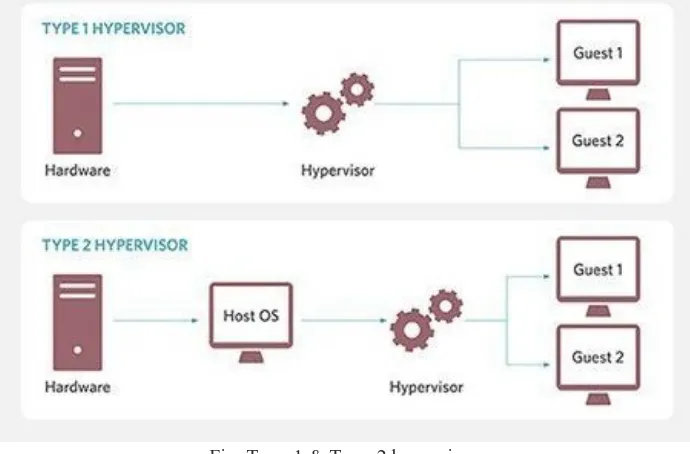
[image:2.612.133.478.318.545.2]A hypervisor also known as virtual machine monitor is a process that creates and runs virtual machines. A hypervisor allows one host computer to support multiple guest VMs by virtually sharing its resources like memory and processing. A hypervisor is a function which abstracts -- isolates -- operating systems and applications from the underlying computer hardware. This abstraction allows the underlying host machine hardware to independently operate one or more virtual machines as guests, allowing multiple guest VMs to effectively share the system's physical compute resources, such as processor cycles, memory space, network bandwidth and so on. There are two kinds of hypervisors: Type1 hypervisors, called bare metal that run directly on the host’s hardware; Type2 hypervisors, called hosted that run as a software layer on an operating system like other computer programs. Hypervisors make it possible to use more of systems available resources and provide greater IT mobility since the guest VMs are independent of the host hardware. This means that they can be easily moved between different servers.
Fig. Type-1 & Type-2 hypervisor.
The benefit from hypervisor is that the VMs are also logically isolated from each other -- even though they run on the same physical machine. In effect, a VM has no native knowledge or dependence on any other VMs. An error, crash or malware attack on one VM does not proliferate to other VMs on the same or other machines. This makes hypervisor technology extremely secure.
III. VIRTUALIZATION
Fig. Typical Virtualization of compute resources
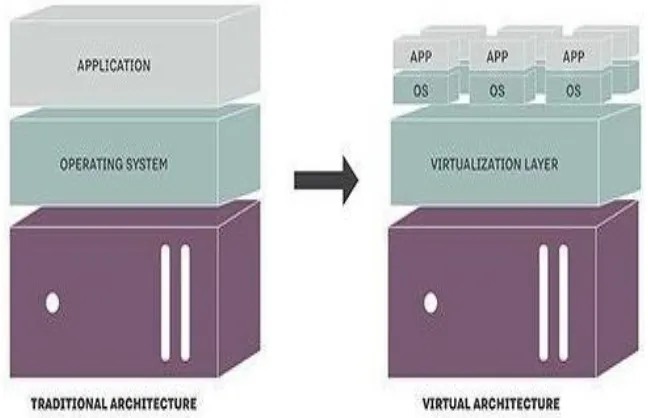
A key use of virtualization technology is server virtualization which uses a software layer called a hypervisor to emulate the underlying hardware. While the performance of this virtual system is not equal to the performance of the operating system running on true hardware, the concept of virtualization works because most guest operating systems and applications don't need the full use of the underlying hardware. This allows for greater flexibility, control and isolation by removing the dependency on a given hardware platform. While initially meant for server virtualization, the concept of virtualization has spread to applications, networks, data and desktops.
Fig. Physical server architecture vs. virtual architecture
The objectives of any virtualization technology include adding a layer of abstraction between the applications and the hardware, enabling a reduction in costs and complexity, providing the isolation of computer resources for improved reliability and security, and improve service levels and the quality of service, etc. Software, referred to as a virtual machine monitor (VMM), controls use and access to the CPU, memory, storage, and network resources underneath.
A. Considerations for IT Virtualization
The process of determining the size of the physical server that will host the virtual servers is a critical step that should not be neglected.
1) Adequately planning the size of the physical server will provide a solid foundation from which to run virtual servers. 2) Planning network traffic and bandwidth for virtual machines to operate seamlessly.
[image:3.612.140.464.350.559.2]IV. TYPES OF VIRTUALIZATION
There are six areas of IT where virtualization can make head-away:
A. Network Virtualization
It is a method of combining the available resources in a network by splitting up the available bandwidth into channels each of which is independent from the others and can be assigned or reassigned to a particular server or device in real time.
B. Storage Virtualization
It deals with the pooling of physical storage from multiple network storage devices into what appears to be a single storage device that is managed from a central console. Storage virtualization is commonly used in storage area networks.
C. Server Virtualization
Server virtualization is the masking of server resources including the number and identity of individual physical servers, processors and operating systems -- from server users. The intention is to spare the user from having to understand and manage complicated details of server resources while increasing resource sharing and utilization and maintaining the capacity to expand later.
D. Data Virtualization
Data virtualization is abstracting the traditional technical details of data and data management, such as location, performance or format, in favor of broader access and more resiliencies tied to business needs.
E. Desktop Virtualization
Desktop virtualization is virtualizing a workstation load rather than a server. This allows the user to access the desktop remotely, typically using a thin client at the desk. Since the workstation is essentially running in a data center server, access to it can be both more secure and portable. The operating system license does still need to be accounted for as well as the infrastructure.
F. Application Virtualization
Application Virtualization is abstracting the application layer away from the operating system. This way the application can run in an encapsulated form without being depended upon on the operating system underneath. This can allow a Windows application to run on Linux and vice versa, in addition to adding a level of isolation.
V. SERVER VIRTUALIZATION
Server virtualization is the masking of server resources, including the number and identity of individual physical servers, processors, and operating systems, from server users. The server administrator uses a software application to divide one physical server into multiple isolated virtual environments. The virtual environments are sometimes called virtual private servers, but they are also known as guests, instances, containers or emulations.
There are three popular approaches to server virtualization: the virtual machine model, the para-virtual machine model, and virtualization at the operating system (OS) layer. Virtual machines are based on the host/guest paradigm. Each guest runs on a virtual imitation of the hardware layer. This approach allows the guest operating system to run without modifications. It also allows the administrator to create guests that use different operating systems. The guest has no knowledge of the host's operating system because it is not aware that it's not running on real hardware. In the para-virtual machine model, however, The VMM actually modifies the guest operating system's code. This modification is called porting. Porting supports the VMM so it can utilize privileged systems calls sparingly. Virtualization at the OS level works a little differently. It isn't based on the host/guest paradigm. In the OS level model, the host runs a single OS kernel as its core and exports operating system functionality to each of the guests. Guests must use the same operating system as the host, although different distributions of the same system are allowed.
1) Full Virtualization: Full virtualization uses a hypervisor, a type of software that directly communicates with a physical server's disk space and CPU. The hypervisor monitors the physical server's resources and keeps each virtual server independent and unaware of the other virtual servers.
2) Para-Virtualization: Unlike full virtualization, para-virtualization involves the entire network working together as a cohesive unit. Since each operating system on the virtual servers is aware of one another in para-virtualization, the hypervisor does not need to use as much processing power to manage the operating systems.
3) OS-Level Virtualization: Unlike full and para-virtualization, OS-level visualization does not use a hypervisor. Instead, the virtualization capability, which is part of the physical server operating system, performs all the tasks of a hypervisor.However, all the virtual servers must run that same operating system in this server virtualization method.
A. Benefits of Server Virtualization
1) Facilitating quicker troubleshooting and problem resolution. Management components are strictly contained in a relatively small and manageable management cluster. Otherwise, running on a large set of host clusters could lead to situations where it is time-consuming to track down and manage such workloads.
2) Management components are separate from the resources they are managing.
3) Resources allocated for cloud use have little overhead reserved. For example, cloud resources would not host vCenter VMs.
4) Cloud resources can be consistently and transparently managed, carved up, and scaled horizontally.
5) The management cluster and the cloud resources reside within a single physical Data center. Servers in both clusters are striped across the server chasses.
6) This provides for business continuity of clusters, for HA, should one chassis fail. Secondary and/or DR sites are out of scope for this engagement.
VI. IMPLEMENTATION OF COMPUTE AND STORAGE VIRTUALIZATION
Data and information needs for organizations rely heavily on information technology infrastructure support. One of the necessary supporting components is the availability of a sufficient number of servers to increase data center. Basically, this private cloud was implemented to cater the compute requirements in terms of scalability, availability and better manageability for Near-real time data processing systems.
The provisioning of Data processing Systems (DPS) in the private cloud environment includes the virtualization of compute resources and a shared Storage environment – Storage Area Network (SAN). The following key components are involved in the implementation
1) ESXi Host: ESX hosts are the servers/data storage devices on which the ESX or ESXi hypervisor has been installed
2) vCenter: The central point for configuring, provisioning, and managing virtualized IT environments.
3) vSphere: VMware vSphere virtualizes the entire IT infrastructure including servers, storage, and networks. vSphere aggregates these resources and presents a uniform set of elements in the virtual environment. With VMware vSphere, you can manage IT resources like a shared utility and dynamically provision resources to different business units and projects.
4) vCenter Datacenter: The datacenter is the highest-level logical boundary and is typically used to delineate separate physical sites/locations, or potentially an additional vSphere infrastructure with completely independent purposes.
A. Cloud Networking Design
The network design section defines how the vSphere virtual networking will be configured. The network architecture will meet these requirements:
1) Separate networks for vSphere management, VM connectivity, and vMotion traffic
2) Redundant vSwitch ports with at least 2 active physical NIC adapters each
3) Redundancy across different physical adapters to protect against NIC or PCI slot failure
4) Redundancy at the physical switch level
Fig: Network logical design
B. Cloud Storage Design
The shared storage design section defines how the vSphere datastores will be configured. The same storage was used for both the management cluster as well as the cloud resources. The shared storage architecture will meet these requirements:
1) Storage paths will be redundant at the host (connector), switch, and storage array levels.
2) All hosts in a cluster will have access to the same data stores.
Fig: VMs accessing common storage volume
C. VMFS
Virtual machine file system is a cluster files system developed by VMware. It is used to Virtual machine disk images including snapshots.
Having installed and configured the above mentioned configuration, the setup is ready with server virtualization and the VMs are ready with the required compute environment.
The challenging task is now attaching the existing SAN storage LUNs to the virtual machines. The existing shared storage configuration is managed by the StorNext file system.
To provision SAN storage to client access the traditional environment has three methodologies:
1) Direct SAN client i.e., FC SAN client.
2) DLC (Distributed LAN Client): involves FC /Direct SAN clients as Gateway servers.
3) NFS share
Fig. Raw Device Mapping (RDM)
To conceive this configuration of Direct SAN client, we go with a method called as
D. RDM – RAW Device Mapping
Raw device mapping (RDM) is an option in the VMware server virtualization environment that enables a storage logical unit number (LUN) to be directly connected to a virtual machine (VM) from the storage area network (SAN). RDM, which permits the use of existing SAN commands, is generally used to improve performance in I/O-intensive applications. There are 2 types of Raw Device Mapping (RDM) Compatibility Mode
Virtual compatibility mode allows an RDM to act exactly like a virtual disk file, including the use of snapshots. Physical compatibility mode allows direct access of the SCSI device for those applications that need lower level control.
After presenting the storage LUNs to the virtual machine, the LUN counts are verified using multipath commands. The process continues with the installation of StorNext Filesystem (SNFS) client software that will be an orchestration layer for the SAN storage LUNs organized under SAN Meta Controllers. With this the Virtual machine becomes to be a Data processing system as like a traditional server in the physical environment.
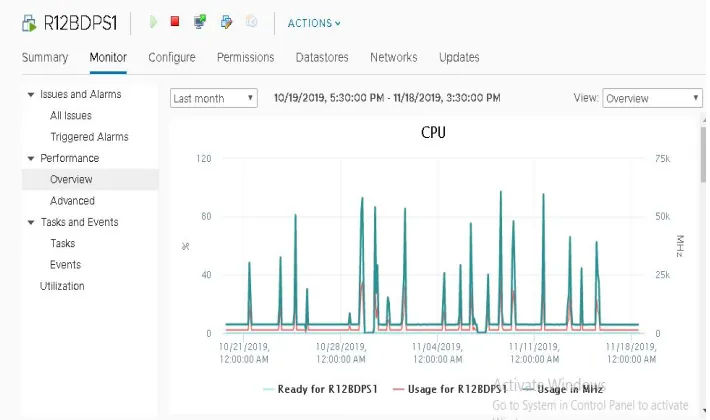
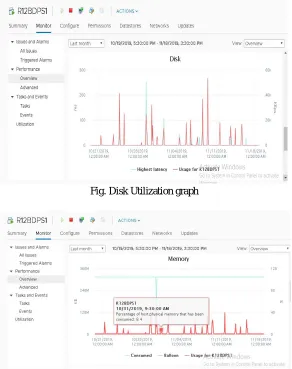
E. Performance Graphs of Virtual Machines
[image:7.612.130.485.509.719.2]Fig. Disk Utilization graph
Fig: Memory Utilization graph
VII.ACKNOWLEDGEMENT
The authors would like to thank the General Manager, CSNVF for giving us an opportunity to work on this application to bring out this idea. The authors would also like to acknowledge the internal users of networks services for their critical reviews to improve the cybersecurity mechanism to meet the purpose of secured assets and networks.
REFERENCES [1] Data quest technical magazines.
[2] https://cdn.ttgtmedia.com/searchStorage/downloads/MStaimer_1_VMware_and_Storage.pdf [3] https://www.vmware.com/topics/glossary/content/server-virtualization