Tabitha Frahm. A Usability Study of Virtual Reality Systems: On Best Practices for User-Centered Design in Virtual Reality Gaming Interfaces. A Master's paper for the M.S. in I.S. degree. April, 2018. 106 pages. Advisor: Chad M. Haefele
In an effort to gather a list of best practices for user-centered design in virtual reality gaming interfaces, this study combines evidence from industry anecdotal observations, heuristic evaluations, and usability testing with three of the leading virtual reality platforms on the market: HTC Vive, Oculus Rift, and Windows Mixed Reality. Quantitative and qualitative data were collected from a variety of usability scales and questionnaires, think-aloud tasks, observation, and semi-structured interviews. The results of the study suggest that immersion is an effective design feature across all interfaces, however the lack of real-world awareness resulting from immersion can be a major usability concern. Pain-points included controller design and button mapping, physiological comfort, and adapting to new methods of movement and interaction required in 3D virtual environments. The findings emphasize the need to prioritize learnability in the design of VR systems. The paper concludes with fifteen guidelines for designing user-friendly virtual reality interfaces.
Headings:
Heuristic
Human-Computer Interaction Systems Design
Technological Innovations
A USABILITY STUDY OF VIRTUAL REALITY SYSTEMS:
ON BEST PRACTICES FOR USER-CENTERED DESIGN IN VIRTUAL REALITY GAMING INTERFACES
by Tabitha Frahm
A Master's paper submitted to the faculty of the School of Information and Library Science of the University of North Carolina at Chapel Hill
in partial fulfillment of the requirements for the degree of Master of Science in
Information Science.
Chapel Hill, North Carolina April 2018
Approved by:
TABLE OF CONTENTS
INTRODUCTION... 3
LITERATURE REVIEW ... 7
USER EXPERIENCE ... 7
HEURISTICS ... 8
HUMAN FACTORS ... 8
VIRTUAL REALITY ... 9
APPLICATIONS OF VR TECHNOLOGY ... 10
THE SYSTEMS ... 12
Handheld VR ... 12
Augmented Reality (AR) ... 12
Head-Mounted Displays ... 13
THE USER EXPERIENCE OF VIRTUAL REALITY ... 14
GAMING AND PLAYER EXPERIENCE ... 15
MEASURING THE USER EXPERIENCE IN VR ... 15
QUESTIONNAIRES ... 16
PART I: DEVELOPING BEST PRACTICES ... 17
Best Practices for UX in VR... 17
METHODS ... 21
PART II: HEURISTIC EVALUATION ... 21
PART III: USABILITY TEST ... 23
Data Collection ... 24
Recruitment ... 24
Demographics ... 26
Questionnaires ... 27
Tasks ... 27
FINDINGS ... 31
PART II: HEURISTIC EVALUATIONS ... 31
Button Mapping ... 31
“How to Play” ... 32
Help and Errors ... 32
Comfort and Accessibility ... 33
PART III: USER TESTING ... 35
Pain-Points ... 36
User Satisfaction ... 42
Immersion ... 43
Key Usability Factors ... 47
LIMITATIONS ... 49
SYSTEM VARIANCE ... 49
GAME SELECTION ... 51
USER DIVERSITY ... 51
STUDY DESIGN ... 52
CONCLUSION ... 54
BEST PRACTICES ... 54
REFERENCES ... 59
APPENDICES ... 73
APPENDIX A: GLOSSARY OF TERMS ... 73
APPENDIX B: EVALUATION HEURISTICS ... 75
Nielsen’s 10 Heuristics for User Interface Design (1995) ... 75
Sutcliffe and Gault’s Heuristics for Virtual Environment (VE) Evaluation (2004) .. 76
Mariani and Ponsa’s 13 Heuristics for Virtual Reality (VR) Devices (2017) ... 78
APPENDIX C: EMAIL SCRIPTS ... 80
APPENDIX D: SCREENING SURVEY... 82
APPENDIX E: TEST SCRIPT ... 85
APPENDIX F: SUPPLIES LIST ... 88
APPENDIX G: CONSENT FORM ... 89
APPENDIX H: PRE-EXPERIMENT QUESTIONNAIRE ... 93
APPENDIX I: OBSERVATION CHECKLIST... 95
APPENDIX J: FOLLOW-UP INTERVIEW QUESTIONS ... 97
APPENDIX K: POST-EXPERIMENT QUESTIONNAIRES ... 98
System Usability Scale (SUS)... 99
Slater-Usoh-Steed Questionnaire ... 100
Virtual Reality Usability Scale (VRUS) ... 101
APPENDIX L: GIFT CARD RECEIPT FORM ... 102
INTRODUCTION
One moment, I am standing in a sterile, white-walled, 10’ x 10’ room with my classmates; the next, I step out onto a beach, under the light of a full moon. Waves lap at the shore; a fire crackles merrily nearby. I catch a glimmer in the corner of my eye, and stoop to get a better look at the object. It’s a conch shell. I pick it up. On a whim, I hold the shell up to my ear. In that moment, with the whispers of the ocean in my ear, I fall in love.
As I experienced first-hand in the fall of 2016, the magic of Virtual Reality (VR) is in its immersive ability to transport its users to another place entirely. VR offers individuals a chance to see things from new perspectives; to visit lands previously inaccessible; to venture to worlds that were once no more than fantasy. People on opposite sides of the earth can now be present in the same virtual space—all from the comfort of their respective homes. And these spaces are not bound by the limits of our reality. We can walk on the moon, fly like a bird, breathe beneath the sea. In this “shared lucid dream,” the possibilities are ‘virtually’ infinite (Lanier, 2015).
Virtual Reality technology has been in slow development for decades, beginning with Morton Heilig’s Sensorama in 1962, a multi-sensory experience which amplified a 3D motion picture with sounds, smells, wind and vibrations. Excitement around the technology has waxed and waned as products appear and fall short of sufficiently
gaming console (2016). Virtual reality may at last be on its way to providing an experience both delightful and affordable enough to become the next household must-have. But to achieve this goal, designers and developers must now shift their objective from creating products that function to creating products that satisfy.
User-centered design, first coined by Donald Norman in 1986, is a practice essential to creating such products (Norman, 1986). A popular idea in human factors research and the field of Human-Computer Interaction (HCI), user-centered design is a method of design—especially user interface (UI) design—that gives special attention to user needs at each stage of the design process. This practice allows designers to create an end product that provides the highest user experience (UX), which in turn leads to high customer satisfaction. This technique is credited as responsible in part for the
organizational success of Apple Inc. (Norman, Miller, & Henderson, 1995).
Modern design practice has centered mainly on the two-dimensional interface afforded by a flat screen. The mainstreaming of VR, however, presents designers with new opportunities and challenges inherent in the theoretically limitless interactive capabilities afforded within a six-degrees-of-freedom (6DoF) virtual environment (VE). And what could be more important when designing an experience machine1 than a good user experience?
VR is a still-emerging area of technology where no solid standards nor specific guidelines are yet in place. Therefore, the purpose of this study is to inform the design
and development of current and future VR products. The study will examine three leading contenders in the VR head-mounted display (HMD) marketplace:
• Oculus Rift (released March 2016) • HTC Vive (released April 2016)
• Samsung Odyssey Windows Mixed Reality Headset (released October 2017) This study will not function as a product comparison, but rather, will focus on physical and visual features within each platform that contribute to the best user
experience. The study was conducted in three parts to establish validity via triangulation: 1. Part I was conducted as part of the literature review, used to gather a general list
of best practices from anecdotal evidence collected from online blogs and articles. 2. Part II consisted of a heuristic evaluation of the platforms, using three sets of
heuristics to cover standard usability practices, virtual environment design, and ergonomic evaluation of the three VR systems.
3. Part III involved a usability test of a game within each of the three platforms. 15 participants recruited from the University of North Carolina at Chapel Hill were instructed to complete tasks within one of the 3 systems (5 participants each per device). Participants were asked to think aloud as they completed tasks within one VR game, Space Pirate Trainer, after which they answered questions about the user interface to which they had been exposed. A between-subjects design (using multiple groups of participants rather than having each participant test all the headsets) was essential to prevent bias toward the system to which the user is first exposed.
questionnaires, and semi-structured interviews. Testing sessions were each completed in under an hour. Participants consisted of adult (aged 18+) students at the University of North Carolina at Chapel Hill. The majority of users had little to no prior experience using a VR system. Additional information was collected to determine user demographics and prior gaming and technology experience.
One of the greatest obstacles in usability testing is the translation of research findings into actionable design advice, so it will be the ultimate goal of this paper to discuss the practical application of its findings and establish actionable recommendations in the hope that designers and product developers may use the information presented here as a guide to creating good, usable VR products. In doing so, I hope to address the
LITERATURE REVIEW
USER EXPERIENCE
Human-Computer Interaction (HCI) is the field of study encompassing the
connections between people and technologies, especially as it relates to the user interface (UI) whereupon the interaction takes place (Carroll, 1997). HCI blends cognitive and behavioral psychology with computer and information science and technology.
Human-centered design is a method of design thinking which places emphasis on designing systems that work for people, rather than requiring people to adapt to a system (Greenhouse, 2012). User-centered design, a subset of HCD, focuses more specifically on the real-world users of that system (Abras, Maloney-Krichmar, & Preece, 2004). One way to do this is to design for a good user experience. User eXperience (UX) refers to the way people feel about a system as they use it (Dix, 2009). Design for UX can be applied to virtually any product, but much of the current research focuses on designing for digital experiences.
Measuring the user experience can be a difficult, multi-faceted, iterative process, but an essential component is conducting a usability test. Usability is defined in ISO 9241–11 as “the extent to which a product can be used by specified users to achieve specified goals with effectiveness, efficiency and satisfaction in a specified context of use.” Usability testing is a method of evaluating a user interface, which involves
of user testing is that saturation occurs rapidly. A sample size of just 5 users can uncover 80% of usability issues (Nielsen & Landauer, 1993).
HEURISTICS
Another way to measure the user experience is via heuristic evaluation. A heuristic (meaning “shortcut”) evaluation, is an expert review of a product that is
conducted by one or a group of experienced user researchers, using accepted principles to identify issues with the usability of a given interface (Nielsen and Molich, 1990; Nielsen 1994).
Similar evaluation methods surfaced in the preceding decades (Cheriton, 1976; Card, Moran, and Newell, 1983; Norman, 1983; Schneiderman, 1987), but Nielsen and Molich first developed their set of usability heuristics (Molich and Nielsen, 1990), later refined by Nielsen (1995) after conducting a study which showed that evaluators were pretty awful at conducting heuristic evaluations (Nielsen and Molich, 1990). Nielsen’s 10 Usability Heuristics for User Interface Design are now a widely used standard for such heuristic evaluations.
Heuristic analyses are helpful because they can uncover a variety of usability issues but require minimal resources. When designing user-centered products, a heuristic review should be part of the iterative design process (Nielsen, 1995).
HUMAN FACTORS
productivity, ergonomic evaluations can also be used as a method to evaluate the usability of a system which inherently involves designing for physical interaction. VR Head-Mounted Display (HMD) Systems require the user to wear equipment on their heads (and often hands, feet, and bodies as well) for what may amount to hours at a time, often blinding the user to the larger environment, and may involve navigating around cords or other devices which can involve a level of physical risk. The ergonomic evaluation is frequently overlooked in digital system design; but is a critical step for successful interaction design in VR (Patel et. al., 2006).
VIRTUAL REALITY
Virtual Reality is a simulated three-dimensional (3D) environment generated by a computer that can be experienced, interacted with, and affected by the user in a way that mimics the real world (Sherman & Craig, 2002). Simply put, virtual reality is “highly advanced stage magic” (Lanier, 2015). The user of a VR system feels that they are inside the virtual environment (VE). This can happen within a CAVE (Cave Automatic Virtual Environment) – typically a six-walled room in which screens are projected onto the walls to simulate immersion (Cruz-Neira ET. AL., 1992) – or with the use of specially
designed goggles which place a screen before the wearer’s eyes.
As everyone who works with it knows, VR is based on finding ways to present what should by all rights be inadequate equipment in a way that somehow meets the expectations of the human nervous system.– Jaron Lanier
afforded to us in the world for collaborative information tasks: they support remote collaboration, are “more flexible than physical spaces” and offer a “theoretically limitless” storage capacity (Geszten et. al., 2015).
To understand interactions within a virtual reality interface, it is necessary to cover the topic of “degrees of freedom” (DoF) in movement. The VR interfaces discussed herein offer either three (3DoF) or six (6DoF) degrees of freedom. Three degrees of freedom account for orientation (roll, pitch, yaw), and three more cover position (up/down, left/right, forward/backward) (Paul, 1981). Of the two alternatives, a 6DoF display most closely resembles real-life human movements. There are two techniques for navigating a 6DoF virtual environment: joystick-based input and head-controlled
paradigms. Head-controlled navigation, (employed by the platforms examined within this study,) is the superior method in terms of usability (Chen et. al., 2013).
APPLICATIONS OF VRTECHNOLOGY
VR technologies offer boundless opportunities not just for the gaming industry, but for business, education, and health. In business, virtual reality technologies are ideal for virtual collaboration and product design (Kan, Duffy, & Su, 2001) as well as
marketing and advertising applications (Van Kerrebroeck, Brengman, & Willems, 2017). VR is an idyllic medium for the tourism industry, with applications in planning and management, marketing, entertainment, accessibility, heritage preservation, and education (Guttentag, 2010).
environments involving dangerous equipment (Haase & Termath, 2015), or job interview training for individuals with social development disorders (Smith et. al., 2014).
Virtual Reality in clinical medicine offers benefits to doctors and patients alike, in areas from surgical training to pain management and therapeutic treatment of mental illness (Li et. al., 2017). It has been used as a tool in physical and cognitive rehabilitation (Cao, 2016; Cherniack, 2011) and is especially beneficial as a therapeutic resource for psychological disorders in the emerging field of clinical cyberpsychology, including for the treatment of phobias (Stanica et. al., 2016), Schizophrenia (Uvais, 2015), and Alzheimer’s disease (García-Betances et. al., 2015). VR is also a valuable health and safety resource when applied to emergency preparedness training, personal health promotion, stress reduction, and urban planning (Kamel Boulos et. al., 2017).
With so many important applications of virtual interaction, why focus on games and gaming systems? According to PEW research statistics, 49% of adults in the United States play video games (Duggan, 2015). The global market for virtual reality in gaming is forecasted to grow at a compound annual growth rate of 84.4% between 2016 and 2020 (PR Newswire, 2017). Moreover, annual worldwide revenue for VR HMD systems, controllers, and content will reach $35 billion by 2021 (Tractica, 2016).
and has been shown to result in generally positive effects (Hamari, Koivisto, & Sarsa, 2014). So, by studying the design of VR gaming interfaces, we can learn much about the application of VR in many contexts.
THE SYSTEMS
Handheld VR
Google Cardboard debuted in 2014 as a simple and (at around $15,) relatively low-cost platform which brought virtual reality experiences into people’s homes and created interest in the technology (Statt, 2014). The viewers may be purchased pre-manufactured or assembled from materials (such as cardboard) at home with the aid of online instructions provided by Google. A smartphone is then inserted into the viewer and is used to power the VR experience through specially developed mobile applications.
Samsung Gear VR (released in November 2015) and Google Daydream (released in November 2016) took the experience a bit further with ergonomically-designed headsets to secure the smartphones and simple controllers to allow for a more involved experience. The headsets work exclusively with Samsung and Google smartphones, respectively (Ralph, 2015; Whitwam, 2016). Oculus Go (to be released in early 2018) will offer a similar 3DoF experience but will function as a standalone headset (sporting a built-in mobile computer) (Oculus VR, 2017).
Augmented Reality (AR)
(wearable computer glasses) that projects overlays onto its display, perceptually integrating these holograms with the real world (Hollister, 2016).
Head-Mounted Displays
Oculus Rift (also released in March 2016) is a fully-immersive 6DoF VR system typically composed of an OLED (organic light-emitting diode) head-mounted display (HMD), two Constellation sensors (a positional tracking system that uses infrared LEDs) to allow for “room scale” 360° tracking, and two Oculus Touch wireless motion-tracked controllers (Orland, 2016). (Note: the system can also be used with an Xbox controller.) Unlike the mobile-supported VR systems, the Rift requires connection to a powerful gaming computer.
HTC Vive (released in April 2016) includes a comparable OLED HMD, two Lighthouse infrared-emitting base stations, two SteamVR wireless motion-tracked controllers, and a similar list of technical requirements to that of the Rift. The Vive also includes a front-facing camera (Orland, 2016).
In the wake of the huge successes of the Rift and the Vive in the consumer gaming market, PlayStation released their own VR headset (in October 2016), an OLED HMD designed as a companion to the PlayStation 4 video game console (Bakalar, 2016).
specifications than the Rift and the Vive. Various HMDs are manufactured for WMR by a number of companies including Acer, ASUS, Dell, HP, Lenovo, and Samsung.
THE USER EXPERIENCE OF VIRTUAL REALITY
While the endless possibilities of virtual interfaces sound great in theory, the ability of VR to mimic so much of the human experience can be a problem for software architecture (Lanier, 2015). And due to the unique design opportunities and challenges afforded 3-D environments, measuring the usability of virtual reality systems is
necessarily more complex than measuring the usability of 2-D interfaces. Tanriverdi and Jacob highlight some key differences in virtual interfaces when compared to conventional (flat-screen) interfaces (2001):
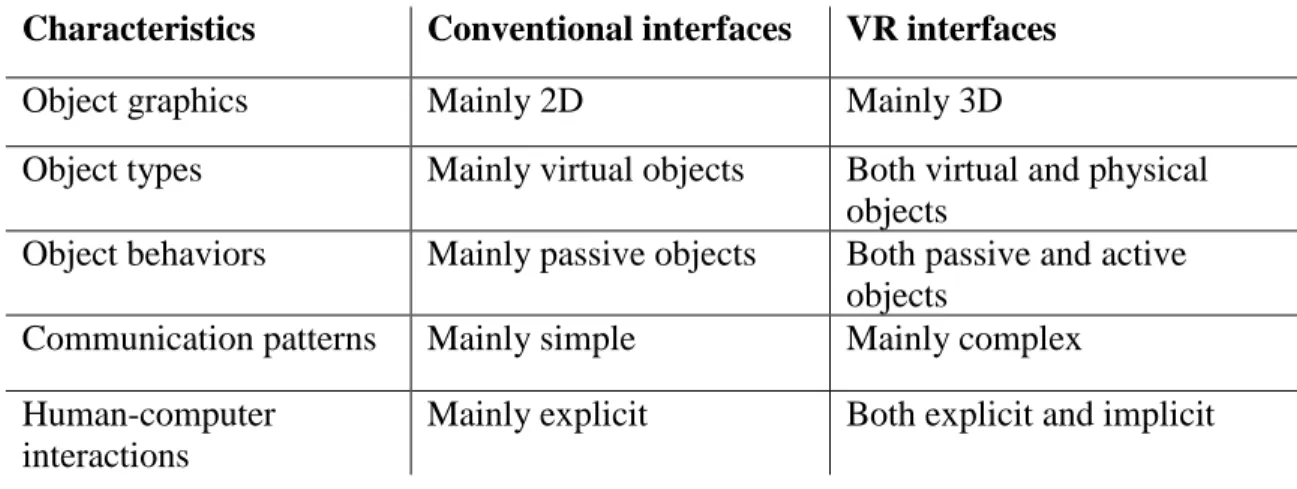
Characteristics Conventional interfaces VR interfaces
Object graphics Mainly 2D Mainly 3D
Object types Mainly virtual objects Both virtual and physical objects
Object behaviors Mainly passive objects Both passive and active objects
Communication patterns Mainly simple Mainly complex Human-computer
interactions
Mainly explicit Both explicit and implicit
Table 1. Comparative characteristics of conventional and VR interfaces
Other VR usability issues to address include creating an illusion of immersion (known as
presence) and avoiding cybersickness (a sensation of nausea and disorientation resulting from interactions within virtual environments), which may be best evaluated in user testing (Blade and Padgett, 2002).
GAMING AND PLAYER EXPERIENCE
Although users experience more anxiety playing VR games than non-VR games and playing games in both contexts is equal in difficulty, users find VR games more appealing (Pallavicini et. al., 2017). People enjoy playing games more if they perceive those games as usable, regardless of the gaming system being used – and the more they enjoy that experience, the more willing they are to engage in repeated interactions with the system (Joeckel and Bowman, 2012). So, we know that usability is important in gaming interfaces – but is measuring the user experience enough?
The nature of video games is highly recreational. As such, traditional UX evaluations cannot tell the full story. Player eXperience (PX) or playability is an extension of UX that focuses specifically on the player’s physical, emotional and behavioral experiences with a game and/or gaming system (González Sánchez et. al., 2012). Playability differs from usability in some meaningful ways; notably, UX assumes goals of ease and productivity, whereas PX assumes goals of stimulating challenge and entertainment (Lazzaro, 2008).
MEASURING THE USER EXPERIENCE IN VR
1. Orientating: looking around a virtual environment to develop a sense of presence 2. Moving: moving within a virtual environment
3. Acting: selecting, manipulating, and controlling virtual objects
Junyoung et. al. analyzed 113 articles on virtual reality and related research (especially those involving the major HMD devices of the time: Oculus Rift, HTC Vive, Samsung Gear VR, and Sony PlayStation VR) to establish important usability factors for the evaluation of virtual interactions (2017). Drawing parallels from Kjeldskov’s earlier study, the researchers divided their data into three categories of interaction:
1. Remote controller 2. Headtracking 3. Hand gesture
QUESTIONNAIRES
The System Usability Scale (SUS) presents users with ten statements describing the usability of the system being tested (Brooke, 1996). Responses are given on a Likert scale with 5 choices ranging from strongly disagree to strongly agree. The average SUS score is 68 (Bangor, Kortum, & Miller, 2009), so usability can be deemed “above average” or “below average” based on a system’s score compared to the average. The SUS measures usability but is not a diagnostic tool; Therefore, additional methods are required to discern the usability issues responsible for the SUS score (Brooke, 2013).
Furthermore, gaming systems have their own set of specific requirements when it comes to measuring usability (González Sánchez et. al., 2012). To that end, a number of
measurement scales have been developed which attempt to close the gap, such as the HARUS (Handheld Augmented Reality Usability Scale), VRUSE (Virtual Reality User Satisfaction Evaluation), IEQ (Immersive Experience Questionnaire), Slater-Usoh-Steed Questionnaire (six questions that inquire about the users’ sense of being in the virtual environment), GEQ (Game Experience Questionnaire), and PENS (Player Experience of Needs Satisfaction) (Santos et. al., 2015; Kalawsky, 1999; Jennett et. al., 2008;
IJsselsteijn, DeKort, & Peols, 2008; Ryan, Rigby, & Przybylski, 2006; Usoh et. al, 2000).
PART I:DEVELOPING BEST PRACTICES
It is easy to identify problems. But perhaps the greatest challenge of usability research is turning the collected data into actionable design advice (Patel et. al., 2006; Sutcliffe and Deol, 2000). Mixed reality systems must be evaluated for usability iteratively throughout each stage of design, and recommendations made for future development (Bach & Scapin, 2003). The academic literature on best practices for user-centered design in virtual reality systems is sparse at best, so I will here attempt to aggregate some of the anecdotal evidence published by UX designers and researchers online in blogs and on professional websites.
Best Practices for UX in VR
1. Controllers are hard to learn. Make them as simple and effective as possible.
Each button should have a unique and consistent function and should be easy to locate without sight (since the users can’t see their hands). Same goes for menus (Anderson, 2016; Ceballos, 2016; Hudelson, 2017; West, 2015).
2. Give instructions and guidance. Teach users how to interact. Encourage them to move around the space. Include a tutorial or guidance system. Make it obvious which objects are interactive. Better yet, make everything interactive (Betts, 2016; Ceballos, 2016; Cortes, 2016; Hudelson, 2017; Hunter, 2016a; Hunter, 2016b; Ravasz, 2016; West, 2015).
3. Always provide feedback. VR is a multi-sensory experience. Feedback should be provided via visual, auditory, and haptic clues. Sound is especially important to create a truly immersive experience (Anderson, 2016; Betts, 2016; Ceballos, 2016; Cortes, 2016; Hsu, 2016; Hudelson, 2017; Hunter, 2016a; Ravasz, 2016; Schell, 2016; Shanmugam, n.d.; West, 2015).
4. Use reality as a guide (but don’t take things too literally). Don’t use abstractions where you can easily map actions to real-world interactions. But remember that VR offers more flexibility than the real world, and take advantage of that flexibility (Betts, 2016; Hsu, 2016; Hunter, 2016a; Hunter, 2016b).
5. Use text, but make sure it’s readable. Text can be a great way to explain controls, interactions, and gameplay, but only if your users can read it! This means
6. Give users complete control. Don’t overwhelm your users. Give them time to adjust to their new environment. Don’t force them to do anything. Allow them to personalize their experience as much as possible, but remember that functionality trumps control (Anderson, 2016; Cortes, 2016; Hunter, 2016a; Schell, 2016; West, 2015).
7. Design to combat cybersickness. Provide a fixed reference point, such as horizon line. Motion should be restricted to user-initiated movement (Anderson, 2016; Betts, 2016; Cortes, 2016; Hudelson, 2017; Schell, 2016; Shanmugam, n.d.). 8. Pay attention to comfort and accessibility. Consider the varying heights and sizes
of your users, including physical handicaps. Prioritize safety and comfort (both physical and emotional). Don’t neglect users’ transition back into the real world (Anderson, 2016; Betts, 2016; Cortes, 2016; Hudelson, 2017; Hunter, 2016a; Punchcut, 2016; Shanmugam, n.d.).
9. Spend time getting to know VR for yourself. This means playing around with both hardware and software. Consider the possibilities VR has to offer, and its
limitations (Anderson, 2016; Hunter, 2016a; Schell, 2016; West, 2015).
10.Conduct (iterative) usability testing.You are not the user. Test your product with diverse users (think age, gender, physical build, background, experience level, etc.) (Anderson, 2016; Hunter, 2016b; Schell, 2016).
feedback (when possible) (n.d.). Leap Motion encourages the use of storytelling in VR interfaces, and notes that flat, minimalistic design (which has become the standard for 2D UI design) is no longer relevant (2017).
METHODS
PART II:HEURISTIC EVALUATION
Heuristic evaluations were conducted on the HTC Vive, Oculus Rift, and Samsung Odyssey Windows Mixed Reality headsets, to compare each system against a trio of existing usability standards. This included heuristics for user interface design, design of virtual environments, and an ergonomic assessment to investigate human factors and physical design of the equipment. These reviews were guided by heuristic standards previously developed by Nielsen (1995), Sutcliffe and Gault (2004), and Mariani and Ponsa (2017), respectively.
Nielsen’s (1995) ten usability heuristics were selected as a good starting point for the evaluation due to their widespread adoption by the User Experience community. The heuristics are as follows:
1. Visibility of system status
2. Match between system and the real world 3. User control and freedom
4. Consistency and standards 5. Error prevention
9. Help users recognize, diagnose, and recover from errors 10.Help and documentation
Sutcliffe and Gault’s 12 heuristics for VE evaluation (2004) were selected to address issues particular to virtual environments, which are not necessarily addressed by Nielsen’s heuristics. They are:
1. Natural engagement
2. Compatibility with the user's task and domain 3. Natural expression of action
4. Close coordination of action and representation 5. Realistic feedback
6. Faithful viewpoints
7. Navigation and orientation support 8. Clear entry and exit points
9. Consistent departures 10.Support for learning 11.Clear turn-taking 12.Sense of presence
Finally, the 13 Heuristics for VR Devices developed by Mariani and Ponsa (2017) rounded out the evaluation nicely due to the attention they give to physical ergonomics specific to VR HMDs:
1. The device is compatible with the use of glasses.
4. The user needs assistance to adjust the device.
5. When adjusting the device, there is a noticeable change in the head’s orientation. 6. After the necessary adjustments, there is a noticeable change in the head’s
orientation.
7. The device rests comfortably on the nose.
8. The device rests comfortably on the cheekbones. 9. The device leaves marks on the face.
10.The device triggers a noticeable increase in sweat.
11.The device triggers some type of pain on the back side of the head. 12.The user can adjust the focal distance.
13.(In the case of headphones) The user can adjust the distance between face and ears.
Each headset was evaluated separately using each of the heuristics outlined above. Positive and negative findings were recorded.
PART III:USABILITY TEST
Data Collection
Data for the experiment was gathered via questionnaires, think-aloud tasks, and interviews completed by participants in the Manning Hall VR Lab. The questionnaires consisted of:
1. A screening survey (see Appendix D)
2. A pre-experiment questionnaire (see Appendix H) 3. Follow-up interview questions (see Appendix J) 4. A post-experiment questionnaire (see Appendix K)
This was a mixed methods study which collected both quantitative data from performance-based measures, and qualitative data from observational and self-report measures. Quantitative measures included:
- Number of participants to complete task
- Number of participants to complete in-task sub-goals
- SUS score (from post-experiment questionnaire)
Qualitative measures included:
- Think-aloud comments
- Responses to interview questions
Recruitment
an online Qualtrics survey. To complete the survey, it was required that participants be a current student at UNC, a minimum of 18 years of age, and fluent in English.
Participation in the survey was voluntary and confidential. The survey received 33 responses in total. A follow-up email was sent to all 33 respondents with a link to a Doodle poll for scheduling. Twenty-nine of the initial thirty-three responded to the poll. Two participants were selected to complete an initial pilot test.
A pilot test was conducted on two participants using the HTC Vive. Afterwards, several small changes were made to the experimental design. This included, most
notably, the addition of Task 3 (adjust the volume) after one participant struggled to hear the researcher’s prompts over the in-game audio. Additionally, a workaround was developed to solve a technical issue with the VR sensors in the testing lab, and small modifications were made to the post-test interview questions. The order of events was altered slightly so that the interview would occur before the post-experiment
questionnaire (it had previously been slotted at the end of the schedule), to avoid bias in feedback collected therein.
Demographics
All the participants (excluding the two selected for pilot testing) were women. Their ages ranged from 19 to 32, with a mean age of 22 years. Thirteen were
undergraduates and two were graduate students. Participants reported a mid-range of experience with video games – 2.6 average on a scale from 1 (novice) to 5 (expert). One-third of the participants had some prior experience with virtual reality, and one
participant (from the Vive group) had previous experience with the game used in the study (Space Pirate Trainer). About half (47%) wore glasses. Each of the fifteen reported no physical or cognitive impairments which might interfere with their participation in the study. A breakdown of the demographic distribution across the three experimental groups can be seen in Table 2.
Participant Characteristics:
Experimental group Vive Rift WMR
Avg. age (in years) 23.6 21.0 20.4
Percent female 100% 100% 100%
Percent undergraduate 60% 100% 100%
Percent wearing glasses 60% 0% 20%
Prior VR experience 20% 40% 40%
Avg. experience with
video games (1-5 scale) 2.4 2.2 3.2
Avg. level of interest in
VR (1-5 scale) 4.0 4.4 4.8
Questionnaires
Once they had consented to participation in the study (see Appendix G for consent form) and before the task analyses began, participants were administered a short pre-experiment questionnaire to collect additional information about their interests and experience in relation to virtual reality and the particular headset they would be using to complete tasks during the experiment. After the experiment (and a brief follow-up interview) had concluded, participants were asked to complete a post-experiment questionnaire, this time collecting information about their satisfaction with the system they had used, their sense of immersion within the system, and other key factors that contribute to a good user experience in VR interfaces.
Tasks
Working from the assumption that a true user of the system would either a) have a knowledgeable guide to assist them or b) have used the system before and be acquainted with these tasks (e.g., if they own the system in their home or use it with friends, at work, at school, etc.), participants of the study were not required to complete the following items as part of the experiment. Rather, these items were completed by the researcher or the participants were guided through the process by the researcher as needed:
1. Setting up the VR system 2. Equipping the machinery 3. Removing the equipment
The researcher remained in the testing lab and took notes throughout the
laptop, which was recorded via screen-capture. Additionally, a camera was placed in the testing lab to record the spoken word and body movements of participants during testing.
For the user to become fully immersed in the experience and to provide sufficient engagement with the system features, it was necessary to select a VR game with which participants would have the opportunity to interact. Space Pirate Trainer (SPT) was the game selected for this study. In 2016, SPT received the Proto Awards for Best Sound Design, Best Independent Experience, and Best Game (The Proto Awards, 2016). In 2018, SPT won the award for Best Action VR at the Cinequest Film & VR Festival (Cinequest, 2018). The game has also been nominated for ‘Reality Mixer of the Year’ at the 2018 Microsoft Build Awards (Microsoft Corporation, 2018)
Space Pirate Trainer is available on Steam (a videogame distribution platform), and although it was originally designed for the Vive, the game is compatible with all three platforms tested in the study (Vive, Rift, and Windows Mixed Reality) (Space Pirate Trainer, n.d.). In addition to these criteria, Space Pirate Trainer made a good selection for this study because the arcade-style interface of the game makes it possible for users to complete a round of gameplay in a relatively short amount of time, and the in-game menus, instructions, and settings provided participants an introduction to basic VR interactions.
In a typical usability test, tasks are presented one at a time, often with their order randomized and breaks for follow-up questions between each one. This method is, however, not ideal for a usability test of a VR gaming system, due to:
2. The awkwardness of conducting "blind" interviews, pausing the game, and/or removing the headset between each task.
As such, tasks for this research study were presented in standard order, one right after the other, with a follow-up interview conducted at the end (once the participant had removed the equipment and could once again look the researcher in the eye.
Participants were observed and recorded as they completed tasks within one of the VR platforms. They were encouraged to speak aloud as they navigated through each task in the virtual environment. The tasks included:
1. Launch the game “Space Pirate Trainer.”
2. Take as much time as you need to explore the interface.
3. Turn the volume up or down, depending on your preference.
4. Try and make it to Wave 5 in Old School mode. Continue playing as long as you are able.
5. Tell me your score for the round you just played.
6. Find out who holds the worldwide high score for the ion grenade launcher.
7. Play another round in Old School mode. 8. Exit out of the game.
An observation checklist (see Appendix I) was used to record timestamps and milestones for success during the think-aloud tasks. Once the task-portion of the study was complete, participants were asked to answer a series of questions about their
experience in virtual reality during a semi-structured interview to fill in remaining gaps in the data.
1. System Usability Scale (SUS) 2. Slater-Usoh-Steed Questionnaire 3. Virtual Reality Usability Scale (VRUS)
The VRUS comprises a 24-item Likert scale made up of statements derived from a set of key usability factors essential to a good user experience in the context of VR gaming HMD systems collected by Junyoung et. al. in a 2017 literature review – see Table 3.
Essential Factors Controller Tracking Hand Gesture Learning
Ease of use Satisfaction
Effectiveness Efficiency Ease of remembering Frequency of errors
Sickness Immersion Fatigue Stress Intuitiveness Presence Naturalness Feedback Consistency Simplicity Naturalness Efficiency Responsiveness Usefulness Intuitiveness Adaptability Wayfinding Table 3
FINDINGS
PART II:HEURISTIC EVALUATIONS
Button Mapping
Simulations of the controllers are visible from within the virtual environment while in home and menu screens, and in the SteamVR environment. Within the Space Pirate Trainer interface, the simulated controllers are replaced by simulated guns. This is helpful for immersing the user into the game environment and providing context for required interactions (i.e. shooting robots). However, the tradeoff here is that the guns map only to the trigger buttons (and in the case of the Vive OpenVR Controllers, the thumbpad). Other buttons must be located through memory or by feeling around. The Vive also included an option to turn on the front facing-camera in the menu screen, which allows the user to view their hands, controllers, and surrounding environment without exiting the virtual environment (this option was not available in the Oculus or Samsung Odyssey).
buttons can be easy to press by accident—thereby disrupting engagement at what may be critical moments (say, in the midst of dodging an enemy attack).
“How to Play”
The Space Pirate Trainer interface includes a 3-panel “How to Play” guide which illustrates basic interactions users must learn to master gameplay. However, these
illustrations attempt to convey 3D movement via flat design, which means the actions demonstrated may be misinterpreted by some users. Additionally, the illustrations include images of the Vive OpenVR Controllers, regardless of the interface (Vive, Rift, or WMR) from which the game has been launched. This may result in additional confusion for players using a platform other than the HTC Vive. Lastly, the panel merely provides an illustration, whereas an interactive tutorial that requires engagement and provides feedback may be more fitting in a VR setting.
Help and Errors
Because all the platforms are compatible with SteamVR, error messages appear in the SteamVR status menu in case the devices are improperly connected, there are
tracking errors with the headsets, or a firmware update is needed. This status menu is visible on the PC desktop. If an error occurs while the user is wearing the headset, the error is sometimes displayed on the screen. Other times, the only indication is visual lag or total blindness, which can result in disorientation or even cybersickness, and will often require the user to remove the headset before the error may be remedied. Each of the device platforms, as well as SteamVR, provides an online support website, should users run into trouble:
https://support.oculus.com/rift/ (Oculus VR, 2018)
https://www.samsung.com/us/support/owners/product/windows-mixed-reality
(Samsung, n.d.)
https://support.steampowered.com/kb_article.php?ref=8566-SDZC-9326 (Valve
Corporation, n.d.b)
Additionally, the Steam website includes a technical support page specific to issues in Space Pirate Trainer:
https://steamcommunity.com/app/418650/discussions/1/ (Valve Corporation,
n.d.a)
Comfort and Accessibility
All three devices are adjustable to a range of head-sizes and are compatible with the use of eyeglasses. However, the Vive requires interchangeable face pads, and certain types of these are more compatible with glasses than others. For the Vive and Rift, wearers of glasses will likely prefer to mount the headset face-first, so as not to knock their glasses askew. However, users who do not require eyeglasses may prefer to mount the headset starting at the back of the head, which makes adjusting the head strap easier. The Samsung Odyssey is a halo-style HMD which can be placed directly over the user’s head and tightened to fit using a wheel at the back of the halo.
de-tangling cords, and handing the user the controllers and/or headphones after the headset has been adjusted.
The Odyssey and Rift include built-in adjustable headphones, however the Vive used for this study did not include the deluxe audio strap, therefore the use of additional headphones was required. These must be worn over the headset to fit comfortably. Depending on the type of headphones, they may slip and slide over the device, or fall off the user’s head—which presents problems, as the headphones cannot be viewed from within the interface.
Wearing the devices does not require the user to adopt an uncomfortable position, although the devices place more weight on the head than is usual for the users’ daily life. If worn for an extended period, the added weight may result in discomfort for the user. The devices are padded and therefore rest comfortably for the most part, however they do apply noticeable pressure to the cheekbones and may become less comfortable over time and could possibly result in pain in the back of the head or neck. If worn for longer than 30 minutes, the devices may leave faint marks on the user’s face.
PART III:USER TESTING
A Note on User Testing:
This study was a between-subjects design, consisting of 15 participants divided into three groups of five. With just 5 users in each experimental group, the research does not attempt to draw conclusions or make claims about statistical significance. The goal of this study is simply to make general observations about usability based on empirical evidence.
As illustrated in Table 4, the majority of participants were able to successfully complete each of the tasks without assistance from the researcher. Tasks 1, 3, and 6 proved most difficult to complete, with multiple participants failing to complete the task in each case. While all 15 participants were able to successfully complete Tasks 2, 4, 5, 7, and 8, a variety of usability issues were uncovered during the think-alouds and
interviews. (See Appendix M for a breakdown of task completion rates across devices.)
Successful attempts Failed attempts
Task 1: Launch the game. 13 2
Task 2: Explore the interface. 15 0
Task 3: Turn the volume up or down. 10 5
Task 4: Play a round in Old School
mode. 15 0
Task 5: Tell me your score. 15 0
Task 6: Find the worldwide high score
for the ion grenade launcher. 11 4
Task 7: Play another round in Old
School mode. 15 0
Task 8: Exit out of the game. 15 0
Pain-Points
The top ten areas of frustration for participants as they completed the tasks are as outlined below. For more details, consult Appendix M.
1. Using the controllers.
Participants struggled with figuring out how to work the controllers. “I wasn’t sure where to press,” said one participant. Several mentioned their inability to see their hands and controllers. “I can’t see what my hand is doing,” observed one participant. Another noted that she “couldn’t see the buttons in the game so had to grope around.” A third remarked that she was worried because she “wasn’t sure if the buttons were power buttons.” Several commented on the functions of each button on the controllers, saying “figuring out what the buttons did in each different setting” and “not knowing what the buttons on the controllers did” were some of the most challenging parts of using the system. Another commented that “it’s cool how you can see where your fingers are on the finger pad.”
2. Orienting to the new environment.
3. Noticing and interpreting the “How to Play” instructions.
The game interface included a section on “How to Play,” that illustrated three basic interactions crucial to gameplay: the swap, evade, and mode actions. However, not all 15 of the participants noticed this area of the interface, even when given time to explore the interface at their leisure (in Task 2). Two missed it entirely. Of those who did notice the section, only a handful correctly mimicked the gestures that the illustrations attempted to relay (see Table 5). “I’m not sure what they mean,” commented one participant. Many of these participants failed to engage in the swap, evade, and mode actions in gameplay during Tasks 4 and 7, as shown in Table 6 (on page 35).
Task 2—Number of participants to:
Notice the “How to Play” instructions 13
Successfully mimic 'Swap' motion 5
Successfully mimic 'Evade' motion 4
Successfully mimic 'Mode' motion 5
Table 5
4. Adjusting the volume.
As shown in Table 4, one-third of participants failed to complete Task 3, which required them to adjust the volume to their preference, without assistance. Volume buttons were located on the actual hardware for only one of the three VR systems (the WMR headset), however none of the participants in that experimental group successfully located those buttons. More than half of participants attempted to locate a volume button on the hardware. “My automatic instinct is that it should be something on me,”
have no idea how to turn down the volume.” Several participants remarked that they felt adjusting the volume was the most challenging task they had faced. “I just didn’t know how to get there,” said one, “it wasn’t where I thought it would be.” Others noted that the location of the volume bar failed to align with their preconceptions, not realizing that they “needed to exit the game,” and noting that its location was not “like games I’m used to.” Once she had located the volume bar, one participant called attention to the lack of feedback: “I’m increasing the volume, though I don’t hear it.”
5. Navigating menus.
Participants were exposed to various menus in each of the 8 tasks, and their interactions with these menus uncovered several pain-points. Knowing which menu to navigate was the first hurdle. For example, in attempting Task 3 participants searched the in-game options menu, the system menu (Vive, Rift, or WMD), and the Steam menu— some of them exploring all three menus in this one task—uncertain where to find the volume settings. Each menu had a different style, making navigation difficult. “How do I go back?” asked one participant.
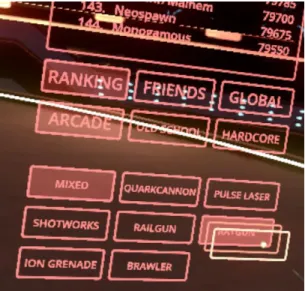
The design of the High Score menu in Space Pirate Trainer’s home environment led to much confusion due to one small inconsistency in interaction: “I don’t know how to un-highlight ‘mixed,’” stated one participant of the scoreboard’s filtering options (see Figures 4 and 5). Several others had similar complaints, remarking, “I don’t know how to uncheck stuff,” and “it’s frustrating when you have areas you seem to have options but are denied those options.” Another participant suggested that the scoreboard “should be in an additional menu,” rather than being immediately visible within the home
Figure 4: SPT High Score menu options. Figure 5: Note “mixed” remains selected.
6. Making sense of jargon and symbols.
Navigating the menus was further complicated by the use of unfamiliar language and icons that participants stumbled upon. “I’m curious about what anti-aliasing is, but I wish the game would tell me,” remarked one participant. Another said of the “bullet mode” symbols in the game, “I had no idea what the symbols meant.”
7. Dodging and moving in a 3D space.
Number of participants to: Round 1 Round 2
Swap between gun and shield 4 6
Evade bullets 10 12
Toggle bullet or defense mode 3 5
Table 6
Participants seemed surprised about the amount of movement elicited by the game. “I was crouching down when I was getting shot at,” exclaimed one. “I’m always used to looking forward only and this enables me to turn all the way around,” remarked another. Another noted difficulty “keeping track of where things were in the 3D space.” Providing options for locomotion received positive remarks. “I liked that you could [teleport] to move instead of having to walk around,” commented one participant. Audio cues were also appreciated. “When you have such a wide visual space but can only see so far,” said one participant, “hearing things was helpful.”
8. Physical and/or psychological discomfort.
“Your face gets kinda hot,” noted one participant after gameplay. Several others commented on their headsets getting sweaty. One mentioned that the lenses were fogging up. One participant said after removing the headset, “my eyes do feel kinda weird,” and another said she was “a little confused as to where I am.” Another remarked that
interacting with the system “could get a little dizzy or overwhelming.” One more said after the experience that she was “a little stressed… because things were shooting at me.”
9. Hardware issues.
headphones began slipping off mid-gameplay. Others made positive comments on the hardware, noting the accessibility provided in the “head stuff being adjustable.” Another said, “I liked that it had the headphones [built-in]. I could barely hear anything outside. That really does put you in the game.”
10.Being aware of the outside environment.
Though immersion in a VR system is considered mostly positive, a total lack of awareness of the real world can be a notable safety issue. “I was surprised when I was finished and came back, and remembered that I was in a rather small room indoors,” commented one participant. Another noted that it was “hard to separate VR from reality until you take off the headset.” Others said, “the game kind of disorients you—you don’t realize [how much] you’ve moved around.” One said she “wasn’t really aware of
anything going on outside of it,” during the experience, while another remarked afterwards feeling “like I’ve just gotten off an airplane or something.” One participant said she liked how the system “took into account safety” by showing the floor and walls. Another ran into the wall of the testing lab while using the equipment.
Other Observations
Participants said they considered VR to be a “unique gaming experience,” and “an experience you can’t get from a typical PC game.” Those with little to no video game experience offered positive reviews. “I’m surprised at how much I liked playing games in it, too,” remarked one participant, “I am not a gaming person.” When asked what their favorite part of the experience was, almost all mentioned the systems’ ability to immerse them in the virtual environment. Here are a few of their comments on the subject:
- “It’s amazing.”
- “It makes you really feel like you’re there. You actually feel like you’re in that space.”
- “It definitely transports you.”
- “I did feel that I truly was in a different world.” - “I feel like I’ve just been in the matrix.”
User Satisfaction
HTC Vive
The overall System Usability Scale (SUS) score for the Vive (averaged over 5 participants) was 70, just above the standard score of 68. The average SUS score for the system excluding participants with prior VR experience (n=4) was 65.6, just below the standard. As noted in Table 2, this group was slightly older and more educated than the other groups, on average.
Oculus Rift
The overall SUS score for the Rift (averaged over 5 participants) was 57, which is lower than the standard score of 68. If participants with prior experience with VR are excluded (n=3), the score drops to a 46.7. It should be noted that this experimental group reported having the least experience with video games, which may have biased the results.
Samsung Odyssey
The overall SUS score for the Samsung Odyssey WMR headset (averaged over 5 participants) was 75.5, which is higher than the standard score of 68. Excluding
It should be noted that this group of participants reported a higher level of experience with video games and a higher level of interest in VR when compared to the other groups (see Table 2), which may have impacted this score.
Immersion
7 of the 15 participants stated in the pre-experiment questionnaire that the immersive experience was one of the aspects of virtual reality that “most interested” them. After using the VR system, they reported on their experience in responses to the Slater-Usoh-Steed Questionnaire.
When asked to compare the structure of their memories from being in the virtual environment (VE) to their memories of other places they had visited that day, two participants described their memories of the VE as “vivid.” Another described her memory as being “detailed and expansive.” One explained recalling the experience as “similar to… remembering a dream.” “It seemed very realistic,” said another participant of the gaming environment, “it made me think of being in Tokyo Japan at night.”
Chart1
Others pointed out limitations of the VR systems, saying “the visuals were clearly constructed by a computer, so my brain didn't feel as though I was seeing reality,” and that having “few details or objects around made it feel more simulated.” Two participants noted a lack of sensory stimulation as one of the biggest differences. “I think one limit on my virtual reality experience is that it didn't engage all of my senses as reality does,” said one. Another observed, “the main thing that was missing was smell. Usually, the places that are most strongly embedded in my memories are associated with a particular smell. This one was not.”
When asked to rate their experience of being in the virtual environment on a scale from 1 to 7 (with 7 being equal to their ‘normal experience of being in a place’), the average rating out of all 15 participants was 5.5, holding fairly consistent across the three platforms (see Chart 2).
1 3 1 5 4 2 4 10 0 1 2 3 4 5 6 7 8 9 10
Vive Rift WMR TOTAL
Do you think of the virtual environment more as images that
you saw or more as somewhere that you visited?
Chart 2
Participants were also asked to what extent the virtual environment was the reality for them during their experience. Overall, the majority reported feeling a part of the VE at least some of the time. One participant wrote, “The second I put the set on I felt like I was apart [sic] of the virtual environment.” Another commented that “it felt very real.” A third claimed, “Most of the time, the virtual environment felt extremely real to me. I was surprised by how immersive it was, and how much it pulled me out of ‘regular’ reality.”
Of the 15 participants, 10 reported thinking to themselves that they “were actually in the virtual environment” (see Chart 3). One participant noted her physiological
response to the VE: “It felt like I was in ‘reality’ during the most intense parts of the game—I could feel my heart rate quickening and I got wrapped up in it much easier than if I were just playing on a phone or another small screen.”
5.8 5.2
5.4
0 1 2 3 4 5 6 7
Vive Rift WMR
Please rate your sense of being in the virtual environment,
on a scale of 1 to 7.
Chart 3
Sensory feedback was another key player in making the environment feel real. “Whenever the visuals were being really fluid and not lagging, it really felt like I was living the game,” said one participant. Another noted, “When the music went along with what was visually going on, I really felt like I was in the simulator. I actually forgot for a few minutes I was actually in [the testing lab].” Tracking and freedom of movement played a particularly important role, as one more recalled: “The system tracked my movement very accurately, so I never felt like there was a ‘lag’ or a disconnect with a real experience.” Another said that the experience felt real because “I was… able to use my hands in a way that wasn't constricted.”
2
4 4
10
3
1 1
5
0 1 2 3 4 5 6 7 8 9 10
Vive Rift WMR TOTAL
During the time of your experience, did you often think to
yourself that you were actually in the virtual environment?
Key Usability Factors
Essential Factors
Overall, participants gave the VR systems high marks on the essential usability factors: learning, ease of use, and satisfaction. All 15 participants said they were able to learn the systems and found them satisfying to use, and 14 out of 15 said the system was “easy to use.” For a detailed breakdown of the Virtual Reality Usability Scale (VRUS) results, please see Appendix M.
Controllers
The use of controllers was one of the more frustrating parts of the experiment for participants. The VRUS measured controller effectiveness, efficiency, easeof
remembering, and frequency of errors. Out of 15 participants, 2 claimed the controllers were not effective, 4 said the controllers were not efficient, another 4 remarked that it was not easy to remember how to work the controllers, and 7 reported making more than a few errors using the controllers.
Tracking
Tracking was another area of usability that left participants wanting. In the “tracking” category, the VRUS included measurements for sickness, immersion, fatigue,
Hand gestures
In the category of hand gestures, the VRUS collected ratings on feedback,
consistency, simplicity, naturalness, efficiency, responsiveness, usefulness, intuitiveness,
LIMITATIONS
SYSTEM VARIANCE
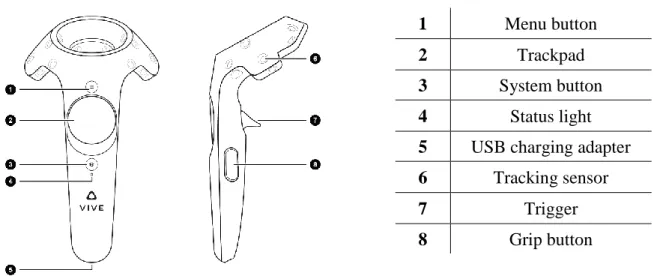
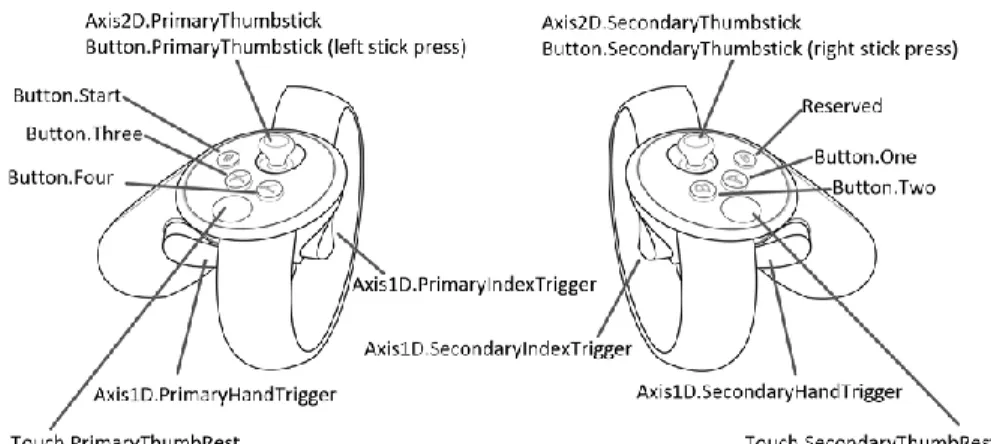
The VR systems used in this experiment included distinct headgear, motion-sensors, and controllers for each system. The Oculus and WMR headsets included built-in headphones, while the Vive required separate headphones to be plugged built-into the headset’s audio jack. Figures 1-3 illustrate the assortment of controller designs and button placement.
Figure 1: Vive OpenVR Controllers
The Vive OpenVR Controllers are ostensibly identical, with five buttons on each (menu, trackpad, system, trigger, and grip). From within the virtual environment, users can see that there is a left-controller and right-controller, which may function differently depending on the game or experience.
1 Menu button
2 Trackpad
3 System button 4 Status light 5 USB charging adapter 6 Tracking sensor
7 Trigger
Figure 2: Oculus Touch Controllers
The Oculus touch controllers appear almost like a typical console gaming
controller (from say, PlayStation or Xbox,) which has been split apart to allow each hand to move freely of the other. Both controllers include grip, thumbstick, and trigger buttons, with X, Y, and Menu buttons located on the left controller, and A, B, and Oculus buttons located on the right controller.
Figure 3: Windows Mixed Reality Motion Controllers
The Windows Mixed Reality Motion Controllers are mirror images of one
another, with six buttons each (menu, thumbstick, touchpad, trigger, Windows, and grab).
space (Viveport, Oculus Home, and Windows Mixed Reality Home, respectively). The variance in hardware and software meant a variety of pathways and interaction styles as participants completed usability tasks. These design differences in the headsets may have biased the results of the study—but again, this was not a product comparison. The study required testing on several different headsets in order to uncover usability issues across a multitude of VR interfaces.
GAME SELECTION
This study consisted of a usability test involving a single game (Space Pirate Trainer). SPT is a simple arcade-style shooter, which made it great for this study as it required low complexity of experience due to time constraints. Of course, a more
comprehensive list of design guidelines could be gleaned from additional tests conducted with a variety of other VR experiences. VR technology is constantly changing and evolving, so studies like this one will continue to be necessary as a part of the market’s iterative design process. It is likely that as virtual reality continues to advance, some of the suggestions outlined in this study may age out. Of course, this is true for any list of best practices, since every interface is different and there are no rules in design, only guidelines.
USER DIVERSITY
ages, physical abilities, and educational backgrounds, including children and the elderly. Participants from this study can be considered VR-novices, however user testing should encompass individuals with all levels of interest in, and experience with, virtual reality.
STUDY DESIGN
The between-subjects design of the study (alongside limits of recruitment and scheduling) was chosen to reduce order effects and comparison bias. This design resulted in unequal experimental groups (see Table 2 on page 25), however, the objective of the study was to compile a list of best practices from a diverse range of usability issues rather than to compare the three systems outright, so bias resulting from individual differences in the experimental groups was considered inconsequential to the goals of this research. Another downside to the between-subjects design was and fewer participants per device, resulting in findings that are less generalizable than a study conducted with more
participants.
The use of think-aloud tasks in user testing is valuable for collecting qualitative data, but it can create an artificial testing environment, which is especially detrimental in the case of virtual interfaces (of which immersion is a main goal). The problem is
twofold: 1) the act of “thinking aloud” calls for multitasking that may increase cognitive load, thereby making tasks more difficult to complete, and 2) by asking participants to complete specific, pre-designed tasks, it is impossible to observe truly unguided interactions with the systems being tested.
CONCLUSION
With all this in mind, let’s get to the point:
How can we best design user-centered virtual reality interfaces?
BEST PRACTICES
While this list is certainly not comprehensive, it should provide a good starting point for anyone designing for VR. These guidelines will encompass and expand upon the best practices addressed in the literature review, based on the findings of the research study:
1. First impressions matter. Wow them.
Virtual reality is still considered new, shiny, unique, and interesting. Every day, people are putting on VR headsets for the first time. This won’t always be the case. Your headset/game/experience could be their first EVER—and it probably won’t be what they are expecting. Use this opportunity to show your users why virtual reality is so cool! Blow them away, get them hooked, and keep them coming back for more.
2. Controllers are hard to learn. Make them as simple and effective as possible. Learning to use the controllers and gaining familiarity with button locations and functions is an essential aspect of user interaction with VR systems. With new
to see the controllers while in VR, so make sure the buttons are easy to locate and noticeably press-able.
3. Focus on learnability. Allow time for users to adjust.
Basic usability issues (like learning to use the controllers) are a high priority to new and/or infrequent users of a system. Oftentimes ease of learning is sacrificed in favor of established standards, and systems are designed with familiarity in mind so as not to upset the existing user base. However, this can alienate a significant portion of potential users. This is especially problematic for new technologies like VR. When designing virtual experiences, design for novices, and give users ample time to adjust to their new environment.
4. Give instructions and guidance (in a format that users understand). The addition of instructions, tutorials, or guides can go a long way towards improving learnability, but only if users can comprehend them. Space Pirate Trainer is a good example; the game’s home interface includes a “How to Play” screen, but many of the participants were unable to interpret the instructions. As a result, their gameplay performance suffered. Images, vocabulary, or interactions that may seem obvious to the designer (like moving aside to dodge bullets) may not be as familiar to the user.
5. Basic functions should be readily available.
6. Always provide feedback. Engage all the senses.
The sights, sounds, and feelings created by visual, auditory, and haptic feedback were cited by participants as key to creating an immersive experience. Good feedback can also contribute to safety (like the chaperone bounds which appear as users approach walls). A system element may function perfectly, but it won’t matter if users can’t be certain it worked (as one participant relayed when her attempt to adjust the volume was met with no feedback at all).
7. Use reality as a guide (but don’t take things too literally).
Lifelike sounds and realistic graphics can be a part of the experience no matter what far corner of the galaxy your virtual environment transports them to. Natural interactions (like not being able to shoot through a shield) will make sense to users and help them learn and recover from mistakes more efficiently. But there’s no need to succumb to the limitations of scientific discovery. VR makes it easy for users to breathe in space, or teleport across the room.
8. Use text, but make sure it’s readable. Minimize lingo.
Text should always be legible and comprehensible. Keep in mind that some headsets may offer better visual acuity than others. Avoid fancy technical jargon whenever possible. If you choose to incorporate symbols into your interface, consider adding labels or providing a legend to explain their meaning.
9. Keep it simple… but avoid flat design.