Jenny E. McCraw. Stories of the American South: A Usability Study of Learning Objects. A Master’s Paper for the M.S. in L.S degree. April 2007. 63 pages. Advisor: Lisa
Norberg
This study presents the results of a usability test of reusable learning objects currently in development in the Instructional Services Department of the UNC-Chapel Hill University Library. The learning objects are Web-based learning modules that are part of a new project, Stories of the American South, and they aim to make digital primary source material more accessible by breaking it into manageable units and providing contextual information. Seven undergraduate students viewed three prototypes, each focused on a unique theme related to the history of the American South. The results suggested that the learning objects are generally usable in design and function, and participants’ responses to design and content were positive. Several changes are suggested to optimize the usability of the learning object prototypes, and further usability testing with other audiences is recommended.
Headings:
Web sites/Evaluation
Computer-assisted Instruction/Evaluation Usability Testing
STORIES OF THE AMERICAN SOUTH: A USABILITY STUDY OF LEARNING OBJECTS
by
Jenny E. McCraw
A Master’s paper submitted to the faculty of the School of Information and Library Science of the University of North Carolina at Chapel Hill
in partial fulfillment of the requirements for the degree of Master of Science in
Library Science.
Chapel Hill, North Carolina April 2007
Approved by
Table of Contents
List of Figures 2
Chapter 1: Introduction 3
Chapter 2: Literature Review 10
Chapter 3: Methodology 25
Chapter 4: Results 35
Chapter 5: Discussion 46
Chapter 6: Conclusion 49
Chapter 7: Works Cited 51
Appendix A: Demographic Questionnaire 58
Appendix B: Usability Test 59
List of Figures
Figure 1: Homepage of “The Story of Tobacco Bag Stringing” 30
Figure 2: Sample page from The Story 30
Figure 3: Sample Resources page 31
Figure 4: Sample Audio Excerpts page 31
Figure 5: Sample Images page 32
Chapter 1: Introduction
Traditionally, programs of library instruction have served to demystify the library and its resources and to help students develop the critical thinking skills required to access and evaluate information resources. In recent years, librarians have added Web-based instructional modules to supplement or take the place of face-to-face classroom instruction, with essentially the same goals in mind. This trend mirrors an interest in “learning,” or Web-based instruction in academic settings in general. Examples of e-learning include distance e-learning and distributed or blended e-learning, which involves a mixture of face-to-face methods and Web-based coursework (Smith 6-7).
from teaching people how to find primary source materials to actually integrating these sources into a learning environment – a new and different way of providing access to these materials.
In higher education settings, a variety of e-learning methods have been
implemented, including courses taught entirely via the Web and courses that supplement traditional in-class instruction with Web-based modules. There has been a trend in the educational literature to evaluate e-learning in its various forms. This research indicates that students in higher education settings value e-learning for the convenience and flexibility it offers (Young and Norgard 113; Concannon, Flynn, and Campbell 512).
Recently, Web and multimedia technologies have been embraced in the academic field of history. Historians have pushed forward with impressive digital projects, such as the University of Virginia’s Valley of the Shadow project
(http://valley.vcdh.virginia.edu/), a substantial archive of primary source material from two towns – one in the South and one in the North – during the Civil War. Many other such projects – sponsored by universities, libraries, museums, and collaborative
partnerships between these institutions – attest to the active engagement of historians in designing Web-based instructional environments. Digital primary source material is of particular value to teachers and students of history. Edward J. Gallagher of Lehigh University asserts the value of providing undergraduate students with access to digital archives of primary documents, relating his own successes with using such collections to foster student learning. He writes that exposing students to these digital archives
heartening range of awareness” (322). Historians are also taking e-learning to a new level, asking their students to be producers of history as well as consumers of it, in the digital storytelling movement (Gallagher; Igartua; Weis, et al.). In digital storytelling projects, students take what they have learned about digital primary sources, such as images and oral histories, and create their own short narratives with similar documentary material. Few other fields have integrated e-learning and technology at the undergraduate level as creatively.
but are more often used on a smaller scale to provide Web-based instruction on a particular concept or theme.
As colleges and universities have become more interested in e-learning and learning objects, academic libraries have followed suit, supplementing traditional bibliographic instruction with Web-based instruction. This increased use of Web-based library instruction supports e-learning as well as traditional classroom learning. This type of instruction comes in many forms, ranging from general research tutorials to Web pages meant to supplement face-to-face bibliographic instruction sessions. Web-based library instruction has the same overall goal as in-person instruction: to facilitate effective use of the library and its resources (Smith 1). Recent studies have confirmed the effectiveness of Web-based library instruction, particularly for undergraduate students (Germain,
Jacobson, and Kaczor; Holman; Nichols, Shaffer, and Shockey). The results of these studies generally suggest that Web-based instruction can be as effective as traditional bibliographic instruction. It is also more flexible than traditional library instruction. As Smith notes, “[t]here is no limitation of time or space; students can access the instruction twenty-four hours a day from wherever they can connect to the Internet” (2).
This study is concerned with a particular group of learning objects currently in development in the Instructional Services Department of the University Library at UNC-Chapel Hill. These learning objects, which are part of a new project entitled Stories of the American South, are Web-based, independent learning modules that bring together digital primary sources and other library resources relating to a particular theme. They also provide contextual information in narrative form. They are not meant to supplement a traditional library instruction session, but rather to facilitate independent use of library resources. These instructional modules are being developed to supplement the University Library’s digital collections, including the “Oral Histories of the American South” collection available through the Documenting the American South Digital Library. The three learning objects tested in this study deal with tobacco bag stringing in North
Carolina and Virginia, Hurricane Floyd and child labor in Southern cotton mills. The first learning object, “The Story of Tobacco Bag Stringing,” supplements a digitized
collection from the University Library’s North Carolina Collection. The other two integrate oral history excerpts from Documenting the American South.
might make them more relevant to these students’ coursework. In this respect, these particular learning objects differ from existing Web-based instruction that is offered through the UNC-Chapel Hill University Library, such as tutorials and subject guides. The learning objects of interest in this study are not designed to teach students to use library resources, but rather to repackage existing library resources into modules to more effectively support independent learning.
Academic libraries have a strong tradition of incorporating usability testing into the development of various Web resources, from entire library Websites (Battleson, Booth, and Weintrop; George; Turnbow; VandeCreek) to library tutorials (Bury and Oud). This study follows that tradition. The ultimate goal of usability testing, according to Jeffrey Rubin, is to determine if products are easy to learn and use, and are satisfying for their users (26). Rubin identifies four main factors that contribute to usability, and these four factors inform the study: usefulness, effectiveness (ease of use), learnability and attitude (likability) (18-19).
Rubin’s work is based in a tradition of testing software products rather than user interfaces or Websites. However, the goal that he presents is clearly applicable to these interfaces as well. Usability testing in academic libraries is often credited with
uncovering unexpected difficulties for users, and is thus an integral part of a
The Instructional Services team is unsure how usable the learning objects that comprise the Stories of the American South project actually are for the target audience of UNC-Chapel Hill undergraduates. Since these learning objects are still in the early stages of development, the goal of this study is not to assess how much undergraduates learn from the objects, but rather to identify design and usability problems and gauge overall impressions of these new resources. The purpose of this study was thus to determine how usable the learning objects currently in development in Instructional Services are for UNC-Chapel Hill undergraduates. To investigate the research question, a usability test of three prototype learning objects was implemented with a sample of undergraduate
Chapter 2: Literature Review
Three major areas of research inform this study: e-learning, Web-based instruction in libraries, and usability. The literature on e-learning confirms that Web-based instruction is useful for students at the higher education level, and also describes some techniques for assessment of e-learning tools, including learning objects. The literature on Web-based instruction in libraries indicates its effectiveness in an academic library setting. The literature on usability offers some discussion of the importance of user-centered design, as well as practical guidance in the implementation of usability tests. As the following review of the literature suggests, these three areas overlap considerably. Research on e-learning and Web-based instruction in libraries also emphasizes the importance of usability and user-centered design. All of these areas provide a context for a usability study of the thematic learning objects in development in Instructional Services.
(Young and Norgard 109). The survey was distributed to 913 undergraduate and graduate students enrolled in online courses at the university. The authors received 233 responses. While only 59% of the survey respondents indicated that they actually preferred online courses to traditional courses, the students overwhelmingly reported that they took online courses because of the convenience and flexibility they offer (Young and Norgard 113). While this survey was somewhat limited by the fact that most of the respondents had already taken one or more online courses, which seems to indicate a preference for this type of coursework, the authors’ findings about flexibility and convenience are
noteworthy. Flexibility is a frequently cited advantage of Web-based instruction, and this study indicates that this characteristic can be an important part of the appeal of
e-learning.
While Young and Norgard’s study dealt with courses taught entirely via the Web, Concannon, Flynn, and Campbell conducted a study meant to examine campus-based students’ perceptions of e-learning. The authors sought to investigate the use of information and communications technology (ICT) as part of a blended learning
that “[s]tudents saw e-learning as an expected and integral part of the learning process within higher education” (511). Summarizing their findings, the authors write,
It is clear from this research that students consider [ICT] a valuable support to the learning process. They see it as an additional
reinforcement to the traditional face-to-face delivery mediums, and they make regular use of the medium’s flexible access, and the incentive it provides for ongoing study and continuous assessment (Concannon, Flynn, and Campbell 512).
This study thus confirms the importance of e-learning, even for students enrolled in more traditional, campus-based programs.
A very small subset of the e-learning literature is devoted to empirical research on learning objects in a higher education setting. Much of the available literature on learning objects focuses not on evaluation and assessment, but on case studies of implementation, and on the emergence of learning object repositories meant for classification and storage. A notable exception is Bradley and Boyle’s exploration of the design and development of a group of learning objects used in introductory computer programming courses at
(Bradley and Boyle 383). The 36 students interviewed more extensively further confirmed the usefulness of the learning objects. Based on their findings, the authors conclude that the learning objects tested “are extensively used and highly valued” (Bradley and Boyle 287). These findings indicate that learning objects can be useful forms of Web-based instruction in a higher education setting. Their success in this general academic setting suggests that learning objects could be similarly effective as a form of Web-based library instruction.
In recent years, historians have been particularly willing to embrace various forms of e-learning, integrating Web-based instructional materials successfully into courses geared towards undergraduates. Some of these e-learning projects, such as the archive of primary source documents about the Civil War included in the University of Virginia’s Valley of the Shadow project, relate directly to the learning objects tested in this study. This project, spearheaded by historian Edward L. Ayers, “has experimented to see what possibilities new technologies might present for the understanding of history” since its inception in 1991 (Ayers 143). Ayers writes that his inspiration for the project came from his own tendency to require his students to use primary source materials:
For years, I had required my students to read newspapers, letters, diaries, and account books in the archives. There was nothing like confronting the raw material of the past to understand history and feel its appeal (144).
Ayers is certainly not alone in his beliefs about the value of primary source
integrated e-learning methods, including digital archives of primary source material, into history courses. He defines the purpose of one such course, Virtual Americana, as putting “the novice in the archives” (Gallagher 323). From his students’ work, and from comments collected from these students, Gallagher concludes that his e-learning projects, complete with their digital archives, fostered critical thinking, encouraging students to engage actively with history by providing access and insight into actual historical material. He quotes one student, who said of a digital archive used in the course: “Experiencing the controversy has made me more open-minded and at the same time given me the ability to decide things for myself” (Gallagher 323). Other student
comments reported in Gallagher’s reflection on these courses indicate similar responses to the course material (326). This attests to the value of first-hand experience with historical materials that digital primary source research, and the e-learning projects that support it, provides.
Projects like Valley of the Shadow and courses like Edward Gallagher’s only represent one side of the current interest in technology’s role in teaching history. Another movement in this field, digital storytelling, requires that students become engaged with historical materials in a different way – by creating their own primary source material. This encourages students to be not only consumers, but also producers of history. Weis, et al. describe several different projects involving digital storytelling. They articulate the importance of technology not only for teaching, but also for learning:
New digital media are empowering students to become
Clearly, the researchers value the pedagogical possibilities of digital storytelling. According to the authors, a digital story is “a three to four minute digital multimedia ‘movie’ that combines an original story or script with images, music, and above all, a narration in the author’s own voice” (Weis, et al. 157). Students in the authors’ courses create, share and analyze these types of stories, and their instructors make them available for future students to see as examples of living history. It is on the digital storytelling model that the Stories of the American South project is loosely based; these learning objects are not films, but they do incorporate various multimedia elements that give voices and faces to the historical narrative provided. These learning objects also help students access the raw material – primary source documents – that they can use to create their own digital stories.
Unfortunately, very little empirical literature exists on the value of integrating technology and e-learning methods into undergraduate history courses. The evidence that exists is anecdotal, like Gallagher’s. However, this has not discouraged historians, who continue to seek out and also create Web-based tools to supplement history instruction. Historians tend to agree with Ann Wynne, who argues that integrating e-learning into the historical curriculum facilitates constructivism, a type of learning in which learners “construct their own mental models of the past based on the interaction of new information with their prior knowledge” (26). Constructivist learning is thought to be very active, and to engage learners more effectively than other types of learning. As Wynne writes,
understanding by making personal connections to subject matter (26).
This passage further attests to the value of e-learning and digital primary source materials for students and teachers of history. This area of the educational literature generally indicates that the types of materials included in the Stories of the American South project support student learning in the field of history.
The success of e-learning in college and university settings has inspired many academic libraries to offer their own Web-based instruction. This instruction can take various forms, including reusable learning objects like tutorials and other modular content. The focus is on instruction that can be accessed any time, and from anywhere. Web-based instruction in libraries is attractive for librarians, who use it to serve larger constituencies that cannot always be reached in face-to-face bibliographic instruction sessions, and also for students. Comparing computer-assisted instruction (CAI) with classroom library instruction, Lucy Holman notes that CAI “offers high flexibility in the amount of information conveyed and can address differences in student ability and learning style” (54). The theme of flexibility thus appears not only in the literature on e-learning in general, but also in research on e-e-learning in libraries.
In recent years, researchers have conducted a number of studies meant to evaluate Web-based instruction in libraries. In order to determine the effectiveness of this
instructional method, Web-based bibliographic instruction is often compared to
suggest that Web-based instruction is as effective as traditional bibliographic instruction, based on the number of correct answers about a variety of library tasks provided by subjects on pretests and posttests.
Germain, Jacobson, and Kaczor found no difference in effectiveness between Web-based and live instruction for 284 students in the University of Albany’s first year experience program who participated in a pretest-posttest study. Lucy Holman conducted a similar study with 125 English composition students at the University of North Carolina at Chapel Hill. Holman included a third group of students, a control group that completed both the pretest and posttest before receiving any library instruction. Based on her
suggest that Web-based library instruction can be just as effective as traditional bibliographic instruction.
Much of the literature on e-learning and Web-based instruction in libraries focuses on evaluating the effectiveness of this instruction as it relates to student learning. As important as these evaluations are, and as much as they confirm the effectiveness of Web-based instruction in general, they do not discuss the importance of system or interface usability. E-learning tools are less likely to support learning if they have usability problems. Crowther, Keller, and Waddoups assert that usability issues in
computer-mediated instructional applications can render these applications instructionally ineffective (289). This study’s primary goal was to evaluate the usability of the learning objects currently in development, identifying issues that can be corrected, and can also inform the design of future learning objects.
Usability is associated with a more general approach known as user-centered design (UCD). As Jeffrey Rubin writes, “UCD represents not only the techniques, processes, methods, and procedures for designing usable products and systems, but just as important, the philosophy that places the user at the center of the process” (10). He identifies three principles of UCD, originally posited by Gould and Lewis:
1. An early focus on users and tasks
2. Empirical measurement of product usage
3. Iterative design whereby a product is designed, modified, and tested repeatedly (12).
Usability tests differ from other types of experiments in a number of ways, but perhaps most notably in sample size. Usability expert Jakob Nielsen asserts that testing with five users is adequate to identify most usability problems. As he explains, as few as three users can identify most major problems, and “as you add more and more users, you learn less and less because you will keep seeing the same things over and over again” (Nielsen, “Why You Only Need to Test with Five Users”). While Nielsen’s five users theory has been disputed (Spool and Schroeder), small sample sizes are still very common in the usability literature.
Rubin’s work is based in a tradition of testing software products, but the principles and techniques covered are still applicable to usability testing of Web-based applications and interfaces. Texts that cover concepts of Web usability more specifically include Web Site Usability: A Designer’s Guide by Jared M. Spool et al. and Designing Web Usability by Jakob Nielsen. These texts serve as handbooks, and focus on design principles that contribute to usable Websites rather than on the process of usability testing. Another useful text that summarizes empirical research to provide usability guidelines and information about usability testing is Koyani, et al.’s Research-Based Web Design and Usability Guidelines. None of the above texts deal specifically with
e-learning tools or with libraries. Usability studies in these areas do exist, however, in the Education and Library Science literature.
Crowther, Keller, and Waddoups assert the importance of usability evaluations for computer-mediated instruction in their study of ChemLab, a chemical education
simulation at Brigham Young University. The authors conducted a usability study of this application with ten students enrolled in a chemistry course. Their findings about
measures of actual learning makes usability and application quality especially important to those involved in the design and development of learning objects and multimedia courseware” (302-03). The authors encourage usability testing early in the development phase and note a general tension between designers of instructional applications and those concerned with their usability. This tension further supports the necessity of testing end-users to identify problems with computer-mediated instruction.
Usability testing and evaluation of learning objects in a higher education setting has received very little attention in the educational literature, and there is virtually no empirical literature on this topic in the Library Science literature. This is likely the result of several different factors, including the ambiguity of the term learning object and the relative novelty of this concept within the field.
test to see what students though generally about the site and the test itself (Battleson, Booth, and Weintrop 192). The authors indicate that usability testing was an effective strategy for evaluating the library’s site, as it helped them identify a number of problems that had not been previously considered (Battleson, Booth, and Weintrop 194). They also conclude that their test “revealed the validity and usefulness of qualitative analysis in Web site evaluation” (Battleson, Booth, and Weintrop 195).
The value of qualitative data in usability analyses is confirmed by Leanne M. VandeCreek’s 2005 case study of a usability analysis of the Northern Illinois University Libraries’ Website. The author describes a number of methods, including formal usability testing, focus groups, and surveys provided to branch campus library users, all meant to evaluate the usability of the Libraries’ Website. The usability test identified a number of expected problems with the site, but also uncovered usability problems not previously considered. Like Battleson, Booth, and Weintrop’s study, this one indicates that usability testing, particularly that which solicits qualitative feedback from users, is an important step in the design of user-centered library Websites. As VandeCreek states,
“[i]ncorporating what is learned through usability testing into website modification or redesign leads to user-centered websites, which lead to more successful researchers” (189). Similar case studies, such as those published by Turnbow, et al. at UCLA and Carol George at Carnegie Mellon University, further support the importance of usability testing in the development of user-centered Websites. These studies indicate the
There have been markedly fewer usability tests on tutorials and other modular content than there have been on library sites in general. Evaluation of these tutorials tends to be more focused on their instructional effectiveness than their usability (Germain, Jacobson and Kaczor; Holman; Nichols, Shaffer, and Shockey). Bury and Oud assert that the goals of a tutorial are different than the goals of a library Website. The goal of this type of application is learning, rather than finding information or accessing services (Bury and Oud 58). The authors summarize the major difference between a tutorial and a library site, remarking, “[u]sers need to approach a tutorial with patience and attention, and a tutorial is typically less finite and task oriented than a library web site” (58). In order to deal with this distinction, the authors designed a different kind of usability test for the tutorial, focusing on navigation, design, layout and presentation of information, interactivity, content, use of language, and tests (60-61). The goal of this study was not only to find out what users did, as is usually the case in task-oriented usability tests, but also to find out what they said about the tutorial, and what their general impressions were (Bury and Oud 59). While the focus on qualitative data and user-centered design found in that line of research does inform this study, Bury and Oud’s particular technique for testing the usability of a library learning module is more appropriate here. The purpose of this study was to find out generally how usable and useful the learning objects are for undergraduate students, rather than measuring how quickly or effectively these students complete a series of tasks.
Chapter 3: Methodology
The purpose of this study was to assess the usability of three prototype learning objects in development as part of the Stories of the American South project. Several types of data were collected: demographic information about participants, recordings of
participants’ verbal responses and on-screen activity during the test and participants’ responses to a follow-up survey. All data was examined in aggregate, and no attempts were made to hypothesize relationships between the data sets. No variables were manipulated in this study, and all participants viewed the same three learning object prototypes in the same order.
Participants
Data Collection Instruments
The demographic questionnaire (Appendix A) functioned to gather basic demographic data about study participants. Participants were asked to provide the
following information: their age, whether they were undergraduates at UNC-Chapel Hill, their gender, their year in school, and their major.
The usability questions and tasks (Appendix B) were designed to test the
prototypes based on three of Rubin’s four usability factors: effectiveness, learnability and attitude or likability. The two initial questions asked of participants as they viewed each prototype were “What are your initial impressions of this site? What do you like? What do you dislike?” and “What do you want to do first when you see this site?” These questions were most closely aligned with the factor of attitude or likability, as they were meant to find out what participants’ perceptions and impressions of the prototypes were.
Four usability tasks were designed for each prototype. These tasks were meant to determine how effectively users were able to navigate the sites, and how they performed tasks that represent the primary functions of the site, such as listening to oral histories and finding additional resources. One task, which asked participants to “Begin the story,” was repeated for all three sites as a measure of learnability.
The tasks for the first prototype, “The Story of Tobacco Bag Stringing” were: 1. Listen to the introduction by Nick Graham.
2. Begin the story. How many sections does the story have? (Please answer verbally).
3. Find the image of Mrs. Daisy Stamper.
The first task was meant to determine how transparent the labeling of the audio
introduction is on this prototype. The second served two functions: to see which of two links to the Story that participants were more likely to click, and to determine if the layout of the Story is clear. The third task was designed to find out if participants were able to find the site’s image collection, and the final task was meant to see how
participants searched the larger digital collection to find images related to a theme. The tasks for the second prototype, “The Story of Hurricane Floyd” were: 1. Begin the story.
2. Listen to the oral history excerpt entitled “More Space.”
3. Save this oral history excerpt to the D:\ drive on your computer. 4. Find the page explaining how to cite oral history excerpts.
The first task functioned as an indicator of learnability. The second task was designed to find out if participants were able to find the site’s full collection of oral history excerpts, and to determine if the “Audio Excerpts” labeling chosen for the navigation menu was clear enough. The third task was exploratory, and served to show how participants chose to save the oral history excerpt. The final task was also designed to find out if the site’s organization and navigation were clear, and if participants were confident about which section of the site would contain citation information.
The tasks for the third prototype, “The Story of Child Labor in the Cotton Mills” were:
1. Begin the story.
3. Listen to the first few seconds of the interview with Alice P. Evitt in the section entitled “The Mills.” Read the transcript of this interview.
4. Find links to additional websites with information about child labor.
The first task functioned, again, as an indicator of the sites’ learnability. The second served to give participants an opportunity to interact with the content of the prototype and to see the structure of the Story. The third was designed to see how clearly the oral
history excerpts that are integrated into the Story are labeled. The final task tests
learnability, as participants visited the Resources page on the Hurricane Floyd prototype, and also tests organizational and navigational clarity.
The follow-up questionnaire (Appendix C) contained six general questions meant to evaluate the usefulness and likability of the prototypes. The questions contained on the follow-up questionnaire were:
1. Do the opening slideshows enhance your experience with the sites? 2. What do you think of the navigation of these Websites?
3. If you were doing research for a course on a topic covered by one of these sites, would you be likely to use sites like these to inform your research? Why or why not?
4. What do you think of the amount of text per page, particularly in the “Story” sections of each site?
5. Do the audio and images enhance your experience on the sites?
The Prototypes
The three prototypes tested in this study have similar designs and navigational schemes, but contain different narratives and multimedia content. These learning objects, which are meant to repackage digital primary source materials to encourage access and use, build narratives – the Stories themselves – around these digital primary source materials to provide context. They also provide access to the larger digital collections from which these materials come, such as the Tobacco Bag Stringing Collection and the Oral Histories of the American South collection. This access is provided via links from pages in the site which showcase the images and audio excerpts used from these
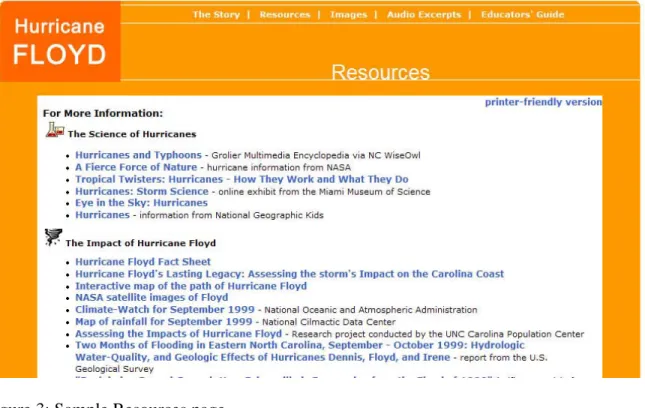
collections. Each learning object also includes a Resources page, which provides links to websites, citations to print materials, and recommendations for databases that users who would like to learn more about the theme at hand might use. The Resources pages also provide citation information. Finally, each of the prototype learning objects has a section called the Educators’ Guide, which provides lesson plans, activities, and resources for K-12 teachers who might use these learning objects with their students. That section of the prototypes was not tested in this study, as it is not targeted for an undergraduate audience.
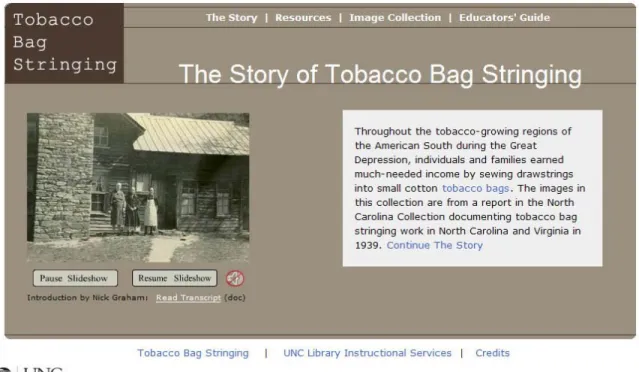
Figure 1: Homepage of “The Story of Tobacco Bag Stringing.”
Figure 3: Sample Resources page
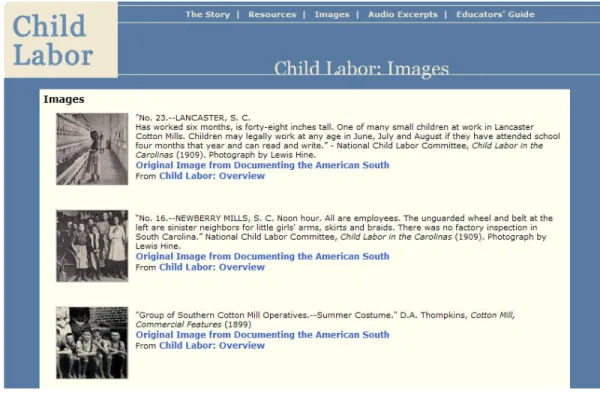
Figure 5: Sample Images page
Study Procedures
Participants made individual appointments with the researcher via email. At the time of the appointment, the participant met the researcher in Davis Library room 246. This small computer lab includes one PC equipped with TechSmith’s Morae, the usability software used in this study.
Participants were greeted and seated and asked to read and sign a consent form. If they chose to continue with the study, they were asked to fill out the demographic
questionnaire (Appendix A) by hand.
Upon completion of the demographic questionnaire, the researcher took a seat next to the participant to begin the usability test. The Morae software was turned on so that audio and screen-capture recording would begin. During each usability test, another researcher was stationed in an adjacent room containing a PC with the same software, networked to the PC on which the usability test was taking place. This ensured that the software worked properly and that recordings were saved.
During the usability test portion of the session, the participant was asked the two general questions and then completed the four tasks with each prototype (Appendix B). If participants were unsure how to complete a task, the researcher provided guidance. The researcher also asked additional questions when necessary, such as “Did you find that confusing?” and “What made you decide to click on that link?”
Before testing began, two students were recruited for a pilot test of the data collection instruments and study procedures. No changes were made as a result of these pilot tests.
Ethical Issues
Chapter 4: Results
Demographic Questionnaire
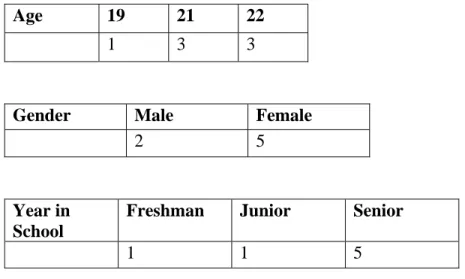
The following charts represent the data collected in the demographic
questionnaire. All participants were between 19 and 22, falling into the demographic of traditional college-aged students. The academic majors of participants varied widely, and majors in the Natural Sciences, Social Sciences and Humanities were all represented.
Age 19 21 22 1 3 3
Gender Male Female
2 5
Year in School
Freshman Junior Senior
1 1 5
Usability Test Initial Impressions
The first question asked about each site was, “What is your initial impression of the site? What do you like? What do you dislike?” Though responses varied widely between participants and between sites, several patterns emerged.
Participants generally liked the overall design and layout of “The Story of Tobacco Bag Stringing.” In their comments regarding this site’s appearance, several mentioned navigation as well. One participant said that the site looked “like it would be easy to get through” and another noted that it looked “very clear cut.” Three participants commented that they liked the Flash slideshow, though one noted that it was too fast. One participant noted that the UNC University Library logo in the bottom left of the page made it look legitimate. Three participants commented that they liked the colors used in the design of this learning object.
Three participants commented negatively on fonts used. One noted that the font used for the title of the homepage, “The Story of Tobacco Bag Stringing” was “pretty hideous” and two others indicated that the font used for the introductory text was “boring.” One participant also noted that she felt having the title on the homepage right next to a logo reading “tobacco bag stringing” was redundant and unnecessary.
The general impressions of “The Story of Hurricane Floyd” were largely related to its bright orange color. Five participants commented that they liked the color,
than the last one, just because it’s brighter. It looks more interesting, just because it catches your attention more. It’s more noticeable, I guess.”
The remaining two participants reacted very negatively to the color. One said: I’m not fond of the orange, personally. I don’t think a hurricane
theme should be orange. I mean, it’s really orange. I don’t like the color. I feel like it should be… not a little bit more depressing, but a little bit more conservative.
In keeping with this response, when asked what she wanted to do first when she saw this page, she joked, “Go get my sunglasses.” The other participant who responded negatively also questioned the appropriateness of the color for the subject matter.
General impressions of the design and layout of the third learning object “The Story of Child Labor in the Cotton Mills,” were positive. Four participants commented that they liked the colors used on the learning object, that they were “mild” and “soft.” One participant, however, did not like the color of the “Child Labor” logo in the top left corner, remarking that it was “not working” for her, “because they’re two different shades of white right next to each other.”
First Inclinations
The responses to the second question – What do you want to do first when you see this site? – tended to fall more clearly into categories. For the first prototype, “The Story of Tobacco Bag Stringing,” two participants were drawn to the audio icon, four were drawn to images, and one said that he would read the story first. One participant who was drawn to the audio icon commented, “Because it’s a slideshow, I’m thinking the sound is going to be telling me about the pictures coming up in the website. So I want to know, is there talking, is there music, is there something else in the background?” Another mentioned that the audio icon drew her attention because it was red.
For the second prototype, most participants were initially drawn to the images in the slideshow. Six reported that the slideshow caught their attention, while one
participant was drawn to the audio icon. Several participants commented on their interest in images on this prototype. One noted, “I might go to images first, since it seems like it’s a subject that could be told best by pictures.” Another participant expressed similar interest, remarking that the slideshow would probably inspire her to click on the images link, “because when you go to images it gives a description and then tells more about them. I just like that… when something like this happens, it’s a good way to feel connected with it initially, for me.” Another participant also expressed an interest in finding out more information about the images in the slideshow. Interestingly, one
For the third prototype, “The Story of Child Labor in the Cotton Mills,” six of the participants said that they would continue the story. The remaining participant was drawn to the slideshow. One participant, remarking on his interest in beginning the story, said, “I don’t know if that’s just a subconscious thing because ‘story’ is in the title.”
Tasks
Three of the tasks tended to cause more problems for participants than others. The fourth task to be completed with the first prototype, searching the Tobacco Bag Stringing Collection for the word poverty, was consistently difficult for participants. Only one of the seven participants was able to complete this task without guidance from the
researcher. Searching the collection is actually meant to be accomplished by clicking a link on the Image Collection page. Four participants used the Ctrl + F “find in page” command on each page to search for the word poverty until they were stopped by the researcher.
It’s broad and I would think, you know, resources regarding the
hurricane, and not regarding how to do anything about the hurricane. If you had a student resources or student guide or whatever, like the educator’s guide, that would be you know, “what do you do with this website, as a student.” Resources sounds like everybody could click on it… Searching and citing to me doesn’t go with… I don’t know.
The other three participants who selected Educators’ Guide said that they did so because they associated citation with academics and education.
Three users had trouble completing the task of saving an oral history excerpt. All of the participants initially right-clicked the link for the excerpt, but the three who did not complete the task all expressed confusion that the menu had a “Save Link As” rather than simply a “Save” option. One participant commented, “I don’t know how many people save links on their computer.” Another said, “I don’t like to save it as a link, because if the link gets canceled, my saving it doesn’t make sense, so I usually don’t save links. I would actually rather just get the link.”
The difficulty that participants had with the three tasks mentioned above were somewhat expected, as these were functional and navigational areas that were considered by the Instructional Services team to be possibly confusing to users. A more surprising result of the study was that three of the seven participants did not complete the task of beginning the story on the second prototype. These participants, when asked to begin the story, clicked instead on the audio icon located near the slideshow and listened to the introduction. This indicates that the prototypes may not be as “learnable” as expected.
appears covered with a circle crossed by a red line, indicating that it is muted. Five of the seven participants, when probed, said that they found this task confusing, largely because of the labeling of the audio icon. One participant, when she started the audio introduction, thought that clicking to listen to the sound started in the middle of the introduction, and wanted to know how to restart it. When the researcher explained that clicking the audio icon started the introduction from the beginning, the participant commented that she would not have thought that was the case, because of the labeling.
All participants were able to complete the remaining tasks without guidance from the researcher.
Follow-up Questionnaire
Participants provided qualitative responses to the prototypes by answering a follow-up questionnaire with six questions.
• Question 1: Do the opening slideshows enhance your experience with the
sites?
All seven participants responded that the slideshows did enhance their experience with the sites. Six participants explicitly stated that the slideshows made the sites more attractive or visually appealing. The slideshows also served to draw attention. As one participant remarked, “[the slideshows] drew my attention in a way that normal text cannot.” Two participants noted that the slideshows did more than attract the eye. One commented that the slideshows “give more meaning to the stories” and another remarked that they “gave a lot of gravitas to the presentations.”
distracting.” He noted that, for this reason, he appreciated the option to pause the slideshow.
• Question 2: What do you think of the navigation of these sites?
Five of seven participants responded positively to the navigation of the sites. For instance, one participant wrote, “The navigation was very well laid out. The content bar on the top of the page was accessible and everything I was looking for was clearly labeled.” Four participants commented on the simplicity of the navigation and the organization of the sites more generally. One commented, “the sites were very simply structured, so there was no real room for confusion.” Another liked “that they are simpler than many sites, which are distracting with too many bells and whistles.” The two
participants who did not respond in a clearly positive way, wrote that the navigation was “adequate, but sometimes unclear,” and “fairly easy, with a few exceptions.”
• Question 3: If you were doing research for a course on a topic covered by one
of these sites, would you be likely to use sites like these to inform your research? Why or why not?
This question was meant to gauge the usefulness of these prototypes for a target audience of undergraduates. Six of seven participants responded that they would be likely to use these sites. Two noted that the sites would be good places to begin research
The single participant who said no provided interesting insight into her answer. Her response to this question was:
To be honest, not likely, but largely because I wouldn’t know they existed. If on the other hand I was aware of them, I’d love to use something like quotes from oral histories or paraphrasing stories to add a little depth to my paper, but this is actually the first time I knew the University even collected oral histories.
Another participant, who responded that she would be likely to use the sites, said that she would do so because of the oral history recordings. She then commented, “These are unique sources of information that I don’t often use because I don’t know about them…” These responses suggest the importance of promoting digital primary sources, and also of providing clear, easy access to these materials.
• Question 4: What do you think of the amount of text per page, particularly in
the “Story” sections of the site?
Six of the seven participants felt that the amount of text per page was appropriate. This question was of interest to the researcher because of the modular nature of the learning objects. It was useful to find out if participants felt that smaller chunks of information were more manageable. The five participants with clearly positive reactions made several observations about the amount of text. For instance, one participant wrote:
The amount of text was well laid out, in my opinion. With ample margins and spaced sentences, the text did not appear daunting as do some extended paragraphs at times. It is better to have
numerous shorter pages rather than one long page which you have to scroll down.
Two participants particularly commented on the modular quality of the learning objects. One wrote: “Having it broken into more manageable pieces is always great because it a) takes less time to load and b) makes it easier to digest information.” Another noted, “I really enjoyed that the text was presented in a simpler fashion, so I could read it more like I would pages of a book, rather than having to jump around as I tend to do on sites which have multiple stories/texts on one page.”
The remaining participant had a neutral response to the amount of text per page, commenting that it did not matter much to him. He did note however “if passages are shorter, some readers may not realize that additional pages exist.”
• Question 5: Do the audio and images enhance your experience on the sites?
All seven participants responded that the multimedia content enhanced their experience on the sites. One commented that “the media was a nice supplement to the text and it was very easy to use.” Another responded similarly, writing,
Yes, multimedia is always nice. It adds another dimension and can take away from the boredom and routine of lengthy reading, which can sometimes be monotonous, especially for those reading out of obligation (school project) rather than those reading for pleasure or quest for
knowledge.
A third participant commented particularly on the audio: “I really love the audio. I think you get so much out of a person’s voice and storytelling.”
• Question 6: Was one site easier to use than the others? If so, which one?
Additional Findings
Participants made several comments outside of the structure of the usability test and follow-up questionnaire that contribute meaningful data. For instance, one participant commented, while reading through the Child Labor learning object, that she really
enjoyed the pull-out quotes, but that she wanted clarification on the identity of the person being quoted.
I really like these pull out quotes. My question would be, I’m on the second Mills page, and there’s a quote attributed to Lethe Ann Sloane Osteen, and I have no idea who she is. I would like to know, did she work in the mills, did she own the mills, that’s a really long name, stuff like that.
Of particular interest to the researcher was the fact that several participants expressed or implied interest in the content of the learning objects. When asked to complete the task of reading through the first two sections of the Child Labor learning object, two participants seemed particularly invested in its content, choosing to listen to the integrated oral history excerpts and taking time to read particularly interesting passages aloud to the researcher.
Chapter 5: Discussion
Participants in the study provided valuable feedback regarding the usability of the three learning object prototypes. Participants responded positively to the design, layout, navigation and content of the prototypes. This indicates that the prototypes are generally usable, though several tasks did reveal usability issues that should be addressed.
Responses to the multimedia content of the sites were overwhelmingly positive. All participants felt that this content enhanced their experience on the sites. The Flash slideshows and the oral history excerpts were particularly popular with participants. Responses to the navigational structure of the prototypes were also generally positive, though problematic usability tasks indicate that re-labeling of menu links may be necessary. Participants also appreciated the modular format of the prototypes, with the “Story” presented in smaller chunks.
Though responses were generally positive, several changes are recommended. For instance, the icon that begins the audio introduction on the Tobacco Bag Stringing and Hurricane Floyd learning objects should be more clearly labeled. The distinction between resources for students and resources for educators should also be made more apparent, as several participants had difficulty locating citation information because they expected it to be included in the Educators’ Guide.
For “The Story of Tobacco Bag Stringing” and future learning objects connected to particular digital collections at UNC-Chapel Hill, more of an effort should be made to explain the connection between the learning object and the collection itself. When asked to search the Tobacco Bag Stringing Collection, six participants had difficulty. Several of them attempted to search pages within the prototype, which indicates that they had difficulty distinguishing the learning object from the digital collection.
Other recommended changes include lightening the color of the Hurricane Floyd learning object. Though most participants indicated that the bright orange helped to capture their attention, the two participants who reacted negatively to the color did so strongly. One possible change could be toning down the orange so that the site is still bright and eye-catching, without seeming inappropriate for the subject matter.
When changes are made and these prototypes are available through the UNC-Chapel Hill Libraries website, it will be necessary to market these new learning modules in order to promote their use. With the trend of integrating digital primary source
Study and Methodology Limitations
The sampling technique used in this study was non-probability convenience sampling. Participants were identified on a first-come, first-served basis, and the sample was non-random. As a result, the study is not generalizable. The small size of the sample, and the specificity of the project, threaten external validity.
Chapter 6: Conclusion
This goal of this study was to answer the following question: how usable are the learning objects currently in development in Instructional Services for UNC-Chapel Hill undergraduates? The study shows that the learning objects are generally usable for
undergraduates in their current format. Participants in the study generally liked the design of the learning objects, and were very enthusiastic about their content, particularly the multimedia elements.
However, these learning objects could be more usable if their connection to the digital collections at UNC-Chapel Hill was made clearer. Revising the labeling of the audio introductions and of the Resources pages may also contribute to the usability of the sites. Providing clearer instructions about saving media, such as oral history excerpts, would also be useful, as several participants had trouble saving these excerpts.
Results of this study also indicate that location of the learning objects in the library’s website will be a key factor in their use. Since participants were already unaware of the Oral Histories of the American South collection and other digital collections, it is clear that promoting these modules will be important. Future usability studies should include questions about the location of these learning objects and how easy they are to find.
undergraduates. Such a study would be useful, but would require a longer period of time and likely the cooperation of faculty members.
The study was also limited to undergraduates, who comprise just one of the two target audiences of these learning objects, suggesting that more research is needed. A usability test should be conducted with educators or pre-service teachers to determine how usable these modules are for them.
Chapter 7: Works Cited
Ayers, Edward L. “Doing Scholarship on the Web: Ten Years of Triumphs – and a Disappointment.” Journal of Scholarly Publishing. 35.3 (2004): 143-27. Academic Search Premier. University of North Carolina at Chapel Hill, Academic Affairs Library. 3 Mar. 2007 <
http://eresources.lib.unc.edu/eid/description.php?EIDID=1265>.
Ayers, Edward L. The Valley of the Shadow: Two Communities in the American Civil War. 2007. Virginia Center for Digital History. Accessed 5 Mar. 2007. < http://valley.vcdh.virginia.edu/>.
Battleson, Brenda, Austin Booth, and Jane Weintrop. “Usability Testing of an Academic Library Web Site: A Case Study.” Journal of Academic Librarianship. 27.3 (2001): 188-98. Education Full Text. WilsonWeb. University of North Carolina at Chapel Hill, Academic Affairs Library. 19 Oct. 2006
<http://eresources.lib.unc.edu/eid/description.php?EIDID=995>.
at Chapel Hill, Academic Affairs Library. 12 Sep. 2006
<http://eresources.lib.unc.edu/eid/description.php?EIDID=995>.
Bury, Sophie, and Joanne Oud. “Usability Testing of an Online Information Literacy Tutorial.” Reference Services Review. 33.1 (2005): 54-65. Emerald Fulltext. University of North Carolina at Chapel Hill, Academic Affairs Library. 19 Oct. 2006 < http://eresources.lib.unc.edu/ejournal/description.php?EJID=12672>.
Concannon, Fiona, Antoinette Flynn, and Mark Campbell. “What Campus-Based Students Think about the Quality and Benefits of E-learning.” British Journal of Educational Technology. 36.3 (2005): 501-12. ERIC. EbscoHost. University of North Carolina at Chapel Hill, Academic Affairs Library. 12 Sep. 2006 < http://eresources.lib.unc.edu/eid/description.php?EIDID=134>.
Crowther, Michael S., Chris C. Keller, and Gregory Waddoups. “Improving the Quality and Effectiveness of Computer-Mediated Instruction through Usability
Evaluations.” British Journal of Educational Technology. 35.3 (2004): 289-303. Education Full Text. WilsonWeb. University of North Carolina at Chapel Hill, Academic Affairs Library. 19 Oct. 2006
<http://eresources.lib.unc.edu/eid/description.php?EIDID=995>.
Carolina at Chapel Hill, Academic Affairs Library. 5 Mar. 2007 < http://eresources.lib.unc.edu/eid/description.php?EIDID=1265>.
George, Carole A. “Usability Testing and Design of a Library Website: An Iterative Approach.” OCLC Systems & Services. 21.3 (2005): 167-80. Emerald Fulltext. University of North Carolina at Chapel Hill, Academic Affairs Library. 19 Oct. 2006 <http://eresources.lib.unc.edu/ejournal/description.php?EJID=16107>.
Germain, Carole Anne, Trudi Jacobson, and Sue A. Kaczor. “A Comparison of the Effectiveness of Presentation Formats for Instruction: Teaching First Year Students.” College & Research Libraries. 61.1 (2000): 65-72. Library Literature and Information Science. WilsonWeb. University of North Carolina at Chapel Hill, Academic Affairs Library. 18 Oct. 2006
<http://eresources.lib.unc.edu/eid/description.php?EIDID=885>.
Holman, Lucy. “A Comparison of Computer-Assisted Instruction and Classroom
Bibliographic Instruction.” Reference & User Services Quarterly. 61.1 (2000): 53-60. Library Literature and Information Science. WilsonWeb. University of North Carolina at Chapel Hill, Academic Affairs Library. 18 Oct. 2006
<http://eresources.lib.unc.edu/eid/description.php?EIDID=885>.
Essays on Teaching with Technology. Ed. Dennis A. Trinkle and Scott A. Merriman. Amonk, NY: M.E. Sharpe, 2001. 85-106.
Johnson, Greg. “Introducing Undergraduate Students to Archives and Special Collections.” College & Undergraduate Libraries. 13.1 (2006): 91-100.
Koyani, Robert W. et al. Research-Based Web Design and Usability Guidelines. Washington, D.C.: U.S. Dept. of Health and Human Services, 2006. <http://www.usability.gov/pdfs/guidelines.html>.
Nichols, James, Barbara Shaffer, and Karen Shockey. “Changing the Face of Instruction: Is Online or In-class More Effective?” College & Research Libraries. 64.5 (2003): 378-88. Library Literature and Information Science. WilsonWeb. University of North Carolina at Chapel Hill, Academic Affairs Library. 18 Oct. 2006 <http://eresources.lib.unc.edu/eid/description.php?EIDID=885>.
Nielsen, Jakob. Designing Web Usability. Indianapolis, IN: 2000.
Nurmi, Sami, and Tomi Jaakkola. “Effectiveness of Learning Objects in Various
Instructional Settings.” Learning, Media and Technology 31.3 (Sep. 2006): 233-47.
Polsani, Pithamber R. “Use and Abuse of Reusable Learning Objects.” Journal of Digital Information 3.4 (Feb. 2003). 19 Oct. 2006
<http://jodi.ecs.soton.ac.uk/Articles/v03/i04/Polsani/>.
Rubin, Jeffrey. Handbook of Usability Testing. New York, NY: John Wiley & Sons, Inc., 1994.
Smith, Susan Sharpless. Web Based Instruction: A Guide for Libraries. 2nd ed. Chicago, IL: American Library Association, 2006.
Spool, Jared M. et al. Web Site Usability: A Designer’s Guide. San Francisco, CA: Morgan Kaufmann Publishers, Inc., 1999.
Spool, Jared, and Will Schroeder “Testing Web Sites: Five Users is Nowhere Near Enough.” CHI ’01 Extended Abstracts on Human Factors in Computing Systems. Conference on Human Factors in Computing Systems, 2001, Seattle, WA. New York, NY: ACM Press, 2001. 285-86. ACM Digital Library. University of North Carolina at Chapel Hill, Academic Affairs Library. 21 Nov. 2006
Turnbow, Dominique, et al. “Usability Testing for Web Redesign: A UCLA Case Study.” OCLC Systems & Services. 21.3 (2005): 226-34. Emerald Fulltext. University of North Carolina at Chapel Hill, Academic Affairs Library. 19 Oct. 2006
<http://eresources.lib.unc.edu/ejournal/description.php?EJID=16107>.
VandeCreek, Leanne M. “Usability Analysis of Northern Illinois University Libraries’ Website: A Case Study.” OCLC Systems & Services. 21.3 (2005): 181-92. Emerald Fulltext. University of North Carolina at Chapel Hill, Academic Affairs Library. 19 Oct. 2006
<http://eresources.lib.unc.edu/ejournal/description.php?EJID=16107>.
Wang, Shiang-Kwei, and Chiachi Yang. “The Interface Design and the Usability Testing of a Fossilization Web-Based Learning Environment.” Journal of Science
Education and Technology 14.3 (Sep. 2005): 305-13. LINK Springer Online. Springer-Verlag. 17 Sep. 2006 <
http://eresources.lib.unc.edu/eid/description.php?EIDID=24>.
Warren, Wilson J. “Using the World Wide Web for Primary Source Research in
Weis, Tracey M., et al. “Digital Technologies and Pedagogies.” Social Justice. 29.4 (2002): 153-68. Academic Search Premier. University of North Carolina at Chapel Hill, Academic Affairs Library. 5 Mar. 2007 <
http://eresources.lib.unc.edu/eid/description.php?EIDID=1265>.
Wynne, Ann. “History Instruction and the Internet: A Literature Review.” History.edu: Essays on Teaching with Technology. Ed. Dennis A. Trinkle and Scott A. Merriman. Amonk, NY: M.E. Sharpe, 2001. 25-37.
Young, Andria, and Chari Norgard. “Assessing the Quality of Online Courses from the Students’ Perspective.” The Internet and Higher Education. 9.2 (2006): 107-15. Academic Search Premier. EbscoHost. University of North Carolina at Chapel Hill, Academic Affairs Library. 19 Oct. 2006.
Appendix A: Demographic Questionnaire 1. What is your age? ______
2. Are you a UNC-Chapel Hill undergraduate student? Yes _____ No _____
3. Are you male or female?
Male _____ Female _____ Prefer not to answer _____
4. What year are you in school? Freshman _____
Sophomore _____ Junior _____ Senior _____ Other _____
5. What is your major?
Appendix B: Usability Test
Website 1: The Story of Tobacco Bag Stringing Questions
1. What is your initial impression of the site? What do you like? What do you dislike? (Please answer verbally).
2. What do you want to do first when you see this Web page? Tasks
5. Listen to the introduction by Nick Graham.
6. Begin the story. How many sections does the story have? (Please answer verbally).
7. Find the image of Mrs. Daisy Stamper.
8. Search the Tobacco Bag Stringing Collection for the word “poverty.”
Website 2: The Story of Hurricane Floyd Questions
1. What is your initial impression of the site? What do you like? What do you dislike? (Please answer verbally).
2. What do you want to do first when you see this Web page? Tasks
5. Begin the story.
6. Listen to the oral history excerpt entitled “More Space.”
Website 3: The Story of Child Labor in the Cotton Mills Questions
1. What is your initial impression of the site? What do you like? What do you dislike? (Please answer verbally).
2. What do you want to do first when you see this Web page? Tasks
5. Begin the story.
6. Read through the first two sections of the story.
7. Listen to the first few seconds of the interview with Alice P. Evitt in the section entitled “The Mills.” Read the transcript of this interview.
Appendix C. Follow-Up Questionnaire
1. Do the opening slideshows enhance your experience with the sites?
2. What do you think of the navigation of these Websites?
3. If you were doing research for a course on a topic covered by one of these sites, would you be likely to use sites like these to inform your research? Why or why not?
4. What do you think of the amount of text per page, particularly in the “Story” sections of each site?
5. Do the audio and images enhance your experience on the sites?