EDI Reference
Guide
Dental Electronic Services
Revised May 20081 ****This page left blank intentionally.****
Table of Contents
Chapter 1 • Introduction
Chapter 2 • General Information
2.1 Contact Information ...2.1 2.2 System Operating Hours ...2.1 2.3 Audit Procedures ...2.2 2.4 Valid Characters in Text Data (AN, string data element type) ...2.2
Chapter 3 • Security Features
3.1 Confidentiality ...3.1 3.2 Authorized Release of Information ...3.1
Chapter 4 • Authorization Process
4.1 Where to Get Enrollment Forms to Request a Trading Partner ID ... 4.1 4.2 Receiving 835 Transactions ...4.1 4.3 Adding a New Provider to an Existing Trading Partner ...4.2 4.4 Deleting Providers from an Existing Trading Partner ...4.2 4.5 Reporting Changes in Status...4.2
Chapter 5 • Testing Policy
5.1 United Concordia Syntax Testing ...5.1
Chapter 6 • Communications
6.1 Asynchronous Dial-Up...6.1 6.1.1 Menu Option...6.2 6.2 Internet ... ...6.3 6.2.1. Internet File Transfer Protocol (FTP) through “eDelivery” ...6.3
Chapter 7 • Transmission Envelopes
7.1 General Information...7.1 7.1.1 Delimiters ...7.1 7.2 Data Detail and Explanation of Incoming ISA to United Concordia ... 7.4
ISA
Interchange Control Header (Incoming) ... 7.47.3 Data Detail and Explanation of Outgoing ISA from United Concordia ... 7.5
ISA
Interchange Control Header (Outgoing) ... 7.5Chapter 8 • Dental Claim (837D)
8.1 General Information and Guidelines for Submitting an 837D...8.1 8.1.1 Data that is Not Used ...8.1 8.1.2 Transaction Size ...8.2 8.1.3 837D Business Edit Testing ...8.2 8.2 Data Detail for 837D ...8.3
GS
Functional Group Header ... 8.3REF
Transmission Type Identification... 8.3NM1
Submitter Name... 8.4NM1
Receiver Name ... 8.4PRV
Provider Specialty Information ... 8.4REF
Provider Secondary Identification... 8.5NM1
Subscriber Name ... 8.5NM1
Payer Name... 8.6NM1
Patient Name ... 8.6CLM
Claim Information ... 8.6PWK
Claim Supplemental Information... 8.7AMT
COB
Patient Paid Amount ... 8.8NM1
Other Payer Name... 8.9SV3
Service Line ... 8.9TOO
Tooth Information ... 8.10Chapter 9 • Claim Acknowledgement (277A)
Chapter 10 • Claim Payment Advice (835)
10.1 General Information and Guidelines for 835 ...10.1 10.1.1 Missing Checks ...10.1 10.1.2 Administrative Checks...10.2 10.1.3 Availability ...10.2 10.1.4 Highmark Oral Surgery ...10.2 10.1.5 Unavailable Claim Data...10.2 10.1.6 Claim Overpayment Refunds ...10.2 10.1.7 Capitation Payments ...10.2
10.1.8 Encounter Data on the 835 ...10.3 10.1.9 Member Identification Numbers ...10.3 10.1.10 Data that is Not Used ...10.3
BPR
Financial Information ... 10.4REF
Receiver Identification ... 10.5REF
Additional Payer Identification ... 10.5REF
Payee Additional Identification ... 10.5CLP
Claim Payment Information ... 10.6PLB
Provider Adjustment ... 10.6Chapter 11 • Claim Status (276 & 277)
11.1 General Instructions and Guidelines for 276 and 277...11.1 11.1.1 General Instructions and Guidelines for 276...11.1 11.1.1.1 General Description... 11.2 11.1.1.2 Dental Services ... 11.2 11.1.1.3 Data that Is Not Used ... 11.2 11.1.1.4 Situational Elements and Data Content... 11.2 11.1.1.5 Multiple Requests Per Transaction... 11.3 11.1.2 General Instructions and Guidelines for 277 ... 11.3 11.1.2.1 General Description of 277... 11.3 11.1.2.2 Claim Splits... 11.3 11.1.2.3 Customer Service Requests... 11.3 11.1.2.4 Maximum Claim Responses per Subscriber/Patient/Dependent 11.4 1.1.2.5 Claim vs. Line Reporting of Status ... 11.4 11.2 276/277 Data Detail Instructions ... 11.5 11.2.1 Data Detail for Claim Status Request (276)... 11.5
GS
Functional Group Header... 11.5NM1
Payer Name ... 11.6NM1
Information Receiver Name ... 11.6NM1
Provider Name ... 11.7NM1
Subscriber Name ... 11.7REF
Payer Claim ID Number ... 11.711.2.2 Data Detail for Claim Status Response (277) ... 11.8
GS
Functional Group Header... 11.8Chapter 12 • Eligibility Request (270) and Response (271)
12.1 General Instructions and Guidelines for 270 and 271...12.1 12.1.1 United Concordia Requirements ...12.1 12.1.2 Oral Surgery Inquiries ...12.1 12.1.3 Definition of Active Coverage...12.2 12.1.4 Primary Care Provider Verification for DHMO/POS Patients...12.2 12.1.5 Benefit Inquiries ...12.2
12.1.8 Dates on the Incoming 270 ...12.3 12.1.9 Range Dates on the Incoming 270 ...12.3 12.1.10 Level of Detail on Outbound 271 ...12.3 12.1.11 Specific Service Code Request ...12.3 12.1.12 Real Time Request ...12.3 12.1.13 Two Connection Modes Supported...12.3 12.1.14 Data that is Not Used ...12.3 12.1.15 Multiple Requests Per Transaction ...12.4 12.1.16 Date Ranges Submitted on the 270...12.4 12.1.17 Minimum Amount of Data Required for Search ...12.4 12.2 270/271 Data Detail Instructions ...12.6 12.2.1 Data Detail for Eligibility Request (270) ...12.6
GS
Functional Group Header... 12.6BHT
Beginning of Hierarchical Transaction ... 12.6NM1
Information Source Name ... 12.7NM1
Information Receiver Name ... 12.7EQ
Subscriber/Dependent Eligibility or Benefit Inquiry Information ... 12.8III
Subscriber/Dependent Eligibility or Benefit Inquiry Information... 12.8REF
Subscriber/Dependent Additional Information ... 12.812.2.2 Data Detail for Eligibility Response (271) ...12.9
GS
Functional Group Header... 12.9N3
Subscriber/Dependent Address... 12.9N4
Subscriber/Dependent City, Street, Zip Code... 12.9EB
Eligibility or Benefit Information ... 12.10MSG
Message Text... 12.11Appendix A • 277A Claim Acknowledgement (004010H01)
Appendix B • United Concordia Business Edits
1
Introduction
The Provider EDI Reference Guide addresses how Providers, or their business associates, conduct Dental Claim, Claim Acknowledgement, Claim Payment Advice, Claim Status and Eligibility HIPAA standard electronic transactions with United Concordia. This guide also applies to the above referenced transactions that are being transmitted to United Concordia by a clearinghouse.
An Electronic Data Interchange (EDI) Trading Partner is defined as any United Concordia customer (Provider, Billing Service, Software Vendor, Clearinghouse, Employer Group, Financial Institution, etc.) that transmits to, or receives electronic data from, United Concordia.
United Concordia EDI transaction system supports transactions adopted under the Health Insurance Portability and Accountability Act of 1996 (HIPAA) as well as additional
supporting transactions as described in this guide. United Concordia EDI Operations supports transactions for multiple payers; each transaction chapter lists the supported payers for that transaction.
While United Concordia EDI Operations will accept HIPAA compliant transactions from any covered entity, HIPAA security requirements dictate that proper procedure be established in order to secure access to data. As a result, United Concordia has a process in place to establish an Electronic Trading Partner relationship. That process has two aspects:
• A Trading Partner Agreement must be submitted which establishes the legal relationship and requirements. This is separate from a participating provider agreement.
• Once the agreement is received, the Trading Partner will be sent a logon ID and password combination for use when accessing United Concordia’s EDI system for submission or retrieval of transactions. This ID is also used within EDI Interchanges as the ID of the Trading Partner. Maintenance of the ID and password by the Trading Partner is detailed in the security section of this document.
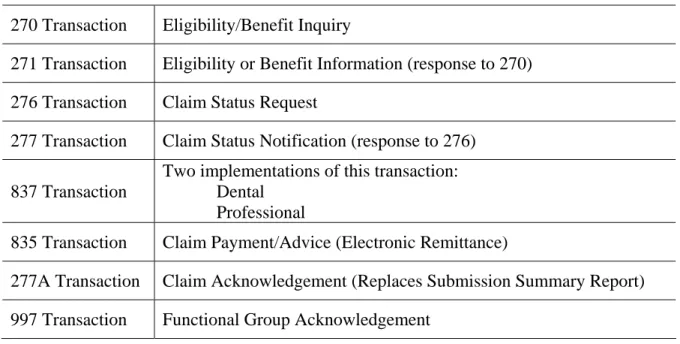
United Concordia will be supporting the following EDI Transactions:
Provider Transactions
270 Transaction Eligibility/Benefit Inquiry
271 Transaction Eligibility or Benefit Information (response to 270) 276 Transaction Claim Status Request
277 Transaction Claim Status Notification (response to 276)
837 Transaction
Two implementations of this transaction: Dental
Professional
835 Transaction Claim Payment/Advice (Electronic Remittance)
277A Transaction Claim Acknowledgement (Replaces Submission Summary Report) 997 Transaction Functional Group Acknowledgement
NOTE: To receive authorization to submit EDI transactions to United Concordia, you must complete the Trading Partner Agreement and Trading Partner EDI Application
which can be found on our website at www.unitedconcordia.com. Select the “Dentist”
tab, then select the “Electronic Data Interchange” link at the left side of the page, then select the category which best represents your company.
2
General Information
2.1 Contact
Information
Information on EDI Transactions can be accessed at www.unitedconcordia.com.
For questions concerning logon IDs, passwords, or file transmissions, please contact Dental Electronic Services.
Address: Dental Electronic Services
P.O. Box 69408 Harrisburg, PA 17110 or TELEPHONE NUMBER: (800) 633-5430 FAX NUMBER: (717) 260-7131
When contacting Dental Electronic Services have your Trading Partner Number and Logon ID available. These numbers facilitate the handling of your questions.
Dental Electronic Services personnel are available for questions from 8:30 a.m. to 5:00 p.m. ET, Monday through Friday.
Questions regarding the content of the claim information or eligibility information received should be directed to the appropriate Customer Service Department listed below:
For example, if you are questioning the payment amount on a claim or the effective date of coverage for a member, the appropriate Customer Service department should be contacted.
Dental (Commercial Products) (800) 332-0366 Dental (Tricare Dental Programs) (800) 866-8499
2.2 System Operating Hours
United Concordia is available to handle EDI transactions 24 hours a day seven days a week, except during scheduled system maintenance periods.
2.3 Audit Procedures
Provider offices that send EDI claims must ensure that input documents and medical records are available for every automated claim for audit purposes. United Concordia may require access to the records at any time.
The Provider’s automated claim input documents must be kept on file for a period of seven years after date of service for auditing purposes. Microfilm/microfiche copies of Provider documents are acceptable. The Provider, not his billing agent, is held accountable for accurate records.
The audit consists of verifying a sample of automated claim input against medical records. Retention of records may also be checked. Compliance to reporting requirements is sample checked to ensure proper coding technique is employed. Signature on file records may also be verified.
In accordance with the Trading Partner Agreement, United Concordia may request, and the Provider is obligated to provide, access to the records at any time.
2.4 Valid Characters in Text Data (AN, string data
element type)
For data elements that are type AN, "string", United Concordia can accept characters from the basic and extended character sets with the following exceptions:
Character Name Hex value
! Exclamation point (21)
> Greater than (3E)
^ Caret (5E)
| Pipe (7C)
~ Tilde (7E)
These five characters are used by United Concordia for delimiters on outgoing transactions and control characters for internal processing and therefore would cause problems if encountered in the transaction data. As described in the X12 standards organization's Application Control Structure document (X12.6), a string data element is a sequence of characters from the basic or extended character sets and contains at least one non-space character. The significant characters shall be left justified. Leading spaces, when they occur, are presumed to be significant characters. In the actual data stream trailing spaces should be suppressed. The representation for this data element type is AN.
3
Security Features
United Concordia Dental Electronic Services personnel will assign Login IDs and Passwords to Trading Partners. EDI Transactions submitted by unauthorized Trading Partners will not be accepted by our United Concordia EDI Operations system.
Trading Partners should protect password privacy by limiting knowledge of the password to key personnel. Also, the password should be changed if there are personnel changes in the Trading Partner office, or at any time the Trading Partner deems necessary.
3.1 Confidentiality
United Concordia and its Trading Partners will comply with the privacy standards for all EDI transactions as outlined in the United Concordia EDI Trading Partner Agreement.
3.2
Authorized Release of Information
When contacting Dental Electronic Services concerning any EDI transactions, you will be asked to confirm your Trading Partner information.
4
Authorization Process
New Trading Partners wishing to submit EDI Transactions electronically must complete and forward a Trading Partner Agreement and EDI Transaction Application to United Concordia Dental Electronic Services.
Completion of the Trading Partner Agreement indicates compliance with specifications set forth by United Concordia for the submission of EDI Transactions. This form must be completed and signed by an authorized representative of the organization.
Complete and accurate reporting of information on both documents will insure that your authorization forms are processed in a timely manner. If you need assistance in completing these forms, contact Dental Electronic Services.
Upon completion of the authorization process, a Logon ID and Password will be assigned to the Trading Partner. Dental Electronic Services will authorize, in writing via mail, the Trading Partner to submit production EDI Transactions.
Test files may be submitted at the discretion of the Trading Partner.
4.1
Where to Get Enrollment Forms to Request a
Trading Partner ID
To receive a Trading Partner ID, you must complete the Trading Partner Agreement and the EDI Transaction Application. You can download these forms from our website,
www.unitedconcordia.com. Select the “Dentist” tab, then select the “Electronic Data Interchange” link at the left side of the page, then select the category which best represents your company.
4.2
Receiving 835 Transactions
If you are not currently receiving 835 (Electronic Remittance Advice) transactions and wish to, you will either need to complete a new EDI Transaction Application or fax a request to Dental Electronic Services. Please include your Trading Partner number on the request. When a Trading Partner is approved to receive 835 transactions, those transactions will be sent for all United Concordia products.
4.3
Adding a New Provider to an Existing Trading
Partner
Trading Partners currently using electronic claim submission who wish to add a new provider to their Trading Partner Number should instruct the provider to call Dental Electronic
Services at (800) 633-5430.
4.4
Deleting Providers from an Existing Trading
Partner
Providers wishing to be deleted from an existing Trading Partner should contact Dental Electronic Services at (800) 633-5430.
4.5
Reporting Changes in Status
Trading Partners changing their information must inform Dental Electronic Services by completing a new EDI Transaction Application or by faxing a letter with the changes indicated to (717) 260-7131. Include the Trading Partner Number on the request.
5
Testing Policy
5.1
United Concordia Syntax Testing
All transactions will be taken into United Concordia’s translator and edited for X12 syntax. A functional acknowledgement 997 transaction will be returned indicating the results of the test. Note that syntax checking is done for any transaction submitted to United Concordia regardless of test or production status of the submitted file.
Trading Partners may choose to submit test transactions to United Concordia at any time. In order to submit a test file, you must indicate “test” in the ISA segment. Any transactions marked as “production” will be processed against actual production data.
Refer to Chapter 8 Section 8.1.3 for details on testing of business edits in the 837D transaction.
6
Communications
6.1 Asynchronous
Dial-Up
Trading Partners submitting via modem dial a toll free telephone number and establish a reliable link with United Concordia.
In order to submit electronically via modem, you will need a computer, modem, and software programmed with the option to submit electronic to United Concordia. Additionally, a
dedicated telephone line for your modem is recommended.
Trading Partners should use modems that support the Z modem transfer protocol and incorporate error correction capabilities. Modem baud rates can range up to 56,000.
For transmitting or retrieving transactions, the asynchronous phone numbers are (877) 533-1539 (Toll-free) and (717) 214-7376 (Toll). You must use the Toll number when retrieving the 835 transaction.
After connecting to United Concordia you will be required to enter your EDI User Logon ID.
To reach a command prompt, enter the Logon ID followed by a semicolon(;). You will
then be required to enter your password. At that point and you will get to the prompt (PN>). The alpha character in the Logon ID must be entered as lower case.
The following is a list of valid commands. All of the commands are shown here in upper case. These commands must be entered into the system in lower case (no shift key or shift-lock). The system will always echo the characters back in upper case:
XS Submit any X12 transaction
XACK Retrieve any and all X12 functional acknowledgements XR Retrieve 835 transactions
X271 Retrieve 271 transactions (response to 270 inquiry) X277 Retrieve 277 transactions
X277U Retrieve 277U (unsolicited) transactions
X### Retrieve other X12 response transactions (future) CHPASS Change Password
L Logoff
NOTE: All of the commands are shown above in upper case. These commands must be entered into the system in lower case (no shift key or shift-lock). The system will always echo the characters back in upper case.
6.1.1 Menu Option
To reach the EDI Operations menu, enter the User Login ID at the Login prompt and you will be directed to the Welcome page (see example). NOTE: The S, G, A, R, and H
commands are not valid for HIPAA-compliant transactions.
In addition to options listed on the menu screen, you can also enter HIPAA-compliant commands. At “Enter letter or selection”, type XS, XACK, etc.
In addition to options listed on the menu screen, you can also enter HIPAA-compliant commands. At “Enter letter or selection”, type XS, XACK, etc.
WELCOME TO HIGHMARK EDI SERVICES ELECTRONIC MAIL CLAIMS NETWORK
PLEASE SELECT ONE OF THE FOLLOWING: S)UBMIT CLAIM DATA
G)ET CONFIRMATION REPORT
A)CQUIRE 6001/6003 SUBMISSION ANALYSIS REPORTS
R)ETRIEVE RECONCILIATION C)HANGE PASSWORD
H)ELP L)OGOFF
6.2 Internet
UCCI offers secured File Transfer Protocol (FTP) through “eDelivery.” “eDelivery” is available for Trading Partners who submit or receive any HIPAA-compliant EDI transactions.
6.2.1 Internet File Transfer Protocol (FTP) through
“eDelivery”
United Concordia utilizes the Highmark Secure FTP Server (“eDelivery”) to provide an FTP service over an encrypted data session providing “on-the-wire” privacy during file
exchanges. This service offers an Internet accessible environment to provide the ability to exchange files with customers, providers, and business partners using a simple FTP process in an encrypted and private manner. Any state of the art browser can be used to access the Highmark Secure FTP Server. Browsers must support strong encryption (128 bit) and must allow cookies for session tracking purposes. Once the browser capabilities are confirmed, the following are the general guidelines for exchanging files.
1. Launch your web browser. Highmark has tested Internet Explorer 6.x and Netscape 7.x browsers.
2. Connect to the FTP servers at: https://ftp.highmark.com
3. The server will prompt for an ID and Password. Use the ID/Password that Highmark has provided you for accessing this service. Enter the ID, tab to password field and enter the password, then hit enter or click on OK.
4. The server will then place you in your individual file space on the FTP server. No one else can see your space and you cannot access the space of others. You will not be able to change out of your space.
5. You will need to change into the directory for the type of file you are putting or getting from the server.
6. By default, the file transfer mode will be binary and this mode is acceptable for all data types. However, you may change between ASCII and Binary file transfer modes by clicking the “Set ASCII”/”Set Binary” toggle button.
7. Send United Concordia a file. The following is an example of the submission of an 837 claim transaction file:
a. Click on the “hipaa-in” folder to change into that directory.
b. Click on the browse button to select a file from your system to send to United Concordia. This will pop open a file finder box listing the files available on
c. Select the file you wish to send to United Concordia and Click on OK. d. This will return you to the browser with the file name you selected in the
filename window. Now click on the “Upload File” button to transfer the file to Highmark. Once completed, the file will appear in your file list.
8. Retrieve a file from United Concordia. The following is an example of retrieval of a 997 Functional Acknowledgement file:
a. Click on the “hipaa-out” directory.
b. Your browser will list all the files available to you. c. Click on the “997” directory.
d. Click on the file you wish to download. Your browser will download the file. If your browser displays the file instead of downloading, click the browser back button and click on the tools next to the file you wish to receive. Select
application/octet-stream. Your system may then prompt you for a “Save As”
file location window. Make the selection appropriate for your system and click on Save to download the file.
7
Transmission Envelopes
7.1 General
Information
Interchange Control (ISA/IEA) and Function Group (GS/GE) envelopes must be used as described in the national implementation guides. United Concordia’s expectations for inbound ISAs and a description of data on outbound ISAs are detailed in this chapter. Specific guidelines and instructions for GS and GE segments are contained in each transaction chapter.
Note – United Concordia only supports one interchange (ISA/IEA envelope) per incoming transmission (file). A file containing multiple interchanges will be rejected for a mismatch between the ISA Interchange Control Number at the top of the file and the IEA Interchange Control Number at the end of the file.
7.1.1 Delimiters
As detailed in the national implementation guides, delimiters are determined by the characters sent in specified, set positions of the ISA header. For transmissions to United Concordia EDI Operations (inbound transmissions), the following list contains all characters that can be accepted as a delimiter.
Please note: Delimiters used may not be used in any text/notes/narrative data within the transaction
Description Hex value
StartOfHeading 01 StartofTeXt 02 EndofTeXt 03 EndOfTrans. 04 ENQuiry 05 ACKnowledge 06 BELL 07 VerticalTab 0B
Description Hex value FormFeed 0C CarriageReturn 0D DeviceControl1 11 DeviceControl2 12 DeviceControl3 13 DeviceControl4 14 NegativeAcK 15 SYNchron.Idle 16 EndTransBlock 17 FileSeparator 1C GroupSeparator 1D RecordSeparator 1E ! 21 “ 22 % 25 & 26 ‘ 27 ( 28 ) 29 * 2A + 2B , 2C . 2E / 2F : 3A ; 3B < 3C = 3D > 3E
Description Hex value @ 40 [ 5B ] 5D ^ 5E { 7B } 7D ~ 7E
*NOTE: May be used as a Data Element Separator, but will not be accepted as Component Element Separate, Repeating Element Separate or Segment Terminator.
United Concordia will use the following delimiters in all outbound transactions.
Delimiter Type Character Used (hex value)
Data element separator ^ (5E)
Component element separator > (3E)
Segment terminator ~ (7E)
Repeating element separator | (7C)
7.2
Data Detail and Explanation of Incoming ISA to
United Concordia
Segment:
ISA
Interchange Control Header (Incoming)Note: This fixed record length segment must be used in accordance with the guidelines in the national transaction implementation guides, with the clarifications listed below.
Data Element Summary
Ref Des. Element Name Element Note
ISA01
Authorization Information Qualifier
United Concordia can only support code 00 - No Authorization Information present.
ISA02 Authorization
Information This element must be space filled.
ISA03
Security Information Qualifier
United Concordia can only support code 00 - No security Information present.
ISA04 Security
Information This element must be space filled.
ISA05 Interchange ID Qualifier
Use qualifier code value “ZZ” Mutually Defined, to designate a payer-defined ID.
United Concordia only supports United Concordia-assigned proprietary IDs for senders.
ISA06 Interchange Sender ID
United Concordia must receive the security logon ID assigned to the trading partner.
This field will be validated against the logon supplied. The ID must be left justified and space filled. Alpha character must be in upper case.
ISA07 Interchange ID Qualifier
Use qualifier code value “33”. United Concordia only supports the NAIC code to identify the receiver (United Concordia).
ISA08 Interchange Receiver ID
United Concordia must be identified using NAIC code 89070. The code must be left justified and space filled.
ISA14 Acknowledgement Requested
United Concordia does not consider the contents of ISA14. A TA1 segment is returned when the incoming
interchange is rejected.
7.3
Data Detail and Explanation of Outgoing ISA
from United Concordia
Segment:
ISA
Interchange Control Header (Outgoing)Note: Listed below are clarifications of United Concordia’s use of the ISA segment for outgoing interchanges.
Data Element Summary
Ref Des. Element Name Element Note
ISA01
Authorization Information Qualifier
United Concordia can only support code 00 - No Authorization Information present.
ISA02 Authorization
Information This element must be space filled.
ISA03
Security Information Qualifier
United Concordia can only support code 00 - No security Information present.
ISA04 Security
Information This element must be space filled.
ISA05 Interchange ID Qualifier
United Concordia will send qualifier code value “33” to designate that the NAIC code is used to identify the sender (United Concordia).
ISA06 Interchange Sender ID
United Concordia will be identified by NAIC code 89070. The code will be left justified and space filled.
ISA07 Interchange ID Qualifier
Use qualifier code value “33”. United Concordia only supports the NAIC code to identify the receiver (United Concordia).
ISA08 Interchange Receiver ID
United Concordia must be identified using NAIC code 89070. The code must be left justified and space filled.
ISA14 Acknowledgement
Requested United Concordia always uses a 0 (no Interchange Acknowledgement Requested).
ISA15 Usage Indicator
United Concordia uses the value in this element to determine the test or production nature of all transactions within the interchange. Only syntax editing will be done
7.4
Outgoing Interchange Acknowledgement
TA1 Segment
United Concordia returns a TA1 Interchange Acknowledgement segment when the entire interchange (ISA-IEA) must be rejected. The reason for the rejection is indicated by the code value in the TA105 data element. This fixed length segment is built in accordance with the guidelines in Appendix B of the national transaction Implementation Guides. Each United Concordia TA1 will have an Interchange Control envelope (ISA-IEA). TA1 segments are not returned for interchanges that are received with no interchange-level errors.
7.5
Outgoing Functional Acknowledgement 997
Transaction
United Concordia returns a 997 Functional Acknowledgement for each Functional Group (GS - GE) envelope that is received. If multiple Functional Groups are received in an Interchange (ISA - IEA) envelope, a corresponding number of 997 Functional
Acknowledgement transactions will be returned.
Action on a Functional Group can be: acceptance, partial acceptance, or rejection. A partial acceptance occurs when the Functional Group contains multiple transactions and at least one, but not all, of those transactions is rejected. (Transaction accepted/rejected status is indicated in AK501.) The location and reason for errors are identified in one or more of the following segments:
AK3 – segment errors AK4 – data element errors AK5 – transaction errors AK9 – functional group errors
Rejection reason codes are contained in Appendix B of each transaction’s national Implementation Guides. Rejected transactions or functional groups must be fixed and resubmitted.
997 transactions will have Interchange Control (ISA-IEA) and Functional Group (GS-GE) envelopes. The Version Identifier Code in GS08 of the envelope containing the 997 will be “004010”, indicating a generic 4010 997 transaction. Note that this will not match the Implementation Guide identifier that was in the GS08 of the envelope of the original
submitted transaction. This difference is because the 997 is generic to the 4010 version and is not unique to each transaction standard.
8
Dental Claim (837D)
The 837D transaction is utilized for dental claims and encounters. The national transaction set implementation guide named in the HIPAA Administrative Simplification Electronic Transaction rule is the primary source for definitions, data usage, and requirements. This companion document contains clarifications and payer-specific requirements related to data usage and content when submitting an 837D to United Concordia based on the national 837D implementation guide.
This EDI Reference Guide applies to transactions related to the following United Concordia traditional and managed care products: Preferred Provider Organization (PPO), Point of Service (POS), Indemnity, and Dental Health Maintenance Organization (DHMO).
United Concordia accepts electronic claims for those payers listed below. Those payers are identified by their NAIC codes in the 2010BB destination payer loop of this transaction. United Concordia EDI Operations, identified by United Concordia’s NAIC code of 89070, is considered to be the interchange receiver (ISA08) in the ISA Interchange Control Header, and the transaction receiver (NM109) in the 1000B Receiver Name loop of the transaction. The health care payers and corresponding National Association of Insurance Commissioners (NAIC) codes:
• 89070 - United Concordia • 54771 – Highmark
* When submitting Dental transactions for the Federal Employee Program (FEP), Highmark’s NAIC code must be used. FEP transactions are identified by a Member Identification Number that starts with “R” and has eight
succeeding numbers. Example: R12345678
8.1
General Information and Guidelines for
Submitting an 837D
8.1.1 Data that is Not Used
While the claim information listed below can be (and in some instances must be) contained in a standard claim transaction, United Concordia’s processing does not currently use the following information:
1. Submitter EDI Contact and Billing Provider Contact (will use contact information on internal files for initial contact)
“Billing” provider. Therefore, payments will be made to the Billing Provider, even if a Pay-To Provider is submitted in the claim transaction.
4. Provider addresses (will use data on internal files if provider is identified)
5. Subscriber and Patient Secondary Identification (not needed for processing)
6. Payer Secondary Identification (not needed for processing)
7. Tooth Status Information in the DN2 segment
8. Other Payer Provider identifiers and Other Payer Provider information (not needed because claims are not sent to other payers for COB)
8.1.2 Transaction
Size
As required in the national implementation guide, United Concordia can accept up to 5,000 claims per 837D transaction. That is, up to 5,000 “2300” Claim Information loops per ST-SE.
8.1.3 837D Business Edit Testing
To test the 837D business edits associated with United Concordia, you must first contact Dental Electronic Services at 800-633-5430. Dental Electronic Services will provide you the instructions needed to send your test files.
Business edit testing is not required. However, United Concordia highly recommends that an 837D test transaction be sent for all new Trading Partners or when testing new software or software enhancements. We recommend that the 837D test transactions contain between 10-50 claims.
8.2
Data Detail for 837D
The following segment references are clarifications and payer-specific requirements related to data usage and content.
Segment:
GS
Functional Group HeaderLoop:
4010A1 Page: B.8
Data Element Summary
Ref Des. Element Name Element Note
GS02 Application Sender’s Code
Sender’s United Concordia assigned Trading Partner Number
GS03 Application Receiver’s Code
To support United Concordia's routing process, all claims in a functional group must be for the same payer. Submit the NAIC number for the payer identified as the
destination payer in loop 2010BB of the 837D transaction. Following is a list of recognized payers and their
respective NAIC codes:
89070 - United Concordia
Segment:
REF
Transmission Type IdentificationLoop:
4010A1 Page: 57
Data Element Summary
Ref Des. Element Name Element Note
REF02 Transmission Type Code
Submit the value specified in the national implementation guide for production mode. Test transmissions are
designated by the appropriate code value in the Interchange Control Header segment at ISA15. The submission of a “D” suffix in this REF segment is not necessary to indicate a test transaction, and will not be carried or considered in processing.
Segment:
NM1
Submitter NameLoop: 1000A
4010A1 Page: 59
Data Element Summary
Ref Des. Element Name Element Note
NM109 Submitter
Identifier Send Trading Partner Number as assigned by United Concordia’s Dental Electronic Services. (i.e., 94XXXX)
Segment:
NM1
Receiver NameLoop: 1000B
4010A1 Page: 66
Data Element Summary
Ref Des. Element Name Element Note
NM109 Receiver Primary Identifier
Use 89070 - This 1000B Receiver Name loop identifies the receiver of the transaction, which for United Concordia equates to the interchange receiver identified in the ISA08 element of the Interchange Control Header. The identifier in this element must be United Concordia’s NAIC code, 89070, to identify United Concordia EDI Operations as the receiver. United Concordia Dental Electronic Services accepts claims for a number of payers as explained in the introduction to this section of the reference guide. Those payers are identified by the NAIC codes in the 2010BB destination payer loop.
Segment:
PRV
Provider Specialty InformationLoop: 2000A Billing/Pay-To Provider
2310A Referring Provider
2310B & 2420A Rendering Provider
2310D & 2420C Assistant Surgeon
4010A1 Page: 69, 183, 190, 202, 292, 304
Note: The provider class and specialty from internal files will be used for processing, not the submitted taxonomy code.
Segment:
NM1
Subscriber NameLoop: 2010BA
4010A1 Page: 102
Data Element Summary
Ref Des. Element Name Element Note
NM109 Identification
Code This is the Member Identification Number assigned by United Concordia.
Segment:
NM1
Payer NameLoop: 2010BB
4010A1 Page: 113
Data Element Summary
Ref Des. Element Name Element Note
NM109 Payer Identifier
Submit the NAIC number for the destination payer. Following is a list of recognized payers and their respective NAIC codes:
89070 - United Concordia 54771 - Highmark
* When submitting Dental transactions for the Federal Employee Program (FEP), Highmark’s NAIC code must be used. FEP transactions are identified by a Member Identification Number that starts with “R” and has eight succeeding numbers. Example: R12345678
Segment:
NM1
Patient NameLoop: 2010CA
4010A1 Page: 131
Data Element Summary
Ref Des. Element Name Element Note
NM109 Patient Primary
Segment:
CLM
Claim InformationLoop: 2300
4010A1 Page: 144
Data Element Summary
Ref Des. Element Name Element Note
CLM05-3 Claim Frequency
Type Code All claims will be adjudicated as original (code value = 1) regardless of the value submitted.
Segment:
PWK
Claim Supplemental InformationLoop: 2300
4010A1 Page: 164
Note1: Attachments associated with a PWK paperwork segment should be sent at the same time the 837D claim transaction is sent. United Concordia's business practice is that additional documentation received more than 5 days after the receipt of your 837D claim transmission may not be considered in adjudication thereby resulting in development or denial of your claim.
Note2: The PWK segment and attachments should only be used when
supplemental information is necessary for the claim to be accurately and completely adjudicated according to established business policies and guidelines. The PWK and attachments should not be used without regard to established requirements because their use will trigger procedures to consider the contents of the supplemental information that may delay the processing of the claim as compared to a like claim without a PWK.
Note3: A Cover Sheet should be used when faxing or mailing supplemental information in support of an electronic claim. PLEASE INDICATE PATIENT NAME, PATIENT ID NUMBER, PROVIDER NAME, AND PROVIDER NATIONAL PROVIDER IDENTIFIER (NPI) NUMBER ON BOTH THE COVER SHEET AND THE
ATTACHMENT.
Data Element Summary
Ref Des. Element Name Element Note
PWK01 Attachment Report Code
United Concordia may be able to adjudicate your claim more quickly and accurately if you utilize a specific code in PWK01 and not the generic “OZ” - Support Data for Claim.
PWK02 Attachment Transmission Code
United Concordia's business practices and policy only support the following transmission types at this time:
BM - By mail;
Mail Tricare Dental Plan claims attachments to:
TDP Claims
PO Box 69411
Harrisburg, PA 17106-9411
Mail all other United Concordia claims
attachments to:
United Concordia Commercial Claims PO Box 69421
Harrisburg, PA 17106-9421
FX - By fax; fax to (800) 985-2024.
EL - Electronically Only (Attachment Warehouses)
Segment:
AMT COB
Patient Paid AmountLoop: 2320
4010A1 Page: 223
Note: This COB Patient Paid Amount AMT segment should
not be used. The national standards group has confirmed that an oversight resulted in two places for reporting this amount in the 4010 Implementation Guide, this 2320 AMT and the 2320 CAS. Therefore, this usage of the AMT segment will be removed in the next version of the guide. The amount (previous payer paid to the patient) will be reported to the provider in the previous payer’s 835 remittance in a CAS segment, and therefore can and should be reflected in the CAS segment (2320 loop) in an 837D claim to a secondary payer.
The amount that the patient paid to the provider is not reported in this segment; rather, that amount is placed in the Patient Paid Amount AMT in the 2300 loop.
Segment:
NM1
Other Payer NameLoop: 2330B
4010A1 Page: 237
Data Element Summary
Ref Des. Element Name Element Note
NM109 Other Payer
Primary Identifier
Until the National Health Plan ID is established, this NM109 data element will only be used to match to the corresponding information in the 2430 loop.
Use a unique number that identifies the other payer in the submitter’s system. As specified in the national
implementation guide, if line level adjudication
information from this other payer is being submitted in the 2430 Service Line Adjudication Information loop, it is critical that the Other Payer ID number in this 2330B element match exactly the Payer Identifier in the SVD01 element of the 2430 loop.
If the submitter’s system does not have a unique identifier for the other payer, a value can be assigned by the
submitter that is unique within this transaction.
Segment:
SV3
Service LineLoop: 2400
4010A1 Page: 262
Data Element Summary
Ref Des. Element Name Element Note
SV301-2 Product/Service ID
United Concordia will validate the procedure code reported to ensure that it is an American Dental
Association Current Dental Terminology procedure code. Procedure code will be validated to ensure that it is effective for the Date of Service reported.
SV304 Oral Cavity
Designation Code United Concordia business practices and policy do not support the “09 - Other area of Oral Cavity” Code.
SV306 Quantity
United Concordia requires that units of service be reported for anesthesia services. (Units of Service = 15 minutes). For example, 1 hour of anesthesia would be reported as SV306 = 4.
Segment:
TOO
Tooth InformationLoop: 2400
4010A1 Page: 269
Note: United Concordia suggests that multiple iterations of the TOO segment only be used when the SV306 (Quantity) in Loop 2400 is equal to one. This will allow for more accurate reporting of the processed claim on the 835 transaction.
For Example: If reporting a partial denture, multiple tooth numbers may be reported on this service line. However, if multiple crowns or restorations are being reported, they must be reported on separate lines.
Data Element Summary
Ref Des. Element Name Element Note
TOO02 Industry Code
United Concordia will validate the tooth number/code reported. Acceptable tooth numbers/codes are:
1 through 32 (Permanent Teeth) A through T (Primary Teeth)
51 through 82 (Supernumerary Permanent Teeth) AS through TS (Supernumerary Primary Teeth)
9
Claim Acknowledgement (277A)
The Claim Acknowledgement transaction is used to return a reply of accepted or not
accepted for claims or encounters submitted via the 837D transaction that have passed syntax validation. Acceptance at this level is based on Implementation Guide and United Concordia front-end business edits and will apply to individual claims within an 837D transaction. That is, for a given 837D transaction, this 277A Acknowledgement will indicate which claims were accepted for processing and which claims were not accepted.
The details of United Concordia’s acknowledgement transaction are contained in the 277A Claims Acknowledgement Reference Guide document in Appendix A.
Generally, claim submitters should expect a 277A Claim Acknowledgement within 24 hours of the time that United Concordia received the 837D claims, subject to processing cutoffs.
10 Claim Payment Advice (835)
The 835 is utilized to send an electronic Explanation of Benefits (EOB) remittance advice from a health care payer to a health care provider. Health care providers that may receive the 835 include but are not limited to hospitals, nursing homes, laboratories, physicians, dentists, and allied professional groups.
The national transaction set implementation guide named in the HIPAA Administrative Simplification Electronic Transaction rule is the primary source for definitions, data usage and requirements. This supplemental document contains clarifications and payer-specific requirements related to data usage and content when receiving an 835 from United Concordia EDI Operations.
This EDI Reference Guide applies to transactions related to the following United Concordia traditional and managed care products: Preferred Provider Organization (PPO), Point of Service (POS), Indemnity and Dental Health Maintenance Organization (DHMO).
10.1
General Information and Guidelines for 835
While the Claim Payment Advice information listed below may have been submitted in a standard claim transaction, it was not captured and used in processing by the payers listed in the EDI Reference Guide. The payers will utilize data from internal databases.
• Payer name and address • Payee name and address
10.1.1
Missing Checks
If a payment reflected in the 835 is not received, the Provider should contact the payer’s customer department for assistance.
Dental (Commercial Products) (800) 332-0366
10.1.2
Administrative Checks
Administrative check information will not be reflected in the 835 transaction. Administrative checks are issued from a manual process and are not part of a weekly payment cycle. A letter or some form of documentation usually accompanies the check. An Administrative check does not routinely contain an Explanation of Benefits notice.
10.1.3
Availability
835 transactions are created on a weekly basis to correspond with payers’ weekly payment cycles. The 835 transaction files become available for retrieval Monday of each week and remain available through the remainder of the week. If an 835 transaction was expected but not available for retrieval in any given week, contact Dental Electronic Services for assistance at (800) 633-5430.
10.1.4
Highmark Oral Surgery
Claims for oral surgery services that are processed through Highmark Medical-Surgical health care products will be reported in Highmark’s 835 transaction.
10.1.5
Unavailable Claim Data
Paper claims and non-HIPAA electronic claim submission modes may not provide all data utilized in the 835. Therefore, some data segments and elements in the 835 Claim Payment Advice may be populated with “dummy data” or not available as a result of the claim submission mode. If a paper claim is received with no procedure code or procedure description, UNKNO will be sent back in the SVC01-2 composite data element.
10.1.6
Claim Overpayment Refunds
A check or provider level offset/reduction will be utilized to recoup refunds for overpayment of claims that were not voluntarily returned by the provider after being notified of the refund request. This reduction in total payment (check) will be reported in the PLB segment of the transaction using the WO qualifier code.
10.1.7
Capitation Payments
10.1.8
Encounter Data on the 835
United Concordia provides encounter data on the 835 transaction.
NOTE: The encounter claim and line charges will reflect the manufactured charges used by United Concordia for encounter processing. The original claim and line level charges, if reported on the incoming encounter, will not be reported back on the 835.
10.1.9
Member Identification Numbers
This is the Member Identification Number assigned by United Concordia.
10.1.10
Data that is Not Used
The following segments will not be utilized in the 835: • CUR - Foreign Country Information
• REF - Version Identification
• TS3 - Provider Summary Information
• TS2 - Provider Supplemental Summary Information • QTY - Service Supplemental Quantity
10.2
Data Detail for 835
The following segment references are clarifications and payer-specific requirements related to data usage and content.
Segment:
GS
Functional Group HeaderLoop:
4010A1 Page: B.8
Data Element Summary
Ref Des. Element Name Element Note
GS02 Application Sender’s Code
United Concordia will send the NAIC code and transaction related suffix for the following recognized payers:
VALUE (PAYER)
89070 (United Concordia)
GS03 Application Receiver’s Code
This will be the electronic Trading Partner Number assigned by United Concordia’s Dental Electronic Services for transmission of 835 Transactions.
GS06 Group Control
Number United Concordia will send unique control numbers for each functional group.
Segment:
BPR
Financial InformationLoop:
4010A1 Page 45
Data Element Summary
Ref Des. Element Name Element Note
BPR01 Transaction
Handling Code The only values that will be passed are H and I.
BPR04 Payment Method Code
CHK will be utilized when payment is made via check.
NON will be utilized when the payment amount for the 835 is zero. (Subscriber Paid Claims or Encounters)
Segment:
REF
Receiver Identification Loop:4010A1 Page: 57
Data Element Summary
Ref Des. Element Name Element Note
REF02 Receiver ID This will be the electronic Trading Partner Number assigned by United Concordia's Dental Electronic Services for transmission of 835 Transactions.
Segment:
REF
Additional Payer IdentificationLoop: 1000A
4010A1 Page: 67
Data Element Summary
Ref Des. Element Name Element Note
REF01
Reference Identification Qualifier
The code value “NF” will be utilized to designate the Payer’s NAIC code in REF02.
REF02 Additional Payer ID
89070 - United Concordia 54771 – Highmark
Segment:
REF
Payee Additional IdentificationLoop: 1000B
4010A1 Page: 77
Data Element Summary
Ref Des. Element Name Element Note
REF01
Payee Additional Identification Qualifier
PQ will be utilized for the Payer’s assigned provider number.
Segment:
CLP
Claim Payment InformationLoop: 2100
4010A1 Page: 89
Data Element Summary
Ref Des. Element Name Element Note
CLP01 Claim Submitter’s
Identifier The actual Patient Account value may not be passed from paper claim submissions.
Segment:
PLB
Provider AdjustmentLoop:
4010A1 Page: 165
Data Element Summary
Ref Des. Element Name Element Note
PLB03-1 PLB05-1 PLB07-1 PLB09-1 PLB11-1 PLB13-1 Provider Adjustment Reason Code
Values noted will be passed when applicable for reducing or increasing the provider’s check.
WO - will be utilized for recouping claim overpayments - Professional. PLB03-2 PLB05-2 PLB07-2 PLB09-2 PLB11-2 PLB13-2 Provider Adjustment Identifier
When the Adjustment Reason Code is WO, the reference number will be the Member's ID and or a Customer Service Inquiry Tracking number.
11 Claim Status (276 & 277)
The 276 transaction is used to request the status of a health care claim(s), and the 277 transaction is used to respond with information regarding the specified claim(s). These implementation guides were designed to allow for standardized submission of data content for all users. Entities who can request health care claim status include, but are not limited to, hospitals; nursing homes; laboratories; physicians; dentists; allied professional groups; Preferred Provider Organizations and Billing Services acting on behalf of Health Care Providers.
The national transaction set implementation guide named in the HIPAA Administrative Simplification Electronic Transaction rule is the primary source for definitions, data usage and requirements. This supplemental document contains clarifications and payer specific requirements related to data usage and content when submitting a 276 to United Concordia EDI Operations or receiving a 277 from United Concordia EDI Operations.
This EDI Reference Guide applies to transactions related to the following United Concordia traditional and managed care products: Preferred Provider Organization (PPO), Point of Service (POS), Indemnity and Dental Health Maintenance Organization (DHMO). Health care payers, and their corresponding National Association of Insurance
Commissioners (NAIC) codes, represented in sections 11.1 and 11.2 of this guide are: • United Concordia - 89070
• Highmark - 54771
11.1 General Instructions and Guidelines for 276 and
277
The sections below will provide guidelines about the 276 and 277 transaction. These sections provide minimum data requirements for submitting a 276 status request, and what data the payer will respond with on the 277 response transaction.
11.1.1 General Instructions and Guidelines for 276
The general instruction section will provide guidelines in submitting a successful 276 transaction. Detailed in the sections below are minimum data requirements that must be followed in order for the payer to process the 276 request. Also, there is information on dental services, data not used by the payer, specified minimum data requirements and situational data elements, and limitations on submitting multiple requests.
11.1.1.1 General
Description
All claim status requests will be processed in a batch mode, and will only include
information available on the payers’ adjudication system not yet purged. The 276 health care claim request can be used to request a status at a claim level, or for specific service lines.
11.1.1.2 Dental
Services
All status requests containing a CDT dental procedure code must be submitted directly to United Concordia Companies, Inc. (UCCI). Any claim status requests for oral surgery services reported with a CPT medical procedure code must be requested to either United Concordia or Highmark according to which payer is responsible for the patient’s oral surgery coverage.
11.1.1.3
Data that Is Not Used
While the claim status information listed below can be (and in some cases must be) contained in a standard claim status request transaction, this information may not be captured and used by the payers listed in the EDI Reference Guide:
Payer name - NM1 (2100A) - payer will search for claims using the payer ID, not the payer name.
Payer Contact - PER (2100A) - payer will use contact information on internal files when necessary.
Provider name - NM1 (2100C) - payer will search for claims using the billing provider ID, not provider name.
Subscriber and Patient name - NM1 (2100D/E) - payer will search for claims using the member ID or health insurance claim number, (HIC #), not the Subscriber or Patients name. Service line information - SVC (2210D/E) - payer will use only the minimum/situational elements described further in this EDI Reference Guide when searching for claims; the payer will not use the service line information reported in the SVC. Note that service line
information will be returned in the response transaction if the claim is finalized.
11.1.1.4
Situational Elements and Data Content
United Concordia will sequentially use the following elements and data content to narrow down the search when looking for claims:
Patient Date of Birth (2000D/E) Patient First Name
(when provided)
(2100D/E) Medical Record Number
If one of these elements eliminates all potential matches, those claims identified prior to that criteria will be returned.
11.1.1.5
Multiple Requests Per Transaction
Multiple subscribers for one provider and/or multiple dependents for one subscriber can be submitted and a response will be sent for each. Requests for both the subscriber and that subscriber’s dependent cannot be included in the same subscriber loop; rather, there must be one subscriber loop for the request concerning the subscriber and a second subscriber loop for the request concerning the dependent.
11.1.2
General Instructions and Guidelines for 277
The general instruction section will provide information regarding a 277 transaction. Detailed in the sections below is the data that will be sent on a 277 response by the payer. This section also addresses claim splits, when to call customer service and the maximum claims returned for one 276 claim status request.
11.1.2.1
General Description of 277
The 277 health care claim response will contain information for both pending and finalized claims, the pending claims will be returned at the claim level, but all finalized claims will be returned with the processed service lines. The 277 response will only return the specified service lines in response to a 276 request for specific service lines.
11.1.2.2 Claim
Splits
Claims split during processing will be reported as multiple claims on the 277 Claim Status Response.
11.1.2.3
Customer Service Requests
When it is determined that a request cannot be answered from the information provided, please change your search criteria or contact the customer service area (according to normal procedures).
11.1.2.4
Maximum Claim Responses per Subscriber/Patient/
Dependent
If multiple claims are found for one status request, the Payer can only respond with a
maximum of 50 claims. If the number of claims found is greater than 50, the last claim on the 277 response will contain a Claim Status Category Code ‘D0’, Change Search Criteria, and a Claim Status Code of ‘0’, Cannot Provide Further Status Electronically. The requestor should change the data in the 276 request and submit a new request if the claims returned do not answer the initial status request.
11.1.2.5
Claim vs. Line Reporting of Status
All status requests still listed as pending will only receive pending responses at claim level. All pending finalized claims will show no check information but will have line detail information. All status requests that find finalized claims at the claim level will receive a response for all lines. All status requests at a line level will receive responses for only matching lines.
11.2
276/277 Data Detail Instructions
This section will provide the data detail that is required when submitting a 276 transaction. The segments below contain the minimum data requirements that must be followed in order for the payer to process the 276 claim status request transaction. This section also covers what data detail will be sent by the payer on the 277 response transaction.
11.2.1
Data Detail for Claim Status Request (276)
Specific segments and content detail must be included on the 276 health care claim request in order for the payer to process the 276 claims status request. Please look over the data detail in this section before submitting a 276 health care claim request.
Segment:
GS
Functional Group HeaderLoop:
4010A1 Page: B.8
Data Element Summary
Ref Des. Element Name Element Note
GS02 Application Sender’s Code
Sender’s United Concordia-assigned Trading Partner Number.
Must be prefixed with a “B” for Batch (i.e., B94XXXX).
GS03 Application Receiver’s Code
To support United Concordia's routing process, all 276 transactions in a functional group should be for the same payer. Submit the NAIC number for the payer identified in loop 2100A of the 276 transaction. Following is a list of recognized payers and their respective NAIC codes:
Segment:
NM1
Payer NameLoop: 2100A
4010A1 Page: 54
Data Element Summary
Ref Des. Element Name Element Note
NM108 Identification Code Qualifier
The payers’ Claim Status routing process requires the use of the National Association of Insurance Commissioners (NAIC) Identification, therefore code value “NI” must be used with the appropriate NAIC identifier in NM109.
NM109 Payer Identifier
Enter the payer's NAIC number from the list below.
89070 - United Concordia 54771 – Highmark
Segment:
NM1
Information Receiver NameLoop: 2100B
4010A1 Page: 62
Data Element Summary
Ref Des. Element Name Element Note
NM108 Identification Code Qualifier
The payers’ Claim Status process requires the use of the Trading Partner Number as assigned by United Concordia EDI Operations. This must be designated by a code value in this data element of “46”, Electronic Transmitter
Identification Number. NM109 Information Receiver Identification Number
Send Trading Partner Number as assigned by United
Concordia's EDI Operations. This must be the same number as identified in GS02. (i.e., 94XXXX)
Segment:
NM1
Provider NameLoop: 2100C
4010A1 Page: 67
Data Element Summary
Ref Des. Element Name Element Note
NM108 Identification Code Qualifier Use code value “XX”, National Provider Identifier (NPI.)
NM109 Provider Identifier Enter your National Provider Identifier (NPI) number.
Segment:
NM1
Subscriber NameLoop: 2100D
4010A1 Page: 74
Data Element Summary
Ref Des. Element Name Element Note
NM108 Identification Code Qualifier Use code value “MI”, Member Identification Number.
NM109
Subscriber
Identifier This is the Member Identification Number assigned by United Concordia.
Segment:
REF
Payer Claim ID NumberLoop: 2200D
2200E
4010A1 Page: 80, 107
Data Element Summary
Ref Des. Element Name Element Note
REF02
Payer Claim Identification Number
Enter the Payer’s Claim Control Number.
Note: When the Payer’s Claim ID Number is provided, the Payer will limit its search to an exact match of that ID number.
11.2.2
Data Detail for Claim Status Response (277)
The payer will return specific data content on the 277 health care claim response. The detail data listed in this section will be what is sent back on the 277 response transaction.
Segment:
GS
Functional Group HeaderLoop:
4010A1 Page: B.8
Data Element Summary
Ref Des. Element Name Element Note
GS02 Application Sender’s Code
United Concordia will send the NAIC code and transaction related suffix for the following recognized payers:
VALUE (PAYER)
12
Eligibility Request (270) and
Response
(271)
The 270 / 271 transactions are designed so that inquiry submitters (information receivers) can determine whether an information source has a particular subscriber or dependent on file, and the health care eligibility about the subscriber or dependent.
The national transaction set implementation guide named in the HIPAA Administrative Simplification Electronic Transaction rule is the primary source for definitions, data usage and requirements. This supplemental document contains clarifications and payer specific requirements related to data usage and content when submitting a 270 to United Concordia EDI Operations or receiving a 271 from United Concordia EDI Operations.
This EDI Reference Guide applies to transactions related to the following United Concordia traditional and managed care products: Preferred Provider Organization (PPO), Point of Service (POS), Indemnity and Dental Health Maintenance Organization (DHMO). The health care payer, and its corresponding National Association of Insurance Commissioners (NAIC) code, represented in sections 12.1 and 12.2 of this guide is:
• 89070 - United Concordia • 54771 - Highmark
12.1
General Instructions and Guidelines for 270
and 271
12.1.1
United Concordia Requirements
In some instances United Concordia's business is supported by only some of the allowed values. In these cases the values allowed are identified in the reference guide along with the action which will be taken if the guide is not followed.
12.1.2
Oral Surgery Inquiries
Oral Surgery inquiries must be submitted to both United Concordia for Dental coverage and Highmark for Medical coverage.