#SVSummit16
Roundtable
Sessions
COLOR-CODED MAP
ROUNDTABLE SCHEDULES
(
WEB and
CRM)
Tucson Ballroom
SESSIONS MAP
Table Number
1
8
15
2
7
9
14
16
3
6
10
13
17
4
5
11
12
18
Foyer/Reception
B
al
con
y
TABLE SESSION
TIME
1
Deep Dive on the Text Box Widget (CMS)
The Text Box Widget displays text, links and images in thousands of different ways. Let us walk through all the available features to make content development work a breeze.9:45 - 10:45 AM
11:00 AM - NOON
2:15 - 3:15 PM
2
Content Updates Timeline (CMS)
As sites are updated, be aware of what content changes will appear. This will depend on whether changes were made in Simpleview CMS or CRM. Come learn and collect “Cache” prizes if you can answer our presenters’ questions correctly.
9:45 - 10:45 AM
11:00 AM - NOON
2:15 - 3:15 PM
3
Social Media Ads: Succeed in the Digital Advertising Platform (SEM)
The Facebook and Twitter advertising platforms have become an increasingly powerful component of social media strategy. With the ability to demographically target millions of users, the power of social media advertising cannot be ignored! This session will discuss: Exciting ways to engage with your audience, The Power of Facebook and Twitter Advertising, Tips and Tricks from the Paid Media Team.
9:45 - 10:45 AM
11:00 AM - NOON
2:15 - 3:15 PM
4
Three Ways to Get Links (SEM)
Everyone needs links to rank, but getting good ones has always been difficult and time-consuming. Learn three scalable techniques for earning good links that will boost rankings across a wide variety of keywords.9:45 - 10:45 AM
11:00 AM - NOON
2:15 - 3:15 PM
5
Determine the Value of Your Website (DTN)
Curious how much revenue can be generated through your DMO website if you monetized it with an advertising program for local businesses? Come to this roundtable equipped with the trailing 12-months total (not unique) page views and we’ll let you know! While revenue varies for every market, we have identified consistent growth trends and averages regarding CPM’s by market designation.
9:45 - 10:45 AM
11:00 AM - NOON
2:15 - 3:15 PM
6
UX Design Tips using CMS 3.0 (CREATIVE)
The new CMS gives DMOs the ability to change whatever they want—great for the DMO, but with great power comes great responsibility. In this roundtable, a Simpleview Creative expert will discuss the website audit and other processes that will help keep your site on-brand and in check.
9:45 - 10:45 AM
11:00 AM - NOON
2:15 - 3:15 PM
7
Creative Q&A Roulette (CREATIVE)
All bets are off in this no-holds-barred Q&A roundtable with Simpleview’s Creative panel. Email questions to [email protected] or ask on-the-fly questions about our creative process, favorite beers, office antics, or Moose, our resident K-9 and quality assurance expert.
9:45 - 10:45 AM
11:00 AM - NOON
2:15 - 3:15 PM
8
Creating a Bid Book Table Template (BID BOOK)
Ever worry about fonts not matching the rest of your Bid Book? Learn how to create a table template within the Bid Book section, so typing that sales letter in a Word document is consistent and has fonts staying within brand guidelines.
9:45 - 10:45 AM
11:00 AM - NOON
2:15 - 3:15 PM
Tucson Ballroom
ROUNDTABLE
Tucson Ballroom
SESSIONS
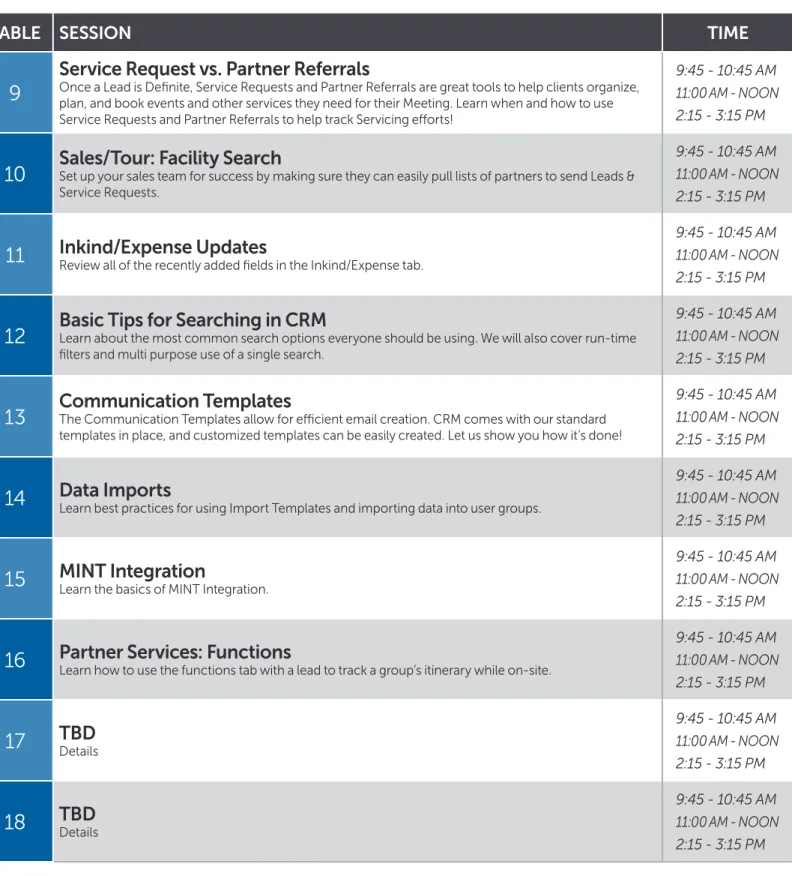
TABLE SESSION
TIME
9
Service Request vs. Partner Referrals
Once a Lead is Definite, Service Requests and Partner Referrals are great tools to help clients organize, plan, and book events and other services they need for their Meeting. Learn when and how to use Service Requests and Partner Referrals to help track Servicing efforts!
9:45 - 10:45 AM
11:00 AM - NOON
2:15 - 3:15 PM
10
Sales/Tour: Facility Search
Set up your sales team for success by making sure they can easily pull lists of partners to send Leads & Service Requests.9:45 - 10:45 AM
11:00 AM - NOON
2:15 - 3:15 PM
11
Inkind/Expense Updates
Review all of the recently added fields in the Inkind/Expense tab.9:45 - 10:45 AM
11:00 AM - NOON
2:15 - 3:15 PM
12
Basic Tips for Searching in CRM
Learn about the most common search options everyone should be using. We will also cover run-time filters and multi purpose use of a single search.9:45 - 10:45 AM
11:00 AM - NOON
2:15 - 3:15 PM
13
Communication Templates
The Communication Templates allow for efficient email creation. CRM comes with our standard templates in place, and customized templates can be easily created. Let us show you how it’s done!9:45 - 10:45 AM
11:00 AM - NOON
2:15 - 3:15 PM
14
Data Imports
Learn best practices for using Import Templates and importing data into user groups.9:45 - 10:45 AM
11:00 AM - NOON
2:15 - 3:15 PM
15
MINT Integration
Learn the basics of MINT Integration.9:45 - 10:45 AM
11:00 AM - NOON
2:15 - 3:15 PM
16
Partner Services: Functions
Learn how to use the functions tab with a lead to track a group’s itinerary while on-site.9:45 - 10:45 AM
11:00 AM - NOON
2:15 - 3:15 PM
17
TBD
Details9:45 - 10:45 AM
11:00 AM - NOON
2:15 - 3:15 PM
18
TBD
Details9:45 - 10:45 AM
11:00 AM - NOON
2:15 - 3:15 PM
TUESDAY, APRIL 5
CRM
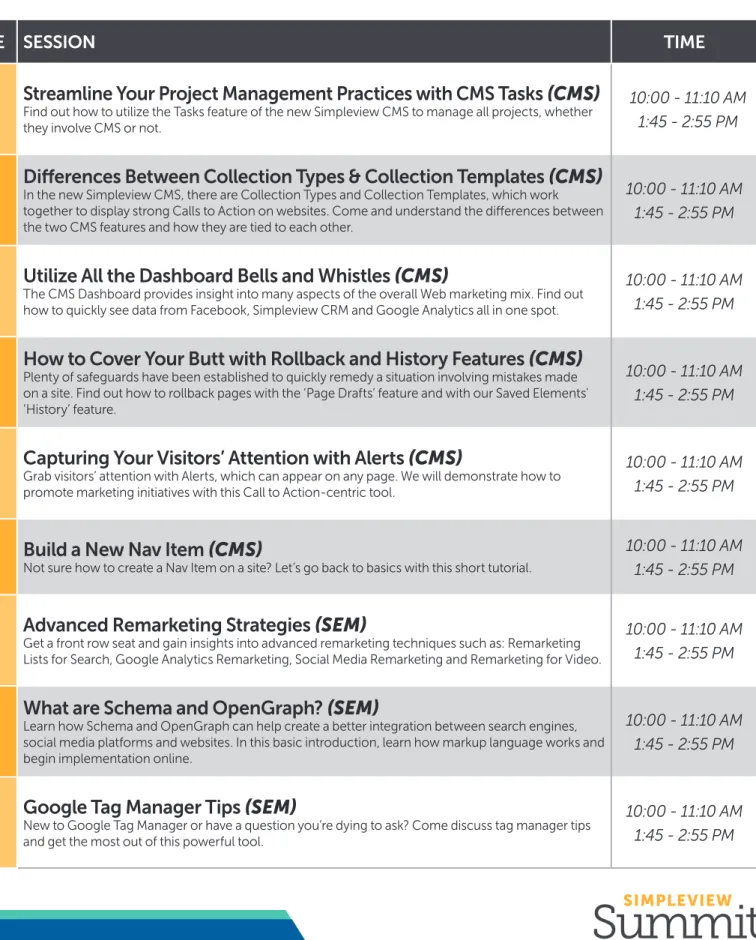
TABLE SESSION
TIME
1
Streamline Your Project Management Practices with CMS Tasks (CMS)
Find out how to utilize the Tasks feature of the new Simpleview CMS to manage all projects, whether they involve CMS or not.10:00 - 11:10 AM
1:45 - 2:55 PM
2
Differences Between Collection Types & Collection Templates (CMS)
In the new Simpleview CMS, there are Collection Types and Collection Templates, which work together to display strong Calls to Action on websites. Come and understand the differences between the two CMS features and how they are tied to each other.
10:00 - 11:10 AM
1:45 - 2:55 PM
3
Utilize All the Dashboard Bells and Whistles (CMS)
The CMS Dashboard provides insight into many aspects of the overall Web marketing mix. Find out how to quickly see data from Facebook, Simpleview CRM and Google Analytics all in one spot.10:00 - 11:10 AM
1:45 - 2:55 PM
4
How to Cover Your Butt with Rollback and History Features (CMS)
Plenty of safeguards have been established to quickly remedy a situation involving mistakes made on a site. Find out how to rollback pages with the ‘Page Drafts’ feature and with our Saved Elements’ ‘History’ feature.
10:00 - 11:10 AM
1:45 - 2:55 PM
5
Capturing Your Visitors’ Attention with Alerts (CMS)
Grab visitors’ attention with Alerts, which can appear on any page. We will demonstrate how to promote marketing initiatives with this Call to Action-centric tool.10:00 - 11:10 AM
1:45 - 2:55 PM
6
Build a New Nav Item (CMS)
Not sure how to create a Nav Item on a site? Let’s go back to basics with this short tutorial.10:00 - 11:10 AM
1:45 - 2:55 PM
7
Advanced Remarketing Strategies (SEM)
Get a front row seat and gain insights into advanced remarketing techniques such as: Remarketing Lists for Search, Google Analytics Remarketing, Social Media Remarketing and Remarketing for Video.10:00 - 11:10 AM
1:45 - 2:55 PM
8
What are Schema and OpenGraph? (SEM)
Learn how Schema and OpenGraph can help create a better integration between search engines, social media platforms and websites. In this basic introduction, learn how markup language works and begin implementation online.
10:00 - 11:10 AM
1:45 - 2:55 PM
9
Google Tag Manager Tips (SEM)
New to Google Tag Manager or have a question you’re dying to ask? Come discuss tag manager tips and get the most out of this powerful tool.10:00 - 11:10 AM
1:45 - 2:55 PM
Tucson Ballroom
ROUNDTABLE
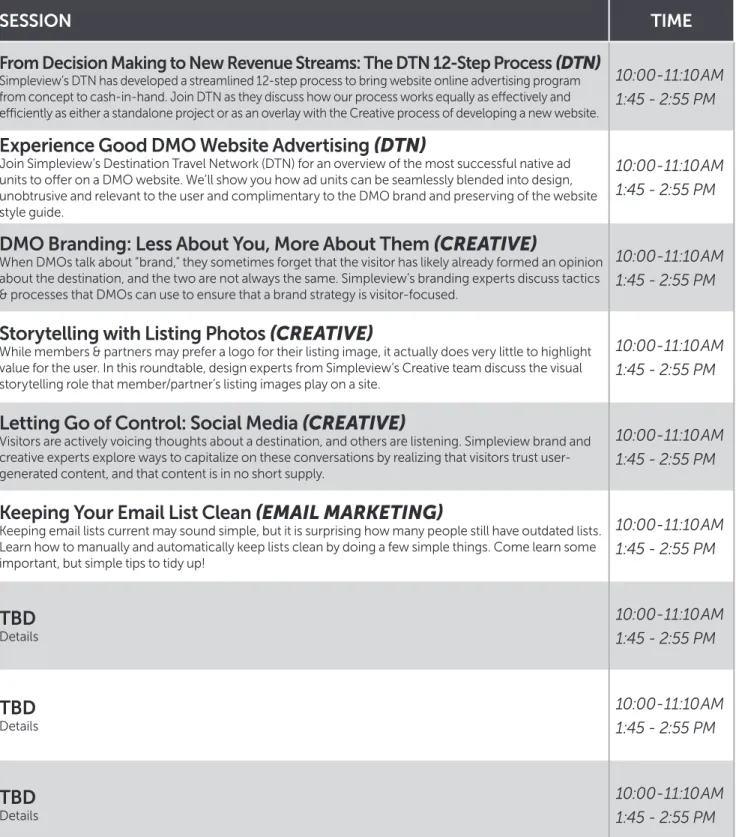
TABLE SESSION
TIME
10
From Decision Making to New Revenue Streams: The DTN 12-Step Process
(DTN)
Simpleview’s DTN has developed a streamlined 12-step process to bring website online advertising program from concept to cash-in-hand. Join DTN as they discuss how our process works equally as effectively and efficiently as either a standalone project or as an overlay with the Creative process of developing a new website.
10:00 - 11:10 AM
1:45 - 2:55 PM
11
Experience Good DMO Website Advertising (DTN)
Join Simpleview’s Destination Travel Network (DTN) for an overview of the most successful native ad units to offer on a DMO website. We’ll show you how ad units can be seamlessly blended into design, unobtrusive and relevant to the user and complimentary to the DMO brand and preserving of the website style guide.
10:00 - 11:10 AM
1:45 - 2:55 PM
12
DMO Branding: Less About You, More About Them (CREATIVE)
When DMOs talk about “brand,” they sometimes forget that the visitor has likely already formed an opinion about the destination, and the two are not always the same. Simpleview’s branding experts discuss tactics & processes that DMOs can use to ensure that a brand strategy is visitor-focused.
10:00 - 11:10 AM
1:45 - 2:55 PM
13
Storytelling with Listing Photos (CREATIVE)
While members & partners may prefer a logo for their listing image, it actually does very little to highlight value for the user. In this roundtable, design experts from Simpleview’s Creative team discuss the visual storytelling role that member/partner’s listing images play on a site.
10:00 - 11:10 AM
1:45 - 2:55 PM
14
Letting Go of Control: Social Media (CREATIVE)
Visitors are actively voicing thoughts about a destination, and others are listening. Simpleview brand and creative experts explore ways to capitalize on these conversations by realizing that visitors trust user-generated content, and that content is in no short supply.
10:00 - 11:10 AM
1:45 - 2:55 PM
15
Keeping Your Email List Clean (EMAIL MARKETING)
Keeping email lists current may sound simple, but it is surprising how many people still have outdated lists. Learn how to manually and automatically keep lists clean by doing a few simple things. Come learn some important, but simple tips to tidy up!
10:00 - 11:10 AM
1:45 - 2:55 PM
16
TBD
Details10:00 - 11:10 AM
1:45 - 2:55 PM
17
TBD
Details10:00 - 11:10 AM
1:45 - 2:55 PM
18
TBD
Details10:00 - 11:10 AM
1:45 - 2:55 PM
Tucson Ballroom
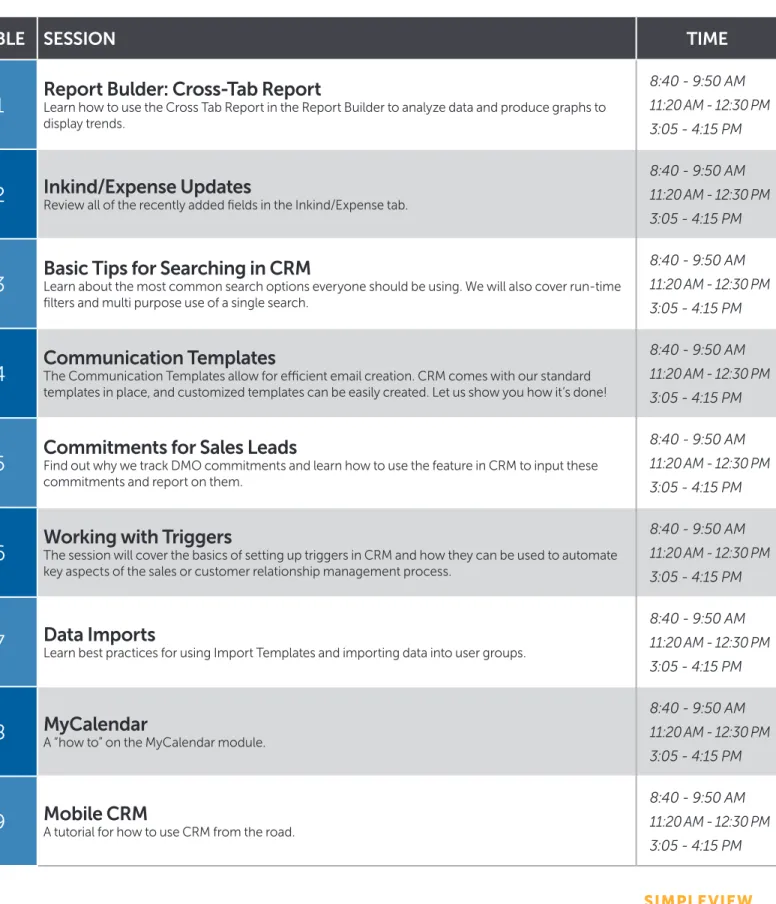
TABLE SESSION
TIME
1
Report Bulder: Cross-Tab Report
Learn how to use the Cross Tab Report in the Report Builder to analyze data and produce graphs to display trends.8:40 - 9:50 AM
11:20 AM - 12:30 PM
3:05 - 4:15 PM
2
Inkind/Expense Updates
Review all of the recently added fields in the Inkind/Expense tab.8:40 - 9:50 AM
11:20 AM - 12:30 PM
3:05 - 4:15 PM
3
Basic Tips for Searching in CRM
Learn about the most common search options everyone should be using. We will also cover run-time filters and multi purpose use of a single search.8:40 - 9:50 AM
11:20 AM - 12:30 PM
3:05 - 4:15 PM
4
Communication Templates
The Communication Templates allow for efficient email creation. CRM comes with our standard templates in place, and customized templates can be easily created. Let us show you how it’s done!8:40 - 9:50 AM
11:20 AM - 12:30 PM
3:05 - 4:15 PM
5
Commitments for Sales Leads
Find out why we track DMO commitments and learn how to use the feature in CRM to input these commitments and report on them.8:40 - 9:50 AM
11:20 AM - 12:30 PM
3:05 - 4:15 PM
6
Working with Triggers
The session will cover the basics of setting up triggers in CRM and how they can be used to automate key aspects of the sales or customer relationship management process.8:40 - 9:50 AM
11:20 AM - 12:30 PM
3:05 - 4:15 PM
7
Data Imports
Learn best practices for using Import Templates and importing data into user groups.8:40 - 9:50 AM
11:20 AM - 12:30 PM
3:05 - 4:15 PM
8
MyCalendar
A “how to” on the MyCalendar module.8:40 - 9:50 AM
11:20 AM - 12:30 PM
3:05 - 4:15 PM
9
Mobile CRM
A tutorial for how to use CRM from the road.8:40 - 9:50 AM
11:20 AM - 12:30 PM
3:05 - 4:15 PM
Tucson Ballroom
ROUNDTABLE
TABLE SESSION
TIME
10
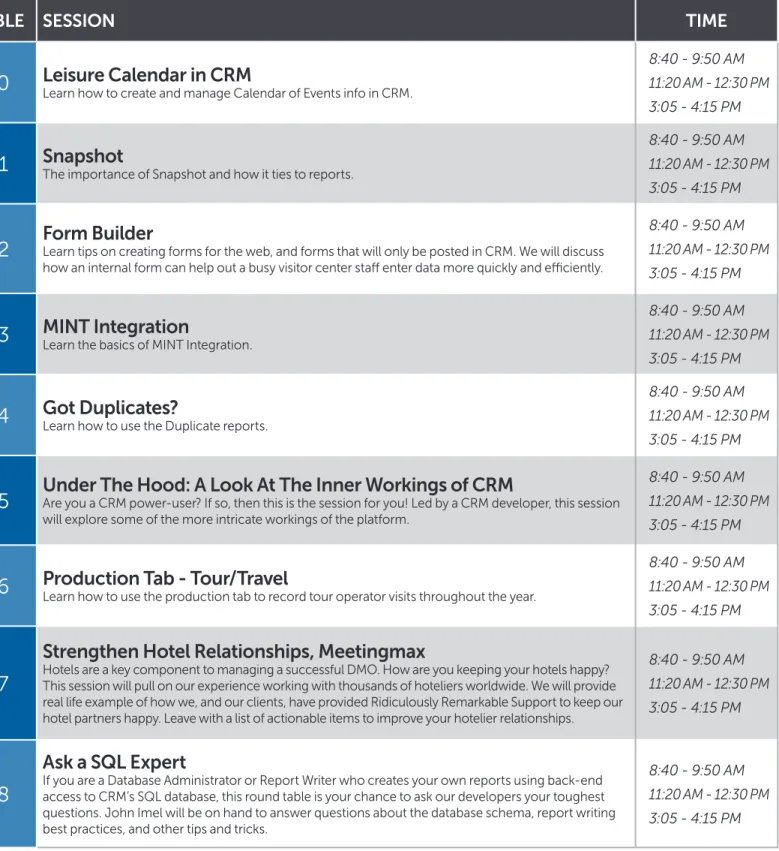
Leisure Calendar in CRM
Learn how to create and manage Calendar of Events info in CRM.8:40 - 9:50 AM
11:20 AM - 12:30 PM
3:05 - 4:15 PM
11
Snapshot
The importance of Snapshot and how it ties to reports.8:40 - 9:50 AM
11:20 AM - 12:30 PM
3:05 - 4:15 PM
12
Form Builder
Learn tips on creating forms for the web, and forms that will only be posted in CRM. We will discuss how an internal form can help out a busy visitor center staff enter data more quickly and efficiently.8:40 - 9:50 AM
11:20 AM - 12:30 PM
3:05 - 4:15 PM
13
MINT Integration
Learn the basics of MINT Integration.8:40 - 9:50 AM
11:20 AM - 12:30 PM
3:05 - 4:15 PM
14
Got Duplicates?
Learn how to use the Duplicate reports.8:40 - 9:50 AM
11:20 AM - 12:30 PM
3:05 - 4:15 PM
15
Under The Hood: A Look At The Inner Workings of CRM
Are you a CRM power-user? If so, then this is the session for you! Led by a CRM developer, this session will explore some of the more intricate workings of the platform.8:40 - 9:50 AM
11:20 AM - 12:30 PM
3:05 - 4:15 PM
16
Production Tab - Tour/Travel
Learn how to use the production tab to record tour operator visits throughout the year.8:40 - 9:50 AM
11:20 AM - 12:30 PM
3:05 - 4:15 PM
17
Strengthen Hotel Relationships, Meetingmax
Hotels are a key component to managing a successful DMO. How are you keeping your hotels happy? This session will pull on our experience working with thousands of hoteliers worldwide. We will provide real life example of how we, and our clients, have provided Ridiculously Remarkable Support to keep our hotel partners happy. Leave with a list of actionable items to improve your hotelier relationships.
8:40 - 9:50 AM
11:20 AM - 12:30 PM
3:05 - 4:15 PM
18
Ask a SQL Expert
If you are a Database Administrator or Report Writer who creates your own reports using back-end access to CRM’s SQL database, this round table is your chance to ask our developers your toughest questions. John Imel will be on hand to answer questions about the database schema, report writing best practices, and other tips and tricks.