PERFORMANCE
AND
SCALABILITY
User Scalability for the
Enterprise
Microsoft Dynamics CRM 4.0
CONTENTS
EXECUTIVE SUMMARY ... 1
RESULTS SUMMARY ... 1
OVERVIEW ... 2
TESTING METHODOLOGY ... 2
BUSINESS TRANSACTIONS ... 3
TRANSACTION WORKLOAD ... 3
DATABASE SERVER ... 3
TUNING AND OPTIMIZATION ... 4
HARDWARE ENVIRONMENT ... 4
TEST RESULTS ... 5
CONCLUSION ... 6
RESOURCES ... 7
1
User Scalability for the Enterprise
Executive Summary
Microsoft Dynamics™ CRM business software is designed to help enterprises achieve a 360-degree view of their customers across marketing, sales, and
service. Engineered to scale efficiently to the needs of the largest global deployments, Microsoft Dynamics CRM has been tested for user scalability, data scalability, and wide area network performance. This white paper focuses on user scalability. Microsoft, together with Unisys Corporation, completed benchmark testing of
Microsoft Dynamics CRM 4.0 running on Microsoft® Windows Server® 2008 operating system and Microsoft SQL Server® 2008 database software. Benchmark results demonstrate that Microsoft Dynamics CRM can scale to meet the needs of an enterprise-level, mission-critical workload of 24,000 concurrent users while maintaining performance at sub-second response times.
Test results were achieved without customizations to simulate an out-of-the-box Microsoft Dynamics CRM deployment. Standard optimization was applied using guidelines published in the Microsoft Dynamics CRM 4.0 Optimizing Performance toolkit. Extensive customer research formed the basis of the test design, test scenarios, database sizing, and record counts used in the testing.
These results reflect a snapshot of how Microsoft Dynamics CRM 4.0 performs in a specific environment.1 Customers may be able to achieve higher levels of
performance and scalability through customization and a finer level of optimization.
RESULTS SUMMARY
Microsoft Dynamics CRM 4.0, running on Microsoft Windows Server 2008 and Microsoft SQL Server 2008 was tested using Dell PowerEdge application servers and a single Unisys ES7000 database server. In this test environment, Microsoft
Dynamics CRM demonstrated the following performance characteristics:
Table 1: Benchmark Test Results Summary
Concurrent Users
Average Response Time
Web Requests
Business Transactions
AverageSQL Server Utilization
AverageCRM Server Utilization
24,000 .70 seconds 1,051,921 / hr 169,344 / hr 61% 53%
1 This benchmark shows scalability and performance for a particular implementation of
Microsoft Dynamics CRM 4.0. Results will vary for each implementation.
MICROSOFT
DYNAMICS CRM 4.0
SHOWED THE ABILITY
TO SUPPORT 24,000
CONCURRENT USERS
WITH SUB-SECOND
RESPONSE TIMES.
THE BENCHMARK
INCLUDED 169,000
BUSINESS
TRANSACTIONS WITH
OVER 1 MILLION WEB
REQUESTS PER HOUR.
Overview
Microsoft Dynamics CRM 4.0 is designed to meet the stringent requirements of enterprise organizations in the areas of performance and scalability, application flexibility, and infrastructure manageability.
Performance and scalability: Microsoft Dynamics CRM takes unique advantage
of the Microsoft Windows and SQL Server platforms to provide enterprise levels of performance and scalability. The application is message-based and stateless, allowing for easy horizontal scaling through standard network load balancing methods. The application can be tuned for performance and scalability using common tools and skill sets, and is designed to maintain the benefits of tuning as the application changes.
Application flexibility: Microsoft Dynamics CRM is engineered for change.
Declarative configuration is quick and accessible through the user interface without coding or restarting servers. Customization is powerful and upgradeable through the Software Development Kit (SDK), and is based on industry standards such as Microsoft.NET, XML, and Web services.
Infrastructure manageability: Microsoft Dynamics CRM is designed to improve
application manageability through multiple deployment options and integration with enterprise systems management products such as Microsoft System Center Essentials. Multiple deployment models are available, including on-premise, hosted, and hybrid, and customers can change between deployment options seamlessly as their needs change. Built on the popular .NET platform, Microsoft Dynamics CRM takes advantage of existing investments in technology,
infrastructure, and development skills many customers already have in place.
Testing Methodology
The benchmark testing was conducted by Microsoft in partnership with Unisys Corporation to demonstrate the performance and scalability characteristics of
Microsoft Dynamics CRM 4.0 in conjunction with Microsoft Windows Server 2008 and Microsoft SQL Server 2008.
The generally available version of Microsoft Dynamics CRM 4.0 was used in all testing without customization to simulate an out-of-the-box deployment. Basic application tuning was performed using best practices outlined in the Microsoft Dynamics CRM 4.0 Tuning and Optimization white paper.
Test scenarios were created using the Microsoft Dynamics CRM 4.0 Performance and Stress Testing Toolkit based on extensive customer research. All test cases used for this benchmark are included in the Microsoft Dynamics CRM 4.0 Performance and Stress Testing Toolkit, and can be used by customers as a basis for their own
benchmarking. This toolkit, available as a free download, is designed to help formalize performance testing of Microsoft Dynamics CRM by facilitating load testing in
customer environments.
See the Resources section for links to the Microsoft Dynamics CRM 4.0 Optimizing Performance white paper and Microsoft Dynamics CRM 4.0 Performance and Stress Testing Toolkit.
MICROSOFT
DYNAMICS CRM CAN
BE TUNED FOR
PERFORMANCE AND
SCALABILITY USING
STANDARD
MICROSOFT SQL
SERVER TOOLS AND
SKILL SETS.
THE MICROSOFT
DYNAMICS CRM 4.0
OPTIMIZING
PERFORMANCE WHITE
PAPER IS AVAILABLE
AS A FREE
DOWNLOAD FROM
MICROSOFT.
3 BUSINESS TRANSACTIONS
Test scenarios were designed to approximate typical usage of Microsoft Dynamics CRM 4.0 by an enterprise-level sales organization based on extensive customer feedback. Simulated users performed common tasks including Create, Search, Update, and Delete for CRM entities such as accounts, contacts, and leads.
Each business transaction in the testing represented a user performing an end-to-end business process involving multiple interactions between the user and the system. For example, the following activities comprise the Create e-mail business transaction:
1. Open the Workplace homepage.
2. Select New under Activities to create a new e-mail message. 3. Use Find to select the recipient from the user list.
4. Enter a subject and description.
5. Select an account from the list for the Regarding field. 6. Click Save.
7. Close the form. TRANSACTION WORKLOAD
Forty-six unique business scenarios were tested to simulate a variety of enterprise roles and activities. The workload was created to simulate a high transaction CRM deployment exercising a broad range of CRM functionality. All 24,000 users were logged on rapidly in order to assess the impact of a large number of CRM users logging on to the system in a brief time period.
The workload executed resulted in over 169,000 complex business transactions, or over 1 million Web requests per hour for the 24,000 active concurrent users test. In a follow-the-sun global deployment, this translates to a projected average of over 4 million business transactions, or over 24 million Web requests in a 24 hour period. See the Appendix for more information on the business scenarios selected for testing. DATABASE SERVER
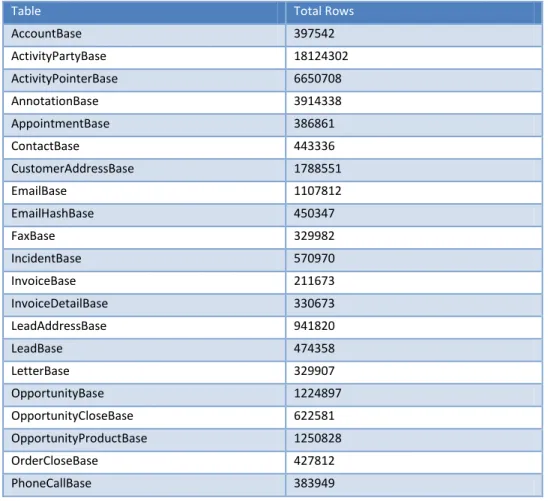
The benchmark testing was performed against a database with size and complexity similar to a real-world implementation of Microsoft Dynamics CRM 4.0. The test database contained over 60 million business records with a total size of 70GB. Microsoft SQL Server 2008 running on a Unisys ES7000 server demonstrated the ability to handle a significant load and scaled consistently as the load increased. See the Appendix for detailed database information.
SCENARIOS USED FOR
THIS TEST ARE
PUBLISHED IN THE
PERFORMANCE AND
STRESS TESTING
TOOLKIT, AVAILABLE
AS A FREE
DOWNLOAD FROM
MICROSOFT.COM.
THE PERFORMANCE
AND STRESS TESTING
TOOLKIT ALLOWS
YOU TO BUILD TEST
SCENARIOS FOR
YOUR
TUNING AND OPTIMIZATION
In order to simulate an out-of-the-box deployment, no customizations were applied to the CRM application in the test environment. Standard optimization techniques were applied using guidelines from the Microsoft Dynamics CRM 4.0 Optimizing
Performance white paper. Depending on the specific business processes involved, higher levels of performance and scalability may be possible through customization to meet specific business and performance requirements, and through deeper
optimization.
See the Resources section of this paper for a link to the Microsoft Dynamics 4.0 Optimizing Performance white paper.
HARDWARE ENVIRONMENT
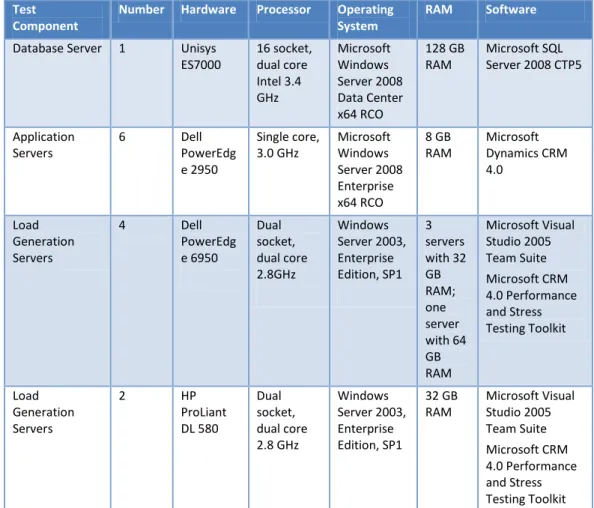
This section describes the hardware used in the test configuration, as well as the software installed on each system.
Table 2: Hardware Description
Test Component
Number Hardware Processor Operating System
RAM Software
Database Server 1 Unisys ES7000 16 socket, dual core Intel 3.4 GHz Microsoft Windows Server 2008 Data Center x64 RCO 128 GB RAM Microsoft SQL Server 2008 CTP5
Application Servers
6 Dell PowerEdg e 2950 Single core, 3.0 GHz Microsoft Windows Server 2008 Enterprise x64 RCO 8 GB RAM Microsoft Dynamics CRM 4.0 Load Generation Servers
4 Dell PowerEdg e 6950 Dual socket, dual core 2.8GHz Windows Server 2003, Enterprise Edition, SP1 3 servers with 32 GB RAM; one server with 64 GB RAM Microsoft Visual Studio 2005 Team Suite Microsoft CRM 4.0 Performance and Stress Testing Toolkit Load Generation Servers
2 HP ProLiant DL 580 Dual socket, dual core 2.8 GHz Windows Server 2003, Enterprise Edition, SP1 32 GB RAM Microsoft Visual Studio 2005 Team Suite Microsoft CRM 4.0 Performance and Stress Testing Toolkit
The configuration used a F5 BIG-IP load balancer to distribute the traffic across the six Microsoft Dynamics CRM 4.0 servers. Microsoft SQL Server Reporting Services was placed on a separate tier, a common configuration in enterprise environments. See the Appendix for detailed descriptions of the hardware.
THE MICROSOFT
OPTIMIZATION
PERFORMANCE WHTIE
PAPER CONTAINS
EXTENSIVE BEST
PRACTICES FOR
TUNING YOUR
MICROSOFT
DYNAMICS CRM
DEPLOYMENT.
5
Test Results
The results of the benchmark study validate that Microsoft Dynamics CRM 4.0 can scale to support 24,000 concurrent users in a single instance averaging sub-second response times. These results were achieved without customization and using basic performance tuning.
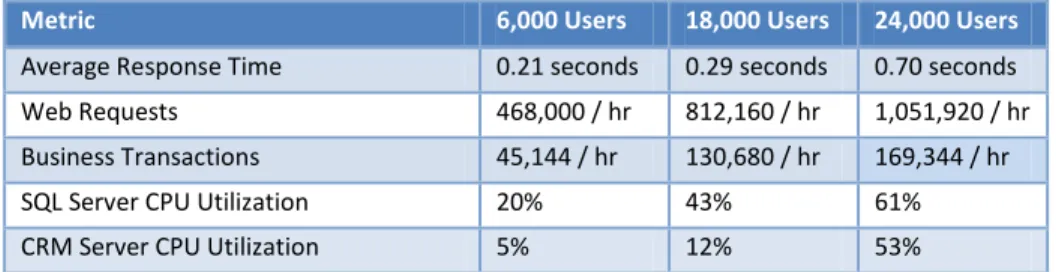
Using the same machine configurations, test cases and date volumes, the benchmark tests were executed against user groups of three sizes to demonstrate how the application performance was affected as it scaled.
The following table summarizes the performance of Microsoft Dynamics CRM 4.0 for user groups of three sizes:
Table 3: Summary of Scalability Results
Metric 6,000 Users 18,000 Users 24,000 Users
Average Response Time 0.21 seconds 0.29 seconds 0.70 seconds Web Requests 468,000 / hr 812,160 / hr 1,051,920 / hr Business Transactions 45,144 / hr 130,680 / hr 169,344 / hr SQL Server CPU Utilization 20% 43% 61% CRM Server CPU Utilization 5% 12% 53%
With 24,000 users, the application executed a projected transaction rate of 4,056,000 business transactions per day.
The test results were achieved with minimal tuning and optimization. Advanced tuning and optimization may deliver better user scalability.
THE TEST RESULTS
WERE ACHIEVED
WITHOUT
CUSTOMIZATIONS
AND WITH MINIMAL
TUNING. ADVANCED
TUNING AND
OPTIMIZATION MAY
DELIVER HIGHER USER
SCALABILITY.
Conclusion
Microsoft Dynamics CRM 4.0 demonstrated its ability to scale to support the needs of the largest global businesses. The benchmark testing showed that Microsoft
Dynamics CRM 4.0, together with Microsoft Windows Server 2008 and Microsoft SQL Server 2008, scaled to support 24,000 users without customization and with minimal optimization. When projected to the usage patterns of a global enterprise, these results indicate that a Microsoft Dynamics CRM implementation is capable of supporting millions of requests per day.
The deep integration with key Microsoft business applications and components helps companies realize cost benefits by allowing them to take advantage of existing investments in technology, infrastructure, and resources to maintain and optimize the application. The flexible application architecture offers companies choices, including the deployment model that meets their needs and the user interface that is best for them.
The results achieved in this benchmark are reproducible through the use of the Microsoft Dynamics CRM 4.0 Performance and Stress Testing Toolkit along with the description of the testing provided in this paper.
USE THE PROVIDED
TOOLS TO TEST AND
TUNE MICROSOFT
DYNAMICS CRM FOR
YOUR ENVIRONMENT.
7
Resources
Resources related to Microsoft Dynamics CRM 4.0 in the enterprise:
Microsoft Dynamics CRM Web Site
Unisys Web Site
Microsoft Dynamics CRM in the Enterprise brochure
Microsoft Dynamics CRM Performance and Scalability Toolkit Microsoft Dynamics CRM Tuning and Optimization white paper
Appendix A: Charts and Tables
Table 4: Benchmark Test Parameters Summary
Benchmark Test Parameters
Concurrent Users Tested 24,000 CRM Business Transaction Rate 169,000/hour CRM Web Request Rate 1,000,000/hour Database Size 70 GB
CRM Application Servers (6 total) Dell PowerEdge 2950, 4 socket dual core, 3.0GHz, 8GB RAM
CRM Database Server Unisys ES7000, 16 socket dual core, 3.4 GHz 128GB RAM
Table 5: Benchmark Results Summary
Key Benchmark Test Results
AverageAtomic Web Request resp. time 850 ms AverageCPU Utilization – CRM Servers 53% AverageCPU Utilization – SQL Server 61%
Table 6: Row counts for all tables with more than 100,000 rows at the completion of tests
Table Total Rows
AccountBase 397542
ActivityPartyBase 18124302 ActivityPointerBase 6650708 AnnotationBase 3914338 AppointmentBase 386861
ContactBase 443336
CustomerAddressBase 1788551
EmailBase 1107812
EmailHashBase 450347
FaxBase 329982
IncidentBase 570970
InvoiceBase 211673
InvoiceDetailBase 330673 LeadAddressBase 941820
LeadBase 474358
LetterBase 329907
OpportunityBase 1224897 OpportunityCloseBase 622581 OpportunityProductBase 1250828 OrderCloseBase 427812 PhoneCallBase 383949
9
PrincipalObjectAccess 8335641 QueueItemBase 3194205
QuoteBase 1251405
QuoteCloseBase 791781 QuoteDetailBase 854974 SalesOrderBase 644633 SalesOrderDetailBase 262867
TaskBase 2237054
UserQueryBase 1427188 Table 7: Database Server Hardware
Database Server Hardware
Manufacturer Unisys
Model ES7000
Operating System Windows Server 2008 DataCenter x64 RC0 Processor 16 socket, dual core Intel 3.4 GHz Network Adapter 1 GB NIC
RAM 128 GB
Software SQL Server 2008 CTP5
SAN Data Log TempDb
16 Spindles:
200 GB RAID 1+0 400 GB RAID 1+0 190 GB RAID 1+0 Table 8: Load Balancer Hardware
Load Balancer
Manufacturer F5
Model BIG-IP
Balancing algorithm Ratio Table 9: Application Server Web Farm Hardware
The application server Web farm consisted of 6 computers, configured as shown below:
Application Server
Manufacturer Dell
Model PowerEdge 2950
Operating System Windows Server 2008 Enterprise x64 RC0 Processor Single core, 3.0 GHz
Network Adapter 1 GB NIC
RAM 8 GB
Table 10: Load Generation Server Hardware
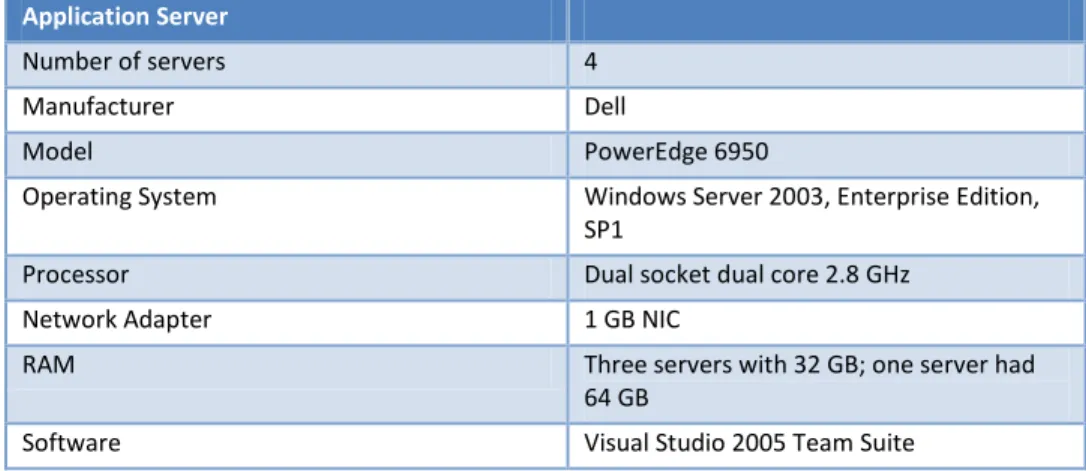
Six load generation servers were used; four of the servers were configured as shown below:
Application Server
Number of servers 4 Manufacturer Dell
Model PowerEdge 6950
Operating System Windows Server 2003, Enterprise Edition, SP1
Processor Dual socket dual core 2.8 GHz Network Adapter 1 GB NIC
RAM Three servers with 32 GB; one server had 64 GB
Software Visual Studio 2005 Team Suite Table 11: Load Generation Server Hardware
Two of the load generation servers were configured as shown below:
Application Server
Number of servers 2 Manufacturer HP
Model ProLiant DL580
Operating System Windows Server 2003, Enterprise Edition, SP1
Processor Dual socket dual core 3.4 GHz Network Adapter 1 GB NIC
RAM 32 GB
Software Visual Studio 2005 Team Suite Table 12: Business cases selected for testing
AccountActivityRollup AccountOppRollup AccountSCRollup AddActivityToAccount AddActivityToLead AdvancedFindAccount AdvancedFindAccountNotes AdvancedFindContact AdvancedFindProduct AssignAccounts AssignContact AssignLead AssignOpportunity AssignServiceCase ConvertleadToOpp WithAccount CreateEmail CreateNewAccount CreateNewContact CreateNewLead CreateNewNoteForAccount CreateNewNoteForContact CreateNewNoteForLead CreateNewNoteForOpp CreateNewNoteForTask CreateNewOpportunity CreateQuote CreateServiceCaseAccount CreateTask DeleteLead DeleteNoteOnAccount DeleteNoteOnContact DeleteNoteOnLead DeleteNoteOnOpportunity DeleteNoteOnTask DeleteOpportunity DeleteTask EmailQuote FindAccounts FindContacts QuickCreateNewAccount ShareAccounts UpdateAccount UpdateContact UpdateLead UpdateOpportunity UpdateTask
11
© 2008 Microsoft Corporation. All rights reserved.
This document is for informational purposes only. MICROSOFT MAKES NO WARRANTIES, EXPRESS OR IMPLIED, IN THIS SUMMARY.
Microsoft, Microsoft Dynamics, Visual Studio, Windows, and Windows Server are trademarks of the Microsoft group of companies.
The names of actual companies and products mentioned herein may be the trademarks of their respective owners.