Server Load Balancing Guide
ServerIron 4G Series
ServerIronGT C Series
ServerIronGT E Series
ServerIron 350 & 350-PLUS
ServerIron 350 & 350-PLUS
ServerIron 450 & 450-PLUS
Release Date: April 7, 2008 4980 Great America Parkway
Santa Clara, CA 95054 Tel 408.207.1700 Publication Date: April 7, 2008
www.foundrynetworks.com Version 1.01
No part of this work may be reproduced in any form or by any means – graphic, electronic or mechanical, including photocopying, recording, taping or storage in an information retrieval system – without prior written permission of the copyright owner.
The trademarks, logos and service marks ("Marks") displayed herein are the property of Foundry or other third parties. You are not permitted to use these Marks without the prior written consent of Foundry or such appropriate third party.
Foundry Networks, BigIron, FastIron, IronView, JetCore, NetIron, ServerIron, TurboIron, IronWare, EdgeIron, the Iron family of marks and the Foundry Logo are trademarks or registered trademarks of Foundry Networks, Inc. in the United States and other countries.
F-Secure is a trademark of F-Secure Corporation. All other trademarks mentioned in this document are the property of their respective owners.
C
HAPTER
1
A
BOUT
THIS
G
UIDE
... 1-1
INTRODUCTION ...1-1 AUDIENCE ...1-1 CONVENTIONS ...1-1 RELATED DOCUMENTATION ...1-2 REPORTING DOCUMENTATION ERRORS ...1-2 HOWTO GET HELP ...1-2 WEB ACCESS ...1-2 EMAIL ACCESS ...1-3 TELEPHONE ACCESS ...1-3
C
HAPTER
2
N
EW
F
EATURES
AND
E
NHANCEMENTS
... 2-1
SOFTWARE DEPENDENCIESFOR HARDWARE PLATFORMS ...2-1 FEATURESAND ENHANCEMENTSFOR RELEASE 10.2.00 ...2-2 FEATURESAND ENHANCEMENTSFOR RELEASE 10.1.00 ...2-4 FEATURESAND ENHANCEMENTSFOR RELEASE 10.0.00B ...2-5 FEATURESAND ENHANCEMENTSFOR RELEASE 09.5.02A ...2-6 FEATURESAND ENHANCEMENTSFOR RELEASE 09.4.01 ...2-7 FEATURESAND ENHANCEMENTSFOR RELEASE 09.4.00 ...2-8 FEATURESAND ENHANCEMENTSFOR RELEASE 09.3.01 ...2-10
C
HAPTER
3
S
ERVER
L
OAD
B
ALANCING
... 3-1
VALUEOF SLB ...3-2 HOW SLB WORKS ...3-2 SLOW-START MECHANISM... 3-3 LOAD-BALANCING PREDICTOR ...3-3
LEAST CONNECTIONS... 3-3 ROUND ROBIN... 3-3 WEIGHTED... 3-3 SERVERRESPONSETIMEONLY... 3-4 LEASTCONNECTIONANDSERVERRESPONSETIMEWEIGHTS... 3-4 LEASTLOCALCONNECTIONS... 3-4 LEASTLOCALSESSIONS... 3-4 DYNAMIC WEIGHTED PREDICTOR... 3-4 CONFIGURABLE APPLICATION GROUPING ...3-6 STICKY CONNECTIONS... 3-6 CONFIGURABLE TCP/UDP APPLICATION GROUPS... 3-6 CONCURRENT CONNECTIONS... 3-7 STICKY VIPS ...3-7 UNLIMITED VIPS ...3-7 GEOGRAPHICALLY-DISTRIBUTED SERVERS ...3-8 SYMMETRIC SLB ...3-8 LINK-LEVEL REDUNDANCY... 3-9 SWITCHBACK ...3-9 MANY-TO-ONE TCP/UDP PORT BINDING ...3-11 BINDING SAME REAL PORTSTO MULTIPLE VIP PORTS ...3-11 HTTP REDIRECT ...3-12 TRANSPARENT VIP AND STATELESS APPLICATION PORTS ...3-12 WINDOWS TERMINAL SERVERWITH L7 PERSISTENCE ...3-12 UNDERSTANDING WINDOWS TERMINAL SERVER ...3-12 CONFIGURING WINDOWS TERMINAL SERVER ...3-14 TFTP LOAD BALANCING ...3-14 MULTINETTING USING NAT ...3-14 CONFIGURING SLB ...3-16 CONFIGURATION GUIDELINES ...3-17 DEFININGTHE REAL SERVERSAND ADDINGTHE APPLICATION PORTS ...3-18 CLONING REAL SERVERS... 3-18 DEFININGTHE VIRTUAL SERVER (VIP) ...3-19 BINDING VIRTUALAND REAL SERVERS ...3-19 GLOBAL SLB SETTINGS ...3-19 FAST-PATH SLB PROCESSING ...3-20 CONFIGURATION CONSIDERATIONS... 3-20 ENABLING FAST-PATH PROCESSINGFOR STATELESS SLB... 3-21 GLOBALLY CHANGINGTHE LOAD-BALANCING METHOD ...3-22 CONFIGURINGTHE ENHANCED WEIGHTED PREDICTOR ...3-22 ASSIGNING WEIGHTSTOTHE REAL SERVERS... 3-22 ENABLINGTHE WEIGHTED PREDICTOR... 3-23 ENABLINGTHE ENHANCED WEIGHTED PREDICTOR... 3-23 COMPARISONOF CONNECTION ASSIGNMENTS... 3-24 CONFIGURING DYNAMIC WEIGHTED PREDICTOR ...3-25 CONFIGURE REAL SERVERWITH SNMP QUERY REQUIREMENTS ...3-25 CONFIGURATION EXAMPLE... 3-26 CONFIGUREA VIRTUAL SERVERWITH DYNAMIC WEIGHTED PREDICTOR ...3-26 DYNAMIC-WEIGHTED DIRECT... 3-26 DYNAMIC-WEIGHTED REVERSE... 3-26
LIMITINGTHE MAXIMUM NUMBEROF TCP SYN REQUESTS ...3-27 CONFIGURINGTHE WARNINGAND SHUTDOWN THRESHOLDS ...3-27 CONFIGURING WARNINGAND SHUTDOWN THRESHOLDSFOR ALL REAL SERVERS... 3-28 CONFIGURING WARNINGAND SHUTDOWN THRESHOLDSFORAN INDIVIDUAL REAL SERVER... 3-28 VIEWING THRESHOLD MESSAGESINTHE SYSLOG... 3-28 SENDING ICMP PORT UNREACHABLEOR DESTINATION UNREACHABLE MESSAGES ...3-29 SENDINGA TCP RST TOA CLIENT THAT REQUESTS UNAVAILABLE APPLICATIONS ...3-29 SENDINGA TCP RST WHEN TCP SESSION ENTRY AGES OUT ...3-30 DISABLING TCP RST MESSAGE WHENA REAL SERVER GOES DOWN DURINGAN OPEN SESSION ...3-30 DISABLING TCP RST MESSAGEON MAXIMUM CONNECTIONS ...3-31 ADDINGA SOURCE IP ADDRESS ...3-31 ENABLING USEOFTHE CLIENT MAC ADDRESS ...3-32 ENABLING SOURCE NAT GLOBALLY ...3-33 ENABLING REVERSE NAT ...3-33 DYNAMIC NAT FOR REAL SERVERS USING VIRTUAL SERVER ADDRESS ...3-34 DECREMENT COUNTERSIN DELETION QUEUE ...3-34 OVERVIEWOF DECREMENT COUNTERSIN DELETION QUEUE ...3-34 ENABLING DECREMENT SESSION COUNTERSIN DELETION QUEUE ...3-34 ENABLING FORCE-DELETE ...3-34 SETTINGTHE STICKY AGE ...3-35 SETTING STICKY WITHOUT COOKIE ...3-36 ALLOWING STICKY PORTS ...3-36 ENABLING TRANSPARENT VIP ...3-37 CONFIGURING TCP FAST AGING ...3-37 DECREMENTINGTHE CURRENT CONNECTION COUNTER FOLLOWINGA SERVER RST ...3-37 DISABLING VIPS ...3-38 ENABLING SYN ACK THRESHOLD ...3-38 ENABLING SYNCHRONIZATION LINKFOR SYMMETRIC SLB ...3-38 ENABLING NO-GRACEFUL-SHUTDOWN ...3-38 ENABLING BACKUP TRUNK PORT ...3-39 REPLACINGTHE SOURCE MAC ADDRESSOFTHE PACKET ...3-39 REAL SERVER SETTINGS ...3-39 CHANGINGA REAL SERVER’S IP ADDRESS ...3-39 ADDINGA DESCRIPTION ...3-39 CONFIGURINGA LOCALOR REMOTE REAL SERVER ...3-40 CONFIGURINGA LOCAL REAL SERVER... 3-40 CONFIGURINGA REMOTE REAL SERVER... 3-40 CONFIGURING PRIMARYAND BACKUP SERVERS ...3-40 DESIGNATINGA REAL SERVERASA BACKUP... 3-41 ENABLINGA VIP TO USETHE PRIMARYAND BACKUP SERVERS... 3-41 CONFIGURATION EXAMPLE... 3-42 DESIGNATINGA REAL SERVER PORTASA BACKUP... 3-42 DISABLINGA REAL SERVER ...3-43 ADDING APPLICATION PORTSTOA REAL SERVER ...3-44 CONFIGURINGA HOST RANGE ...3-44
CONFIGURING HOST-RANGE MAPS... 3-44 DEFININGTHE MAXIMUM NUMBEROF SESSIONS ...3-48 CONFIGURING LOCAL MAX-CONN ...3-49 CONFIGURING LOCAL MAX-CONNFORA REAL SERVER... 3-49 CONFIGURING LOCAL MAX-CONNFORA REAL SERVER PORT... 3-49 SETTINGTHE TRAFFIC RATE THRESHOLD ...3-50 SETTING WARNINGAND SHUTDOWN THRESHOLDSFORA SERVER ...3-50 VIEWING THRESHOLD MESSAGESINTHE SYSLOG... 3-51 DISABLING LAYER 3 HEALTH CHECKONA REAL SERVER ...3-51 ENABLING SOURCE NAT ONA REAL SERVER ...3-52 CONFIGURINGTHE WEIGHTFOR REAL SERVER ...3-52 SETTINGA REAL SERVER’S WEIGHT BASEDON RESPONSE TIME... 3-53 REAL SERVER PORTS ...3-53 DISALBINGOR RE-ENABLING APPLICATION PORTS ...3-54 GLOBALLY DISABLING APPLICATION PORTS... 3-54 DISABLING SLB TOA SERVER WHENAN APPLICATIONIS DOWN... 3-55 UNBINDING ALL APPLICATION PORTSFROM VIRTUAL SERVERS ...3-55 REBININGAN APPLICATION PORTTOA VIRTUAL SERVER... 3-55 ENABLINGOR DISABLINGTHE KEEPALIVE HEALTH CHECK ...3-55 CONFIGURINGTHE CONNECTION RATE ...3-56 LAYER 7 HEALTH CHECK PARAMETERS ...3-57 VIP SETTINGS ...3-57 ADDING APPLICATION PORTSAND BINDINGS ...3-57 CONFIGURING PRIMARYAND BACKUP SERVERS ...3-57 ENABLINGA VIP TO USETHE PRIMARYAND BACKUP SERVERS... 3-58 CONFIGURINGA HOST RANGE ...3-58 ENABLING HTTP REDIRECTONA VIRTUAL SERVER ...3-58 CHANGINGTHE LOAD BALANCING METHODONA VIRTUAL SERVER ...3-59 SETTING SYMMETRIC SLB PRIORITY ...3-59 TRACKINGTHE PRIMARY PORT ...3-59 CONFIGURINGA TRACK PORT GROUP ...3-60 TRACK GROUP HEALTH CHECKFOR REAL SERVERS ...3-61 SAMPLE CONFIGURATION... 3-61 ENABLING TRACK PORTSINA TRACK GROUPTO UNBIND ...3-61 IDENTIFYING VIP PORTAS TCP ONLYOR UDP ONLY ...3-61 ENABLING SERVER CLUSTER SUPPORT ...3-62 ENABLING FAST AGINGFOR UDP SESSIONS ...3-62 ENABLING NORMAL UDP AGINGFOR DNS AND RADIUS ...3-63 ENABLING TRANSPARENT VIP ...3-63 SETTING TCP AND UDP AGESFOR VIPS ...3-63 PER SERVER BASED REAL SERVER BACKUP ...3-64 OVERVIEWOF PER SERVER BASED REAL SERVER BACKUP ...3-64 CURRENT BACKUP SCHEME... 3-64 PER SERVER BASED BACKUP SCHEME... 3-64 COMMAND LINE INTERFACE ...3-65 SERVER BACKUP ASSOCIATION... 3-65 SERVER PORT BACKUP ASSOCIATION... 3-66 DISPLAYTHE BACKUP BINDINGS... 3-66
GLOBALLY DISABLING REALAND VIRTUAL PORTS ...3-67 CONFIGURING STICKY PORTS ...3-67 CONFIGURING STICKINESS BASEDON CLIENT’S SUBET ...3-68 INCREASE STICKY-AGEPER VIP LONGERTHAN 60 MINUTES ...3-69 ENABLINGA CONCURRENT PORT ...3-69 CONFIGURINGTHE SMOOTH FACTOR ...3-69 CONFIGURINGA STATELESS PORT ...3-71 CONFIGURING VIRTUAL SOURCE ...3-71 DISABLING PORT TRANSLATION ...3-72 ENABLINGTHE SERVERIRONTO USETHE ALIAS PORT’S STATE ...3-72 STICKY CONNECTION RETURNFROM BACKUP SERVERTO PRIMARY ...3-73 PERFORMING SLB BASEDON ALIAS PORT STATE ...3-73 IP LOAD BALANCING ...3-73 BACKGROUND ...3-73 OVERVIEW ...3-74 HASHING MECHANISM... 3-74 IP LOAD BALANCINGVS REGULAR LOAD BALANCING... 3-74 FEATURE INTEROPERABILITY... 3-74 HIGH AVAILABILITY... 3-75 MINIMUM REQUIRED CONFIGURATION ...3-75 LOAD BALANCING SPECIFIC IP PROTOCOLS ...3-75 DISPLAYING LOAD BALANCINGAND HASH DISTRIBUTION STATISTICS ...3-75 BINDINGA REAL SERVER PORTTO MULTIPLE VIPS ...3-76 CONFIGURING HARDWARE FORWARDINGOF PASS-THROUGH TRAFFIC ...3-77 SSL ACCELERATORS ...3-78 SLB CONFIGURATION ...3-79 TCS CONFIGURATION ...3-79 GROUP STICKY: L4 SLB TO SERVER GROUP ...3-79 ENABLING GROUP STICKY ...3-80 CONFIGURATION EXAMPLE... 3-80 ENABLING GROUP STICKY FAILOVER ...3-82 HASH-BASED SLB WITH SERVER PERSISTENCE ...3-82 PERSISTENT HASH TABLE ...3-82 CLEARVS REASSIGN MECHANISMS ...3-83 ENABLING PERSISTENT HASHING ...3-83 ENABLINGTHE CLEAR-ON-CHANGE MECHANISM ...3-83 ENABLINGTHE REASSIGN-ON-CHANGE MECHANISM ...3-84 CONFIGURINGTHE REASSIGN THRESHOLDAND DURATION... 3-84 REASSIGNMENT SEQUENCEAND EXAMPLE... 3-85 KEEPINGTHE PERSISTENT HASH TABLE UNCHANGED ...3-87 REAL SERVER FAILURE ...3-87 DISPLAYING PERSISTENT HASH TABLE ENTRYAND STATISTICS ...3-88 CLEARINGTHE HIT COUNTFORTHE PERSISTENT HASH TABLE ...3-89 CLEARINGTHE PERSISTENT HASH TABLE ...3-89 ENABLING DEBUGGINGFOR PERSISTENT HASH ...3-89
REASSIGNINGA PERSISTENT HASH TABLE ENTRY ...3-89 VIP ROUTE HEALTH INJECTION ...3-90 OVERVIEW ...3-90 INJECTINGAND DELETING VIP ROUTE BASEDON VIP HEALTH... 3-90 VIP RHI AND HIGH AVAILABILITY TOPOLOGIES... 3-91 CONFIGURATION CONSIDERATIONS... 3-91 ENABLINGOR DISABLING VIP RHI ...3-92 DEFININGTHE HEALTHOFA VIP PORT ...3-92 DEFININGTHE HEALTHOFA VIP ...3-93 CONFIGURINGTHE VIP RHI ROUTE MASK LENGTH ...3-93 DISPLAYING RHI INFORMATION ...3-94 DISPLAYING ROUTE TYPE ...3-95 CONFIGURATION EXAMPLES ...3-96 BASIC CONFIGURATION... 3-96 BOTH SERVERIRON SITES WORKINGIN PRIMARY MODE... 3-97 SITE-1 SERVERIRONIN PRIMARY MODEAND SITE-2 IN BACKUP MODE... 3-108 REAL SERVER SHUTDOWN ...3-121 POLICY-BASED SLB ...3-122 CONFIGURINGA POLICY LIST ...3-123 SIMPLIFIED FORMATFORTHE POLICY LIST FILE... 3-123 SPECIFYINGTHE MAXIMUM NUMBEROF ENTRIES ...3-123 NO LIMITTOTHE SIZEOFTHE POLICY LIST FILE... 3-124 DELETINGAN ENTRYFROMTHE POLICY LIST ...3-124 DELETINGAN ENTIRE PBSLB LIST ...3-124 DYNAMICALLY DOWNLOADINGA POLICY LIST ...3-124 DOWNLOADINGA POLICY LIST USING TFTP ...3-124 COPYINGA POLICY LISTTOA FILEON TFTP SERVER ...3-125 WRITINGTHE POLICY LISTTO FLASH MEMORY ...3-125 SPECIFYINGA DEFAULT SERVER GROUP ...3-125 ASSIGNING REAL SERVERSTO SERVER GROUPS ...3-125 ENABLING PBSLB FORA PORTONA VIRTUAL SERVER ...3-126 DELETING EXISTING PBSLB SESSIONS ...3-126 DISPLAYING PBSLB ENTRIES ...3-127 VIP TRAFFIC NO LONGER BLOCKED DURING POLICY FILE DOWNLOAD ...3-127 PACKET TRACE ...3-128 INCREASEINTHE SIZEOF PBSLB LIST (SPAM LIST) ...3-129 PBSLB POOL FAILSAFE GROUP ...3-129 OVERVIEWOF PBSLB POOL FAILSAFE GROUP ...3-129 EXPECTED BEHAVIOROF PBSLB FAILSAFE GROUP... 3-129 COMMAND LINE INTERFACE ...3-129 CREATEA PBSLB FAILSAFEGROUP... 3-130 ENABLE PBSLB ONA VIP PORT... 3-130 SHOW COMMMANDS... 3-130 AUTO DOWNLOADOF PBSLB LIST ...3-130 CONFIGURING PBSLB DOWNLOAD-INTERVAL ...3-131 CONFIGURING PBSLB TIME-OF-DAY ...3-131 PBSLB SYSLOG MESSAGES ...3-131 BANDWIDTH METRICFOR SLB ...3-131
CHANGINGTHE SIZEOFTHE BANDWIDTH SAMPLING WINDOW ...3-134 CHANGINGTHE SIZE GLOBALLY... 3-134 CHANGINGTHE SIZEFORA VIRTUAL SERVER... 3-134 ENABLING METRIC ALGORITHMS ...3-134 RE-ENABLINGTHE SUM ALGORITHM... 3-134 ENABLINGTHE WEIGHTED SERVER SUM ALGORITHM... 3-134 ENABLINGTHE WEIGHTED-INTERVAL SUM ALGORITHM... 3-135 DISPLAYING BANDWIDTH USAGE STATISTICS ...3-135 DISPLAYING BANDWIDTH USAGE... 3-135 DISPLAYING BANDWIDTH USAGE COUNTS... 3-136 CLEARING OCTET COUNTS INTHE BANDWIDTH OCTET LIST ...3-136 POLICY-BASED ROUTINGFOR REVERSE SLB TRAFFIC ...3-136 DSR ...3-137 SETTING DSR NORMAL AGE REVERSE SESSION ...3-139 REMOTE FAILOVER SERVERSFOR SWITCHBACK ...3-139 HEALTH CHECKSWITH SWITCHBACK ...3-139 SYN-DEFENSEWITH SWITCHBACK ...3-139 PLACINGA SESSIONIN TIMEOUT QUEUE ...3-139 SWITCHBACK CONFIGURATION EXAMPLE ...3-140 CONFIGURING SERVERIRON A... 3-141 CONFIGURING SERVERIRON B... 3-142 CONFIGURINGTHE LOOPBACK ADDRESSONA REAL SERVER... 3-143 DISPLAYING SERVER INFORMATION ...3-147 DISPLAYING GLOBAL LAYER 4 SERVERIRON CONFIGURATION ...3-149 DISPLAYING REAL SERVER CONFIGURATION STATISTICS ...3-152 DISPLAYING VIRTUAL SERVERS CONFIGURATION STATISTICS ...3-157 DISPLAYING INFORMATIONABOUT VIRTUAL SERVER’S BOUND PORTS... 3-161 DISPLAYINGA LISTOF FAILED SERVERS ...3-164 DISPLAYINGA LISTOF FAILED PORTS ...3-164 DISPLAYING PORT-BINDING INFORMATION ...3-165 DISPLAYING PACKET TRAFFIC STATISTICS ...3-167 DISPLAYING CONFIGURATION INFORMATION ...3-169 SHOW AGGREGATE HEALTHOF TRACKED PORTS ...3-170 AUTO REPEATOF SHOW COMMAND OUTPUT ...3-171 DISPLAYING VIP OWNERIN HA SETUP ...3-171 CLEARING ALL SESSION TABLE ENTRIES ...3-172 CLEARINGTHE CONNECTIONS COUNTER ...3-173 SLB CONFIGURATION EXAMPLES ...3-173 WEB HOSTINGWITH ONE VIRTUAL SERVER MAPPEDTO MULTIPLE REAL SERVERS ...3-173 WEB HOSTINGWITH MULTIPLE VIRTUAL SERVERS MAPPEDTO ONE REAL SERVER ...3-174 MANY-TO-ONE TCP/UDP PORT BINDING ...3-174 CONFIGURATION RULES... 3-175 CONFIGURATION EXAMPLE... 3-176 WEB HOSTINGWITH UNLIMITED VIRTUAL IP ADDRESSES ...3-177 SLB INTRANET CONFIGURATIONWITH HTTP, TELNET HOSTINGACROSS MULTIPLE VIRTUAL SERVERSAND
TCP/UDP APPLICATION GROUPS ...3-180 WEB HOSTINGWITH SERVERIRONAND REAL SERVERSIN DIFFERENT SUBNETS ...3-182 WEB HOSTINGWITH GEOGRAPHICALLY-DISTRIBUTED SERVERS ...3-184 USING HTTP REDIRECTWITH GEOGRAPHICALLY-DISTRIBUTED SERVERS ...3-187 USING REVERSE PROXY SLB ... 3-188 BASIC EXAMPLE... 3-189 E-COMMERCE EXAMPLE... 3-190 LOAD BALANCING STREAMING MEDIA FILES ...3-192 LAYER 3 SLB ...3-194 BASIC SLB WITH ONE VLAN AND ONE VIRTUAL ROUTING INTERFACE... 3-194 BASIC SLB WITH MULTIPLE SUBNETSAND MULTIPLE VIRTUAL ROUTING INTERFACES... 3-197 IPSECAND VPN LOAD BALANCING ...3-199 CONFIGURING IPSECAND VPN LOAD BALANCING... 3-201 CONFIGURATION EXAMPLE... 3-201 ACTIVE-ACTIVE INSIDE SOURCE NAT WITH SLB AND VRRPE ...3-202 SI A CONFIGURATION... 3-202 SI B CONFIGURATION... 3-203
SERVEROPT-ENABLE-ROUTE-RECALCULATION ...3-203
C
HAPTER
4
S
TATELESS
S
ERVER
L
OAD
B
ALANCING
... 4-1
STATELESS TCP/UDP PORTS ...4-1 HOWTHE SERVERIRON SELECTSA REAL SERVERFORA STATELESS PORT ...4-2 CONFIGURINGA STATELESS APPLICATION PORT ...4-2 DISABLINGTHE STATELESS SLB HASHING ALGORITHMFOR UDP PORTS... 4-3 CONFIGURINGA PORT TO BE BOTH STATELESSAND STATEFUL... 4-3 STATELESS HEALTH CHECKING ...4-4 CONFIGURING STATELESS HEALTH CHECKS ...4-5 CONFIGURINGA STATELESS HEALTH CHECK GROUP... 4-5 SETTINGA SERVERIRON’S STATELESS HEALTH CHECK PRIORITY... 4-5
C
HAPTER
5
H
EALTH
C
HECKS
... 5-1
HEALTH CHECKS OVERVIEW ...5-1 ENHANCED SERVER BRINGUP ...5-2 APPLICATION PORTS ...5-2 LAYER 3 HEALTH CHECKS ...5-3 ARP REQUEST... 5-3 IP PING... 5-3 LAYER 4 HEALTH CHECKS ...5-4 TCP ... 5-5 UDP ... 5-5 LAYER 7 HEALTH CHECKS ...5-6 DNS ... 5-7 FTP ... 5-7 HTTP (STATUS CODE) ... 5-8 HTTP (CONTENT VERIFICATION)... 5-8 SCRIPTED (CONTENT VERIFICATIONFOR UNKNOWN PORTS) ... 5-9
MMS ... 5-10 NNTP ... 5-10 PNM... 5-10 POP3 ... 5-10 RADIUS ... 5-11 RTSP ... 5-11 SMTP... 5-11 SSL (COMPLETE) ... 5-12 SSL (SIMPLE) ... 5-12 TELNET... 5-12 DISTRIBUTED HEALTH CHECKS ...5-13 HEALTH CHECKINGFOR REAL SERVERSIN OTHER SUBNETS ...5-13 FASTCACHE ...5-13 SERVERAND APPLICATION PORT STATES ...5-13 SERVER STATES ...5-13 APPLICATION PORT STATES ...5-14 DISPLAYING REAL SERVER STATE INFORMATION... 5-15 DISPLAYING VIRTUAL SERVER STATE INFORMATION... 5-16 BEST PATHTOA REMOTE SERVER ...5-16 LAYER 3 HEALTH CHECK ...5-17 DISABLING LAYER 3 HEALTH CHECK ...5-17 MODIFYINGTHE PING INTERVALAND PING RETRIES ...5-18 SETTINGTHE PERIODIC ARP INTERVAL ...5-18 SERVER PERIODIC-ARP ENHANCEMENT ...5-18 DISPLAYING DEBUGGING INFORMATIONABOUT PERIODIC ARPS... 5-18 LAYER 4 HEALTH CHECK ...5-19 DISABLINGOR RE-ENABLING LAYER 4 HEALTH CHECK ...5-19 PERFORMING LAYER 4 UDP KEEPALIVE HEALTH CHECKSFORTHE DNS PORT ...5-19 HEALTH CHECKSFOR FIREWALL PATHS ...5-19 CHANGINGTHE MAXIMUM NUMBEROF LAYER 3 PATH HEALTH-CHECK RETRIES ...5-19 ENABLING LAYER 4 PATH HEALTH CHECKSFOR FWLB ...5-20 PORT PROFILESAND ATTRIBUTES ...5-21 CONFIGURINGA PORT PROFILE ...5-21 ADDINGA PORTAND SPECIFYING ITS TYPE... 5-22 CHANGINGA PORT’S KEEPALIVE PARAMETERS... 5-22 CONFIGURING PORT PROFILE ATTRIBUTES ...5-22 CHANGINGA PORT’S SESSION AGE... 5-25 DISPLAYINGTHE SESSION AGEOFA TCP PORT... 5-25 BASINGA PORT’S HEALTHONTHE HEALTHOF ANOTHER PORT... 5-26 BASINGAN ALIAS PORT’S HEALTHONTHE HEALTHOFITS MASTER PORT... 5-27 OVERRIDINGTHE GLOBAL TCP OR UDP AGE... 5-28 ENABLING SESSION SYNCHRONIZATION... 5-28 CHANGINGTHE SMOOTH FACTORONAN APPLICATION PORT... 5-28 ENABLING RECURSIVE DNS HEALTH CHECKS... 5-29 REASSIGN THRESHOLD ...5-29 PREVENTING STATE FLAPPING ...5-30 ENABLINGTHE HEALTH CHECKING PROCEDURE IN RELEASES BEFORE 7.1.05 ...5-31 SSL HEALTH CHECKS ...5-31
CONFIGURING SSL HEALTH CHECKS ...5-31 ERROR MESSAGES ...5-32 LAYER 7 HEALTH CHECKS ...5-32 ENABLING LAYER 7 HEALTH CHECK ...5-32 CHANGING HTTP KEEPALIVE METHOD, VALUE, AND STATUS CODES ...5-33 CONFIGURING HTTP CONTENT MATCHING LISTS ...5-34 DISPLAYING HTTP MATCH LISTS ...5-36 BINDINGTHE MATCHING LISTTOTHE REAL SERVERS ...5-36 CONFIGURING SCRIPTED HEALTH CHECKS ...5-37 CONFIGURINGA PORT PROFILE... 5-37 CONFIGURINGA MATCHING LIST... 5-37 BINDINGTHE MATCHING LISTTOTHE REAL SERVER... 5-38 USINGA SCRIPTED HEALTH CHECKINA HEALTH-CHECK POLICY ...5-38 CONFIGURINGA HEALTH CHECK POLICY... 5-38 SCRIPTED HEALTHCHECK ENHANCEMENTON REAL SERVERS ...5-39 BINARY SCRIPTED HEALTH CHECK ...5-39 SCRIPTED HEALTH CHECKFOR UDP PORTS ...5-40 OVERVIEWOF SCRIPTED HEALTH CHECKFOR UDP PORTS ...5-40 COMMAND LINE INTERFACE ...5-40 CONFIGURING SERVER PORT HEALTH CHECK POLICY ...5-40 CONFIGURINGTHE PORT POLICY... 5-41 BINDINGTHE POLICY... 5-42 CONFIGURING DNS HEALTH CHECK METHODAND VALUES ...5-43 CONFIGURING RADIUS HEALTH CHECK VALUES ...5-43 CHANGINGTHE LDAP VERSION ...5-44 LAYER 7 HEALTH CHECKFORAN UNKNOWN PORT ...5-44 CONFIGURINGAN UNKNOWN TCP PORTTO USE LAYER 7 TCP HEALTH CHECKS... 5-44 CONFIGURINGAN UNKNOWN UDP PORTTO USEA LAYER 7 HEALTH CHECK... 5-45 HEALTH CHECKOF MULTIPLE WEB SITESONTHE SAME REAL SERVER ...5-45 BOOLEAN HEALTH-CHECK POLICIES ...5-46 HEALTH-CHECK STATE ...5-47 HEALTH-CHECK POLICY ...5-47 CONFIGURING ELEMENT-ACTION EXPRESSIONS... 5-48 CONFIGURINGA HEALTH-CHECK POLICY... 5-54 ATTACHINGA HEALTH-CHECK POLICYTOAN APPLICATION PORTONA SERVER... 5-55 GLOBALLY DISABLING ALL HEALTH-CHECK POLICIES... 5-55 DISPLAYING HEALTH CHECK POLICIESAND THEIR STATUS ...5-55 DISPLAYING HEALTH CHECK POLICY STATISTICS ...5-57 CLEARING HEALTH CHECK POLICY STATISTICS ...5-57 HEALTH CHECK POLICYFOR VIP PORT ...5-57 OVERVIEWOF HEALTH CHECK POLICYFOR VIP PORT ...5-58 COMMAND LINE INTERFACE ...5-58 MINIMUM HEALTHY REAL SERVERSUNDER VIP PORT ...5-58 OVERVIEWOF MINIMUM HEALTHY REAL SERVERS ...5-58 COMMAND LINE INTERFACE ...5-58 SERVER PORT BRING UP ENHANCEMENT ...5-58 OVERVIEWOF SERVER PORT BRINGUP ...5-59 COMMAND LINE INTERFACE ...5-59
CONFIGURINGTHE MAXIMUM NUMBEROF ACTIVE SESSIONS ...5-60 CONFIGURING FAST SESSION AGING ...5-60 DISPLAYING INFORMATIONABOUT FAST AGING... 5-61 CLEARING STATISTICS COUNTERSFOR FAST SESSION AGING... 5-62 CLEARING STATISTICS COUNTERSFOR SESSIONS THAT AGEDOUT RANDOMLY... 5-62 CONFIGURING TCP AGE ...5-62 CONFIGURING UDP AGE ...5-63 SETTINGTHE CLOCK SCALE ...5-63 SYSLOGFOR SESSION TABLE ENTRIES ...5-63 ENABLING TCP/UDP SESSION LOGGING... 5-64 SLOW-START MECHANISM ...5-65 OVERVIEW ...5-65 PORT SLOW-START MECHANISM ...5-67 DEFAULT PORT SLOW-START MECHANISM... 5-67 SETTINGUPA USER-CONFIGURED PORT SLOW-START MECHANISM... 5-69 APPLYINGA USER-CONFIGURED SLOW-START MECHANISMTO MULTIPLE PORTS... 5-72 GLOBALLY DISABLINGOR RE-ENABLINGTHE SLOW-START MECHANISM ...5-72 LDAP OVER SSL ...5-72 CONFIGURING NON-BOOLEAN LDAP HEALTH CHECKS ...5-73 09.2.00 SCRIPTED HEALTH CHECK ENHANCEMENTFOR BOOLEAN ...5-73 ENHANCEMENT DESCRIPTION ...5-73 CONFIGURATION EXAMPLE ...5-74 DEBUGGINGAND TROUBLESHOOTING ...5-74 FIN CLOSEFOR SERVER HEALTH CHECK ...5-75
C
HAPTER
6
L
AYER
7 S
WITCHING
... 6-1
SECTION 1: ADVANCED LAYER 7 SWITCHING FEATURES ...6-1 1.1.3 ENABLING CSW ... 6-2 1.1.4 SPECIFYING SCAN DEPTH... 6-2 1.2 DEFINING CSW RULES ...6-2 1.2.1 CONFIGURINGAN HTTP METHOD RULE... 6-3 1.2.2 CONFIGURINGAN HTTP VERSION RULE... 6-3 1.2.3 URL RULES... 6-3 1.2.4 HTTP HEADER RULES... 6-4 1.2.5 XML TAG RULES... 6-5 1.2.6 CONFIGURINGTHE NESTED RULES... 6-6 1.3 DEFINING CSW POLICIES ...6-7 1.3.1 CREATINGA POLICY... 6-7 1.3.1.1 CONFIGURINGTHE FORWARD ACTION... 6-7 1.3.1.2 CONFIGURINGTHE PERSIST ACTION... 6-8 1.3.1.3 CONFIGURINGTHE REPLY-ERROR ACTION... 6-9 1.3.1.4 CONFIGURINGTHE REDIRECT ACTION... 6-9 1.3.1.5 CONFIGURINGTHE LOG ACTION... 6-10 1.3.1.6 CONFIGURINGTHE CONTENT-REWRITE ACTION... 6-10 A UNDERSTANDING HTTP URL REWRITE ...6-12 B HTTP URL REWRITE FEATURES ...6-12
C CSW TOPOLOGY ...6-13 D. CONFIGURING HTTP URL REWRITE ...6-13 DA CONFIGURING HTTP URL REWRITE EXAMPLE ...6-14 DA.A.1 CREATEA POLICYWITH HTTP URL REWRITE... 6-14 D.A.A.2 CONFIGURE REALAND VIRTUAL SERVERS... 6-15 D.A.A.3 ENABLE CONTENT SWITCHING... 6-16 D.A.A.4 HTTP URL REWRITE CONFIGURATION SUMMARY... 6-16 D.B CONFIGURING HTTP URL REWRITE ACTIONS ...6-16 D.B.1 CONFIGURING REWRITE REQUEST-DELETE... 6-16 D.B.2 CONFIGURING REWRITE REQUEST-INSERT... 6-20 D.B.3 CONFIGURING REWRITE REQUEST-REPLACE... 6-22 E HTTP URL REWRITE COMMAND REFERENCE ...6-24
REWRITEREQUEST-DELETE ...6-24
REWRITEREQUEST-INSERT ...6-25
REWRITEREQUEST-REPLACE ...6-25 F. EXPLANATIONOF OFFSETS ...6-25 G. DISPLAYINGTHE STATISTICSFOR ALL HTTP CONTENT REWRITES ...6-26 USAGE GUIDELINES ...6-28 1.3.2 CASE-INSENSITIVE MATCHFOR CONTENT SWITCHING ...6-28 1.3.3 WILDCARDSIN CSW RULESFOR URL PREFIXES ...6-28 1.4 DISPLAYING CSW INFORMATION ...6-28 1.4.1 DISPLAYING HEADER INFORMATION... 6-29 1.4.2 DISPLAYING CSW RULE INFORMATION... 6-30 1.4.3 DISPLAYING CSW POLICY INFORMATION... 6-32 2.2 ENABLING HTTP REDIRECT ...6-33 3.8 HTTP STATUS CODES ...6-34 HTTP REWRITEON SERVER RESPONSE ...6-36 HTTP RESPONSE-HEADER REWRITE ...6-36 CONFIGURING HTTP HEADERRESPONSEREWRITE ...6-36 STEP 1: CREATEA CSW RULE SPECIFYINGTHE HEADER RESPONSE CODES... 6-37 STEP 2: CREATEA CSW RULE SPECIFYINGTHE STRINGTOBE MODIFIED... 6-37 STEP 3: CREATEA CSW POLICY... 6-37 STEP 4: BIND CSW-POLICYTOTHEVIRTUAL-SERVERPORT... 6-37 HTTP RESPONSE-BODYREWRITE: ...6-38 CONFIGURING HTTP BODYRESPONSEREWRITE ...6-38
STEP 1: CREATEA CSW RULEIDENTIFYINGREQUESTSWHOSERESPONSESHAVETOBEMODIFIED 6-38
STEP 2: CREATEA CSW RULESPECIFYINGTHESTRINGTOBEMODIFIED... 6-38 STEP 3: CREATEA CSW POLICY... 6-38 STEP 4: BIND CSW-POLICYTOTHEVIRTUAL-SERVERPORT... 6-39 SPECIFYCONTENT-TYPETOENABLETHISFEATURE (OPTIONAL) ... 6-39 SHOW COMMANDS... 6-39 DEBUG COMMANDS... 6-39 CONFIGURATION EXAMPLE... 6-40 USING MULTIPLE COOKIES UNDER VIRTUAL SERVER PORT ...6-40 CONFIGURING MULTIPLE UNIQUE COOKIE INSERTIONWITH COOKIE PATH ...6-40 CONFIGURECOOKIEINSERTIONWHENAPARTICULAR CSW RULEISHIT... 6-40 CONFIGURECOOKIEINSERTIONINDEFAULTMODE (WHENNO CSW RULEISHIT) ... 6-41 SPECIFICATIONS ...6-41 CONFIGURATION GUIDELINES ...6-41 EXAMPLE ...6-41
CONFIGURING PERSISTONTHE NESTED RULE ...6-43 CONFIGURING PERSISTONTHE REAL PORT ...6-43 USAGE EXAMPLE... 6-43 SECTION 2: LEGACY LAYER 7 SWITCHING FEATURES ...6-44 2.1 LAYER 7 SWITCHING METHODS ...6-44 2.1.1 URL SWITCHING ...6-44 SETTINGUP BASIC URL SWITCHING... 6-45 CONFIGURINGTHE URL SWITCHING POLICIES... 6-46 CONFIGURINGTHE REAL SERVERS... 6-48 SETTINGUPTHE VIRTUAL SERVER... 6-49 CONFIGURATION EXAMPLE: TWO WEB SITES USING ONE VIP ... 6-50 DEFININGTHE URL SWITCHING POLICIES... 6-51 SETTINGUPTHE VIRTUAL SERVER... 6-52 SAMPLE URLS... 6-53 DIRECTING HTTP REQUESTSTO SPECIFIC TCP PORTS... 6-54 DEFININGTHE URL SWITCHING POLICIES... 6-54 CONFIGURINGTHE REAL SERVERS... 6-55 SETTINGUPTHE VIRTUAL SERVER... 6-55 PREFIX-SUFFIX MATCHING METHOD ...6-56 SYNTAX CHANGEFOR URL SWITCHING POLICIES ...6-56 2.1.1.1 DISPLAYING URL SWITCHING POLICY INFORMATION ...6-56 DISPLAYING URL SWITCHING POLICY INFORMATION ...6-57 2.1.2 SETTINGUP COOKIE SWITCHING ...6-57 2.1.2.1 CONFIGURINGTHE REAL SERVERS... 6-58 2.1.2.2 ENABLING COOKIE SWITCHINGONA VIRTUAL SERVER ...6-59 2.3.1 CONFIGURING COOKIE INSERTION ...6-59 2.3.1.A CONFIGURINGTHE SERVERTO SENDA SET-COOKIE HEADER ...6-59 2.3.1.1 CONFIGURINGTHE SERVERS... 6-60 2.3.1.2 ENABLING COOKIE SWITCHINGONTHE VIRTUAL SERVER... 6-61 2.3.1.3 ENABLING COOKIE INSERTION... 6-61 2.3.1.4 SETTINGTHE COOKIE DOMAIN... 6-62 2.3.1.5 SETTINGTHE COOKIE PATH... 6-62 2.3.1.6 SETTINGTHE COOKIE AGE... 6-63 2.3.1.7 ENABLING COOKIE DELETION... 6-64 2.3.1.8 ENABLING COOKIE DAMAGE... 6-64 2.3.1.9 ALLOCATING ADDITIONAL MEMORYTO COOKIE HANDLING... 6-65 2.3.1.10 DISPLAYING COOKIE STATISTICSAND INFORMATION ...6-66 2.1.3 SETTINGUP CONCURRENT URL SWITCHINGAND COOKIE SWITCHING ...6-67 CONFIGURINGTHE URL SWITCHING POLICIES ...6-69 PREFIX-SUFFIX MATCHING METHODINA URL SWITCHING POLICY... 6-69 SYNTAX CHANGEFOR URL SWITCHING POLICIES... 6-70 CONFIGURING SERVER GROUPSAND SERVER IDS ...6-70 CONFIGURINGTHE SERVERTO SETA COOKIE ...6-70 ENABLING CONCURRENT URL AND COOKIE SWITCHINGONTHE VIRTUAL SERVER ...6-71 2.3.2 HTTP HEADER INSERTION ...6-71 2.3.3 INSERTINGTHE ORIGINAL SOURCE IP ADDRESSINTO HTTP REQUESTS ...6-72 CLIENT IP INSERTIONIN USER CONFIGURABLE HEADERS ...6-73 2.1.4 HTTP HEADER HASHING ...6-73
2.1.4.1 ENABLING COOKIE HASHING ...6-74 CLEARING COOKIE HASHING BUCKET ALLOCATIONSAND STATISTICS... 6-75 2.1.4.2 ENABLING SELECTIVE COOKIE HASHING ...6-75 2.1.4.3 ENABLING URL STRING HASHING ...6-76 2.1.4.4 ENABLING URL SEGMENT HASHING ...6-77 SETTING UPTHE SERVER GROUPS... 6-79 ENABLING URL SEGMENT HASHINGONA VIRTUAL SERVER... 6-79 2.1.4.5 DISPLAYING HASH BUCKET ASSIGNMENTSANDTHE NUMBEROF HITS ...6-79 SECTION 3: ADVANCED L7 AND LEGACY L7 "COMMON FEATURES" ...6-80 3.1 CHANGINGTHE MAXIMUM NUMBEROF CONCURRENT L7 SWITCHING CONNECTIONS ...6-80 3.2 DROPPING HTTP REQUESTS ...6-80 DROPPINGTHE REQUESTS AFTER EXCEEDINGTHE MAXIMUM NUMBEROF CONNECTIONS... 6-80 DROPPINGTHE REQUESTS WHEN SERVERS ARE UNAVAILABLE... 6-81 3.3 CLEANINGUP ALL HASHING BUCKETS ...6-81 3.4 L7 CONTENT BUFFERING OPTIONS ...6-81 3.5 CHANGINGTHE TCP WINDOW SIZE ...6-81 3.6 PREVENTINGTHE SERVERIRON FROM SENDINGAN ACK TOTHE CLIENT ...6-82 3.7 DISPLAYING L7 SWITCHING STATISTICS ...6-82 3.8 HTTP STATUS CODES ...6-83 SECTION 4: HTTP 1.1 SUPPORTFOR ADVANCEDAND LEGACY L7 SWITCHING ...6-85 4.1 DEFAULT SETTINGS ...6-85 4.2 PREVENTINGTHE SERVERIRONFROM DOWNGRADINGTHE HTTP VERSIONTO 1.0 ...6-85 4.3 HTTP 1.1 SUPPORT ...6-86 4.3.1 SUPPORTFOR PIPELINING REQUESTS ...6-86 4.3.2 SUPPORTFOR EXISTING LAYER 7 FEATURES ...6-87 4.3.3 ENABLINGTHE KEEPALIVE MODE ...6-87 4.3.4 ENABLINGTHE TCP OFFLOAD MODE ...6-87 4.3.5 CLEARING ALL KEEPALIVE CONNECTIONS ...6-88 4.3.6 DISPLAYING SESSION INFORMATION ...6-88 DISPLAYING MORE CHARACTERSFOR SERVER FIELDON "SHOW SERVER ALL" COMMAND OUTPUT ...6-89 4.3.8 DISPLAYING TRANSACTIONSAND CONNECTIONS ...6-90 SETTINGUP SSL SESSION ID SWITCHING ...6-91 CONFIGURATION EXAMPLE ...6-92 CONFIGURINGTHE REAL SERVERSFOR SSL... 6-93 CONFIGURINGTHE VIRTUAL SERVERFOR SSL SESSION ID SWITCHING... 6-94 ADJUSTINGTHE AGE TIMER... 6-94 ADJUSTINGTHE MAXIMUM NUMBEROFSESSION_ID-TO-REAL-SERVER ASSOCIATIONS... 6-94
C
HAPTER
7
H
IGH
A
VAILABILITY
... 7-1
OVERVIEWOF HIGH AVAILABILITY ...7-1 HOT STANDBY SLB ...7-1 HOT STANDBY PROTOCOL OPERATIONS ...7-2 STANDARD HOT STANDBY... 7-4 VIP AND SERVERSIN DIFFERENT SUBNETS... 7-10 SOURCE-NAT IN HOT STANDBY... 7-11 SEAMLESS FAILOVERIN HOT STANDBY WHEN SOURCE-NAT ENABLED... 7-12
ENABLING BACKUP PREFERENCE ...7-13 CONFIGURINGA SERVERIRONTO REMAININ STANDBY STATE ...7-13 CONFIGURINGTHE FORWARDINGOF SYNCHING MESSAGES ...7-14 REAL/VIRTUAL SERVER CONFIGURATION EXAMPLE ...7-14 SYMMETRIC SLB ...7-15 MINIMUM REQUIRED CONFIGURATION ...7-16 FAILOVER CONDITIONS ...7-17 ENABLING SESSION SYNCHRONIZATIONONA PORT ...7-18 SYMMETRIC SLB INA IPSEC/IKE CONFIGURATION ...7-18 ACTIVE SERVERIRON... 7-19 STANDBY SERVERIRON... 7-19 CONFIGURINGTHE INTERVALAND WAIT TIMEFOR SSLB DISCOVERY PACKETS ...7-21 CONFIGURING DYNAMIC PRIORITY ...7-21 COMMANDSON SERVERIRON A... 7-23 COMMANDSON SERVERIRON B... 7-23 DISPLAYING DYNAMIC PRIORITY INFORMATION... 7-24 CONFIGURING DELAY REACTIVATION ...7-25 DISPLAYING SSLB INFORMATION ...7-26 VIP FAILOVER FOLLOWINGA LINK FAILURE ...7-26 CONFIGURING VIP FAILOVERIN VRRP EXTENDEDWITH SYMMETRIC SLB ...7-27 CONFIGURING VLAN OPTIONFOR ACTIVE-ACTIVE LINKS ...7-27 ALLOWING PASS-THROUGH TRAFFICTOA VIP ...7-28 FAST SESSION SYNCHRONIZATIONWITH VRRP ...7-28 CONFIGURINGTHE OWNER... 7-29 CONFIGURINGA BACKUP... 7-29 VRRP-E TRACK PORT INCREASE ...7-31 TRACKING TRUNK PORTSWITH VRRP-E ...7-31 CONFIGURING TRACKING TRUNK PORTSWITH VRRP-E ...7-32 SAMPLE CONFIGURATION ...7-32 SAMPLE CONFIGURATION ...7-33 SI-A... 7-33 SI-B... 7-34 SYM-ACTIVE SLB ...7-34 DIFFERENCE BETWEEN SYM-ACTIVEVS SYMMETRIC SLB ...7-34 MINIMUM REQUIRED CONFIGURATION ...7-35 LAYER 3 SYM-ACTIVE ...7-35 COMMANDSFOR ROUTER NI1... 7-36 COMMANDSFOR SERVERIRON 254 ... 7-37 COMMANDSFOR ROUTER NI2... 7-39 COMMANDSFOR SERVERIRON 253 ... 7-40 SYM-ACTIVEINAN IPSEC/IKE LOAD BALANCING CONFIGURATION ...7-43 SERVERIRON A... 7-43 SERVERIRON B... 7-44 MULTIPLE HIGH AVAILABILITY SLB PAIRSINTHE SAME VLAN ...7-45 HOT STANDBY TOPOLOGY ...7-45 CONFIGURINGA BACKUP-GROUP ID... 7-45
SYMMETRIC TOPOLOGY ...7-45 CONFIGURINGA SYMMETRIC GROUP ID ... 7-45 VRRP AND VRRPE ...7-46 ENABLING VRRP AND BINDINGA VIP GROUPTOA VIRTUAL ROUTER ID ...7-46
About this Guide
Introduction
This guide describes the features of provides configuration procedures for Foundry ServerIron devices. This chapter contains the following information:
• “Audience” on page 1-1 • “Conventions” on page 1-1
• “Related Documentation” on page 1-2 • “How to Get Help” on page 1-2
Audience
This guide is intended for network engineers with a basic knowledge of switching, routing, and application traffic management.
Conventions
This guide uses the following typographical conventions to describe information:
NOTE: A note emphasizes an important fact or calls your attention to a dependency.
WARNING: A warning calls your attention to a possible hazard that can cause injury or death.
CAUTION: A caution calls your attention to a possible hazard that can damage equipment. Italic Highlights the title of another publication or emphasizes a word or phrase. Bold Indicates code that is entered exactly as shown.
Related Documentation
For more information, refer to the following Foundry Networks ServerIron documentation:
• Release Notes for ServerIron Switch and Router Software TrafficWorks 10.2.00 –provides a list of new features and enhancements, upgrade procedures, and bug fixes.
• ServerIron TrafficWorks Graphical User Interface – provides details on the graphical user interface for the ServerIron family of application delivery controllers.
• ServerIron TrafficWorks Server Load Balancing Guide – describes basic Server Load Balancing configurations for the ServerIron product family. It covers the following features: Server Load Balancing, Stateless Server Load Balancing, Health Checks, Layer 7 Content Switching, and High Availability • ServerIron TrafficWorks Advanced Server Load Balancing Guide – discusses Advanced Server Load
Balancing concepts for the ServerIron product family. It covers the following features: are SIP Server Load Balancing, Transparent Cache Switching, IDS Server Load Balancing, HTTP Compression, and Total Content Analysis
• ServerIron TrafficWorks Global Server Load Balancing Guide – explains how one can achieve site level redundancy and data center site failure protection using Global Server Load Balancing feature of ServerIron • ServerIron TrafficWorks Security Guide – describes Security features of ServerIron product family. It covers the following features: are Secure Socket Layer (SSL) Acceleration, Web Application Firewall, Deep Packet Scan, Access Control List, and Network Address Translation
• ServerIron TrafficWorks Administration Guide – discusses different administrative configurations for the ServerIron product family.
• ServerIron TrafficWorks Switching and Routing Guide – describes switching and routing configurations on the ServerIron product family
• Foundry ServerIron Hardware Installation Guide – provides the physical characteristics, power consumption, and performance capabilities of the ServerIron chassis switch families, and explains how to set up and install the switches and their modules.
• Foundry ServerIron Firewall Load Balancing Guide – provides detailed feature descriptions, procedures, and application examples for Firewall Load Balancing.
• Foundry Management Information Base Reference – presents the Simple Network Management Protocol (SNMP) Management Information Base (MIB) objects that are supported on Foundry devices.
NOTE: For the latest edition of this document, which contains the most up-to-date information, see Product Manuals at kp.foundrynet.com.
Reporting Documentation Errors
If you find errors in this document, please report the error by going to kp.foundrynet.com. After you login in, click Cases > Create a New Ticket. Make sure you specify the document title in the ticket description.
How to Get Help
Foundry Networks technical support will ensure that the fast and easy access that you have come to expect from your Foundry Networks products will be maintained.
Web Access
Email Access
Technical requests can also be sent to the following email address: • [email protected]
Telephone Access
• 1-877-TURBOCALL (887-2622) United States • 408.207.1600 Outside the United States
New Features and Enhancements
This chapter lists new ServerIron features by release, and directs you to their descriptions in the documentation. This chapter contains information about the following releases:
• “Software Dependencies for Hardware Platforms” on page 2-1 • “Features and Enhancements for Release 10.2.00” on page 2-2 • “Features and Enhancements for Release 10.1.00” on page 2-4 • “Features and Enhancements for Release 10.0.00b” on page 2-5 • “Features and Enhancements for Release 09.5.02a” on page 2-6 • “Features and Enhancements for Release 09.4.01” on page 2-7 • “Features and Enhancements for Release 09.4.00” on page 2-8 • “Features and Enhancements for Release 09.3.01” on page 2-10
Software Dependencies for Hardware Platforms
• The ServerIron WSM7 management module requires software release 09.4.00l or later. • 3-slot chassis (GT-C series or SI 350) is supported from software release 09.4.00g onwards. • ServerIron 4G series is supported from release 09.5.02a onwards.• The software enhancements/features available on chassis based systems with release 10.0.00a are available on 4G family from software release 10.0.00 onwards.
Features and Enhancements for Release 10.2.00
The following new features and enhancements are available with ServerIron software release 10.2.00: • Enhanced Web Graphical User InterfaceServerIron Release 10.2.00 adds an enhanced Web Graphical User Interface (GUI) to configure and maintain real servers, virtual server servers, and content switching features.
This feature is documented in the ServerIron TrafficWorks Graphical User Interface Guide. • Role Based Management
ServerIron Release 10.2.00 allows users to create different administrative domains and enable user-based access privileges on ServerIron.
This feature is documented in the Role Based Management chapter of the ServerIron TrafficWorks Administration Guide.
• Stateful UDP Based SIP Server Load Balancing
ServerIron Release 10.2.00 enhances the current SIP feature by making it stateful and by adding intelligence for handling varying caller-id situations.
This feature is documented in the SIP chapter of the ServerIron TrafficWorks Advanced Server Load Balancing Guide.
• SIP Security
ServerIron Release 10.2.00 allows the ServerIron to identify incorrect SIP headers, undefined application ports, and non-supported SIP methods, and then logs and/or drops the appropriate packets.
This feature is documented in the SIP chapter of the ServerIron TrafficWorks Advanced Server Load Balancing Guide.
• Source PAT for SSL Service Modules
ServerIron Release 10.2.00 enhances the existing functionality to use source ports instead of source IP address to properly identify SSL terminated response traffic and thereby eliminate the requirement of source-NAT with SSL service modules.
This feature is documented in the SSL chapter of the ServerIron TrafficWorks Security Guide. • Identifying VIP Port as TCP Only or UDP Only
ServerIron Release 10.2.00 allows ServerIron to explicitly identify an application port to be "TCP only" or "UDP only".
This feature is documented in the SLB chapter of the ServerIron TrafficWorks Server Load Balancing Guide. • Prioritizing Management Traffic
ServerIron Release 10.2.00 enhances the ServerIron TrafficWorks software to give priority to management traffic, such as telnet and SSH, over other web traffic to facilitate uninterrupted access to the ServerIron switches even under heavy load conditions.
This feature is documented in the Network Security chapter of the ServerIron TrafficWorks Security Guide. • Health Check Policy for VIP Port
ServerIron Release 10.2.00 enhances the ServerIron TrafficWorks software to allow more granular health check definitions.
This feature is documented in the Health Check chapter of the ServerIron TrafficWorks Server Load Balancing Guide.
• Minimum Healthy Real Servers under VIP Port
"minimum number of healthy real servers" under virtual server definition.
This feature is documented in the Health Check chapter of the ServerIron TrafficWorks Server Load Balancing Guide.
• Server Port Bring Up Enhancement
ServerIron Release 10.2.00 allows the user to configure retries for bringup, so that ServerIron will bringup a port only after the configured number of retries have passed.
This feature is documented in the Health Check chapter of the ServerIron TrafficWorks Server Load Balancing Guide.
• Scripted Health Check for UDP Ports
ServerIron Release 10.2.00 enhances the TrafficWorks software to perform customizable scripted health checks for UDP protocol.
This feature is documented in the Health Check chapter of the ServerIron TrafficWorks Server Load Balancing Guide.
• GSLB Domain-Level Affinity
ServerIron Release 10.2.00 enhances the TrafficWorks software to perform GSLB IP Affinity at Host Level. This feature is documented in the ServerIron TrafficWorks Global Server Load Balancing Guide.
• PBSLB Pool Failsafe Group
ServerIron Release 10.2.00 enhances the Policy Based Server Load Balancing (PBSLB) functionality and allows ServerIron to direct traffic away from a given server pool to a "default pool" in case all the servers in server pool become unavailable.
This feature is documented in the SLB chapter of the ServerIron TrafficWorks Server Load Balancing Guide. • Increase Sticky-age per VIP longer than 60 minutes
ServerIron Release 10.2.00 allows ServerIron to specify longer sticky age values (up to 24 hours) per VIP port.
This feature is documented in the SLB chapter of the ServerIron TrafficWorks Server Load Balancing Guide. • Support for RIP Timers
ServerIron Release 10.2.00 enhances the current functionality by providing support for RIP timers, such as update, aging, and garbage collection.
This feature is documented in the Routing chapter of the ServerIron TrafficWorks Switching and Routing Guide.
• Increase SSL Certificate Count to 512
ServerIron Release 10.2.00 increases the maximum number of SSL certificates that ServerIron supports. This feature is documented in the SSL chapter of the ServerIron TrafficWorks Security Guide.
• Per Server Based Real Server Backup
ServerIron Release 10.2.00 enhances the existing ServerIron functionality to allow backup server definition on a per server basis.
Features and Enhancements for Release 10.1.00
The following new features and enhancements are available with ServerIron software release 10.1.00: • Policy Based Caching EnhancementThis feature enhances policy based caching to allow configuration of a separate set of filters for each cache-group.
This feature is documented in the Transparent Cache Switching chapter of the ServerIron TrafficWorks Advanced Server Load Balancing Guide.
• Weighted Distribution of Sites with Hash-Based Persistence
This feature allows the user to maintain persistence and to determine what percentage of the traffic goes to a particular domain IP address.
This feature is documented in the ServerIron TrafficWorks Global Server Load Balancing Guide. • GSLB Hash Based Site Persistence with Configurable Subnet Mask Length
This feature allows specification of subnet mask while doing GSLB site persistence. The GSLB controller will take into account both source IP address and the subnet mask length before determining the site IP address. This feature is documented in the ServerIron TrafficWorks Global Server Load Balancing Guide.
• Track Group Health Check for Real Servers
This feature allows tracking of multiple application ports under real server definition. If the health of one of the application ports fail, the aggregated health wii be marked as fail.
This feature is documented in the SLB chapter of the ServerIron TrafficWorks Server Load Balancing Guide. • Binary Scripted Health Check
This feature allows ServerIron to send binary data (carray format) after doing 3-way TCP handshake with the backend server.
This feature is documented in the Health Checks chapter of the ServerIron TrafficWorks Server Load Balancing Guide.
• HTTP Rewrite on Server Response
This feature allows ServerIron to do content rewrite on the server response packets for greater flexibility. The content rewrite engine engine allows rewrite on both http headers and http data.
This feature is documented in the Layer 7 Switching chapter of the ServerIron TrafficWorks Server Load Balancing Guide.
• Using Multiple Cookies Under Virtual Server Port
This feature adds support for multiple cookies. Based on a URL or any content information contained in a HTTP request, this feature allows ServerIron to introduce client user agent a unique cookie with different attributes, such as domain, path, expiration time, etc.
This feature is documented in the Layer 7 Switching chapter of the ServerIron TrafficWorks Server Load Balancing Guide.
• Server and Server Port Persistence with CSW Nested Rules
This feature is to be used with the persistence on the group or server id. This is useful when the customer has multiple ports configured on the same group or server, and wants to direct the request to the particular port instead of load balancing among all the ports.
This feature is documented in the Layer 7 Switching chapter of the ServerIron TrafficWorks Server Load Balancing Guide.
• Displaying More Characters for Server Field on "Show Server All" Command Output
columns such as "Next" column.
This feature is documented in the Layer 7 Switching chapter of the ServerIron TrafficWorks Server Load Balancing Guide.
Features and Enhancements for Release 10.0.00b
The following new features and enhancements are available with ServerIron software release 10.0.00b: • DST Change Notice for Networks Using US Time ZonesA new command is required.
This feature is documented in the ServerIron TrafficWorks Administration Guide. • Web Application Firewall
This feature enables the ServerIron to analyze incoming client requests for violations in web security policy. This feature is documented in the Web Aplication Firewall chapter of the ServerIron TrafficWorks Security Guide.
• HTTP Compression
This feature allows the ServerIron to compress HTTP response data to the clients if the client browser is capable of decompressing it.
This feature is documented in the HTTP Compression chapter of the ServerIron TrafficWorks Advanced Server Load Balancing Guide.
• Dynamic Weighted Predictor
This feature enables ServerIron to make load balancing decisions using real time server resource usage information, such as CPU utilization and memory consumption.
This feature is documented in the Server Load Balancing chapter of the ServerIron TrafficWorks Server Load Balancing Guide.
• Dynamic NAT for Real Servers Using Virtual Server Address
This feature enhances dynamic NAT functionality by enabling the ServerIron to use virtual server address as dynamic NAT address for real servers.
This feature is documented in the Server Load Balancing chapter of the ServerIron TrafficWorks Server Load Balancing Guide.
• Deletion of UDP Data Session Along With TCP Control Session For RTSP
This feature enables the ServerIron to track both control and data sessions for RTSP even if they are carried over separate transport layer protocols.
This feature is documented in the Server Load Balancing chapter of the ServerIron TrafficWorks Server Load Balancing Guide.
• Tracking Trunk Ports with VRRP-E
This feature enables the ServerIron to track the failure of individual ports within trunk link and associate it with VRRP-E.
This feature is documented in the High Availability chapter of the ServerIron TrafficWorks Server Load Balancing Guide.
• SSL Debug and Troubleshooting Commands
This enhancement enables ServerIron to insert the client certificate or several fields from the client certificate into the HTTP header for backend communication with the real servers.
• Track Port and Track Group Support for SSL Terminated Traffic
This release adds track-port and track-group support for SSL terminated traffic.
This feature is documented in the SSL chapter of the ServerIron TrafficWorks Security Guide. • Enhanced VIP Group Support
This release helps grouping of several virtual server addresses and associating them with the VRRP-E tracking mechanism.
This feature is documented in the High Availability chapter of the ServerIron TrafficWorks Server Load Balancing Guide.
• Increase in the Size of PBSLB List (SPAM List)
The SPAM mitigation feature supported up to 5 Million IP prefix entries. This release increases this capability for up to 7 Million entries.
This feature is documented in the Server Load Balancing chapter of the ServerIron TrafficWorks Server Load Balancing Guide.
• SNMP MIB Enhancement for GSLB Site
The release adds an SNMP MIB for show gslb site. This feature is documented in the Foundry MIB Guide.
Features and Enhancements for Release 09.5.02a
The following new features and enhancements are available with ServerIron software release 09.5.02a: • SSL SupportSecure Socket Layer (SSL) support is added in this realease.
This feature is documented in the SSL chapter of the ServerIron TrafficWorks Server Load Balancing Guide. • ServerIron 4G Series
Two new stackable switches: ServerIron 4G and ServerIron 4G-SSL are added in this realease. This feature is documented in the ServerIron Hardware Install Guide.
• FIN close for server health check
You now have the option to use FIN instead of RESET to close TCP connections.
This feature is documented in the Health Check chapter of the ServerIron TrafficWorks Server Load Balancing Guide.
• SSHv2 support
SSHv2 is now supported on ServerIron products
This feature is documented in the the ServerIron TrafficWorks Administration Guide. • Auto repeat of Show Command output
You can now assign a repeat function to any show command for periodic informational displays.“Auto Repeat of Show Command Output.
This feature is documented in the SLB chapter of the ServerIron TrafficWorks Server Load Balancing Guide. • Binding same real ports to multiple VIP ports
You can now bind more than one VIP to the same application service on real servers that are listening on different ports.“
• Show aggregate health of tracked ports You can now monitor the health of tracked ports.
This feature is documented in the Health Check chapter of the ServerIron TrafficWorks Server Load Balancing Guide.
• Auto download of PBSLB List
You can now automatically download a list of policies to the ServerIron at scheduled intervals or a specific time of day.
This feature is documented in the SLB chapter of the ServerIron TrafficWorks Server Load Balancing Guide. • Dual-mode VLAN ports
You can now configure tagged ports as dual-mode, allowing them to accept tagged and untagged traffic at the same time.
This feature is documented in the ServerIron TrafficWorks Switch and Routing Guide. • LDAPS, POP3S and IMAPS support for SSL
SSL acceleration can now be used with popular protocols such as LDAPS, POP3S, and IMAPS. This feature is documented in the SSL chapter of the ServerIron TrafficWorks Security Guide. • TCP-Options support for WSM6-SSL Modules
WSM6-SSL Modules now support TCP-Options.
This feature is documented in the SSL chapter of the ServerIron TrafficWorks Security Guide. • 802.3ad link aggregation
ServerIron devices now support 802.3ad LACP link aggregation.
This feature is documented in the SLB chapter of the ServerIron TrafficWorks Switching and Routing Guide. • New tcp syn-proxy command
TCP syn-proxy can be configured globally or for a specific interface. This feature is documented in the ServerIron TrafficWorks Security Guide.
Features and Enhancements for Release 09.4.01
The following new features and enhancements are available with ServerIron software release 09.4.01: • Source Port-Based BP DistributionTraffic distribution across barrel processors.
This feature is documented in the SLB chapter of the ServerIron TrafficWorks Server Load Balancing Guide. • Granular Application of Syn-Proxy Feature
When enabled, traffic destined to a virtual server IP is denied if the destination port is not defined under the virtual server definition.
This feature is documented in the SLB chapter of the ServerIron TrafficWorks Security Guide. • Show Command Enhancement
Jetcore now supports slot-based WSM CPU distribution.
This feature is documented in the SLB chapter of the ServerIron TrafficWorks Server Load Balancing Guide. • Transaction Rate Limit Hold-down Value
In previous releases, if you configured "hold down 0," the incoming request could be held down for up to a minute. In this release, if you configure "hold down 0," the incoming request is not held down. Instead it generates a log.
This feature is documented in the ServerIron TrafficWorks Security Guide. • SIP Header Parsing Length increase
The SIP Header Parsing maximum length is now 1000 bytes.
This feature is documented in the SIP chapter of the ServerIron TrafficWorks Security Guide. • Peak BP Utilization with TRAP
New commands and an enhanced command add the ability to show CPU usage, and set BP and MP usage thresholds.
• RADIUS NAS-Identifier
Provides identifiers for ServerIron devices so that RADIUS servers can correct VSAs to the device. This feature is documented in the ServerIron TrafficWorks Administration Guide.
• Server Periodic-ARP Enhancement
Increases the upper range of the periodic-arp timer from 240 seconds to 14,400 seconds.
This feature is documented in the Health Check chapter of the ServerIron TrafficWorks Server Load Balancing Guide.
• Local Max-Conn Limit for Real Servers
Enhancement adds a local max-conn count that allows limitation of connections using the connection count of the local barrel processor.
This feature is documented in the Health Check chapter of the ServerIron TrafficWorks Server Load Balancing Guide.
Features and Enhancements for Release 09.4.00
The following new features and enhancements are available with ServerIron software release 09.4.00: • Support for ServerIronGT C Series SwitchesNew ServerIronGT C series devices introduced.
This feature is documented in theServerIron TrafficWorks Hardware Installation Guide. • Support for ServerIron 3-slot chassis
Introduced a new 3-slot chassis for ServerIron
This feature is documented in theServerIron TrafficWorks Hardware Installation Guide. • Slot-based WSM CPU distribution for Jetcore
Jetcore now supports slot-based WSM CPU distribution.
This feature is documented in the ServerIron TrafficWorks Administration Guide. • Counter decrementation in deletion queue
ServerIron now supports counter decrementation in deletion queues.
This feature is documented in the SLB chapter of the ServerIron TrafficWorks Server Load Balancing Guide. • Reload when a WSM module CPU experiences a software reload.
ServerIron now supports a reload whenever a WSM module CPU experiences a software reload. This feature is documented in the ServerIron TrafficWorks Administration Guide.
• Firewall Load Balancing Enhancements
You can now configure Firewall Strict Forwarding, Firewall VRRPE Priority, Track Firewall Group, and Firewall Session Sync Delay.
This feature is documented in the Network Security chapter of the ServerIron TrafficWorks Security Guide. • Syn-Cookie Threshhold Trap
This feature allows you to configure a Syn-Cookie Threshhold.
This feature is documented in the Network Security chapter of the ServerIron TrafficWorks Security Guide. • IP NAT DNS Fast Delete
This enhancement fixes the IP-NAT-DNS (UDP) fast-deletion issue.
This feature is documented in the Network Security chapter of the ServerIron TrafficWorks Security Guide. • Total content analysis
You can now make switching decisions based on the content of any TCP and UDP traffic.
This feature is documented in the Total Content Analysis chapter of the ServerIron TrafficWorks Advanced Server Load Balancing Guide.
• Session Initiation Protocol (SIP)
Session Initiation Protocol acts as a load balancer for requests and responses based on a call-ID. This feature is documented in the SIP chapter of the ServerIron TrafficWorks Advanced Server Load Balancing Guide.
• Bandwidth abuse prevention
You can now restrict bandwidth use when a client accesses services.
This feature is documented in the Network Security chapter of the ServerIron TrafficWorks Security Guide. • Transaction Rate Limiting
Transaction Rate Limiting (TRL) allows the ServerIron to monitor and limit traffic from a specific IP address. This feature is documented in the Network Security chapter of the ServerIron TrafficWorks Security Guide. • Enhanced server bringup
Increases the speed of the bringup process.
This feature is documented in the Network Security chapter of the ServerIron TrafficWorks Security Guide. • Windows Terminal Server with L7 Persistance
You can now reconnect to the session directory on the Windows 2003 terminal server.
This feature is documented in the SLB chapter of the ServerIron TrafficWorks Server Load Balancing Guide. • VRRP-E track port increase
You can now configure eight additional (16) track ports with VRRP-E.
This feature is documented in the High Availability chapter of the ServerIron TrafficWorks Server Load Balancing Guide.
• Client IP insertion in user-configurable headers
You can now configure ServerIron to insert the client IP header with any configurable name.
This feature is documented in the Layer 7 Switching chapter of the ServerIron TrafficWorks Server Load Balancing Guide.
• TFTP Load Balancing
This feature is documented in the SLB chapter of the ServerIron TrafficWorks Server Load Balancing Guide. • Case-insensitive match
You can now specify a csw-rule or csw-policy to disregard case.
This feature is documented in the Layer 7 Switching chapter of the ServerIron TrafficWorks Server Load Balancing Guide.
• Policy-based routing
Policy based routing for server-initiated (reverse) traffic is now supported.
This feature is documented in the ServerIron TrafficWorks Switching and Routing Guide.
Features and Enhancements for Release 09.3.01
The following new features and enhancements are available with ServerIron software release 09.3.01: • New server sticky-without-cookie commandUse this command in the global configuration mode to ensure that the SI uses the sticky session when a cookie is not found for subsequent connections.
This feature is documented in the SLB chapter of the ServerIron TrafficWorks Server Load Balancing Guide. • New server dsr-normal-age-reverse-session command
Use this command in the global configuration mode to ensure that a DSR reverse session ages normally during long-lived sessions. With this command, you can avoid session accumulation when connections are long lived. It applies to DSR reverse sessions.
This feature is documented in the SLB chapter of the ServerIron TrafficWorks Server Load Balancing Guide. • Full Firewall Load Balancing support
ServerIron software release 09.3.01 adds full support for Firewall Load Balancing (FWLB) on the ServerIron 100/400/800, ServerIron 450/850, and ServerIronGT E-series.
This feature is documented in the ServerIron TrafficWorks Firewall Load Balancing Guide. • Firewall Load Balancing Hashing
ServerIron systems support Firewall Load Balancing by way of hashing
This feature is documented in the ServerIron TrafficWorks Firewall Load Balancing Guide. • Client forceful standby mode
ServerIron in hot-standby configurations can remain in standby state, irrespective of any changes in the system parameters
This feature is documented in the High Availability chapter of the ServerIron TrafficWorks Server Load Balancing Guide.
• Subnet based source NAT
The selection of IP addresses for source NAT are based on configured client subnets
This feature is documented in the Network Security chapter of the ServerIron TrafficWorks Security Guide. • New show server failed commands
Use show server failed to display all servers that are not in Active or Disabled state.
This feature is documented in the High Availability chapter of the ServerIron TrafficWorks Server Load Balancing Guide.
Use show server port failed to display all server ports that are not in Active or Disabled state. It also shows the servers to which the ports belong.
This feature is documented in the High Availability chapter of the ServerIron TrafficWorks Server Load Balancing Guide.
• Deleting existing PBSLB sessions
Client sessions that are associated with a PBSLB server group change can be deleted from the session table if that PBSLB server group’s configuration changes.
This feature is documented in the SLB chapter of the ServerIron TrafficWorks Server Load Balancing Guide. • Deleting an entire PBSLB List
You can remove all the entries in a PBSLB list with one command.
This feature is documented in the SLB chapter of the ServerIron TrafficWorks Server Load Balancing Guide. • Server port health check policy
Server port policies help reduce the configuration required for health checks and provides more flexibility while configuring health checks
This feature is documented in the Health Check chapter of the ServerIron TrafficWorks Server Load Balancing Guide.
• Scripted health check enhancement for real servers
When configured to send a string to the server, the ServerIron will establish a TCP connection and
immediately send the configured string to the server. The device then waits for the server to send ASCII text and then brings the real server port up or down, based on the configured match-list policy.
The new content-check send has been added to the existing port <port-name> command.
This feature is documented in the Health Check chapter of the ServerIron TrafficWorks Server Load Balancing Guide.
• Increased GSLB parameter values
The values for the following GSLB parameters have been increased for the WSM6 module: • Maximum zones
• Maximum hosts
• Maximum geographic prefixes
This feature is documented in the ServerIron TrafficWorks Global Server Load Balancing Guide. • Maximum concurrent connection limit per client
This feature restricts each client to a specified number of connections, based on the client’s subnet, to prevent any one client from using all available connections.
This feature is documented in the Network Security chapter of the ServerIron TrafficWorks Security Guide. • Support for DNS type ANY query
GSLB ServerIron will be able to handle DNS type ANY queries.
This feature is documented in the ServerIron TrafficWorks Global Server Load Balancing Guide. • GSLB active bindings enhancements
Weighed active bindings, minimum active bindings, and tracking an application port for active bindings have been added to the GSLB active bindings feature.
This feature is documented in the ServerIron TrafficWorks Global Server Load Balancing Guide. • Removal of TCP option command
This feature is documented in the Network Security chapter of the ServerIron TrafficWorks Security Guide. • New HTTP methods
Support for the HTTP Lock and Unlock methods have been added to this release on Layer 7 switching. This feature is documented in the Layer 7 Switching chapter of the ServerIron TrafficWorks Server Load Balancing Guide.
Server Load Balancing
NOTE: Serveriron supports switch and server trunks.
NOTE: With multi-port bindings, ServerIron does not support the case where the master port is unbound or removed.
NOTE: PBSLB time-of-day takes time as 16:35:30, but in the config it is shown as 16:35:00. ServerIron is setting seconds part to zero.
Server Load Balancing (SLB) is based on associations between real servers and virtual servers. The real servers are your application servers. The virtual servers have one or more Virtual IP addresses (VIPs). You associate a real server with a virtual server by binding TCP/UDP ports on the real servers with TCP/UDP ports on the virtual server. When a client sends a TCP/UDP request for a port on the virtual server, the ServerIron sends the client’s request to the real server. The client is unaware of the real servers behind the virtual server but does experience enhanced throughput and availability for TCP/UDP services.
SLB maps one logical (virtual) server connection to multiple physical (real) servers. This allows a single IP address (virtual server IP address) can serve as the connection point for multiple TCP/UDP services such as HTTP, FTP or Telnet rather than each of the services requiring a different IP address for each service. These services can be located on a single server or across multiple servers.
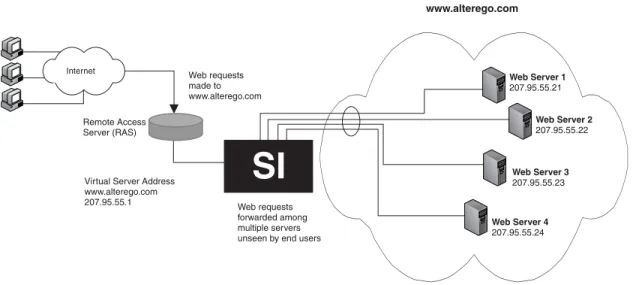
Figure 3.1 Single Virtual IP Address Mapped to Multiple Real Servers
In Figure 3.1, a company establishes a Web site with the URL of www.alterego.com. The Web site is mapped to the virtual IP address 207.95.55.1, defined on a ServerIron. All inquiries made to that Web site by users on the Internet or the company's Intranet use either the URL or virtual IP address to reach the company's Web site. Once these inquiries are received at the company site, the requests are handled by one of four separate physical (real) Web servers that the system administrator has mapped to the virtual IP address. The addresses of the four physical (real) Web servers are unknown and unseen to those users who send the inquiries. The only address the users ever see for the Web site is the virtual IP address.
Value of SLB
SLB provides numerous benefits that ease overall administration of TCP/UDP applications on servers as well as increase their performance and reliability.
In the previous example, Figure 3.1, the system administrator has greater flexibility in managing server resources for this application. When you use a ServerIron, you can add or remove the physical (real) servers to handle changing traffic requirements without disrupting service to the end users. The end users continue to access the virtual IP address configured on the ServerIron and are not aware of added or removed real servers that underlay the virtual IP address.
SLB also enhances server security because the real servers’ IP addresses are never broadcast. The ServerIron sends and responds to ARPs with the virtual IP address, not the actual IP addresses of the real servers.
In addition to offering increased control over server resources and greater security within the network, SLB provides increased reliability of the server resources by providing support for both switch and server redundancy.
How SLB Works
A Foundry ServerIron running SLB software establishes a virtual server that acts as a front-end to physical servers, distributing user service requests among active real servers. SLB packet processing is based on the Network Address Translation (NAT) method. Packets received by the virtual server IP address are translated into the real physical IP address based on the configured distribution metric (for example, “round robin”) and sent to a real server. Packets returned by the real server for the end user are translated by SLB so that the source address is that of the virtual server instead of the real server.
NAT translation is performed for both directions of the traffic flow. Converting virtual services to real services requires IP and TCP checksum modifications.
Port translation is not performed for any virtual port that is bound to a default virtual port.
Internet
Remote Access Server (RAS)
Web Server 1
207.95.55.21
Web Server 2
207.95.55.22
Web Server 3
207.95.55.23
Web Server 4
207.95.55.24 Web requests
forwarded among multiple servers unseen by end users
www.alterego.com
Virtual Server Address www.alterego.com 207.95.55.1
Web requests made to www.alterego.com
Slow-Start Mechanism
When the ServerIron begins sending client requests to a real server that has recently gone online, it allows the server to ramp up by using the slow-start mechanism. The slow-start mechanism allows a server (or a port on the server) to handle a limited number of connections at first and then gradually handle an increasing number of connections until the maximum is reached.
The ServerIron uses two kinds of slow-start mechanisms:
• The non-configurable server slow-start mechanism applies to a real server that has just gone online • The configurable port slow-start mechanism applies to individual TCP application ports that have just been
activated on a real server
See “Slow-Start Mechanism” on page 5-65 for more information.
Load-Balancing Predictor
The predictor is the parameter that determines how to balance the client load across servers.
You can fine-tune how traffic is distributed across multiple real servers by selecting one of the following load balancing metrics (predictors):
Least Connections
Sends the request to the real server that currently has the fewest active connections with clients. For sites where a number of servers have similar performance, the least connections option smooths distribution if a server gets bogged down. For sites where the capacity of various servers varies greatly, the least connections option maintains an equal number of connections among all servers. This results in those servers capable of processing and terminating connections faster receiving more connections than slower servers over time.
Round Robin
Directs the service request to the next server, and treats all servers equally regardless of the number of
connections or response time. For example, in a configuration of four servers, the first request is sent to server1, the second request is sent to server2, the third is sent to server3, and so on. After all servers in the list have received one request, assignment begins with server1 again. If a server fails, SLB avoids sending connections to that server and selects the next server instead.
Weighted
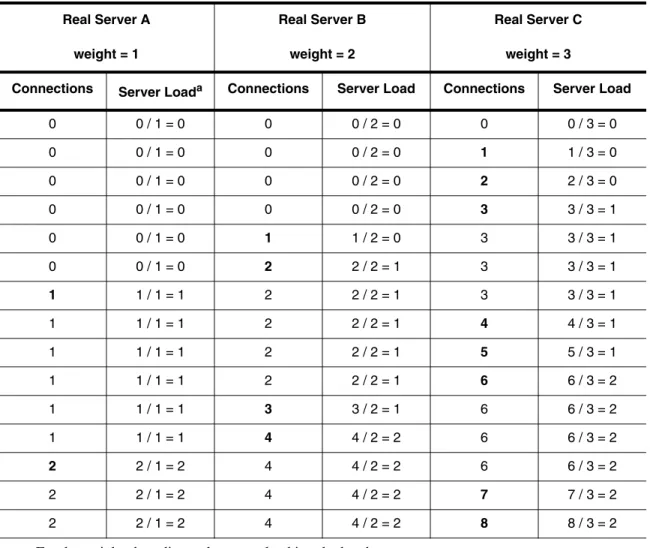
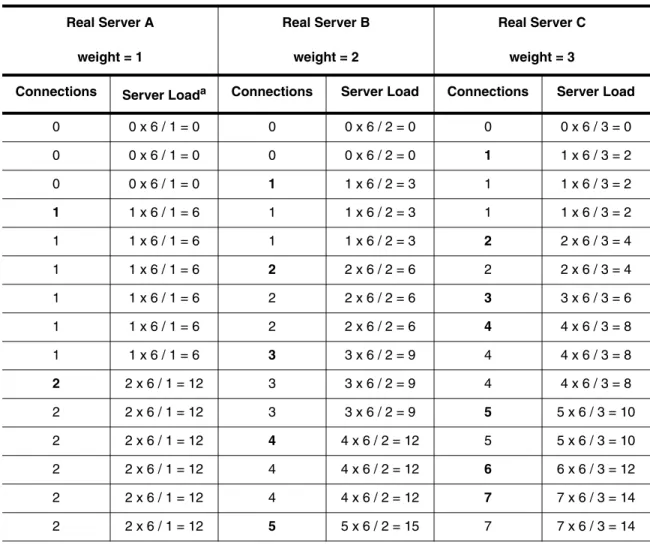
Assigns a performance weight to each server. Weighted load balancing is similar to least connections, except servers with a higher weight value receive a larger percentage of connections at a time. You can assign a weight to each real server, and that weight determines the percentage of the current connections that are given to each server. The default weight is 0.
For example, in a configuration with five servers of various weights, the percentage of connections is calculated as follows:
• Weight server1 = 7 • Weight server2 = 8 • Weight server3 = 2 • Weight server4 = 2 • Weight server5 = 5
• Total weight of all servers = 24
The result is that server1 gets 7/24 of the current number of connections, server2 gets 8/24, server3 gets 2/24, and so on. If a new server, server6, is added with a weight of 10, the new server gets 10/34.