Deliverable: 2.2 VoteCal
System Functional
Specifications
VoteCal Statewide Voter Registration System Project
State of California, Secretary of State (SOS)
February 19, 2010
Version: 2.1
February 19, 2010 Version: 2.1
Page 2
Authors
This document was prepared by:
Contributors
Kurt Schwartz
Catalyst Consulting Group 211 West Wacker Drive Suite 450
Chicago, IL 60606
Don Westfall
Catalyst Consulting Group 211 West Wacker Drive Suite 450
Chicago, IL 60606
Catalyst Team
Catalyst Consulting Group 211 West Wacker Drive Suite 450 Chicago, IL 60606 Date Document Version Document Revision
Description Revision Author
01/20/2010 0.1 Initial Draft Don Westfall 01/27/2010 1.0 Release to SOS for Review Kurt Schwartz 02/08/2010 1.1 Incorporate Use Case Changes and
Re-release to SOS for Review
Kurt Schwartz 02/16/2010 2.0 Release to SOS for Review Kurt Schwartz 02/19/2010 2.1 Incorporate SOS Feedback Kurt Schwartz
February 19, 2010 Version: 2.1
Page 3
Table of Contents
1 Introduction ...4
1.1 Purpose and Objectives ...4
1.2 Scope ...4
1.3 Standards ...4
1.4 Assumptions, Dependencies, and Constraints...5
1.5 Document Control...5
2 Functional Specification...5
2.1 Use Cases ...6
2.1.1 Preliminary Use Case Inventory...6
2.1.2 Preliminary Use Cases...11
2.2 User Interface Specifications...11
2.2.1 Page Inventory ...11
February 19, 2010 Version: 2.1
Page 4
1 Introduction
This document is Deliverable 2.2, the VoteCal System Functional Specification. It has been developed to the specifications presented in Deliverable Expectation Document (DED) 2.2 as approved by the Secretary of State (SOS).
The VoteCal System Functional Specification deliverable is responsible for documenting what (not how) the VoteCal System will provide. It presents the components of the system at a high level of
abstraction, reflective of the “analysis model”. Subsequent deliverables will present continued elaborations of the design artifacts incorporated into the deliverable. At the culmination of the design phase is the delivery of deliverables that will contain the detailed design artifacts that document the “design model” – how the system will provide the required functionality.
1.1 Purpose
and
Objectives
There are three simultaneous objectives for Deliverable 2.2: VoteCal System Functional Specification:
To serve as the analysis model of the system that will evolve into a full design model through a process of progressive elaboration.
To serve as a framework and a backdrop for discussion during the discovery sessions.
To demonstrate how the system will address all requirements in the form of:
Interface
Business Processing Logic
Process
Data Artifacts1.2 Scope
Deliverable 2.2: VoteCal System Functional Specification will be produced in conjunction with
Deliverable 2.1: VoteCal System Requirements Specification. The combination of Deliverables 2.1 and 2.2 will form the basis of the “analysis model” which will serve as the starting point for and input into the discovery sessions.
The VoteCal System Functional Specification conveys the aspects of the VoteCal System “analysis model” and serves as a bridge between the Validated System Requirements and Deliverable 2.3, the VoteCal System Detailed System Design Specification. The design artifacts are presented at a higher level of abstraction than what Deliverable 2.3 will present. Formal discovery sessions will occur between this Deliverable 2.2 and Deliverable 2.3 which will provide input for increased design elaboration.
1.3 Standards
The approach to the design of the VoteCal System is based on a single iteration of the Unified Process. The design artifacts are adapted from the Unified Modeling Language (UML).
February 19, 2010 Version: 2.1
Page 5
1.4 Assumptions, Dependencies, and Constraints
This deliverable was prepared on the basis of the following assumptions, dependencies, and constraints.
The use cases and other design artifacts are at a high level of abstraction and are subject to refinement and elaboration based on information gathered from SOS and the counties during the Discovery Sessions.
The use cases and other design artifacts represent the design of the VoteCal system. These artifacts are maintained and updated separately. The Design deliverables capture the design of the VoteCal system at a point in time through the status of these artifacts at the time the deliverable is produced.1.5 Document
Control
This document contains a revision history log. When changes occur, the version number will be incremented and the date, name of the person authoring the change, and a description of the change will be recorded in the revision history log of the document.
As with other work products of the VoteCal Project, the approved VoteCal System Functional Specification will be placed under configuration management in accordance with the Document
Management Plan (a subset of the Project Management Plan). Also, in accordance with the Document Management Plan, the VoteCal System Functional Specification will be stored on the SharePoint server and available to the project team, the Independent Project Oversight Consultant (IPOC), Independent Verification and Validation (IV&V) vendor, and SOS senior management.
2 Functional
Specification
This is one of several documents intended to address the design of the VoteCal System. This
document lays the foundation for the design of the VoteCal system by providing a high-level description of the general architecture, along with a description of the interfaces with other State agencies, a description of the database, processing functions, and the overall platform for the system.
This deliverable and its companion document, VoteCal System Requirements Specification
(Deliverable 2.1) serve as the analysis model of the VoteCal system design. These documents will provide a preliminary view of the design in preparation for the Discovery sessions.
After the Discovery sessions, the VoteCal system design will be elaborated through the following design documents:
Deliverable 2.3 – VoteCal Detailed System Design Specifications
Deliverable 2.7 – VoteCal System Technical Architecture DocumentationCertain details of the design will be further elaborated in the following design deliverables:
Deliverable 2.4 – VoteCal System Standard Report Specifications
Deliverable 2.8 – VoteCal System Data Model and Data DictionaryFebruary 19, 2010 Version: 2.1
Page 6
2.1 Use
Cases
This deliverable presents the preliminary use cases. The preliminary use cases are descriptions of the behavior of the VoteCal system as it responds to requests from external actors. Each use case
describes the behavior of the system needed to meet one or more of the requirements of the system as defined in the Request for Proposals.
2.1.1 Preliminary Use Case Inventory
This section presents the preliminary use case inventory.
The numbering scheme for the use cases is as follows: UC99.99.01 {Use Case Name} v1.x, where:
“UC” designates it as a use case
99 – the first number designates the use case category
99 - the second number indicates the use case sequence number within the category 01 – a designator to identify variations on a theme. The majority of use cases will only
have a single variation.
Use Case Name – an abbreviated name for the use case v1.x – The version for the use case.
The use case categories are: 01 – Voter Registration 02 – Voter Search 03 – List Maintenance 04 – Data Synchronization 05 – Administration 06 – Extracts/Lists 07 – Correspondence 08 – Reports 09 – Survey
February 19, 2010 Version: 2.1
Page 7
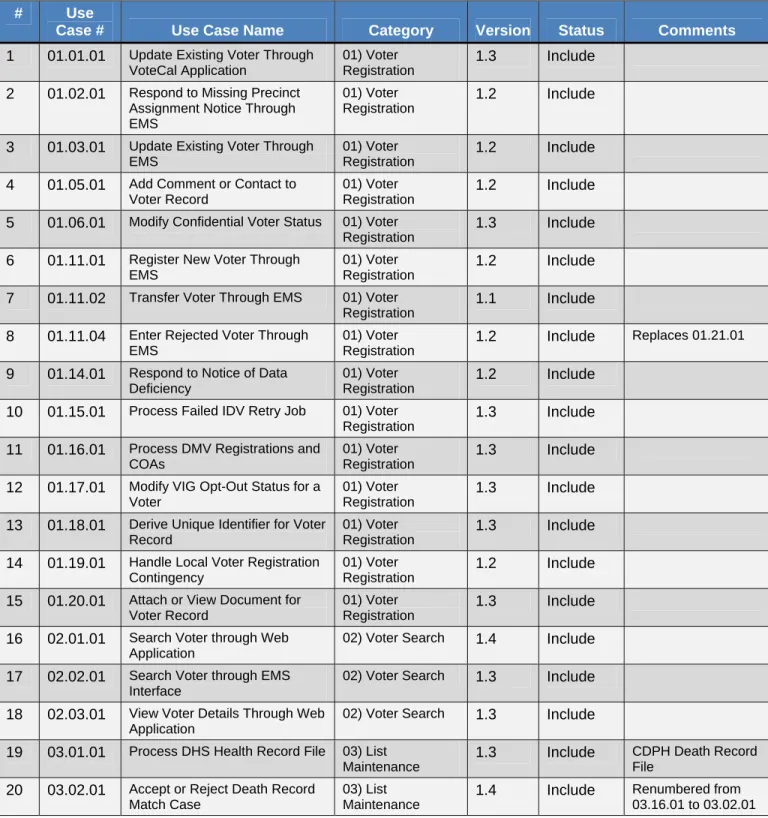
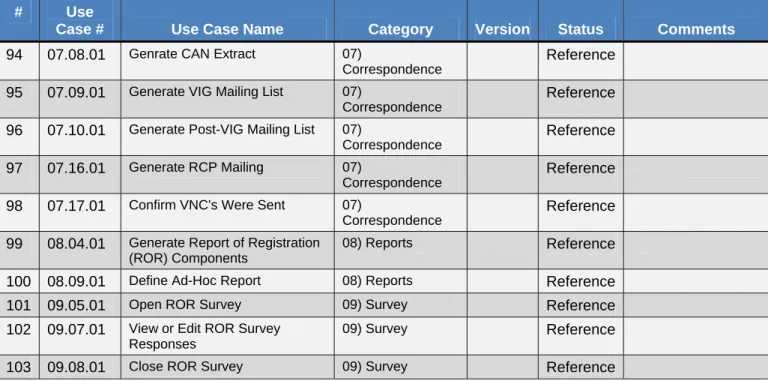
The following table presents the inventory of the use cases for the VoteCal system: Table 2-1 Use Case Inventory
# Use
Case # Use Case Name Category Version Status Comments
1 01.01.01 Update Existing Voter Through VoteCal Application
01) Voter Registration
1.3 Include 2 01.02.01 Respond to Missing Precinct
Assignment Notice Through EMS
01) Voter Registration
1.2 Include 3 01.03.01 Update Existing Voter Through
EMS
01) Voter Registration
1.2 Include 4 01.05.01 Add Comment or Contact to
Voter Record
01) Voter Registration
1.2 Include 5 01.06.01 Modify Confidential Voter Status 01) Voter
Registration
1.3 Include 6 01.11.01 Register New Voter Through
EMS
01) Voter Registration
1.2 Include 7 01.11.02 Transfer Voter Through EMS 01) Voter
Registration
1.1 Include 8 01.11.04 Enter Rejected Voter Through
EMS
01) Voter Registration
1.2 Include Replaces 01.21.01
9 01.14.01 Respond to Notice of Data Deficiency
01) Voter Registration
1.2 Include 10 01.15.01 Process Failed IDV Retry Job 01) Voter
Registration
1.3 Include 11 01.16.01 Process DMV Registrations and
COAs
01) Voter Registration
1.3 Include 12 01.17.01 Modify VIG Opt-Out Status for a
Voter
01) Voter Registration
1.3 Include 13 01.18.01 Derive Unique Identifier for Voter
Record
01) Voter Registration
1.3 Include 14 01.19.01 Handle Local Voter Registration
Contingency
01) Voter Registration
1.2 Include 15 01.20.01 Attach or View Document for
Voter Record
01) Voter Registration
1.3 Include 16 02.01.01 Search Voter through Web
Application
02) Voter Search 1.4 Include
17 02.02.01 Search Voter through EMS Interface
02) Voter Search 1.3 Include
18 02.03.01 View Voter Details Through Web Application
02) Voter Search 1.3 Include
19 03.01.01 Process DHS Health Record File 03) List Maintenance
1.3 Include CDPH Death Record File
20 03.02.01 Accept or Reject Death Record Match Case
03) List Maintenance
1.4 Include Renumbered from 03.16.01 to 03.02.01
February 19, 2010 Version: 2.1
Page 8 # Use
Case # Use Case Name Category Version Status Comments
21 03.03.01 Undo Accepted Death Record Match Case
03) List Maintenance
1.2 Include 22 03.11.01 Process CDCR Felon Record
File
03) List Maintenance
1.3 Include 23 03.12.01 Accept or Reject CDCR Felon
Record Match Case
03) List Maintenance
1.5 Include Renumbered from 03.21.01 to 03.12.01
24 03.13.01 Undo Accepted CDCR Felon Match Case
03) List Maintenance
1.3 Include 25 03.21.01 Process DMV COA Record File 03) List
Maintenance
1.3 Include 26 03.22.01 Accept or Reject DMV COA
Match Case
03) List Maintenance
1.5 Include Renumbered from 03.06.01 to 03.22.01
27 03.23.01 Undo Accepted DMV COA Record Match
03) List Maintenance
1.3 Include 28 03.31.01 Create NCOA-CASS Export 03) List
Maintenance
1.0 Include 29 03.32.01 Process NCOA-CASS Record
File
03) List Maintenance
1.4 Include 30 03.33.01 Accept or Reject NCOA Match
Case
03) List Maintenance
1.1 Include Renumbered from 03.28.01 to 03.33.01
31 03.41.01 Process Duplicate Voter Detection Job
03) List Maintenance
1.4 Include 32 03.42.01 Accept or Reject Duplicate Voter
Match Case
03) List Maintenance
1.3 Include Renumbered from 03.08.01 to 03.42.01
33 03.43.01 Undo Accepted Duplicate Voter Match Case
03) List Maintenance
1.5 Include 34 03.44.01 Re-Open Rejected Duplicate
Voter Match Case
03) List Maintenance
1.3 Include 35 03.50.01 Accept or Reject Transfer Out
Condition
03) List Maintenance
1.4 Include 36 04.06.01 EMS Processes Message
Queue 04) Data Synchronization 1.2 Include 37 04.07.01 Process VNC Printed Notification Batch 04) Data Synchronization 1.4 Include 38 04.10.01 Process Election Participation
Batch
04) Data Synchronization
1.4 Include 39 04.11.01 Process Vote-By-Mail History
Batch
04) Data Synchronization
1.3 Include 40 04.12.01 Process Provisional Voting
Batch 04) Data Synchronization 1.4 Include 41 04.13.01 Process Precinct-District Mapping Batch 04) Data Synchronization 1.4 Include 42 04.14.01 Process Voter Record Update
Batch
04) Data Synchronization
February 19, 2010 Version: 2.1
Page 9 # Use
Case # Use Case Name Category Version Status Comments
43 04.15.01 Process Election Polling Place Batch
04) Data Synchronization
1.3 Include 44 04.16.01 Process Voter Activity Batch 04) Data
Synchronization
1.4 Include 45 04.17.01 Send Signature Batch 04) Data
Synchronization
1.2 Include 46 04.18.01 Process Batch Data Exchange 04) Data
Synchronization
1.0 Include 47 05.01.01 Schedule Sweep of Expired
Confidential Voter Status
05) Administration 1.3 Include
48 05.08.01 Record Issuance of Affidavits for Organization
05) Administration 1.3 Include
49 05.09.01 Determine Organization that was Issued an Affidavit
05) Administration 1.3 Include 50 05.10.01 Log into VoteCal Web
Application-User
05) Administration 1.3 Include 51 05.12.01 Create User Account from
VoteCal Application
05) Administration 1.3 Include 52 05.15.01 Add Organization 05) Administration 1.2 Include
53 05.16.01 Select Organization 05) Administration 1.2 Include
54 05.17.01 Edit Organization 05) Administration 1.3 Include
55 05.19.01 Add or Edit Customer Organization Contact
05) Administration 1.3 Include
56 05.24.01 Print Screen Information 05) Administration 1.1 Include 57 06.01.01 State User Generates Official
List of Voters
06) Extracts/Lists 1.2 Include 58 06.06.01 Enter PVRDR Jury Wheel
Request for Organization
06) Extracts/Lists 1.4 Include 59 06.07.01 Generate PVRDR File Set 06) Extracts/Lists 1.3 Include 60 07.01.01 Generate Expired Confidential
Voter Status Mailing
07) Correspondence 1.5 Include 61 07.18.01 Generate Report or Correspondence 07) Correspondence 1.6 Include 62 08.01.01 User Generates Orphaned Voter
Report
08) Reports 1.4 Include
63 08.03.01 Jurisdictional User Generates Precinct-District Report
08) Reports 1.4 Include
64 08.10.01 Access VoteCal Help Feature 08) Reports 1.3 Include 65 08.11.01 User Generates Orphaned
Precincts Report
08) Reports 1.4 Include
66 09.06.01 Answer ROR Survey 09) Survey 1.2 Include 67 10.01.01 Verify Voter Registration Online 10) Public Website 1.2 Include 68 10.02.01 Register to Vote Online 10) Public Website 1.3 Include
February 19, 2010 Version: 2.1
Page 10 # Use
Case # Use Case Name Category Version Status Comments
69 10.03.01 Determine Provisional Ballot Status Online
10) Public Website 1.3 Include
70 10.04.01 Determine Vote-by-Mail Ballot Status Online
10) Public Website 1.3 Include 71 10.05.01 Select Alternate Language for
Online Features
10) Public Website 1.3 Include 72 10.06.01 Modify VIG Opt-Out Status
Online
10) Public Website 1.2 Include 73 10.07.01 Verify Voter Identity Online 10) Public Website 1.5 Include
74 01.13.01 Check for Duplicate Driver's License or State ID Rejections
01) Voter Registration
Reference 75 03.51.01 Review Unresolved List
Maintenance Issues
03) List Maintenance
Reference 76 05.02.01 Modify Printed Notification and
Post Card Templates
05) Administration Reference
77 05.03.01 Configure List Management Match Settings
05) Administration Reference
78 05.05.01 Configure Standard Codes 05) Administration Reference 79 05.06.01 Edit Political Party 05) Administration Reference 80 05.07.01 Modify ROR Format and Content 05) Administration Reference 81 05.11.01 Adjust Functions Assigned to
Security Role
05) Administration Reference
82 05.13.01 Edit Security Policy Settings 05) Administration Reference 83 05.14.01 Adjust Allowed Idle Session
Time
05) Administration Reference
84 05.18.01 Determine Organization that Requested PVRDR using Salt Record
05) Administration Reference
85 05.20.01 Schedule a Job 05) Administration Reference 86 05.21.01 Check Job Status 05) Administration Reference 87 05.22.01 Add or Edit Political Party
Contact
05) Administration Reference
88 05.23.01 Add Political Party 05) Administration Reference 89 05.25.01 Enter Eligible Registrants
Estimates for ROR
05) Administration Reference New Use Case
(Added 02/05/2010)
90 06.08.01 Create or Modify PVRDR Salt Record
06) Extracts/Lists Reference
91 07.02.01 Generate Failed DMV COA Transaction Mailing 07) Correspondence Reference 92 07.03.01 Generate VNC Mailing 07) Correspondence Reference 93 07.07.01 Generate ARCP Mailing 07)
Correspondence
February 19, 2010 Version: 2.1
Page 11 # Use
Case # Use Case Name Category Version Status Comments
94 07.08.01 Genrate CAN Extract 07)
Correspondence
Reference 95 07.09.01 Generate VIG Mailing List 07)
Correspondence
Reference 96 07.10.01 Generate Post-VIG Mailing List 07)
Correspondence
Reference 97 07.16.01 Generate RCP Mailing 07)
Correspondence
Reference 98 07.17.01 Confirm VNC's Were Sent 07)
Correspondence
Reference 99 08.04.01 Generate Report of Registration
(ROR) Components
08) Reports Reference
100 08.09.01 Define Ad-Hoc Report 08) Reports Reference 101 09.05.01 Open ROR Survey 09) Survey Reference 102 09.07.01 View or Edit ROR Survey
Responses
09) Survey Reference
103 09.08.01 Close ROR Survey 09) Survey Reference
Note: For those use cases specified with a status of “Include”, the use cases will be submitted with this deliverable. The remaining use cases specified with a status of “Reference” will only be referenced in this inventory table.
2.1.2 Preliminary Use Cases
Each use case is maintained as a separate word document. The use cases are submitted with this deliverable, but as separate documents. Please look to “Deliverable 2.2 Functional Specification - Addendum Use Cases v2.1.zip”, included with this deliverable as a separate file. The .zip file contains all of the use cases listed in the use case inventory.
2.2 User
Interface
Specifications
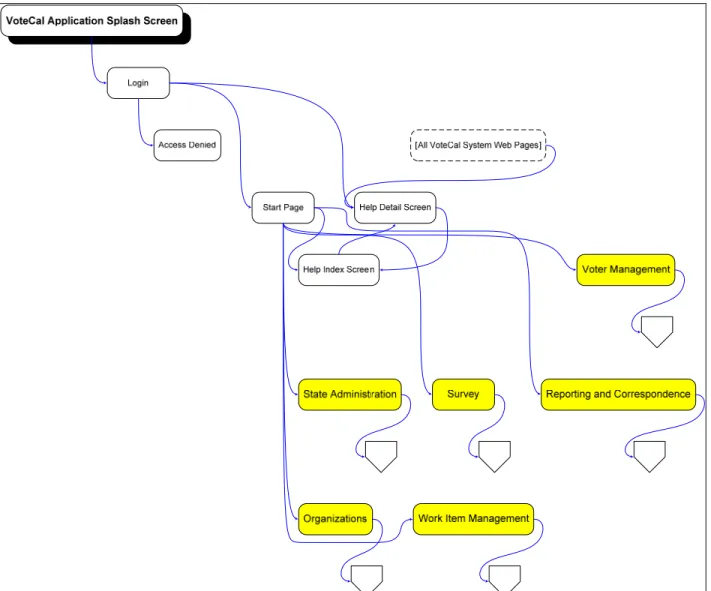
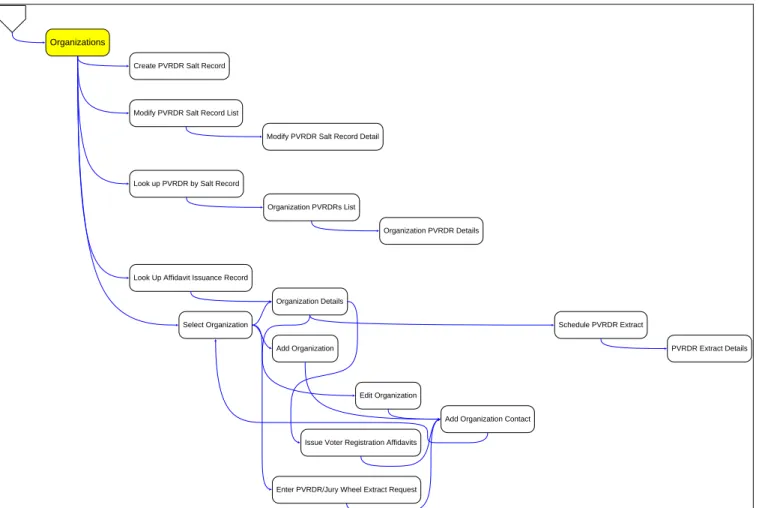
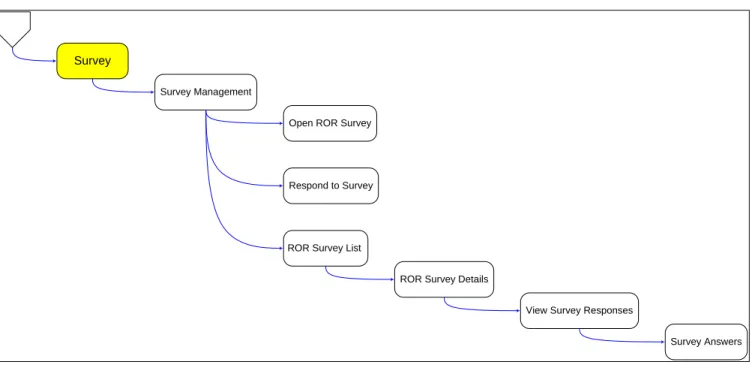
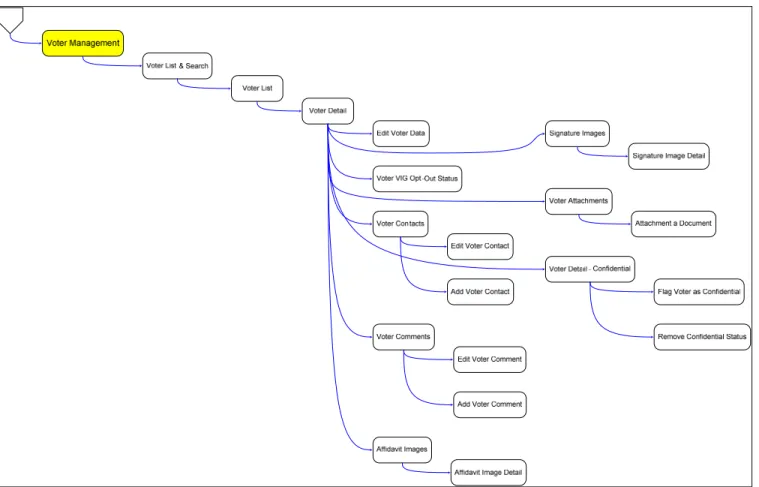
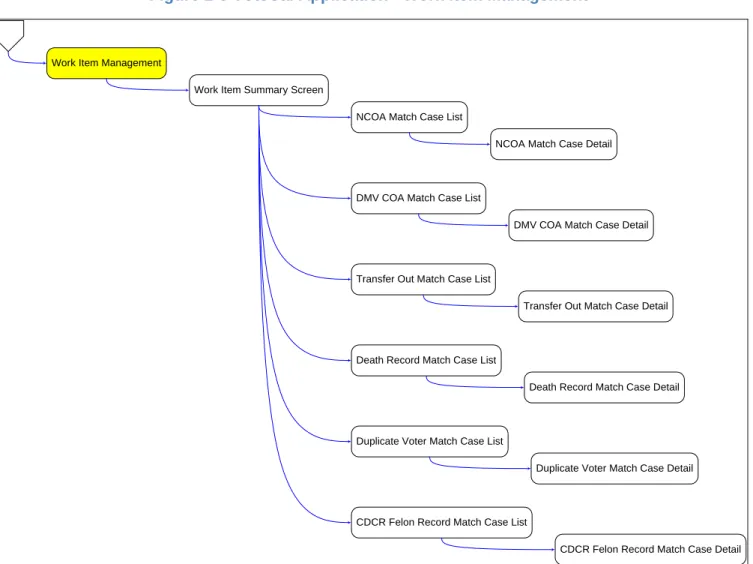
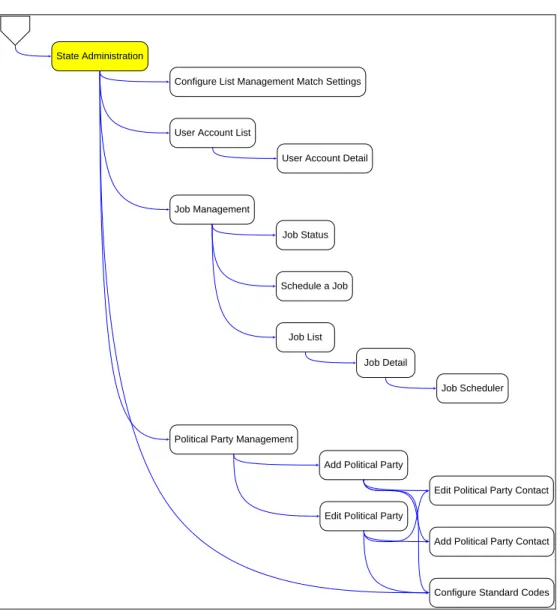
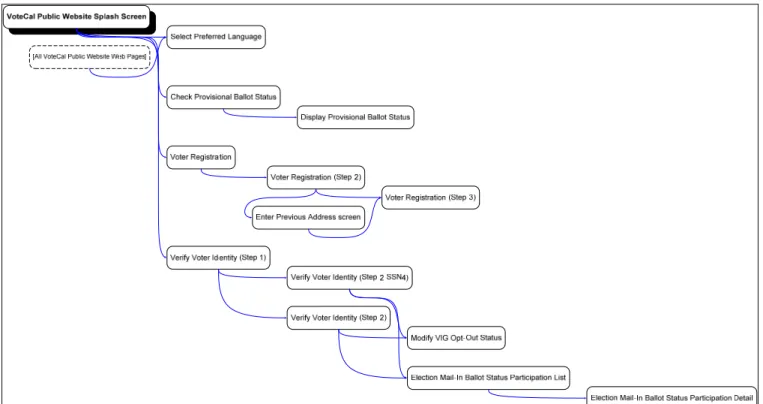
The user interface (UI) specifications are presented in the form of an inventory of user interface pages and a page flow diagram.
2.2.1 Page
Inventory
The following table presents an inventory of user interface pages extracted from the use cases that have been presented to date. The table breaks down the user interface pages into functional categories, referred to as areas.
Table 2-2 User Interface Page Inventory
# UI Number Area Page Name
1 UI99.XX All Help Detail 2 UI99.XX All Help Index 3 UI99.XX Main Access Denied 4 UI99.XX Main Login
February 19, 2010 Version: 2.1
Page 12
# UI Number Area Page Name
5 UI99.XX Main Start Page 6 UI99.XX Organizations Add Organization
7 UI99.XX Organizations Add Organization Contact 8 UI99.XX Organizations Create PVRDR Salt Record 9 UI99.XX Organizations Edit Organization
10 UI99.XX Organizations Enter PVRDR/Jury Wheel Extract Request 11 UI99.XX Organizations Issue Voter Registration Affidavits
12 UI99.XX Organizations Look up Affidavit Issuance Record 13 UI99.XX Organizations Look up PVRDR by Salt Record 14 UI99.XX Organizations Modify PVRDR Salt Record Detail 15 UI99.XX Organizations Modify PVRDR Salt Record List 16 UI99.XX Organizations Organization Details
17 UI99.XX Organizations Organization PVRDR Details 18 UI99.XX Organizations Organization PVRDRs List 19 UI99.XX Organizations PVRDR Extract Details 20 UI99.XX Organizations Schedule PVRDR Extract 21 UI99.XX Organizations Select Organization
22 UI99.XX Reporting and Correspondence Alternate Residency Confirmation Postcard (ARCP) 23 UI99.XX Reporting and Correspondence Change of Address Notification (CAN)
24 UI99.XX Reporting and Correspondence Confidential Voter Status Expiration Notice 25 UI99.XX Reporting and Correspondence Failed DMV COA Transaction
26 UI99.XX Reporting and Correspondence Orphaned Precinct Report 27 UI99.XX Reporting and Correspondence Orphaned Voter Report
28 UI99.XX Reporting and Correspondence Post Voter Information Guide (VIG) Mailing List 29 UI99.XX Reporting and Correspondence Precinct-District Report
30 UI99.XX Reporting and Correspondence Report List
31 UI99.XX Reporting and Correspondence Report of Registration (ROR) 32 UI99.XX Reporting and Correspondence Report Request
33 UI99.XX Reporting and Correspondence Residency Confirmation Postcard (RCP) 34 UI99.XX Reporting and Correspondence VNC – District Detail Template
35 UI99.XX Reporting and Correspondence VNC – Standard Template
36 UI99.XX Reporting and Correspondence Voter Information Guide (VIG) Mailing List 37 UI99.XX Reporting and Correspondence Voter Invalid Addresses Report
38 UI99.XX Reporting and Correspondence Voter Registration Statistics Report 39 UI99.XX Reporting and Correspondence Voters by Party by County
February 19, 2010 Version: 2.1
Page 13
# UI Number Area Page Name
41 UI99.XX State Administration Add Political Party Contact 42 UI99.XX State Administration Configure Standard Codes 43 UI99.XX State Administration Edit Political Party
44 UI99.XX State Administration Edit Political Party Contact 45 UI99.XX State Administration Job Detail
46 UI99.XX State Administration Job List
47 UI99.XX State Administration Job Management 48 UI99.XX State Administration Job Scheduler 49 UI99.XX State Administration Job Status
50 UI99.XX State Administration Political Party Management 51 UI99.XX State Administration Schedule a Job
52 UI99.XX State Administration User Account Detail 53 UI99.XX State Administration User Account List 54 UI99.XX Survey Open ROR Survey 55 UI99.XX Survey Respond to Survey 56 UI99.XX Survey ROR Survey Details 57 UI99.XX Survey ROR Survey List 58 UI99.XX Survey Survey Answers 59 UI99.XX Survey Survey Management 60 UI99.XX Survey View Survey Responses 61 UI99.XX VoteCal Public Website Check Provisional Ballot Status 62 UI99.XX VoteCal Public Website Display Provisional Ballot Status
63 UI99.XX VoteCal Public Website Election Mail-In Ballot Status Participation Detail 64 UI99.XX VoteCal Public Website Election Mail-In Ballot Status Participation List 65 UI99.XX VoteCal Public Website Modify VIG Opt-out Status
66 UI99.XX VoteCal Public Website Select Preferred Language 67 UI99.XX VoteCal Public Website Verify Voter Identity: Step 1 68 UI99.XX VoteCal Public Website Verify Voter Identity: Step 2
69 UI99.XX VoteCal Public Website Verify Voter Identity: Step 2 (SSN4) 70 UI99.XX VoteCal Public Website VoteCal Public Website Splash 71 UI99.XX Voter Management Add Voter Comment
72 UI99.XX Voter Management Add Voter Contact 73 UI99.XX Voter Management Affidavit Image Detail 74 UI99.XX Voter Management Affidavit Images 75 UI99.XX Voter Management Attach a Document 76 UI99.XX Voter Management Edit Voter Comment
February 19, 2010 Version: 2.1
Page 14
# UI Number Area Page Name
77 UI99.XX Voter Management Edit Voter Contact 78 UI99.XX Voter Management Edit Voter Data
79 UI99.XX Voter Management Flag Voter as Confidential 80 UI99.XX Voter Management Remove Confidential Status 81 UI99.XX Voter Management Signature Image Detail 82 UI99.XX Voter Management Signature Images 83 UI99.XX Voter Management Voter Attachments 84 UI99.XX Voter Management Voter Comments 85 UI99.XX Voter Management Voter Contacts 86 UI99.XX Voter Management Voter Detail
87 UI99.XX Voter Management Voter Detail - Confidential 88 UI99.XX Voter Management Voter List
89 UI99.XX Voter Management Voter List and Search 90 UI99.XX Voter Management Voter VIG Opt-Out Status
91 UI99.XX Work Item Management CDCR Felon Record Match Case Detail 92 UI99.XX Work Item Management CDCR Felon Record Match Case List 93 UI99.XX Work Item Management Death Record Match Case Detail 94 UI99.XX Work Item Management Death Record Match Case List 95 UI99.XX Work Item Management DMV COA Match Case Detail 96 UI99.XX Work Item Management DMV COA Match Case List 97 UI99.XX Work Item Management Duplicate Voter Match Case Detail 98 UI99.XX Work Item Management Duplicate Voter Match Case List 99 UI99.XX Work Item Management NCOA Match Case Detail 100 UI99.XX Work Item Management NCOA Match Case List
101 UI99.XX Work Item Management Transfer Out Match Case Detail 102 UI99.XX Work Item Management Transfer Out Match Case List 103 UI99.XX Work Item Management Work Item Summary
2.2.2 Page Flow Diagram
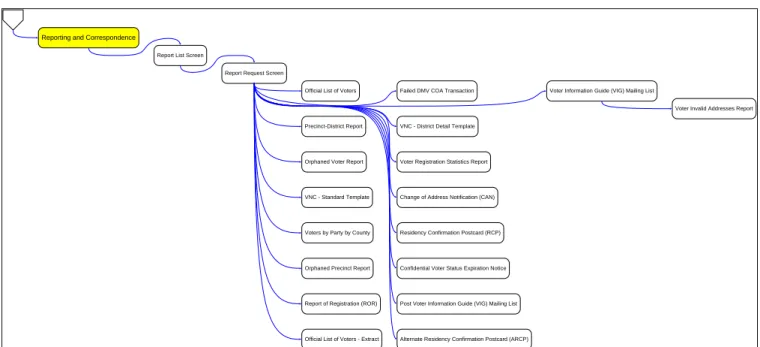
This section presents a series of page flow diagrams. The diagrams are broken down into functional categories, referred to as areas, with each diagram sequence reflecting a single area. The diagrams are pasted into this section and also presented in a separate file. Please look to “Deliverable 2.2 Functional Specification - Addendum Page Flow v2.1.pdf”, included with this deliverable as a separate file.
February 19, 2010 Version: 2.1
Page 15
February 19, 2010 Version: 2.1
Page 16
Figure 2-2 VoteCal Application - Reporting and Correspondence
Reporting and Correspondence
Report List Screen
Report Request Screen
Confidential Voter Status Expiration Notice Failed DMV COA Transaction
VNC - Standard Template
VNC - District Detail Template
Alternate Residency Confirmation Postcard (ARCP) Change of Address Notification (CAN)
Voter Information Guide (VIG) Mailing List
Voter Invalid Addresses Report
Post Voter Information Guide (VIG) Mailing List Residency Confirmation Postcard (RCP) Orphaned Voter Report
Precinct-District Report
Voter Registration Statistics Report
Orphaned Precinct Report Voters by Party by County
Report of Registration (ROR) Official List of Voters
February 19, 2010 Version: 2.1
Page 17
Figure 2-3 VoteCal Application - Organizations
Select Organization
Add Organization Organization Details
Issue Voter Registration Affidavits
Add Organization Contact Look Up Affidavit Issuance Record
Organizations
Edit Organization Look up PVRDR by Salt Record
Organization PVRDRs List
Organization PVRDR Details
Enter PVRDR/Jury Wheel Extract Request
Schedule PVRDR Extract
PVRDR Extract Details Create PVRDR Salt Record
Modify PVRDR Salt Record List
February 19, 2010 Version: 2.1
Page 18
Figure 2-4 VoteCal Application - Survey
Survey
Survey Management
Respond to Survey
View Survey Responses
Survey Answers ROR Survey List
ROR Survey Details Open ROR Survey
February 19, 2010 Version: 2.1
Page 19
February 19, 2010 Version: 2.1
Page 20
Figure 2-6 VoteCal Application - Work Item Management
Work Item Management
Work Item Summary Screen
DMV COA Match Case List
DMV COA Match Case Detail
Death Record Match Case List
Death Record Match Case Detail
CDCR Felon Record Match Case List
CDCR Felon Record Match Case Detail NCOA Match Case List
NCOA Match Case Detail
Duplicate Voter Match Case List
Duplicate Voter Match Case Detail Transfer Out Match Case List
February 19, 2010 Version: 2.1
Page 21
Figure 2-7 VoteCal Application - State Administration
State Administration
User Account List
User Account Detail
Job Management
Schedule a Job Job Status
Political Party Management
Add Political Party
Add Political Party Contact
Configure Standard Codes Edit Political Party
Edit Political Party Contact Job List
Job Detail Configure List Management Match Settings
February 19, 2010 Version: 2.1
Page 22