Oracle
Getting Started with
NoSQL Database Tables API
12c Release 1
Library Version 12.1.3.1
Legal Notice
Copyright © 2011, 2012, 2013, 2014, Oracle and/or its affiliates. All rights reserved.
This software and related documentation are provided under a license agreement containing restrictions on use and disclosure and are protected by intellectual property laws. Except as expressly permitted in your license agreement or allowed by law, you may not use, copy, reproduce, translate, broadcast, modify, license, transmit, distribute, exhibit, perform, publish, or display any part, in any form, or by any means. Reverse engineering, disassembly, or decompilation of this software, unless required by law for interoperability, is prohibited.
The information contained herein is subject to change without notice and is not warranted to be error-free. If you find any errors, please report them to us in writing.
If this is software or related documentation that is delivered to the U.S. Government or anyone licensing it on behalf of the U.S. Government, the following notice is applicable:
U.S. GOVERNMENT END USERS: Oracle programs, including any operating system, integrated software, any programs installed on the hardware, and/or documentation, delivered to U.S. Government end users are "commercial computer software" pursuant to the applicable Federal Acquisition Regulation and agency-specific supplemental regulations. As such, use, duplication, disclosure, modification, and adaptation of the programs, including any operating system, integrated software, any programs installed on the hardware, and/or documentation, shall be subject to license terms and license restrictions applicable to the programs. No other rights are granted to the U.S. Government.
This software or hardware is developed for general use in a variety of information management applications. It is not developed or intended for use in any inherently dangerous applications, including applications that may create a risk of personal injury. If you use this software or hardware in dangerous applications, then you shall be responsible to take all appropriate fail-safe, backup, redundancy, and other measures to ensure its safe use. Oracle Corporation and its affiliates disclaim any liability for any damages caused by use of this software or hardware in dangerous applications.
Oracle and Java are registered trademarks of Oracle and/or its affiliates. Other names may be trademarks of their respective owners.
Intel and Intel Xeon are trademarks or registered trademarks of Intel Corporation. All SPARC trademarks are used under license and are trademarks or registered trademarks of SPARC International, Inc. AMD, Opteron, the AMD logo, and the AMD Opteron logo are trademarks or registered trademarks of Advanced Micro Devices. UNIX is a registered trademark of The Open Group.
This software or hardware and documentation may provide access to or information on content, products, and services from third parties. Oracle Corporation and its affiliates are not responsible for and expressly disclaim all warranties of any kind with respect to third-party content, products, and services. Oracle Corporation and its affiliates will not be responsible for any loss, costs, or damages incurred due to your access to or use of third-party content, products, or services.
Getting Started with Oracle
Table of Contents
Preface ... v
Conventions Used in This Book ... v
1. Introduction to Oracle NoSQL Database ... 1
The KVStore ... 1
Replication Nodes and Shards ... 2
Replication Factor ... 3
Partitions ... 4
Zones ... 4
Topologies ... 4
Access and Security ... 5
KVLite ... 5
The Administration Command Line Interface history ... 6
The Administration Command Line Interface ... 6
2. Introduction to Oracle KVLite ... 7
Starting KVLite ... 7
Stopping and Restarting KVLite ... 8
Verifying the Installation ... 8
kvlite Utility Command Line Parameter Options ... 9
3. Developing for Oracle NoSQL Database ... 11
The KVStore Handle ... 11
The KVStoreConfig Class ... 12
Using the Authentication APIs ... 13
Configuring SSL ... 13
Identifying the Trust Store ... 13
Setting the SSL Transport Property ... 14
Authenticating to the Store ... 14
Renewing Expired Login Credentials ... 16
Unauthorized Access ... 19
4. Introducing Oracle NoSQL Database Tables and Indexes ... 20
Defining Tables ... 20
Name Limitations ... 21
Supported Table Data Types ... 21
Record Fields ... 22
Defining Tables using Existing Avro Schema ... 24
Tables Compatible with Key-Only Entries (-r2-compat) ... 26
Defining Child Tables ... 27
Table Evolution ... 28
Table Manipulation Commands ... 28
Creating Indexes ... 30
Indexable Field Types ... 31
Index Manipulation Commands ... 32
5. Primary and Shard Key Design ... 33
Primary Keys ... 33
Data Type Limitations ... 33
Partial Primary Keys ... 34
Getting Started with Oracle
Row Data ... 35
6. Writing and Deleting Table Rows ... 38
Write Exceptions ... 38
Writing Rows to a Table in the Store ... 38
Writing Rows to a Child Table ... 39
Other put Operations ... 41
Deleting Rows from the Store ... 41
Using multiDelete() ... 42
7. Reading Table Rows ... 44
Read Exceptions ... 44
Retrieving a Single Row ... 44
Retrieve a Child Table ... 46
Using multiGet() ... 46
Iterating over Table Rows ... 49
Specifying Field Ranges ... 52
Using MultiRowOptions to Retrieve Nested Tables ... 54
Reading Indexes ... 58
Parallel Scans ... 61
8. Using Data Types ... 63
Using Arrays ... 63
Using Binary ... 65
Using Enums ... 66
Using Fixed Binary ... 67
Using Maps ... 69
Using Embedded Records ... 70
9. Indexing Non-Scalar Data Types ... 72
Indexing Arrays ... 72
Indexing Maps ... 73
Indexing Embedded Records ... 75
10. Using Row Versions ... 78
11. Consistency Guarantees ... 80
Specifying Consistency Policies ... 80
Using Predefined Consistency ... 81
Using Time-Based Consistency ... 82
Using Version-Based Consistency ... 83
12. Durability Guarantees ... 87
Setting Acknowledgment-Based Durability Policies ... 87
Setting Synchronization-Based Durability Policies ... 88
Setting Durability Guarantees ... 89
13. Executing a Sequence of Operations ... 92
Sequence Errors ... 92
Creating a Sequence ... 92
Executing a Sequence ... 95
Getting Started with Oracle
Preface
There are two different APIs that can be used to write Oracle NoSQL Database (Oracle NoSQL Database) applications: the original key/value API, and the tables API. This document describes how to write Oracle NoSQL Database applications using the tables API. Note that most application developers should use the tables API because it offers important features, including secondary indexes.
This document provides the concepts surrounding Oracle NoSQL Database, data schema considerations, as well as introductory programming examples.
This document is aimed at the software engineer responsible for writing an Oracle NoSQL Database application.
Conventions Used in This Book
The following typographical conventions are used within in this manual:
Class names are represented in monospaced font, as are method names. For example: "The
KVStoreConfig() constructor returns a KVStoreConfig class object."
Variable or non-literal text is presented in italics. For example: "Go to your KVHOME
directory."
Program examples are displayed in a monospaced font on a shaded background. For example:
import oracle.kv.KVStore;
import oracle.kv.KVStoreConfig; ...
KVStoreConfig kconfig = new KVStoreConfig("exampleStore", "node1.example.org:5088, node2.example.org:4129"); KVStore kvstore = null;
In some situations, programming examples are updated from one chapter to the next. When this occurs, the new code is presented in monospaced bold font. For example:
import oracle.kv.KVStore;
import oracle.kv.KVStoreConfig;
import oracle.kv.KVStoreFactory;
...
KVStoreConfig kconfig = new KVStoreConfig("exampleStore", "node1.example.org:5088, node2.example.org:4129"); KVStore kvstore = null;
try {
Getting Started with Oracle
} catch (FaultException fe) {
// Some internal error occurred. Either abort your application // or retry the operation.
}
Note
Getting Started with Oracle
Chapter 1. Introduction to Oracle NoSQL Database
Welcome to Oracle NoSQL Database. Oracle NoSQL Database provides multi-terabyte
distributed key/value pair storage that offers scalable throughput and performance. That is, it services network requests to store and retrieve data which is accessed as tables of information or, optionally, as key-value pairs. Oracle NoSQL Database services these types of data requests with a latency, throughput, and data consistency that is predictable based on how the store is configured.
Oracle NoSQL Database offers full Create, Read, Update and Delete (CRUD) operations with adjustable durability guarantees. Oracle NoSQL Database is designed to be highly available, with excellent throughput and latency, while requiring minimal administrative interaction. Oracle NoSQL Database provides performance scalability. If you require better performance, you use more hardware. If your performance requirements are not very steep, you can purchase and manage fewer hardware resources.
Oracle NoSQL Database is meant for any application that requires network-accessible data with user-definable read/write performance levels. The typical application is a web application which is servicing requests across the traditional three-tier architecture: web server, application server, and back-end database. In this configuration, Oracle NoSQL Database is meant to be installed behind the application server, causing it to either take the place of the back-end database, or work alongside it. To make use of Oracle NoSQL Database, code must be written (using Java or C) that runs on the application server.
An application makes use of Oracle NoSQL Database by performing network requests against Oracle NoSQL Database's data store, which is referred to as the KVStore. The requests are made using the Oracle NoSQL Database Driver, which is linked into your application as a Java library (.jar file), and then accessed using a series of Java APIs.
By using the Oracle NoSQL Database APIs, the developer is able to perform create, read, update and delete operations on the data contained in the KVStore. The usage of these APIs is introduced later in this manual.
Note
Oracle NoSQL Database is tested using Java 7, and so Oracle NoSQL Database should be used only with that version of Java.
The KVStore
The KVStore is a collection of Storage Nodes which host a set of Replication Nodes. Data is spread across the Replication Nodes. Given a traditional three-tier web architecture, the KVStore either takes the place of your back-end database, or runs alongside it.
The store contains multiple Storage Nodes. A Storage Node is a physical (or virtual) machine with its own local storage. The machine is intended to be commodity hardware. It should be, but is not required to be, identical to all other Storage Nodes within the store.
Library Version 12.1.3.1 Introduction to Oracle NoSQL Database
Getting Started with Oracle
The following illustration depicts the typical architecture used by an application that makes use of Oracle NoSQL Database:
Every Storage Node hosts one or more Replication Nodes as determined by its capacity. The capacity of a Storage Node serves as a rough measure of the hardware resources associated with it. A store can consist of Storage Nodes of different capacities. Oracle NoSQL Database will ensure that a Storage Node is assigned a load that is proportional to its capacity. A Replication Node in turn contains at least one and typically many partitions. Also, each Storage Node contains monitoring software that ensures the Replication Nodes which it hosts are running and are otherwise healthy.
Replication Nodes and Shards
At a very high level, a Replication Node can be thought of as a single database which contains key-value pairs.
Replication Nodes are organized into shards. A shard contains a single Replication Node, called the master node, which is responsible for performing database writes, as well as one or more read-only replicas. The master node copies all writes to the replicas. These replicas are used to service read-only operations. Although there can be only one master node at any given
Library Version 12.1.3.1 Introduction to Oracle NoSQL Database
Getting Started with Oracle
time, any of the members of the shard (with the exception of nodes in a secondary zone as described below) are capable of becoming a master node. In other words, each shard uses a single master/multiple replica strategy to improve read throughput and availability.
The following illustration shows how the KVStore is divided up into shards:
Note that if the machine hosting the master should fail in any way, then the master automatically fails over to one of the other nodes in the shard. That is, one of the replica nodes is automatically promoted to master.
Production KVStores should contain multiple shards. At installation time you provide information that allows Oracle NoSQL Database to automatically decide how many shards the store should contain. The more shards that your store contains, the better your write performance is because the store contains more nodes that are responsible for servicing write requests.
Replication Factor
The number of nodes belonging to a shard is called its Replication Factor. The larger a shard's Replication Factor, the faster its read throughput (because there are more machines to service the read requests) but the slower its write performance (because there are more machines to which writes must be copied).
Once you set the Replication Factor for each zone in the store, Oracle NoSQL Database makes sure the appropriate number of Replication Nodes are created for each shard residing in each zone making up your store. The number of copies, or replicas, maintained in a zone is called the Zone Replication Factor. The total number of replicas in all Primary zones is called the Primary Replication Factor, and the total number in all Secondary zones is called the
Secondary Replication Factor. For all zones in the store, the total number of replicas across the entire store is called the Store Replication Factor.
Library Version 12.1.3.1 Introduction to Oracle NoSQL Database
Getting Started with Oracle
Partitions
Each shard contains one or more partitions. Table rows (or key-value pairs) in the store are accessed by the data's key. Keys, in turn, are assigned to a partition. Once a key is placed in a partition, it cannot be moved to a different partition. Oracle NoSQL Database spreads records evenly across all available partitions by hashing each record's key.
As part of your planning activities, you must decide how many partitions your store should have. Note that this is not configurable after the store has been installed.
It is possible to expand and change the number of Storage Nodes in use by the store. When this happens, the store can be reconfigured to take advantage of the new resources by adding new shards. When this happens, partitions are balanced between new and old shards by redistributing partitions from one shard to another. For this reason, it is desirable to have enough partitions so as to allow fine-grained reconfiguration of the store. Note that there is a minimal performance cost for having a large number of partitions. As a rough rule of thumb, there should be at least 10 to 20 partitions per shard, and the number of partitions should be evenly divisible by the number of shards. Since the number of partitions cannot be changed after the initial deployment, you should consider the maximum future size of the store when specifying the number of partitions.
Zones
A zone is a physical location that supports good network connectivity among the Storage Nodes deployed in it and has some level of physical separation from other zones. A zone generally includes redundant or backup power supplies, redundant data communications connections, environmental controls (for example: air conditioning, fire suppression) and security devices. A zone may represent an actual physical data center building, but could also represent a floor, room, pod, or rack, depending on the particular deployment. Oracle recommends you install and configure your store across multiple zones to guard against systemic failures affecting an entire physical location, such as a large scale power or network outage.
Multiple zones provide fault isolation and increase the availability of your data in the event of a single zone failure.
Zones come in two types. Primary zones contain nodes which can serve as masters or replicas. Zones are created as primary zones by default. Secondary zones contain nodes which can only serve as replicas. Secondary zones can be used to make a copy of the data available at a distant location, or to maintain an extra copy of the data to increase redundancy or read capacity.
Topologies
A topology is the collection of zones, storage nodes, replication nodes and administration services that make up a NoSQL DB store. A deployed store has one topology that describes its state at a given time.
After initial deployment, the topology is laid out so as to minimize the possibility of a single point of failure for any given shard. This means that while a Storage Node might host more
Library Version 12.1.3.1 Introduction to Oracle NoSQL Database
Getting Started with Oracle
than one Replication Node, those Replication Nodes will never be from the same shard. This improves the chances of the shard continuing to be available for reads and writes even in the face of a hardware failure that takes down the host machine.
Topologies can be changed to achieve different performance characteristics, or in reaction to changes in the number or characteristics of the Storage Nodes. Changing and deploying a topology is an iterative process.
Access and Security
Access to the KVStore and its data is performed in two different ways. Routine access to the data is performed using Java APIs that the application developer uses to allow his application to interact with the Oracle NoSQL Database Driver, which communicates with the store's Storage Nodes in order to perform whatever data access the application developer requires. The Java APIs that the application developer uses are introduced later in this manual. In addition, administrative access to the store is performed using a command line interface or a browser-based graphical user interface. System administrators use these interfaces to perform the few administrative actions that are required by Oracle NoSQL Database. You can also monitor the store using these interfaces.
For most production stores, authentication over SSL is normally required by both the command line interface and the Java APIs. It is possible to install a store such that authentication is not required, but this is not recommended. For details on Oracle NoSQL Database's security features, see the Oracle NoSQL Database Security Guide.
Note
Oracle NoSQL Database is intended to be installed in a secure location where physical and network access to the store is restricted to trusted users. For this reason, at this time Oracle NoSQL Database's security model is designed to prevent accidental access to the data. It is not designed to prevent denial-of-service attacks.
KVLite
KVLite is a simplified version of Oracle NoSQL Database. It provides a single-node store that is not replicated. It runs in a single process without requiring any administrative interface. You configure, start, and stop KVLite using a command line interface.
KVLite is intended for use by application developers who need to unit test their Oracle NoSQL Database application. It is not intended for production deployment, or for performance measurements.
KVLite is installed when you install KVStore. It is available in the kvstore.jar file in the lib
directory of your Oracle NoSQL Database distribution. Note that KVLite cannot be configured as a secure store.
Library Version 12.1.3.1 Introduction to Oracle NoSQL Database
Getting Started with Oracle
The Administration Command Line Interface history
By default Oracle NoSQL Database uses the Java Jline library to support saveable command line history in the CLI. If you want to disable this feature, the following Java property should be set while running runadmin:
java -Doracle.kv.shell.jline.disable=true -jar KVHOME/kvstore.jar \ runadmin -host <hostname> -port <portname>
Command line history is saved to a file so that it is available after restart. By default, Oracle NoSQL Database attempts to save the history in a
KVHOME/.jlineoracle.kv.impl.admin.client.CommandShell.history file, which is created and opened automatically. The default history saved is 500 lines.
Note
If the history file cannot be opened, it will fail silently and the CLI will run without saved history.
The default history file path can be overridden by setting the
oracle.kv.shell.history.file="path" Java property.
The default number of lines to save to the file can be modified by setting the
oracle.kv.shell.history.size=<int_value> Java property.
The Administration Command Line Interface
The Administration command line interface (CLI) is the primary tool used to manage your store. It is used to configure, deploy, and change store components.
The CLI can also be used to get, put, and delete store records or tables, retrieve schema, and display general information about the store. It can also be used to diagnose problems or potential problems in the system, fix actual problems by adding, removing or modifying store data and/or verify that the store has data. It is particularly well-suited for a developer who is creating a Oracle NoSQL Database application, and who needs to either populate a store a with a small number of records so as to have data to develop against, or to examine the store's state as part of development debugging activities.
The command line interface is accessed using the following command:
java -Xmx256m -Xms256m -jar KVHOME/lib/kvstore.jar runadmin
For a listing of all the commands available to you in the CLI, see appendix A of the Oracle NoSQL Database Administrator's Guide.
Getting Started with Oracle
Chapter 2. Introduction to Oracle KVLite
KVLite is a single-node, single shard store. It usually runs in a single process and is used to develop and test client applications. KVLite is installed when you install Oracle NoSQL Database.
Note
KVLite supports only non-authenticated access to the store. That is, you cannot configure KVLite such that your code can authenticate, or log in, to it. If you are developing code for a store that requires authentication, then you must install a test store that is configured for authentication access in the same way as your production store.
Using the authentication APIs is described in Using the Authentication APIs (page 13). For information on configuring a store to require authentication, see the Oracle NoSQL Database Security Guide.
Starting KVLite
You start KVLite by using the kvlite utility, which can be found in KVHOME/lib/kvstore.jar. If you use this utility without any command line options, then KVLite will run with the
following default values: • The store name is kvstore.
• The hostname is the local machine. • The registry port is 5000.
• The directory where Oracle NoSQL Database data is placed (known as KVROOT) is ./kvroot. • The administration process is turned on using port 5001.
This means that any processes that you want to communicate with KVLite can only connect to it on the local host (127.0.0.1) using port 5000. If you want to communicate with KVLite from some machine other than the local machine, then you must start it using non-default values. The command line options are described later in this chapter.
For example:
> java -Xmx256m -Xms256m -jar KVHOME/lib/kvstore.jar kvlite
Note
To avoid using too much heap space, you should specify -Xmx and -Xms flags for Java when running administrative and utility commands.
When KVLite has started successfully, it issues one of two statements to stdout, depending on whether it created a new store or is opening an existing store:
Library Version 12.1.3.1 Introduction to Oracle KVLite
Getting Started with Oracle
Created new kvlite store with args:
-root ./kvroot -store <kvstore name> -host <localhost> -port 5000 -admin 5001
or
Opened existing kvlite store with config:
-root ./kvroot -store <kvstore name> -host <localhost> -port 5000 -admin 5001
where <kvstore name> is the name of the store and <localhost> is the name of the local host. It takes about 10 - 60 seconds before this message is issued, depending on the speed of your machine.
Note that you will not get the command line prompt back until you stop KVLite.
Stopping and Restarting KVLite
To stop KVLite, use ^C from within the shell where KVLite is running.
To restart the process, simply run the kvlite utility without any command line options. Do this even if you provided non-standard options when you first started KVLite. This is because KVLite remembers information such as the port value and the store name in between run times. You cannot change these values by using the command line options.
If you want to start over with different options than you initially specified, delete the KVROOT directory (./kvroot, by default), and then re-run the kvlite utility with whatever options you desire. Alternatively, specify the -root command line option, making sure to specify a location other than your original KVROOT directory, as well as any other command line options that you want to change.
Verifying the Installation
There are several things you can do to verify your installation, and ensure that KVLite is running:
• Start another shell and run:
jps -m
The output should show KVLite (and possibly other things as well, depending on what you have running on your machine).
• Run the kvclient test application: 1. cd KVHOME
2. java -Xmx256m -Xms256m -jar lib/kvclient.jar This should write the release to stdout:
Library Version 12.1.3.1 Introduction to Oracle KVLite
Getting Started with Oracle
• Compile and run the example program: 1. cd KVHOME
2. Compile the example:
javac -g -cp lib/kvclient.jar:examples examples/hello/*.java
3. Run the example using all default parameters:
java -Xmx256m -Xms256m \
-cp lib/kvclient.jar:examples hello.HelloBigDataWorld
Or run it using non-default parameters, if you started KVLite using non-default values:
java -Xmx256m -Xms256m \
-cp lib/kvclient.jar:examples hello.HelloBigDataWorld \ -host <hostname> -port <hostport> -store <kvstore name>
kvlite Utility Command Line Parameter Options
This section describes the command line options that you can use with the kvlite utility. Note that you can only specify these options the first time KV Lite is started. Most of the parameter values specified here are recorded in the KVHOME directory, and will be used when you restart the KVLite process regardless of what you provide as command line options. If you want to change your initial values, either delete your KVHOME directory before starting KV Lite again, or specify the -root option (with a different KVHOME location than you initially used) when you provide the new values.
• -admin <port>
If this option is specified, the administration user interface is started. The port identified here is the port you use to connect to the UI.
• -help
Print a brief usage message, and exit. • -host <hostname>
Identifies the name of the host on which KVLite is running. Use this option ONLY if you are creating a new store.
If you want to access this instance of KVLite from remote machines, supply the local host's real hostname. Otherwise, specify localhost for this option.
• -logging
Turns on Java application logging. The log files are placed in the examples directory in your Oracle NoSQL Database distribution.
Library Version 12.1.3.1 Introduction to Oracle KVLite
Getting Started with Oracle
Identifies the port on which KVLite is listening for client connections. Use this option ONLY if you are creating a new store.
• -root <path>
Identifies the path to the Oracle NoSQL Database home directory. This is the location where the store's database files are contained. The directory identified here must exist. If the appropriate database files do not exist at the location identified by the option, they are created for you.
• -store <storename>
Getting Started with Oracle
Chapter 3. Developing for Oracle NoSQL Database
You access the data in the Oracle NoSQL Database KVStore using Java APIs that are provided with the product. There are two different programming paradigms that you can use to write your Oracle NoSQL Database applications. One uses a tables API, and the other offers a key/ value pair API. Most customers should use the tables API because it offers important features that do not appear in the key/value pair API, such as secondary indexing. However, as of this release, the tables API does not allow you to insert Large Objects into a table. You can, however, use the LOB API alongside of the tables API.
Regardless of the API you decide to use, the provided classes and methods allow you to write data to the store, retrieve it, and delete it. You use these APIs to define consistency and durability guarantees. It is also possible to execute a sequence of store operations atomically so that all the operations succeed, or none of them do.
The rest of this book introduces the Java APIs that you use to access the store, and the concepts that go along with them. This book describes the tables API. If you prefer to use the key/value API, you should read Oracle NoSQL Database Getting Started with the Key/Value API.
Note
Oracle NoSQL Database is tested with Java 7, and so Oracle NoSQL Database should be used only with that version of Java.
The KVStore Handle
In order to perform store access of any kind, you must obtain a KVStore handle. You obtain a KVStore handle by using the KVStoreFactory.getStore() method.
When you get a KVStore handle, you must provide a KVStoreConfig object. This object identifies important properties about the store that you are accessing. We describe the
KVStoreConfig class next in this chapter, but at a minimum you must use this class to identify:
• The name of the store. The name provided here must be identical to the name used when the store was installed.
• The network contact information for one or more helper hosts. These are the network name and port information for nodes currently belonging to the store. Multiple nodes can be identified using an array of strings. You can use one or many. Many does not hurt. The downside of using one is that the chosen host may be temporarily down, so it is a good idea to use more than one.
In addition to the KVStoreConfig class object, you can also provide a PasswordCredentials
class object to KVStoreFactory.getStore(). You do this if you are using a store that has been configured to require authentication. See Using the Authentication APIs (page 13) for more information.
Library Version 12.1.3.1 Developing for Oracle NoSQL Database
Getting Started with Oracle
package kvstore.basicExample; import oracle.kv.KVStore; import oracle.kv.KVStoreConfig; import oracle.kv.KVStoreFactory; ...
String[] hhosts = {"n1.example.org:5088", "n2.example.org:4129"}; KVStoreConfig kconfig = new KVStoreConfig("exampleStore", hhosts); KVStore kvstore = KVStoreFactory.getStore(kconfig);
The KVStoreConfig Class
The KVStoreConfig class is used to describe properties about a KVStore handle. Most of the properties are optional; those that are required are provided when you construct a class instance.
The properties that you can provide using KVStoreConfig are: • Consistency
Consistency is a property that describes how likely it is that a record read from a replica node is identical to the same record stored on a master node. For more information, see
Consistency Guarantees (page 80). • Durability
Durability is a property that describes how likely it is that a write operation performed on the master node will not be lost if the master node is lost or is shut down abnormally. For more information, see Durability Guarantees (page 87).
• Helper Hosts
Helper hosts are hostname/port pairs that identify where nodes within the store can be contacted. Multiple hosts can be identified using an array of strings. Typically an
application developer will obtain these hostname/port pairs from the store's deployer and/ or administrator. For example:
String[] hhosts = {"n1.example.org:3333", "n2.example.org:3333"};
• Request Timeout
Configures the amount of time the KVStore handle will wait for an operation to complete before it times out.
• Store name
Identifies the name of the store.
Library Version 12.1.3.1 Developing for Oracle NoSQL Database
Getting Started with Oracle
See the next section on authentication.
Using the Authentication APIs
Oracle NoSQL Database can be installed such that your client code does not have to
authenticate to the store. (For the sake of clarity, most of the examples in this book do not perform authentication.) However, if you want your store to operate in a secure manner, you can require authentication. Note that doing so will result in a performance cost due to the overhead of using SSL and authentication. While best practice is for a production store to require authentication over SSL, some sites that are performance sensitive may want to forgo that level of security.
Authentication involves sending username/password credentials to the store at the time a store handle is acquired. A store that is configured to support authentication is automatically configured to communicate with clients using SSL in order to ensure privacy of the authentication and other sensitive information. When SSL is used, SSL certificates need to be installed on the machines where your client code runs in order to validate that the store that is being accessed is trustworthy.
Configuring a store for authentication is described in the Oracle NoSQL Database Security Guide.
Configuring SSL
If you are using a secure store, then all communications between your client code and the store is transported over SSL, including your authentication credentials. You must therefore configure your client code to use SSL. To do this, you identify where the SSL certificate data is, and you also separately indicate that the SSL transport is to be used.
Identifying the Trust Store
When an Oracle NoSQL Database store is configured to use the SSL transport, a series of security files are generated using a security configuration tool. One of these files is the
client.trust file, which must be copied to any machine running Oracle NoSQL Database client code.
For information on using the security configuration tool, see the Oracle NoSQL Database Security Guide.
Your code must be told where the client.trust file can be found because it contains the certificates necessary for your client to establish an SSL connection with the store. You indicate where this file is physically located on your machine using the
oracle.kv.ssl.trustStore property. There are two ways to set this property: 1. Identify the location of the trust store by using a Properties object
to set the oracle.kv.ssl.trustStore property. You then use
KVStoreConfig.setSecurityProperties() to pass the Properties object to your
Library Version 12.1.3.1 Developing for Oracle NoSQL Database
Getting Started with Oracle
When you use this method, you use
KVSecurityConstants.SSL_TRUSTSTORE_FILE_PROPERTY as the property name. 2. Use the oracle.kv.security property to refer to a properties file, such as the
client.trust file. In that file, set the oracle.kv.ssl.trustStore property. Setting the SSL Transport Property
In addition to identifying the location of the client.trust file, you must also tell your client code to use the SSL transport. You do this by setting the oracle.kv.transport property in one of two ways:
1. Identify the location of the trust store by using a Properties
object to set the oracle.kv.transport property. You then use
KVStoreConfig.setSecurityProperties() to pass the Properties object to your
KVStore handle.
When you use this method, you use KVSecurityConstants.TRANSPORT_PROPERTY as the property name, and KVSecurityConstants.SSL_TRANSPORT_NAME as the property value. 2. Use the oracle.kv.security property to refer to a properties file, such as the
client.trust file. In that file, set the oracle.kv.transport property.
Authenticating to the Store
You authenticate to the store by specifying a LoginCredentials implementation instance to
KVStoreFactory.getStore(). Oracle NoSQL Database provides the PasswordCredentials
class as a LoginCredentials implementation. If your store requires SSL to be used as the transport, configure that prior to performing the authentication. (See the previous section for details.)
Your code should be prepared to handle a failed authentication attempt.
KVStoreFactory.getStore() will throw AuthenticationFailure in the event of a failed authentication attempt. You can catch that exception and handle the problem there. The following is a simple example of obtaining a store handle for a secured store. The SSL transport is used in this example.
import java.util.Properties; import oracle.kv.AuthenticationFailure; import oracle.kv.PasswordCredentials; import oracle.kv.KVSecurityConstants; import oracle.kv.KVStoreConfig; import oracle.kv.KVStoreFactory;
Library Version 12.1.3.1 Developing for Oracle NoSQL Database
Getting Started with Oracle
try { /*
* storeName, hostName, port, username, and password are all * strings that would come from somewhere else in your * application.
*/
KVStoreConfig kconfig =
new KVStoreConfig(storeName, hostName + ":" + port); /* Set the required security properties */
Properties secProps = new Properties();
secProps.setProperty(KVSecurityConstants.TRANSPORT_PROPERTY, KVSecurityConstants.SSL_TRANSPORT_NAME); secProps.setProperty (KVSecurityConstants.SSL_TRUSTSTORE_FILE_PROPERTY, "/home/kv/client.trust"); kconfig.setSecurityProperties(secProps); store = KVStoreFactory.getStore(kconfig, new PasswordCredentials(username, password.toCharArray())); null /* ReauthenticateHandler */);
} catch (AuthenticationFailureException afe) { /*
* Could potentially retry the login, possibly with different * credentials, but in this simple example, we just fail the * attempt.
*/
System.out.println("authentication failed!") return;
}
Another way to handle the login is to place your authentication credentials in a flat text file that contains all the necessary properties for authentication. In order for this to work, a password store must have been configured for your Oracle NoSQL Database store. (See the
Oracle NoSQL Database Security Guide for information on setting up password stores). For example, suppose your store has been configured to use a password file password store and it is contained in a file called login.pwd. In that case, you might create a login properties file called login.txt that looks like this:
oracle.kv.auth.username=clientUID1
oracle.kv.auth.pwdfile.file=/home/nosql/login.pwd oracle.kv.transport=ssl
oracle.kv.ssl.trustStore=/home/nosql/client.trust
In this case, you can perform authentication in the following way:
import oracle.kv.AuthenticationFailure; import oracle.kv.PasswordCredentials;
Library Version 12.1.3.1 Developing for Oracle NoSQL Database
Getting Started with Oracle
import oracle.kv.KVStoreConfig; import oracle.kv.KVStoreFactory;
/* the client gets login credentials from the login.txt file */ /* can be set on command line as well */
System.setProperty("oracle.kv.security", "/home/nosql/login.txt"); KVStore store = null;
try { /*
* storeName, hostName, port are all strings that would come * from somewhere else in your application.
*
* Notice that we do not pass in any login credentials. * All of that information comes from login.txt
*/
myStoreHandle =
KVStoreFactory.getStore(
new KVStoreConfig(storeName, hostName + ":" + port)) } catch (AuthenticationFailureException afe) {
/*
* Could potentially retry the login, possibly with different * credentials, but in this simple example, we just fail the * attempt.
*/
System.out.println("authentication failed!") return;
}
Renewing Expired Login Credentials
It is possible for an authentication session to expire. This can happen for several reasons. One is that the store's administrator has configured the store to not allow session extension and the session has timed out. These properties are configured using sessionExtendAllow and
sessionTimeout. See the Oracle NoSQL Database Security Guide for information on these properties.
Reauthentication might also be required if some kind of a major disruption has occurred to the store which caused the authentication session to become invalidated. This is a pathological condition which you should not see with any kind of frequency in a production store. Stores which are installed in labs might exhibit this condition more, especially if the stores are frequently restarted.
An application can encounter an expired authentication session at any point in its lifetime, so robust code that must remain running should always be written to respond to authentication session expirations.
When an authentication session expires, by default the method which is attempting store access will throw AuthenticationRequiredException. Upon seeing this, your code needs to reauthenticate to the store, and then retry the failed operation.
Library Version 12.1.3.1 Developing for Oracle NoSQL Database
Getting Started with Oracle
You can manually reauthenticate to the store by using the KVStore.login() method. This method requires you to provide the login credentials via a LoginCredentials class instance (such as PasswordCredentials):
try { ...
/* Store access code happens here */ ...
} catch (AuthenticationRequiredException are) { /*
* myStoreHandle is a KVStore class instance. *
* pwCreds is a PasswordCredentials class instance, obtained * from somewhere else in your code.
*/
myStoreHandle.login(pwCreds); }
Note that this is not required if you use the oracle.kv.auth.username and
oracle.kv.auth.pwdfile.file properties, as shown in the previous section. In that case, your Oracle NoSQL Database client code will automatically and silently reauthenticate your client using the values specified by those properties.
A third option is to create a ReauthenticationHandler class implementation that performs your reauthentication for you. This option is only necessary if you provided a
LoginCredentials implementation instance (that is, PasswordCredentials) in a call to
KVStoreFactory.getStore(), and you want to avoid a subsequent need to retry operations by catching AuthenticationRequiredException.
A truly robust example of a ReauthenticationHandler implementation is beyond the scope of this manual (it would be driven by highly unique requirements that are unlikely to be appropriate for your site). Still, in the interest of completeness, the following shows a very simple and not very elegant implementation of ReauthenticationHandler:
package kvstore.basicExample
import oracle.kv.ReauthenticationHandler; import oracle.kv.PasswordCredentials;
public class MyReauthHandler implements ReauthenticationHandler { public void reauthenticate(KVStore reauthStore) {
/*
* The code to obtain the username and password strings would * go here. This should be consistent with the code to perform * simple authentication for your client.
*/
PasswordCredentials cred = new PasswordCredentials(username, password.toCharArray());
Library Version 12.1.3.1 Developing for Oracle NoSQL Database
Getting Started with Oracle
} }
You would then supply a MyReauthHandler instance when you obtain your store handle:
import java.util.Properties; import oracle.kv.AuthenticationFailure; import oracle.kv.PasswordCredentials; import oracle.kv.KVSecurityConstants; import oracle.kv.KVStoreConfig; import oracle.kv.KVStoreFactory; import kvstore.basicExample.MyReauthHandler; KVStore store = null;
try { /*
* storeName, hostName, port, username, and password are all * strings that would come from somewhere else in your * application. The code you use to obtain your username * and password should be consistent with the code used to * obtain that information in MyReauthHandler.
*/
KVStoreConfig kconfig =
new KVStoreConfig(storeName, hostName + ":" + port); /* Set the required security properties */
Properties secProps = new Properties();
secProps.setProperty(KVSecurityConstants.TRANSPORT_PROPERTY, KVSecurityConstants.SSL_TRANSPORT_NAME); secProps.setProperty (KVSecurityConstants.SSL_TRUSTSTORE_FILE_PROPERTY, "/home/kv/client.trust"); kconfig.setSecurityProperties(secProps); store = KVStoreFactory.getStore(kconfig, new PasswordCredentials(username, password.toCharArray())); new MyReauthHandler());
} catch (AuthenticationFailureException afe) { /*
* Could potentially retry the login, possibly with different * credentials, but in this simple example, we just fail the * attempt.
*/
System.out.println("authentication failed!") return;
Library Version 12.1.3.1 Developing for Oracle NoSQL Database
Getting Started with Oracle
Unauthorized Access
Clients which must authenticate to a store are granted some amount of access to the store. This could range from a limited set of privileges to full, complete access. The amount of access is defined by the roles and privileges granted to the authenticating user. Therefore, a call to the Oracle NoSQL Database API could fail due to not having the authorization to perform the operation. When this happens, UnauthorizedException will be thrown. See the Oracle NoSQL Database Security Guide for information on how to define roles and privileges for users.
When UnauthorizedException is seen, the operation should not be retried. Instead, the operation should either be abandoned entirely, or your code could attempt to reauthenticate using different credentials that would have the required permissions necessary to perform the operation. Note that a client can log out of a store using KVStore.logout(). How your code logs back in is determined by how your store is configured for access, as described in the previous sections.
// Open a store handle, and perform authentication as you do // as described earlier in this section.
... try {
// When you attempt some operation (such as a put or delete) // to a secure store, you should catch UnauthorizedException // in case the user credentials you are using do not have the // privileges necessary to perform the operation.
} catch (UnauthorizedException ue) { /*
* When you see this, either abandon the operation entirely, * or log out and log back in with credentials that might * have the proper permissions for the operation.
*/
System.out.println("authorization failed!") return;
Getting Started with Oracle
Chapter 4. Introducing Oracle NoSQL Database
Tables and Indexes
The Oracle NoSQL Database tables API is the recommended method of coding an Oracle NoSQL Database client application. It allows you to manipulate data using a tables metaphor, in which data is organized in multiple columns of data. An unlimited number of subtables are supported by this API. You can also create indexes to improve query speeds against your tables.
Note
You should avoid any possibility of colliding keys if your store is accessed by a mix of clients that use both the tables and the key/value APIs.
Table creation, deletion and evolution is performed using the command line interface (CLI). You use the CLI to define tables, including the data types supported by each column in the table. You also use the CLI to define indexes. Once you have created your table(s) using the CLI, you then use the tables API to read and write the data stored in those tables.
Defining Tables
Before an Oracle NoSQL Database client can read or write to a table in the store, the table must be created using the command line interface (CLI). While it is possible to define tables interactively using the CLI, doing so represents challenges when developing table definitions for use in an enterprise environment. In order to avoid typos as code moves from the development environment, to test, to production, it is best to perform table definitions using a script.
A CLI script is simply a series of CLI commands contained in a single text file, one command to a line. To run the script, you start the CLI and then use the load command.
For example, suppose you wanted to use a table named myTable with four columns per row:
item, count1, count2, and percentage. To create this table, you can log into the CLI and use the table create, add-field, primary-key, and plan add-table commands interactively. Or you can just collect all these commands into a plain text file like this:
## Enter into table creation mode
## This enters into a submode for the CLI, which offers ## commands specifically used to define tables.
table create -name myTable ## Now add the fields
add-field -type STRING -name item
add-field -type STRING -name description add-field -type INTEGER -name count add-field -type DOUBLE -name percentage
## A primary key must be defined for every table
## Here, we will define field 'item' as the primary key. primary-key -field item
Library Version 12.1.3.1 Introducing Oracle NoSQL Database Tables and Indexes
Getting Started with Oracle
## main CLI commands. exit
## Add the table to the store. Use the -wait flag to ## force the script to wait for the plan to complete ## before doing anything else.
plan add-table -name myTable -wait
Note
Primary keys are a concept that have not yet been introduced in this manual. See
Primary and Shard Key Design (page 33) for a complete explanation on what they are and how you should use them.
To run the script, start the CLI and then use the load command. Suppose you placed the above script into a file named createTable.txt:
> java -Xmx256m -Xms256m \
-jar KVHOME/lib/kvstore.jar runadmin -host <hostName> \ -port <port> -store <storeName>
kv-> load -file createTable.txt Table myTable built
Executed plan 8, waiting for completion... Plan 8 ended successfully
kv->
Note
The above example assumes you are connecting to a nonsecure store. If you are using a secure store, then you will have to authenticate when you start the CLI. You do this using the -admin-security command line option.
By performing all your table and index manipulation in this way, you can ensure a consistent store environment all the way through your development/test/product deployment cycle.
Name Limitations
Table, index and field names are case-preserving, but case-insensitive. So you can, for example, create a field named MY_NAME, and later reference it as my_name without error. However, whenever the field name is displayed, it will display as MY_NAME.
Table and index names are limited to 32 characters. Field names can be 64 characters. All table, index and field names are restricted to alphanumeric characters, plus underscore ("_"). All names must start with a letter.
Supported Table Data Types
You specify schema for each column in an Oracle NoSQL Database table. This schema can be a primitive data type, or complex data types that are handled as objects.
Library Version 12.1.3.1 Introducing Oracle NoSQL Database Tables and Indexes
Getting Started with Oracle
• Binary
Implemented as a Java byte array with no predetermined fixed size. • Boolean • Double • Float • Integer • Long • Java String
Complex data types are non-atomic in nature: • Array
An array of values, all of the same type. • Enum
An enumeration, represented as an array of strings. • Fixed Binary
A fixed-sized binary type (Java byte array) used to handle binary data where each record is the same size. It uses less storage than an unrestricted binary field, which requires the length to be stored with the data.
• Map
An unordered map type where all entries are constrained by a single type. • Records
See the following section.
Record Fields
As described in Defining Child Tables (page 27), you can create child tables to hold subordinate information, such as addresses in a contacts database, or vendor contact
information for an inventory system. When you do this, you can create an unlimited number of rows in the child table, and you can index the fields in the child table's rows.
However, child tables are not required in order to organize subordinate data. If you have very simple requirements for subordinate data, and you do not want to index the fields in the subordinate data, you can use record fields instead of a child tables. In general, you can use record fields instead of child tables if you only want a fixed, small number of instances of the record for each parent table row. For anything beyond trivial cases, you should use child tables. (Note that there is no downside to using child tables even for trivial cases.)
Library Version 12.1.3.1 Introducing Oracle NoSQL Database Tables and Indexes
Getting Started with Oracle
The assumption when using record fields is that you have a fixed known number of records that you will want to manage (unless you organize them as arrays). For example, for a contacts database, child tables allows you to have an unlimited number of addresses
associated for each user. But by using records, you can associate a fixed number of addresses by creating a record field for each supported address (home and work, for example).
You create a record field using add-record-field, which puts you into a special submode within the CLI that you must exit or quit just as you do when creating a table:
## Enter into table creation mode table create -name myContactsTable ## Now add the fields
add-field -type STRING -name uid add-field -type STRING -name surname add-field -type STRING -name familiarName add-field -type STRING -name homePhone add-field -type STRING -name workPhone
## Create a record field. This puts us into a new submode. add-record-field -name homeAddress
add-field -type STRING -name street add-field -type STRING -name city add-field -type STRING -name state
add-field -type INTEGER -name zip -min 00000 -max 99999 ### Exit record field creation mode
exit
## Add a second record field add-record-field -name workAddress add-field -type STRING -name street add-field -type STRING -name city add-field -type STRING -name state
add-field -type INTEGER -name zip -min 00000 -max 99999 ### Exit record field creation mode
exit
## A primary key must be defined for every table primary-key -field uid
## Exit table creation mode exit
## Add the table to the store. Use the -wait flag to ## force the script to wait for the plan to complete ## before doing anything else.
plan add-table -name myContactsTable -wait
Alternatively, you can create an array of record fields. This allows you to create an unlimited number of address records per field. Note, however, that in general you should use child tables in this case.
## Enter into table creation mode table create -name myContactsTable
Library Version 12.1.3.1 Introducing Oracle NoSQL Database Tables and Indexes
Getting Started with Oracle
## Now add the fields
add-field -type STRING -name uid add-field -type STRING -name surname add-field -type STRING -name familiarName add-field -type STRING -name homePhone add-field -type STRING -name workPhone
## Create an array field. This puts us into a new submode. add-array-field -name addresses
## Create a record field for the array. ## This puts us into a new submode. add-record-field -name address
add-field -type ENUM -name addressType -enum-values home,work,other add-field -type STRING -name street
add-field -type STRING -name city add-field -type STRING -name state
add-field -type INTEGER -name zip -min 00000 -max 99999 ### Exit record field creation mode
exit
### Exit array field creation mode exit
## A primary key must be defined for every table primary-key -field uid
## Exit table creation mode exit
## Add the table to the store. Use the -wait flag to ## force the script to wait for the plan to complete ## before doing anything else.
plan add-table -name myContactsTable -wait
Defining Tables using Existing Avro Schema
If you are a user of the key/value API, then you probably have been using Avro schema to describe your record values. You can create a table based on Avro schema which currently exists in your store, and in so doing overlay the existing store records. You can then operate on that data using both the tables API and the key/value API so long as you do not evolve (change) the table definitions. This is intended as a migration aid from the key/value API to the tables API.
For example, suppose you have the following Avro schema defined in your store:
kv-> show schema -name com.example.myItemRecord {
"type" : "record", "name" : "myItemRecord", "namespace" : "com.example", "fields" : [ {
Library Version 12.1.3.1 Introducing Oracle NoSQL Database Tables and Indexes
Getting Started with Oracle
"name" : "itemType", "type" : "string", "default" : "" }, { "name" : "itemCategory", "type" : "string", "default" : "" }, { "name" : "itemClass", "type" : "string", "default" : "" }, { "name" : "itemColor", "type" : "string", "default" : "" }, { "name" : "itemSize", "type" : "string", "default" : "" }, { "name" : "price", "type" : "float", "default" : 0.0 }, { "name" : "inventoryCount", "type" : "int", "default" : 0 } ] }
Then you can define a table using this schema. Note that the table's name must correspond directly to the first component of the key/value applications's keys.
kv-> table create -name myItemTable
myItemTable-> add-schema -name com.example.myItemRecord myItemTable-> show { "type" : "table", "name" : "myItemTable", "id" : "myItemTable", "r2compat" : true, "description" : null, "shardKey" : [ ], "primaryKey" : [ ], "fields" : [ { "name" : "itemType", "type" : "STRING" }, { "name" : "itemCategory", "type" : "STRING"
Library Version 12.1.3.1 Introducing Oracle NoSQL Database Tables and Indexes
Getting Started with Oracle
}, { "name" : "itemClass", "type" : "STRING" }, { "name" : "itemColor", "type" : "STRING" }, { "name" : "itemSize", "type" : "STRING" }, { "name" : "price", "type" : "FLOAT", "default" : 0.0 }, { "name" : "inventoryCount", "type" : "INTEGER" } ] } myItemTable->
At this point, you need to define your primary keys and, optionally, your shard keys in the same way you would any table. You also need to add the table to the store in the same way as always.
Note that in this case, the primary keys must be of type STRING and must also correspond to the key components used by the key/value application.
myItemTable->primary-key -field itemType -field itemCategory myItemTable->exit
kv->plan add-table -name myItemTable -wait
Tables Compatible with Key-Only Entries (-r2-compat)
If you are a user of the key/value API, you might have created store entries that have only keys. These entries have no schema. In fact, they have no data of any kind. In this case, you can create tables that are compatible with these legacy entries using the table create
command's -r2-compat flag.
For example, suppose you have key-only entries of the format:
/User/<id>
where <id> is a unique string ID. You can create a table to overlay this key space by doing this:
kv-> table create -name User -r2-compat User-> add-field -name id -type String User-> primary-key -field id
User-> exit Table User built.
kv-> plan add-table -name User -wait
If you did not use the -r2-compat flag, the underlying keys generated for the table's entries would start with something other than User.
Library Version 12.1.3.1 Introducing Oracle NoSQL Database Tables and Indexes
Getting Started with Oracle
Note that when you create tables using existing Avro schema, the -r2-compat flag is automatically used.
Also note that as is the case when generating tables using Avro schema, the overlay only works so long as you do not evolve the tables.
Defining Child Tables
Oracle NoSQL Database tables can be organized in a parent/child hierarchy. There is no limit to how many child tables you can create, nor is there a limit to how deep the child table nesting can go.
Child tables are not retrieved when you retrieve a parent table, nor is the parent retrieved when you retrieve a child table.
To create a child table, you name the table using the format:
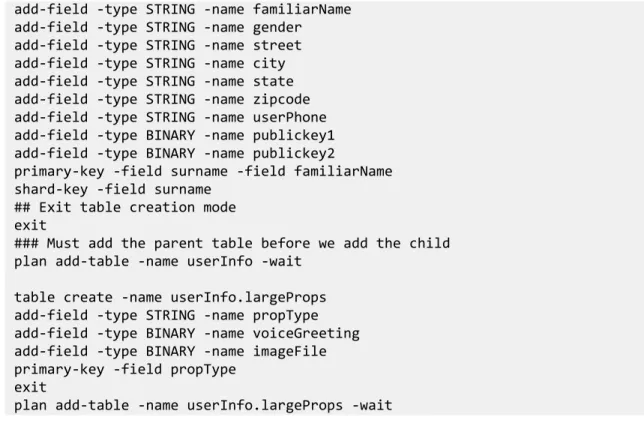
<parentTableName>.<childTableName>. For example, we previously showed how to create a trivial table called myTable:
## Enter into table creation mode table create -name myTable
## Now add the fields
add-field -type STRING -name itemCategory add-field -type STRING -name description
## A primary key must be defined for every table
## Here, we will define field 'itemCategory' as the primary key. primary-key -field itemCategory
## Exit table creation mode exit
## Add the table to the store. Use the -wait flag to ## force the script to wait for the plan to complete ## before doing anything else.
plan add-table -name myTable -wait
We can create a child table called myChildTable in the following way:
## Enter into table creation mode
## This 'table create' will fail if 'plan add-table -name myTable' ## is not run first.
table create -name myTable.myChildTable ## Now add the fields
add-field -type STRING -name itemSKU
add-field -type STRING -name itemDescription add-field -type FLOAT -name price
add-field -type INTEGER -name inventoryCount ## Define the primary key
primary-key -field itemSKU ## Exit table creation mode exit
## Add the table to the store.
Library Version 12.1.3.1 Introducing Oracle NoSQL Database Tables and Indexes
Getting Started with Oracle
Note that when you do this, the child table inherits the parent table's primary key. In this trivial case, the child table's primary key is actually the two fields: itemCategory and
itemSKU. This has several ramifications, one of which is that the parent's primary key fields are retrieved when you retrieve the child table. See Retrieve a Child Table (page 46) for more information.
Table Evolution
In the event that you must update your application at some point after it goes into
production, there is a good chance that your tables will also have to be updated to either use new fields or remove existing fields that are no longer in use. You do this through the use of the table evolve and plan evolve-table commands.
Note that you cannot remove a field if it is a primary key field. You also cannot add primary key field during table evolution.
Tables can only be evolved if they have already been added to the store using either the plan add-table or plan evolve-table commands.
For example, the following script evolves the table that was created in the previous section. It adds a field and deletes another one. Again, we use a script to evolve our table so as to ensure consistency across engineering, test and production.
## Enter into table evolution mode table evolve -name myTable
## Add a field
add-field -type STRING -name itemCategory ## Remove a field.
remove-field -name percentage ## Exit table creation mode exit
plan evolve-table -name myTable -wait
Table Manipulation Commands
This section briefly describes the CLI commands that you use to manipulate tables. This section is for advertisement purposes only.
An exhaustive list of all CLI commands, and their syntax, can be found in the KVStore Command Reference. You can also see the command syntax for all CLI commands using the CLI help command.
• plan add-table
Adds a table to the store that has been created but not yet added. Use the table create
command to create the table. • plan evolve-table
Adds a table to the store that has been evolved using the table evolve command. • plan remove-table
Library Version 12.1.3.1 Introducing Oracle NoSQL Database Tables and Indexes
Getting Started with Oracle
Removes an existing table from the store. • show tables
Shows all tables and child tables that have been added to the store. • table clear
Clears a table of all schema. This command works only on tables that have been created using the table create command, but not yet added to the store using the plan add-table command.
• table create
Enters into table creation mode in which you can design the schema for the table. This mode offers a series of sub-commands:
• add-array-field
Adds a field to the table that accepts an array. • add-field
Adds a field that accepts data of a simple type. You must identify the data's type. For example, INTEGER, LONG, DOUBLE, etc.
• add-map-field
Adds a field that accepts a map. • add-schema
Build the table using specified Avro schema. • cancel
Cancels the table creation. This returns you to the main admin prompt, abandoning any work that you might have performed when creating the table.
• exit
Saves the work you performed when creating the table, and returns you to the main admin prompt. After exiting table creation mode, you must issue the plan add-table
command to add the table to your store. • primary-key
The identified field is the table's primary key. Every table must have at least one field identified as its primary key. See Primary and Shard Key Design (page 33) for more information.
Library Version 12.1.3.1 Introducing Oracle NoSQL Database Tables and Indexes
Getting Started with Oracle
Removes the identified field from the table. • set-description
Sets a plain-text description of the table. Use this to document what the table is used for. • shard-key
Sets a shard key for the table. See Primary and Shard Key Design (page 33) for more information.
• show
Shows the current fields defined for the table. • table evolve
Allows you to evolve (modify) a table that has been added to the store. This command puts you into a special mode that allows you to add and remove fields in much the same way as you can when using table create. Upon completing this command, you must add your evolved table to the store using the plan evolve-table command.
• table list
Lists all the table that have been built but not yet created or evolved using plan add-table or plan evolve-table..
Creating Indexes
Indexes represent an alternative way of retrieving table rows. Normally you retrieve table rows using the row's primary key. By creating an index, you can retrieve rows with dissimilar primary key values, but which share some other characteristic.
Indexes can be created on any field which is an indexable datatype, including primary key fields. See Indexable Field Types (page 31) for information on the types of fields that can be indexed.
For example, if you had a table representing types of automobiles, the primary keys for each row might be the automobile's manufacturer and model type. However, if you wanted to be able to query for all automobiles that are painted red, regardless of the manufacturer or model type, you could create an index on the table's field that contains color information. As with tables, the best way to create indexes is to use a script. In this way, you can ensure consistency in the index(es) created across all phases of your product development cycle — from engineering, to test, to production.
Indexes can take a long time to create because Oracle NoSQL Database must examine all of the data contained in the relevant table in your store. The smaller the data contained in the table, the faster your index creation will complete. Conversely, if a table contains a lot of data, then it can take a long time to create indexes for it.