Configuring a Load-Balancing Scheme
Last Updated: August 15, 2011
This module contains information about Cisco Express Forwarding and describes the required and optional tasks for configuring a per-destination load-balancing scheme for Cisco Express Forwarding traffic. Load-balancing allows you to optimize resources by distributing traffic over multiple paths.
Note The Cisco ASR 1000 Series Aggregation Services Routers supports only per-destination load-balancing schemes. Cisco ASR 1000 Series Aggregation Services Routers does not support per-packet load-balancing schemes.
Cisco Express Forwarding is an advanced Layer 3 IP switching technology. It optimizes network performance and scalability for all kinds of networks: those that carry small amounts of traffic and those that carry large amounts of traffic in complex patterns, such as the Internet and networks characterized by intensive web-based applications or interactive sessions.
• Finding Feature Information, page 1
• Prerequisites for a Load-Balancing Scheme, page 2 • Information About a Load-Balancing Scheme, page 2 • How to Configure a Load-Balancing Scheme, page 4
• Configuration Examples for a Load-Balancing Scheme, page 9 • Additional References, page 10
• Feature Information for a Load-Balancing Scheme, page 11 • Glossary, page 12
Finding Feature Information
Your software release may not support all the features documented in this module. For the latest feature information and caveats, see the release notes for your platform and software release. To find information
Configuring a Load-Balancing Scheme
about the features documented in this module, and to see a list of the releases in which each feature is supported, see the Feature Information Table at the end of this document.
Use Cisco Feature Navigator to find information about platform support and Cisco software image support. To access Cisco Feature Navigator, go to www.cisco.com/go/cfn. An account on Cisco.com is not required.
Prerequisites for a Load-Balancing Scheme
Cisco Express Forwarding or distributed Cisco Express Forwarding must be enabled on your switch or router.
Information About a Load-Balancing Scheme
For links to information about other Cisco Express Forwarding and distributed Cisco Express Forwarding features that you can configure, see the Additional References, page 10.
• Cisco Platform Support for Central CEF and dCEF, page 2 • CEF Load-Balancing Overview, page 2
• Per-Destination Load Balancing, page 3 • 8-Way Per-Destination Load Balancing, page 3 • Load-Balancing Algorithms, page 3
Cisco Platform Support for Central CEF and dCEF
Cisco Express Forwarding is enabled by default on the Cisco ASR 1000 Series Aggregation Services Routers.
To find out if Cisco Express Forwarding is enabled on your platform, enter the show ip cefcommand. If Cisco Express Forwarding is enabled, you receive output that looks like this:
Router# show ip cef
Prefix Next Hop Interface [...]
10.2.61.8/24 192.168.100.1 FastEthernet1/0/0 192.168.101.1 FastEthernet2/1/0 [...]
If Cisco Express Forwarding is not enabled on your platform, the output for the show ip cefcommand looks like this:
Router# show ip cef %CEF not running
If Cisco Express Forwarding is not enabled on your platform, use the ip cefcommand to enable (central) Cisco Express Forwarding or the ip cef distributed command to enable distributed Cisco Express Forwarding.
CEF Load-Balancing Overview
Cisco Express Forwarding load balancing is based on a combination of source and destination packet information; it allows you to optimize resources by distributing traffic over multiple paths.
Cisco Platform Support for Central CEF and dCEF Prerequisites for a Load-Balancing Scheme
Per-Destination Load Balancing
Per-destination load balancing allows the router to use multiple paths to achieve load sharing across multiple source-destination host pairs. Packets for a given source-destination host pair are guaranteed to take the same path, even if multiple paths are available. Traffic streams destined for different pairs tend to take different paths.
Per-destination load balancing is enabled by default when you enable Cisco Express Forwarding. To use per-destination load balancing, you do not perform any additional tasks once Cisco Express Forwarding is enabled. Per-destination is the load-balancing method of choice for most situations.
Because per-destination load balancing depends on the statistical distribution of traffic, load sharing becomes more effective as the number of source-destination host pairs increases.
You can use per-destination load balancing to ensure that packets for a given host pair arrive in order. All packets intended for a certain host pair are routed over the same link (or links).
Note Per-destination load balancing is the default load-balancing scheme for Cisco Express Forwarding traffic on the Cisco ASR 1000 Series Aggregation Services Routers. No configuration steps are required to enable per-destination load balancing. Additionally, on the Cisco ASR 1000 Series Aggregation Services Routers per-destination load balancing cannot be disabled.
8-Way Per-Destination Load Balancing
Destination IP prefixes are added to the routing table by routing protocols or static routes. Each path is a valid route to reach the destination prefix. The set of active paths is the set of paths with the best cost. The 8-Way Cisco Express Forwarding Load Balancing feature provides the ability to share the traffic to a destination prefix over up to eight active paths (an increase from the previous support of six active paths). The traffic load among the active paths can be distributed by destination.
Load-Balancing Algorithms
The following load-balancing algorithms are provided for use with Cisco Express Forwarding traffic. You select a load-balancing algorithm with the ip cef load-sharing algorithm command.
• Original algorithm--The original Cisco Express Forwarding load-balancing algorithm produces distortions in load sharing across multiple routers because the same algorithm was used on every router. Depending on your network environment, you should select either the universal algorithm (default) or the tunnel algorithm instead.
• Universal algorithm--The universal load-balancing algorithm allows each router on the network to make a different load sharing decision for each source-destination address pair, which resolves load-sharing imbalances. The router is set to perform universal load load-sharing by default.
• Tunnel algorithm--The tunnel algorithm is designed to load balance when only a few source and destination pairs are involved.
• Include-ports algorithm--The include-ports algorithm allows you to use the Layer 4 source and destination ports as part of the load-balancing decision. This method benefits traffic streams running over equal cost paths that are not load shared because the majority of the traffic is between peer addresses that use different port numbers, such as Real-Time Protocol (RTP) streams.
Per-Destination Load Balancing
How to Configure a Load-Balancing Scheme
Note Per-destination load balancing is the default load-balancing scheme for Cisco Express Forwarding traffic on the Cisco ASR 1000 Series Aggregation Services Routers. No configuration steps are required to enable per-destination load balancing. Additionally, on the Cisco ASR 1000 Series Aggregation Services Routers per-destination load balancing cannot be disabled.
Perform the following tasks to fine-tune load balancing for Cisco Express Forwarding: The router is set to perform universal load sharing by default.
• Selecting a Tunnel Load-Balancing Algorithm, page 4
• Selecting an Include-Ports Layer 4 Load-Balancing Algorithm, page 5 • Verifying the Load-Balancing Scheme Configuration, page 6
Selecting a Tunnel Load-Balancing Algorithm
Perform the following task to select a tunnel load-balancing algorithm for Cisco Express Forwarding traffic. Select the tunnel algorithm when your network environment contains only a few source and destination pairs.
SUMMARY STEPS 1. enable
2. configure terminal
3. ip cef load-sharing algorithm {original | tunnel [id] | universal [id] | include-ports {source[id]| [destination] [id] | source[id] destination [id]}}
4. end
DETAILED STEPS
Command or Action Purpose Step 1 enable
Example: Router> enable
Enables privileged EXEC mode. • Enter your password if prompted.
Step 2 configure terminal
Example:
Router# configure terminal
Enters global configuration mode.
Selecting a Tunnel Load-Balancing Algorithm How to Configure a Load-Balancing Scheme
Command or Action Purpose Step 3 ip cef load-sharing algorithm {original |
tunnel [id] | universal [id] | include-ports {source[id]| [destination] [id] | source[id] destination [id]}}
Example:
Router(config)# ip cef load-sharing algorithm tunnel
Selects a Cisco Express Forwarding load-balancing algorithm.
• The original keyword sets the load-balancing algorithm to the original algorithm, based on a source and destination hash.
• The tunnel keyword sets the load-balancing algorithm to one that can be used in tunnel environments or in environments where there are only a few IP source and destination address pairs.
• The id argument is a fixed identifier.
• The universal keyword sets the load-balancing algorithm to one that uses a source and destination and an ID hash.
• The include-ports source keywords set the load-balancing algorithm to one that uses the source port.
• The include-ports destination keywords set the load-balancing algorithm to one that uses the destination port.
• The include-ports source destinationkeywords set the load-balancing algorithm to one that uses both source and destination ports.
Step 4 end
Example:
Router(config)# end
Exits to privileged EXEC mode.
Selecting an Include-Ports Layer 4 Load-Balancing Algorithm
Perform the following task to select an include-ports load-balancing algorithm for Cisco Express Forwarding traffic. Select the include-port algorithm when your network environment contains traffic running over equal-cost paths that is not load shared because the majority of the traffic is between peer addresses with different port numbers, such as RTP streams.
SUMMARY STEPS 1. enable
2. configure terminal
3. ip cef load-sharing algorithm {original | tunnel [id] | universal [id] include-ports {source[id] | [destination] [id] | source[id] destination [id]}}
4. end
Selecting an Include-Ports Layer 4 Load-Balancing Algorithm
DETAILED STEPS
Command or Action Purpose Step 1 enable
Example: Router> enable
Enables privileged EXEC mode. • Enter your password if prompted.
Step 2 configure terminal
Example:
Router# configure terminal
Enters global configuration mode.
Step 3 ip cef load-sharing algorithm {original | tunnel [id] | universal [id] include-ports {source[id] | [destination] [id] | source[id] destination [id]}}
Example:
Router(config)# ip cef load-sharing algorithm include-ports source destination
Selects a Cisco Express Forwarding load-balancing algorithm. • The original keyword sets the load-balancing algorithm to the
original algorithm, based on a source and destination hash.
• The tunnel keyword sets the load-balancing algorithm to one that can be used in tunnel environments or in environments where there are only a few IP source and destination address pairs.
• The id argument is a fixed identifier.
• The universal keyword sets the load-balancing algorithm to one that uses a source and destination and an ID hash.
• The include-ports source keyword sets the load-balancing algorithm to one that uses the source port.
• The include-ports destination keyword sets the load-balancing algorithm to one that uses the destination port.
• The include-ports source destination keyword sets the load-balancing algorithm to one that uses the source and destination ports.
Step 4 end
Example:
Router(config)# end
Exits to privileged mode.
Verifying the Load-Balancing Scheme Configuration
To verify the configuration of a load-balancing scheme, perform the following task.
Verifying the Load-Balancing Scheme Configuration How to Configure a Load-Balancing Scheme
SUMMARY STEPS 1. enable
2. show cef state
3. show ip cef adjacency drop detail
4. show ipv6 cef detail
5. show cef table
6. disable
DETAILED STEPS
Step 1 enable
Use this command to enter privileged EXEC mode. Enter your password, if prompted. For example:
Example: Router> enable Router#
Step 2 show cef state
Use this command to verify that load-balancing algorithm is configured, as you expect. For example:
Example:
Router# show cef state CEF Status:
RP instance
common CEF enabled IPv4 CEF Status: CEF enabled/running dCEF disabled/not running CEF switching enabled/running
! The load-balancing scheme configured for IPv4 Cisco Express Forwarding traffic, follows: universal per-destination load sharing algorithm, id A189DD49 ! <== scheme for IPv4 traffic IPv6 CEF Status:
CEF enabled/running dCEF disabled/not running
The load-balancing scheme configured for IPv6 Cisco Express Forwarding traffic, follows: original per-destination load sharing algorithm, id A189DD49
Step 3 show ip cef adjacency drop detail
Use this command to verify that to verify that a load-balancing scheme is configured for Cisco Express Forwarding. For example:
Example:
Router# show ip cef adjacency drop detail
IP CEF with switching (Table Version 4), flags=0x0
4 routes, 0 reresolve, 0 unresolved (0 old, 0 new), peak 0 4 leaves, 8 nodes, 8832 bytes, 13 inserts, 9 invalidations 0 load sharing elements, 0 bytes, 0 references
universal per-destination load sharing algorithm, id 00B999CA ! <== Load-sharing scheme 3 CEF resets, 0 revisions of existing leaves
Resolution Timer: Exponential (currently 1s, peak 1s) 0 in-place modifications
refcounts: 533 leaf, 536 node
Verifying the Load-Balancing Scheme Configuration
10.0.0.0/4, version 3
0 packets, 0 bytes, Precedence routine (0) via 0.0.0.0, 0 dependencies
next hop 0.0.0.0 valid drop adjacency
Step 4 show ipv6 cef detail
Use this command to verify that a load-balancing scheme is configured for IPv6 Cisco Express Forwarding traffic. For example:
Example:
Router# show ipv6 cef detail IPv6 CEF is enabled and running VRF Default:
20 prefixes (20/0 fwd/non-fwd) Table id 0, version 20, 0 resets
Database epoch:0 (20 entries at this epoch) .
. .
4004::/64, epoch 0, per-destination sharing ! <== Per-destination load-sharing configured recursive via 172.11.11.1 label 27
nexthop 10.1.1.3 Ethernet0/0 label 16 recursive via 172.30.30.1 label 26 nexthop 10.1.1.3 Ethernet0/0 label 18
Step 5 show cef table
Use this command to verify that load-sharing build characteristics are configured for Cisco Express Forwarding. For example:
Example:
Router# show cef table Global information:
Output chain build favors: platform: not configured CLI: not configured operational: convergence-speed Output chain build characteristics:
Inplace modify ! <== Build characteristic configured for load-sharing operational for: load-sharing
Collapse ! <== Build characteristic configured for load-sharing operational for: load-sharing
Indirection
operational for: recursive-prefix MTRIE information:
TAL: node pools:
pool[C/8 bits]: 12 allocated (0 failed), 12480 bytes {1 refcount} 1 active IPv4 table (9 prefixes total) out of a maximum of 10000. VRF Prefixes Memory Flags
Default 9 13520
1 active IPv6 table (1 prefix total) out of a maximum of 10000. VRF Prefixes Memory Flags
VRF Prefixes Memory Flags Default 1 208
Step 6 disable
Use this command to exit to user EXEC mode. For example:
Example:
Router# disable Router>
Verifying the Load-Balancing Scheme Configuration How to Configure a Load-Balancing Scheme
Configuration Examples for a Load-Balancing Scheme
This section provides the following examples for configuring a load-balancing scheme for Cisco Express Forwarding traffic:
The router is set to perform universal load balancing by default. • Example Selecting a Tunnel Load-Balancing Algorithm, page 9
• Example Selecting an Include-Ports Layer 4 Load-Balancing Algorithm, page 9
Example Selecting a Tunnel Load-Balancing Algorithm
The following example shows how to select a tunnel load-balancing algorithm for Cisco Express Forwarding:
configure terminal !
ip cef load-sharing algorithm tunnel
end
The following example shows how to disable the tunnel load-balancing algorithm: configure terminal
!
no ip cef load-sharing algorithm tunnel
end
Example Selecting an Include-Ports Layer 4 Load-Balancing Algorithm
The following example shows how to select an include-ports Layer 4 load-balancing algorithm for Cisco Express Forwarding traffic:
configure terminal !
ip cef load-sharing algorithm include-ports source
end
This example sets up load sharing that includes the source port in the load-balancing decision.
Example Selecting a Tunnel Load-Balancing Algorithm
To disable the include-ports Layer 4 load-balancing algorithm and return to the default universal mode, enter the following commands:
configure terminal !
no ip cef load-sharing algorithm
end
Additional References
Related Documents
Related Topic Document Title
Cisco IOS commands Cisco IOS Master Commands List, All Releases
Commands for configuring and managing Cisco Express Forwarding
Cisco IOS IP Switching Command Reference
Overview of the Cisco Express Forwarding feature Cisco Express Forwarding Overview Tasks for verifying basic Cisco Express Forwarding
and distributed Cisco Express Forwarding operation
Configuring Basic Cisco Express Forwarding for Improved Performance, Scalability, and Resiliency in Dynamic Networks
Tasks for enabling or disabling Cisco Express Forwarding or distributed Cisco Express Forwarding
Enabling or Disabling Cisco Express Forwarding or Distributed Cisco Express Forwarding to
Customize Switching and Forwarding for Dynamic Network
Tasks for configuring Cisco Express Forwarding consistency checkers
Configuring Cisco Express Forwarding
Consistency Checkers for Route Processors and Line Cards
Tasks for configuring epochs for Cisco Express Forwarding tables
Configuring Epochs to Clear and Rebuild Cisco Express Forwarding and Adjacency Tables Tasks for configuring and verifying Cisco Express
Forwarding network accounting
Configuring Cisco Express Forwarding Network Accounting
Tasks for customizing the display of Cisco Express Forwarding event trace messages
Customizing the Display of Cisco Express Forwarding Event Trace Messages
Example Selecting an Include-Ports Layer 4 Load-Balancing Algorithm Additional References
Standards
Standard Title
No new or modified standards are supported by this feature, and support for existing standards has not been modified by this feature.
--MIBs
MIB MIBs Link
No new or modified MIBs are supported by this feature, and support for existing MIBs has not been modified by this feature.
To locate and download MIBs for selected platforms, Cisco IOS XE software releases, and feature sets, use Cisco MIB Locator found at the following URL:
http://www.cisco.com/go/mibs
RFCs
RFC Title
No new or modified RFCs are supported by this feature, and support for existing RFCs has not been modified by this feature.
--Technical Assistance
Description Link
The Cisco Support and Documentation website provides online resources to download
documentation, software, and tools. Use these resources to install and configure the software and to troubleshoot and resolve technical issues with Cisco products and technologies. Access to most tools on the Cisco Support and Documentation website requires a Cisco.com user ID and password.
http://www.cisco.com/cisco/web/support/ index.html
Feature Information for a Load-Balancing Scheme
The following table provides release information about the feature or features described in this module. This table lists only the software release that introduced support for a given feature in a given software release train. Unless noted otherwise, subsequent releases of that software release train also support that feature.
Use Cisco Feature Navigator to find information about platform support and Cisco software image support. To access Cisco Feature Navigator, go to www.cisco.com/go/cfn. An account on Cisco.com is not required.
Example Selecting an Include-Ports Layer 4 Load-Balancing Algorithm
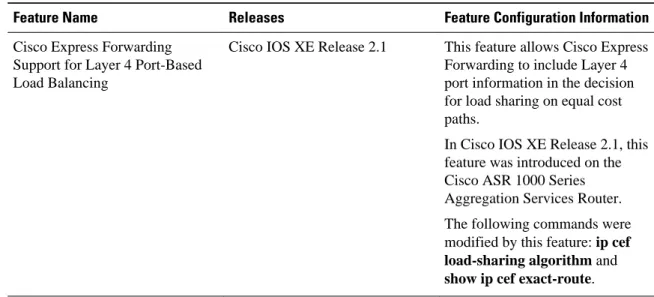
Table 1 Feature Information for Configuring a Load-Balancing Scheme for Cisco Express Forwarding Traffic
Feature Name Releases Feature Configuration Information
Cisco Express Forwarding Support for Layer 4 Port-Based Load Balancing
Cisco IOS XE Release 2.1 This feature allows Cisco Express Forwarding to include Layer 4 port information in the decision for load sharing on equal cost paths.
In Cisco IOS XE Release 2.1, this feature was introduced on the Cisco ASR 1000 Series Aggregation Services Router. The following commands were modified by this feature: ip cef load-sharing algorithm and show ip cef exact-route.
Glossary
adjacency --A relationship formed between selected neighboring routers and end nodes for the purpose of exchanging routing information. Adjacency is based upon the use of a common media segment by the routers and nodes involved.
Cisco Express Forwarding --A Layer 3 switching technology. Cisco Express Forwarding can also refer to central Cisco Express Forwarding mode, one of two modes of Cisco Express Forwarding operation. Cisco Express Forwarding enables a Route Processor to perform express forwarding. Distributed Cisco Express Forwarding is the other mode of Cisco Express Forwarding operation.
distributed Cisco Express Forwarding --A mode of Cisco Express Forwarding operation in which line cards maintain identical copies of the forwarding information base (FIB) and adjacency tables. The line cards perform the express forwarding between port adapters; this relieves the Route Processor of involvement in the switching operation.
FIB --forwarding information base. A component of Cisco Express Forwarding that is conceptually similar to a routing table or information base. The router uses the FIB lookup table to make destination-based switching decisions during Cisco Express Forwarding operation. The router maintains a mirror image of the forwarding information in an IP routing table.
LSP --label switched path. A sequence of hops (Router 0...Router n). A packet travels from R0 to Rn by means of label switching mechanisms. An LSP can be chosen dynamically, based on normal routing mechanisms, or you can configure the LSP manually.
prefix --The network address portion of an IP address. A prefix is specified by a network and mask and is generally represented in the format network/mask. The mask indicates which bits are the network bits. For example, 1.0.0.0/16 means that the first 16 bits of the IP address are masked, making them the network bits. The remaining bits are the host bits. In this example, the network number is 10.0.
RIB --Routing Information Base. A central repository of routes that contains Layer 3 reachability.
Example Selecting an Include-Ports Layer 4 Load-Balancing Algorithm Glossary
Cisco and the Cisco Logo are trademarks of Cisco Systems, Inc. and/or its affiliates in the U.S. and other countries. A listing of Cisco's trademarks can be found at www.cisco.com/go/trademarks. Third party trademarks mentioned are the property of their respective owners. The use of the word partner does not imply a partnership relationship between Cisco and any other company. (1005R)
Any Internet Protocol (IP) addresses and phone numbers used in this document are not intended to be actual addresses and phone numbers. Any examples, command display output, network topology diagrams, and other figures included in the document are shown for illustrative purposes only. Any use of actual IP addresses or phone numbers in illustrative content is unintentional and coincidental.