White Paper
The Benefits of a
Lean Application Portfolio
This document contains Confidential, Proprietary and Trade Secret Information (“Confidential Information”) of Informatica Corporation and may not be copied, distributed, duplicated, or otherwise reproduced in any manner without the prior written consent of Informatica.
While every attempt has been made to ensure that the information in this document is accurate and complete, some typographical errors or technical inaccuracies may exist. Informatica does not accept responsibility for any kind of loss resulting from the use of information contained in this document. The information contained in this document is subject to change without notice.
The incorporation of the product attributes discussed in these materials into any release or upgrade of any Informatica software product—as well as the timing of any such release or upgrade—is at the sole discretion of Informatica.
Protected by one or more of the following U.S. Patents: 6,032,158; 5,794,246; 6,014,670; 6,339,775; 6,044,374; 6,208,990; 6,208,990; 6,850,947; 6,895,471; or by the following pending U.S. Patents: 09/644,280; 10/966,046; 10/727,700.
White Paper
Table of Contents
Executive Summary . . . . 2
The Application Landscape . . . . 3
Embracing Change . . . 3
Avoiding the Pitfall of Non-Action . . . 3
The Lean Application Portfolio . . . . 4
Getting Started . . . 4
Classifying Legacy Applications . . . 5
Maintaining Access to Legacy Data . . . 6
Managing Retention and Disposal . . . 6
Resisting the Temptation of Backup-as-Retirement. . . 7
Application Retirement Case Study . . . . 7
The Informatica Solution for Application Retirement . . . . 8
Executive Summary
Retiring legacy applications has always been a priority for the typical CIO. But because the task can be daunting, a comprehensive plan often gets downgraded to one of limited scope, compounding a persistent problem. Not only are you spending a chunk of each year’s budget supporting the same legacy applications, but that portion also grows as new application deployments obsolete progressively more of your systems. The effect is only magnified as you inherit applications through mergers and acquisitions. Over time, the amount spent on the infrastructure and maintenance of legacy systems can become a crushing weight on your IT budget.
This white paper presents a way out from under that weight. It begins with a discussion of the changing landscape of enterprise applications and how carrying the burden of legacy systems undermines your enterprise. It explains the Lean application portfolio, how to make the business case to key stakeholders for its importance, and how to prepare for and initiate its implementation. The paper then presents the Informatica®
solution for application retirement as an effective means of achieving a Lean application portfolio. Using this approach, you can systematically shut down aging and low-value systems while retaining access to data to meet compliance and business needs. As a result, you free up your IT budget for new projects that ultimately better serve the business.
The Application Landscape
Embracing Change
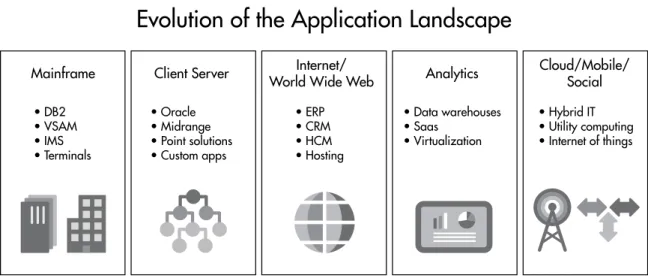
As the old adage goes, “Nothing is permanent but change.” In the IT world, as new technologies are developed, each one is evaluated for new or enhanced application capabilities that were never before possible. The pace of technological change is much faster than it was 30—or even just 10—years ago. Figure 1 shows an example of how application technology has evolved over the past 40 to 50 years. Whether or not your company has been in operation that long, the figure illustrates how disparate are the technologies that are left behind with each new generation. Regardless of how many of these waves you’ve been through (or have yet to experience), the wide range of skills required to manage these technologies places a huge burden on organizations. For this reason, application retirement should not be regarded as a one-time initiative, but rather should be implemented as an ongoing best practice to ride these waves of technology without allowing old systems to weigh you down.
Avoiding the Pitfall of Non-Action
Forrester estimates from a survey of more than 1,000 software decision makers in North America and Europe that about 66 percent of their organizations’ capital and operating budget is spent on maintaining existing applications—meaning only 33 percent is left for new software initiatives and IT projects.1 A similar survey
recently found that organizations with more than 50 IT staff members puts the average at 70 percent of the IT budget being spent on existing applications, with only 30 percent left for new IT projects (see Figure 2).2 From
the same survey, 50 percent of those existing applications are legacy, which means an average of 35 percent of an organization’s IT budget is spent on maintaining legacy applications that are of low business value.
1 Phil Murphy, “A Workable Application Modernization Framework Is Job No. 1 Now,” Forrester Research
(April 26, 2010). 2 NCC Survey of Companies with over 50 IT Staff, ESG Research Report IT Spending Intentions Survey
(January 2013).
Evolution of the Application Landscape
Mainframe • DB2 • VSAM • IMS • Terminals • Oracle • Midrange • Point solutions • Custom apps • ERP • CRM • HCM • Hosting • Data warehouses • Saas • Virtualization • Hybrid IT • Utility computing • Internet of things
Client Server World Wide WebInternet/ Analytics Cloud/Mobile/Social
Faced with these statistics, it’s hard to ignore the accumulation of wasted expenditures on legacy applications. The longer you wait to retire your legacy applications, the longer new IT projects will be postponed, which in turn impacts the business operations, agility, and competitiveness of your enterprise
The Lean Application Portfolio
Similar to the Lean manufacturing principle of eliminating waste, the premise of the Lean application portfolio is to retire legacy or redundant applications in an organization’s application portfolio. This practice is supported by archiving technologies that efficiently migrate and retain data to reduce storage capacity, maintain data access, meet compliance requirements, and run on a modern, easily supported infrastructure. In this way, legacy applications can be safely decommissioned to eliminate all associated hardware and maintenance costs. What remains is the much smaller cost associated with efficiently retaining the archived data itself.
Getting Started
The first step to implementing a Lean application portfolio is to catalog and inventory the applications in your organization’s existing portfolio and identify which ones are candidates for decommissioning. The inventory should include the following information about each of those candidate applications:
• Name, type, and owner
• Dates of implementation and deployment to production • Business function
• Departments, groups, and individual users accessing it and their frequency of access In addition, you need to answer the following questions:
• Are transactions still active and are modifications still being made to the application? • Has the application been migrated to or consolidated with another application?
IT Budget Allocation
New Projects
30%
Existing Systems
70%
Figure 2: In a typical IT organization, budget allocation is overwhelmingly weighted toward maintaining existing systems rather than innovating.
The key thing to remember: it isn’t necessary to complete the entire inventory of applications before beginning a decommissioning project. You may have hundreds, if not thousands, of legacy applications—but you can start the retirement process with only the first 5 or 10. Choosing this initial set of legacy applications is critical, however. Begin with those systems for which you have existing domain knowledge and good technical skills (database or technology stack, for example). It’s also beneficial to choose a variety of system sizes, to ensure that you gauge the effort and time involved in moving data. Once you’ve identified your first application candidates, you can launch a pilot project and gather statistics for broaching the rest of the portfolio.
Classifying Legacy Applications
Informatica recommends using a classification scheme to categorize legacy applications in your portfolio. This process can help organize applications based on the time and effort required to retire them.
Consider the following classification scheme for your legacy systems:
Classification Legacy Application
Type
Description
A Active Application Systems that still have active transactions or provide unique reporting capabilities or functions that haven’t been completely replaced by front-line applications.
B Business Access Systems that are kept online simply for business reporting, data browsing, and audit purposes.
C Cold Storage Systems that are kept on backup media and not actively managed except if there is a request for information. When the system needs to be restored, specialized consultants may need to be hired.
D Dormant System Systems so old that the cost to restore them is nearly
prohibitive. Regulatory requirements may dictate that the data needs to be retained.
Before classifying, IT organizations need to work side by side with business stakeholders to determine which applications are the best candidates for decommissioning. Here are some questions to ask about each legacy application so you can begin to classify your systems:
• Is the system inactive or is it still used to process/update transactions? • Is the application used only for reporting or for compliance audit purposes? • How often is the data accessed and/or reports run?
• Can specific reports/formats be identified?
• What is acceptable performance for data access/reporting?
• How many users access the data on a regular basis (include frequency)?
• How many people are skilled in using the applications (both technically and functionally)? • Are consultants on staff specifically to manage the system?
• Which system replaced this one or provides redundant capabilities? • How much data does the system hold (in GB)?
A matrix format using classification methods similar to the one above can give you insights into prioritizing applications for your overall retirement project.
Maintaining Access to Legacy Data
One of the recurring themes you’ll find during your inventory and classification process is the requirement for accessing legacy data for either business reporting or regulatory compliance. For each decommissioning candidate, it’s important to ask, Is maintaining the complete application and related infrastructure providing the requisite amount of business value? An archiving strategy that migrates data to an accessible archive enables you to retire legacy platforms while preserving your ability to meet reporting and audit requirements. By moving legacy data into a central archive, you benefit from economies of scale on modern commodity servers and storage. Additionally, most archive vendors furnish compression technology to significantly reduce the amount of storage necessary.
Here are some questions to ask about maintaining access to the data from legacy applications: • Will I have SQL-based access to data and/or be able to use my existing reporting tools? • What compression ratios will I be able to get on the data?
• How do I preserve the business integrity and context of the data? • What levels of security are provided to ensure privacy?
• Will specialized skills be necessary to obtain access?
While ensuring adequate access to legacy data will boost the amenability of your retirement program to business stakeholders, you have potentially another selling point. A central archive that houses legacy data lets you report across systems from a single connection. This capability wasn’t possible with a wide range of legacy applications running on disparate hardware with different technologies (that is, without having to invest heavily in building a new data warehouse or federated database technology). Once their applications are retired, formerly compartmentalized data sets could all be accessed from a single, consolidated data store. A long-time customer, for example, may dispute some business dealings from 10 years ago. Looking up all the activity for this customer across a myriad of systems would ordinarily be an arduous task. Consolidation of the legacy data from those retired applications would make the task considerably faster and easier to carry out.
Managing Retention and Disposal
Once the data from various decommissioned applications is archived into a central repository, your retirement solution must be able to manage data retention and disposal. These tasks represent another set of capabilities that wasn’t possible if you were to continue supporting independent and disparate legacy applications. Disposing of data according to the retention policies of your data governance program is an essential requirement of archiving and retirement.
Retirement solutions using archiving techniques are designed for long-term data retention. Make sure you evaluate compliance features to enforce retention policies, automatic disposal once the retention expires, and legal hold to lock down expired data that’s relevant to e-discovery. In addition, archiving technologies must offer compression ratios to further reduce storage requirements while maintaining the data online. In this way, the cost of retaining data is kept at a minimum without sacrificing responsiveness to audits and e-discovery requests.
Resisting the Temptation of Backup-as-Retirement
Some companies have used system backups as a low-cost alternative to formally retiring applications. They make a full backup of the entire application and data, take the system down, and decommission the environment. But the backup-and-restore approach is unsuitable for long-term data retention. The first problem with this approach is that the likelihood of being able to restore the environment goes down considerably with each passing year because of the increasing chances of incompatibility between a legacy system and the platform onto which it would be restored. Furthermore, retaining the backup media presents a corporate liability. If it were discovered during litigation that you have backups of a system with information that may be relevant to a case, the court could force you to restore it—at your company’s expense. Litigators are well aware of this issue and use it as a tactic to force companies to settle cases out of court, rather than comply with a cost-prohibitive mandate. Because you cannot readily access the data, there’s no way to respond to the court’s directive other than hiring technology consultants to restore the system and get it running. The alternative is to pay a fine as dictated by the court. No enterprise wants to take this kind of risk.
Application Retirement Case Study
The IT staff of a pharmaceutical company recently embarked on a legacy system retirement project. Their goal was to save $5 million over a five-year period and invest the savings back into modernized applications. After the inventory of legacy systems, they found hundreds of orphaned systems that were still taking up infrastructure and data center space, costing the company unnecessary maintenance licenses. In addition, they found legacy systems being maintained across lines of business that provided redundant functions. Even so, they met with resistance from business users claiming to need continued access to the data in those systems. Within the first six months of the project, the team was able to target and retire several legacy applications. This helped them to establish quick wins and build confidence across lines of business. Business users found that their access requirements were satisfied using standard reporting tools with existing trained personnel. Hardware and software were decommissioned, freeing up data center space and dropping energy
consumption while eliminating the need for unique administrative skills. Because the retired data was heavily compressed into a central archive, the company saved $5 million alone in storage costs over a two-year period. As a result, the company is currently set to exceed its original goal, with a total estimated savings of $50 million in five years.
Although not project drivers, there are two additional areas in which this company is deriving significant business benefits. The first is the accomplishment of a single view of historical data. What used to take several connections and resources across systems to respond to audits and inquiries now takes only one connection and one resource. In some cases, a single report can be run across legacy application data sources, saving time and resources. The second unintended benefit concerns the disposition of data. Prior to the retirement project, there was no systematic approach to deleting data in accordance with regulatory requirements. But during archiving, data was classified by type. This allowed retention policies to be inherited from compliance settings or set/adjusted once in the archive repository. Without integrated retention management, archive data would have been retained forever. The company is now able to delete data according to documented retention policies.
The Informatica Solution for Application Retirement
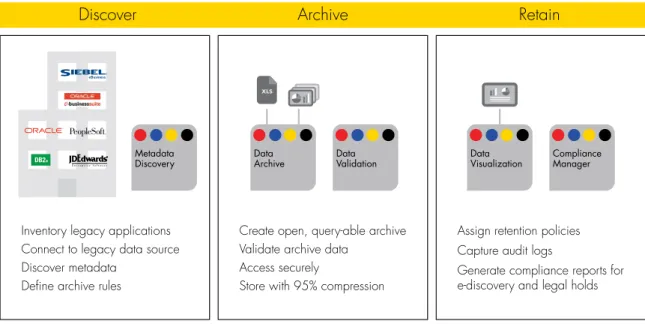
The Informatica solution for application retirement is based on a Lean application portfolio strategy, ensuring that minimal investments are required to support legacy applications. The solution combines Informatica’s industry-leading data archive capabilities and an integrated Compliance Manager with data validation and discovery options to provide comprehensive application retirement. Managing the full lifecycle of content in database applications—discovery, archival, and retention—the solution consists of the following products: • Informatica Data Archive
• The Informatica ILM Discovery Option • The Informatica ILM Data Validation Option
Informatica Data Archive stores legacy data in a highly optimized, centralized, and secure store. The
Informatica ILM Discovery Option supplies data discovery capabilities, enabling you to find complete business entities, such sales orders, invoices, and customers, and retire them intact into the archive. Alternatively, individual tables or files can be moved into the archive store. When data is moved into the Informatica Data Archive, extreme compression of up to 95 percent minimizes the storage footprint. The Informatica ILM Data Validation Option automatically validates business rules during the application retirement process, to ensure that archived data is complete, correct, and compliant with requirements.
Figure 3: The Informatica solution for application retirement manages the full lifecycle of content in database applications.
Discover
Archive
Retain
Create open, query-able archive Validate archive data
Access securely
Store with 95% compression Inventory legacy applications
Connect to legacy data source Discover metadata
Define archive rules
Assign retention policies Capture audit logs
Generate compliance reports for e-discovery and legal holds Metadata
Discovery . The Informatica solution furnishes connectivity with a wide range of legacy data sources. Whether you’re dealing with data from mainframes, proprietary data stores, or relational databases, you can easily retire all datatypes into a centralized and standardized format that is accessible through a variety of options.
Archival . Data remains accessible through ODBC/JDBC connectivity and open SQL access to retired data. The built-in discovery portal provides keyword search, data
browsing, and data visualization that allows you to build and save custom business reports. Your investments in enterprise reporting tools can be leveraged as well by connecting them directly to the archive for reporting and ad hoc queries.
Retention . While supplying business access to data, the Informatica solution reduces the risks of delayed response to e-discovery requests and of noncompliance. It provides granular levels of security to maintain data privacy and corporate security requirements. The Informatica solution for application retirement delivers the technology and best practices approach to make your project successful. Designed to meet the challenges of application retirement, it efficiently migrates and retains data to reduce storage capacity, maintains data access, meets compliance requirements, and runs on a modern, easily supported infrastructure.
What distinguishes the Informatica solution for application retirement from competing offerings is its foundation: the industry-leading Informatica Platform. This comprehensive, open, unified, and economical platform delivers a one-stop shop for application retirement. With it, Informatica has established itself as a leader in the industry with validated customer satisfaction and loyalty ratings. Data archives are intended to endure a rapid pace of technology changes—so should your data archive vendor. That is the advantage of Informatica.
Conclusion
Legacy application retirement should be a normal course of business, preventing
accumulated applications, outdated technologies, and diminished skill sets from dragging your organization down. Rather than consider it a one-time project, best practices dictate that companies incorporate an archiving and retirement strategy into their ongoing rationalization and modernization plans. With each new application deployment, retiring the replaced or redundant systems in a timely fashion keeps costs down. A program based on a Lean application portfolio strategy ensures that minimal investments are required to support legacy applications. Providing you with robust technology to implement such a program, the Informatica solution for application retirement offers clear benefits to both the IT organization and line of business. The savings that result enable greater innovation for a competitive advantage.
About Informatica
Informatica Corporation (NASDAQ: INFA) is the world’s number one independent provider of data integration software. Organizations around the world rely on Informatica for maximizing return on data to drive their top business imperatives. Worldwide, over 4,630 enterprises depend on Informatica to fully leverage their information assets residing on-premise, in the Cloud and across social networks.
Worldwide Headquarters, 100 Cardinal Way, Redwood City, CA 94063, USA Phone: 650.385.5000 Fax: 650.385.5500 Toll-free in the US: 1.800.653.3871 informatica.com linkedin.com/company/informatica twitter.com/InformaticaCorp