Interstage Application Server
V7.0
Trademarks
Trademarks of other companies are used in this user guide only to identify particular products or systems:
Product Trademark/Registered Trademark
Microsoft, Visual Basic, Visual C++,
Windows, Windows NT, Internet Information Server, and Internet Explorer
Registered trademarks of Microsoft Corporation in the U.S.A. and other countries
Sun, Solaris, Java, and other trademarks containing Java
Trademarks of Sun Microsystems, Inc., in the U.S.A. and other countries
Linux Registered trademark of Linus Torvalds in the
U.S.A. and other countries Red Hat, RPM and all Red Hat-based
trademarks and logos
Trademarks or registered trademarks of Red Hat, Inc. in the U.S.A and other countries
UNIX Registered trademark of The Open Group in the
United States and other countries Netscape, Netscape FastTrack Server,
Netscape Enterprise Server, and Netscape Navigator
Registered trademarks of Netscape
Communications Corporation in the U.S.A. and other countries
CORBA, Object Management Group, OMG, OMG IDL, IIOP, Object Request Broker, and ORB
Trademarks or registered trademarks of Object Management Group Inc. in the U.S.A. and other countries
Interstage and ObjectDirector Registered trademarks of Fujitsu Limited
This document contains technology relating to strategic products controlled by export control laws of the producing and/ or exporting countries. This document or a portion thereof should not be exported (or re-exported) without authorization from the appropriate government authorities in accordance with such laws.
Single Sign-on Operator's Guide - Preface
Preface
Purpose of this Document
This manual describes the environment setup and operation procedures required for Interstage Single Sign-on operation.
Note
Throughout this manual Interstage Application Server is referred to as Interstage.
Who Should Read this Document?
It is assumed that readers of this manual have a basic knowledge of the following:
• The Internet
• SSL
• Apache
• Web Server
• LDAP and X.500
• Basic knowledge of Java application development using JAAS for Java application development
Organization of this Document
This document is organized as follows:• Chapter 1 Overview
This chapter provides an outline and explanation of the concepts (e.g., system configuration) and functions of Interstage Single Sign-on.
• Chapter 2 Environment Setup (SSO Administrators)
This chapter explains how to set up the authentication infrastructure environment for Interstage Single Sign-on.
• Chapter 3 Environment Setup (Business Server Administrators)
This chapter explains how to set up the business system environment that is needed for Interstage Single Sign-on.
• Chapter 4 Operation and Maintenance
This chapter provides details on the operation and maintenance of Interstage Single Sign-on.
• Chapter 5 Single Sign-on Customization
This chapter explains how to customize Interstage Single Sign-on.
• Chapter 6 Troubleshooting
This chapter explains how to troubleshoot problems in Interstage Single Sign-on.
• Chapter 7 Developing Applications
This chapter provides an explanation of the application interface provided by Interstage Single Sign-on. In addition, it also provides information on how to develop applications for Interstage Single Sign-on.
• Appendix A Samples of User Program Descriptions
This appendix provides samples of the user programs that are required to operate the SSO repository for Interstage Single Sign-on.
• Appendix B Entry Attributes To Be Registered in SSO Repository
This appendix provides user information, role configurations, and protection resources that are registered in the SSO repository, which are required for authentication and authorization for Interstage Single Sign-on.
Table of Contents
Chapter 1 Overview
What Is Single Sign-on ...1-2 Problems in Conventional Systems ...1-2 Effects of Single Sign-on...1-4 Implementation Method ...1-5 Basic System Configuration...1-6 Authentication Infrastructure...1-7 Business System ... 1-11 Client ...1-13 Administrators ...1-14 Authentication ...1-15 Password and Certificate Authentication ...1-15 Combinations of Authentication Methods ...1-23 User Information ...1-24 Authentication Information ...1-25 Authentication in a Multi-domain Environment ...1-25 Certificate Selection Windows ...1-26 Restrictions on Authentication ...1-28 Authorization ...1-35 Relationships between Roles, Users, and Resources ...1-35 Information Required for Authorization Using Roles ...1-36 Centralized Management of User and Access Control Information ...1-39 Updating Access Control Information ...1-40 High-Performance and High-Reliability System ...1-42 Load Balancing ...1-42 Increase of System Availability ...1-44 Linkage with SSL Accelerator ...1-47 Linkage with Application Gateway ...1-49 Linkage with Web Applications ...1-56 Choosing URLs...1-57 Authentication infrastructure URL...1-57
Business system public URL ...1-61 Host Name of the Repository Server ...1-65
Chapter 2 Environment Setup (SSO Administrators)
Environment Setup Flow ...2-2 Flow of Environment Setup by Systems ...2-3 Using the Authentication Infrastructure Configuration Spreadsheet...2-6 Preparation for Environment Setup...2-8 Designing an SSO Repository ...2-8 Preparation for a User Program...2-11 Repository Server Setup ...2-12 Creating an SSO Repository ...2-13 Registering User Information and Role Configuration in the SSO Repository ...2-16 Importing User Information From the Database to the SSO Repository ...2-16 Using a CSV Data File ...2-19 Using an LDIF File ...2-28 Role Configuration Entry...2-37 User Information Entry...2-41 Constructing a Repository Server (One Server or Update System)...2-51 Downloading the Authentication Infrastructure Setup File...2-52 Constructing an SSL Communication Environment for a Repository Server (Update System)2-52 Adding a Repository Server (Reference System)...2-54
Backing up the SSO Repository of the Repository Server (Update System)...2-54 Setting up the SSL Communication Environment for the Repository Server (Reference System)...2-55 Creating an SSO Slave Repository of the Repository Server (Reference System)...2-56 Restoring the SSO Repository in the Repository Server (Reference System) ...2-58 Changing the Settings of the SSO Repository of the Restored Repository Server
(Reference System)...2-61 Setting up for Adding the Repository Server (Reference System) ...2-61 Changing the Settings of the SSO Repository of the Repository Server (Update System)2-62 Setup of Authentication Server ...2-63 SSL Communication Environment Setup ...2-63
Single Sign-on Operator's Guide - Table of Contents
Setting the Reference System Repository Server Information in the Authentication Server ..2-78 Setting up a Repository Server and Authentication Server on a Single Machine ...2-79 Registering a Business System ...2-80 Registration Flow of Business System ...2-80 Information to be Acquired from Business Server Administrator ...2-81 Registering Protection Resources ...2-81 Registering Site Configuration of Business System ...2-81 Registering Protection Path...2-82 Settings for Protection Resource...2-82 Preparations for Setting up a Business System ...2-87 More Secure Use ...2-89 Using IPsec...2-89 Using a Firewall ...2-91
Chapter 3 Environment Setup (Business Server Administrators)
Environment Setup Flow...3-2 Environment Setup Flow by Case ...3-3 Using the Configuration Spreadsheet for Business Systems ...3-4 Designing a Business System ...3-6 Setting up Business Servers...3-7 Setting up the First Business Server ...3-7 Setting up the Second and Subsequent Business Servers for Load Balancing ...3-10 Integrating into the Web Server ...3-12 Integrating into Interstage HTTP Server ...3-12 Integrating into InfoProvider Pro ...3-12 Integrating into Sun ONE Web Server Enterprise Edition 4.1 ...3-13 Integrating into Sun ONE Web Server Enterprise Edition 6.0 ...3-15 Microsoft(R) Internet Information Services 5.0 and 6.0...3-18 Setting the Access Permission for Operation Resources of a Web Server Used by a Business Server ...3-23
Chapter 4 Operation and Maintenance
Starting Single Sign-on ...4-2 Starting a Repository Server...4-2 Starting an SSO Repository...4-2 Starting a Repository Server...4-2 Starting an Authentication Server ...4-3 Starting a Business Server ...4-3 Stopping Single Sign-on...4-5 Stopping a Business Server...4-5
Stopping an Authentication Server...4-6 Stopping a Repository Server ...4-6 Stopping a Repository Server ...4-6 Stopping an SSO Repository ...4-6 Changing Environment Settings ...4-7 Changing the Environment Settings of Repository Server, Authentication Server and Business Server...4-7 Changing Effective User for Web Server...4-8 User Related Operation ...4-10 Adding a User ...4-10 Deleting a User ...4-10 Amending the Role of a User...4-11 Changing User Passwords ...4-11 Taking Corrective Action if the User Password is Forgotten...4-11 Canceling Lockout ...4-11 Checking User Lock Status...4-12 Checking and Changing User Validity Period ...4-12 Authorization-related Operation ...4-13 Amending Role Configurations ...4-13 Amending Protection Resource ...4-14 Maintenance Using Access Logs ...4-16 Access Log of Repository server ...4-16 Access Log of Authentication Server ...4-18 Access Log of Business Server ...4-20 Operating Notes for Large Systems ...4-22
Chapter 5 Single Sign-on Customization
Customizing Messages Displayed on a Web Browser ...5-2 Messages that Can be Customized...5-2 Messages Displayed for Form Authentication ...5-2 Authentication Error Messages ...5-5 Authorization Error Messages ...5-7
Single Sign-on Operator's Guide - Table of Contents
Setting the Service Dependency ...5-16 Canceling the Service Dependency ...5-17
Chapter 6 Troubleshooting
Error Handling...6-2 Error Investigation and Corrective Action ...6-2 Log output destination ...6-3 Examples of Errors ...6-5 Errors that can be encountered while using the Smart Repository Replication Function ...6-5 Errors in Authentication...6-5 Errors in Business Server Authentication ...6-7 Errors in the Interstage Management Console...6-7
Chapter 7 Developing Applications
Developing Java Applications ...7-2 Program Development Flow ...7-3 Servlet Application that Receives Authentication Information from a Client...7-3 Java Application that Receives User ID/Password from a Client for Authentication ...7-5 Developing Programs ...7-7 Converting CallbackHandler to an Instance ...7-10 Converting LoginContext to an Instance ... 7-11 Calling LoginContext Login Method... 7-11 Obtaining User Information...7-12 Executing Authorization ...7-14 Setting the Application Execution Environment ...7-16 Setting Environment Variables ...7-16 Obtaining Service ID File ...7-19 Creating Login Configuration File ...7-19 Creating a Security Policy File...7-22 Creating a Trust Store File...7-27 Setting Access Permission for Operation Resources...7-29 Registering Protection Resources ...7-31 Exceptions and Exception Handling ...7-31 Executing Applications...7-34 Sample Code ...7-38 Servlet Application ...7-38 Application that Uses a User ID/Password for Authentication and Authorization ...7-46 Setting User Information Report with Environment Variables...7-56
Appendix A Samples of User Program Descriptions
Registering a Role Configuration in the SSO Repository ... A-3 Registering User Information in the SSO Repository ... A-4 Deleting User Information from the SSO Repository ... A-7 Adding a User Role ... A-8 Deleting a User Role ... A-10 Displaying the User Lock Status ... A-12 Displaying the User Validity Period ... A-14 Changing the User Validity Period ... A-16 Changing the User Password ... A-17
Appendix B Entry Attributes To Be Registered in SSO Repository
User Information... B-2 Role Configuration ... B-6 Protection Resources... B-8 Site Configuration ... B-8 Path Configuration ... B-9
Chapter 1
Overview
This chapter provides an outline and description of the functions in the Interstage Single Sign-on application.
What Is Single Sign-on
A business information system uses multiple Web Servers and Web Services together. Users usually need to enter the each their ID and password for Web server and Web service.
The Single Sign-on function enables the user to obtain authorization to access multiple Web Servers and Web Services by a single sign-on (Authentication) operation.
The Single Sign-on function provides an authentication and authorization infrastructure for multiple Web servers and Web services comprising an enterprise system.
Authentication
Authentication is the process used to verify the validity and identification of the person who uses the system.
Authorization
Authorization is the process used to make sure that the user who requests access to a resource is allowed to access that resource. It is to confirm that a user who requests access to a resource, for example, a HTML document, image data, voice data on a Web server, and a CGI application operating on a Web server is allowed to access the resource.
Problems in Conventional Systems
It is often stated that a company cannot fully adapt to changes in the market and grow unless their business information system is constructed on application servers based on Internet technology. This means that not all-in-one information systems are used, but the system that can be flexibility to adapt to changes is used by the construction on the Web servers and services adapted to needs and purposes of individual, and operation it integrally.
However, business information systems that use multiple Web servers and Web services often occurs troubles.
User authentication is essential to business information systems, so conventional systems must supply Web servers and Web services with authentication functionality.
What Is Single Sign-on
Figure 1-1 Problems in Conventional Systems Reduced User Convenience
Since each system has an authentication function, a user must be authenticated every time they use the system. User information (user ID and password) is also managed for each system and therefore user must enter the user ID and password for authentication of each system. The user must also memorize and manage the user ID and password for each system. These restrictions make users to be
inconvenience to use and access system.
Increase of Operation Cost
Every time a user is added, changed, or deleted because of a personnel change (or for other reasons), the administrator for each individual system must perform maintenance on the associated user and access control details. This means that the cost and time required for management of this activity is quite significant.
Increase of Development Cost
Since a security function must be developed for each system, the time and costs required for this development increases.
Low Level of Security
The total security level of an information system that contains multiple subsystems is equivalent to the lowest security level of its subsystems. This means that even if a subsystem is equipped with an advanced security function based on the latest security architecture, the advanced security function only has an effect on the total system security when all other subsystems have been used within the
advanced system.
Effects of Single Sign-on
Interstage Single Sign-on can solve the problems associated with conventional information systems.
Improving User Convenience
Each user can access various Web systems and services securely by using a single pair user ID and password.
Reduction of Operation Cost
The system management and maintenance that is required when users are added, changed, or deleted because of personnel changes can be integrated. This means that the associated costs for system management and maintenance can be reduced.
Reduction of Development Cost
The need for security function development for each system is also eliminated and this means that the associated development costs can be reduced.
Realization of High Security Level
The level of security can be increased using an integrated method and as a result the total system can utilize the latest security architecture that is available.
What Is Single Sign-on
Figure 1-2 Comparison of a Conventional System and an Interstage Single Sign-on system
Implementation Method
Interstage Single Sign-on uses an implementation method called the "agent style" to implement the Single Sign-on.
The agent style locates an agent on each business server, where the necessity for user authentication is determined. When authentication is necessary, the authentication server is requested to perform authentication. The agent style also allows the original network configuration to be used after Interstage Single Sign-on is installed.
Basic System Configuration
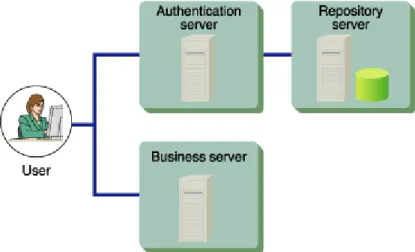
The Interstage Single Sign-on system basically consists of an authentication infrastructure, a business system, and clients. The authentication infrastructure has an authentication server, a repository server, and an SSO repository. The business system has a business server.
Figure 1-4 Basic System Configuration
Users access the system from a Web browser on a client. The user can use the system in the following two ways:
Basic System Configuration
If the user accesses the business system without being authenticated, the Web browser is automatically directed to the Authentication infrastructure URL and requested to perform user authentication. When authentication is successful, the Web browser is automatically directed back to the URL specified first.
Note
• The authentication and business servers cannot be constructed on the same machine.
Authentication Infrastructure
The authentication infrastructure retains the user information required for authentication, and requests each user to present a pair of user ID and password to certificate and authenticate.
The authentication infrastructure consists of an authentication server, repository server, and SSO repository.
Note
All access to the Authentication infrastructure uses SSL communication. For details, refer to “Authentication infrastructure URL”.
Authentication Server
The authentication server requests each user to present a pair of user ID and password or a certificate, and authenticate the user.
The authentication server compares the user ID and Password (or certificate presented by the user) with the user information previously set in the repository server to determine whether the user can use the Single Sign-on system.
Note
The authentication server is provided by the following products: • Interstage Application Server Enterprise Edition
• Interstage Application Server Standard Edition • Interstage Application Server Plus
Repository Server
The repository server manages the information necessary for user authentication, such as user IDs and passwords, and the information to authorize users to access the public URL path to the business system. According to the request from the authentication server, the repository server fetches the user
information necessary for authentication from the SSO repository. The fetched information is then transferred to the authentication server.
Two types of repository server are available: Repository server (update system) and repository server (reference system).
The repository server (reference system) is installed when system availability needs to be increased. If the repository server (reference system) to which the authentication server requests authentication has failed, repository server (reference system) to the authentication request destination is switched automatically to respond to the authentication request from the relevant client.
Note
The repository server is provided by the following products: • Interstage Application Server Enterprise Edition • Interstage Application Server Standard Edition • Interstage Application Server Plus
SSO Repository
The SSO repository is a single directory used to control the information about all users of the operating system, and the resources associated with each business server.
For the SSO repository, Interstage Smart Repository is used.
Basic Configurations of Authentication Infrastructure
The following describes the basic configurations of the authentication infrastructure.
Four configuration patterns are supported to meet different system-scale requirements, e.g., load balancing and increase of system availability.
1. When Setting Up the Authentication Server on One Machine and the Repository Server on Another Machine (Middle-scale System)
This system configuration is suitable when the number of users in the business system and the number of simultaneous accesses to the business system are low in volume.
If the number of users within a business system increase and simultaneous access also increases, authentication servers can be added to change the system configuration in order to match the setup described in item 2 below.
Basic System Configuration
2. When Setting Up the Authentication Server on Multiple Machines and the Repository Server on a Machine (Middle-scale System: Balancing the Authentication Server Load)
This configuration is suitable when the number of users of the business system and the volume of simultaneous access to that business system is large.
This system configuration places a load balancer before multiple authentication servers to balance the load of the authentication servers. Three or more authentication servers can be implemented.
Figure 1-6 Setting Up the Authentication Server on Multiple Machines and the Repository Server on a Machine (Middle Scale System- Balancing the Authentication Server Load)
3. When Setting Up the Authentication Server and the Repository Server on Multiple Machines Individually (Large-scale System)
This system configuration has multiple repository servers that are used separately as update and reference systems. Multiple repository servers have been used in this setup in order to share and balance the processing load as needed.
This system configuration positions a load balancer between the client and multiple authentication servers, to balance the load of the authentication servers. This configuration also uses multiple repository servers to balance the load on repository servers during authentication processing. Multiple repository servers (reference systems) can be allocated for an authentication server. With multiple repository servers, even if a repository server (reference system) stops (fails), the system can continue operation by switching the repository server to another (reference system). A repository server (update system) can be also operated as a repository server (reference system). If a repository server (update system) stops (fails), the system is automatically stopped.
The information stored in the SSO repositories of update and reference systems must always be maintained to be the same status by the repository replication function.
Figure 1-7 Setting Up the Repository Server and Authentication Server on Multiple Machines Individually (Large Scale System)
4. When Setting Up the Repository Server and the Authentication Server on a Single Machine (Small-scale System)
This system configuration sets up the authentication infrastructure (repository and authentication servers) on one machine. This configuration is suitable for a small-scale system in which the number of business system users and the number of simultaneous accesses to the business system are small.
Basic System Configuration
Business System
The business system provides users with Web-based services.
The business system basically consists of a business server and Web Systems and services operated on the business server.
Business Server
In request for business system access from a user, the business server requests the authentication infrastructure in order to authenticate the user. At this point, the business server also authorizes the authenticated user to use the access-target services.
The business server that is available to add to the business system of Interstage Single Sign-on must be operated on the following Web servers.
• Interstage HTTP Server • InfoProvider Pro
• Microsoft(R) Internet Information Services
• Interstage HTTP Server • InfoProvider Pro
• Sun ONE Web Server Enterprise Edition
• Interstage HTTP Server
Basic Configurations of Business System
The following two configuration patterns are available for the business system.
1. When Setting Up a Business Server on a Machine
Figure 1-9 Setting Up a Business Server on a Machine 2. When Setting Up Business Servers on Multiple Machines
This system configuration positions a load balancer between the client and multiple business servers, to balance the load of the business servers. Three or more business servers can be implemented.
Basic System Configuration
Client
With Interstage Single Sign-on, a user uses the business system from a Web browser on a client.
Supported Web Browsers
The following table lists the Web browsers that can be used on the client.
Table 1-1 Supported Web Browsers
Web browser Version and level
Netscape Communicator 4.6, 4.7, 4.72, 4.73, 4.75, 4.78 Microsoft(R) Internet Explorer 5.01, 5.5, 6.0
Web Browser Setup
• Set up the browser to accept cookies. • Validate Java scripts.
• When using proxy servers, set up the browser so that both authentication and business servers are connected through proxy servers.
• Set up the browser to use SSL2.0 and SSL3.0.
Application of Security Patch
The client system may be attacked and cookies may be stolen when a problem occurs in the Web browser being used. If such a trouble is detected, the developer of the Web browser releases a security patch. The system administrator must instruct all users of the operating system to always apply the latest security patches to their browsers.
About Proxy Servers
When a load balancer, such as Interstage Traffic Director, is used for load balancing, the proxy server through which a client is connected may be varied per access according to load balancer settings. Since the authentication and business servers recognize the proxy server address as the client address, if the proxy server is varied, the client address will be different between the access to the authentication server and the access to the business server.
If it occurs, the Single Sign-on operation cannot be validated. To avoid this problem, ensure the load balancer is set up so that access to the same client always uses the same proxy server.
For example, when "Balancing for each node" is specified for Interstage Traffic Director, every request from the same client is connected to the same server.
Administrators
To operate Interstage Single Sign-on, the SSO (Single Sign-on) administrator must not only manage the authentication infrastructure but also coordinate with the administrator of the business server linked to Single Sign-on.
SSO Administrator
The SSO administrator manages the authentication infrastructure.
Based on the information obtained from the business server administrator, the SSO administrator registers users in the SSO repository, deletes users from the SSO repository or changes registered user information.
Business Server Administrator
The business server administrator manages the business system.
The business server administrator decides the resources to be protected by the business server and protection policies, including the criteria for the users who can access protected resources and delivers the information to register the business system in the authentication infrastructure to the SSO
Authentication
Authentication
Authentication is the operation used to check the validity of any person who attempts to use the system. This section explains the authentication function provided with Interstage Single Sign-on.
Interstage Single Sign-on supports the following authentication methods for user authentication:
Figure 1-11 Authentication
For details about Password authentication, Form authentication, Basic authentication, and Certificate authentication, refer to “Password and Certificate Authentication“.
For details about “Password authentication or Certificate authentication” and “Password authentication and Certificate authentication“, refer to “Combinations of Authentication Methods”.
Password and Certificate Authentication
Interstage Single Sign-on supports the following two authentication methods for user authentication. Both methods can be used in combination.
• Password authentication • Certificate authentication
With Interstage Single Sign-on, the two authentication methods can be specified separately or in combination for the resources as access control targets for each user.
The authentication method for a user is set according to ssoAuthType, a user information entry managed by the SSO repository of the repository server.
Also, a re-authentication interval can be specified for authentication. When a re-authentication interval is specified, an authenticated user is requested to be authenticated again after a specified time elapses from the first authentication. This function prevents unauthorized use of the Web system by a third person even if a user leaves the client computer for long after authentication.
Figure 1-12 Password and Certificate Authentication Password Authentication
Password authentication is the process used to authenticate a user via a paired user ID and password. This means that if a computer used by the user is undefined, the user can be easily authenticated. With Interstage Single Sign-on, it is possible to select either of the following user ID/password input screen for password authentication:
Table 1-2 Password Authentication
User ID/password input screen
Explanation Written name in subsequent explanations
Form authentication page
Web page in which the authentication form is embedded
Authentication
If the form authentication is used, users can access the Authentication infrastructure URL directly through a Web browser for authentication, and users can also access the business system.
If users access to Authentication infrastructure directly, use the same method to access the following URL:
Authentication infrastructure URL/ssoatcag (*1)(*2)
In the following explanation, the URL above is replaced with “URL of Form authentication“ *1 Specify the port number even if 443 is specified.
*2 If the Authentication infrastructure URL is confirmed after setting the business server, on the
Interstage Management Console, select [System] > [Security] > [Single Sign-on] > [Business system] > [Business system Name] > [Settings] > [Detailed Settings [Show]], and then check the setting for [Repository Server URL] under [Authentication Infrastructure Information Settings].
Example
If Authentication infrastructure URL is used as "https://authserver.fujitsu.com", the URL of Form authentication page is the following:
https://authserver.fujitsu.com:443/ssoatcag
Note
If the incorrect URL is specified, the following error occurs and the authentication may fail.
• The following message outputs on the Web browser, even if authentication is performed. Or re-authentication is required.
− “403 Forbidden/Authentication is processing”
• If client authentication is processed through SSL communication, the request window of the client certificate is displayed several times.
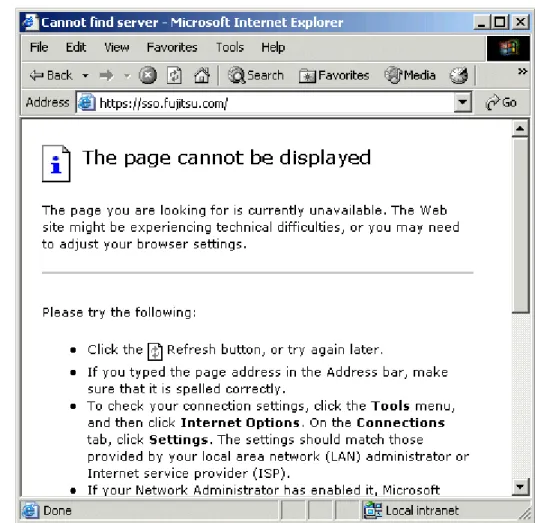
• The following message is displayed on the Web browser, and output message: sso02012 to the system log.
− “403 Not Found”
− “The page cannot be displayed”
The form authentication page can be customized. For customization method details, see “Customizing a Message"
Authentication by Password authentication is simple, but there is a risk that a user's password could be stolen or spoofed.
The following examples show the form authentication page and dialogs that are displayed by each Web browser for basic authentication.
Example
Figure 1-13 Form Authentication Page in Microsoft(R) Internet Explorer 6.0
Example
Authentication
Figure 1-14 Authentication Window for Microsoft ® Internet Explorer 6.0 Example
Basic authentication dialog for Netscape Communicator 4.75
Figure 1-15 Basic Authentication Window for Netscape Communicator 4.75 Certificate Authentication
This authentication method is used to authenticate a user with a certificate. This method is convenient when the computer to be used is specified.
When the user accesses a business system or the Authentication infrastructure URL, the Web browser prompts the user to present the certificate. Authentication is performed by registering the certificate in advance in the Web browser used by the user. In this authentication method, the user is assumed to be authenticated when he or she can be identified from the presented certificate.
Certificate Information
For certificate authentication by Interstage Single Sign-on, the owner name (Subject), owner alias (Subject Alternative Name) and extension information contained in the presented certificate is referenced. Therefore, one of the following items of information must be stored in the certificate.
Certificate information referenced by Interstage Single Sign-on
• Mail address (mail)
• Employee number (employeeNumber) • User ID (uid)
• Serial number (serialNumber) • DN qualifier (dnQualifier) • Name (cn)
If same attribute is specified for the owner name (Subject), owner alias (Subject Alternative Name) and extension information contained in the presented certificate, the following is referenced.
• For Mail address, the value that is set in the owner alias (Subject Alternative Name) and extension information is valid.
• For except mail address, the value that set in the owner name (Subject) is valid.
To set the certificate information, such as owner name and owner alias, on the Interstage Management Console, select, [System] > [Security] > [Single Sign-on] > [Authentication infrastructure] >
[Authentication server] > [Settings] > [Detailed Settings [Show]]. Then, make settings for [Attributes used for Authentication] under [Certificate Authentication Settings].
The following examples show the certificate selection windows that are displayed for certificate authentication in Web browsers. If multiple certificates have been registered in a Web browser, select the certificate on this window to be presented to the Web server.
If only one certificate has been registered in a Web browser, the certificate can be used automatically without the certificate selection window displayed. For further details about how to display the certificate selection window, refer to "Certificate selection windows".
For details about how to register certificates in a Web browser, refer to the Security System Guide.
Example
Authentication
Figure 1-16 Certificate Selection Window for Microsoft ® Internet Explorer 6.0 Example
Figure 1-17 Certificate Selection Window for Netscape Communicator 4.75
On Netscape Communicator, the following window is opened after the certificate selection window is displayed.
Authentication
Checking the Effectiveness of Certificate
The certificate used for certificate authentication can be checked effectiveness by the authentication server. The effectiveness is checked based on the certificate revocation list (CRL) registered in the authentication server. The CRL lists revoked certificates. If a certificate listed in the CRL is presented, then authentication fails.
Note
If password authentication is being executed with basic authentication, a user cannot directly access the Authentication infrastructure URL using, for example, a Web browser.
Combinations of Authentication Methods
Interstage Single Sign-on supports the following four authentication methods as combinations of password authentication and certificate authentication. Authentication methods can be selected for each user.
Authentication Method Description
password authentication This authentication method uses a user ID and password pair. Either form authentication or basic authentication can be used.
certificate authentication This authentication method uses the certificate obtained at SSL client authentication. Either the file-format certificate registered in the Web browser can be used.
password authentication or certificate
authentication
Success of authentication is assumed only when either password authentication or certificate authentication is successful.
password authentication and certificate
authentication
Success of authentication is assumed only when both password authentication and certificate authentication are successful.
Password Authentication or Certificate Authentication
Success of authentication is assumed when either password authentication or certificate authentication is successful.
This authentication method is appropriate for a user who frequently performs access from the
computers other than the one in which the user's certificate has been registered. For example, when a user who always receives certificate authentication needs to access a resource from a different
computer during a business trip or cannot use the certificate for some reason, the user can obtain access by using password authentication. The authentication operation is flexible.
This authentication method first requests the user to receive certificate authentication. When certificate authentication is successful, success of authentication is assumed. If the user fails in certificate authentication or presents no certificate, the user is requested to receive password authentication. When password authentication is successful, success of authentication is assumed. If the user fails password authentication, failure in authentication is assumed.
When the user has registered only one certificate or has not registered any certificate, the user can also use the registered certificate without displaying the certificate selection window or display the password authentication window without displaying the certificate selection window. For further details about how to display the certificate selection window, refer to "Certificate Selection Windows".
Password Authentication and Certificate Authentication
This authentication method only assumes authentication has been successful when both password authentication and certificate authentication have been successfully completed.
This method of authentication firstly requests the user to receive certificate authentication. When certificate authentication is successful, the user is then requested to complete password authentication. When password authentication has been completed, the authentication process has been successful. If password authentication fails, the authentication process may fail.
When the user has registered only one certificate, the user can also use the registered certificate without displaying the certificate selection window. For details about how to display the certificate selection window, refer to "Certificate Selection Windows".
Remark
When the Web browser is Netscape Communicator, the certificate selection window may be displayed twice. If it occurs, operate same action for both windows.
User Information
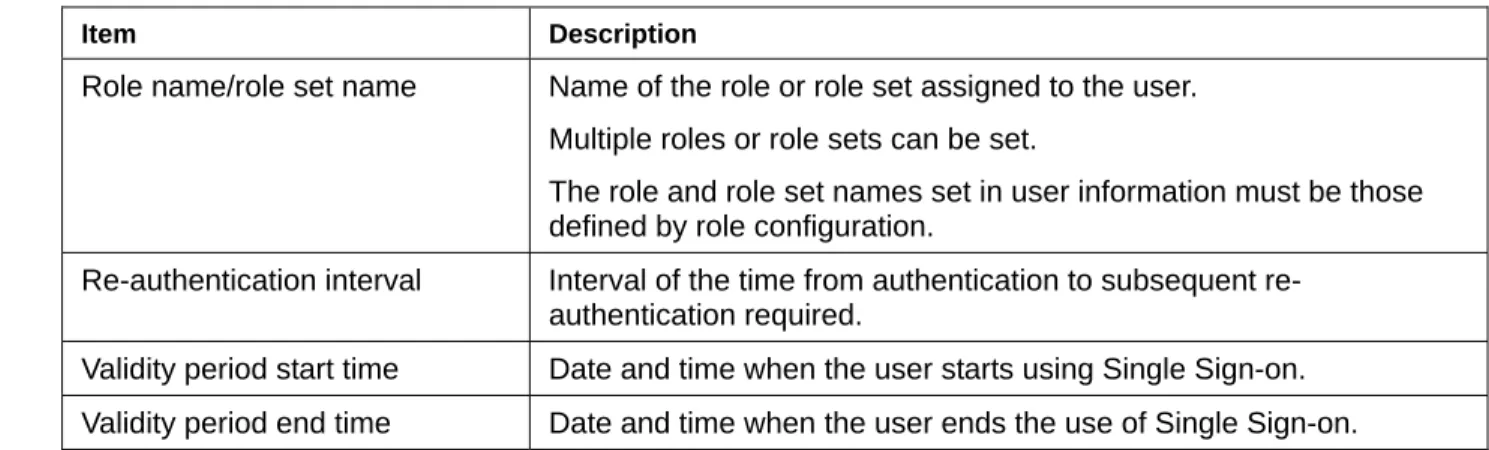
User information is managed in the SSO repository, and includes the user ID, password and authentication method for each user managed by Interstage Single Sign-on. The following user information can be set for each user according to system operation requirements.
The following table lists the main setting items for user information.
Table 1-3 User Information
Item Description
Authentication method One of the following authentication method: Password authentication
Certificate authentication
Password authentication or certificate authentication Password authentication and certificate authentication
User ID User ID of the user.
Only one user ID must be set for a user.
Password Password of the user.
Only one password must be set for a user.
Authentication
Item Description
Role name/role set name Name of the role or role set assigned to the user. Multiple roles or role sets can be set.
The role and role set names set in user information must be those defined by role configuration.
Re-authentication interval Interval of the time from authentication to subsequent re-authentication required.
Validity period start time Date and time when the user starts using Single Sign-on. Validity period end time Date and time when the user ends the use of Single Sign-on. For details of roles and role sets, refer to "Relationships between Roles, Users, and Resources".
Authentication Information
After a user is authenticated, the user's mail address, employee number, and other information that is registered in the SSO repository are transferred as authentication information in a cookie format to the business, authentication and repository servers.
Authentication in a Multi-domain Environment
Authentication and authorization Interstage Single Sign-on are also available for an environment where the business system and authentication infrastructure belong to different domains.
Certificate Selection Windows
If no certificate (or only one certificate) has been registered in the client computer, the displaying of the certificate selection window can be suppressed during the certificate authentication operation.
The following explains how to suppress display of the certificate selection window on Microsoft® Internet Explorer and Netscape Communicator. As the display procedure for the certificate selection window varies depending on the version of Web browser, refer to the manual for the corresponding Web browser.
Example
Microsoft® Internet Explorer 6.0
Authentication
Figure 1-21 Security Settings Example
Netscape Communicator 4.78
Select [Communicator] > [Tools] > [Security Info], and from the window displayed, select [Navigator]. Then select "Select Automatically" for [Certificate to identify you to a web site].
Figure 1-22 Netscape Navigator Screen
Restrictions on Authentication
Interstage Single Sign-on provides some functions to prevent illegal access. The functions include the function for requesting re-authentication after a specified time elapses, the function setting a user
Authentication
When the authenticated user connects to the business system from a client computer that has a different IP address, the user is requested to be authenticated regardless of the setting of the re-authentication interval.
Figure 1-23 Interstage Single Sign-on Authentication
Re-authentication intervals can be set using the following methods.
• To set a re-authentication interval for each user, set the time of re-authentication interval for "ssoCredentialTTL" in the user information stored in the SSO repository.
• To set a standard re-authentication interval, from the Interstage Management Console, select [System] > [Security] > [Single Sign-on] > [Authentication infrastructure] > [Authentication server] > [Settings] > [Detailed Settings [Show]]. Then, set the time of standard re-authentication interval for [Re-authentication Interval] under [Operation after Authentication].
If all 2 items above have been set, the priority (for the re-authentication) is described in the table below.
Table 1-4 The priority for the re-authentication settings
High ^ | Low
Re-authentication interval set for each user Standard re-authentication interval
For details of the user information stored in the SSO repository, refer to "User Information Entry". For details of the configurations on the Interstage Management Console, refer to Operator’s Guide.
Figure 1-24 Using Re-authentication Intervals
Remarks
• When "certificate authentication" is used as the authentication method for the user, or when the user has been authenticated by certificate authentication with "password authentication or certificate authentication" used as the authentication method, the client (Web browser) automatically presents the certificate to the Web server at re-authentication.
Therefore, the window requesting re-authentication is not shown to the user. Note that, when users are setting up the Authentication Server on multiple machines and the Repository Server on a machine, or setting up the Authentication Server and the Repository Server on multiple machines individually, the window requesting re-authentication may display even when the authentication method is "certificate authentication" or "password authentication or certificate authentication." • When the remaining time for the validity period registered as user information in the SSO repository
Authentication
User Validity Period
Validity periods can be set for users in Interstage Single Sign-on.
For example, if the information on new employees is stored in the SSO repository in advance, settings can be made to validate authentication on the beginning date of employment and specify the projected end date of employment as the validity period end date.
Thus, authentication can be invalidated temporarily, and user validity periods can be set without deletion of user information from the SSO repository.
Set the user validity period by specifying values in "ssoNotBefore" and "ssoNotAfter" for the user information in the SSO repository.
For details about the user information in the SSO repository, refer to "User Information Entry".
Lockout
In order to protect users against unauthorized access, the lockout function restricts authentication and disables access to the resources managed by Interstage Single Sign-on.
If a user inputs invalid passwords (user ID and password) for a specified number of consecutive times, the user is locked and the use of the Single Sign-on system is restricted to disable the user from attempting the input of any more passwords.
The locked user fails authentication until the userID is unlocked.
To unlock user is performed using the Interstage Management Console by the SSO administrator. The locked user can also be unlocked automatically after a specified time. Automatic unlocking after a specified time is performed at the user's first authentication operation after the specified time elapses. The count for successive authentication failures is reset when the user succeeds in password
authentication.
Remark
If a user fails in authentication using a certificate, the user is requested to input the user ID and password. If the authentication method specified for that user is "certificate authentication" or
"Password authentication and certificate authentication," the user will fail in authentication even when the user inputs valid user ID and password. If it occurs, select [Cancel] on the User ID/Password Request window.
When the user inputs a user ID and a password to the user ID/password request window, the user is regarded as a lockout target and the count for successive authentication failures is increased by one, even if the input user ID and password are valid.
Figure 1-25 Lockout in Single Sign-on Authentication
If a user has failed password authentication for a specified consecutive number of times and is locked by the lockout function, a message is sent to the user's client computer.
The message shown in Figure 1-26 notifies the user when authentication has failed. The display of this message is configured in the environment setup on the authentication server. To activate this setting, on the Interstage Management Console select [System] > [Security] > [Single Sign-on] > [Authentication infrastructure] > [Authentication server] > [Authentication server: Settings]. Then select [Yes] for [Notify Cause of Authentication Failure to user?].
If [No] is selected, the message "User name or password is invalid." is displayed on the browser. For further details, refer to "Messages that can be Customized".
Authentication
When a locked user performs authentication, the following window is displayed on the Web browser.
Figure 1-27 Screen Displayed when User has been Locked Note
Locked users cannot use Interstage Single Sign-on (even for certificate authentication) until they are unlocked.
Authorization
Authorization
Authorization is the process that is used to make sure that the user who requests access to a resource is allowed to access the resource. A user who requests access to a resource, for example, a HTML document, image data, or voice data disclosed on a Web server or a CGI application operating on a Web server; is checked to allow access to the resource.
Interstage Single Sign-on authorizes users' access based on the concept of "role," which is an attribute indicating a department or business. Whether a user is allowed to access a resource is determined according to the relationship between the role of the user and the role set for the access target resource. The relationships between resources and roles are managed as access control information.
Relationships between Roles, Users, and Resources
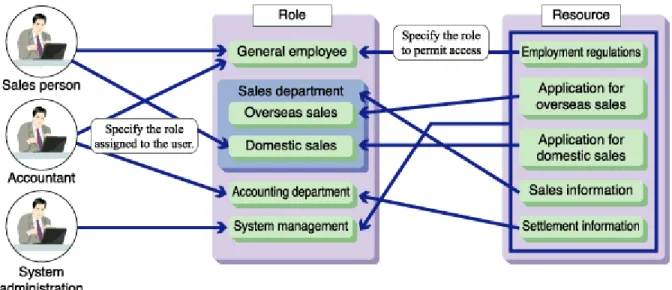
Roles are defined based on actual departments and businesses, e.g., "general employee" and "domestic sales," and assigned to user information. On the other hand, the roles required to access resources, including the HTML and CGI resources disclosed by the Web services on business servers, are set for the respective resources. When a user accesses a resource, the user must succeed in authentication and have the role that is set for the target resource.
Figure 1-28 Relationships Between, Roles, Users and Resources
In the above example:
• The roles "general employee" and "accounting department" are assigned to the accountant. • The role "general employee" is permitted to access only the resource "employment regulations." • The role "accounting department" is permitted to access only the resource "settlement information."
• Therefore, the accountant can access only the resources "employment regulations" and "settlement information."
Multiple roles can be grouped as a role set. In the above example:
• The role set "sales department" contains two roles, such as "overseas sales" and "domestic sales." • Because the resource "sales information" permits both "overseas sales" and "domestic sales" to
access the resource, the role set "sales department" can be set for the resource.
• Because the resource "application for domestic sales" is intended to permit only the role "domestic sales" to access the resource, only the role "domestic sales" should be assigned to the resource. As described above, the concept of role can be used to implement authorization in a flexible manner.
Information Required for Authorization Using Roles
The following information required for the authorization using roles must be registered in the SSO repository.
1. Role configuration 2. User information 3. Protection resource
The following shows examples of configurations in the SSO repository. Access control information is a set of role configuration and protection resource information.
Authorization
Figure 1-29 Information Required for Authorization Using Roles Role Configuration
The role or role set name to be used is registered as a role configuration.
Roles are used to authorize the users who access the business system. Roles must be designed on the basis of the departments and businesses of the users who use the business system. To define a post, e.g., "general employee" or "manager," or a department, e.g., "accounting department" or
"administration department," as a role, use the role name that corresponds to the post or department as shown in the table below to define it in the SSO repository.
When multiple roles are grouped and defined as a role set according to the hierarchy of organization and assigned to resource information, the system has the flexibility to accommodate the future changes in organization.
Note
Interstage Single Sign-on provides authorization with a role. Please be sure to perform a role configuration to the SSO repository. Unless role configuration is performed, a repository server does not start.
Examples of Roles Table 1-5 Role
Post/department Role name
General employee employee
Executive officer executives
Accounting department finance department Administration department administration department
Example of Role Set Table 1-6 Role Set
Post/department Role set name Contained role
All employees all employee、executives
User Information
For details of user information, refer to "User information".
Protection Resource
If authentication and authorization are required for users to access resources such as HTML documents and CGI applications disclosed in the business system, define those resources as protection resources. Protection resource information consists of site and path configurations.
Site Configuration
The site configuration defines the site name of the business system. The format of site name is "fully qualified domain name (FQDN) + port number." FQDN is the host name that includes domain name. When the Business system public URL is "https://www.fujitsu.com:443/index.html", the site name is "www.fujitsu.com:443".
Path Configuration
The path configuration specifies the name of the directory or file that is disclosed on the site defined by the site configuration and requires authentication and authorization for access. When a directory name is specified (when the path name ends with "/"), all resources under the specified directory are the targets of authentication and authorization.
Authorization
Note
If a role or role set name set in the path configuration is not defined by role configuration, access control information cannot be updated on the business server. The role and role set names set in the path configuration must be the same as that defined by the role configuration.
Centralized Management of User and Access Control Information
The user and access control information concerning the users of multiple systems can be centrally managed using the SSO repository to reduce the system administrators' load.Example
The following diagram illustrates the centralized management using one SSO repository of the user and access control information concerning business servers A, B, and C.
Updating Access Control Information
The business server retains the access control information fetched from the SSO repository to reduce the load on the repository server and increase the processing speed of the business server itself. If the access control information (role configurations, protection resources) registered in the SSO repository has been changed, access control information retained in the business server must be updated.
The following describes the methods of updating the access control information in the business server. • Updating Access Control Information from the Interstage Management Console
On the Interstage Management Console, select [System] > [Security] > [Single Sign-on] > [Business system] > [Business system Name] > [Update access control iInformation], and click [Update] to update the access control information. This operation can be performed even while the business server is active.
• Updating Access Control Information Automatically at Business Server Startup
Access control information can be updated automatically at the startup of business server according to an environment setting. On the Interstage Management Console, select [System] > [Security] > [Single Sign-on] > [Business system] > [Business system Name] > [Settings] > [Detailed Settings [Show]] to check or change the environment setting.
Then, check or change the setting for [When updating Access Control Information?] under [Access Control Information]. When "Execute when Business server is started" is selected, the access control information is updated at the startup of business server.
When the access control is updated information, the business server accesses the repository server that was specified by [Repository server URL] at the creation of the business system setup file. For details about the business system setup file, refer to “Downloading Business System Setup File” of ”Preparations for Setting up a Business System”.
To check or change the URL of the repository server after setting up the business server, select, on the Interstage Management Console, [System] > [Security] > [Single Sign-on] > [Business system] > [Business system Name] > [Settings] > [Detailed Settings [Show]]. Then, check the setting for [Repository Server URL] under [Authentication Infrastructure Information Settings].
Notes
• Changes to access control information (role configurations, protection resources) of the SSO repository are not reflected in business server authentication. To enable reflection of such changes, access control information must be updated in the business server.
Note that, if "access control information is not updated at the start of the business server," is set, changing of the SSO repository is not reflected even if the business server is restarted.
Authorization
• If the access control information is updated while the business server is active, make sure that you access a protection resource after the update. This is important to ensure that authentication and authorization can be performed normally. If authentication or authorization is not performed normally, updating may have failed.
If updating of access control information has failed, the business server responds to every access from user with message "500 Internal Server Error".
Check those messages output to the system log which begin with "sso", take corrective action, and stop and restart the business server. For details of message contents, refer to "Messages with Message Numbers Beginning sso" in the Messages.
• If an error message is output after the access control information has been updated on the Interstage Management Console, the business server remains in the status to perform authorization according to the old access control information. In that case, stop the business server or take another measure as required until the business server has recovered from the error and the information is updated normally.
High-Performance and High-Reliability System
Interstage Single Sign-on supports high-performance and high-reliability systems such as client certificate verification, high-speed SSL communication, load balancing, and increased availability.Load Balancing
When the authentication requests from users converge on the authentication server, the load on the server is also increased. The load can be balanced by adding an authentication server.
Also, the authentication processing on the repository server can be distributed to two repository servers, repository server (update system) and repository server (reference system) in order to balance the load of authentication processing on the repository server.
To distribute authentication processing to the repository server (update system) and repository server (reference system), select, on the Interstage Management Console, [System] > [Security] > [Single Sign-on] > [Authentication infrastructure] > [Authentication server] > [Settings] > [Detailed Settings [Show]].
Then, specify the repository server (update system) and repository server (reference system) for [Communication Settings with Repository server] and [Communication Settings with repository Server (reference system)].
For details about the configurations on the Interstage Management Console, refer to the Operator’s Guide.
It is recommended to install one repository server (update system) and multiple repository servers (reference systems) to balance the load of authentication processing on the repository servers.
High-Performance and High-Reliability System
Figure 1-31 Load Balancing among Authentication and Repository Servers
The figure above shows the load balancing among authentication and repository servers.
The authentication requests from clients are distributed to each authentication server by a load balancer, e.g., Interstage Traffic Director, to each authentication server.
When one repository server (update system) and multiple repository servers (reference systems) are allocated to each authentication server, the authentication server connects to a repository server
(reference system) for the processing of ordinary authentication request. It connects automatically to the repository server (update system) only when the information in the SSO repository is required to
change(e.g., when the user is locked by the lockout function). When different repository servers (reference systems) are allocated separately to the authentication servers, the load on repository servers can be balanced.
When the information in the SSO repository of the repository server (update system) is updated, the updated content can be reflected in the SSO repository of the repository servers (reference systems) automatically by using the Smart Repository replication function.
When a different repository server (reference system) is assigned to each authentication server as the one to be connected preferentially, the load on repository servers can be balanced.
For an example of setting a system configuration in which multiple authentication servers are arranged to distribute the authentication server load, see “When Setting Up the Authentication Server on Multiple Machines and the Repository Server on a Machine" of “Basic Configurations of Authentication
Infrastructure” of "Authentication Infrastructure”.
For an example of setting a system configuration in which the repository server (update system) and repository server (reference system) are arranged to distribute the repository server load, see “When Setting Up the Authentication Server and the Repository Server on Multiple Machines Individually" of “Basic Configurations of Authentication Infrastructure” of "Authentication Infrastructure”.
Remark
When repository servers are used separately for update and reference systems, the contents of SSO repositories (master and slave) must be synchronized with each other to prevent illegal authentication due to data inconsistency. A synchronizing method is to copy the content of the SSO repository (master) into the SSO repository (slave) by using the Smart Repository replication function.
Notes
• The repository server (update system) and repository server (reference system) both need to be the same edition/version.
• The load balancer, e.g., Interstage Traffic Director, must be set up so that all authentication servers logically have the same host name.
• To perform SSL communication on the authentication servers, the owner name of each certificate to be used for SSL communication must be the same on every authentication server. In details, the host name of Interstage Traffic Director must be specified as the owner name of the certificate for SSL communication when the certificate is obtained and registered. For further information about the application for the certificate and its registration, refer to "Preparations for SSL Communication". • The load balancer must be set up so that the requests from the same client transfer to the same
authentication servers.
• Use the following settings when the load balancer is Interstage Traffic Director:. − Operation Mode : bridge
− Measure of load Balancing and uniqueness of connection : Balancing for each node
Increase of System Availability
When multiple repository servers (reference systems) are allocated to the authentication server, the system configuration can include active and standby repository servers (reference systems). This system configuration allows the system to continue operation even if a repository server (reference system) fails or an error is posted from an SSO repository.
High-Performance and High-Reliability System
Figure 1-32 Increasing System Availability
When the re-connection interval specified as an environment setting on the authentication server has elapsed after the automatic switching of authentication request destination, repository server (reference system), an attempt is made automatically to connect to the repository server (reference system) that was the destination for the old authentication request.
Figure 1-33 Standby Repository takes over in the Event of a Failure
This means that the Interstage Single Sign-on service can operate without a halt when multiple repository servers (reference systems) are installed.
To check the sequence of connections to the repository servers (reference systems) from the
authentication server, select, on the Interstage Management Console, [System] > [Security] > [Single Sign-on] > [Authentication infrastructure] > [Authentication server] > [Settings] > [Detailed Settings [Show]]. The sequence of connections is indicated by [Host name and Port numberNo.] under [Communication Settings with Repository server (reference system)].
The authentication server attempts to connect to all the specified repository servers (reference systems) sequentially. If the authentication server cannot connect to any other repository servers, it attempts to connect to the first repository server (reference system) again. If the first repository server also cannot be connected, the authentication server notifies the user of the failure in authentication.
Note that the repository server (update system) can be operated as a repository server (reference system). When the repository server (update system) is specified as the last repository server (reference system) to be connected in the setting for [Communication Settings with Repository server (reference system)], the authentication server attempts to connect to the repository server (update
High-Performance and High-Reliability System
• If the repository server (update system) stops operation as the result of some problem, user authentication fails even when the repository server (reference system) can operate normally.
• The authentication server may attempt to re-connect to the first repository server that failed before the re-connection interval (as specified as an environment setting on the authentication server) elapses.
Linkage with SSL Accelerator
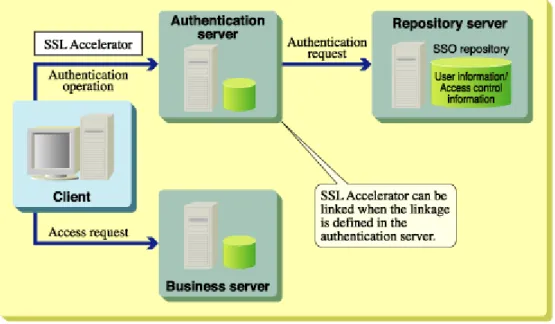
Interstage Single Sign-on allows SSL Accelerator to be installed between the client and authentication server to speed up client certificate authentication and SSL communication when the authentication method is "password authentication," "certificate authentication," or "password authentication and certificate authentication".
Figure 1-34 SSL Accelerator links the Client and Authentication Server
The linkage with SSL Accelerator must be defined in the authentication server.