Web Based Collaboration (for Free)
Using Wikis in Design Studios
Mark LindquistVictoria University of Wellington
Abstract
This paper presents a case study of the use of Wikis by students in a landscape architecture design studio to evaluate the suitability of Wikis for enhancing student collaboration in the site analysis and preliminary design stage of a project. It was anticipated that using Wikis to facilitate collaboration would provide alternatives to conventional peer to peer collaboration. In addition, Wikis could enhance feedback between the course coordinator and students. The Wiki was used to collect, compile and present data for the purpose of a precedent study of cultural and physical analysis of a site in New Zealand, for which the technology proved successful. The Wiki was less successful in contributing to the collaborative preliminary design of the project. The following discussion and presentation will include the evaluation of online Wiki services, the process used in the design studio, strengths and weaknesses observed, and opportunities for future research.
Introduction
A Wiki is software that enables any user to edit or update a webpage via a
browser. The development of the first
Wiki is credited to Ward Cunningham to enable tracking of computer programmers’ ideas from project to project (Leuf and Cunningham 00). More recently and on a broader scale, Wikis have become popular as an updateable and expandable knowledge base. One of the most popular is Wikipedia, an online encyclopedia that allows any user to add, edit or update information on any entry to the encyclopedia (www.wikipedia.com) (Figure
). This open operability has its critics
both in academia and the popular press;
Wikipedia has been criticized due to issues of accuracy, ulterior motives and lack of expertise of contributors (Denning et al. 005, Terdiman 005). Critics state
that one of its largest flaws is that one
is not required to be an expert in any subject to alter information. However, in practice, manipulation of data, accuracy and ulterior motives have been reported as the exception rather than the norm (Meyer 006). Regardless of these issues, the critiques are primarily focused on large scale, popular, open-access Wikis, which are editable by anyone with an internet
connection (Figure ).
Wikis and their counterparts have proven successful in academic settings for enhancing teaching in varied disciplines and with students spanning freshman English classes, ice- breaking sessions in ICT school, and collaborative primary school
story telling (Rick et al. 2002; Augar et al. 2004; Désilets, A., and Paquet, S. 2005).
Wikis are able to facilitate computer supported collaborative learning (CSCL) through the dissemination of information, enabling the exchange of ideas and to facilitate group interaction (Auger et al. 00). For academic use, negative issues facing larger open-access Wikis can be avoided by restricting access to smaller groups and allowing only those associated with the project access to editing.
Wikis Evaluated
Three criteria were used to evaluate the suitability of online Wiki services for
use in the project; the usability of the
Wiki (ease of creating and editing data and the timeframe required to master these techniques), the integration of tools for uploaded data management, and free service. Based on these criteria three Wiki’s were selected by the course coordinator to be evaluated for use in the
Figure 1. Wikipedia Landscape Architecture entry (http://en.wikipedia.org/wiki/Landscape_architecture)
Figure 2. Wikipedia Landscape architecture entry in editing mode (http://en.wikipedia.org/w/index. php?title=Landscape_architecture&action=edit)
Figure 3. Wikispaces sample page. Figure 5. Schtuff sample page. Figure 4. PBWiki sample page.
project, Wikispaces, PBWiki and Schtuff
(http://wikispaces.com; http://pbwiki. com/; http://.schtuff.com/) (Figure 3, 4, 5).
After reviewing each service, a fourth
criterion emerged; the service had to have
minimal interference from advertisements on the page to reduce visual clutter for presentations. Of the three Wiki services, Schtuff was selected to be used as it was evaluated to have the best tradeoff between usability, online storage, unobtrusive advertisement and best data management at the time of evaluation.
All three services offered Really Simple Syndication (RSS) and email based
notification of updated or new content in
real time, allowing students and the course coordinator to view, edit and respond to updates as they happened.
Free online storage space was also offered by all three services. Schtuff provided 00mb of free online storage for each Wiki. PBWiki did not limit the amount of storage but had caveats regarding fair use. Wikispaces offered GB of storage, but editing was not as user friendly and advertisements were more obtrusive. It was decided a known limit was advisable, with 00mb per group of
students deemed a sufficient amount of
storage for this short project. In addition,
the tradeoff for better editing and cleaner layout of the selected Wiki service was deemed more appropriate for this trial.
Only Schtuff.com offered a solution for uploaded data management through tagging of uploaded data. Tags are effective means for organizing information as data can be tagged as it is uploaded, and multiple tags can be used for effective cross-referencing. Tags can be viewed as keywords, and are used in contrast to a hierarchical nested folder system as many
digital filing systems have historically been
based. In addition, tagging commonly allows for a list of tags to be displayed, as well as a ‘cloud’ of tags that graphically represents popular tags as larger text within a group of words. Tags have been developed with various Web .0 services and are now used extensively in online social networking applications as varied as online photo sharing services such as ‘Flickr’ (Figure 6) and social bookmark services such as ‘del.icio.us’ (Figure 7) (www.flickr. com; http://del.icio.us/).
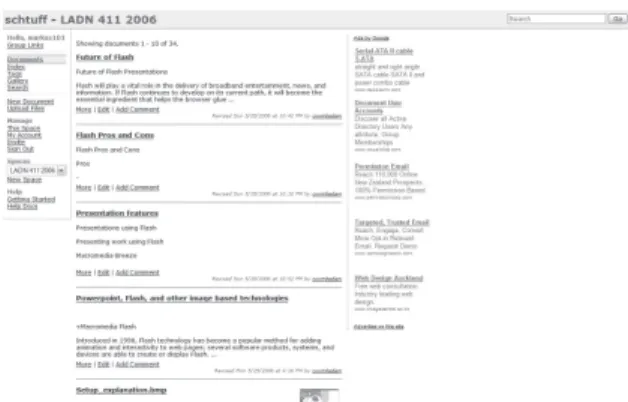
Description of Student Work To aid the students’ use of the Wiki for the project, the coordinator created a parent Wiki page for the LADN design
Figure 6. Flickr tag cloud (http://www.flickr.com/photos/ tags/).
studio schtuff.com (Figure 8), to deliver a thirty minute tutorial outlining the use of Wikis (http://ladn4112006.schtuff.com/). The concept of the Wiki was discussed
with students at the first group meeting
and a strategy for a two week precedent study and site analysis was agreed upon. The Wiki was to be used for research and presentation of a design precedent to inform the studio project, physical and cultural analysis of the site, and to present a preliminary design for the site. Each group created their Wiki with an assigned naming convention (ladn-006g, ladn-006g etc.) Students discussed in their groups how best to use the Wiki for data collection, compilation, processing and presentation, and then met with the coordinator to discuss the proposed methodology.
Data collection, processing and organization
Students used the Wiki as an online
repository for collected data; photographs,
scanned and downloaded maps, images and documents. Data had to be uploaded to the Wiki prior to being linked on the Wiki page which forced students to upload the majority of their found data as it was
uncovered, prior to organizing it. Students uploaded their data online to the Wiki during the collection process. In addition, tags could be assigned to the data and used to organize various maps, images and documents into subject areas and keywords.
Design
While investigation of the wiki for design collaboration was intended, Masterplan design was not completed on the Wiki but rather the wiki was used for data transfer. Each group uploaded a Masterplan that group members were able
to download and edit offline. Students
used image editing software to make alterations and additions to the plan, then
uploaded the file to be accessible online
via the Wiki by others in the group. Presentation
Once data was collected, processed and organized the students had to
determine the best method for presenting the information via the Wiki. Students were provided with a computer and digital projector, and were to present to the class in the format they deemed appropriate to the technology and information they had compiled. In addition to being used for verbal presentation, the Wikis were required to stand alone on the internet for external critics to view. The critics were to be directed to the Wikis for background
information for the final presentation of the project ten weeks later; this method of information exchange is the first trial of
its type in the School of Design, Victoria University of Wellington. With these two differing presentation requirements as
Figure 8. LADN 411 Studio wiki (http://ladn4112006. schtuff.com/).
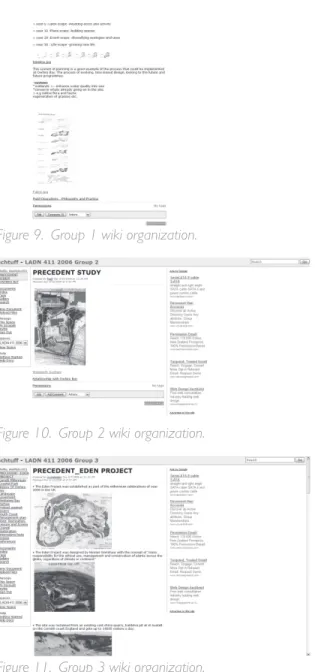
the basis for disseminating information, each of the three groups took a different approach to organizing their site within the comparative framework of the Wiki. Group used individual pages that linked to the next page in the presentation at the bottom of the active page (Figure 9), Group used page links at the bottom of a main title page (Figure 0) and Group used side menu links to each page of the presentation (Figure ).
Discussion
The observations are preliminary and based on a class of th-year undergraduate
landscape architecture students. There were students in total with two groups of 5 and one group of . The Wiki project was a compulsory component of the precedent study, site analysis and preliminary design of a core design studio project which was a total of 0 weeks in length, of which the site analysis and Wiki presentation were two weeks in duration. In previous years students were required to complete a similar two week study as a project introduction which was presented via more conventional poster presentations or projected PowerPoint presentations. Through observing the use of Wikis in this academic setting, valuable insight was gained into ) technological usability and the impact on acceptance by students, ) teacher/student collaborative opportunities afforded by Wikis, ) student-student collaboration afforded by Wikis during the data collection and processing phase, ) student-student collaboration afforded by Wikis during the design phase, and 5) the impact on presentations that the Wiki as a process provided.
Technological usability and the impact on acceptance
Acceptance of using the Wiki technology by students occurred by
the end of the first studio session. This
is in contrast to past attempts to use conventional webpages for presentations in the design studio. It was observed that the period wherein students struggled with using the technology was brief, and that
Figure 9. Group 1 wiki organization.
Figure 10. Group 2 wiki organization.
students who were less digitally proficient
were able to use the Wiki at a productive level after only one studio session (Figure ). Based on past experience with introducing new technology in the design studio, had the technology taken longer to master students would have rejected the technology and the project would have relied on conventional methods of collaboration and presentation. Technology with high usability such as Wikis enabled the students to focus on the project rather than feeling burdened by the learning of new skills, thus allowing them to probe the technology and explore its uses more fully.
Teacher/student collaboration The greatest value of the Wiki in enhancing the teacher/student relationship in this project was the ability for teacher/ student collaboration to be facilitated outside normal classroom contact time. In this case the option of email or RSS based
notification of changes and activity on the
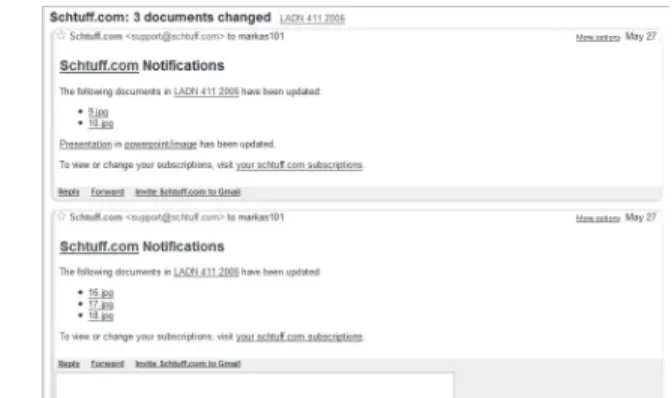
Wikis signaled to the course coordinator that new material or updated content was being added to the Wiki. An email was automatically sent out with each change to the Wiki (Figure ) and the course coordinator could check the update and
respond immediately. This allowed valuable monitoring capabilities by the course coordinator of ongoing updates and use of the Wiki by students. In addition, as a group member completed an edit to a page, the course coordinator could use the
built-in comments field provided on each
page of the Wiki to respond to uploaded content without altering or otherwise editing the student page itself. The students
would be notified of comments posted
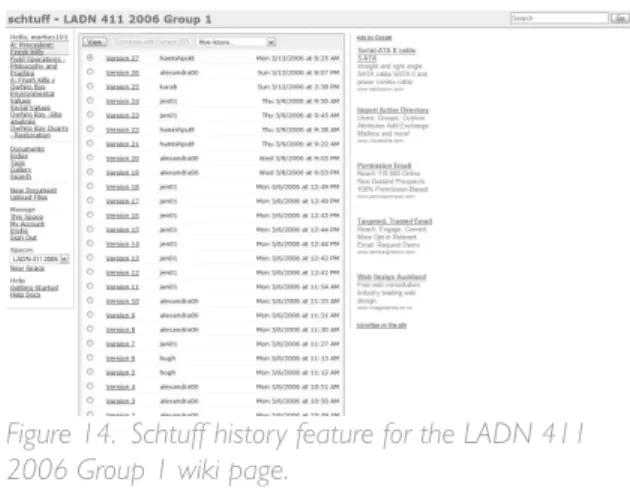
by email and/or RSS. In this way it was of value to provide feedback in later stages as the groups began processing and organizing their information. Finally, the history feature available on the wiki (Figure ) is a valuable tool, enabling both staff and students to review prior versions of the page that are saved with each edit. This feature is presented as a security feature by the developers of the service to allow for past versions to be resurrected in the event of negative activity. However, in the case of education this is an invaluable tool to evaluate the evolution of the project as well as providing documentation of all the
versions of the page to analyze workflow
and updates.
Figure 12. Editing interface for Schtuff.com wiki, with quick reference guide.
Peer to Peer collaboration – data collection and processing phase
The Wiki offered distinct advantages
over conventional methods, at specific
phases of the project for peer to peer collaboration. When students were in the data collection phase the Wiki provided a central repository for uploading information. Students did not need to focus on how they would use the information at the time, but could conveniently upload photos, maps and documents and tag the uploaded information for future use. In previous studios students used the university
provided network storage for this purpose. However, the Wiki was more robust, offering the ability to tag data that was uploaded, allowing remote access to data
and providing email and RSS notification of
new data and changes to the site.
In the data processing phase the Wiki enabled tagged retrieval of related data
allowing for far more efficient processing
than if the data had been stored in a folder organized hierarchically on the school network. However, these groups of students were unfamiliar with tagging organizational systems and did not
use this feature and therefore this did not provide the functionality that was envisioned. Students relied on what they were familiar with, naming an image or uploaded document and subsequently
searching for or finding that file within
a list. The Wiki offered a gallery view of uploaded data, alphabetical listing of
files and lists of changed documents in
chronological order. This functionality
does not differ significantly from network storage using a file explorer interface, but
did allow the students to rely on their known techniques of data management when time was of the essence. The most important feature of the Wiki for this particular group of students was observed to be the combined provisions of offsite access to data that the online service provided in conjunction with email and
RSS notifications of new or changed data.
Peer to Peer collaboration – preliminary design phase As a collaborative design tool, the Wiki had limited impact as multi-person remote collaboration could not be facilitated. In the way the students used the technology only one student could edit a document at a time and upload the edited document. This provision, coupled with email and instant messaging, provided a quasi-collaborative remote design process. In the end, however, students mainly worked in the design studio together on clustered computers on the design plan in a method they were familiar with.
The Wiki was effective during the collaborative preliminary design phase in requiring students to refer back to the data they collected during the site analysis and data processing phase. Posting the
Figure 14. Schtuff history feature for the LADN 411 2006 Group 1 wiki page.
masterplan on the Wiki for presentation forced students to revisit the data they had collected and processed, and to evaluate their group proposal in relation
to their earlier findings. The awareness of
the group site analysis carried over into the individual design phase with mixed results. A minority of students referred to the Wiki in very early presentations
while it was still fresh in their minds; by the final presentation all students had
moved on from the group stage. In future projects the students’ awareness and engagement with previously conducted analyses could be maintained by employing formal methods of referral to the data at particular phases in the project.
Presentation
In the presentation stage of the project the online Wiki service offered advantages over conventional hard copy poster presentations and digital PowerPoint presentations. When compared to a hard copy pin-up presentation, the Wiki provided advantages that most digital technologies facilitate: active linking to
websites and external data, magnification
of images in a presentation and projecting large on a wall for enhanced visibility. However, the Wiki did not overcome more conventional issues that digital presentations are prone to, mainly the continuity of information. In a poster presentation information remains on the wall as one is taken through the presentation, allowing the audience to refer back to previously mentioned information. In a PowerPoint presentation or the method the students used with the Wikis, the information is only as current as the slide on the wall. While handouts can
help overcome this issue, students in this instance did not use that technique.
The more significant observation
was the ability of the Wiki to engage their peers with the content that was being presented when compared to projected PowerPoint or standard webpage presentations. PowerPoint has been criticized as an entirely presenter oriented presentation tool rather than content or audience oriented (Tufte 00). The Wiki, in contrast, is by design an interactive tool and because students had become familiar with the technology by the time of the presentation they were accustomed with the malleability of data within the Wiki technology. It was observed that the presentation of information became much more content and audience oriented as students knew the information could be altered and that
it was not a static ‘final presentation’. As
such, during presentations students offered their peers updates and corrections to the pages during the presentation, which is an occurrence that has not been observed when students have used PowerPoint in previous design studio presentations. As discussion occurred and feedback was received during the presentation, the students were able to change content update the page in real time. Rather than view the presentation as complete or
final, it was still a very updateable, editable
and correctable format, and the dialogue
during the presentations reflected this.
The malleability of Wiki content provides one method to disrupt the presenter oriented PowerPoint model and truly engage an audience with content, provided the audience has an awareness of the malleability of information within the Wiki.
Future Work
The case study evaluated in this paper was an experiment to test the suitability of Wikis for enhancing design studio
collaboration. Students were provided with
specific tasks to complete on the Wiki
within a short timeframe. In the immediate
future in their final design studio the same
students will be required to use the Wiki for preliminary design work as presented here, as well as, to document and present work through the weeks of their thesis. This will formalize the need for external examiners to access the Wiki and provide further feedback as to the enhancements Wikis can offer design collaboration.
In this instance the interactivity that the Wiki provided potentially relied upon other important aspects. There was an element of familiarity within the class as students had been in the same class for the past three years. The class size was small, students, increasing the familiarity within the class when compared to more standard university size classes that can exceed 00 students. Geographically the students could meet in person, and it was noted that if this possibility did not exist it did impact on the use of the Wiki, especially during the preliminary design phase. The class as a whole had an existing skilled knowledge of desktop publishing, d CAD and d modeling applications, which contributed to the ease of adoption in using the Wiki. At the end of the process of using the Wikis students responded positively to the introduction of this new presentation and collaboration technique, to the point of using it on their own in other design courses without the mandate of an instructor.
The use of the Wiki for collaboration
in the design studio offered the standard technical advantages afforded by online learning tools: asynchronous access to data while removing the requirement of geographic proximity for collaboration. However, in this instance the collaborative format of the Wiki also positively
influenced the overall mindset of students
who participated. Most notably, as the individual design projects progressed there was less coveting of information than observed in previous studios at this level. Students were generous with information and comments about their peers’ designs, whether or not they had been in a group with them in the earlier stage of the project. The increasingly collaborative nature of the design process can only
benefit from such an open and democratic
relationship to information and ideas. Future research will aim to explore the potential of collaborating with students and external examiners in other geographical locations. The goal of future research is to examine the impact of the collaborative use of Wikis where face to face contact is not possible, cultural differences exist, and when larger
groups are involved; recognizing the
potential outcome that a more rigorous information gathering methodology may be necessitated and determine what effect these organizational changes may have on the collaborative design process.
Conclusion
This paper presented a case study of the use of Wikis by students in a landscape architecture design studio and evaluated the suitability of Wikis for enhancing design studio collaboration. Three free online services were analyzed and the
value that their features presented was considered, for both peer to peer and teacher/student collaboration. It was presented that Wikis offer very effective means of peer to peer and teacher/student collaboration in the early stages of a design project when compared to conventional digital collaboration techniques. For data collection and processing, the technology
offers valuable 'on the fly' organization
of data and remote access to data by teachers and students. Wikis provide effective tools for educators to monitor student work and to provide feedback as information is updated on the website. Finally, the Wiki offers an alternative to conventional presenter-oriented presentations, by engaging the audience with the content being presented and encouraging interaction.
References
Augar, N., R. Raitman, and W. Zhou. (00). Teaching and learning online with wikis. In Beyond the Comfort Zone: Proceedings of the 21st ASCILITE Conference, eds. R. Atkinson, C. McBeath, D. Jonas-Dwyer and R. Phillips, 95-0. Perth. http://www. ascilite.org.au/conferences/perth0/ procs/augar.html
Denning, P., J. Horning, D. Parnas, and L. Weinstein. (005) Wikipedia Risks. In Communications of the ACM, vol. 8, no. . 5-5. New York: ACM Press http://www.csl.sri.com/users/ neumann/insiderisks05.html.
Désilets, A., and S. Paquet. (005). Wiki as a Tool for Web-based Collaborative Story Telling in Primary School: A Case Study. In Proceedings of Ed-Media 2005, (Montreal, Canada, June 7-July , 005).
Rick, J., M. Guzdial, K. Carroll, L. Holloway-Attaway, B. Walker (00).
Collaborative Learning at Low Cost: CoWeb Use in English. Proceedings of the Computer Support for Collaborative Learning 2002. Boulder, CO. http:// newmedia.colorado.edu/cscl/9.html Leuf, B. and W. Cunningham. (00). The
Wiki way: Quick collaboration on the Web. NJ, USA: Addison Wesley. Meyer, B. (006). Defense and Illustration of
Wikipedia. http://se.ethz.ch/~meyer/ publications/wikipedia/wikipedia.pdf (accessed February 8, 006)
Terdiman, D. (005). Wikipedia Faces Growing Pains. In Wired News
(January 005). http://www.wired. com/news/culture/0,8,660,00. html (accessed February 8, 006) Tufte, E. R. (00). The Cognitive Style of
PowerPoint. Cheshire, CT: Graphics Press, 00