The Shell as a Service
Glenn Fowler
[email protected]
AT&T Bell Laboratories Murray Hill, NJ 07974
Abstract
Abstract
This paper explores the design history of the nmake shell coprocess. Originally a special purpose uniprocessor executor, the coshell has evolved into a general purpose service that automatically executes shell actions on lightly loaded hosts in a local network. A major thrust of this work has been ease of use. The only privilege required for installation, administration or use is rsh access to the local hosts.
nmake and GNU-make users can take advantage of network execution with no makefile modifications. Shell level access is similar to but more efficient than rsh and allows host expression matching to replace the explicit host name argument. Also provided is a C programming library interface with five primitive operations that follow the fork-exec-wait process model.
Beside the speedups attained by parallelizing computations in a homogeneous network, coshell also supports heterogeneous configurations. This presents novel solutions to traditional cross-compilation problems. It also allows the user to view a new network host as a compute engine rather than yet another architecture on which to port the home environment and tools.
coshell runs on most S5R4 and BSD UNIX* operating system variants.
1 Introduction
make [Fel79][SUN87][SV84] is a natural candidate for parallelization. It generates a directed graph of file dependencies with nodes as files and edges as dependency relationships. Edge direction points from target nodes to prerequisite nodes. Target nodes are optionally labeled with shell script actions. If any prerequisite is newer than its target then the target action may be executed by a shell [Bour78][BK89] to bring the target up to date. make’s job is to traverse the graph from a given root node and execute the actions for all targets that are out of date.
__________________
* UNIX is a registered trademark of USL.
If the dependency graph specified by the input makefile is complete (no omitted dependencies) then the shell actions for some nodes can be executed in parallel. In the simplest case sibling prerequisites of the same target may be made concurrently:
a : b c d
Here the actions for b, c and d may execute concurrently, but the action for a must wait until its prerequisite actions b,canddcomplete.
ordering thatbis made beforecandcis made before
d. Parallel make implementations take one of two approaches to compensate. The first promotes the implied ordering to a feature that must be overridden by explicitly listing prerequisites that can be parallelized:
a :& b c d
The second breaks the old implicit model and lets the user discover missing prerequisites by trial and error, as in:
y.tab.c : a.y b.o : y.tab.h a : y.tab.o b.o
Here a.y generates y.tab.c and y.tab.h, b.c
includes y.tab.h and generates b.o. If the b.o
action executes beforey.tab.othen the compilation will fail because y.tab.h will not have been generated yet (or worse, the compilation will succeed by using an old and possibly incompatibley.tab.h). A fundamental feature of nmake [Fowl85][Fowl90], GNU-make [SM89] and mk [Hume87] is that prerequisite lists are not ordered. In contrast to other makes, nmake also provides automatic #include
prerequisite analysis that prevents errors of omission as in the previous makefile example. Because of this all nmake makefiles are by default parallelizable. Handling the details of concurrent execution is only the first step towards network execution. A study of how various make implementations execute actions illustrates the next step.
2 Uniprocessor Implementation
The original make model divides each action into lines that are sent off, in order, to a separate shell invocation (sh –e –c "line"). This is why shell constructs like
a : b
cd c; if test –d d; echo ok d; fi cd c; doit
are common in old makefiles. Besides complicating action syntax and semantics (why should an action be that much different from a shell script?), sending each line to a separate shell is inefficient. A simple command likecc –e –c t.crequires aforkand
exec for the sh –e –c and another fork and
exec by the shell for the cc (although some shell implementations like ksh optimize out the second
fork). Most make implementations avoid the double
fork by checking each line for shell metacharacters
*?;[]()’"‘$\and skipping the shell exec when no metacharacters are present. Although the shell may be bypassed make must still duplicate the shellPATH
command search rules. And, unless make becomes the shell itself, the exec optimization ignores shell functions and aliases.
Why not drop the line-by-line semantics and send entire actions to the shell? The counter reasoning lies in the old make execution model. First, old make allows action lines to be prefixed by the special characters@ and–, where@ means do not trace this line and – means ignore command errors from this line. If actions were not split into lines then make would have to do a shell parse to determine if an occurrence of @ or – were special. Second, some actions taken as a unit would simply be too big to send to the shell via sh –e –c. Finally, as with parallelization above, make is nailed by a backwards compatible implementation detail: the previous example fails when executed as a unit.
To work around this inefficiency some implementations offer a .MULTILINE phony target for selective multi-line execution. Others, like mk and nmake execute actions as a unit by default and force makefile conversion for old makefiles (in practice line-at-a-time execution has not been a conversion problem).
Executing actions as a unit is not a prerequisite for parallelization, but it does provide a convenient abstraction for make actions as jobs. Another benefit is that it eliminates the need for extra ; and \
characters to force shell actions into old make syntax. Actions also form a natural, localized grouping for network execution.
The size limitation of passing an action as an argument tosh –e –ccan be avoided by piping the action to the shell instead. For example, the following two command lines are equivalent:
sh –e –c ’{ echo hi; echo lo; }’ echo ’{ echo hi; echo lo; }’ | sh –e
Connecting to the shell by a pipe not only removes action size limitations, it also makes it possible for a single shell to execute a sequence of actions:
{
echo ’action1’ echo ’action2’ } | sh –e
such as the environment and open file descriptors. Since make typically does not change these between action executions, it is possible to eliminate a shell
fork/execfor each action by using a single shell to handle all actions. Using one shell requires another pipe to allow execution after failure. This pipe provides status information from the shell back to the caller. The action encapsulation, written to the shell command pipe, becomes:
{ action; } && echo 0 >&status || echo $? >&status Here status is the shell side file descriptor of the status
pipe. It is interesting to note that this encapsulation transforms fork/exec into a write on the shell command pipe andwaitinto a read on the status pipe (unintentionally similar to the original UNIX system
waitimplementation).
A final detail completes the sequential execution encapsulation: if action contains shell syntax errors then the shell will either exit or hang (e.g., waiting for
"orfion the command pipe). evalfixes this:
eval ’action’ && echo 0 >&status || echo $? >&status As for concurrent execution the shell side is easy
--just use ‘‘&’’. The caller, however, must maintain a table that associates a job id with each outstanding action so that the exit status messages can be identified:
{ eval ’action’ && echo jobid 0 >&status || echo jobid $? >&status; }&
No problems are evident at first glance, but the coshell design process has been an ongoing education in shell internals. Lesson number one: shells with job control disabled (non-interactive shells like the one above) may not reap (waitfor) child processes. This means that given enough &commands, even though all may have completed, the shell may exceed its process limit. So the coshell encapsulation must manually track action pids and execute wait commands to reap zombies. Lesson number two: the shell $$ variable (process id) is set once at shell startup and is not reset when the shell forks (i.e., it is not the pid of the current process). Taking this into account results in:
{ eval ’action’ && echo x jobid 0 >&status || echo x jobid $? >&status; }& echo j jobid $! >&status
This encapsulation has two status messages: the j
message associates a process id with a jobid and thex
message associates an exit status with a jobid. After the xstatus message is received the caller can send a
waitpid command to the shell to reap the terminated action process.
A side effect of concurrency is that only one job (the foreground job) may read from the terminal at any one time. For job control shells the foreground job is manually determined. Rather than complicate the user interface and implementation, coshell disables interactive input for each action by redirecting the standard input from /dev/null. Any interactive actions must explicitly redirect input from the terminal by name, e.g., </dev/ttyxxnn. This has not been an inconvenience in practice. Figure 1 illustrates the concurrent execution model.
Figure 1. Concurrent execution model
3 Library Interface
The coshell library interface, declared in
<coshell.h>, completes the concurrent execution model and hides action encapsulation issues from the user. It also makes coshell a publicly available resource rather than just another special purpose make hack. The interface routines are:
• Coshell_t* coopen(char* shell, int flags, char* attributes): This function opens a connection to the coshell and returns a coshell handle to be used in the remaining library calls. The handle points to a structure of readonly coshell accounting data. shell is the coshell process name and defaults to ksh. The environment variable COSHELL overrides the default value.
flagscontrols job execution: CO_SILENTturns off job command tracing, CO_IGNORE ignores command errors within each job, and CO_LOCAL
disables remote job execution. attributesis a string that is interpreted by the coshell and is ignored by all but the remote coshell described in the next section. IfattributesisNULLthen the value of the environment variable
COATTRIBUTESprovides a default value. The readonly accounting data inCoshell_tis:
• int outstanding:The number of jobs that can be waited for bycowait(). Some of these may have already completed execution.
• int running: The number of jobs currently executing in the coshell.
Coshell_t.outstanding – Coshell_t.running is the number of jobs that have completed execution but have not been reaped bycowait().
• int total:The total number of jobs sent to
• unsigned long user: The total user time in 1 / CO_QUANT second increments for all jobs that have been reaped bycowait().
• unsigned long sys:The total system time in 1 / CO_QUANT second increments for all jobs that have been reaped bycowait().
• Cojob_t* coexec(Coshell_t* sh, char* cmd, int flags, char* out, char* err, char* att): This sends the shell command cmd to the coshell for execution and returns a job handle that points to a structure of readonly job accounting data. flags are the same as incoopen()and are used to augment the default settings from coopen(). out is the standard output file name and defaults tostdoutif
NULL. err is the standard error file name and defaults tostderrifNULL. att, if non-NULL, contains job attributes that are appended to the attributes from coopen()before being sent to the coshell. Job status may be checked after a call to
cowait(). Application specific data can be attached to the Cojob_t user modifiable field
void* local. The same Cojob_t handle is returned by cowait() and the local field is retained for additional user access.
• Cojob_t* cowait(Coshell_t* sh, Cojob_t* job): This returns the status forjob, or for the next job that completes if jobis NULL.
cowait() blocks until the specified job(s) complete; NULL is returned when all jobs have completed. (sh–>outstanding – sh–>running)is the number of jobs that may be waited for without blocking. job->status is the shell exit code for the job. The return value data is valid until the nextcoexec(), cowait()or
coclose().
• int cokill(Coshell_t* sh, Cojob_t* job, int sig): This sends the signal sig to
job in the coshell sh. If job is NULL then the signal is sent to all jobs in the coshell.
• int coclose(Coshell_t* sh): This closes the connection to sh and returns the coshell exit status if available.
4 Network Implementation
Most UNIX systems provide shell level remote execution via rsh or remsh. Both require an explicit host name argument: rsh host action. A network coshell could be implemented by adding rsh to the action encapsulation:
{ rsh host eval ’action’ && echo x jobid 0 >&status || echo x
where host would be selected bycoexec()to be the ‘‘best’’ host on the local network. This has the advantage that actual remote execution is deferred to a widely available implementation that requires no special privileges. On the downside:
• each action incurs the overhead of rsh setup
• coexec() must somehow implement a ‘‘best host’’ ranking
• an rsh design flaw that fails to report the remote action exit status complicates error detection
• rsh executes in the caller’s remote home directory with a minimal default environment
These counter arguments lead the way to a different network coshell implementation. The key point is illustrated by the concurrent execution model in figure 1. Since all communication between the coshell and caller is by the command and status pipes, one could replace the sh process with one that acts as if it were sh and the caller would be none the wiser. Figure 2 illustrates this model.
Figure 2. Network execution model
In this model the shell processes are distributed to hosts on the local network and a special coshell process sends user jobs to these shells. Instead of requiring privileged execution servers to be running on each host as some remote execution systems do [AC92][HP90], coshell uses rsh to establish a single shell process on each candidate host. And, in order to minimize the overhead of establishing these network shell connections, the network coshell process is implemented as a daemon. Security is maintained by making the coshell daemon a per-user process. The effect is that a network coshell user has no more or less privilege than that provided by rsh. From an efficiency viewpoint rsh is only used to establish remote shell processes. Once the shell is running the rsh process exits, so that in the steady state a coshell daemon consumes one process for itself and one process for each active network shell connection. The coshell daemon’s job is to:
Accept user connections via coopen(): daemon connections are based on the standard UNIX operating system networking IPC paradigms [LFJ83][Ritc84][Stev90]. One difference is that connections are initiated by the coshell process that is executed by coopen() rather than in the
the coshell library. In fact, network coshell was developed and tested without compiling or re-linking any of the coshell library based commands. Network execution was enabled by merely exporting COSHELL=coshell in the environment.
Sendcoexec()jobs to the best hosts on the local network: determining the ‘‘best’’ host is the hardest component to implement efficiently. Since it involves scheduling it is also an area ripe with support from the literature [Bers85][DO91]. Each network shell connection is considered a resource (it takes time to establish a new connection) so old connections are kept active to minimize job overhead. Greed is counterproductive, however, as each shell connection accounts for a remote process slot and local file descriptor that must be polled. Not only is the ‘‘best host’’ of interest for assigning jobs to hosts, information on the top hosts is also necessary for optimizing the number of active network shell connections. As the host rankings change sub-par host connections are dropped to make room for better ones.
The literature tends towards centralized scheduling to provide an accurate basis for load balancing across the network. The problem is that a central scheduler becomes a communications bottleneck and potential security loophole: if the central scheduler also executes jobs then it must run as root and verify the identity of each request; if it only determines the best host then it must verify that the job is eventually executed on that host.
An alternative, used by coshell, is to use decentralized scheduling based on random smoothing. In this algorithm the hosts are ordered by a non-linear ranking function that is parameterized by the 1 minute load average, relative mips rating, and minimum idle time for all interactive users. The load average and mips rating give a measure of the capacity to execute new jobs whereas the minimum interactive idle time is used to make coshell a good citizen. After all, the goal should be to grab idle cycles rather than to sap your colleague’s mouse and keyboard interactions. This is such a strong component of the ranking that by default no jobs are run on hosts with less than 15 minutes interactive idle time. A random component is added to the ranking to break ties. The effect is that unrelated coshell daemons will most likely have different rank orders, and, should both schedule jobs at the same time, different hosts will most likely be selected.
Host status is generated by a per-host status daemon supplied by the coshell library. Each status daemon posts the status to a host-specific file that is visible to all hosts on the local network. For efficiency the information is compressed into 8 bytes and stored in the access and modify time fields of the file status.
stat() implements host status query and
utime() implements host status update. Both of these operations on NFS requires at most 1 RPC --the same efficiency that a hand-coded implementation could have attained, but with the added benefit of the file system abstraction.
Special system boot-time entries (e.g., /etc/rc) are not required. Instead the status daemon for each host is initiated by the first status request for that host. One daemon per host is maintained by keeping track of thectimeof the host-specific file. If the ctime has changed since the last status update then the daemon exits on the assumption that another daemon has taken over. This also provides a clean mechanism for killing status daemons: remove the corresponding host status file. The status update frequency is 40 seconds plus a random part of 10 seconds. The random component tends to evenly distribute the update times of all status daemons on the local network.
The coshell status daemon configuration scales linearly with the number of hosts as opposed to the widely used rwho/ruptime that uses an n-squared broadcast algorithm.
Multiplex the standard output and standard error IO streams from the remote shells to the local user processes: this is the only coshell feature that requires a special shell extension. The standard output and standard error for each job must be redirected to network pipes that are intercepted by coshell. Data appearing on these pipes is then transferred to the appropriate file descriptors in the user processes on the originating host.
This one simple extension makes it possible to use the shell for remote job execution rather than a special purpose process or daemon, as in Remote UNIX [Litz87].
Retain most of the semantics of the concurrent execution model: user environment, processor type and remote file systems are the main issues. Most user environments contain at least 1K of data that seldom changes from the login values set by
.profile. Passing the entire environment for each action would be prohibitive in communication and initialization overhead. coshell handles this situation by reading the user .profile and
$ENV files to initialize remote shell connections. This increases the shell initialization overhead, and adds to the importance of active shell connection management. For the rare cases where some environment variables change between coshell invocations the environment variableCOEXPORTis provided. Its value is a : separated list of environment variable names whose values are checked and exported by each coexec(). The
COATTRIBUTES, COEXPORT, FPATH, NPROC,
PATH, PWD and VPATH variables are always exported.
On the remote side the environment variables
HOSTNAME and HOSTTYPE are automatically defined. As an aid to heterogeneous execution any occurrence of /hosttype/ in the export variable values is changed to /$HOSTTYPE/and evaluated in the remote job context. For instance, if the local
host type is sun4 and
PATH=/home/bozo/arch/sun4/bin:/bin
then remote jobs will evaluate
PATH=/home/bozo/arch/$HOSTTYPE/bin:/bin. Host attributes are maintained in a central host description file:
local busy=2m pool=9 bunting type=sgi.mips rating=60
dodo type=sun4 rating=9 idle=15m
gryphon type=sun4 rating=18 cpu=3 os=solbourne knot type=sol.sun4 rating=4 idle=15m
lynx type=hp.pa rating=40
parker type=sun4 rating=21 idle=15m quail type=att.i386 rating=5 idle=15m
toucan type=sun4 rating=22 cpu=4
Each line describes a single host; the first field is the host name followed by a list of name=value attributes. The attributes used by coshell are:
• name: the host name in the local domain (i.e., no
.’s in the name).
• type: the host type that differentiates different processor types. Normally hosts with the same
.oanda.outformat have the same type.
• rating: the mips rating relative to the other hosts on the network. This is usually the observed rating rather than the one in the vendor’s advertisements.
• cpu: the number of cpus for multi-processor hosts.
• idle: the minimum interactive idle time before jobs will be scheduled on the host. idle is usually
15m for workstations and is not specified (i.e., always available) for compute servers.
The special host name local defines default scheduling parameters for the coshell daemon:
• busy: a job running on a host that has become busy (non-idle) is allowed to continue running for this amount of time, after which it is stopped via
SIGSTOP. The job is restarted via SIGCONT
when the host once again becomes idle. Busy job status messages are posted to the tty where the coshell daemon was started, allowing the user to manually restart busy jobs if necessary. The reader may recognize this as a lazy alternative to process checkpointing and migration. Although far short of what a migration would provide, this method has the advantage that it preserves most process semantics (e.g., time is not preserved) and places no restrictions on processes that can run under coshell [BLL91]. In practice (mostly nmake users) with busy=2m this method has been activated only during tests to verify that it actually works.
• pool: a soft upper limit for the number of shell connections the daemon maintains. The limit may be exceeded to handle requests for host that otherwise would not have been added to the shell pool.
By default jobs are only scheduled on hosts that have the same type as the originating host. The environment variable COATTRIBUTES overrides this default by specifying a C-style host selection expression. For example,
COATTRIBUTES=’(type=="sun4|hp" && rating>10.0)’. User specified attributes of the form name=value may also be specified and queried, as in
COATTRIBUTES=’(floating_point_accelerator==1)’. Given the HOSTTYPE environment variable
nmake is as simple as exporting
COSHELL=coshell and
COATTRIBUTES=’(type==" cross-compiler-type")’.
The most important semantic to preserve is the file system. Any host used by coshell must be able to access the same files as the originating host. This requires administrative cooperation between the hosts but is not a problem in practice since most coshell hosts are workstations that share a small group of common file servers. Notice, however, that readonly files like those in /usr/include
need only follow the as if rule.
5 Command Interface
The coshell package includes 3 user level commands.
cs (for connect stream) provides information on the active coshells and supports queries on the local host attributes. cs –h lists the host specific environment attributes for the local host. This is particularly useful for setting upPATHand viewpaths in.profile:
$ cs –h
HOSTNAME=dodo HOSTTYPE=sun4
$ eval $(cs –h)
$ print $HOSTNAME $HOSTTYPE
dodo sun4
cs –a attr lists host attribute information: $ cs –a type local
sun4
$ cs –a – gryphon
type=sun4 rating=18 cpu=3 os=solbourne addr=135.3.113.106
ss (for system status) lists host system status generated by the daemon ssd and is similar to ruptime:
$ ss
bluejay up 2w00d, 1 user, idle 2h56m, load 0.56, %usr 0, %sys 0 cardinal up 2w00d, 1 user, idle 19h33m, load 0.00, %usr 0, %sys 0 condor up 2w00d, 1 user, idle 34m00s, load 0.08, %usr 0, %sys 0 dgk down 1d17h, 0 users, idle 0, load 0.00, %usr 0, %sys 0 dodo up 2w00d, 4 users, idle 1.00s, load 0.32, %usr 0, %sys 2 ...
$ ss local
local up 2w00d, 4 users, idle 3.00s, load 0.32, %usr 0, %sys 4
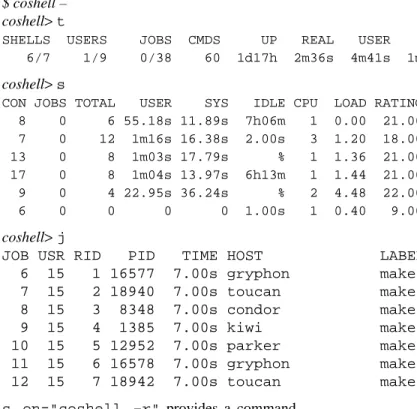
Finally, coshell provides access to the coshell daemon. coshell + starts the per-user coshell daemon if one is not already running. coshell
-enters an interactive coshell daemon query interpreter:
$ coshell – coshell>t
SHELLS USERS JOBS CMDS UP REAL USER SYS 6/7 1/9 0/38 60 1d17h 2m36s 4m41s 1m36s
coshell>s
CON JOBS TOTAL USER SYS IDLE CPU LOAD RATING BIAS 8 0 6 55.18s 11.89s 7h06m 1 0.00 21.00 1.00 7 0 12 1m16s 16.38s 2.00s 3 1.20 18.00 1.00 13 0 8 1m03s 17.79s % 1 1.36 21.00 1.00 17 0 8 1m04s 13.97s 6h13m 1 1.44 21.00 1.00 9 0 4 22.95s 36.24s % 2 4.48 22.00 1.00 6 0 0 0 0 1.00s 1 0.40 9.00 4.00
coshell>j
JOB USR RID PID TIME HOST LABEL
6 15 1 16577 7.00s gryphon make main.o 7 15 2 18940 7.00s toucan make job.o 8 15 3 8348 7.00s condor make schedule.o 9 15 4 1385 7.00s kiwi make shell.o 10 15 5 12952 7.00s parker make command.o 11 15 6 16578 7.00s gryphon make misc.o 12 15 7 18942 7.00s toucan make init.o
alias on="coshell –r" provides a command level equivalent to rsh:
# execute hostname on ‘‘best’’ host
$ on – hostname
toucan
# execute hostname on the ‘‘best’’ host of a different type
$ on ’(!type@local)’ hostname
lynx
6 Performance
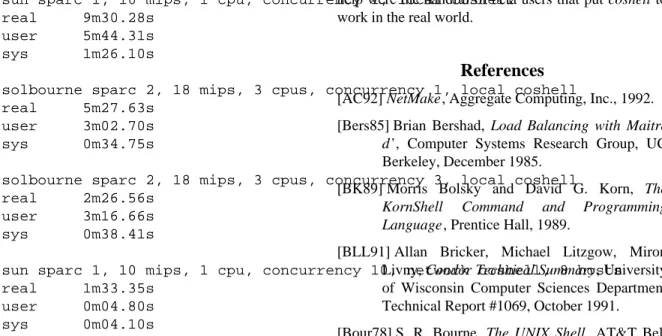
Figure 3 shows empirical timings of nmake building itself using various combinations of local and network coshells and concurrency levels. The nmake build compiles and links 18 C files into a single executable. The network configuration includes many idle sparc 2’s rated at 21 mips, more than double the local sparc 1’s rating of 10 mips. Compensating for the rating differences, the network coshell provided a factor of 4 improvement in compile time. Empirical timings for other projects ranging in size from 10K lines of source (like nmake) to 1M lines of source show an average 5 times build time improvement. In particular, the 1M line project build time went from 10 hours down to 2 hours. This factor of 5 has also been noted in other network build implementations.
sun sparc 1, 10 mips, 1 cpu, concurrency 1, local coshell real 9m30.28s
user 5m44.31s sys 1m26.10s
solbourne sparc 2, 18 mips, 3 cpus, concurrency 1, local coshell real 5m27.63s
user 3m02.70s sys 0m34.75s
solbourne sparc 2, 18 mips, 3 cpus, concurrency 3, local coshell real 2m26.56s
user 3m16.66s sys 0m38.41s
sun sparc 1, 10 mips, 1 cpu, concurrency 10, network coshell, 8 hosts real 1m33.35s
user 0m04.80s sys 0m04.10s
Figure 3. Empirical coshell timings
coshell has been operational since mid 1990 and statistics for the author’s personal usage have been maintained since November 1990. These are listed in figure 4.
number of coshell daemons 134 number of active shell connections 3426 number of user connections to daemon 22459 number of executed jobs 199010 total daemon up time 1Y01M total real time while jobs executing 4w01d total job user time 4d19h total job sys time 3d13h
Figure 4. Author’s coshell usage from 11/90 to 4/93
7 Conclusion
The network coshell has consistently provided factors of 5 improvement in build times for nmake users. Its simple, non-privileged administration makes it easy to maintain and port and allows any user to take advantage of idle network cycles.
8 Acknowledgements
coshell has been in development since early 1990 and my colleagues in the Advanced Software Technology Department have suffered through its evolution. Included were innumerable kernel crashes caused by buggy socket implementations (these have all been compensated for) and bad job scheduling parameters that brought the sparcs to their knees.* Also of great
help were the handful of beta users that put coshell to work in the real world.
References
[AC92] NetMake, Aggregate Computing, Inc., 1992. [Bers85] Brian Bershad, Load Balancing with Maitre
d’, Computer Systems Research Group, UC Berkeley, December 1985.
[BK89] Morris Bolsky and David G. Korn, The KornShell Command and Programming Language, Prentice Hall, 1989.
[BLL91] Allan Bricker, Michael Litzgow, Miron Livny, Condor Technical Summary, University of Wisconsin Computer Sciences Department Technical Report #1069, October 1991. [Bour78] S. R. Bourne, The UNIX Shell, AT&T Bell
Laboratories Technical Journal, Vol. 57 No. 6 Part 2, pp. 1971-1990, July-August 1978. [DO91] Fred Douglis and John Ousterhout,
Transparent Process Migration: Design Alternatives and the Sprite Implementation, Software – Practice and Experience, Vol. 21 No. 8, pp. 757-785, August 1991.
[Feld79] S. I. Feldman, Make – A Program for Maintaining Computer Programs, Software – Practice and Experience, Vol. 9 No. 4, pp. 256-265, April 1979.
[Fowl85] Glenn S. Fowler, The Fourth Generation Make, Proc. of Summer 1985 USENIX Conf., Portland, 1985.
[Fowl90] Glenn S. Fowler, A Case for make, Software – Practice and Experience, Vol. 20 No. S1, pp. 30-46, June 1990.
[HP90]Task Broker for Networked Environments Based on the UNIX Operating System, technical data booklet, Hewlett Packard, 1990. [Hume87] Andrew G. Hume, Mk: a successor to
make, Proc. of Summer 1987 USENIX Conf., Phoenix, 1987.
[KK90] David G. Korn and Eduardo Krell, A New Dimension for the Unix File System, Software – Practice and Experience, Vol. 20 No. S1, pp. 19-33, June 1990.
[Litz87] Michael J. Litzkow, Remote UNIX: Turning Idle Workstations into Cycle Servers, Proc. of Summer 1987 USENIX Conf., Phoenix, 1987. [Ritc84] D. M. Ritchie, A Stream Input-Output
System, AT&T Bell Laboratories Technical Journal, Vol. 63, No. 8, Part 2, October 1984. [SM89] R. M. Stallman and R. McGrath, GNU Make –
A Program for Directing Recompilation, Edition 0.1 Beta, March 1989.
[Stev90] UNIX Network Programming, W. Richard Stevens, Prentice Hall, 1990.
[SUN87] SunPro: The Sun Programming Environment, Sun Technical Report, make: Keeping Files Up-to-Date, ch. 5, pp 67-83, Sun Microsystems, 1987.
[SV84]Augmented Version of Make, UNIX System V – Release 2.0 Support Tools Guide, pp. 3.1-3.19, April 1984.
Glenn Fowler is a distinguished member of technical staff in the Software Engineering Research Department at AT&T Bell Laboratories in Murray Hill, New Jersey. He is currently involved with research on configuration management and software portability, and is the author of nmake, a configurable ANSI C preprocessor library, and the coshell network execution service. Glenn has been with Bell Labs since 1979 and has a B.S.E.E., M.S.E.E., and a Ph.D. in electrical engineering, all from Virginia Tech, Blacksburg Virginia.
__________________