The SELinux
Notebook
0. Notebook Information
0.1
Copyright Information
Copyright © 2014 Richard Haines.Permission is granted to copy, distribute and/or modify this document under the terms of the GNU Free Documentation License, Version 1.3 or any later version published by the Free Software Foundation; with no Invariant Sections, no Front-Cover Texts, and no Back-Cover Texts.
A copy of the license is included in the section entitled "GNUFree Documentation License".
The scripts and source code in this Notebook are covered by the GNU General Public License. The scripts and code are free source: you can redistribute it and/or modify it under the terms of the GNU General Public License as published by the Free Software Foundation, either version 3 of the License, or any later version.
These are distributed in the hope that they will be useful in researching SELinux, but WITHOUT ANY WARRANTY; without even the implied warranty of MERCHANTABILITY or FITNESS FOR A PARTICULAR PURPOSE. See the GNU General Public License for more details.
You should have received a copy of the GNU General Public License along with scripts and source code. If not, see <http://www.gnu.org/licenses/>.
0.2
Revision History
Edition Date Changes
1.0 20th Nov '09 First released.
2.0 8th May '10 Second release.
3.0 2nd September '12 Third release.
4.0 30th September '14 Fourth release.
0.3
Acknowledgements
Logo designed by Máirín Duffy0.4
Abbreviations
AV Access Vector AVC Access Vector Cache BLP Bell-La Padula CC Common CriteriaF-20 Fedora 20
FLASK Flux Advanced Security Kernel Fluke Flux µ-kernel Environment
Flux The Flux Research Group (http://www.cs.utah.edu/flux/) ID Identification
LSM Linux Security Module
LAPP Linux, Apache, PostgreSQL, PHP / Perl / Python LSPP Labeled Security Protection Profile
MAC Mandatory Access Control MCS Multi-Category Security MLS Multi-Level Security NSA National Security Agency OM Object Manager
OTA over the air
PAM Pluggable Authentication Module RBAC Role-based Access Control rpm Red Hat Package Manager SELinux Security Enhanced Linux SID Security Identifier
SMACK Simplified Mandatory Access Control Kernel
SUID Super-user Identifier TE Type Enforcement UID User Identifier
XACE X (windows) Access Control Extension
0.5
Terminology
These give a brief introduction to the major components that form the core SELinux infrastructure.
Term Description
Access Vector (AV)
A bit map representing a set of permissions (such as open, read, write).
Access Vector
Cache (AVC) A component that stores access decisions made by the SELinux Security Server for subsequent use by Object Managers. This allows previous decisions to be retrieved without the overhead of re-computation.
Within the core SELinux services there are two Access Vector Caches:
Term Description
2. A userspace AVC built into libselinux that caches decisions when SELinux-aware applications use avc_open(3) with avc_has_perm(3) or avc_has_perm_noaudit(3) function calls. This will save kernel calls after the first decision has been made.
Domain For SELinux this consists of one or more processes associated to the type component of a Security Context. Type Enforcement rules declared in Policy describe how the domain will interact with objects (see Object Class).
Linux Security Module (LSM)
A framework that provides hooks into kernel components (such as disk and network services) that can be utilised by security modules (e.g. SELinux and SMACK) to perform access control checks.
Currently only one LSM module can be loaded, however work is in progress to stack multiple modules).
Mandatory Access Control
An access control mechanisim enforced by the system. This can be achieved by 'hard-wiring' the operating system and applications (the bad old days - well good for some) or via a policy that conforms to a Policy. Examples of policy based MAC are SELinux and SMACK.
Multi-Level Security (MLS)
Based on the Bell-La & Padula model (BLP) for confidentiality in that (for example) a process running at a 'Confidential' level can read / write at their current level but only read down levels or write up levels. While still used in this way, it is more commonly used for application separation utilising the Multi-Category Security variant.
Object Class Describes a resource such as files, sockets or services.
Each 'class' has relevant permissions associated to it such as read, write or export. This allows access to be enforced on the instantiated object by their Object Manager.
Object Manager Userspace and kernel components that are responsible for the labeling, management (e.g. creation, access, destruction) and enforcement of the objects under their control. Object Managers call the Security Server for an access decision based on a source and target Security Context (or SID), an Object Class and a set of permissions (or AVs). The Security Server will base its decision on whether the currently loaded Policy will allow or deny access.
An Object Manager may also call the Security Server to compute a new Security Context or SID for an object.
Term Description
format for loading into the Security Server. Role Based
Access Control
SELinux users are associated to one or more roles, each role may then be associated to one or more Domain types.
Security Server A sub-system in the Linux kernel that makes access decisions and computes security contexts based on Policy on behalf of SELinux-aware applications and Object Managers.
The Security Server does not enforce a decision, it merely states whether the operation is allowed or not according to the Policy. It is the SELinux-aware application or Object Manager responsibility to enforce the decision.
Security Context An SELinux Security Context is a variable length string that consists of the following mandatory components
user:role:type and an optional [:range] component. Generally abbreviated to 'context', and sometimes called a 'label'.
Security Identifier (SID)
SIDs are unique opaque integer values mapped by the kernel Security Server and userspace AVC that represent a Security Context.
The SIDs generated by the kernel Security Server are u32
values that are passed via the Linux Security Module hooks to/from the kernel Object Managers.
Type
Enforcement
SELinux makes use of a specific style of type enforcement (TE) to enforce Mandatory Access Control. This is where all subjects and objects have a type identifier associated to them that can then be used to enforce rules laid down by Policy.
0.6
Index
0. NOTEBOOK INFORMATION ... 2
0.1 COPYRIGHT INFORMATION ... 2
0.2 REVISION HISTORY ... 2
0.3 ACKNOWLEDGEMENTS ... 2
0.4 ABBREVIATIONS ... 2
0.5 TERMINOLOGY ... 3
0.6 INDEX ... 5
1. THE SELINUX NOTEBOOK ... 15
1.1 INTRODUCTION ... 15
1.2 NOTEBOOK OVERVIEW ... 15
1.2.1 Notebook Source Overview ... 16
2. SELINUX OVERVIEW ... 17
2.1 INTRODUCTION ... 17
2.1.1 Is SELinux useful ... 17
2.2 CORE SELINUX COMPONENTS ... 19
2.4 SELINUX USERS ... 24
2.5 ROLE-BASED ACCESS CONTROL (RBAC) ... 24
2.6 TYPE ENFORCEMENT (TE) ... 25
2.6.1 Constraints ... 26
2.6.2 Bounds ... 26
2.7 SECURITY CONTEXT ... 27
2.8 SUBJECTS ... 29
2.9 OBJECTS ... 29
2.9.1 Object Classes and Permissions ... 29
2.9.2 Allowing a Process Access to Resources ... 30
2.9.3 Labeling Objects ... 31
2.9.3.1 Labeling Extended Attribute Filesystems ... 32
2.9.3.1.1 Copying and Moving Files ... 32
2.9.3.2 Labeling Subjects ... 33
2.9.4 Object Reuse ... 34
2.10 COMPUTING SECURITY CONTEXTS ... 34
2.10.1 Security Context Computation for Kernel Objects ... 34
2.10.1.1 Process ... 35
2.10.1.2 Files ... 35
2.10.1.3 File Descriptors ... 36
2.10.1.4 Filesystems ... 36
2.10.1.5 Network File System (nfsv4) ... 37
2.10.1.6 INET Sockets ... 37
2.10.1.7 IPC ... 37
2.10.1.8 Message Queues ... 37
2.10.1.9 Semaphores ... 38
2.10.1.10 Shared Memory ... 38
2.10.1.11 Keys ... 38
2.10.2 Using libselinux Functions ... 38
2.10.2.1 avc_compute_create and security_compute_create ... 38
2.10.2.2 avc_compute_member and security_compute_member ... 40
2.10.2.3 security_compute_relabel ... 41
2.11 COMPUTING ACCESS DECISIONS ... 42
2.12 DOMAINAND OBJECT TRANSITIONS ... 43
2.12.1 Domain Transition ... 43
2.12.1.1 Type Enforcement Rules ... 45
2.12.2 Object Transition ... 47
2.13 MULTI-LEVEL SECURITYAND MULTI-CATEGORY SECURITY ... 48
2.13.1 Security Levels ... 49
2.13.1.1 MLS / MCS Range Format ... 50
2.13.1.2 Translating Levels ... 51
2.13.2 Managing Security Levels via Dominance Rules ... 51
2.13.3 MLS Labeled Network and Database Support ... 53
2.13.4 Common Criteria Certification ... 53
2.14 TYPESOF SELINUX POLICY ... 54
2.14.1 Example Policy ... 54
2.14.2 Reference Policy ... 54
2.14.3 Policy Functionality Based on Name or Type ... 55
2.14.4 Custom Policy ... 55
2.14.6 Loadable Module Policy ... 56
2.14.6.1 Optional Policy ... 56
2.14.7 Conditional Policy ... 56
2.14.8 Binary Policy ... 57
2.14.9 Policy Versions ... 57
2.15 SELINUX PERMISSIVE AND ENFORCING MODES ... 59
2.16 AUDITING SELINUX EVENTS ... 59
2.16.1 AVC Audit Events ... 60
2.16.2 General SELinux Audit Events ... 63
2.17 POLYINSTANTIATION SUPPORT ... 65
2.17.1 Polyinstantiated Objects ... 65
2.17.2 Polyinstantiation support in PAM ... 65
2.17.2.1 namespace.conf Configuration File ... 66
2.17.2.2 Example Configurations ... 67
2.17.3 Polyinstantiation support in X-Windows ... 68
2.17.4 Polyinstantiation support in the Reference Policy ... 68
2.18 PAM LOGIN PROCESS ... 68
2.19 LINUX SECURITY MODULEAND SELINUX ... 70
2.19.1 The LSM Module ... 71
2.19.2 The SELinux Module ... 73
2.19.2.1 Fork System Call Walk-thorough ... 74
2.19.2.2 Process Transition Walk-thorough ... 76
2.19.2.3 SELinux Filesystem ... 81
2.20 LIBSELINUX LIBRARY ... 86
2.21 SELINUX NETWORKING SUPPORT ... 88
2.21.1 SECMARK ... 89
2.21.2 NetLabel - Fallback Peer Labeling ... 91
2.21.3 NetLabel - CIPSO ... 92
2.21.4 Labeled IPSec ... 92
2.21.4.1 Configuration Examples ... 94
2.22 SELINUX VIRTUAL MACHINE SUPPORT ... 96
2.22.1 KVM / QEMU Support ... 96
2.22.2 libvirt Support ... 97
2.22.3 VM Image Labeling ... 97
2.22.3.1 Dynamic Labeling ... 98
2.22.3.2 Shared Image ... 98
2.22.3.3 Static Labeling ... 101
2.22.4 Xen Support ... 103
2.23 SANDBOX SERVICES ... 104
2.24 X-WINDOWS SELINUX SUPPORT ... 106
2.24.1 Infrastructure Overview ... 106
2.24.1.1 Polyinstantiation ... 108
2.24.2 Configuration Information ... 109
2.24.2.1 Enable/Disable the OM from Policy Decisions ... 109
2.24.2.2 Determine OM X-extension Opcode ... 109
2.24.2.3 Configure OM Enforcement Mode ... 109
2.24.2.4 The x_contexts File ... 110
2.24.3 SELinux Extension Functions ... 112
2.25 SE-POSTGRESQL ... 114
2.25.2 Installing SE-PostgreSQL ... 115
2.25.3 SECURITY LABEL SQL Command ... 116
2.25.4 Additional SQL Functions ... 116
2.25.5 Additional postgresql.conf Entries ... 117
2.25.6 Logging Security Events ... 118
2.25.7 Internal Tables ... 118
2.26 APACHE SELINUX SUPPORT ... 119
2.26.1 mod_selinux Overview ... 119
2.26.2 Bounds Overview ... 120
2.26.2.1 Notebook Examples ... 121
3. SELINUX CONFIGURATION FILES ... 122
3.1 INTRODUCTION ... 122
3.1.1 Policy Store Migration ... 122
3.1.1.1 The priority Option ... 123
3.1.1.2 Converting policy packages to CIL ... 124
3.2 GLOBAL CONFIGURATION FILES ... 124
3.2.1 /etc/selinux/config File ... 125
3.2.2 /etc/selinux/semanage.conf File ... 126
3.2.3 /etc/selinux/restorecond.conf and restorecond-user.conf Files ... 131
3.2.4 /etc/selinux/newrole_pam.conf ... 131
3.2.5 /etc/sestatus.conf File ... 132
3.2.6 /etc/security/sepermit.conf File ... 132
3.3 POLICY STORE CONFIGURATION FILES ... 133
3.3.1 modules/ Files ... 134
3.3.2 modules/active/base.pp File ... 134
3.3.3 modules/active/base.linked File ... 134
3.3.4 modules/active/commit_num File ... 134
3.3.5 modules/active/file_contexts.template File ... 134
3.3.6 modules/active/file_contexts File ... 138
3.3.7 modules/active/homedir_template File ... 139
3.3.8 modules/active/file_contexts.homedirs File ... 139
3.3.9 modules/active/netfilter_contexts & netfilter.local File ... 140
3.3.10 modules/active/policy.kern File ... 140
3.3.11 modules/active/seusers.final and seusers Files ... 141
3.3.12 modules/active/users_extra, users_extra.local and users.local Files ... 143
3.3.13 modules/active/booleans.local File ... 145
3.3.14 modules/active/file_contexts.local File ... 145
3.3.15 modules/active/interfaces.local File ... 146
3.3.16 modules/active/nodes.local File ... 146
3.3.17 modules/active/ports.local File ... 146
3.3.18 modules/active/preserve_tunables File ... 146
3.3.19 modules/active/disable_dontaudit File ... 146
3.3.20 modules/active/modules Directory Contents ... 146
3.4 POLICY CONFIGURATION FILES ... 147
3.4.1 seusers File ... 148
3.4.2 booleans and booleans.local File ... 148
3.4.3 booleans.subs_dist File ... 149
3.4.4 setrans.conf File ... 150
3.4.6 policy/policy.<ver> File ... 153
3.4.7 contexts/customizable_types File ... 154
3.4.8 contexts/default_contexts File ... 154
3.4.9 contexts/dbus_contexts File ... 156
3.4.10 contexts/default_type File ... 156
3.4.11 contexts/failsafe_context File ... 157
3.4.12 contexts/initrc_context File ... 158
3.4.13 contexts/lxc_contexts File ... 158
3.4.14 contexts/netfilter_contexts File ... 159
3.4.15 contexts/removable_context File ... 159
3.4.16 contexts/securetty_types File ... 160
3.4.17 contexts/sepgsql_contexts File ... 160
3.4.18 contexts/systemd_contexts File ... 161
3.4.19 contexts/userhelper_context File ... 162
3.4.20 contexts/virtual_domain_context File ... 162
3.4.21 contexts/virtual_image_context File ... 163
3.4.22 contexts/x_contexts File ... 163
3.4.23 contexts/files/file_contexts File ... 165
3.4.24 contexts/files/file_contexts.local File ... 165
3.4.25 contexts/files/file_contexts.homedirs File ... 166
3.4.26 contexts/files/file_contexts.subs and file_contexts.subs_dist File ... 166
3.4.27 contexts/files/media File ... 167
3.4.28 contexts/users/[seuser_id] File ... 167
3.4.29 logins/<linuxuser_id> File ... 168
3.4.30 users/local.users File ... 169
4. SELINUX POLICY LANGUAGES ... 170
4.1 INTRODUCTION ... 170
4.1.1 CIL Overview ... 170
4.2 KERNEL POLICY LANGUAGE ... 172
4.2.1 Policy Source Files ... 172
4.2.2 Conditional, Optional and Require Statement Rules ... 175
4.2.3 MLS Statements and Optional MLS Components ... 175
4.2.4 General Statement Information ... 175
4.2.5 Section Contents ... 178
4.3 POLICY CONFIGURATION STATEMENTS ... 179
4.3.1 policycap ... 179
4.4 DEFAULT OBJECT RULES ... 180
4.4.1 default_user ... 180
4.4.2 default_role ... 181
4.4.3 default_type ... 182
4.4.4 default_range ... 183
4.5 USER STATEMENTS ... 184
4.5.1 user ... 184
4.6 ROLE STATEMENTS ... 186
4.6.1 role ... 186
4.6.2 attribute_role ... 187
4.6.3 roleattribute ... 188
4.6.4 allow ... 189
4.6.6 dominance ... 191
4.7 TYPE STATEMENTS ... 192
4.7.1 type ... 192
4.7.2 attribute ... 194
4.7.3 typeattribute ... 194
4.7.4 typealias ... 195
4.7.5 permissive ... 196
4.7.6 type_transition ... 197
4.7.7 type_change ... 200
4.7.8 type_member ... 201
4.8 BOUNDS RULES ... 201
4.8.1 typebounds ... 202
4.9 ACCESS VECTOR RULES ... 203
4.9.1 allow ... 204
4.9.2 dontaudit ... 205
4.9.3 auditallow ... 205
4.9.4 neverallow ... 205
4.10 OBJECT CLASSAND PERMISSION STATEMENTS ... 206
4.10.1 class ... 206
4.10.2 Associating Permissions to a Class ... 207
4.10.3 common ... 207
4.10.4 class ... 207
4.11 CONDITIONAL POLICY STATEMENTS ... 209
4.11.1 bool ... 209
4.11.2 if ... 210
4.12 CONSTRAINT STATEMENTS ... 212
4.12.1 constrain ... 212
4.12.2 validatetrans ... 215
4.12.3 mlsconstrain ... 216
4.12.4 mlsvalidatetrans ... 217
4.13 MLS STATEMENTS ... 219
4.13.1 sensitivity ... 220
4.13.2 dominance ... 221
4.13.3 category ... 222
4.13.4 level ... 222
4.13.5 range_transition ... 223
4.13.5.1 MLS range Definition ... 224
4.13.6 mlsconstrain ... 225
4.13.7 mlsvalidatetrans ... 225
4.14 SECURITY ID (SID) STATEMENT ... 225
4.14.1 sid ... 225
4.14.2 sid context ... 226
4.15 FILE SYSTEM LABELING STATEMENTS ... 227
4.15.1 fs_use_xattr ... 227
4.15.2 fs_use_task ... 228
4.15.3 fs_use_trans ... 228
4.15.4 genfscon ... 229
4.16 NETWORK LABELING STATEMENTS ... 230
4.16.1 IP Address Formats ... 231
4.16.1.2 IPv6 Address Formats ... 231
4.16.2 netifcon ... 231
4.16.3 nodecon ... 232
4.16.4 portcon ... 234
4.17 MODULAR POLICY SUPPORT STATEMENTS ... 235
4.17.1 module ... 235
4.17.2 require ... 235
4.17.3 optional ... 237
4.18 XEN STATEMENTS ... 238
4.18.1 iomemcon ... 238
4.18.2 ioportcon ... 239
4.18.3 pcidevicecon ... 240
4.18.4 pirqcon ... 240
5. THE REFERENCE POLICY ... 242
5.1 INTRODUCTION ... 242
5.2 REFERENCE POLICY OVERVIEW ... 242
5.2.1 Distributing Policies ... 244
5.2.2 Policy Functionality ... 245
5.2.3 Reference Policy Module Files ... 245
5.2.4 Reference Policy Documentation ... 248
5.3 REFERENCE POLICY SOURCE ... 249
5.3.1 Source Layout ... 249
5.3.2 Reference Policy Files and Directories ... 249
5.3.3 Source Configuration Files ... 252
5.3.3.1 Reference Policy Build Options - build.conf ... 252
5.3.3.2 Reference Policy Build Options - policy/modules.conf ... 253
5.3.3.2.1 Building the modules.conf File ... 256
5.3.4 Source Installation and Build Make Options ... 256
5.3.5 Booleans, Global Booleans and Tunable Booleans ... 258
5.3.6 Modular Policy Build Structure ... 259
5.3.7 Creating Additional Layers ... 261
5.4 INSTALLING AND BUILDING THE REFERENCE POLICY SOURCE ... 261
5.4.1 Building Standard Reference Policy ... 261
5.4.2 Building the Fedora Policy ... 263
5.5 REFERENCE POLICY HEADERS ... 266
5.5.1 Building and Installing the Header Files ... 266
5.5.2 Using the Reference Policy Headers ... 267
5.5.3 Using Fedora Supplied Headers ... 268
5.6 MIGRATING COMPILED MODULES TO CIL ... 268
5.7 REFERENCE POLICY SUPPORT MACROS ... 268
5.7.1 Loadable Policy Macros ... 270
5.7.1.1 policy_module Macro ... 270
5.7.1.2 gen_require Macro ... 271
5.7.1.3 optional_policy Macro ... 272
5.7.1.4 gen_tunable Macro ... 273
5.7.1.5 tunable_policy Macro ... 274
5.7.1.6 interface Macro ... 275
5.7.1.7 template Macro ... 277
5.7.2.1 gen_context Macro ... 279
5.7.2.2 gen_user Macro ... 281
5.7.2.3 gen_bool Macro ... 282
5.7.3 MLS and MCS Macros ... 283
5.7.3.1 gen_cats Macro ... 283
5.7.3.2 gen_sens Macro ... 284
5.7.3.3 gen_levels Macro ... 285
5.7.3.4 System High/Low Parameters ... 286
5.7.4 ifdef / ifndef Parameters ... 286
5.7.4.1 hide_broken_symptoms ... 286
5.7.4.2 enable_mls and enable_mcs ... 287
5.7.4.3 enable_ubac ... 287
5.7.4.4 direct_sysadm_daemon ... 288
5.8 MODULE EXPANSION PROCESS ... 288
6. IMPLEMENTING SELINUX-AWARE APPLICATIONS ... 290
6.1 INTRODUCTION ... 290
6.1.1 Implementing SELinux-aware Applications ... 290
6.1.2 Implementing Object Managers ... 292
6.1.3 Reference Policy Changes ... 293
6.1.4 Adding New Object Classes and Permissions ... 294
7. SECURITY ENHANCEMENTS FOR ANDROID ... 296
7.1 INTRODUCTION ... 296
7.1.1 Terminology ... 296
7.1.2 Useful Links ... 297
7.1.3 Document Sections ... 297
7.2 SE FOR ANDROID PROJECT UPDATES ... 298
7.3 KERNEL LSM / SELINUX SUPPORT ... 301
7.4 SE FOR ANDROID CLASSES & PERMISSIONS ... 302
7.5 SELINUX COMMANDS ... 304
7.6 SELINUX PUBLIC METHODS ... 305
7.7 ANDROID INIT LANGUAGE SELINUX EXTENSIONS ... 307
7.8 DEVICE POLICY FILE LOCATIONS ... 308
7.9 BUILDING THE POLICY ... 309
7.9.1 SELinux MAC Policy Files ... 309
7.9.1.1 Policy Build Files ... 309
7.9.1.2 Policy Configuration Files ... 310
7.9.2 Install-time MMAC Policy File ... 312
7.9.3 Device Specific Policy ... 312
7.9.3.1 Managing Device Policy File ... 313
7.9.4 Build Tools ... 315
7.9.5 Miscellaneous Information ... 316
7.9.5.1 SELinux Policy Versions ... 316
7.9.5.2 SELinux Policy Booleans ... 316
7.9.5.3 Setting Permissive / Enforcing Mode ... 316
7.9.5.4 Checking File Labels ... 317
7.10 UPDATING POLICY FILES ... 317
7.10.1.1 Local Policy Update ... 317
7.12 POLICY FILE CONFIGURATION DETAIL ... 319
7.12.1 SELinux MAC Configuration Files ... 319
7.12.1.1 seapp_contexts File ... 319
7.12.1.1.1 Default Entries ... 319
7.12.1.1.2 Entry Definitions ... 320
7.12.1.1.3 Computing a Context ... 321
7.12.1.2 property_contexts File ... 326
7.12.1.3 service_contexts File ... 327
7.12.2 Install-time MMAC Configuration File ... 328
7.12.2.1 Policy Rules ... 329
7.12.3 EOps MMAC Configuration File ... 330
7.12.4 Intent Firewall MMAC Configuration File ... 331
7.13 POLICY BUILD TOOLS ... 332
7.13.1 checkfc ... 332
7.13.2 checkseapp ... 333
7.13.3 insertkeys.py ... 333
7.13.3.1 keys.conf File ... 334
7.13.4 Build Bundle Tools ... 335
7.13.4.1 buildsebundle ... 335
7.13.4.1.1 Using an Intent Example ... 336
7.13.4.2 buildeopbundle ... 337
7.13.4.2.1 Eops Example ... 338
7.13.4.3 buildifwbundle ... 339
7.13.4.3.1 IFW Example ... 339
7.13.5 post_process_mac_perms ... 340
7.13.6 sepolicy_check ... 341
7.13.7 sepolicy-analyze ... 341
7.13.7.1 Type Equivalence ... 341
7.13.7.2 Type Difference ... 342
7.13.7.3 Duplicate Allow Rules ... 342
7.13.8 setool ... 343
7.14 SELINUX-NETWORK.SH CONFIGURATION ... 344
7.15 UID TO USERNAME UTILITY ... 345
8. APPENDIX A - OBJECT CLASSES AND PERMISSIONS ... 347
8.1 INTRODUCTION ... 347
8.2 DEFINING OBJECT CLASSES AND PERMISSIONS ... 347
8.3 COMMON PERMISSIONS ... 348
8.3.1 Common File Permissions ... 348
8.3.2 Common Socket Permissions ... 348
8.3.3 Common IPC Permissions ... 349
8.3.4 Common Database Permissions ... 349
8.3.5 Common X_Device Permissions ... 350
8.4 FILE OBJECT CLASSES ... 350
8.5 NETWORK OBJECT CLASSES ... 353
8.5.1 IPSec Network Object Classes ... 355
8.5.2 Netlink Object Classes ... 356
8.5.3 Miscellaneous Network Object Classes ... 358
8.6 IPC OBJECT CLASSES ... 359
8.8 SECURITY OBJECT CLASS ... 360
8.9 SYSTEM OPERATION OBJECT CLASS ... 361
8.10 KERNEL SERVICE OBJECT CLASS ... 361
8.11 CAPABILITY OBJECT CLASSES ... 362
8.12 X WINDOWS OBJECT CLASSES ... 363
8.13 DATABASE OBJECT CLASSES ... 368
8.14 MISCELLANEOUS OBJECT CLASSES ... 370
9. APPENDIX B - LIBSELINUX LIBRARY FUNCTIONS ... 373
10. APPENDIX C - SELINUX COMMANDS ... 389
11. APPENDIX D - DOCUMENT REFERENCES ... 390
12. APPENDIX E - POLICY VALIDATION EXAMPLE ... 391
1. The SELinux Notebook
1.1
Introduction
This Notebook should help with explaining: a) SELinux and its purpose in life.
b) The LSM / SELinux architecture, its supporting services and how they are implemented within GNU / Linux.
c) SELinux Networking, Virtual Machine, X-Windows, PostgreSQL and Apache/SELinux-Plus SELinux-aware capabilities.
d) The core SELinux kernel policy language and how basic policy modules can be constructed for instructional purposes.
e) An introduction to the new Common Intermediate Language (CIL) implementation.
f) The core SELinux policy management tools with examples of usage.
g) The Reference Policy architecture, its supporting services and how it is implemented.
h) The integration of SELinux within Android - SE for Android.
Note that this Notebook will not explain how the SELinux implementations are managed for each GNU / Linux distribution as they have their own supporting documentation.
While the majority of this Notebook is based on Fedora 20, all additional developments as seen on the SELinux mail list ([email protected]) up to September '14 have been added.
1.2
Notebook Overview
This volume has the following major sections:
SELinux Overview - Gives a description of SELinux and its major components to provide Mandatory Access Control services for GNU / Linux. Hopefully it will show how all the SELinux components link together and how SELinux-aware applications / object manager have been implemented (such as Networking, X-Windows, PostgreSQL and virtual machines).
SELinux Configuration Files - Describes all known SELinux configuration files with samples. Also lists any specific SELinux commands or libselinux APIs used by them.
SELinux Policy Language - Gives a brief description of each policy language statement, with supporting examples taken from the Reference Policy source. Also an introduction to the new CIL language (Common Intermediate Language). The Reference Policy - Describes the Reference Policy and its supporting macros.
Object Classes and Permissions - Describes the SELinux object classes and permissions.
libselinux Functions - Describes the libselinux library functions. 1.2.1 Notebook Source Overview
To demonstrate some of the SELinux capabilities a supporting Notebook source tarball is available (notebook-source-4.0.tar.gz). The tarball contains directories and READMEs covering the following:
Building a Basic Policy - Describes how to build monolithic, base and loadable policy modules using core policy language statements and SELinux commands. Note that these policies should not to be used in a live environment, they are examples to show simple policy construction. These can be extended with additional modules in kernel policy language and CIL.
Example libselinux applications - This contains over 100 samples that use the libselinux 2.2.1-6 functions. To save typing long context strings it makes use of a configuration file. There are also some supporting policy modules for the F-20 targeted policy to show how the functions work.
Example Android emulator device - This replaces the kernel policy language version with a CIL policy using namespaces. This is built using Android 4.4 AOSP master and will show processes as u:r:kernel.process:s0,
u:r:untrusted_app.process:s0:c512,c768. and files as
u:r:bluetooth.data_file:s0,
2. SELinux Overview
2.1
Introduction
SELinux is the primary Mandatory Access Control (MAC) mechanism built into a number of GNU / Linux distributions. SELinux originally started as the Flux Advanced Security Kernel (FLASK) development by the Utah university Flux team and the US Department of Defence. The development was enhanced by the NSA and released as open source software. The history of SELinux can be found at the Flux and NSA websites.
Each of the sections that follow will describe a component of SELinux, and hopefully they are is some form of logical order.
Note: When SELinux is installed, there are three well defined directory locations referenced. Two of these will change with the old and new locations as follows:
Description Old Location New Location
The SELinux filesystem that interfaces with the kernel based security server. The new location has been available since Fedora 17.
/selinux /sys/fs/selinux
The SELinux configuration directory that holds the sub-system configuration files and policies.
/etc/selinux No change
The SELinux policy store that holds policy modules and configuration details (see https://github.com/SELinuxPro ject/selinux/wiki/Policy-Store-Migration and Policy Store Migration).
/etc/selinux/
<SELINUXTYPE>/module
/var/lib/selinux/ <SELINUXTYPE>/module
2.1.1 Is SELinux useful
There are many views on the usefulness of SELinux on Linux based systems, this section gives a brief view of what SELinux is good at and what it is not (because its not designed to do it).
SELinux is not just for military or high security systems where Multi-Level Security (MLS) is required (for functionality such as 'no read up' and 'no write down'), as using the 'type enforcement' (TE) functionality applications can be confined (or contained) within domains and limited to the mimimum privileges required to do their job, so in a 'nutshell':
unless allowed by policy). This is why SELinux is called a 'mandatory access control' (MAC) system.
2. The policy design, implementation and testing against a defined security policy or requirements is important, otherwise there could be 'a false sense of security'.
3. SELinux can confine an application within its own 'domain' and allow it to have the minimum priviledges required to do its job. Should the application require access to networks or other applications (or their data), then (as part of the security policy design), this access would need to be granted (so at least it is known what interactions are allowed and what are not - a good security goal).
4. Should an application 'do something' it is not allowed by policy (intentional or otherwise), then SELinux would stop these actions.
5. Should an application 'do something' it is allowed by policy, then SELinux may contain any damage that maybe done intentional or otherwise. For example if an application is allowed to delete all of its data files or database entries and the bug, virus or malicious user gains these priviledges then it would be able to do the same, however the good news is that if the policy 'confined' the application and data, all your other data should still be there. 6. User login sessions can be confined to their own domains. This allows clients
they run to be given only the priviledges they need (e.g. admin users, sales staff users, HR staff users etc.). This again will confine/limit any damage or leakage of data.
7. Some applications (X-Windows for example) are difficult to confine as they are generally designed to have total access to all resources. SELinux can generally overcome these issues by providing sandboxing services.
8. SELinux will not stop memory leaks or buffer over-runs (because its not designed to do this), however it may contain the damage that may be done. 9. SELinux will not stop all viruses/malware getting into the system (as there are
many ways they could be introduced (including by legitimate users), however it should limit the damage or leaks they cause.
10. SELinux will not stop kernel vulnerabilities, however it may limit their effects.
11. It is easy to add new rules to an SELinux policy using tools such as audit2allow(1) if a user has the relevant permissions, however be aware that this may start opening holes, so check what rules are really required. 12. Finally, SELinux cannot stop anything allowed by the security policy, so good
design is important.
The following maybe useful in providing a practical view of SELinux:
However with careful design and known security goals the SELinux Apache / SELinux Plus services could be used to build a more secure web service (also see http://code.google.com/p/sepgsql/wiki/Apache_SELinux_plus).
2. SELinux services have been added to Andriod, producing SE for Android. The presentation "The Case for Security Enhanced (SE)Android" [20] gives use-cases and types of Android exploits that SELinux could have overcome. The presentation and others are available at:
http://seandroid.bitbucket.org/PapersandPresentation.html#3
2.2
Core SELinux Components
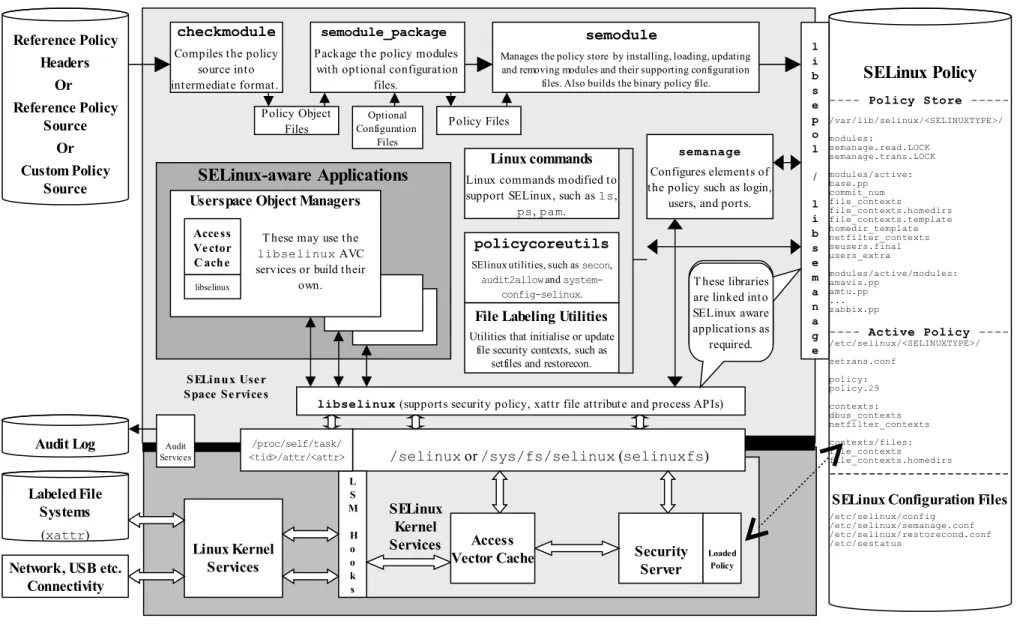
Figure 2.1 shows a high level diagram of the SELinux core components that manage enforcement of the policy and comprise of the following:
1. A subject that must be present to cause an action to be taken by an object (such as read a file as information only flows when a subject is involved). 2. An Object Manager that knows the actions required of the particular resource
(such as a file) and can enforce those actions (i.e. allow it to write to a file if permitted by the policy).
3. A Security Server that makes decisions regarding the subjects rights to perform the requested action on the object, based on the security policy rules. 4. A Security Policy that describes the rules using the SELinux policy language. 5. An Access Vector Cache (AVC) that improves system performance by
caching security server decisions.
Figure 2.1: High Level Core SELinux Components - Decisions by the Security Server are cached in the AVC to enhance performance of future requests. Note that it
is the kernel and userspace Object Managers that enforce the policy.
Object Manager
Knows what objects it manages, so queries if the action is allowed and then
enforces the security policy decision.
Access Vector Cache
Stores decisions made by the Security Server. Q ue ry
pe rmissions
Answe r from C ache
If answe r not in cache , ask se curity se rve r
Add answe r to cache
Security Server
Makes decisions based on the security policy.
Security Policy Subject
Figure 2.2: High Level SELinux Architecture - Showing the major supporting services Reference Policy Headers Or Reference Policy Source Or Custom Policy Source Security Server SELinux Kernel Services
libselinux (supports security policy, xattr file attribute and process APIs) Policy Object
Files checkmodule Compiles the policy
source into intermediate format.
semodule
Manages the policy store by installing, loading, updating and removing modules and their supporting configuration
files. Also builds the binary policy file.
semanage
Configures elements of the policy such as login,
users, and ports.
SELinux Policy ---- Policy Store ---/var/lib/selinux/<SELINUXTYPE>/ modules: semanage.read.LOCK semanage.trans.LOCK modules/active: base.pp commit_num file_contexts file_contexts.homedirs file_contexts.template homedir_template netfilter_contexts seusers.final users_extra modules/active/modules: amavis.pp amtu.pp ... zabbix.pp
---- Active Policy ----/etc/selinux/<SELINUXTYPE>/ setrans.conf policy: policy.29 contexts: dbus_contexts netfilter_contexts contexts/files: file_contexts file_contexts.homedirs
---SELinux Configuration Files /etc/selinux/config
/etc/selinux/semanage.conf /etc/selinux/restorecond.conf /etc/sestatus
SELinux Use r Space Se rvice s
semodule_package Package the policy modules
with optional configuration files.
File Labeling Utilities
Utilities that initialise or update file security contexts, such as
setfiles and restorecon.
/selinux or /sys/fs/selinux (selinuxfs)
Audit Log
Labeled File Systems
(xattr)
L S M H o o k s Linux Kernel Services policycoreutils
SElinux utilities, such as secon, audit2allow and
system-config-selinux. Linux commands Linux commands modified to support SELinux, such as ls,
ps, pam.
SELinux-aware Applications
Userspace Object Managers
T hese may use the
libselinux AVC services or build their
own.
Acce ss Ve ctor C ache
Access
Vector Cache Loaded
Policy l i b s e p o l / l i b s e m a n a g e Policy Files Optional Configuration Files
libselinux T hese libraries
are linked into SELinux aware applications as
required.
Network, USB etc. Connectivity
/proc/self/task/ <tid>/attr/<attr> Audit
Services
T hese libraries are linked into SELinux aware applications as
Figure 2.2 shows a more complex diagram of kernel and userspace with a number of supporting services that are used to manage the SELinux environment. This diagram will be referenced a number of times to explain areas of SELinux, therefore starting from the bottom:
a) In the current implementation of SELinux the security server is embedded in the kernel with the policy being loaded from userspace via a series of functions contained in the libselinux library (see SELinux Userspace Libraries for details).
The object managers (OM) and access vector cache (AVC) can reside in: kernel space - These object manages are for the kernel services such as files, directory, socket, IPC etc. and are provided by hooks into the SELinux sub-system via the Linux Security Module (LSM) framework (shown as LSM Hooks in Figure 2.2) that is discussed in the LSM section. The SELinux kernel AVC service is used to cache the security servers response to the kernel based object managers thus speeding up access decisions should the same request be asked in future.
userspace - These object managers are provided with the application or service that requires support for MAC and are known as 'SELinux-aware' applications or services. Examples of these are: X-Windows, D-bus messaging (used by the Gnome desktop), PostgreSQL database, Name Service Cache Daemon (nscd), and the GNU / Linux passwd command. Generally, these OMs use the AVC services built into the SELinux library (libselinux), however they could, if required supply their own AVC or not use an AVC at all (see Implementing SELinux-aware Applications for details).
b) The SELinux security policy (right hand side of Figure 2.2) and its supporting configuration files are contained in the /etc/selinux directory. This directory contains the main SELinux configuration file (config) that has the name of the policy to be loaded (via the SELINUXTYPE entry) and the initial enforcement mode1 of the policy at load time (via the SELINUX entry). The /etc/selinux/<SELINUXTYPE> directories contain policies that can be activated along with their configuration files (e.g. 'SELINUXTYPE=targeted' will have its policy and associated configuration files located at /etc/selinux/targeted). All known configuration files are shown in the SELinux Configuration Files section. c) SELinux supports a 'modular policy', this means that a policy does not have to
be one large source policy but can be built from modules. A modular policy consists of a base policy that contains the mandatory information (such as object classes, permissions etc.), and zero or more policy modules where generally each supports a particular application or service. These modules are
compiled, linked, and held in a 'policy store' where they can be built into a binary format that is then loaded into the security server (in the diagram the
binary policy is located at
/etc/selinux/targeted/policy/policy.29). The types of policy and their construction are covered in the Types of SELinux Policy section. d) To be able to build the policy in the first place, policy source is required (top
left hand side of Figure 2.2). This can be supplied in three basic ways:
i) as source code written using the SELinux Policy Language. This is how the simple policies have been written to support the examples in this Notebook, however it is not recommended for large policy developments such as the Reference Policy, although the smaller SE for Android policy is written this way with some m4 macro support. ii) using the Reference Policy that has high level macros to define policy
rules. This is the standard way policies are now built for SELinux distributions such as Red Hat and Debian and is discussed in the Reference Policy section. Note that SE for Android also uses high level macros to define policy rules but the overall policy is much less complex.
iii) using CIL (Common Intermediate Language). An overview can be found at https://github.com/SELinuxProject/cil/wiki and the CIL Overview section.
e) To be able to compile and link the policy source then load it into the security server requires a number of tools (top of Figure 2.2).
f) To enable system administrators to manage policy, the SELinux environment and label file systems, tools and modified GNU / Linux commands are used. These are mentioned throughout the Notebook as needed and summarised in Appendix C - SELinux Commands. Note that there are many other applications to manage policy, however this Notebook only concentrates on the core services.
g) To ensure security events are logged, GNU / Linux has an audit service that captures policy violations. The Auditing SELinux Events section describes the format of these security events.
h) SELinux supports network services that are described in the SELinux Networking Support section.
The Linux Security Module and SELinux section goes into greater detail of the LSM / SELinux modules with a walk through of a fork and exec process.
2.3
Mandatory Access Control (MAC)
Mandatory Access Control (MAC) is a type of access control in which the operating system is used to constrain a user or process (the subject) from accessing or performing an operation on an object (such as a file, disk, memory etc.).
• subjects are processes.
• objects are system resources such as files, sockets, etc.
• security attributes are the security context.
• Security Server within the Linux kernel authorizes access (or not) using the
security policy (or policy) that describes rules that must be enforced.
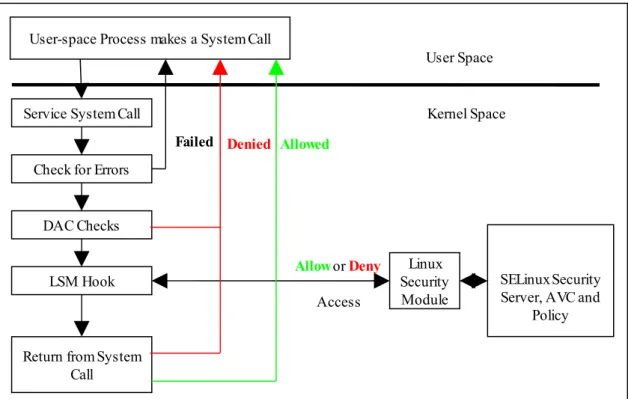
Note that the subject (and therefore the user) cannot decide to bypass the policy rules being enforced by the MAC policy with SELinux enabled. Contrast this to standard Linux Discretionary Access Control (DAC), which also governs the ability of subjects to access objects, however it allows users to make policy decisions. The steps in the decision making chain for DAC and MAC are shown in Figure 2.3.
Figure 2.3: Processing a System Call - The DAC checks are carried out first, if they pass then the Security Server is consulted for a decision.
SELinux supports two forms of MAC:
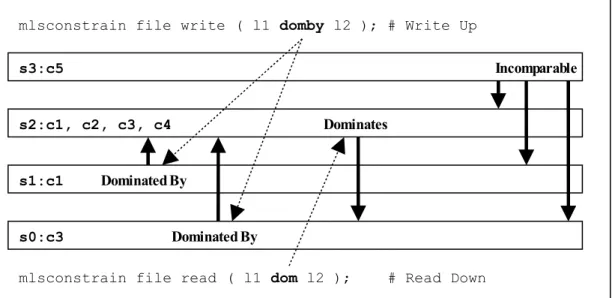
Type Enforcement - Where processes run in domains and the actions on objects are controlled by the policy. This is the implementation used for general purpose MAC within SELinux along with Role Based Access Control. The Type Enforcement and Role Based Access Control sections covers these in more detail. Multi-Level Security - This is an implementation based on the Bell-La Padula (BLP) model, and used by organizations where different levels of access are required so that restricted information is separated from classified information to maintain confidentiality. This allows enforcement rules such as 'no write down' and 'no read up' to be implemented in a policy by extending the security context to include security levels. The MLS section covers this in more detail along with a variant called Multi-Category Security (MCS).
The MLS / MCS services are now more generally used to maintain application separation, for example SELinux enabled:
User-space Process makes a System Call
Service System Call
Linux Security Module Check for Errors
DAC Checks
LSM Hook
Return from System Call
SELinux Security Server, AVC and
Policy
Allow or Deny
Access
Allowed Denied
Failed
• virtual machines use MCS categories to allow each VM to run within its own domain to isolate VMs from each other (see the SELinux Virtual Machine Support section).
• Android devices use dynamically generated MCS categories so that an app running on behalf of one user cannot read or write files created by the same app running on behalf of another user (see the Security Enhancements for Android - Computing a Process Context section).
2.4
SELinux Users
Users in GNU / Linux are generally associated to human users (such as Alice and Bob) or operator/system functions (such as admin), while this can be implemented in SELinux, SELinux user names are generally groups or classes of user. For example all the standard system users could be assigned an SELinux user name of user_u
and administration staff under staff_u.
There is one special SELinux user defined that must never be associated to a GNU / Linux user as it a special identity for system processes and objects, this user is
system_u.
The SELinux user name is the first component of a 'security context' and by convention SELinux user names end in '_u', however this is not enforced by any SELinux service (i.e. it is only to identify the user component), although CIL with namespaces does make identification of an SELinux user easier for example a 'user' could be declared as unconfined.user.
It is possible to add constraints and bounds on SELinux users as discussed in the Type Enforcement section.
2.5
Role-Based Access Control (RBAC)
To further control access to TE domains SELinux makes use of role-based access control (RBAC). This feature allows SELinux users to be associated to one or more roles, where each role is then associated to one or more domain types as shown in Figure 2.4.
The SELinux role name is the second component of a 'security context' and by convention SELinux roles end in '_r', however this is not enforced by any SELinux service (i.e. it is only used to identify the role component), although CIL with namespaces does make identification of a role easier for example a 'role' could be declared as unconfined.role.
Figure 2.4: Role Based Access Control - Showing how SELinux controls access via user, role and domain type association.
2.6
Type Enforcement (TE)
SELinux makes use of a specific style of type enforcement2 (TE) to enforce
mandatory access control. For SELinux it means that all subjects and objects have a type identifier associated to them that can then be used to enforce rules laid down by policy.
The SELinux type identifier is a simple variable-length string that is defined in the policy and then associated to a security context. It is also used in the majority of SELinux language statements and rules used to build a policy that will, when loaded into the security server, enforce policy via the object managers.
Because the type identifier (or just 'type') is associated to all subjects and objects, it can sometimes be difficult to distinguish what the type is actually associated with (it's not helped by the fact that by convention, type identifiers end in '_t'). In the end it comes down to understanding how they are allocated in the policy itself and how they are used by SELinux services (although CIL policies with namespaces do help in that a domain process 'type' could be declared as msg_filter.ext_gateway.process
with object types being any others (such as msg_filter.ext_gateway.exec).
Basically if the type identifier is used to reference a subject it is referring to a Linux process or collection of processes (a domain or domain type). If the type identifier is used to reference an object then it is specifying its object type (i.e. file type).
While SELinux refers to a subject as being an active process that is associated to a domain type, the scope of an SELinux type enforcement domain can vary widely. For example in the simple policy built in the basic-selinux-policy directory of the source tarball, all the processes on the system run in the unconfined_t domain (or for the CIL version in the unconfined.process domain), therefore every
2 There are various 'type enforcement' technologies. SELinux User
unconfined_u
TE Domain
unconfined_t This domain includes most
processes started at boot time and logins.
Role
unconfined_r
TE Domain
ext_gateway_t
TE Domain
int_gateway_t
TE Domain
move_file_t
Role
message_filter_r
These domains are entered from the unconfined_t domain by performing domain transitions using SELinux facilities. This can be done
because unconfined_u is associated to roles unconfined_r and message_filter_r within the policy.
process is 'of type unconfined_t' (that means it can do whatever it likes within the limits of the standard Linux DAC policy as all access is allowed by SELinux).
It is only when additional policy statements are added to the simple policy that areas start to be confined. For example, an external gateway is run in its own isolated domain (ext_gateway_t) that cannot be 'interfered' with by any of the
unconfined_t processes (except to run or transition the gateway process into its own domain). This scenario is similar to the 'targeted' policy delivered as standard in Red Hat Fedora where the majority of user space processes run under the
unconfined_t domain (although don't think the simple policies implemented in source tarball are equivalent to the Reference Policy, they are not - so do not use them as live implementations).
The SELinux type is the third component of a 'security context' and by convention SELinux types end in '_t', however this is not enforced by any SELinux service (i.e. it is only used to identify the type component), although as explained above CIL with namespaces does make identification of types easier.
2.6.1 Constraints
It is possible to add constraints on users, roles, types and MLS ranges, for example within a TE environment, the way that subjects are allowed to access an object is via a TE allow rule , for example:
allow unconfined_t ext_gateway_t : process transition;
This states that a process running in the unconfined_t domain has permission to transition a process to the ext_gateway_t domain. However it could be that the policy writer wants to constrain this further and state that this can only happen if the role of the source domain is the same as the role of the target domain. To achieve this a constraint can be imposed using a constrain statement:
constrain process transition ( r1 == r2 );
This states that a process transition can only occur if the source role is the same as the target role, therefore a constraint is a condition that must be satisfied in order for one or more permissions to be granted (i.e. a constraint imposes additional restrictions on TE rules). Note that the constraint is based on an object class (process in this case) and one or more of its permissions.
The kernel policy language constraints are defined in the Constraint Statements section).
2.6.2 Bounds
2.7
Security Context
SELinux requires a security context to be associated with every process (or subject) and object that are used by the security server to decide whether access is allowed or not as defined by the policy.
The security context is also known as a 'security label' or just label that can cause confusion as there are many types of label depending on the context.
Within SELinux, a security context is represented as variable-length strings that define the SELinux user3, their role, a type identifier and an optional MCS / MLS
security range or level as follows:
user:role:type[:range]
Where:
user The SELinux user identity. This can be associated to one or more roles that the SELinux user is allowed to use.
role The SELinux role. This can be associated to one or more types the SELinux user is allowed to access.
type When a type is associated with a process, it defines what processes (or domains) the SELinux user (the subject) can access.
When a type is associated with an object, it defines what access permissions the SELinux user has to that object.
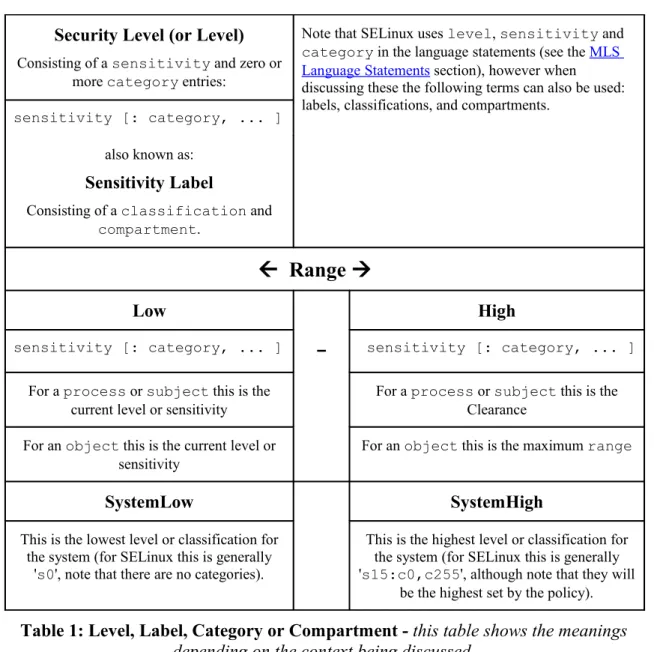
range This field can also be know as a level and is only present if the policy supports MCS or MLS. The entry can consist of:
• A single security level that contains a sensitivity level and zero or more categories (e.g. s0, s1:c0, s7:c10.c15).
• A range that consists of two security levels (a low and high) separated by a hyphen (e.g. s0 - s15:c0.c1023). These components are discussed in the Security Levels section.
However note that:
1. Access decisions regarding a subject make use of all the components of the security context.
2. Access decisions regarding an object make use of the components as follows: a) the user is either set to a special user called system_u or it is set to
the SELinux user id of the creating process. It is possible to add contraints on users within policy based on their object class (an example of this is the Reference Policy UBAC (User Based Access Control) option.
b) the role is generally set to a special SELinux internal role of
object_r, although policy version 26 with kernel 2.6.39 and above do support role transitions on any object class. It is then possible to add contraints on the role within policy based on their object class.
The Computing Security Contexts section decribes how SELinux computes the security context components based on a source context, target context and object class.
The examples below show security contexts for processes, directories and files (note that the policy did not support MCS or MLS, therefore no level field):
Example Process Security Context:
# These are process security contexts taken from a ps -Z command # (edited for clarity) that show four processes:
LABEL PID TTY CMD
unconfined_u:unconfined_r:unconfined_t 2539 pts/0 bash
unconfined_u:message_filter_r:ext_gateway_t 3134 pts/0 secure_server unconfined_u:message_filter_r:int_gateway_t 3138 pts/0 secure_server unconfined_u:unconfined_r:unconfined_t 3146 pts/0 ps
# Note the bash and ps processes are running under the
# unconfined_t domain, however the secure_server has two instances # running under two different domains (ext_gateway_t and
# int_gateway_t). Also note that they are using the
# message_filter_r role whereas bash and ps use unconfined_r. #
# These results were obtained by running the system in permissive # mode (as in enforcing mode the gateway processes would not # be shown).
Example Object Security Context:
# These are the message queue directory object security contexts # taken from an ls -Zd command (edited for clarity):
system_u:object_r:in_queue_t /usr/message_queue/in_queue system_u:object_r:out_queue_t /usr/message_queue/out_queue
# Note that they are instantiated with system_u and object_r
# These are the message queue file object security contexts # taken from an ls -Z command (edited for clarity):
/usr/message_queue/in_queue:
unconfined_u:object_r:in_file_t Message-1 unconfined_u:object_r:in_file_t Message-2
/usr/message_queue/out_queue:
unconfined_u:object_r:out_file_t Message-10 unconfined_u:object_r:out_file_t Message-11
2.8
Subjects
A subject is an active entity generally in the form of a person, process, or device that causes information to flow among objects or changes the system state.
Within SELinux a subject is an active process and has a security context associated with it, however a process can also be referred to as an object depending on the context in which it is being taken, for example:
1. A running process (i.e. an active entity) is a subject because it causes information to flow among objects or can change the system state.
2. The process can also be referred to as an object because each process has an associated object class4 called 'process'. This process 'object', defines what
permissions the policy is allowed to grant or deny on the active process.
An example is given of the above scenarios in the Allowing a Process Access to an Object section.
In SELinux subjects can be:
Trusted - Generally these are commands, applications etc. that have been written or modified to support specific SELinux functionality to enforce the security policy (e.g. the kernel, init, pam, xinetd and login). However, it can also cover any application that the organisation is willing to trust as a part of the overall system. Although (depending on your paranoia level), the best policy is to trust nothing until it has been verified that it conforms to the security policy. Generally these trusted applications would run in either their own domain (e.g. the audit daemon could run under auditd_t) or grouped together (e.g. the semanage(8) and semodule(8) commands could be grouped under semanage_t).
Untrusted - Everything else.
2.9
Objects
Within SELinux an object is a resource such as files, sockets, pipes or network interfaces that are accessed via processes (also known as subjects). These objects are classified according to the resource they provide with access permissions relevant to their purpose (e.g. read, receive and write), and assigned a security context as described in the following sections.
2.9.1 Object Classes and Permissions
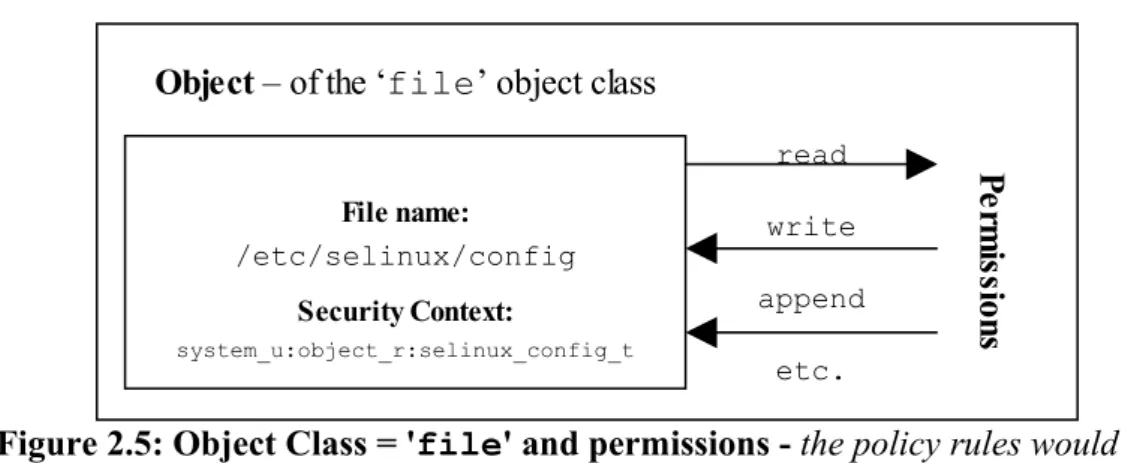
Each object consists of a class identifier that defines its purpose (e.g. file, socket) along with a set of permissions5 that describe what services the object can handle
(read, write, send etc.). When an object is instantiated it will be allocated a name (e.g. a file could be called config or a socket my_connection) and a security context (e.g. system_u:object_r:selinux_config_t) as shown in Figure 2.5.
Figure 2.5: Object Class = 'file' and permissions - the policy rules would define those permissions allowed for each process that needs access to the
/etc/selinux/config file.
The objective of the policy is to enable the user of the object (the subject) access to the minimum permissions needed to complete the task (i.e. do not allow write permission if only reading information).
These object classes and their associated permissions are built into the GNU / Linux kernel and user space object managers by developers and are therefore not generally updated by policy writers.
The object classes consist of kernel object classes (for handling files, sockets etc.) plus userspace object classes for userspace object managers (for services such as X-Windows or dbus). The number of object classes and their permissions can vary depending on the features configured in the GNU / Linux release. All the known object classes and permissions are described in Appendix A - Object Classes and Permissions.
2.9.2 Allowing a Process Access to Resources This is a simple example that attempts to explain two points:
1. How a process is given permission to use an objects resource.
2. By using the 'process' object class, show that a process can be described as a process or object.
An SELinux policy contains many rules and statements, the majority of which are
allow rules that (simply) allows processes to be given access permissions to an objects resources.
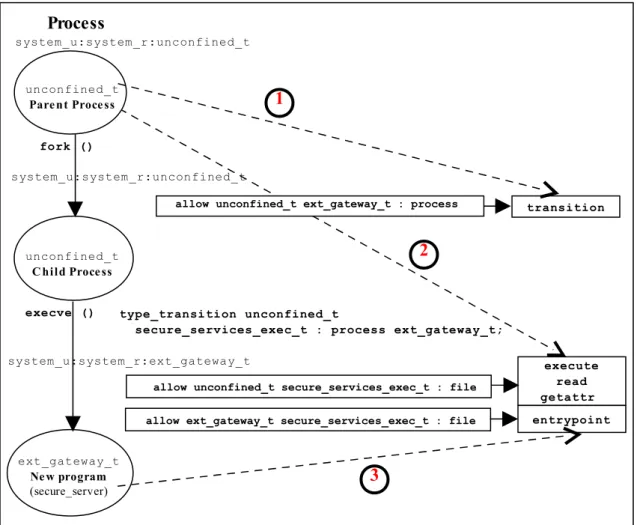
The following allow rule and Figure 2.6 illustrates 'a process can also be an object' as it allows processes running in the unconfined_t domain, permission to 'transition' the external gateway application to the ext_gateway_t domain once it has been executed:
allow Rule | source_domain | target_type : class | permission ---▼---▼---▼ ---allow unconfined_t ext_gateway_t : process transition;
Where:
allow The SELinux language allow rule.
unconfined_t The source domain (or subject) identifier - in this case the
File name:
/etc/selinux/config
Security Context:
system_u:object_r:selinux_config_t
Object – of the ‘file’ object class
read
write
append
etc.
Pe
rm
is
sio
shell that wants to exec the gateway application.
ext_gateway_t The target object identifier - the object instance of the gateway application process.
process The target object class - the 'process' object class.
transition The permission granted to the source domain on the targets object - in this case the unconfined_t domain has transition permission on the ext_gateway_t
'process' object.
Figure 2.6: The allow rule - Showing that the subject (the processes running in the unconfined_t domain) has been given the transition permission on the
ext_gateway_t 'process' object.
It should be noted that there is more to a domain transition than described above, for a more detailed explanation, see the Domain Transition section.
2.9.3 Labeling Objects
Within a running SELinux enabled GNU / Linux system the labeling of objects is managed by the system and generally unseen by the users (until labeling goes wrong !!). As processes and objects are created and destroyed, they either:
1. Inherit their labels from the parent process or object.
2. The policy type, role and range transition statements allow a different label to be assigned as discussed in the Domain and Object Transitions section.
3. SELinux-aware applications can enforce a new label (with the policies approval of course) using the libselinux API functions.
4. An object manager (OM) can enforce a default label that can either be built into the OM or obtained via a configuration file (such as those used by X-Windows).
5. Use an 'initial security identifier' (or initial SID). These are defined in all base and monolithic policies and are used to either set an initial context during the boot process, or if an object requires a default (i.e. the object does not already have a valid context).
The Computing Security Contexts section gives detail on how some of the kernel based objects are computed.
ext_gateway_t
unconfined_t
Subject – the
process Object Instance – of the ‘process’ object class transition