3591
Webpage And Telegram Bot Controlled Home
Automation System Using Raspberry Pi3
Dhiraj Sunehra, G. Venkat Ramana
Abstract: IoT refers to the devices or things connected to the Internet, so that one or more devices can share or monitor the data to another over the internet. With the rapid improvements, in the field of Internet of Things (IoT), home automation and security systems are gaining high popularity. In this paper, an Internet of Things (IoT) based Home automation system is implemented using Raspberry Pi3 processor that can be controlled using the developed web page and the telegram bot. User can access to the household devices anytime by connecting to the network and can control them using webpage and telegram bot. Devices such as lights, fans, door lock are used in this system. The web page allows user to control the home appliances through any internet enabled device such as smart phone or laptop. The access to the control webpage is secured by providing a login for access. The proposed system also provides home security using a passive infrared (PIR) sensor that detects any intrusion when nobody is at home. The system sends an e-mail alert to the user on intruder detection.
Index Terms: Home automation, Home security, Internet of Things, Python language, Raspberry Pi3, Webpage, Telegram Bot. —————————— ——————————
1
INTRODUCTION
MART home device market is growing every year due to development of smart devices that can be easily controlled using user friendly mobile applications installed in smart phones that are connected to the internet or a local network. The Indian home automation market which is currently at $1.79 billion is estimated to reach $13.574 billion by 2026 with a compound annual growth rate (CAGR) of 29.8 for the period 2019-2026 due to its wide popularity [1]. Various technology platforms are developed for smart home automation. In this paper, a home automation system is implemented that can be controlled using different communication interfaces such as Wi-Fi, a Local area Network or a telegram bot. One of the major applications of home automation is to control and monitor the status of various home appliances remotely from anywhere. Controlling the home devices and accessing the devices to know their status through the internet and providing home security is the main purpose of this work.The Raspberry Pi board is the core component of the proposed system. The Raspberry Pi 3 Model B+ is used here with the Raspbian operating system (OS) installed on a SD card. PuTTY software is installed on the PC to interface with Raspberry Pi wirelessly using secure socket shell (SSH) as a client by running both PC and Raspberry Pi on the same network. The program is written in Python, with various Python packages like NLTK, Telepot, WebIOPi installed to achieve the purpose of the work. The WebIOPi is used to access the GPIO pins of the Raspberry Pi to make them turn ON or OFF on a webpage. Teleport is used to access the bot created in telegram, with which the commands are sent to modify the GPIO pins of the Raspberry Pi. NLTK is a Natural Language Processing tool to process the commands sent through the bot and recognize the keywords and action words from the given commands to turn on or off the appliances.
The PIR sensor is used to identify the motion of the objects in the home, when the door is locked and the system sends an intruder alert message on email using an SMTP server.
2 LITERATURE
REVIEW
Alkar and Buhur presented a home automation system (HAS) that uses internet to access the home remotely and infrared communication for communication with the devices within home [2]. Sunehra and Tejaswi implemented a speech based HAS using Bluetooth and GSM, which is very comfortable to use by elderly and physically handicapped people who may not be able to manually operate the home devices [3]. Sunehra and Veena implemented a HAS for controlling the home appliances through Email remotely and Bluetooth when in the home [4]. Anvekar and Banakar implemented an IoT based home security system using telegram chatbot for detection, identification and authentication of the intruder [5].
3 HARDWARE
DESCRIPTION
3.1 Block Diagram of the HAS
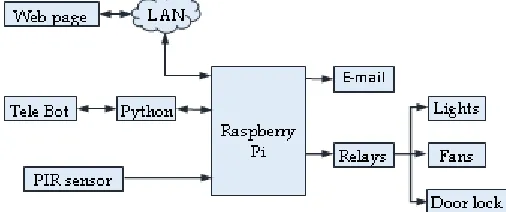
Figure 1 shows the block diagram of the Web page and Tele Bot controlled HAS. Raspberry Pi is used to control the home appliances by switching on the relays based on the commands provided through the web page/Tele Bot. PIR sensor is used for the intruder detection to provide home security. PIR sensor senses any human motion in the home when door is locked. The system sends an email alert to user when any motion is detected in the home.
Fig. 1. Block Diagram of Web page and Tele Bot controlled
HAS
S
————————————————
• Dr. Dhiraj Sunehra is currently working as a Professor of Electronics & Communication Engineering in Jawaharlal Nehru Technological University Hyderabad, India, PH-+91-7893278314. E-mail: [email protected]
3592 3.2 Raspberry Pi 3 Model B+
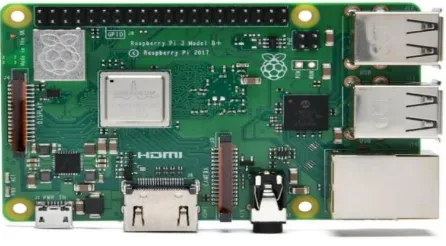
Figure 2 shows the Raspberry Pi 3B+ board used in this work. It was launched in March 2018 runs at 1.4GHz with Broadcom BCM2837B0 quad-core A53 64-bit revised SoC design and 1GB of SDRAM. This board is shielded under a metal plate for quick power dissipation that allows higher clock frequencies. New dual band 802.11ac Wi-Fi compatibility, upgraded Bluetooth to 4.2 LS BLE. The network port supports 1Gbits/s Ethernet but limited to about 300 M bits/s due to the internal use of the USB hub [6].
Fig. 2. Raspberry Pi 3 Model B+
3.3 PIR sensor
PIR sensor detects the motion of nearby objects. The sensor is made of pyroelectric material, which detects any changes in infrared rays emitted by the objects and thus used in motion detection. Pyroelectric materials generate a temporary voltage when subjected to a change in temperature. A high logic is sent at the output when it detects the motion. Figure 3 shows the PIR sensor with its pin configuration. The sensor is powered from the GPIO pin of Raspberry Pi with 3.3 volts. The delay and sensitivity knobs can be adjusted in the PIR sensor for adjusting the response time and distance in detecting the motion of the object.
3.4 Relay
Relay is an electro-mechanical device used to turn on/off a device by sending a small signal at the output. Figure 4 shows a two-channel relay with two relays on a single PCB. The input to the relays IN1 and IN2 are connected to Raspberry Pi GPIO pins, to turn on the corresponding relay. The output pins contains a common terminal (COM1 and COM2), normally open (NO) and normally closed (NC).
Fig. 3. PIR sensor
Fig. 4. Two-Channel Relay
The home device is connected via relay with either COM and NO pins or COM and NC pins. By connecting through NO terminal, the device will be normally off and turns on when a high signal is given at the input. By connecting through NC terminal, the device will be in on state and turns off when a high signal is given at the input.
4 SOFTWARE
TOOLS
4.1 Python
Python is a widely used powerful and object oriented scripting language and also easy to learn. Raspberry Pi supports programming in python. Python is portable and is compatible with all platforms including Unix, Windows and Mac operating systems. Raspberry Pi fully supports the programing in python and also to install the python packages. A Python library refers to the standard library that comes along with python allowing the modules available to run the python codes. Python also has many third-party libraries which allows the user to perform various actions directly instead of writing the code. Various python libraries are available for different purposes used while working with data, image processing, language processing, etc. All the python packages contain libraries that allow them to perform all the necessary actions.
4.2 HTML
Hypertext Markup Language (HTML) is used to design webpages that are to be displayed on the web browser. HTML is designed using elements that define the structure of the webpage. The elements are the building blocks of HTML. There are various elements used in designing the HTML webpage every element starts with tags in the following format.
<tag> content inside the tag element </tag>
The tags are paired using opening and closing tag, the end tag should start with forward slash (/) before the tag name. Every HTML program starts and ends with HTML element, the whole program is defined in between these tags (<html> and </html>).
4.3 WebIOPi
3593
the WebIOPi directory. The HTML program is used to create a webpage and assigning buttons to modify the status of GPIO pins. The python program runs continuously when we start the WebIOPi and monitors the changes in the webpage and modifies the GPIO pins of Raspberry Pi.
4.4 NLTK
Natural Language Tool Kit (NLTK) is a freely available leading language processing platform, used for building python programs by processing human language data. The NLTK is used to process the instruction given by using Natural Language Processing techniques [8].
The following steps are used to process the given instruction, which helps in making decisions for the chatbot.
1. Lowercase: The command given from the bot is first made to lower case.
2. Tokenization: The „word_tokenize‟ function in NLTK is used to split the sentence into words and punctuations. The split words are used for further processing.
3. Split words are then grouped into keywords and action words, to easily identify the keyword, which contains the room name and the action to be done like ON, OFF or Status.
4. Any unwanted words are removed in the list by using stopwords commands. We can add or delete a word using NLTK stopwords.
4.5 Telepot
Telepot is a python framework that is used in building applications for Telegram Bot API [9]. The Bot API from telegram allows users to create programs for interacting with bots using the telegram messages or commands sent by the users. Telepot is installed in Raspberry Pi to chat with the Telegram bot using the access token of the bot, the access token is the unique ID given during the creation of the bot in Telegram.
5 SCHEMATIC
DIAGRAM
The schematic diagram of the Web page and Tele Bot controlled Home Automation system is shown in Figure 5. The schematic diagram shows Raspberry Pi interfaced with three 2-channel relays and a PIR sensor. The home devices such as lights, fans and the door lock are connected to each relay individually. The VCC terminals of all relays are connected to
the 2nd pin (5V) of the Raspberry Pi and the ground terminal of the relays are connected to the 6th pin (Ground) of the Raspberry Pi. The GPIO pins 17, 27, 5, 6 and 22 of Raspberry Pi are connected to the three two channel relays that control the bed light, kitchen light, bed fan, kitchen fan and the main door lock respectively. By providing the high or low signal input to the relays from the GPIO pins, switches the home devices ON/OFF accordingly. The PIR sensor VCC terminal is
connected to the 1st pin of Raspberry Pi to provide 3.3 V and the ground terminal is connected to the 6th pin. The output signal from the PIR sensor is given to the GPIO 4 pin to read the data from the PIR sensor. The PIR sensor when idle sends a low signal and when an intrusion is detected a high signal is sent to the GPIO 4 pin, which activates the SMTP to send an email to the user.
Fig. 5. Schematic Diagram
6 EXPERIMENTAL
SETUP
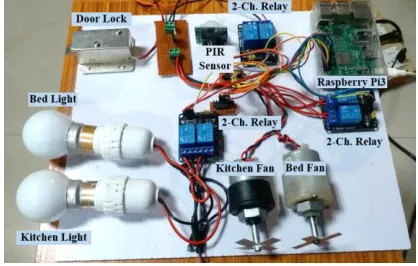
Figure 6 shows the experimental setup of Web page and Tele Bot controlled Home Automation System. It consists of a PIR sensor, three 2-channel relays, two lights, two fans and a door lock interfaced with Raspberry Pi. The home devices such as lights and fans are connected to the Pi through two 2-channel relays. A third 2-channel relay is used to connect the electromagnetic door lock. The home devices (lights and fans) and the door lock can be controlled using the developed web page and also by giving commands through the Telegram bot. The PIR sensor detects any intrusion into the home. Initially, the light and fan in the bedroom as well as kitchen is in OFF state and main door is locked.
Fig. 6. Experimental Setup
7
FLOW
CHART
3594
Fig. 7. Flowchart showing the events that take place after
Raspberry Pi is turned on
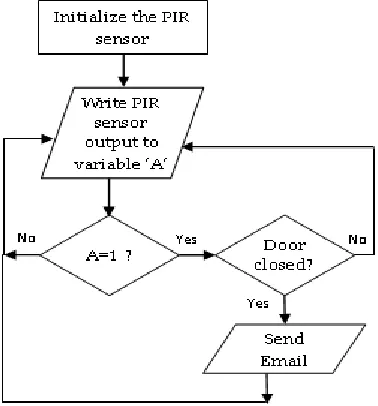
Figure 8 shows the flowchart for intrusion detection and email alert using a PIR sensor. The sensor output is stored in a variable „A‟. If a motion is detected, the value in the variable „A‟ is high, it then checks whether the door is closed. If the door is closed, an email alert is sent to the user using the SMTP server to indicate that an intrusion has taken place in the home.
Fig. 8. Flowchart for intrusion detection and e-mail alert
8 RESULTS
AND
DISCUSSION
Case 1 : Figure 9 shows the snapshot of the developed webpage. In this case, the user turns on both bedroom and kitchen lights, and unlocks the door using the buttons on the webpage. The status of the devices turned on is shown as green colour and the rest are shown in red colour on the webpage. Door status in green colour indicates that the door is open. The corresponding status can also be checked on the telegram bot. Figure 10 shows the corresponding status of the devices on the telegram bot. Figure 11 shows the experimental results of the home automation system corresponding to the
inputs provided from webpage (Case 1).
Fig. 9. Webpage view corresponding to Case 1
Fig. 10. Checking status in Telegram Bot (Case 1)
Fig. 11. Experimental results corresponding to Case 1
3595
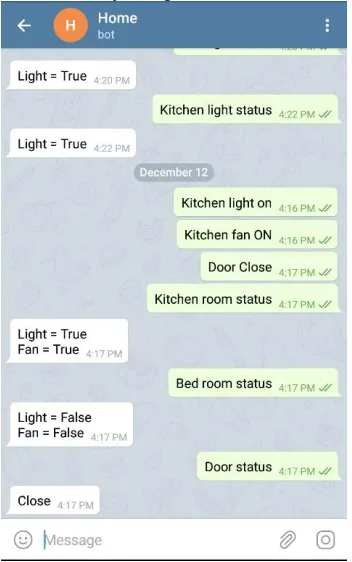
the telegram bot. We use telegram mobile app to turn on the kitchen light and kitchen fan and to lock the door. The status of the devices can also be checked in the bot using relevant commands. It can be observed that kitchen light and fan status is “true”, bedroom light and fan status is ”false”, and the door status is “close”. Figure 13 shows the experimental results of the home automation system corresponding to the inputs provided from Telegram Bot (Case 2). It can be observed that kitchen light and fan are ON and door is locked. Figure 14 shows the email alert sent to the user by the Raspberry Pi using the SMTP server. When the PIR sensor detects any motion after the door is locked, it sends the signal to the Raspberry Pi. An email alert is sent by the system to the user by using the SMTP server.
Fig. 12. Text Commands given in Telegram Bot to control HAS
(Case 2)
Fig. 13. Experimental results corresponding to Case 2
Fig. 14. Email alert received after PIR detected the motion
9
CONCLUSIONS
The home automation system implemented in this work can be used to control the home appliances remotely through the telegram bot connected to any network. The appliances can also be controlled using the webpage that is connected to the same network of Raspberry Pi. The status of the devices used such as lights, fans and door lock are updated instantly on the webpage. We can know the status of the devices by giving suitable text commands on the telegram bot. Home security is provided in the system by using the PIR sensor which is enabled when the door is locked. The PIR sensor responds to the motion near to it and sends an email alert to the user.
10
REFERENCES
[1] “India Home Automation Market by Product Type, Technology, and End-User: Opportunity Analysis and Industry Forecast, 2019-2026,” Research and Markets, July 2019, https://www.resear chandmarkets.com/reports/4844573/india-home-automation-market.
[2] Z. Alkar and U. Buhur, “An Internet based wireless home automation system for multifunctional devices”, IEEE Transactions on Consumer Electronics, Vol. 51, No. 4, pp. 1169-1174, Nov. 2005.
[3] Dhiraj Sunehra and Vemula Tejaswi, “Implementation of speech based home automation system using bluetooth and GSM”, International Conference on Signal Processing, Communication, Power and Embedded Systems (SCOPES 2016), Oct 3-5, 2016, Paralakhemundi, India, pp. 807-813.
[4] Dhiraj Sunehra and M. Veena, “Implementation of interactive home automation systems based on email and bluetooth technologies”, International Conference on Information Processing (ICIP 2015), Dec. 16-19, 2015, Pune, India, pp. 458-463.
[5] R. G. Anvekar and R. M. Banakar, “IoT application development: Home security system”, IEEE Technological Innovations in ICT for Agriculture and Rural Development (TIAR 2017), Apr. 7-8, 2017, Chennai, India, pp. 68-72.
[6] https://www.raspberrypi.org/. [7] https://webiopi.trouch.com.
[8] Bird, Steven, Edward Loper and Ewan Klein, “Natural Language Processing with Python”, O‟Reilly Media Inc., 2009.