Securing Computer Application using Image
Code as a Password
D. E. Devghare B. S. Dhamse
Student Student
Department of Computer Science & Engineering Department of Computer Science & Engineering Priyadarshini Bhagwati College of Engineering, Nagpur, Priyadarshini Bhagwati College of Engineering, Nagpur,
Maharashtra, India Maharashtra, India
S. B. Chinchalkar P. R. Chandewar
Student Student
Department of Computer Science & Engineering Department of Computer Science & Engineering Priyadarshini Bhagwati College of Engineering, Nagpur, Priyadarshini Bhagwati College of Engineering, Nagpur,
Maharashtra, India Maharashtra, India
K. M. Bhute
Student
Department of Computer Science & Engineering
Priyadarshini Bhagwati College of Engineering, Nagpur, Maharashtra, India
Abstract
Access to computer systems is most often based on the use of alphanumeric passwords. However, users have difficulty remembering a password that is long and random-appearing. Instead, they create short, simple, and insecure passwords. Today, most Internet applications still establish user authentication with traditional text depended passwords. From the long time there is research to design a secure and user-friendly password method for the security reasons. On the other hand, there are password manager programs which facilitate generating site-specific strong passwords from a single user password to eliminate the memory burden due to more than one password. On the other hand, there are studies exploring the operability of graphical passwords as a more secure and good user-friendly alternative. Image Code Password has been designed to try to make passwords more memorable and easier for people to use and, therefore, more secure. Using an image code as password, users selects on image code rather than type alphanumeric characters.
Keywords: Image codes, Graphical Passwords, Computer Security, Authentication, Web Access through Graphical Password, Secure Web Access, Graphical User Authentication, Watermarking
________________________________________________________________________________________________________
I. INTRODUCTION
Only in the last few years, computer and network security has been recognized as a technical problem, especially when dealing with user authentication. User authentication typically in form of a password, is a key security process that either allows or denies access to a system or resource depending on the credentials presented. A password comprises of authentication data which is used to control access to resources. The security of a password lies in it being kept secret from unauthorized users while those wishing to gain access use passwords for the system to be able to determine whether to grant or deny them access accordingly. Various Image Code as password schemes have been proposed as alternatives to text-based passwords. Research and experience have shown that text-based passwords are fraught with both usability and security problems that make them less than desirable solutions. Psychology studies have revealed that the human brain is better at recognizing and recalling images than text. Graphical passwords are intended to capitalize on this human characteristic in hopes that by reducing the memory burden on users, coupled with a larger full password space offered by images, more secure passwords can be produced and users will not resort to unsafe practices in order to cope.
accounts. To address the problems with traditional username password authentication, alternative authentication methods, such as biometrics, have been used.
In this paper, however, we have focus on another alternative: using images code as passwords. Image Code as password schemes have been proposed as a possible alternative to text-based schemes, motivated partially by the fact that humans can remember pictures better than text; psychological studies supports such assumption. Pictures are generally easier to be remembered or recognized than text. In addition, if the number of possible pictures is sufficiently large, the possible password space of a Image Code as password scheme may exceed that of text based schemes and thus presumably offer better resistance to dictionary attacks. Because of these (presumed) advantages, there is a growing interest in graphical password. In addition to workstation and web log-in applications, graphical passwords have also been applied to ATM machlog-ines and mobile devices. In this paper, we propose a new Image Code as password scheme for accessing application & web accounts. Here user selects number of images as a password and while login user needs to enter the random code generated below each image, which has been set as a password. Image Code as password Schemes provide a way of making more human-friendly passwords. Here the security of the system is very high and every time user needs to enter different set of code for authentication i.e. every time new password gets generated. Dictionary attacks, Brute Force attack, and other attacks are infeasible on this password scheme.
Authentication is the process of determining whether someone or something is, in fact, who or what it is declared to be. In private and public computer networks (including the Internet), authentication is commonly done through the use of logon passwords. Knowledge of the password is assumed to guarantee that the user is authentic. Each user registers initially (or is registered by someone else), using an assigned or self-declared password. On each subsequent use, the user must know and use the previously declared password. The weakness in this system for transactions that are significant (such as the exchange of money) is that passwords can often be stolen, accidentally revealed, or forgotten.
For this reason, Internet business and many other transactions require a more stringent authentication process. The use of digital certificates issued and verified by a Certificate Authority (CA) as part of a public key infrastructure is considered likely to become the standard way to perform authentication on the Internet. Logically, authentication precedes authorization (although they may often seem to be combined). Current authentication methods can be divided into three main areas:
1) Token based authentication 2) Biometric based authentication 3) Knowledge based authentication
Token based techniques, such as key cards, bank cards and smart cards are widely used. Many token-based authentication systems also use knowledge based techniques to enhance security.
For example, ATM cards are generally used together with a PIN number. Biometric based authentication techniques, such as fingerprints, iris scan, or facial recognition, are not yet widely adopted. The major drawback of this approach is that such systems can be expensive, and the identification process can be slow and often unreliable. However, this type of technique provides the highest level of security. Knowledge based techniques are the most widely used authentication techniques and include both text-based and picture-text-based passwords. The picture-text-based techniques can be further divided into two categories: Recognition-text-based graphical techniques and Recall-based graphical techniques. Using recognition-based techniques, a user is presented with a set of images and the user passes the authentication by recognizing and identifying the images he or she selected during the registration stage. Using recall-based techniques, a user is asked to reproduce something that he or she created or selected earlier during the registration stage.
II. EXISTING SYSTEM
Dhamija and Perrig [1] proposed a graphical authentication scheme where the user has to identify the pre-defined images to prove user’s authenticity. In this system, the user selects a certain number of images from a set of random pictures during registration. Later, during login the user has to identify the pre-selected images for authentication from a set of images as shown in figure 1. This system is vulnerable to shoulder-surfing. Passface [2, 12] is a technique where the user sees a grid of nine faces and selects one face previously chosen by the user as shown in figure 2. Here, the user chooses four images of human faces as their password and the users have to select their pass image from eight other decoy images.
Since there are four user selected images it is done for four times. Jermyn [3], proposed a new technique called “Draw- a-Secret” (DAS) as shown in figure 3 where the user is required to re-draw the pre-defined picture on a 2D grid. If the drawing touches the same grids in the same sequence, then the user is authenticated. This authentication scheme is vulnerable to shoulder surfing. Haichang’s [4, 5] proposed a new shoulder-surfing resistant scheme as shown in figure 4 where the user is required to draw a curve across their password images orderly rather than clicking on them directly. This graphical scheme combines DAS and Story schemes to provide authenticity to the user.
III. VARIOUS ATTACKS ON PASSWORD
Brute Force Search:
The main defence against brute force search is to have a sufficiently large password space. Text-based passwords have a password space of 94^N, where N is the length of the password, 94 is the number of printable characters excluding SPACE. Some Image Code as password techniques have been shown to provide a password space similar to or larger than that of text-based passwords. Recognition based graphical passwords tend to have smaller password spaces than the recall based methods. It is more difficult to carry out a brute force attack against graphical passwords than text-based passwords. The attack programs need to automatically generate accurate mouse motion to imitate human input, which is particularly difficult for recall based graphical passwords. Overall, we believe a Image Code as password is less vulnerable to brute force attacks than a text-based password.
Dictionary Attacks:
Since recognition based graphical passwords involve mouse input instead of keyboard input, it will be impractical to carry out dictionary attacks against this type of graphical passwords. For some recall based graphical passwords, it is possible to use a dictionary attack but an automated dictionary attack will be much more complex than a text based dictionary attack. More research is needed in this area. Overall, we believe graphical passwords are less vulnerable to dictionary attacks than text-based passwords.
Guessing:
Unfortunately, it seems that graphical passwords are often predictable, a serious problem typically associated with text-based passwords. For example, studies on the Pass faces technique have shown that people often choose weak and predictable graphical passwords. Nali and Thorpe’s study revealed similar predictability among the graphical passwords created with the DAS technique. More research efforts are needed to understand the nature of graphical passwords created by real world users.
Spyware:
Except for a few exceptions, key logging or key listening spyware cannot be used to break graphical passwords. It is not clear whether “mouse tracking” spyware will be an effective tool against graphical passwords. However, mouse motion alone is not enough to break graphical passwords. Such information has to be correlated with application information, such as window position and size, as well as timing information.
Shoulder Surfing:
Shoulder-surfing – using direct observation techniques, such as looking over someone's shoulder, to get passwords, PINs and other sensitive personal information – is a problem that has been difficult to overcome. When a user enters information using a keyboard, mouse, touch screen or any traditional input device, a malicious observer may be able to acquire the user’s password credentials. [4, 5, 9, 10] We present Eye Password, a system that mitigates the issues of shoulder surfing via a novel approach to user input. With Eye Password, a user enters sensitive input (password, PIN, etc.) by selecting from an on-screen keyboard using only the orientation of their pupils (i.e. the position of their gaze on screen), making eavesdropping by a malicious observer largel y impractical.
Social Engineering:
Comparing to text based password, it is less convenient for a user to give away graphical passwords to another person. For example, it is very difficult to give away graphical passwords over the phone. Setting up a phishing web site to obtain graphical passwords would be more time consuming. Overall, we believe it is more difficult to break graphical passwords using the traditional attack methods like brute force search, dictionary attack, and spyware. There is a need for more in-depth research that investigates possible attack methods against graphical passwords.
IV. OUR PROPOSED SYSTEM
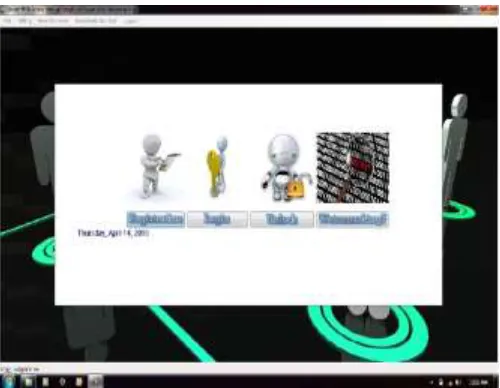
Fig. 1: Home page for Registration
1) User clicks on registration button.
2) In registration page, the user has to enter User ID and other details. (Fig.2) 3) User Registered Successfully. (Fig.3)
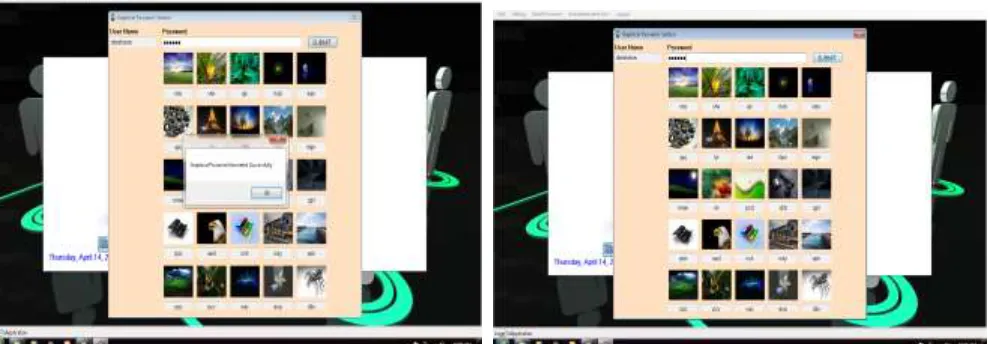
Fig. 2: User Details for Registration – Entered Details Fig. 3: User Registered Successfully
4) User selects the password image by entering the corresponding code generated below the image as shown in Fig5,Fig6, Fig7 5) Algorithm checks for the match of code entered by the user and its corresponding image.
6) Extract the watermarked code from the image.
7) Store the watermarked code and the User ID into the Database.
Fig. 5: After Selection of image Entering Email Id & Password Fig. 6: Image Code as password Generated Successfully
In the login section, the user first enters his username. The image matrix will be displayed which will contain same images as we had in the registration form but the position of the images will be different. Again each image will have some random characters below it. The user should recognize his password images and then enter the text corresponding to his password image in the password textbox. Now Algorithm will again split the string into sub strings of 3 characters each. Here the algorithm will then find the related images of the entered characters from the login matrix. After finding the images associated with entered characters, algorithm will extracts the watermarked data from the and checks the data with the user information in database and if the information are the same then user can login to the system, otherwise, the user need to try again. The workflow of Login phase is as below (Fig.7, Fig8)
1) User clicks on Login button.
2) In Login page, the user has to enter User ID and enter the password.
3) User enters the password by entering the code generated below the password image. 4) Algorithm checks for the match of code entered by the user and its corresponding image. 5) Extract the watermarked code from the image.
6) Checks weather the code extracted from the image selected by the user belongs to the User. 7) If yes, user gets Login else needs to enter the password again.
Fig. 7: Enter Email Id & Password Fig. 8: Login Done Successfully
V. CONCLUSION
previous evaluation methods to determine this algorithms’ level of resistance to common attacks of Image Code as password algorithms especially shoulder surfing and physical attacks. The proposed scheme shows promise as a usable and memorable authentication mechanism. By taking advantage of users’ ability to recognize images and the memory trigger associated with seeing a new image, watermarking has advantages over other techniques in terms of usability.
REFERENCES
[1] R.Dhamija and A. Perrig. “Déjà Vu: A User Study Using Images for Authentication”. In 9th USENIX Security Symposium, 2000. [2] Real User Corporation: Passfaces. www.passfaces.com
[3] Jermyn, I., Mayer A., Monrose, F., Reiter, M., and Rubin. “The design and analysis of graphical passwords” in Proceedings of USENIX Security Symposium, August 1999.
[4] Haichang Gao, Zhongjie Ren, Xiuling Chang, Xiyang Liu Uwe Aickelin, "A New Graphical Password Scheme Resistant to Shoulder-Surfing"
[5] Kumar, M., et al., Reducing Shoulder-surfing by Using Gaze-based Password Entry, in Symposium On Usable Privacy and Security (SOUPS). 2007: Pittsburgh, PA, USA.
[6] Tari, F., A.A. Ozok, and S.H. Holden, A Comparison of Perceived and Real Shoulder-surfing Risks between Alphanumeric and Graphical Passwords, in Symposium On Usable Privacy and Security (SOUPS). 2006: Pittsburgh, PA, USA.
[7] Gao, H., et al., A New Graphical Password Scheme Resistant to Shoulder-Surfing, in International Conference on Cyberworlds. 2010, IEEE: Singapore p. 194 - 199
[8] Hasegawa, M., Y. Tanaka, and S. Kato, A Study on an Image Synthesis Method for Graphical Passwords, in International Symposium on Intelligent Signal Processing and Communication Systems (ISPACS 2009). 2009.
[9] Gao, H., et al., Analysis and Evaluation of the ColorLogin Graphical Password Scheme, in Fifth International Conference on Image and Graphics(ICIG). 2009, IEEE. p. 722 - 727
[10] Lashkari, A.H., et al., Shoulder Surfing attack in graphical password authentication. International Journal of Computer Science and Information Security, 2009. 6(9).
[11] Biddle, R., S. Chiasson, and P.C.v. Oorschot, Graphical Passwords: Learning from the First Generation. 2009: Ottawa, Canada. [12] Dunphy, P., J. Nicholson, and P. Olivier, Securing Passfaces for Description. 2008.
[13] Sandouka, H., A. Cullen, and I. Mann, Social Engineering Detection using Neural Networks, in 2009 International Conference on CyberWorlds 2009, IEEE. [14] al, A.A.G.e., Network Attacks, in Network Intrusion Detection and Prevention: Concepts and Techniques, Springer Science, Business Media.
[15] RealUser, "www.realuser.com," last accessed in June 2005.
[16] T. Valentine, "An evaluation of the Passface personal authentication system," Technical Report, Goldsmiths College, University of London 1998. [17] T. Valentine, "Memory for Passfaces after a Long Delay," Technical Report, Goldsmiths College, University of London 1999.
[18] S. Brostoff and M. A. Sasse, "Are Passfaces more usable than passwords: a field trial investigation," in People and Computers XIV - Usability or Else: Proceedings of HCI. Sunderland, UK: Springer-Verlag, 2000.
[19] D. Davis, F. Monrose, and M. K. Reiter, "On user choice in graphical password schemes," in Proceedings of the 13th Usenix Security Symposium. San Diego, CA, 2004.
[20] W. Jansen, "Authenticating Mobile Device Users Through Image Selection," in Data Security, 2004.
[21] W. Jansen, S. Gavrila, V. Korolev, R. Ayers, and R. Swanstrom, "Picture Password: A Visual Login Technique for Mobile Devices," National Institute of Standards and Technology Interagency Report NISTIR 7030, 2003.
[22] W. A. Jansen, "Authenticating Users on Handheld Devices," in Proceedings of Canadian Information Technology Security Symposium, 2003.
[23] T. Takada and H. Koike, "Awase-E: Image-based Authentication for Mobile Phones using User’s Favorite Images," in Human-Computer Interaction with Mobile Devices and Services, vol. 2795 / 2003: Springer-Verlag GmbH, 2003, pp. pp. 347 - 351.
[24] I. Jermyn, A. Mayer, F. Monrose, M. K. Reiter, and A. D. Rubin, "The Design and Analysis of Graphical Passwords," in Proceedings of the 8th USENIX Security Symposium, 1999.
[25] J. Thorpe and P. C. v. Oorschot, "Graphical Dictionaries and the Memorable Space of Graphical Passwords," in Proceedings of the 13th USENIX Security Symposium. San Deigo, USA: USENIX, 2004.
[26] J. Thorpe and P. C. v. Oorschot, "Towards Secure Design Choices for Implementing Graphical Passwords," in Proceedings of the 20th Annual Computer Security Applications Conference. Tucson, Arizona, 2004.
[27] J. Goldberg, J. Hagman, and V. Sazawal, "Doodling Our Way to Better Authentication," presented at Proceedings of Human Factors in Computing Systems (CHI), Minneapolis, Minnesota, USA., 2002.
[28] J. Thorpe and P. C. v. Oorschot, "Towards Secure Design Choices for Implementing Graphical Passwords," in 20th Annual Computer Security Applications Conference (ACSAC). Tucson, USA.: IEEE, 2004.