DOCKER: A STUDY ON EMERGING VIRTUALIZED
ENVIRONMENT
Sravan Kumar G
1, Y Srinivas
2, M Pravallika
31,2,3
Assistant Professor, Department of Computer Science,
Sphoorthy Engineering College, JNTUH, (India)
ABSTRACT
In contemporary software developing environment, virtualization is the technology that has been playing vital
role in virtualization of hardware infrastructure through a layer called hypervisor that actually performs
virtualization by isolating host operating system and other guest operating systems on the same machine. To
overcome this issue Docker which is container based technology has come into existence. Docker is an open
platform for developers and sys-admins to build ship and run distributed applications. Docker virtualizes host
operating system through Docker engine allows container to be created by the images stored in Docker hub.
Docker container provides an environment for executing the application. Applications running in Docker
container are isolated from the application running in other container. Docker technology that virtualizes host
operating system, provided by Docker engine, a portable, light weight runtime allows containers running in a
isolated manner on same machine. The application running in container has been allowed to push back to
Docker hub as Docker Image. Docker hub which is a cloud based service that enables sharing of application
and automating workflows. Eventually, Docker removes all dependency issues, enables applications to be
quickly assembled from Docker components and eliminates the friction between development, quality assurance
and production environment.
Keywords: Container, Cloud, Docker, Docker Daemon, Docker Images, Virtual Machine
I. INTRODUCTION
Docker is open platform for building, shipping and running distributed applications. It gives programmers,
development teams and operation engineers the common tool box they need to use of the distributed and
networked nature of real world applications. Docker containers wrap up a piece of software in a complete file -system which contains everything; it needs to run code, run-time, -system tools and -system libraries – anything you can install on the server. This guarantee that it will always run the same, regardless of the environment it is running in [1].
Docker Containers are:
i) Low weight: Dockers Containers running on a single machine all share the same operating system i.e.
kernel. So, Dockers start instantly and make more efficient use of RAM. Images or files are constructed
from layered file-systems. So, they can share common files, making disk usage and image downloads
ii) Open: Docker containers are based on open standards allowing containers to run on all major Linux and
Microsoft operating systems with support of every infrastructure.
iii) Secure: Containers isolate and unique applications from each other and the underlying infrastructure,
and also it provide an added layer of protection for the application.
Fig. 1: Docker Container
II.
CONTAINERS ARE DIFFERENT FROM VIRTUAL MACHINES
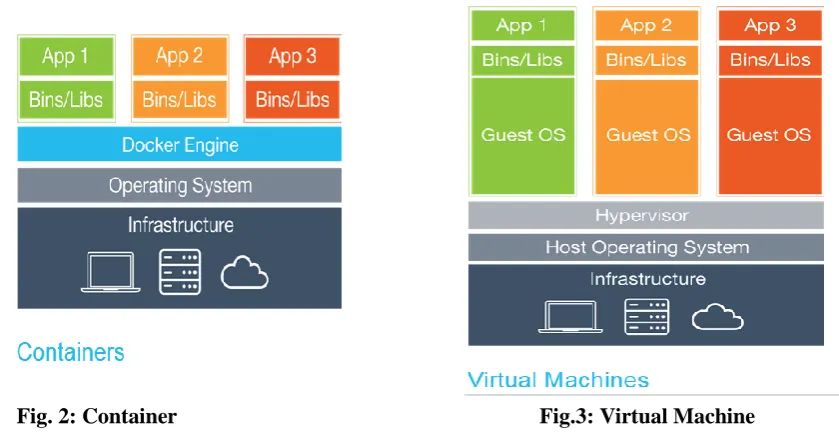
Each and every virtual machine [6] includes the application, the necessary binaries, libraries and entire guest
Operating systems - all of which may be 10GBs in size. Containers contain an application and all of its
dependencies, but share the kernel (Operating System) with other containers. They run as an isolated or
unique process in user space on the client Operating System. They are not tied to any specific infrastructure.
Docker containers [1] run on any computer, on any infrastructure and in any cloud [5].
Fig. 2: Container
Fig.3: Virtual Machine
III. DOCKER – ENVIRONMENT TO BUILD BETTER SOFTWARE
If your app is in Docker containers, you won’t worry about setting up and maintaining different
environments or different tooling for each language. Focus on creating new features, fixing issues and
Accelerate Developer Onboarding: Being try to setup developer environments instead of wasting time,
spin up new instances and make copies of production code to run locally. With Docker, you can easily
take copies of your live environment and run on any new endpoint running Docker.
Empower Developer Creativity: The Unique capabilities of Dockers containers free developers from the worries of using “approved” language stacks and tooling. Developers can use the best language and
tools for their application service without worrying about causing conflict issues.
Eliminate Environment Inconsistencies: By packaging up the application with it’s configure and
dependencies together and also shipping as a container. The application will always work as designed
locally; on another machine, in test or production. No more worries about having to install the same
configure into a different environment
IV. DOCKER ARCHITECTURE
Docker uses client-server architecture. The DockerClient that talks to the DockerDaemon. It does the heavy
lifting of building, running and distributing to your Dockers containers. Both the Docker Daemonand Docker
Client can run on the same system. The Docker client and daemon communicatevia sockets or through a
RESTful API.
Fig.4.Docker Architecture
Docker Daemon: The Docker daemon runs on a host system. The user does not interact with the Daemon
directly, but instead of it user communicate with the Docker client.
Docker Client: It contains three components Pull, Build and Run. The Docker client is the primary user
interface to Docker. It accepts commands from the user and communicates with user and Docker Daemon.
Inside Docker: Inside Docker divided into three components:
Docker Images Docker Registries Docker Containers
By using these three components we clearly understand the inside Dockers structure. These are also called as
V. DOCKER WORKFLOW COMPONENTS
Docker Image: A Docker image is a read-only template, which can’t modify. For example, an image contains
an Ubuntu operating system with web server i.e. Apache or Wamp server and your web application installed. To
create Docker containers we use Dockers Images. Docker provides a simple way to build new images or update
existing images, or you can download Docker images that other people have already created. Docker images are
thebuildcomponent of Docker [2].
Docker Containers: we knew already that each container is created from a Docker image. Docker containers are
similar to a directory in the file system. A Docker container contains everything that is need for an application to
be run. Docker containers can run, start, stop, move and delete operations. Each container is an isolated and
secure application platform. Docker containers are therun component of Docker [2].
Docker Registries: Docker registries hold images, which are either public or private stores from which you
upload or download images. The public Docker registry is provided with theDocker Hub. It serves a huge
collection of existing images in it for your use. These images you create yourself or you can use images that
others have previously created in the container. Docker registries are the distribution component of Docker [2].
VI. WORKING OF DOCKER
Docker works in three steps.
Build Docker images that require for your applications.
Create Docker containers by using Docker images to run for your applications. Share or distribute those Docker images via Docker Hub [4] or your own registry.
VII. APPLICATIONS
In so many areas [7] we should incorporate this technology among them a few application areas presently most
use are:
Virtual environment for Application Deployment based on the Dockers. Docker supports Multi-task PaaS clouding infrastructure
Docker supports hosting Big data Applications
VIII. DOCKER COMMANDS
$ docker info - (Checking docker installation) $ docker pull ubuntu - (Down loading exist image)
$ docker ps -a # Lists all containers - (listing all containers)
$ JOB=$(docker run -d ubuntu /bin/sh -c "while true; do echo Hello world; sleep 1; done") $ docker stop $JOB (to stop the docker job)
$ docker rm $JOB
$docker cp
IX. CONCLUSION
Docker, an open platform for building, shipping and running distributed application; revolutionize the
development and operations team by providing the common tool box that handles all the environment
dependencies.
REFERENCES
[1] Cito J., Ferme V., Gall H.C. (2016) Using Docker Containers to Improve Reproducibility in Software
and Web Engineering Research. In: Bozzon A., Cudre-Maroux P., Pautasso C. (eds) Web Engineering.
ICWE 2016. Lecture Notes in Computer Science, vol 9671. Springer, Cham
[2] http://docs.docker.com/introduction/understanding-dockers/
[3] Anderson, C.: Docker software engineering. The IEEE Computer Society, 2015
https://www.computer.org/csdl/mags/so/2015/03/mso2015030102.pdf
[4] http://hub.docker.com/
[5] G.M., Park, S., Kim, J. et al. Cluster Comput (2016) 19: 1585. doi:10.1007/s10586 -016-0599-0:An
efficient multi-task PaaS cloud infrastructure based on docker and AWS ECS for application deployment
by Tihfon
[6] A New Virtualized Environment for Application Deployment Based on Docker and AWS by Tihfon
G.M., Kim J., Kim K.J. (2016) A New Virtualized Environment for Application Deployment Based on
Docker and AWS. In: Kim K., Joukov N. (eds) Information Science and Applications (ICISA) 2016.
Lecture Notes in Electrical Engineering, vol 376. Springer, Singapore.
[7] Analysis of Network IO Performance in Hadoop Cluster Environments Based on Docker Containers by
China Venkanna Varma P., Kalyan Chakravarthy K.V., Valli Kumari V., Viswanadha Raju S. (2016)
Analysis of Network IO Performance in Hadoop Cluster Environments Based on Docker Containers.
In: Pant M., Deep K., Bansal J., Nagar A., Das K. (eds) Proceedings of Fifth International Conference
on Soft Computing for Problem Solving. Advances in Intelligent Systems and Computing, vol 437.