Database Development
OpenOffice.org & OOBasic
This is, for the time being, an informal guide on database development using OpenOffice.org & OpenOffice Basic (OOBasic).
Database Programming Using OOBasic
Statement Service
Contents
I. Introduction
II. Manipulating Data
a) Inserting Records
b) Updating Fields/Records
c) Deleting Records
III.Prepared Statements
a) Introduction
b) Creating PreparedStatements
c) Supplying Values to a PreparedStatement
IV.A Closer Look at the OOo API (for Services utilized in this chapter)
a) Introduction
b) The DatabaseContext Service
c) The DataSource Service
d) The Connection Service
As mentioned in the introduction, a Statement is one of the methods we can use to connect to a database with the OOo API. A Statement is a way of directly communicating with the database using SQL commands. Whenever a result is returned, it will be stored in a ResultSet object—this will be discussed later in the next chapter. The Statement Service can be used to do virtually anything you can do with the GUI such as adding, dropping, updating tables; inserting, deleting, updating records, etc. The basic steps needed to connect to a database (more specifically, an object in a database) are as follows:
1. Obtain a connection object.
2. From the connection object, create a statement object
3. Depending on your particular need, call the respective execute method. 4. Perform some action with the result—if the statement returns a result. Let us begin by looking at a quick example:
Listing 1
1 Sub Example1
2 REM SIMPLE CONNECTION 3 Dim Context 4 Dim DB 5 Dim Conn 6 Dim Stmt 7 Dim Result 8 Dim strSQL As String
9 REM create database context
10 Context=CreateUnoService("com.sun.star.sdb.DatabaseContext") 11 REM get the database
12 DB=Context.getByName("DB1")
13 REM stablish connection to database 14 Conn=DB.getConnection("","")
15 REM create a statement service object 16 Stmt=Conn.createStatement()
17 REM create an SQL command
18 strSQL="SELECT *FROM EMPLOYEES"
19 REM finally, execute and store results in ResultSet Object 20 Result=Stmt.executeQuery(strSQL)
21 While Result.next()
22 REM for now, let us just use the getString() method to get the 23 REM columns. Note that they are being accessed by index
24 MsgBox Result.getString(2) & " " & Result.getString(3) _ 25 & " " & _ Result.getString(4) & " " & Result.getInt(5)
26 Wend
27 Conn.close() 28 End Sub
Line 8 introduces the DatabaseContext. As we can see from the usage in line 9, the DatabaseContext is a container for databases/data sources in OOo. If the database is not registered in OOo, you may still access it by using the getByName(...) method of the DatabaseContext service; instead of passing the
database name as parameter, pass the entire path of where the file is located . If you are connecting directly via a particular driver, a different method of establishing a connection may be utilized. In the next few chapters, we are only going to discuss database connections that are registered in OOo—other means of connecting will be discussed later.
Note
It is of most importance to keep in mind that the DatabaseContext is a singleton—meaning that there is only one instance running. If you dispose of the DatabaseContext, you will not be able to retrieve until OOo is restarted; usually closing or disposing of the DatabaseContext will crash OOo.
In line 10 we actually open the connection via the database object. Note that in this example, we called
getConnection(...) method with two empty strings. If your database is password protected, this is where the username and password can be specified. Having established a connection to the desired database, we can now create a Statement object by calling the createStatement() method of the database object—see line 12. We are now ready to create any desired SQL command and execute it. In our example, we are going to be doing a simple SELECT. Before calling an execute method, you must decide which method is required based on the type of command created. The executeQuery() method is used for the SELECT command, and executeUpdate() for UPDATE, DELETE, INSERT, CREATE, DROP, ALTER, and GRANT.
In our example above, the executeQuery() was utilized as we were doing a SELECT command. This is the final step, and we are now ready to process the result (if there is a result). When a result is
returned, it will be returned in the form of a ResultSet object. The ResultSet object, being complex, will be discussed in more detail in the next chapter.
Manipulating Data
We are going to be working with a database named DB1 and, for the moment a table named
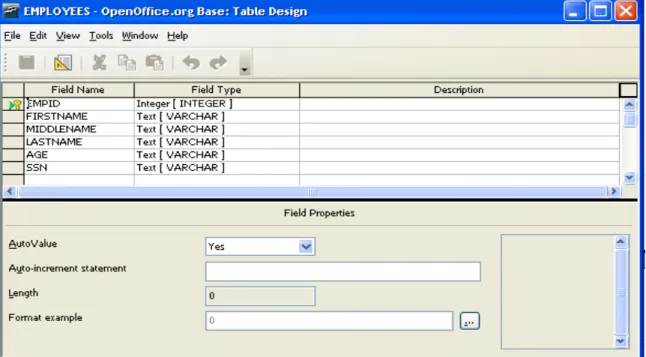
EMPLOYEES. See image 1 for table definition. Note that all names (table and columns) are in upper case. When generating SQL commands, it is necessary to quote all names that are not in upper case alphabetic characters.
As you might have noticed, everything is the same in regards to preparing a connection up to the point of generating the desired SQL command/statements. In the following sections we are going to see basic data manipulation command individually.
Inserting Data
In this example, we will see a basic INSERT INTO statement. Since we are inserting plain text data, no special handling is required. However, this is not always the case when other data types are being inserted.
Listing 2
1 Sub Example2
2 REM INSERT RECORDS INTO DATABASE TABLE 3 Dim Context 4 Dim DB 5 Dim Conn 6 Dim Stmt 7 Dim Result 8 Dim strSQL As String 9 Context=CreateUnoService("com.sun.star.sdb.DatabaseContext") 10 DB=Context.getByName("DB1") 11 Conn=DB.getConnection("","") 12 13 Stmt=Conn.createStatement() 14 strSQL="INSERT INTO _ 15 EMPLOYEES(FIRSTNAME,MIDDLENAME,LASTNAME,AGE,SSN) _ 16 VALUES('Hubert','','Farnsworth','164','511-11-1111')" 17 Stmt.executeUpdate(strSQL) 18 19 Conn.close() 20 End Sub
The new code is introduced starting on line 14. As you can see, all the preparation is the same up to this point—compared to the previous example. Additionally, since all of our names (table and columns) are upper case, there is no need to quote them. If you do not plan ahead or forget, this will become a nightmare, though later I will offer methods to lessen the work required to quote names. As of OpenOffice.org 2.0.2, I have not had problems with case sensitivity, but if you are connecting to external databases, this may be an issue.
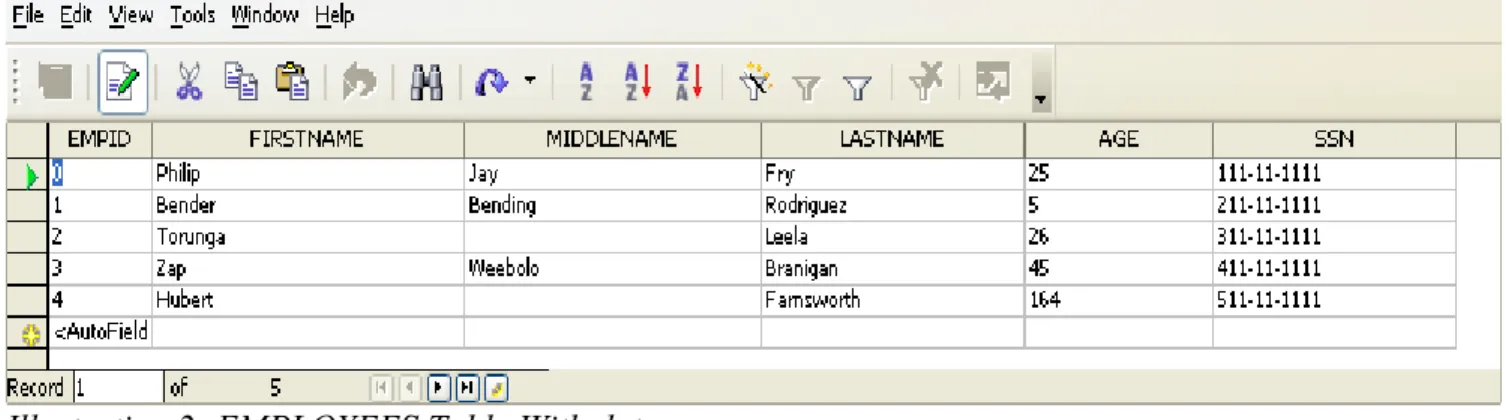
Image 2 shows the table where the data was inserted. Note that the EMPID field was not included in our SQL statement, but it has been entered into the table automatically. This has been true of all database packages with which I have worked.
A word of caution with auto-incrementing fields: When doing database programming, it is often necessary to do batch inserts or updates. If you are inserting into a table with an auto-incrementing field , be careful not to end up with duplicate keys (for unique or primary keys). For example:
consider that you have a table with an auto-incrementing field, and the sequence at this point is 1000. If you are inserting data from another table for which that field already has a value, and you
programmatically insert data into that field, the field will not be incremented. The next time that data is inserted, and the field is not inserted, the auto-increment mechanism will kick in again. Therefore make sure that the values entered do not conflict with the auto-increment sequence value. A sequence can be reset with:
ALTER TABLE ALTER COLUMN <COLUMN_NAME> RESTART WITH <NEW_VALUE>
Thus far, we have only seen the simplest possible example in regards to inserting records into a table. In the following example, we are going to see a slightly more complex demonstration showing that once you create a Statement, you may reuse it as many times as you want. This is due to the fact that when the statement object is created, no specification was given as to the command to be executed. Rather, it is a generic object that will execute any valid/supported SQL statement.
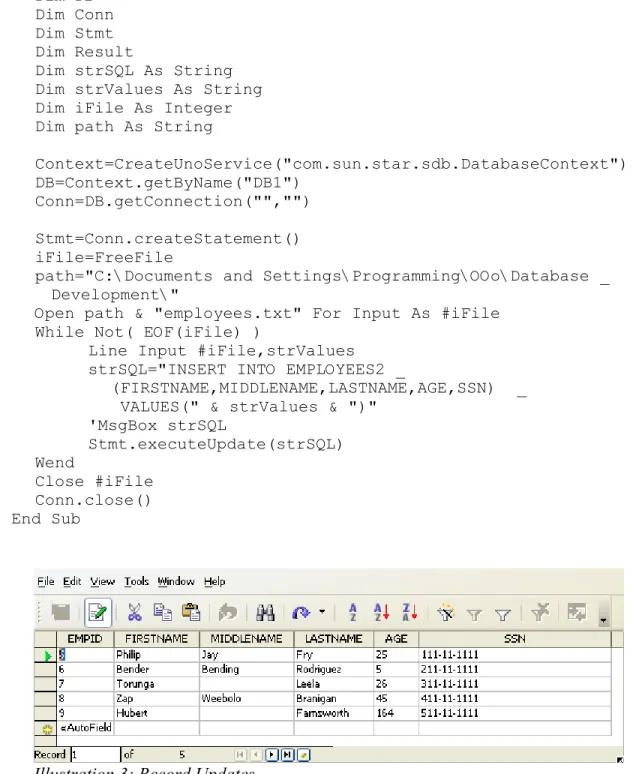
In the following example, we are going to read a file, and insert the content into the database. For this example, I have made a copy of our existing EMPLOYEES table (structure only). Additionally, the file has been specifically prepared for this example, and thus no special parsing is required (this is a simple coma separated file with “ as text delimeter. Once again, you may note that nothing new has been introduced in Listing 3 until line 24 where the SQL statement is generated. In our previous example, the statement was hard coded. In this example, however, the statement is being generated dynamically from the data that was read from our prepared file. After the statement is generated, we simply call the
executeUpdate(...) method of the statement object just as before, with the exemption that we are going to be re-using it for each iteration of our loop.
Image 3 shows the updated table. Listing 3
1 Sub Example3
2 REM INSERT RECORDS INTO DATABASE TABLE 3 Dim Context 4 Dim DB 5 Dim Conn 6 Dim Stmt 7 Dim Result 8 Dim strSQL As String 9 Dim strValues As String 10 Dim iFile As Integer 11 Dim path As String 12 13 Context=CreateUnoService("com.sun.star.sdb.DatabaseContext") 14 DB=Context.getByName("DB1") 15 Conn=DB.getConnection("","") 16 17 Stmt=Conn.createStatement() 18 iFile=FreeFile
19 path="C:\Documents and Settings\Programming\OOo\Database _ 20 Development\"
21 Open path & "employees.txt" For Input As #iFile 22 While Not( EOF(iFile) )
23 Line Input #iFile,strValues
24 strSQL="INSERT INTO EMPLOYEES2 _
25 (FIRSTNAME,MIDDLENAME,LASTNAME,AGE,SSN) _ 26 VALUES(" & strValues & ")"
27 'MsgBox strSQL 28 Stmt.executeUpdate(strSQL) 20 Wend 30 Close #iFile 31 Conn.close() 32 End Sub
In database programming, it is very often necessary to insert data into tables or modify existing tables based on data contained in a file. The above example is a brief introduction—batch modification of data will be covered in more detail in later chapters.
Updating Records
Updating records using the Statements Service is just as easy as inserting (as will be deleting). Once again, the only difference is the SQL statement generated—this would of course be an UPDATE rather than INSERT INTO.
After inserting the records into the EMPLOYEES table, I noticed the following typographical errors. First, Leela's first name is Turanga and not Torunga. Second, it is Zapp Brannigan not Zap Branigan. Listing 4 show the code that makes the required updates to the database. For simplicity, the SQL statements have been put into an array, as this will allow us to easily cycle through the array and execute the updates by using the executeUpdate(...) of the statement service.
Listing 4
1 Sub Example4
2 REM UPDATE RECORDS/FIELDS 3 Dim Context 4 Dim DB 5 Dim Conn 6 Dim Stmt 7 Dim Result 8 Dim strSQL As String 9 10 Context=CreateUnoService("com.sun.star.sdb.DatabaseContext") 11 DB=Context.getByName("DB1") 12 Conn=DB.getConnection("","") 13 14 Stmt=Conn.createStatement()
15 updates=Array("UPDATE EMPLOYEES SET MIDDLENAME='N/A' WHERE _ 16 MIDDLENAME IS NULL", _
17 "UPDATE EMPLOYEES SET FIRSTNAME='Zapp',LASTNAME='Brannigan' _ 18 WHERE EMPID=3", _
19 "UPDATE EMPLOYEES SET FIRSTNAME='Turanga' WHERE EMPID=2") 20
21 For I=0 To UBound(updates)
22 Stmt.executeUpdate(updates(I)) 23 'MsgBox updates(I)
24 Next I
25 Conn.close() 26 End Sub
As you might have noted, it is quite important to include the WHERE clause when updating a database using SQL (rather than through a GUI).
Deleting Records
The last topic in the basic SQL commands is the DELETE command. I mentioned above to use caution when updating a database programmatically, as you may end up updating an entire table if you fail to use a proper WHERE clause. The DELETE command can be more detrimental if not used with the proper WHERE clause, as you will delete the entire table. Code listing 5 shows the code to delete records from a table using the Statement Service.
Listing 5
1 Sub Example7
2 REM DELETE RECORDS 3 Dim Context 4 Dim DB 5 Dim Conn 6 Dim Stmt 7 Dim Result 8 Dim strSQL As String 9 10 Context=CreateUnoService("com.sun.star.sdb.DatabaseContext") 11 DB=Context.getByName("DB1") 12 Conn=DB.getConnection("","") 13 14 Stmt=Conn.createStatement()
15 strSQL="DELETE FROM EMPLOYEES2 WHERE EMPID IN(10,14)" 16 Stmt.executeUpdate(strSQL)
17 Conn.close() 18 End Sub
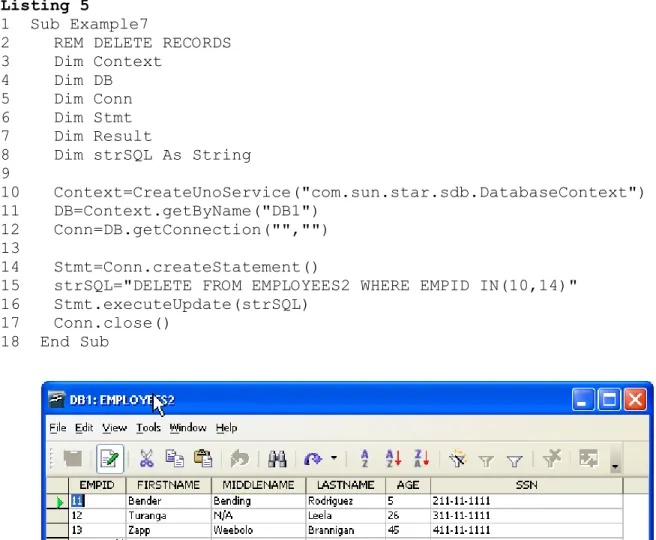
As you can see in illustration 4, the records with EMPID 10 and 14 have been removed from the table.
Prepared Statements
Earlier I mentioned that the Statement service is quite flexible, and that it allows reuseability as the
createStatement object is generic because it does not require any SQL command specification at the time the object is created. However, this flexibility comes at a cost. If you have not yet seen this pattern, you will soon learn that software, much like everything else, is a series of compromises. If you want flexibility, you may sacrifice speed or efficiency, and vice versa. That which you trade for the sake of something else is up to you; but more importantly is determined by your needs.
A PreparedStatement is similar to the statement object we have been using; however, a
PreparedStatement requires that the SQL command be specified at the time the object is created. This has advantages and disadvantages.
Advantage-the advantage of using a PreparedStatement is that once it is created it is compiled, and therefore increases the speed for subsequent uses. In the examples we have seen in the previous pages this would be irrelevant, as the tables we are working with are quite small. However, in large tables, and in particular, when the data resides in a server across a network, speed may be preferred over flexibility.
Disadvantage—the disadvantage with a PreparedStatement object is that once it is created, it may not be reused for something else. If you want to use a PreparedStatement to query a table, store the result somewhere, and the update a second table, two objects would have to be created. Additionally, creating a PreparedStatement requires more complexity than a regular Statement. Personally, I do not find the disadvantages a big enough factor to discourage use, in particular when their execution speed is useful.
Creating a PreparedStatement
The PreparedStatement object is created via the connection object, much as the Statement object, by using the prepareStatement(...) method. The parameter required is the SQL statement to be executed. Before creating the PreparedStatement object, you must plan how you want to create it; namely, with or without parameters. If you need to create a PreparedStatement with parameters, all parameters must be indicated with a question mark (?). If no parameters are required, simply create the SQL statement and call the respective execute method (executeQuery, executeUpdate, etc).
Parameters may be required when generating an SQL statement and the values for the WHERE clause or VALUES(...) in an INSERT INTO statement are not known.
Let us look at quick example: Listing 6
1 Sub Example8
2 REM QUERY TABLE USING PreparedStatement 3 Dim Context 4 Dim DB 5 Dim Conn 6 Dim Stmt 7 Dim Result 8 Dim strSQL As String 9 Dim strDump As String 10
12 Context=CreateUnoService("com.sun.star.sdb.DatabaseContext") 13 'GET DATABASE BY NAME
14 DB=Context.getByName("DB1")
15 'ESTABLISH CONNECTION TO DATABASE 16 Conn=DB.getConnection("","")
17 'CREATE A PREPAREDSTATEMENT OBJECT
18 Stmt=Conn.prepareStatement("SELECT *FROM EMPLOYEES WHERE EMPID=?") 19 'SUPPLY PARAMETER VALUES
20 Stmt.setInt(1,0)
21 'FINALLY, EXECUTE THE STATEMENT
22 'SAME RULES APPLY IN SELECTING THE PROPER EXECUTION METHOD AS _ 23 ' WITH REGULAR STATEMENTS
24 Result= Stmt.executeQuery() 25 strDump=""
26 'NOW LET'S CYCLE THROUGH THE RESULT SET 27 While Result.next()
28 strDump=strDump & Result.getString(2) & " " & _ 29 Result.getString(4) & chr(10)
30 Wend
31 'NOTE THAT THERE IS ONLY ONE RECORD--AS WE PASSED EMPID=0 32 MsgBox strDump
33
34 Conn.close() 35 End Sub
The code of interest begins on line 18 where we create the PreparedStatement by calling the
prepareStatement(...) method. In our case, we are creating our PreparedStatement with one parameter. Therefore, the SQL statements contains one question mark (?)--...EMPID=?...
The next step, of course, is to supply the statement with the values for all parameters indicated. In line 20, we supply our statement with the desired EMPID value using the setInt(...) method. Generally you can use the setString(...) for most basic data types, but you may end up corrupting your data by not using the property setXXX(...) method. You will find a setXXX(...) method for every data type in the Java language.
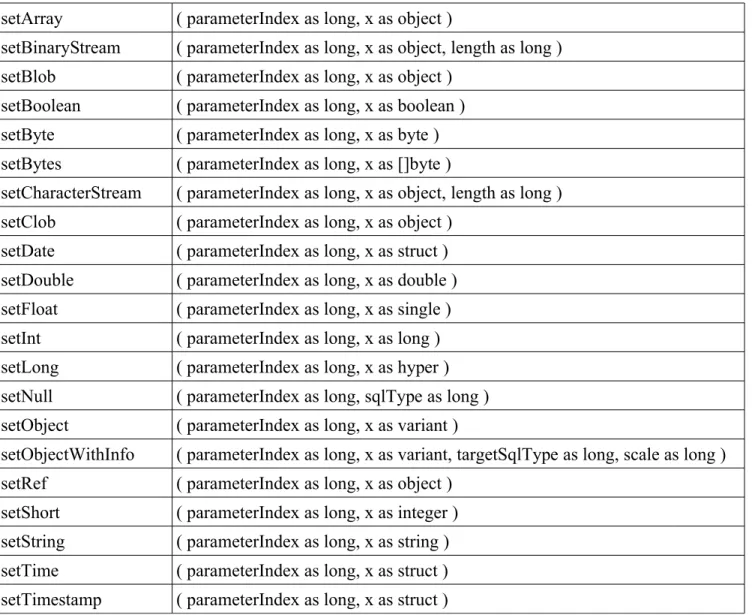
Every setXXX(...) method requires at least two parameters. The first is the index corresponding to the desired parameter, and the second is the actual data you wish to supply. For special or more advanced methods such as setBinaryStream, a third parameter is required to specify the length. Illustration 5 shows how to identify the correct index for a desired parameter in an SQL statement. Table 1 shows the setXXX() methods that can be utilized to supply values to a prepared statement object.
Illustration 5: Parameter Indexing in a Prepared Statement
“SELECT *FROM EMPLOYEES WHERE AGE>? AND SALARY=? AND MARRIED=?”
Let us look at a more complex example. In an earlier example, we saw how we could insert records into a table from data contained in a text file. Let us now perform the same task using a
PreparedStatement. Listing 7
1 Sub Example9
2 REM INSERT RECORDS FROM FILE USING PREPARED STATEMENT 3 Dim Context
4 Dim DB 5 Dim Conn 6 Dim Stmt
7 Dim strSQL As String 8 Dim strBuff As String 9 Dim iFileName As String 10 Dim iFileNumber As Integer 11 Dim I As Integer
12
13 'CREATE A DATABASE CONTEXT OBJECT
14 Context=CreateUnoService("com.sun.star.sdb.DatabaseContext") 15 'GET DATABASE BY NAME
16 DB=Context.getByName("DB1")
17 'ESTABLISH CONNECTION TO DATABASE 18 Conn=DB.getConnection("","")
19 'CREATE A PREPAREDSTATEMENT OBJECT 20 strSQL="INSERT INTO _
21 EMPLOYEES2(FIRSTNAME,MIDDLENAME,LASTNAME,AGE,SSN)_ 22 VALUES(?,?,?,?,?)"
23 Stmt=Conn.prepareStatement(strSQL) 24
25 'GET NEXT FILE NUMBER AVAILABLE 26 iFileNumber=FreeFile
27 'ESPEFICY FILE/PATH
28 iFileName="C:\Documents and Settings\Programming\OOo\Database _ 29 Development\employees.txt"
30 Open iFileName for Input As #iFileNumber 31 'READ FILE
32 While NOT( EOF(iFileNumber) )
34 'READ 5 ITEMS AT A TIME--FIVE COLUMNS 35 For I=0 To 4
36 Input #iFileNumber,strBuff
37 'WE DON'T NEED SINGLE QUOTE ANYMORE--REMOVIE IT 38 strBuff=Mid(strBuff,2,Len(strBuff)-2)
39 'PROVIDE VALUE FOR ITH COLUMN 40 Stmt.setString(I+1,strBuff)
41 Next I
42 'EXECUTE THE STATEMENT 43 Stmt.executeUpdate() 44 Wend 45 46 Conn.close() 47 Close #iFileNumber 48 End Sub
We start to create our SQL statement on line 20. Note that the only difference so far from what we have seen before is the VALUE(...) clause; instead of the actual value, we have a question mark (?) for each value to be entered. The PreparedStatement is created on line 23. Now, the next task is to supply values to the statement. We are going to accomplish this by reading a text file—this is the same file we used in the previous example using a Statement object. Lines 32 to 44 contain the While Loop that reads the file and supplies the values to our PreparedStatement. Note however, that on line 35 we have another loop. This For loop allows us to easily supply the values. In our example, this is possible since all the values being read are of the same type—VARCHAR. If however, we had various data types, it would be a more complex task.
Also note that, in this example, we are reading the file differently from the previous example. First, on the original example we read one whole line at a time. This was possible since we were generating the entire content of the VALUES(..) portion of the SQL statement—which is basically the same as a whole line in the file. In this example, however, we are not interested in the whole line, as we need the individual fields to insert into the PreparedStatement using the respective setXXX(...) method one at a time. One way of accomplishing this is to use a For loop and cycle through five iterations—
supplying the Ith value to the PreparedStatement in each iteration. Again, this would not be possible, or
at least advisable if we were reading data with varying data types. The second difference between this example and the previous in which we inserted the data from this file into the EMPLOYEES2 table is that, since we are doing a textual generation of the SQL statement. Therefore, it was necessary to have the values quoted. In this example however, we are passing values to a function. It is not necessary to have the values quoted. You may note that on line 38, the single quotes are removed from each value read.
Table 1: setXXX Methods for Prepared Statement
setArray ( parameterIndex as long, x as object )
setBinaryStream ( parameterIndex as long, x as object, length as long ) setBlob ( parameterIndex as long, x as object )
setBoolean ( parameterIndex as long, x as boolean ) setByte ( parameterIndex as long, x as byte ) setBytes ( parameterIndex as long, x as []byte )
setCharacterStream ( parameterIndex as long, x as object, length as long ) setClob ( parameterIndex as long, x as object )
setDate ( parameterIndex as long, x as struct ) setDouble ( parameterIndex as long, x as double ) setFloat ( parameterIndex as long, x as single ) setInt ( parameterIndex as long, x as long ) setLong ( parameterIndex as long, x as hyper ) setNull ( parameterIndex as long, sqlType as long ) setObject ( parameterIndex as long, x as variant )
setObjectWithInfo ( parameterIndex as long, x as variant, targetSqlType as long, scale as long ) setRef ( parameterIndex as long, x as object )
setShort ( parameterIndex as long, x as integer ) setString ( parameterIndex as long, x as string ) setTime ( parameterIndex as long, x as struct ) setTimestamp ( parameterIndex as long, x as struct )
Supplying values using the respective setXXX() method can become a bit cumbersome—if you are supplying more than string data types. However, this can be alleviated by creating your own sub-routine. Code listing 8 shows a simple routine to call the respective setXXX() method to supply values to a preparedStatement.
Listing 8
1 Sub setXXX(prepStmt,val , parindex As Long, DataType As String) 2 REM set the value for the object (prepared statemnt)
3 Select Case DataType
4 Case "Array": prepStmt.setArray(parindex,val) 5 Case "Blob": prepStmt.setBlob(parindex,val)
6 Case "Boolean": prepStmt.setBoolean(parindex,val) 7 Case "Byte": prepStmt.setByte(parindex,val)
8 Case "Bytes": prepStmt.setBytes(parindex,val) 9 Case "Clob": prepStmt.setClob(parindex,val) 10 Case "Date": prepStmt.setDate(parindex,val)
11 Case "Double": prepStmt.setDouble(parindex,val) 12 Case "Float": prepStmt.setFloat(parindex,val) 13 Case "Int": prepStmt.setInt(parindex,val) 14 Case "Long": prepStmt.setLong(parindex,val) 15 Case "Null": prepStmt.setNull(parindex,val) 16 Case "Object": prepStmt.setObject(parindex,val) 17 Case "Ref": prepStmt.setRef(parindex,val)
18 Case "Short": prepStmt.setShort(parindex,val) 19 Case "String": prepStmt.setString(parindex,val) 20 Case "Time": prepStmt.setTime(parindex,val)
21 Case "Timestamp": prepStmt.setTimestamp(parindex,val) 22 Case Else: prepStmt.setString(parindex,val)
23 End Select 24 End Sub
The first parameter is the preparedStatement object—remember that parameters are passed by
reference in OOoBasic by default. The second parameter is the actual value being supplied, followed by the parameter index and finally the data type. As you can see, the rest is a simple Select Case
statement. Code listing 9 demonstrates how to utilized our newly defined setXXX(..) method. Listing 9
1 Sub Example10
2 REM INSERT RECORDS FROM FILE USING PREPARED STATEMENT 3 Dim Context
4 Dim DB 5 Dim Conn 6 Dim Stmt
7 Dim strSQL As String 8 Dim strBuff As String 9
10 'CREATE A DATABASE CONTEXT OBJECT
11 Context=CreateUnoService("com.sun.star.sdb.DatabaseContext") 12
13 'GET DATABASE BY NAME
14 DB=Context.getByName("DB1") 15 'STABLISH CONNECTION TO DATABASE 16 Conn=DB.getConnection("","")
17 'CREATE A PREPAREDSTATEMENT OBJECT
18 strSQL="INSERT INTO EMPLOYEES(FIRSTNAME,LASTNAME,AGE,SSN) _ 19 VALUES(?,?,?,?)"
20 Stmt=Conn.prepareStatement(strSQL)
22 'NOW, CALL setXXX(..) subroutine to supply values to our 23 'Prepared statement
24 setXXX(Stmt,"Amy",1,"String") 25 setXXX(Stmt,"Wong",2,"String") 26 setXXX(Stmt,22,3,"Int")
27 setXXX(Stmt,"121-11-1111",4,"String") 28 'EXECUTE THE STATEMENT
29 Stmt.executeUpdate() 30 Conn.close()
31
While this example works, it does not easy the workload. As you can see, we still to one function call per column, which is what we would have done by directly calling the respective setXXX() method on the Stmt object. However, having established that our routine does in fact work, let us look at a more productive example.
Listing 10
1 Sub Example11
2 REM INSERT RECORDS FROM FILE USING PREPARED STATEMENT/setXXX(..) 3 Dim Context
4 Dim DB 5 Dim Conn 6 Dim Stmt
7 Dim strSQL As String 8 Dim strBuff As String 9 Dim iFileName As String 10 Dim iFileNumber As Integer 11 Dim DataTypes
12 Dim I As Integer 13
14 'CREATE A DATABASE CONTEXT OBJECT
15 Context=CreateUnoService("com.sun.star.sdb.DatabaseContext") 16 'GET DATABASE BY NAME
17 DB=Context.getByName("DB1") 18 'STABLISH CONNECTION TO DATABASE 19 Conn=DB.getConnection("","") 20
21 'CREATE A PREPAREDSTATEMENT OBJECT 22 strSQL="INSERT INTO _
22 EMPLOYEES2(FIRSTNAME,MIDDLENAME,LASTNAME,AGE,SSN,DOB, _ 23 SALARY,MARRIED) VALUES(?,?,?,?,?,?,?,?)"
24 Stmt=Conn.prepareStatement(strSQL) 25 'GET NEXT FILE NUMBER AVAILABLE 26 iFileNumber=FreeFile
27 'SPEFICY FILE/PATH
28 iFileName="C:\Documents and Settings\Programming\OOo\Database _ 29 Development\employees.txt"
30 Open iFileName for Input As #iFileNumber
31 'ARRAY TO SPECIFY THE DATA TYPE FOR EACH COLUMN READ
32 DataTypes=Array("String","String","String","Int","String", _ 33 "String","Float","Boolean")
34 'READ FILE
35 While NOT( EOF(iFileNumber) )
36 'READ 8 ITEMS AT A TIME--FIVE COLUMNS 37 For I=0 To 7
38 Input #iFileNumber,strBuff 39 'PROVIDE VALUE FOR ITH COLUMN
40 setXXX(Stmt,strBuff,I+1,DataTypes(I))
41 Next I
42 'EXECUTE THE STATEMENT 43 Stmt.executeUpdate() 44 Wend
46 Conn.close()
47 Close #iFileNumber 48 End Sub
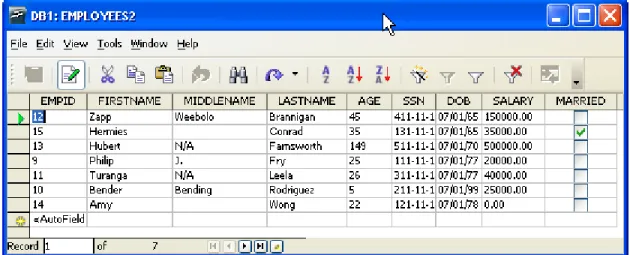
Note that this example is quite similar to listing 7. The only difference is that we are using the proper setXXX() method—which is necessary as we are now importing/inserting several more fields of varying types. Illustration 6 shows our second table (EMPLOYEES2) after the routine was executed. Data types such as Binary Streams require special handling; therefore, our setXXX() routine does not support them. On line 32 we defined an array that specifies the data type for each column; this will allow us to easily retrieve the desired type for each column. Our own setXXX() method is called to supply the values. Note that while the array is 0 based (as defined here), the columns in the
preparedStatement are 1 based.
A Closer Look at the OOo API
Up to now, we have seen examples on database access and manipulation using the OOo API.
However, we haven not seen all the methods or properties for the services or objects utilized. As it is quite advantageous, if not crucial, to have a more thorough knowledge of the API or libraries being utilized. We are not going to take a closer look at the properties and methods for the objects and services previously discussed.
DatabaseContext
Earlier, we briefly discussed the DatabaseContext as being a container that hold databases or data sources in OOo. Note that it is not necessary to have a database registered in OOo to be able to access it—though it makes the process simpler. Looking at the properties table as well as the methods table, we can see the ElementNames property and the createEnumaration, getElementNames, getByName,
hasByName,hasElements methods respectivelly. Enumeration as well as name access support are common methods found in container objects.
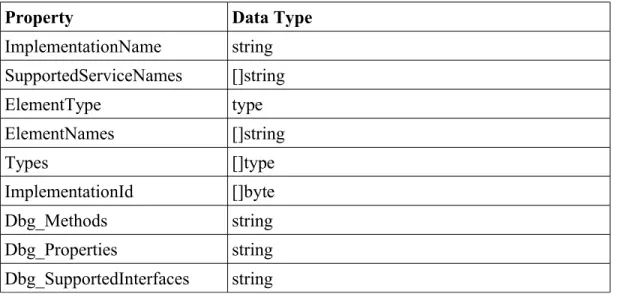
Table 2: Properties for the DatabaseContext Service
Property Data Type
ImplementationName string SupportedServiceNames []string ElementType type ElementNames []string Types []type ImplementationId []byte Dbg_Methods string Dbg_Properties string Dbg_SupportedInterfaces string
Properties of interest in table 1 are greater ElementNames, Dbg_Methods, Dbg_Properties, and Dbg_SupportedInterfaces. As the name suggests, ElementNames contains a string array with the names of all registered databases. The Dbg_* properties return a string containing the methods, properties, and supported interfaces respectively—such as these tables.
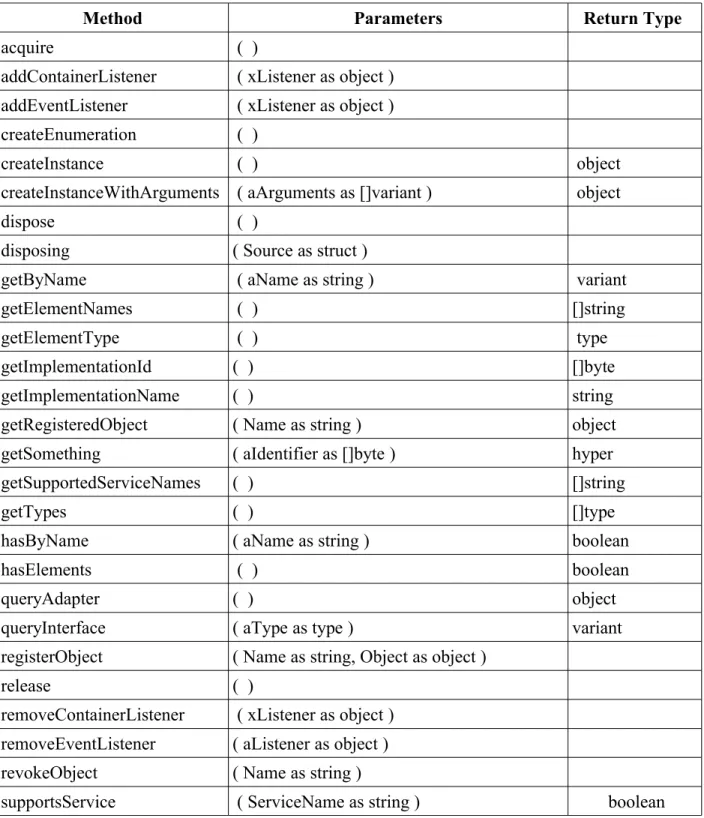
Table 3 lists the methods for the DatabaseContext. Let us first look at the createEnumaration() method. Listing 11 creates an enumeration object, and gets the name of each database registered in OOo.
Listing 11
1 Sub Example12
2 on error resume next
3 REM EXAMINE THE DATABASECONTEXT SERVICE 4 Dim Context
5 'CREATE A DATABASE CONTEXT OBJECT
6 Context=CreateUnoService("com.sun.star.sdb.DatabaseContext" 7 oEnum=context.createEnumeration() 8 Do While oEnum.hasMoreElements() 9 item=oEnum.nextElement() 10 print item.name 11 Loop 12 End Sub
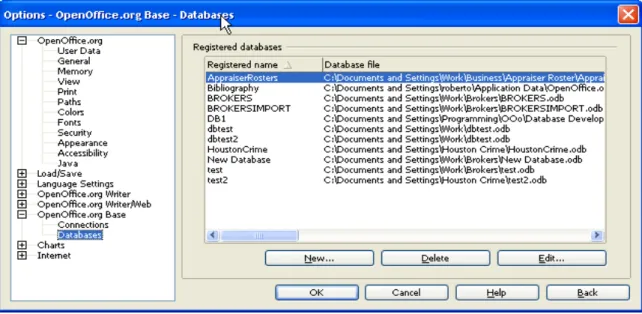
When creating an new database in OOo, you will be asked to register the database. If you choose not to registered it, or later change your mind about having registered it, all hope is not lost. Database registration can be managed by going to Tools->Options. The OOo options dialog will open. Select
To register a new database, simply click on the button labeled New... and enter information as required--see illustration 8. To unregister a database click on the button labeled Delete—you will be asked to confirm your choice to delete the registration. The registration information can be modified by clicking on the button labeled Edit...--note that the edit dialog is similar to the dialog to add a new
registration as seen on illustration 8.
Illustration 7: Database Registration
Table 3: Methods for the DatabaseContext Service
Method Parameters Return Type
acquire ( )
addContainerListener ( xListener as object ) addEventListener ( xListener as object ) createEnumeration ( )
createInstance ( ) object
createInstanceWithArguments ( aArguments as []variant ) object
dispose ( )
disposing ( Source as struct )
getByName ( aName as string ) variant
getElementNames ( ) []string
getElementType ( ) type
getImplementationId ( ) []byte
getImplementationName ( ) string
getRegisteredObject ( Name as string ) object
getSomething ( aIdentifier as []byte ) hyper
getSupportedServiceNames ( ) []string
getTypes ( ) []type
hasByName ( aName as string ) boolean
hasElements ( ) boolean
queryAdapter ( ) object
queryInterface ( aType as type ) variant
registerObject ( Name as string, Object as object )
release ( )
removeContainerListener ( xListener as object ) removeEventListener ( aListener as object ) revokeObject ( Name as string )
supportsService ( ServiceName as string ) boolean
Turning our attention to table 3 (DatabaseContext Methods) we can see the forbidden fruit of database programming with the OOo API—namely the dispose() method of the DatabaseContext service. Calling this method will, require that you restart OOo to regain use of the DatabaseContext. Restarting OOo will be facilitated by the same process since, at least in my tests, disposing of the
DatabaseContext will crash OOo.
DataSource Object
A DataSource object is returned by the DatabaseContext by calling methods such as getByName(...) or through enumeration access. From the previous examples, and as implied by the name, we can see that the DataSource objects is what gives access to the database.
Table 4: DataSource Object Methods
Method Parameters Return Value
queryInterface ( aType as type ) variant acquire ( )
release ( ) dispose ( )
addEventListener ( xListener as object ) removeEventListener ( aListener as object )
getTypes ( ) []type
getImplementationId ( ) []byte
queryAdapter ( ) object
setFastPropertyValue ( nHandle as long, aValue as variant )
getFastPropertyValue ( nHandle as long ) variant getPropertySetInfo ( ) object setPropertyValue ( aPropertyName as string, aValue as variant )
getPropertyValue ( PropertyName as string ) variant addPropertyChangeListener ( aPropertyName as string, xListener as object )
removePropertyChangeListener ( aPropertyName as string, aListener as object ) addVetoableChangeListener ( PropertyName as string, aListener as object ) removeVetoableChangeListener ( PropertyName as string, aListener as object )
getPropertySetInfo ( ) object setPropertyValues ( aPropertyNames as []string, aValues as []variant )
getPropertyValues ( aPropertyNames as []string ) []variant addPropertiesChangeListener ( aPropertyNames as []string, xListener as object )
removePropertiesChangeListener ( xListener as object )
firePropertiesChangeEvent ( aPropertyNames as []string, xListener as object )
getImplementationName ( ) string supportsService ( ServiceName as string ) boolean getSupportedServiceNames ( ) []string getConnection ( user as string, password as string ) object setLoginTimeout ( seconds as long )
getLoginTimeout ( ) long
getBookmarks ( ) object
getQueryDefinitions ( ) object connectWithCompletion ( handler as object ) object disposing ( Source as struct )
elementInserted ( Event as struct ) elementRemoved ( Event as struct ) elementReplaced ( Event as struct )
getIsolatedConnectionWithCompletion ( handler as object ) object getIsolatedConnection ( user as string, password as string ) object
getTables ( ) object
flush ( )
addFlushListener ( l as object ) removeFlushListener ( l as object ) flushed ( rEvent as struct )
Table 5: Database Object Properties
Property Data Type
Info []struct IsPasswordRequired boolean IsReadOnly boolean LayoutInformation []struct Name string NumberFormatsSupplier object Password string SuppressVersionColumns boolean TableFilter []string TableTypeFilter []string URL string User string Types []type ImplementationId []byte PropertySetInfo object ImplementationName string SupportedServiceNames []string LoginTimeout long Bookmarks object QueryDefinitions object Tables object DatabaseDocument object Dbg_Methods string Dbg_Properties string Dbg_SupportedInterfaces string
Let us look at the tables and query definitions. Note that there are methods as well as properties to obtain tables and query definitions. Listing 12 shows how to access the Tables as well as query definitions via the methods and properties, respectively.
1 Sub Example13
2 'EXPLORE DataSource Object 3 Dim Context 4 Dim DB 5 Dim Conn 6 Dim Tables 7 Dim oEnum 8 Dim oItem 9 10 'create db context 11 Context=CreateUnoService("com.sun.star.sdb.DatabaseContext") 12 'get datasource/database object from context
13 DB=Context.getByName("DB1") ' 14
15 'get the tables from the database 16 Tables=DB.getTables()
17
18 'Perform Enumration Access
19 oEnum=Tables.createEnumeration()
20 'write to file for easier view of entire output 21 Open PATH & "debug_dump.txt" For Output AS #100 22 Print #100,"[TABLES]"
23 Print #100,"Enumration Access for Tables object [db.getTables()]" 24 'loop through enumeratioin
25 While oEnum.hasMoreElements() 26 'get next element
27 oItem=oEnum.nextElement() 28 Print #100," " & oItem.Name 29 Wend
30 Print #100,"Array access through Tables object-- db.getTables()" 31 For I=0 To Tables.Count-1
32 oItem=Tables(I)
33 Print #100," " & oItem.Name 34 Next I
35 Print #100,"Array/Index Access through Tables Property [db.Tables]" 36 'XRay Tables
37 For I=0 To DB.Tables.Count-1 38 oItem=DB.Tables(I)
39 Print #100," " & oItem.Name 40 Next I
41 Print #100,"[QUERY DEFINITIONS]" 42 Queries=Db.getQueryDefinitions()
43 Print #100,"Enumeration Access of Query Definitions" 44 oEnum=DB.QueryDefinitions.createEnumeration()
45 While oEnum.hasMoreElements() 46 oItem=oEnum.nextElement() 47 Print #100," " & oItem.Name 48 Wend
49 Print #100,"Index Accesss Of Query Defs-db.getQueryDefinitions()" 50 For I=0 To Queries.Count-1
51 oItem=Queries(I) 'can also use oItgem=Queries.getByIndex(I) 52 Print #100," " & oItem.Name
53 Next I
55 property"
56 For I=0 To DB.QueryDefinitions.Count-1 57 oItem=DB.QueryDefinitions(I) 58 Print #100," " & oItem.name 59 Next I
60 Close #100 61 End Sub
Looking at the code we can see that the code to obtain the tables and query definitions is essentially the same. The reason for this is that both the properties as well as the methods to obtain the tables and query definitions, as well as other objects in the database, are of type
com.sun.star.sdb.ODefinitionContainer.
[The ODefinitionContainer] describes a container which provides access to database related definitions like commands, forms, and reports.
The container supports access to its elements by the elements name or by the elements position. Simple enumeration must be supported as well.
To reflect the changes with the underlying database, a refresh mechanism needs to be supported. --OOo Developer's Guide The output for the code above is as follows:
[TABLES]
Enumration Access for Tables object [db.getTables()] EMPLOYEES
EMPLOYEES2 Table1
Array access through Tables object obtained from db.getTables() EMPLOYEES
EMPLOYEES2 Table1
Array/Index Access through Tables Property [db.Tables] EMPLOYEES
EMPLOYEES2 Table1
[QUERY DEFINITIONS]
Enumeration Access of Query Definitions Query1
SENIORCITIZENS
Index Accesss Of Query Defs-db.getQueryDefinitions() method Query1
SENIORCITIZENS
Index Access of Query Defs.--db.QueryDefinitions property Query1
SENIORCITIZENS
It is due to the ODefenitionContainer object that we are able to access the database objects by enumeration by way of the createEnumaration() method; by name using the getByName(...) method; and by index position using object(index) or object.getByIndex(index).
The Connection Object
of a Connection, SQL statements are executed and results are returned.
A Connection's database is able to provide information describing its tables, its supported SQL grammar, its stored procedures, and the capabilities of this connection. This information is obtained with the XDatabaseMetaData::getMetaData() method. “
--OOo Developer's Guide In our examples, we created a DatabaseContext, from which we obtained a database (using the
getByName(...) method), and then established a connection to the database by using the
getConnection(...) method of the DataSource object. Let us now look at a few more details of the connection object.
Table 6: Methods for the Connection
Method Name Parameters Return Type
queryInterface ( aType as type ) variant
acquire ( )
release ( )
close ( )
createStatement ( ) object
prepareStatement ( sql as string ) object
prepareCall ( sql as string ) object
nativeSQL ( sql as string ) string
setAutoCommit ( autoCommit as boolean )
getAutoCommit ( ) boolean
commit ( )
rollback ( )
isClosed ( ) boolean
getMetaData ( ) object
setReadOnly ( readOnly as boolean )
isReadOnly ( ) boolean
setCatalog ( catalog as string )
getCatalog ( ) string
setTransactionIsolation ( level as long )
getTransactionIsolation ( ) long
getTypeMap ( ) object
setTypeMap ( typeMap as object )
getTypes ( ) []type
queryAdapter ( ) object
dispose ( )
addEventListener ( xListener as object ) removeEventListener ( aListener as object )
getImplementationName ( ) string
supportsService ( ServiceName as string ) boolean
getSupportedServiceNames ( ) []string
getSomething ( aIdentifier as []byte ) hyper
getParent ( ) object
setParent ( Parent as object )
createInstance ( aServiceSpecifier as string ) object
createInstanceWithArguments ( ServiceSpecifier as string, Arguments as []variant )
object
getAvailableServiceNames ( ) []string
prepareCommand ( command as string, commandType as long ) object
getQueries ( ) object createQueryComposer ( ) object getWarnings ( ) variant clearWarnings ( ) getTables ( ) object getUsers ( ) object getViews ( ) object flush ( ) addFlushListener ( l as object ) removeFlushListener ( l as object )
Table 7: Properties for the Connection
Property Name Type
AutoCommit boolean
MetaData object
Catalog string
TypeMap object ReadOnly boolean Types []type ImplementationId []byte ImplementationName string SupportedServiceNames []string Parent object AvailableServiceNames []string Queries object Warnings variant Tables object Users object Views object Dbg_Methods string Dbg_Properties string Dbg_SupportedInterfaces string
Looking at the methods and properties tables we can see that some of the properties and methods for the connection are the same as those seen for the DataSource Object—in particular those involved with obtaining database objects such as tables, queries, views, etc. Additionally, they can be accessed in the same way as with the datasource object—by name, index, and enumeration.
The MetaData property and the getMetaData(...) method have the datasource metadata. The metadata object contains a wealth of information regarding the connection's database such settings andcapabilities. Table 8 shows a few examples of the items/information found in the metadata object. Being that the metadata object is quiet lengthy, it will not be discussed thoroughly in its entirety in this chapter. For a full description refer to Appendix A
Table 8: Some Metadata Methods
Method Name Description
getDatabaseProductName returns the name of the database product
storesUpperCaseIdentifiers Does the database treat mixed case unquoted SQL identifiers as case insensitive and store them in upper case?
getIdentifierQuoteString What's the string used to quote SQL identifiers? This returns a space " " if identifier quoting is not supported.
supportsCoreSQLGrammar true , if the database supports ODBC Core SQL grammar, otherwise false .
getMaxTableNameLength return the maximum length of a table name
getDefaultTransactionIsolation return the database default transaction isolation level. The values are defined in TransactionIsolation
While the properties and methods found in the tables presented in the previous pages are not generally utilized on day-to-day database programming, it is good practice to have a reference.
The ResultSet Service
Introduction
In the previous section (The Statement Service), we briefly looked at the ResultSet Service. As can be seen in the previous examples, the ResultSet Service provided access to the data source. In addition to allowing us to utilize the result of a Statement Service, a result set also allows the updating of data. Let us look at our first example in the Statement Service section, but shift our attention to the result of the Statement—The ResultSet Service.
Listing 1 1 Sub Example1 2 Dim Context 3 Dim DB 4 Dim Conn 5 Dim Stmt 6 Dim Result 7 Dim strSQL As String 8 9 Context=CreateUnoService("com.sun.star.sdb.DatabaseContext") 10 DB=Context.getByName("DB1") 11 Conn=DB.getConnection("","") 12 Stmt=Conn.createStatement() 13
15 Result=Stmt.executeQuery(strSQL) 16
17 While Result.next
18 MsgBox Result.getString(2) & " " & Result.getString(3) & _ 19 " " & Result.getString(4) & " " _
20 & Result.getInt(5) 21 Wend
22 Conn.close() 23 End Sub
On line 15 we can obtained the ResultSet Service from the Statement. The first thing to note about the ResultSet Service is line 17—Result.next. The next method moves the cursor one row from its current position. Once in the loop, we use the getString(...) and getInt(...) methods to get the data from the current row. These methods are similar to the setXXX(...) methods we saw in the
PreparedStatement section earlier. However, instead of setting the data, they retrieve it from the ResultSet. Much like the generic setXXX(...) method created for the PreparedStatement, we can create a generic method to fetch the data.
Unlike the setXXX(...) methods which take two parameters, the getXXX(...) methods take only one parameter; this is the column index whose data we are trying to retrieve. The first column has index of 1, the second 2, and so forth.
A Closer Look
Let us now take a closer look at the ResultSet Service. There are three basic functions that can be performed with a data base result.
1. Navigate through result 2. Fetch data from current row
3. Manipulate Data—insert data or update current row data.
There are of course, other actions that can be taken, such as inspecting meta data, but this chapter is focused on data retrieval and manipulation. Each of these functions/actions listed above have, of course, specific methods that carry them out.
Navigating Through a Result Set
There is really nothing that can be done with the result, until some sort of navigation action is taken. In listing 1, this is done by invoking the next method of the result set. There are, of course, more methods to allow navigation or perform functions related to navigation. These methods are described below:
next—moves the cursor to the next row. Initially, the result set cursor will be located before the first row, if next is called after the result set is obtained, the cursor will be moved to the first row. If the call to next is successful, it will return true, false otherwise. Note that this method can be used to test if the result set contains rows.
Example:
MsgBox "no records" Else
MsgBox "records found" End If
It is this that allows our while loop (line 17 of listing 1) to break when the end of the result set is found. Calling next after the the last row has no effect.
previous—Moves the cursor to the previous row. Returns boolean, indicating success/failure. isBeforeFirst—Returns a boolean, indicating whether or not the cursor is located before the first row.
isAfterLast—Returns a boolean, indicating whether or not the cursor is located after the last row.
isFirst—Returns boolean, indicating whether or not the cursor is located on the first row. isLast—Returns boolean, indicating whether or not the cursor is located on the last row. beforeFirst—Moves the cursor before the first row (the front of the result set).
afterLast—Moves the cursor after the last row (end of result set).
first—Moves the cursor to the first row. This will have the same result as next if called right after the result set is obtained. Additionally, it returns a boolean, indicating whether or not it succeeded. Therefore, it could also be used to test if the result set has rows.
last—Moves the cursor to the last row. This also returns a boolean, indicating whether or not it was successful.
absolute(long row)--Moves the cursor to the row index specified by row.
relative(long rows)—Moves the cursor a relative number of rows as specified by the rows.
getRow—Returns the index for the current row. The first row index is 1, the second 2, and so on. If there are no rows, getRow will return zero, even if next is called. This can be used as another test for an empty result set.
Listing 2 1 Sub Example2 2 Dim Context 3 Dim DB 4 Dim Conn 5 Dim Stmt 6 Dim Result 7 Dim strSQL As String 8 9 Context=CreateUnoService("com.sun.star.sdb.DatabaseContext") 10 DB=Context.getByName("DB1")
11 Conn=DB.getConnection("","") 12 Stmt=Conn.createStatement()
13 strSQL="SELECT *FROM EMPLOYEES WHERE EMPID>0" 14 Result=Stmt.executeQuery(strSQL)
15 Dumper(PATH,DUMPERFILE,"isBeforeFirst:=" & Result.isBeforeFirst()) 16 Dumper(PATH,DUMPERFILE,"GET ROW BEFORE FIRST .next:=" & _
17 Result.getRow())
18 while Result.next
19 Dumper(PATH,DUMPERFILE," GET ROW...IN WHILE :=" & _ 20 Result.getRow())
21 Wend
22 Dumper(PATH,DUMPERFILE,"AFTER WHILE:=" & Result.getRow()) 23 Result.next
24 Dumper(PATH,DUMPERFILE,".next AFTER WHILE:=" & Result.getRow()) 25 Dumper(PATH,DUMPERFILE,"isAfterLastt:=" & Result.isAfterLast()) 26 shell("c:\windows\notepad.exe " & PATH & DUMPERFILE,1) 'OPEN FILE 27 Conn.close()
28 End Sub
Code Listing 2 shows the result of getRow after successive next calls.
Note: the function Dumper(...) is a simple function I wrote that writes a string to a file. This makes is easier to see results—especially when the results are long. Line 26 calls the shell(...)
function to open the file in notepad
Illustration 1 shows the output for our function. Note that getRow returns 0 when called prior to calling
next . Once we entered the While loop, the corresponding row indexes are returned. When next was called after the loop, it still returns 7. This is due to the fact that, as explained above, next will have no effect if it is unable to move to the next row—having reached the end of the result set, it was unable to move the cursor, and thus the row index remained at 7.
You may also note that, before the first call to next, isBeforeFirst returned true, and when isAfterLast
was called after the while loop, it returned true.
For those visual oriented, let us now look at listing 1 graphically.
First, let us look at the entire result set, represented here by the first four columns of the EMPLOYEES table. Let the arrow represent the cursor. Before the first call to the next, the cursor is before the first row—isBeforeFirst returns true, and getRow(...) returns 0.
After the first iteration of the While loop, the cursor is moved to the first row, getRow(...) returns 1.
After the second iteration, the cursor moves to the second row, getRow(...) returns 2.
And, as you might expect, after Successive iterations, the cursor moves, until it reaches the last row, row 7.
Illustration 10: EMPLOYEES Table Representing Result Set
Illustration 11: First Iteration of While Loop
When row 7 is reached (the end), the while loop calls next again, however, having reached the end, it returns false, and the loop breaks. At this point the cursor is located after the last row, and isAfterLast
returns true. Note that, after the while loop, another call is made to the next method. However, the row remains 7.
ResultSetType
To use navigation methods other than next it is first necessary to set the proper ResultSetType. This is one of the properties of the Statement Service which specifies what type of ResultSet to create.
ResultSetType specifies different scroll capabilities for a ResultSet. It is a member of the constants group in the SDBC Module (com.sun.star.sdbc); these values can be assigned via the SDBC module, or simply by passing the numeric value—see table .
Name Numeric Value Description
FORWARD_ONLY 1003 Allows record set to be moved forward only. In my tests, it goes further to limit navigation methods to the
next method.
SCROLL_INSENSITIVE 1004 Can scroll in any direction, but does not reflect changes made by others.
SCROLL_SENSITIVE 1005 Can scroll in any direction, AND reflects changes made by others.
Table 9: ResultSetType Value
Usability:
Stmt.ResultSetType=com.sun.star.sdbc.ResultSetType.SCROLL_INSENSITIVE
or
Stmt.ResultSetType=1004 Illustration 13: Last Iteration
Note that it is easier to type 1004 than the full name/path, but it may be easier to remember what
SCROLL_INSENSITIVE mean. It is entirely up to you which method you use.
Once the desired SCROLL_* is specified, the rest of the navigation options may be used (absolute(..), relative(..) ). Please note that attempts to move past the end of a result set, or before the start does not produce an error—no action will be taken. However, either the isBeforeFirst or isAfterLast flags will be set. Attempting to fetch data when the result set has either of these flags set to true will result in an error. See illustration 7.
Fetching Data from a Row
Having beaten result set navigation to death (at least the next method), we can move on to fetching the data from the current row. As seen in listing 1, we can fetch data by calling the respective getXXX(...) method. Table 1 shows the getXXX(...) methods. No description has been provided here as their function is self explanatory by their names.
Method Name getString getBoolean getByte getShort getInt getLong getFloat getDouble getBytes getDate getTime getTimestamp getBinaryStream getCharacterStream
Illustration 15: Result Set is before first or after last
getObject getRef getBlob getClob getArray
Again, they all take one parameter which is the column index.
When working with a table/view that has a large number of columns, it may not be as easy to
remember the index for a particular column. Consider that the table or view has 20 fields (often this can be solved by simply breaking up to the table), and we are interested in the column by the name “HIREDATE.” We could open the table definition and count the columns to get the corresponding column index. If the SELECT statement only included a small subset of the columns, the index could also be obtained from the SELECT statement in your SQL string passed (if using the Statement or
PreparedStatement services). However, it might be easier to refer to the fields by name. This can be accomplished by using the findColumn(...) method of the ResultSet. The findColumn(...) method takes a string corresponding to the name for the column of interest, and returns the column index. This can be passed to the appropriate getXXX(...) method. Let us look at an example.
Listing 3 1 Sub Example3 2 Dim Context 3 Dim DB 4 Dim Conn 5 Dim Stmt 6 Dim Result 7 Dim strSQL As String 8 Dim strTmp As String 9 Dim colIndex As Integer 10 11 12 Context=CreateUnoService("com.sun.star.sdb.DatabaseContext") 13 DB=Context.getByName("DB1") 14 Conn=DB.getConnection("","") 15 Stmt=Conn.createStatement() 16
17 strSQL="SELECT *FROM EMPLOYEES" 18 Result=Stmt.executeQuery(strSQL) 19
20 while Result.next
21 colIndex=Result.findColumn("EMPID") 'GET EMPID COL INDEX 22 strTmp=Result.getInt(colIndex) & ","
23 colIndex=Result.findColumn("FIRSTNAME") 'FIRSTNAME COL INDEX 24 strTmp=strTmp & Result.getString(colIndex) & ","
25 colIndex=Result.findColumn("AGE") 'AGE COL INDEX 26 strTmp=strTmp & Result.getString(colIndex)
28 Wend
29 shell("c:\windows\notepad.exe " & PATH & DUMPERFILE,1) 'OPEN FILE 30 Conn.close()
31 End Sub
Listing 3 is similar to listing 1, with the exception that it uses the findColumn(...) method, rather than passing the column index manually. On line 21 we obtain the column index for EMPID, and pass it to the getInt(...) method on line 22. This is repeated for the other two columns of interest. Note that we could have done the following:
Result.getInt( Result.findColumn("EMPID") )
This would reduce the number of lines in our code. However, I personally prefer two obtain the index separately, and then pass it to the respective getXXX(...) method as it makes the code more readable; but this is a matter of personal preference.
In Practice
All three examples above have produced the desired result. More appropriately, the code provided here is the final code that provided the desired result as suitable for the demonstration. In our listing above, there are two actions that could lead to the same error; fortunately this is an error that can be easily identified once the SQLException is thrown. If the name passed to the findColumn(...) method is not a valid column name, or if the index passed to the respective setXXX(...) method is invalid, an
SQLException will be thrown. Illustration 8 shows error messages after calling
Result.findColumn(“EMPIDD”)--extra 'D' added to 'EMPID'. Illustration 9 shows error message after calling Result.getInd(1000)--1000 being greater than the number of columns in our table.
Another possible error is caused by calling the wrong getXXX(...) method. While calling getString(...)
for an integer is fine, as integer will get casted to string; calling getInt(...) on a string will produce the following error. Most types can be obtained by using the getString(...) method; but as mentioned on the previous section (Statement Service), this could lead to data corruption.
More on Columns
So far, we have seen a few ways to work with the columns in a result set. Many more column features can be obtained via the Columns property of a result set.
Some useful properties of the Columns Service are:
ElementNames—String array containing the column names. Count—Integer indicating the number of columns.
Some useful methods for the Columns Service
createEnumeration—Create enumeration of columns in result set.
Illustration 18: SQLException thrown by the findColumn Method
Illustration 17: SQLException thrown by the getInt Method
Illustration 19: SQLException thrown by calling wrong setXXX method
findColumn—this works the same as we saw above; it returns the column index for the named column passed.
getByIndex—Get column by index. This is different from findColumn in that it returns a column object rather than the index to the column.
getByName—Get column by name. Same as getByIndex, but takes column name rather than index.
hasElements—Returns boolean indicating whether or not there are columns. getCount—Returns integer indicating number of columns; same as Count property. hasByName—Returns boolean indicating if there is a column with specified name. Earlier we saw that to get a column from the result set we can do so by calling
result.getXXX(columnIndex), where columnIndex is a long from 1 to n, and n is the number of
columns. In short, we could say that it is 1 based. For whatever reason, index access for the Columns Service is zero (0) based; and thus result.Columns.getByIndex(0) points to the first column. This also means that when iterating over the columns collection, the last iteration is the result.Columns.Count-1
iteration. Attempting to iterate up to the result.Columns.Count position will result in an IndexOutOfBoundsException—see illustration 11.
DataColumn Service
As you might have guessed, the Columns Service being a collection of columns, each item in the columns collections is a DataColumn Service. Tables 1 shows some properties for the DataColumn Service.
Illustration 20: IndexOutOfBounds Exception
Property Name Description
DisplaySize Maximum number of characters that can be displayed Label Column title to be used for displays
Name Column Name
Precision Columns number of decimal digits
Type Column type-integer
TypeName Column type-string
Table 10: Some Properties for the DataColumn Service
There is a property for each data type (e.g. Int, Double, etc)--this can be used to get the value for the column. I have not included a table for the methods or properties, as there is one property and respective method for every data type—methods begin with get, or update (at least the ones that are relevant to this discussion of the DataColumn Service). When obtaining the column value, using the method or the property for the necessary data type is up to you.
Examples: column.getInt(), column.Int, column.updateInt(intVal)
NOTE: These are not to be confused with the get, update methods of the result set. Since these methods are being called on the DataColumn Service directly (the column), there is no need to pass a column index. The get methods requires no parameters. The update method would require one parameter—the value to to which the column will updated. Another point to note (at least in my tests) is that using a method that gets a numeric value on a column with non-numeric value will return 0 (e.g. column.Int on a column containing a string).
Let us now look at a more complex example utilizing some of these Column Service methods. The goal is to:
1. Create a generic getXXX(...) method,
2. Use the Columns Service to get the data type for the column, and pass it to our getXXX(...) method which fetches the correct data type,
3. And finally, to do a print of the result set including column headings. Note that we are doing a simple printout. For a more elegant table dump, it would be best to write the result to a
OOWrite document, as we could use the Write table feature. Listing 5 1 Sub Example4 2 Dim Context 3 Dim DB 4 Dim Conn 5 Dim Stmt 6 Dim Result 7 Dim strSQL As String 8 Dim strTmp As String 9 Dim colIndex As Integer 10
11 Context=CreateUnoService("com.sun.star.sdb.DatabaseContext") 12 DB=Context.getByName("DB1")
13 Conn=DB.getConnection("","") 14 Stmt=Conn.createStatement()
15 strSQL="SELECT EMPID,FIRSTNAME,LASTNAME,AGE FROM EMPLOYEES" 16 Result=Stmt.executeQuery(strSQL)
17 REM PRINT COLUMN HEADING 18 strTmp=""
19 For I=0 To Result.Columns.Count-1 20 col=Result.Columns.getByIndex(I)
21 colLabel=padString(col.Name,col.DisplaySize) 22 strTmp=strTmp & colLabel
23 Next I
24 Dumper(PATH,DUMPERFILE,strTmp) 25 'NOW GET DATA
26 while Result.next 27 strTmp=""
28 For I=0 To Result.Columns.Count-1 'CYCLE THROUGH COLUMNS 29 col=Result.Columns.getByIndex(I)
30 tmp=getXXX(col)
31 'DATE NEEDS TO BE CONVERTED TO STRING FROM PIECES 32 If col.TypeName="DATE" Then '
33 tmp=tmp.Month & "/" & tmp.Day & "/" & tmp.Year
34 End If
35 strTmp=strTmp & padString(tmp & " ",col.DisplaySize)
36 Next I
37 Dumper(PATH,DUMPERFILE,strTmp) 38 Wend
39 shell("c:\windows\notepad.exe " & PATH & DUMPERFILE,1) 'OPEN FILE 40 Conn.close()
41 End Sub
Lines 19 to 23 display the column headings for the result set. Note that we are iterating from 0 to
Result.Columns.Count-1. On line 20, we obtain the Ith Column Service in the Columns Collection. For
this demonstration, there are two properties of the column in which we are interested, namely DisplaySize and Name (we could have also used the Label property).
To get the data, we are going to use two loops. One to iterate over the rows, and a second to iterate over the columns. On line 32, we check to see if this column is a date. Given that the getXXX method returns the respective data type, the client must make sure to handle it properly—for complex data types. In this case, the Month, Day, and Year properties of the date object were concatenated to form a string representing a date of the form MONTH/DAY/YEAR. Note that this listing uses a function called padString(...). This is a simple function that returns the string padded to fill the specified width; this will make sure that the columns are properly aligned. Illustration 12 shows the output of listing 5
Listing 6
1 Function getXXX(col)
2 REM col is a column object/serivce.
3 REM SELECT CASE gets property that corresponds to datatype passed 4 Dim ret
5 Dim DataType As String 6 DataType=col.TypeName 7
8 Select Case DataType
9 Case "ARRAY": ret=col.Array 10 Case "BLOB": ret=col.Blob
11 Case "BOOLEAN": ret=col.Boolean 12 Case "BYTE": ret=col.Byte
13 Case "BYTES": ret=col.Bytes 14 Case "BLOB": ret=col.Clob 15 Case "DATE": ret=col.Date 16 Case "DOUBLE": ret=col.Double 17 Case "INTEGER": ret=col.Int 18 Case "LONG": ret=col.Long 19 Case "DECIMAL": ret=col.Double 20 Case "NULL": ret=col.Null 21 Case "OBJECT": ret=col.Object 22 Case "REF": ret=col.Ref
23 Case "SHORT": ret=col.Short 24 Case "VARCHAR": ret=col.String 25 Case "TIME": ret=col.Time
26 Case "TIMESTAMP": ret=col.TimeStamp
27 Case Else: ret=col.String 'GIVE STRING A TRY 28 End Select
29 getXXX=ret 30 End Function
Listing 6 show the getXXX method. Much like the setXXX method we created on the previous section, it is quite simple.
In the example above, the goal is to get the column value, and convert it to string for display purposes. Individual needs my be different. It would be that the data is being retrieved for computation purposes, or to insert into another table. In which case, there is no need to convert to string, necessarily, for complex data types such as date. The getXXX method can be modified to accommodate individual
needs, or not used at all—it is all dependent upon the individual needs/requirements and if the return of utilizing such code/methodology is cost effective. As this code (getXXX Method) can be added to a library, there should not be much coding overhead for each individual use.
Enumeration Access
Before moving on to the next section, let us take a quick look at Enumeration Access for the Columns Service. Listing 7 shows how to print the column names, as in example 5, but uses Enumeration Access rather than Index Access. Since the rest of the code is the same, we are only going to look at the enumeration portion of the code.
Listing 7
17 REM previous code omitted
18 oEnum=Result.Columns.createEnumeration() 19 strTmp=""
20 'PRINT COLUMN HEADINGS
21 While oEnum.hasMoreElements()
22 col=oEnum.nextElement() REM GET NEXT ENUMERATION ELEMENT 23 colLabel=padString(col.Name,col.DisplaySize)
24 strTmp=strTmp & colLabel 25 Wend
26 Dumper(PATH,DUMPERFILE,strTmp)
27 REM remainder of code omitted
The enumeration object is created on line 18 using the createEnumeration() method of the Columns Service. The nextElement() in the enumeration is of course a column, therefore the rest of the code is the same as on the previous example. Refer to the Enumeration Accesssection for more detail on Enumeration Access. Illustration shows the output of listing 7. Note the output is exactly the same as listing 5—The column heading portion of the code anyways.
Manipulating Data Sources
The last topic of discussion for this section shall be on manipulating a data source with the ResultSet Service. This will include:
1. Updating records 2. Inserting records 3. deleting records
Before a result set can be updated/modified, the ResultSetConcurrency property must be set. However, there appears to be a bug which does not allow this property to be updated. I will leave this section open in case this bug is fixed in the future.
All hope is not lost, however. There is another alternative to perform this action. This will be covered in the next section—RowSets