1059
JRRD
JRRD
Journal of Rehabilitation Research & DevelopmentAnalyzing performance with computer access technology using
unconstrained text entry protocol
Jennifer M. Smith, MS;1 Richard C. Simpson, PhD, ATP1–2*
1Department of Rehabilitation Sciences and Technology, University of Pittsburgh, Pittsburgh, PA; 2Human
Engineer-ing Research Laboratories, Department of Veterans Affairs Pittsburgh Healthcare System, Pittsburgh, PA
Abstract—Recent work in human-computer interaction has demonstrated the use of unconstrained text entry protocols, which provide a more natural environment for research partici-pants. We demonstrate the application of this approach to the analysis of word completion. Eleven participants (five nondis-abled and six with disabilities) were recruited and asked to transcribe sentences using an on-screen keyboard both with and without word completion while time-stamped keystroke data were collected. The subsequent analysis demonstrates how the entire input stream (including erroneous keystrokes and the keystrokes used to correct errors) can be included in evaluation of performance with a text entry device or keystroke reduction method. Three new measures of keystroke savings are introduced, and the application of these measures is demonstrated.
Key words: assistive technology, augmentative communica-tion, human-computer interaccommunica-tion, keystroke data, keystroke savings, rehabilitation, text entry protocol, text entry rate, unconstrained text input, word completion.
INTRODUCTION
Word completion attempts to increase a user’s text entry rate (TER) by reducing the number of keystrokes the user must enter. A word-completion system typically operates by presenting a list of “best guesses” for the word the user is currently entering. As the user continues to enter letters, the system updates the list of word com-pletions to conform to the user’s input. When the word
the user is entering is displayed on the list, the user can select the word with one keystroke (often, one of the number keys on the keyboard) and the system will then complete the word for the user.
A key concern for clinicians when determining whether word completion is appropriate for a client is whether word completion increases a client’s TER. Sev-eral investigators have studied the impact of word com-pletion on TER under controlled conditions [1–5], and results indicate that many users actually produce text at a slower rate when using word completion [1–3]. One factor that may have influenced these results, however, is the
Abbreviations: ANOVA = analysis of variance, C = correct characters, CI = confidence interval, ERC = corrected error rate, ERT = total error rate, ERU = uncorrected error rate, F = fixes, I = input stream, IF = incorrect but fixed characters, INF = incorrect and not fixed characters, KR = keystroke rate, KSLO = keystroke savings compared with letters-only typing, KSOLO = keystroke savings compared with optimal letters-only typing, KSOWC = keystroke savings compared with optimal use of word completion, MSD = minimum string distance, P = pre-sented text, T = transcribed text, TER = text entry rate, UB = utilized bandwidth, WB = wasted bandwidth.
*Address all correspondence to Richard C. Simpson, PhD, ATP; University of Pittsburgh, Department of Rehabilita-tion Sciences and Technology, Forbes Tower, Suite 5044, Sennott and Atwood Streets, Pittsburgh, PA 15260; 412-383-6593; fax: 412-383-6597. Email: [email protected]
way that erroneous keystrokes were handled during test-ing.
Any investigation of alternative text entry techniques (including word completion) must establish a policy for handling incorrect keystrokes. One approach is to count errors by hand [6–7], which can make it difficult to compare results across studies that use different counting methods. Counting by hand can also be extremely time-consuming.
Another common approach is to reject incorrect key-strokes, forcing the transcribed text (T) to match the pre-sented text (P) exactly [8–12]. A common side effect of this approach is that users will often not notice their first incorrect keystroke and produce a string of subsequent “incorrect” keystrokes. Another issue with this approach is the difficulty it presents in dealing with techniques like word completion or abbreviation expansion, for which a single keystroke can produce multiple characters, only some of which may be incorrect. For example, if a user is expected to enter the word “fall,” a reasonable strategy might be to type the letter “f,” select “falls” from the word completion list, and then erase the trailing “s.” However, how to treat this input is not clear in this case. The input could be treated as a single incorrect character (either the keystroke to select the “wrong” word from the word-completion list or the “s” at the end of “falls”) or four incorrect characters (“alls”). Also not clear is how to distinguish this case from the case where a user selects the wrong word from the word-completion list by mistake.
As an alternative, investigators within the field of human factors have recently begun employing “uncon-strained” text entry protocols [8–12], in which the user is allowed to make errors and decide whether or not to cor-rect the errors that occur. The primary advantage of this approach is that it allows users to enter text under more natural, realistic conditions [8–12]. This approach also allows investigators to analyze the entire input (I) stream, including errors and error corrections [12], thus provid-ing a more detailed picture of text entry.
An unconstrained text entry protocol involves three strings [8–11]:
• P is the string of characters the participant was asked to reproduce.
• I consists of all the keys that were pressed by the par-ticipant in the order that the keystrokes occurred. • T consists of the text that the participant entered and
did not subsequently delete.
I can be decomposed into [8–11]—
• Correct characters (C): Correct key is pressed at the correct time.
• Incorrect but fixed characters (IF): Incorrect charac-ters that are removed from T.
• Incorrect and not fixed characters (INF): Incorrect characters that do appear in T.
• Fixes (F): Keystrokes used to remove characters or reposition the cursor (e.g., backspace, delete, arrow keys).
The number of characters in C and INF (represented as |C| and |INF|, respectively) can be calculated based on the minimum string distance (MSD) between P and T [8–11]. The MSD between two strings represents the number of edits (insertions, deletions, and transpositions) needed to convert one string to another.* |C| and |INF| can then be calculated as |INF| = MSD(P, T) and |C| = max(|P|, |T|) – |INF| [10].
Keystrokes in IF and F, on the other hand, can only be identified by analyzing I [8–11]. The number of key-strokes in F (|F|) is a count of the number of times the backspace, delete, and arrow keys are pressed. The number of characters in IF (|IF|) then, is |IF| = |I| – |F| – |T|.† This article demonstrates how to apply the unconstrained input paradigm to assistive technology for computer access. In addition, new measures are introduced for comparison of I with the “optimal” streams that provide additional insight into the use of text entry techniques like word completion. Note that, since the point of this study was to evaluate the unconstrained text entry approach, our goal was not to maximize performance with word completion. Hence, all participants used the exact same experimental conditions, with no effort made to configure the word-completion interface to maximize their performance.
METHODOLOGY Participants
This study was approved by the University of Pitts-burgh Institutional Review Board. Participants between the ages of 21 and 65 were recruited via posting of an approved flyer and word-of-mouth advertising. Participants
*Spell-checkers use the MSD to identify the most likely replacements
for misspelled words.
†Note that this equation assumes that all deleted (i.e., “fixed”)
charac-ters were incorrect, which is not necessarily the case. This issue is addressed in the “Conclusions” section.
were required to possess the ability to use some form of hand-operated pointing device (mouse, trackball, track pad, joystick, etc.) and sufficient visual acuity to enable use of a computer with screen resolution set to 1,024 × 768 pixels.
A total of 11 individuals participated in the study: 5 nondisabled individuals and 6 individuals with disabili-ties. In the remaining text, nondisabled participants are identified via letters, while participants with disabilities are identified via numbers. Table 1 shows a summary of the primary diagnosis for the participants with disabilities.
Instrumentation
The test bed (shown in Figure 1) was a text entry interface that supports text entry both with and without word completion. The program was written in Java and requires the J2SE runtime environment (Sun Microsys-tems; Santa Clara, California). The application presents sentences in groups of five for the user to transcribe while keystrokes are collected, time stamped, and written to a log file. The text entry interface categorizes key-strokes according to the following types:
• Error correction (FIX) keystrokes are keystrokes, such as backspace, that are used to correct errors.
• Word-completion selection (WPSELECTION) key-strokes are numeric characters entered to select a word from the word-completion list.
• Letter (LETTER) keystrokes are alphabetical characters. • Space (SPACE) keystrokes are entered to produce
spaces between words.
• Enter (TRANSITION) keystrokes are entered to indi-cate that transcription of the current sentence has been completed.
Protocol
Data were collected in a single session lasting approximately 2 hours. Participants were asked to
tran-scribe sentences using an on-screen keyboard. The partici-pants were asked to type quickly and accurately. Artificial strategies for using word completion were nei-ther imposed nor encouraged, but participants were not allowed to use the mouse to reposition the text entry cur-sor. Instead, participants were required to use the arrow and backspace keys.
A block consisted of five trials, each trial consisting of a single sentence. Breaks were offered between blocks. Nondisabled participants were asked to complete a minimum of 12 blocks comprising a total of 60 sen-tences. Participants with disabilities were asked to com-plete a minimum of 6 blocks comprising a total of 30 sentences. While participants were asked to complete a minimum number of sentences, in some cases they were not able to do so in the allotted time. Participant 2 in particular took an extremely long time for transcription, only completing seven sentences. Data for this partici-pant were not used in the analysis. Participartici-pant 4 only completed a single block of letters-only typing, which was not enough to calculate confidence intervals (CIs) for that typing condition. Participants 1 and 5 were able to complete more trials than requested. Table 2 shows the number of sentences completed by each participant.
The order of the sentence blocks and the configura-tion (letters only, word compleconfigura-tion) were selected ran-domly based on a 6 × 6 Latin square for nondisabled participants and a 3 × 3 Latin square for participants with disabilities. The word-completion typing condition was used for 10 blocks; the letters-only typing condition was applied to 2 blocks. When word completion was active, the configuration was set to always show the prediction list with a maximum list length of five words.
Sentences used by the interface are representative of the English language; they are combinations of phrases from the set identified by MacKenzie and Soukoreff [13]. Sentences were limited to lower case and contained no punctuation, because inclusion of these elements acts as a confounder when variations are found in dependent measures [13]. Analysis of the data collected from pants did not identify a single instance in which partici-pants entered punctuation or a capital letter.
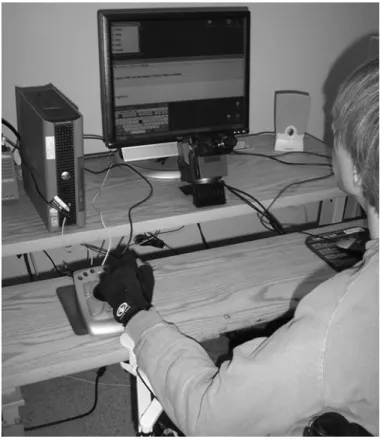
An adjustable chair was provided for participants without wheelchairs. The chair seat-to-floor height and armrest height were adjusted for the comfort of the par-ticipant. An Ergorest adjustable support (ErgoRest Oy; Siilinjärvi, Finland) was available to provide an armrest for participants with manual wheelchairs. The personal computer was on a two-level height-adjustable computer
Table 1.
Primary diagnosis for participants with disabilities.
Participant Primary Diagnosis
1 Dwarfism and incomplete SCI (C5/6 and L1/2)
2 Cerebral palsy
3 SCI (C5/6)
4 Cerebral palsy
5 SCI (C5/6)
6 Cerebral palsy
desk to support adjustment for the participant’s comfort. As shown in Figure 2, participants sat upright in a com-fortable position approximately 2 ft from the computer monitor, with their eyes hitting just below the midline of the monitor.
RESULTS
The mean for each of the identified variables of interest was computed per block. Data for all the blocks completed by the nondisabled participants were used to calculate a mean and 95 percent CI for the group for each variable. Mean values for each block were compared to determine whether performance changed as the participant gained experience using the system. Significance was determined
Table 2.
Number of sentences transcribed by each participant.
Participant* No. Sentences Transcribed
A 60 B 60 1 40 2 7 C 60 3 30 D 60 4 25 E 60 5 80 6 30
*Letters = nondisabled participants, numbers = participants with disabilities.
Figure 1.
by a one-way repeated-measures analysis of variance (ANOVA) with = 0.05.
On an individual basis, the data for each participant with disabilities were used to calculate a mean and 95% CI for each variable. Note that data for Participant 4 are missing in some comparisons because this participant only completed a single block with the letters-only typing condition, thus precluding the computation of a CI. The data for the nondisabled group and each of the partici-pants with disabilities were plotted together for comparison.
Text Entry Rate
The TER, measured in characters per second, was calculated in each trial from the appearance of the P, to the time the participant hit the enter key, ending the trial (Equation (1)):
where |T| is the length (i.e., number of characters) in the transcribed text string (1 is added for the enter key) and t
is the transcription time. TER focuses on the resulting text, T, ignoring text that was erased by the participant. TER also does not distinguish between text entered by the participant and text entered by word completion.
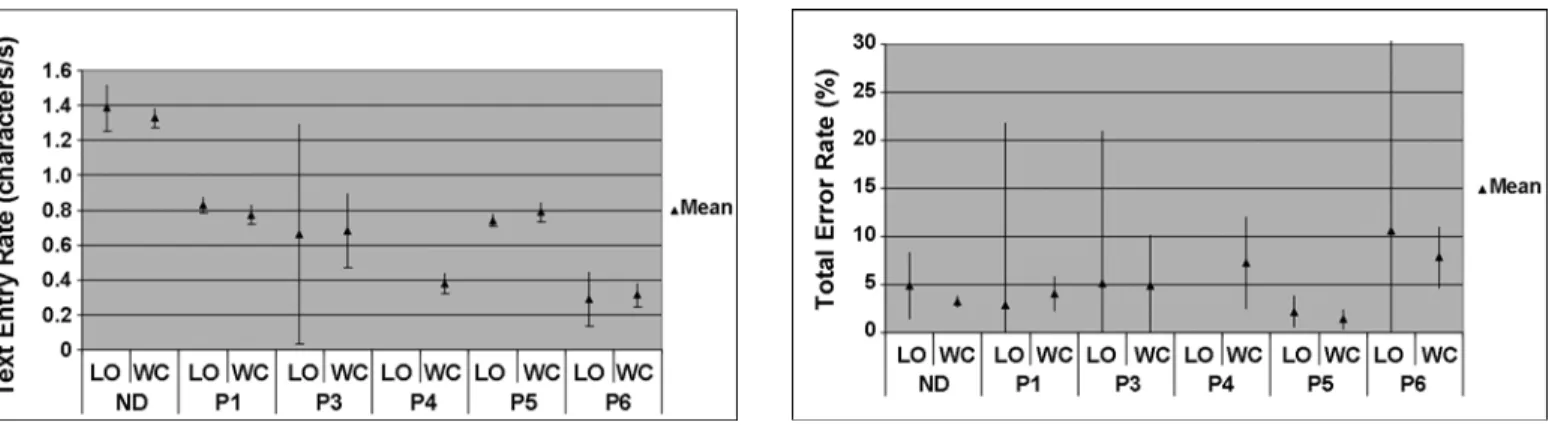
Figure 3 shows the 95% CIs for the average TER for both typing conditions. A one-way repeated-measures ANOVA was performed with = 0.05 to determine whether block order had a significant effect on TER. Results showed p = 0.63, indicating no relationship between block order and TER.
Keystroke Rate
Keystroke rate (KR), measured in keystrokes per second, is the total number of keystrokes entered divided by the total amount of time for transcription in seconds (Equation (2)):
where |I| is the length of I. KR is thus distinguished from TER in that it reflects all keystrokes generated by the user.
Figure 4 shows the 95% CIs for KR for both typing conditions. A one-way repeated-measures ANOVA was performed with = 0.05 to determine whether block order had a significant effect on KR. Results showed p = 0.98, indicating no relationship between block order and KR.
Error Rate
Total error rate (ERT) is the number of erroneous key-strokes (both corrected and uncorrected) divided by the num-ber of correct and erroneous keystrokes (Equation (3)) [10]:
where |INF| is the number of characters in INF, |IF| is the number of characters in IF, and |C| is the number of characters in C. Figure 5 shows the 95% CIs for ERT for both typing conditions.
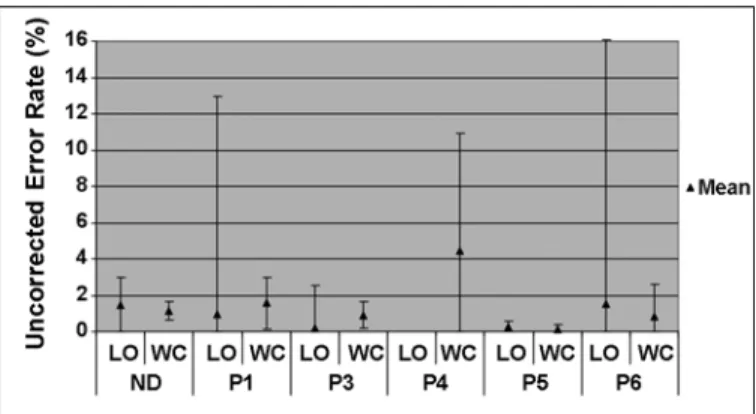
Uncorrected error rate (ERU) is the number of uncor-rected erroneous keystrokes divided by the number of correct and erroneous keystrokes (Equation (4)) [10]:
Figure 2.
Figure 6 shows the 95% CIs for ERU for both typing conditions.
Corrected error rate (ERC) is the number of corrected erroneous keystrokes divided by the number of correct and erroneous keystrokes (Equation (5)) [10]:
Figure 7 shows the 95% CIs for ERC for both typing conditions.
Bandwidth
Utilized bandwidth (UB) is the proportion of band-width representing useful information transfer [10]. As
such, it is the number of correct keystrokes divided by the total number of keystrokes (Equation (6)):
where |F| is the number of keystrokes in F. Note that the total number of keystrokes includes “fixes,” whereas the denomi-nator contains the total number of text-producing key-strokes in the previously described error metrics. Figure 8 shows the 95% CIs for UB for both typing conditions.
Wasted bandwidth (WB) is the proportion of band-width used to create and fix errors (Equation (7)) [10]:
Figure 9 shows the 95% CIs for WB under both typing conditions.
Keystroke Savings
Keystroke savings compared with letters-only typing (KSLO) reflects the difference between the number of keys pressed and the number of characters actually pro-duced (Equation (8)). If each keystroke in I resulted in a character in T, the keystroke savings is zero because the lengths of I and T are equal.
Figure 3.
Text entry rate (mean characters per second and 95% confidence interval) for letters-only (LO) and word-completion (WC) conditions. ND = nondisabled, P = participant with disabilities.
Figure 4.
Keystroke rate (mean keystrokes per second and 95% confidence interval) for letters-only (LO) and word-completion (WC) conditions. ND = nondisabled, P = participant with disabilities.
Figure 5.
Total error rate (mean % and 95% confidence interval) for letters-only (LO) and word-completion (WC) conditions. ND = nondisabled, P = participant with disabilities.
Figure 10 shows the 95% CIs for KSLO for each typing condition.
Keystroke savings compared with optimal letters-only typing (KSOLO) reflects the difference between the number of keys pressed and the number of characters in P ( Equa-tion (9)). Optimal letters-only typing assumes that the user transcribes P exactly, thus requiring a single keystroke to enter each character in P. In the event that this condition occurs, the keystroke savings compared with optimal letters-only is zero.
Figure 11 shows the 95% CIs for KSOLO for each typing condition.
Keystroke savings compared with optimal use of word completion (KSOWC) reflects the difference between the number of keys pressed and the minimum number of keys that would have been needed if word com-pletion had been used to the fullest extent (Equation (10)). The minimum number of keystrokes required using word completion (MKRWC) was obtained by use of a strategy of always searching the word-completion list and select-ing the target word immediately when it appeared in the list. If word completion is used in this manner, then the keystroke savings will be zero. If word completion is not used or is used in a less efficient manner, then I is longer than the minimum and keystroke savings is negative.
Figure 12 shows the 95% CIs for KSOWC for each typing condition.
DISCUSSION
Text Entry Rate and Keystroke Rate
Comparing TER with and without word completion is important, but also comparing KR across conditions can provide additional insights. Unlike TER, KR considers
Figure 6.
Uncorrected error rate (mean % and 95% confidence interval) for letters-only (LO) and word-completion (WC) conditions. ND = nondisabled, P = participant with disabilities.
Figure 7.
Corrected error rate (mean % and 95% confidence interval) for letters-only (LO) and word-completion (WC) conditions. ND = nondisabled, P = participant with disabilities.
Figure 8.
Utilized bandwidth (mean and 95% confidence interval) for letters-only (LO) and word-completion (WC) conditions. ND = nondisabled, P = participant with disabilities.
all keystrokes, not just those that appear in the final T. KR is particularly useful when a client’s goal is to reduce the number of keystrokes (perhaps because of pain or fatigue).
In addition, KR can be used in the clinic to determine whether a client’s performance with word completion is due to the behavior of the system or the behavior of the user. If KR is similar across conditions, then a lack of improvement in TER is due either to the client’s difficulty selecting word completions or consistent failure to search the completion list. If KR is significantly slower across conditions, then a lack of improvement in TER is due to the client either having a cognitive delay imposed by word completion, searching the list too often, or spending too much time during each search.
As shown in Figure 3, large differences were observed in TER between participants but TER was
remarkably similar within each participant across both experimental conditions. In all cases, however, KR under word completion was slower than KR under letters-only typing, sometimes significantly so. If Participants 1 or 5 are seen clinically, their clinician should focus first on list-search behavior. If the problem is that the client is searching the list too often, then the number of key-strokes that must be entered before the word completion list is displayed can be increased. If the problem is that the client is spending too much time per list search, then the number of words in the completion list can be reduced.
Error Rate
ERT is valuable for obvious reasons, but ERC and ERU also have clinical utility. In particular, if ERT is simi-lar across conditions, then a simi-large difference in ERC or ERU across conditions is likely to be of interest to the cli-nician. The change may be due to different strategies
Figure 9.
Wasted bandwidth (mean and 95% confidence interval) for letters-only (LO) and word-completion (WC) conditions. ND = nondisabled, P = participant with disabilities.
Figure 10.
Keystroke savings compared with letters-only typing (mean and 95% confidence interval) for letters-only (LO) and word-completion (WC) conditions. ND = nondisabled, P = participant with disabilities.
Figure 11.
Keystroke savings compared with optimal letters-only typing (mean and 95% confidence interval) for letters-only (LO) and word-completion (WC) conditions. ND = nondisabled, P = participant with disabilities.
Figure 12.
Keystroke savings compared with optimal word-completion use (mean and 95% confidence interval) for letters-only (LO) and word-completion (WC) conditions. ND = nondisabled, P = participant with disabilities.
employed by the client (i.e., increased/decreased vigi-lance toward identifying typographical errors) or to a dif-ference between conditions in the difficulty associated with correcting errors. As shown in Figures 5 and 6, no difference in ERC or ERU was seen across conditions for any of the participants with disabilities.
Bandwidth
UB and WB provide measures of text entry effi-ciency that are independent of time. These measures are useful for research comparing performance between par-ticipants with and without disabilities. With speed elimi-nated, differences in movement time between participants are removed.
These measures are also useful clinically for evalua-tion of devices with steep learning curves, where speed is initially slow but likely to increase with practice. In addi-tion, UB and WB, in combination with ERC and ERT, can provide insight into how efficiently a client can correct errors. If ERC and ERT are similar between two condi-tions but WB increases, this indicates an increased num-ber of keystrokes devoted to fixing errors. As shown in
Figures 8 and 9, no difference in UB or WB was seen between conditions for any of the participants with dis-abilities or between participants with disdis-abilities and par-ticipants without disabilities.
Keystroke Savings
As with UB and WB, keystroke-saving metrics focus on I entered by the user independent of the time for tran-scription. KSLO and KSOLO both compare performance with use of word completion with theoretical perfor-mance on the same task without use of word completion. Using the unconstrained text entry technique, these meas-ures can be either positive or negative. If word comple-tion is used effectively, then the length of I is less than the length of T and keystroke savings will be a positive num-ber. If the user commits errors and engages in correction, the length of I may be greater than the length of T, result-ing in negative keystroke savresult-ings.
KSOWC provides a measure of how a user’s actual list-search strategy affects performance. Comparing actual and “optimal” performance allows a clinician to deter-mine whether to focus on the user’s behavior or the con-figuration of the word-prediction interface when trying to improve performance. If little difference exists between actual and optimal performance, then any further perfor-mance improvement will have to come from changes to the interface. However, if a large difference exists
between actual and optimal performance, then the clini-cian may choose to focus on the user’s strategy for using word completion.
Participant 6 was the only participant with a negative KSLO and KSOLO. Participant 6 had difficulty targeting the keys on the on-screen keyboard and had the highest ERC and the highest average WB with a large CI. How-ever, Participant 6 performed even worse without word completion. In fact, Participant 6 relied on word comple-tion extensively when it was available and used word completion to reduce the number of both keystrokes required and errors. This insight would not have been possible without the unconstrained text entry protocol.
Although all the other participants with disabilities had positive KSLO and KSOLO, only Participant 5 had a KSOWC approaching –10 percent. This implies that Par-ticipants 1, 3, and 4 could have improved their perfor-mance with word completion by changing their strategy for using word completion. Any improvement in perfor-mance for Participant 5, on the other hand, would likely need to come from changes to the configuration of the word-completion interface.
CONCLUSIONS
This article demonstrates how an unconstrained text input protocol could be applied in the clinic and labora-tory and presented three new measures of performance with word completion (KSLO, KSOLO, and KSOWC). Unconstrained text input analysis provides a valuable new tool for both clinicians and researchers who work with assistive technology for computer access and aug-mentative communication. Unconstrained text input allows clients and research participants to choose their own balance between speed and accuracy and to enter text under more realistic conditions.
A limitation of the methods used in this article was the failure to distinguish between characters that were erased because they were erroneous (i.e., truly incorrect but fixed) and characters that were actually correct but erased in the process of fixing errors [11–12]. Wobbrock and Myers have recently demonstrated how the input stream can be decomposed into [12]—
• Nonerrors: Correct keystrokes (i.e., the correct key pressed at the correct time).
• Substitutions: Incorrect keystrokes in which one char-acter is entered instead of another.
• Insertions: Incorrect keystrokes in which additional characters are entered.
• Omissions: Errors in which a character that should appear in I does not.
• Fixes: Keystrokes used to remove characters or repo-sition the cursor (e.g., backspace, delete, arrow keys).
The algorithms developed by Wobbrock and Myers, however, make certain assumptions that are not necessari-ly valid for individuals with disabilities or for text entry methods like word completion and abbreviation expan-sion, in which a single input can generate multiple char-acters [12]. Future work is planned to determine how Wobbrock and Myers’s work can be extended to cover these situations.
ACKNOWLEDGMENTS
Author Contributions:
Acquisition of data: J. M. Smith.
Analysis and interpretation of data: J. M. Smith.
Statistical analysis: J. M. Smith.
Study concept and design: R. C. Simpson.
Drafting of manuscript: R. C. Simpson.
Obtained funding: R. C. Simpson.
Study supervision: R. C. Simpson.
Financial Disclosures: The authors have declared that no competing interests exist.
Funding/Support: This material was based on work supported by the National Science Foundation (equipment: grant 0133395, Dr. Simpson: grants 0133395 and 0540865, and Ms. Smith: grant 0333420) and was conducted while Ms. Smith was a student in the Department of Rehabilitation Science and Technology of the University of Pittsburgh. Additional Contributions: Ms. Smith is currently employed by Koester Performance Research in Pittsburgh, Pennsylvania. Participant Follow-Up: The authors do not plan to inform partici-pants of the publication of this study.
REFERENCES
1. Koester HH, Levine S. Effect of a word prediction feature on user performance. Augment Altern Commun. 1996;12(3): 155–68. DOI:10.1080/07434619612331277608
2. Koester HH, Levine S. Keystroke-level models for user performance with word prediction. Augment Altern Com-mun. 1997;13(4):239–57.
DOI:10.1080/07434619712331278068
3. Koester HH, Levine SP. Model simulations of user perfor-mance with word prediction. Augment Altern Commun. 1998;14(1):25–36. DOI:10.1080/07434619812331278176
4. Venkatagiri H. Efficiency of lexical prediction as a commu-nication acceleration technique. Augment Altern Commun. 1993;9(3):161–67. DOI:10.1080/07434619312331276561 5. Venkatagiri H. Effect of window size on rate of
communi-cation in a lexical prediction AAC system. Augment Altern Commun. 1994;10(2):105–12.
DOI:10.1080/07434619412331276810
6. Tam C, Reid D, Naumann S, O’Keefe B. Effects of word prediction and location of word prediction list on text entry with children with spina bifida and hydrocephalus. Aug-ment Altern Commun. 2002;18(3):147–62.
DOI:10.1080/07434610212331281241
7. Zordell J. The use of word prediction and spelling correction software with mildly handicapped students. Closing the Gap. 1990;9:10–11.
8. MacKenzie IS, Soukoreff RW. A character-level error analysis technique for evaluating text entry methods. Proceedings of the Second Nordic Conference on Human-Computer Inter-action; 2002 Oct 19–23; Aarhus, Denmark. New York (NY): ACM; 2002. p. 243–46.
9. Soukoreff RW, MacKenzie IS. Measuring errors in text entry tasks: An application of the Levenshtein string dis-tance statistic. CHI ‘01 Extended Abstracts on Human Fac-tors in Computing Systems; 2001 Mar 31–Apr 5; Seattle, WA. New York (NY): ACM. p. 319–20.
10. Soukoreff RW, MacKenzie IS. Metrics for text entry research: An evaluation of MSD and KSPC, and a new uni-fied error metric. Proceedings of the SIGCHI Conference on Human Factors in Computing Systems; 2003 Apr 5–10; Fort Lauderdale, FL. New York (NY): ACM; 2003. p. 113–20. 11. Soukoreff RW, MacKenzie IS. Recent developments in
text-entry error rate measurement. CHI ‘04 Extended Abstracts on Human Factors in Computing Systems; 2004 Apr 24–29; Vienna, Austria. New York (NY): ACM; 2004. p. 1425–28.
12. Wobbrock JO, Myers BA Analyzing the input stream for character-level errors in unconstrained text entry evalu-ations. ACM TOCHI. 2006;13(4):458–89.
DOI:10.1145/1188816.1188819
13. MacKenzie IS, Soukoreff RW. Phrase sets for evaluating text entry techniques. CHI ‘03 Extended Abstracts on Human Factors in Computing Systems; 2003 Apr 5–10; Fort Lauderdale, FL. New York (NY): ACM; 2003. p. 754–55.
Submitted for publication September 30, 2008. Accepted in revised form June 23, 2009.