NEC Storage Manager
Snapshot
Command Reference
© NEC Corporation 2004
No part of the contents of this book may be reproduced or transmitted in any form without permission of NEC Corporation. The contents of this book may be modified without notice in the future.
Preface
This manual describes how to use the snapshot function provided by NEC Storage DynamicSnapVolume and NEC Storage SnapControl.
The snapshot function consists of the snapshot creation function provided in a disk array and software to manage and operate it. It utilizes snapshot to make business operation more effective.
This manual describes command syntax and how to operate commands that operate the snapshot function by command lines. In the following manuals, the snapshot function and how to operate the function on other platforms are described.
“NEC Storage Manager Snapshot User’s Manual (Function Guide)” (IS030):
This manual describes comprehensive explanation of the snapshot function and how to operate the function from software.
“NEC Storage Manager Snapshot User’s Manual (Installation and Operation Guide for Windows)” (IS031): This manual describes how to install and operate the snapshot function on Windows OS.
“NEC Storage Manager Snapshot User’s Manual (Installation and Operation Guide for Linux)” (IS035): This manual describes how to install and operate the snapshot function on Linux OS.
“NEC Storage Manager Messages Handbook” (IS010):
This manual describes messages output by NEC Storage Manager software. This manual also includes messages output from the snapshot function.
“NEC Storage Manager Manual Guide” (IS901) describes an overview of NEC Storage and the related manuals. Remarks 1. This manual explains functions implemented by the following program products:
• NEC Storage Manager and NEC Storage BaseProduct
• NEC Storage ReplicationControl
• NEC Storage SnapControl
• NEC Storage DynamicSnapControl
• NEC Storage ReplicationControl SQL Option
• NEC Storage DynamicDataReplication
• NEC Storage RemoteDataReplication
2. This manual is applicable to the program products of the following versions:
• NEC Storage Manager Ver3.3
• NEC Storage BaseProduct Ver3.3
• NEC Storage SnapControl Ver3.3
• NEC Storage ReplicationControl Ver3.3
• NEC Storage ReplicationControl SQL Option Ver3.2
3. The NEC Storage Manager is referred to as iSM or Storage Manager in the text of this manual. Also, the NEC Storage series disk array subsystem is referred to as a disk array.
DynamicSnapVolume NEC Storage DynamicSnapVolume PerformanceMonitor NEC Storage PerformanceMonitor RemoteDataReplication NEC Storage RemoteDataReplication ReplicationControl NEC Storage ReplicationControl
ReplicationControl SQL Option NEC Storage ReplicationControl SQL Option SnapControl NEC Storage SnapControl
5. The following descriptions in the text of this manual refer to the corresponding manuals. Description Corresponding Manual User’s Manual NEC Storage Manager User’s Manual (IS004) Data Replication Command Reference NEC Storage Manager Data Replication Command
Reference (IS021) 6. Trademarks and registered trademarks
• Microsoft® and Windows® are registered trademarks or trademarks of Microsoft Corporation in the United States and other countries.
• HP-UX is a registered trademark of Hewlett-Packard, Co. in the United States.
• UNIX is a registered trademark of The Open Group in the United States and other countries.
• VERITAS, VxVM, VxFS, NetBackup, VERITAS Volume Manager, VERITAS File System, and VERITAS NetBackup are registered trademarks or trademarks of VERITAS Software Corporation in the United States and other countries.
• Legato NetWorker is a registered trademark of Legato Systems, Inc. in the United States.
• Sun is a registered trademark of Sun Microsystems, Inc. in the United States and other countries.
• Solaris is a registered trademark of Sun Microsystems, Inc. in the United States.
• Linux is a trademark or registered trademark of Mr. Linus Torvalds in the United States and other countries.
Other product names and company names, etc. are registered trademarks or trademarks of the associated companies.
Chapter 1 Overview...1
1.1 Command List ...1
1.2 Specifications Common to the Commands ...3
1.2.1 Volume Types...3
1.2.2 Operation Volume Setting File...5
1.3 Linkage to SQL Server 2000...11
1.3.1 Database Operation File ...11
Chapter 2 Command Reference ...15
2.1 Volume List Creation/Display...15
2.1.1 iSMvollist (Windows) ...15 2.1.2 iSMvollist (UNIX)...22 2.2 Snapshot Operations...28 2.2.1 iSMsc_create ...28 2.2.2 iSMsc_delete ...35 2.2.3 iSMsc_restore ...43 2.2.4 iSMsc_query...51 2.3 Link Operations ...62 2.3.1 iSMsc_link...62 2.3.2 iSMsc_unlink...67 2.3.3 iSMsc_linkinfo ...72
2.4 Displaying Logical Disk Information...83
2.4.1 iSMrc_sense...83 2.4.2 iSMrc_ldlist ...88 2.5 Disk Operations ...93 2.5.1 iSMrc_flush ...93 2.5.2 iSMrc_mount ...96 2.5.3 iSMrc_umount ...99 2.5.4 iSMrc_signature ...103 2.5.5 iSMrc_scan ...107
2.6 Operations Linked with SQL Server 2000 ...108
2.6.1 iSMsql_snapshotbkup...108
2.6.2 iSMsql_snapshotrst...121
Chapter 3 Operation Settings ...133
3.1 Option Setting File (Windows) ...133
3.2 Environment Variables (UNIX) ...139
Chapter 1 Overview
1
1
1
.
.
.
1
1
1
C
C
C
o
o
o
m
m
m
m
m
m
a
a
a
n
n
n
d
d
d
L
L
L
i
i
i
s
s
s
t
t
t
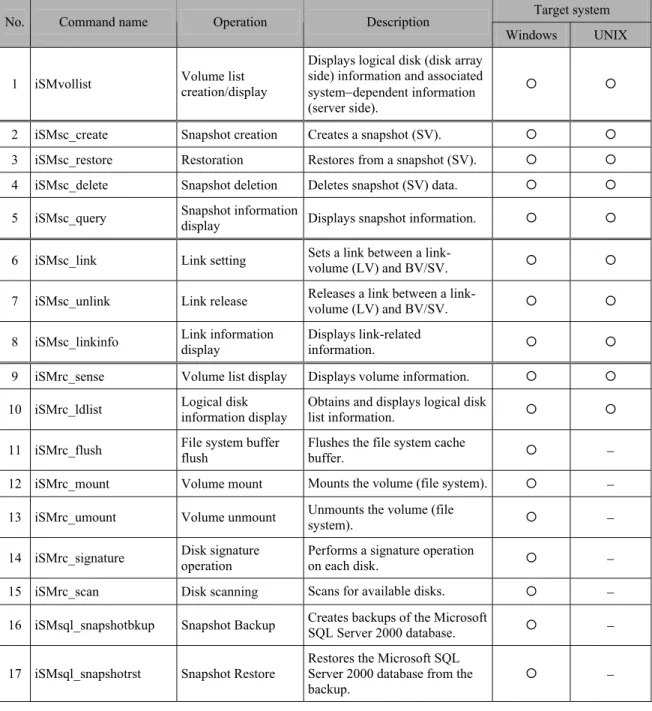
Table 1-1 lists snapshot related commands described in this document.
The description of “UNIX” that appears in this document indicates all the UNIX systems, such as HP-UX, Solaris, Linux etc., which the SnapControl supports.
Table 1-1 Command List
Target system No. Command name Operation Description
Windows UNIX
1 iSMvollist Volume list creation/display
Displays logical disk (disk array side) information and associated system−dependent information (server side).
{ {
2 iSMsc_create Snapshot creation Creates a snapshot (SV). { {
3 iSMsc_restore Restoration Restores from a snapshot (SV). { {
4 iSMsc_delete Snapshot deletion Deletes snapshot (SV) data. { {
5 iSMsc_query Snapshot information display Displays snapshot information. { {
6 iSMsc_link Link setting Sets a link between a link- volume (LV) and BV/SV. { {
7 iSMsc_unlink Link release Releases a link between a link- volume (LV) and BV/SV. { {
8 iSMsc_linkinfo Link information display Displays link-related information. { {
9 iSMrc_sense Volume list display Displays volume information. { {
10 iSMrc_ldlist Logical disk information display Obtains and displays logical disk list information. { {
11 iSMrc_flush File system buffer flush Flushes the file system cache buffer. { − 12 iSMrc_mount Volume mount Mounts the volume (file system). { − 13 iSMrc_umount Volume unmount Unmounts the volume (file system). { − 14 iSMrc_signature Disk signature operation Performs a signature operation on each disk. { − 15 iSMrc_scan Disk scanning Scans for available disks. { − 16 iSMsql_snapshotbkup Snapshot Backup Creates backups of the Microsoft SQL Server 2000 database. { −
17 iSMsql_snapshotrst Snapshot Restore
Restores the Microsoft SQL Server 2000 database from the
backup. { −
Notes:
(1) Commands from No.1 to No.15 can be used after the SnapControl has been installed. (2) Commands No.16 and No.17 can be used after the ReplicationControl SQL Option has been
installed.
(3) Command No.1 can be used also for iSM and ReplicationControl. (4) Commands from No.9 to No.15 can be used also for ReplicationControl.
(5) Commands No.16 and No.17 are Microsoft SQL Server 2000 linkage functions. These commands operate as optional functions of SnapControl or ReplicationControl.
(6) On the Windows system, those commands can be operated only by a user who belongs to the Administrators group.
(7) On the UNIX system, operation authority belongs to a super user immediately after the installation. The volume list can be created only by the super user; other operations, however, can be performed by any user by changing the authority for the command and directory.
(8) When iSM is operated together (I/O issue to a disk array is controlled via iSM), joint operations are possible for commands from No.2 to No.8.
1
1
1
.
.
.
2
2
2
S
S
S
p
p
p
e
e
e
c
c
c
i
i
i
f
f
f
i
i
i
c
c
c
a
a
a
t
t
t
i
i
i
o
o
o
n
n
n
s
s
s
C
C
C
o
o
o
m
m
m
m
m
m
o
o
o
n
n
n
t
t
t
o
o
o
t
t
t
h
h
h
e
e
e
C
C
C
o
o
o
m
m
m
m
m
m
a
a
a
n
n
n
d
d
d
s
s
s
1
1
1
.
.
.
2
2
2
.
.
.
1
1
1
V
V
V
o
o
o
l
l
l
u
u
u
m
m
m
e
e
e
T
T
T
y
y
y
p
p
p
e
e
e
s
s
s
Types of volumes that are specified as operation targets by snapshot commands are as follows: Table 1-2 Volume Types
Target system Type Description Identifier
Windows UNIX Logical disk name Specifies the logical disk name set on the disk array side. ld { { Mount point volume
name
Specifies the mount point volume name
assigned by the system to the volume. mvol { − NTFS folder name Specifies the NTFS folder name (path name) set for the volume. mdir { − Drive letter Specifies the drive letter set for the volume. drv { − Special file name Specifies the special file name assigned by the system to the disk (logical disk). sfn − { Volume group name Specifies the name of the LVM’s volume group that includes the disk (logical disk). vg − { Disk group name Specifies the name of the VxVM’s disk group that includes the disk (logical disk). dg − {
Relative generation name
Specifies a number that is assigned in descending order (as in -2, -3, -4, etc.) relative to the latest generation (-1) to identify an SV corresponding to a BV.
relgen { {
Cyclic generation
Specified when the snapshot of the oldest generation is deleted as a new snapshot is
created. cyclic { {
Deleted SV auto selection
Indicates that the SV to be deleted is automatically selected when a snapshot is
deleted. auto { {
SV batch deletion Specified at the batch deletion of snapshots in all generations when a snapshot is deleted. all { {
{: Target −: Non-target
Notes:
(1) The identifier is a character string that indicates the volume type and is used in the following cases:
y When specifying a volume type by a snapshot operation command argument (-bvflg, -svflg, or -volflg).
y When specifying a volume type by the pair specification (BV type or SV type) in the operation volume setting file.
(2) To use the volume group, the LVM environment is necessary. (3) To use the disk group, the VxVM environment is necessary.
(4) On the UNIX system Solaris version, to specify a special file name (/dev/rdsk/c#t#d#s#), remove the special file name’s slice (partition) number (s#).
(5) When a pair of volumes is specified in remote operations, an applicable volume type is a logical disk name only.
(6) When joint operation with iSM is performed, applicable volume types are logical disk name, relative generation name, cyclic generation, deleted SV auto selection, and SV batch deletion only.
1
1
1
.
.
.
2
2
2
.
.
.
2
2
2
O
O
O
p
p
p
e
e
e
r
r
r
a
a
a
t
t
t
i
i
i
o
o
o
n
n
n
V
V
V
o
o
o
l
l
l
u
u
u
m
m
m
e
e
e
S
S
S
e
e
e
t
t
t
t
t
t
i
i
i
n
n
n
g
g
g
F
F
F
i
i
i
l
l
l
e
e
e
To perform batch setting of paired volumes by a snapshot command with the -file option, use the operation volume setting file.
The operation volume setting file is described below.
[ FILE LOCATION AND NAME ]
Can be freely specified.
[ DESCRIPTION ]
The operation volume setting file is used to perform batch setting of multiple pairs by using a snapshot command.
[ SYNOPSIS ]
This file is described in the following synopsis:
For the snapshot operation commands (iSMsc_create, iSMsc_delete, and iSMsc_restore)
For the snapshot information acquisition command (iSMsc_query)
BV_Type:BV SV_Type:SV
BV_Type:BV
To describe the BV and SV, use a colon (“:”) to connect the volume type (BV_Type or SV_Type) with the volume (BV or SV). When the SV can be omitted, describe only the BV information.
For the link operation commands (iSMsc_link and iSMsc_unlink)
LV_Type:LV BV_Type:BV
LV_Type:LV SV_Type:SV
LV_Type:LV
Describe the LV and BV/SV, with the volume type (LV_Type or BV_Type/SV_Type) and the volume (LV or BV/SV) connected using a colon (“:”). When the BV/SV can be omitted, describe
For the link information acquisition command (iSMsc_linkinfo)
VOL_Type:VOL
To display the link information, describe the volume, with the volume type (VOL_Type) and the volume (VOL) connected using a colon (“:”).
Specifying volume types
The following values can be specified as a volume type (BV_Type or SV_Type) by using either a numerical value or a character string.
Table 1-3 Volume Types (BV_Type or SV_Type)
Volume types Target system Target volume
By number By characters Windows UNIX
Logical disk name 0 ld { {
Special file name 1 sfn
-
{Volume group name 2 vg
-
{Drive letter 4 drv {
-
Disk group name 5 dg
-
{Mount point volume name 6 mvol {
-
NTFS folder name 7 mdir {
-
Relative generation (SV only) 10 relgen { { Cyclic generation (SV only) 11 cyclic { { Auto selection (SV only) 12 auto { { SV batch deletion (SV only) 13 all { { * When cyclic generation, auto selection or SV batch deletion is specified, the volume name is
not described (no data is described after “:”).
The following values can be specified as a volume type (LV_Type, SV_Type, or VOL_Type) by using either a numerical value or a character string.
Table 1-4 Volume Types (LV_Type, SV_Type, and VOL_Type)
Volume types Target system
Target volume
By number By characters Windows UNIX
Logical disk name 0 ld { {
Special file name 1 sfn
-
{Drive letter 4 drv {
-
Mount point volume name 6 mvol {
-
NTFS folder name 7 mdir {
-
A volume type (SV_Type or VOL_Type) can also be specified as [BV volume type + relative generation]. The following values can be specified using either a numerical value or a character string.
Table 1-5 Volume Types (SV_Type and VOL_Type)
Volume types Target system
Target volume
By number By characters Windows UNIX
Logical disk name 100 ld.relgen { {
Special file name 101 sfn.relgen
-
{Drive letter 104 drv.relgen {
-
Mount point volume name 106 mvol.relgen {
-
NTFS folder name 107 mdir.relgen {
-
* Describe the volume type (character string) with the character string representing the relative generation (relgen) connected using a period (“.”). Likewise, describe the volume with the character string connected using a period (“.”).
* A description example is as follows: ld.relgen:volume-LD-name.-1
Specifying a volume (BV, SV, LV, VOL)
Specify the name of the target volume that has an attribute specified as a volume type. The maximum number of characters is as follows:
Table 1-6 Specifying a Volume
Target volume Maximum number of characters
Logical disk name Special file name Volume group name Drive letter
Disk group name
32 single-byte characters
Mount point volume name 52 single-byte characters
NTFS folder name 260 single-byte characters
Rules
y Start description from the first column of the line.
y A line break shall be a partition of records.
y Up to 1,024 single-byte characters can be described per record.
y One pair can be described per record.
y When there are one BV and one SV, description of the SV can be omitted.
y Normally, when there are one BV and multiple SVs, description of the SVs cannot be omitted.
y Use a blank space or a tab character to separate the description of the BV (LV) from the description of the SV.
y Text displayed from the sharp (#) character to the end of the record is recognized as a comment.
y If there is an error in the file syntax, operations to all pairs described in the file become invalid.
y When describing a pair that combines a volume group or a disk group with a special file name (or logical disk name), multiple volumes can be specified by describing multiple special file names (or logical disk names) separated by a comma (,).
y When specifying a pair that combines a volume group or a disk group with a special file name (or logical disk name), the number of logical volumes that consist of the volume group or the disk group must coincide with the number of special file names to be described.
y If a character string, such as an NTFS folder name, includes a blank space (∆), colon (:), or period (.), enclose the entire character string in double quotation marks (“).
The following is an example of a volume description of the operation volume setting file:
For the snapshot command (Windows)
(Specify the BV and SV.)
ld:bv000 ld:sv001 0:bv000 0:sv001 drv:E ld:bv001 mdir:”c:\mnt q\vol\” ld:sv001 mvol:\\?\Volume{c619c48b-1234-11d8-5678-00e018fa017d} ld:sv001 ld:bv000 relgen:.-1
(Specify cyclic generation.)
ld:bv000 cyclic #iSMsc_create command only 0:bv000 11 #iSMsc_create command only (Specify deleted SV auto selection.)
ld:bv011 auto #iSMsc_delete command only (Specify SV batch deletion.)
ld:bv012 all #iSMsc_delete command only (When the number of SV generations for the BV is 1)
For the link operation command (Windows)
(Specify the LV and destination-volume.)
ld:lv001 ld:sv001 ld:lv001 drv:E
ld:lv001 mdir:”c:\mnt q\vol\”
ld:lv001 mvol:\\?\Volume{c619c48b-1234-11d8-5678-00e018fa017d} (Specify [BV + generation] as the destination-volume.)
ld:lv001 ld.relgen:bv007.-2
ld:lv001 mdir.relgen:”c:\mnt q\vol\”.-2 0:lv001 100:bv007.-2
(Specify only the LV.) ld:lv005
For the link information acquisition command (Windows)
(Specify a specific volume.) ld:sv001 drv:E mdir:”c:\mnt q\vol\” mvol:\\?\Volume{c619c48b-1234-11d8-5678-00e018fa017d} (Specify [BV + generation].) ld.relgen:bv007.-2 mdir.relgen:”c:\mnt q\vol\”.-2 100:bv007.-2
For the snapshot command (UNIX)
(Specify the BV and SV.)
ld:bv000 ld:sv001 0:bv000 0:sv001 sfn:/dev/rdsk/c16t1d0 ld:sv001
vg:/dev/vgvol ld:sv001, sv002 ld:dev000 relgen:.-1 (Specify cyclic generation.)
ld:bv000 cyclic #iSMsc_create command only 0:bv000 11 #iSMsc_create command only (Specify deleted SV auto selection.)
ld:bv011 auto #iSMsc_delete command only (Specify SV batch deletion.)
ld:bv012 all #iSMsc_delete command only (When the number of SV generations for the BV is 1)
For the link operation command (UNIX)
(Specify the LV and destination-volume.)
ld:lv001 ld:sv001
ld:lv001 sfn:/dev/rdsk/c16t1d0 (Specify [BV + generation] as the destination-volume.)
ld:lv001 ld.relgen:bv007.-2
ld:lv001 sfn.relgen:/dev/rdsk/c16t1d0.-2 (Specify only the LV.)
ld:lv005
For the link information acquisition command (UNIX)
(Specify a specific volume.) ld:sv001
sfn:/dev/rdsk/c16t1d0 (Specify [BV + generation].) ld.relgen:bv007.-2
1
1
1
.
.
.
3
3
3
L
L
L
i
i
i
n
n
n
k
k
k
a
a
a
g
g
g
e
e
e
t
t
t
o
o
o
S
S
S
Q
Q
Q
L
L
L
S
S
S
e
e
e
r
r
r
v
v
v
e
e
e
r
r
r
2
2
2
0
0
0
0
0
0
0
0
0
1
1
1
.
.3
.
3
3.
.
.1
1
1
D
D
D
a
a
a
t
t
t
a
a
a
b
b
b
a
as
a
s
se
e
e
O
O
O
p
p
p
e
er
e
r
ra
a
a
t
t
t
i
io
i
o
o
n
n
n
F
F
F
i
il
i
l
l
e
e
e
The ReplicationControl SQL Option command, which is a Microsoft SQL Server 2000 linkage function, allows the database operation file to be used by means of the -dbfile option when manipulating multiple databases in batch processing.
The database operation file is described below.
[ FILE LOCATION AND NAME ]
Can be freely specified.
[ DESCRIPTION ]
The database operation file is used to perform batch setting of multiple databases by using a ReplicationControl SQL Option command.
[ SYNOPSIS ]
This file is described in the following synopsis:
db:db_name [ option_type:[value] ] [...]
For description, use a colon (:) to connect “db” with a database name (db_name) and to connect an option type (option_type) with the preset value (value).
Description of each option can be omitted or can be in arbitrary order.
Specifying a database name (
db_name
)
Specify a name of the database which is a Snapshot Backup or Snapshot Restore target. If the database name includes any of the following eleven characters, an error occurs. \ / : , ; * ? “ < > |
Specifying an option type (
option_type
) and a preset value (
value
)
The following character strings can be specified as an option type.
Table 1-7 Specifying an Option Type and Preset Value Option type Description
uid Specify a user ID for connecting to the Microsoft SQL Server 2000. pass Specifies a password for the user ID for connecting to the Microsoft SQL Server 2000. input Specifies for entering a user ID and a password from the input screen. server Specify a computer name and an instance name for connecting to a named instance.
remod
Specify the mode during the database recovery.
Description of this option is effective only during Snapshot Restore execution, and becomes invalid during Snapshot Backup execution.
refile Specifies the standby database file. Description of this option is effective only during Snapshot Restore execution, and becomes invalid during Snapshot Backup execution.
move
When executing Restore by using a physical file that has a different path from the backed up physical file, specify the data file path name and the log file path name.
Description of this option is effective only during Snapshot Restore execution, and becomes invalid during Snapshot Backup execution.
Specify the following preset values for each option type:
uid:user_Id Specify a user ID for connecting to the Microsoft SQL Server 2000. Specify the pass option together with this option. If this option is omitted, the system uses a user name and a password for the Windows login account.
This option and the input option cannot be simultaneously specified.
pass:[password] Specify a password for connecting to the Microsoft SQL Server 2000. If the password is omitted, the system recognizes that there is no password. Specify the uid option together with this option.
This option and the input option cannot be simultaneously specified.
input: Enters a user ID and a password from the input screen when connecting to the Microsoft SQL Server 2000. This option does not have a preset value.
This option and the uid and pass options cannot be simultaneously specified.
server:instance_name Specify a computer name and an instance name in the following format when connecting to a named instance.
computer_name\instance_name If this option is omitted, a connection is made to the predetermined instance.
The computer name must be either a local computer name, or a virtual computer name in the MSCS (Microsoft Cluster Server) environment.
remod:{recovery | norecovery | standby}
Specify the mode during the database recovery.
recovery Executes a command and simultaneously recovers the database.
norecovery Recovers the target database in the state so that the transaction log is applicable. standby Recovers the database as a standby
database. A standby database file is specified by the refile option. If this option is omitted, the operation is the same as the operation when recovery is specified.
refile:restore_file Specify a standby database file.
This option can be specified only when standby is specified by the remod option. If recovery or norecovery is specified, or if the remod option is omitted, an error occurs.
move:os_file_name[,...] When executing Snapshot Restore by the -norestore
option and when executing Restore by using a physical file that has a different path from the backed up physical file, specify the database’s data file path name and log file path name. As a file name specified by os_file_name, specify the database’s data file and log file in the full path by
Rules
y Start description from the first column of the line.
y A line break shall be a partition of records.
y Up to 1,024 single-byte characters can be described per record.
y Information of one database can be described per record.
y The same option type cannot be specified twice per record.
y Description of the database name cannot be omitted.
y The operation target database must be unique.
y Use a blank space or a tab character to separate the descriptions of the database name or the option type.
y Text displayed from the sharp (#) character to the end of the record is recognized as a comment.
y If there is an error in the file syntax, operations to all databases described in the file become invalid.
y If a character string includes a blank space (∆), enclose the entire character string in double quotation marks (“).
The following is an example of a description of the database operation file:
# db:db_name db:db01
# db:db_name uid:user_id pass:password
# db:db_name uid:user_id pass:password server:instance_name db:db01 uid:guest pass:guestpass
db:db02 uid:administrator pass:adminpass server:localmachine\user_inst # db:db_name input:
db:db01 input:
# db:db_name remod:restore_mode
# db:db_name remod:restore_mode refile:restore_file db:db01 remod:norecovery
db:db03 remod:standby refile:”d:\db_folder\db03_standby.dat” # db:db_name move:os_file_name[,...]
Chapter 2 Command Reference
2
2
2
.
.
.
1
1
1
V
V
V
o
o
o
l
l
l
u
u
u
m
m
m
e
e
e
L
L
L
i
i
i
s
s
s
t
t
t
C
C
C
r
r
r
e
e
e
a
a
a
t
t
t
i
i
i
o
o
o
n
n
n
/
/
/
D
D
D
i
i
i
s
s
s
p
p
p
l
l
l
a
a
a
y
y
y
2
2
2
.
.
.
1
1
1
.
.
.
1
1
1
i
i
i
S
S
S
M
M
M
v
v
v
o
o
o
l
l
l
l
l
l
i
i
i
s
s
s
t
t
t
(
(
(
W
W
W
i
i
i
n
n
n
d
d
d
o
o
o
w
w
w
s
s
s
)
)
)
[ NAME ]
iSMvollist - Creates and displays the table of logical disks and related information.
[ SYNOPSIS ]
iSMvollist –cr iSMvollist –diSMvollist -dl disk_array [ld_number] iSMvollist -de disk_array [ld_name] iSMvollist -dd disk_array [drive | path] iSMvollist -dp disk_array [disk_number] iSMvollist -dh disk_array [HBT [LUN]] iSMvollist –a
iSMvollist -al ld_number
iSMvollist -ae ld_name
iSMvollist -ad [drive | path] iSMvollist -ap disk_number
iSMvollist -av volume_name
iSMvollist -ah HBT [LUN] iSMvollist –ctl
iSMvollist –p iSMvollist –ax iSMvollist –ver iSMvollist -?
[ DESCRIPTION ]
The iSMvollist command creates and displays the table of logical disks and related information. The options which start with “a” display the relations of ld_number/ld_name/VAA/OS Type/drive/path/volume_name/HBT/LUN/disk_number/disk_array for all the disk arrays in the Volume List.
The options which start with “d” display the relations of ld_number/drive/path HBT/LUN/disk_number/ld_name/OS Type for the specified disk arrays.
The Volume List can be created and displayed only with the devices recognized by the system. The Volume List is necessary when ReplicationControl or SnapControl is used (except for joint operation with iSM).
z
OPTIONS
The iSMvollist command recognizes the following options and arguments.
-cr Scans the physical disks connected to the server, and creates or updates the volume information of the target devices. When disk arrays are added or deleted, and when logical disks are bound or unbound, you must perform this command to re-create the Volume List.
-d Displays the list of the disk arrays in the Volume List as well as the number of logical drives in each disk array.
-dl disk_array [ld_number] Displays the relations for the disk arrays specified
by disk_array, sorted by the logical disk number as the key.
If ld_number is specified, it displays the relations only for the specified logical disk.
-de disk_array [ld_name] Displays the relations for the disk arrays specified
by disk_array, sorted by the logical disk name as the key.
If ld_name is specified, it displays the relations only for the specified logical disk name.
-dd disk_array [drive | path] Displays the relations for the disk arrays specified by disk_array, sorted by the drive letter or path name of the NTFS folder as the key.
If drive or path is specified, it displays the relations only for the specified drive letter or path name of the NTFS folder.
-dp disk_array [disk_number] Displays the relations for the disk arrays specified by disk_array, sorted by the physical disk number as the key.
If disk_number is specified, it displays the relations only for the specified physical disk.
-dh disk_array [HBT [LUN]] Displays the relations for the disk arrays specified by disk_array, sorted by HBT and LUN as the keys.
If HBT is specified, it displays the relations only for the specified HBTs.
Furthermore, if LUN is specified, it displays the relations only for the specified HBT and LUN.
-a Displays all volume information in the Volume List.
-al ld_number Displays the relations only for the logical disk number specified by ld_number.
-ae ld_name Displays the relations only for the logical disk name specified by ld_name.
-ad [drive | path] Displays the relations only for the drive letter or path name of the NTFS folder specified by drive or path.
-ap disk_number Displays the relations only for the physical disk number specified by disk_number.
-av volume_name Displays the relations only for the mount point volume name specified in volume_name.
-ah HBT [LUN] Displays the relations only for the host numbers, bus numbers, and target IDs specified by HBT. If LUN is specified, it displays the relations only for the specified HBT and LUN.
-ctl Lists the physical disk number, logical disk number, and corresponding disk array name of the control volume.
The control volume is used in operating data replication and snapshot functions from the business server. For details on control volumes, refer to a manual for data replication or snapshot.
-p Displays the version and creation time and date of the Volume List as its property information.
-ax Lists disk array information in the Volume List, information about all volumes, and property information of the Volume List.
-ver Displays the version information of this command.
-? Lists the version information and options of this command.
[ DISPLAYED INFORMATION ]
C:\>iSMvollist -d--- Disk Array List ---
Disk Array Name Number of Drives
disk_array nnnn
C:\>
Description of messages:
y Disk Array Name Disk array name
C:\>iSMvollist -a
LDN LD Name VAA OS Type HBT LUN Disk No. Disk Array
Volume Name Path
ldn ld-name vaa type hbt lun disk-no disk_array
volume-name path
C:\>
Description of messages:
y LDN Logical disk number
y LD Name Logical disk name
y VAA Volume Absolute Address
y OS Type Type of operating system
y HBT Host adapter number, bus number, target ID
y LUN LUN (Logical unit number)
y Disk No. Physical disk number
y Disk Array Disk array name
y Volume Name Mount point volume name
y Path Drive letters or path name of the NTFS folder
C:\>iSMvollist -ctl --- Control Volume List ---
Disk No. LDN Disk Array Name
disk-no ldn disk_array
C:\>
Description of messages:
y Disk No. Physical disk number
y LDN Logical disk number
C:\>iSMvollist -p
--- Property of Volume List File ---
Version v.v.vvv
Created date_time
Owner Host Name hostname
Disk Array ddd
Volume Information nnn
C:\>
Description of messages:
y Version Version of iSMvollist used in Volume List creation
y Created Time and date of Volume List creation
y Owner Host Name Host name of the server that has the Volume List
y Disk Array Number of disk arrays in the Volume List
y Volume Information Number of items of volume information in the Volume List
C:\>iSMvollist -ax
Volume List iSMvollist Version V.V.VVV Date: yyyy/mm/dd HH:MM:SS
--- Disk Array List ---
Disk Array Name Number of Drives
disk_array nnnn
Volume List
---LDN LD Name VAA OS Type HBT LUN Disk No. Disk Array
Volume Name Path
ldn ld-name vaa type hbt lun disk-no disk_array
volume-name path
--- Property of Volume List File ---
Version v.v.vvv
Created date_time
Owner Host Name hostname
Disk Array ddd
Volume Information nnn
Description of messages:
The version and execution date and time of iSMvollist are displayed on the first line. The information displayed as “Disk Array List” is the same as when the -d option is specified. The information displayed as “Volume List” is the same as when the -a option is specified. The information specified as “Property of Volume List File” is the same as when the -p option is specified.
[ USAGE ]
The command creates the Volume List.
C:\>iSMvollist -cr
iSMvollist: Info: iSM11700: Please wait a minute.
iSMvollist: Info: iSM11701: Volume list is created successfully. C:\>
The command displays the Volume List with the logical disk name specified.
C:\>iSMvollist -ae dev001
LDN LD Name VAA OS Type HBT LUN Disk No. Disk Array
Volume Name Path 030ch dev001 3000000000000002030c WN h4b0t35 000h disk2 Storage4100/1007 \\?\Volume{674de734-ee66-11d5-95d8-00004c792133}\ H: C:\>
[ NOTES ]
• While updating or creating a Volume List, you cannot create, update, or display the Volume List or execute ReplicationControl or SnapControl.
[ RETURN VALUE ]
0: Normal command termination 1: Abnormal command termination
This command terminates abnormally in the following cases. - A parameter is invalid.
- A condition for operation is not satisfied. - An attempt to operate a disk array fails.
2
2
2
.
.
.
1
1
1
.
.
.
2
2
2
i
i
i
S
S
S
M
M
M
v
v
v
o
o
o
l
l
l
l
l
l
i
i
i
s
s
s
t
t
t
(
(
(
U
U
U
N
N
N
I
I
I
X
X
X
)
)
)
[ NAME ]
iSMvollist - Creates and displays the list of logical disks and related information.
[ SYNOPSIS ]
iSMvollist –r iSMvollist –diSMvollist -l [Special File | LD Name]
iSMvollist -vs Disk Array Name [Special File] iSMvollist -vl Disk Array Name [LDN]
iSMvollist -ve Disk Array Name [LD Name] iSMvollist –ctl iSMvollist –p iSMvollist –ax iSMvollist –ver iSMvollist -help
[ DESCRIPTION ]
The iSMvollist command creates and displays the list of logical disks and related information. The Volume List can be created and displayed only with the devices recognized by the system. The Volume List is necessary when ReplicationControl or SnapControl is used (except for joint operation with iSM).
z
OPTIONS
The iSMvollist command recognizes the following options and arguments.
-r Creates the list of the logical disks, VAAs, and special files. When a disk array has been added or deleted, or a logical disk has been bound or unbound, be sure to execute this command to re-create the volume list.
On the UNIX system HP-UX version, the system checks the disk array currently being connected and creates a character special file for the SCSI access.
-d Lists the disk arrays stored in the volume list and displays the number of logical disks located in each disk array.
-l [Special File | LD Name]
Displays the relations for the logical disk names, VAA, and special file names.
If Special File or LD Name is specified, the relation only for the specified special file name or logical disk name is displayed.
-vs Disk Array Name [Special File]
Displays the relations for the disk arrays specified by Disk Array Name, sorted by the special file name as the key.
If Special File is specified, the relation only for the specified special file name is displayed.
-vl Disk Array Name [LDN]
Displays the relations for the disk arrays specified by Disk Array Name, sorted by the logical disk number as the key.
If LDN is specified, the relation only for the specified logical disk number is displayed.
-veDisk Array Name [LD Name]
Displays the relations for the disk arrays specified by Disk Array Name, sorted by the logical disk name as the key.
If LD Name is specified, the relation only for the specified logical disk name is displayed.
-ctl Lists the special file name, logical disk number, and corresponding disk array name of the control volume.
The control volume is used in operating data replication and snapshot functions from the business server. For details on control volumes, refer to a manual for data replication or snapshot.
-p Displays the version and creation time and date of the Volume List as its property information.
-ax Lists disk array information in the Volume List, volume information about all logical disk names/VAAs/special file names, and Volume List property information.
-ver Displays the version information of this command.
[ DISPLAYED INFORMATION ]
# iSMvollist –d--- Disk Array List ---
Disk Array Name Number of LDN
disk_array nnn
#
Description of messages:
Disk Array Name Disk array name
Number of LDN Number of items of volume information for each disk array
# iSMvollist -l
LDN LD NAME VAA TYPE
Special File Disk Array Path
ldn ld name VAA type special_file_name disk_array path
#
Description of messages:
LDN Logical disk number
LD NAME Logical disk name
VAA Volume Absolute Address
TYPE OS type
Special File Special file name
Disk Array Disk array name
Path Availability of special file
Usually nothing is displayed. In data replication or snapshot operations, “B” is displayed if an error is detected in access to the special file of interest.
# iSMvollist –ctl
--- Control Volume List ---
Special File LDN Disk Array Name Path
special_file_name ldn disk_array path
Description of messages:
Special File Special file name
LDN Logical disk number
Disk Array Name Disk array name
Path Availability of special file
Usually nothing is displayed. In data replication or snapshot operations, “B” is displayed if an error is detected in access to the special file of interest.
# iSMvollist –p
--- Property of Volume List File ---
Version v.v.vvv
Created date_time
Owner Host Name hostname
Disk Array ddd
Volume Information nnn
#
Description of messages:
Version Version of iSMvollist used in Volume List creation
Created Time and date of Volume List creation
Owner Host Name Host name of the server that has the Volume List
Disk Array Number of disk arrays in the Volume List
Volume Information Number of items of volume information in the Volume List
# iSMvollist –ax
Volume List iSMvollist Version V.V.VVV Date: yyyy/mm/dd HH:MM:SS
--- Disk Array List ---
Disk Array Name Number of LDN
disk_array nnnn
--- Volume List ---
LDN LD NAME VAA TYPE
Special File Disk Array Path
ldn ld name VAA type special_file_name disk_array path
--- Property of Volume List File ---
Version v.v.vvv
Created date_time
Owner Host Name hostname
Disk Array ddd
Volume Information nnn
#
Description of messages:
The version and execution date and time of iSMvollist are displayed on the first line. The information displayed as “Disk Array List” is the same as when the -d option is specified. The information displayed as “Volume List” is the same as when the -a option is specified. The information specified as “Property of Volume List File” is the same as when the -p option is specified.
[ USAGE ]
(1) This command creates the volume list.
# iSMvollist -r
iSMvollist: Info: iSM11700: Please wait a minute.
iSMvollist: Info: iSM11100: Command has completed successfully. #
(2) This command displays volume list information by specifying the special file.
# iSMvollist -l /dev/rdsk/c1t2d0
LDN LD NAME VAA TYPE
Special File Disk Array Path
0001h disk001 30000000000000020000 NX
/dev/rdsk/c1t2d0 Storage4100/07 #
[ NOTES ]
• While the volume list is being created or updated, it is not possible to create, update or display the volume list or to conduct operations by ReplicationControl or SnapControl commands. • On the UNIX system HP-UX version, while the iSM Server is running on the same server, the
[ RETURN VALUE ]
0: Normal command termination 1: Abnormal command termination
This command terminates abnormally in the following cases. - A parameter is invalid.
- A condition for operation is not satisfied. - An attempt to operate a disk array fails.
2
2
2
.
.
.
2
2
2
S
S
S
n
n
n
a
a
a
p
p
p
s
s
s
h
h
h
o
o
o
t
t
t
O
O
O
p
p
p
e
e
e
r
r
r
a
a
a
t
t
t
i
i
i
o
o
o
n
n
n
s
s
s
2
2
2
.
.2
.
2
2.
.
.1
1
1
i
iS
i
S
S
M
M
M
s
sc
s
c
c_
_
_c
c
cr
r
re
e
e
a
a
a
t
t
t
e
e
e
[ NAME ]
iSMsc_create - Creates the current image of the BV in the specified SV.
[ SYNOPSIS ]
iSMsc_create -bv volume -bvflg bv_flg
[-sv volume -svflg sv_flg | -cyclic]
iSMsc_create -file file_name
iSMsc_create -ver
iSMsc_create -help(UNIX) iSMsc_create -?(Windows)
[ DESCRIPTION ]
The iSMsc_create command creates the current image of the BV in the specified SV. Note that, if the specified SV stores any data, the command deletes the stored data before creating the BV image.
z
OPTIONS
The iSMsc_create command recognizes the following options.
-bv volume Specify the volume of the BV.
As the volume, specify a logical disk name, special file name, drive letter, mount point volume name, NTFS folder name, volume group for the file system using LVM, or disk group for the file system using VxVM.
-bvflg bv_flg Specify the type of the volume specified in -bv. In bv_flg, one of the following can be specified. ld Logical disk name
<For UNIX only>
sfn Special file name vg Volume group dg Disk group <For Windows only> drv Drive letter
mdir NTFS folder name
This argument must be specified together with -bv. If a volume group or disk group is specified, the same disk configuration as -bv must be specified in -sv.
Also, if a volume group or disk group is specified, that specified volume group or disk group must be active.
-sv volume Specify the volume of the SV.
As the volume, specify a logical disk name or relative generation. When specifying a relative generation, use .−1 as the latest generation, with the subsequent generations represented by .−n (n = 2 to 16). If the number of generations is 1 (the BV and SV correspond on a one-to-one basis), both the -sv/-svflg and -cyclic options can be omitted.
-svflg sv_flg Specify the type of the volume specified in -sv. In sv_flg, one of the following can be specified. ld Logical disk name
relgen Relative generation
This argument must be specified when -sv is specified.
-cyclic Maintains the number of created SV generations and creates a snapshot in an SV of free generation. If there is no free SV, a snapshot is created in the SV of the oldest generation except the protected one. If there are two or more free SVs, snapshots are created in the order of logical disk numbers.
If the number of generations is 1 (the BV and SV correspond on a one-to-one basis), both the -sv/-svflg and -cyclic options can be omitted.
-file file_name Specify sets of BVs and SVs in file_name if it is necessary to specify more than one set. For details on the description format for file_name, refer to 1.2.2 “Operation Volume Setting File”. If an error occurs with any set when multiple sets are specified, an error message is output and the processing continues until all the specified sets are done.
-ver Displays the version information of this command.
-? Displays the usage of this command (Windows).
[ DISPLAYED INFORMATION ]
On the Windows system
(1) Upon normal termination, the command displays the following information.
C:\>iSMsc_create -bv ld-name -bvflg ld -sv ld-name -svflg ld
iSMsc_create:Info: iSM19010: iSMsc_create has normally terminated. BV:ld-name type
Volume Name: volume name
Path : path
SV:ld-name type
Generation : generation
Status : snap_status [YYYY/MM/DD hh:mm:ss] C:\>
Description of messages:
•iSMsc_create:Info: iSM19010: iSMsc_create has normally terminated.
Snapshot creation end message •BV: ld-name type
Volume Name : volume name
Path : path
The BV logical disk name, OS type, mount point volume name, and drive letter mounted to the folder of the NTFS volume accessed by users are displayed.
•SV:ld-name type
Generation : generation
Status : snap_status [YYYY/MM/DD hh:mm:ss]
The SV logical disk name, OS type, SV relative generation number (after successful snapshot creation, −1 is displayed indicating the latest generation), SV snapshot status (snap/active), and snapshot creation time are displayed.
(2) Upon abnormal termination, the command displays the following information.
C:\>iSMsc_create -bv ld-name -bvflg ld -sv ld-name -svflg ld
iSMsc_create:Error:iSM19104: The volume is not paired cannot be specified. iSMsc_create:Error:iSM19012: iSMsc_create has abnormally terminated. BV:volume name
SV:volume name
C:\>
Description of messages:
iSMsc_create:Error:iSM19104: The volume is not paired cannot be specified.
iSMsc_create:Error:iSM19012: iSMsc_create has abnormally terminated.
•BV:volume name
SV:volume name
The logical disk name, drive letter, physical disk number, mount point volume name, NTFS folder name, or SV relative generation number of the BV/SV specified on the command line is displayed.
On the UNIX system
(1) Upon normal termination, the command displays the following information.
#iSMsc_create -bv special-file-name -bvflg sfn -sv ld-name -svflg ld iSMsc_create:Info: iSM19010: iSMsc_create has normally terminated. BV:ld-name type
Special File : special-file-name
SV:ld-name type
Generation : generation
Status : snap_status [YYYY/MM/DD hh:mm:ss] #
Description of messages:
• iSMsc_create:Info: iSM19010: iSMsc_create has normally terminated.
Snapshot creation end message
•BV: ld-name type
Volume Name : volume name
Special File : special-file-name
The BV logical disk name, OS type, and special file name are displayed.
•SV:ld-name type
Generation : generation
Status : snap_status [YYYY/MM/DD hh:mm:ss]
The SV logical disk name, OS type, SV relative generation number (after successful snapshot creation, −1 is displayed indicating the latest generation), SV snapshot status (snap/active), and snapshot creation time are displayed.
(2) Upon abnormal termination, the command displays the following information.
C:\>iSMsc_create -bv ld-name -bvflg ld -sv ld-name -svflg ld
iSMsc_create:Error:iSM19104: The volume is not paired cannot be specified. iSMsc_create:Error:iSM19012: iSMsc_create has abnormally terminated. BV:volume name
SV:volume name
C:\>
Description of messages:
• The following error messages are output.
iSMsc_create:Error:iSM19104: The volume is not paired cannot be specified.
iSMsc_create:Error:iSM19012: iSMsc_create has abnormally terminated.
•BV:volume name
SV:volume name
The logical disk name or special file name of the BV/SV specified on the command line is displayed.
[ EXAMPLE ]
(1) The command is executed with specific BV and SV specified.
#iSMsc_create -bv dev001 -bvflg ld -sv dev002 -svflg ld
iSMsc_create:Info: iSM19010: iSMsc_create has normally terminated. BV:dev001 NX
Special File : /dev/rsdk/c0t1d0 SV:dev002 NX
Generation : -1
Status : snap/active [2003/08/08 12:34:56] #
(2) The command is executed with the SV generation specified.
#iSMsc_create -bv dev001 -bvflg ld -sv .-1 -svflg relgen
iSMsc_create:Info: iSM19010: iSMsc_create has normally terminated. BV:dev001 NX
Special File : /dev/rsdk/c0t1d0 SV:dev002 NX
Generation : -1
Status : snap/active [2003/08/11 15:36:58] #
(3) The command is executed with all BVs and SVs specified.
#iSMsc_create -file volume_file
iSMsc_create:Info: iSM19010: iSMsc_create has normally terminated. BV:dev001 NX
Special File : /dev/rsdk/c0t1d0 SV:dev101 NX
Generation : -1
Status : snap/active [2003/09/01 08:52:36]
iSMsc_create:Info: iSM19010: iSMsc_create has normally terminated. BV:dev002 NX
Special File : /dev/rsdk/c0t2d0 SV:dev102 NX
Generation : -1
Status : snap/active [2003/09/01 08:53:11]
iSMsc_create:Info: iSM19010: iSMsc_create has normally terminated. BV:dev003 NX
Special File : /dev/rsdk/c0t3d0 SV:dev103 NX
Generation : -1
Status : snap/active [2003/09/01 08:53:31] #
The end messages are displayed in the order the snapshot creation terminates. • The content of volume_file is as follows.
#Type:BV Type:SV ld:dev001 ld:dev101 0:dev002 ld:dev102 0:dev003 0:dev103
[ RETURN VALUE ]
0: The command terminated normally. 1: Operation for all volumes failed. 2: Operation for some volumes failed.
[NOTES]
• The SV corresponding to the target BV must be bound in advance. • The target volume must not be being deleted or restored.
• The specified BV must not be being restored from another generation. • The target SV must not be protected.
• The target SV must not be linked with the LV.
• If the target BV is paired as MV for replication, replication must not be in the restore state. • The disk array storing the target volume must not be in the freeze state.
• The target volume must not be a dynamic disk volume (Windows system). • The target volume must not be a GPT-format partition disk (Windows system). • The iSM-only special file must not be being created (HP-UX version only).
The following notes do not apply to joint operation with iSM. • The target BV must be registered in the volume list. • The volume list must not be being created.
• When specifying the combination of a volume group or a disk group with a logical disk name, the same number of logical volumes as those constituting a volume group or disk group must be specified to SV on the side where the logical disk name is specified. In this case, snapshot creation is performed in the specified order.
• When a volume group is specified, the target volume group must be active. • When a disk group is specified, the target disk group must be active.
2
2
2
.
.
.
2
2
2
.
.
.
2
2
2
i
i
i
S
S
S
M
M
M
s
s
s
c
c
c
_
_
_
d
d
d
e
e
e
l
l
l
e
e
e
t
t
t
e
e
e
[ NAME ]
iSMsc_delete - Deletes specified snapshot data.
[ SYNOPSIS ]
iSMsc_delete -bv volume -bvflg bv_flg
[-sv volume -svflg sv_flg | -auto| -all]
iSMsc_delete -file file_name
iSMsc_delete -ver
iSMsc_delete -help(UNIX) iSMsc_delete -?(Windows)
[ DESCRIPTION ]
The iSMsc_delete command deletes snapshot data from the specified SV.
z
OPTIONS
The iSMsc_delete command recognizes the following options.
-bv volume Specify the volume of the BV.
As the volume, specify a logical disk name, special file name, drive letter, mount point volume name, NTFS folder name, or volume group for the file system using LVM or disk group for the file system using VxVM.
-bvflg bv_flg Specify the type of the volume specified in -bv. In bv_flg, one of the following can be specified. ld Logical disk name
<For UNIX only>
sfn Special file name vg Volume group dg Disk group <For Windows only> drv Drive letter
mvol Mount point volume name mdir NTFS folder name
This argument must be specified together with -bv. If a volume group or disk group is specified, the same disk configuration as -bv must be specified in -sv.
Also, if a volume group or disk group is specified, that specified volume group or disk group must be active.
-sv volume Specify the volume of the SV.
As the volume, specify a logical disk name or relative generation. When specifying a relative generation, use .−1 as the latest generation, with the subsequent generations represented by .−n (where n = 2 to 16).
If the number of generations is 1 (the BV and SV correspond on a one-to-one basis), the -sv/-svflg, -auto, and-all options can be omitted together.
-svflg sv_flg Specify the type of the volume specified in -sv. In sv_flg, one of the following can be specified. ld Logical disk name
relgen Relative generation
This argument must be specified when -sv is specified.
-auto Automatically select the SV from which snapshot data is deleted. If snapshots have been created for all SV generations, the SV in the oldest generation except the protected SV is selected. If there already exists an SV for which no snapshot has been created, the snapshot deletion will not be done.
If the number of generations is 1 (the BV and SV correspond on a one-to-one basis), the -sv/-svflg , -auto, and -all options can be omitted together.
-all Perform batch deletion of all snapshots.
When there exists the protected SV, the SV in process of link setting or the SV in process of deletion/restoration, snapshot deletion is not performed.
If the number of generations is 1 (the BV and SV correspond on a one-to-one basis), the -sv/-svflg , -auto and -all options can be omitted together
-file file_name Specify sets of BVs and SVs in file_name if it is necessary to specify more than one set. For details on the description format for file_name, refer to 1.2.2 “Operation Volume Setting File”. If an error occurs with any set when multiple sets are specified, an error message is output and the processing continues until all specified sets are done.