MURDOCH RESEARCH REPOSITORY
The reengineering of a software system for glaucoma analysis
Author(s): Fraser, Ryan George and Armarego, Jocelyn and Yogesan, Kanagasingam
Year: 2005
Source: Computer Methods and Programs in Biomedicine, 79 (2). pp. 97-109.
Official URL:
Copyright © 2005 Published by Elsevier Ireland Ltd.
This is the author’s final version of the work, as accepted for publication following peer review but without the publishers’ layout or pagination.
The Reengineering of a Software system for Glaucoma Analysis
Ryan George Fraser 1, Jocelyn Armarego2 and Prof Kanagasingam Yogesan3
Abstract
Glaucoma is a destructive eye disease that causes blindness in individuals displaying little or no symptoms. There is no cure as yet though there are treatments that can arrest its effects or slow its development. The earlier the disease is detected, the more likely the treatment will be successful; however early detection of the disease can be difficult. This highlights the importance of ophthalmologists having access to tools that can assist in accurately diagnosing glaucoma and other retinal diseases as early as possible.
The Stereo Optic Disc Analyser (SODA) software package is a tool intended to be used by ophthalmologists, to aid in the accurate detection of retinal diseases. SODA will use stereoscopy and three-dimensional image analysis to assist in accurately detecting changes in the retina, caused by diseases such as glaucoma.
This paper will focus on the re-engineering and redesign of the SODA software package to overcome the shortcomings inherent in its prototype implementation and develop a package that can be commercialised.
Software Engineering principles and the Software Development Lifecycle, along with principles of Object-Orientation and usability, have been used to establish a
framework for SODA, improve its accuracy, enhance its usability and to redevelop the product into an implementation that can later be commercialised.
Keywords
Reengineering; user-centred design; software engineering; glaucoma
1. Introduction
Glaucoma is a destructive eye disease that causes blindness in individuals displaying little or no symptoms [1]. While 300 000 people are affected by glaucoma in Australia alone, this figure grows to approximately 66.8 million worldwide, of which 7.6 million are blind because of the disease [2]. At present there is no cure though there are treatments that can arrest the development of glaucoma: the success of these is largely dependent on how early the disease is detected.
Glaucoma attacks the human retina [2, 1]. Ophthalmologists use a combination of techniques to diagnose the disease: in order to do so it is necessary for them to have access to realistic views of the patient’s eye/retina either by in-person examination or
1
Software Engineer/Researcher, Centre for E-Health, Lions Eye Institute 2 Verdun Street, Nedlands, Western Australia 6009
2
Lecturer, School of Engineering Science, Murdoch University , South Street, Murdoch, WA 6150
3
from the traditional method of taking stereo images of the patient’s eyes. The former is not always possible and the latter can be expensive, due to the film and camera costs of this method of photography.
These two issues, the value of early detection, and the requirement for realistic views of the eye/retina, highlight the importance of tools that give ophthalmologists the ability to examine patients’ eyes realistically in order to diagnose the disease in a timely manner. The Stereo Optic Disc Analyser (SODA) [3] addresses these requirements by providing the ophthalmologist with the ability to analyse patient images in a way comparable to examining a patient in person, from stereo images captured by means of a low-cost digital fundus camera.
SODA is a three-dimensional (3-D) software package developed at the Lions Eye Institute of Western Australia [3]. By incorporating stereoscopy, which is recognised as a valuable technology for use in diagnosis of eye diseases [4, 5], SODA provides a suite of tools to assist ophthalmologists in diagnosing and evaluating retinal diseases and gives them the ability to monitor the disease’s progression in their patients’ eyes in three-dimensions (3-D), based on fundus images. SODA’s tools allow the ophthalmologist to objectively support findings gathered from their observations and instrument measures.
This paper describes the reengineering and redesign effort required to transform SODA from prototype form into a product that encompasses a high level of usability, has an ability to evolve, and later to be commercialised.
The intricacies of the glaucoma disease are described and the intent and goals of the software product are detailed in Section 2. The requirements and constraints of this project will then be detailed in Section 3, followed by the description of the methodologies employed to accomplish this project in Section 4. Implementation details and results of the project are then described in Section 5 and a final discussion is made detailing future directions and lessons learnt from the development in Section 6.
2. Background
2.1 Glaucoma and techniques to assist in its diagnosis
Glaucoma is a destructive disease that affects the optic disc [2]. It gradually strips a person of their sight, often without warning and/or symptoms. Glaucoma can be caused by the intraocular pressure (internal pressure) of a patient’s eye being too high, which results from internal blockages [1].
At present there is no cure for glaucoma, though it can be treated [2]. Treatment cannot recover lost sight caused by the disease but can arrest or at least slow its development. However, for treatment to be successful the disease must be detected early. This highlights the need for timely and accurate methods of diagnosis.
disc, calculation of a ratio such as the vertical cup-to-disc ratio (VCDR) and calculation of the optic disc and cup areas. In particular, the VCDR method is of significant importance to ophthalmologists since it enables the detection of disease progression/development over time. While the size of the disc and cup is genetically determined, a ratio of 0.3 is considered normal, and any variation of this is generally regarded as suspicious. However, some people have small physiological cups with ratios of around 0.2. In these cases analysis of the cup-disc ratio over time is important to detect changes.
Figure 1 demonstrates the growth of glaucoma in a retina over an elapsed time period. Image “a” is of a normal optic disc with a cup-disc ratio of 0.2. Images “b” through to “f” demonstrates the growth of glaucoma in what was a normal optic disc. The inside cup grows and creates internal blockages which disrupts messages getting through the optic disc and being sent to the brain for interpretation.
Fig.1 An example of glaucoma growth over a 10-year period [1]. a) Healthy eye, VCDR of 0.2; b)-f) demonstrate the growth of glaucoma over this period and its
affects on the optic disc
One technique to view the human retina for diseases such as glaucoma is fundus photography. Fundus photography is used to image the human retina, which includes the optic disc [6]. Simply, a fundus camera takes the images of the ocular fundus (the retina) by shedding a light through a dilated pupil into the eye and recording the reflection light from the ocular fundus. Fundus images are generally high-resolution (typically above 1728 X 1152 pixels) and of significant importance to ophthalmologists, who view them to detect changes in the retinal structure, in order to diagnose and to compare them to photographs taken on previous occasions.
brain the information to determine distance or depth [7]. Stereoscopy exploits the parallax principle, where two images of the same object (a stereo pair) are taken at slightly different angles [8]. These images can then be viewed using various stereoscopy display methods with LCD (Liquid Crystal Display) shutter glasses, among others. By modelling depth perception, Stereoscopy assists in the detection of changes in the eye in three-dimensions.
2.2 Goals
With all eye diseases, early detection is mandatory to increase the chances of the applied treatment’s success [2]. Section 2.1 detailed the significance of glaucoma and this should be justification enough for any project aimed at improving the situation. SODA is one such project that will assist ophthalmologists by providing them with some of the tools necessary to assist in the diagnosis of this disease, through the analysis of fundus images.
The project described in this paper concentrated on the re-engineering of the SODA software product using a software development lifecycle (SDLC) and software engineering principles in order to create an application that can evolve. The user interface was redesigned in accordance with accepted usability principles. In addition, problems associated with the prototype or “proof of concept” implementation, needed to be addressed.
3. Design Considerations
Various components make up the problem domain for SODA and hence this project. The following sections will be devoted to providing:
• a summary of the requirements of the SODA software product
• details of the problems associated with the prototype implementation of
SODA
• the project’s constraints and issues of developing for evolution • the short to long-term requirements of SODA and finally
• the requirements of this reengineering project .
3.1 User and Functional Requirements of SODA
Users, who are ophthalmologists, will utilise SODA to assess glaucoma in patients in an effort to detect the disease early. The package will be used to
capture stereo fundus images (stereo images of the human retina)
measure topographic changes such as progressive degeneration within the
optic disc
visually evaluate the optic-disc and make comparisons with previous images
of the same eye and
obtain measurements to support subjective findings and provide objective
evaluation such as the measurement of the VCDR. In order to achieve these objectives, the package must:
have a high level of usability. The software must have an interface that is
how to better use the system by simply using it. The user interface requires functions accessible through menus and via shortcuts from the mouse and keyboard to give the user options in how they use the system. The software is to have an organised, structured interface, similar to medical record keeping, so that images and analysis sessions are contained under a unique patient’s record. A structured file organisation should facilitate the management of patient records and patients’ image files in a graphical and secure manner.
be able to process stereo fundus images (a stereo pair) into 3-D
standardise-interlaced images. These images must initially be registered and colour matched
include a measurement template to assist users in making 3-D measurements.
The system will automatically record the measurements for optic-disc cupping, rim width, diameter, and shape and disc area, horizontal and vertical cup/disc ratio
produce depth maps of the 3-D image by comparing the differences in the two
stereo images, and producing an objective 3-D view of the optic-disc topography. The 3-D image must be able to be customised to suit the user’s needs.
The preceding points establish the functional requirements for this project. The requirements were gathered from extensive meeting with ophthalmologists and from analysis of their duties in conducting glaucoma diagnosis.
The following sections will detail the additional requirements for this project - the re-engineering of the SODA package.
3.2 SODA Prototype
The project concentrated on the reengineering of a prototype used as a “proof of concept” in clinical tests. As the prototype was essentially a “throwaway-prototype” [9] (a “hack” job) constructed over a period of three months, many problems existed. Some of the problems associated with the prototype included:
the lack of documentation apart from published articles detailing results
proving the concept of the software product
disorganised, non-intuitive code with no logical flow
very simplistic User Interface with no obvious organisation and no command
logic
Table 1 lists the problems associated with the software and the tasks required to solve the problem.
Table 1 Tasks required in the reengineering effort of SODA
Problem Task
Documentation: there was very little
development-based documentation produced, such
as a Requirements Specification or Design
Specifications
Re-engineering: SODA must be reengineered so
the application can be easily changed and
maintained. The application must also be logical
and intuitive in nature. Sound engineering
re-development of the SODA product using an
SDLC
Code: the code in the prototype is disorganised,
non-intuitive and does not adhere to Object
Oriented principles. All methods are located in a
single class and are not labelled appropriately
according to their functionality. No coherent
architecture exists and algorithms implemented
contain many problems in relation to their speed
and reliability. Very few comments exist within
the code and error and exceptions are not handled.
Redesign: The code must be sorted into logical
classes and methods and attributes need
appropriate names to reflect their function.
Algorithms need to be redesigned and optimised
and extensive commenting is required within the
code to detail each function, which will assist in
the maintainability of the product.
User Interface: very simplistic with no obvious
organisation and no command logic. No Help
items in terms of manuals, online help and
contextual help are incorporated in the package.
Some functionality is difficult to use and
understand. The usability of the interface is very
low.
Redesign: in accordance with the principles of
usability. User help, command logic and other
usability features must be added to the user
interface.
3.3 Constraints and Product Evolution
Several constraints were also placed on this project. One of these was the allowable time for the development of a functioning product that meets all the requirements and can be evolved. It is intended to have a product available for market within a period of a couple of years. Also, the more time spent on development, the more this constraint will affect the next constraint – finance. Monetary (financial) constraints are also in place regarding the project: it has to be developed at the lowest-cost possible to keep the end product cost at a minimum so that the product is affordable for its proposed target markets, regional Australia and overseas communities. All development decisions had to be made with respect to monetary constraints, with the aim of developing a reliable software product for the diagnosis of glaucoma at an affordable price.
The prototype implementation of SODA was characteristic of a “throwaway-prototype” [9], in that it is structurally complete, although it does not contain all the required functionality. A Software Development approach was applied to this project to enable a transfer from a “throwaway-prototype” model to an “evolutionary” model [9]: one in which the implementation can easily be adapted, evolved and maintained.
3.4 Term Requirements
The Requirements of the SODA product were categorised into three groups: Short, Medium and Long term. We worked backwards through these requirements since long-term requirements, as will be seen, affect the short-term requirements of the project.
• Long-term Requirements – SODA product is commercialised. Maintenance and
enhancements continue, thus requiring code to be documented and logically organised. Product must be able to “evolve”. Developments of computer-aided diagnosis will continue
• Medium-term Requirements – SODA product evolved to commercialisation
status. Help references and further documenting completed. User testing conducted to make product clinically acceptable
• Short-term Requirements -Essentially, this project, which was concerned with the
re-development of the application using a SDLC to create an application that could evolve. The user interface was redesigned in accordance with usability principles. Problems associated with the prototype implementation where dealt with appropriately to resolve them.
Requirements beyond the time frame of this project had to be considered seriously, such as the product being easy to maintain. The result from this project was the development of specifications for requirements, architecture and design for the system, as well as an evolution of the software product itself.
To summarise, this project aimed to:
• re-engineer the SODA software product using a SDLC as a research method and
produce a software product that can easily be evolved
• redesign the User Interface for enhanced usability
• optimise and investigate alternate methods of implementing the important
functions in the program
• redevelop the product so that it can be clinically acceptable and later
commercialised
4. Problem Methodology
4.1 Research Methodology
The Fountain OO-SDLC Model [13] was employed within this project. This Model was chosen because of its iterative nature and its ability to mimic real world systems development. The various phases in the SODA development were intended to overlap due to its complex nature, making the Fountain model well suited. There was also to be user involvement throughout the development, allowing the user to give input and steer the development in the appropriate direction.
The specific methodology for this thesis has been conducted as follows:
• Investigation Phase
Time was allocated to research and investigate issues related to the project. For example, a rudimentary background into ophthalmology and the biology of the eye proved necessary. In addition, the existing prototype system was explored and understood so that requirements could be extracted from it
• Requirements Analysis
Using the prototype as a base and through meetings with ophthalmologists, a requirements specification for SODA was constructed. This incorporated all relevant requirements, which were detailed and documented. Interactions with the system were also documented and a class diagram created
• Architecture Design
Architecture for SODA has been investigated, developed and documented, to aid the implementation of the system
• Software Design
Within the design stage, design patterns were selected and documented to aid in the implementation of the system. The user interface was designed and its components described. Language and libraries to be used for the implementation have been selected
• Detailed Software Design
Algorithms were transported to code skeletons for the chosen language in this phase. Header files (Class models) were developed
• Tool, Language and Library selection and comparative studies
An investigation into suitable languages for this development was conducted. Library and Tool selection influence and were influenced by this decision
• Legacy/existing code study, sort and rewrite
Several thousand lines of code from the existing prototype was rewritten and restructured using Object-Oriented concepts
• Code and iterative testing and documenting
each newly implemented function’s impact on the various parts of the program.
• Testing and user testing
The testing phase comprised several levels including requirements and implementation testing, peer testing, user and beta tests
• Help and user documentation
Program documentation and user help manuals were constructed along with any other relevant documentation required.
4.2 Development Approach
A Software Development approach was employed in the redevelopment of SODA, to make the transition from a “throwaway prototype” model to an evolutionary model. By applying an evolutionary model to the redevelopment of SODA, it is possible to make enhancements in iterations to make delivery of more and more enhanced versions of the software product over time. As each delivery includes more features, the product is built incrementally. Both the iterative and incremental development methods of the evolutionary model are appropriate for SODA, since the product will continuously evolve (make incremental changes), and further enhancements will be required (iterative method).
4.3 User-Centred Design
In the initial parts of the development, it was necessary to use techniques to establish “Customer-links” [14]. Maintaining links with customers is important throughout development to ensure that it maintains the correct focus: building a software tool that will assist ophthalmologists (the user/customer) in detecting retinal diseases.
To further improve the usability and to develop a product that the user actually needs (which was high priority requirement), techniques such as user-centred design [15, 16] have been employed.
“Protocol Analysis” [17] and the “Apprenticing the Customer” [18], techniques that involves the developer watching the user (in this instance - ophthalmologists) complete various activities such as screening a patient and completing a diagnosis for that patient, were employed. Throughout the activity the ophthalmologist describes to the developer what they are doing, whilst the developer makes notes. The process the ophthalmologist goes through is used to model the processes developed in the SODA program. This technique has also been used to assist in extracting requirements from the user.
requirements of the user; are too difficult to use or force the user into undertaking a process in way that is not natural to them [16]. This is very undesirable and an outcome we wanted to avoid, thus the use of user-centred” design [16]. The technique also assists in providing a sense of ownership of the SODA product for the target user group, since it was designed in association with them.
These techniques assisted in identifying requirements not explored before and to further establish the “sense-of-ownership” for the customer.
5. Implementation and System Description
The SODA software product has been reengineered following the proposed method using the OO-SDLC to produce a product that can evolve. As described in the method, the product has been redesigned to encompass the principles of usability; program functions were investigated, optimised and implemented and the product was redeveloped so that it could be clinically acceptable and suitable for demonstration to potential investors/commercial partners.
The programming language used for this development was C++, selected for many reasons including the fact that many software-imaging libraries are available for this language. Native Windows and the Microsoft Foundation Classes (MFC) [19] were used to assist code development while the Matrox Imaging Library (MIL5.0) [20] and ImageMagick [21] were the main imaging libraries used to develop imaging functions. Microsoft Visual Studio (v6.0) [19] was the development environment.
5.1 Resulting Architecture
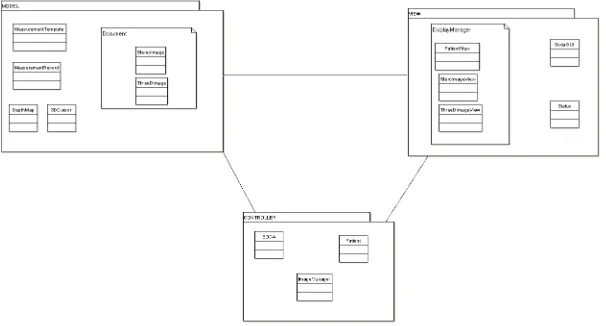
The Model-View-Controller (MVC) architecture was chosen and used to implement the SODA program, because it is well suited to separating the user interface from actual program data and models. This architecture was slightly modified to allow for
Fig 2. The Model-View-Controller architecture of SODA with embedded Document-View architecture
the use of the MFC library and thus incorporated the Document-View (DV)
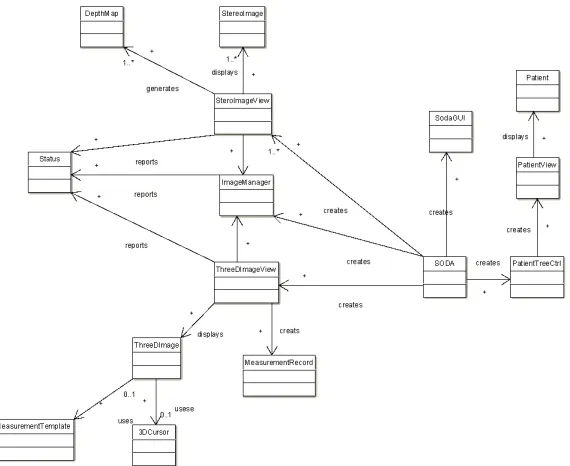
(Fig 2.), where DV components are embedded in the MVC components. The later diagram (Fig 3.), details the user classes required by the system.
Fig 3. User class diagram for SODA, as can be seen each document type class (StereoImage and 3DImage) have a corresponding view class (StereoImageView
and 3DImageView respectively). The Soda, ImageManager and Patient classes make up the controller component of the architecture.
5.2 Image Capture from Fundus camera
The SODA program required image capture functionality; this includes the control of an external device and the digitisation of an image from it. There is a requirement for TWAIN-compatible devices to be used to capture image for SODA.
The TWAIN Toolkit (library) from the TWAIN Working Group [22] was used to implement the image capture feature in SODA known as “SODAGrab”. The
SODAGrab program has been implemented to capture images from
TWAIN-compatible fundus cameras and slide scanners. This feature allows the user to capture and digitise images, save the images in the TIFF file format and open them in the SODA environment.
5.3 Registration
Another requirement is to incorporate functions to register stereo images within the SODA environment for image analysis and 3-D viewing. Two approaches to image registration were implemented: a semi-automatic and an automatic method. The methods have been implemented using MFC and MIL library functions.
second image (the target image). The MFC framework provides the functionality to capture the events of the user “mouse-clicking” on the images. For each image, the locations of the user clicks are recorded into a buffer (a 2-D array,). From the arrays the differences in rotation, scale and translation are calculated and corrected.
Fig.4 Semi-Automatic Registration of a Stereo Fundus Pair. Requires user to select common points in the image pair and then select register based on the
selected points.
The automatic registration method only requires that a stereo pair be opened within the environment. Using pattern-matching techniques, landmarks are searched for and extracted from the stereo pairs. Once similarities are extracted, the rotation, scaling and translation correction required is calculated and applied to the target image
5.4 Colour matching
In order to achieve the requirement of providing the user with an environment in which they can visually evaluate and make comparisons between images, a function to colour match stereo pairs was required by the SODA program. For greater accuracy whilst the user (the ophthalmologist) is performing diagnosis, colour-matching algorithms were implemented to “normalise” stereo images’ colour to each other. The function does not change the basic colour of the images, only makes an image “look” similar in colour to its former, by a process called - “normalisation of illumination” [3]. The process attempts to remove colours that could have been introduced from causes such as differing cameras, different lens used to image the two images and different external lighting, to name only a few.
The implementation allows the user to apply the colour matching to the whole image or a specific region of interest (ROI) selected by the user. The implementation then normalises colours of the images to each other.
5.5 User interface, Usability and Patient & Image management
Specifically, the goal of the project was to make the user interface of SODA have a high-level of usability by applying the heuristics, in an effort to rectify the problems associated with the prototype user interface, as noted in Section 3.2.
This implementation of SODA has a standard and familiar feel to it, similar to many applications under the Windows environment. This was accomplished by using typical Microsoft elements and concepts common to other products (such as Microsoft Office), with which the user is likely to be familiar.
Fig.5 SODA sample user-interface, demonstrating how images are laid out in the environment
Heuristics such as “reducing the user’s memory load” were achieved by reducing the amount of interactions the user has to have with the system to accomplish a given task. For example, image registration, to successfully register stereo images opened within the environment, under the redesigned interface require the user to remember less than what was required in the prototype implementation.
Other examples of applying usability heuristics in SODA are:
• Great effort was made to “speak the users’ talk”. Similar jargon and vocabulary
was attempted to be included at all times where possible. This was accomplished by questioning the user group about specific language to be used in certain aspects of the program
• Dialog boxes have been used to inform and give the user feedback at all times.
“Progress Bars” and the like have been used to inform the user of the progress of operations and what the program is currently processing
• Buttons and shortcuts have been implemented for “expert usage”
• Effort has been made to stop the user from making errors, such as not allowing the
images would simply create unexplained errors. In the case of an error, effort has been made to make error messages informative and assist the user out of problems
• Contextual and “Button Help” (hint appears next to the cursor when intending to
press a button on the interface) have been implemented to assist the user go about the usual operation of the program.
The user interface of SODA required the redesign to encompass an organised layout and functionality that would make it more intuitive for the user to operate.
The SODA user interface was implemented using components and resources available in MFC and the Microsoft Visual Studio environment. The “Resource Editor” assisted in the creation of dialog boxes required to gather user input and prompt and inform the user of the program’s current status and processing.
Use of MFC class functions enabled the development of an organised layout for SODA. This can be seen in Figure 3, a screen shot of SODA’s redesigned user interface that addresses the problems associated with the prototype. The redesigned user interface encompasses organisation, command logic and an interface that can be customised by the user. The various components of the interface can be customised, such as the toolbars and buttons and window locations to name a few of the improvements.
File and patient organisation was required within the SODA environment to handle patients’ records and images associated with them. This was implemented using a file tree (directory) structure with file filtering and security. The ophthalmologist logs into the program, and to view any images must first open a patient’s record and the associated folder containing all relevant images and information.
Once a patient’s record is opened, no other patient’s images or records can be accessed until the current patient’s folder is closed. This creates a secure system, maintains privacy for patients and allows the ophthalmologist to have an organised structure (which models their manual systems) to their workings with SODA.
5.7 3-D Images
The creation of 3-D stereo images from stereo fundus pairs was an important requirement for the software. This was accomplished in the implementation, firstly requiring the user to open and register a pair of stereo images. Several computer stereoscopy methods were used to create the 3-D image from the registered pair. These included the use of LCD glasses methods: interlacing and double-syncing, and glasses-free operation on a 3-D laptop screen. Depending on their hardware configuration users have the ability to choose by which method they would like to view the 3-D image.
5.8 Depth Mapping
Depth analysis of stereo images was also an important requirement for SODA: a depth mapping function was implemented in order to address this.
The depth map function was implemented in SODA using MIL and Microsoft’s Graphics Device Interface (GDI) functions. The user is simply required to have a stereo pair opened within the SODA environment, from which the user selects and draws a ROI in order to conduct the depth analysis on the images.
Once an area is selected the analysis can start. The program makes use of the pattern recognition functions available in MIL to search for common patterns within the stereo pair and to calculate the disparity between the two images. After pattern models and search parameters are defined using MIL functions, the images are searched for matches. Once matches are found between the two images, the disparity between them is calculated and entered into a file for later graphing.
On completion of the search and once disparities have been calculated, a graph can be generated from the disparity values entered into the file during processing.
5.9 Measurement and Tools
The requirements of SODA specified the need for tools to allow the user to make measurements and draw on images. These tools and utilities made available within SODA have been created using the drawing and graphics utilities of MFC, MIL and GDI. The drawing utilities of these libraries were used to display measurements, draw measurement lines and implement the required templates to assist in diagnosis of glaucoma and to draw indicators upon images in relation to user interactions and requirements.
The user-centred design techniques as noted in Section 4.3, aided in identifying and detailing the requirements for the package. User input and involvement within the developmental process has been attributed to the success of the redevelopment of this product.
6. Status Report
A commercial deal has been agreed upon and SODA will potentially be destined for commercial release later in 2005, after feedback has been gathered from initial reviews and recommendations from a selected users group. However prior to this, SODA has under gone another programming change – the MIL library which was used for image handling has been replaced by a free and more recent library, CxImage [24]. MIL version 5.0 was found to be quite slow at loading larger images (for
example greater than 3MB) whereas the CxImage library does not suffer from this, so MIL image buffers were replaced with CxImage buffers.
7. Discussions
In this paper, we have presented both a software product for the analysis and diagnosis of glaucoma and the method used to develop it. The software product known as SODA, was a development for the Lions Eye Institute, and has been the focus of this project, which has involved re-engineering and redesign of the application.
The SODA package has been re-engineered and, using the OO-SDLC relevant documents such as the Requirements Specification and various design documents have been produced. The SODA program has been implemented with reference to these documents and the user interface has been redesigned.
As implemented, the SODA package can evolve to satisfy future demands; conversion from its previous “throwaway-prototype” implementation has enabled this.
During this development, we learnt that MIL v5.0 was not adequate for accessing and loading multiple large images (>3MB) into their buffers at any one time in a timely manner. Later versions of MIL may have resolved their larger image access problems (this was not investigated for unrelated reasons), so CxImage was chosen because it was free (enabling us to achieve the ultimate goal of a low-cost system).
Another major lesson learnt by us in this development is that the maintainability of the product would probably be greater if MFC had not been used in the program. MFC forced the developer into using various calls, macros and coding styles which are not like that in native c/c++ and therefore make it more difficult to read and requires some learning by the programmer to get used to. Another negative about MFC is that it essentially makes your product platform-dependent – only operatable on Microsoft Windows machines. In the future we have decided that developments of such a nature as this would probably be better off using a GUI library that would make the product platform independent and therefore be useable by a larger user group and possibly cheaper.
Other things learnt from this development are that reuse and design patterns really work and save a lot in development time.
With any project, there are always recommendations for future work. For SODA this can be divided into short, medium and long-term work:
• Short Term - extensive user documentation and help manuals need to be
constructed for the program to assist users to learn how to operate the system effectively. Requirements creep issues documented in a requirements creep log need to be addressed. The SDLC will need to be used in the process of addressing these issues. Clinical and user trials must take place to allow the product to progress to commercialisation release stage.
• Medium Term - SODA is intended to go through a commercialisation process to
bring the product to market. This process will be governed by marketing representatives at the Lions Eye Institute
• Long Term - in the long term, continuous investigations will occur into
components that could possibly be incorporated into SODA. Maintenance and enhancements to the SODA software product will continue. Integration of web-capabilities to SODA and possible linkage to existing tele-health applications developed at the Lions Eye Institute.
REFERENCES:
1. J. J. Kanski, Clinical Ophthalmology (4th edition). Butterworth Heinemann, 1999.
2. Glaucoma-Australia, The sneak thief of Sight, [online], Glaucoma Australia, 2003, Available at: www.glaucoma.net.au (Accessed 28th February 2003)
3. K. Yogesan, C. J. Barry, L. Jitskaia, R. H. Eikelbloom, W. Morgan, P. H. House, and P. P. van Saarloos, "Software for 3-D visualization/analysis of optic-disc images," IEEE Engineering in Medicine and Biology, vol. January/February (1999) 43-49.
4. C. J. Barry, R. Eikelboom, K. Yogesan, and L. Jitskaia, "Comparison of optic disc image assessment methods when examining serial photographs for Glaucomatous progression," British Journal of Ophthalmology, vol. 84 (200) 28-30
5. R. H. Eikelbloom, C. J. Barry, L. Jitskaia, A. Voon, and K. Yogesan, "Neuroretinal rim measurement error using PC-based stereo software," Clinical and Experimental Ophthalmology, (2000) 178-180
6. O. Chutatape, Fundus (Summary), [online], Nanyang Technological University, 2003, Available At: www.ntu.edu.sg/home/eopas/fundus.html (Accessed 3rd February 2003)
7. Neotek Cooporation, Real 3D Displays, [online], NEOTEK, 1998, Available At:
www.neotek.com (Accessed 12 November 2002)
8. StereoGraphics, "Developers' Handbook: Background for creating Images for CrystalEyes and SimulEyes," StereoGraphics Cooporation, USA, [handbook], 1997.
9. R. S. Pressman, Software Engineering: A Practitioner's Approach (4th edition). US. McGraw-Hill, 1997.
10. A. Behforooz and F. J. Hudson, Software Engineering Fundamentals. NY. Oxford University Press, 1996.
11. S. L. Pfleeger, Software Engineering: Theory and Practice (2nd Edition). NJ. Prentice Hall, 2001.
12. Object Management Group, Unified Modelling Language, [online], OMG, 2003, Available At: www.uml.org (Accessed April 2003)
13. B. Henderson-Sellers and J. Edwards, "The Object-Oriented Systems Life Cycle," Communications of the ACM, vol. 33 (1990)
15. Nectar, Usability Handbook, Nectar, 2003, Available At: www.ejeisa.com/nectar
(Accessed April 2003)
16. O. Daly-Jones, N. Bevan, and C. Thomas, INUSE - Handbook of User-Centred Design, [online], European Journal of Engineering for Information Society
Applications, 1999, Available At: www.ejeisa.com/nectar/inuse/index.htm (Accessed Feb 2003)
17. Ericsson, K. A. and Simon, H. A. Protocol Analysis. Cambridge, MA: The MIT Press, 1984.
18. H. R. Beyer and K. Holtzblatt, "Apprenticing with the Customer," Communications of the ACM, vol. 38 (1995) 45-52.
19. Microsoft Corporation, Microsoft Visual Studio, Microsoft, 2003, Available At:
www.microsoft.com (Accessed Jan 2003)
20. Matrox, Matrox Imaging Library, 2003, Available At www.matrox.com
21. ImageMagick, ImageMagick v5.5.5, ImageMagick,2003, Available At
www.imagemagick.org
22. TWAIN Working Group, TWAIN Toolkit, TWAIN Working Group,2000, Available At www.twain.org
23. J. Nielsen, Usability Engineering. Academic Press, USA, 1993.